phone FORD MONDEO 2014 4.G User Guide
[x] Cancel search | Manufacturer: FORD, Model Year: 2014, Model line: MONDEO, Model: FORD MONDEO 2014 4.GPages: 446, PDF Size: 29.09 MB
Page 308 of 446
Downloaded from www.Manualslib.com manuals search engine Safety Information
WARNING
Driving while distracted can result inloss of vehicle control, crash andinjury. We strongly recommend thatyou use extreme caution when using anydevice that may take your focus off theroad. Your primary responsibility is the safeoperation of your vehicle. We recommendagainst the use of any hand-held devicewhile driving and encourage the use ofvoice-operated systems when possible.Make sure you are aware of all applicablelocal laws that may affect the use ofelectronic devices while driving.
When using SYNC:
•Do not operate playing devices if thepower cords or cables are broken, splitor damaged. Carefully place cords andcables where you cannot step on themor they do not interfere with theoperation of pedals, seats,compartments or safe driving abilities.
•Do not leave playing devices in yourvehicle during extreme conditions as itcould cause them damage. Refer toyour device's manual for furtherinformation.
•Do not attempt to service or repair thesystem. See an authorized dealer.
Privacy Information
When a cell phone is connected to SYNC,the system creates a profile that is linkedto that cell phone. The system creates theprofile to offer you more mobile featuresand to operate more efficiently. Amongother things, this profile may contain dataabout your phonebook, text messages(read and unread) and call history. Thiswill include the history of calls when yourcell phone was not connected to thesystem. If you connect a media player, thesystem creates and retains an index of
supported media content. The system alsorecords a short development log ofapproximately 10 minutes of all recentsystem activity. The log profile and othersystem data may be used to improve thesystem and help diagnose any problemsthat may occur.
The cell phone profile, media player indexand development log will remain in thesystem unless deleted. They are generallyaccessible in your vehicle only when youconnect your cell phone or media player.If you no longer plan to use the system oryour vehicle, we recommend you completea master reset to erase all storedinformation. See Information Displays(page 86).
Special equipment is required to accesssystem data. Access to your vehicle'sSYNC module is also required. We will notaccess the system data for any purposeother than as described without consent.Examples where system data can beaccessed are for a court order, whererequired by law enforcement, othergovernment authorities or other thirdparties acting with lawful authority. Otherparties may seek to access the informationindependently of us. Further privacyinformation is available. See SYNC™Applications and Services (page 320).
USING VOICE RECOGNITION
This system helps you control manyfeatures using voice commands. Thisallows you to keep your hands on thesteering wheel and focus on what is aroundyou.
Helpful Hints
Make sure the interior of your vehicle is asquiet as possible. Wind noise from openwindows and road vibrations may preventthe system from correctly recognizingspoken commands.
306Mondeo (CNG) Vehicles Built From: 08-09-2014 Vehicles Built Up To: 19-04-2015, CG3633en enGBR, Edition date: 10/2014, First PrintingSYNC™
Page 309 of 446
Downloaded from www.Manualslib.com manuals search engine Before giving a voice command, wait forthe system announcement to finishfollowed by a single beep. Any commandspoken before this does not register withthe system.
Speak naturally, without long pausesbetween words.
You can interrupt the system at any timewhile it is speaking by pressing the voicebutton. You can also cancel a voice sessionat any time by pressing and holding thevoice button.
Initiating a Voice Session
Press the voice button. A list ofavailable commands appears inthe display.
DescriptionCommand
Stream audio from your cell phone.Bluetooth audio
Cancel the requested action.(cancel | stop | exit)
Access the device connected to the auxil-iary input jack.((line | AV | audio video) in | AUX | audiovideo)
Make calls.(phone | Blackberry | iPhone | Mobile)
Access the device connected to your USBport.(USB [stick] | iPod | MP3 [player])
Adjust the level of voice interaction andfeedback.voice settings
Hear a list of voice commands available inthe current mode.[main menu] help
System Interaction and Feedback
The system provides feedback throughaudible tones, prompts, questions andspoken confirmations depending on thesituation and your chosen level ofinteraction. You can customize the voicerecognition system to provide more or lessinstruction and feedback.
The default setting is to a higher level ofinteraction in order to help you learn to usethe system. You can change these settingsat any time.
Adjusting the Interaction Level
Press the voice button. Whenprompted:
DescriptionCommand
Provides access to change the interaction level.voice settings
Then any of the following:
307Mondeo (CNG) Vehicles Built From: 08-09-2014 Vehicles Built Up To: 19-04-2015, CG3633en enGBR, Edition date: 10/2014, First PrintingSYNC™
Page 310 of 446
Downloaded from www.Manualslib.com manuals search engine DescriptionCommand
Provides less audible interaction and more tone prompts.interaction modeadvanced
Provides more detailed interaction and guidance.interaction mode novice
Confirmation prompts are short questionsthe system asks when it is not sure of yourrequest or when there is more than onepossible response to your request. Forexample, the system may ask if thecommand phone is correct.
Press the voice button. When prompted:
DescriptionCommand
Provides access to change the confirmation prompt setting.voice settings
Then any of the following:
DescriptionCommand
Makes a best guess from the command. You may still occa-sionally be asked to confirm settings.confirmation prompts off
Clarifies your voice command with a short question.confirmation prompts on
The system creates suggestion lists whenit has the same confidence level of severaloptions based on your voice commands.When switched on, the system mayprompt you with as many as fourpossibilities for clarification.
DescriptionCommand
Makes a best guess from the media suggestion list. Thesystem may occasionally ask you questions.media candidate lists off
Clarifies your voice command for media suggestions.media candidate lists on
Makes a best guess from the cell phone suggestion list. Thesystem may occasionally ask you questions.phone candidate lists off
Clarifies your voice command for cell phone suggestions.phone candidate lists on
308Mondeo (CNG) Vehicles Built From: 08-09-2014 Vehicles Built Up To: 19-04-2015, CG3633en enGBR, Edition date: 10/2014, First PrintingSYNC™
Page 311 of 446
Downloaded from www.Manualslib.com manuals search engine Changing the Voice Settings
You can change the voice settings using
the information and entertainment display.
Press the MENU button.
MessageAction
SYNC-Settings1
Voice settings2
USING SYNC™ WITH YOUR
PHONE
Hands-free calling is one of the mainfeatures of SYNC. While the systemsupports a variety of features, many aredependent on your cell phone'sfunctionality.
At a minimum, most cell phones withBluetooth wireless technology support thefollowing functions:
•Answering an incoming call.
•Ending a call.
•Using privacy mode.
•Dialing a number.
•Redialing.
•Call waiting notification.
•Caller ID.
Other features such as text messagingusing Bluetooth and automatic phonebookdownload are cell phone dependentfeatures. To check your cell phone'scompatibility, refer to your device's manualor visit the regional Ford website.
Pairing a Cell Phone For the FirstTime
Wirelessly pairing your cell phone with thesystem allows you to make and receivehands-free calls.
Note:You must switch the ignition andradio on.
Note:To scroll through the menus, pressthe up or down arrows on your audio system.
1.Make sure the Bluetooth feature onyour cell phone is switched on beforestarting the search. Refer to yourdevice's manual if necessary.
2.Press the PHONE button. When theaudio display indicates that no phonesare paired, select the option to add.
3.When a message to begin pairingappears in the audio display, search forSYNC on your cell phone to start thepairing process.
4.Select SYNC on your cell phone.
5.Wait until the PIN appears on thephone display. Compare the PIN on thephone with the PIN shown in the audiodisplay and accept the request on thephone and the vehicle display. Thedisplay indicates when the pairing issuccessful.
Note:In some cases the phone will requestto enter a PIN. Enter the six-digit PINprovided by the system in the audio display.The display indicates when the pairing issuccessful.
Depending on your cell phone's capabilityand your market, the system may promptyou with questions such as setting thecurrent cell phone as the primary cellphone (the cell phone the systemautomatically tries to connect with firstwhen you switch the ignition on) ordownloading your phonebook.
309Mondeo (CNG) Vehicles Built From: 08-09-2014 Vehicles Built Up To: 19-04-2015, CG3633en enGBR, Edition date: 10/2014, First PrintingSYNC™
Page 312 of 446
Downloaded from www.Manualslib.com manuals search engine The information display mayshow your cell phone's batterycharge level and signal strength.
Pairing Subsequent Cell Phones
Wirelessly pairing your cell phone with thesystem allows you to make and receivehands-free calls.
Note:You must switch the ignition andradio on.
Note:To scroll through the menus, pressthe up or down arrows on your audio system.
1.Make sure the Bluetooth feature onyour cell phone is switched on beforestarting the search. Refer to yourdevice's manual if necessary.
2.Press the PHONE button.
3.Select the option for Bluetooth devices.
4.Press the OK button.
5.Select the option to add. This startsthe pairing process.
6.When a message to begin pairingappears in the audio display, search forSYNC on your device to start thepairing process.
7.Select SYNC on your cell phone.
8.Wait until the PIN appears on thephone display. Compare the PIN on thephone with the PIN shown in the audiodisplay and accept the request on thephone and the vehicle display. Thedisplay indicates when the pairing issuccessful.
Note:In some cases the phone will requestto enter a PIN. Enter the six-digit PINprovided by the system in the audio display.The display indicates when the pairing issuccessful.
The system may prompt you withquestions such as setting the current cellphone as the primary cell phone ordownloading your phonebook.
Cell Phone Voice Commands
Press the voice button and whenprompted say either:
ActionCommand
You do not need to say "phone" prior to these commands.call (someone | [[a]name])
You do not need to say "phone" prior to these commands.Call
You do not need to say "phone" prior to these commands.Call
You do not need to say "phone" prior to these commands.Call
You do not need to say "phone" prior to these commands.Call
You do not need to say "phone" prior to these commands.Call
You do not need to say "phone" prior to these commands.dial [[a] number]
These commands are only available during a call.([go to] privacy [on] |transfer to phone |handsfree off)
310Mondeo (CNG) Vehicles Built From: 08-09-2014 Vehicles Built Up To: 19-04-2015, CG3633en enGBR, Edition date: 10/2014, First PrintingSYNC™
Page 313 of 446
![FORD MONDEO 2014 4.G User Guide Downloaded from www.Manualslib.com manuals search engine ActionCommand
These commands are only available during a call.(hold call [on] | (put |place) call on hold)
These commands are only available du](/img/11/5483/w960_5483-312.png "FORD MONDEO 2014 4.G User Guide Downloaded from www.Manualslib.com manuals search engine ActionCommand
These commands are only available during a call.(hold call [on] | (put |place) call on hold)
These commands are only available du")
Downloaded from www.Manualslib.com manuals search engine ActionCommand
These commands are only available during a call.(hold call [on] | (put |place) call on hold)
These commands are only available during a call.(hold call off | take calloff hold)
These commands are only available during a call.mute [call] [on]
These commands are only available during a call.(mute [call] off | Unmute[call])
These commands are only available during a call.join (call | calls)
Phonebook Commands
When you ask the system to access aphonebook name or number the requestedinformation appears in the audio display.
Press the voice button and when promptedsay either:
ActionCommand
To call the contact.call (someone | [[a]name])
112 (one-one-two), 700 (seven hundred) etc.dial [[a] number]
Pound
0 (zero) to 9 (nine)Number
Asterisk
Deletes all entered digitsclear
Deletes the last set of entered digits.(delete | correct)
Plus
Star
Note:To exit dial mode, press and hold the phone button or any button on the audio unit.
Menu Commands
Press the voice button and when promptedsay either:
311Mondeo (CNG) Vehicles Built From: 08-09-2014 Vehicles Built Up To: 19-04-2015, CG3633en enGBR, Edition date: 10/2014, First PrintingSYNC™
Page 315 of 446
Downloaded from www.Manualslib.com manuals search engine Receiving a Call
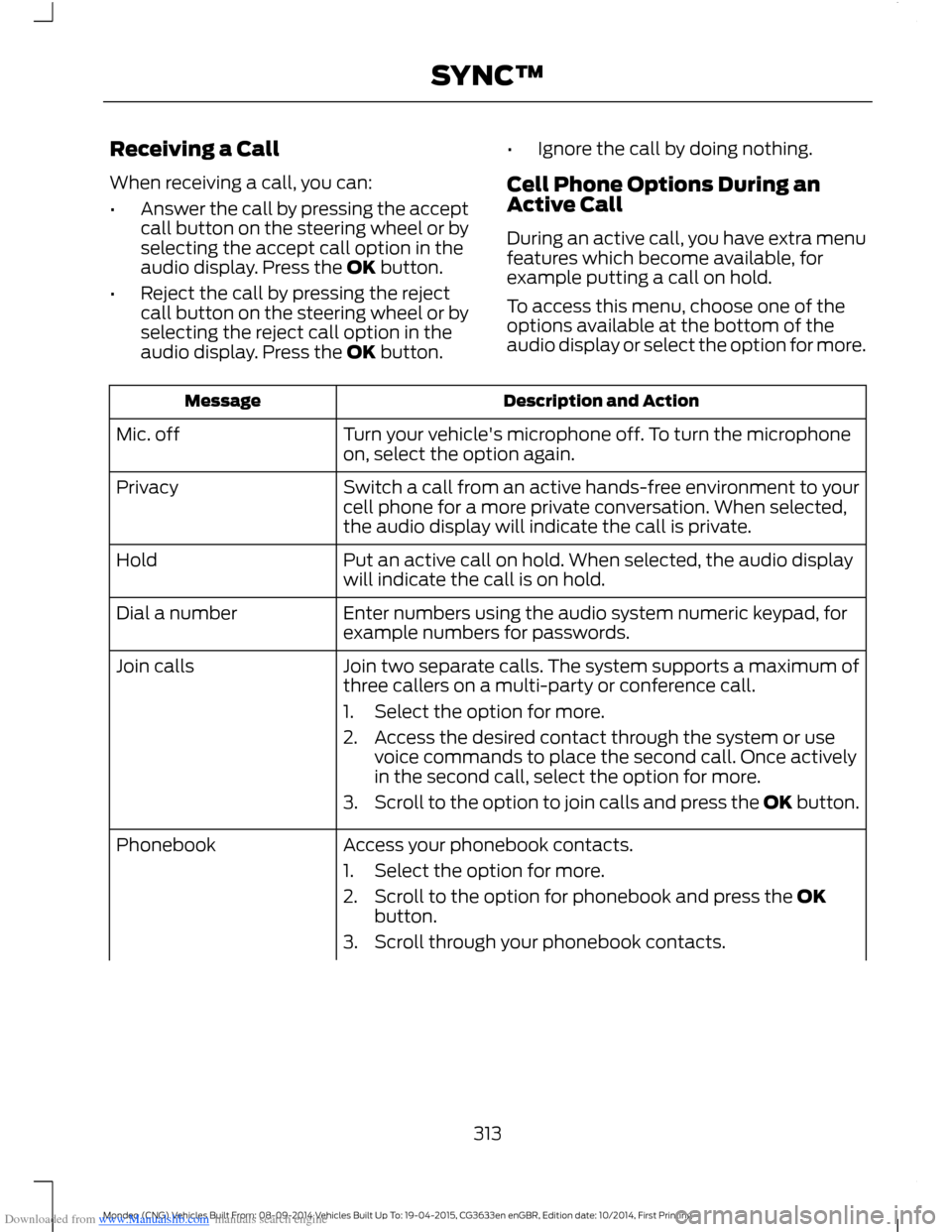
When receiving a call, you can:
•Answer the call by pressing the acceptcall button on the steering wheel or byselecting the accept call option in theaudio display. Press the OK button.
•Reject the call by pressing the rejectcall button on the steering wheel or byselecting the reject call option in theaudio display. Press the OK button.
•Ignore the call by doing nothing.
Cell Phone Options During anActive Call
During an active call, you have extra menufeatures which become available, forexample putting a call on hold.
To access this menu, choose one of theoptions available at the bottom of theaudio display or select the option for more.
Description and ActionMessage
Turn your vehicle's microphone off. To turn the microphoneon, select the option again.Mic. off
Switch a call from an active hands-free environment to yourcell phone for a more private conversation. When selected,the audio display will indicate the call is private.
Privacy
Put an active call on hold. When selected, the audio displaywill indicate the call is on hold.Hold
Enter numbers using the audio system numeric keypad, forexample numbers for passwords.Dial a number
Join two separate calls. The system supports a maximum ofthree callers on a multi-party or conference call.Join calls
1.Select the option for more.
2.Access the desired contact through the system or usevoice commands to place the second call. Once activelyin the second call, select the option for more.
3.Scroll to the option to join calls and press the OK button.
Access your phonebook contacts.Phonebook
1.Select the option for more.
2.Scroll to the option for phonebook and press the OKbutton.
3.Scroll through your phonebook contacts.
313Mondeo (CNG) Vehicles Built From: 08-09-2014 Vehicles Built Up To: 19-04-2015, CG3633en enGBR, Edition date: 10/2014, First PrintingSYNC™
Page 316 of 446
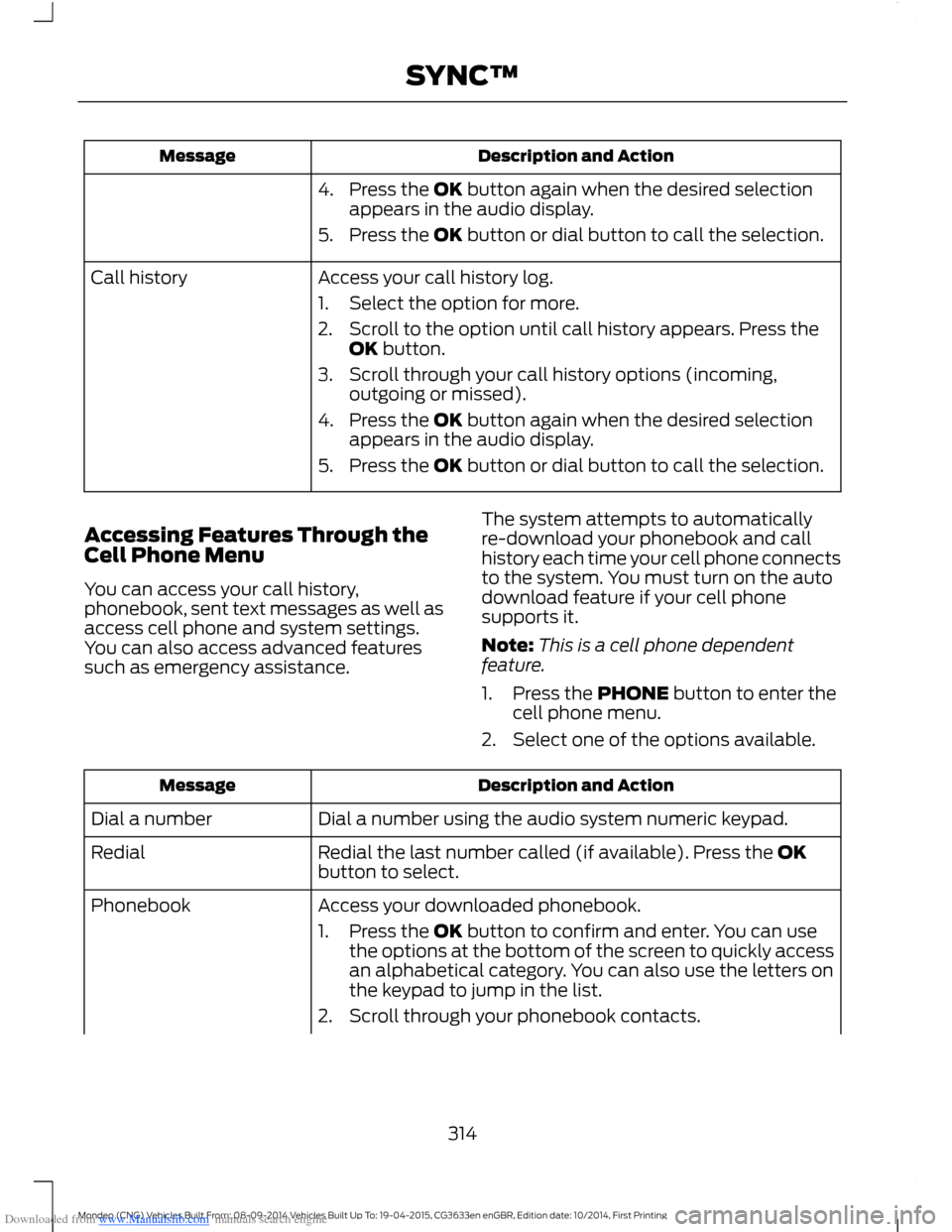
Downloaded from www.Manualslib.com manuals search engine Description and ActionMessage
4.Press the OK button again when the desired selectionappears in the audio display.
5.Press the OK button or dial button to call the selection.
Access your call history log.Call history
1.Select the option for more.
2.Scroll to the option until call history appears. Press theOK button.
3.Scroll through your call history options (incoming,outgoing or missed).
4.Press the OK button again when the desired selectionappears in the audio display.
5.Press the OK button or dial button to call the selection.
Accessing Features Through theCell Phone Menu
You can access your call history,phonebook, sent text messages as well asaccess cell phone and system settings.You can also access advanced featuressuch as emergency assistance.
The system attempts to automaticallyre-download your phonebook and callhistory each time your cell phone connectsto the system. You must turn on the autodownload feature if your cell phonesupports it.
Note:This is a cell phone dependentfeature.
1.Press the PHONE button to enter thecell phone menu.
2.Select one of the options available.
Description and ActionMessage
Dial a number using the audio system numeric keypad.Dial a number
Redial the last number called (if available). Press the OKbutton to select.Redial
Access your downloaded phonebook.Phonebook
1.Press the OK button to confirm and enter. You can usethe options at the bottom of the screen to quickly accessan alphabetical category. You can also use the letters onthe keypad to jump in the list.
2.Scroll through your phonebook contacts.
314Mondeo (CNG) Vehicles Built From: 08-09-2014 Vehicles Built Up To: 19-04-2015, CG3633en enGBR, Edition date: 10/2014, First PrintingSYNC™
Page 317 of 446
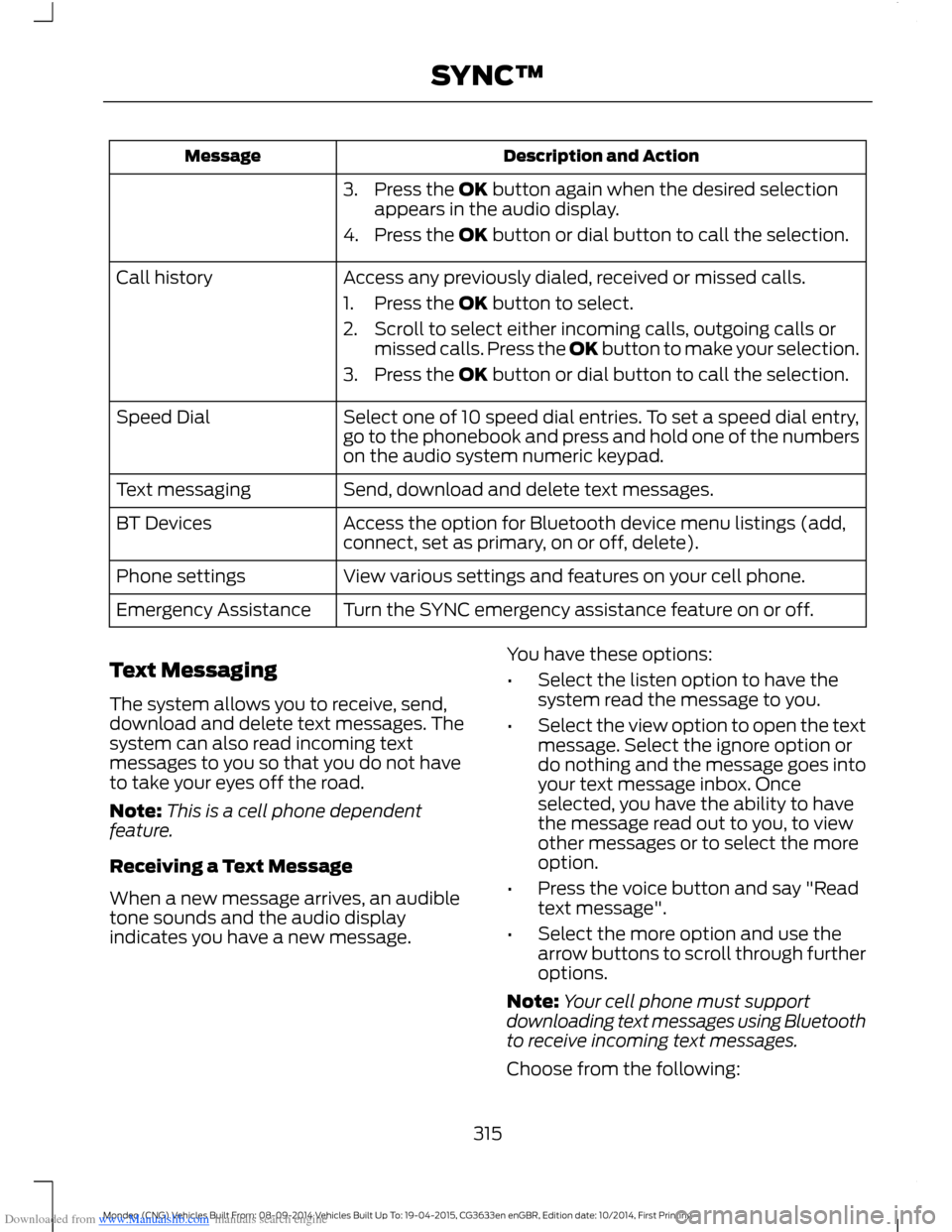
Downloaded from www.Manualslib.com manuals search engine Description and ActionMessage
3.Press the OK button again when the desired selectionappears in the audio display.
4.Press the OK button or dial button to call the selection.
Access any previously dialed, received or missed calls.Call history
1.Press the OK button to select.
2.Scroll to select either incoming calls, outgoing calls ormissed calls. Press the OK button to make your selection.
3.Press the OK button or dial button to call the selection.
Select one of 10 speed dial entries. To set a speed dial entry,go to the phonebook and press and hold one of the numberson the audio system numeric keypad.
Speed Dial
Send, download and delete text messages.Text messaging
Access the option for Bluetooth device menu listings (add,connect, set as primary, on or off, delete).BT Devices
View various settings and features on your cell phone.Phone settings
Turn the SYNC emergency assistance feature on or off.Emergency Assistance
Text Messaging
The system allows you to receive, send,download and delete text messages. Thesystem can also read incoming textmessages to you so that you do not haveto take your eyes off the road.
Note:This is a cell phone dependentfeature.
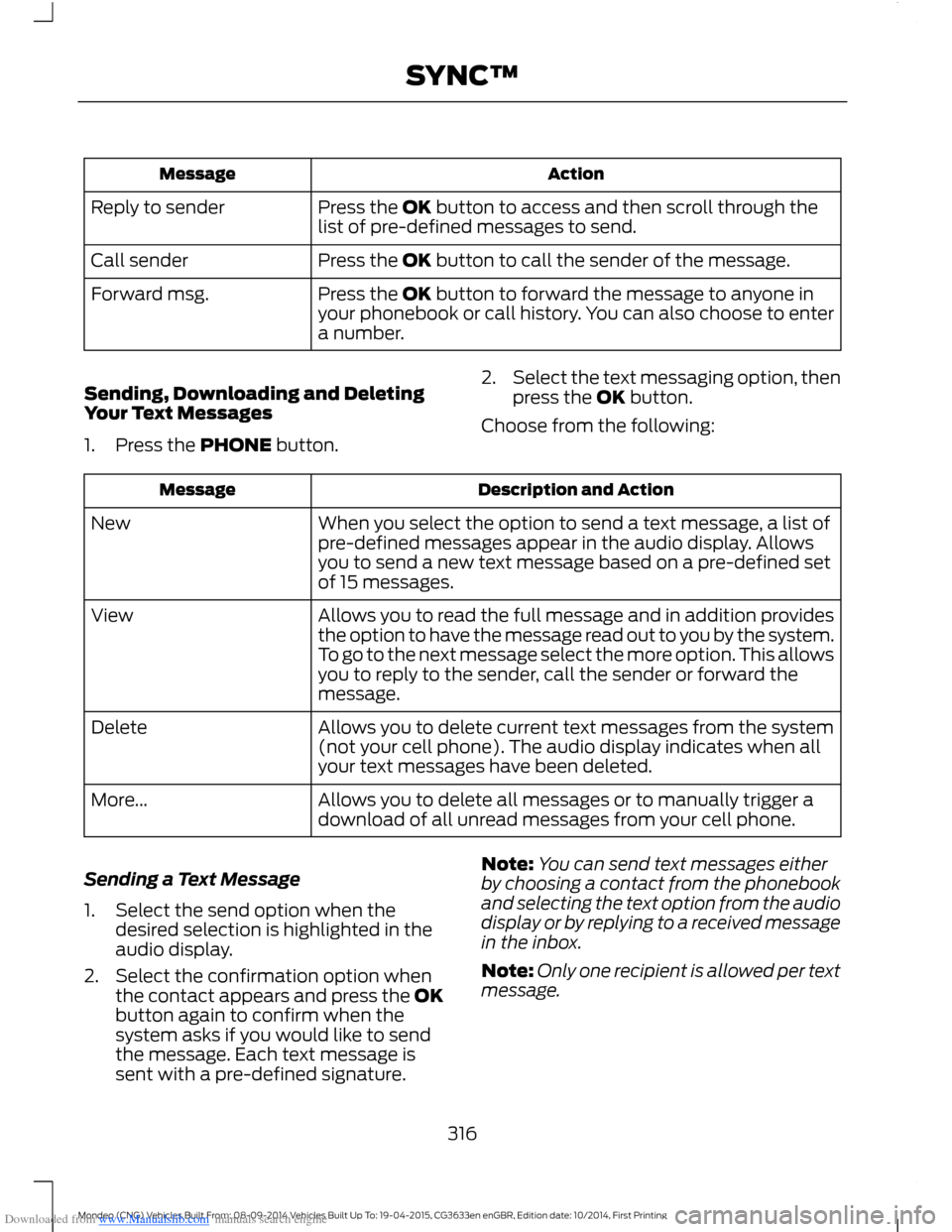
Receiving a Text Message
When a new message arrives, an audibletone sounds and the audio displayindicates you have a new message.
You have these options:
•Select the listen option to have thesystem read the message to you.
•Select the view option to open the textmessage. Select the ignore option ordo nothing and the message goes intoyour text message inbox. Onceselected, you have the ability to havethe message read out to you, to viewother messages or to select the moreoption.
•Press the voice button and say "Readtext message".
•Select the more option and use thearrow buttons to scroll through furtheroptions.
Note:Your cell phone must supportdownloading text messages using Bluetoothto receive incoming text messages.
Choose from the following:
315Mondeo (CNG) Vehicles Built From: 08-09-2014 Vehicles Built Up To: 19-04-2015, CG3633en enGBR, Edition date: 10/2014, First PrintingSYNC™
Page 318 of 446
Downloaded from www.Manualslib.com manuals search engine ActionMessage
Press the OK button to access and then scroll through thelist of pre-defined messages to send.Reply to sender
Press the OK button to call the sender of the message.Call sender
Press the OK button to forward the message to anyone inyour phonebook or call history. You can also choose to entera number.
Forward msg.
Sending, Downloading and DeletingYour Text Messages
1.Press the PHONE button.
2.Select the text messaging option, thenpress the OK button.
Choose from the following:
Description and ActionMessage
When you select the option to send a text message, a list ofpre-defined messages appear in the audio display. Allowsyou to send a new text message based on a pre-defined setof 15 messages.
New
Allows you to read the full message and in addition providesthe option to have the message read out to you by the system.To go to the next message select the more option. This allowsyou to reply to the sender, call the sender or forward themessage.
View
Allows you to delete current text messages from the system(not your cell phone). The audio display indicates when allyour text messages have been deleted.
Delete
Allows you to delete all messages or to manually trigger adownload of all unread messages from your cell phone.More...
Sending a Text Message
1.Select the send option when thedesired selection is highlighted in theaudio display.
2.Select the confirmation option whenthe contact appears and press the OKbutton again to confirm when thesystem asks if you would like to sendthe message. Each text message issent with a pre-defined signature.
Note:You can send text messages eitherby choosing a contact from the phonebookand selecting the text option from the audiodisplay or by replying to a received messagein the inbox.
Note:Only one recipient is allowed per textmessage.
316Mondeo (CNG) Vehicles Built From: 08-09-2014 Vehicles Built Up To: 19-04-2015, CG3633en enGBR, Edition date: 10/2014, First PrintingSYNC™