VIN Number FORD MONDEO 2014 4.G Owners Manual
[x] Cancel search | Manufacturer: FORD, Model Year: 2014, Model line: MONDEO, Model: FORD MONDEO 2014 4.GPages: 446, PDF Size: 29.09 MB
Page 11 of 446
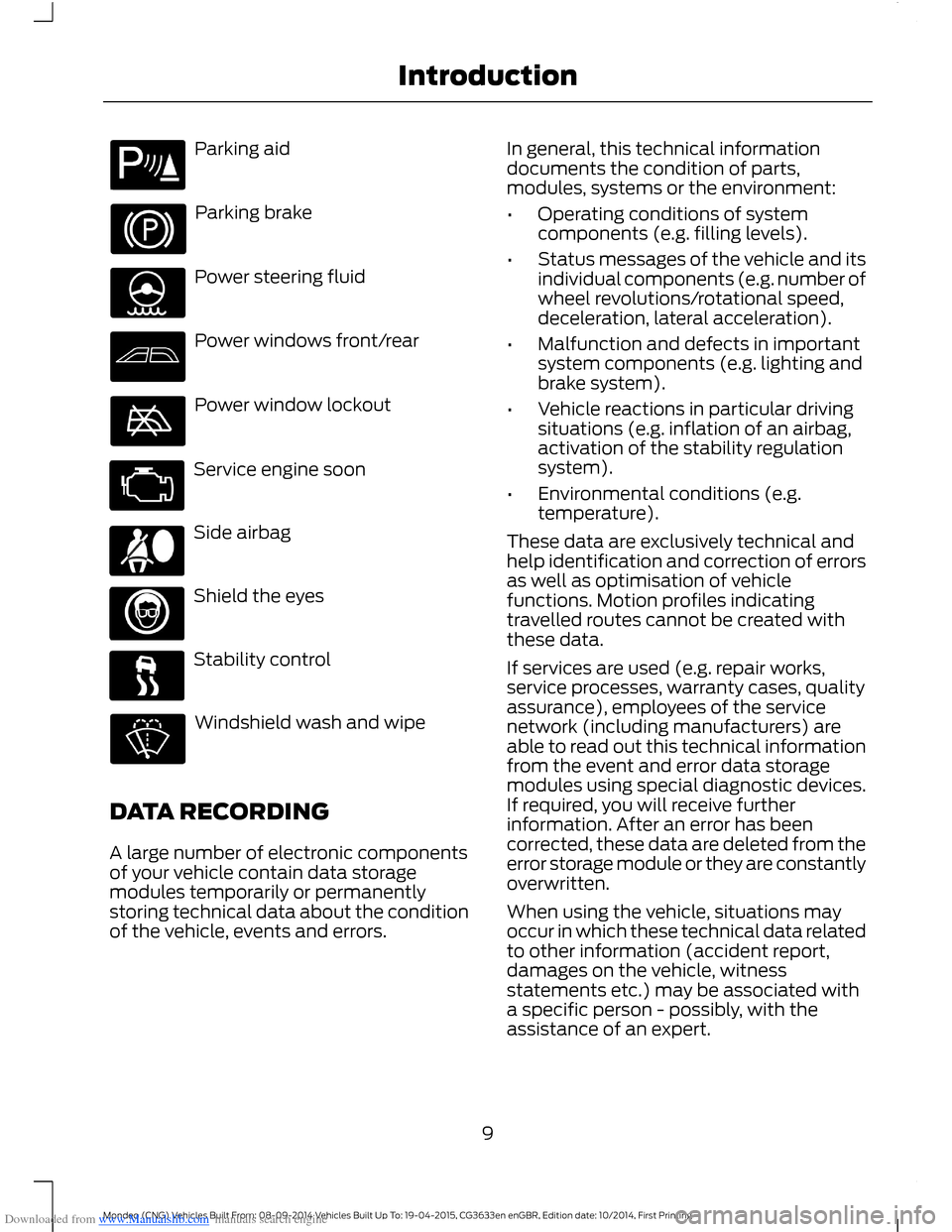
Downloaded from www.Manualslib.com manuals search engine Parking aid
Parking brake
Power steering fluid
Power windows front/rear
Power window lockout
Service engine soon
Side airbag
Shield the eyes
Stability control
Windshield wash and wipe
DATA RECORDING
A large number of electronic componentsof your vehicle contain data storagemodules temporarily or permanentlystoring technical data about the conditionof the vehicle, events and errors.
In general, this technical informationdocuments the condition of parts,modules, systems or the environment:
•Operating conditions of systemcomponents (e.g. filling levels).
•Status messages of the vehicle and itsindividual components (e.g. number ofwheel revolutions/rotational speed,deceleration, lateral acceleration).
•Malfunction and defects in importantsystem components (e.g. lighting andbrake system).
•Vehicle reactions in particular drivingsituations (e.g. inflation of an airbag,activation of the stability regulationsystem).
•Environmental conditions (e.g.temperature).
These data are exclusively technical andhelp identification and correction of errorsas well as optimisation of vehiclefunctions. Motion profiles indicatingtravelled routes cannot be created withthese data.
If services are used (e.g. repair works,service processes, warranty cases, qualityassurance), employees of the servicenetwork (including manufacturers) areable to read out this technical informationfrom the event and error data storagemodules using special diagnostic devices.If required, you will receive furtherinformation. After an error has beencorrected, these data are deleted from theerror storage module or they are constantlyoverwritten.
When using the vehicle, situations mayoccur in which these technical data relatedto other information (accident report,damages on the vehicle, witnessstatements etc.) may be associated witha specific person - possibly, with theassistance of an expert.
9Mondeo (CNG) Vehicles Built From: 08-09-2014 Vehicles Built Up To: 19-04-2015, CG3633en enGBR, Edition date: 10/2014, First PrintingIntroduction
Page 53 of 446
Downloaded from www.Manualslib.com manuals search engine PASSIVE ANTI-THEFT
SYSTEM
Principle of Operation
The system prevents someone fromstarting the engine with an incorrectlycoded key.
Note:Do not leave correctly coded keys inthe vehicle. Always take your keys and lockall doors when leaving the vehicle.
Coded Keys
If you lose a key, you can obtain areplacement from an authorized dealer. Ifpossible, provide them with the keynumber from the tag provided with theoriginal keys. You can also obtain extrakeys from an authorized dealer.
Note:Have all of your remaining keyserased and recoded if you lose a key. Havereplacement keys coded together withrecoding your remaining keys. See anauthorized dealer for further information.
Note:Do not shield your keys with metalobjects. This may prevent the receiver fromrecognizing a coded key.
Arming the Engine Immobilizer
When you switch the ignition off the engineimmobilizer will arm automatically after ashort time.
Disarming the Engine Immobilizer
When you switch the ignition on the engineimmobilizer will disarm automatically if acorrectly coded key is used.
If you are unable to start your vehicle witha correctly coded key, have your vehiclechecked by an authorized dealer.
ANTI-THEFT ALARM -
VEHICLES WITH: INTERIOR
SENSOR
Alarm System
WARNING
Do not arm the alarm with full guardif passengers, animals or othermoving objects are inside yourvehicle.
Perimeter Alarm
The perimeter alarm is a deterrent againstunauthorized access to your vehiclethrough the doors and the hood. It alsoprotects the audio unit.
Interior Sensors
The interior lamp unit sensors are locatedin the overhead console.
Note:Do not cover up the interior lamp unitsensors.
The sensors act as a deterrent againstunauthorized intrusion by sensing anymovement inside your vehicle.
Triggering the Alarm
Once armed, the alarm is triggered in anyof the following ways:
•If someone opens a door, the liftgateor the hood without a valid key orremote control.
•If someone removes the audio unit ornavigation system.
•If you switch your vehicle on without acorrectly coded key.
•If the interior sensors detect movementwithin your vehicle.
If the alarm is triggered, the alarm horn willsound for 30 seconds and the hazardwarning flasher will flash for five minutes.
51Mondeo (CNG) Vehicles Built From: 08-09-2014 Vehicles Built Up To: 19-04-2015, CG3633en enGBR, Edition date: 10/2014, First PrintingSecurity
Page 198 of 446
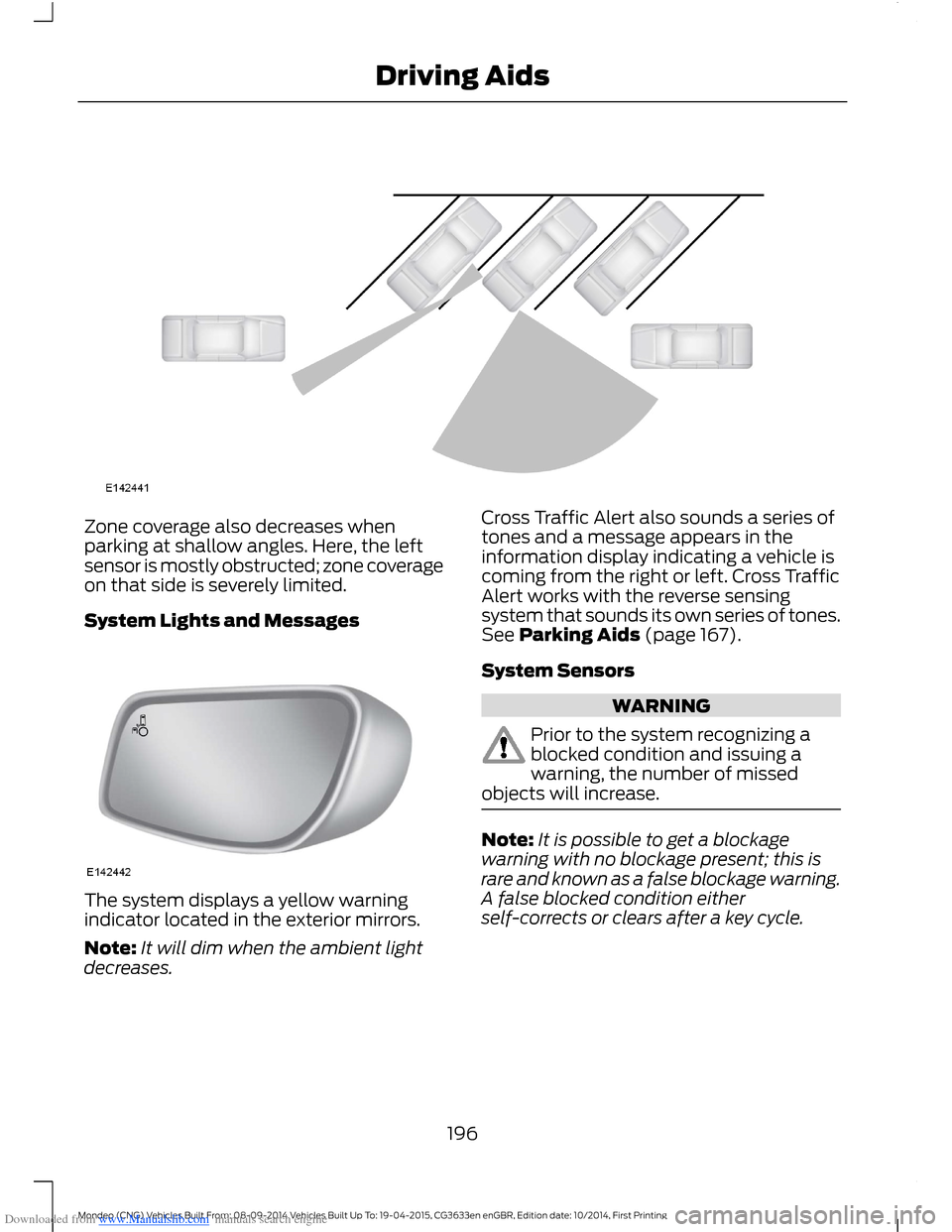
Downloaded from www.Manualslib.com manuals search engine Zone coverage also decreases whenparking at shallow angles. Here, the leftsensor is mostly obstructed; zone coverageon that side is severely limited.
System Lights and Messages
The system displays a yellow warningindicator located in the exterior mirrors.
Note:It will dim when the ambient lightdecreases.
Cross Traffic Alert also sounds a series oftones and a message appears in theinformation display indicating a vehicle iscoming from the right or left. Cross TrafficAlert works with the reverse sensingsystem that sounds its own series of tones.See Parking Aids (page 167).
System Sensors
WARNING
Prior to the system recognizing ablocked condition and issuing awarning, the number of missedobjects will increase.
Note:It is possible to get a blockagewarning with no blockage present; this israre and known as a false blockage warning.A false blocked condition eitherself-corrects or clears after a key cycle.
196Mondeo (CNG) Vehicles Built From: 08-09-2014 Vehicles Built Up To: 19-04-2015, CG3633en enGBR, Edition date: 10/2014, First PrintingDriving Aids
Page 201 of 446
Downloaded from www.Manualslib.com manuals search engine Note:Keep the windshield free fromobstructions such as bird droppings, insectsand snow or ice.
Note:The system may not detect all trafficsigns and may read signs incorrectly.
Note:The system is designed toautomatically detect traffic signs meetingthe Vienna convention.
Note:Traffic sign data provided by thenavigation system contains informationintegrated to the data carrier release.
There is a sensor mounted behind theinterior rear view mirror. It continuouslymonitors road signs to inform you of thecurrent speed limit and overtakingregulations.
The system automatically detectsrecognisable traffic signs, such as:
•Speed limit signs.
•No overtaking signs.
•Speed limit cancellation signs.
When the system recognises a traffic sign,it will be shown in the display.
Using the System
Switching the System On and Off
Note:The system status and settings willremain unchanged during ignition cycles.
You can switch the system on and off usingthe information display. See GeneralInformation (page 86).
Setting the System Speed Warning
The system has a number of speedwarning levels which can be set using theinformation display. See GeneralInformation (page 86).
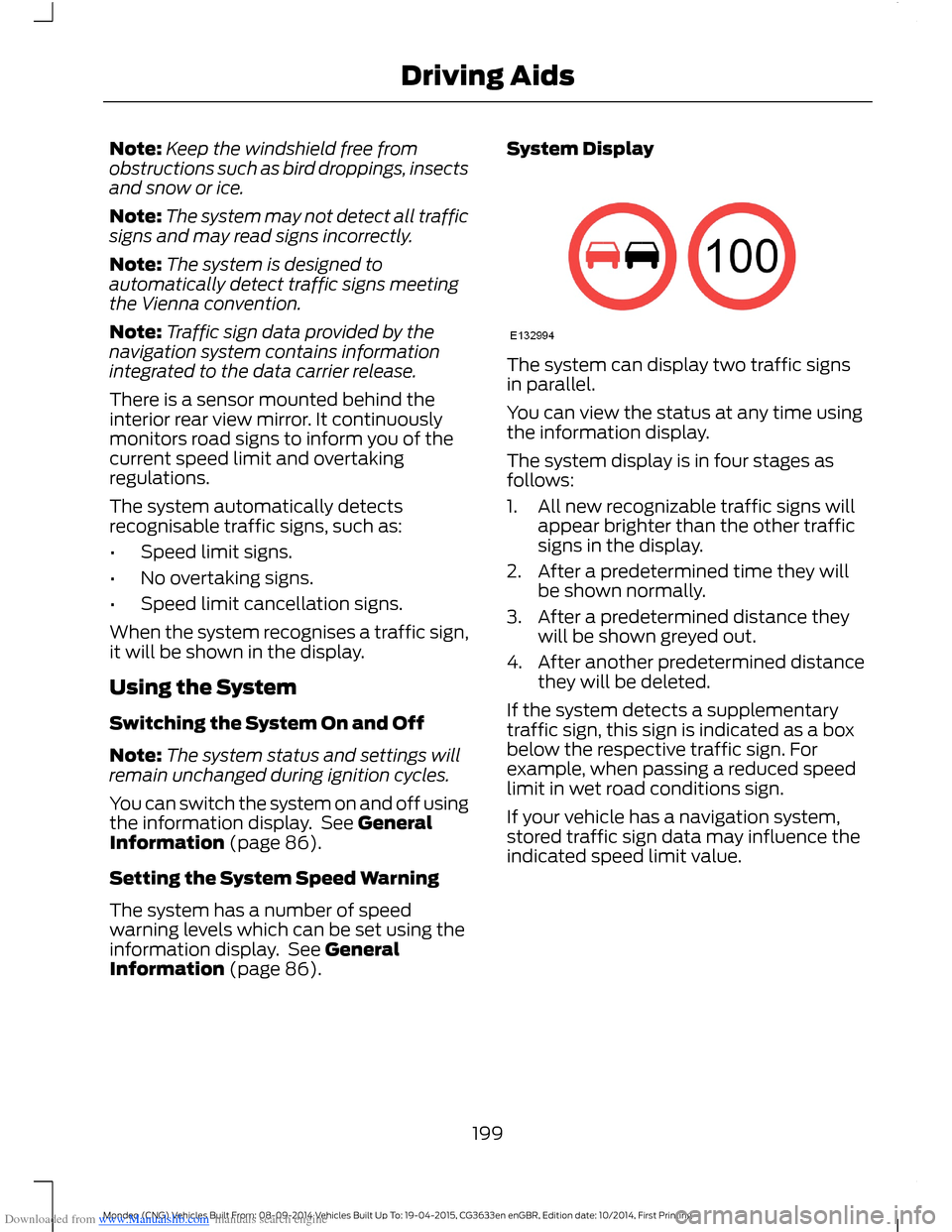
System Display
The system can display two traffic signsin parallel.
You can view the status at any time usingthe information display.
The system display is in four stages asfollows:
1.All new recognizable traffic signs willappear brighter than the other trafficsigns in the display.
2.After a predetermined time they willbe shown normally.
3.After a predetermined distance theywill be shown greyed out.
4.After another predetermined distancethey will be deleted.
If the system detects a supplementarytraffic sign, this sign is indicated as a boxbelow the respective traffic sign. Forexample, when passing a reduced speedlimit in wet road conditions sign.
If your vehicle has a navigation system,stored traffic sign data may influence theindicated speed limit value.
199Mondeo (CNG) Vehicles Built From: 08-09-2014 Vehicles Built Up To: 19-04-2015, CG3633en enGBR, Edition date: 10/2014, First PrintingDriving Aids
Page 270 of 446
Downloaded from www.Manualslib.com manuals search engine CHANGING A ROAD WHEEL
Lug Nuts
You can obtain a replacement locking lugnut key and replacement locking lug nutsfrom your dealer using the referencenumber certificate.
Vehicles with a Spare Wheel
If the spare wheel is exactly the same typeand size as the other fitted road wheels,you can replace the existing road wheelwith the spare wheel and continue to drivein the normal manner.
If the spare wheel is different to the otherroad wheels, it will carry a yellow label withthe appropriate speed limit.
Refer to the following information beforechanging the road wheel.
WARNINGS
Drive the shortest possible distances.
Do not fit more than one spare wheelon your vehicle at any one time.
Do not carry out any tire repairs on aspare wheel.
Do not drive through an automaticcar wash.
If you are unsure what type of sparewheel you have do not exceed 80km/h (50 mph).
Only fit snow chains to specifiedtires. See Using Snow Chains(page 264).
The ground clearance of your vehiclemay be reduced. Take care whenparking next to a curb.
Note:Your vehicle may exhibit someunusual driving characteristics.
Vehicle Jack
WARNINGS
The vehicle jack supplied with yourvehicle should only be used whenchanging a wheel in emergencysituations.
Before using the vehicle jack, checkthat it is not damaged or deformedand that the thread is lubricated andfree from foreign matter.
Never place anything between thejack and the ground, or the jack andyour vehicle.
Note:Vehicles with a temporary mobilitykit do not have a vehicle jack or a lug nutwrench
It is recommended to use a workshop typehydraulic jack for changing betweensummer and winter tires.
Note:Use a jack with a minimum liftingcapacity of 1.5 tonnes and a lifting plate witha minimum diameter of 3.1 inches (80millimeters).
Vehicles without a Temporary MobilityKit
Your vehicle jack, lug nut wrench andscrew-in towing eye are located in thespare wheel well or behind the rear seatwith the fuel funnel.
Jacking and Lifting Points
WARNING
Use only the specified jacking points.If you use other positions, you maydamage the body, steering,suspension, engine, braking system or thefuel lines.
268Mondeo (CNG) Vehicles Built From: 08-09-2014 Vehicles Built Up To: 19-04-2015, CG3633en enGBR, Edition date: 10/2014, First PrintingWheels and Tires
Page 295 of 446
Downloaded from www.Manualslib.com manuals search engine •MP3 and WMA folder mode representsa folder structure consisting of onelevel of folders. The CD player numbersall MP3 and WMA tracks on the disc(noted by the MP3 or WMA fileextension) and all folders containingMP3 and WMA files, from F001 (folder)T001 (track) to F253 T255.
•Creating discs with only one level offolders helps with navigation throughthe disc files.
If you are burning your own MP3 and WMAdiscs, it is important to understand howthe system reads the structures you create.While various files may be present, (fileswith extensions other than MP3 andWMA), only files with the MP3 and WMAextension are played; other files areignored by the system. This enables you touse the same MP3 and WMA disc for avariety of tasks on your work computer,home computer and your in-vehiclesystem.
In track mode, the system displays andplays the structure as if it were only onelevel deep (all MP3 and WMA files play,regardless of being in a specific folder). Infolder mode, the system only plays theMP3 and WMA files in the current folder.
AUDIO UNIT
WARNING
Driving while distracted can result inloss of vehicle control, crash andinjury. We strongly recommend thatyou use extreme caution when using anydevice that may take your focus off theroad. Your primary responsibility is the safeoperation of your vehicle. We recommendagainst the use of any hand-held devicewhile driving and encourage the use ofvoice-operated systems when possible.Make sure you are aware of all applicablelocal laws that may affect the use ofelectronic devices while driving.
Note:Depending on your vehicle optionpackage, your system may look differentfrom what you see here.
Note:Some features, such as Sirius satelliteradio, may not be available in your location.Check with an authorized dealer.
293Mondeo (CNG) Vehicles Built From: 08-09-2014 Vehicles Built Up To: 19-04-2015, CG3633en enGBR, Edition date: 10/2014, First PrintingAudio System
Page 315 of 446
Downloaded from www.Manualslib.com manuals search engine Receiving a Call
When receiving a call, you can:
•Answer the call by pressing the acceptcall button on the steering wheel or byselecting the accept call option in theaudio display. Press the OK button.
•Reject the call by pressing the rejectcall button on the steering wheel or byselecting the reject call option in theaudio display. Press the OK button.
•Ignore the call by doing nothing.
Cell Phone Options During anActive Call
During an active call, you have extra menufeatures which become available, forexample putting a call on hold.
To access this menu, choose one of theoptions available at the bottom of theaudio display or select the option for more.
Description and ActionMessage
Turn your vehicle's microphone off. To turn the microphoneon, select the option again.Mic. off
Switch a call from an active hands-free environment to yourcell phone for a more private conversation. When selected,the audio display will indicate the call is private.
Privacy
Put an active call on hold. When selected, the audio displaywill indicate the call is on hold.Hold
Enter numbers using the audio system numeric keypad, forexample numbers for passwords.Dial a number
Join two separate calls. The system supports a maximum ofthree callers on a multi-party or conference call.Join calls
1.Select the option for more.
2.Access the desired contact through the system or usevoice commands to place the second call. Once activelyin the second call, select the option for more.
3.Scroll to the option to join calls and press the OK button.
Access your phonebook contacts.Phonebook
1.Select the option for more.
2.Scroll to the option for phonebook and press the OKbutton.
3.Scroll through your phonebook contacts.
313Mondeo (CNG) Vehicles Built From: 08-09-2014 Vehicles Built Up To: 19-04-2015, CG3633en enGBR, Edition date: 10/2014, First PrintingSYNC™
Page 317 of 446
Downloaded from www.Manualslib.com manuals search engine Description and ActionMessage
3.Press the OK button again when the desired selectionappears in the audio display.
4.Press the OK button or dial button to call the selection.
Access any previously dialed, received or missed calls.Call history
1.Press the OK button to select.
2.Scroll to select either incoming calls, outgoing calls ormissed calls. Press the OK button to make your selection.
3.Press the OK button or dial button to call the selection.
Select one of 10 speed dial entries. To set a speed dial entry,go to the phonebook and press and hold one of the numberson the audio system numeric keypad.
Speed Dial
Send, download and delete text messages.Text messaging
Access the option for Bluetooth device menu listings (add,connect, set as primary, on or off, delete).BT Devices
View various settings and features on your cell phone.Phone settings
Turn the SYNC emergency assistance feature on or off.Emergency Assistance
Text Messaging
The system allows you to receive, send,download and delete text messages. Thesystem can also read incoming textmessages to you so that you do not haveto take your eyes off the road.
Note:This is a cell phone dependentfeature.
Receiving a Text Message
When a new message arrives, an audibletone sounds and the audio displayindicates you have a new message.
You have these options:
•Select the listen option to have thesystem read the message to you.
•Select the view option to open the textmessage. Select the ignore option ordo nothing and the message goes intoyour text message inbox. Onceselected, you have the ability to havethe message read out to you, to viewother messages or to select the moreoption.
•Press the voice button and say "Readtext message".
•Select the more option and use thearrow buttons to scroll through furtheroptions.
Note:Your cell phone must supportdownloading text messages using Bluetoothto receive incoming text messages.
Choose from the following:
315Mondeo (CNG) Vehicles Built From: 08-09-2014 Vehicles Built Up To: 19-04-2015, CG3633en enGBR, Edition date: 10/2014, First PrintingSYNC™
Page 325 of 446
Downloaded from www.Manualslib.com manuals search engine •After the delivery of the introductorymessage the voice line opens so thatyou can speak hands-free with theemergency operator.
•When the line is connected, you mustbe prepared to provide your name,phone number and locationinformation immediately.
Note:While the system providesinformation to the emergency operator, thesystem plays a message letting you knowit is sending important information. It thenlets you know when the line is open to starthands-free communication.
Note:During an Emergency Assistance call,an emergency priority screen appears whichcontains vehicle GPS coordinates whenavailable.
Note:It is possible that GPS locationinformation is not available at the time ofthe crash; in this case, EmergencyAssistance will still attempt to place anemergency call.
Note:It is possible that the emergencyservices will not receive the GPScoordinates; in this case, hands-freecommunication with an emergency operatoris available.
Note:The emergency operator may alsoreceive information from the cellularnetwork such as cell phone number, cellphone location and cell phone carrier nameindependent from SYNC EmergencyAssistance.
Emergency Assistance may not work if:
•Your cell phone or EmergencyAssistance hardware sustains damagein the crash.
•The vehicle battery or the system hasno power.
•A crash ejects your cell phone fromyour vehicle.
•You do not have a valid and registeredSIM card with credit in your cell phone.
•You are in a European country or regionwhere the SYNC Emergency Assistancecannot place the call. Visit the regionalFord website for details.
Important Information about theEmergency Assistance Feature
Emergency Assistance does not currentlycall emergency services in the followingmarkets: Albania, Belarus, Bosnia andHerzegovina, Macedonia, Netherlands,Ukraine, Moldova and Russia.
Visit the regional Ford website for thelatest details.
Emergency Assistance Privacy Notice
When you switch on EmergencyAssistance, it may disclose to emergencyservices that your vehicle has been in acrash involving the deployment of anairbag or activation of the fuel pump shutoff. This feature has the capability todisclose your location information to theemergency operator or other details aboutyour vehicle or crash to provide the mostappropriate emergency services.
If you do not want to disclose thisinformation, do not switch on the feature.
SYNC AppLink
The system enables voice and manualcontrol of SYNC AppLink enabledsmartphone apps. Once an app is runningthrough AppLink, you can control mainfeatures of the app through voicecommands and manual controls.
Note:You must pair and connect yoursmartphone to SYNC to access AppLink.
Note:iPhone users need to connect thephone to the USB port.
Note:Android users need to connect thephone to SYNC using Bluetooth.
323Mondeo (CNG) Vehicles Built From: 08-09-2014 Vehicles Built Up To: 19-04-2015, CG3633en enGBR, Edition date: 10/2014, First PrintingSYNC™
Page 327 of 446
![FORD MONDEO 2014 4.G Owners Manual Downloaded from www.Manualslib.com manuals search engine Description and ActionCommand
The system will search your connected mobile device forSYNC compatible apps.find [new] [mobile](apps | applicatio](/img/11/5483/w960_5483-326.png "FORD MONDEO 2014 4.G Owners Manual Downloaded from www.Manualslib.com manuals search engine Description and ActionCommand
The system will search your connected mobile device forSYNC compatible apps.find [new] [mobile](apps | applicatio")
Downloaded from www.Manualslib.com manuals search engine Description and ActionCommand
The system will search your connected mobile device forSYNC compatible apps.find [new] [mobile](apps | applications)
Say the name of an app to start it on SYNC.
The system will list the available voice commands for therequested app.
Use this command followed by the name of the app.(quit | exit | close)
Enabling and Disabling PushNotifications
Some apps can send push notifications. Apush notification is an alert from an apprunning in the background and is deliveredby voice, pop up or both. This may beparticularly useful for news or locationbased apps.
Press the MENU button then select:
Description and ActionMessage
SYNC-Apps
Mobile Apps
Settings
If push notifications are supported, this setting will be listed.Select to enable or disable the feature as required.All Apps
Enabling SYNC Mobile Apps
To use the system you must consent tosend and receive app authorizationinformation and updates, using the dataplan associated with the connected device.
Data is sent to Ford in the United Statesthrough the connected device. Theinformation is encrypted and includes yourVIN, SYNC module number, anonymoususage statistics and debugginginformation. Updates may take placeautomatically.
Note:You must enable mobile apps foreach connected device the first time youselect a mobile app using the system.
Note:Standard data rates will apply. Fordis not responsible for any additional chargesyou may receive from your service provider,when your vehicle sends or receives datathrough the connected device. This includesany additional charges incurred due todriving in areas when roaming out of a homenetwork.
325Mondeo (CNG) Vehicles Built From: 08-09-2014 Vehicles Built Up To: 19-04-2015, CG3633en enGBR, Edition date: 10/2014, First PrintingSYNC™