display FORD MONDEO 2014 4.G Owners Manual
[x] Cancel search | Manufacturer: FORD, Model Year: 2014, Model line: MONDEO, Model: FORD MONDEO 2014 4.GPages: 446, PDF Size: 29.09 MB
Page 3 of 446
Downloaded from www.Manualslib.com manuals search engine Introduction
About This Manual...........................................7
Symbols Glossary.............................................7
Data Recording..................................................9
Replacement PartsRecommendation......................................10
Mobile CommunicationsEquipment.....................................................10
At a Glance
Front Exterior Overview.................................11
Rear Exterior Overview..................................12
Vehicle Interior Overview..............................13
Instrument Panel Overview - LHD............14
Instrument Panel Overview - RHD...........15
Child Safety
Installing Child Seats......................................17
Child Seat Positioning..................................20
Child Safety Locks - Vehicles With:Remote Child Proof Locks......................24
Child Safety Locks - Vehicles With:Mechanical Child Proof Locks...............24
Safety Belts
Fastening the Safety Belts..........................25
Safety Belt Height Adjustment.................26
Safety Belt Minder.........................................26
Supplementary RestraintsSystem
Principle of Operation...................................27
Driver Airbag.....................................................27
Passenger Airbag...........................................28
Side Airbags.....................................................29
Driver Knee Airbag.........................................29
Side Curtain Airbags.....................................29
Inflatable Safety Belts.................................30
Keys and Remote Controls
General Information on RadioFrequencies..................................................32
Remote Control...............................................32
Replacing a Lost Key or RemoteControl............................................................37
MyKey™
Principle of Operation..................................38
Creating a MyKey...........................................38
Clearing All MyKeys.......................................39
Checking MyKey System Status................41
Using MyKey With Remote StartSystems.........................................................42
MyKey Troubleshooting...............................42
Locks
Locking and Unlocking.................................44
Manual Liftgate..............................................46
Power Liftgate.................................................46
Keyless Entry...................................................48
Security
Passive Anti-Theft System..........................51
Anti-Theft Alarm - Vehicles With: InteriorSensor.............................................................51
Anti-Theft Alarm - Vehicles With:Integral Battery...........................................53
Steering Wheel
Adjusting the Steering Wheel - VehiclesWith: Manual Adjustable SteeringColumn..........................................................56
Adjusting the Steering Wheel - VehiclesWith: Power Adjustable SteeringColumn..........................................................56
Audio Control...................................................57
Voice Control...................................................58
Cruise Control..................................................58
Information Display Control......................58
Heated Steering Wheel...............................59
1Mondeo (CNG) Vehicles Built From: 08-09-2014 Vehicles Built Up To: 19-04-2015, CG3633en enGBR, Edition date: 10/2014, First PrintingTable of Contents
Page 4 of 446
Downloaded from www.Manualslib.com manuals search engine Wipers and Washers
Windshield Wipers........................................60
Autowipers.......................................................60
Windshield Washers......................................61
Rear Window Wiper and Washers...........62
Lighting
General Information......................................63
Lighting Control..............................................63
Autolamps........................................................64
Instrument Lighting Dimmer.....................65
Headlamp Exit Delay....................................65
Daytime Running Lamps............................65
Automatic High Beam Control.................65
Front Fog Lamps............................................67
Rear Fog Lamps..............................................67
Headlamp Leveling........................................67
Adaptive Headlamps...................................68
Cornering Lamps...........................................69
Direction Indicators.......................................69
Interior Lamps.................................................70
Ambient Lighting.............................................71
Windows and Mirrors
Power Windows..............................................72
Global Opening and Closing......................73
Exterior Mirrors.................................................73
Interior Mirror....................................................75
Sun Visors.........................................................76
Moonroof...........................................................76
Instrument Cluster
Gauges...............................................................78
Warning Lamps and Indicators..................81
Audible Warnings and Indicators.............85
Information Displays
General Information.....................................86
Information Messages.................................96
Climate Control
Principle of Operation...................................111
Air Vents.............................................................111
Manual Climate Control..............................112
Automatic Climate Control - VehiclesWith: Heated Windshield.......................114
Automatic Climate Control - VehiclesWithout: Heated Windshield................116
Automatic Climate Control - VehiclesWith: Sony Audio System.......................117
Hints on Controlling the InteriorClimate..........................................................119
Heated Windows and Mirrors....................121
Heated Windshield.......................................122
Auxiliary Heater.............................................122
Seats
Sitting in the Correct Position..................126
Head Restraints.............................................126
Manual Seats.................................................128
Power Seats - Vehicles Without:Multi-Contour Seats................................128
Power Seats - Vehicles With:Multi-Contour Seats................................129
Memory Function...........................................131
Heated Seats..................................................133
Climate Controlled Seats..........................133
Rear Seat Armrest........................................134
Auxiliary Power Points
Auxiliary Power Points................................135
Cigar Lighter...................................................136
Storage Compartments
Cup Holders.....................................................137
Center Console...............................................137
Overhead Console........................................137
Ashtray..............................................................137
2Mondeo (CNG) Vehicles Built From: 08-09-2014 Vehicles Built Up To: 19-04-2015, CG3633en enGBR, Edition date: 10/2014, First PrintingTable of Contents
Page 16 of 446
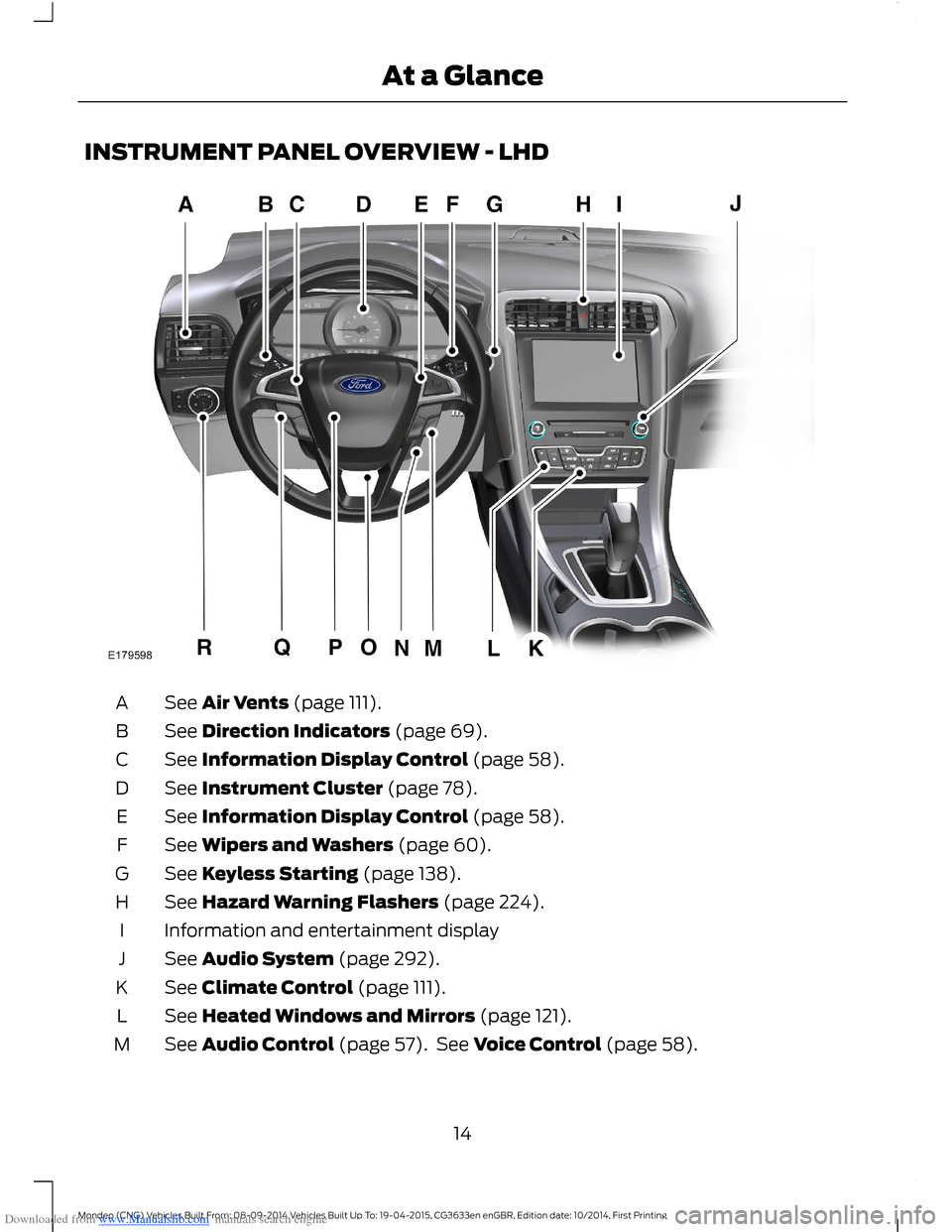
Downloaded from www.Manualslib.com manuals search engine INSTRUMENT PANEL OVERVIEW - LHD
See Air Vents (page 111).A
See Direction Indicators (page 69).B
See Information Display Control (page 58).C
See Instrument Cluster (page 78).D
See Information Display Control (page 58).E
See Wipers and Washers (page 60).F
See Keyless Starting (page 138).G
See Hazard Warning Flashers (page 224).H
Information and entertainment displayI
See Audio System (page 292).J
See Climate Control (page 111).K
See Heated Windows and Mirrors (page 121).L
See Audio Control (page 57). See Voice Control (page 58).M
14Mondeo (CNG) Vehicles Built From: 08-09-2014 Vehicles Built Up To: 19-04-2015, CG3633en enGBR, Edition date: 10/2014, First PrintingAt a Glance
Page 17 of 446
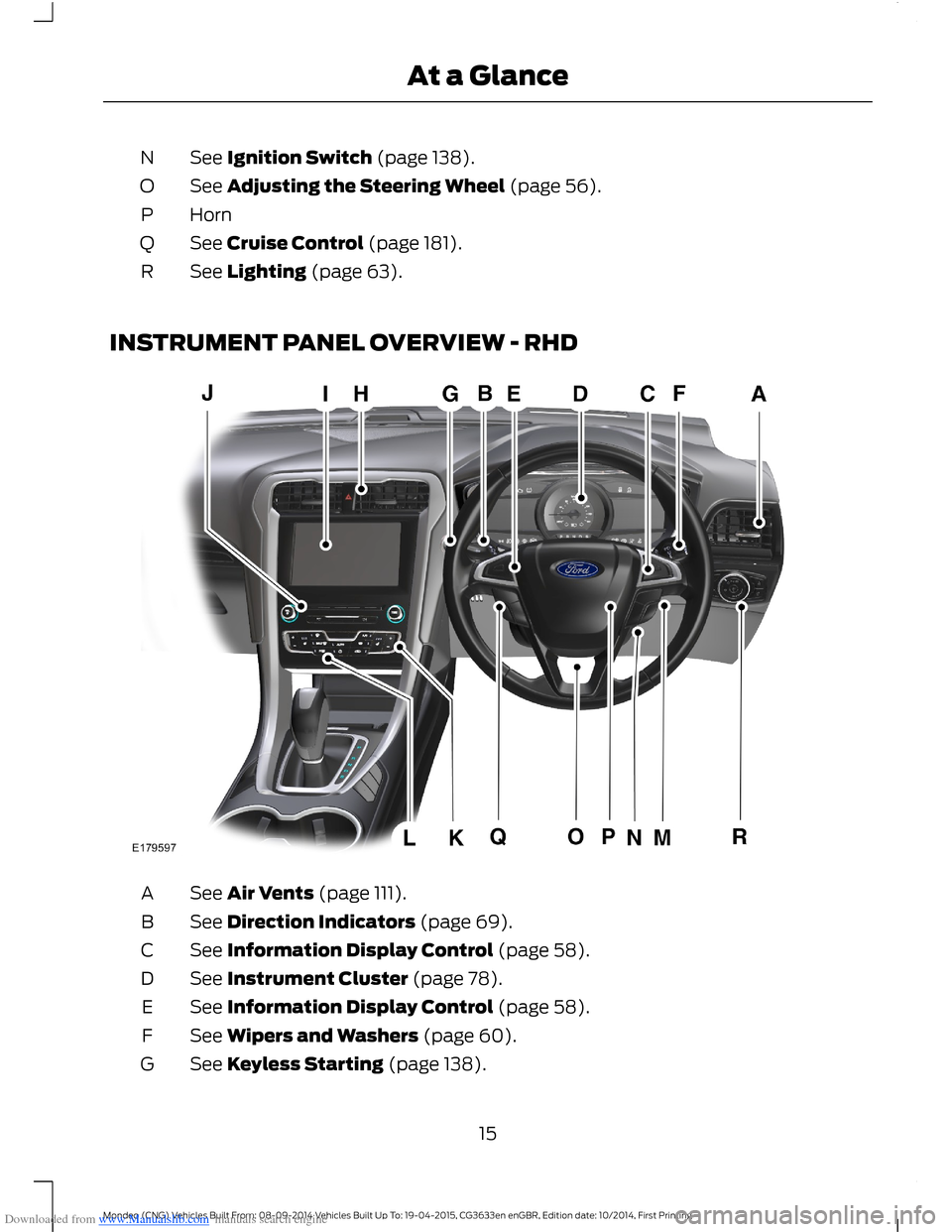
Downloaded from www.Manualslib.com manuals search engine See Ignition Switch (page 138).N
See Adjusting the Steering Wheel (page 56).O
HornP
See Cruise Control (page 181).Q
See Lighting (page 63).R
INSTRUMENT PANEL OVERVIEW - RHD
See Air Vents (page 111).A
See Direction Indicators (page 69).B
See Information Display Control (page 58).C
See Instrument Cluster (page 78).D
See Information Display Control (page 58).E
See Wipers and Washers (page 60).F
See Keyless Starting (page 138).G
15Mondeo (CNG) Vehicles Built From: 08-09-2014 Vehicles Built Up To: 19-04-2015, CG3633en enGBR, Edition date: 10/2014, First PrintingAt a Glance
Page 18 of 446
Downloaded from www.Manualslib.com manuals search engine See Hazard Warning Flashers (page 224).H
Information and entertainment displayI
See Audio System (page 292).J
See Climate Control (page 111).K
See Heated Windows and Mirrors (page 121).L
See Audio Control (page 57). See Voice Control (page 58).M
See Ignition Switch (page 138).N
See Adjusting the Steering Wheel (page 56).O
HornP
See Cruise Control (page 181).Q
See Lighting (page 63).R
16Mondeo (CNG) Vehicles Built From: 08-09-2014 Vehicles Built Up To: 19-04-2015, CG3633en enGBR, Edition date: 10/2014, First PrintingAt a Glance
Page 24 of 446
Downloaded from www.Manualslib.com manuals search engine ISOFIX Child Seats
Mass group categories
Seating positions
10+0
Rear facingForwardfacingRear facing
20 - 40 lbs (9 - 18 kg)Up to 29 lbs (13 kg)
Not ISOFIX equipped
SizeclassFront passengerseat
Seattype
C, D1A, B, B11C,D, E1SizeclassRear outboardseat ISOFIX
IL2IL2, IUF3IL2Seattype
Not ISOFIX equipped
SizeclassRear center seat
Seattype
IL Suitable for particular ISOFIX child restraints systems of the semi-universal category.Please consult child restraints systems suppliers' vehicle recommendation lists.
IUF Suitable for ISOFIX forward facing child restraints systems of universal categoryapproved for use in this mass group and ISOFIX size class.1The ISOFIX size class for both universal and semi-universal child seat systems is definedby the capital letters A to G. These identification letters are displayed on the ISOFIX childseat.2At time of publishing the recommended Group O+ ISOFIX baby safety seat is the BritaxRomer Baby Safe. See an authorized dealer for the latest details relating to ourrecommended child seats.3At time of publishing the recommended Group 1 ISOFIX child seat is the Britax RomerDuo. See an authorized dealer for the latest details relating to our recommended childseats.
22Mondeo (CNG) Vehicles Built From: 08-09-2014 Vehicles Built Up To: 19-04-2015, CG3633en enGBR, Edition date: 10/2014, First PrintingChild Safety
Page 36 of 446
Downloaded from www.Manualslib.com manuals search engine Changing the Remote ControlBattery
Note:Refer to local regulations whendisposing of transmitter batteries.
Note:Do not wipe off any grease on thebattery terminals or on the back surface ofthe circuit board.
Note:You do not need to reprogram theremote control after you have replaced itsbattery, it should operate normally.
A message will appear in the informationdisplay when the remote control batteryis low. See Information Messages (page96).
Integrated Keyhead Transmitter
The remote control uses one coin-typethree-volt lithium battery CR2032 orequivalent.
Press the button to release the key beforebeginning the procedure.
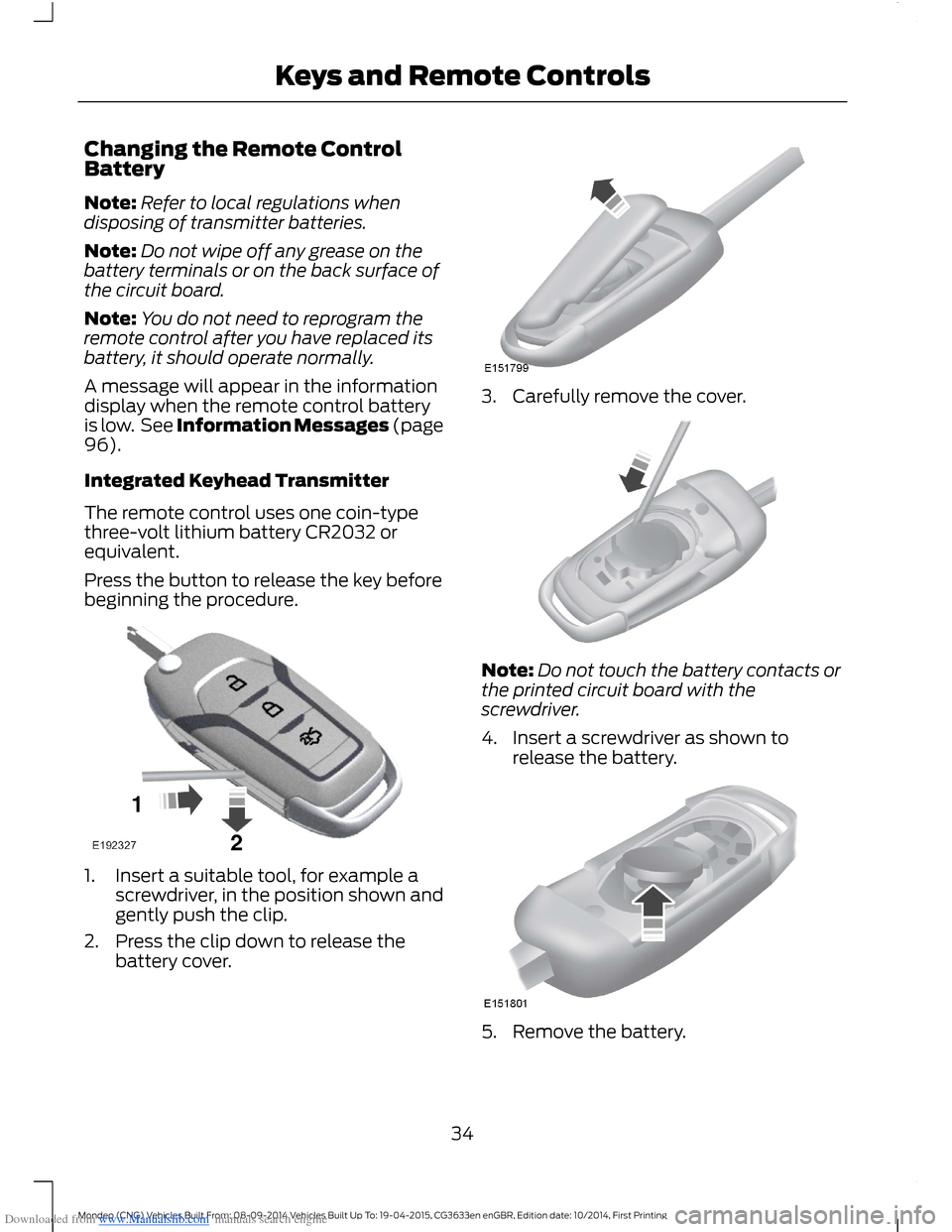
1.Insert a suitable tool, for example ascrewdriver, in the position shown andgently push the clip.
2.Press the clip down to release thebattery cover.
3.Carefully remove the cover.
Note:Do not touch the battery contacts orthe printed circuit board with thescrewdriver.
4.Insert a screwdriver as shown torelease the battery.
5.Remove the battery.
34Mondeo (CNG) Vehicles Built From: 08-09-2014 Vehicles Built Up To: 19-04-2015, CG3633en enGBR, Edition date: 10/2014, First PrintingKeys and Remote Controls
Page 38 of 446
Downloaded from www.Manualslib.com manuals search engine Many states and provinces haverestrictions for the use of remote start.Check your local and state or provinciallaws for specific requirements regardingremote start systems.
The remote start system will not work if:
•The ignition is on.
•The alarm system triggered.
•You disable the feature.
•The hood is open.
•The transmission is not in park (P).
•The vehicle battery voltage is too low.
•The service engine soon light is on.
Remote Starting the Vehicle
Note:You must press each button withinthree seconds of each other. Your vehiclewill not remote start if you do not follow thissequence.
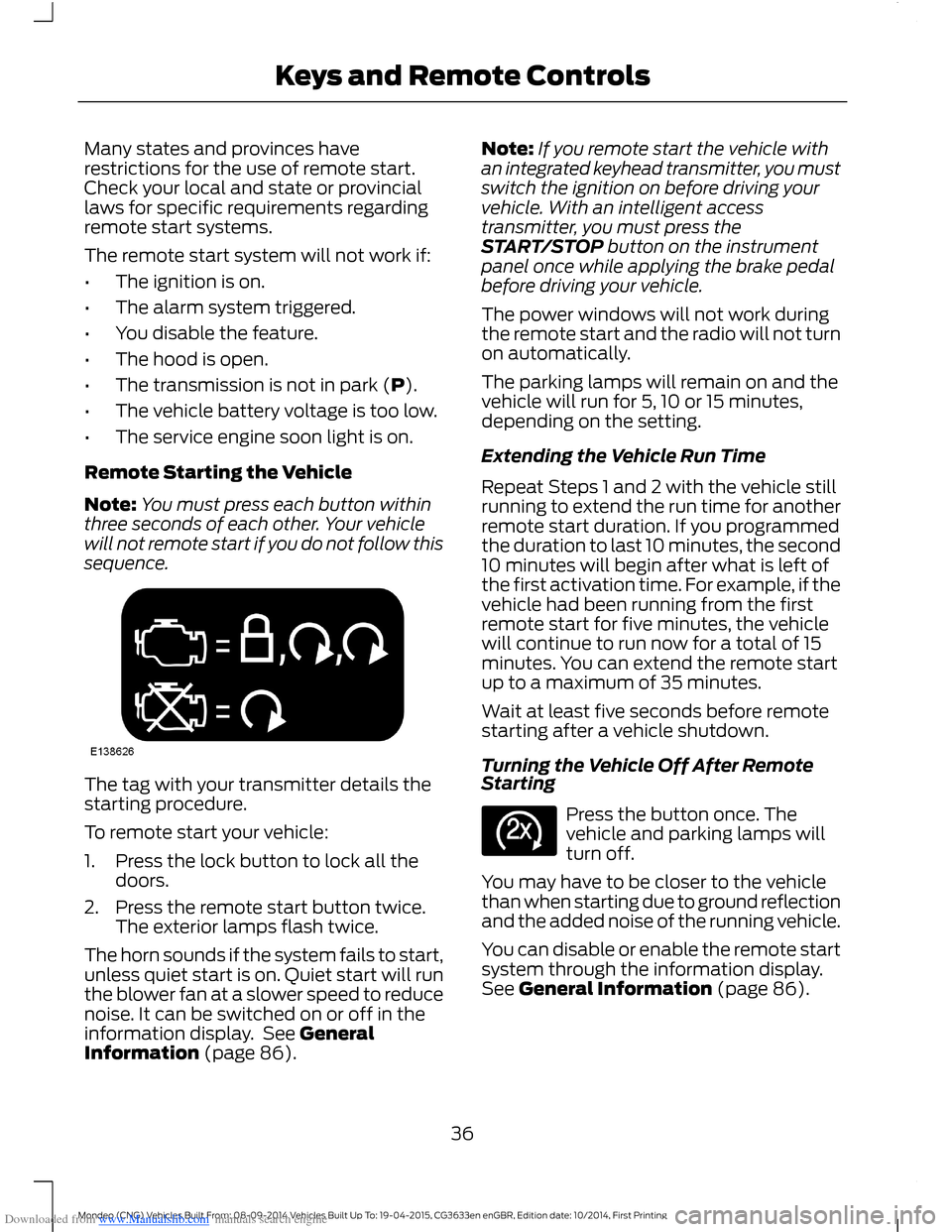
The tag with your transmitter details thestarting procedure.
To remote start your vehicle:
1.Press the lock button to lock all thedoors.
2.Press the remote start button twice.The exterior lamps flash twice.
The horn sounds if the system fails to start,unless quiet start is on. Quiet start will runthe blower fan at a slower speed to reducenoise. It can be switched on or off in theinformation display. See GeneralInformation (page 86).
Note:If you remote start the vehicle withan integrated keyhead transmitter, you mustswitch the ignition on before driving yourvehicle. With an intelligent accesstransmitter, you must press theSTART/STOP button on the instrumentpanel once while applying the brake pedalbefore driving your vehicle.
The power windows will not work duringthe remote start and the radio will not turnon automatically.
The parking lamps will remain on and thevehicle will run for 5, 10 or 15 minutes,depending on the setting.
Extending the Vehicle Run Time
Repeat Steps 1 and 2 with the vehicle stillrunning to extend the run time for anotherremote start duration. If you programmedthe duration to last 10 minutes, the second10 minutes will begin after what is left ofthe first activation time. For example, if thevehicle had been running from the firstremote start for five minutes, the vehiclewill continue to run now for a total of 15minutes. You can extend the remote startup to a maximum of 35 minutes.
Wait at least five seconds before remotestarting after a vehicle shutdown.
Turning the Vehicle Off After RemoteStarting
Press the button once. Thevehicle and parking lamps willturn off.
You may have to be closer to the vehiclethan when starting due to ground reflectionand the added noise of the running vehicle.
You can disable or enable the remote startsystem through the information display.See General Information (page 86).
36Mondeo (CNG) Vehicles Built From: 08-09-2014 Vehicles Built Up To: 19-04-2015, CG3633en enGBR, Edition date: 10/2014, First PrintingKeys and Remote Controls
Page 40 of 446
Downloaded from www.Manualslib.com manuals search engine PRINCIPLE OF OPERATION
The system allows you to program keyswith restricted driving modes to promotegood driving habits. You can use all but oneof the keys programmed to your vehiclewith these restricted modes.
Any keys that have not been programmedare referred to as an administrator key oradmin key. These can be used to:
•create a MyKey
•program optional MyKey settings
•clear all MyKey features.
When you have programmed a MyKey, youcan access the following information usingthe information display:
•How many admin keys and MyKeys areprogrammed to your vehicle.
•The total distance your vehicle hastraveled using a MyKey.
Note:Switch the ignition on to use thesystem.
Note:All MyKeys are programmed to thesame settings. You cannot program themindividually.
Standard Settings
The following settings cannot be changed:
•Safety belt minder. You cannot disablethis feature. The audio system willmute when this feature is activated.
•Early low fuel or charge. The low-fuelor low charge warning activates earlier,giving the MyKey user more time torefuel or recharge.
•Driver assist features, for examplenavigation, parking aids and Blind SpotInformation System (BLIS) with crosstraffic alert. These systems turn onautomatically whenever you switch theignition on.
Optional Settings
You can configure MyKey settings whenyou first create a MyKey. You can alsochange the settings afterward with anadmin key.
The following settings can be configuredusing an admin key:
•Various vehicle speed limits can be set.Warnings will be shown in the displayfollowed by an audible tone when yourvehicle reaches the set speed. Youcannot override the set speed by fullydepressing the accelerator pedal or bysetting cruise control.
•Various vehicle speed reminders canbe set. Warnings will be shown in thedisplay followed by an audible tonewhen the set vehicle speed isexceeded.
•Audio system maximum volume of45%. A message will be shown in thedisplay when you attempt to exceedthe limited volume. Automatic volumecontrol will be disabled.
•Always on setting. When this isselected you will not be able to switchoff Advance Trac, traction control,emergency assistance or the do notdisturb feature.
Vehicles with Keyless Entry
If a MyKey and an admin key are present,your vehicle will recognize the admin keyonly.
CREATING A MYKEY
Use the information display to create aMyKey:
38Mondeo (CNG) Vehicles Built From: 08-09-2014 Vehicles Built Up To: 19-04-2015, CG3633en enGBR, Edition date: 10/2014, First PrintingMyKey™
Page 41 of 446
Downloaded from www.Manualslib.com manuals search engine 1. Insert the key you want to program intothe ignition. If your vehicle is equipped witha push-button start, place the intelligentaccess key fob into the backup slot. Thelocation of your backup slot is in anotherchapter. See Starting and Stopping theEngine (page 138).
2. Switch the ignition on.
3. Access the main menu on theinformation display controls, and selectSettings then MyKey by pressing OK orthe > button.
4. Press OK or the > button to selectCreate MyKey.
5. When prompted, hold the OK buttonuntil you see a message informing you tolabel this key as a MyKey. The key will berestricted at the next start.
MyKey is successfully created. Make sureyou label it so you can distinguish it fromthe admin keys.
You can also program configurablesettings for the key(s). SeeProgramming/Changing ConfigurableSettings.
Programming/ChangingConfigurable Settings
Use the information display to access yourconfigurable MyKey settings.
1.Switch the ignition on using an adminkey or fob.
2.Access the main menu on theinformation display controls, and selectSettings, then MyKey by pressing OKor > button.
3.Use the arrow buttons to get to afeature.
4.Press OK or > to make a selection.
Note:You can clear or change your MyKeysettings at any time during the same keycycle as you created the MyKey. Once youhave switched the vehicle off, however, youwill need an admin key to change or clearyour MyKey settings.
CLEARING ALL MYKEYS
You can clear or change your MyKeysettings using the information displaycontrol on the steering wheel. SeeInformation Displays (page 86).
Switch the ignition on using an admin keyor fob.
To clear all MyKeys of all MyKey settings, press the left arrow button to accessthe main menu and scroll to:
Action and DescriptionMessage
Press the OK button.Settings
Press the OK button.MyKey
Press and hold the OK button until the following messagedisplays.Clear MyKey
39Mondeo (CNG) Vehicles Built From: 08-09-2014 Vehicles Built Up To: 19-04-2015, CG3633en enGBR, Edition date: 10/2014, First PrintingMyKey™