light FORD MUSTANG 1998 4.G User Guide
[x] Cancel search | Manufacturer: FORD, Model Year: 1998, Model line: MUSTANG, Model: FORD MUSTANG 1998 4.GPages: 192, PDF Size: 1.67 MB
Page 41 of 192

Troubleshooting the CD player (if equipped)
The laser beam used in the compact disc
player is harmful to the eyes. Do not
attempt to disassemble the case.
If sound skips:
²You may be traveling on a rough road, playing
badly scratched discs or the disc may be dirty.
Skipping will not scratch the discs or damage the
player.
If your changer does not work, it may be that:
²A disc is already loaded where you want to insert
a disc.
²The disc is inserted with the label surface
downward.
²The disc is dusty or defective.
²The player's internal temperature is above 60ÉC
(140ÉF). Allow the player to cool down before
operating.
²A disc with format and dimensions not within
industry standards is inserted.
Cleaning compact discs
Inspect all discs for contamination before playing. If
necessary, clean discs only with an approved CD
cleaner and wipe from the center out to the edge.
Do not use circular motion.
CD and CD player care
²Handle discs by their edges only. Never touch the
playing surface.
²Do not expose discs to direct sunlight or heat
sources for extended periods of time.
²Do not insert more than one disc into the slot of
the CD player.
Controls and features
41
Page 42 of 192

Cleaning cassette player (if equipped)
Clean the tape player head with a cassette cleaning
cartridge after ten to twelve hours of play in order
to maintain the best sound and operation.
Cassette and cassette player care
²Use only cassettes that are 90 minutes long or
less.
²Do not expose tapes to direct sunlight, high
humidity, extreme heat or extreme cold. Allow
tapes that may have been exposed to extreme
temperatures to reach a moderate temperature
before playing.
²Tighten very loose tapes by inserting a finger or
pencil into the hole and turning the hub.
²Remove loose labels before inserting tapes.
²Do not leave tapes in the cassette player for a
long time when not being played.
Radio frequency information
The Federal Communications Commission (FCC)
and the Canadian Radio and Telecommunications
Communications (CRTC) establish the frequencies
AM and FM stations may use for their broadcasts.
Allowable frequencies are:
AM 530, 540±1600, 1610 kHz
FM 87.9, 88.1±107.1, 107.9 MHz
Not all frequencies are used in a given area.
Radio reception factors
Three factors can affect radio reception:
²Distance/strength.The further an FM signal
travels, the weaker it is. The listenable range of
the average FM station is approximately 40 km
(24 miles). This range can be affected by ªsignal
modulation.º Signal modulation is a process radio
stations use to increase their strength/volume
relative to other stations.
Controls and features
42
Page 43 of 192
²Terrain.Hills, mountains and tall buildings
between your vehicle's antenna and the radio
station signal can cause FM reception problems.
Static can be caused on AM stations by power
lines, electric fences, traffic lights and
thunderstorms. Moving away from an interfering
structure (out of its ªshadowº) returns your
reception to normal.
²Station overload.Weak signals are sometimes
captured by stronger signals when you pass a
broadcast tower. A stronger signal may
temporarily overtake a weaker signal and play
while the weak station frequency is displayed.
The audio system automatically switches to single
channel reception if it will improve the reception of
a station normally received in stereo.
Audio system warranties and service
Refer to the ªWarranty Guideº for audio system
warranty information.
If service is necessary, see your dealer or a qualified
technician.
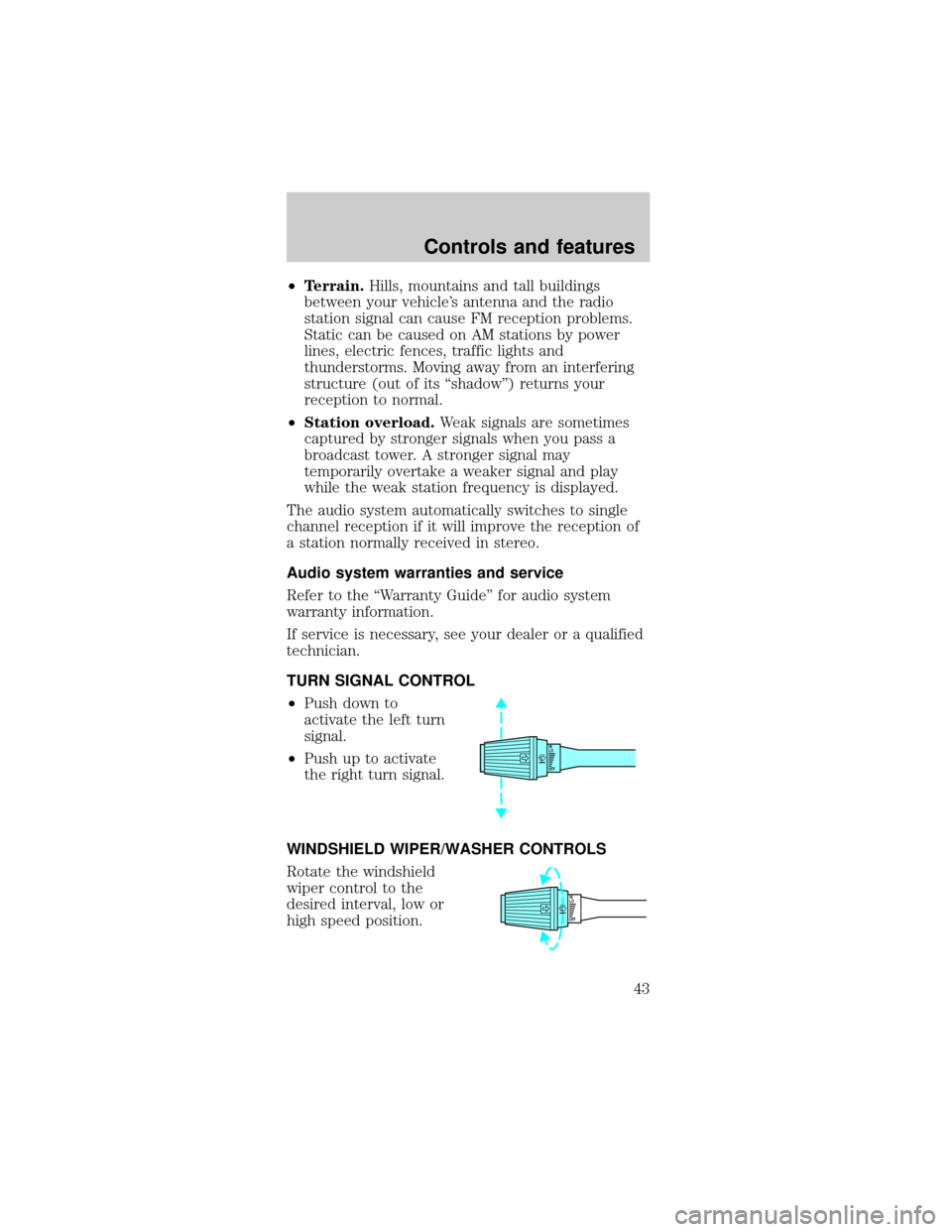
TURN SIGNAL CONTROL
²Push down to
activate the left turn
signal.
²Push up to activate
the right turn signal.
WINDSHIELD WIPER/WASHER CONTROLS
Rotate the windshield
wiper control to the
desired interval, low or
high speed position.
OFFHI
LO
OFFHI
LO
Controls and features
43
Page 45 of 192
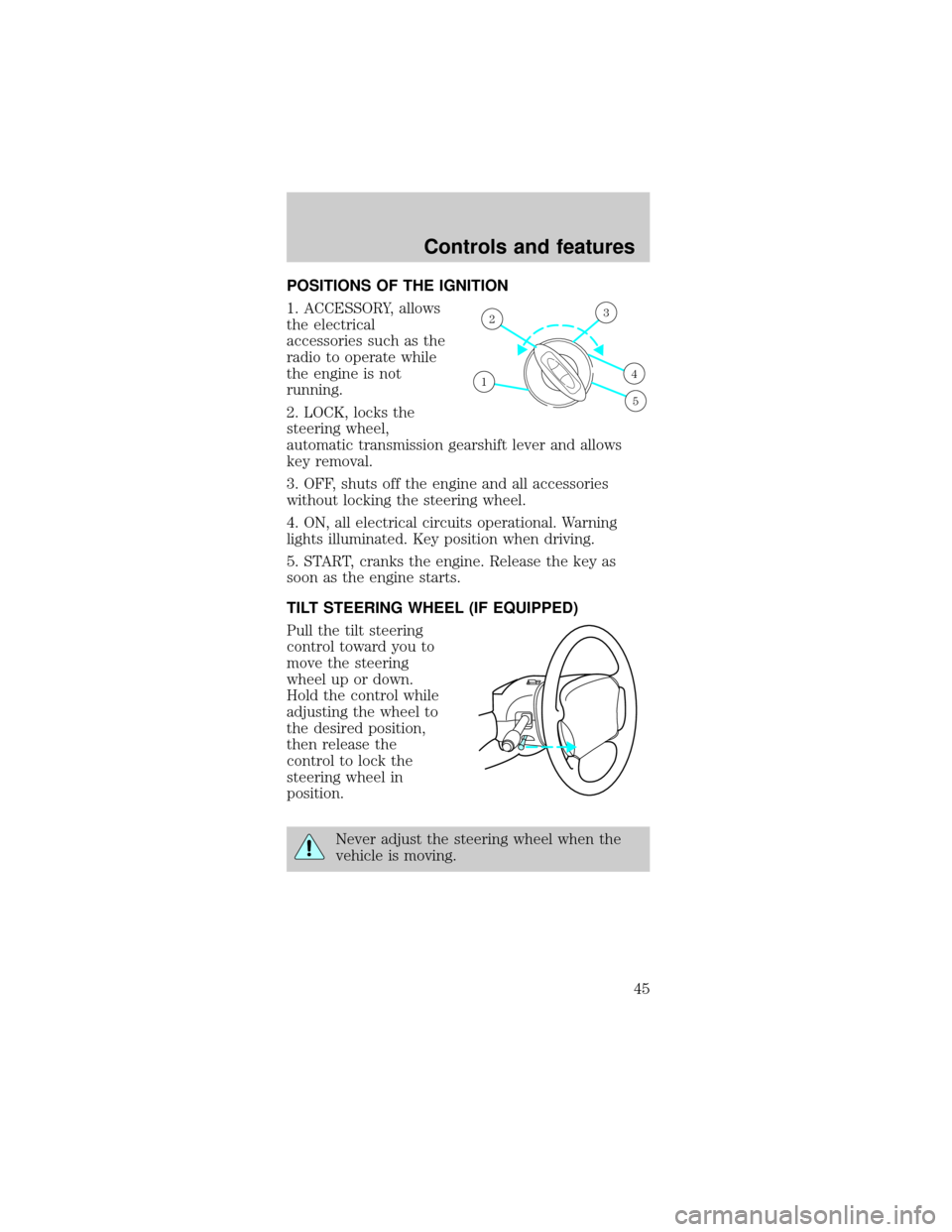
POSITIONS OF THE IGNITION
1. ACCESSORY, allows
the electrical
accessories such as the
radio to operate while
the engine is not
running.
2. LOCK, locks the
steering wheel,
automatic transmission gearshift lever and allows
key removal.
3. OFF, shuts off the engine and all accessories
without locking the steering wheel.
4. ON, all electrical circuits operational. Warning
lights illuminated. Key position when driving.
5. START, cranks the engine. Release the key as
soon as the engine starts.
TILT STEERING WHEEL (IF EQUIPPED)
Pull the tilt steering
control toward you to
move the steering
wheel up or down.
Hold the control while
adjusting the wheel to
the desired position,
then release the
control to lock the
steering wheel in
position.
Never adjust the steering wheel when the
vehicle is moving.
1
23
4
5
Controls and features
45
Page 53 of 192
Convertible (If equipped)
Do not store articles behind rear seat. Articles
stored in the convertible top stowage compartment
may break the rear glass window when the top is
lowered.
Lowering the convertible top
The convertible top can be lowered with the side
windows either up or down.
The convertible top will not operate unless the
parking brake is engaged. Do not lower the top while
the vehicle is moving because the top may be
severely damaged. Also, do not lower the top when
the top material is wet.
To lower the convertible top:
1. Bring vehicle to a complete stop. Engage the
parking brake. Key must be in the ON position.
2. Check the convertible top stowage compartment
behind the rear seat to be sure it is empty and ready
to receive the top.
3. Unclamp the top from the windshield header at
both the right and left sides by pulling each clamp
rearward until the hook in the windshield header is
free. The clamps are flush with the header when in
the closed position.
4. Close the windshield header clamps immediately
after disengagement, to avoid cutting the top
material and to permit installation of the vinyl boot.
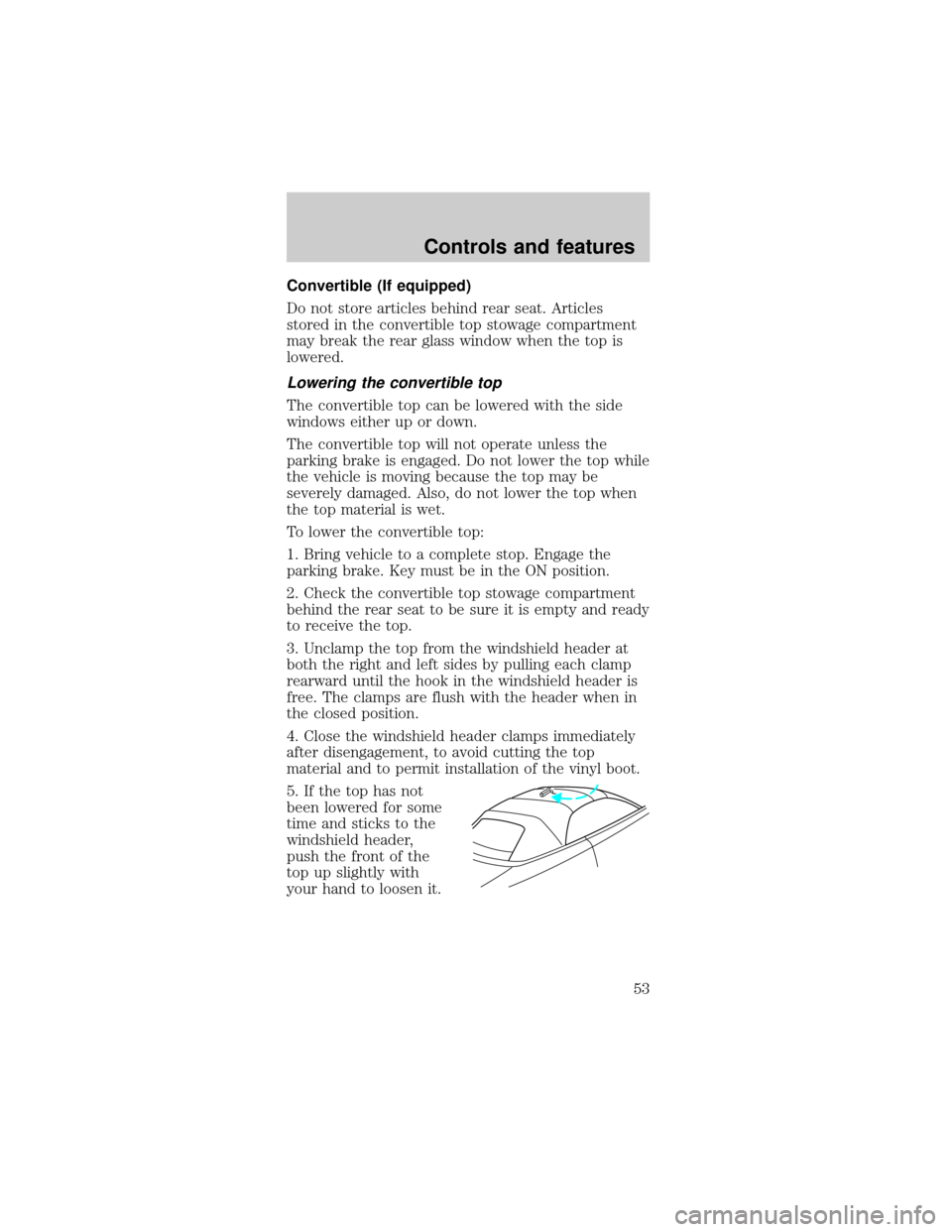
5. If the top has not
been lowered for some
time and sticks to the
windshield header,
push the front of the
top up slightly with
your hand to loosen it.
Controls and features
53
Page 58 of 192
Changes or modifications not expressly
approved by the party responsible for
compliance could void the user's authority to
operate the equipment.
Illuminated entry
The interior lamps illuminate when the remote entry
system is used to unlock the door(s) or sound the
personal alarm.
The system automatically turns off after 25 seconds
or when the ignition is turned to the START/RUN or
ACC position. The dome lamp control (if equipped)
mustnotbe set to the OFF position for the
illuminated entry system to operate.
The inside lights will not turn off if:
²they have been turned on with the dimmer
control or
²any door is open.
The battery saver will shut off the interior lamps
30 minutes after the ignition has been turned to the
OFF position, 10 minutes after if the door is left
open, and 30 minutes after if the trunk is left open
or the dome lamp switch is left on.
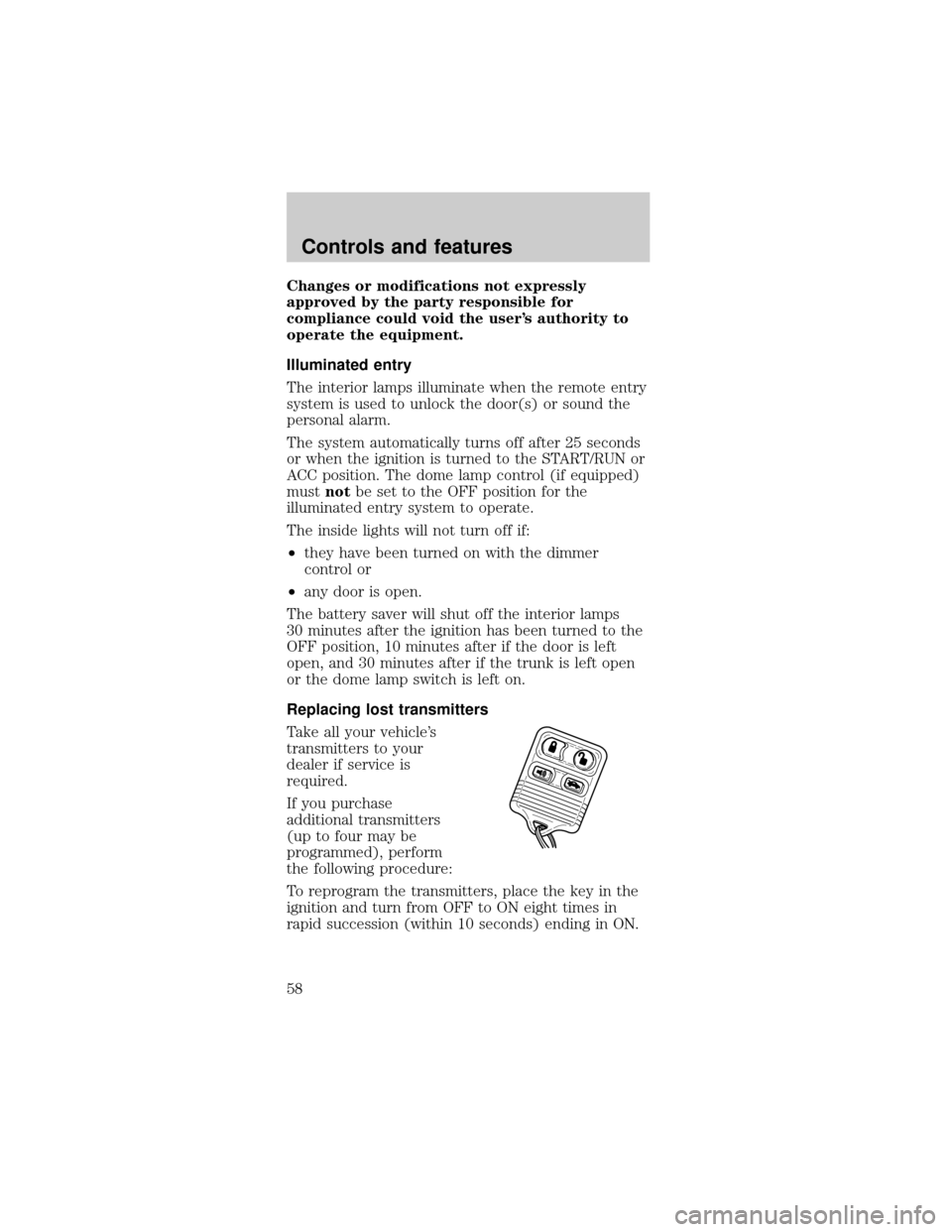
Replacing lost transmitters
Take all your vehicle's
transmitters to your
dealer if service is
required.
If you purchase
additional transmitters
(up to four may be
programmed), perform
the following procedure:
To reprogram the transmitters, place the key in the
ignition and turn from OFF to ON eight times in
rapid succession (within 10 seconds) ending in ON.
Controls and features
58
Page 61 of 192

Theft indicator
The theft indicator on the instrument cluster will
operate as follows:
²When the ignition is OFF, the theft indicator will
flash briefly every 2 seconds to indicate the
SecuriLockysystem is protecting your vehicle.
²
When the ignition is turned to RUN or START, the
theft indicator will light for 3 seconds and then go
out. If the theft indicator stays on for an extended
period of time or flashes rapidly, have the system
serviced by your dealership or a qualified technician.
Programming spare SecuriLockYkeys
Spare SecuriLockykeys can be purchased from
your dealership and programmed to your
SecuriLockypassive anti-theft system (up to a total
of 8 keys). Your dealership can program your new
SecuriLockykey(s) to your vehicle or you can do it
yourself using the following simple procedure. To
program a new SecuriLockykey yourself, you will
need two previously programmed SecuriLockykeys
(keys that already operate your vehicle's engine). If
two previously programmed SecuriLockykeys are
not available (one or both of your original keys were
lost or stolen), you must bring your vehicle to your
dealership to have the spare SecuriLockykey(s)
programmed.
Procedure to program spare SecuriLockYkeys
to your vehicle
New SecuriLockykeys must have the correct
mechanical key cut for your vehicle.
Conventional (non-SecuriLocky) keyscannotbe
programmed to your vehicle.
You will need to have two previously programmed
SecuriLockykeys and the new unprogrammed
SecuriLockykey readily accessible for the
procedure. Please read and understand the entire
procedure before you begin.
Controls and features
61
Page 62 of 192

1. Insert the first previously programmed
SecuriLockykey into the ignition and turn the
ignition from OFF to RUN (maintain ignition in RUN
for at least one second).
2. Turn ignition to OFF and remove the first
SecuriLockykey from the ignition.
3. Within five seconds of turning the ignition to OFF,
insert the second previously programmed
SecuriLockykey into the ignition and turn the
ignition from OFF to RUN (maintain ignition in RUN
for at least one second but no more than 5 seconds).
4. Turn the ignition to OFF and remove the second
SecuriLockykey from the ignition.
5. Within 10 seconds of turning the ignition to OFF,
insert the unprogrammed SecuriLockykey (new
key) into the ignition and turn the ignition from OFF
to RUN (maintain ignition in RUN for at least one
second). This step will program your new
SecuriLockykey.
6. To program additional SecuriLockykey(s), repeat
this procedure from step 1.
If the programming procedure was successful, the
new SecuriLockykey(s) will start the vehicle's
engine. The theft indicator (located on the
instrument cluster) will light for three seconds and
then go out.
If the programming procedure was not successful,
the new SecuriLockykey(s) will not operate the
vehicle's engine. The theft indicator will flash on and
off. Wait at least one minute and then repeat the
procedure from step 1. If failure repeats, bring your
vehicle to your dealership to have the spare
SecuriLockykey(s) programmed.
Controls and features
62
Page 70 of 192
Safety belt extension assembly
If the safety belt assembly is too short, even when
fully extended, 20 cm (8 inches) can be added to
the safety belt assembly by adding a safety belt
extension assembly (part number 611C22). Safety
belt extension assemblies can be obtained from your
dealer at no cost.
Use only extensions manufactured by the same
supplier as the safety belt. Manufacturer
identification is located at the end of the webbing on
the label. Also, use the safety belt extension only if
the safety belt is too short for you when fully
extended. Do not use extensions to change the fit of
the shoulder belt across the torso.
Safety belt warning light and indicator chime
The seat belt warning light illuminates in the
instrument cluster and a chime sounds to remind
the occupants to fasten their safety belts.
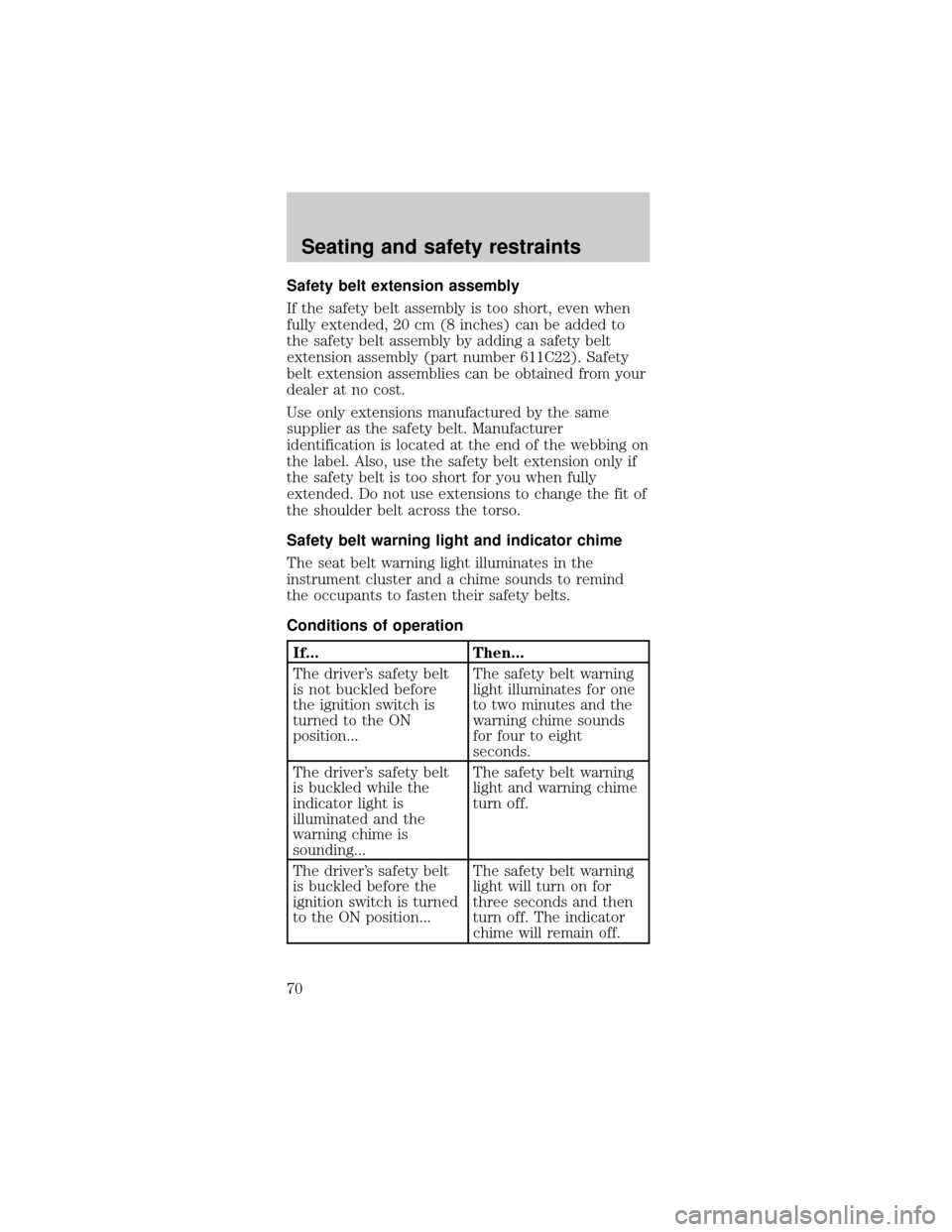
Conditions of operation
If... Then...
The driver's safety belt
is not buckled before
the ignition switch is
turned to the ON
position...The safety belt warning
light illuminates for one
to two minutes and the
warning chime sounds
for four to eight
seconds.
The driver's safety belt
is buckled while the
indicator light is
illuminated and the
warning chime is
sounding...The safety belt warning
light and warning chime
turn off.
The driver's safety belt
is buckled before the
ignition switch is turned
to the ON position...The safety belt warning
light will turn on for
three seconds and then
turn off. The indicator
chime will remain off.
Seating and safety restraints
70
Page 72 of 192
Important supplemental restraint system (SRS)
precautions
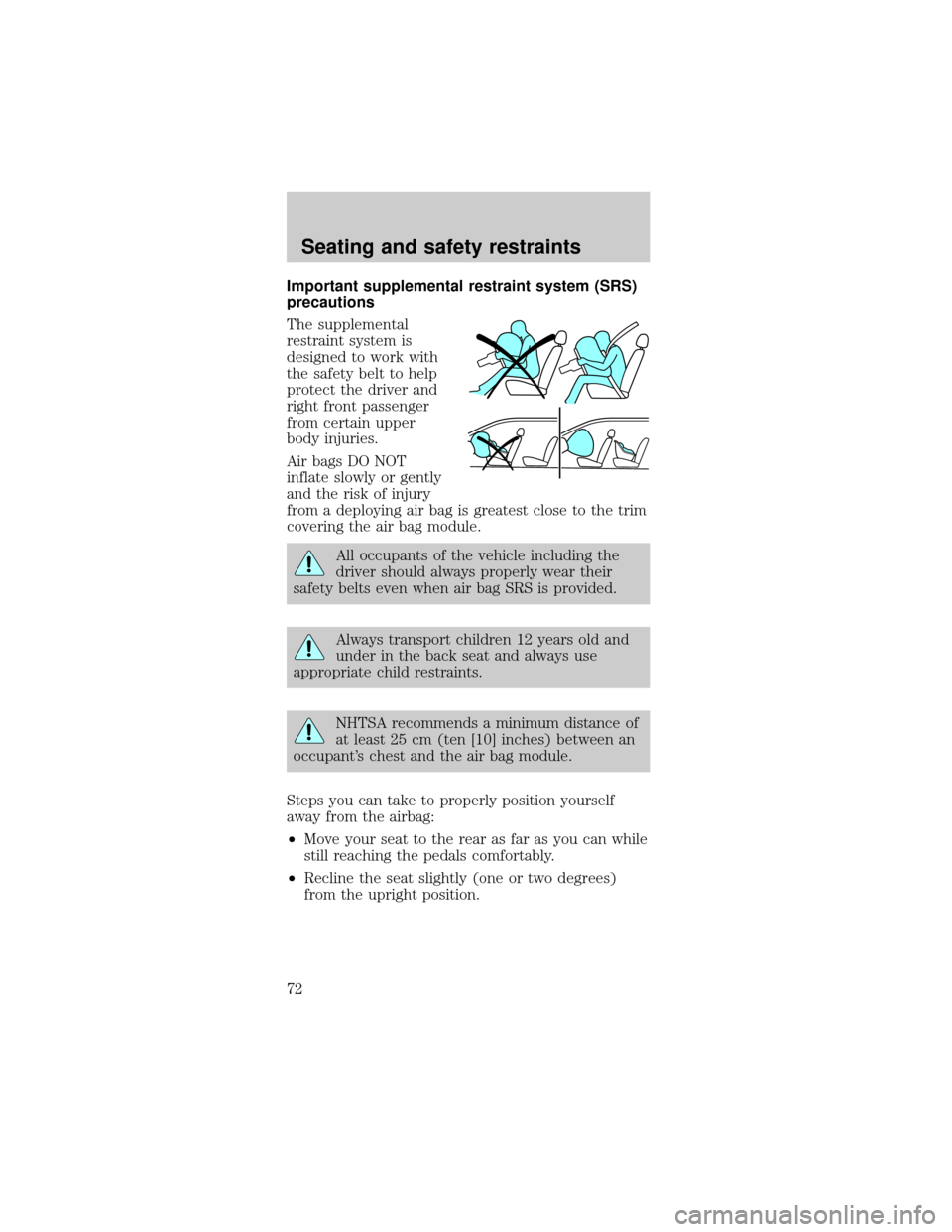
The supplemental
restraint system is
designed to work with
the safety belt to help
protect the driver and
right front passenger
from certain upper
body injuries.
Air bags DO NOT
inflate slowly or gently
and the risk of injury
from a deploying air bag is greatest close to the trim
covering the air bag module.
All occupants of the vehicle including the
driver should always properly wear their
safety belts even when air bag SRS is provided.
Always transport children 12 years old and
under in the back seat and always use
appropriate child restraints.
NHTSA recommends a minimum distance of
at least 25 cm (ten [10] inches) between an
occupant's chest and the air bag module.
Steps you can take to properly position yourself
away from the airbag:
²Move your seat to the rear as far as you can while
still reaching the pedals comfortably.
²Recline the seat slightly (one or two degrees)
from the upright position.
Seating and safety restraints
72