wheel FORD MUSTANG 2002 4.G Owners Manual
[x] Cancel search | Manufacturer: FORD, Model Year: 2002, Model line: MUSTANG, Model: FORD MUSTANG 2002 4.GPages: 264, PDF Size: 2.56 MB
Page 1 of 264
Introduction 4
Congratulations 4
Safety and environment protection 5
Symbol glossary 8
Instrument Cluster 10
Warning and control lights 10
Gauges 16
Entertainment Systems 20
AM/FM stereo cassette with CD 20
AM/FM stereo with CD 30
AM/FM stereo cassette (CD changer compatible) 45
Climate Controls 67
Manual heating and air conditioning 67
Lights 71
Headlamps 71
Bulb replacement 75
Driver Controls 81
Windshield wiper/washer control 81
Steering wheel adjustment 82
Power windows 83
Mirrors 84
Locks and Security 94
Keys 94
Locks 94
Anti-theft system 96
Table of Contents
1
Page 82 of 264
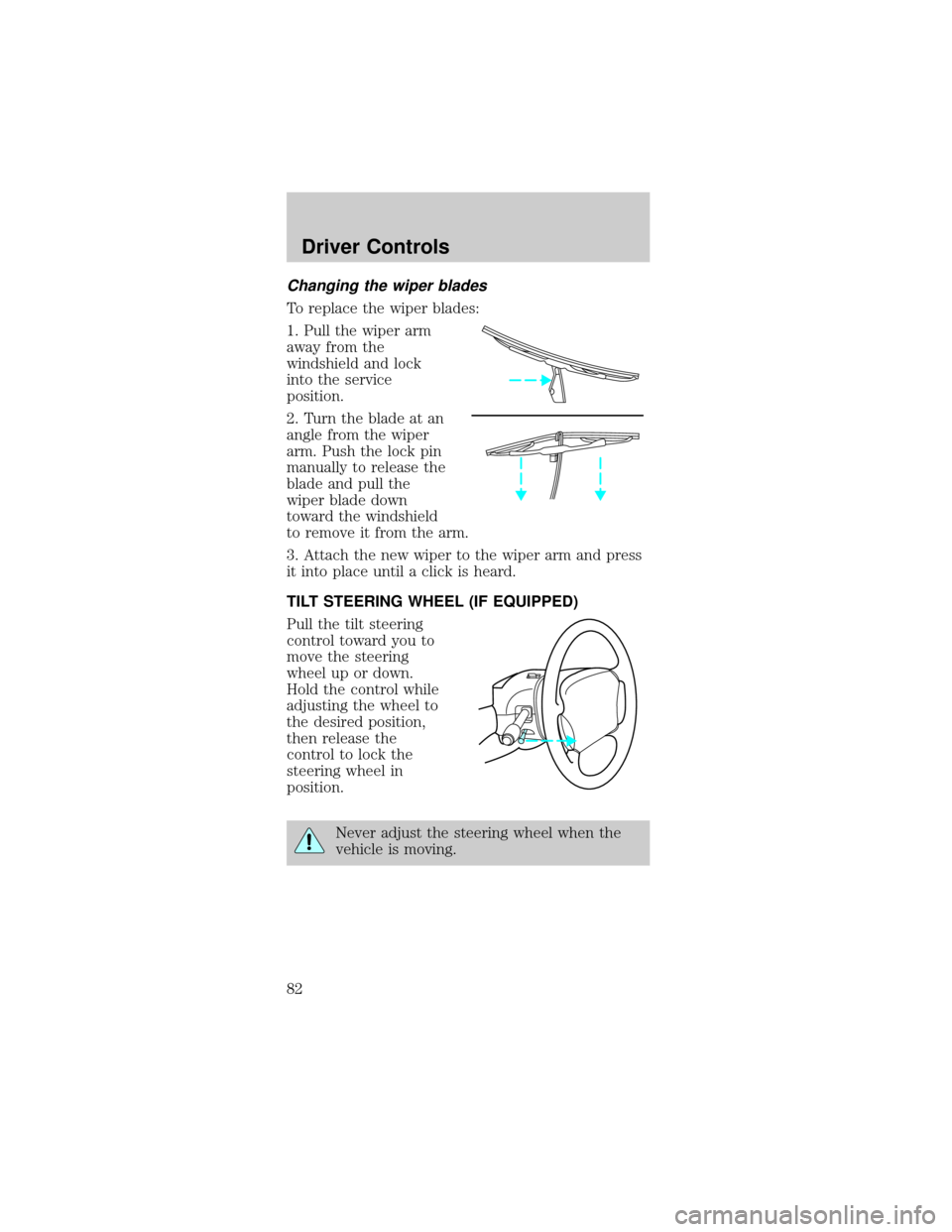
Changing the wiper blades
To replace the wiper blades:
1. Pull the wiper arm
away from the
windshield and lock
into the service
position.
2. Turn the blade at an
angle from the wiper
arm. Push the lock pin
manually to release the
blade and pull the
wiper blade down
toward the windshield
to remove it from the arm.
3. Attach the new wiper to the wiper arm and press
it into place until a click is heard.
TILT STEERING WHEEL (IF EQUIPPED)
Pull the tilt steering
control toward you to
move the steering
wheel up or down.
Hold the control while
adjusting the wheel to
the desired position,
then release the
control to lock the
steering wheel in
position.
Never adjust the steering wheel when the
vehicle is moving.
Driver Controls
82
Page 136 of 264

STARTING
Positions of the ignition
1. ACCESSORY, allows
the electrical
accessories such as the
radio to operate while
the engine is not
running. For manual
transmission, you must
depress the ignition
release lever.
2. LOCK, locks the steering wheel, automatic
transmission gearshift lever and allows key removal.
For manual transmission, you must depress the
ignition release lever.
3. OFF, shuts off the engine and all accessories
without locking the steering wheel. This position
also allows the automatic transmission shift lever to
be moved from the P (Park) position without the
brake pedal being depressed.
4. ON, all electrical circuits operational. Warning
lights illuminated. Key position when driving.
5. START, cranks the engine. Release the key as
soon as the engine starts.
Preparing to start your vehicle
Engine starting is controlled by the powertrain
control system. This system meets all Canadian
Interference-Causing Equipment standard
requirements regulating the impulse electrical field
strength of radio noise.
When starting a fuel-injected engine, avoid pressing
the accelerator before or during starting. Only use
the accelerator when you have difficulty starting the
engine. For more information on starting the vehicle,
refer toStarting the enginein this chapter.
3
1
2
5
4
Driving
136
Page 138 of 264
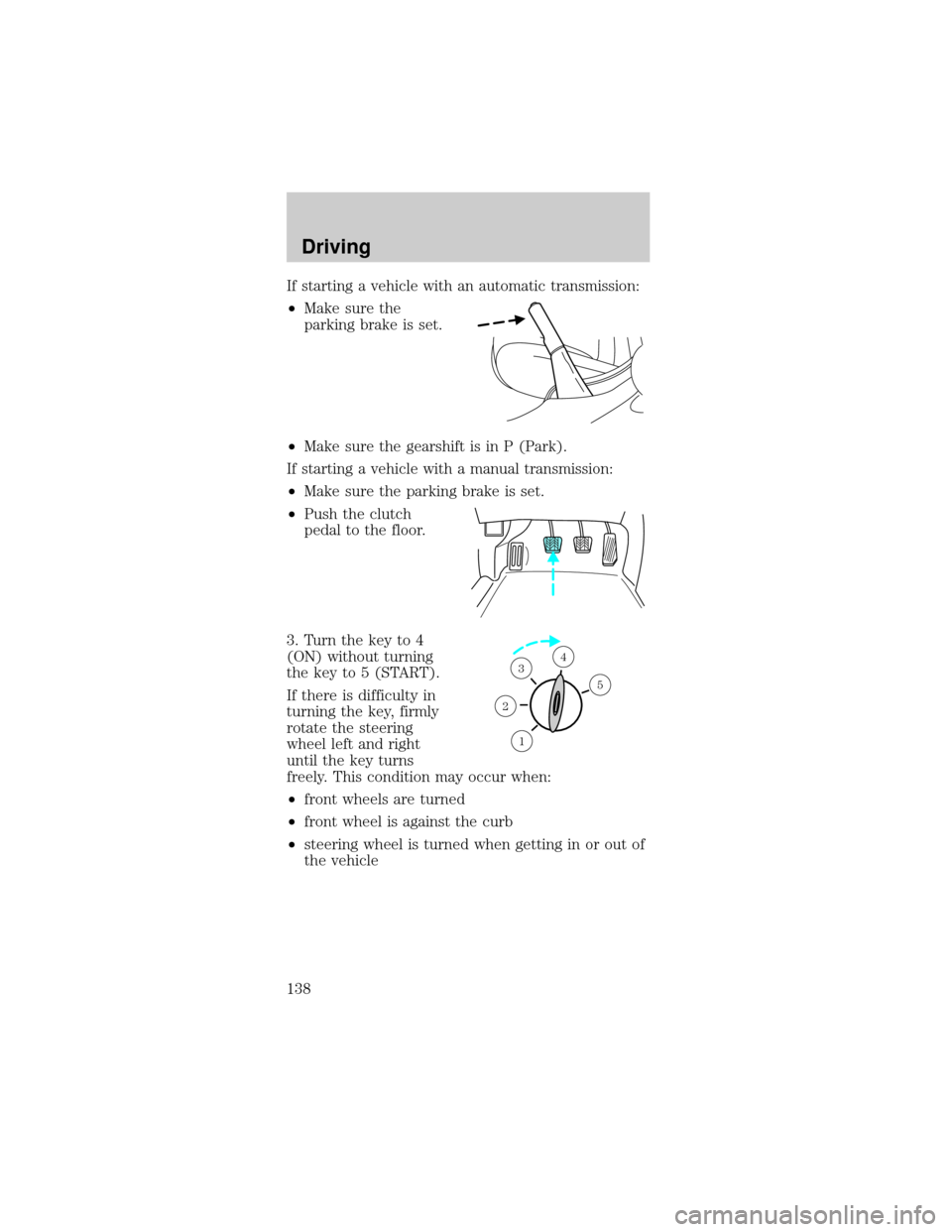
If starting a vehicle with an automatic transmission:
²Make sure the
parking brake is set.
²Make sure the gearshift is in P (Park).
If starting a vehicle with a manual transmission:
²Make sure the parking brake is set.
²Push the clutch
pedal to the floor.
3. Turn the key to 4
(ON) without turning
the key to 5 (START).
If there is difficulty in
turning the key, firmly
rotate the steering
wheel left and right
until the key turns
freely. This condition may occur when:
²front wheels are turned
²front wheel is against the curb
²steering wheel is turned when getting in or out of
the vehicle
1
2
34
5
Driving
138
Page 143 of 264
Always set the parking brake fully and make
sure that the gearshift is securely latched in
P (Park) (automatic transmission) or in 1 (First
Gear) (manual transmission).
The parking brake is not recommended to stop a
moving vehicle. However, if the normal brakes fail,
the parking brake can be used to stop your vehicle
in an emergency. Since the parking brake applies
only the rear brakes, the vehicle's stopping distance
will increase greatly and the handling of your vehicle
will be adversely affected.
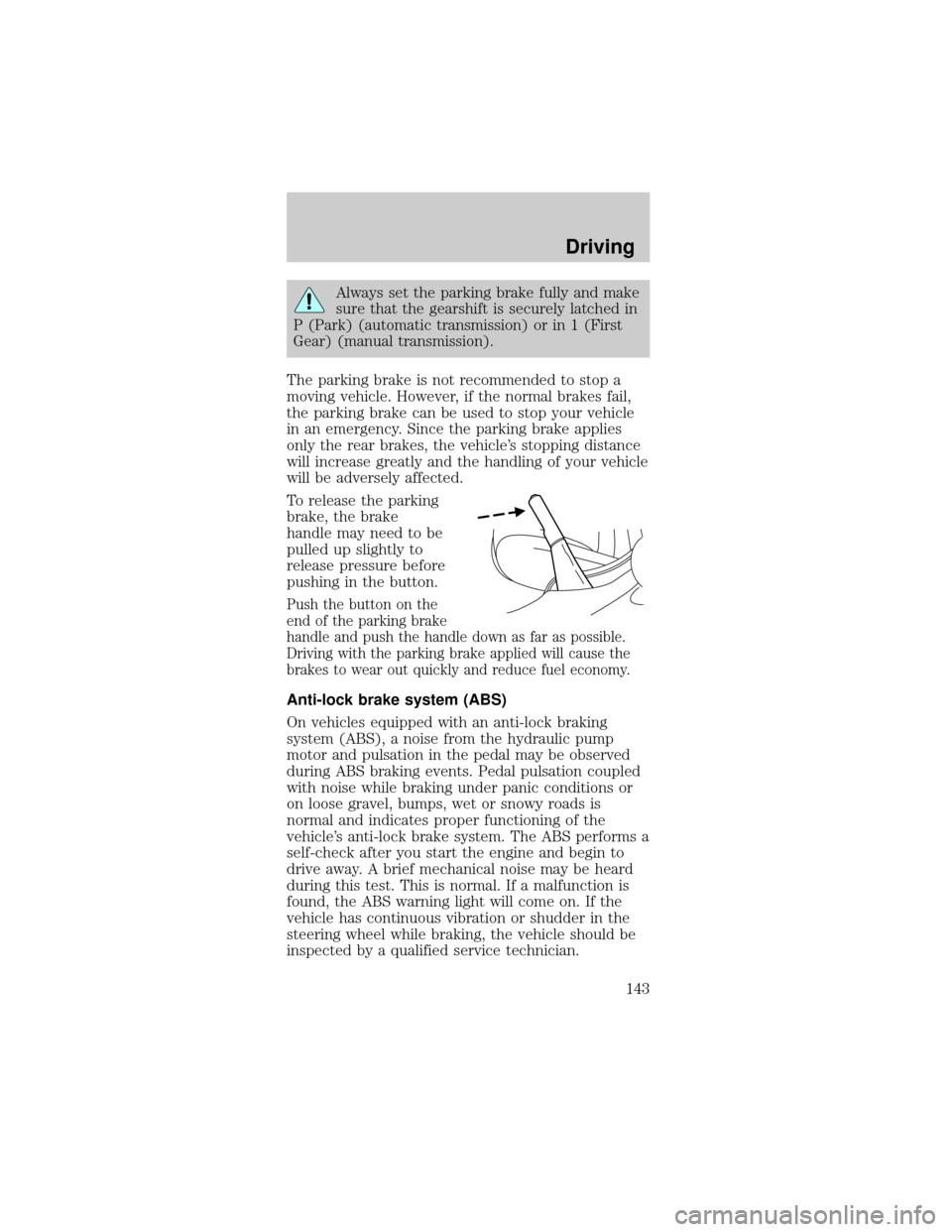
To release the parking
brake, the brake
handle may need to be
pulled up slightly to
release pressure before
pushing in the button.
Push the button on the
end of the parking brake
handle and push the handle down as far as possible.
Driving with the parking brake applied will cause the
brakes to wear out quickly and reduce fuel economy.
Anti-lock brake system (ABS)
On vehicles equipped with an anti-lock braking
system (ABS), a noise from the hydraulic pump
motor and pulsation in the pedal may be observed
during ABS braking events. Pedal pulsation coupled
with noise while braking under panic conditions or
on loose gravel, bumps, wet or snowy roads is
normal and indicates proper functioning of the
vehicle's anti-lock brake system. The ABS performs a
self-check after you start the engine and begin to
drive away. A brief mechanical noise may be heard
during this test. This is normal. If a malfunction is
found, the ABS warning light will come on. If the
vehicle has continuous vibration or shudder in the
steering wheel while braking, the vehicle should be
inspected by a qualified service technician.
Driving
143
Page 144 of 264
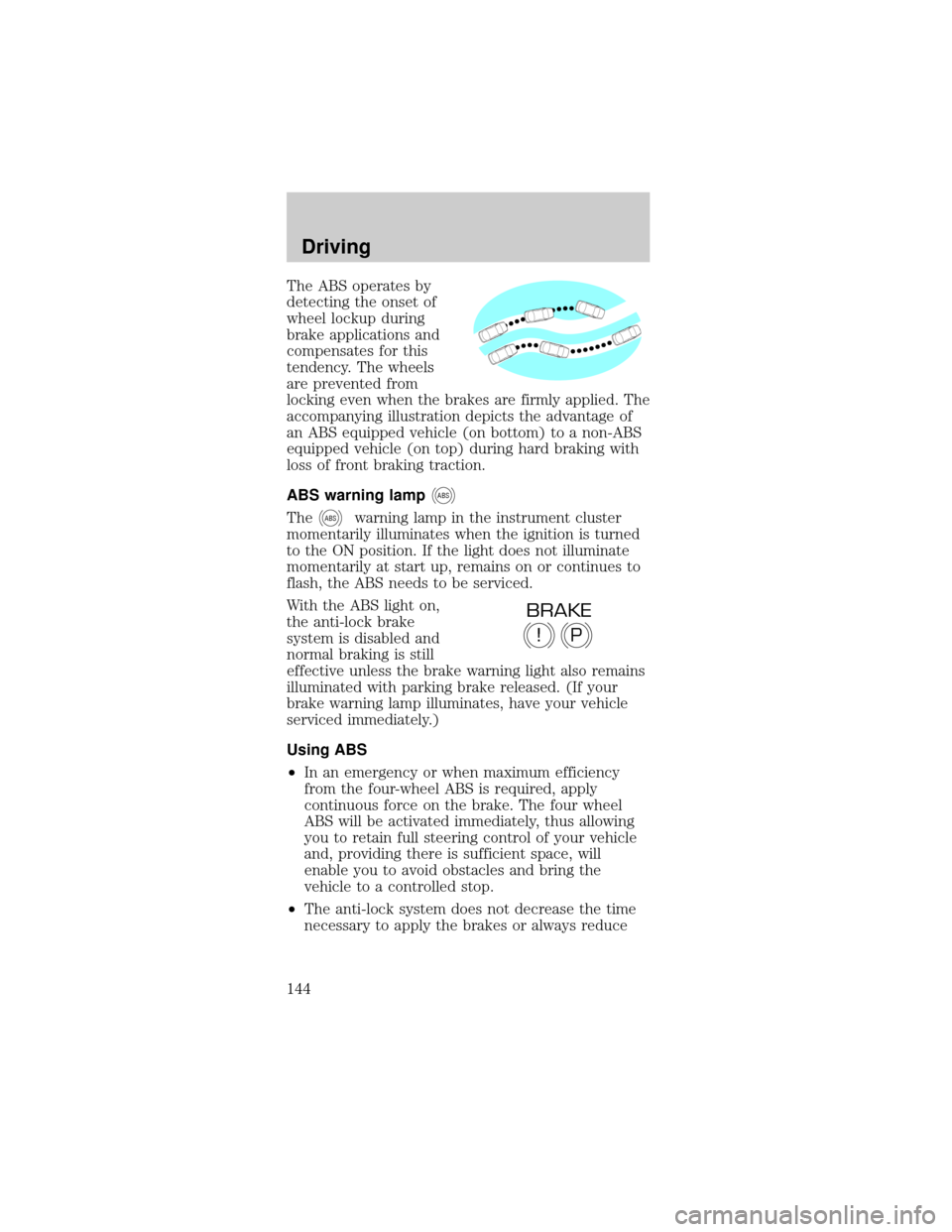
The ABS operates by
detecting the onset of
wheel lockup during
brake applications and
compensates for this
tendency. The wheels
are prevented from
locking even when the brakes are firmly applied. The
accompanying illustration depicts the advantage of
an ABS equipped vehicle (on bottom) to a non-ABS
equipped vehicle (on top) during hard braking with
loss of front braking traction.
ABS warning lamp
ABS
TheABSwarning lamp in the instrument cluster
momentarily illuminates when the ignition is turned
to the ON position. If the light does not illuminate
momentarily at start up, remains on or continues to
flash, the ABS needs to be serviced.
With the ABS light on,
the anti-lock brake
system is disabled and
normal braking is still
effective unless the brake warning light also remains
illuminated with parking brake released. (If your
brake warning lamp illuminates, have your vehicle
serviced immediately.)
Using ABS
²In an emergency or when maximum efficiency
from the four-wheel ABS is required, apply
continuous force on the brake. The four wheel
ABS will be activated immediately, thus allowing
you to retain full steering control of your vehicle
and, providing there is sufficient space, will
enable you to avoid obstacles and bring the
vehicle to a controlled stop.
²The anti-lock system does not decrease the time
necessary to apply the brakes or always reduce
P!
BRAKE
Driving
144
Page 145 of 264

stopping distance. Always leave enough room
between your vehicle and the vehicle in front of
you to stop.
²We recommend that you familiarize yourself with
this braking technique. However, avoid taking any
unnecessary risks.
Hydraulic brake booster system (Hydroboost)
The Hydroboost system receives fluid pressure from
the power steering pump to provide power assist
during braking.
The sound of the pump operating may be heard by
the driver, but this is a normal characteristic of the
system.
For Hydroboost-equipped vehicles operating under
normal conditions, the noise of the fluid flowing
through the booster may be heard whenever the
brake is applied. This condition is normal. Vehicle
service is not required.
If braking performance or pedal response becomes
very poor, even when the pedal is strongly
depressed, it may indicate the presence of air in the
hydraulic system or leakage of fluid. Stop the vehicle
safely as soon as possible and seek service
immediately.
TRACTION CONTROLY
Your vehicle may be equipped with the optional
Traction Controlysystem. This system helps you
maintain the stability and steerability of your
vehicle. It is especially useful on slippery road
surfaces. The system operates by detecting and
controlling wheel spin. The system borrows many of
the electronic and mechanical elements already
present in the anti-lock braking system (ABS).
Wheel-speed sensors allow excess rear wheel spin to
be detected by the Traction Controlyportion of the
ABS computer. Any excessive wheel spin is
controlled by automatically applying and releasing
the rear brakes in conjunction with engine torque
Driving
145
Page 146 of 264
reductions. Engine torque reduction is realized via
the fully electronic spark and fuel injection systems.
This process is very sensitive to driving conditions
and very fast acting. The rear wheels ªsearchº for
optimum traction several times a second and
adjustments are made accordingly.
The Traction Controlysystem will allow your
vehicle to make better use of available traction on
slippery surfaces. The system is a driver aid which
makes your vehicle easier to handle primarily on
snow, ice covered and gravel roads.
During Traction
Controlyoperation,
the traction control
active light will
illuminate, you may hear an electric motor type of
sound coming from the engine compartment and the
engine will not ªrev-upº when you push further on
the accelerator. This is normal system behavior.
The Traction Controly
on/off switch, located
below the radio,
illuminates when the
system is OFF. The
Traction Controly
system will revert to the ON position every time the
ignition is turned OFF and ON.
If you should become stuck in snow or ice or on a
very slippery road surface, try switching the Traction
Controlysystem off. This may allow excess wheel
spin to ªdigº the vehicle out and enable a successful
ªrockingº maneuver.
If a system fault is detected the OFF indicator lamp
on the traction control switch will be illuminated and
your vehicle should be serviced.
Driving
146
Page 147 of 264

STEERING
Your vehicle is equipped with power steering. Power
steering uses energy from the engine to help steer
the vehicle.
To prevent damage to the power steering pump:
²Never hold the steering wheel to the extreme
right or the extreme left for more than a few
seconds when the engine is running.
²Do not operate the vehicle with a low power
steering pump fluid level (below the MIN mark on
the reservoir).
If the power steering system breaks down (or if the
engine is turned off), you can steer the vehicle
manually, but it takes more effort.
If the steering wanders or pulls, the condition could
be caused by any of the following:
²underinflated tire(s) on any wheel(s)
²uneven vehicle loading
²high crown in center of road
²high crosswinds
²wheels out of alignment
²loose or worn suspension components
TRACTION-LOK AXLE (IF EQUIPPED)
This axle provides added traction on slippery
surfaces, particularly when one wheel is on a poor
traction surface. Under normal conditions, the
Traction-Lok axle functions like a standard rear axle.
Extended use of other than the manufacturer's
specified size tires on a Traction-Lok rear axle could
result in a permanent reduction in effectiveness.
This loss of effectiveness does not affect normal
driving and should not be noticeable to the driver.
Driving
147
Page 148 of 264
To reduce the risk of injury, never run the
engine with one wheel off the ground, such
as when changing a tire.
AUTOMATIC TRANSMISSION OPERATION
(IF EQUIPPED)
Brake-shift interlock
This vehicle is equipped with a brake-shift interlock
feature that prevents the gearshift lever from being
moved from P (Park) when the ignition is in the ON
position unless brake pedal is depressed.
If you cannot move the gearshift lever out of P
(Park) with ignition in the ON position and the
brake pedal depressed:
1. Apply the parking brake, turn ignition key to
LOCK, then remove the key.
2. Insert the key and turn it to OFF.Apply the
brake pedal and shift to N (Neutral).
In the ignition OFF position, the automatic
transmission shift lever can be moved from
the P (Park) position without the brake pedal
depressed. To avoid unwanted vehicle movement,
always set the parking brake.
3. Start the vehicle.
If it is necessary to use the above procedure to
move the gearshift lever, it is possible that a fuse
has blown or the vehicle's brakelamps are not
operating properly. Refer toFuses and relaysin the
Roadside emergencieschapter.
Do not drive your vehicle until you verify
that the brakelamps are working.
Driving
148