USB FORD MUSTANG 2014 5.G User Guide
[x] Cancel search | Manufacturer: FORD, Model Year: 2014, Model line: MUSTANG, Model: FORD MUSTANG 2014 5.GPages: 461, PDF Size: 5.47 MB
Page 366 of 461
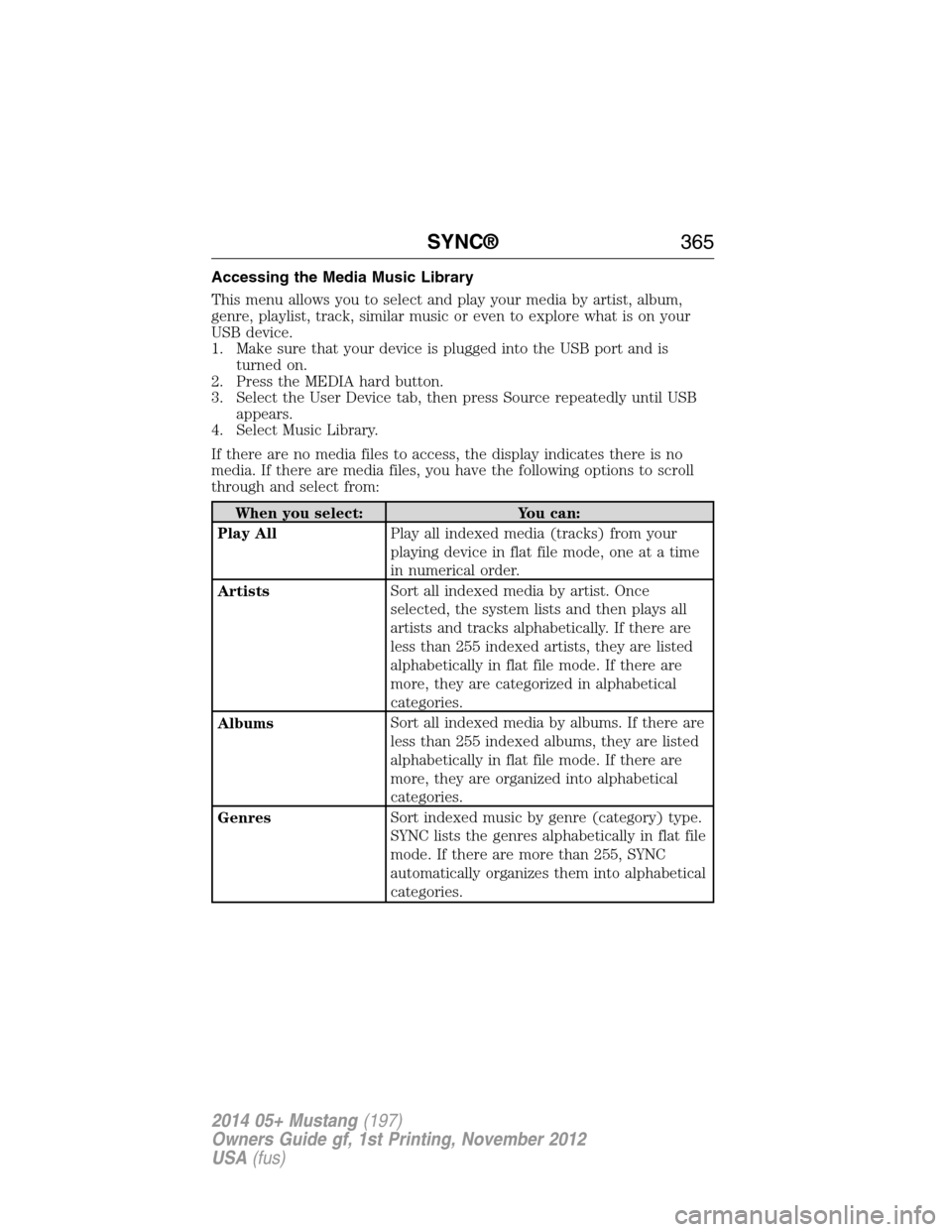
Accessing the Media Music Library
This menu allows you to select and play your media by artist, album,
genre, playlist, track, similar music or even to explore what is on your
USB device.
1. Make sure that your device is plugged into the USB port and is
turned on.
2. Press the MEDIA hard button.
3. Select the User Device tab, then press Source repeatedly until USB
appears.
4. Select Music Library.
If there are no media files to access, the display indicates there is no
media. If there are media files, you have the following options to scroll
through and select from:
When you select: You can:
Play AllPlay all indexed media (tracks) from your
playing device in flat file mode, one at a time
in numerical order.
ArtistsSort all indexed media by artist. Once
selected, the system lists and then plays all
artists and tracks alphabetically. If there are
less than 255 indexed artists, they are listed
alphabetically in flat file mode. If there are
more, they are categorized in alphabetical
categories.
AlbumsSort all indexed media by albums. If there are
less than 255 indexed albums, they are listed
alphabetically in flat file mode. If there are
more, they are organized into alphabetical
categories.
GenresSort indexed music by genre (category) type.
SYNC lists the genres alphabetically in flat file
mode. If there are more than 255, SYNC
automatically organizes them into alphabetical
categories.
SYNC®365
2014 05+ Mustang(197)
Owners Guide gf, 1st Printing, November 2012
USA(fus)
Page 367 of 461
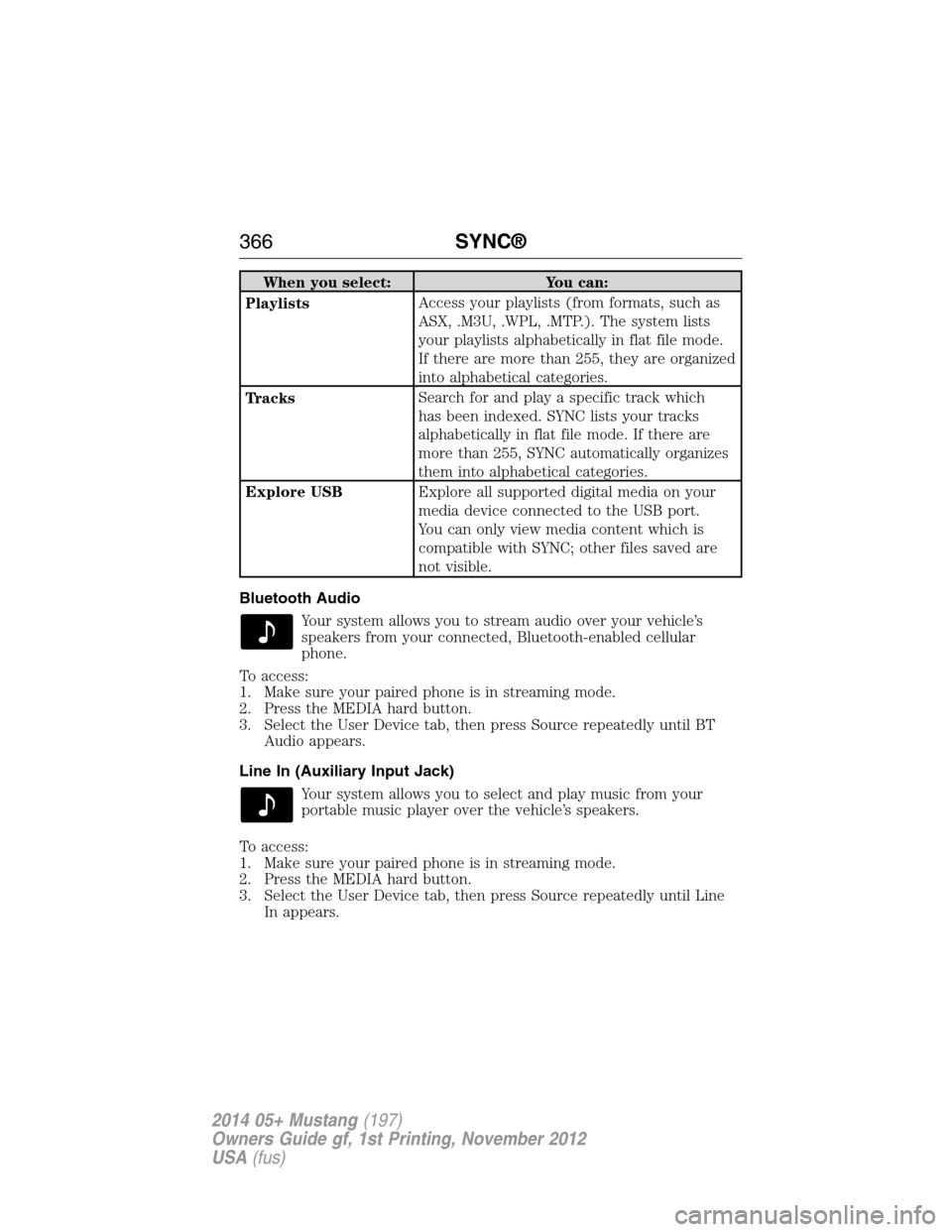
When you select: You can:
PlaylistsAccess your playlists (from formats, such as
ASX, .M3U, .WPL, .MTP.). The system lists
your playlists alphabetically in flat file mode.
If there are more than 255, they are organized
into alphabetical categories.
TracksSearch for and play a specific track which
has been indexed. SYNC lists your tracks
alphabetically in flat file mode. If there are
more than 255, SYNC automatically organizes
them into alphabetical categories.
Explore USBExplore all supported digital media on your
media device connected to the USB port.
You can only view media content which is
compatible with SYNC; other files saved are
not visible.
Bluetooth Audio
Your system allows you to stream audio over your vehicle’s
speakers from your connected, Bluetooth-enabled cellular
phone.
To access:
1. Make sure your paired phone is in streaming mode.
2. Press the MEDIA hard button.
3. Select the User Device tab, then press Source repeatedly until BT
Audio appears.
Line In (Auxiliary Input Jack)
Your system allows you to select and play music from your
portable music player over the vehicle’s speakers.
To access:
1. Make sure your paired phone is in streaming mode.
2. Press the MEDIA hard button.
3. Select the User Device tab, then press Source repeatedly until Line
In appears.
366SYNC®
2014 05+ Mustang(197)
Owners Guide gf, 1st Printing, November 2012
USA(fus)
Page 371 of 461
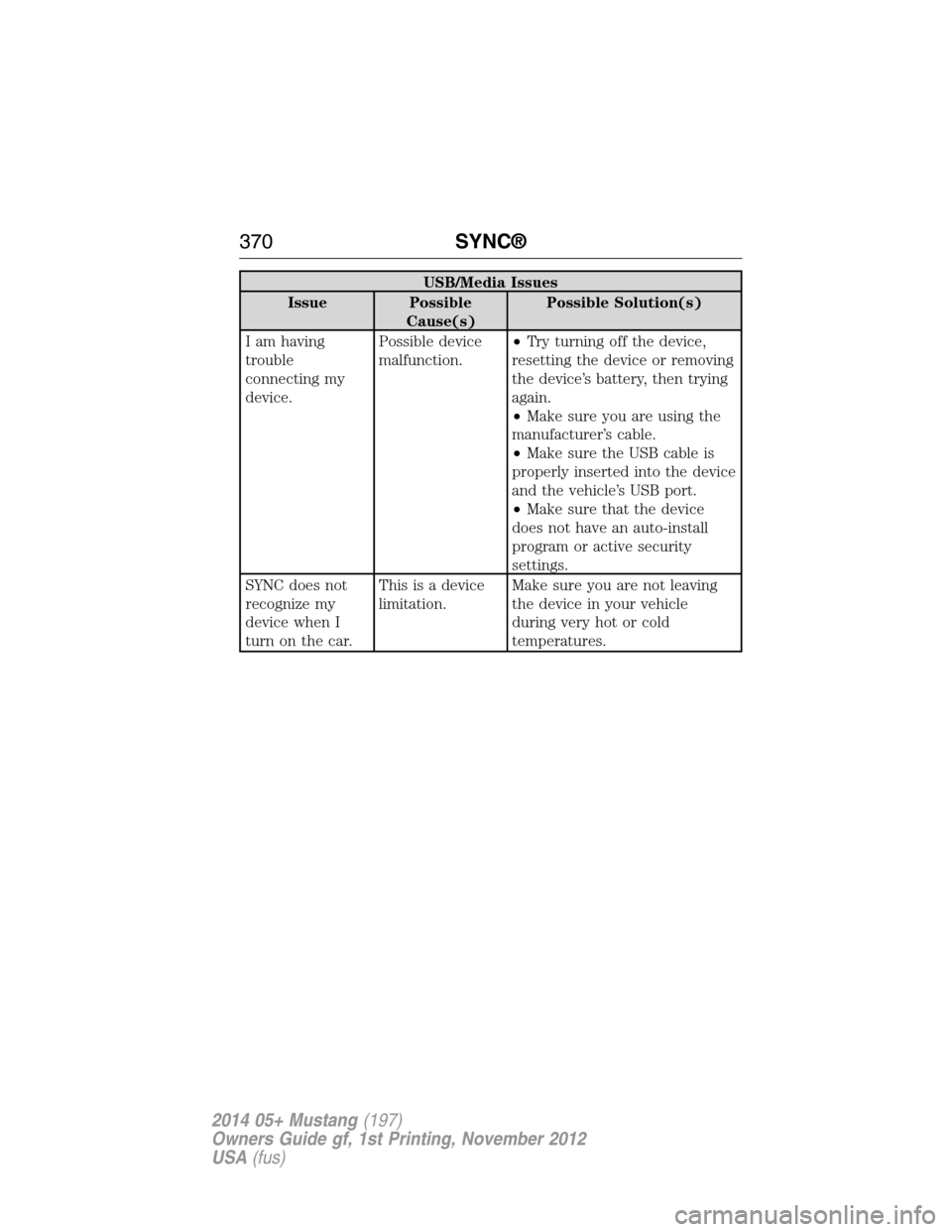
USB/Media Issues
Issue Possible
Cause(s)Possible Solution(s)
I am having
trouble
connecting my
device.Possible device
malfunction.•Try turning off the device,
resetting the device or removing
the device’s battery, then trying
again.
•Make sure you are using the
manufacturer’s cable.
•Make sure the USB cable is
properly inserted into the device
and the vehicle’s USB port.
•Make sure that the device
does not have an auto-install
program or active security
settings.
SYNC does not
recognize my
device when I
turn on the car.This is a device
limitation.Make sure you are not leaving
the device in your vehicle
during very hot or cold
temperatures.
370SYNC®
2014 05+ Mustang(197)
Owners Guide gf, 1st Printing, November 2012
USA(fus)
Page 372 of 461
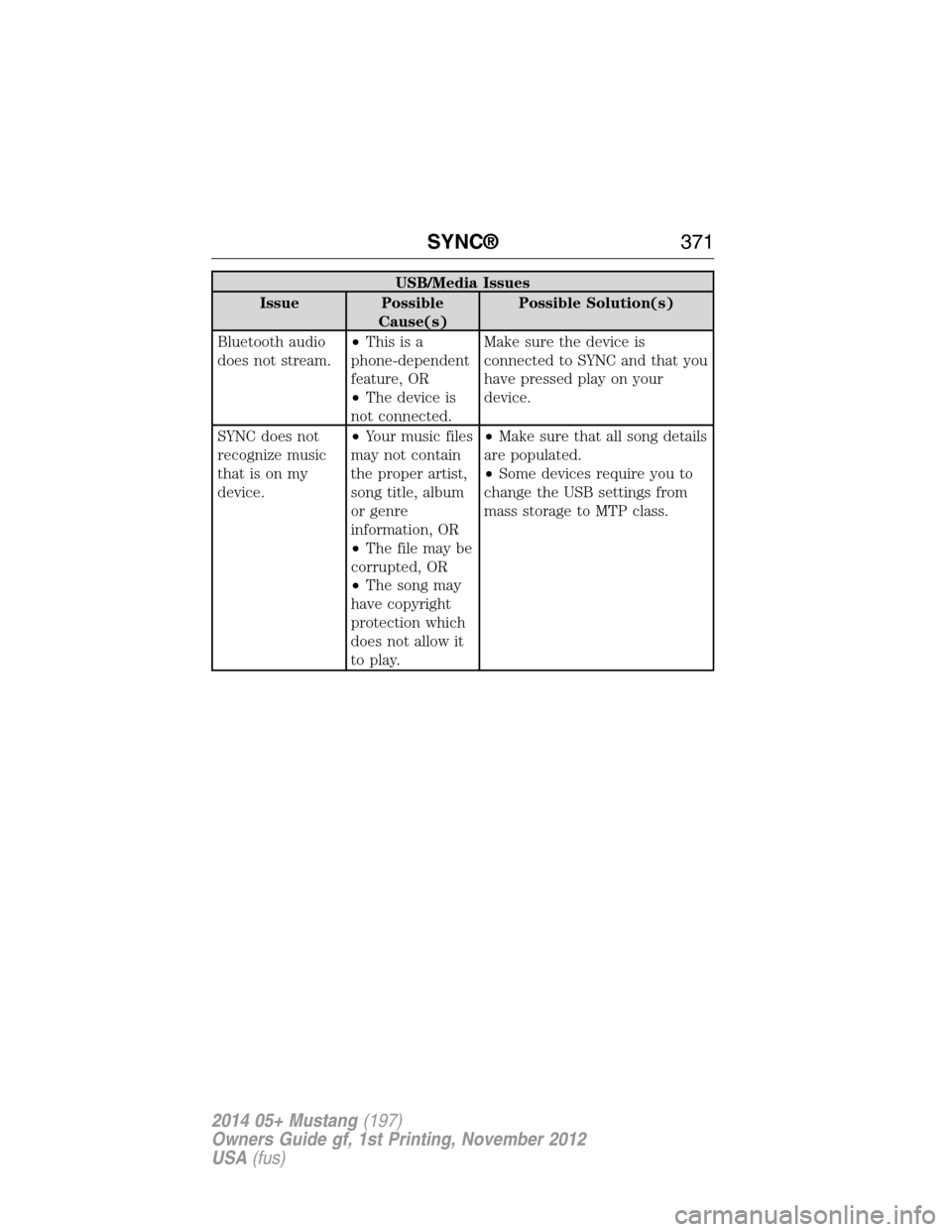
USB/Media Issues
Issue Possible
Cause(s)Possible Solution(s)
Bluetooth audio
does not stream.•Thisisa
phone-dependent
feature, OR
•The device is
not connected.Make sure the device is
connected to SYNC and that you
have pressed play on your
device.
SYNC does not
recognize music
that is on my
device.•Your music files
may not contain
the proper artist,
song title, album
or genre
information, OR
•The file may be
corrupted, OR
•The song may
have copyright
protection which
does not allow it
to play.•Make sure that all song details
are populated.
•Some devices require you to
change the USB settings from
mass storage to MTP class.
SYNC®371
2014 05+ Mustang(197)
Owners Guide gf, 1st Printing, November 2012
USA(fus)
Page 377 of 461
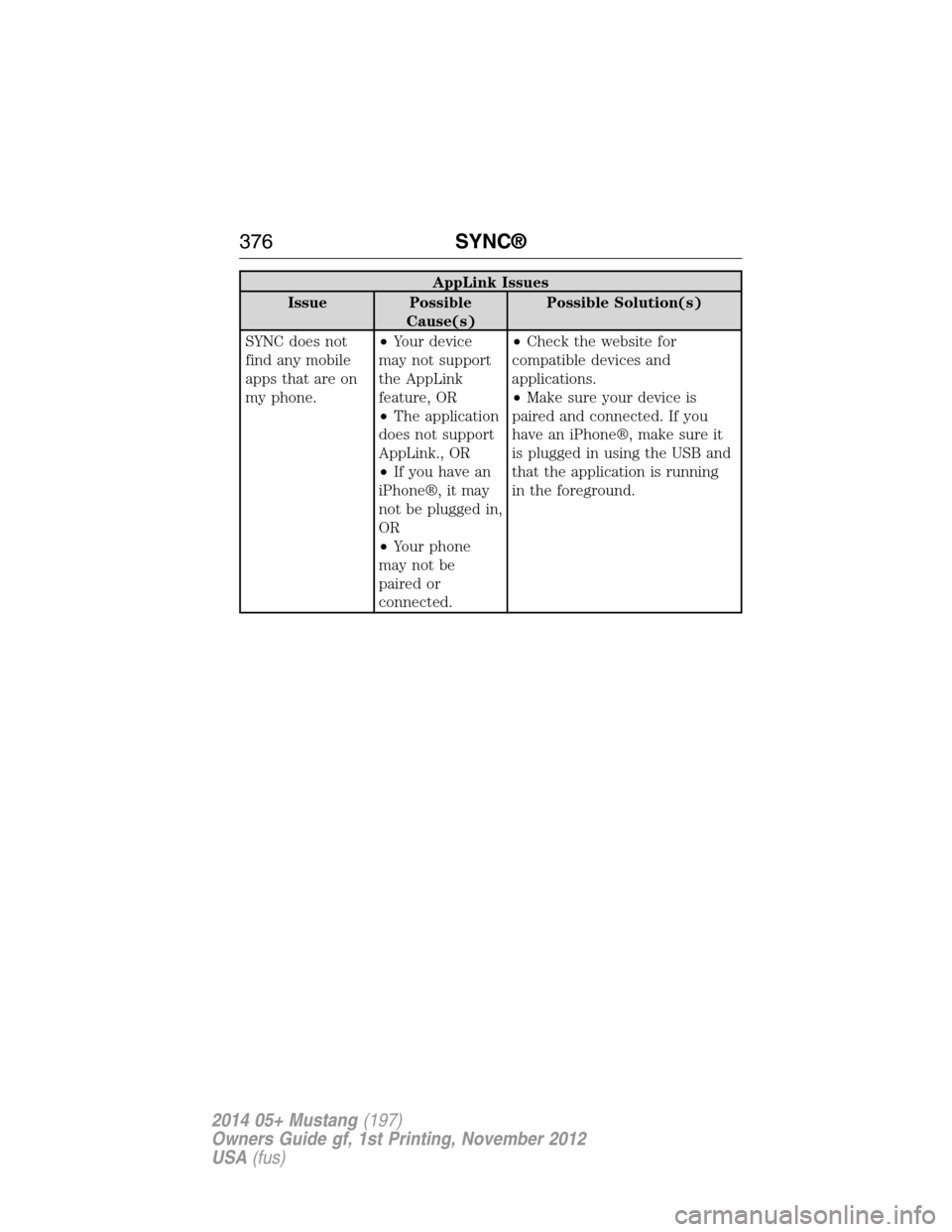
AppLink Issues
Issue Possible
Cause(s)Possible Solution(s)
SYNC does not
find any mobile
apps that are on
my phone.•Your device
may not support
the AppLink
feature, OR
•The application
does not support
AppLink., OR
•If you have an
iPhone®, it may
not be plugged in,
OR
•Your phone
may not be
paired or
connected.•Check the website for
compatible devices and
applications.
•Make sure your device is
paired and connected. If you
have an iPhone®, make sure it
is plugged in using the USB and
that the application is running
in the foreground.
376SYNC®
2014 05+ Mustang(197)
Owners Guide gf, 1st Printing, November 2012
USA(fus)
Page 391 of 461
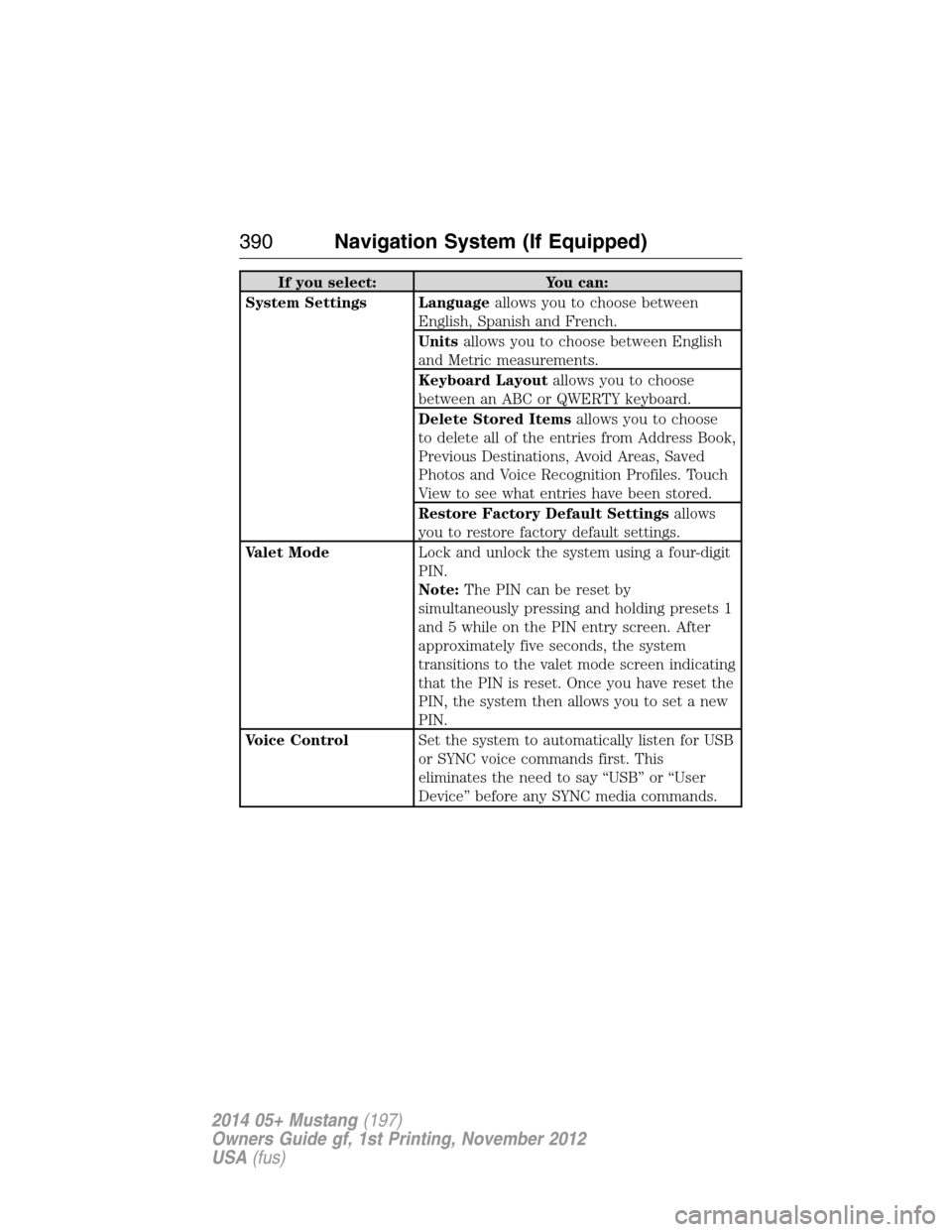
If you select: You can:
System Settings Languageallows you to choose between
English, Spanish and French.
Unitsallows you to choose between English
and Metric measurements.
Keyboard Layoutallows you to choose
between an ABC or QWERTY keyboard.
Delete Stored Itemsallows you to choose
to delete all of the entries from Address Book,
Previous Destinations, Avoid Areas, Saved
Photos and Voice Recognition Profiles. Touch
View to see what entries have been stored.
Restore Factory Default Settingsallows
you to restore factory default settings.
Valet ModeLock and unlock the system using a four-digit
PIN.
Note:The PIN can be reset by
simultaneously pressing and holding presets 1
and 5 while on the PIN entry screen. After
approximately five seconds, the system
transitions to the valet mode screen indicating
that the PIN is reset. Once you have reset the
PIN, the system then allows you to set a new
PIN.
Voice ControlSet the system to automatically listen for USB
or SYNC voice commands first. This
eliminates the need to say “USB” or “User
Device” before any SYNC media commands.
390Navigation System (If Equipped)
2014 05+ Mustang(197)
Owners Guide gf, 1st Printing, November 2012
USA(fus)
Page 393 of 461
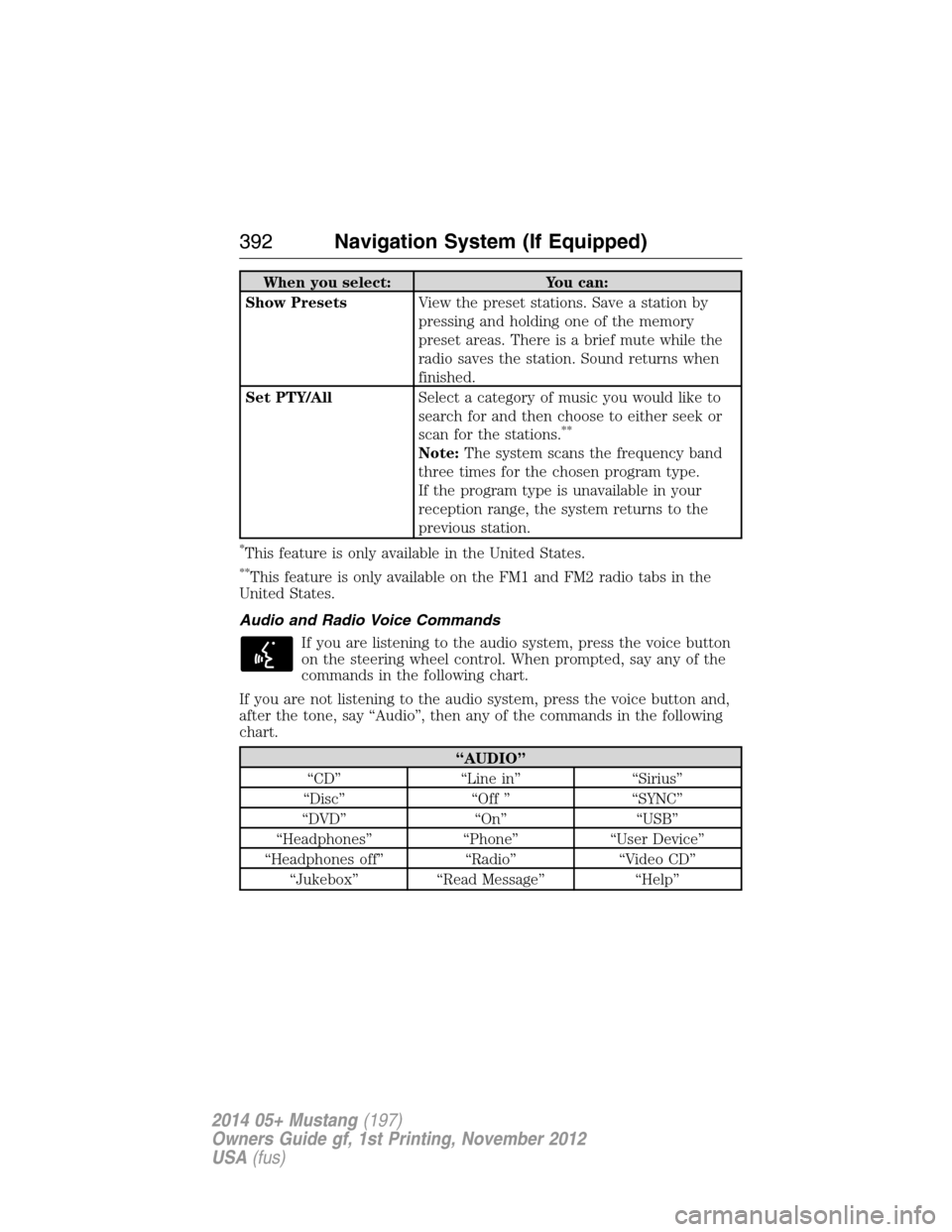
When you select: You can:
Show PresetsView the preset stations. Save a station by
pressing and holding one of the memory
preset areas. There is a brief mute while the
radio saves the station. Sound returns when
finished.
Set PTY/AllSelect a category of music you would like to
search for and then choose to either seek or
scan for the stations.
**
Note:The system scans the frequency band
three times for the chosen program type.
If the program type is unavailable in your
reception range, the system returns to the
previous station.
*This feature is only available in the United States.
**This feature is only available on the FM1 and FM2 radio tabs in the
United States.
Audio and Radio Voice Commands
If you are listening to the audio system, press the voice button
on the steering wheel control. When prompted, say any of the
commands in the following chart.
If you are not listening to the audio system, press the voice button and,
after the tone, say “Audio”, then any of the commands in the following
chart.
“AUDIO”
“CD” “Line in” “Sirius”
“Disc” “Off ” “SYNC”
“DVD” “On” “USB”
“Headphones” “Phone” “User Device”
“Headphones off” “Radio” “Video CD”
“Jukebox” “Read Message” “Help”
392Navigation System (If Equipped)
2014 05+ Mustang(197)
Owners Guide gf, 1st Printing, November 2012
USA(fus)
Page 459 of 461
opening the trunk .....................66
replacing the batteries .............56
Reverse sensing system ...........186
Roadside assistance ..................216
S
Safety Belt Maintenance ............42
Safety belts (see Safety
restraints) ....................................35
Safety defects, reporting ..........229
Safety information ....................337
Safety restraints ....................35–36
Belt-Minder® ............................39
extension assembly ..................38
for adults .............................35–36
for children ...............................24
safety belt maintenance ...........42
seat belt maintenance ..............42
warning light and chime ..........39
Safety restraints - LATCH
anchors ........................................28
Safety seats for children ............24
Safety Compliance
Certification Label ....................311
Satellite Radio ...................122, 402
Scheduled Maintenance Guide
Normal Scheduled
Maintenance and Log .............323
SD card ......................................418
Seat belts (see Safety
restraints) ....................................35
Seats ..........................................145
child safety seats ......................24
front seats .......................142–143heated ......................................144
second row seats ....................145
SecuriLock passive anti-theft
system ..........................................70
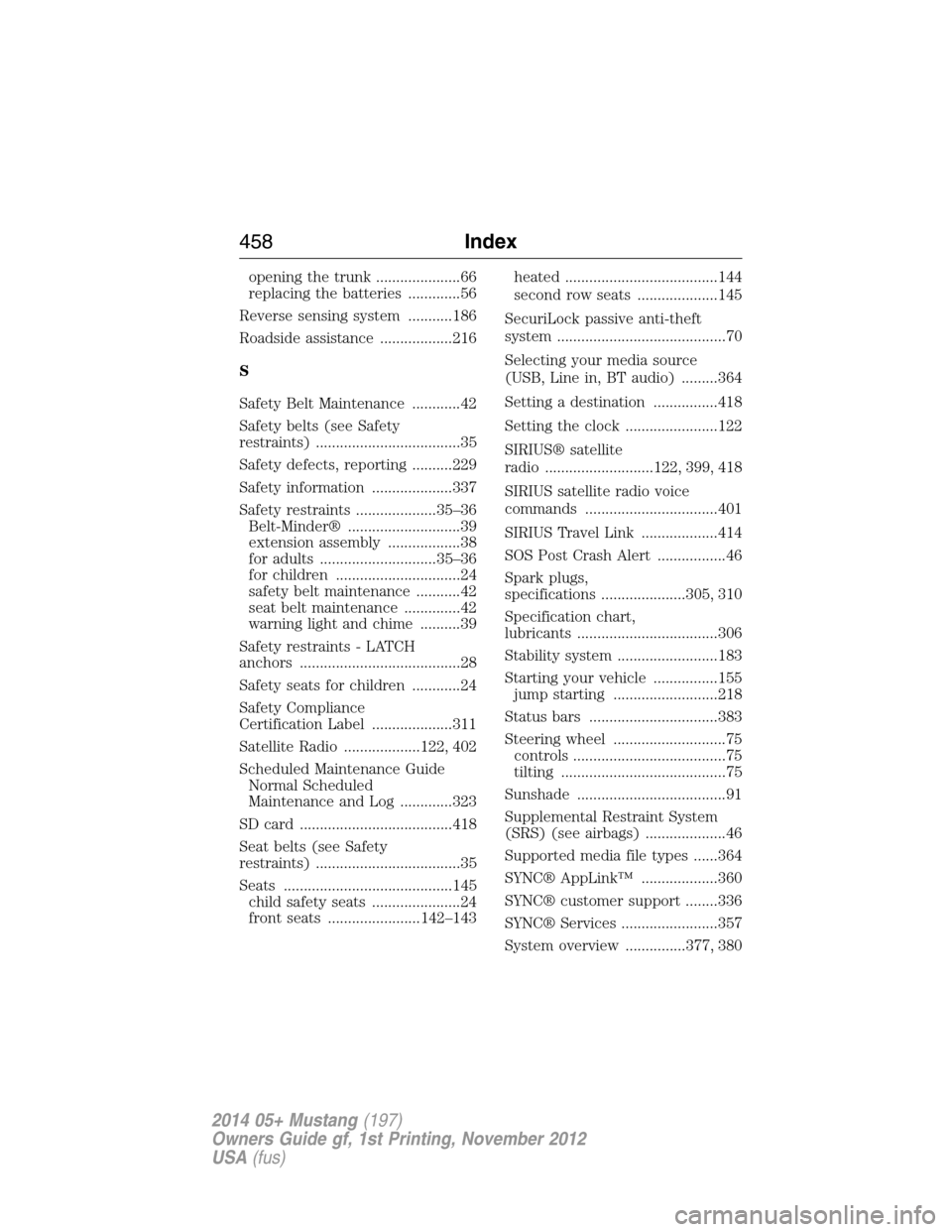
Selecting your media source
(USB, Line in, BT audio) .........364
Setting a destination ................418
Setting the clock .......................122
SIRIUS® satellite
radio ...........................122, 399, 418
SIRIUS satellite radio voice
commands .................................401
SIRIUS Travel Link ...................414
SOS Post Crash Alert .................46
Spark plugs,
specifications .....................305, 310
Specification chart,
lubricants ...................................306
Stability system .........................183
Starting your vehicle ................155
jump starting ..........................218
Status bars ................................383
Steering wheel ............................75
controls ......................................75
tilting .........................................75
Sunshade .....................................91
Supplemental Restraint System
(SRS) (see airbags) ....................46
Supported media file types ......364
SYNC® AppLink™ ...................360
SYNC® customer support ........336
SYNC® Services ........................357
System overview ...............377, 380
458Index
2014 05+ Mustang(197)
Owners Guide gf, 1st Printing, November 2012
USA(fus)
Page 460 of 461
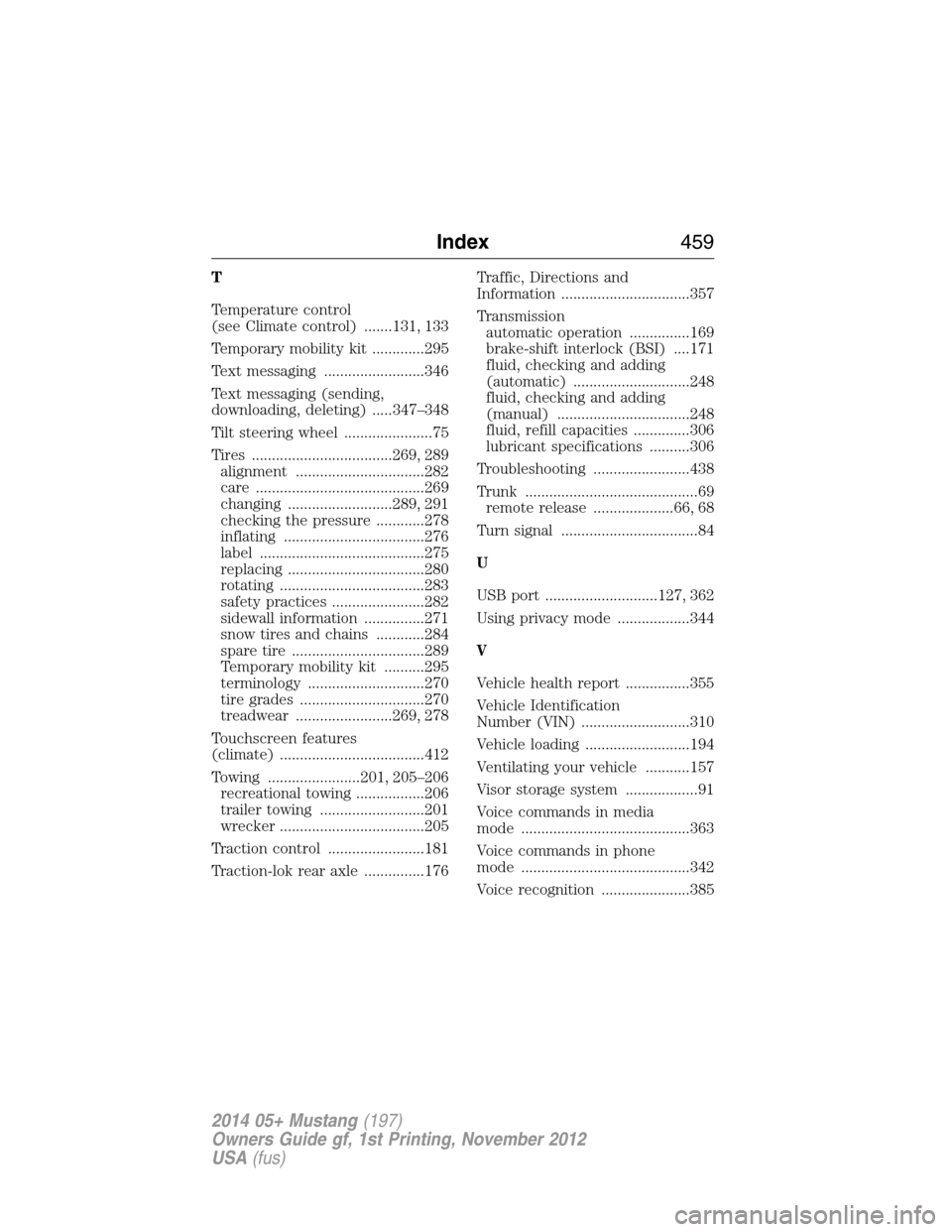
T
Temperature control
(see Climate control) .......131, 133
Temporary mobility kit .............295
Text messaging .........................346
Text messaging (sending,
downloading, deleting) .....347–348
Tilt steering wheel ......................75
Tires ...................................269, 289
alignment ................................282
care ..........................................269
changing ..........................289, 291
checking the pressure ............278
inflating ...................................276
label .........................................275
replacing ..................................280
rotating ....................................283
safety practices .......................282
sidewall information ...............271
snow tires and chains ............284
spare tire .................................289
Temporary mobility kit ..........295
terminology .............................270
tire grades ...............................270
treadwear ........................269, 278
Touchscreen features
(climate) ....................................412
Towing .......................201, 205–206
recreational towing .................206
trailer towing ..........................201
wrecker ....................................205
Traction control ........................181
Traction-lok rear axle ...............176Traffic, Directions and
Information ................................357
Transmission
automatic operation ...............169
brake-shift interlock (BSI) ....171
fluid, checking and adding
(automatic) .............................248
fluid, checking and adding
(manual) .................................248
fluid, refill capacities ..............306
lubricant specifications ..........306
Troubleshooting ........................438
Trunk ...........................................69
remote release ....................66, 68
Turn signal ..................................84
U
USB port ............................127, 362
Using privacy mode ..................344
V
Vehicle health report ................355
Vehicle Identification
Number (VIN) ...........................310
Vehicle loading ..........................194
Ventilating your vehicle ...........157
Visor storage system ..................91
Voice commands in media
mode ..........................................363
Voice commands in phone
mode ..........................................342
Voice recognition ......................385
Index459
2014 05+ Mustang(197)
Owners Guide gf, 1st Printing, November 2012
USA(fus)