clock FORD MUSTANG 2014 5.G User Guide
[x] Cancel search | Manufacturer: FORD, Model Year: 2014, Model line: MUSTANG, Model: FORD MUSTANG 2014 5.GPages: 461, PDF Size: 5.47 MB
Page 378 of 461
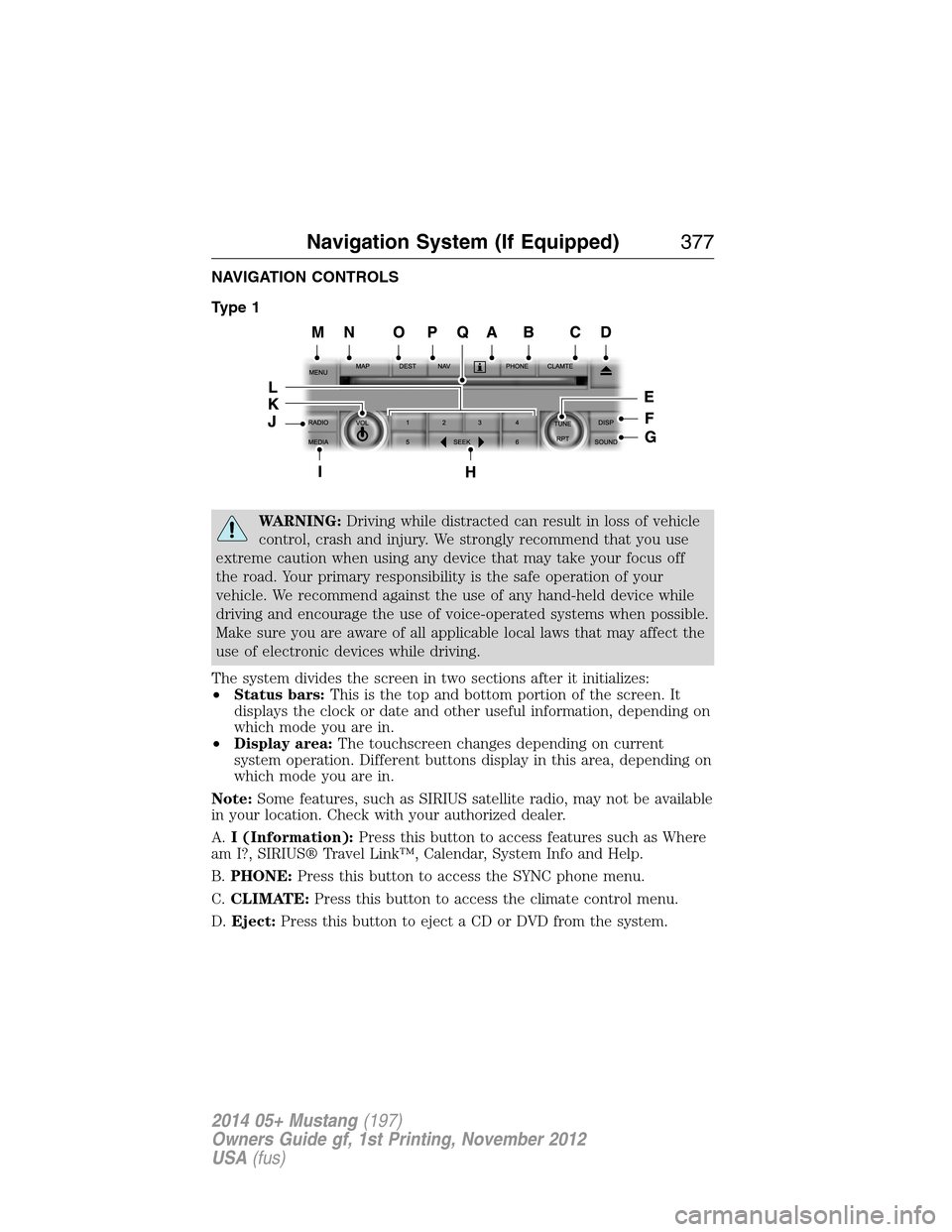
NAVIGATION CONTROLS
Type 1
WARNING:Driving while distracted can result in loss of vehicle
control, crash and injury. We strongly recommend that you use
extreme caution when using any device that may take your focus off
the road. Your primary responsibility is the safe operation of your
vehicle. We recommend against the use of any hand-held device while
driving and encourage the use of voice-operated systems when possible.
Make sure you are aware of all applicable local laws that may affect the
use of electronic devices while driving.
The system divides the screen in two sections after it initializes:
•Status bars:This is the top and bottom portion of the screen. It
displays the clock or date and other useful information, depending on
which mode you are in.
•Display area:The touchscreen changes depending on current
system operation. Different buttons display in this area, depending on
which mode you are in.
Note:Some features, such as SIRIUS satellite radio, may not be available
in your location. Check with your authorized dealer.
A.I (Information):Press this button to access features such as Where
am I?, SIRIUS® Travel Link™, Calendar, System Info and Help.
B.PHONE:Press this button to access the SYNC phone menu.
C.CLIMATE:Press this button to access the climate control menu.
D.Eject:Press this button to eject a CD or DVD from the system.
Navigation System (If Equipped)377
2014 05+ Mustang(197)
Owners Guide gf, 1st Printing, November 2012
USA(fus)
Page 380 of 461
M.MENU:
•Press this button to access the system menu.
•Press while the system menu is active to access the menu tabs of
Display, Clock, Feedback Settings, System Settings and Valet Mode.
N.MAP:
•Press this button to access the navigation map.
•Press while the map display is active to center the map on the
current vehicle position. Press while the map display and route are
active to see the different map guidance views.
O.DEST:
•Press this button to access the destination entry menu.
•Press while the destination entry menu is active to show additional
destination entry techniques.
P.N AV:
•Press this button to access the navigation menu.
•Press while the navigation menu is active to access the navigation
menu tabs.
Q.CD and DVD slot:Insert a CD or DVD, label side up.
Navigation System (If Equipped)379
2014 05+ Mustang(197)
Owners Guide gf, 1st Printing, November 2012
USA(fus)
Page 381 of 461
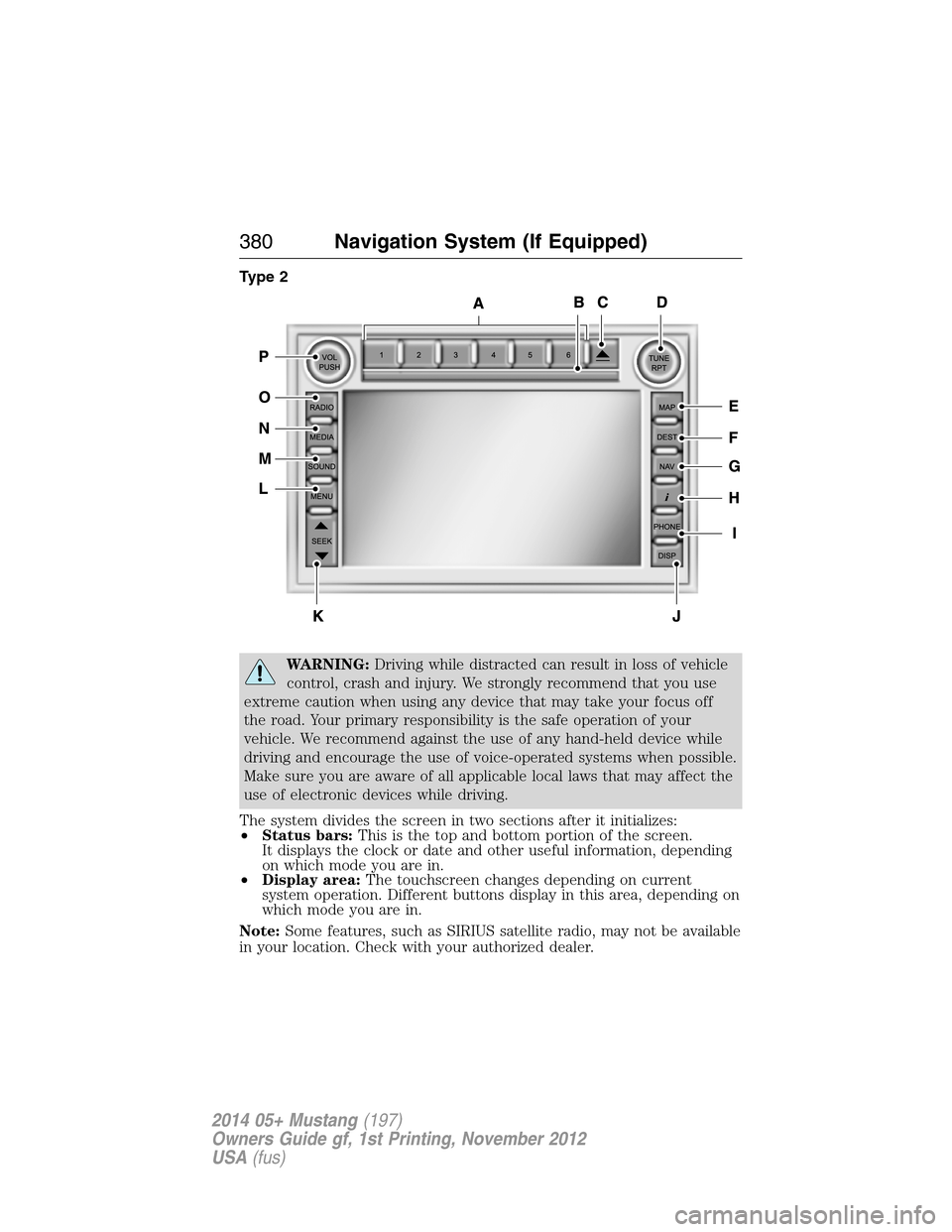
Type 2
WARNING:Driving while distracted can result in loss of vehicle
control, crash and injury. We strongly recommend that you use
extreme caution when using any device that may take your focus off
the road. Your primary responsibility is the safe operation of your
vehicle. We recommend against the use of any hand-held device while
driving and encourage the use of voice-operated systems when possible.
Make sure you are aware of all applicable local laws that may affect the
use of electronic devices while driving.
The system divides the screen in two sections after it initializes:
•Status bars:This is the top and bottom portion of the screen.
It displays the clock or date and other useful information, depending
on which mode you are in.
•Display area:The touchscreen changes depending on current
system operation. Different buttons display in this area, depending on
which mode you are in.
Note:Some features, such as SIRIUS satellite radio, may not be available
in your location. Check with your authorized dealer.
380Navigation System (If Equipped)
2014 05+ Mustang(197)
Owners Guide gf, 1st Printing, November 2012
USA(fus)
Page 383 of 461
L.MENU:
•Press this button to access the system menu.
•Press while the system menu is active to access the menu tabs of
Display, Clock, Feedback Settings, System Settings and Valet Mode.
M.SOUND:
•Press this button to access the sound menu.
•Press while the sound menu is active to access the menu tabs of
Bass/Treble, Balance/Fade, SCV (Speed Compensated Volume), DSP
(Digital Signal Processing) and Visualizer.
N.MEDIA:
•Press this button to access the media menu.
•Press while the media menu is active to access the available sources
of CD/DVD, Jukebox and User Device.
O.RADIO:
•Press this button to access the radio menu.
•Press while the radio menu is active to access the available sources of
AM, FM1, FM2, SAT1, SAT2, and SAT3.
P.VOL:Press and hold this button to turn the system off and on. Turn
the control to adjust the volume.
Note:If a navigation route is active when the navigation system is off,
the system resumes the route when you turn the system on.
DISPLAY MODE
You can choose to turn your screen on or off and if you would like to
view the status bars on the top and bottom of the screen. Press DISP to
see the options.
Display Mode Voice Commands
The following voice commands are available in display mode. If
you are not in display mode, press the voice button on the
steering wheel. When prompted, say “Display mode” and then
any of the following commands.
Display mode voice commands
“Display on”
“Display off”
“Status bar”
“Brighter”
“Dimmer”
“Day”
382Navigation System (If Equipped)
2014 05+ Mustang(197)
Owners Guide gf, 1st Printing, November 2012
USA(fus)
Page 389 of 461
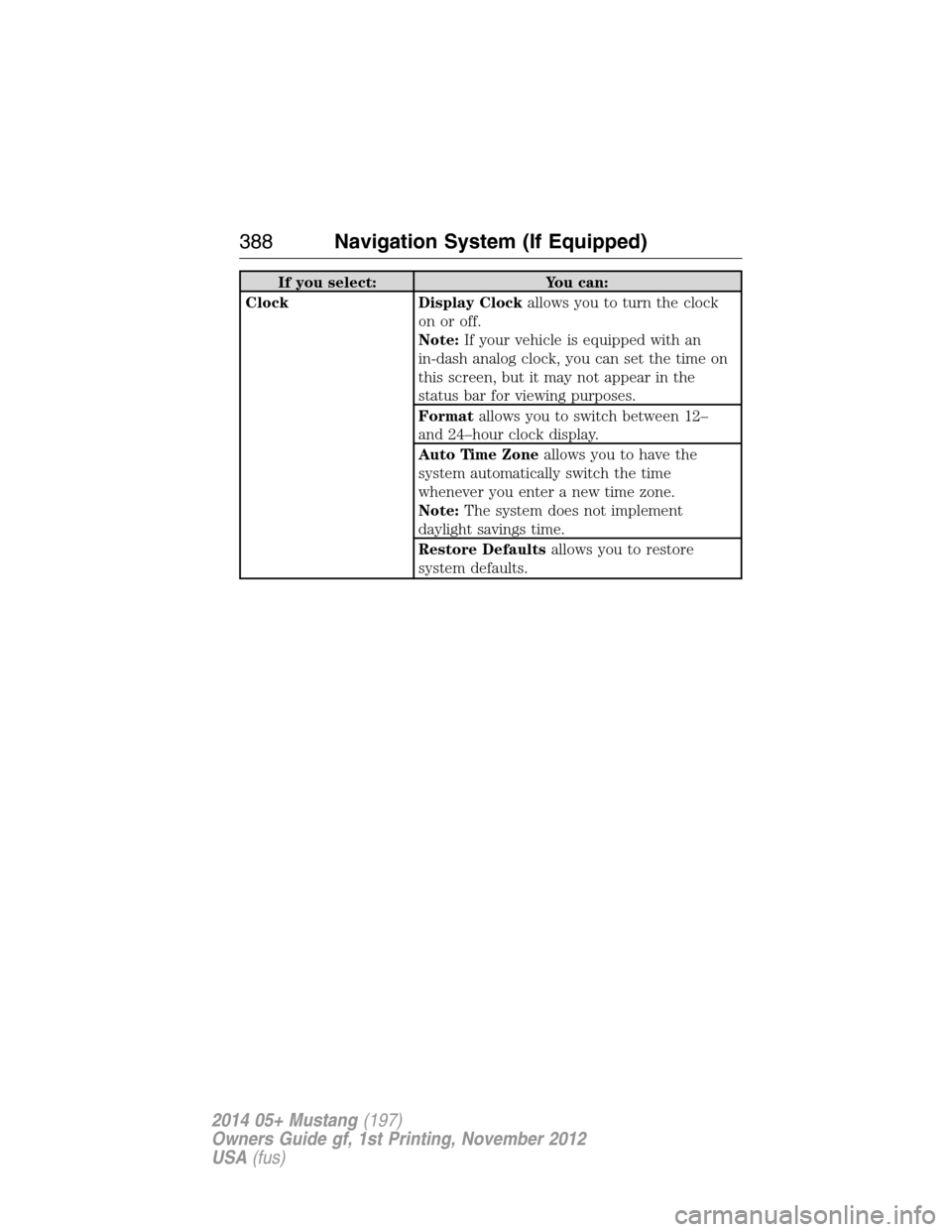
If you select: You can:
Clock Display Clockallows you to turn the clock
on or off.
Note:If your vehicle is equipped with an
in-dash analog clock, you can set the time on
this screen, but it may not appear in the
status bar for viewing purposes.
Formatallows you to switch between 12–
and 24–hour clock display.
Auto Time Zoneallows you to have the
system automatically switch the time
whenever you enter a new time zone.
Note:The system does not implement
daylight savings time.
Restore Defaultsallows you to restore
system defaults.
388Navigation System (If Equipped)
2014 05+ Mustang(197)
Owners Guide gf, 1st Printing, November 2012
USA(fus)
Page 455 of 461
fluid, refill capacities ..............306
fluid, specifications .................306
lubricant specifications ..........306
parking ....................................180
shift interlock ..........................171
trailer .......................................203
C
Capacities for refilling fluids ....306
CD ..............................................122
CD player ..................................120
CD voice
commands .................405, 407–408
Cell phone use ............................16
Changing a tire .........................289
Child safety restraints ..........28–29
Child safety seats
attaching with tether straps ....29
automatic locking mode
(retractor) .................................36
LATCH .......................................28
Child safety seats - booster
seats .............................................22
Cleaning the touchscreen ........385
Cleaning your vehicle ...............260
engine compartment ..............262
instrument panel ....................264
interior .....................................264
interior trim ............................364
plastic parts ............................261
washing ....................................260
waxing .....................................262
wheels ......................................266
wiper blades ............................263Climate control (see Air
conditioning or Heating) ..........131
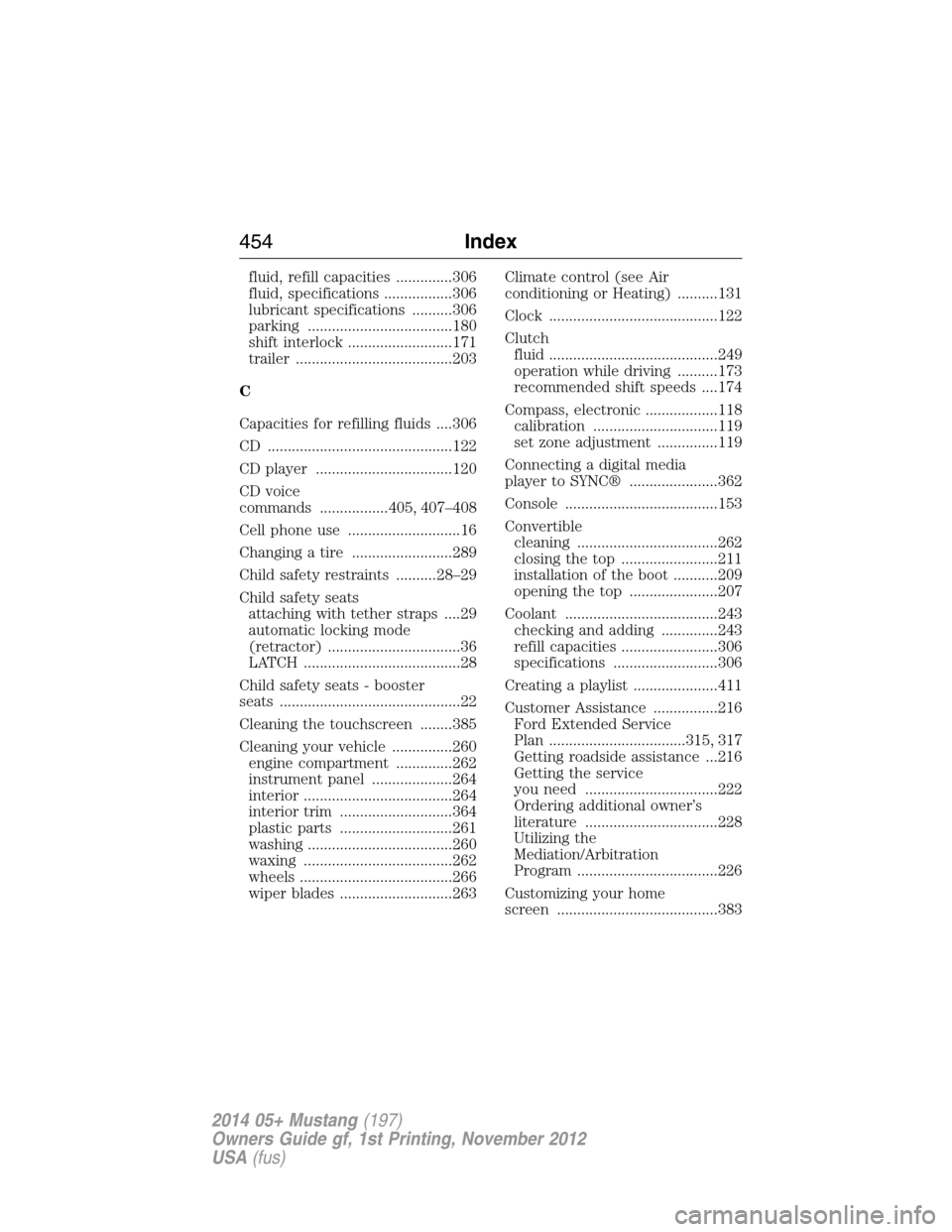
Clock ..........................................122
Clutch
fluid ..........................................249
operation while driving ..........173
recommended shift speeds ....174
Compass, electronic ..................118
calibration ...............................119
set zone adjustment ...............119
Connecting a digital media
player to SYNC® ......................362
Console ......................................153
Convertible
cleaning ...................................262
closing the top ........................211
installation of the boot ...........209
opening the top ......................207
Coolant ......................................243
checking and adding ..............243
refill capacities ........................306
specifications ..........................306
Creating a playlist .....................411
Customer Assistance ................216
Ford Extended Service
Plan ..................................315, 317
Getting roadside assistance ...216
Getting the service
you need .................................222
Ordering additional owner’s
literature .................................228
Utilizing the
Mediation/Arbitration
Program ...................................226
Customizing your home
screen ........................................383
454Index
2014 05+ Mustang(197)
Owners Guide gf, 1st Printing, November 2012
USA(fus)
Page 459 of 461
opening the trunk .....................66
replacing the batteries .............56
Reverse sensing system ...........186
Roadside assistance ..................216
S
Safety Belt Maintenance ............42
Safety belts (see Safety
restraints) ....................................35
Safety defects, reporting ..........229
Safety information ....................337
Safety restraints ....................35–36
Belt-Minder® ............................39
extension assembly ..................38
for adults .............................35–36
for children ...............................24
safety belt maintenance ...........42
seat belt maintenance ..............42
warning light and chime ..........39
Safety restraints - LATCH
anchors ........................................28
Safety seats for children ............24
Safety Compliance
Certification Label ....................311
Satellite Radio ...................122, 402
Scheduled Maintenance Guide
Normal Scheduled
Maintenance and Log .............323
SD card ......................................418
Seat belts (see Safety
restraints) ....................................35
Seats ..........................................145
child safety seats ......................24
front seats .......................142–143heated ......................................144
second row seats ....................145
SecuriLock passive anti-theft
system ..........................................70
Selecting your media source
(USB, Line in, BT audio) .........364
Setting a destination ................418
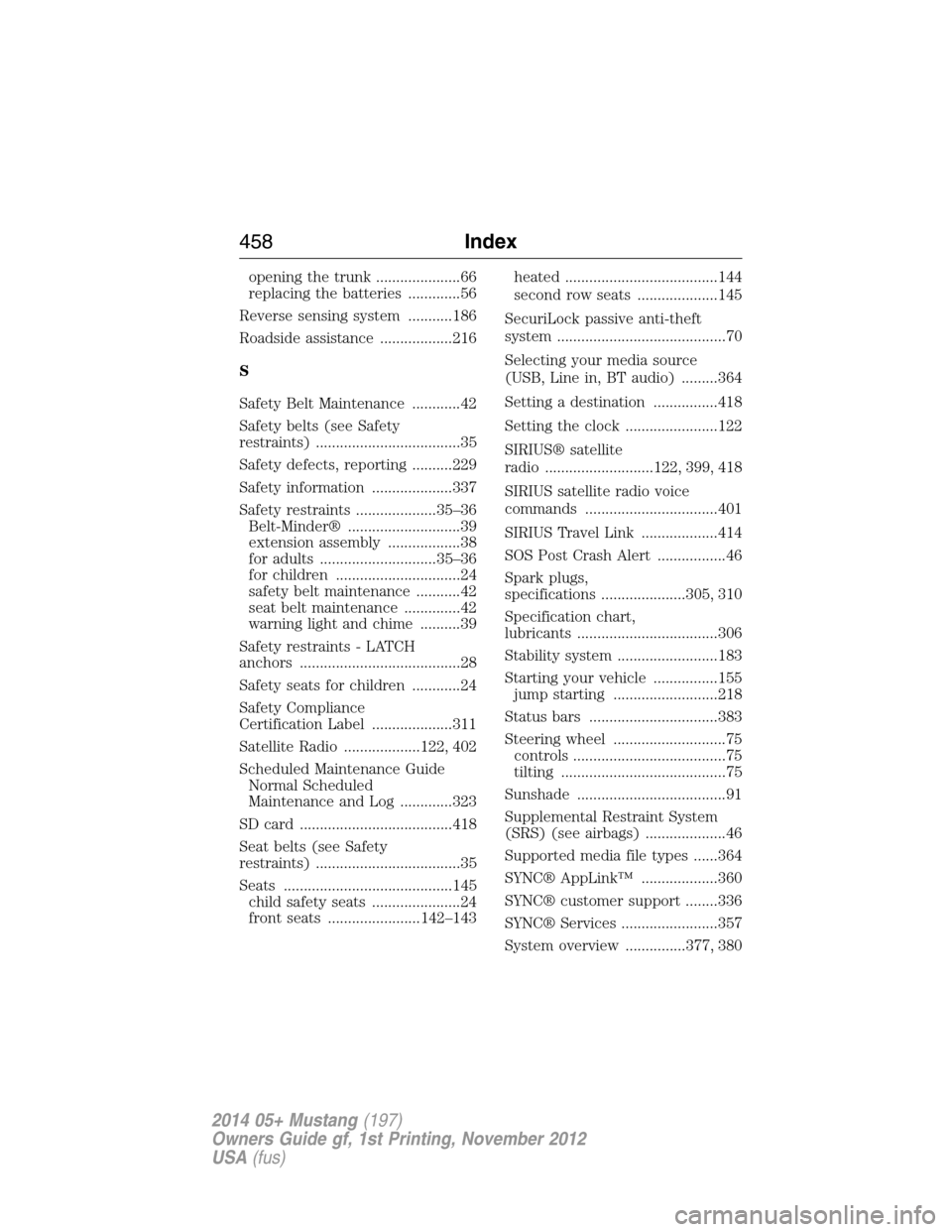
Setting the clock .......................122
SIRIUS® satellite
radio ...........................122, 399, 418
SIRIUS satellite radio voice
commands .................................401
SIRIUS Travel Link ...................414
SOS Post Crash Alert .................46
Spark plugs,
specifications .....................305, 310
Specification chart,
lubricants ...................................306
Stability system .........................183
Starting your vehicle ................155
jump starting ..........................218
Status bars ................................383
Steering wheel ............................75
controls ......................................75
tilting .........................................75
Sunshade .....................................91
Supplemental Restraint System
(SRS) (see airbags) ....................46
Supported media file types ......364
SYNC® AppLink™ ...................360
SYNC® customer support ........336
SYNC® Services ........................357
System overview ...............377, 380
458Index
2014 05+ Mustang(197)
Owners Guide gf, 1st Printing, November 2012
USA(fus)