brake FORD MUSTANG 2017 6.G User Guide
[x] Cancel search | Manufacturer: FORD, Model Year: 2017, Model line: MUSTANG, Model: FORD MUSTANG 2017 6.GPages: 475, PDF Size: 6.93 MB
Page 73 of 475
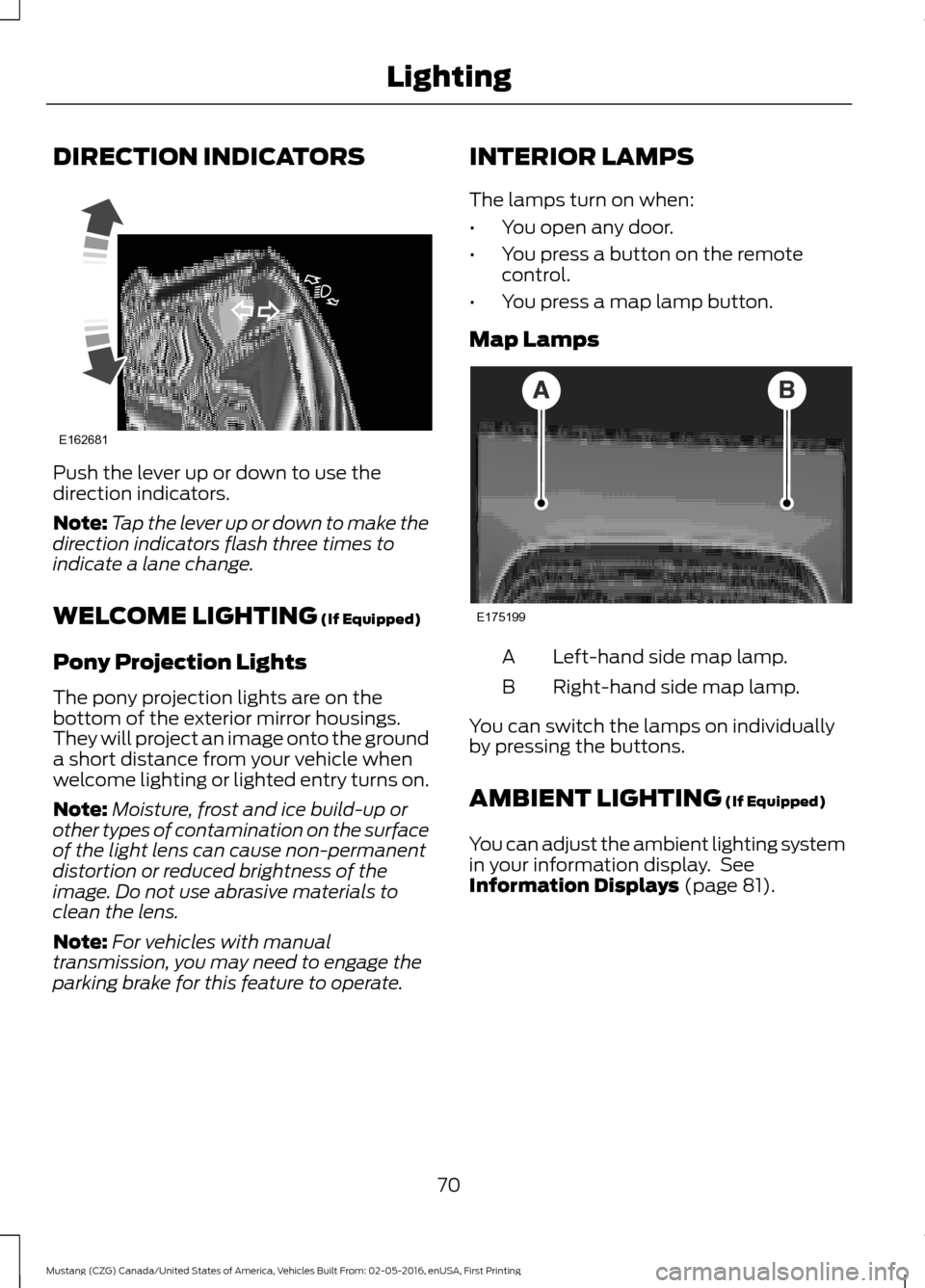
DIRECTION INDICATORS
Push the lever up or down to use the
direction indicators.
Note:
Tap the lever up or down to make the
direction indicators flash three times to
indicate a lane change.
WELCOME LIGHTING (If Equipped)
Pony Projection Lights
The pony projection lights are on the
bottom of the exterior mirror housings.
They will project an image onto the ground
a short distance from your vehicle when
welcome lighting or lighted entry turns on.
Note: Moisture, frost and ice build-up or
other types of contamination on the surface
of the light lens can cause non-permanent
distortion or reduced brightness of the
image. Do not use abrasive materials to
clean the lens.
Note: For vehicles with manual
transmission, you may need to engage the
parking brake for this feature to operate. INTERIOR LAMPS
The lamps turn on when:
•
You open any door.
• You press a button on the remote
control.
• You press a map lamp button.
Map Lamps Left-hand side map lamp.
A
Right-hand side map lamp.
B
You can switch the lamps on individually
by pressing the buttons.
AMBIENT LIGHTING
(If Equipped)
You can adjust the ambient lighting system
in your information display. See
Information Displays
(page 81).
70
Mustang (CZG) Canada/United States of America, Vehicles Built From: 02-05-2016, enUSA, First Printing LightingE162681 E175199
Page 80 of 475
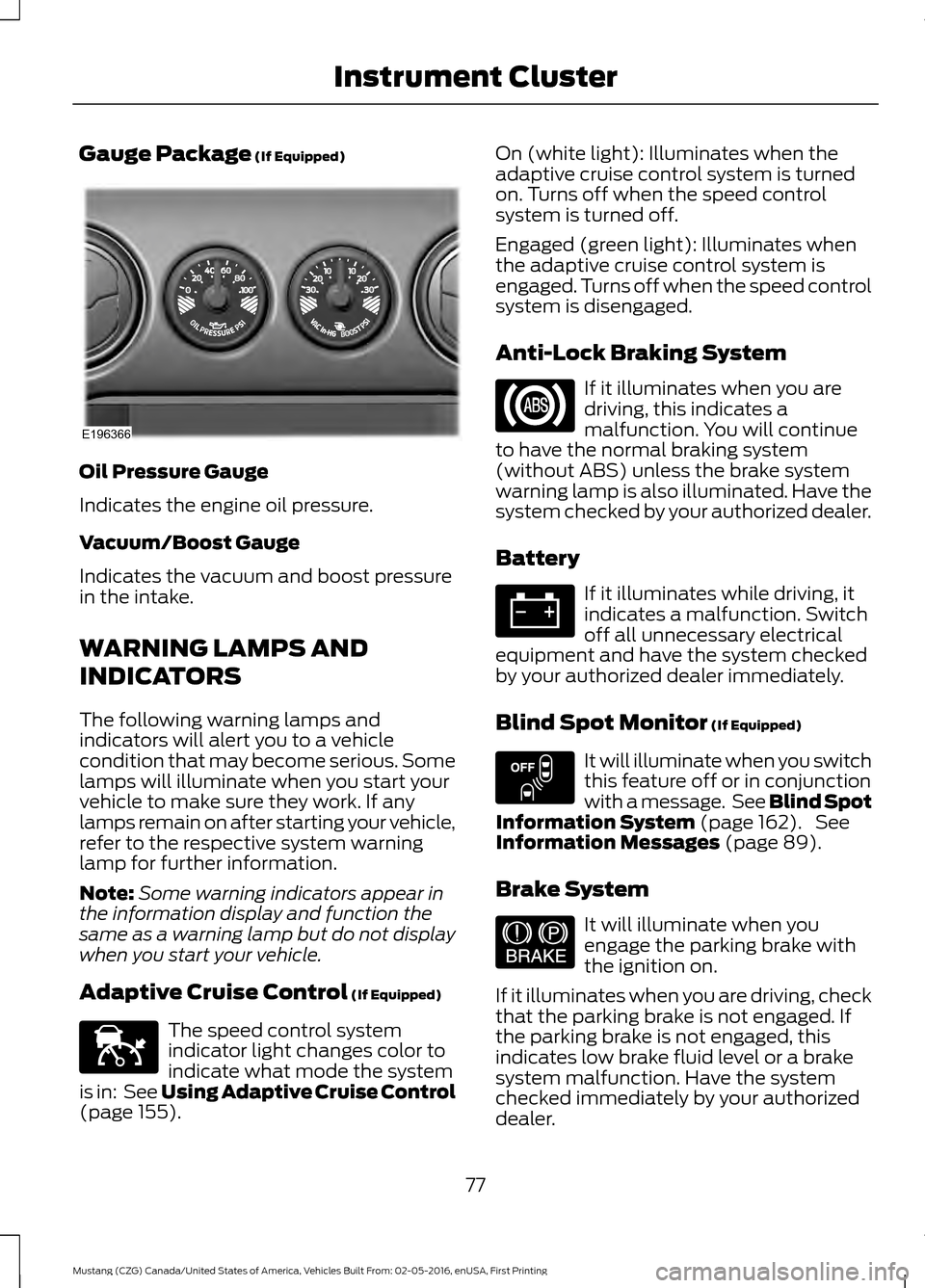
Gauge Package (If Equipped)
Oil Pressure Gauge
Indicates the engine oil pressure.
Vacuum/Boost Gauge
Indicates the vacuum and boost pressure
in the intake.
WARNING LAMPS AND
INDICATORS
The following warning lamps and
indicators will alert you to a vehicle
condition that may become serious. Some
lamps will illuminate when you start your
vehicle to make sure they work. If any
lamps remain on after starting your vehicle,
refer to the respective system warning
lamp for further information.
Note:
Some warning indicators appear in
the information display and function the
same as a warning lamp but do not display
when you start your vehicle.
Adaptive Cruise Control
(If Equipped) The speed control system
indicator light changes color to
indicate what mode the system
is in: See Using Adaptive Cruise Control
(page
155). On (white light): Illuminates when the
adaptive cruise control system is turned
on. Turns off when the speed control
system is turned off.
Engaged (green light): Illuminates when
the adaptive cruise control system is
engaged. Turns off when the speed control
system is disengaged.
Anti-Lock Braking System
If it illuminates when you are
driving, this indicates a
malfunction. You will continue
to have the normal braking system
(without ABS) unless the brake system
warning lamp is also illuminated. Have the
system checked by your authorized dealer.
Battery If it illuminates while driving, it
indicates a malfunction. Switch
off all unnecessary electrical
equipment and have the system checked
by your authorized dealer immediately.
Blind Spot Monitor
(If Equipped) It will illuminate when you switch
this feature off or in conjunction
with a message. See Blind Spot
Information System
(page 162). See
Information Messages (page 89).
Brake System It will illuminate when you
engage the parking brake with
the ignition on.
If it illuminates when you are driving, check
that the parking brake is not engaged. If
the parking brake is not engaged, this
indicates low brake fluid level or a brake
system malfunction. Have the system
checked immediately by your authorized
dealer.
77
Mustang (CZG) Canada/United States of America, Vehicles Built From: 02-05-2016, enUSA, First Printing Instrument ClusterE196366 E144524 E151262 E144522
Page 81 of 475
WARNING
Driving your vehicle with the warning
lamp on is dangerous. A significant
decrease in braking performance
may occur. It will take you longer to stop
your vehicle. Have your vehicle checked by
your authorized dealer immediately. Driving
extended distances with the parking brake
engaged can cause brake failure and the
risk of personal injury. Cruise Control (If Equipped)
It will illuminate when you switch
this feature on.
Direction Indicator Illuminates when the left or right
turn signal or the hazard warning
flasher is turned on. If the
indicators stay on or flash faster, check for
a burned out bulb. See
Changing a Bulb
(page 226).
Door Ajar Displays when the ignition is on
and any door is not completely
closed.
Engine Coolant Temperature Illuminates when the engine
coolant temperature is high.
Stop the vehicle as soon as
possible, switch off the engine and let cool.
See
Engine Coolant Check (page 217). Engine Oil If it illuminates with the engine
running or when you are driving,
this indicates a malfunction.
Stop your vehicle as soon as it is safe to
do so and switch the engine off. Check the
engine oil level. See
Engine Oil Check
(page 216).
Note: Do not resume your journey if it
illuminates despite the level being correct.
Have the system checked by your authorized
dealer immediately.
Fasten Safety Belt It will illuminate and a chime will
sound to remind you to fasten
your safety belt. See
Seatbelt
Reminder (page 31).
Front Airbag If it fails to illuminate when you
start your vehicle, continues to
flash or remains on, it indicates
a malfunction. Have the system checked
by your authorized dealer.
Front Fog Lamps
(If Equipped) Lights when you switch the front
fog lamps on.
Heads Up Display
(If Equipped) A red beam of lights will
illuminate on the windshield in
certain instances when using
adaptive cruise control or the collision
warning system. It will also illuminate
momentarily when you start your vehicle
to make sure the display works.
78
Mustang (CZG) Canada/United States of America, Vehicles Built From: 02-05-2016, enUSA, First Printing Instrument ClusterE71340 E156133
Page 83 of 475
Stability Control Off
It will illuminate when you switch
the system off. It will go out
when you switch the system
back on or when you switch the ignition
off. See Using Stability Control (page
146).
AUDIBLE WARNINGS AND
INDICATORS
Keyless Warning Alert
The horn will sound twice when you exit
your vehicle with the intelligent access key
and your vehicle is in ON, indicating your
vehicle is still on. The horn will also sound
twice when you exit your vehicle and
attempt to lock the doors manually while
the intelligent access key is still in the
vehicle. The doors will not lock if the
intelligent access key remains in the
vehicle.
Headlamps On Warning Chime
Sounds when you remove the key from the
vehicle and you have left the headlamps
or parking lamps on.
Parking Brake On Warning Chime
(If Equipped)
Sounds when you have left the parking
brake on and drive your vehicle. If the
warning chime remains on after you have
released the parking brake, have the
system checked by your authorized dealer
immediately.
80
Mustang (CZG) Canada/United States of America, Vehicles Built From: 02-05-2016, enUSA, First Printing Instrument ClusterE130458
Page 88 of 475
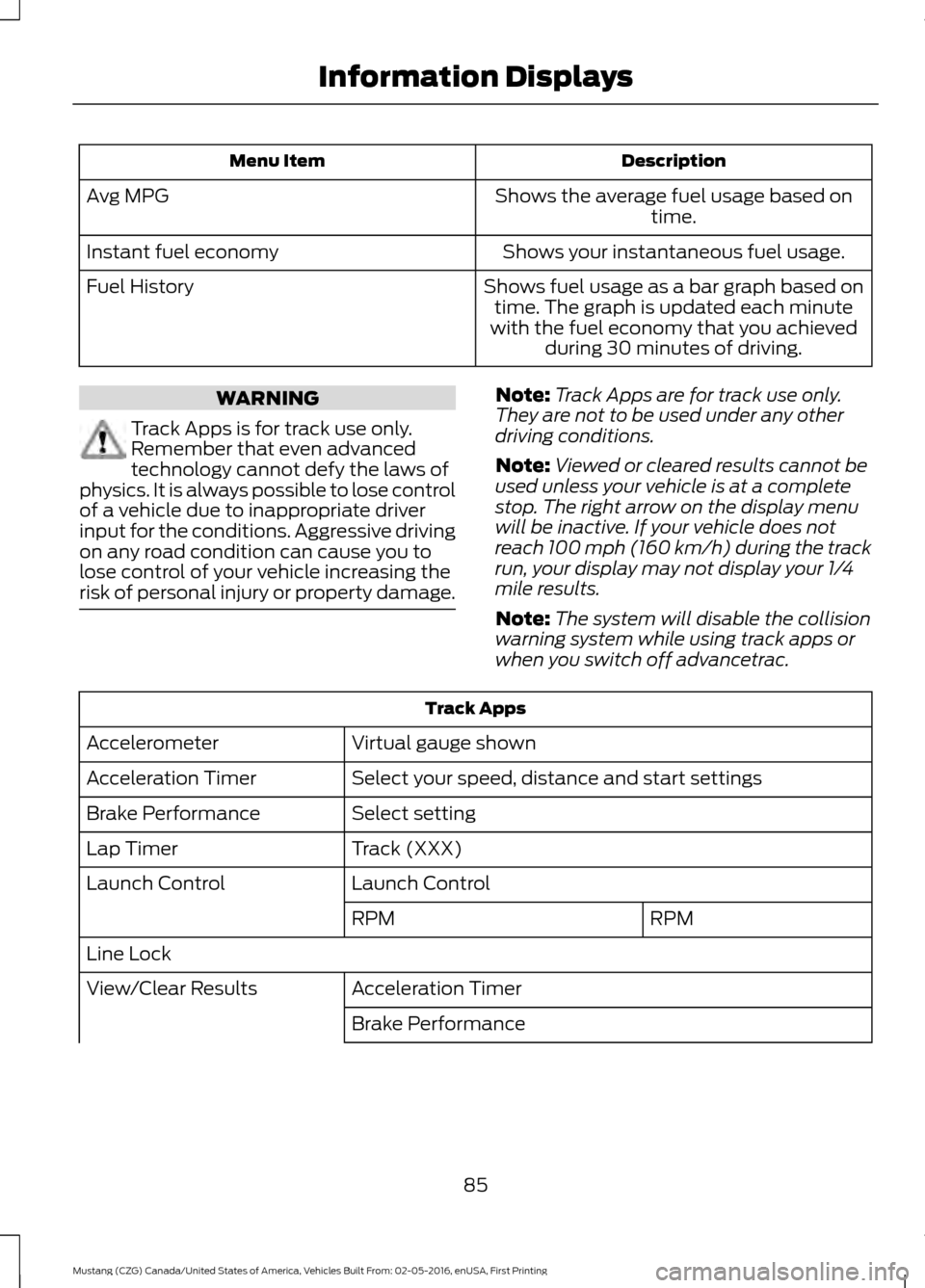
Description
Menu Item
Shows the average fuel usage based ontime.
Avg MPG
Shows your instantaneous fuel usage.
Instant fuel economy
Shows fuel usage as a bar graph based ontime. The graph is updated each minute
with the fuel economy that you achieved during 30 minutes of driving.
Fuel History WARNING
Track Apps is for track use only.
Remember that even advanced
technology cannot defy the laws of
physics. It is always possible to lose control
of a vehicle due to inappropriate driver
input for the conditions. Aggressive driving
on any road condition can cause you to
lose control of your vehicle increasing the
risk of personal injury or property damage. Note:
Track Apps are for track use only.
They are not to be used under any other
driving conditions.
Note: Viewed or cleared results cannot be
used unless your vehicle is at a complete
stop. The right arrow on the display menu
will be inactive. If your vehicle does not
reach 100 mph (160 km/h) during the track
run, your display may not display your 1/4
mile results.
Note: The system will disable the collision
warning system while using track apps or
when you switch off advancetrac. Track Apps
Virtual gauge shown
Accelerometer
Select your speed, distance and start settings
Acceleration Timer
Select setting
Brake Performance
Track (XXX)
Lap Timer
Launch Control
Launch Control
RPM
RPM
Line Lock Acceleration Timer
View/Clear Results
Brake Performance
85
Mustang (CZG) Canada/United States of America, Vehicles Built From: 02-05-2016, enUSA, First Printing Information Displays
Page 89 of 475
Track Apps
All Time Best
Clear Saved Data
Clear All Time Best Accelerometer
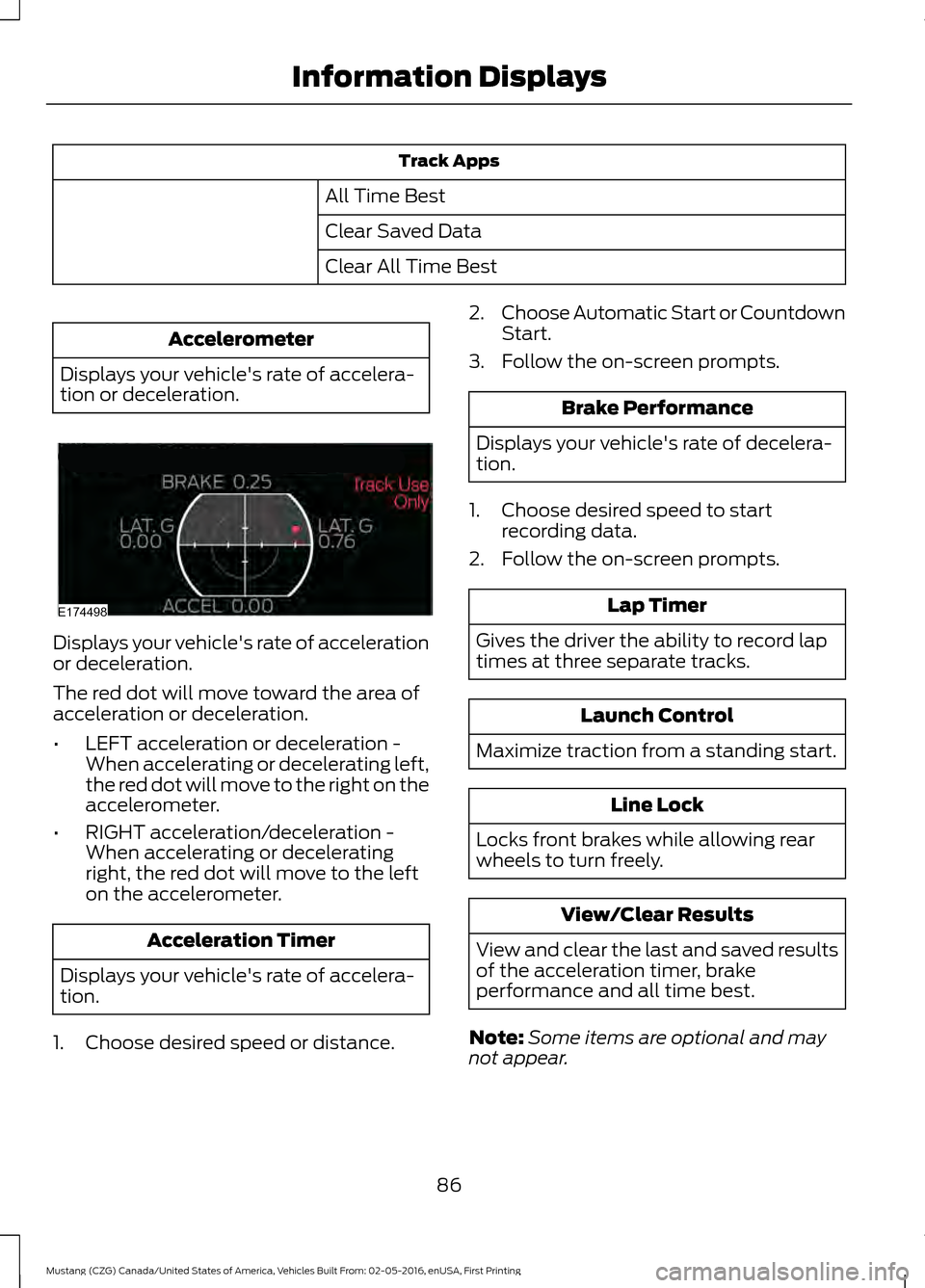
Displays your vehicle's rate of accelera-
tion or deceleration. Displays your vehicle's rate of acceleration
or deceleration.
The red dot will move toward the area of
acceleration or deceleration.
•
LEFT acceleration or deceleration -
When accelerating or decelerating left,
the red dot will move to the right on the
accelerometer.
• RIGHT acceleration/deceleration -
When accelerating or decelerating
right, the red dot will move to the left
on the accelerometer. Acceleration Timer
Displays your vehicle's rate of accelera-
tion.
1. Choose desired speed or distance. 2.
Choose Automatic Start or Countdown
Start.
3. Follow the on-screen prompts. Brake Performance
Displays your vehicle's rate of decelera-
tion.
1. Choose desired speed to start recording data.
2. Follow the on-screen prompts. Lap Timer
Gives the driver the ability to record lap
times at three separate tracks. Launch Control
Maximize traction from a standing start. Line Lock
Locks front brakes while allowing rear
wheels to turn freely. View/Clear Results
View and clear the last and saved results
of the acceleration timer, brake
performance and all time best.
Note: Some items are optional and may
not appear.
86
Mustang (CZG) Canada/United States of America, Vehicles Built From: 02-05-2016, enUSA, First Printing Information DisplaysE174498
Page 96 of 475
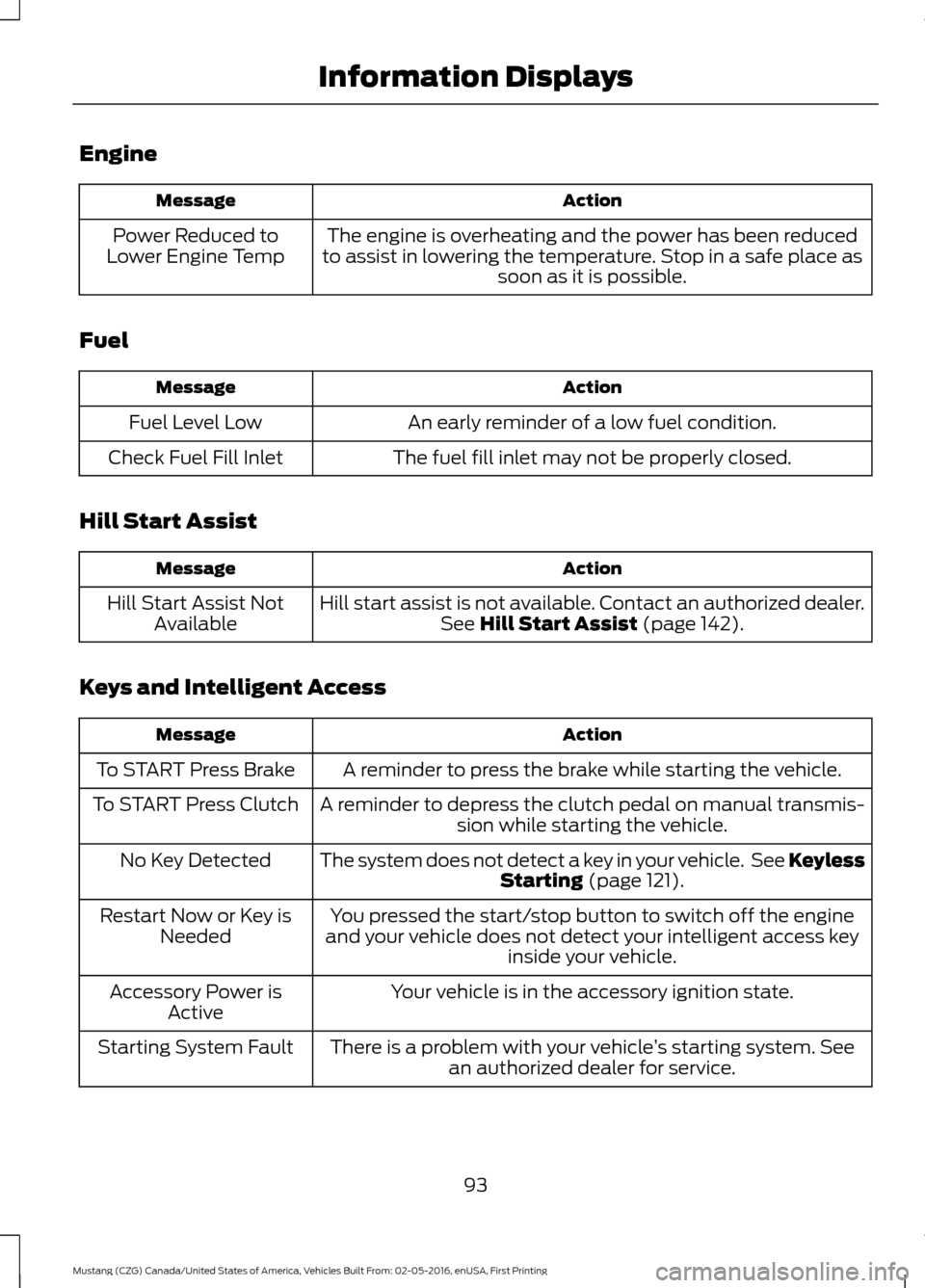
Engine
Action
Message
The engine is overheating and the power has been reduced
to assist in lowering the temperature. Stop in a safe place as soon as it is possible.
Power Reduced to
Lower Engine Temp
Fuel Action
Message
An early reminder of a low fuel condition.
Fuel Level Low
The fuel fill inlet may not be properly closed.
Check Fuel Fill Inlet
Hill Start Assist Action
Message
Hill start assist is not available. Contact an authorized dealer.See Hill Start Assist (page 142).
Hill Start Assist Not
Available
Keys and Intelligent Access Action
Message
A reminder to press the brake while starting the vehicle.
To START Press Brake
A reminder to depress the clutch pedal on manual transmis-sion while starting the vehicle.
To START Press Clutch
The system does not detect a key in your vehicle. See KeylessStarting
(page 121).
No Key Detected
You pressed the start/stop button to switch off the engine
and your vehicle does not detect your intelligent access key inside your vehicle.
Restart Now or Key is
Needed
Your vehicle is in the accessory ignition state.
Accessory Power is
Active
There is a problem with your vehicle ’s starting system. See
an authorized dealer for service.
Starting System Fault
93
Mustang (CZG) Canada/United States of America, Vehicles Built From: 02-05-2016, enUSA, First Printing Information Displays
Page 97 of 475
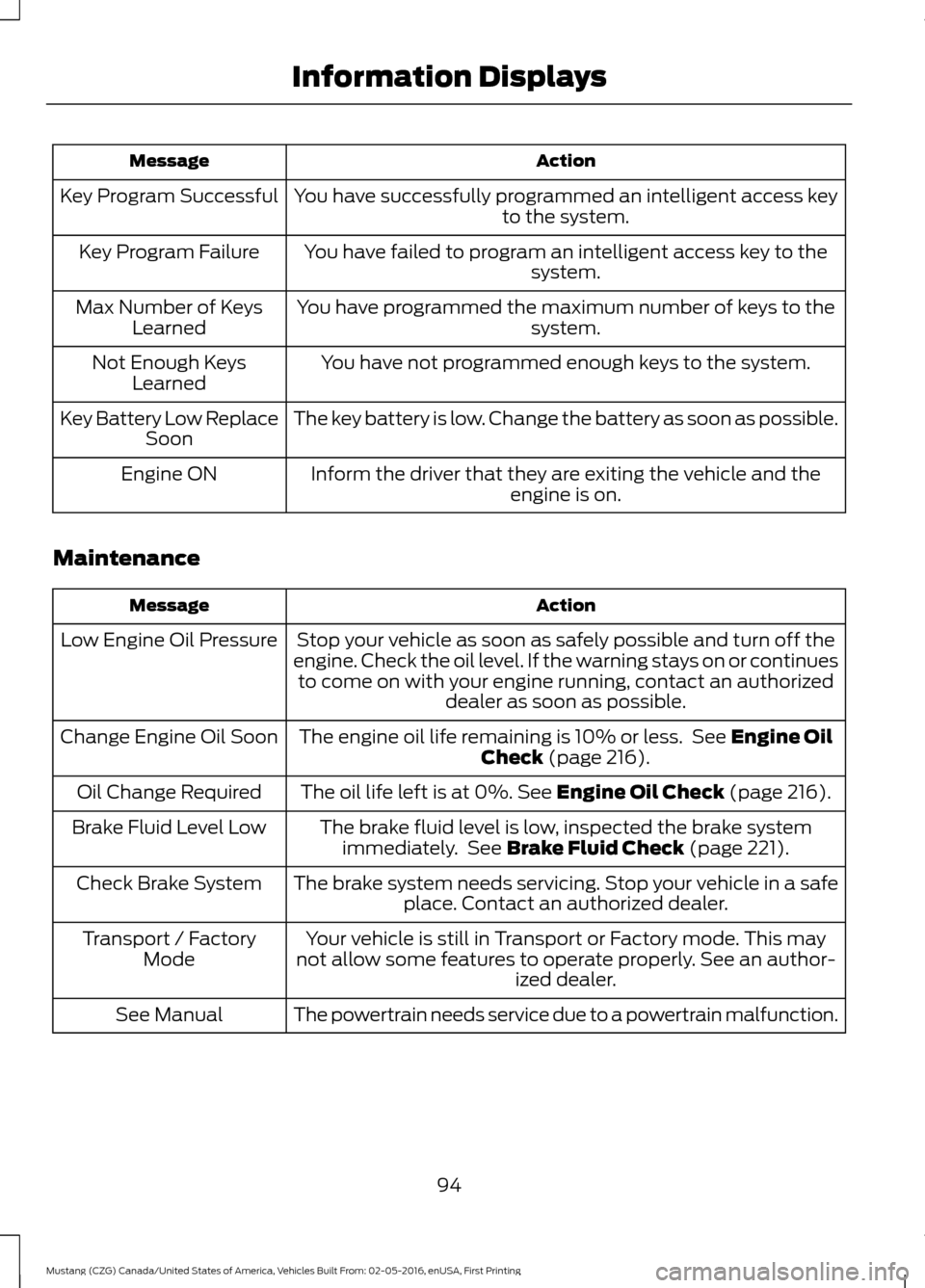
Action
Message
You have successfully programmed an intelligent access key to the system.
Key Program Successful
You have failed to program an intelligent access key to thesystem.
Key Program Failure
You have programmed the maximum number of keys to the system.
Max Number of Keys
Learned
You have not programmed enough keys to the system.
Not Enough Keys
Learned
The key battery is low. Change the battery as soon as possible.
Key Battery Low Replace
Soon
Inform the driver that they are exiting the vehicle and the engine is on.
Engine ON
Maintenance Action
Message
Stop your vehicle as soon as safely possible and turn off the
engine. Check the oil level. If the warning stays on or continues to come on with your engine running, contact an authorized dealer as soon as possible.
Low Engine Oil Pressure
The engine oil life remaining is 10% or less. See Engine Oil
Check (page 216).
Change Engine Oil Soon
The oil life left is at 0%.
See Engine Oil Check (page 216).
Oil Change Required
The brake fluid level is low, inspected the brake systemimmediately. See
Brake Fluid Check (page 221).
Brake Fluid Level Low
The brake system needs servicing. Stop your vehicle in a safeplace. Contact an authorized dealer.
Check Brake System
Your vehicle is still in Transport or Factory mode. This may
not allow some features to operate properly. See an author- ized dealer.
Transport / Factory
Mode
The powertrain needs service due to a powertrain malfunction.
See Manual
94
Mustang (CZG) Canada/United States of America, Vehicles Built From: 02-05-2016, enUSA, First Printing Information Displays
Page 99 of 475
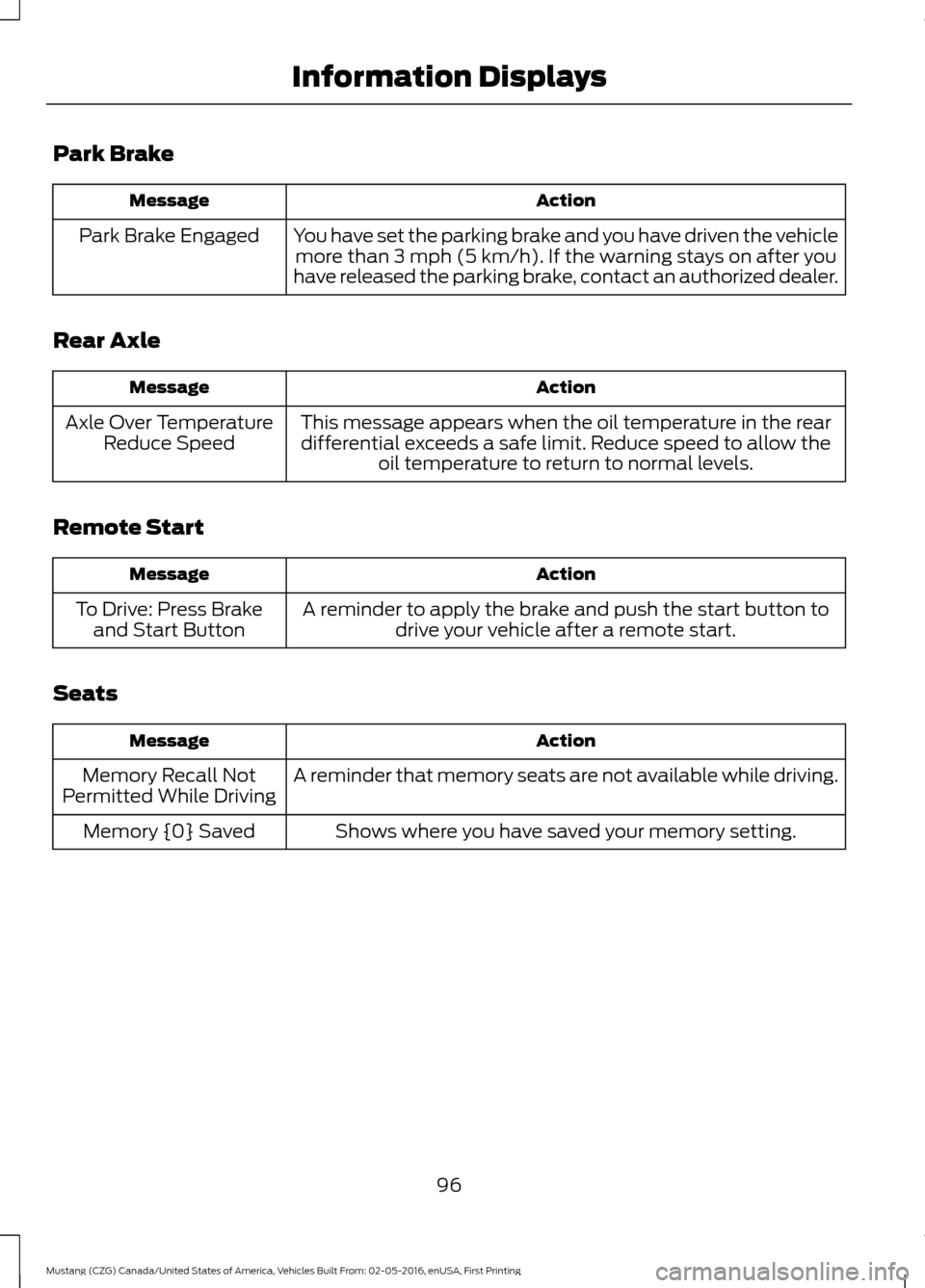
Park Brake
Action
Message
You have set the parking brake and you have driven the vehiclemore than 3 mph (5 km/h). If the warning stays on after you
have released the parking brake, contact an authorized dealer.
Park Brake Engaged
Rear Axle Action
Message
This message appears when the oil temperature in the reardifferential exceeds a safe limit. Reduce speed to allow the oil temperature to return to normal levels.
Axle Over Temperature
Reduce Speed
Remote Start Action
Message
A reminder to apply the brake and push the start button todrive your vehicle after a remote start.
To Drive: Press Brake
and Start Button
Seats Action
Message
A reminder that memory seats are not available while driving.
Memory Recall Not
Permitted While Driving
Shows where you have saved your memory setting.
Memory {0} Saved
96
Mustang (CZG) Canada/United States of America, Vehicles Built From: 02-05-2016, enUSA, First Printing Information Displays
Page 100 of 475
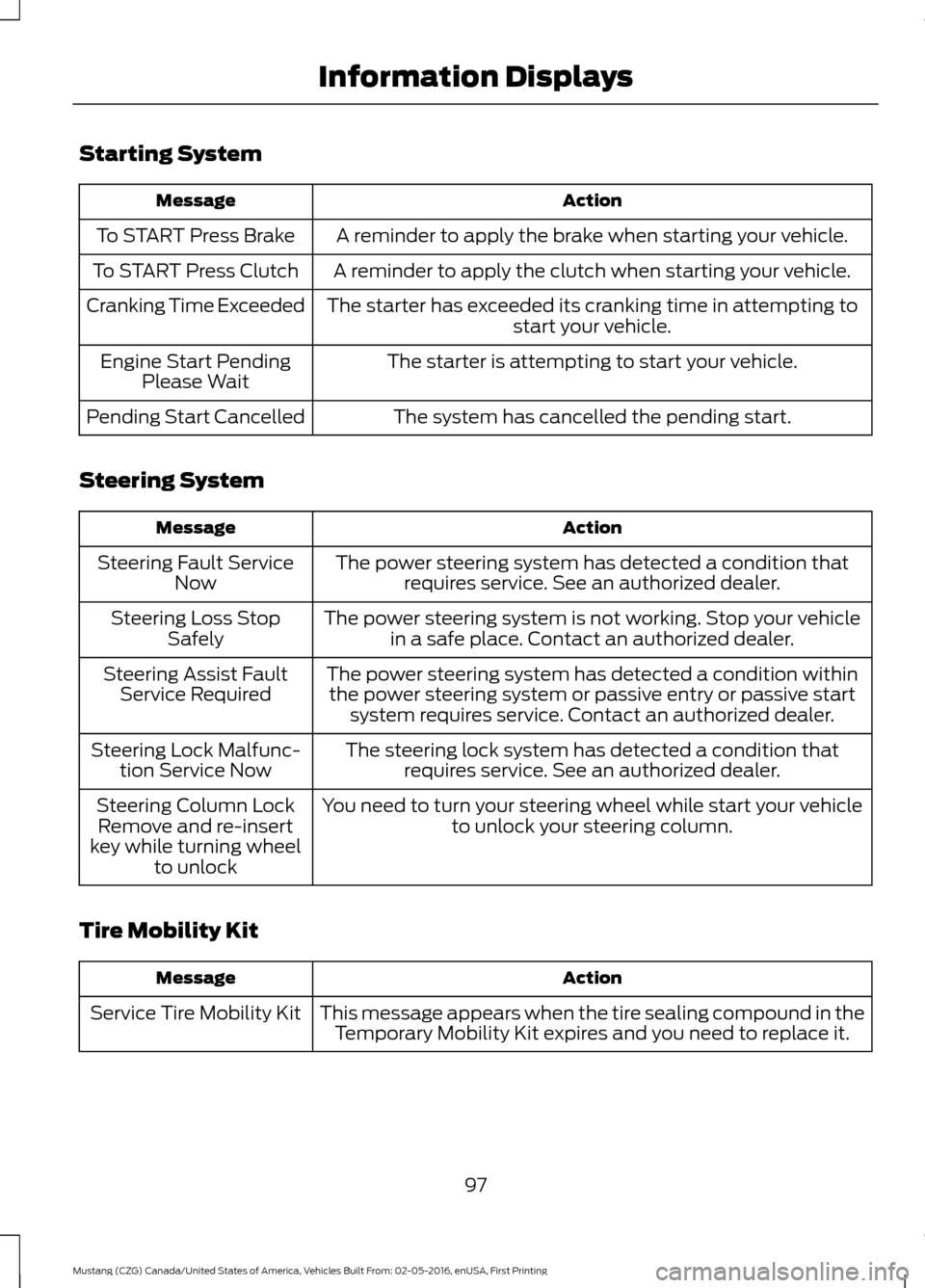
Starting System
Action
Message
A reminder to apply the brake when starting your vehicle.
To START Press Brake
A reminder to apply the clutch when starting your vehicle.
To START Press Clutch
The starter has exceeded its cranking time in attempting tostart your vehicle.
Cranking Time Exceeded
The starter is attempting to start your vehicle.
Engine Start Pending
Please Wait
The system has cancelled the pending start.
Pending Start Cancelled
Steering System Action
Message
The power steering system has detected a condition thatrequires service. See an authorized dealer.
Steering Fault Service
Now
The power steering system is not working. Stop your vehiclein a safe place. Contact an authorized dealer.
Steering Loss Stop
Safely
The power steering system has detected a condition withinthe power steering system or passive entry or passive start system requires service. Contact an authorized dealer.
Steering Assist Fault
Service Required
The steering lock system has detected a condition thatrequires service. See an authorized dealer.
Steering Lock Malfunc-
tion Service Now
You need to turn your steering wheel while start your vehicleto unlock your steering column.
Steering Column Lock
Remove and re-insert
key while turning wheel to unlock
Tire Mobility Kit Action
Message
This message appears when the tire sealing compound in theTemporary Mobility Kit expires and you need to replace it.
Service Tire Mobility Kit
97
Mustang (CZG) Canada/United States of America, Vehicles Built From: 02-05-2016, enUSA, First Printing Information Displays