key FORD MUSTANG 2017 6.G Owner's Manual
[x] Cancel search | Manufacturer: FORD, Model Year: 2017, Model line: MUSTANG, Model: FORD MUSTANG 2017 6.GPages: 475, PDF Size: 6.93 MB
Page 83 of 475
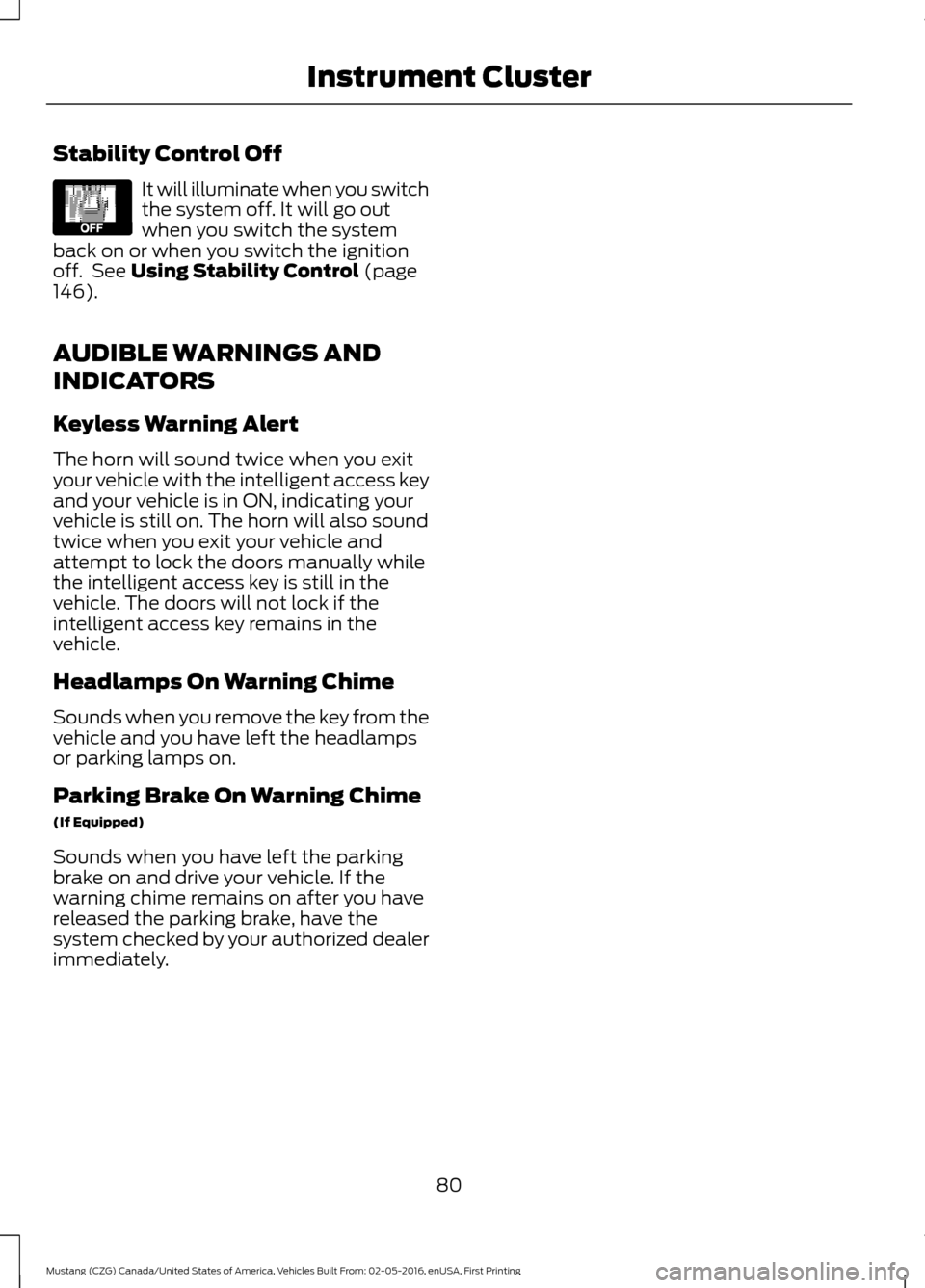
Stability Control Off
It will illuminate when you switch
the system off. It will go out
when you switch the system
back on or when you switch the ignition
off. See Using Stability Control (page
146).
AUDIBLE WARNINGS AND
INDICATORS
Keyless Warning Alert
The horn will sound twice when you exit
your vehicle with the intelligent access key
and your vehicle is in ON, indicating your
vehicle is still on. The horn will also sound
twice when you exit your vehicle and
attempt to lock the doors manually while
the intelligent access key is still in the
vehicle. The doors will not lock if the
intelligent access key remains in the
vehicle.
Headlamps On Warning Chime
Sounds when you remove the key from the
vehicle and you have left the headlamps
or parking lamps on.
Parking Brake On Warning Chime
(If Equipped)
Sounds when you have left the parking
brake on and drive your vehicle. If the
warning chime remains on after you have
released the parking brake, have the
system checked by your authorized dealer
immediately.
80
Mustang (CZG) Canada/United States of America, Vehicles Built From: 02-05-2016, enUSA, First Printing Instrument ClusterE130458
Page 91 of 475
Settings
Seats
Duration
System
Select setting
Tire Mobility
Kit
Remote Open
Windows
Remote Close
Courtesy Wipe
Wipers
Rain Sensing
Select color
Gauge Color
MyColor
Ambient Light
Ambient
Light
Select setting
Ambient Dim
Select color
Ambient Color
Set MyColor 1
- 3
Set MyColor
Select setting
MyKey
Status
MyKey
Create
MyKey
911 Assist
Advan-
ceTrac
Do Not
Disturb
Max Speed
Speed
Minder
Volume LimiterSelect setting
Clear
MyKeys
88
Mustang (CZG) Canada/United States of America, Vehicles Built From: 02-05-2016, enUSA, First Printing Information Displays
Page 96 of 475
Engine
Action
Message
The engine is overheating and the power has been reduced
to assist in lowering the temperature. Stop in a safe place as soon as it is possible.
Power Reduced to
Lower Engine Temp
Fuel Action
Message
An early reminder of a low fuel condition.
Fuel Level Low
The fuel fill inlet may not be properly closed.
Check Fuel Fill Inlet
Hill Start Assist Action
Message
Hill start assist is not available. Contact an authorized dealer.See Hill Start Assist (page 142).
Hill Start Assist Not
Available
Keys and Intelligent Access Action
Message
A reminder to press the brake while starting the vehicle.
To START Press Brake
A reminder to depress the clutch pedal on manual transmis-sion while starting the vehicle.
To START Press Clutch
The system does not detect a key in your vehicle. See KeylessStarting
(page 121).
No Key Detected
You pressed the start/stop button to switch off the engine
and your vehicle does not detect your intelligent access key inside your vehicle.
Restart Now or Key is
Needed
Your vehicle is in the accessory ignition state.
Accessory Power is
Active
There is a problem with your vehicle ’s starting system. See
an authorized dealer for service.
Starting System Fault
93
Mustang (CZG) Canada/United States of America, Vehicles Built From: 02-05-2016, enUSA, First Printing Information Displays
Page 97 of 475
Action
Message
You have successfully programmed an intelligent access key to the system.
Key Program Successful
You have failed to program an intelligent access key to thesystem.
Key Program Failure
You have programmed the maximum number of keys to the system.
Max Number of Keys
Learned
You have not programmed enough keys to the system.
Not Enough Keys
Learned
The key battery is low. Change the battery as soon as possible.
Key Battery Low Replace
Soon
Inform the driver that they are exiting the vehicle and the engine is on.
Engine ON
Maintenance Action
Message
Stop your vehicle as soon as safely possible and turn off the
engine. Check the oil level. If the warning stays on or continues to come on with your engine running, contact an authorized dealer as soon as possible.
Low Engine Oil Pressure
The engine oil life remaining is 10% or less. See Engine Oil
Check (page 216).
Change Engine Oil Soon
The oil life left is at 0%.
See Engine Oil Check (page 216).
Oil Change Required
The brake fluid level is low, inspected the brake systemimmediately. See
Brake Fluid Check (page 221).
Brake Fluid Level Low
The brake system needs servicing. Stop your vehicle in a safeplace. Contact an authorized dealer.
Check Brake System
Your vehicle is still in Transport or Factory mode. This may
not allow some features to operate properly. See an author- ized dealer.
Transport / Factory
Mode
The powertrain needs service due to a powertrain malfunction.
See Manual
94
Mustang (CZG) Canada/United States of America, Vehicles Built From: 02-05-2016, enUSA, First Printing Information Displays
Page 98 of 475
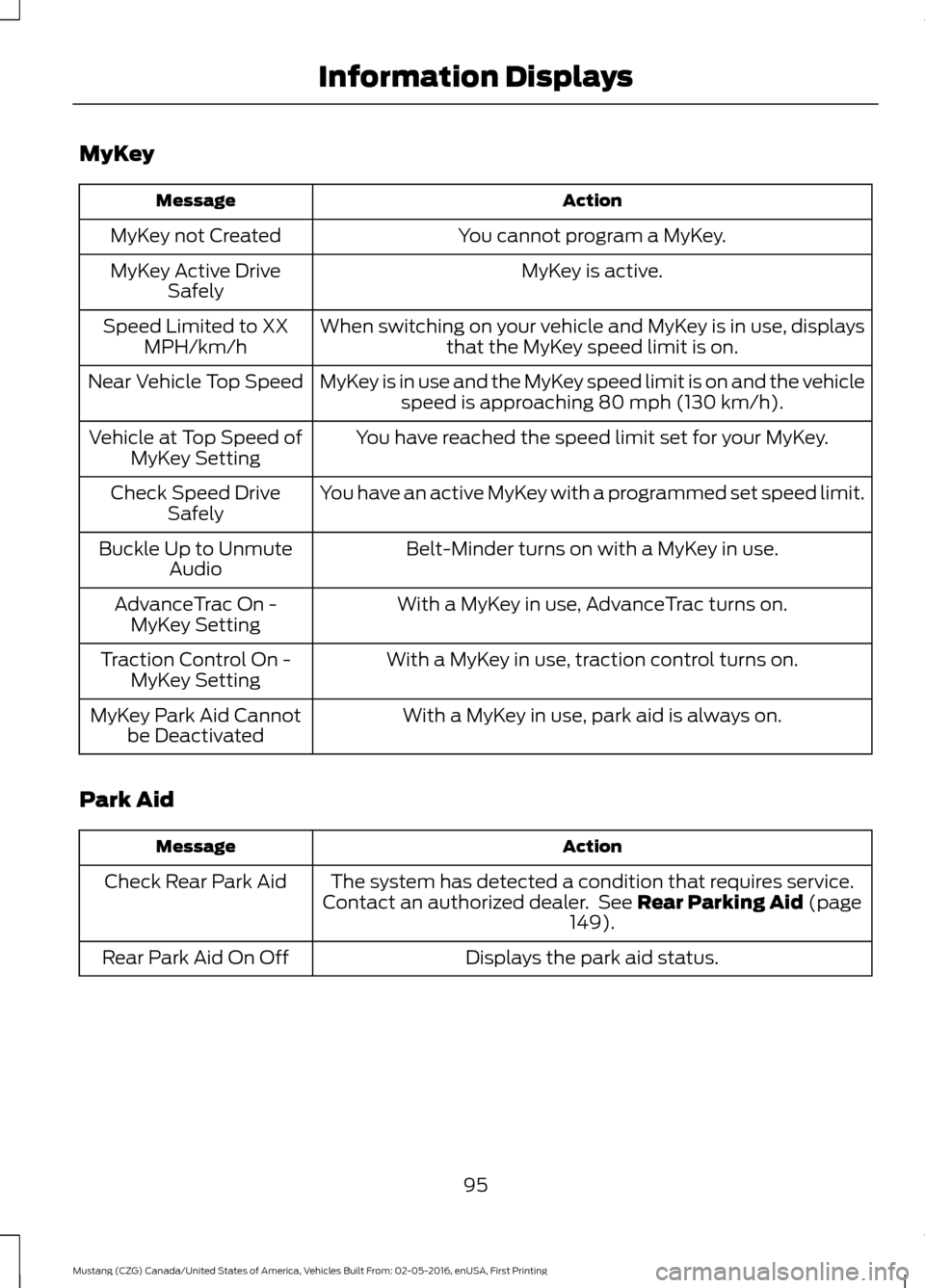
MyKey
Action
Message
You cannot program a MyKey.
MyKey not Created
MyKey is active.
MyKey Active Drive
Safely
When switching on your vehicle and MyKey is in use, displaysthat the MyKey speed limit is on.
Speed Limited to XX
MPH/km/h
MyKey is in use and the MyKey speed limit is on and the vehiclespeed is approaching 80 mph (130 km/h).
Near Vehicle Top Speed
You have reached the speed limit set for your MyKey.
Vehicle at Top Speed of
MyKey Setting
You have an active MyKey with a programmed set speed limit.
Check Speed Drive
Safely
Belt-Minder turns on with a MyKey in use.
Buckle Up to Unmute
Audio
With a MyKey in use, AdvanceTrac turns on.
AdvanceTrac On -
MyKey Setting
With a MyKey in use, traction control turns on.
Traction Control On -
MyKey Setting
With a MyKey in use, park aid is always on.
MyKey Park Aid Cannot
be Deactivated
Park Aid Action
Message
The system has detected a condition that requires service.
Contact an authorized dealer. See
Rear Parking Aid (page
149).
Check Rear Park Aid
Displays the park aid status.
Rear Park Aid On Off
95
Mustang (CZG) Canada/United States of America, Vehicles Built From: 02-05-2016, enUSA, First Printing Information Displays
Page 100 of 475
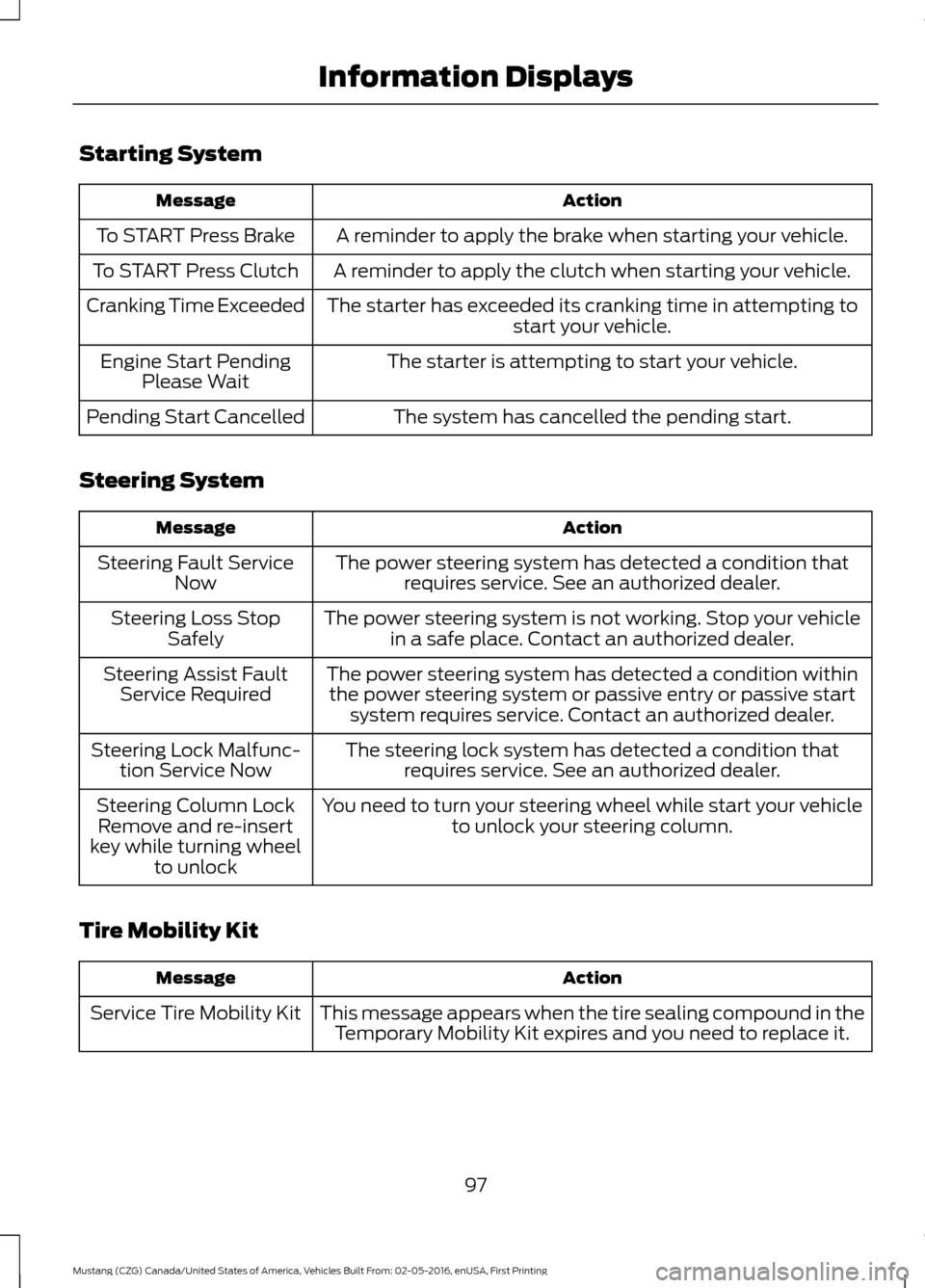
Starting System
Action
Message
A reminder to apply the brake when starting your vehicle.
To START Press Brake
A reminder to apply the clutch when starting your vehicle.
To START Press Clutch
The starter has exceeded its cranking time in attempting tostart your vehicle.
Cranking Time Exceeded
The starter is attempting to start your vehicle.
Engine Start Pending
Please Wait
The system has cancelled the pending start.
Pending Start Cancelled
Steering System Action
Message
The power steering system has detected a condition thatrequires service. See an authorized dealer.
Steering Fault Service
Now
The power steering system is not working. Stop your vehiclein a safe place. Contact an authorized dealer.
Steering Loss Stop
Safely
The power steering system has detected a condition withinthe power steering system or passive entry or passive start system requires service. Contact an authorized dealer.
Steering Assist Fault
Service Required
The steering lock system has detected a condition thatrequires service. See an authorized dealer.
Steering Lock Malfunc-
tion Service Now
You need to turn your steering wheel while start your vehicleto unlock your steering column.
Steering Column Lock
Remove and re-insert
key while turning wheel to unlock
Tire Mobility Kit Action
Message
This message appears when the tire sealing compound in theTemporary Mobility Kit expires and you need to replace it.
Service Tire Mobility Kit
97
Mustang (CZG) Canada/United States of America, Vehicles Built From: 02-05-2016, enUSA, First Printing Information Displays
Page 115 of 475
Note:
A preset memory position can only
be recalled when the ignition is off, or when
the transmission is in park (P) or neutral (N)
if the ignition is on.
You can also recall a preset memory
position by:
• Pressing the unlock button on your
intelligent access key fob if it is linked
to a preset position.
• Unlocking the intelligent driver door
handle if a linked key fob is present.
• Entering a personal entry code on the
Securicode keypad. See Doors and
Locks (page 54).
Note: Using a linked key fob to recall your
memory position when the ignition is off will
move the seat to the Easy Entry position.
Note: Pressing any seat or mirror
adjustment control (or any memory button)
during a memory recall cancels the
operation.
Seat recall movement will also stop if you
drive your vehicle.
Linking a PreSet Position to your
Remote Control or Intelligent
Access Key Fob
Your vehicle can save the preset memory
positions for up to three remote controls
or intelligent access (IA) keys.
1. With the ignition on, move the memory
positions to the desired positions.
2. Press and hold the desired preset button for about five seconds. A tone
will sound after about two seconds.
Continue holding until a second tone
is heard.
3. Within three seconds, press the lock button on the remote control you are
linking.
To unlink a remote control, follow the
same procedure – except in step 3, press
the unlock button on the remote control. Note:
If more than one linked remote
control or intelligent access key is in range,
the memory function will move to the
settings of the first key stored.
Easy Entry and Exit Feature
If you enable the easy entry and exit
feature, it automatically moves the driver
seat position rearward up to two inches
(five centimeters) when you switch the
ignition off.
The driver seat will return to the previous
position when you switch the ignition on.
You can enable or disable this feature in
the information display. See Information
Displays
(page 81).
REAR SEATS WARNINGS
When folding the seat backrest
down, take care not to get your
fingers caught in the mechanism.
Make sure that the seats and the
seat backrests are secure and fully
locked in their catches.
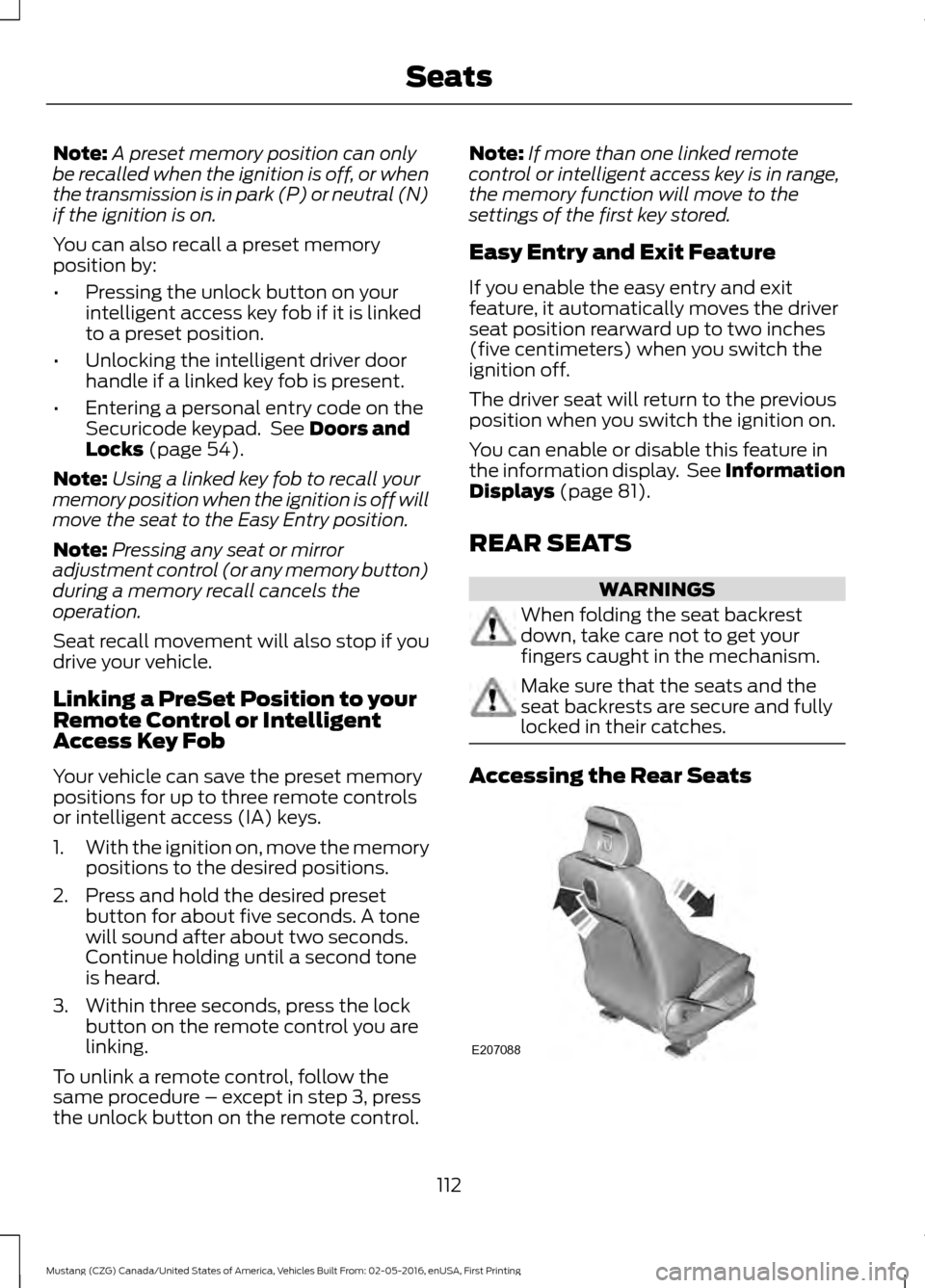
Accessing the Rear Seats
112
Mustang (CZG) Canada/United States of America, Vehicles Built From: 02-05-2016, enUSA, First Printing SeatsE207088
Page 124 of 475
GENERAL INFORMATION
WARNINGS
Extended idling at high engine
speeds can produce very high
temperatures in the engine and
exhaust system, creating the risk of fire or
other damage. Do not park, idle or drive your vehicle
on dry grass or other dry ground
cover. The emission system heats up
the engine compartment and exhaust
system, creating the risk of fire. Do not start the engine in a closed
garage or in other enclosed areas.
Exhaust fumes can be toxic. Always
open the garage door before you start the
engine. If you smell exhaust fumes inside
your vehicle, have your vehicle
checked by an authorized dealer
immediately. Do not drive your vehicle if
you smell exhaust fumes. If you disconnect the battery, your vehicle
may exhibit some unusual driving
characteristics for approximately 5 miles
(8 kilometers) after you reconnect it. This
is because the engine management system
must realign itself with the engine. You can
disregard any unusual driving
characteristics during this period.
The powertrain control system meets all
Canadian interference-causing equipment
standard requirements regulating the
impulse electrical field or radio noise.
When you start the engine, avoid pressing
the accelerator pedal before and during
operation. Only use the accelerator pedal
when you have difficulty starting the
engine. KEYLESS STARTING
Note:
The keyless starting system may not
function if the key is close to metal objects
or electronic devices such as cellular
phones.
Note: A valid key must be located inside
your vehicle to switch the ignition on and
start the engine.
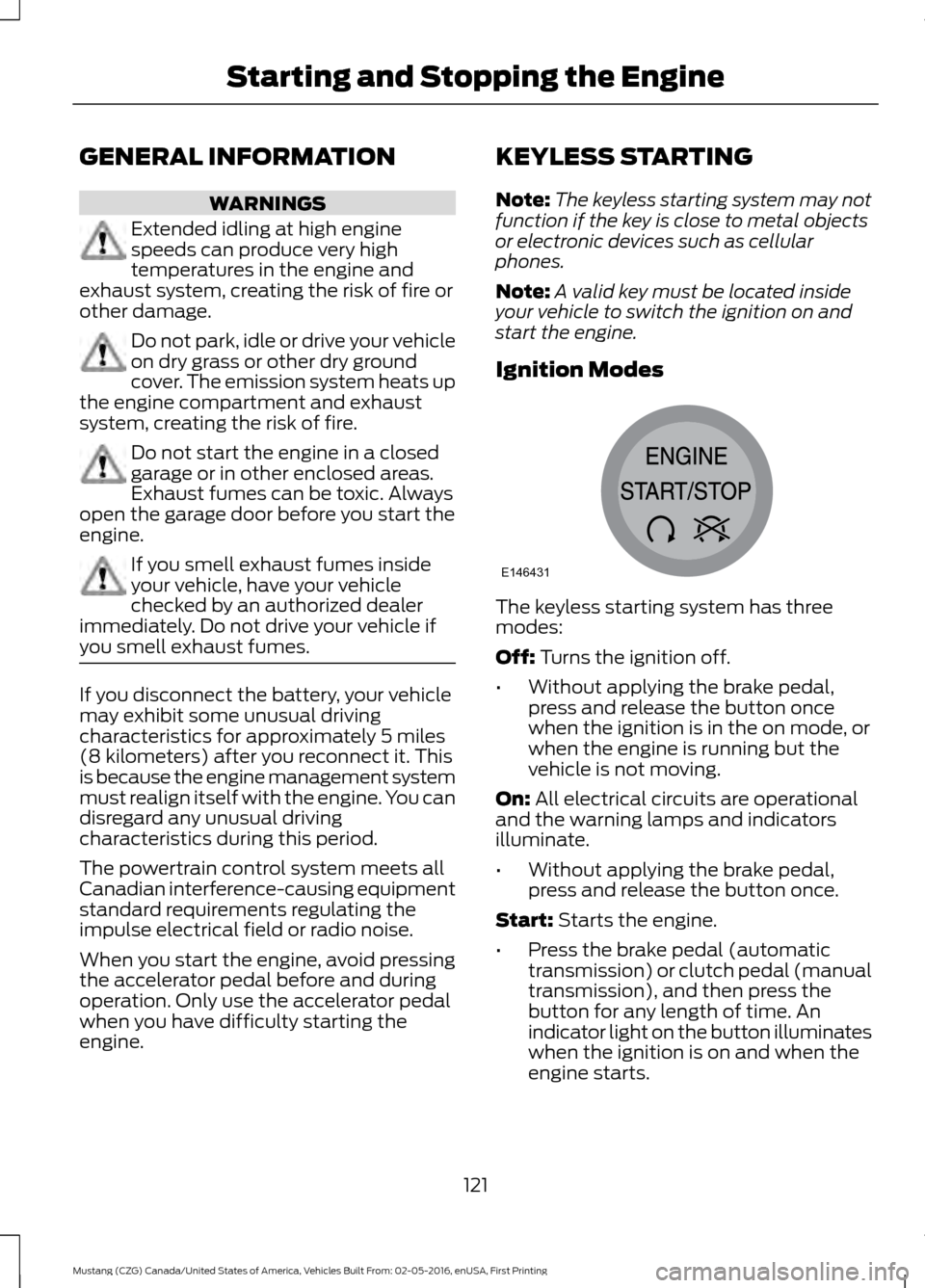
Ignition Modes The keyless starting system has three
modes:
Off: Turns the ignition off.
• Without applying the brake pedal,
press and release the button once
when the ignition is in the on mode, or
when the engine is running but the
vehicle is not moving.
On:
All electrical circuits are operational
and the warning lamps and indicators
illuminate.
• Without applying the brake pedal,
press and release the button once.
Start:
Starts the engine.
• Press the brake pedal (automatic
transmission) or clutch pedal (manual
transmission), and then press the
button for any length of time. An
indicator light on the button illuminates
when the ignition is on and when the
engine starts.
121
Mustang (CZG) Canada/United States of America, Vehicles Built From: 02-05-2016, enUSA, First Printing Starting and Stopping the EngineE146431
Page 125 of 475
STEERING WHEEL LOCK (If
Equipped)
The steering wheel locks automatically
when you leave your vehicle and take the
intelligent access key with you. The
steering wheel unlocks automatically when
you enter your vehicle with the intelligent
access key.
Note: You may need to turn the steering
wheel left or right if the wheel does not
unlock completely. This may happen in
certain situations, such as parking your
vehicle on a steep grade.
STARTING A GASOLINE
ENGINE
When you start the engine, the idle speed
increases, this helps to warm up the
engine. If the engine idle speed does not
slow down automatically, have your
vehicle checked by an authorized dealer.
Note: You can crank the engine for a total
of 60 seconds (without the engine starting)
before the starting system temporarily
disables. The 60 seconds does not have to
be all at once. For example, if you crank the
engine three times for 20 seconds each
time, without the engine starting, you
reached the 60-second time limit. A
message appears in the information display
alerting you that you exceeded the cranking
time. You cannot attempt to start the engine
for at least 15 minutes. After 15 minutes, you
are limited to a 15-second engine cranking
time. You need to wait 60 minutes before
you can crank the engine for 60 seconds
again. Before starting the engine, check the
following:
•
Make sure all occupants have fastened
their seatbelts.
• Make sure the headlamps and
electrical accessories are off.
• Make sure the parking brake is on.
• Move the transmission selector lever
to park (P) (automatic transmission)
or neutral (manual transmission)
Note: Do not touch the accelerator pedal.
Note: You must have your intelligent access
key in the vehicle in order to shift the
transmission out of position
P.
1. Fully press the brake pedal.
2. Press the button.
The system does not function if:
• The key frequencies are jammed.
• The key battery has no charge.
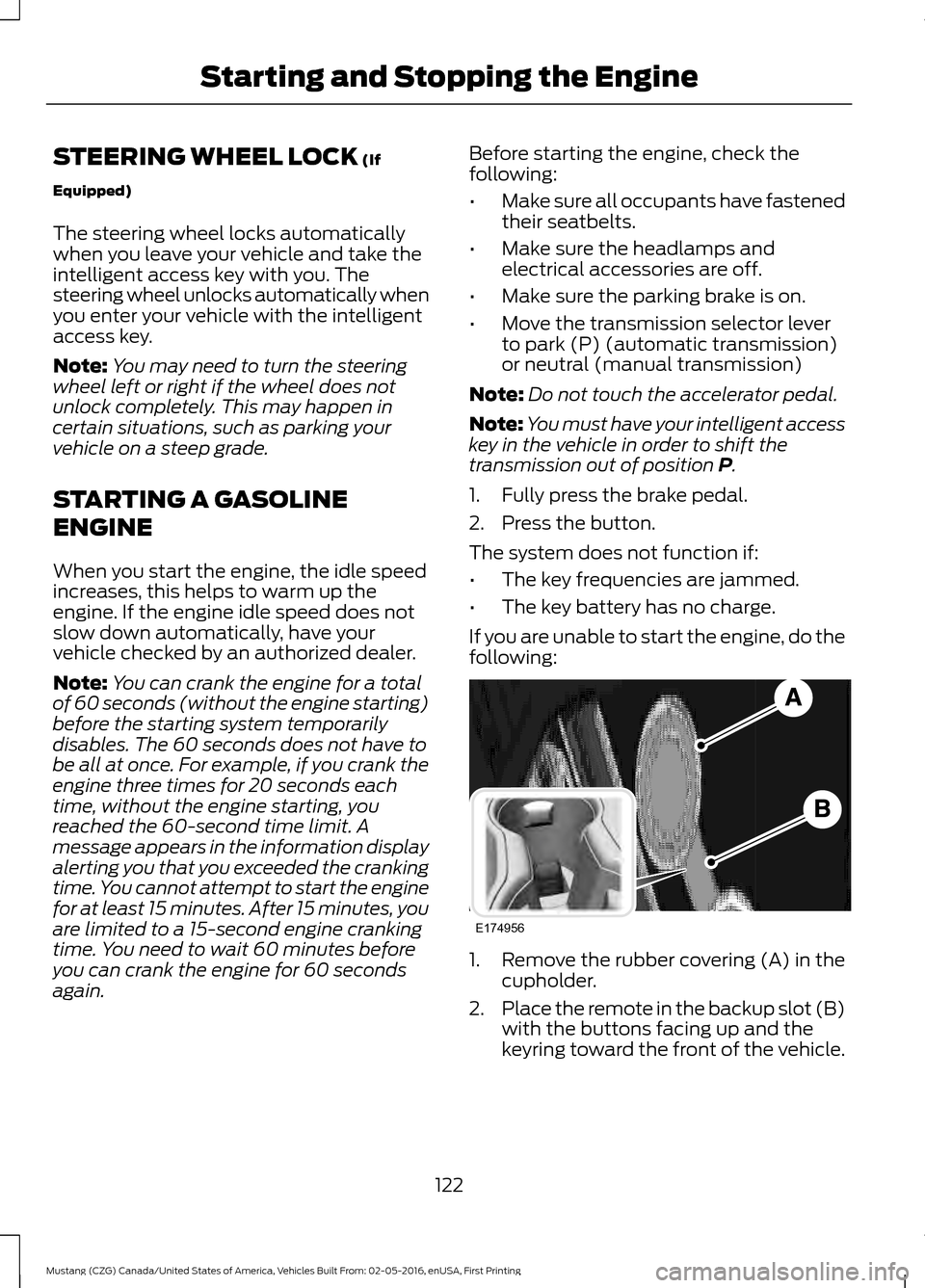
If you are unable to start the engine, do the
following: 1. Remove the rubber covering (A) in the
cupholder.
2. Place the remote in the backup slot (B)
with the buttons facing up and the
keyring toward the front of the vehicle.
122
Mustang (CZG) Canada/United States of America, Vehicles Built From: 02-05-2016, enUSA, First Printing Starting and Stopping the EngineE174956
Page 126 of 475
3. With the key in this position, press the
brake pedal (automatic transmission)
or clutch pedal (manual transmission),
then the START button to switch the
ignition on and start your vehicle.
Fast Restart
The fast restart feature allows you to
restart the engine within 20 seconds of
switching it off, even if a valid key is not
present.
Within 20 seconds of switching the engine
off, press the brake pedal (automatic
transmission) or clutch pedal (manual
transmission) and press the button. After
20 seconds have expired, you can no
longer restart the engine without the key
present inside your vehicle.
Once the engine has started, it remains
running until you press the button, even if
the system does not detect a valid key. If
you open and close a door while the engine
is running, the system searches for a valid
key. You cannot restart the engine if the
system does not detect a valid key within
20 seconds.
Failure to Start
If you cannot start the engine after three
attempts, wait 10 seconds and follow this
procedure:
1. If your vehicle is equipped with an automatic transmission, fully press the
brake pedal. If your vehicle is equipped
with a manual transmission, fully press
the clutch pedal and apply the
handbrake.
2. Move the transmission selector lever to park (P) (automatic transmission)
or neutral (manual transmission).
3. Fully press the accelerator pedal and hold it there.
4. Start the engine. Automatic Engine Shutdown
Your vehicle is equipped with a feature that
automatically shuts down the engine if it
has been idling for an extended period. The
ignition also turns off in order to save
battery power. Before the engine shuts
down, a message appears in the
information display showing a timer
counting down from 30 seconds. If you do
not intervene within 30 seconds, the engine
shuts down. Another message appears in
the information display to inform you that
the engine has shut down in order to save
fuel. Start your vehicle as you normally do.
Automatic Engine Shutdown Override
Note:
You cannot permanently switch off
the automatic engine shutdown feature.
When you switch it off temporarily, it turns
on at the next ignition cycle.
You can stop the engine shutdown, or reset
the timer, at any point before the
30-second countdown has expired by
doing any of the following:
• You can reset the timer by interacting
with your vehicle (such as pressing the
brake pedal or accelerator pedal).
• You can temporarily switch off the
shutdown feature any time the ignition
is on (for the current ignition cycle
only). Use the information display to
do so. See Information Displays
(page 81).
• During the countdown before engine
shutdown, you are prompted to press
OK or RESET (depending on your type
of information display) to temporarily
switch the feature off (for the current
ignition cycle only).
Stopping the Engine When Your
Vehicle is Stationary
1. Move the transmission selector lever to park (P) (automatic transmission)
or neutral (manual transmission).
123
Mustang (CZG) Canada/United States of America, Vehicles Built From: 02-05-2016, enUSA, First Printing Starting and Stopping the Engine