steering wheel FORD MUSTANG 2017 6.G Service Manual
[x] Cancel search | Manufacturer: FORD, Model Year: 2017, Model line: MUSTANG, Model: FORD MUSTANG 2017 6.GPages: 475, PDF Size: 6.93 MB
Page 356 of 475
Home screen display
Tile
Item
If your vehicle does not have navigation, this space
contains the audio information.
* If equipped.
You can touch any of the feature displays
to access that feature.
Anytime you select the home button, the
system returns you to this screen.
USING VOICE RECOGNITION
The SYNC 3 system allows you to use voice
commands, to control features like audio
and climate controls. By using voice
commands, you can keep your hands on
the wheel and your eyes on the road. You can access each feature controlled by
SYNC 3 through a variety of commands. To activate the SYNC 3 voice
commands push the voice
button on the steering wheel and
wait for the prompt.
___ is a dynamic listing, meaning that it can
be the name of anything, such as artist, the
name of contact or number. The context
and the description of the command tell
you what to say for this dynamic option.
There are some commands that work for
every feature, these commands are: Action and Description
Voice Command
Brings you to the main menu.
Main Menu
Returns you to the previous screen.
Go back
Ends the voice session.
Cancel
Gives you a list of possible voice commands.
List of Commands
You can name any feature and the system gives a list of
commands available for the feature. For example, you could
say:
___ List of Commands
Phone List of Commands
Navigation List of Commands
You can use this command to view the next page of options on
any screen where multiple pages of choices are given.
Next Page
You can use this command to view the previous page of options
on any screen where multiple pages of choices are given.
Previous Page
Gives you available commands you can use on the current
screen.
Help
353
Mustang (CZG) Canada/United States of America, Vehicles Built From: 02-05-2016, enUSA, First Printing SYNC™ 3 (If Equipped)E142599
Page 373 of 475
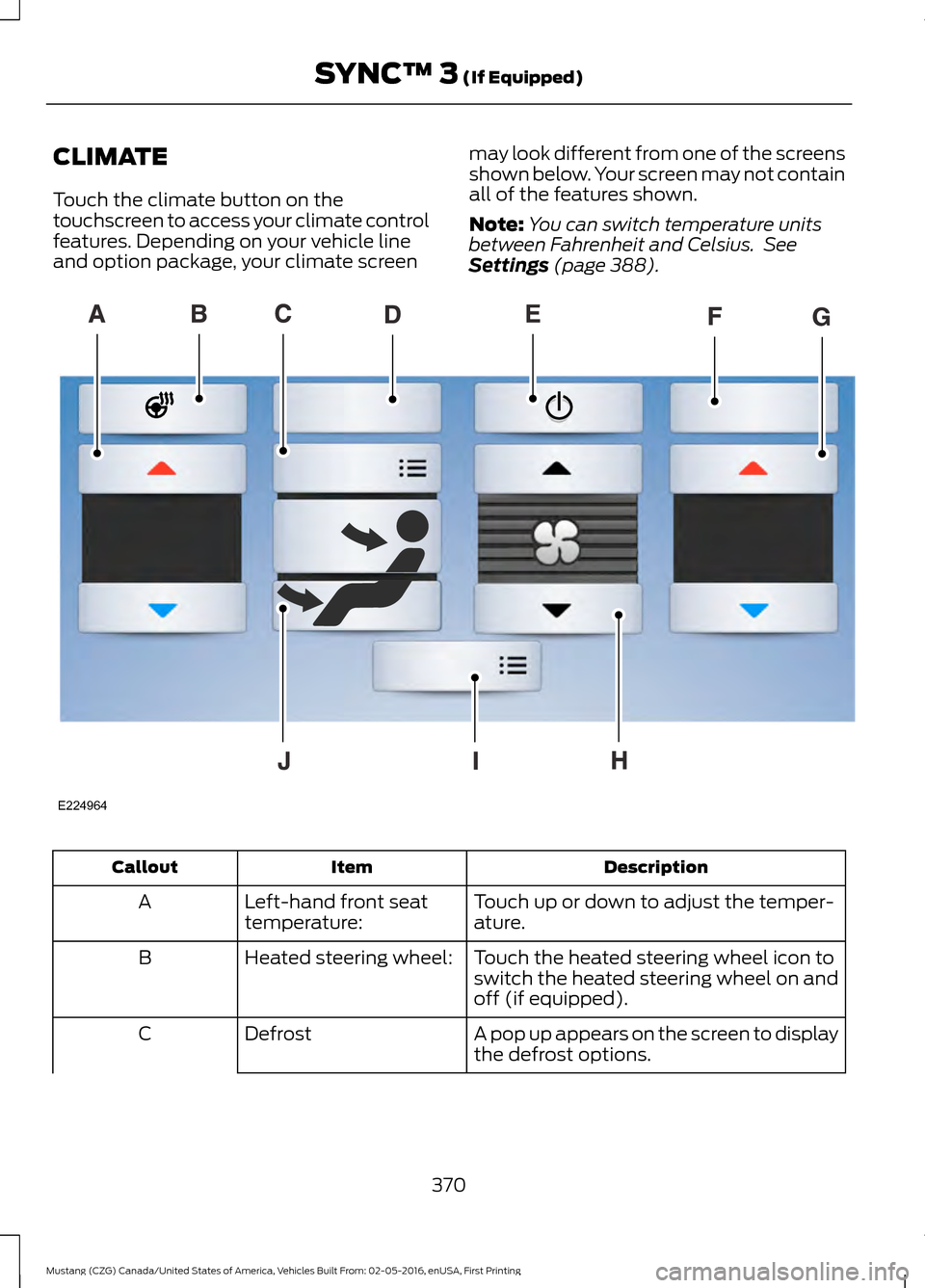
CLIMATE
Touch the climate button on the
touchscreen to access your climate control
features. Depending on your vehicle line
and option package, your climate screen
may look different from one of the screens
shown below. Your screen may not contain
all of the features shown.
Note:
You can switch temperature units
between Fahrenheit and Celsius. See
Settings (page 388). Description
Item
Callout
Touch up or down to adjust the temper-
ature.
Left-hand front seat
temperature:
A
Touch the heated steering wheel icon to
switch the heated steering wheel on and
off (if equipped).
Heated steering wheel:
B
A pop up appears on the screen to display
the defrost options.
Defrost
C
370
Mustang (CZG) Canada/United States of America, Vehicles Built From: 02-05-2016, enUSA, First Printing SYNC™ 3
(If Equipped)E224964
Page 378 of 475
Action and Description
Menu Item
Item
You can also sort the calls by selecting the drop down menu at
the top of the screen. You can choose: Missed
Outgoing
Incoming
All
All of your contacts from your phone display in alphabetical
order.
Contacts
B
Selecting this button allows
you to choose a specific letter
to view.
A-Z Jump
Displays the name of your phone and takes you to the phone
settings options.
Phone
Settings
C
From this menu, you can pair subsequent devices, set ring tones
and alerts. See Settings (page 388).
Displays all recent text messages.
Text
Messages
D
Use this keypad to dial in a phone number.
Phone
Keypad
E
Use the backspace button to delete numbers.
Press this button to begin a
call.
Call
Touch this button to send all calls directly to your voicemail.
New text message notifications are not displayed on the screen
and all ringtones and alerts are set to silent.
Do Not
Disturb
F
Users with phones having voice services
may see a button to access the feature.
For example, iPhone users see a Siri button.
A press and hold of the voice button on the
steering wheel also accesses this feature.
Making Calls
There are many ways to make calls from
the SYNC 3 system, including using voice
commands. See
Using Voice
Recognition (page 353). You can use the
touchscreen to place calls as well.
375
Mustang (CZG) Canada/United States of America, Vehicles Built From: 02-05-2016, enUSA, First Printing SYNC™ 3
(If Equipped)
Page 379 of 475
To call a number in your contacts,
select:
Action and Description
Menu Item
You can then select the
name of the contact you
want to call. Any numbers
stored for that contact
display along with any
stored contact photos. You
can then select the
number that you want to
call. The system begins the
call.
Contacts
To call a number from your recent calls,
select: Action and Description
Menu Item
You can then select an
entry that you want to call.
The system begins the call.
Recent Call
List
To call a number that is not stored in
your phone, select: Action and Description
Menu Item
Select the digits of the
number you wish to call.
Phone
Keypad
The system begins the call.
Call
Pressing the backspace button deletes the
last digit you typed.
Receiving Calls
During an incoming call, an audible tone
sounds. Caller information appears in the
display if it is available. To accept the call, select: Menu Item
Accept
Note: You can also accept the call by
pressing the phone button on the steering
wheel.
To reject the call, select: Menu Item
Reject
Note: You can also reject the call by
pressing the phone button on the steering
wheel.
Ignore the call by doing nothing. SYNC 3
logs it as a missed call.
During a Phone Call
During a phone call, the contacts name
and number display on the screen along
with the call duration.
The phone status items are also visible:
• Signal Strength.
• Battery.
• 911 Assist (United States and Canada
Only). See Settings (page 388).
You can select any of the following during
an active phone call:
376
Mustang (CZG) Canada/United States of America, Vehicles Built From: 02-05-2016, enUSA, First Printing SYNC™ 3
(If Equipped)
Page 380 of 475
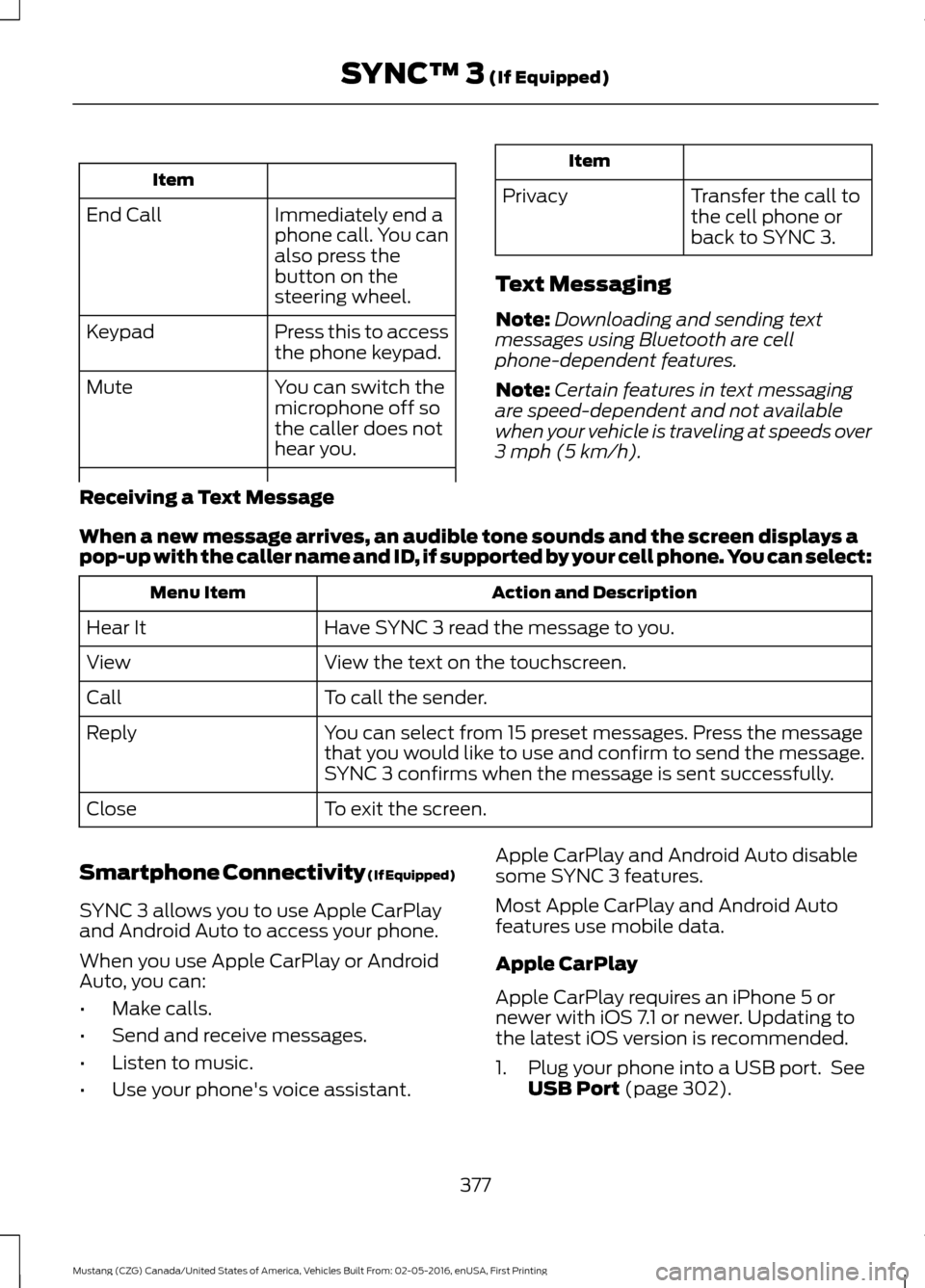
Item
Immediately end a
phone call. You can
also press the
button on the
steering wheel.
End Call
Press this to access
the phone keypad.
Keypad
You can switch the
microphone off so
the caller does not
hear you.
Mute Item
Privacy Transfer the call to
the cell phone or
back to SYNC 3.
Text Messaging
Note: Downloading and sending text
messages using Bluetooth are cell
phone-dependent features.
Note: Certain features in text messaging
are speed-dependent and not available
when your vehicle is traveling at speeds over
3 mph (5 km/h).
Receiving a Text Message
When a new message arrives, an audible tone sounds and the screen displays a
pop-up with the caller name and ID, if supported by your cell phone. You can select: Action and Description
Menu Item
Have SYNC 3 read the message to you.
Hear It
View the text on the touchscreen.
View
To call the sender.
Call
You can select from 15 preset messages. Press the message
that you would like to use and confirm to send the message.
SYNC 3 confirms when the message is sent successfully.
Reply
To exit the screen.
Close
Smartphone Connectivity (If Equipped)
SYNC 3 allows you to use Apple CarPlay
and Android Auto to access your phone.
When you use Apple CarPlay or Android
Auto, you can:
• Make calls.
• Send and receive messages.
• Listen to music.
• Use your phone's voice assistant. Apple CarPlay and Android Auto disable
some SYNC 3 features.
Most Apple CarPlay and Android Auto
features use mobile data.
Apple CarPlay
Apple CarPlay requires an iPhone 5 or
newer with iOS 7.1 or newer. Updating to
the latest iOS version is recommended.
1. Plug your phone into a USB port. See
USB Port
(page 302).
377
Mustang (CZG) Canada/United States of America, Vehicles Built From: 02-05-2016, enUSA, First Printing SYNC™ 3
(If Equipped)
Page 389 of 475
HERE is the digital map provider for the
navigation application. If you find map data
errors, you may report them directly to
HERE by going to
www.here.com/mapcreator. HERE
evaluates all reported map errors and
responds with the result of their
investigation by e-mail.
Map coverage includes the USA (including
Puerto Rico and the US Virgin Islands),
Canada and Mexico.
APPS
The system enables voice, steering wheel,
and touch screen control of SYNC 3
AppLink enabled smartphone apps. Once
an app is running through AppLink, you can
control main features of the app through
voice commands and steering wheel
controls.
Note:
Available AppLink enabled apps will
vary by market.
Note: You must pair and connect your
smartphone via Bluetooth to SYNC 3 to
access AppLink.
Note: iPhone users need to connect the
phone to the USB port.
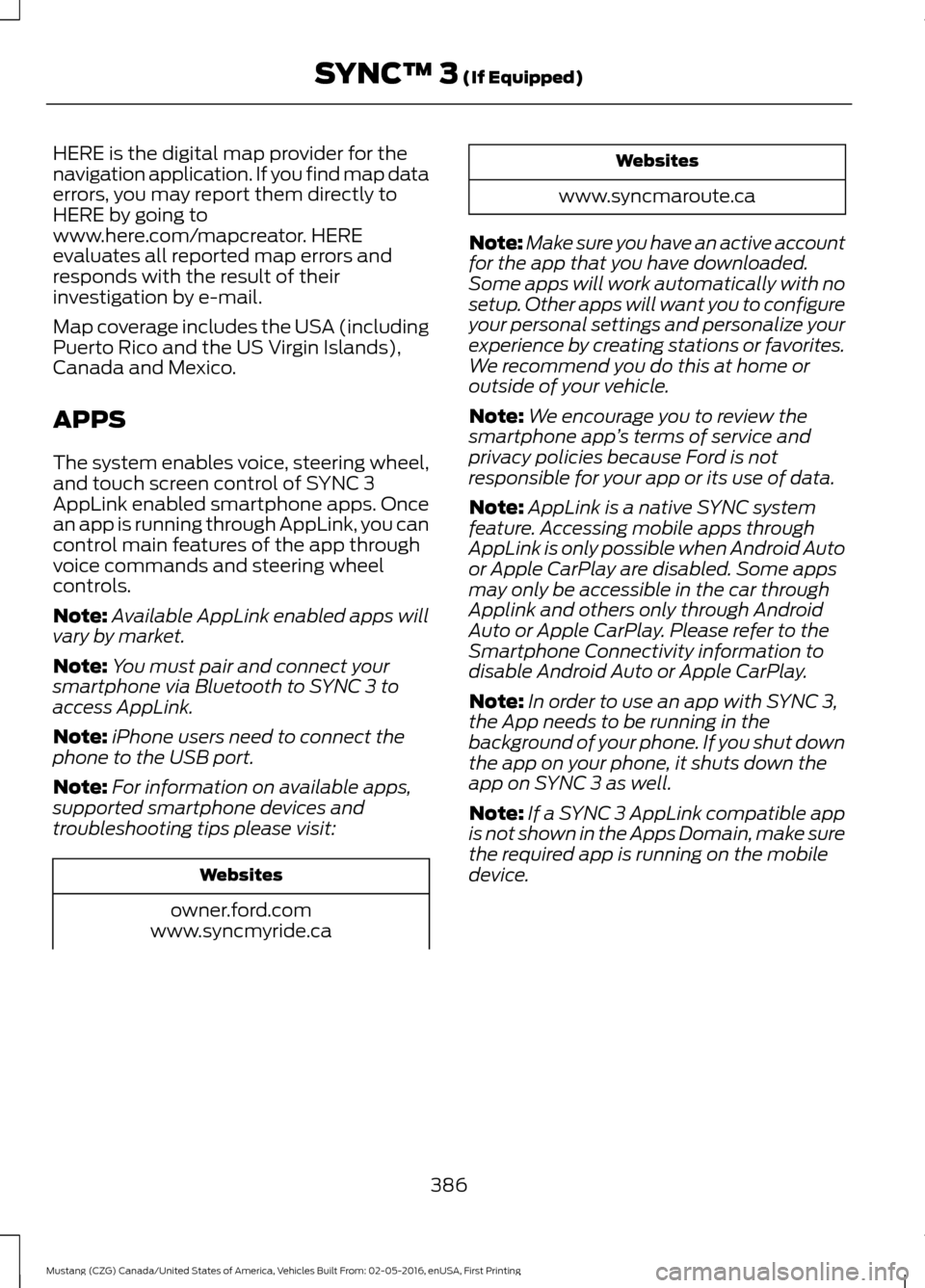
Note: For information on available apps,
supported smartphone devices and
troubleshooting tips please visit: Websites
owner.ford.com
www.syncmyride.ca Websites
www.syncmaroute.ca
Note: Make sure you have an active account
for the app that you have downloaded.
Some apps will work automatically with no
setup. Other apps will want you to configure
your personal settings and personalize your
experience by creating stations or favorites.
We recommend you do this at home or
outside of your vehicle.
Note: We encourage you to review the
smartphone app ’s terms of service and
privacy policies because Ford is not
responsible for your app or its use of data.
Note: AppLink is a native SYNC system
feature. Accessing mobile apps through
AppLink is only possible when Android Auto
or Apple CarPlay are disabled. Some apps
may only be accessible in the car through
Applink and others only through Android
Auto or Apple CarPlay. Please refer to the
Smartphone Connectivity information to
disable Android Auto or Apple CarPlay.
Note: In order to use an app with SYNC 3,
the App needs to be running in the
background of your phone. If you shut down
the app on your phone, it shuts down the
app on SYNC 3 as well.
Note: If a SYNC 3 AppLink compatible app
is not shown in the Apps Domain, make sure
the required app is running on the mobile
device.
386
Mustang (CZG) Canada/United States of America, Vehicles Built From: 02-05-2016, enUSA, First Printing SYNC™ 3 (If Equipped)
Page 425 of 475
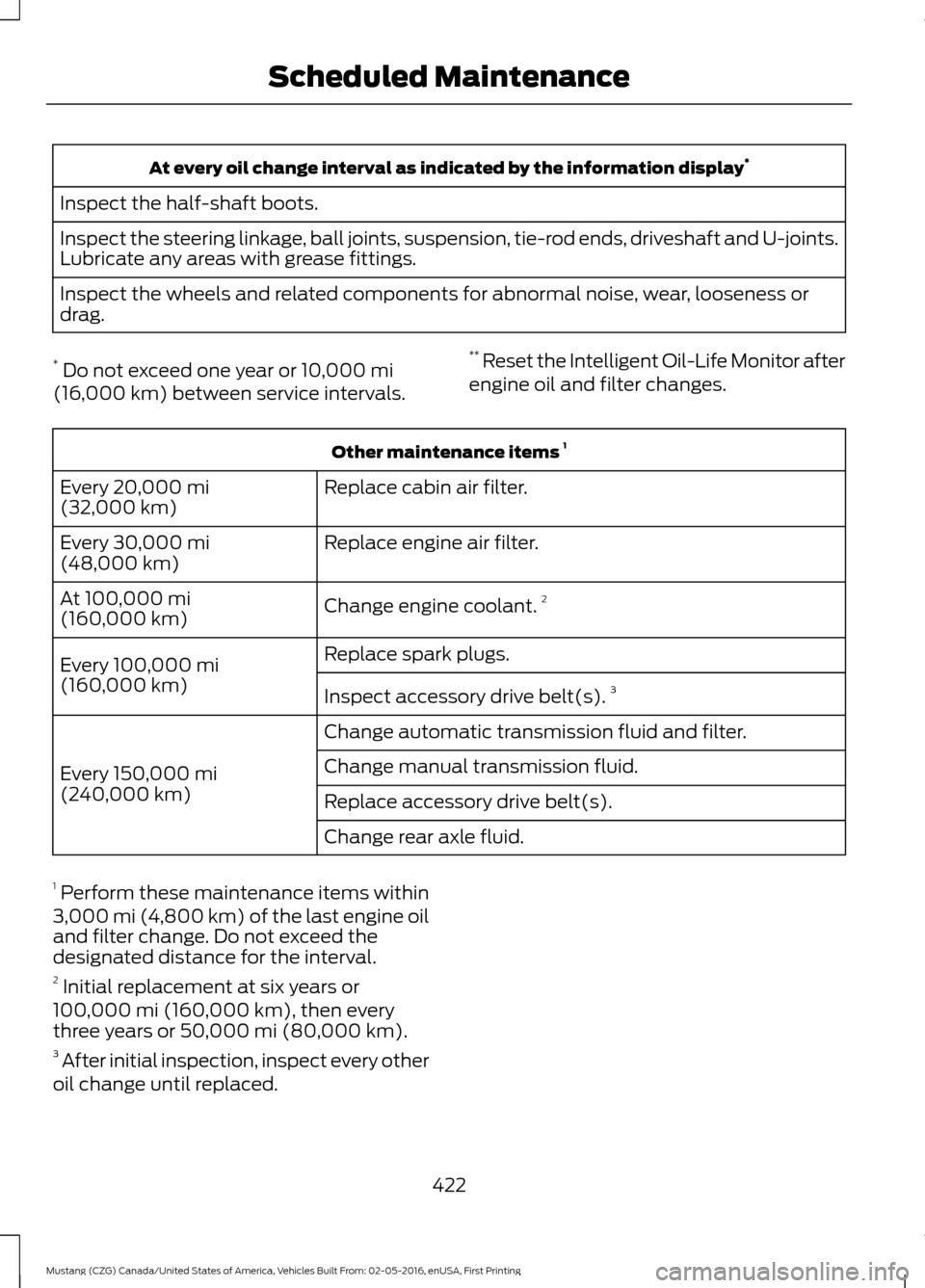
At every oil change interval as indicated by the information display
*
Inspect the half-shaft boots.
Inspect the steering linkage, ball joints, suspension, tie-rod ends, driveshaft and U-joints.
Lubricate any areas with grease fittings.
Inspect the wheels and related components for abnormal noise, wear, looseness or
drag.
* Do not exceed one year or 10,000 mi
(16,000 km) between service intervals. **
Reset the Intelligent Oil-Life Monitor after
engine oil and filter changes. Other maintenance items
1
Replace cabin air filter.
Every
20,000 mi
(32,000 km)
Replace engine air filter.
Every
30,000 mi
(48,000 km)
Change engine coolant.2
At
100,000 mi
(160,000 km)
Replace spark plugs.
Every
100,000 mi
(160,000 km) Inspect accessory drive belt(s). 3
Change automatic transmission fluid and filter.
Every
150,000 mi
(240,000 km) Change manual transmission fluid.
Replace accessory drive belt(s).
Change rear axle fluid.
1 Perform these maintenance items within
3,000 mi (4,800 km) of the last engine oil
and filter change. Do not exceed the
designated distance for the interval.
2 Initial replacement at six years or
100,000 mi (160,000 km)
, then every
three years or 50,000 mi (80,000 km).
3 After initial inspection, inspect every other
oil change until replaced.
422
Mustang (CZG) Canada/United States of America, Vehicles Built From: 02-05-2016, enUSA, First Printing Scheduled Maintenance
Page 466 of 475
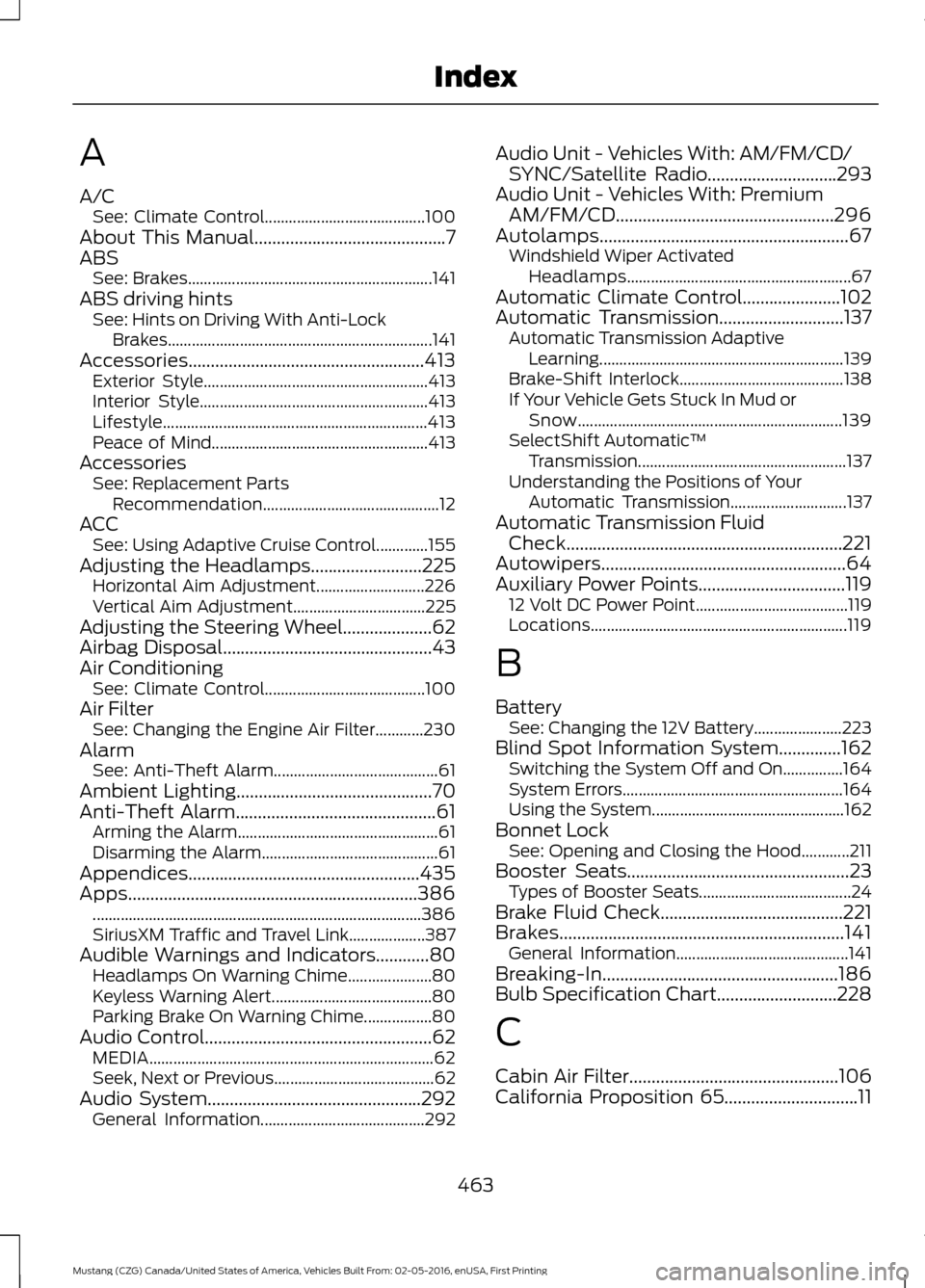
A
A/C
See: Climate Control........................................ 100
About This Manual...........................................7
ABS See: Brakes............................................................. 141
ABS driving hints See: Hints on Driving With Anti-Lock
Brakes.................................................................. 141
Accessories.....................................................413 Exterior Style........................................................ 413
Interior Style......................................................... 413
Lifestyle.................................................................. 413
Peace of Mind...................................................... 413
Accessories See: Replacement Parts
Recommendation............................................ 12
ACC See: Using Adaptive Cruise Control.............155
Adjusting the Headlamps.........................225 Horizontal Aim Adjustment........................... 226
Vertical Aim Adjustment................................. 225
Adjusting the Steering Wheel....................62
Airbag Disposal
...............................................43
Air Conditioning See: Climate Control........................................ 100
Air Filter See: Changing the Engine Air Filter............230
Alarm See: Anti-Theft Alarm......................................... 61
Ambient Lighting
............................................70
Anti-Theft Alarm.............................................61
Arming the Alarm.................................................. 61
Disarming the Alarm............................................ 61
Appendices....................................................435
Apps.................................................................386 ........................................................................\
.......... 386
SiriusXM Traffic and Travel Link................... 387
Audible Warnings and Indicators............80 Headlamps On Warning Chime..................... 80
Keyless Warning Alert........................................ 80
Parking Brake On Warning Chime.................80
Audio Control
...................................................62
MEDIA....................................................................... 62
Seek, Next or Previous........................................ 62
Audio System................................................292 General Information......................................... 292Audio Unit - Vehicles With: AM/FM/CD/
SYNC/Satellite Radio.............................293
Audio Unit - Vehicles With: Premium AM/FM/CD.................................................296
Autolamps........................................................67 Windshield Wiper Activated
Headlamps........................................................ 67
Automatic Climate Control......................102
Automatic Transmission
............................137
Automatic Transmission Adaptive
Learning............................................................. 139
Brake-Shift Interlock......................................... 138
If Your Vehicle Gets Stuck In Mud or Snow.................................................................. 139
SelectShift Automatic ™
Transmission.................................................... 137
Understanding the Positions of Your Automatic Transmission............................. 137
Automatic Transmission Fluid Check..............................................................221
Autowipers.......................................................64
Auxiliary Power Points.................................119 12 Volt DC Power Point...................................... 119
Locations................................................................ 119
B
Battery See: Changing the 12V Battery...................... 223
Blind Spot Information System..............162 Switching the System Off and On...............164
System Errors....................................................... 164
Using the System................................................ 162
Bonnet Lock See: Opening and Closing the Hood............211
Booster Seats
..................................................23
Types of Booster Seats...................................... 24
Brake Fluid Check
.........................................221
Brakes................................................................141 General Information........................................... 141
Breaking-In.....................................................186
Bulb Specification Chart...........................228
C
Cabin Air Filter
...............................................106
California Proposition 65..............................11
463
Mustang (CZG) Canada/United States of America, Vehicles Built From: 02-05-2016, enUSA, First Printing Index
Page 471 of 475
Lug Nuts
See: Changing a Road Wheel....................... 265
M
Maintenance....................................................211 General Information............................................ 211
Manual Climate Control............................100
Manual Seats..................................................110
Manual Transmission Fluid Check..........221
Manual Transmission
..................................135
Parking Your Vehicle.......................................... 136
Recommended Shift Speeds......................... 135
Reverse................................................................... 136
Using the Clutch.................................................. 135
Media Hub
......................................................302
Memory Function............................................111
Easy Entry and Exit Feature............................. 112
Linking a PreSet Position to your Remote Control or Intelligent Access Key
Fob........................................................................\
112
Saving a PreSet Position.................................... 111
Message Center See: Information Displays.................................. 81
Mirrors See: Heated Windows and Mirrors..............106
See: Windows and Mirrors................................. 71
Mobile Communications Equipment......14
Motorcraft Parts - 2.3L EcoBoost™..................................................274
Motorcraft Parts - 3.7L...............................275
Motorcraft Parts - 5.0L
..............................276
MyKey Troubleshooting...............................53
MyKey ™.............................................................49
Principle of Operation........................................ 49
N
Navigation......................................................378 cityseeker.............................................................. 385
Destination Mode.............................................. 379
Map Mode............................................................. 378
Navigation Map Updates................................ 385
Navigation Menu................................................ 383
SiriusXM Traffic and Travel Link................... 385
Waypoints............................................................ 384
Normal Scheduled Maintenance
..........420
Intelligent Oil-Life Monitor™........................ 420Normal Maintenance Intervals......................
421
O
Oil Check See: Engine Oil Check....................................... 216
Opening and Closing the Hood................211 Closing the Hood................................................. 212
Opening the Hood............................................... 211
Opening the Convertible Top...................183 Using the Tonneau Caps................................. 184
Ordering Additional Owner's Literature......................................................199
Obtaining a French Owner ’s Manual.........200
P
Parking Aids....................................................149 Principle of Operation....................................... 149
Parking Brake..................................................141
Passive Anti-Theft System
........................60
SecuriLock.............................................................. 60
PATS See: Passive Anti-Theft System.................... 60
Perchlorate.........................................................11
Personal Safety System ™
..........................34
How Does the Personal Safety System
Work?.................................................................. 34
Phone...............................................................373 During a Phone Call.......................................... 376
Making Calls......................................................... 375
Pairing Your Cell Phone for the First Time................................................................... 373
Phone Menu......................................................... 374
Receiving Calls.................................................... 376
Smartphone Connectivity............................... 377
Text Messaging.................................................... 377
Post-Crash Alert System
...........................193
Power Door Locks See: Locking and Unlocking............................. 54
Power Seats
....................................................110
Power Lumbar........................................................ 111
Power Steering Fluid Check.....................222
Power Windows
...............................................71
Accessory Delay..................................................... 71
Bounce-Back........................................................... 71
One-Touch Down.................................................. 71
One-Touch Up........................................................ 71
468
Mustang (CZG) Canada/United States of America, Vehicles Built From: 02-05-2016, enUSA, First Printing Index
Page 473 of 475
Vehicle...................................................................
399
Voice Control...................................................... 400
Wi-Fi....................................................................... 398
Side Airbags.....................................................39
Sitting in the Correct Position.................108
Snow Chains See: Using Snow Chains................................. 260
Special Notices................................................12 Additional Warranty Information.................... 12
New Vehicle Limited Warranty......................... 12
On Board Diagnostics Data Link Connector............................................................ 13
Special Instructions.............................................. 13
Special Operating Conditions Scheduled Maintenance...............................................423
Exceptions............................................................ 424
Speed Control See: Cruise Control............................................ 154
Stability Control
............................................145
Principle of Operation....................................... 145
Starting a Gasoline Engine........................122 Automatic Engine Shutdown......................... 123
Failure to Start..................................................... 123
Fast Restart........................................................... 123
Guarding Against Exhaust Fumes................124
Important Ventilating Information...............124
Stopping the Engine When Your Vehicle is Moving................................................................ 124
Stopping the Engine When Your Vehicle is Stationary......................................................... 123
Starting and Stopping the Engine...........121 General Information............................................ 121
Steering............................................................167 Electric Power Steering..................................... 167
Steering Wheel Lock
....................................122
Steering Wheel...............................................62
Storage Compartments.............................120
Sun Visors..........................................................74
Illuminated Vanity Mirror.................................... 74
Supplementary Restraints System.........35 Principle of Operation......................................... 35
Symbols Glossary
.............................................7
SYNC™ 3.........................................................341
General Information.......................................... 341
SYNC™ 3 Troubleshooting.....................400
SYNC™ Applications and Services.......319 911 Assist................................................................ 319
SYNC Mobile Apps............................................. 321SYNC™
...........................................................303
General Information......................................... 303
SYNC™ Troubleshooting
..........................333
T
Technical Specifications See: Capacities and Specifications.............272
The Better Business Bureau (BBB) Auto Line Program (U.S. Only)........................197
Tire Care
..........................................................245
Glossary of Tire Terminology......................... 247
Information About Uniform Tire Quality Grading............................................................. 245
Information Contained on the Tire Sidewall........................................................... 248
Temperature A B C............................................ 246
Traction AA A B C.............................................. 246
Treadwear............................................................ 246
Tire Inflation When Punctured See: Tire Sealant and Inflator Kit.................239
Tire Pressure Monitoring System............261 Changing Tires With a Tire Pressure
Monitoring System....................................... 262
Understanding Your Tire Pressure Monitoring System ...................................... 262
Tire Repair Kit See: Tire Sealant and Inflator Kit.................239
Tire Sealant and Inflator Kit....................239 First Stage: Inflating the Tire with Sealing
Compound and Air........................................ 241
General Information......................................... 240
Second Stage: Checking Tire Pressure............................................................ 243
Tips for Use of the Kit...................................... 240
What to Do After the Tire has Been Sealed............................................................... 243
What to do When a Tire Is Punctured.........241
Tires See: Wheels and Tires..................................... 239
Towing a Trailer..............................................178 Load Placement.................................................. 178
Towing the Vehicle on Four Wheels............................................................181
Emergency Towing.............................................. 181
Recreational Towing.......................................... 182
Towing...............................................................178
470
Mustang (CZG) Canada/United States of America, Vehicles Built From: 02-05-2016, enUSA, First Printing Index