mirror FORD MUSTANG 2019 User Guide
[x] Cancel search | Manufacturer: FORD, Model Year: 2019, Model line: MUSTANG, Model: FORD MUSTANG 2019Pages: 495, PDF Size: 8.04 MB
Page 165 of 495
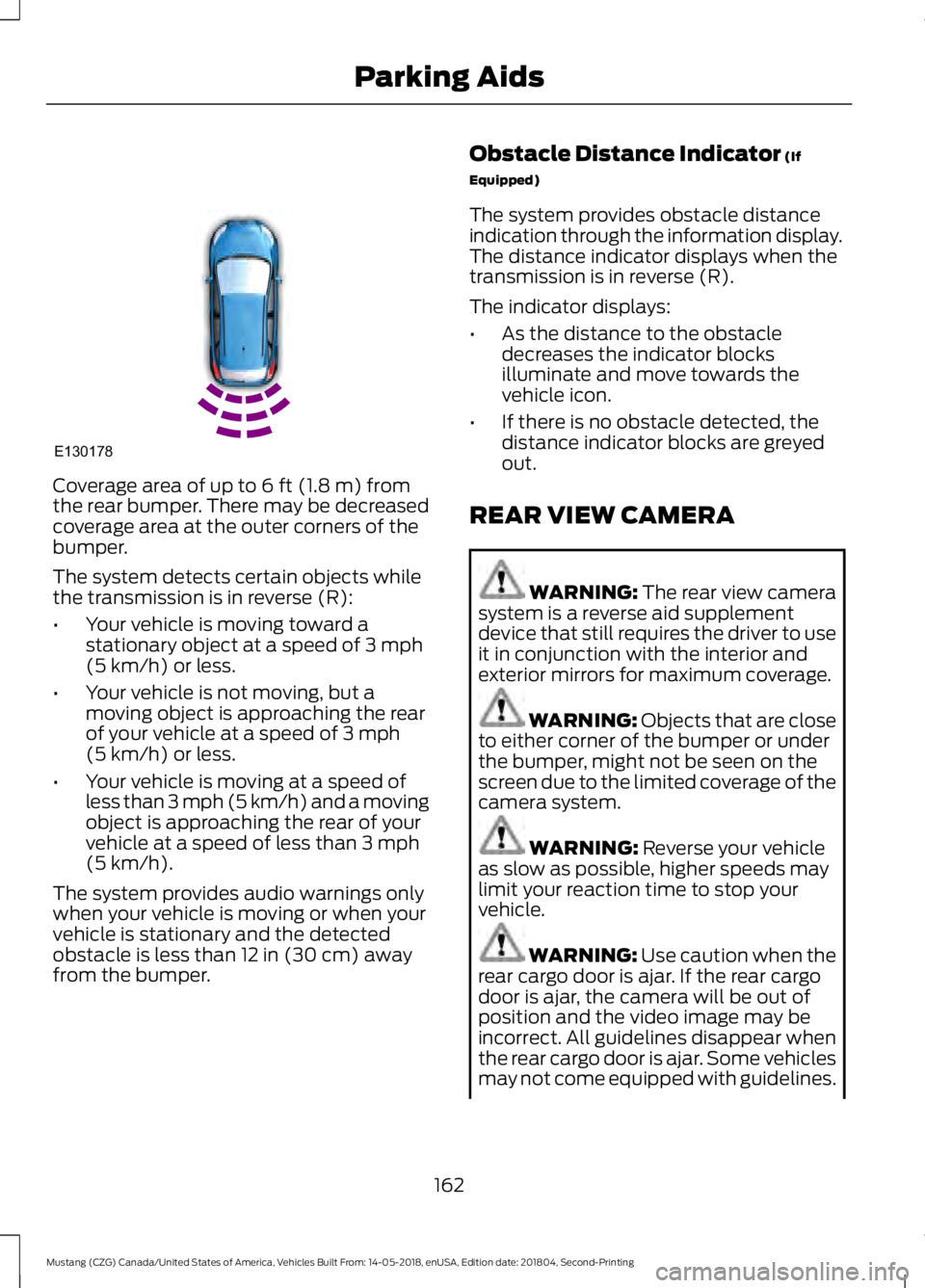
Coverage area of up to 6 ft (1.8 m) from
the rear bumper. There may be decreased
coverage area at the outer corners of the
bumper.
The system detects certain objects while
the transmission is in reverse (R):
• Your vehicle is moving toward a
stationary object at a speed of
3 mph
(5 km/h) or less.
• Your vehicle is not moving, but a
moving object is approaching the rear
of your vehicle at a speed of
3 mph
(5 km/h) or less.
• Your vehicle is moving at a speed of
less than 3 mph (5 km/h) and a moving
object is approaching the rear of your
vehicle at a speed of less than
3 mph
(5 km/h).
The system provides audio warnings only
when your vehicle is moving or when your
vehicle is stationary and the detected
obstacle is less than
12 in (30 cm) away
from the bumper. Obstacle Distance Indicator
(If
Equipped)
The system provides obstacle distance
indication through the information display.
The distance indicator displays when the
transmission is in reverse (R).
The indicator displays:
• As the distance to the obstacle
decreases the indicator blocks
illuminate and move towards the
vehicle icon.
• If there is no obstacle detected, the
distance indicator blocks are greyed
out.
REAR VIEW CAMERA WARNING: The rear view camera
system is a reverse aid supplement
device that still requires the driver to use
it in conjunction with the interior and
exterior mirrors for maximum coverage. WARNING: Objects that are close
to either corner of the bumper or under
the bumper, might not be seen on the
screen due to the limited coverage of the
camera system. WARNING:
Reverse your vehicle
as slow as possible, higher speeds may
limit your reaction time to stop your
vehicle. WARNING:
Use caution when the
rear cargo door is ajar. If the rear cargo
door is ajar, the camera will be out of
position and the video image may be
incorrect. All guidelines disappear when
the rear cargo door is ajar. Some vehicles
may not come equipped with guidelines.
162
Mustang (CZG) Canada/United States of America, Vehicles Built From: 14-05-2018, enUSA, Edition date: 201804, Second-Printing Parking AidsE130178
Page 167 of 495
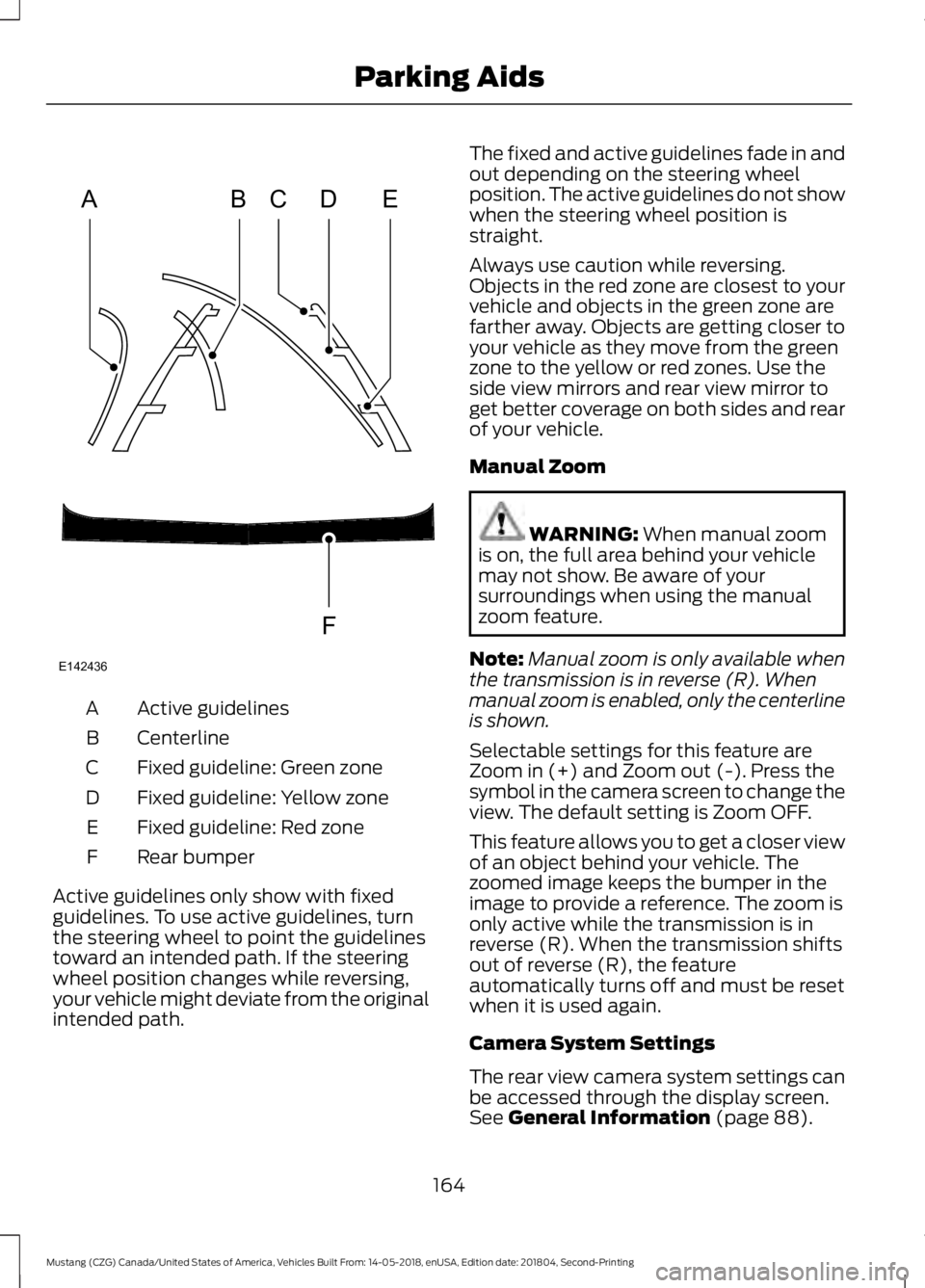
Active guidelines
A
Centerline
B
Fixed guideline: Green zone
C
Fixed guideline: Yellow zone
D
Fixed guideline: Red zone
E
Rear bumper
F
Active guidelines only show with fixed
guidelines. To use active guidelines, turn
the steering wheel to point the guidelines
toward an intended path. If the steering
wheel position changes while reversing,
your vehicle might deviate from the original
intended path. The fixed and active guidelines fade in and
out depending on the steering wheel
position. The active guidelines do not show
when the steering wheel position is
straight.
Always use caution while reversing.
Objects in the red zone are closest to your
vehicle and objects in the green zone are
farther away. Objects are getting closer to
your vehicle as they move from the green
zone to the yellow or red zones. Use the
side view mirrors and rear view mirror to
get better coverage on both sides and rear
of your vehicle.
Manual Zoom
WARNING: When manual zoom
is on, the full area behind your vehicle
may not show. Be aware of your
surroundings when using the manual
zoom feature.
Note: Manual zoom is only available when
the transmission is in reverse (R). When
manual zoom is enabled, only the centerline
is shown.
Selectable settings for this feature are
Zoom in (+) and Zoom out (-). Press the
symbol in the camera screen to change the
view. The default setting is Zoom OFF.
This feature allows you to get a closer view
of an object behind your vehicle. The
zoomed image keeps the bumper in the
image to provide a reference. The zoom is
only active while the transmission is in
reverse (R). When the transmission shifts
out of reverse (R), the feature
automatically turns off and must be reset
when it is used again.
Camera System Settings
The rear view camera system settings can
be accessed through the display screen.
See
General Information (page 88).
164
Mustang (CZG) Canada/United States of America, Vehicles Built From: 14-05-2018, enUSA, Edition date: 201804, Second-Printing Parking AidsABCD
F
E
E142436
Page 181 of 495
Why is the feature not available (line markings are gray) when I can see the lane markings
on the road?
You are driving too close to the vehicle in front of you.
Transitioning between no lane markings to lane markings or vice versa.
There is standing water on the road.
Faint lane markings, for example partial yellow lane markings on concrete roads.
Lane width is too narrow or too wide.
The camera has not been calibrated after a windshield replacement.
Driving on tight roads or on uneven roads. Why does the vehicle not come back toward the middle of the lane, as expected, in the
Aid or Aid + Alert mode?
High cross winds are present.
There is a large road crown.
Rough roads, grooves or shoulder drop-offs.
Heavy uneven loading of the vehicle or improper tire inflation pressure.
The tires have been changed, or the suspension has been modified.
BLIND SPOT INFORMATION
SYSTEM (IF EQUIPPED) WARNING:
Do not use the blind
spot information system as a
replacement for using the interior and
exterior mirrors or looking over your
shoulder before changing lanes. The
blind spot information system is not a
replacement for careful driving.
178
Mustang (CZG) Canada/United States of America, Vehicles Built From: 14-05-2018, enUSA, Edition date: 201804, Second-Printing Driving Aids
Page 182 of 495
WARNING: The system may not
operate properly during severe weather
conditions, for example snow, ice, heavy
rain and spray. Always drive with due
care and attention. Failure to take care
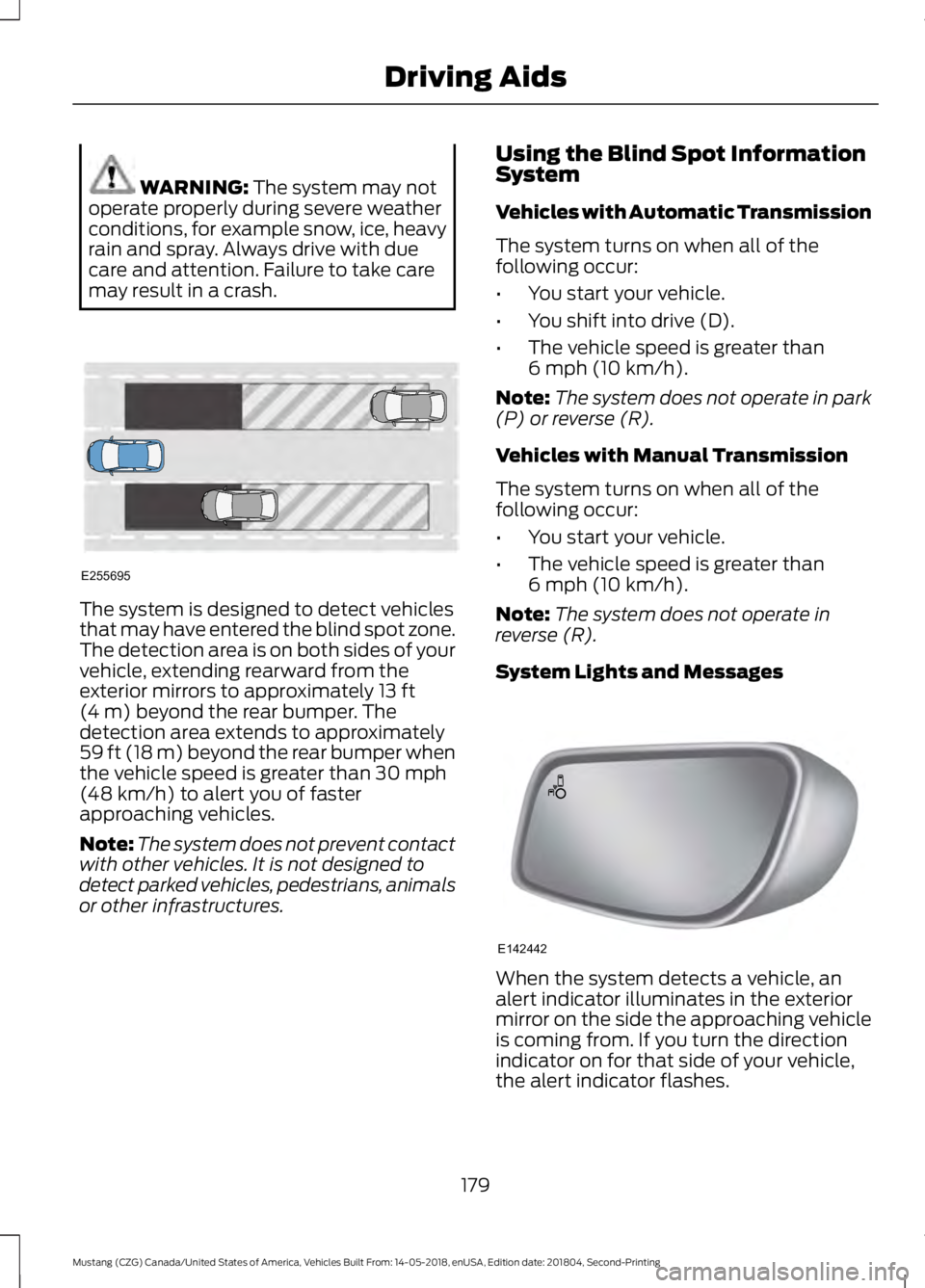
may result in a crash. The system is designed to detect vehicles
that may have entered the blind spot zone.
The detection area is on both sides of your
vehicle, extending rearward from the
exterior mirrors to approximately
13 ft
(4 m) beyond the rear bumper. The
detection area extends to approximately
59 ft (18 m)
beyond the rear bumper when
the vehicle speed is greater than 30 mph
(48 km/h) to alert you of faster
approaching vehicles.
Note: The system does not prevent contact
with other vehicles. It is not designed to
detect parked vehicles, pedestrians, animals
or other infrastructures. Using the Blind Spot Information
System
Vehicles with Automatic Transmission
The system turns on when all of the
following occur:
•
You start your vehicle.
• You shift into drive (D).
• The vehicle speed is greater than
6 mph (10 km/h)
.
Note: The system does not operate in park
(P) or reverse (R).
Vehicles with Manual Transmission
The system turns on when all of the
following occur:
• You start your vehicle.
• The vehicle speed is greater than
6 mph (10 km/h)
.
Note: The system does not operate in
reverse (R).
System Lights and Messages When the system detects a vehicle, an
alert indicator illuminates in the exterior
mirror on the side the approaching vehicle
is coming from. If you turn the direction
indicator on for that side of your vehicle,
the alert indicator flashes.
179
Mustang (CZG) Canada/United States of America, Vehicles Built From: 14-05-2018, enUSA, Edition date: 201804, Second-Printing Driving AidsE255695 E142442
Page 183 of 495
Note:
The system may not alert you if a
vehicle quickly passes through the detection
zone.
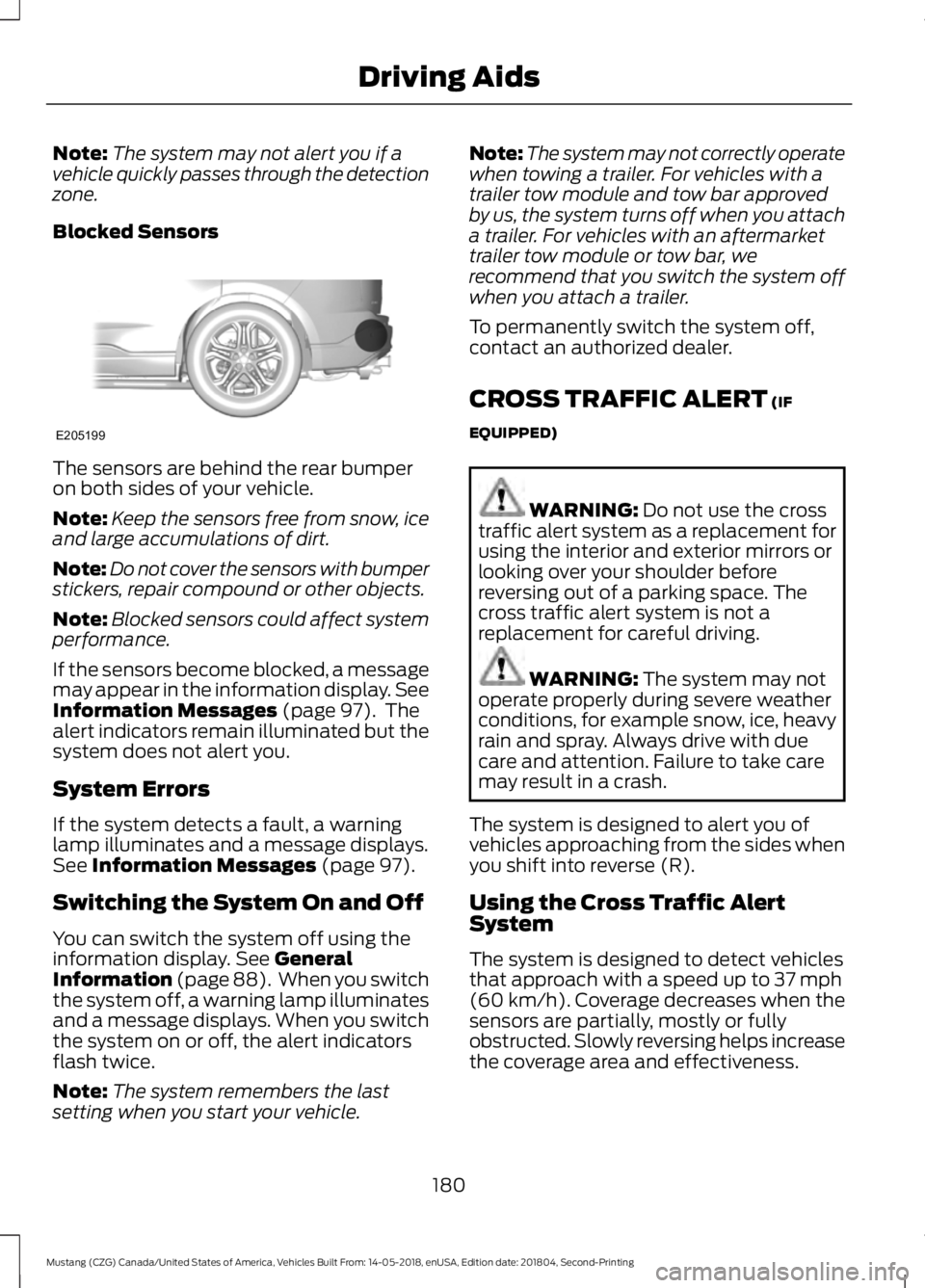
Blocked Sensors The sensors are behind the rear bumper
on both sides of your vehicle.
Note:
Keep the sensors free from snow, ice
and large accumulations of dirt.
Note: Do not cover the sensors with bumper
stickers, repair compound or other objects.
Note: Blocked sensors could affect system
performance.
If the sensors become blocked, a message
may appear in the information display. See
Information Messages (page 97). The
alert indicators remain illuminated but the
system does not alert you.
System Errors
If the system detects a fault, a warning
lamp illuminates and a message displays.
See
Information Messages (page 97).
Switching the System On and Off
You can switch the system off using the
information display.
See General
Information (page 88). When you switch
the system off, a warning lamp illuminates
and a message displays. When you switch
the system on or off, the alert indicators
flash twice.
Note: The system remembers the last
setting when you start your vehicle. Note:
The system may not correctly operate
when towing a trailer. For vehicles with a
trailer tow module and tow bar approved
by us, the system turns off when you attach
a trailer. For vehicles with an aftermarket
trailer tow module or tow bar, we
recommend that you switch the system off
when you attach a trailer.
To permanently switch the system off,
contact an authorized dealer.
CROSS TRAFFIC ALERT
(IF
EQUIPPED) WARNING:
Do not use the cross
traffic alert system as a replacement for
using the interior and exterior mirrors or
looking over your shoulder before
reversing out of a parking space. The
cross traffic alert system is not a
replacement for careful driving. WARNING:
The system may not
operate properly during severe weather
conditions, for example snow, ice, heavy
rain and spray. Always drive with due
care and attention. Failure to take care
may result in a crash.
The system is designed to alert you of
vehicles approaching from the sides when
you shift into reverse (R).
Using the Cross Traffic Alert
System
The system is designed to detect vehicles
that approach with a speed up to
37 mph
(60 km/h). Coverage decreases when the
sensors are partially, mostly or fully
obstructed. Slowly reversing helps increase
the coverage area and effectiveness.
180
Mustang (CZG) Canada/United States of America, Vehicles Built From: 14-05-2018, enUSA, Edition date: 201804, Second-Printing Driving AidsE205199
Page 185 of 495
Zone coverage also decreases when
parking at narrow angles. The sensor on
the left-hand side is mostly obstructed and
zone coverage on that side is severely
reduced.
System Lights, Messages and
Audible Alerts
When the system detects a vehicle, an
indicator illuminates in the exterior mirror
on the side the approaching vehicle is
coming from. A tone sounds and a
message appears in the information
display.
Note:
In exceptional conditions, the system
could alert you even when there is nothing
in the detection zone, for example a vehicle
passing in the distance.
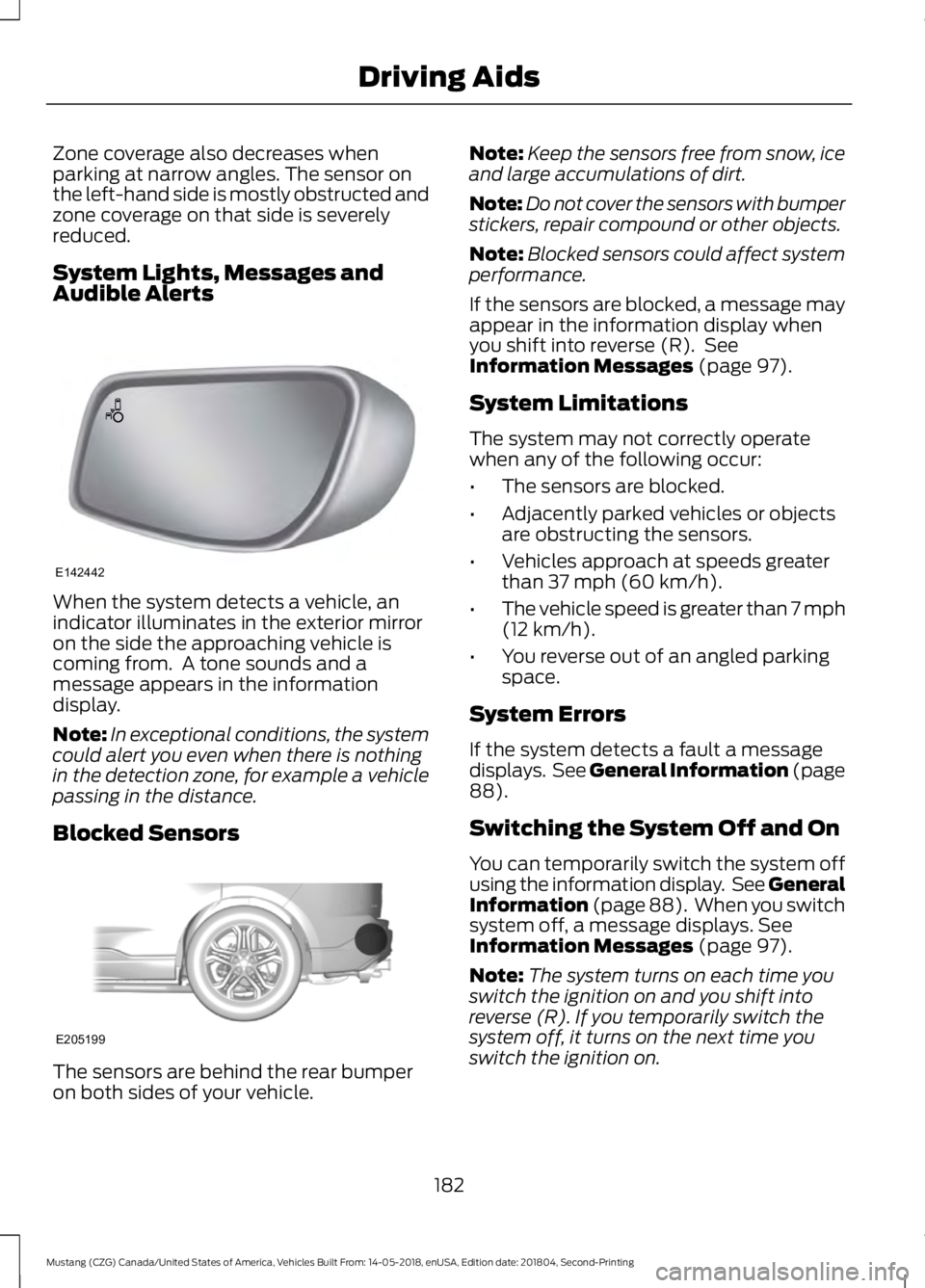
Blocked Sensors The sensors are behind the rear bumper
on both sides of your vehicle. Note:
Keep the sensors free from snow, ice
and large accumulations of dirt.
Note: Do not cover the sensors with bumper
stickers, repair compound or other objects.
Note: Blocked sensors could affect system
performance.
If the sensors are blocked, a message may
appear in the information display when
you shift into reverse (R). See
Information Messages (page 97).
System Limitations
The system may not correctly operate
when any of the following occur:
• The sensors are blocked.
• Adjacently parked vehicles or objects
are obstructing the sensors.
• Vehicles approach at speeds greater
than
37 mph (60 km/h).
• The vehicle speed is greater than 7 mph
(12 km/h)
.
• You reverse out of an angled parking
space.
System Errors
If the system detects a fault a message
displays. See General Information (page
88
).
Switching the System Off and On
You can temporarily switch the system off
using the information display. See
General
Information (page 88). When you switch
system off, a message displays. See
Information Messages (page 97).
Note: The system turns on each time you
switch the ignition on and you shift into
reverse (R). If you temporarily switch the
system off, it turns on the next time you
switch the ignition on.
182
Mustang (CZG) Canada/United States of America, Vehicles Built From: 14-05-2018, enUSA, Edition date: 201804, Second-Printing Driving AidsE142442 E205199
Page 204 of 495
OPENING THE CONVERTIBLE
TOP
When you use the top, you must first
unlatch it from the windshield and then
use the convertible top control.
Note:
The convertible top does not operate
unless the vehicle is stationary or traveling
under 3 mph (5 km/h). A chime sounds and
a warning message appears in the
instrument panel. When you slow down, the
top operates.
Note: When you latch or unlatch the
convertible top, the audio system mutes
briefly. This allows the vehicle to optimize
the cabin ’s sound quality depending on the
position of the convertible top.
To unlatch the convertible top:
1. Bring the vehicle to a complete stop. The ignition must be on. We
recommend that the vehicle remains
running when you open the top to
prevent draining the battery.
2. Check the convertible top stowage compartment behind the rear seat to
be sure it is empty. Make sure the
convertible top outer surface is free of
debris.
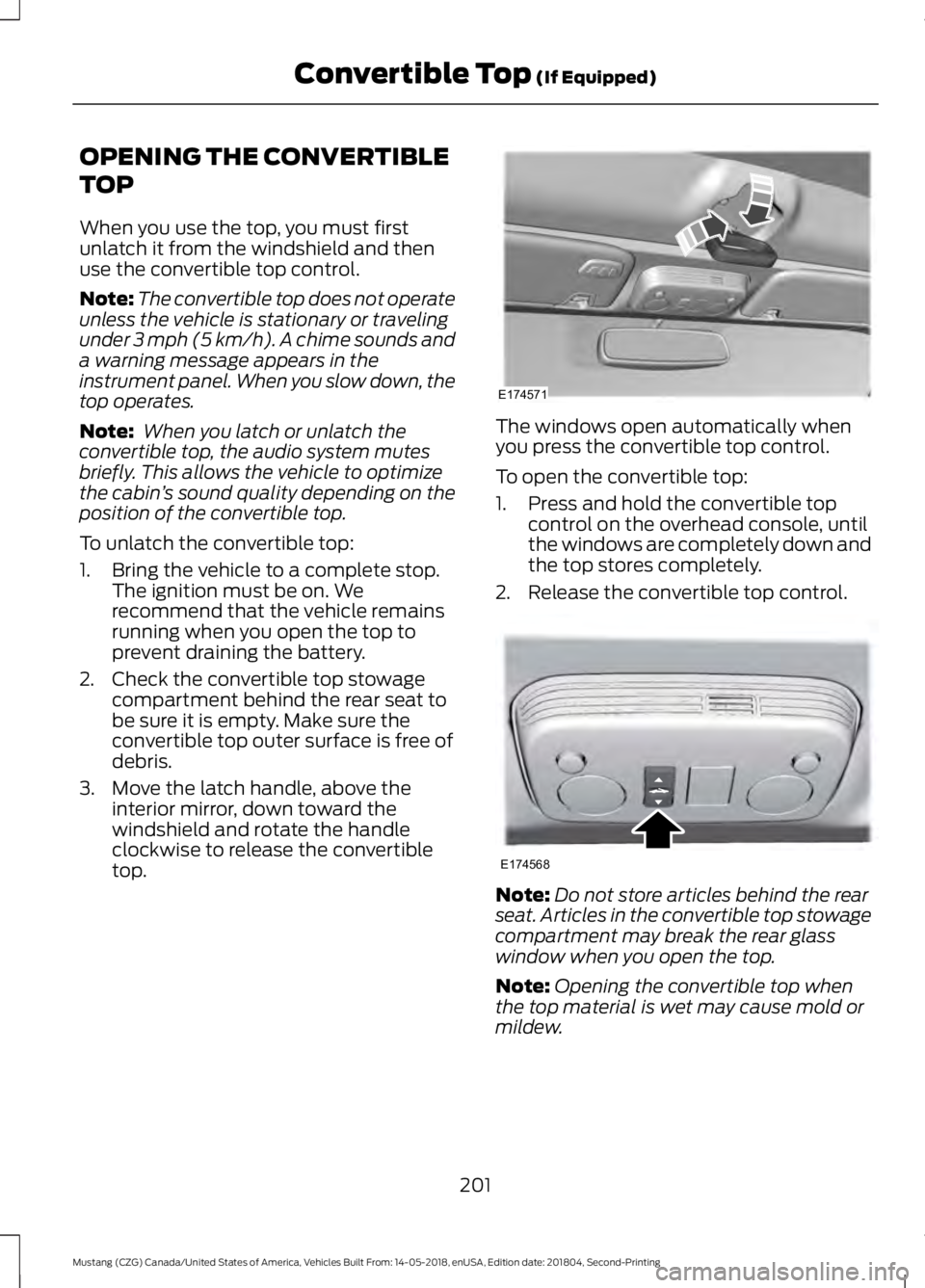
3. Move the latch handle, above the interior mirror, down toward the
windshield and rotate the handle
clockwise to release the convertible
top. The windows open automatically when
you press the convertible top control.
To open the convertible top:
1. Press and hold the convertible top
control on the overhead console, until
the windows are completely down and
the top stores completely.
2. Release the convertible top control. Note:
Do not store articles behind the rear
seat. Articles in the convertible top stowage
compartment may break the rear glass
window when you open the top.
Note: Opening the convertible top when
the top material is wet may cause mold or
mildew.
201
Mustang (CZG) Canada/United States of America, Vehicles Built From: 14-05-2018, enUSA, Edition date: 201804, Second-Printing Convertible Top
(If Equipped)E174571 E174568
Page 227 of 495
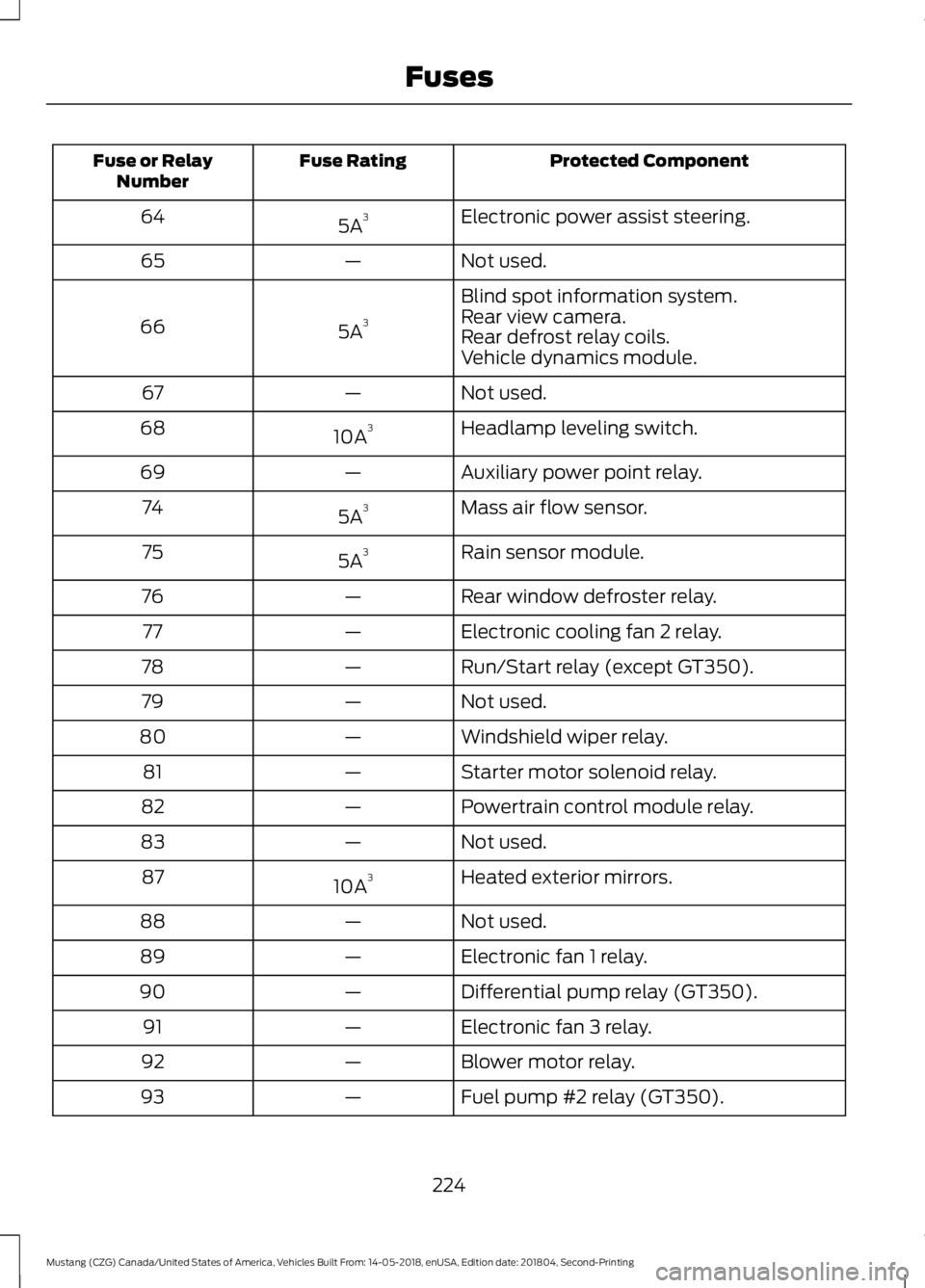
Protected Component
Fuse Rating
Fuse or Relay
Number
Electronic power assist steering.
5A 3
64
Not used.
—
65
Blind spot information system.
5A 3
66 Rear view camera.
Rear defrost relay coils.
Vehicle dynamics module.
Not used.
—
67
Headlamp leveling switch.
10A 3
68
Auxiliary power point relay.
—
69
Mass air flow sensor.
5A 3
74
Rain sensor module.
5A 3
75
Rear window defroster relay.
—
76
Electronic cooling fan 2 relay.
—
77
Run/Start relay (except GT350).
—
78
Not used.
—
79
Windshield wiper relay.
—
80
Starter motor solenoid relay.
—
81
Powertrain control module relay.
—
82
Not used.
—
83
Heated exterior mirrors.
10A 3
87
Not used.
—
88
Electronic fan 1 relay.
—
89
Differential pump relay (GT350).
—
90
Electronic fan 3 relay.
—
91
Blower motor relay.
—
92
Fuel pump #2 relay (GT350).
—
93
224
Mustang (CZG) Canada/United States of America, Vehicles Built From: 14-05-2018, enUSA, Edition date: 201804, Second-Printing Fuses
Page 229 of 495
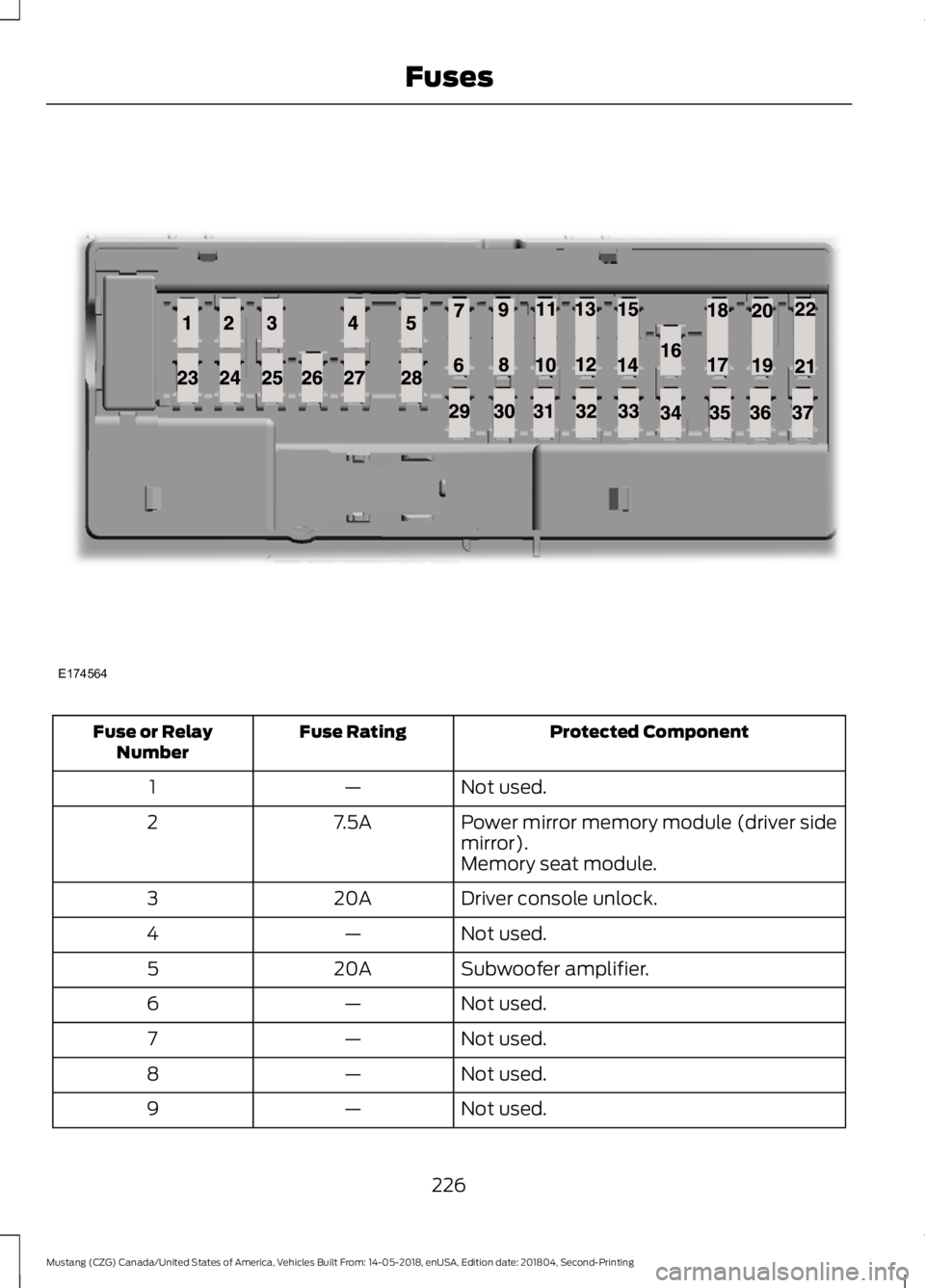
Protected Component
Fuse Rating
Fuse or Relay
Number
Not used.
—
1
Power mirror memory module (driver side
mirror).
7.5A
2
Memory seat module.
Driver console unlock.
20A
3
Not used.
—
4
Subwoofer amplifier.
20A
5
Not used.
—
6
Not used.
—
7
Not used.
—
8
Not used.
—
9
226
Mustang (CZG) Canada/United States of America, Vehicles Built From: 14-05-2018, enUSA, Edition date: 201804, Second-Printing FusesE174564
Page 230 of 495
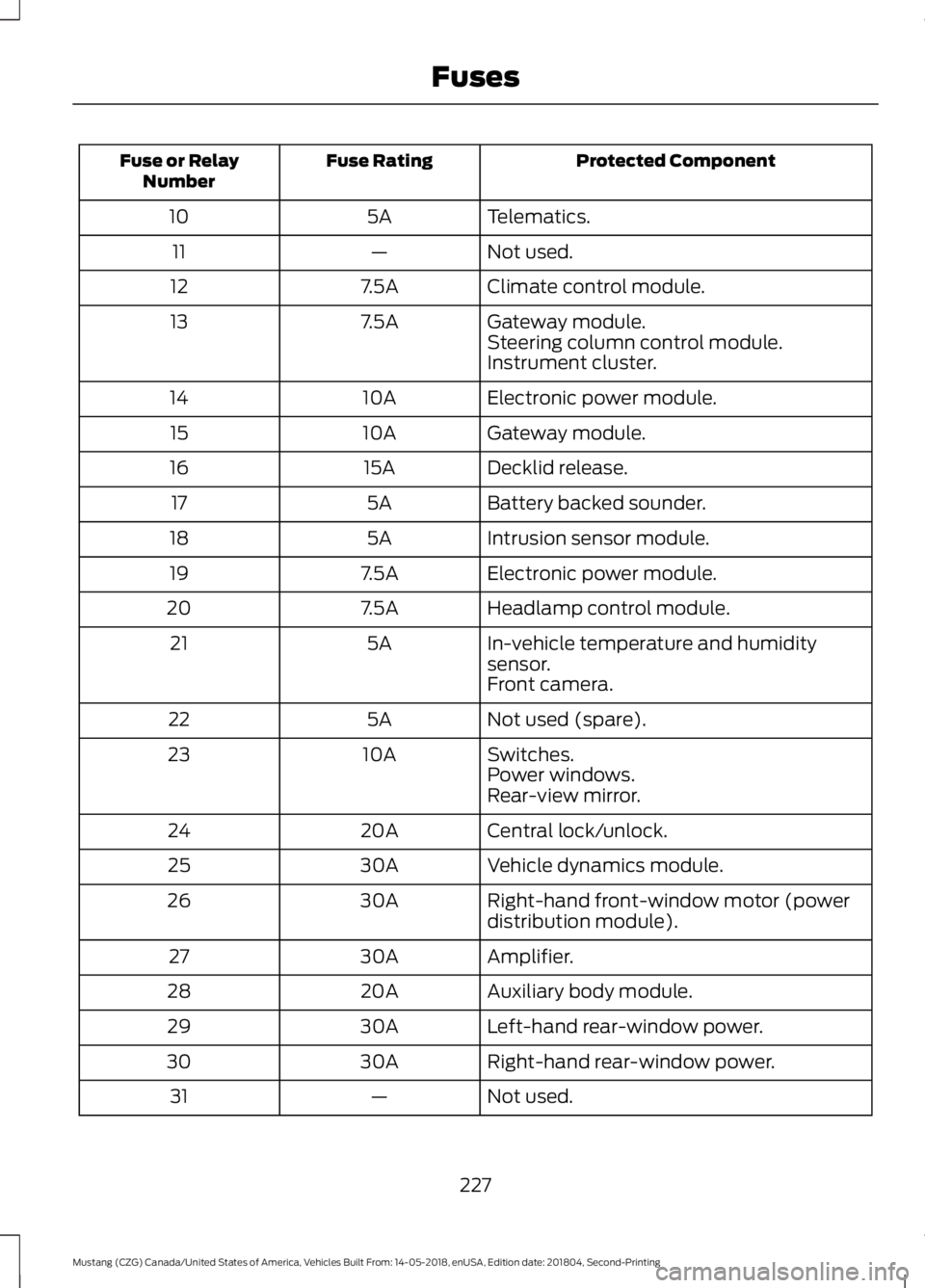
Protected Component
Fuse Rating
Fuse or Relay
Number
Telematics.
5A
10
Not used.
—
11
Climate control module.
7.5A
12
Gateway module.
7.5A
13
Steering column control module.
Instrument cluster.
Electronic power module.
10A
14
Gateway module.
10A
15
Decklid release.
15A
16
Battery backed sounder.
5A
17
Intrusion sensor module.
5A
18
Electronic power module.
7.5A
19
Headlamp control module.
7.5A
20
In-vehicle temperature and humidity
sensor.
5A
21
Front camera.
Not used (spare).
5A
22
Switches.
10A
23
Power windows.
Rear-view mirror.
Central lock/unlock.
20A
24
Vehicle dynamics module.
30A
25
Right-hand front-window motor (power
distribution module).
30A
26
Amplifier.
30A
27
Auxiliary body module.
20A
28
Left-hand rear-window power.
30A
29
Right-hand rear-window power.
30A
30
Not used.
—
31
227
Mustang (CZG) Canada/United States of America, Vehicles Built From: 14-05-2018, enUSA, Edition date: 201804, Second-Printing Fuses