clock FORD MUSTANG 2020 User Guide
[x] Cancel search | Manufacturer: FORD, Model Year: 2020, Model line: MUSTANG, Model: FORD MUSTANG 2020Pages: 464, PDF Size: 7.44 MB
Page 269 of 464
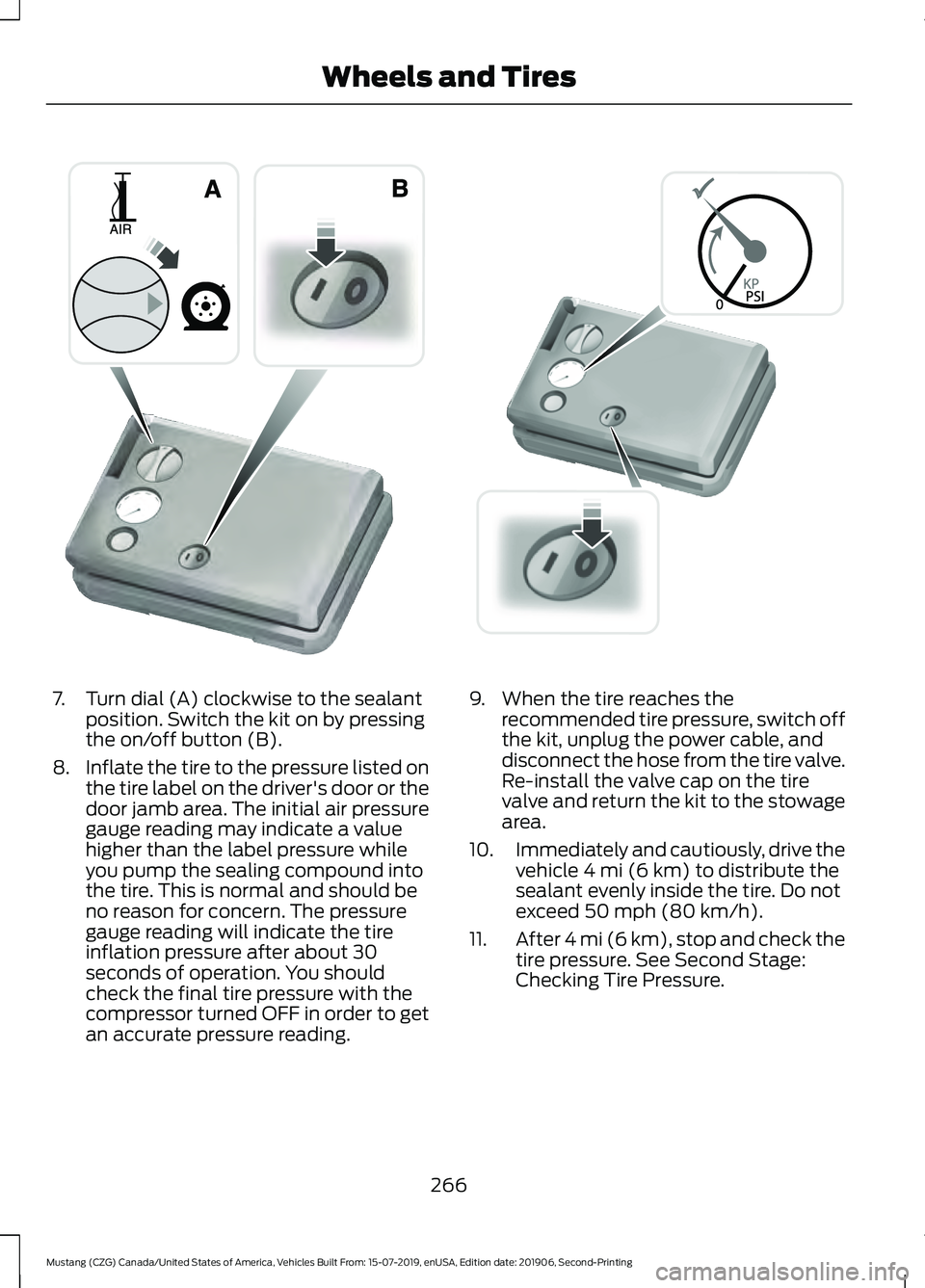
7. Turn dial (A) clockwise to the sealant
position. Switch the kit on by pressing
the on/off button (B).
8. Inflate the tire to the pressure listed on
the tire label on the driver's door or the
door jamb area. The initial air pressure
gauge reading may indicate a value
higher than the label pressure while
you pump the sealing compound into
the tire. This is normal and should be
no reason for concern. The pressure
gauge reading will indicate the tire
inflation pressure after about 30
seconds of operation. You should
check the final tire pressure with the
compressor turned OFF in order to get
an accurate pressure reading. 9. When the tire reaches the
recommended tire pressure, switch off
the kit, unplug the power cable, and
disconnect the hose from the tire valve.
Re-install the valve cap on the tire
valve and return the kit to the stowage
area.
10. Immediately and cautiously, drive the
vehicle 4 mi (6 km) to distribute the
sealant evenly inside the tire. Do not
exceed
50 mph (80 km/h).
11. After 4 mi (6 km), stop and check the
tire pressure. See Second Stage:
Checking Tire Pressure.
266
Mustang (CZG) Canada/United States of America, Vehicles Built From: 15-07-2019, enUSA, Edition date: 201906, Second-Printing Wheels and TiresE175981 E175982
Page 270 of 464
Note:
If you experience any unusual
vibration, ride disturbance or noise while
driving, reduce your speed until you can
safely pull off to the side of the road to call
for roadside assistance. Note: Do not
proceed to the second stage of this
operation.
Second Stage: Checking Tire
Pressure
Note: If you are proceeding from the First
Stage: Re-inflating the Tire with Sealing
Compound and Air section and have
injected sealant in the tire and the pressure
is below 20 psi (1.4 bar), continue to the
next step. WARNING:
The power plug may
get hot after use and should be handled
carefully when unplugging.
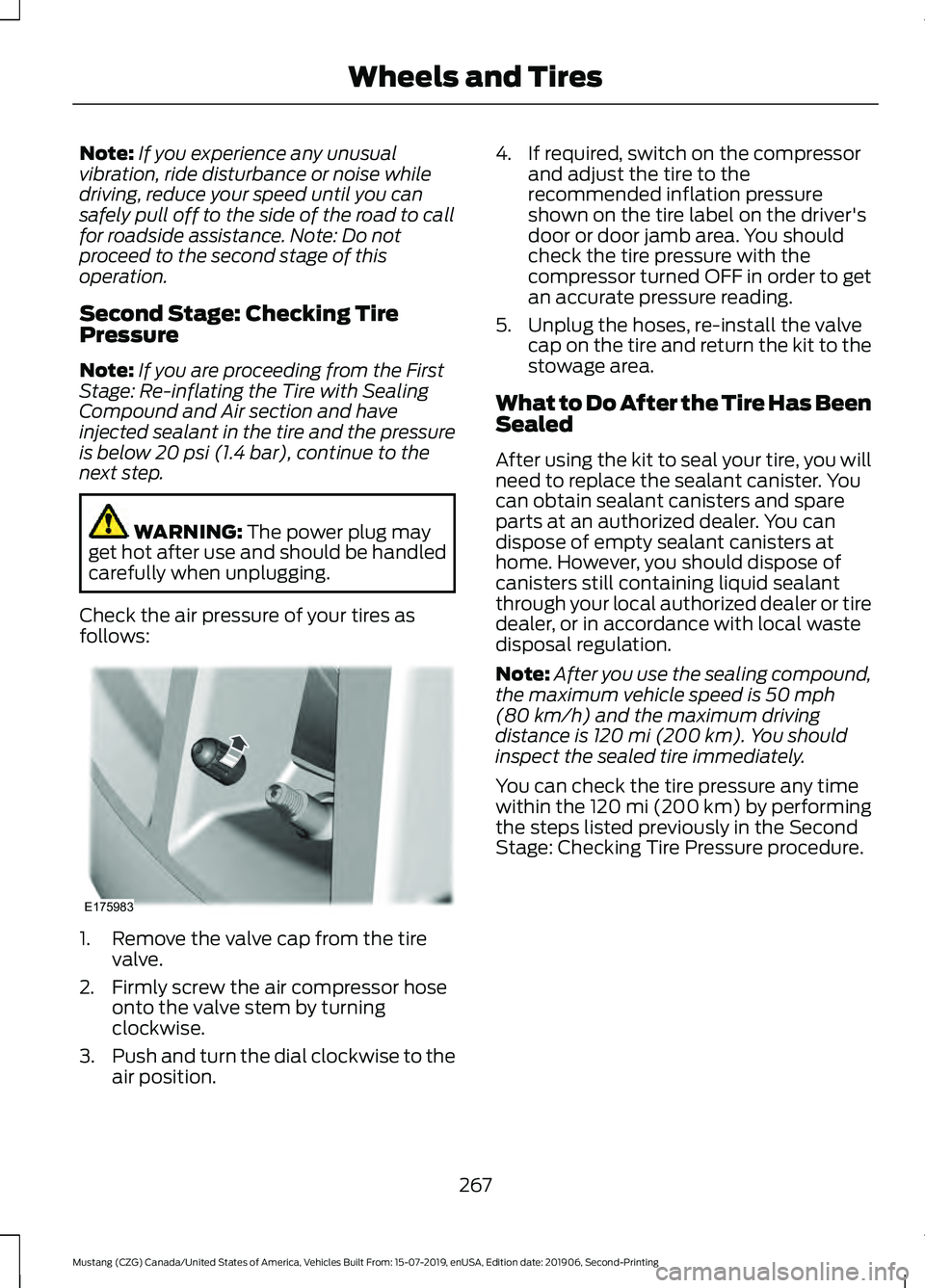
Check the air pressure of your tires as
follows: 1. Remove the valve cap from the tire
valve.
2. Firmly screw the air compressor hose onto the valve stem by turning
clockwise.
3. Push and turn the dial clockwise to the
air position. 4. If required, switch on the compressor
and adjust the tire to the
recommended inflation pressure
shown on the tire label on the driver's
door or door jamb area. You should
check the tire pressure with the
compressor turned OFF in order to get
an accurate pressure reading.
5. Unplug the hoses, re-install the valve cap on the tire and return the kit to the
stowage area.
What to Do After the Tire Has Been
Sealed
After using the kit to seal your tire, you will
need to replace the sealant canister. You
can obtain sealant canisters and spare
parts at an authorized dealer. You can
dispose of empty sealant canisters at
home. However, you should dispose of
canisters still containing liquid sealant
through your local authorized dealer or tire
dealer, or in accordance with local waste
disposal regulation.
Note: After you use the sealing compound,
the maximum vehicle speed is
50 mph
(80 km/h) and the maximum driving
distance is 120 mi (200 km). You should
inspect the sealed tire immediately.
You can check the tire pressure any time
within the 120 mi (200 km) by performing
the steps listed previously in the Second
Stage: Checking Tire Pressure procedure.
267
Mustang (CZG) Canada/United States of America, Vehicles Built From: 15-07-2019, enUSA, Edition date: 201906, Second-Printing Wheels and TiresE175983
Page 296 of 464
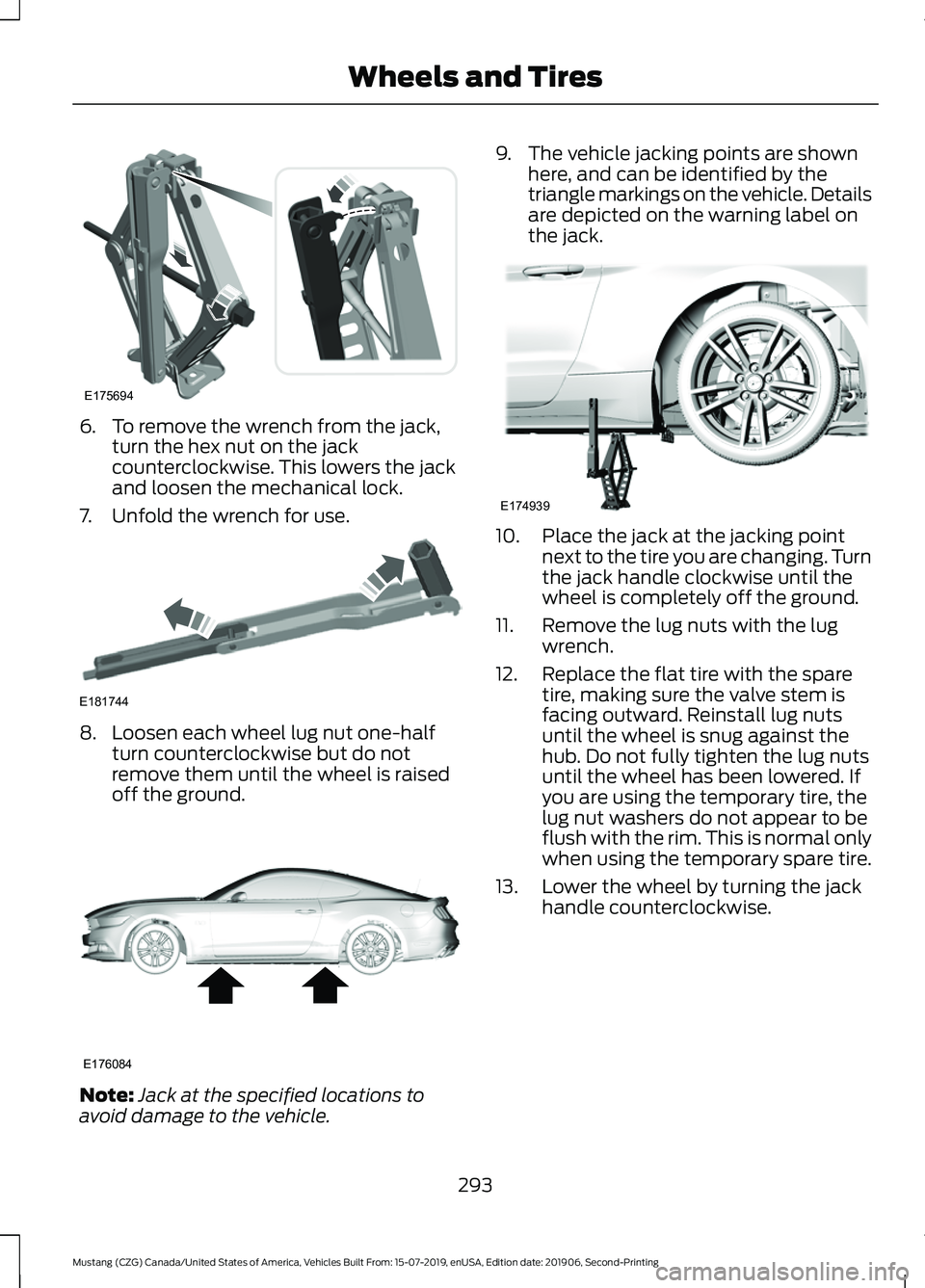
6. To remove the wrench from the jack,
turn the hex nut on the jack
counterclockwise. This lowers the jack
and loosen the mechanical lock.
7. Unfold the wrench for use. 8. Loosen each wheel lug nut one-half
turn counterclockwise but do not
remove them until the wheel is raised
off the ground. Note:
Jack at the specified locations to
avoid damage to the vehicle. 9. The vehicle jacking points are shown
here, and can be identified by the
triangle markings on the vehicle. Details
are depicted on the warning label on
the jack. 10. Place the jack at the jacking point
next to the tire you are changing. Turn
the jack handle clockwise until the
wheel is completely off the ground.
11. Remove the lug nuts with the lug wrench.
12. Replace the flat tire with the spare tire, making sure the valve stem is
facing outward. Reinstall lug nuts
until the wheel is snug against the
hub. Do not fully tighten the lug nuts
until the wheel has been lowered. If
you are using the temporary tire, the
lug nut washers do not appear to be
flush with the rim. This is normal only
when using the temporary spare tire.
13. Lower the wheel by turning the jack handle counterclockwise.
293
Mustang (CZG) Canada/United States of America, Vehicles Built From: 15-07-2019, enUSA, Edition date: 201906, Second-Printing Wheels and TiresE175694 E181744 E176084 E174939
Page 297 of 464
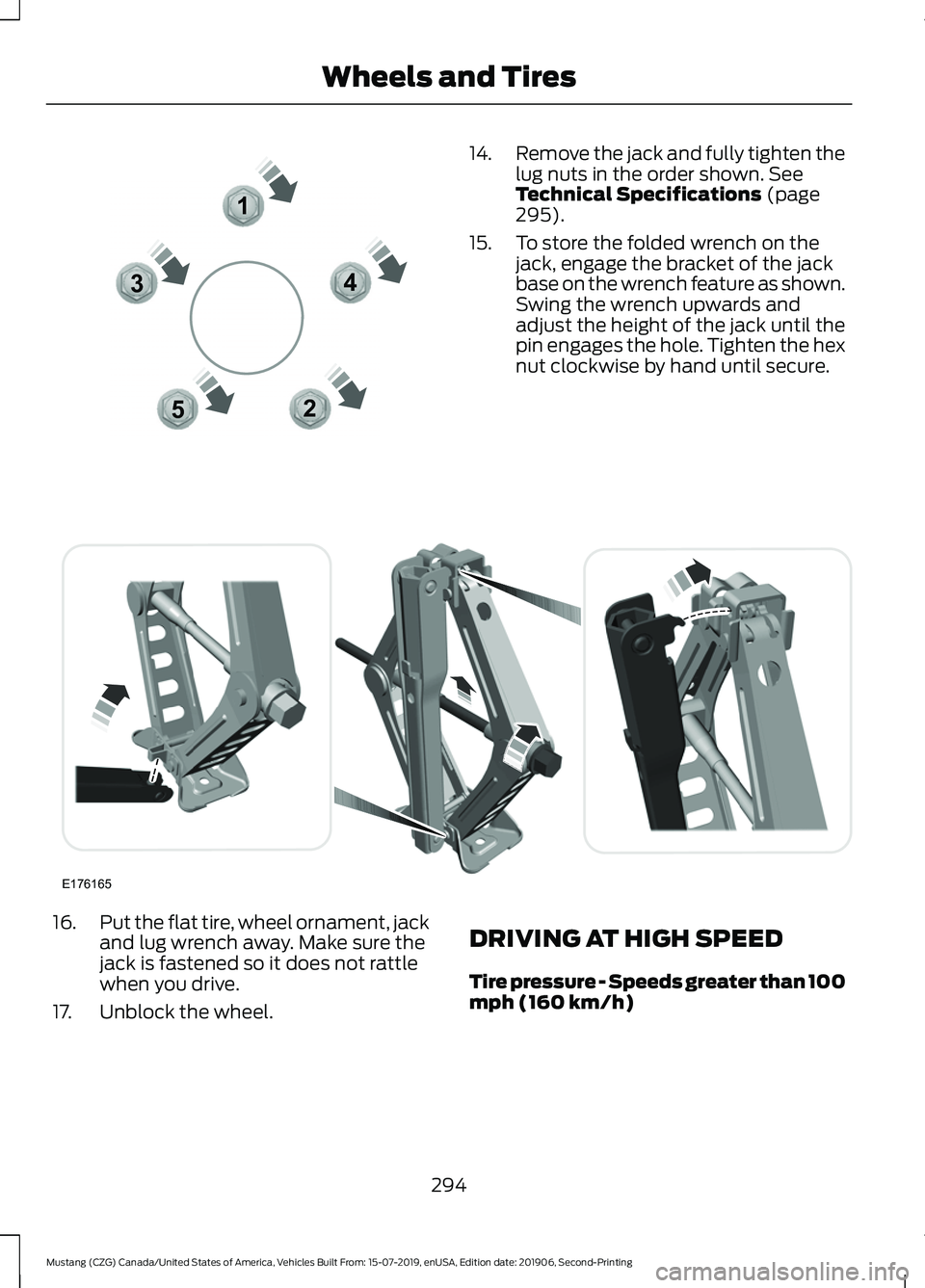
14.
Remove the jack and fully tighten the
lug nuts in the order shown. See
Technical Specifications (page
295).
15. To store the folded wrench on the jack, engage the bracket of the jack
base on the wrench feature as shown.
Swing the wrench upwards and
adjust the height of the jack until the
pin engages the hole. Tighten the hex
nut clockwise by hand until secure.16.
Put the flat tire, wheel ornament, jack
and lug wrench away. Make sure the
jack is fastened so it does not rattle
when you drive.
17. Unblock the wheel. DRIVING AT HIGH SPEED
Tire pressure - Speeds greater than 100
mph (160 km/h)
294
Mustang (CZG) Canada/United States of America, Vehicles Built From: 15-07-2019, enUSA, Edition date: 201906, Second-Printing Wheels and Tires12
3
4
5E306781 E176165
Page 328 of 464
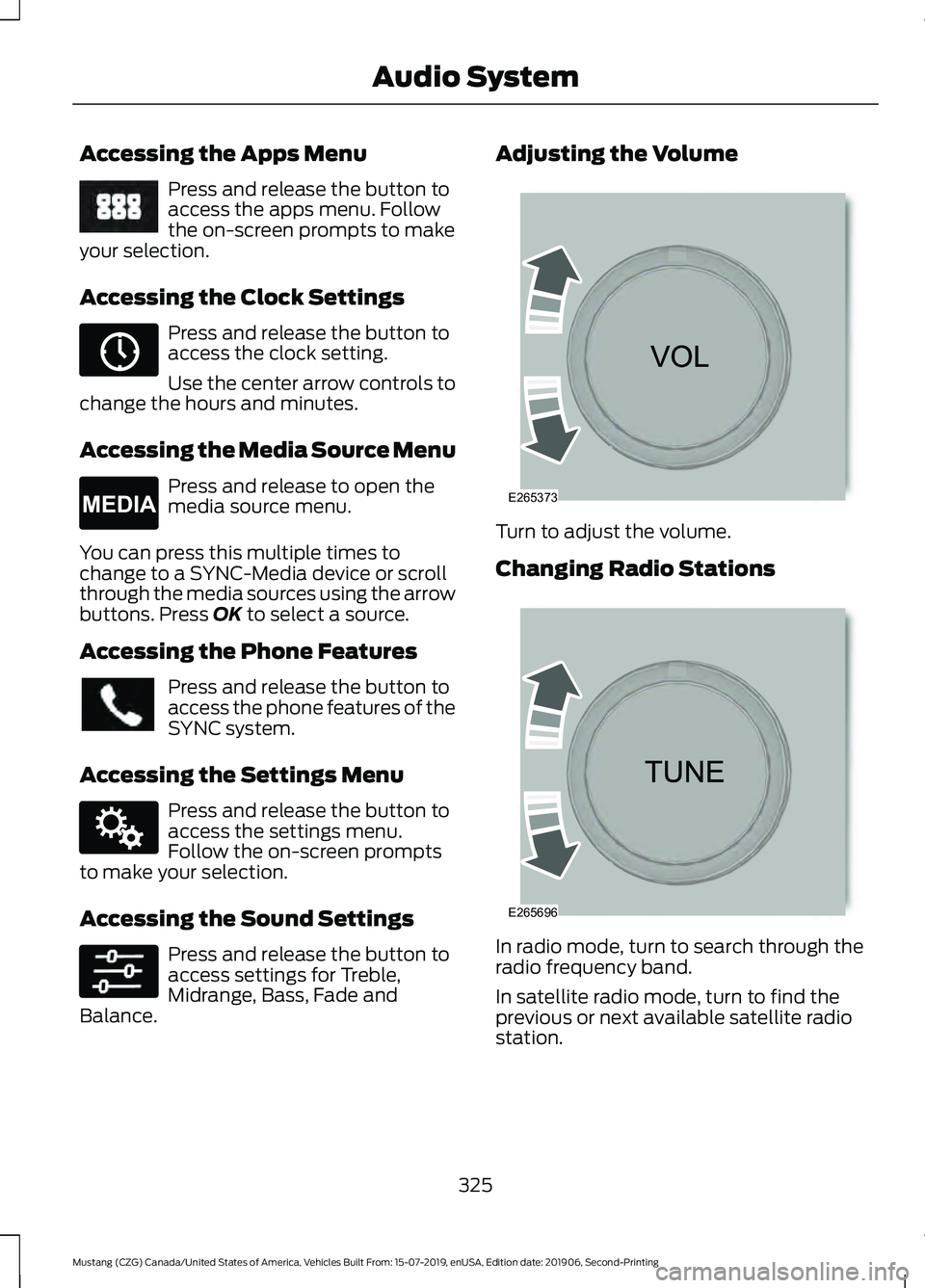
Accessing the Apps Menu
Press and release the button to
access the apps menu. Follow
the on-screen prompts to make
your selection.
Accessing the Clock Settings Press and release the button to
access the clock setting.
Use the center arrow controls to
change the hours and minutes.
Accessing the Media Source Menu Press and release to open the
media source menu.
You can press this multiple times to
change to a SYNC-Media device or scroll
through the media sources using the arrow
buttons. Press OK to select a source.
Accessing the Phone Features Press and release the button to
access the phone features of the
SYNC system.
Accessing the Settings Menu Press and release the button to
access the settings menu.
Follow the on-screen prompts
to make your selection.
Accessing the Sound Settings Press and release the button to
access settings for Treble,
Midrange, Bass, Fade and
Balance. Adjusting the Volume
Turn to adjust the volume.
Changing Radio Stations
In radio mode, turn to search through the
radio frequency band.
In satellite radio mode, turn to find the
previous or next available satellite radio
station.
325
Mustang (CZG) Canada/United States of America, Vehicles Built From: 15-07-2019, enUSA, Edition date: 201906, Second-Printing Audio SystemE249410 E265036 E265035 E142607 E265373 E265696
Page 354 of 464
GENERAL INFORMATION
WARNING: Driving while distracted
can result in loss of vehicle control, crash
and injury. We strongly recommend that
you use extreme caution when using any
device that may take your focus off the
road. Your primary responsibility is the
safe operation of your vehicle. We
recommend against the use of any
hand-held device while driving and
encourage the use of voice-operated
systems when possible. Make sure you
are aware of all applicable local laws
that may affect the use of electronic
devices while driving.
About SYNC
The system allows you to interact with the
entertainment, information and
communication systems on your vehicle
using voice commands and a touchscreen.
The system provides easy interaction with
audio, phone, navigation, mobile apps and
settings.
Note: You can switch the system on and
use it for up to an hour without switching
the ignition on.
Note: You can use the system after you
switch the ignition off for up to 10 minutes
or until you open a door.
Note: For your safety, some features are
speed-dependent. Their use is limited to
when your vehicle speed is less than 3 mph
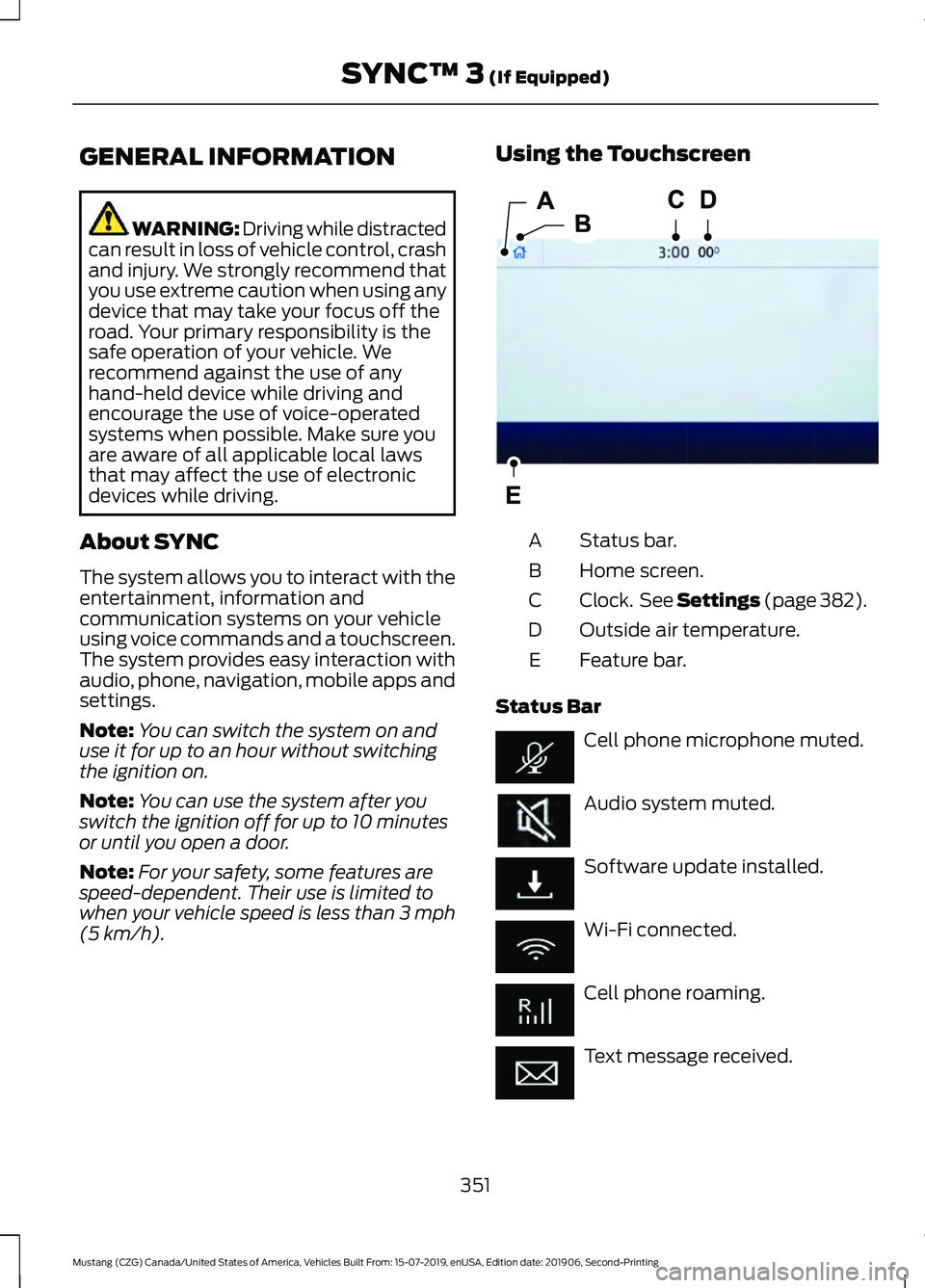
(5 km/h). Using the Touchscreen
Status bar.
A
Home screen.
B
Clock. See Settings (page 382).
C
Outside air temperature.
D
Feature bar.
E
Status Bar Cell phone microphone muted.
Audio system muted.
Software update installed.
Wi-Fi connected.
Cell phone roaming.
Text message received.
351
Mustang (CZG) Canada/United States of America, Vehicles Built From: 15-07-2019, enUSA, Edition date: 201906, Second-Printing SYNC™ 3
(If Equipped)E293823
Page 385 of 464
Action and Description
Menu Item
Select to choose from a listing of
weather locations.
Area
Touch this button to view scores and schedules from a variety
of sports. You can also save up to 10 favorite teams for easier
access. The score automatically refreshes when a game is in
progress.
Sports Info
Touch this button to view ski conditions for a specific area.
Ski Conditions
SETTINGS Press the button to enter the
settings menu.
Once you select a tile, press the
button next to a menu item to
view an explanation of the
feature or setting.
Sound
Select this tile to adjust sound the settings.
Clock
Select this tile to adjust the clock settings.
Bluetooth
Select this tile to switch Bluetooth on and
off and adjust the settings.
Phone
Select this tile to connect, disconnect, and
manage the connected device settings.
Audio
Select this tile to adjust the audio settings. Driver Assist (If Equipped)
Select this tile to adjust Driver Assist
features like Parking Aids, Lane Keeping
System, Pedestrian Detection, and
Auto-Start-Stop.
Vehicle
Select this tile to adjust vehicle settings
like windows, alarm, lighting, and MyKey
settings.
FordPass
Select this tile to adjust the FordPass
settings
General
Select this tile to adjust settings like
language, measurement units, or to reset
the system.
911 Assist
(If Equipped)
Select this tile to switch 911 Assist on and
off.
Automatic Updates
Select this tile to adjust the automatic
update settings.
Mobile Apps
Select this tile to adjust permissions,
enable, disable, and update mobile apps.
382
Mustang (CZG) Canada/United States of America, Vehicles Built From: 15-07-2019, enUSA, Edition date: 201906, Second-Printing SYNC™ 3
(If Equipped)E280315 E268570
Page 452 of 464
A
A/C
See: Climate Control........................................... 111
About This Manual...........................................7
ABS See: Brakes........................................................... 154
ABS driving hints See: Hints on Driving With Anti-Lock
Brakes................................................................ 154
Accessories....................................................397
Accessories See: Replacement Parts
Recommendation............................................ 14
ACC See: Using Adaptive Cruise Control............168
Adjusting the Headlamps........................248 Horizontal Aim Adjustment........................... 250
Vertical Aim Adjustment................................ 248
Adjusting the Steering Wheel...................68
Airbag Disposal
...............................................49
Air Conditioning See: Climate Control........................................... 111
Air Filter See: Changing the Engine Air Filter - 2.3L
EcoBoost™/5.0L.......................................... 239
See: Changing the Engine Air Filter - 5.0L, Bullitt................................................................. 239
Alarm See: Anti-Theft Alarm......................................... 67
Ambient Lighting............................................76
Anti-Theft Alarm
............................................67
Arming the Alarm................................................. 67
Disarming the Alarm........................................... 67
Appendices.....................................................419
Apps
..................................................................379
SiriusXM Traffic and Travel Link.................... 381
Using Apps on an Android Device..............380
Using Apps on an iOS Device....................... 380
Using Mobile Navigation on an Android Device............................................................... 380
At a Glance........................................................18
Audible Warnings and Indicators.............89 Beltminder Warning............................................ 89
Direction Indicator Left On............................... 89
Headlamps On Warning Tone......................... 89
Keyless Warning Alert........................................ 89
Parking Brake On Warning Tone.................... 89Transmission Not in Park..................................
89
Audio Control..................................................68 You can operate the following functions
with the control:.............................................. 68
Audio System
................................................324
General Information......................................... 324
Audio Unit - Vehicles With: SYNC 3.......................................................................326
Accessing the Sound Settings....................... 327
Adjusting the Volume....................................... 327
Changing Radio Stations................................. 327
Ejecting the CD.................................................... 327
Inserting a CD...................................................... 327
Playing or Pausing Media................................ 327
Switching the Audio Unit On and Off.........327
Using Seek, Fast Forward and Reverse............................................................. 328
Audio Unit - Vehicles With: SYNC
.........324
Accessing the Apps Menu.............................. 325
Accessing the Clock Settings........................ 325
Accessing the Media Source Menu.............325
Accessing the Phone Features..................... 325
Accessing the Settings Menu........................ 325
Accessing the Sound Settings...................... 325
Adjusting the Volume....................................... 325
Changing Radio Stations................................ 325
Listening to the Radio...................................... 326
Muting the Audio............................................... 326
Playing or Pausing Media............................... 326
Switching the Audio Unit On and Off........326
Switching the Display On and Off...............326
Using Seek, Fast Forward and Reverse............................................................. 326
Using the Display Control............................... 326
Using the Number Block................................. 326
Autolamps.........................................................74 Windshield Wiper Activated
Headlamps......................................................... 74
Automatic Climate Control
........................112
Setting the Blower Motor Speed................... 112
Setting the Temperature................................... 113
Switching Auto Mode On and Off.................113
Switching Defrost On and Off......................... 113
Switching Maximum Air Conditioning On and Off................................................................ 113
Switching Maximum Defrost On and Off........................................................................\
. 113
449
Mustang (CZG) Canada/United States of America, Vehicles Built From: 15-07-2019, enUSA, Edition date: 201906, Second-Printing Index
Page 461 of 464
Vehicles Sold in the United States: Using
Roadside Assistance...................................208
Roadside Emergencies.............................208
Running-In See: Breaking-In................................................ 206
Running Out of Fuel.....................................137 Adding Fuel From a Portable Fuel
Container.......................................................... 138
Filling a Portable Fuel Container................... 137
S
Safety Canopy ™ - Coupe...........................46
Safety Precautions......................................136
Satellite Radio
..............................................330
Satellite Radio Electronic Serial Number
(ESN).................................................................. 331
Satellite Radio Reception Factors................331
SiriusXM Satellite Radio Service................... 331
Troubleshooting................................................. 332
Scheduled Maintenance Record..........408
Scheduled Maintenance
..........................400
Seatbelt Extensions......................................38
Seatbelt Reminder........................................36 Belt-Minder™........................................................ 36
Seatbelts...........................................................32 Principle of Operation......................................... 32
Seatbelt Warning Lamp and Indicator Chime...............................................................35
Conditions of operation..................................... 36
Seats..................................................................118
Security
..............................................................66
Settings...........................................................382 911 Assist............................................................... 382
Ambient Lighting............................................... 383
Audio...................................................................... 382
Automatic Updates.......................................... 382
Bluetooth.............................................................. 382
Charge Settings.................................................. 383
Clock....................................................................... 382
Display................................................................... 383
Driver Assist......................................................... 382
FordPass............................................................... 382
General.................................................................. 382
Message Center................................................. 383
Mobile Apps......................................................... 382
Multi Contour Seats.......................................... 383
Navigation............................................................ 383Personal Profiles................................................
383
Phone..................................................................... 382
Seats...................................................................... 383
Sound..................................................................... 382
Valet Mode........................................................... 383
Vehicle................................................................... 382
Voice Control....................................................... 383
Setting the Cruise Control Speed...........167 Changing the Set Speed.................................. 167
Side Airbags
.....................................................45
Sitting in the Correct Position...................118
Snow Chains See: Using Snow Chains................................. 285
Spare Wheel See: Changing a Road Wheel....................... 289
Special Notices
................................................14
New Vehicle Limited Warranty......................... 14
On Board Diagnostics Data Link Connector............................................................ 15
Special Instructions.............................................. 14
Special Operating Conditions Scheduled Maintenance..............................................406
Exceptions........................................................... 408
Speed Control See: Cruise Control............................................. 167
Stability Control
............................................158
Principle of Operation....................................... 158
Starting a Gasoline Engine
........................132
Automatic Engine Shutdown......................... 133
Failure to Start..................................................... 133
Fast Restart........................................................... 133
Guarding Against Exhaust Fumes................134
Important Ventilating Information...............134
Stopping the Engine When Your Vehicle is Moving................................................................134
Stopping the Engine When Your Vehicle is Stationary......................................................... 134
Starting and Stopping the Engine...........131 General Information........................................... 131
Steering............................................................184 Adaptive Learning.............................................. 185
Electric Power Steering.................................... 184
Steering Wheel Lock....................................132 Unlocking the Steering Wheel....................... 132
Steering Wheel
...............................................68
Storage Compartments.............................130
Sun Visors..........................................................81 Illuminated Vanity Mirror................................... 82
458
Mustang (CZG) Canada/United States of America, Vehicles Built From: 15-07-2019, enUSA, Edition date: 201906, Second-Printing Index