remote start FORD MUSTANG 2020 User Guide
[x] Cancel search | Manufacturer: FORD, Model Year: 2020, Model line: MUSTANG, Model: FORD MUSTANG 2020Pages: 464, PDF Size: 7.44 MB
Page 68 of 464
Illuminated Exit
The interior lamps and select exterior
lamps illuminate when all doors are closed
and you switch the ignition off.
The lamps turn off if all the doors remain
closed and:
•
25 seconds elapse.
• You press the START/STOP button.
Battery Saver
If you leave on the courtesy lamps, dome
lamps or headlamps, the battery saver
turns them off 10 minutes after you switch
off the ignition.
Accessory Mode Battery Saver for
Intelligent Access Keys
If you leave your vehicle in the run ignition
state, it turns off once it detects a certain
amount of battery drain or after 45
minutes.
INTERIOR LUGGAGE
COMPARTMENT RELEASE WARNING: Keep vehicle doors and
luggage compartment locked and keep
keys and remote transmitters out of a
child ’s reach. Unsupervised children
could lock themselves in the trunk and
risk injury. Children should be taught not
to play in vehicles. WARNING:
Do not leave children
or animals unattended in the vehicle. On
hot days, the temperature in the trunk or
vehicle interior can rise very quickly.
Exposure of people or animals to these
high temperatures for even a short time
can cause death or serious heat-related
injuries, including brain damage. Small
children are particularly at risk. Your vehicle is equipped with a release
handle that provides a means of escape
for children and adults if they become
locked inside the luggage compartment.
Adults should familiarize themselves with
the operation and location of the release
handle.
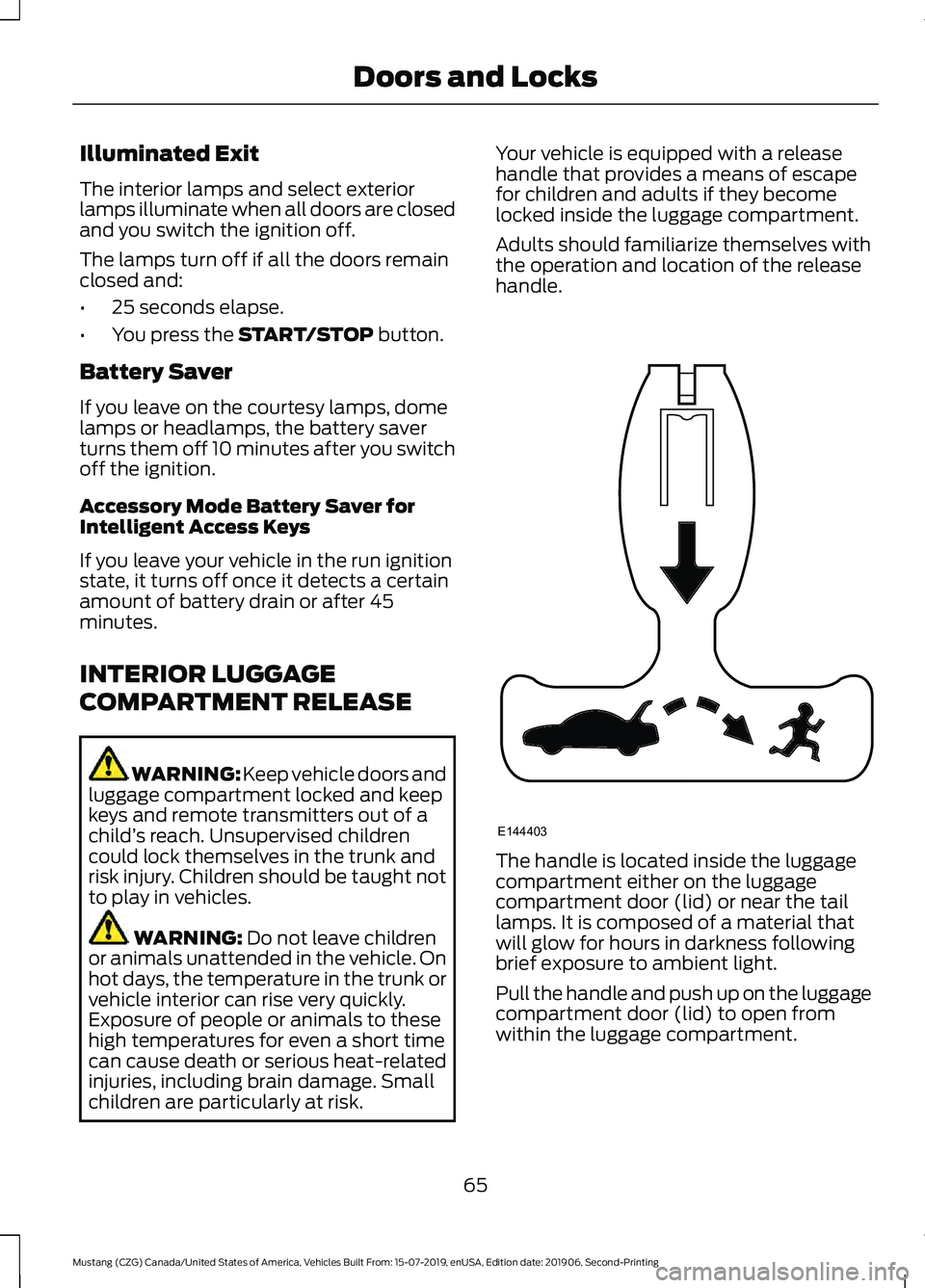
The handle is located inside the luggage
compartment either on the luggage
compartment door (lid) or near the tail
lamps. It is composed of a material that
will glow for hours in darkness following
brief exposure to ambient light.
Pull the handle and push up on the luggage
compartment door (lid) to open from
within the luggage compartment.
65
Mustang (CZG) Canada/United States of America, Vehicles Built From: 15-07-2019, enUSA, Edition date: 201906, Second-Printing Doors and LocksE144403
Page 69 of 464
PASSIVE ANTI-THEFT
SYSTEM
Note:
The system is not compatible with
non-Ford aftermarket remote start systems.
Use of these systems may result in vehicle
starting problems and a loss of security
protection.
Note: Metallic objects, electronic devices
or a second coded key on the same key
chain may cause vehicle starting problems
if they are too close to the key when starting
your vehicle. Prevent these objects from
touching the coded key while starting your
vehicle. Switch the ignition off, move all
objects on the key chain away from the
coded key and restart your vehicle if a
problem occurs.
Note: Do not leave a duplicate coded key
in your vehicle. Always take your keys and
lock all doors when leaving your vehicle.
SecuriLock
The system helps prevent your vehicle
from starting unless you use a coded key
programmed to your vehicle. Using the
wrong key may prevent your vehicle from
starting. A message may appear in the
information display.
If you are unable to start your vehicle with
a correctly coded key, it is not operating
properly. A message may appear in the
information display.
Automatic Arming
Your vehicle arms immediately after
switching the ignition off.
Automatic Disarming
Switching the ignition on with a coded key
disarms your vehicle. Replacement Keys
Note:
Your vehicle comes equipped with
two intelligent access keys.
The intelligent access key functions as a
programmed key that operates the driver
door lock and activates the intelligent
access with push button start system, as
well as a remote control.
If your programmed transmitters are lost
or stolen and you do not have an extra
coded key, you need to have your vehicle
towed to an authorized dealer. You need
to erase the key codes from your vehicle
and program new coded keys.
Store an extra programmed key away from
your vehicle in a safe place to help prevent
any inconveniences. See your authorized
dealer to purchase additional spare or
replacement keys.
Programming a Spare Intelligent
Access Key
Note: You can program a maximum of four
intelligent access keys to your vehicle.
You must have two previously
programmed intelligent access keys inside
your vehicle and the new unprogrammed
intelligent access keys readily accessible.
See an authorized dealer to have the spare
key programmed if two previously
programmed keys are not available.
Make sure that your vehicle is off before
beginning this procedure. Make sure that
you close all the doors before beginning
and that they remain closed throughout
the procedure. Perform all steps within 30
seconds of starting the sequence. Stop
and wait for at least one minute before
starting again if you perform any steps out
of sequence.
Read and understand the entire procedure
before you begin.
66
Mustang (CZG) Canada/United States of America, Vehicles Built From: 15-07-2019, enUSA, Edition date: 201906, Second-Printing Security
Page 70 of 464
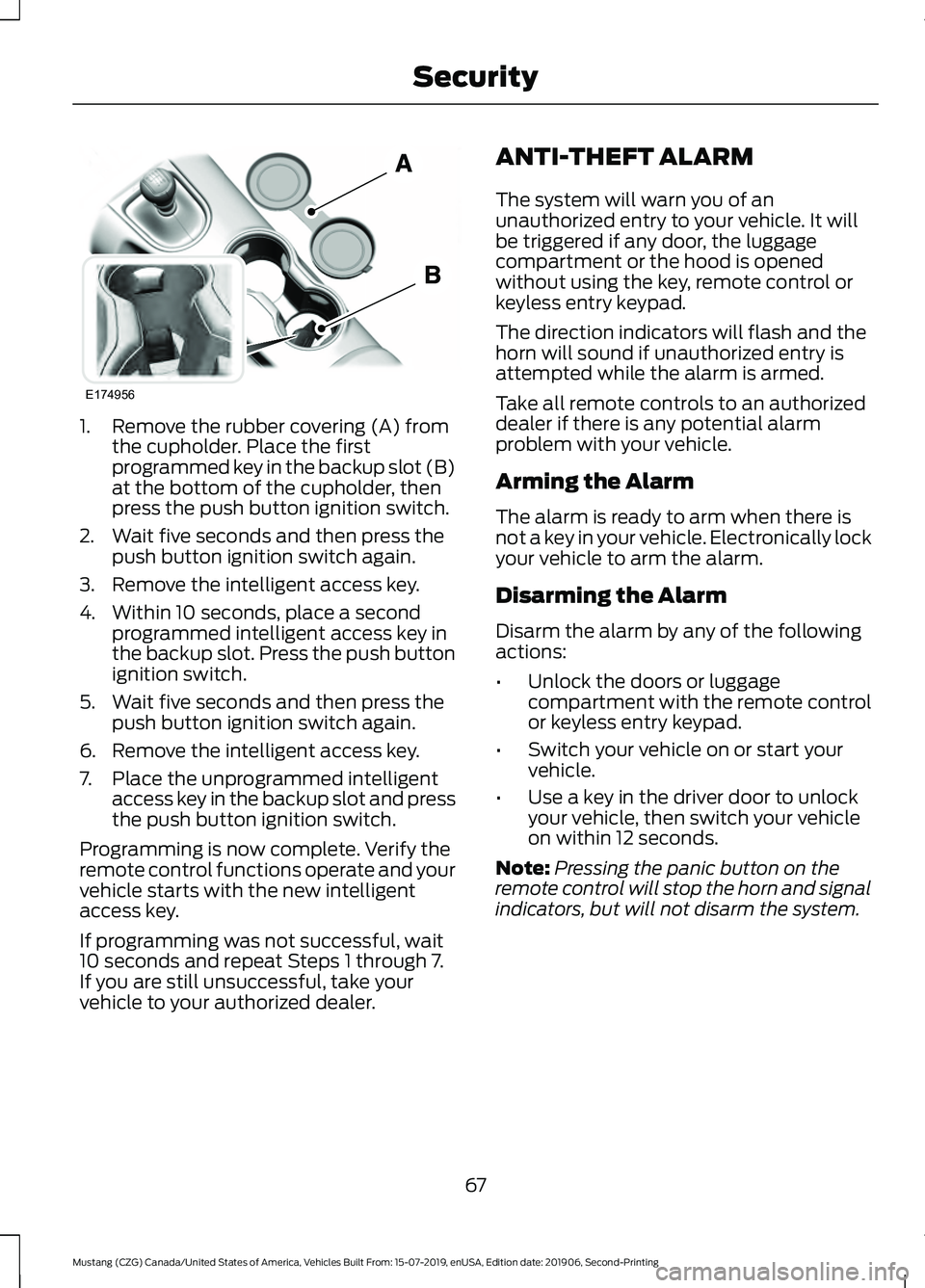
1. Remove the rubber covering (A) from
the cupholder. Place the first
programmed key in the backup slot (B)
at the bottom of the cupholder, then
press the push button ignition switch.
2. Wait five seconds and then press the push button ignition switch again.
3. Remove the intelligent access key.
4. Within 10 seconds, place a second programmed intelligent access key in
the backup slot. Press the push button
ignition switch.
5. Wait five seconds and then press the push button ignition switch again.
6. Remove the intelligent access key.
7. Place the unprogrammed intelligent access key in the backup slot and press
the push button ignition switch.
Programming is now complete. Verify the
remote control functions operate and your
vehicle starts with the new intelligent
access key.
If programming was not successful, wait
10 seconds and repeat Steps 1 through 7.
If you are still unsuccessful, take your
vehicle to your authorized dealer. ANTI-THEFT ALARM
The system will warn you of an
unauthorized entry to your vehicle. It will
be triggered if any door, the luggage
compartment or the hood is opened
without using the key, remote control or
keyless entry keypad.
The direction indicators will flash and the
horn will sound if unauthorized entry is
attempted while the alarm is armed.
Take all remote controls to an authorized
dealer if there is any potential alarm
problem with your vehicle.
Arming the Alarm
The alarm is ready to arm when there is
not a key in your vehicle. Electronically lock
your vehicle to arm the alarm.
Disarming the Alarm
Disarm the alarm by any of the following
actions:
•
Unlock the doors or luggage
compartment with the remote control
or keyless entry keypad.
• Switch your vehicle on or start your
vehicle.
• Use a key in the driver door to unlock
your vehicle, then switch your vehicle
on within 12 seconds.
Note: Pressing the panic button on the
remote control will stop the horn and signal
indicators, but will not disarm the system.
67
Mustang (CZG) Canada/United States of America, Vehicles Built From: 15-07-2019, enUSA, Edition date: 201906, Second-Printing SecurityE174956
Page 83 of 464
Opening the Windows
You can open the windows for a short time
after you unlock your vehicle with the
remote control. After you unlock your
vehicle, press and hold the remote control
unlock button to open the windows.
Release the button once movement starts.
Press the lock or unlock button to stop
movement.
EXTERIOR MIRRORS
Power Exterior Mirrors
WARNING: Do not adjust the
mirrors when your vehicle is moving. This
could result in the loss of control of your
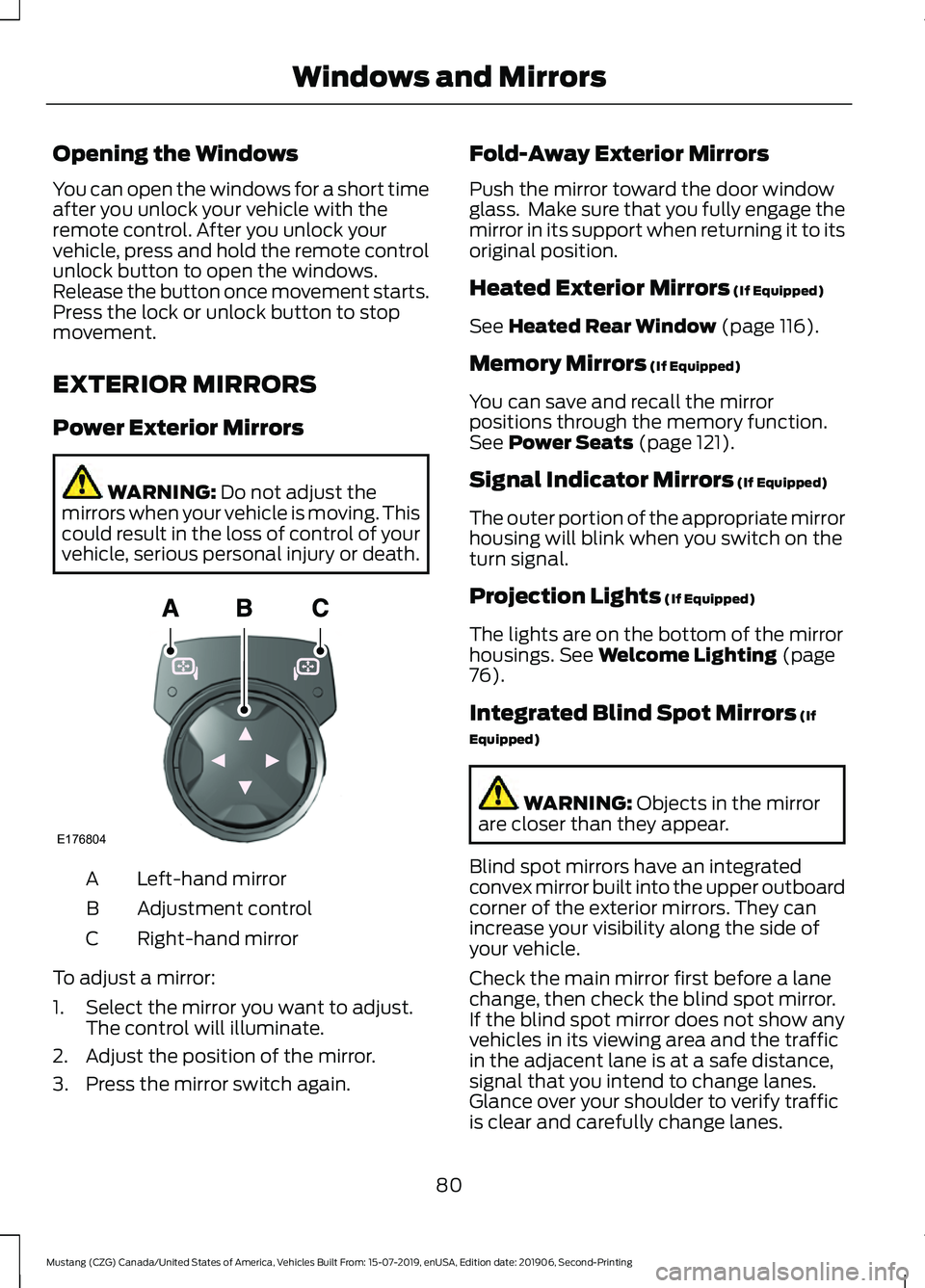
vehicle, serious personal injury or death. Left-hand mirror
A
Adjustment control
B
Right-hand mirror
C
To adjust a mirror:
1. Select the mirror you want to adjust. The control will illuminate.
2. Adjust the position of the mirror.
3. Press the mirror switch again. Fold-Away Exterior Mirrors
Push the mirror toward the door window
glass. Make sure that you fully engage the
mirror in its support when returning it to its
original position.
Heated Exterior Mirrors
(If Equipped)
See
Heated Rear Window (page 116).
Memory Mirrors
(If Equipped)
You can save and recall the mirror
positions through the memory function.
See
Power Seats (page 121).
Signal Indicator Mirrors
(If Equipped)
The outer portion of the appropriate mirror
housing will blink when you switch on the
turn signal.
Projection Lights
(If Equipped)
The lights are on the bottom of the mirror
housings.
See Welcome Lighting (page
76).
Integrated Blind Spot Mirrors
(If
Equipped) WARNING:
Objects in the mirror
are closer than they appear.
Blind spot mirrors have an integrated
convex mirror built into the upper outboard
corner of the exterior mirrors. They can
increase your visibility along the side of
your vehicle.
Check the main mirror first before a lane
change, then check the blind spot mirror.
If the blind spot mirror does not show any
vehicles in its viewing area and the traffic
in the adjacent lane is at a safe distance,
signal that you intend to change lanes.
Glance over your shoulder to verify traffic
is clear and carefully change lanes.
80
Mustang (CZG) Canada/United States of America, Vehicles Built From: 15-07-2019, enUSA, Edition date: 201906, Second-Printing Windows and MirrorsE176804
Page 98 of 464
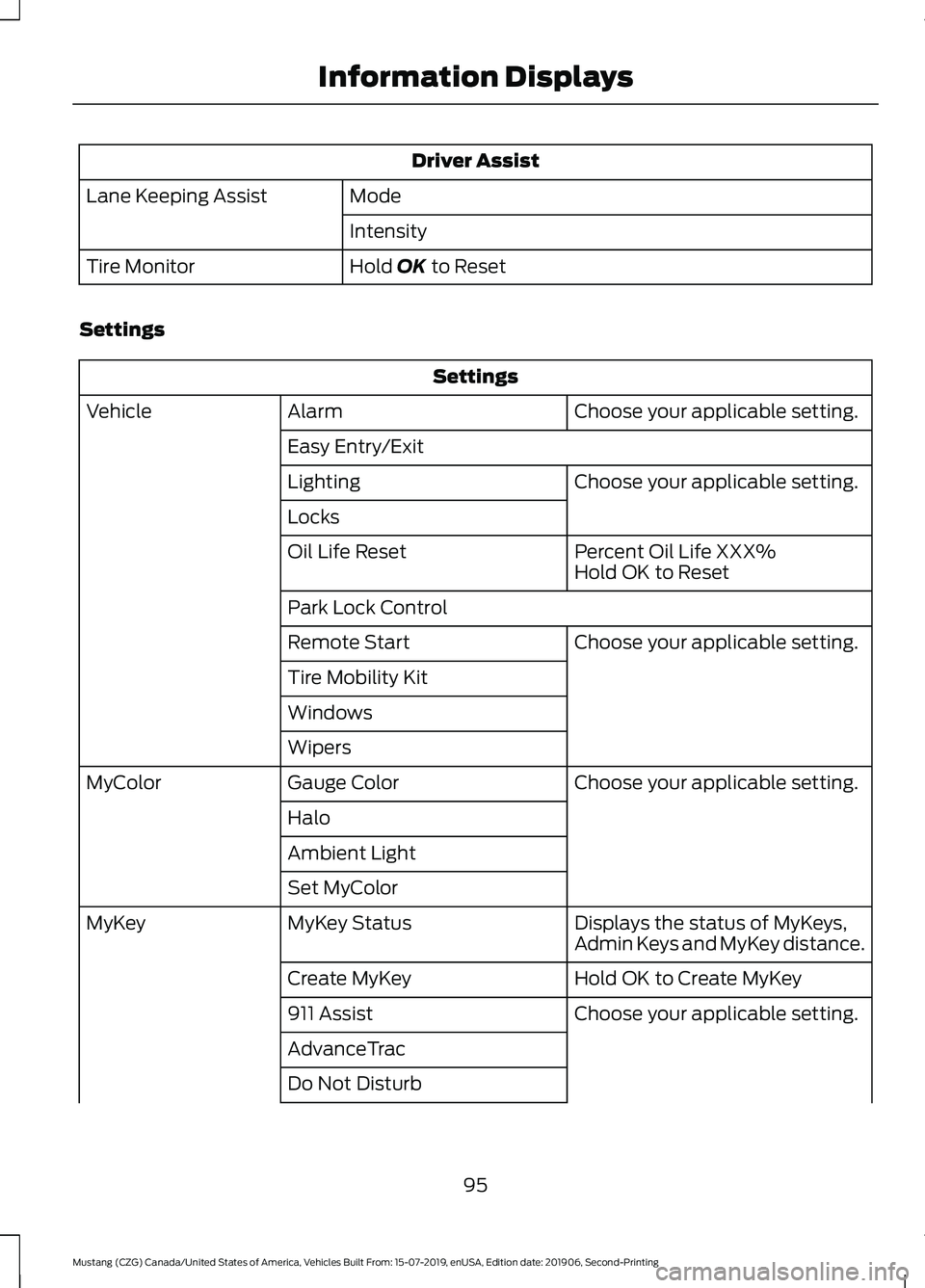
Driver Assist
Mode
Lane Keeping Assist
Intensity
Hold OK to Reset
Tire Monitor
Settings Settings
Choose your applicable setting.
Alarm
Vehicle
Easy Entry/Exit Choose your applicable setting.
Lighting
Locks
Percent Oil Life XXX%
Oil Life Reset
Hold OK to Reset
Park Lock Control Choose your applicable setting.
Remote Start
Tire Mobility Kit
Windows
Wipers
Choose your applicable setting.
Gauge Color
MyColor
Halo
Ambient Light
Set MyColor Displays the status of MyKeys,
Admin Keys and MyKey distance.
MyKey Status
MyKey
Hold OK to Create MyKey
Create MyKey
Choose your applicable setting.
911 Assist
AdvanceTrac
Do Not Disturb
95
Mustang (CZG) Canada/United States of America, Vehicles Built From: 15-07-2019, enUSA, Edition date: 201906, Second-Printing Information Displays
Page 110 of 464
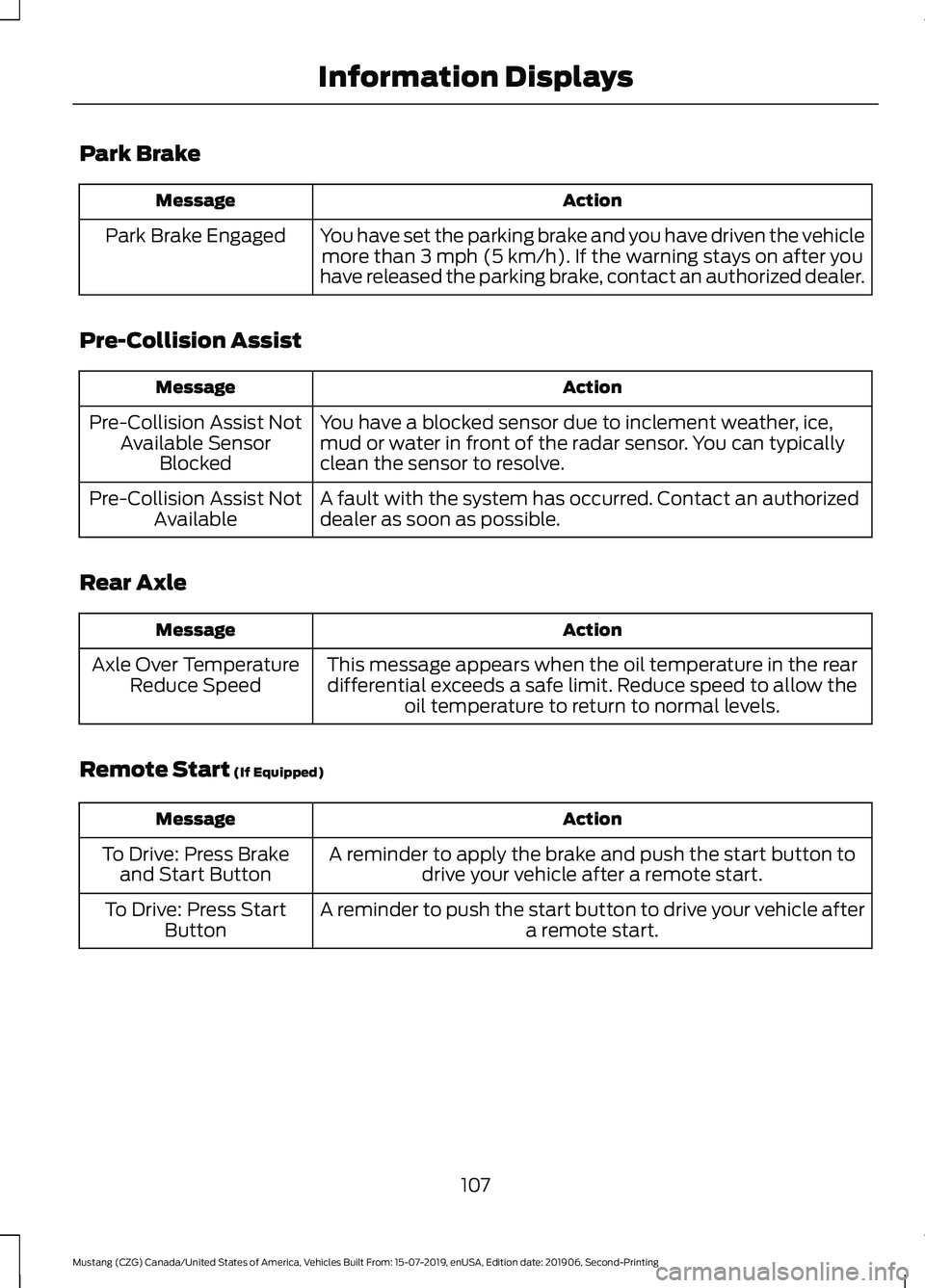
Park Brake
Action
Message
You have set the parking brake and you have driven the vehiclemore than 3 mph (5 km/h). If the warning stays on after you
have released the parking brake, contact an authorized dealer.
Park Brake Engaged
Pre-Collision Assist Action
Message
You have a blocked sensor due to inclement weather, ice,
mud or water in front of the radar sensor. You can typically
clean the sensor to resolve.
Pre-Collision Assist Not
Available Sensor Blocked
A fault with the system has occurred. Contact an authorized
dealer as soon as possible.
Pre-Collision Assist Not
Available
Rear Axle Action
Message
This message appears when the oil temperature in the reardifferential exceeds a safe limit. Reduce speed to allow the oil temperature to return to normal levels.
Axle Over Temperature
Reduce Speed
Remote Start
(If Equipped) Action
Message
A reminder to apply the brake and push the start button todrive your vehicle after a remote start.
To Drive: Press Brake
and Start Button
A reminder to push the start button to drive your vehicle after a remote start.
To Drive: Press Start
Button
107
Mustang (CZG) Canada/United States of America, Vehicles Built From: 15-07-2019, enUSA, Edition date: 201906, Second-Printing Information Displays
Page 119 of 464
2.
Adjust the temperature function to the
setting you prefer. Use 72°F (22°C) as
a starting point, then adjust the setting
as necessary.
Defogging the Side Windows in
Cold Weather
1. Press and release defrost or maximum
defrost.
2. Adjust the temperature control to the setting you prefer. Use
72°F (22°C) as
a starting point, then adjust the setting
as necessary.
HEATED REAR WINDOW Press the button to clear the rear
window of thin ice and fog. The
heated rear window turns off
after a short period of time.
Note: Do not use harsh chemicals, razor
blades or other sharp objects to clean or
remove decals from the inside of the heated
rear window. The vehicle warranty may not
cover damage to the heated rear window
grid lines.
HEATED EXTERIOR MIRRORS
(IF EQUIPPED)
When you switch the heated rear window
on, the heated exterior mirrors turn on.
Note: Do not remove ice from the mirrors
with a scraper or adjust the mirror glass
when it is frozen in place.
Note: Do not clean the mirror housing or
glass with harsh abrasives, fuel or other
petroleum-based cleaning products. The
vehicle warranty may not cover damage
caused to the mirror housing or glass. REMOTE START
(IF EQUIPPED)
You can switch this feature on or off and
adjust the settings in the information
display.
The system adjusts the interior
temperature depending on your chosen
settings during remote start.
You cannot adjust the climate control
setting during remote start operation. The
information display and the indicators do
not turn on during remote start. When you
switch the ignition on, the climate control
system returns to the previous settings.
You can now make adjustments.
You need to switch on certain
vehicle-dependent features, such as:
• Heated seats.
• Cooled seats.
• Heated steering wheel.
• Heated mirrors.
• Heated rear window.
Automatic Settings
In hot weather, the system sets to
72°F
(22°C). The cooled seats are set to high,
if available, and AUTO is on in the
information display.
In moderate weather, the system either
heats or cools, based on pre-selected
settings. The rear defroster, heated mirrors
and heated or cooled seats do not turn on.
In cold weather, the system sets to
72°F
(22°C). The heated seats are set to high,
if available, and AUTO is on in the
information display. The heated rear
window and heated mirrors turn on.
116
Mustang (CZG) Canada/United States of America, Vehicles Built From: 15-07-2019, enUSA, Edition date: 201906, Second-Printing Climate ControlE184884
Page 136 of 464
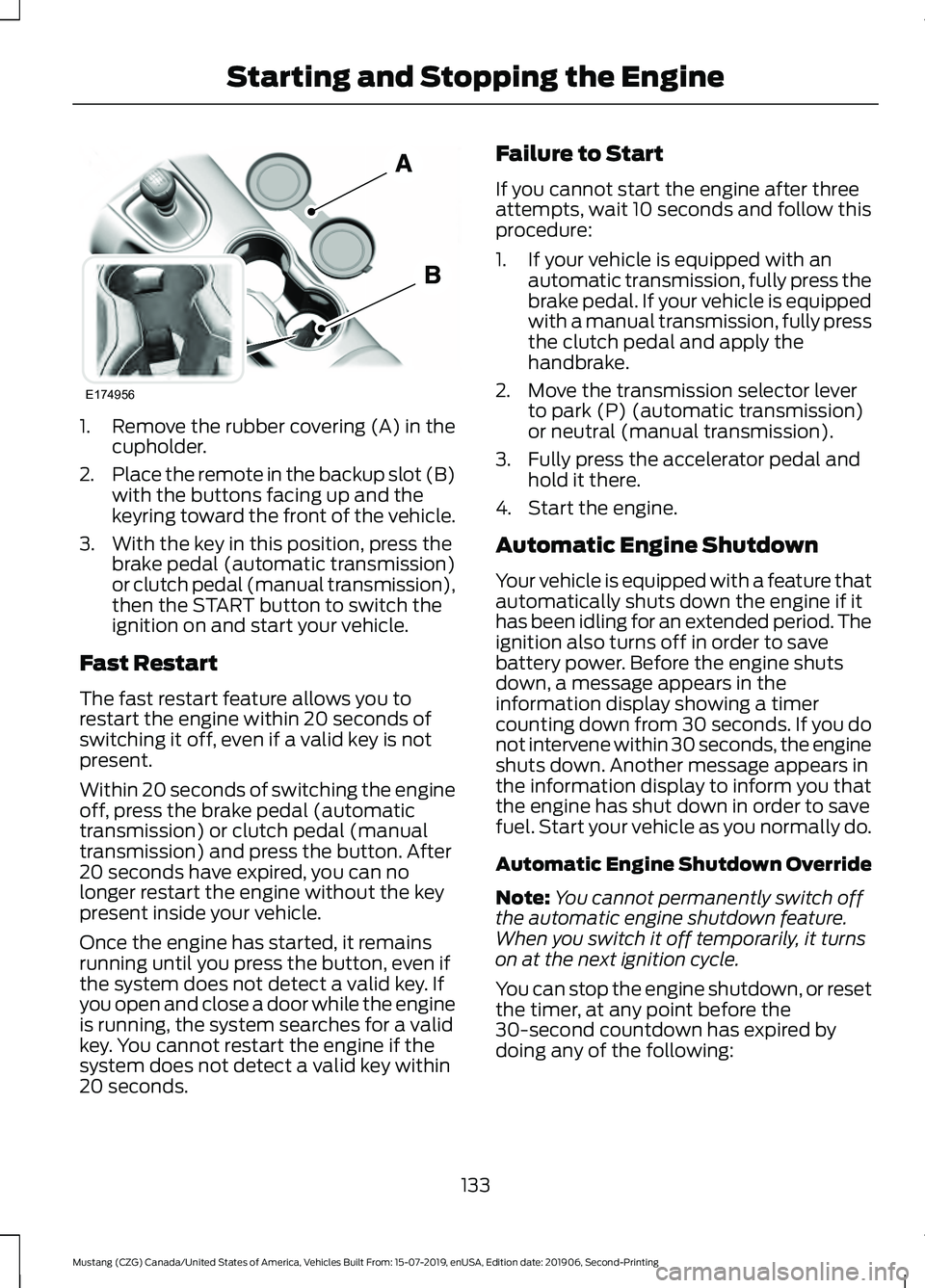
1. Remove the rubber covering (A) in the
cupholder.
2. Place the remote in the backup slot (B)
with the buttons facing up and the
keyring toward the front of the vehicle.
3. With the key in this position, press the brake pedal (automatic transmission)
or clutch pedal (manual transmission),
then the START button to switch the
ignition on and start your vehicle.
Fast Restart
The fast restart feature allows you to
restart the engine within 20 seconds of
switching it off, even if a valid key is not
present.
Within 20 seconds of switching the engine
off, press the brake pedal (automatic
transmission) or clutch pedal (manual
transmission) and press the button. After
20 seconds have expired, you can no
longer restart the engine without the key
present inside your vehicle.
Once the engine has started, it remains
running until you press the button, even if
the system does not detect a valid key. If
you open and close a door while the engine
is running, the system searches for a valid
key. You cannot restart the engine if the
system does not detect a valid key within
20 seconds. Failure to Start
If you cannot start the engine after three
attempts, wait 10 seconds and follow this
procedure:
1. If your vehicle is equipped with an
automatic transmission, fully press the
brake pedal. If your vehicle is equipped
with a manual transmission, fully press
the clutch pedal and apply the
handbrake.
2. Move the transmission selector lever to park (P) (automatic transmission)
or neutral (manual transmission).
3. Fully press the accelerator pedal and hold it there.
4. Start the engine.
Automatic Engine Shutdown
Your vehicle is equipped with a feature that
automatically shuts down the engine if it
has been idling for an extended period. The
ignition also turns off in order to save
battery power. Before the engine shuts
down, a message appears in the
information display showing a timer
counting down from 30 seconds. If you do
not intervene within 30 seconds, the engine
shuts down. Another message appears in
the information display to inform you that
the engine has shut down in order to save
fuel. Start your vehicle as you normally do.
Automatic Engine Shutdown Override
Note: You cannot permanently switch off
the automatic engine shutdown feature.
When you switch it off temporarily, it turns
on at the next ignition cycle.
You can stop the engine shutdown, or reset
the timer, at any point before the
30-second countdown has expired by
doing any of the following:
133
Mustang (CZG) Canada/United States of America, Vehicles Built From: 15-07-2019, enUSA, Edition date: 201906, Second-Printing Starting and Stopping the EngineE174956
Page 233 of 464
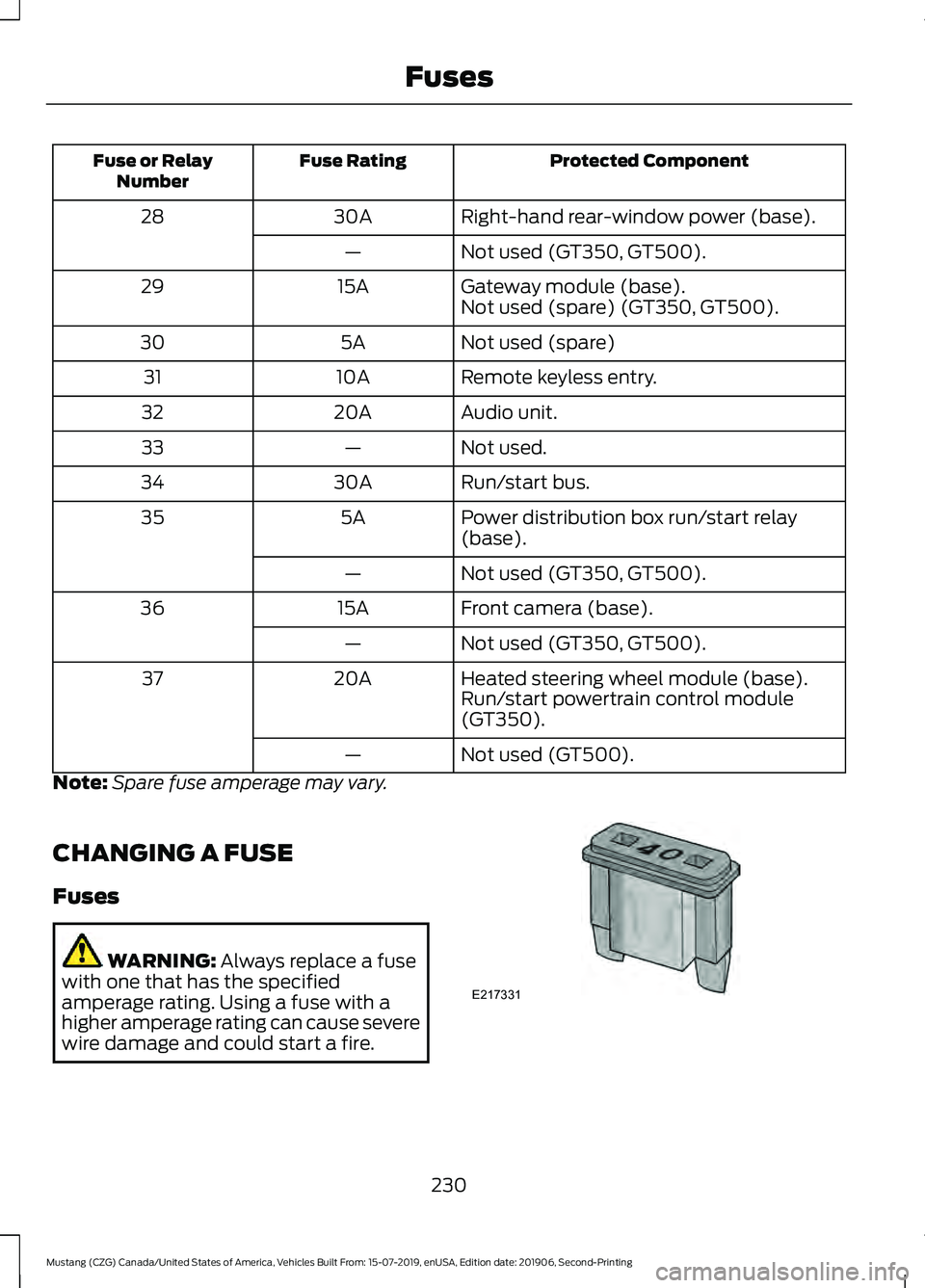
Protected Component
Fuse Rating
Fuse or Relay
Number
Right-hand rear-window power (base).
30A
28
Not used (GT350, GT500).
—
Gateway module (base).
15A
29
Not used (spare) (GT350, GT500).
Not used (spare)
5A
30
Remote keyless entry.
10A
31
Audio unit.
20A
32
Not used.
—
33
Run/start bus.
30A
34
Power distribution box run/start relay
(base).
5A
35
Not used (GT350, GT500).
—
Front camera (base).
15A
36
Not used (GT350, GT500).
—
Heated steering wheel module (base).
20A
37
Run/start powertrain control module
(GT350).
Not used (GT500).
—
Note: Spare fuse amperage may vary.
CHANGING A FUSE
Fuses WARNING: Always replace a fuse
with one that has the specified
amperage rating. Using a fuse with a
higher amperage rating can cause severe
wire damage and could start a fire. 230
Mustang (CZG) Canada/United States of America, Vehicles Built From: 15-07-2019, enUSA, Edition date: 201906, Second-Printing FusesE217331
Page 323 of 464
CONNECTING THE VEHICLE TO
A MOBILE NETWORK
What Is the Modem
The modem allows you to connect your
vehicle to the Internet to use when you are
on the road.
If you enable the modem using the
FordPass app, you can access the
following services:
•
Locating and remotely starting, locking
and unlocking your vehicle. See the
information in FordPass app.
• Automatic system updates.
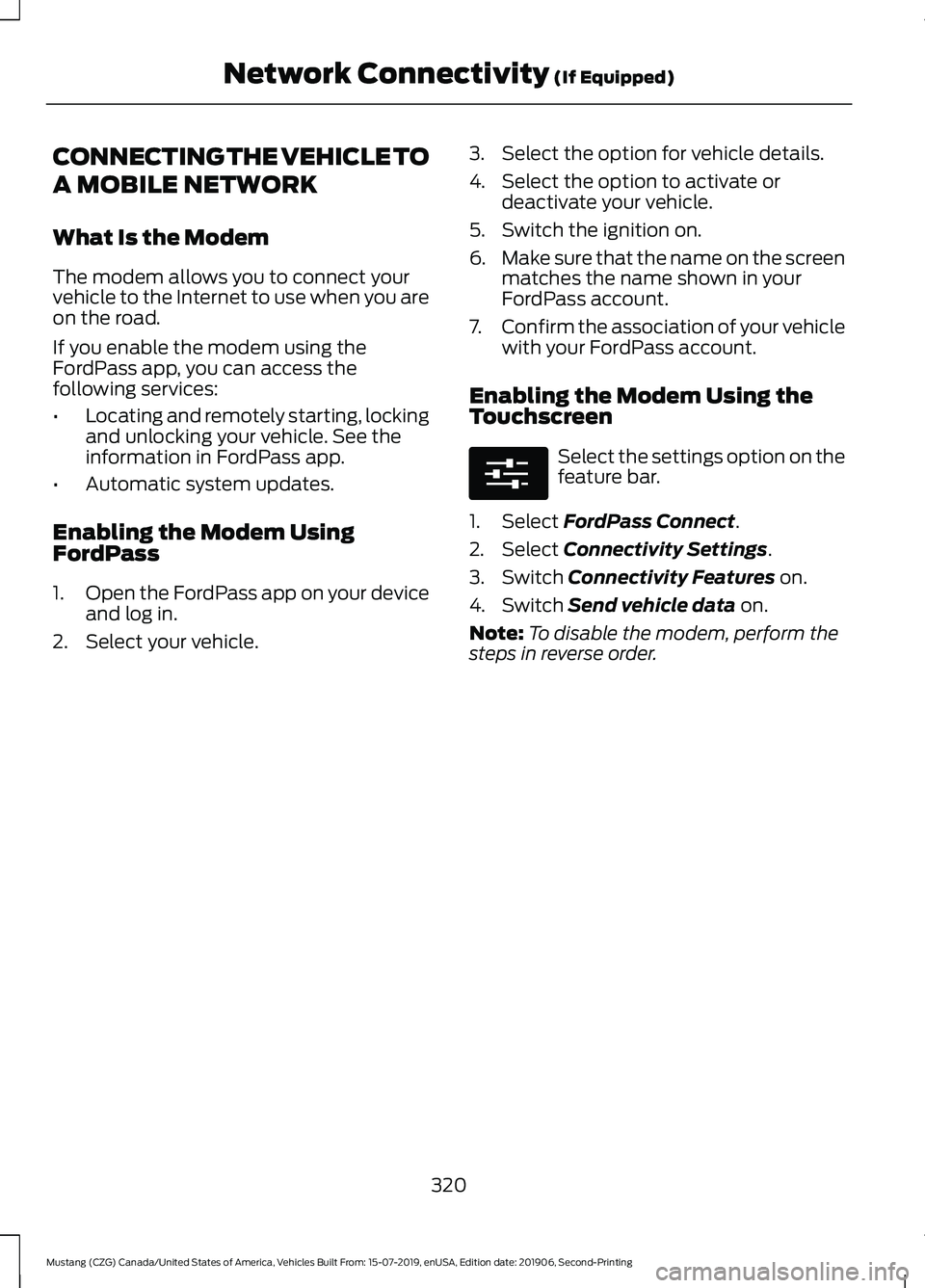
Enabling the Modem Using
FordPass
1. Open the FordPass app on your device
and log in.
2. Select your vehicle. 3. Select the option for vehicle details.
4. Select the option to activate or
deactivate your vehicle.
5. Switch the ignition on.
6. Make sure that the name on the screen
matches the name shown in your
FordPass account.
7. Confirm the association of your vehicle
with your FordPass account.
Enabling the Modem Using the
Touchscreen Select the settings option on the
feature bar.
1. Select FordPass Connect.
2. Select
Connectivity Settings.
3. Switch
Connectivity Features on.
4. Switch
Send vehicle data on.
Note: To disable the modem, perform the
steps in reverse order.
320
Mustang (CZG) Canada/United States of America, Vehicles Built From: 15-07-2019, enUSA, Edition date: 201906, Second-Printing Network Connectivity
(If Equipped)E280315