transmission FORD MUSTANG 2020 User Guide
[x] Cancel search | Manufacturer: FORD, Model Year: 2020, Model line: MUSTANG, Model: FORD MUSTANG 2020Pages: 464, PDF Size: 7.44 MB
Page 92 of 464
Stability Control and Traction
Control Off Warning Lamp
Illuminates when you switch the
system off.
Trunk Ajar Illuminates when the ignition is
on and the trunk is not
completely closed.
AUDIBLE WARNINGS AND
INDICATORS
Keyless Warning Alert
The horn sounds twice when you exit your
vehicle with the intelligent access key and
your vehicle is in ON, indicating your vehicle
is still on. The horn also sounds twice when
you exit your vehicle and attempt to lock
the doors manually when the intelligent
access key is still in the vehicle. The doors
will not lock if the intelligent access key
remains in the vehicle.
Headlamps On Warning Tone
Sounds when you remove the key from the
vehicle and you have left the headlamps
or parking lamps on.
Parking Brake On Warning Tone
Sounds when you have left the parking
brake on and drive your vehicle. If the
warning tone remains on after you release
the parking brake, have the system
checked by your authorized dealer
immediately. Transmission Not in Park
Sounds when the gear selector is in any
position other than park (P), and you
switch the vehicle ignition off or to the
accessory position. If the door is ajar, the
tone is continuous. Once you close the
door, the tone continues for a period of
time.
Direction Indicator Left On
Sounds when the direction indicator does
not disengage after 2.0 mi (3.2 km) of
driving.
Beltminder Warning
Sounds when the system detects an
unfastened seatbelt in an occupied seat
and your vehicle is moving.
89
Mustang (CZG) Canada/United States of America, Vehicles Built From: 15-07-2019, enUSA, Edition date: 201906, Second-Printing Instrument ClusterE130458 E159323
Page 95 of 464
Gauge Mode
Vacuum
Voltage
• Air/Fuel Ratio - Displays the current air to fuel mixture in the engine.
• Axle Oil Temp
- Displays the axle's oil temperature.
• Boost/Vacuum
- Displays the vacuum or boost pressure for the 2.3L engine.
• Cylinder Head Temp
- Displays the engine's cylinder head temperature.
• Inlet Air Temp
- Displays the temperature of the air in the cold air inlet tube.
• Oil Pressure
- Displays the engine oil pressure.
• Oil Temp
- Displays the engine oil temperature. If the temperature rises to the red
area, stop in a safe place and let your vehicle cool. If the problem persists, see an
authorized dealer.
• Trans Oil Temp
- Displays the transmission fluid operating temperature. If the
temperature rises to the red area, stop in a safe place and let the transmission cool.
If the problem persists, see an authorized dealer.
• Vacuum
- Displays the vacuum pressure for the 5.0L engine.
• Voltage
- Displays your vehicle's battery voltage. If the voltage is consistently too
high or very low, contact an authorized dealer.
Note: In order to provide real-time values, some gauges may display more value fluctuation
than other gauges during normal operation.
Trip/Fuel Trip/Fuel
Trip 1 or Trip 2 - Trip timer, Trip distance, distance to E and avg mpg Instant fuel economy
Fuel Economy
AVG MPG
mi to E
Last 30 minutes
Fuel History
92
Mustang (CZG) Canada/United States of America, Vehicles Built From: 15-07-2019, enUSA, Edition date: 201906, Second-Printing Information Displays
Page 102 of 464
Pony
Lap Timer
Start Option
Shift Point
Perform-
ance Shift
Indicator Shift Tone
Shift Light Mode
Launch Control
Launch
Control
RPM
Rev Match Show Gauges
Gauges
Configure MyGauges
Primary Color
MyColor
Secondary Color
Ambient Light
Create MyColor
Change with Drive Mode
Cluster
Appear-
ance Normal
Sport
Track
1 See Track Use (page 252).
Note: Quiet Start allows you to schedule when the Exhaust Mode turns on the Quiet
setting. The time window can be from 1 to 24 hours.
Note: Depending on your vehicle
configuration, some features such as
Exhaust Mode and Line Lock may be if
equipped.
Note: The menu options for Performance
Shift Indicator, Launch Control, and Rev
Match are for manual transmissions only.
Phone
See
General Information (page 351). Audio
See
General Information (page 351).
Navigation
(If Equipped)
See
General Information (page 351).
99
Mustang (CZG) Canada/United States of America, Vehicles Built From: 15-07-2019, enUSA, Edition date: 201906, Second-Printing Information Displays
Page 103 of 464
INFORMATION MESSAGES
Note:
Depending on your vehicle options
and instrument cluster type, not all of the
messages display or are available. The
information display may abbreviate or
shorten certain messages. Press the OK button to acknowledge and
remove some messages from the
information display. See
Information
Display Control (page 69). The
information display automatically removes
other messages after a short time.
You need to confirm certain messages
before you can access the menus.
Adaptive Cruise Control
(If Equipped) Action
Message
A radar malfunction is preventing the adaptive cruise controlfrom engaging. See
Using Adaptive Cruise Control (page
168).
Adaptive Cruise
Malfunction
A condition exists such that the adaptive cruise cannot func-tion properly. See
Using Adaptive Cruise Control (page
168).
Adaptive Cruise Not
Available
You have a blocked sensor due to bad weather, ice, mud or
water in front of the radar sensor. You can typically clean the
sensor to resolve. See Using Adaptive Cruise Control
(page
168).
Adaptive Cruise Not
Available Sensor
Blocked See Manual
The system has disabled the automatic braking.
Normal Cruise Active
Automatic Braking Turned Off
A radar malfunction is preventing the adaptive cruise control from engaging.
Front Sensor Not Aligned
The adaptive cruise has reinstated controls to the driver.
Adaptive Cruise - Driver
Resume Control
Your vehicle speed is too slow to activate the adaptive cruise.
Adaptive Cruise Speed
Too Low to Activate
The adaptive cruise is automatically adjusting the gap
distance and the driver needs to shift the transmission into a lower gear.
Adaptive Cruise Shift
Down
100
Mustang (CZG) Canada/United States of America, Vehicles Built From: 15-07-2019, enUSA, Edition date: 201906, Second-Printing Information Displays
Page 113 of 464
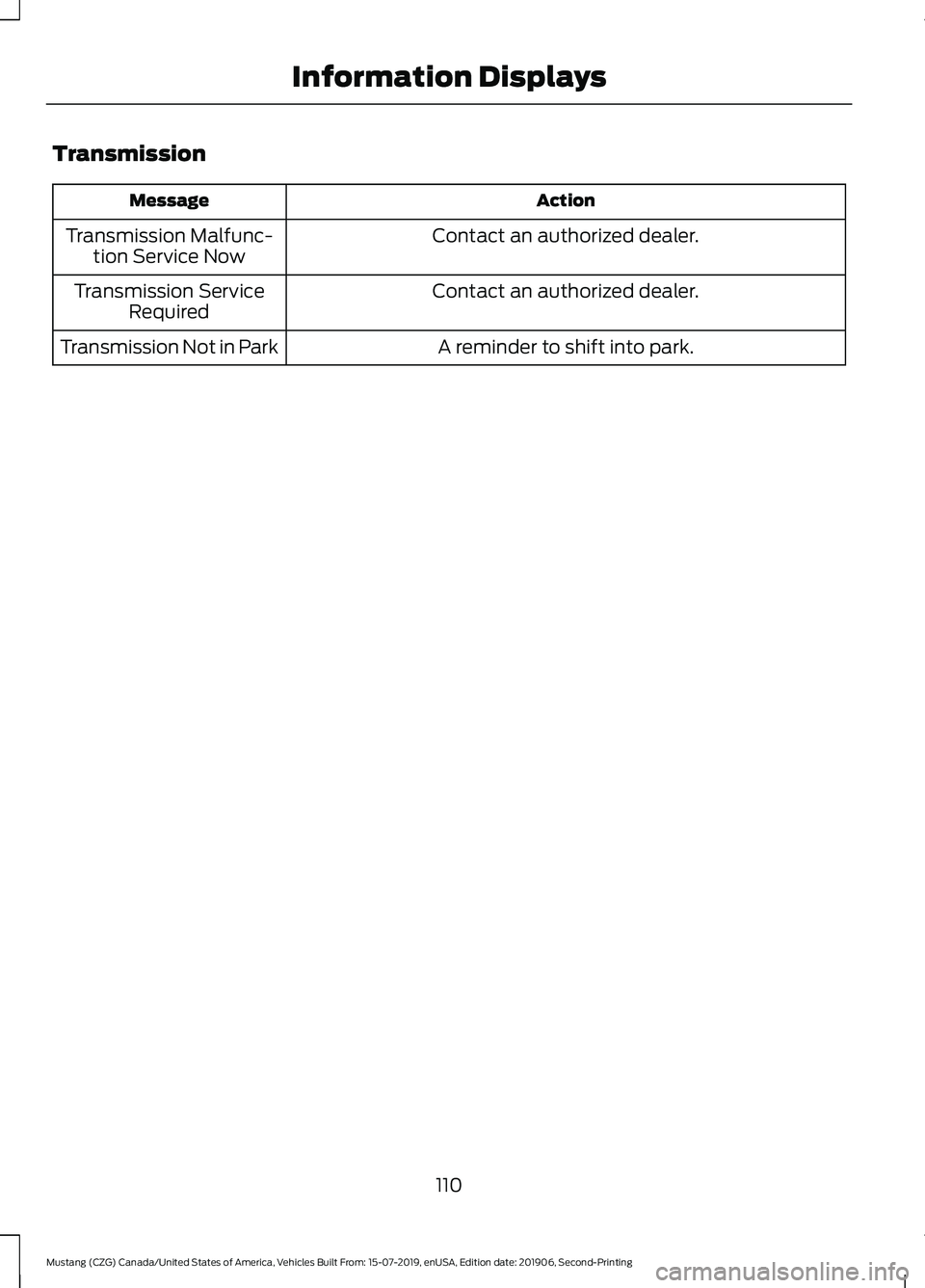
Transmission
Action
Message
Contact an authorized dealer.
Transmission Malfunc-
tion Service Now
Contact an authorized dealer.
Transmission Service
Required
A reminder to shift into park.
Transmission Not in Park
110
Mustang (CZG) Canada/United States of America, Vehicles Built From: 15-07-2019, enUSA, Edition date: 201906, Second-Printing Information Displays
Page 125 of 464
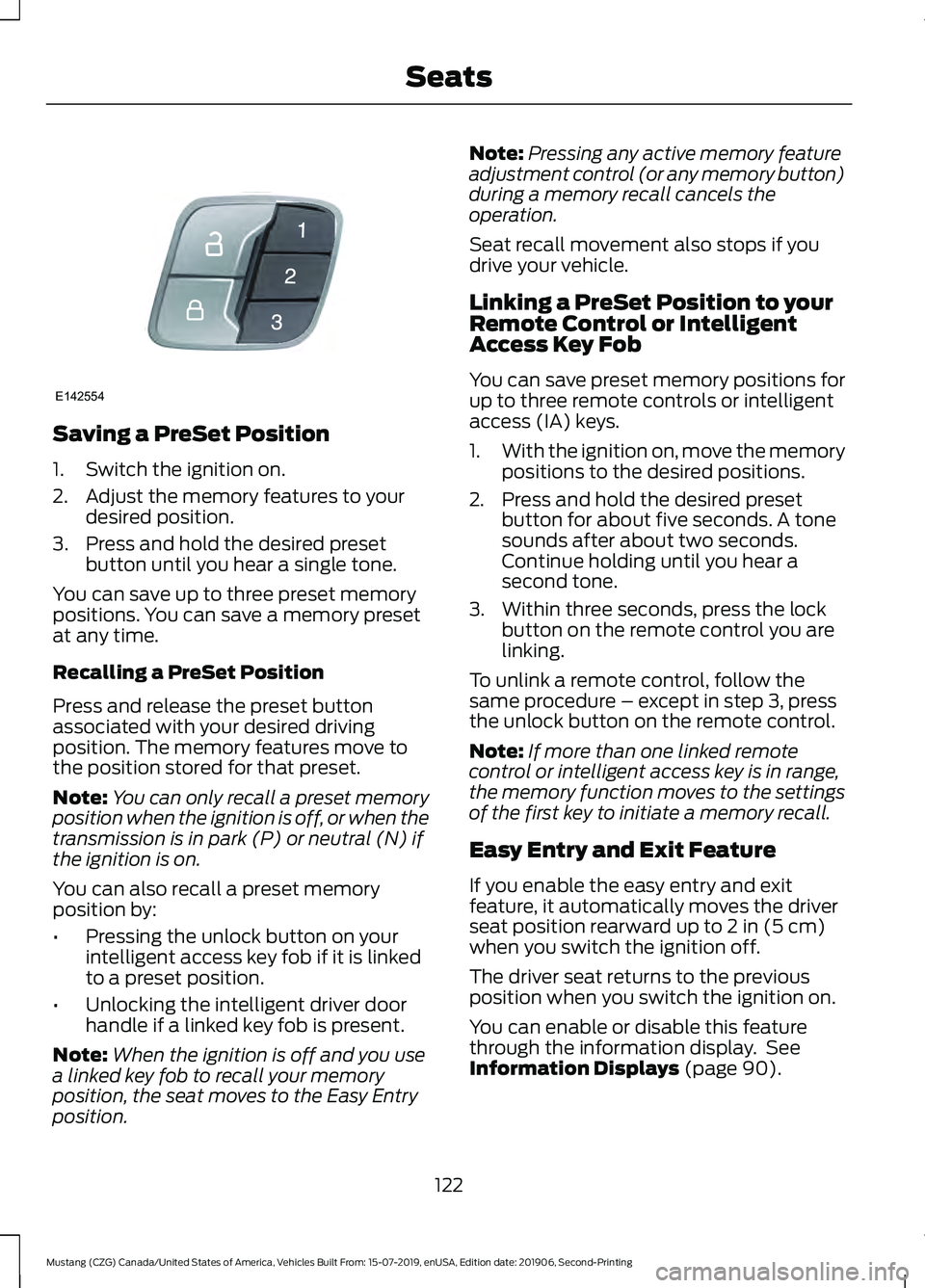
Saving a PreSet Position
1. Switch the ignition on.
2. Adjust the memory features to your
desired position.
3. Press and hold the desired preset button until you hear a single tone.
You can save up to three preset memory
positions. You can save a memory preset
at any time.
Recalling a PreSet Position
Press and release the preset button
associated with your desired driving
position. The memory features move to
the position stored for that preset.
Note: You can only recall a preset memory
position when the ignition is off, or when the
transmission is in park (P) or neutral (N) if
the ignition is on.
You can also recall a preset memory
position by:
• Pressing the unlock button on your
intelligent access key fob if it is linked
to a preset position.
• Unlocking the intelligent driver door
handle if a linked key fob is present.
Note: When the ignition is off and you use
a linked key fob to recall your memory
position, the seat moves to the Easy Entry
position. Note:
Pressing any active memory feature
adjustment control (or any memory button)
during a memory recall cancels the
operation.
Seat recall movement also stops if you
drive your vehicle.
Linking a PreSet Position to your
Remote Control or Intelligent
Access Key Fob
You can save preset memory positions for
up to three remote controls or intelligent
access (IA) keys.
1. With the ignition on, move the memory
positions to the desired positions.
2. Press and hold the desired preset button for about five seconds. A tone
sounds after about two seconds.
Continue holding until you hear a
second tone.
3. Within three seconds, press the lock button on the remote control you are
linking.
To unlink a remote control, follow the
same procedure – except in step 3, press
the unlock button on the remote control.
Note: If more than one linked remote
control or intelligent access key is in range,
the memory function moves to the settings
of the first key to initiate a memory recall.
Easy Entry and Exit Feature
If you enable the easy entry and exit
feature, it automatically moves the driver
seat position rearward up to 2 in (5 cm)
when you switch the ignition off.
The driver seat returns to the previous
position when you switch the ignition on.
You can enable or disable this feature
through the information display. See
Information Displays
(page 90).
122
Mustang (CZG) Canada/United States of America, Vehicles Built From: 15-07-2019, enUSA, Edition date: 201906, Second-Printing SeatsE142554
Page 128 of 464
UNIVERSAL GARAGE DOOR
OPENER
HomeLink Wireless Control
System
WARNING: Do not use the system
with any garage door opener that does
not have the safety stop and reverse
feature as required by U.S. Federal
Safety Standards (this includes any
garage door opener manufactured
before April 1, 1982). A garage door
opener which cannot detect an object,
signaling the door to stop and reverse,
does not meet current federal safety
standards. Using a garage door opener
without these features increases the risk
of serious injury or death.
Note: Make sure that the garage door and
security device are free from obstruction
when you are programming. Do not program
the system with the vehicle in the garage.
Note: Make sure you keep the original
remote control transmitter for use in other
vehicles as well as for future system
programming.
Note: We recommend that upon the sale
or lease termination of your vehicle, you
erase the programmed function buttons for
security reasons. See Erasing the Function
Button Codes
later in this section.
Note: You can program a maximum of
three devices. To change or replace any of
the three devices after it has been initially
programmed, you must first erase the
current settings. See Erasing the Function
Button Codes
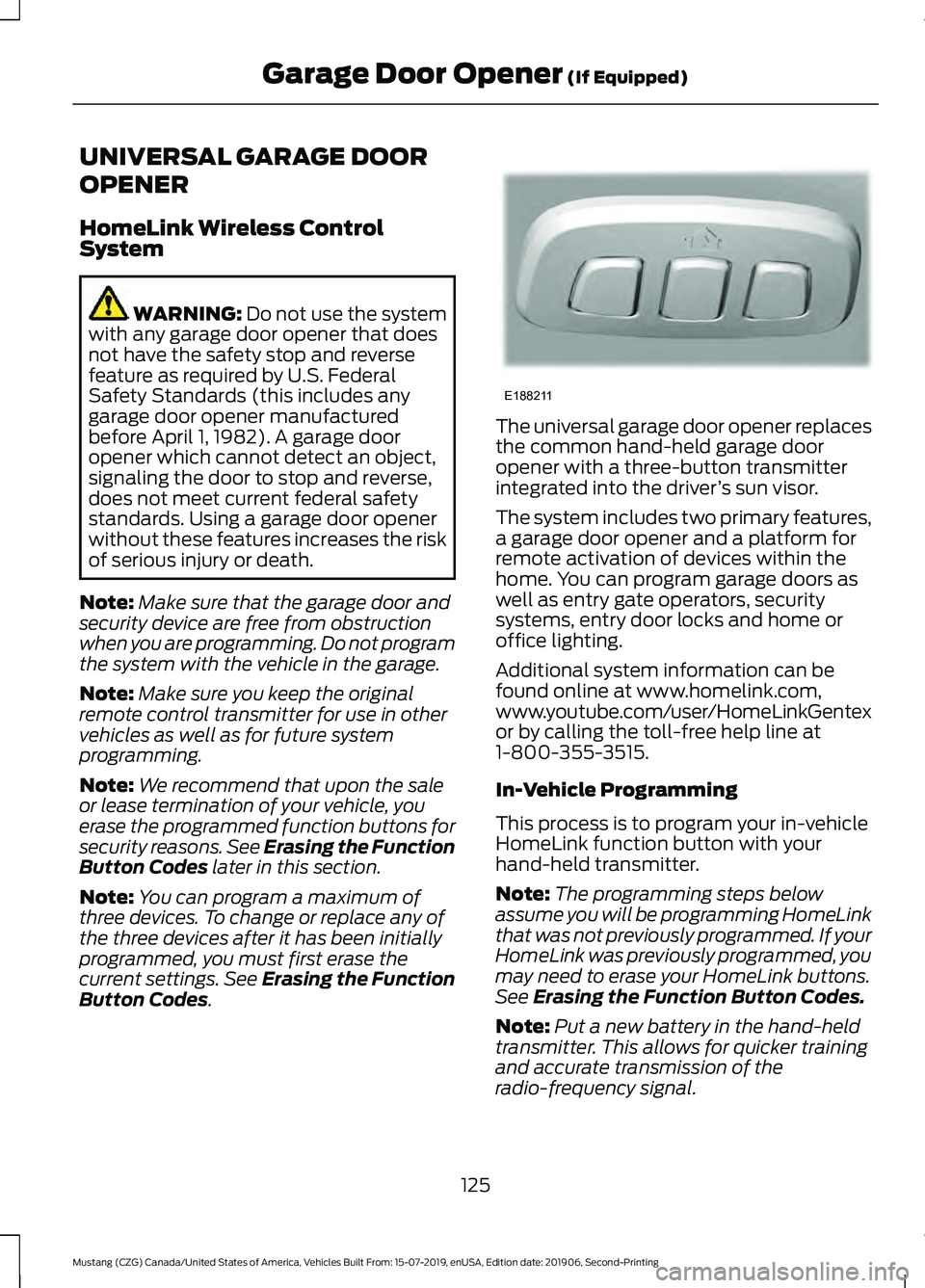
. The universal garage door opener replaces
the common hand-held garage door
opener with a three-button transmitter
integrated into the driver
’s sun visor.
The system includes two primary features,
a garage door opener and a platform for
remote activation of devices within the
home. You can program garage doors as
well as entry gate operators, security
systems, entry door locks and home or
office lighting.
Additional system information can be
found online at www.homelink.com,
www.youtube.com/user/HomeLinkGentex
or by calling the toll-free help line at
1-800-355-3515.
In-Vehicle Programming
This process is to program your in-vehicle
HomeLink function button with your
hand-held transmitter.
Note: The programming steps below
assume you will be programming HomeLink
that was not previously programmed. If your
HomeLink was previously programmed, you
may need to erase your HomeLink buttons.
See Erasing the Function Button Codes.
Note: Put a new battery in the hand-held
transmitter. This allows for quicker training
and accurate transmission of the
radio-frequency signal.
125
Mustang (CZG) Canada/United States of America, Vehicles Built From: 15-07-2019, enUSA, Edition date: 201906, Second-Printing Garage Door Opener
(If Equipped)E188211
Page 130 of 464
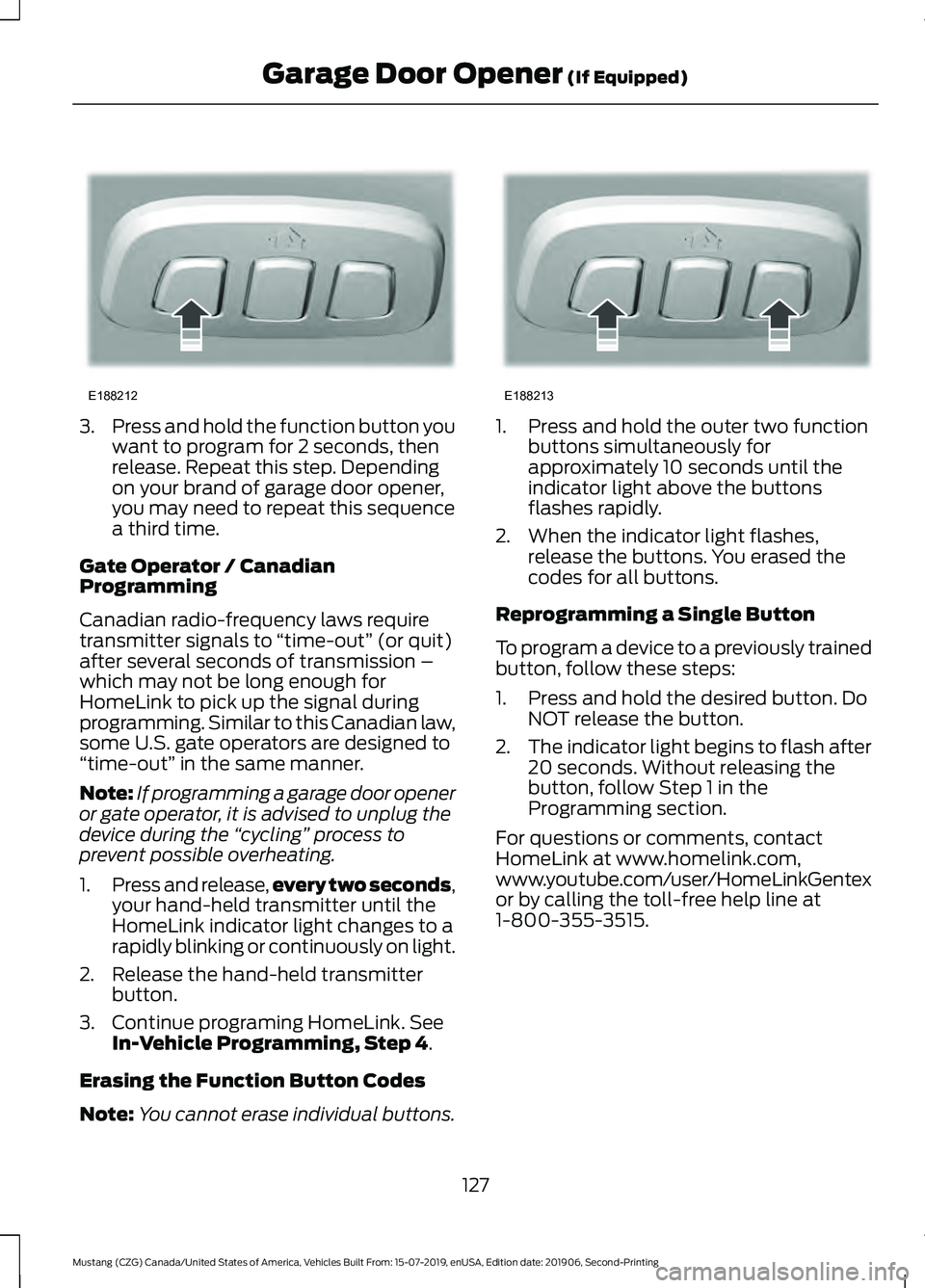
3.
Press and hold the function button you
want to program for 2 seconds, then
release. Repeat this step. Depending
on your brand of garage door opener,
you may need to repeat this sequence
a third time.
Gate Operator / Canadian
Programming
Canadian radio-frequency laws require
transmitter signals to “time-out” (or quit)
after several seconds of transmission –
which may not be long enough for
HomeLink to pick up the signal during
programming. Similar to this Canadian law,
some U.S. gate operators are designed to
“time-out” in the same manner.
Note: If programming a garage door opener
or gate operator, it is advised to unplug the
device during the “cycling” process to
prevent possible overheating.
1. Press and release, every two seconds,
your hand-held transmitter until the
HomeLink indicator light changes to a
rapidly blinking or continuously on light.
2. Release the hand-held transmitter button.
3. Continue programing HomeLink. See In-Vehicle Programming, Step 4.
Erasing the Function Button Codes
Note: You cannot erase individual buttons. 1. Press and hold the outer two function
buttons simultaneously for
approximately 10 seconds until the
indicator light above the buttons
flashes rapidly.
2. When the indicator light flashes, release the buttons. You erased the
codes for all buttons.
Reprogramming a Single Button
To program a device to a previously trained
button, follow these steps:
1. Press and hold the desired button. Do NOT release the button.
2. The indicator light begins to flash after
20 seconds. Without releasing the
button, follow Step 1 in the
Programming section.
For questions or comments, contact
HomeLink at www.homelink.com,
www.youtube.com/user/HomeLinkGentex
or by calling the toll-free help line at
1-800-355-3515.
127
Mustang (CZG) Canada/United States of America, Vehicles Built From: 15-07-2019, enUSA, Edition date: 201906, Second-Printing Garage Door Opener
(If Equipped)E188212 E188213
Page 135 of 464
•
Press the brake pedal (automatic
transmission) or clutch pedal (manual
transmission), and then press the
button for any length of time. An
indicator light on the button illuminates
when the ignition is on and when the
engine starts.
STEERING WHEEL LOCK (IF
EQUIPPED)
Your vehicle has an electronically
controlled steering wheel lock that
automatically operates.
The steering wheel will lock shortly after
you have parked your vehicle and the
passive key is outside it or when you lock
your vehicle.
Note: The steering wheel will not lock when
the ignition is on or when your vehicle is
moving.
Unlocking the Steering Wheel
The steering wheel unlocks when the
system detects a valid passive key inside
your vehicle. If the steering wheel relocks,
switch the ignition on to unlock it.
Note: You may have to slightly rotate the
steering wheel to assist unlocking it.
STARTING A GASOLINE
ENGINE
When you start the engine, the idle speed
increases, this helps to warm up the
engine. If the engine idle speed does not
slow down automatically, have your
vehicle checked by an authorized dealer. Note:
You can crank the engine for a total
of 60 seconds (without the engine starting)
before the starting system temporarily
disables. The 60 seconds does not have to
be all at once. For example, if you crank the
engine three times for 20 seconds each
time, without the engine starting, you
reached the 60-second time limit. A
message appears in the information display
alerting you that you exceeded the cranking
time. You cannot attempt to start the engine
for at least 15 minutes. After 15 minutes, you
are limited to a 15-second engine cranking
time. You need to wait 60 minutes before
you can crank the engine for 60 seconds
again.
Before starting the engine, check the
following:
• Make sure all occupants have fastened
their seatbelts.
• Make sure the headlamps and
electrical accessories are off.
• Make sure the parking brake is on.
• Move the transmission selector lever
to park (P) (automatic transmission)
or neutral (manual transmission)
Note: Do not touch the accelerator pedal.
Note: You must have your intelligent access
key in the vehicle in order to shift the
transmission out of position
P.
1. Fully press the brake pedal.
2. Press the button.
The system does not function if:
• The key frequencies are jammed.
• The key battery has no charge.
If you are unable to start the engine, do the
following:
132
Mustang (CZG) Canada/United States of America, Vehicles Built From: 15-07-2019, enUSA, Edition date: 201906, Second-Printing Starting and Stopping the Engine
Page 136 of 464
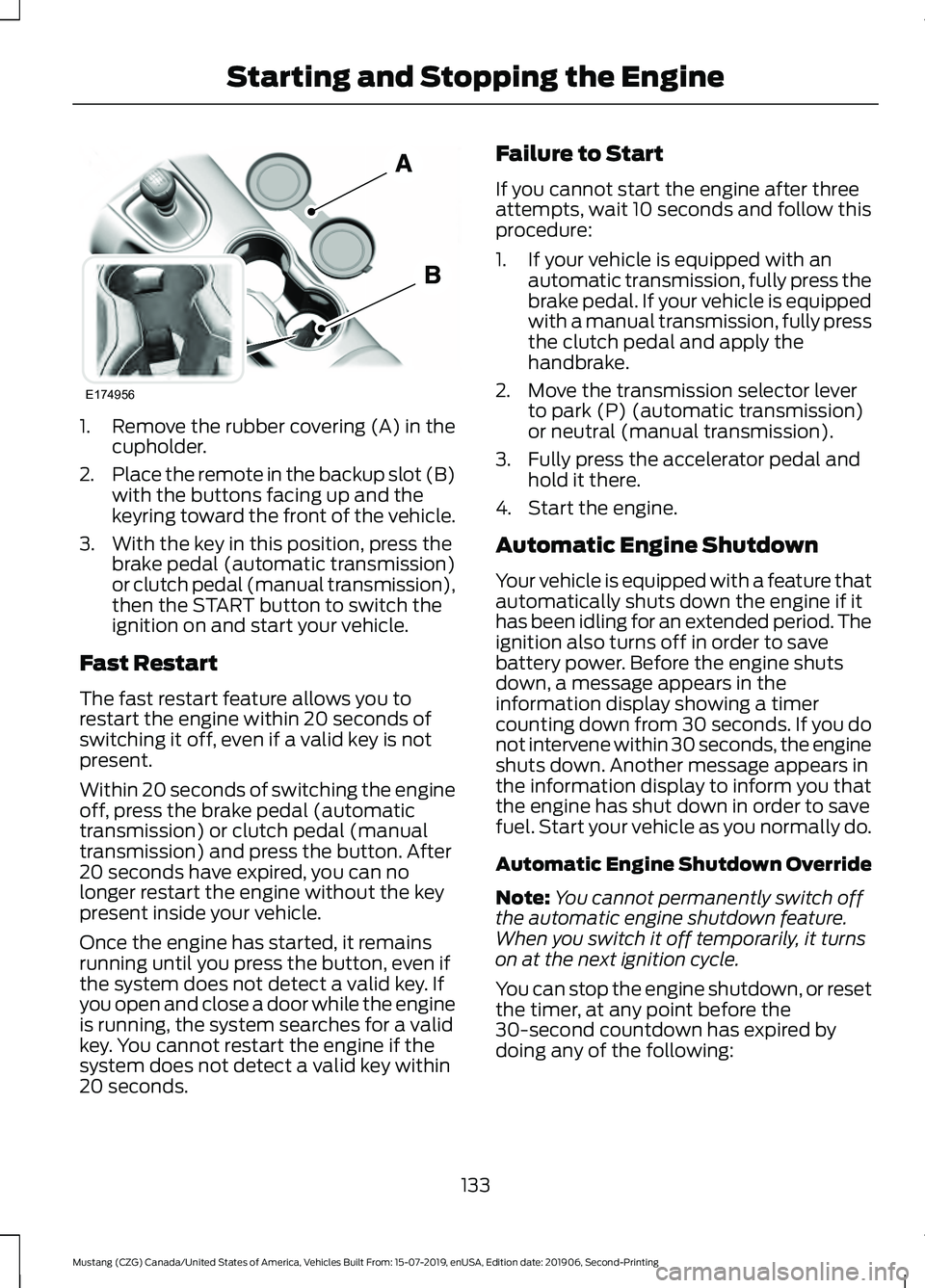
1. Remove the rubber covering (A) in the
cupholder.
2. Place the remote in the backup slot (B)
with the buttons facing up and the
keyring toward the front of the vehicle.
3. With the key in this position, press the brake pedal (automatic transmission)
or clutch pedal (manual transmission),
then the START button to switch the
ignition on and start your vehicle.
Fast Restart
The fast restart feature allows you to
restart the engine within 20 seconds of
switching it off, even if a valid key is not
present.
Within 20 seconds of switching the engine
off, press the brake pedal (automatic
transmission) or clutch pedal (manual
transmission) and press the button. After
20 seconds have expired, you can no
longer restart the engine without the key
present inside your vehicle.
Once the engine has started, it remains
running until you press the button, even if
the system does not detect a valid key. If
you open and close a door while the engine
is running, the system searches for a valid
key. You cannot restart the engine if the
system does not detect a valid key within
20 seconds. Failure to Start
If you cannot start the engine after three
attempts, wait 10 seconds and follow this
procedure:
1. If your vehicle is equipped with an
automatic transmission, fully press the
brake pedal. If your vehicle is equipped
with a manual transmission, fully press
the clutch pedal and apply the
handbrake.
2. Move the transmission selector lever to park (P) (automatic transmission)
or neutral (manual transmission).
3. Fully press the accelerator pedal and hold it there.
4. Start the engine.
Automatic Engine Shutdown
Your vehicle is equipped with a feature that
automatically shuts down the engine if it
has been idling for an extended period. The
ignition also turns off in order to save
battery power. Before the engine shuts
down, a message appears in the
information display showing a timer
counting down from 30 seconds. If you do
not intervene within 30 seconds, the engine
shuts down. Another message appears in
the information display to inform you that
the engine has shut down in order to save
fuel. Start your vehicle as you normally do.
Automatic Engine Shutdown Override
Note: You cannot permanently switch off
the automatic engine shutdown feature.
When you switch it off temporarily, it turns
on at the next ignition cycle.
You can stop the engine shutdown, or reset
the timer, at any point before the
30-second countdown has expired by
doing any of the following:
133
Mustang (CZG) Canada/United States of America, Vehicles Built From: 15-07-2019, enUSA, Edition date: 201906, Second-Printing Starting and Stopping the EngineE174956