automatic transmission FORD MUSTANG 2020 Owners Manual
[x] Cancel search | Manufacturer: FORD, Model Year: 2020, Model line: MUSTANG, Model: FORD MUSTANG 2020Pages: 464, PDF Size: 7.44 MB
Page 6 of 464
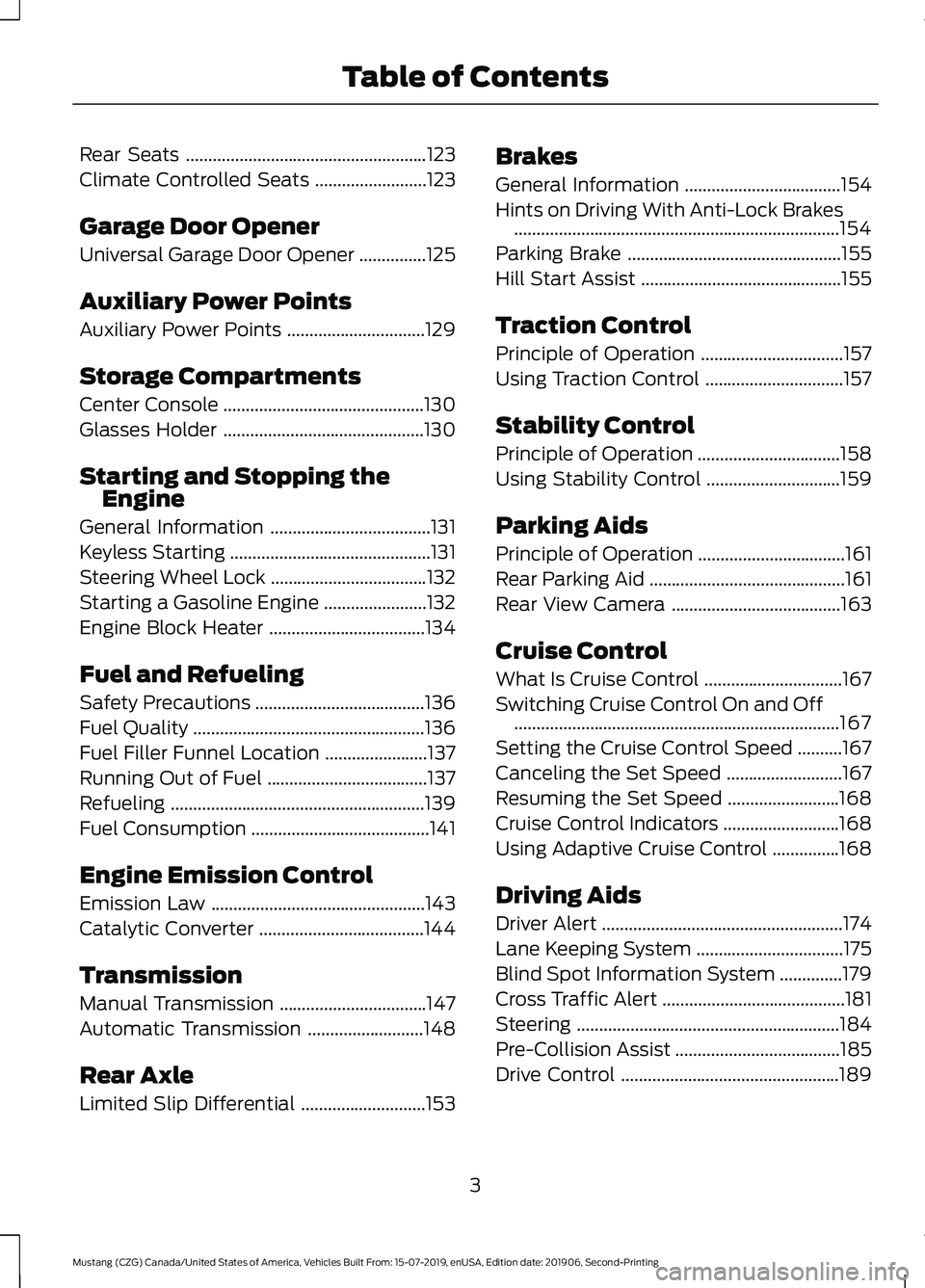
Rear Seats
......................................................123
Climate Controlled Seats .........................
123
Garage Door Opener
Universal Garage Door Opener ...............
125
Auxiliary Power Points
Auxiliary Power Points ...............................
129
Storage Compartments
Center Console .............................................
130
Glasses Holder .............................................
130
Starting and Stopping the Engine
General Information ....................................
131
Keyless Starting .............................................
131
Steering Wheel Lock ...................................
132
Starting a Gasoline Engine .......................
132
Engine Block Heater ...................................
134
Fuel and Refueling
Safety Precautions ......................................
136
Fuel Quality ....................................................
136
Fuel Filler Funnel Location .......................
137
Running Out of Fuel ....................................
137
Refueling .........................................................
139
Fuel Consumption ........................................
141
Engine Emission Control
Emission Law ................................................
143
Catalytic Converter .....................................
144
Transmission
Manual Transmission .................................
147
Automatic Transmission ..........................
148
Rear Axle
Limited Slip Differential ............................
153Brakes
General Information
...................................
154
Hints on Driving With Anti-Lock Brakes ........................................................................\
.
154
Parking Brake ................................................
155
Hill Start Assist .............................................
155
Traction Control
Principle of Operation ................................
157
Using Traction Control ...............................
157
Stability Control
Principle of Operation ................................
158
Using Stability Control ..............................
159
Parking Aids
Principle of Operation .................................
161
Rear Parking Aid ............................................
161
Rear View Camera ......................................
163
Cruise Control
What Is Cruise Control ...............................
167
Switching Cruise Control On and Off ........................................................................\
.
167
Setting the Cruise Control Speed ..........
167
Canceling the Set Speed ..........................
167
Resuming the Set Speed .........................
168
Cruise Control Indicators ..........................
168
Using Adaptive Cruise Control ...............
168
Driving Aids
Driver Alert ......................................................
174
Lane Keeping System .................................
175
Blind Spot Information System ..............
179
Cross Traffic Alert .........................................
181
Steering ...........................................................
184
Pre-Collision Assist .....................................
185
Drive Control .................................................
189
3
Mustang (CZG) Canada/United States of America, Vehicles Built From: 15-07-2019, enUSA, Edition date: 201906, Second-Printing Table of Contents
Page 7 of 464
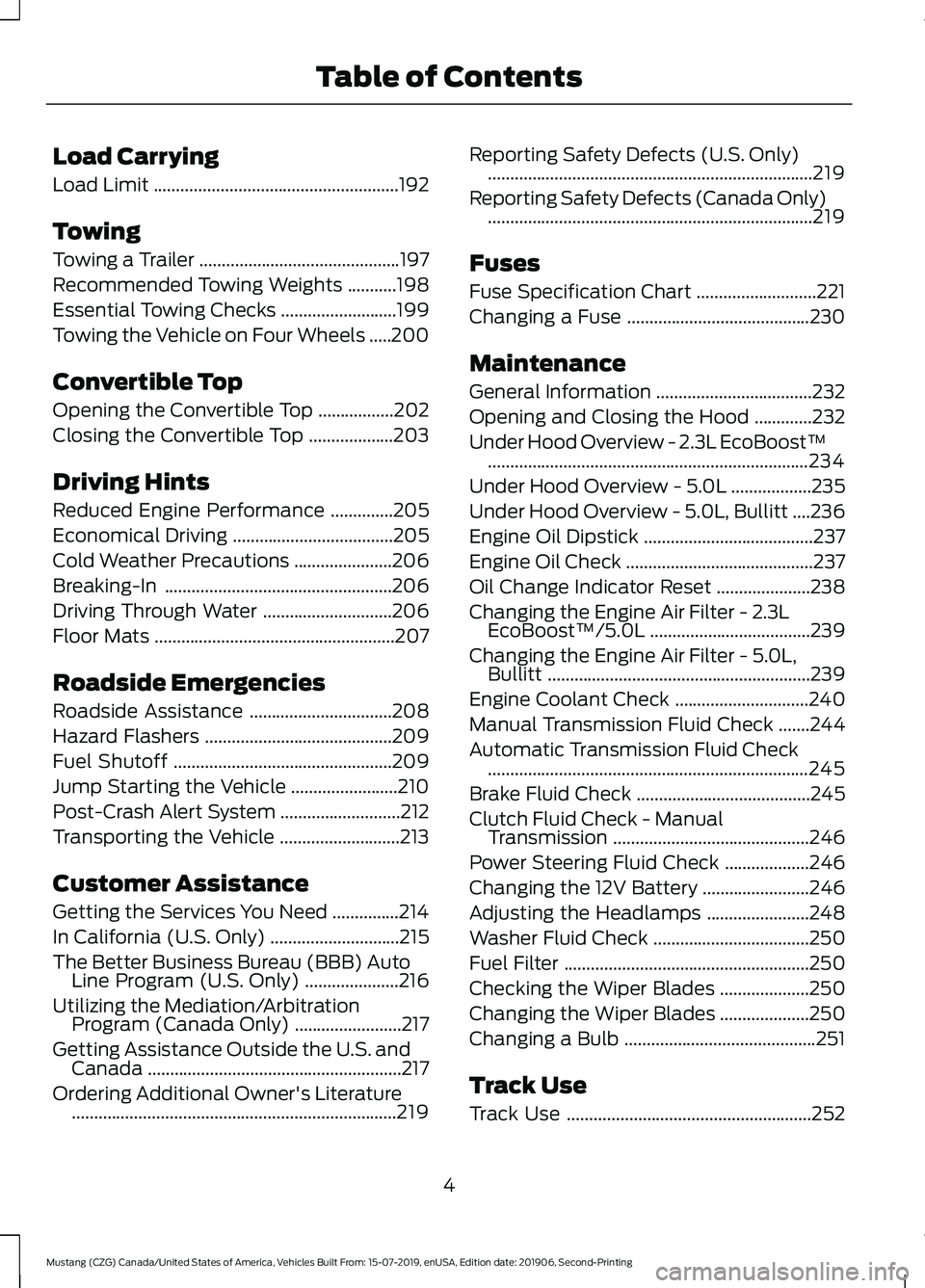
Load Carrying
Load Limit
.......................................................192
Towing
Towing a Trailer .............................................
197
Recommended Towing Weights ...........
198
Essential Towing Checks ..........................
199
Towing the Vehicle on Four Wheels .....
200
Convertible Top
Opening the Convertible Top .................
202
Closing the Convertible Top ...................
203
Driving Hints
Reduced Engine Performance ..............
205
Economical Driving ....................................
205
Cold Weather Precautions ......................
206
Breaking-In ...................................................
206
Driving Through Water .............................
206
Floor Mats ......................................................
207
Roadside Emergencies
Roadside Assistance ................................
208
Hazard Flashers ..........................................
209
Fuel Shutoff .................................................
209
Jump Starting the Vehicle ........................
210
Post-Crash Alert System ...........................
212
Transporting the Vehicle ...........................
213
Customer Assistance
Getting the Services You Need ...............
214
In California (U.S. Only) .............................
215
The Better Business Bureau (BBB) Auto Line Program (U.S. Only) .....................
216
Utilizing the Mediation/Arbitration Program (Canada Only) ........................
217
Getting Assistance Outside the U.S. and Canada .........................................................
217
Ordering Additional Owner's Literature ........................................................................\
.
219 Reporting Safety Defects (U.S. Only)
........................................................................\
.
219
Reporting Safety Defects (Canada Only) ........................................................................\
.
219
Fuses
Fuse Specification Chart ...........................
221
Changing a Fuse .........................................
230
Maintenance
General Information ...................................
232
Opening and Closing the Hood .............
232
Under Hood Overview - 2.3L EcoBoost™ ........................................................................\
234
Under Hood Overview - 5.0L ..................
235
Under Hood Overview - 5.0L, Bullitt ....
236
Engine Oil Dipstick ......................................
237
Engine Oil Check ..........................................
237
Oil Change Indicator Reset .....................
238
Changing the Engine Air Filter - 2.3L EcoBoost™/5.0L ....................................
239
Changing the Engine Air Filter - 5.0L, Bullitt ...........................................................
239
Engine Coolant Check ..............................
240
Manual Transmission Fluid Check .......
244
Automatic Transmission Fluid Check ........................................................................\
245
Brake Fluid Check .......................................
245
Clutch Fluid Check - Manual Transmission ............................................
246
Power Steering Fluid Check ...................
246
Changing the 12V Battery ........................
246
Adjusting the Headlamps .......................
248
Washer Fluid Check ...................................
250
Fuel Filter .......................................................
250
Checking the Wiper Blades ....................
250
Changing the Wiper Blades ....................
250
Changing a Bulb ...........................................
251
Track Use
Track Use .......................................................
252
4
Mustang (CZG) Canada/United States of America, Vehicles Built From: 15-07-2019, enUSA, Edition date: 201906, Second-Printing Table of Contents
Page 40 of 464
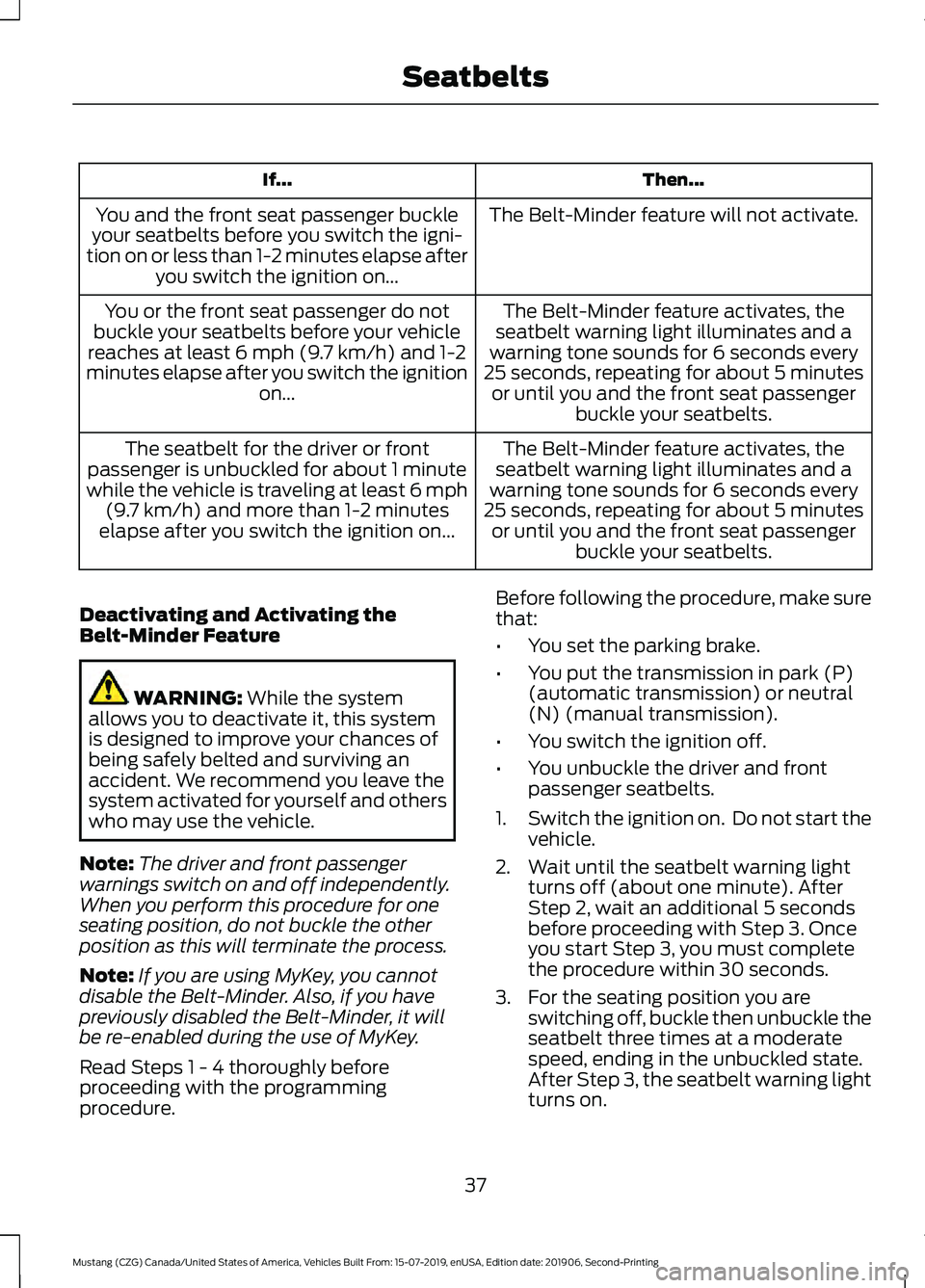
Then...
If...
The Belt-Minder feature will not activate.
You and the front seat passenger buckle
your seatbelts before you switch the igni-
tion on or less than 1-2 minutes elapse after you switch the ignition on...
The Belt-Minder feature activates, the
seatbelt warning light illuminates and a
warning tone sounds for 6 seconds every
25 seconds, repeating for about 5 minutes or until you and the front seat passenger buckle your seatbelts.
You or the front seat passenger do not
buckle your seatbelts before your vehicle
reaches at least 6 mph (9.7 km/h) and 1-2
minutes elapse after you switch the ignition on...
The Belt-Minder feature activates, the
seatbelt warning light illuminates and a
warning tone sounds for 6 seconds every
25 seconds, repeating for about 5 minutes or until you and the front seat passenger buckle your seatbelts.
The seatbelt for the driver or front
passenger is unbuckled for about 1 minute
while the vehicle is traveling at least 6 mph (9.7 km/h)
and more than 1-2 minutes
elapse after you switch the ignition on...
Deactivating and Activating the
Belt-Minder Feature WARNING:
While the system
allows you to deactivate it, this system
is designed to improve your chances of
being safely belted and surviving an
accident. We recommend you leave the
system activated for yourself and others
who may use the vehicle.
Note: The driver and front passenger
warnings switch on and off independently.
When you perform this procedure for one
seating position, do not buckle the other
position as this will terminate the process.
Note: If you are using MyKey, you cannot
disable the Belt-Minder. Also, if you have
previously disabled the Belt-Minder, it will
be re-enabled during the use of MyKey.
Read Steps 1 - 4 thoroughly before
proceeding with the programming
procedure. Before following the procedure, make sure
that:
•
You set the parking brake.
• You put the transmission in park (P)
(automatic transmission) or neutral
(N) (manual transmission).
• You switch the ignition off.
• You unbuckle the driver and front
passenger seatbelts.
1. Switch the ignition on. Do not start the
vehicle.
2. Wait until the seatbelt warning light turns off (about one minute). After
Step 2, wait an additional 5 seconds
before proceeding with Step 3. Once
you start Step 3, you must complete
the procedure within 30 seconds.
3. For the seating position you are switching off, buckle then unbuckle the
seatbelt three times at a moderate
speed, ending in the unbuckled state.
After Step 3, the seatbelt warning light
turns on.
37
Mustang (CZG) Canada/United States of America, Vehicles Built From: 15-07-2019, enUSA, Edition date: 201906, Second-Printing Seatbelts
Page 57 of 464
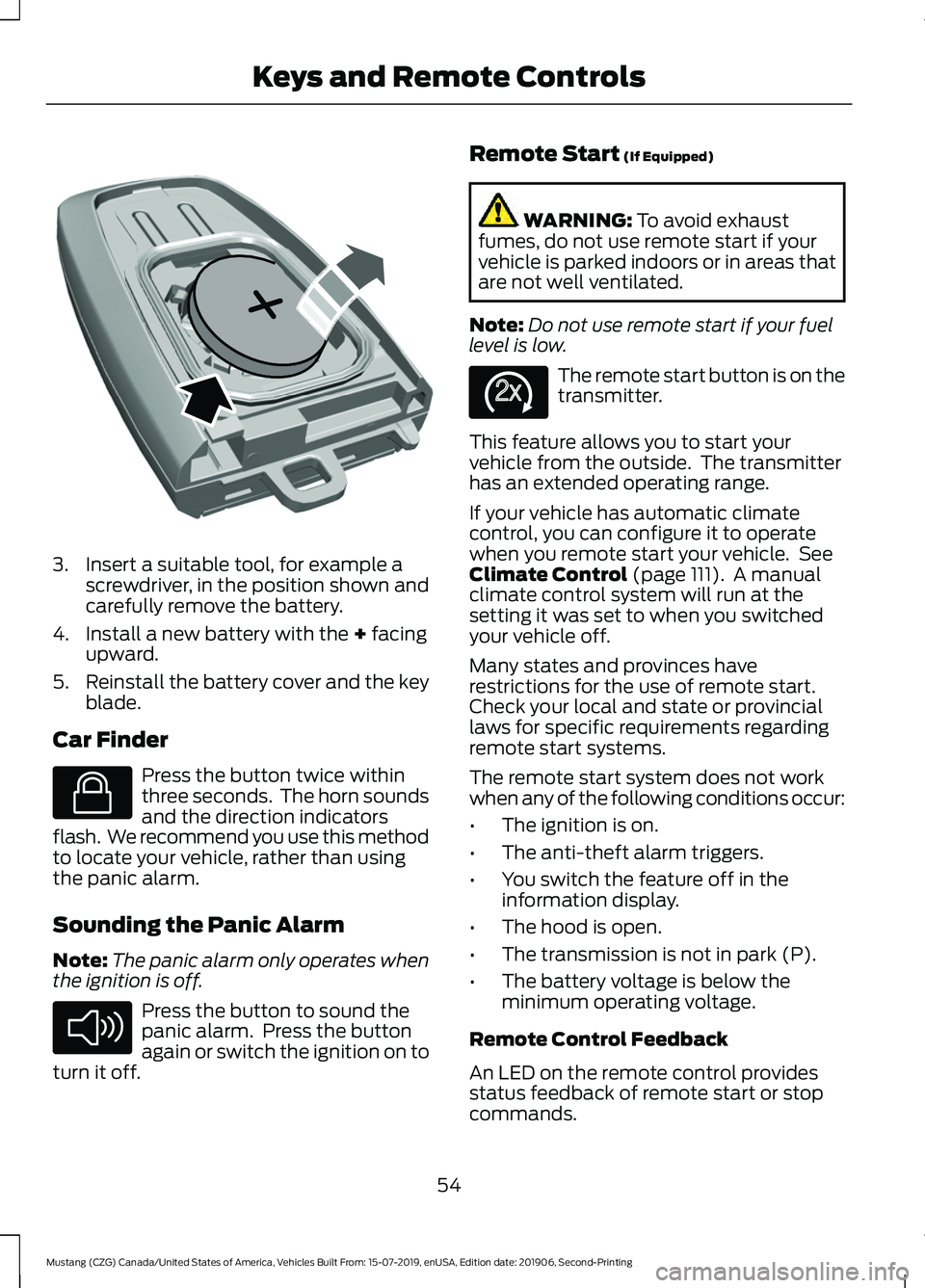
3. Insert a suitable tool, for example a
screwdriver, in the position shown and
carefully remove the battery.
4. Install a new battery with the + facing
upward.
5. Reinstall the battery cover and the key
blade.
Car Finder Press the button twice within
three seconds. The horn sounds
and the direction indicators
flash. We recommend you use this method
to locate your vehicle, rather than using
the panic alarm.
Sounding the Panic Alarm
Note: The panic alarm only operates when
the ignition is off. Press the button to sound the
panic alarm. Press the button
again or switch the ignition on to
turn it off. Remote Start
(If Equipped) WARNING:
To avoid exhaust
fumes, do not use remote start if your
vehicle is parked indoors or in areas that
are not well ventilated.
Note: Do not use remote start if your fuel
level is low. The remote start button is on the
transmitter.
This feature allows you to start your
vehicle from the outside. The transmitter
has an extended operating range.
If your vehicle has automatic climate
control, you can configure it to operate
when you remote start your vehicle. See
Climate Control
(page 111). A manual
climate control system will run at the
setting it was set to when you switched
your vehicle off.
Many states and provinces have
restrictions for the use of remote start.
Check your local and state or provincial
laws for specific requirements regarding
remote start systems.
The remote start system does not work
when any of the following conditions occur:
• The ignition is on.
• The anti-theft alarm triggers.
• You switch the feature off in the
information display.
• The hood is open.
• The transmission is not in park (P).
• The battery voltage is below the
minimum operating voltage.
Remote Control Feedback
An LED on the remote control provides
status feedback of remote start or stop
commands.
54
Mustang (CZG) Canada/United States of America, Vehicles Built From: 15-07-2019, enUSA, Edition date: 201906, Second-Printing Keys and Remote ControlsE218402 E138623 E138624 E138625
Page 78 of 464
DAYTIME RUNNING LAMPS
WARNING: The daytime running
lamps system does not activate the rear
lamps and may not provide adequate
lighting during low visibility driving
conditions. Make sure you switch the
headlamps on, as appropriate, during all
low visibility conditions. Failure to do so
may result in a crash.
Type One - Conventional (Non-
Configurable)
The daytime running lamps turn on when:
1. Switching the ignition on.
2. The transmission is not in park (P) for vehicles with automatic transmissions,
or releasing the parking brake for
vehicles with manual transmissions.
3. The lighting control is in the off, parking
lamp or autolamps positions.
4. The headlamps are off.
Type Two - Configurable
Switch the daytime running lamps on or
off using the information display. See
Information Displays
(page 90).
The daytime running lamps turn on when:
1. The lamps are on in the information display.
2. Switching the ignition on.
3. The transmission is not in park (P) for vehicles with automatic transmissions,
or releasing the parking brake for
vehicles with manual transmissions.
4. The lighting control is in the autolamps
position.
5. The headlamps are off.
The other lighting control switch positions
do not turn on the daytime running lamps. If the daytime running lamps are off in the
information display, the lamps stay off in
all switch positions.
FRONT FOG LAMPS
(IF EQUIPPED)
Switching the Front Fog Lamps On
or Off
Only switch the front fog lamps on during
reduced visibility.
You can switch the front fog lamps on if
any of the following occur:
• You set the lighting control to the
parking lamps position.
• You set the lighting control to the
headlamps position.
• You set the lighting control to the
autolamps position and the headlamps
are on.
The front fog lamp button is on the lighting
control. Press the button to switch the
front fog lamps on or off.
Note: The brightness of the daytime running
lamps may decrease when the front fog
lamps are switched on.
Front Fog Lamp Indicator It illuminates when you switch
the front fog lamps on.
75
Mustang (CZG) Canada/United States of America, Vehicles Built From: 15-07-2019, enUSA, Edition date: 201906, Second-Printing Lighting
Page 103 of 464
INFORMATION MESSAGES
Note:
Depending on your vehicle options
and instrument cluster type, not all of the
messages display or are available. The
information display may abbreviate or
shorten certain messages. Press the OK button to acknowledge and
remove some messages from the
information display. See
Information
Display Control (page 69). The
information display automatically removes
other messages after a short time.
You need to confirm certain messages
before you can access the menus.
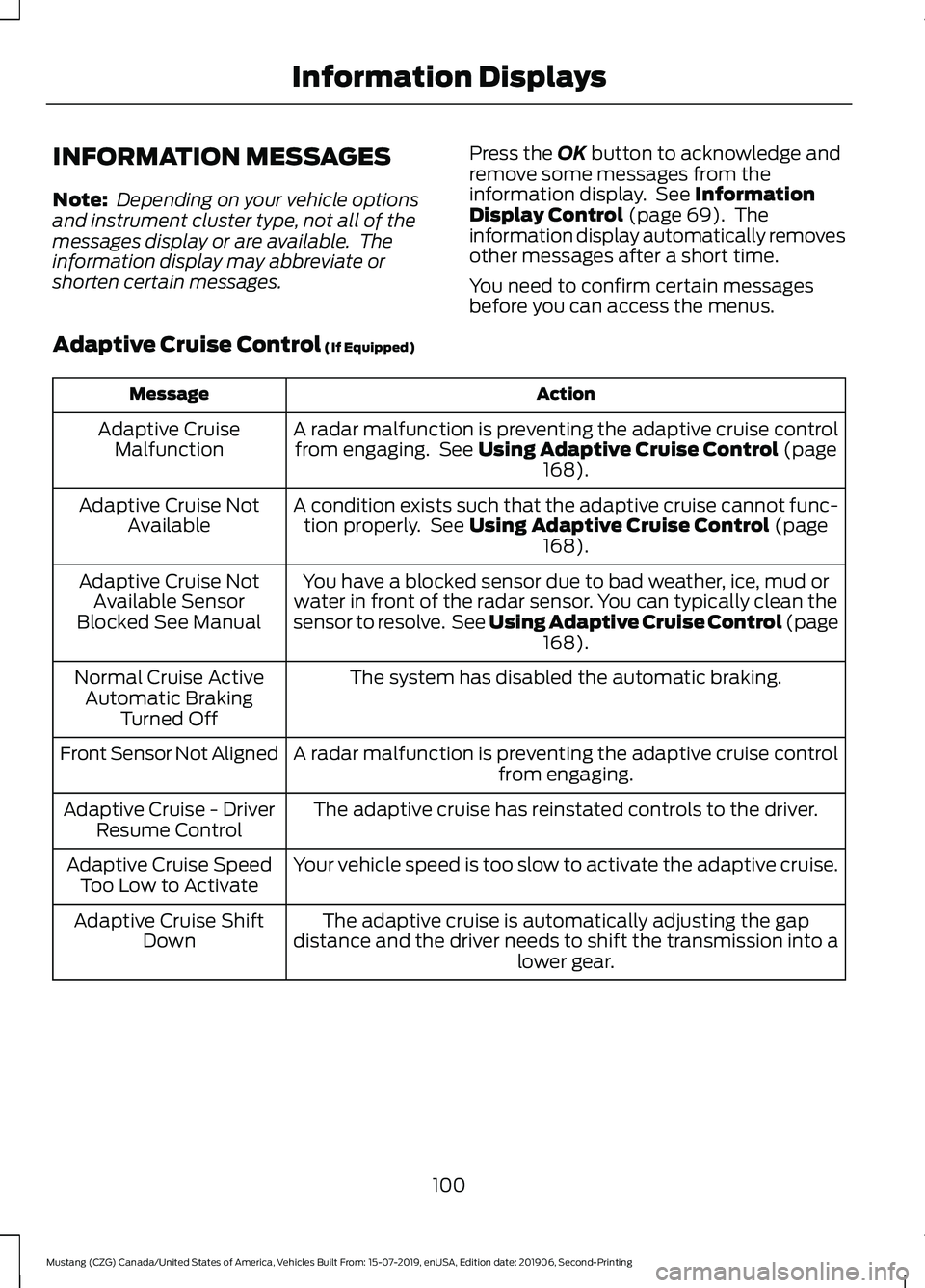
Adaptive Cruise Control
(If Equipped) Action
Message
A radar malfunction is preventing the adaptive cruise controlfrom engaging. See
Using Adaptive Cruise Control (page
168).
Adaptive Cruise
Malfunction
A condition exists such that the adaptive cruise cannot func-tion properly. See
Using Adaptive Cruise Control (page
168).
Adaptive Cruise Not
Available
You have a blocked sensor due to bad weather, ice, mud or
water in front of the radar sensor. You can typically clean the
sensor to resolve. See Using Adaptive Cruise Control
(page
168).
Adaptive Cruise Not
Available Sensor
Blocked See Manual
The system has disabled the automatic braking.
Normal Cruise Active
Automatic Braking Turned Off
A radar malfunction is preventing the adaptive cruise control from engaging.
Front Sensor Not Aligned
The adaptive cruise has reinstated controls to the driver.
Adaptive Cruise - Driver
Resume Control
Your vehicle speed is too slow to activate the adaptive cruise.
Adaptive Cruise Speed
Too Low to Activate
The adaptive cruise is automatically adjusting the gap
distance and the driver needs to shift the transmission into a lower gear.
Adaptive Cruise Shift
Down
100
Mustang (CZG) Canada/United States of America, Vehicles Built From: 15-07-2019, enUSA, Edition date: 201906, Second-Printing Information Displays
Page 125 of 464
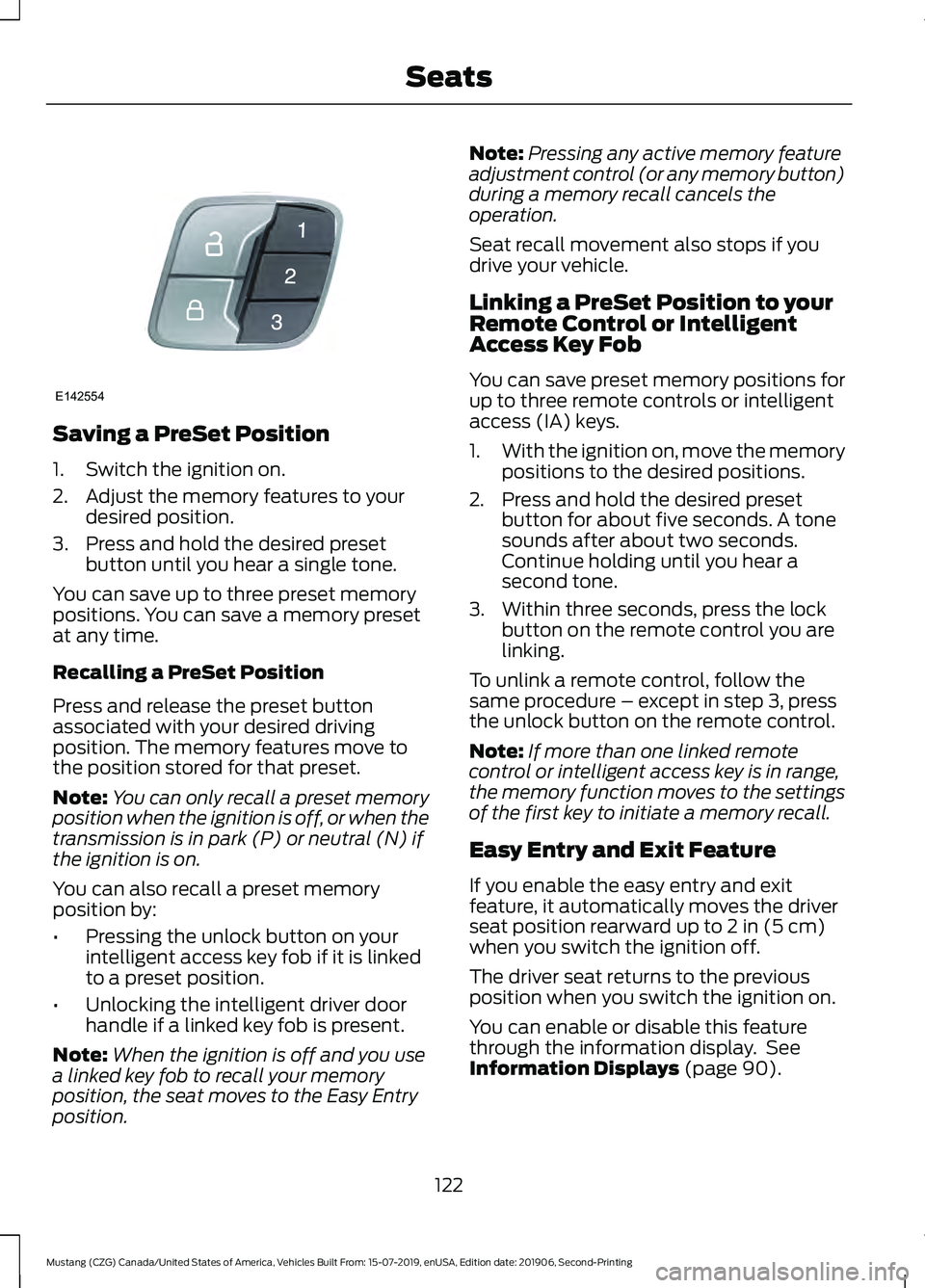
Saving a PreSet Position
1. Switch the ignition on.
2. Adjust the memory features to your
desired position.
3. Press and hold the desired preset button until you hear a single tone.
You can save up to three preset memory
positions. You can save a memory preset
at any time.
Recalling a PreSet Position
Press and release the preset button
associated with your desired driving
position. The memory features move to
the position stored for that preset.
Note: You can only recall a preset memory
position when the ignition is off, or when the
transmission is in park (P) or neutral (N) if
the ignition is on.
You can also recall a preset memory
position by:
• Pressing the unlock button on your
intelligent access key fob if it is linked
to a preset position.
• Unlocking the intelligent driver door
handle if a linked key fob is present.
Note: When the ignition is off and you use
a linked key fob to recall your memory
position, the seat moves to the Easy Entry
position. Note:
Pressing any active memory feature
adjustment control (or any memory button)
during a memory recall cancels the
operation.
Seat recall movement also stops if you
drive your vehicle.
Linking a PreSet Position to your
Remote Control or Intelligent
Access Key Fob
You can save preset memory positions for
up to three remote controls or intelligent
access (IA) keys.
1. With the ignition on, move the memory
positions to the desired positions.
2. Press and hold the desired preset button for about five seconds. A tone
sounds after about two seconds.
Continue holding until you hear a
second tone.
3. Within three seconds, press the lock button on the remote control you are
linking.
To unlink a remote control, follow the
same procedure – except in step 3, press
the unlock button on the remote control.
Note: If more than one linked remote
control or intelligent access key is in range,
the memory function moves to the settings
of the first key to initiate a memory recall.
Easy Entry and Exit Feature
If you enable the easy entry and exit
feature, it automatically moves the driver
seat position rearward up to 2 in (5 cm)
when you switch the ignition off.
The driver seat returns to the previous
position when you switch the ignition on.
You can enable or disable this feature
through the information display. See
Information Displays
(page 90).
122
Mustang (CZG) Canada/United States of America, Vehicles Built From: 15-07-2019, enUSA, Edition date: 201906, Second-Printing SeatsE142554
Page 135 of 464
•
Press the brake pedal (automatic
transmission) or clutch pedal (manual
transmission), and then press the
button for any length of time. An
indicator light on the button illuminates
when the ignition is on and when the
engine starts.
STEERING WHEEL LOCK (IF
EQUIPPED)
Your vehicle has an electronically
controlled steering wheel lock that
automatically operates.
The steering wheel will lock shortly after
you have parked your vehicle and the
passive key is outside it or when you lock
your vehicle.
Note: The steering wheel will not lock when
the ignition is on or when your vehicle is
moving.
Unlocking the Steering Wheel
The steering wheel unlocks when the
system detects a valid passive key inside
your vehicle. If the steering wheel relocks,
switch the ignition on to unlock it.
Note: You may have to slightly rotate the
steering wheel to assist unlocking it.
STARTING A GASOLINE
ENGINE
When you start the engine, the idle speed
increases, this helps to warm up the
engine. If the engine idle speed does not
slow down automatically, have your
vehicle checked by an authorized dealer. Note:
You can crank the engine for a total
of 60 seconds (without the engine starting)
before the starting system temporarily
disables. The 60 seconds does not have to
be all at once. For example, if you crank the
engine three times for 20 seconds each
time, without the engine starting, you
reached the 60-second time limit. A
message appears in the information display
alerting you that you exceeded the cranking
time. You cannot attempt to start the engine
for at least 15 minutes. After 15 minutes, you
are limited to a 15-second engine cranking
time. You need to wait 60 minutes before
you can crank the engine for 60 seconds
again.
Before starting the engine, check the
following:
• Make sure all occupants have fastened
their seatbelts.
• Make sure the headlamps and
electrical accessories are off.
• Make sure the parking brake is on.
• Move the transmission selector lever
to park (P) (automatic transmission)
or neutral (manual transmission)
Note: Do not touch the accelerator pedal.
Note: You must have your intelligent access
key in the vehicle in order to shift the
transmission out of position
P.
1. Fully press the brake pedal.
2. Press the button.
The system does not function if:
• The key frequencies are jammed.
• The key battery has no charge.
If you are unable to start the engine, do the
following:
132
Mustang (CZG) Canada/United States of America, Vehicles Built From: 15-07-2019, enUSA, Edition date: 201906, Second-Printing Starting and Stopping the Engine
Page 136 of 464
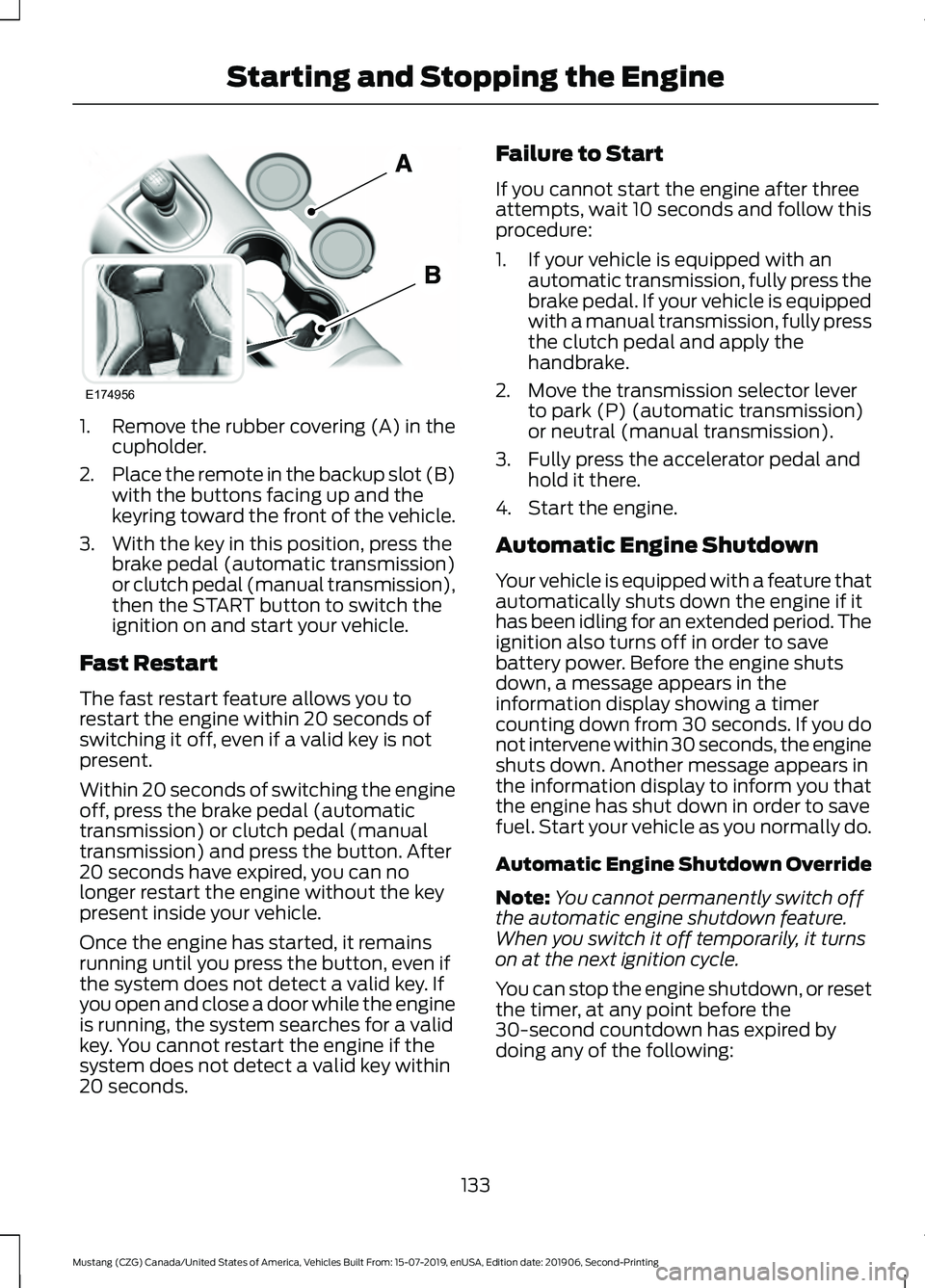
1. Remove the rubber covering (A) in the
cupholder.
2. Place the remote in the backup slot (B)
with the buttons facing up and the
keyring toward the front of the vehicle.
3. With the key in this position, press the brake pedal (automatic transmission)
or clutch pedal (manual transmission),
then the START button to switch the
ignition on and start your vehicle.
Fast Restart
The fast restart feature allows you to
restart the engine within 20 seconds of
switching it off, even if a valid key is not
present.
Within 20 seconds of switching the engine
off, press the brake pedal (automatic
transmission) or clutch pedal (manual
transmission) and press the button. After
20 seconds have expired, you can no
longer restart the engine without the key
present inside your vehicle.
Once the engine has started, it remains
running until you press the button, even if
the system does not detect a valid key. If
you open and close a door while the engine
is running, the system searches for a valid
key. You cannot restart the engine if the
system does not detect a valid key within
20 seconds. Failure to Start
If you cannot start the engine after three
attempts, wait 10 seconds and follow this
procedure:
1. If your vehicle is equipped with an
automatic transmission, fully press the
brake pedal. If your vehicle is equipped
with a manual transmission, fully press
the clutch pedal and apply the
handbrake.
2. Move the transmission selector lever to park (P) (automatic transmission)
or neutral (manual transmission).
3. Fully press the accelerator pedal and hold it there.
4. Start the engine.
Automatic Engine Shutdown
Your vehicle is equipped with a feature that
automatically shuts down the engine if it
has been idling for an extended period. The
ignition also turns off in order to save
battery power. Before the engine shuts
down, a message appears in the
information display showing a timer
counting down from 30 seconds. If you do
not intervene within 30 seconds, the engine
shuts down. Another message appears in
the information display to inform you that
the engine has shut down in order to save
fuel. Start your vehicle as you normally do.
Automatic Engine Shutdown Override
Note: You cannot permanently switch off
the automatic engine shutdown feature.
When you switch it off temporarily, it turns
on at the next ignition cycle.
You can stop the engine shutdown, or reset
the timer, at any point before the
30-second countdown has expired by
doing any of the following:
133
Mustang (CZG) Canada/United States of America, Vehicles Built From: 15-07-2019, enUSA, Edition date: 201906, Second-Printing Starting and Stopping the EngineE174956
Page 137 of 464
•
You can reset the timer by interacting
with your vehicle (such as pressing the
brake pedal or accelerator pedal).
• You can temporarily switch off the
shutdown feature any time the ignition
is on (for the current ignition cycle
only). Use the information display to
do so. See Information Displays
(page 90).
• During the countdown before engine
shutdown, you are prompted to press
OK or RESET (depending on your type
of information display) to temporarily
switch the feature off (for the current
ignition cycle only).
Stopping the Engine When Your
Vehicle is Stationary
1. Move the transmission selector lever to park (P) (automatic transmission)
or neutral (manual transmission).
2. Press the button once.
3. Apply the parking brake.
Note: This switches off the ignition, all
electrical circuits, warning lamps and
indicators.
Note: If the engine is idling for 30 minutes,
the ignition and engine automatically shut
down.
Stopping the Engine When Your
Vehicle is Moving WARNING:
Switching off the
engine when the vehicle is still moving
will result in a loss of brake and steering
assistance. The steering will not lock, but
higher effort will be required. When the
ignition is switched off, some electrical
circuits, including air bags, warning lamps
and indicators may also be off. If the
ignition was turned off accidentally, you
can shift into neutral (N) and re-start the
engine. 1. Move the transmission selector lever
to the neutral position and use the
brakes to bring your vehicle to a safe
stop.
2. When your vehicle has stopped, move the transmission selector lever to park
(P) (automatic transmission) or
neutral (manual transmission).
3. Press and hold the button for one second, or press it three times within
two seconds.
4. Apply the parking brake.
Guarding Against Exhaust Fumes WARNING:
If you smell exhaust
fumes inside your vehicle, have your
vehicle checked by your authorized
dealer immediately. Do not drive your
vehicle if you smell exhaust fumes.
Carbon monoxide is present in exhaust
fumes. Take precautions to avoid its
dangerous effects.
Important Ventilating Information
If you stop your vehicle and the leave the
engine idling for long periods, we
recommend that you do one of the
following:
• Open the windows at least
1 in
(2.5 cm).
• Set your climate control to outside air.
ENGINE BLOCK HEATER
(IF
EQUIPPED) WARNING:
Failure to follow engine
block heater instructions could result in
property damage or serious personal
injury.
134
Mustang (CZG) Canada/United States of America, Vehicles Built From: 15-07-2019, enUSA, Edition date: 201906, Second-Printing Starting and Stopping the Engine