key FORD MUSTANG 2021 Owner's Manual
[x] Cancel search | Manufacturer: FORD, Model Year: 2021, Model line: MUSTANG, Model: FORD MUSTANG 2021Pages: 530, PDF Size: 10.22 MB
Page 94 of 530
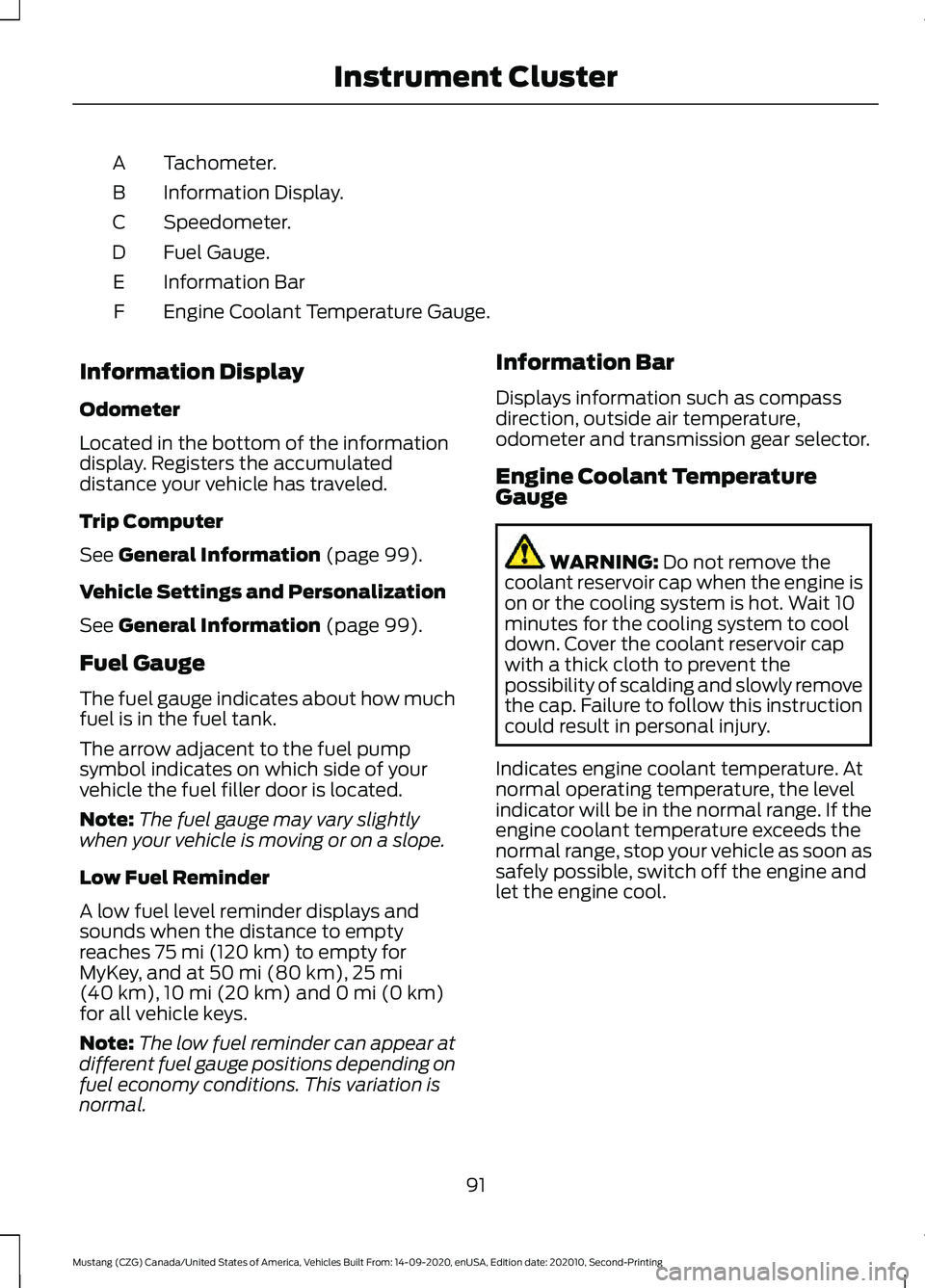
Tachometer.
A
Information Display.
B
Speedometer.
C
Fuel Gauge.
D
Information Bar
E
Engine Coolant Temperature Gauge.
F
Information Display
Odometer
Located in the bottom of the information
display. Registers the accumulated
distance your vehicle has traveled.
Trip Computer
See General Information (page 99).
Vehicle Settings and Personalization
See
General Information (page 99).
Fuel Gauge
The fuel gauge indicates about how much
fuel is in the fuel tank.
The arrow adjacent to the fuel pump
symbol indicates on which side of your
vehicle the fuel filler door is located.
Note: The fuel gauge may vary slightly
when your vehicle is moving or on a slope.
Low Fuel Reminder
A low fuel level reminder displays and
sounds when the distance to empty
reaches
75 mi (120 km) to empty for
MyKey, and at 50 mi (80 km), 25 mi
(40 km), 10 mi (20 km) and 0 mi (0 km)
for all vehicle keys.
Note: The low fuel reminder can appear at
different fuel gauge positions depending on
fuel economy conditions. This variation is
normal. Information Bar
Displays information such as compass
direction, outside air temperature,
odometer and transmission gear selector.
Engine Coolant Temperature
Gauge
WARNING:
Do not remove the
coolant reservoir cap when the engine is
on or the cooling system is hot. Wait 10
minutes for the cooling system to cool
down. Cover the coolant reservoir cap
with a thick cloth to prevent the
possibility of scalding and slowly remove
the cap. Failure to follow this instruction
could result in personal injury.
Indicates engine coolant temperature. At
normal operating temperature, the level
indicator will be in the normal range. If the
engine coolant temperature exceeds the
normal range, stop your vehicle as soon as
safely possible, switch off the engine and
let the engine cool.
91
Mustang (CZG) Canada/United States of America, Vehicles Built From: 14-09-2020, enUSA, Edition date: 202010, Second-Printing Instrument Cluster
Page 96 of 530
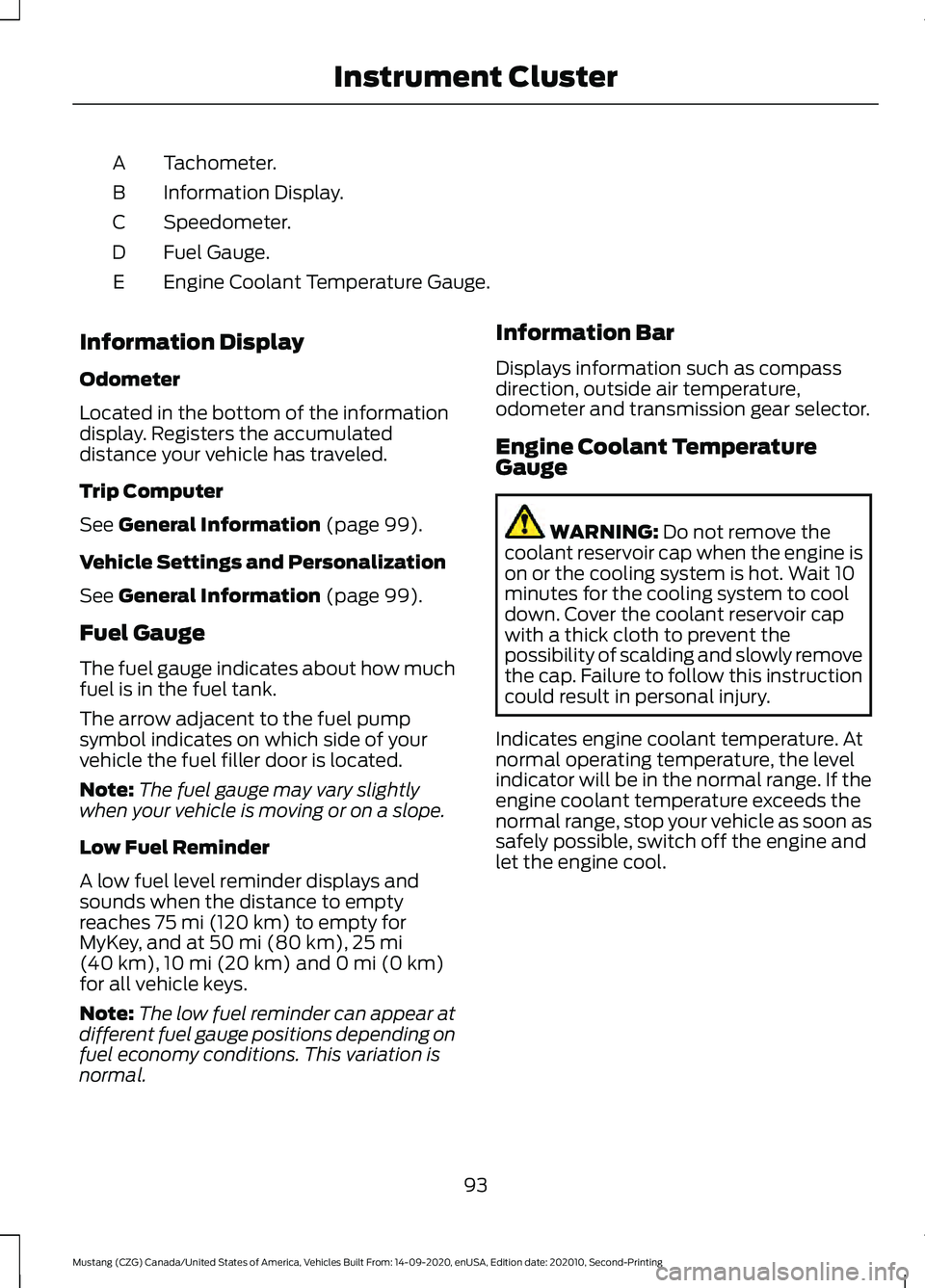
Tachometer.
A
Information Display.
B
Speedometer.
C
Fuel Gauge.
D
Engine Coolant Temperature Gauge.
E
Information Display
Odometer
Located in the bottom of the information
display. Registers the accumulated
distance your vehicle has traveled.
Trip Computer
See General Information (page 99).
Vehicle Settings and Personalization
See
General Information (page 99).
Fuel Gauge
The fuel gauge indicates about how much
fuel is in the fuel tank.
The arrow adjacent to the fuel pump
symbol indicates on which side of your
vehicle the fuel filler door is located.
Note: The fuel gauge may vary slightly
when your vehicle is moving or on a slope.
Low Fuel Reminder
A low fuel level reminder displays and
sounds when the distance to empty
reaches
75 mi (120 km) to empty for
MyKey, and at 50 mi (80 km), 25 mi
(40 km), 10 mi (20 km) and 0 mi (0 km)
for all vehicle keys.
Note: The low fuel reminder can appear at
different fuel gauge positions depending on
fuel economy conditions. This variation is
normal. Information Bar
Displays information such as compass
direction, outside air temperature,
odometer and transmission gear selector.
Engine Coolant Temperature
Gauge
WARNING:
Do not remove the
coolant reservoir cap when the engine is
on or the cooling system is hot. Wait 10
minutes for the cooling system to cool
down. Cover the coolant reservoir cap
with a thick cloth to prevent the
possibility of scalding and slowly remove
the cap. Failure to follow this instruction
could result in personal injury.
Indicates engine coolant temperature. At
normal operating temperature, the level
indicator will be in the normal range. If the
engine coolant temperature exceeds the
normal range, stop your vehicle as soon as
safely possible, switch off the engine and
let the engine cool.
93
Mustang (CZG) Canada/United States of America, Vehicles Built From: 14-09-2020, enUSA, Edition date: 202010, Second-Printing Instrument Cluster
Page 100 of 530
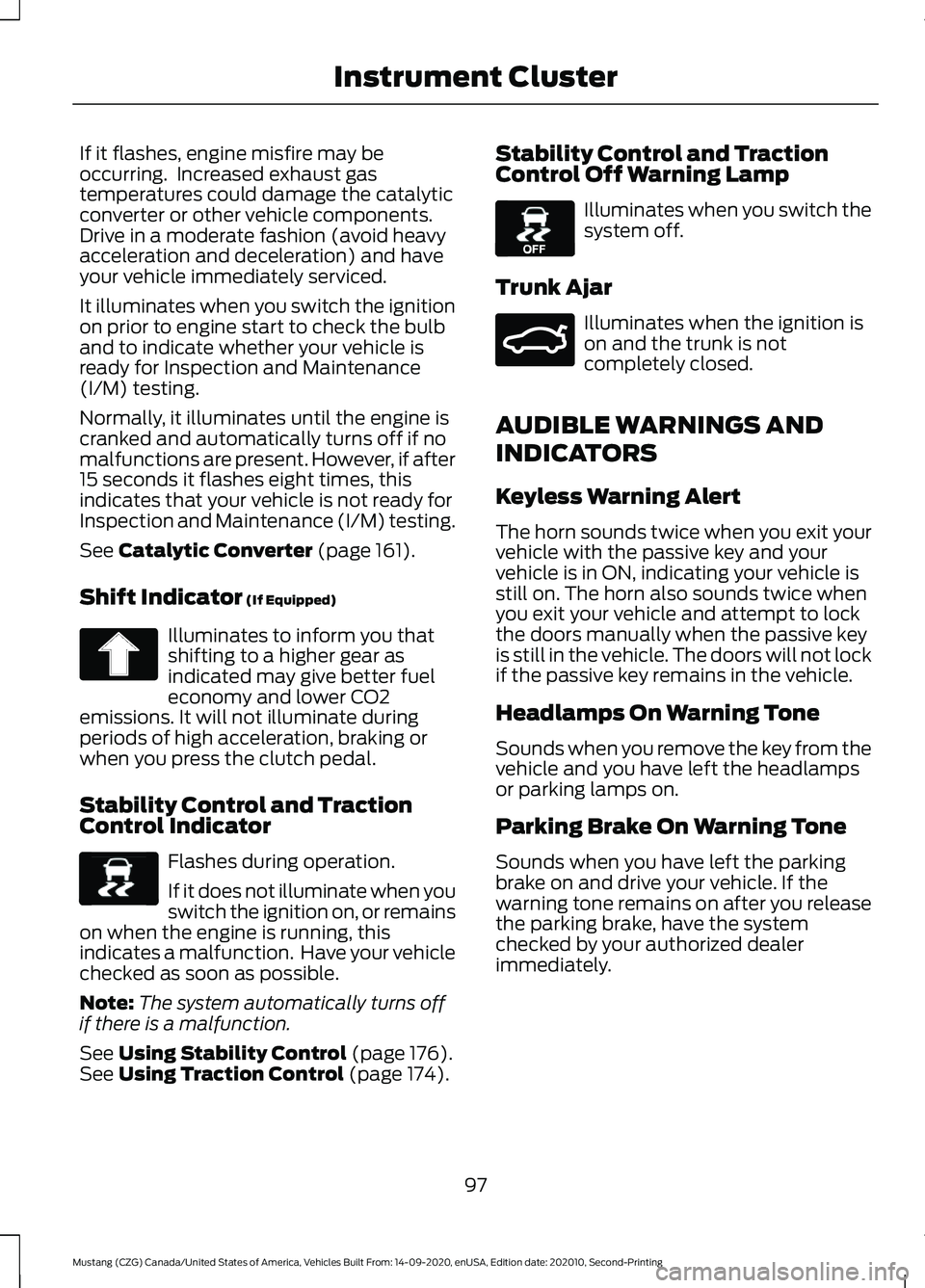
If it flashes, engine misfire may be
occurring. Increased exhaust gas
temperatures could damage the catalytic
converter or other vehicle components.
Drive in a moderate fashion (avoid heavy
acceleration and deceleration) and have
your vehicle immediately serviced.
It illuminates when you switch the ignition
on prior to engine start to check the bulb
and to indicate whether your vehicle is
ready for Inspection and Maintenance
(I/M) testing.
Normally, it illuminates until the engine is
cranked and automatically turns off if no
malfunctions are present. However, if after
15 seconds it flashes eight times, this
indicates that your vehicle is not ready for
Inspection and Maintenance (I/M) testing.
See Catalytic Converter (page 161).
Shift Indicator
(If Equipped) Illuminates to inform you that
shifting to a higher gear as
indicated may give better fuel
economy and lower CO2
emissions. It will not illuminate during
periods of high acceleration, braking or
when you press the clutch pedal.
Stability Control and Traction
Control Indicator Flashes during operation.
If it does not illuminate when you
switch the ignition on, or remains
on when the engine is running, this
indicates a malfunction. Have your vehicle
checked as soon as possible.
Note: The system automatically turns off
if there is a malfunction.
See
Using Stability Control (page 176).
See Using Traction Control (page 174). Stability Control and Traction
Control Off Warning Lamp Illuminates when you switch the
system off.
Trunk Ajar Illuminates when the ignition is
on and the trunk is not
completely closed.
AUDIBLE WARNINGS AND
INDICATORS
Keyless Warning Alert
The horn sounds twice when you exit your
vehicle with the passive key and your
vehicle is in ON, indicating your vehicle is
still on. The horn also sounds twice when
you exit your vehicle and attempt to lock
the doors manually when the passive key
is still in the vehicle. The doors will not lock
if the passive key remains in the vehicle.
Headlamps On Warning Tone
Sounds when you remove the key from the
vehicle and you have left the headlamps
or parking lamps on.
Parking Brake On Warning Tone
Sounds when you have left the parking
brake on and drive your vehicle. If the
warning tone remains on after you release
the parking brake, have the system
checked by your authorized dealer
immediately.
97
Mustang (CZG) Canada/United States of America, Vehicles Built From: 14-09-2020, enUSA, Edition date: 202010, Second-Printing Instrument Cluster E138639 E130458 E159323
Page 103 of 530
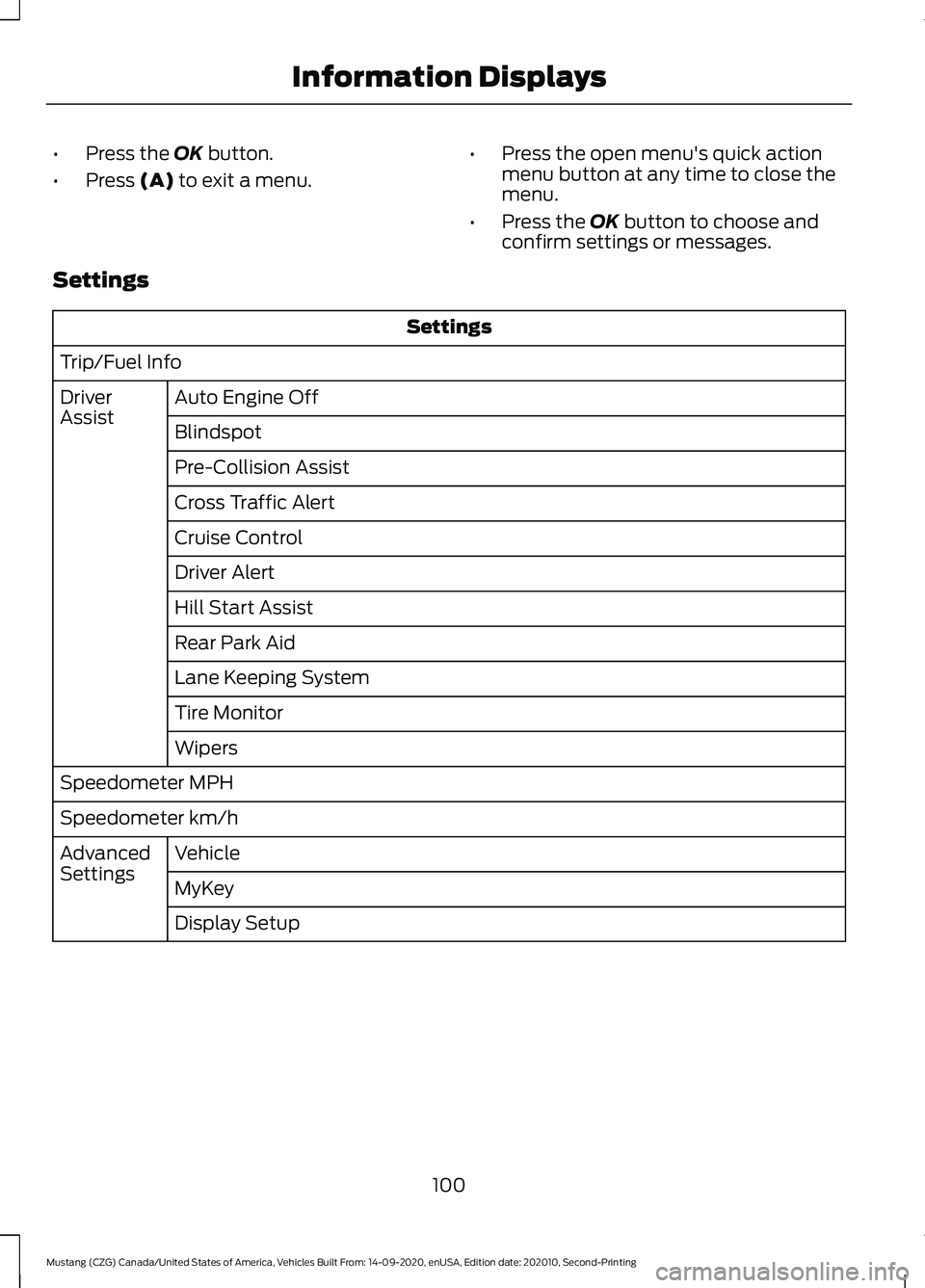
•
Press the OK button.
• Press
(A) to exit a menu. •
Press the open menu's quick action
menu button at any time to close the
menu.
• Press the
OK button to choose and
confirm settings or messages.
Settings Settings
Trip/Fuel Info Auto Engine Off
Driver
Assist
Blindspot
Pre-Collision Assist
Cross Traffic Alert
Cruise Control
Driver Alert
Hill Start Assist
Rear Park Aid
Lane Keeping System
Tire Monitor
Wipers
Speedometer MPH
Speedometer km/h Vehicle
Advanced
Settings
MyKey
Display Setup
100
Mustang (CZG) Canada/United States of America, Vehicles Built From: 14-09-2020, enUSA, Edition date: 202010, Second-Printing Information Displays
Page 111 of 530
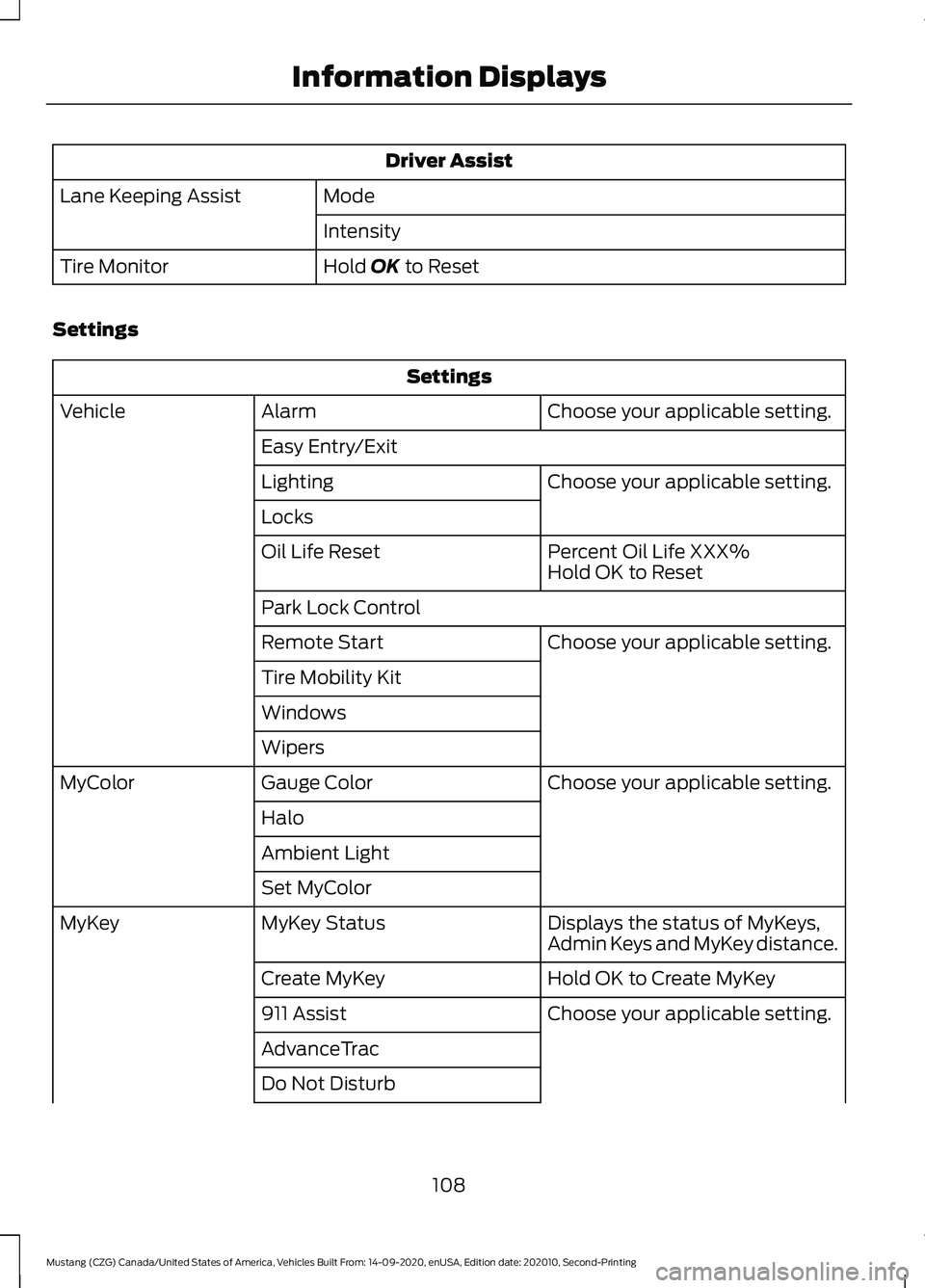
Driver Assist
Mode
Lane Keeping Assist
Intensity
Hold OK to Reset
Tire Monitor
Settings Settings
Choose your applicable setting.
Alarm
Vehicle
Easy Entry/Exit Choose your applicable setting.
Lighting
Locks
Percent Oil Life XXX%
Oil Life Reset
Hold OK to Reset
Park Lock Control Choose your applicable setting.
Remote Start
Tire Mobility Kit
Windows
Wipers
Choose your applicable setting.
Gauge Color
MyColor
Halo
Ambient Light
Set MyColor Displays the status of MyKeys,
Admin Keys and MyKey distance.
MyKey Status
MyKey
Hold OK to Create MyKey
Create MyKey
Choose your applicable setting.
911 Assist
AdvanceTrac
Do Not Disturb
108
Mustang (CZG) Canada/United States of America, Vehicles Built From: 14-09-2020, enUSA, Edition date: 202010, Second-Printing Information Displays
Page 112 of 530
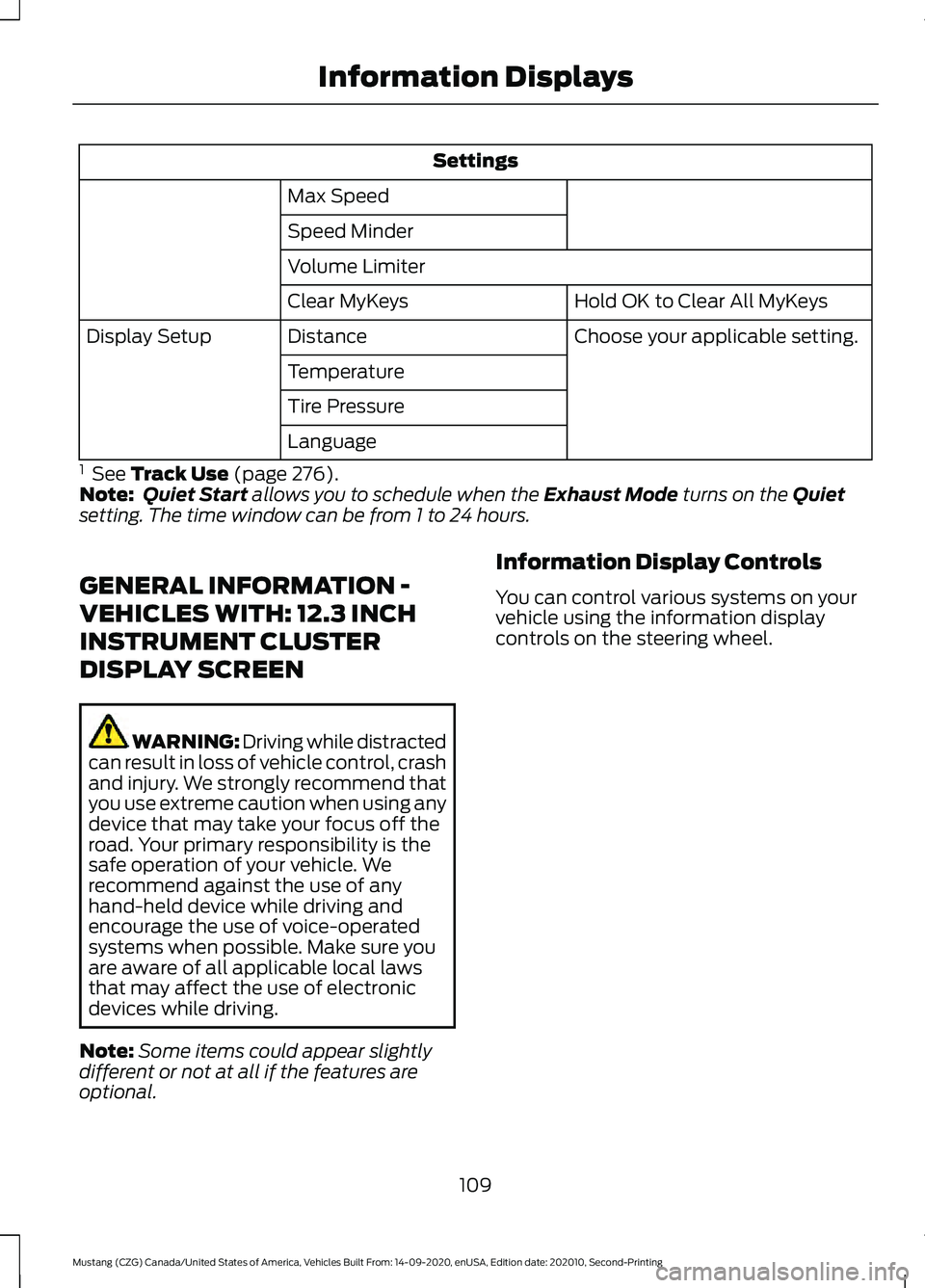
Settings
Max Speed
Speed Minder
Volume Limiter Hold OK to Clear All MyKeys
Clear MyKeys
Choose your applicable setting.
Distance
Display Setup
Temperature
Tire Pressure
Language
1 See Track Use (page 276).
Note: Quiet Start allows you to schedule when the Exhaust Mode turns on the Quiet
setting. The time window can be from 1 to 24 hours.
GENERAL INFORMATION -
VEHICLES WITH: 12.3 INCH
INSTRUMENT CLUSTER
DISPLAY SCREEN WARNING: Driving while distracted
can result in loss of vehicle control, crash
and injury. We strongly recommend that
you use extreme caution when using any
device that may take your focus off the
road. Your primary responsibility is the
safe operation of your vehicle. We
recommend against the use of any
hand-held device while driving and
encourage the use of voice-operated
systems when possible. Make sure you
are aware of all applicable local laws
that may affect the use of electronic
devices while driving.
Note: Some items could appear slightly
different or not at all if the features are
optional. Information Display Controls
You can control various systems on your
vehicle using the information display
controls on the steering wheel.
109
Mustang (CZG) Canada/United States of America, Vehicles Built From: 14-09-2020, enUSA, Edition date: 202010, Second-Printing Information Displays
Page 114 of 530
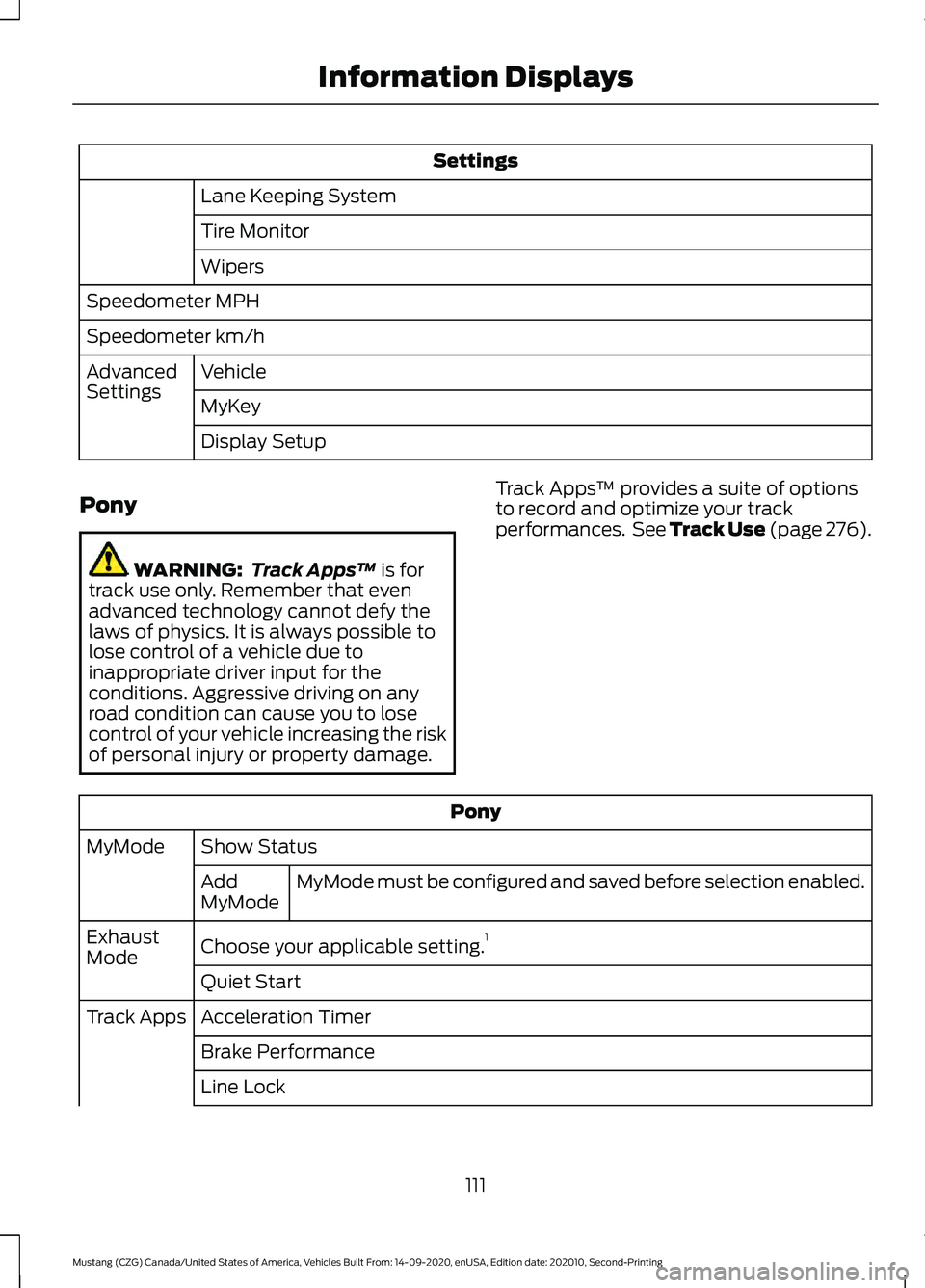
Settings
Lane Keeping System
Tire Monitor
Wipers
Speedometer MPH
Speedometer km/h Vehicle
Advanced
Settings
MyKey
Display Setup
Pony WARNING:
Track Apps™ is for
track use only. Remember that even
advanced technology cannot defy the
laws of physics. It is always possible to
lose control of a vehicle due to
inappropriate driver input for the
conditions. Aggressive driving on any
road condition can cause you to lose
control of your vehicle increasing the risk
of personal injury or property damage. Track Apps
™ provides a suite of options
to record and optimize your track
performances. See Track Use (page 276). Pony
Show Status
MyMode
MyMode must be configured and saved before selection enabled.
Add
MyMode
Choose your applicable setting. 1
Exhaust
Mode
Quiet Start
Acceleration Timer
Track Apps
Brake Performance
Line Lock
111
Mustang (CZG) Canada/United States of America, Vehicles Built From: 14-09-2020, enUSA, Edition date: 202010, Second-Printing Information Displays
Page 120 of 530
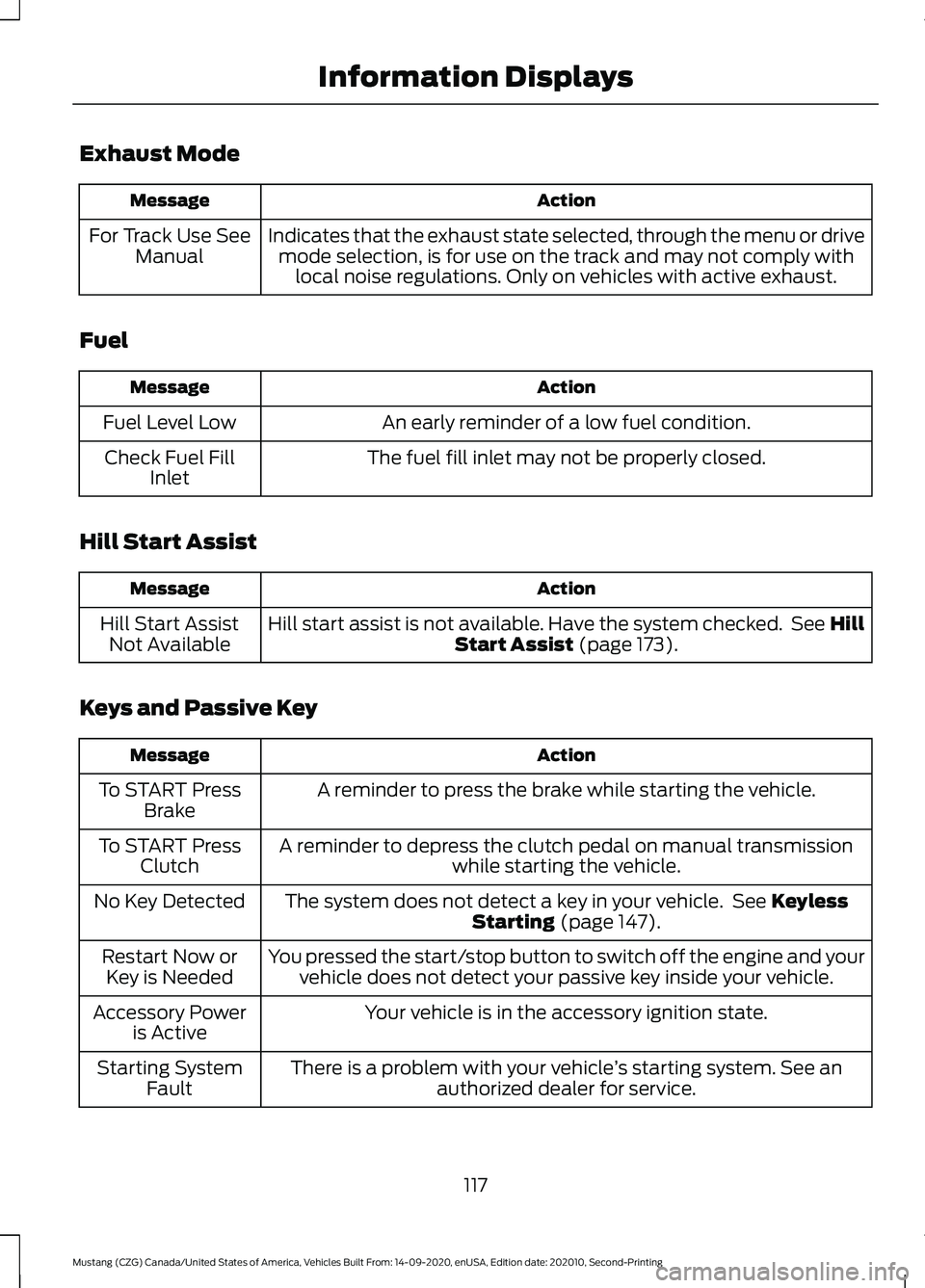
Exhaust Mode
Action
Message
Indicates that the exhaust state selected, through the menu or drivemode selection, is for use on the track and may not comply with local noise regulations. Only on vehicles with active exhaust.
For Track Use See
Manual
Fuel Action
Message
An early reminder of a low fuel condition.
Fuel Level Low
The fuel fill inlet may not be properly closed.
Check Fuel Fill
Inlet
Hill Start Assist Action
Message
Hill start assist is not available. Have the system checked. See Hill Start Assist (page 173).
Hill Start Assist
Not Available
Keys and Passive Key Action
Message
A reminder to press the brake while starting the vehicle.
To START Press
Brake
A reminder to depress the clutch pedal on manual transmission while starting the vehicle.
To START Press
Clutch
The system does not detect a key in your vehicle. See
Keyless
Starting (page 147).
No Key Detected
You pressed the start/stop button to switch off the engine and yourvehicle does not detect your passive key inside your vehicle.
Restart Now or
Key is Needed
Your vehicle is in the accessory ignition state.
Accessory Power
is Active
There is a problem with your vehicle ’s starting system. See an
authorized dealer for service.
Starting System
Fault
117
Mustang (CZG) Canada/United States of America, Vehicles Built From: 14-09-2020, enUSA, Edition date: 202010, Second-Printing Information Displays
Page 121 of 530
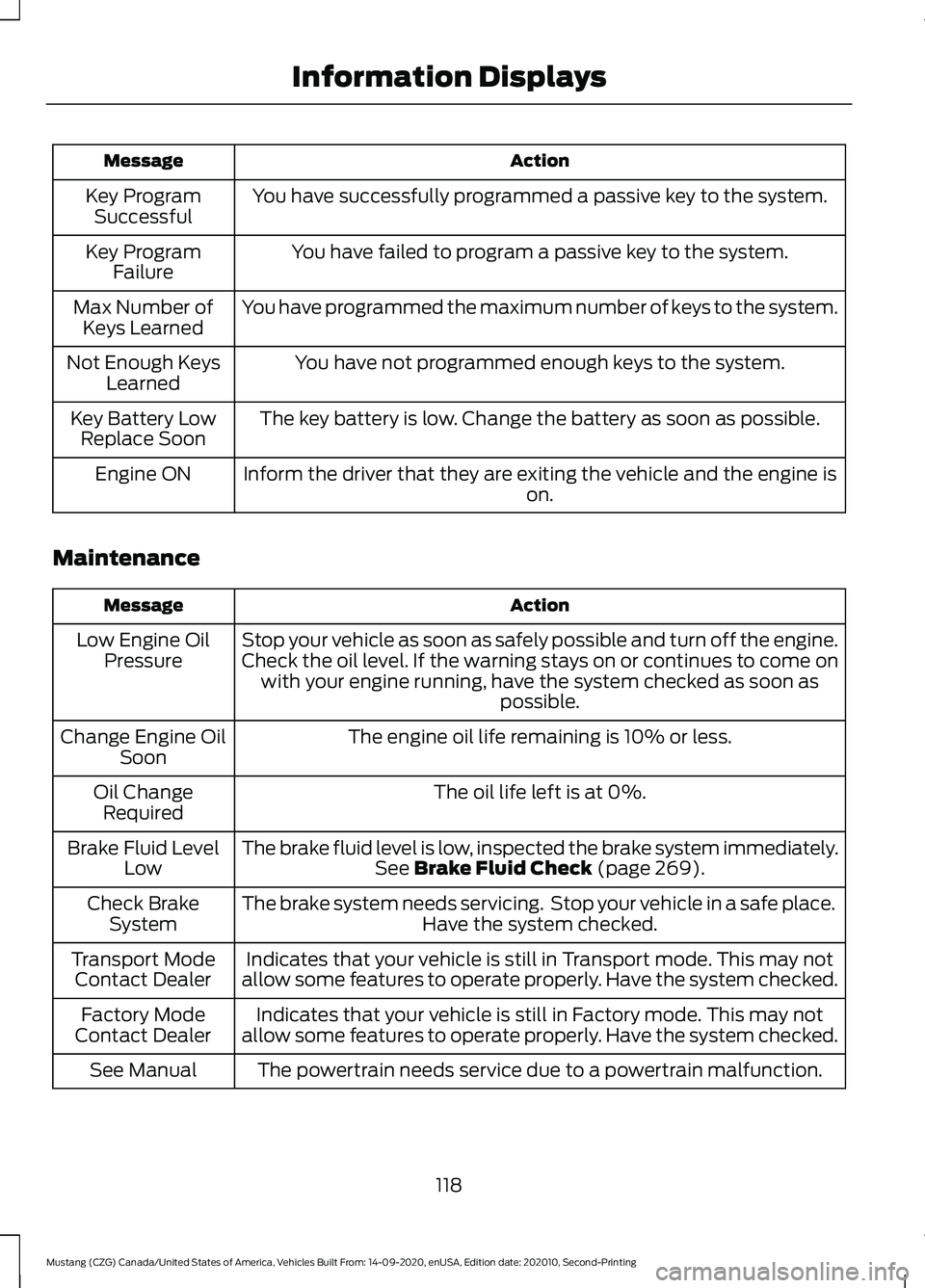
Action
Message
You have successfully programmed a passive key to the system.
Key Program
Successful
You have failed to program a passive key to the system.
Key Program
Failure
You have programmed the maximum number of keys to the system.
Max Number of
Keys Learned
You have not programmed enough keys to the system.
Not Enough Keys
Learned
The key battery is low. Change the battery as soon as possible.
Key Battery Low
Replace Soon
Inform the driver that they are exiting the vehicle and the engine is on.
Engine ON
Maintenance Action
Message
Stop your vehicle as soon as safely possible and turn off the engine.
Check the oil level. If the warning stays on or continues to come onwith your engine running, have the system checked as soon as possible.
Low Engine Oil
Pressure
The engine oil life remaining is 10% or less.
Change Engine Oil
Soon
The oil life left is at 0%.
Oil Change
Required
The brake fluid level is low, inspected the brake system immediately.See Brake Fluid Check (page 269).
Brake Fluid Level
Low
The brake system needs servicing. Stop your vehicle in a safe place. Have the system checked.
Check Brake
System
Indicates that your vehicle is still in Transport mode. This may not
allow some features to operate properly. Have the system checked.
Transport Mode
Contact Dealer
Indicates that your vehicle is still in Factory mode. This may not
allow some features to operate properly. Have the system checked.
Factory Mode
Contact Dealer
The powertrain needs service due to a powertrain malfunction.
See Manual
118
Mustang (CZG) Canada/United States of America, Vehicles Built From: 14-09-2020, enUSA, Edition date: 202010, Second-Printing Information Displays
Page 122 of 530
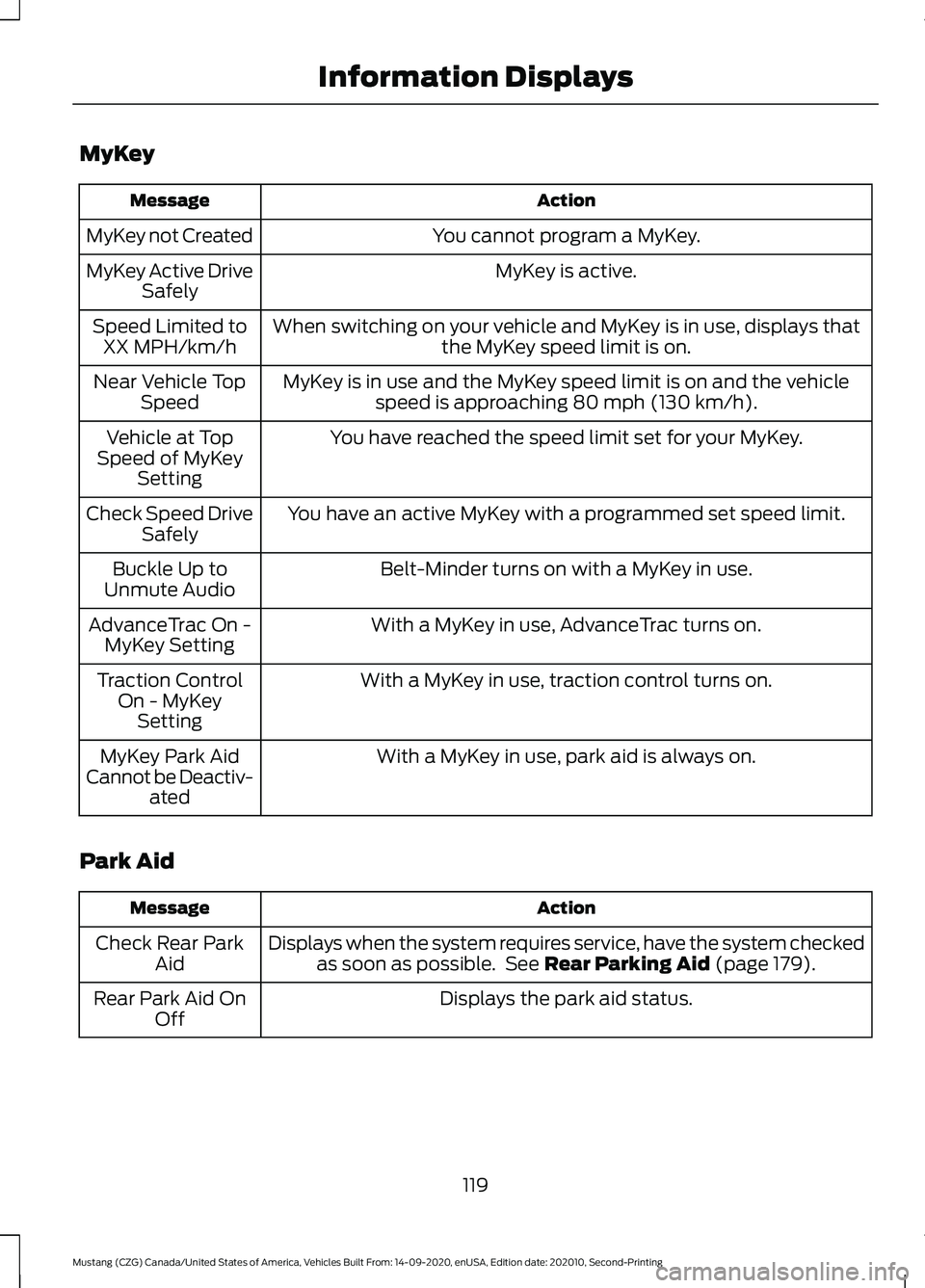
MyKey
Action
Message
You cannot program a MyKey.
MyKey not Created
MyKey is active.
MyKey Active Drive
Safely
When switching on your vehicle and MyKey is in use, displays that the MyKey speed limit is on.
Speed Limited to
XX MPH/km/h
MyKey is in use and the MyKey speed limit is on and the vehiclespeed is approaching 80 mph (130 km/h).
Near Vehicle Top
Speed
You have reached the speed limit set for your MyKey.
Vehicle at Top
Speed of MyKey Setting
You have an active MyKey with a programmed set speed limit.
Check Speed Drive
Safely
Belt-Minder turns on with a MyKey in use.
Buckle Up to
Unmute Audio
With a MyKey in use, AdvanceTrac turns on.
AdvanceTrac On -
MyKey Setting
With a MyKey in use, traction control turns on.
Traction Control
On - MyKeySetting
With a MyKey in use, park aid is always on.
MyKey Park Aid
Cannot be Deactiv- ated
Park Aid Action
Message
Displays when the system requires service, have the system checkedas soon as possible. See
Rear Parking Aid (page 179).
Check Rear Park
Aid
Displays the park aid status.
Rear Park Aid On
Off
119
Mustang (CZG) Canada/United States of America, Vehicles Built From: 14-09-2020, enUSA, Edition date: 202010, Second-Printing Information Displays