light FORD MUSTANG 2021 Owner's Manual
[x] Cancel search | Manufacturer: FORD, Model Year: 2021, Model line: MUSTANG, Model: FORD MUSTANG 2021Pages: 530, PDF Size: 10.22 MB
Page 94 of 530
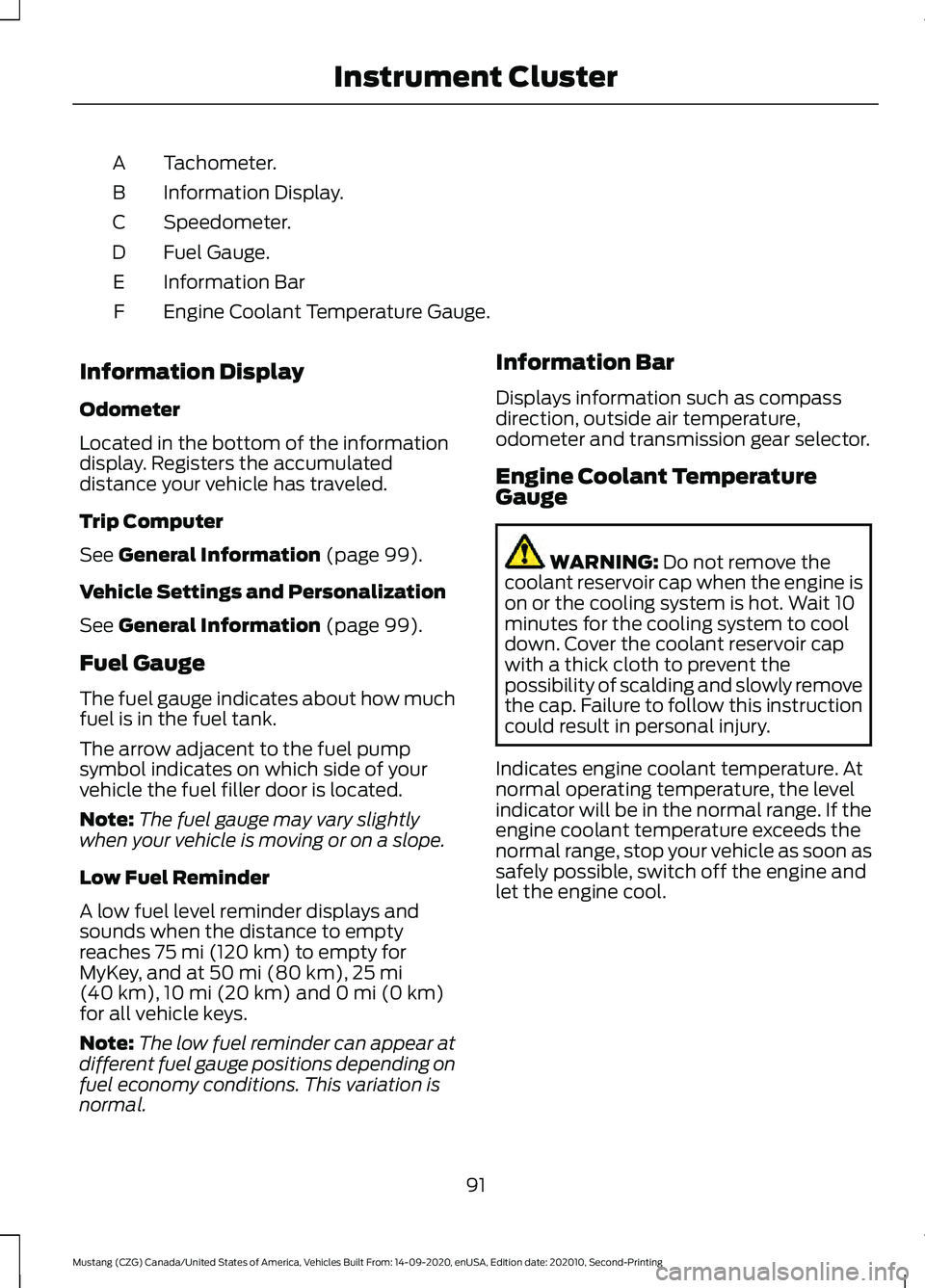
Tachometer.
A
Information Display.
B
Speedometer.
C
Fuel Gauge.
D
Information Bar
E
Engine Coolant Temperature Gauge.
F
Information Display
Odometer
Located in the bottom of the information
display. Registers the accumulated
distance your vehicle has traveled.
Trip Computer
See General Information (page 99).
Vehicle Settings and Personalization
See
General Information (page 99).
Fuel Gauge
The fuel gauge indicates about how much
fuel is in the fuel tank.
The arrow adjacent to the fuel pump
symbol indicates on which side of your
vehicle the fuel filler door is located.
Note: The fuel gauge may vary slightly
when your vehicle is moving or on a slope.
Low Fuel Reminder
A low fuel level reminder displays and
sounds when the distance to empty
reaches
75 mi (120 km) to empty for
MyKey, and at 50 mi (80 km), 25 mi
(40 km), 10 mi (20 km) and 0 mi (0 km)
for all vehicle keys.
Note: The low fuel reminder can appear at
different fuel gauge positions depending on
fuel economy conditions. This variation is
normal. Information Bar
Displays information such as compass
direction, outside air temperature,
odometer and transmission gear selector.
Engine Coolant Temperature
Gauge
WARNING:
Do not remove the
coolant reservoir cap when the engine is
on or the cooling system is hot. Wait 10
minutes for the cooling system to cool
down. Cover the coolant reservoir cap
with a thick cloth to prevent the
possibility of scalding and slowly remove
the cap. Failure to follow this instruction
could result in personal injury.
Indicates engine coolant temperature. At
normal operating temperature, the level
indicator will be in the normal range. If the
engine coolant temperature exceeds the
normal range, stop your vehicle as soon as
safely possible, switch off the engine and
let the engine cool.
91
Mustang (CZG) Canada/United States of America, Vehicles Built From: 14-09-2020, enUSA, Edition date: 202010, Second-Printing Instrument Cluster
Page 96 of 530
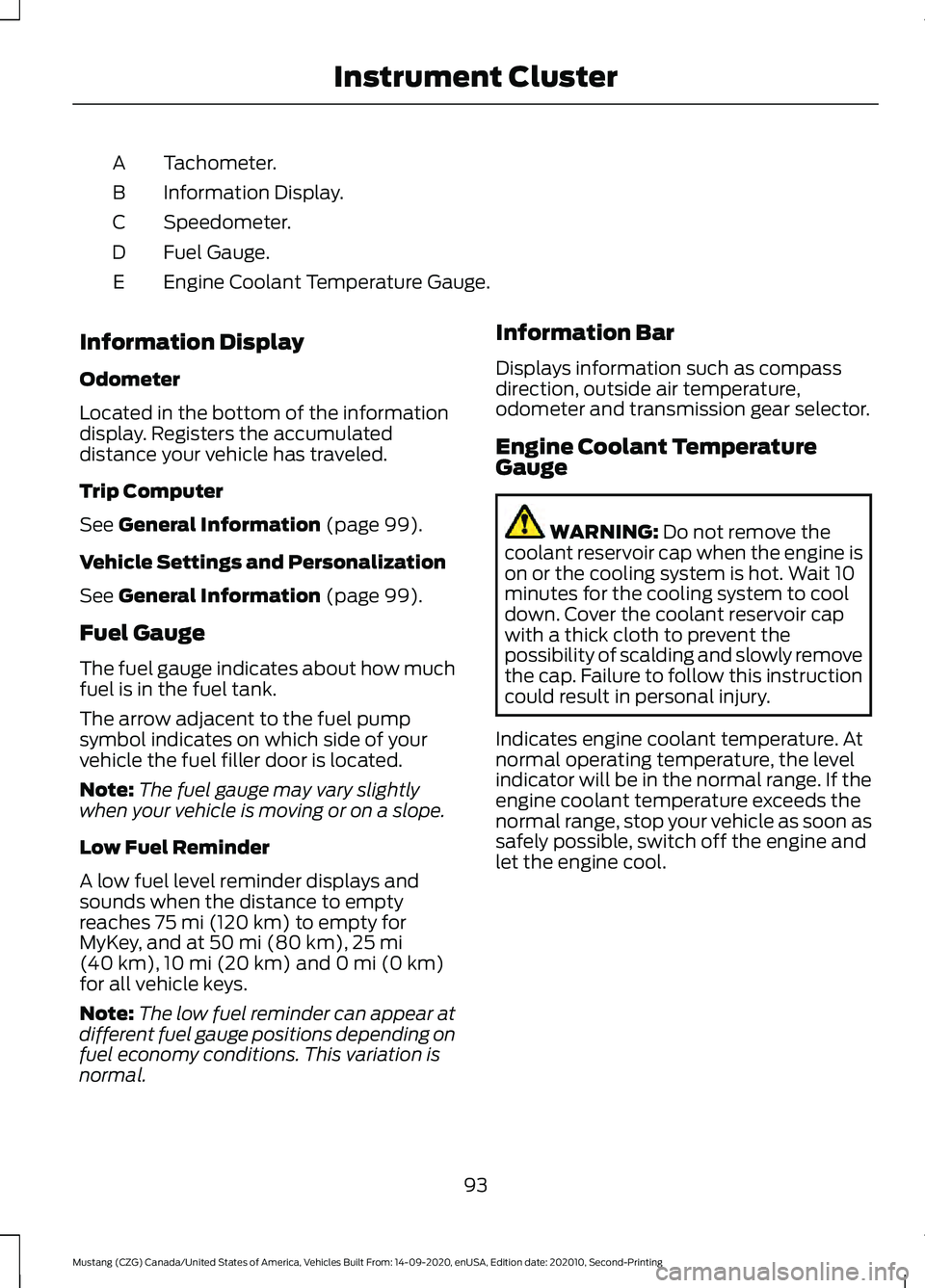
Tachometer.
A
Information Display.
B
Speedometer.
C
Fuel Gauge.
D
Engine Coolant Temperature Gauge.
E
Information Display
Odometer
Located in the bottom of the information
display. Registers the accumulated
distance your vehicle has traveled.
Trip Computer
See General Information (page 99).
Vehicle Settings and Personalization
See
General Information (page 99).
Fuel Gauge
The fuel gauge indicates about how much
fuel is in the fuel tank.
The arrow adjacent to the fuel pump
symbol indicates on which side of your
vehicle the fuel filler door is located.
Note: The fuel gauge may vary slightly
when your vehicle is moving or on a slope.
Low Fuel Reminder
A low fuel level reminder displays and
sounds when the distance to empty
reaches
75 mi (120 km) to empty for
MyKey, and at 50 mi (80 km), 25 mi
(40 km), 10 mi (20 km) and 0 mi (0 km)
for all vehicle keys.
Note: The low fuel reminder can appear at
different fuel gauge positions depending on
fuel economy conditions. This variation is
normal. Information Bar
Displays information such as compass
direction, outside air temperature,
odometer and transmission gear selector.
Engine Coolant Temperature
Gauge
WARNING:
Do not remove the
coolant reservoir cap when the engine is
on or the cooling system is hot. Wait 10
minutes for the cooling system to cool
down. Cover the coolant reservoir cap
with a thick cloth to prevent the
possibility of scalding and slowly remove
the cap. Failure to follow this instruction
could result in personal injury.
Indicates engine coolant temperature. At
normal operating temperature, the level
indicator will be in the normal range. If the
engine coolant temperature exceeds the
normal range, stop your vehicle as soon as
safely possible, switch off the engine and
let the engine cool.
93
Mustang (CZG) Canada/United States of America, Vehicles Built From: 14-09-2020, enUSA, Edition date: 202010, Second-Printing Instrument Cluster
Page 98 of 530
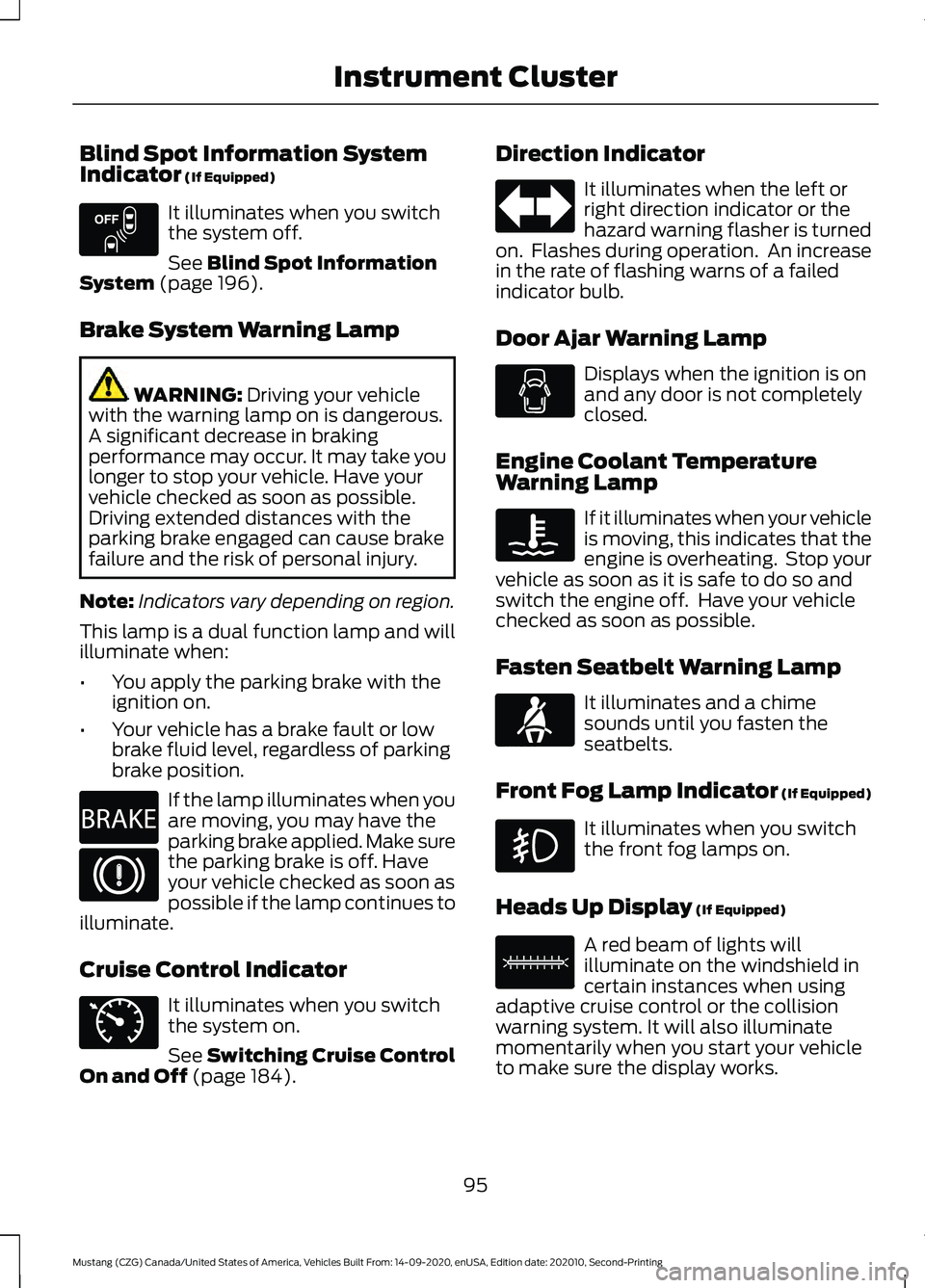
Blind Spot Information System
Indicator (If Equipped)
It illuminates when you switch
the system off.
See
Blind Spot Information
System (page 196).
Brake System Warning Lamp WARNING:
Driving your vehicle
with the warning lamp on is dangerous.
A significant decrease in braking
performance may occur. It may take you
longer to stop your vehicle. Have your
vehicle checked as soon as possible.
Driving extended distances with the
parking brake engaged can cause brake
failure and the risk of personal injury.
Note: Indicators vary depending on region.
This lamp is a dual function lamp and will
illuminate when:
• You apply the parking brake with the
ignition on.
• Your vehicle has a brake fault or low
brake fluid level, regardless of parking
brake position. If the lamp illuminates when you
are moving, you may have the
parking brake applied. Make sure
the parking brake is off. Have
your vehicle checked as soon as
possible if the lamp continues to
illuminate.
Cruise Control Indicator It illuminates when you switch
the system on.
See
Switching Cruise Control
On and Off (page 184). Direction Indicator It illuminates when the left or
right direction indicator or the
hazard warning flasher is turned
on. Flashes during operation. An increase
in the rate of flashing warns of a failed
indicator bulb.
Door Ajar Warning Lamp Displays when the ignition is on
and any door is not completely
closed.
Engine Coolant Temperature
Warning Lamp If it illuminates when your vehicle
is moving, this indicates that the
engine is overheating. Stop your
vehicle as soon as it is safe to do so and
switch the engine off. Have your vehicle
checked as soon as possible.
Fasten Seatbelt Warning Lamp It illuminates and a chime
sounds until you fasten the
seatbelts.
Front Fog Lamp Indicator (If Equipped) It illuminates when you switch
the front fog lamps on.
Heads Up Display
(If Equipped) A red beam of lights will
illuminate on the windshield in
certain instances when using
adaptive cruise control or the collision
warning system. It will also illuminate
momentarily when you start your vehicle
to make sure the display works.
95
Mustang (CZG) Canada/United States of America, Vehicles Built From: 14-09-2020, enUSA, Edition date: 202010, Second-Printing Instrument ClusterE151262 E270480 E71340 E71880 E156133
Page 99 of 530
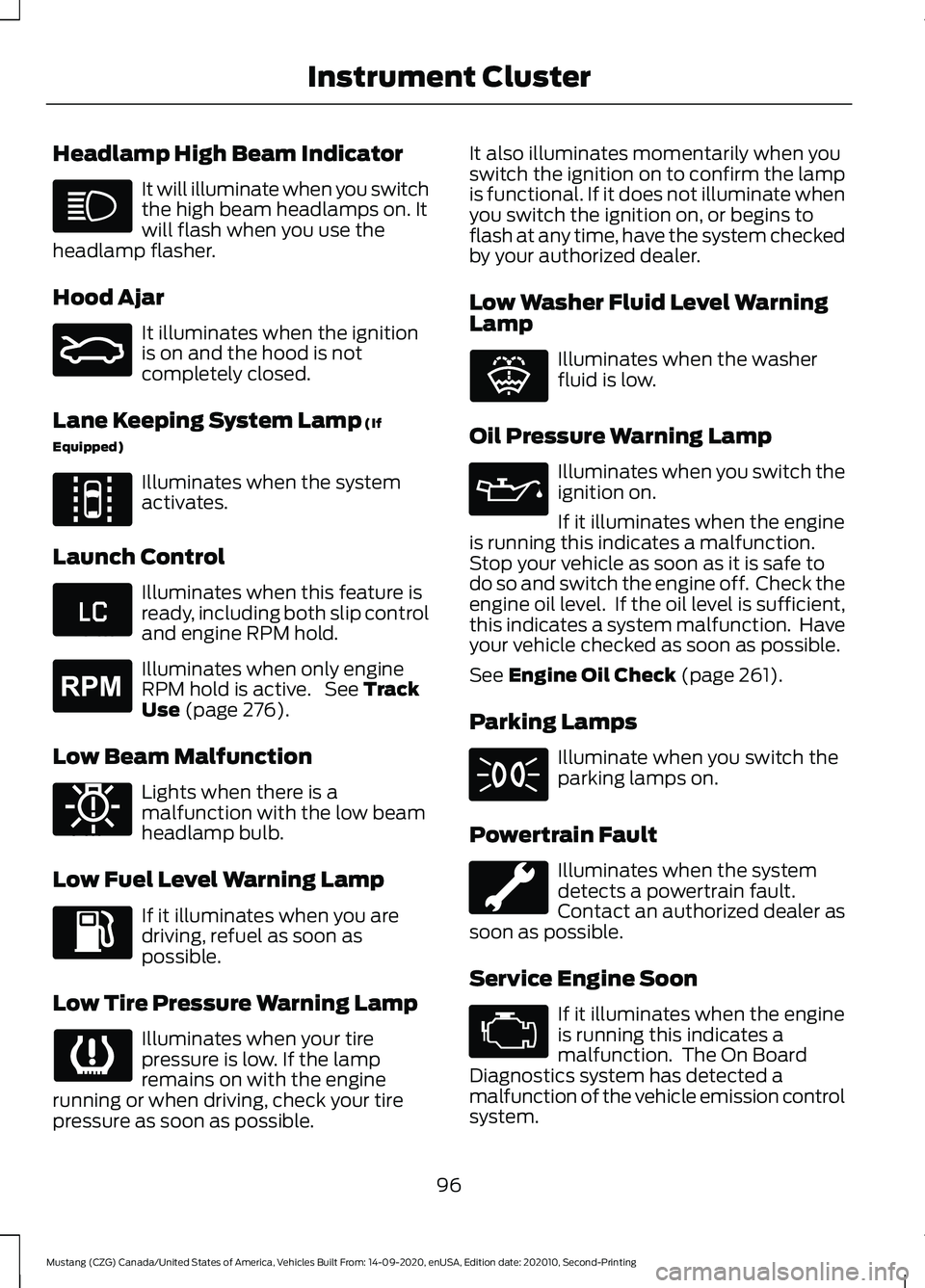
Headlamp High Beam Indicator
It will illuminate when you switch
the high beam headlamps on. It
will flash when you use the
headlamp flasher.
Hood Ajar It illuminates when the ignition
is on and the hood is not
completely closed.
Lane Keeping System Lamp (If
Equipped) Illuminates when the system
activates.
Launch Control Illuminates when this feature is
ready, including both slip control
and engine RPM hold.
Illuminates when only engine
RPM hold is active. See
Track
Use (page 276).
Low Beam Malfunction Lights when there is a
malfunction with the low beam
headlamp bulb.
Low Fuel Level Warning Lamp If it illuminates when you are
driving, refuel as soon as
possible.
Low Tire Pressure Warning Lamp Illuminates when your tire
pressure is low. If the lamp
remains on with the engine
running or when driving, check your tire
pressure as soon as possible. It also illuminates momentarily when you
switch the ignition on to confirm the lamp
is functional. If it does not illuminate when
you switch the ignition on, or begins to
flash at any time, have the system checked
by your authorized dealer.
Low Washer Fluid Level Warning
Lamp
Illuminates when the washer
fluid is low.
Oil Pressure Warning Lamp Illuminates when you switch the
ignition on.
If it illuminates when the engine
is running this indicates a malfunction.
Stop your vehicle as soon as it is safe to
do so and switch the engine off. Check the
engine oil level. If the oil level is sufficient,
this indicates a system malfunction. Have
your vehicle checked as soon as possible.
See
Engine Oil Check (page 261).
Parking Lamps Illuminate when you switch the
parking lamps on.
Powertrain Fault Illuminates when the system
detects a powertrain fault.
Contact an authorized dealer as
soon as possible.
Service Engine Soon If it illuminates when the engine
is running this indicates a
malfunction. The On Board
Diagnostics system has detected a
malfunction of the vehicle emission control
system.
96
Mustang (CZG) Canada/United States of America, Vehicles Built From: 14-09-2020, enUSA, Edition date: 202010, Second-Printing Instrument Cluster E159324 E144813 E234583 E255688 E181350 E132353
Page 102 of 530
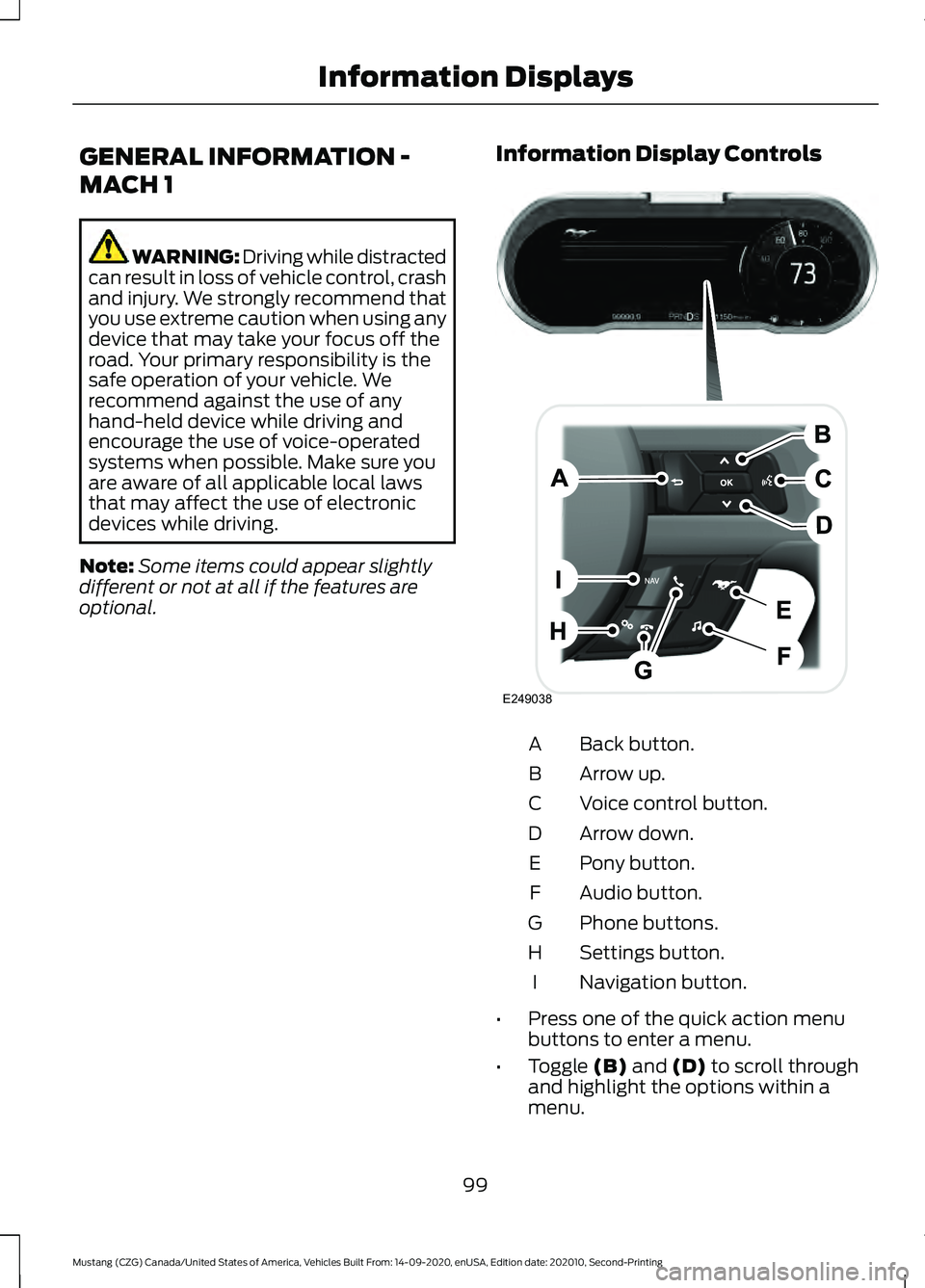
GENERAL INFORMATION -
MACH 1
WARNING: Driving while distracted
can result in loss of vehicle control, crash
and injury. We strongly recommend that
you use extreme caution when using any
device that may take your focus off the
road. Your primary responsibility is the
safe operation of your vehicle. We
recommend against the use of any
hand-held device while driving and
encourage the use of voice-operated
systems when possible. Make sure you
are aware of all applicable local laws
that may affect the use of electronic
devices while driving.
Note: Some items could appear slightly
different or not at all if the features are
optional. Information Display Controls Back button.
A
Arrow up.
B
Voice control button.
C
Arrow down.
D
Pony button.
E
Audio button.
F
Phone buttons.
G
Settings button.
H
Navigation button.
I
• Press one of the quick action menu
buttons to enter a menu.
• Toggle (B) and (D) to scroll through
and highlight the options within a
menu.
99
Mustang (CZG) Canada/United States of America, Vehicles Built From: 14-09-2020, enUSA, Edition date: 202010, Second-Printing Information DisplaysE249038
Page 104 of 530
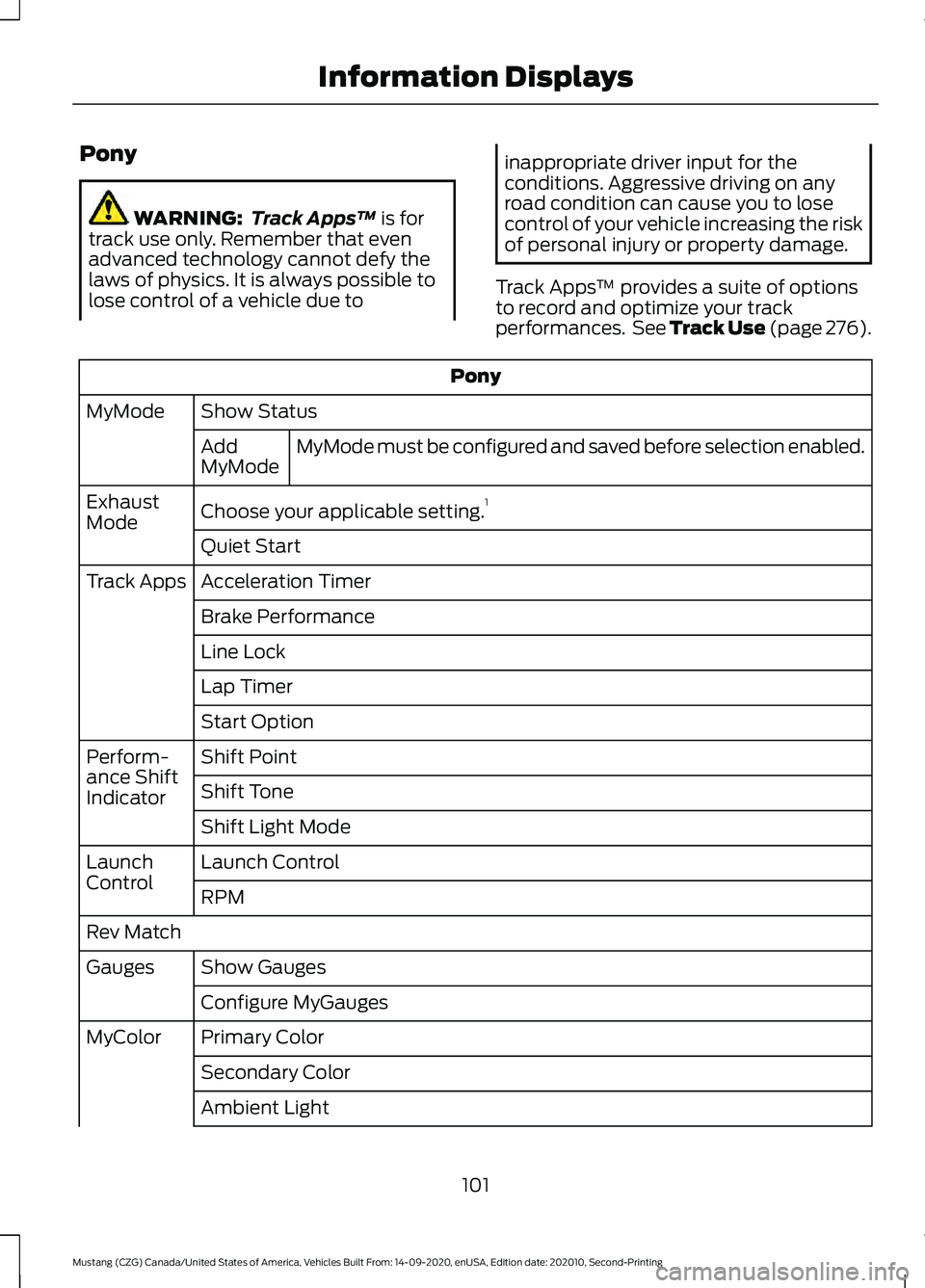
Pony
WARNING:
Track Apps™ is for
track use only. Remember that even
advanced technology cannot defy the
laws of physics. It is always possible to
lose control of a vehicle due to inappropriate driver input for the
conditions. Aggressive driving on any
road condition can cause you to lose
control of your vehicle increasing the risk
of personal injury or property damage.
Track Apps ™ provides a suite of options
to record and optimize your track
performances. See Track Use (page 276). Pony
Show Status
MyMode
MyMode must be configured and saved before selection enabled.
Add
MyMode
Choose your applicable setting. 1
Exhaust
Mode
Quiet Start
Acceleration Timer
Track Apps
Brake Performance
Line Lock
Lap Timer
Start Option
Shift Point
Perform-
ance Shift
Indicator Shift Tone
Shift Light Mode
Launch Control
Launch
Control
RPM
Rev Match Show Gauges
Gauges
Configure MyGauges
Primary Color
MyColor
Secondary Color
Ambient Light
101
Mustang (CZG) Canada/United States of America, Vehicles Built From: 14-09-2020, enUSA, Edition date: 202010, Second-Printing Information Displays
Page 106 of 530
Vacuum.
D
Cylinder head temperature.
E
Transmission oil temperature.
F
Axle temperature.
G
Engine oil pressure.
H
GENERAL INFORMATION -
VEHICLES WITH: 4.2 INCH
INSTRUMENT CLUSTER
DISPLAY SCREEN WARNING: Driving while distracted
can result in loss of vehicle control, crash
and injury. We strongly recommend that
you use extreme caution when using any
device that may take your focus off the
road. Your primary responsibility is the
safe operation of your vehicle. We
recommend against the use of any
hand-held device while driving and
encourage the use of voice-operated
systems when possible. Make sure you
are aware of all applicable local laws
that may affect the use of electronic
devices while driving.
Note: Some items could appear slightly
different or not at all if the features are
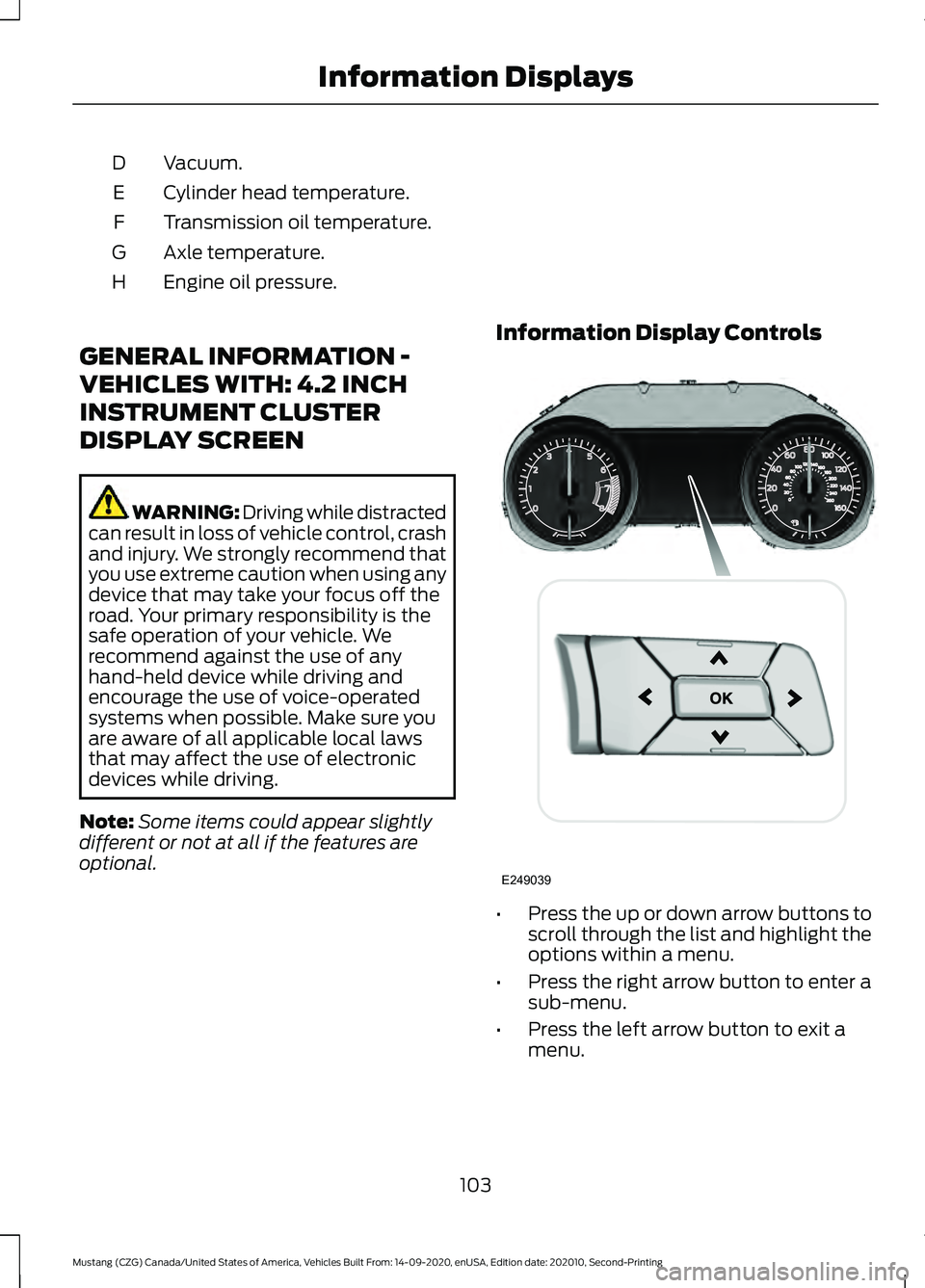
optional. Information Display Controls
•
Press the up or down arrow buttons to
scroll through the list and highlight the
options within a menu.
• Press the right arrow button to enter a
sub-menu.
• Press the left arrow button to exit a
menu.
103
Mustang (CZG) Canada/United States of America, Vehicles Built From: 14-09-2020, enUSA, Edition date: 202010, Second-Printing Information DisplaysE249039
Page 111 of 530
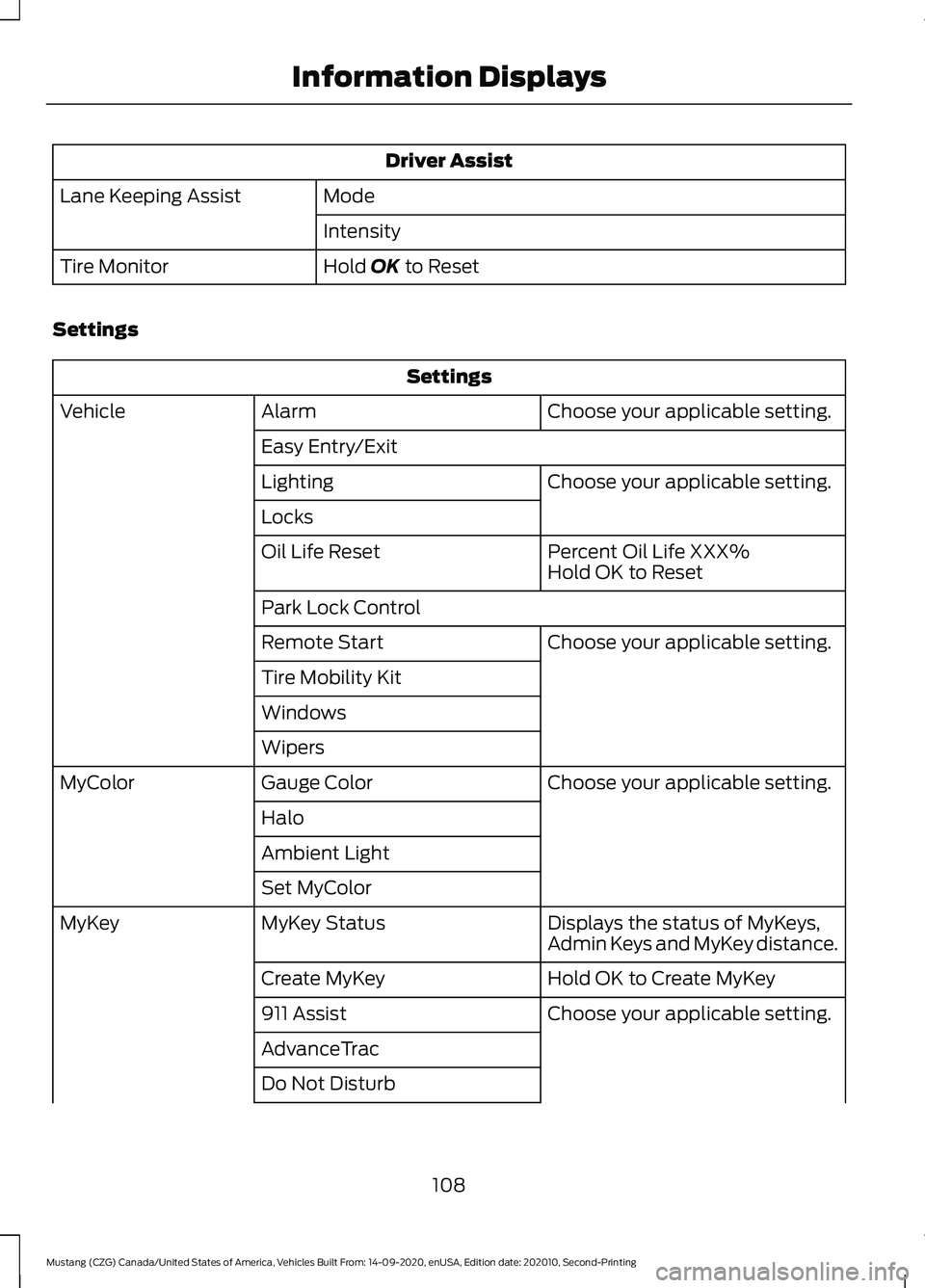
Driver Assist
Mode
Lane Keeping Assist
Intensity
Hold OK to Reset
Tire Monitor
Settings Settings
Choose your applicable setting.
Alarm
Vehicle
Easy Entry/Exit Choose your applicable setting.
Lighting
Locks
Percent Oil Life XXX%
Oil Life Reset
Hold OK to Reset
Park Lock Control Choose your applicable setting.
Remote Start
Tire Mobility Kit
Windows
Wipers
Choose your applicable setting.
Gauge Color
MyColor
Halo
Ambient Light
Set MyColor Displays the status of MyKeys,
Admin Keys and MyKey distance.
MyKey Status
MyKey
Hold OK to Create MyKey
Create MyKey
Choose your applicable setting.
911 Assist
AdvanceTrac
Do Not Disturb
108
Mustang (CZG) Canada/United States of America, Vehicles Built From: 14-09-2020, enUSA, Edition date: 202010, Second-Printing Information Displays
Page 112 of 530
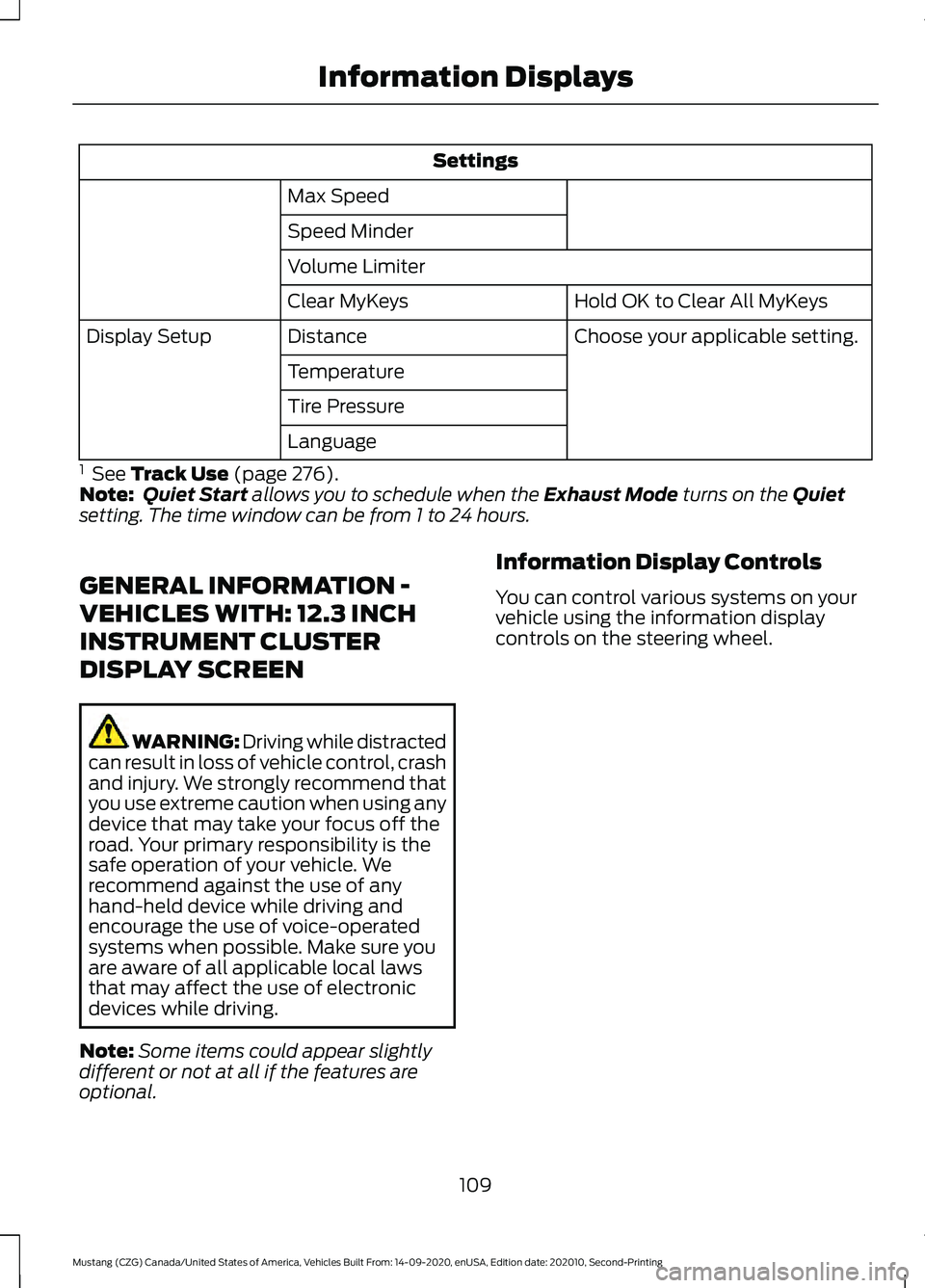
Settings
Max Speed
Speed Minder
Volume Limiter Hold OK to Clear All MyKeys
Clear MyKeys
Choose your applicable setting.
Distance
Display Setup
Temperature
Tire Pressure
Language
1 See Track Use (page 276).
Note: Quiet Start allows you to schedule when the Exhaust Mode turns on the Quiet
setting. The time window can be from 1 to 24 hours.
GENERAL INFORMATION -
VEHICLES WITH: 12.3 INCH
INSTRUMENT CLUSTER
DISPLAY SCREEN WARNING: Driving while distracted
can result in loss of vehicle control, crash
and injury. We strongly recommend that
you use extreme caution when using any
device that may take your focus off the
road. Your primary responsibility is the
safe operation of your vehicle. We
recommend against the use of any
hand-held device while driving and
encourage the use of voice-operated
systems when possible. Make sure you
are aware of all applicable local laws
that may affect the use of electronic
devices while driving.
Note: Some items could appear slightly
different or not at all if the features are
optional. Information Display Controls
You can control various systems on your
vehicle using the information display
controls on the steering wheel.
109
Mustang (CZG) Canada/United States of America, Vehicles Built From: 14-09-2020, enUSA, Edition date: 202010, Second-Printing Information Displays
Page 113 of 530
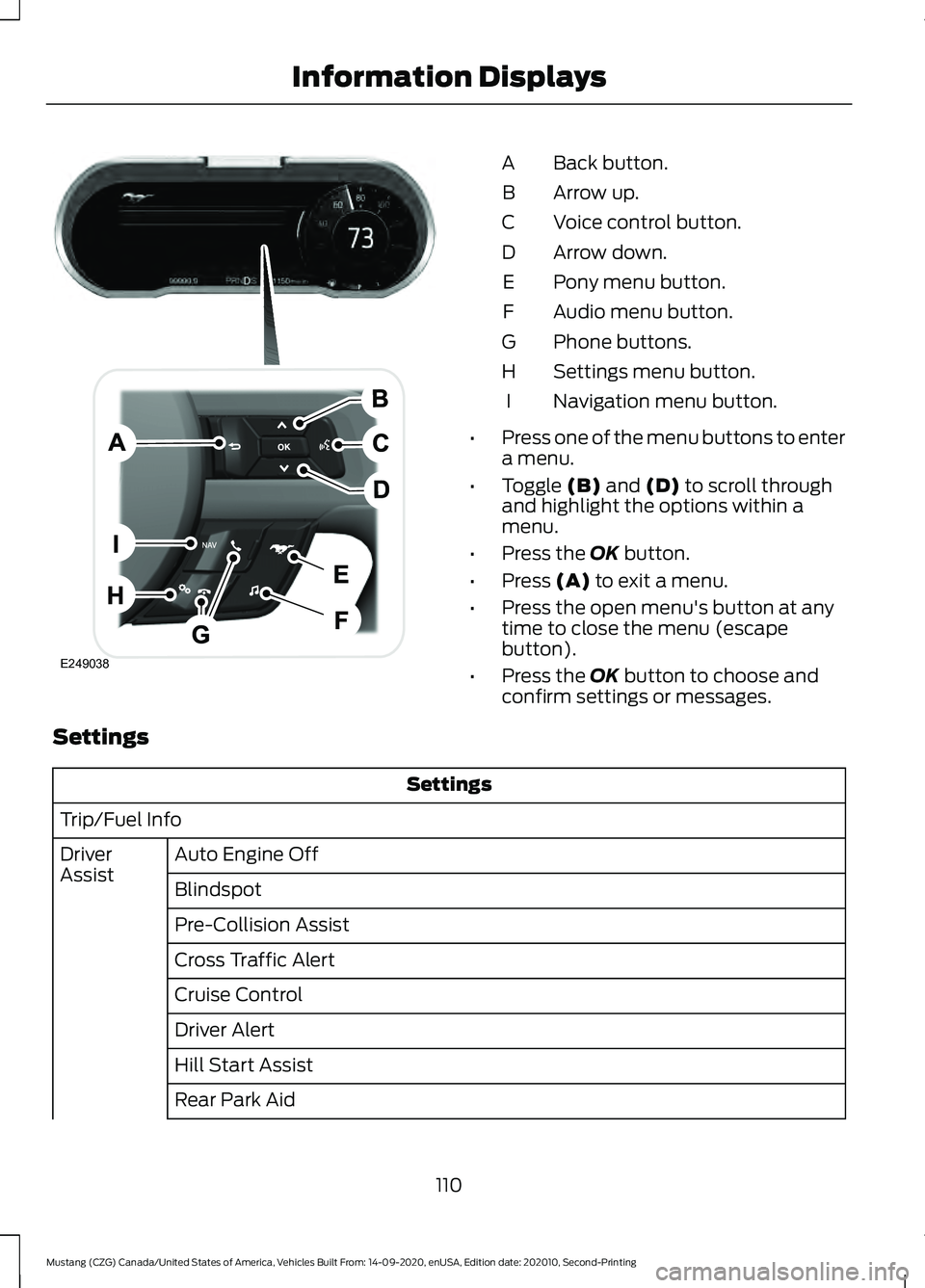
Back button.
A
Arrow up.
B
Voice control button.
C
Arrow down.
D
Pony menu button.
E
Audio menu button.
F
Phone buttons.
G
Settings menu button.
H
Navigation menu button.
I
• Press one of the menu buttons to enter
a menu.
• Toggle (B) and (D) to scroll through
and highlight the options within a
menu.
• Press the
OK button.
• Press
(A) to exit a menu.
• Press the open menu's button at any
time to close the menu (escape
button).
• Press the
OK button to choose and
confirm settings or messages.
Settings Settings
Trip/Fuel Info Auto Engine Off
Driver
Assist
Blindspot
Pre-Collision Assist
Cross Traffic Alert
Cruise Control
Driver Alert
Hill Start Assist
Rear Park Aid
110
Mustang (CZG) Canada/United States of America, Vehicles Built From: 14-09-2020, enUSA, Edition date: 202010, Second-Printing Information DisplaysE249038