reset FORD MUSTANG 2021 Service Manual
[x] Cancel search | Manufacturer: FORD, Model Year: 2021, Model line: MUSTANG, Model: FORD MUSTANG 2021Pages: 530, PDF Size: 10.22 MB
Page 431 of 530
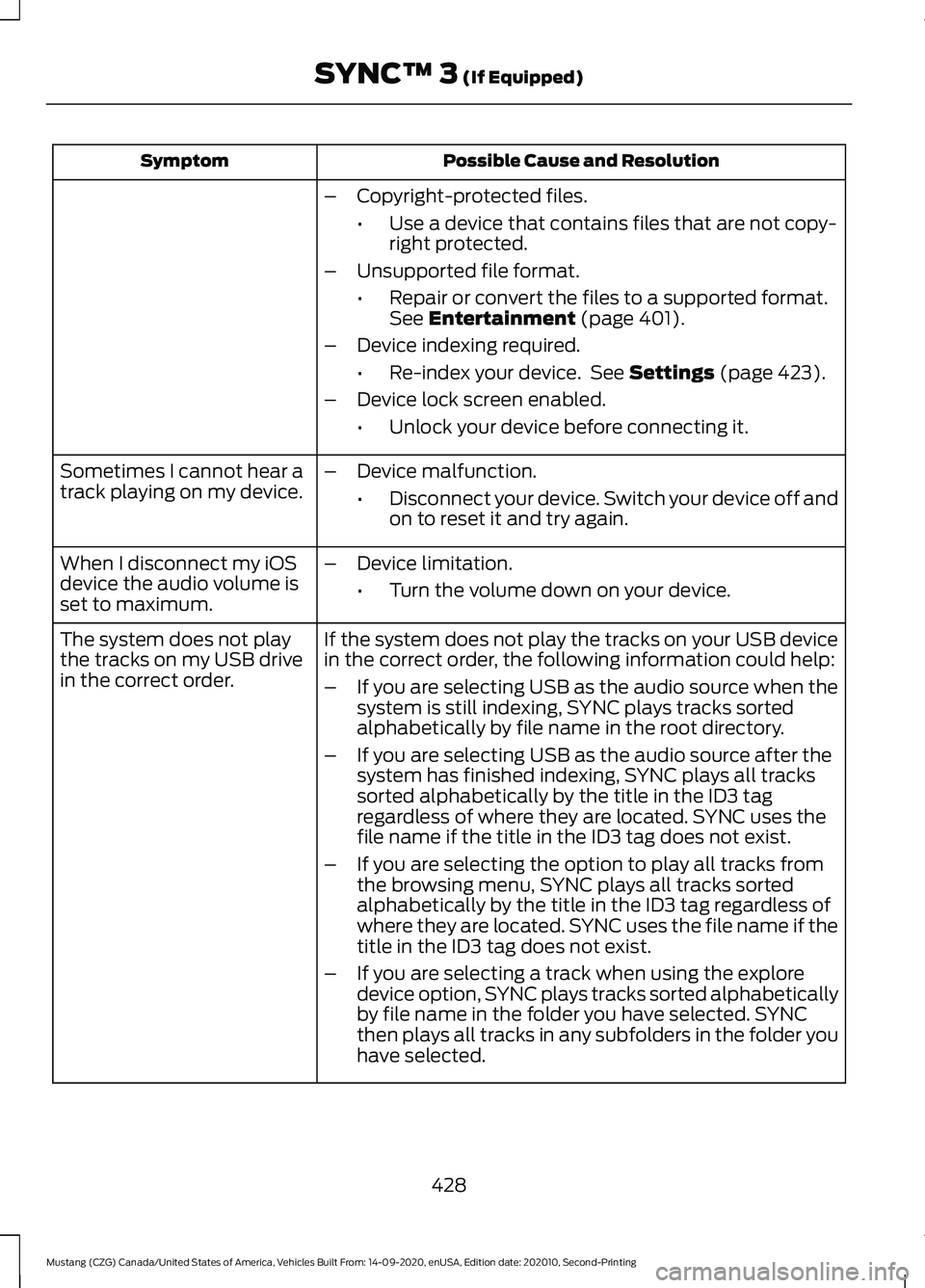
Possible Cause and Resolution
Symptom
–Copyright-protected files.
•Use a device that contains files that are not copy-
right protected.
– Unsupported file format.
•Repair or convert the files to a supported format.
See Entertainment (page 401).
– Device indexing required.
•Re-index your device. See
Settings (page 423).
– Device lock screen enabled.
•Unlock your device before connecting it.
Sometimes I cannot hear a
track playing on my device. –
Device malfunction.
•Disconnect your device. Switch your device off and
on to reset it and try again.
When I disconnect my iOS
device the audio volume is
set to maximum. –
Device limitation.
•Turn the volume down on your device.
If the system does not play the tracks on your USB device
in the correct order, the following information could help:
The system does not play
the tracks on my USB drive
in the correct order.
–If you are selecting USB as the audio source when the
system is still indexing, SYNC plays tracks sorted
alphabetically by file name in the root directory.
– If you are selecting USB as the audio source after the
system has finished indexing, SYNC plays all tracks
sorted alphabetically by the title in the ID3 tag
regardless of where they are located. SYNC uses the
file name if the title in the ID3 tag does not exist.
– If you are selecting the option to play all tracks from
the browsing menu, SYNC plays all tracks sorted
alphabetically by the title in the ID3 tag regardless of
where they are located. SYNC uses the file name if the
title in the ID3 tag does not exist.
– If you are selecting a track when using the explore
device option, SYNC plays tracks sorted alphabetically
by file name in the folder you have selected. SYNC
then plays all tracks in any subfolders in the folder you
have selected.
428
Mustang (CZG) Canada/United States of America, Vehicles Built From: 14-09-2020, enUSA, Edition date: 202010, Second-Printing SYNC™ 3
(If Equipped)
Page 432 of 530
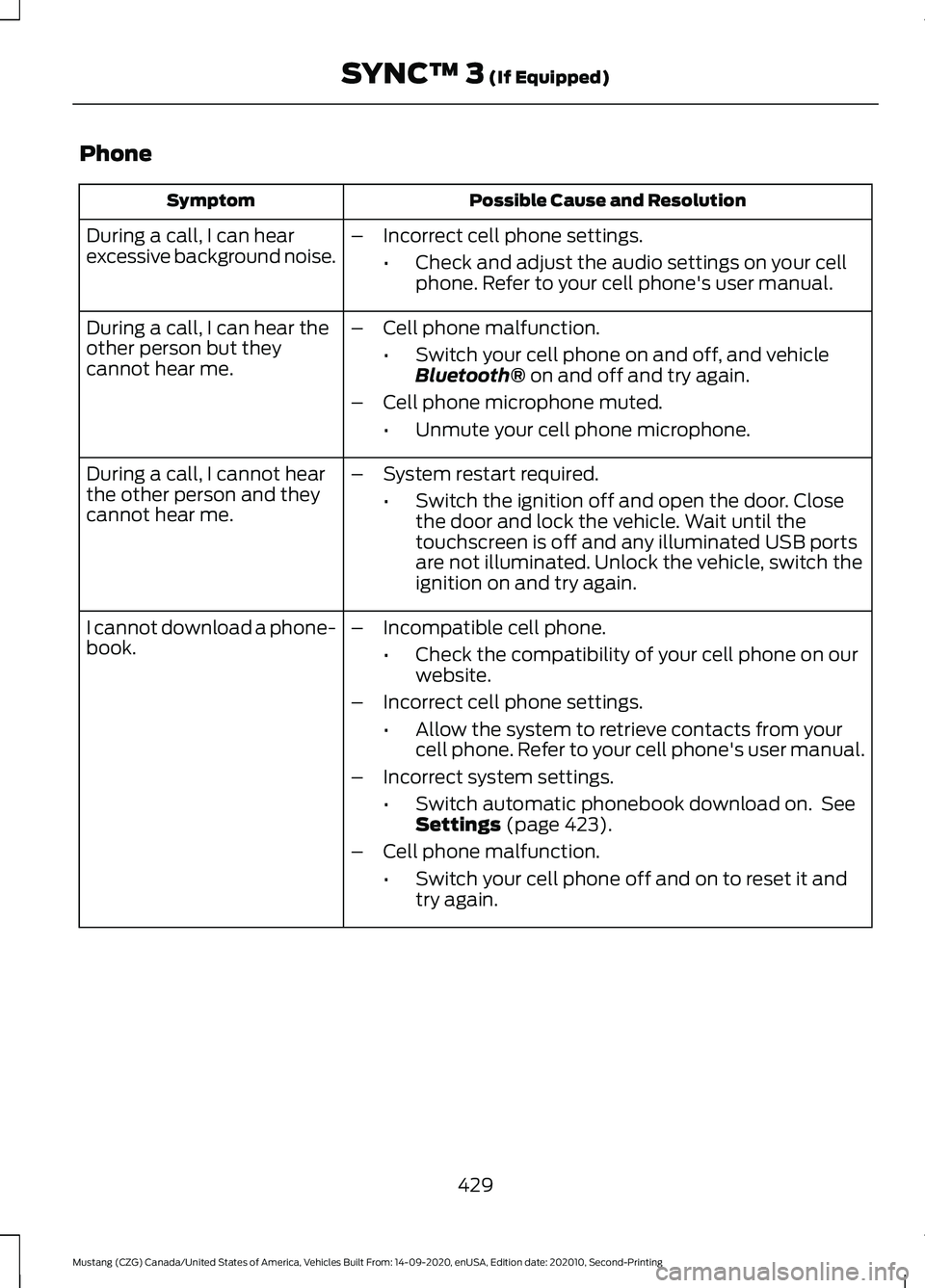
Phone
Possible Cause and Resolution
Symptom
During a call, I can hear
excessive background noise. –
Incorrect cell phone settings.
•Check and adjust the audio settings on your cell
phone. Refer to your cell phone's user manual.
– Cell phone malfunction.
•Switch your cell phone on and off, and vehicle
Bluetooth® on and off and try again.
– Cell phone microphone muted.
•Unmute your cell phone microphone.
During a call, I can hear the
other person but they
cannot hear me.
During a call, I cannot hear
the other person and they
cannot hear me.
–
System restart required.
•Switch the ignition off and open the door. Close
the door and lock the vehicle. Wait until the
touchscreen is off and any illuminated USB ports
are not illuminated. Unlock the vehicle, switch the
ignition on and try again.
I cannot download a phone-
book. –
Incompatible cell phone.
•Check the compatibility of your cell phone on our
website.
– Incorrect cell phone settings.
•Allow the system to retrieve contacts from your
cell phone. Refer to your cell phone's user manual.
– Incorrect system settings.
•Switch automatic phonebook download on. See
Settings
(page 423).
– Cell phone malfunction.
•Switch your cell phone off and on to reset it and
try again.
429
Mustang (CZG) Canada/United States of America, Vehicles Built From: 14-09-2020, enUSA, Edition date: 202010, Second-Printing SYNC™ 3
(If Equipped)
Page 433 of 530
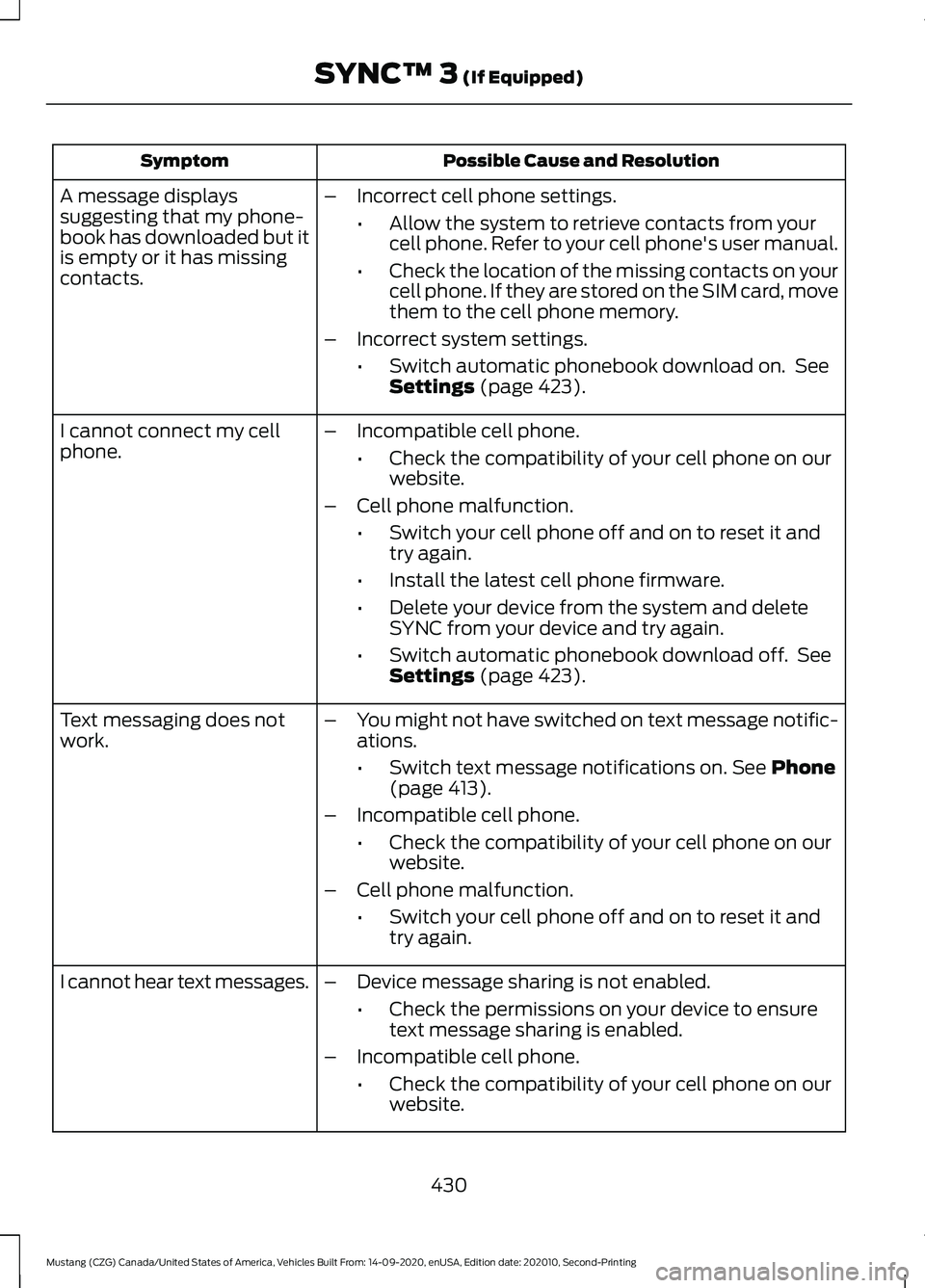
Possible Cause and Resolution
Symptom
–Incorrect cell phone settings.
•Allow the system to retrieve contacts from your
cell phone. Refer to your cell phone's user manual.
• Check the location of the missing contacts on your
cell phone. If they are stored on the SIM card, move
them to the cell phone memory.
– Incorrect system settings.
•Switch automatic phonebook download on. See
Settings (page 423).
A message displays
suggesting that my phone-
book has downloaded but it
is empty or it has missing
contacts.
–Incompatible cell phone.
•Check the compatibility of your cell phone on our
website.
– Cell phone malfunction.
•Switch your cell phone off and on to reset it and
try again.
• Install the latest cell phone firmware.
• Delete your device from the system and delete
SYNC from your device and try again.
• Switch automatic phonebook download off. See
Settings
(page 423).
I cannot connect my cell
phone.
Text messaging does not
work.
–
You might not have switched on text message notific-
ations.
•Switch text message notifications on.
See Phone
(page 413).
– Incompatible cell phone.
•Check the compatibility of your cell phone on our
website.
– Cell phone malfunction.
•Switch your cell phone off and on to reset it and
try again.
– Device message sharing is not enabled.
•Check the permissions on your device to ensure
text message sharing is enabled.
– Incompatible cell phone.
•Check the compatibility of your cell phone on our
website.
I cannot hear text messages.
430
Mustang (CZG) Canada/United States of America, Vehicles Built From: 14-09-2020, enUSA, Edition date: 202010, Second-Printing SYNC™ 3
(If Equipped)
Page 439 of 530
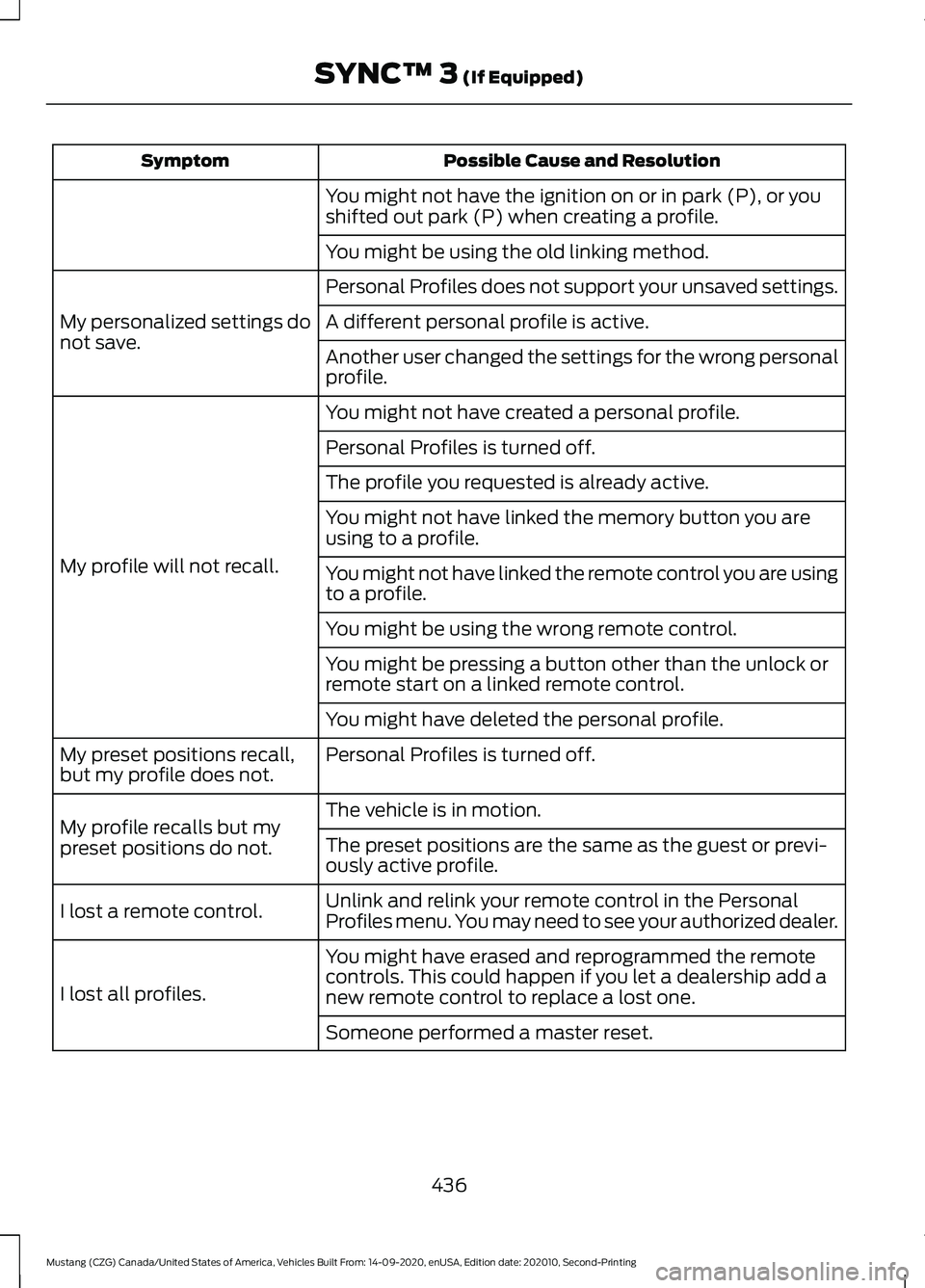
Possible Cause and Resolution
Symptom
You might not have the ignition on or in park (P), or you
shifted out park (P) when creating a profile.
You might be using the old linking method.
Personal Profiles does not support your unsaved settings.
My personalized settings do
not save. A different personal profile is active.
Another user changed the settings for the wrong personal
profile.
You might not have created a personal profile.
My profile will not recall. Personal Profiles is turned off.
The profile you requested is already active.
You might not have linked the memory button you are
using to a profile.
You might not have linked the remote control you are using
to a profile.
You might be using the wrong remote control.
You might be pressing a button other than the unlock or
remote start on a linked remote control.
You might have deleted the personal profile.
Personal Profiles is turned off.
My preset positions recall,
but my profile does not.
The vehicle is in motion.
My profile recalls but my
preset positions do not. The preset positions are the same as the guest or previ-
ously active profile.
Unlink and relink your remote control in the Personal
Profiles menu. You may need to see your authorized dealer.
I lost a remote control.
You might have erased and reprogrammed the remote
controls. This could happen if you let a dealership add a
new remote control to replace a lost one.
I lost all profiles.
Someone performed a master reset.
436
Mustang (CZG) Canada/United States of America, Vehicles Built From: 14-09-2020, enUSA, Edition date: 202010, Second-Printing SYNC™ 3 (If Equipped)
Page 440 of 530
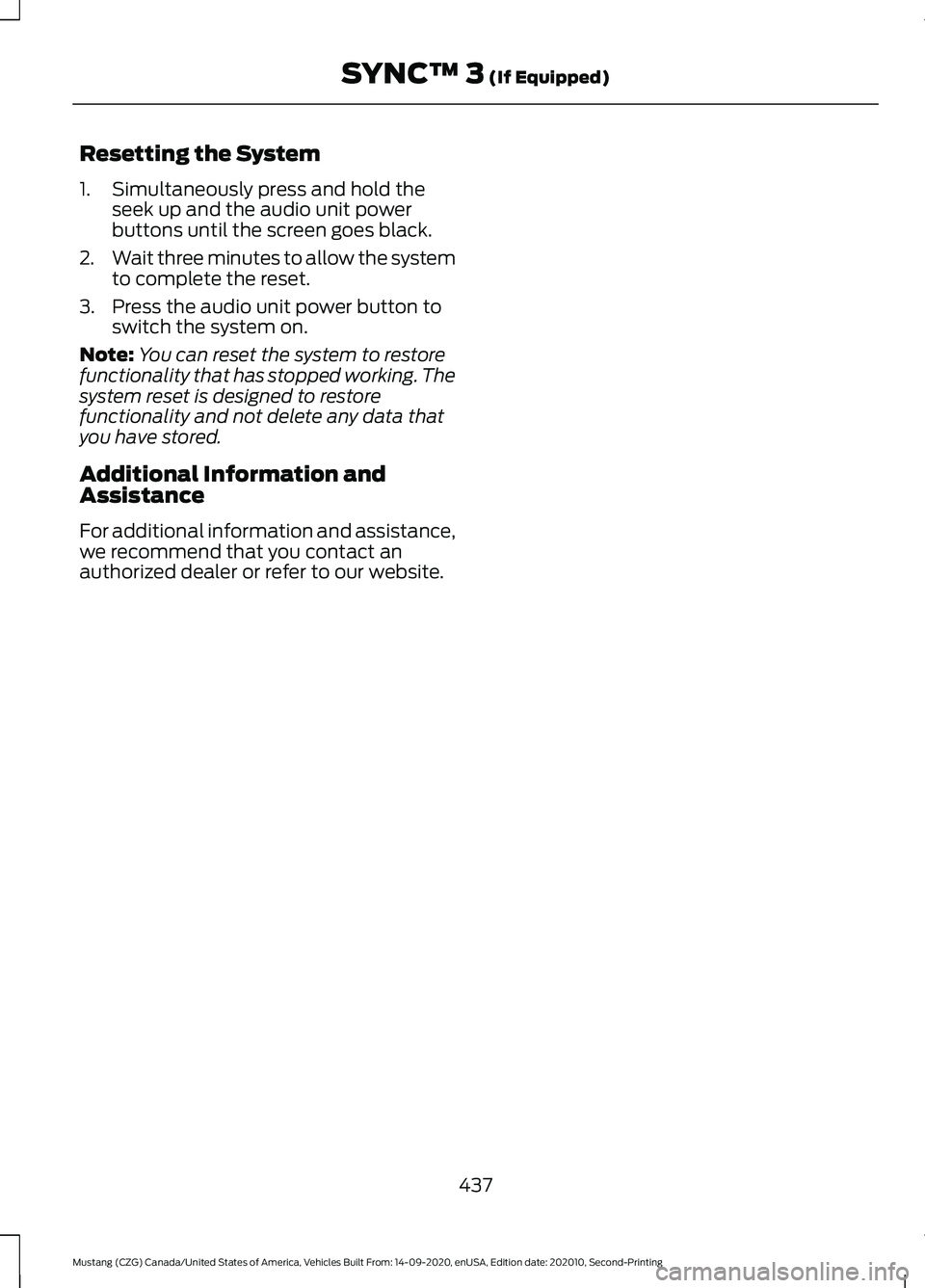
Resetting the System
1. Simultaneously press and hold the
seek up and the audio unit power
buttons until the screen goes black.
2. Wait three minutes to allow the system
to complete the reset.
3. Press the audio unit power button to switch the system on.
Note: You can reset the system to restore
functionality that has stopped working. The
system reset is designed to restore
functionality and not delete any data that
you have stored.
Additional Information and
Assistance
For additional information and assistance,
we recommend that you contact an
authorized dealer or refer to our website.
437
Mustang (CZG) Canada/United States of America, Vehicles Built From: 14-09-2020, enUSA, Edition date: 202010, Second-Printing SYNC™ 3 (If Equipped)
Page 445 of 530
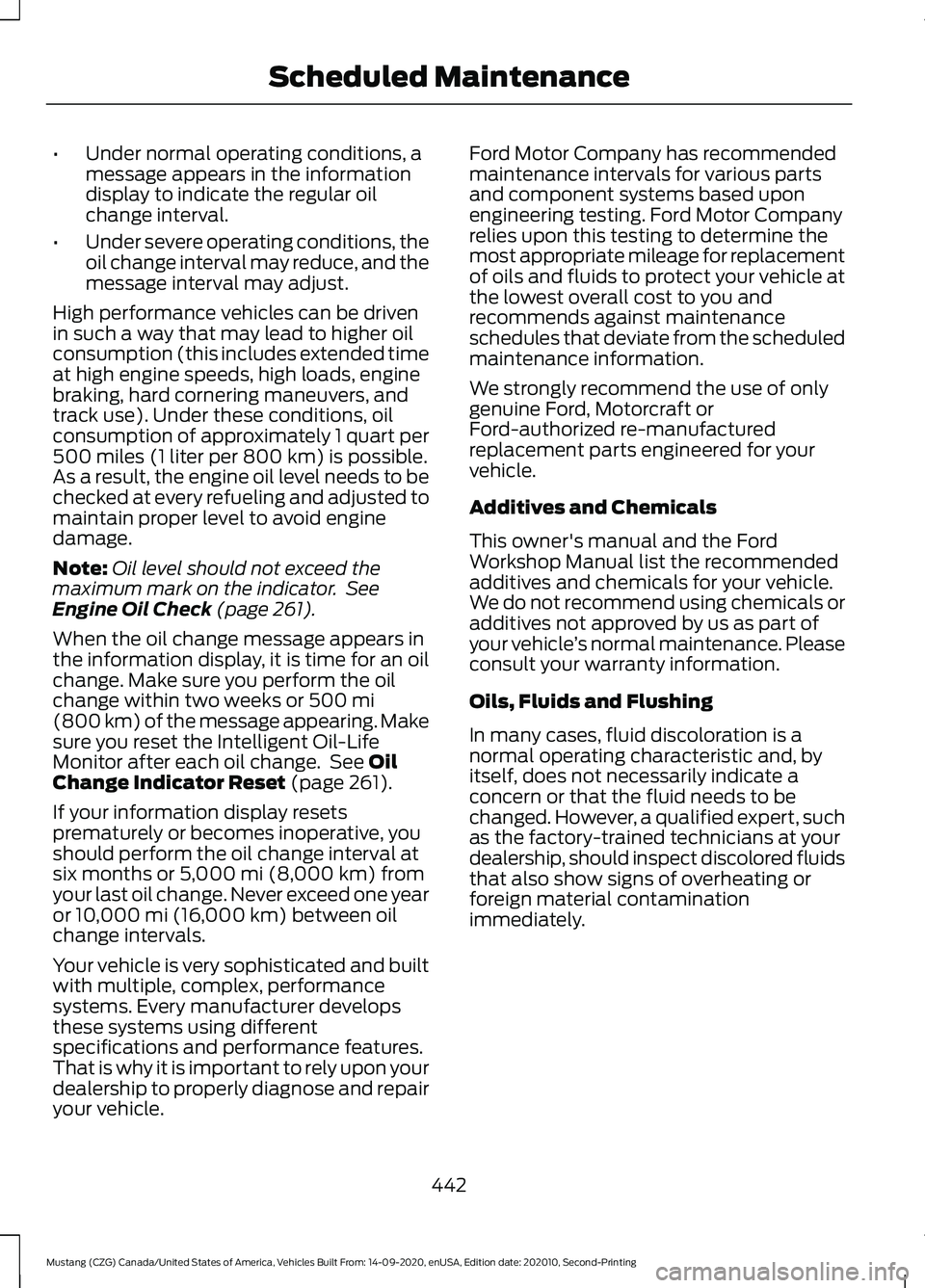
•
Under normal operating conditions, a
message appears in the information
display to indicate the regular oil
change interval.
• Under severe operating conditions, the
oil change interval may reduce, and the
message interval may adjust.
High performance vehicles can be driven
in such a way that may lead to higher oil
consumption (this includes extended time
at high engine speeds, high loads, engine
braking, hard cornering maneuvers, and
track use). Under these conditions, oil
consumption of approximately 1 quart per
500 miles (1 liter per 800 km) is possible.
As a result, the engine oil level needs to be
checked at every refueling and adjusted to
maintain proper level to avoid engine
damage.
Note: Oil level should not exceed the
maximum mark on the indicator. See
Engine Oil Check (page 261).
When the oil change message appears in
the information display, it is time for an oil
change. Make sure you perform the oil
change within two weeks or
500 mi
(800 km) of the message appearing. Make
sure you reset the Intelligent Oil-Life
Monitor after each oil change. See
Oil
Change Indicator Reset (page 261).
If your information display resets
prematurely or becomes inoperative, you
should perform the oil change interval at
six months or
5,000 mi (8,000 km) from
your last oil change. Never exceed one year
or
10,000 mi (16,000 km) between oil
change intervals.
Your vehicle is very sophisticated and built
with multiple, complex, performance
systems. Every manufacturer develops
these systems using different
specifications and performance features.
That is why it is important to rely upon your
dealership to properly diagnose and repair
your vehicle. Ford Motor Company has recommended
maintenance intervals for various parts
and component systems based upon
engineering testing. Ford Motor Company
relies upon this testing to determine the
most appropriate mileage for replacement
of oils and fluids to protect your vehicle at
the lowest overall cost to you and
recommends against maintenance
schedules that deviate from the scheduled
maintenance information.
We strongly recommend the use of only
genuine Ford, Motorcraft or
Ford-authorized re-manufactured
replacement parts engineered for your
vehicle.
Additives and Chemicals
This owner's manual and the Ford
Workshop Manual list the recommended
additives and chemicals for your vehicle.
We do not recommend using chemicals or
additives not approved by us as part of
your vehicle
’s normal maintenance. Please
consult your warranty information.
Oils, Fluids and Flushing
In many cases, fluid discoloration is a
normal operating characteristic and, by
itself, does not necessarily indicate a
concern or that the fluid needs to be
changed. However, a qualified expert, such
as the factory-trained technicians at your
dealership, should inspect discolored fluids
that also show signs of overheating or
foreign material contamination
immediately.
442
Mustang (CZG) Canada/United States of America, Vehicles Built From: 14-09-2020, enUSA, Edition date: 202010, Second-Printing Scheduled Maintenance
Page 449 of 530
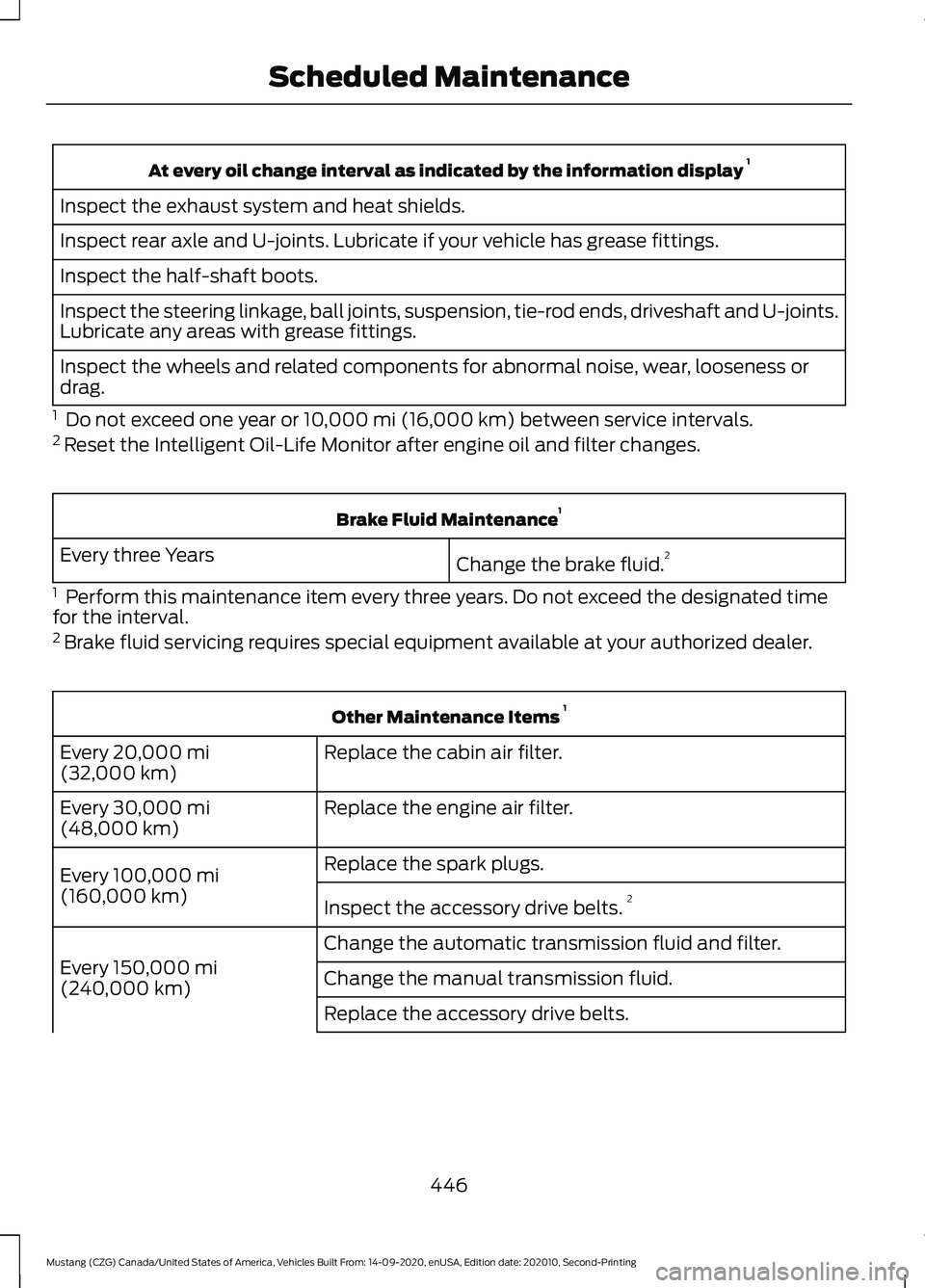
At every oil change interval as indicated by the information display
1
Inspect the exhaust system and heat shields.
Inspect rear axle and U-joints. Lubricate if your vehicle has grease fittings.
Inspect the half-shaft boots.
Inspect the steering linkage, ball joints, suspension, tie-rod ends, driveshaft and U-joints.
Lubricate any areas with grease fittings.
Inspect the wheels and related components for abnormal noise, wear, looseness or
drag.
1 Do not exceed one year or 10,000 mi (16,000 km) between service intervals.
2 Reset the Intelligent Oil-Life Monitor after engine oil and filter changes. Brake Fluid Maintenance
1
Change the brake fluid. 2
Every three Years
1 Perform this maintenance item every three years. Do not exceed the designated time
for the interval.
2 Brake fluid servicing requires special equipment available at your authorized dealer. Other Maintenance Items
1
Replace the cabin air filter.
Every
20,000 mi
(32,000 km)
Replace the engine air filter.
Every
30,000 mi
(48,000 km)
Replace the spark plugs.
Every
100,000 mi
(160,000 km) Inspect the accessory drive belts. 2
Change the automatic transmission fluid and filter.
Every
150,000 mi
(240,000 km) Change the manual transmission fluid.
Replace the accessory drive belts.
446
Mustang (CZG) Canada/United States of America, Vehicles Built From: 14-09-2020, enUSA, Edition date: 202010, Second-Printing Scheduled Maintenance
Page 452 of 530
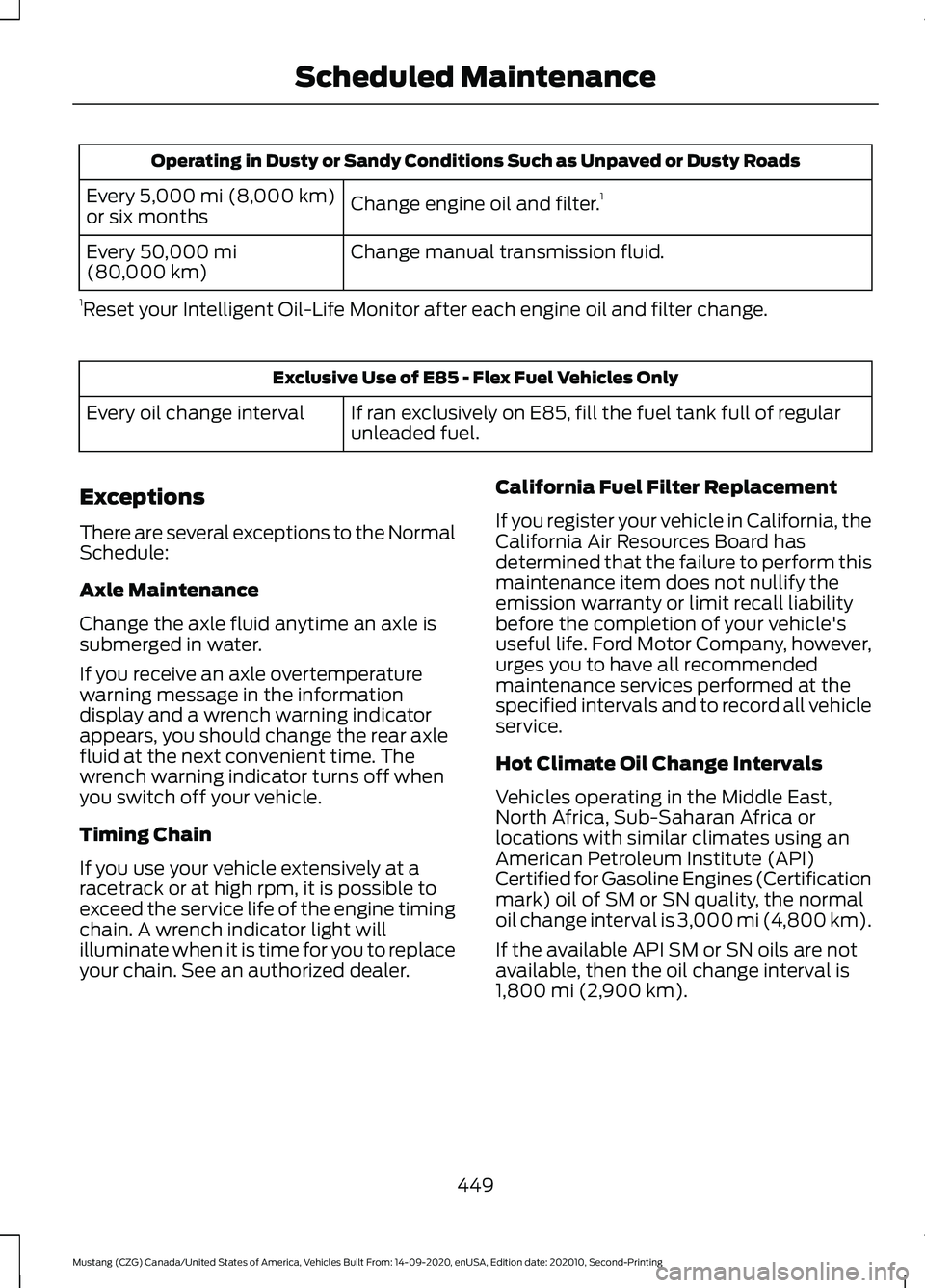
Operating in Dusty or Sandy Conditions Such as Unpaved or Dusty Roads
Change engine oil and filter. 1
Every 5,000 mi (8,000 km)
or six months
Change manual transmission fluid.
Every
50,000 mi
(80,000 km)
1 Reset your Intelligent Oil-Life Monitor after each engine oil and filter change. Exclusive Use of E85 - Flex Fuel Vehicles Only
If ran exclusively on E85, fill the fuel tank full of regular
unleaded fuel.
Every oil change interval
Exceptions
There are several exceptions to the Normal
Schedule:
Axle Maintenance
Change the axle fluid anytime an axle is
submerged in water.
If you receive an axle overtemperature
warning message in the information
display and a wrench warning indicator
appears, you should change the rear axle
fluid at the next convenient time. The
wrench warning indicator turns off when
you switch off your vehicle.
Timing Chain
If you use your vehicle extensively at a
racetrack or at high rpm, it is possible to
exceed the service life of the engine timing
chain. A wrench indicator light will
illuminate when it is time for you to replace
your chain. See an authorized dealer. California Fuel Filter Replacement
If you register your vehicle in California, the
California Air Resources Board has
determined that the failure to perform this
maintenance item does not nullify the
emission warranty or limit recall liability
before the completion of your vehicle's
useful life. Ford Motor Company, however,
urges you to have all recommended
maintenance services performed at the
specified intervals and to record all vehicle
service.
Hot Climate Oil Change Intervals
Vehicles operating in the Middle East,
North Africa, Sub-Saharan Africa or
locations with similar climates using an
American Petroleum Institute (API)
Certified for Gasoline Engines (Certification
mark) oil of SM or SN quality, the normal
oil change interval is 3,000 mi (4,800 km).
If the available API SM or SN oils are not
available, then the oil change interval is
1,800 mi (2,900 km)
.
449
Mustang (CZG) Canada/United States of America, Vehicles Built From: 14-09-2020, enUSA, Edition date: 202010, Second-Printing Scheduled Maintenance
Page 524 of 530
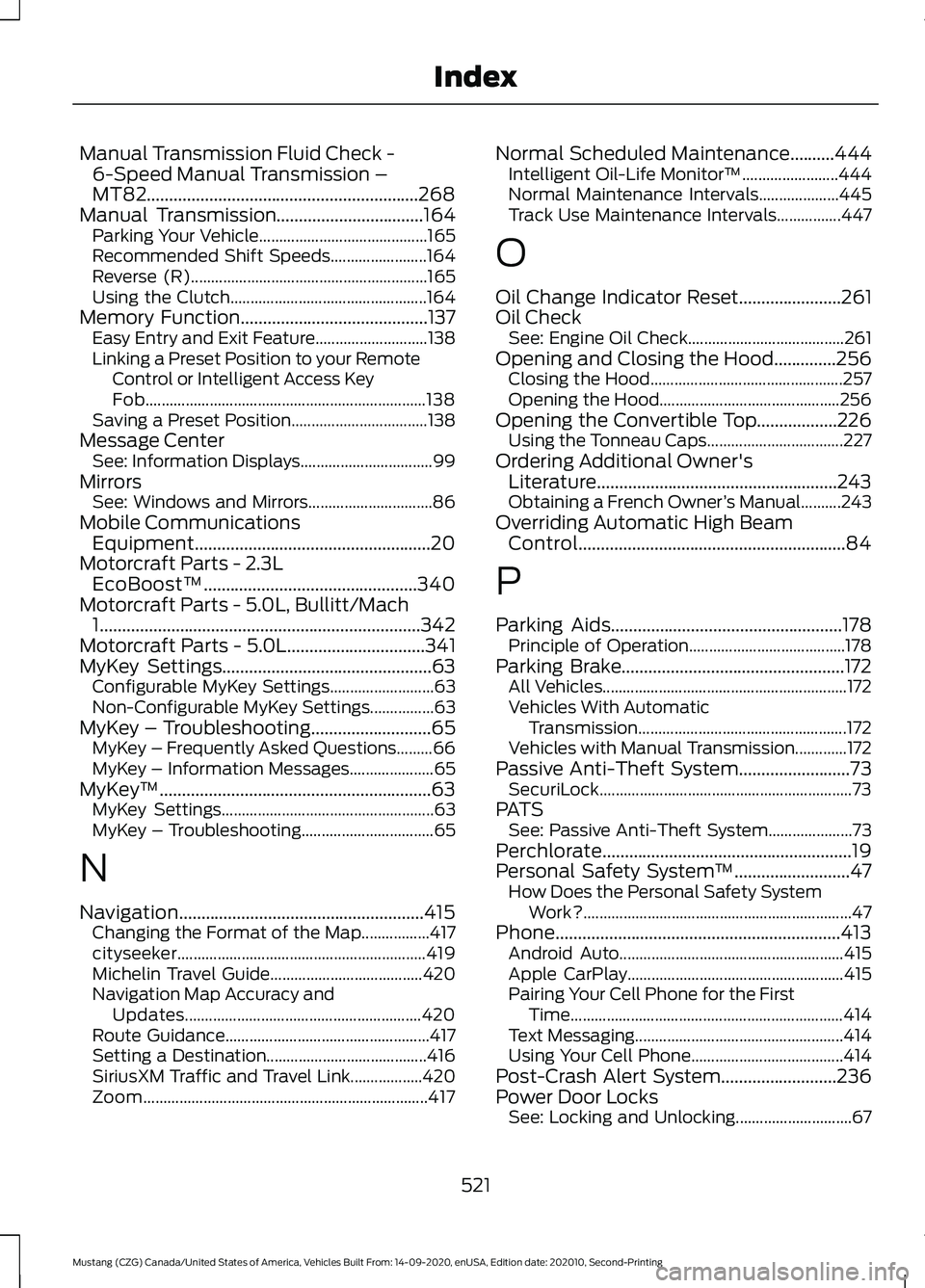
Manual Transmission Fluid Check -
6-Speed Manual Transmission –
MT82.............................................................268
Manual Transmission.................................164 Parking Your Vehicle.......................................... 165
Recommended Shift Speeds........................164
Reverse (R)........................................................... 165
Using the Clutch................................................. 164
Memory Function..........................................137
Easy Entry and Exit Feature............................ 138
Linking a Preset Position to your Remote Control or Intelligent Access Key
Fob...................................................................... 138
Saving a Preset Position.................................. 138
Message Center See: Information Displays................................. 99
Mirrors See: Windows and Mirrors............................... 86
Mobile Communications Equipment.....................................................20
Motorcraft Parts - 2.3L EcoBoost™................................................340
Motorcraft Parts - 5.0L, Bullitt/Mach 1........................................................................\
342
Motorcraft Parts - 5.0L
...............................341
MyKey Settings...............................................63 Configurable MyKey Settings.......................... 63
Non-Configurable MyKey Settings................63
MyKey – Troubleshooting
...........................65
MyKey – Frequently Asked Questions.........66
MyKey – Information Messages..................... 65
MyKey ™.............................................................63
MyKey Settings..................................................... 63
MyKey – Troubleshooting................................. 65
N
Navigation.......................................................415 Changing the Format of the Map.................417
cityseeker.............................................................. 419
Michelin Travel Guide...................................... 420
Navigation Map Accuracy and Updates........................................................... 420
Route Guidance................................................... 417
Setting a Destination........................................ 416
SiriusXM Traffic and Travel Link..................420
Zoom....................................................................... 417Normal Scheduled Maintenance..........444
Intelligent Oil-Life Monitor™........................ 444
Normal Maintenance Intervals.................... 445
Track Use Maintenance Intervals................447
O
Oil Change Indicator Reset
.......................261
Oil Check See: Engine Oil Check....................................... 261
Opening and Closing the Hood..............256 Closing the Hood................................................ 257
Opening the Hood............................................. 256
Opening the Convertible Top..................226 Using the Tonneau Caps.................................. 227
Ordering Additional Owner's Literature......................................................243
Obtaining a French Owner ’s Manual..........243
Overriding Automatic High Beam Control............................................................84
P
Parking Aids....................................................178 Principle of Operation....................................... 178
Parking Brake..................................................172 All Vehicles............................................................. 172
Vehicles With Automatic Transmission.................................................... 172
Vehicles with Manual Transmission.............172
Passive Anti-Theft System.........................73 SecuriLock............................................................... 73
PATS See: Passive Anti-Theft System.....................73
Perchlorate
........................................................19
Personal Safety System ™..........................47
How Does the Personal Safety System
Work?................................................................... 47
Phone................................................................413 Android Auto........................................................ 415
Apple CarPlay...................................................... 415
Pairing Your Cell Phone for the First Time.................................................................... 414
Text Messaging.................................................... 414
Using Your Cell Phone...................................... 414
Post-Crash Alert System
..........................236
Power Door Locks See: Locking and Unlocking............................. 67
521
Mustang (CZG) Canada/United States of America, Vehicles Built From: 14-09-2020, enUSA, Edition date: 202010, Second-Printing Index
Page 527 of 530
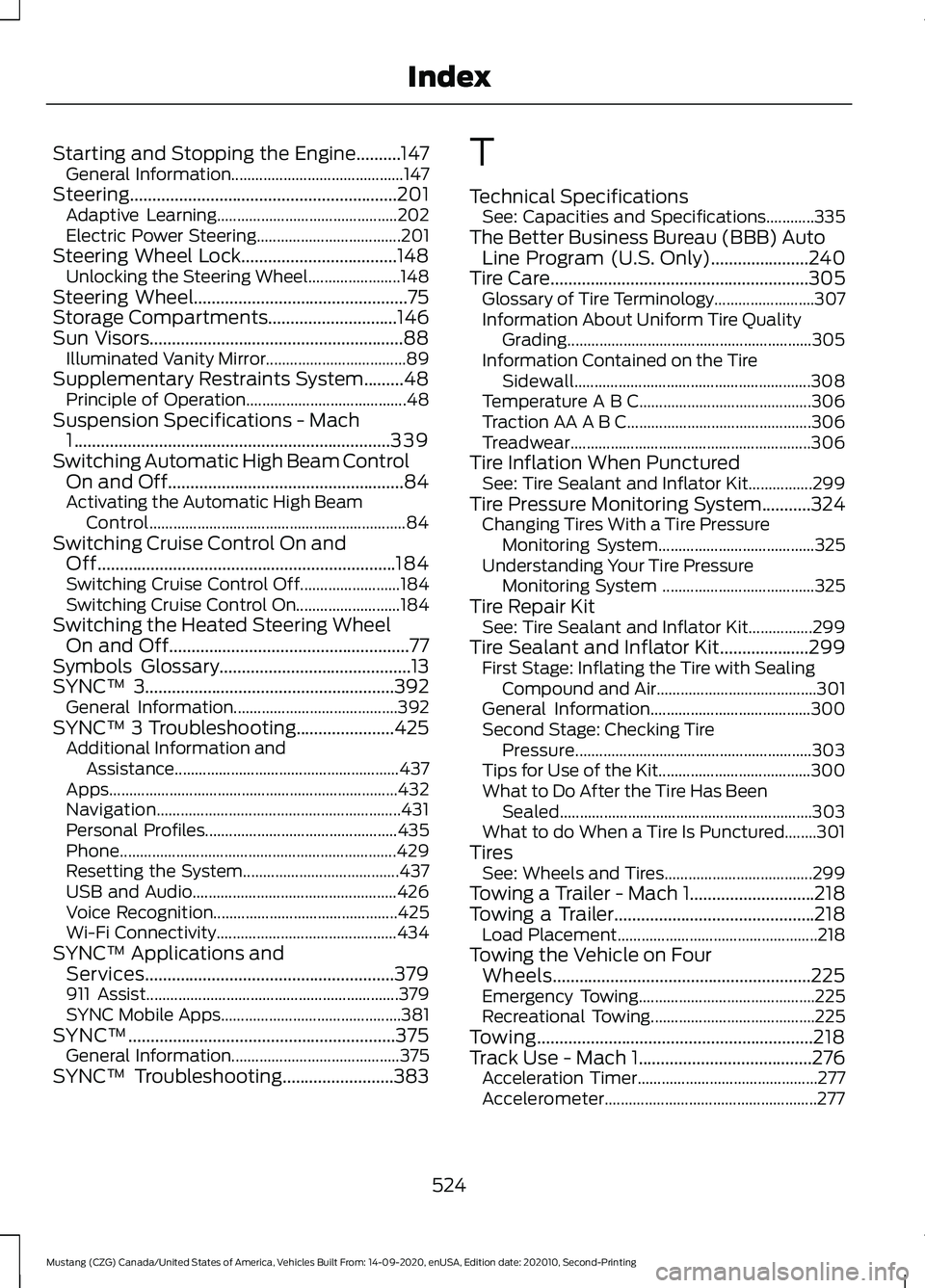
Starting and Stopping the Engine..........147
General Information........................................... 147
Steering............................................................201 Adaptive Learning............................................. 202
Electric Power Steering.................................... 201
Steering Wheel Lock...................................148 Unlocking the Steering Wheel....................... 148
Steering Wheel................................................75
Storage Compartments.............................146
Sun Visors.........................................................88 Illuminated Vanity Mirror................................... 89
Supplementary Restraints System.........48 Principle of Operation........................................ 48
Suspension Specifications - Mach 1
.......................................................................339
Switching Automatic High Beam Control On and Off.....................................................84
Activating the Automatic High Beam Control................................................................ 84
Switching Cruise Control On and Off...................................................................184
Switching Cruise Control Off.........................184
Switching Cruise Control On.......................... 184
Switching the Heated Steering Wheel On and Off......................................................77
Symbols Glossary
...........................................13
SYNC™ 3........................................................392
General Information......................................... 392
SYNC™ 3 Troubleshooting......................425 Additional Information and
Assistance........................................................ 437
Apps........................................................................\
432
Navigation............................................................. 431
Personal Profiles................................................ 435
Phone..................................................................... 429
Resetting the System....................................... 437
USB and Audio................................................... 426
Voice Recognition.............................................. 425
Wi-Fi Connectivity............................................. 434
SYNC™ Applications and Services........................................................379
911 Assist............................................................... 379
SYNC Mobile Apps............................................. 381
SYNC™............................................................375 General Information.......................................... 375
SYNC™ Troubleshooting
.........................383 T
Technical Specifications
See: Capacities and Specifications............335
The Better Business Bureau (BBB) Auto Line Program (U.S. Only)
......................240
Tire Care..........................................................305
Glossary of Tire Terminology......................... 307
Information About Uniform Tire Quality Grading............................................................. 305
Information Contained on the Tire Sidewall........................................................... 308
Temperature A B C........................................... 306
Traction AA A B C.............................................. 306
Treadwear............................................................ 306
Tire Inflation When Punctured See: Tire Sealant and Inflator Kit................299
Tire Pressure Monitoring System
...........324
Changing Tires With a Tire Pressure
Monitoring System....................................... 325
Understanding Your Tire Pressure Monitoring System ...................................... 325
Tire Repair Kit See: Tire Sealant and Inflator Kit................299
Tire Sealant and Inflator Kit
....................299
First Stage: Inflating the Tire with Sealing
Compound and Air........................................ 301
General Information........................................ 300
Second Stage: Checking Tire Pressure........................................................... 303
Tips for Use of the Kit...................................... 300
What to Do After the Tire Has Been Sealed............................................................... 303
What to do When a Tire Is Punctured........301
Tires See: Wheels and Tires..................................... 299
Towing a Trailer - Mach 1............................218
Towing a Trailer.............................................218 Load Placement.................................................. 218
Towing the Vehicle on Four Wheels..........................................................225
Emergency Towing............................................ 225
Recreational Towing......................................... 225
Towing
..............................................................218
Track Use - Mach 1.......................................276 Acceleration Timer............................................. 277
Accelerometer..................................................... 277
524
Mustang (CZG) Canada/United States of America, Vehicles Built From: 14-09-2020, enUSA, Edition date: 202010, Second-Printing Index