ignition FORD MUSTANG 2021 Manual PDF
[x] Cancel search | Manufacturer: FORD, Model Year: 2021, Model line: MUSTANG, Model: FORD MUSTANG 2021Pages: 530, PDF Size: 10.22 MB
Page 395 of 530
GENERAL INFORMATION
WARNING: Driving while distracted
can result in loss of vehicle control, crash
and injury. We strongly recommend that
you use extreme caution when using any
device that may take your focus off the
road. Your primary responsibility is the
safe operation of your vehicle. We
recommend against the use of any
hand-held device while driving and
encourage the use of voice-operated
systems when possible. Make sure you
are aware of all applicable local laws
that may affect the use of electronic
devices while driving.
About SYNC
The system allows you to interact with the
entertainment, information and
communication systems on your vehicle
using voice commands and a touchscreen.
The system provides easy interaction with
audio, phone, navigation, mobile apps and
settings.
Note: You can switch the system on and
use it for up to an hour without switching
the ignition on.
Note: You can use the system after you
switch the ignition off for up to 10 minutes
or until you open a door.
Note: For your safety, some features are
speed-dependent. Their use is limited to
when your vehicle speed is less than 3 mph
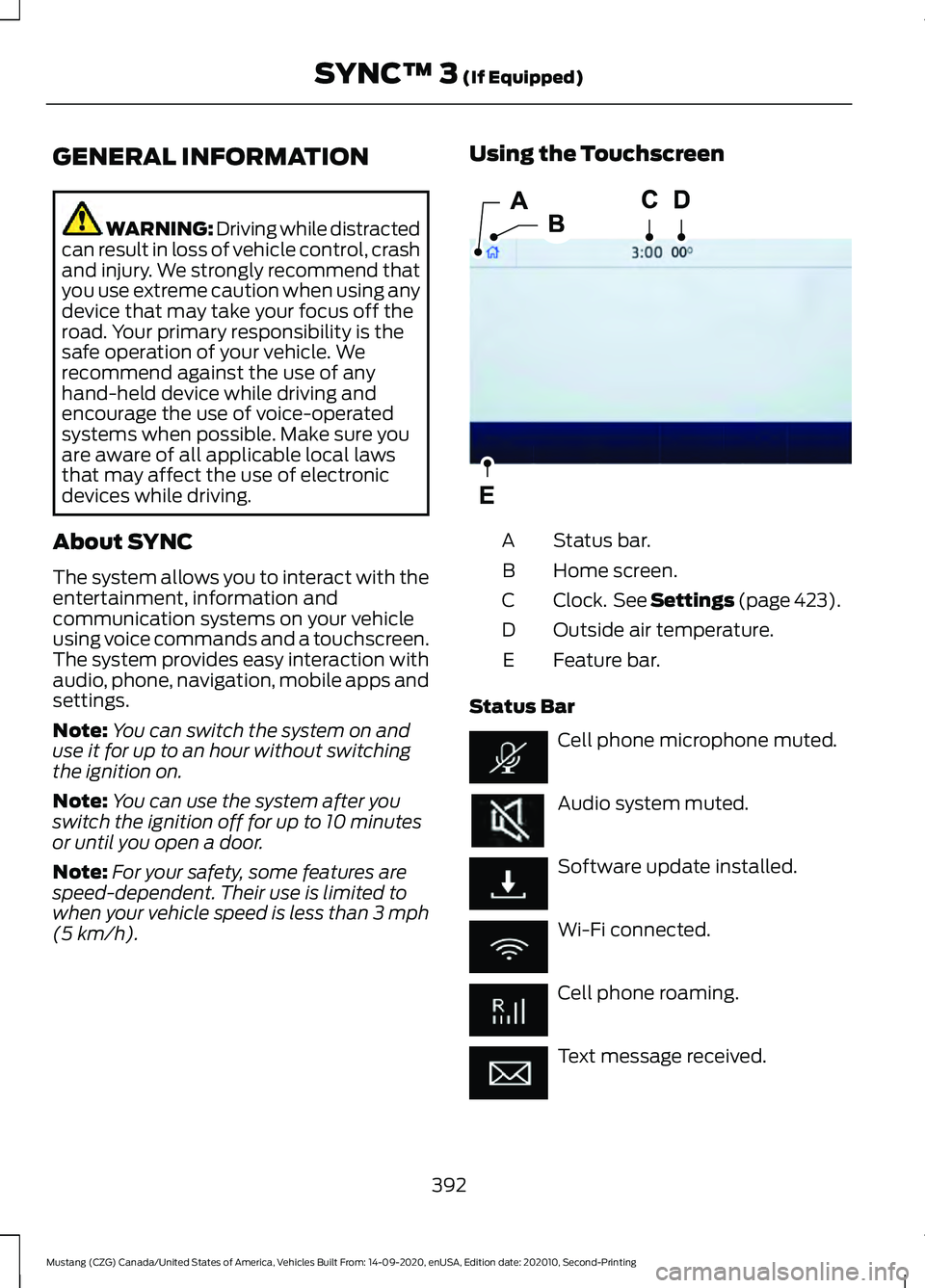
(5 km/h). Using the Touchscreen
Status bar.
A
Home screen.
B
Clock. See Settings (page 423).
C
Outside air temperature.
D
Feature bar.
E
Status Bar Cell phone microphone muted.
Audio system muted.
Software update installed.
Wi-Fi connected.
Cell phone roaming.
Text message received.
392
Mustang (CZG) Canada/United States of America, Vehicles Built From: 14-09-2020, enUSA, Edition date: 202010, Second-Printing SYNC™ 3
(If Equipped)E293823
Page 408 of 530
Troubleshooting Tips
Action
Cause
Message
No action required. This
message should disappear
shortly.
Radio requires more than two
seconds to produce audio for
the selected channel.
Acquiring Signal
If this message does not clear
shortly, or with an ignition key
cycle, your receiver may have
a fault. See an authorized
dealer for service.
There is an internal module or
system failure present.
Satellite antenna fault
SIRIUS system failure
Tune to another channel or
choose another preset.
The channel is no longer avail-
able.
Invalid Channel
Contact SiriusXM at 1-888-
539-7474 to subscribe to the
channel, or tune to another
channel.
Your subscription does not
include this channel.
Unsubscribed Channel
The signal is blocked. When
you move into an open area,
the signal should return.
The signal is lost from the Siri-
usXM satellite or SiriusXM
tower to your vehicle antenna.
Satellite acquiring
signal…
No action required. The
process may take up to three
minutes.
Update of channel program-
ming in progress.
Updating…
Contact SiriusXM at 1-888-
539-7474 to resolve subscrip-
tion issues.
Your satellite service is no
longer available.
Questions? Call 1-
888-539-7474
Use the channel guide or the
Sirius XM Settings tile to turn
off the Lock or Skip function on
that station.
All the channels in the selected
category are either skipped or
locked.
None found. Check
channel guide.
No action required.
SiriusXM has updated the
channels available for your
vehicle.
SIRIUS Subscription
updated
HD Radio ™ Information (If
Available)
To activate HD radio, please see the Radio
Settings in the Settings Chapter. See
Settings (page 423). Note:
HD Radio broadcasts are not
available in all markets.
405
Mustang (CZG) Canada/United States of America, Vehicles Built From: 14-09-2020, enUSA, Edition date: 202010, Second-Printing SYNC™ 3
(If Equipped)
Page 432 of 530
Phone
Possible Cause and Resolution
Symptom
During a call, I can hear
excessive background noise. –
Incorrect cell phone settings.
•Check and adjust the audio settings on your cell
phone. Refer to your cell phone's user manual.
– Cell phone malfunction.
•Switch your cell phone on and off, and vehicle
Bluetooth® on and off and try again.
– Cell phone microphone muted.
•Unmute your cell phone microphone.
During a call, I can hear the
other person but they
cannot hear me.
During a call, I cannot hear
the other person and they
cannot hear me.
–
System restart required.
•Switch the ignition off and open the door. Close
the door and lock the vehicle. Wait until the
touchscreen is off and any illuminated USB ports
are not illuminated. Unlock the vehicle, switch the
ignition on and try again.
I cannot download a phone-
book. –
Incompatible cell phone.
•Check the compatibility of your cell phone on our
website.
– Incorrect cell phone settings.
•Allow the system to retrieve contacts from your
cell phone. Refer to your cell phone's user manual.
– Incorrect system settings.
•Switch automatic phonebook download on. See
Settings
(page 423).
– Cell phone malfunction.
•Switch your cell phone off and on to reset it and
try again.
429
Mustang (CZG) Canada/United States of America, Vehicles Built From: 14-09-2020, enUSA, Edition date: 202010, Second-Printing SYNC™ 3
(If Equipped)
Page 438 of 530
Possible Cause and Resolution
Symptom
I cannot see SYNC when I
search for Wi-Fi networks on
my cell phone or other
device. –
System limitation.
•SYNC does not provide a Wi-Fi hotspot at this time.
– Weak network signal
•Move your vehicle closer to the Wi-Fi hotspot or to
a place where the network signal is not obstructed.
– Wi-Fi hotspot in high demand or has a slow Internet
connection.
•Use a more reliable Wi-Fi hotspot.
Software downloads take
too long.
–No software update available.
– Wi-Fi network requires a subscription or acceptance
of terms and conditions.
•Test the connection using another device. If the
network requires a subscription or acceptance of
terms and conditions, contact the network service
provider.
The system seems to
connect to a Wi-Fi network
and the signal strength is
excellent but the software
does not update.
Personal Profiles (If Equipped) Possible Cause and Resolution
Symptom
You might not have set up Personal Profiles.
I cannot create a profile. You might have entered an invalid profile.
You might not have selected a memory button when
prompted.
You might not have the ignition on or in park (P), or you
shifted out park (P) when creating a profile.
Personal Profiles has been switched off.
You might not have selected the lock button on the remote
control.
I cannot link a remote
control. The remote control selected was already associated with
another profile and the system declined to overwrite.
The system performed a profile recall when linking a
remote control.
435
Mustang (CZG) Canada/United States of America, Vehicles Built From: 14-09-2020, enUSA, Edition date: 202010, Second-Printing SYNC™ 3
(If Equipped)
Page 439 of 530
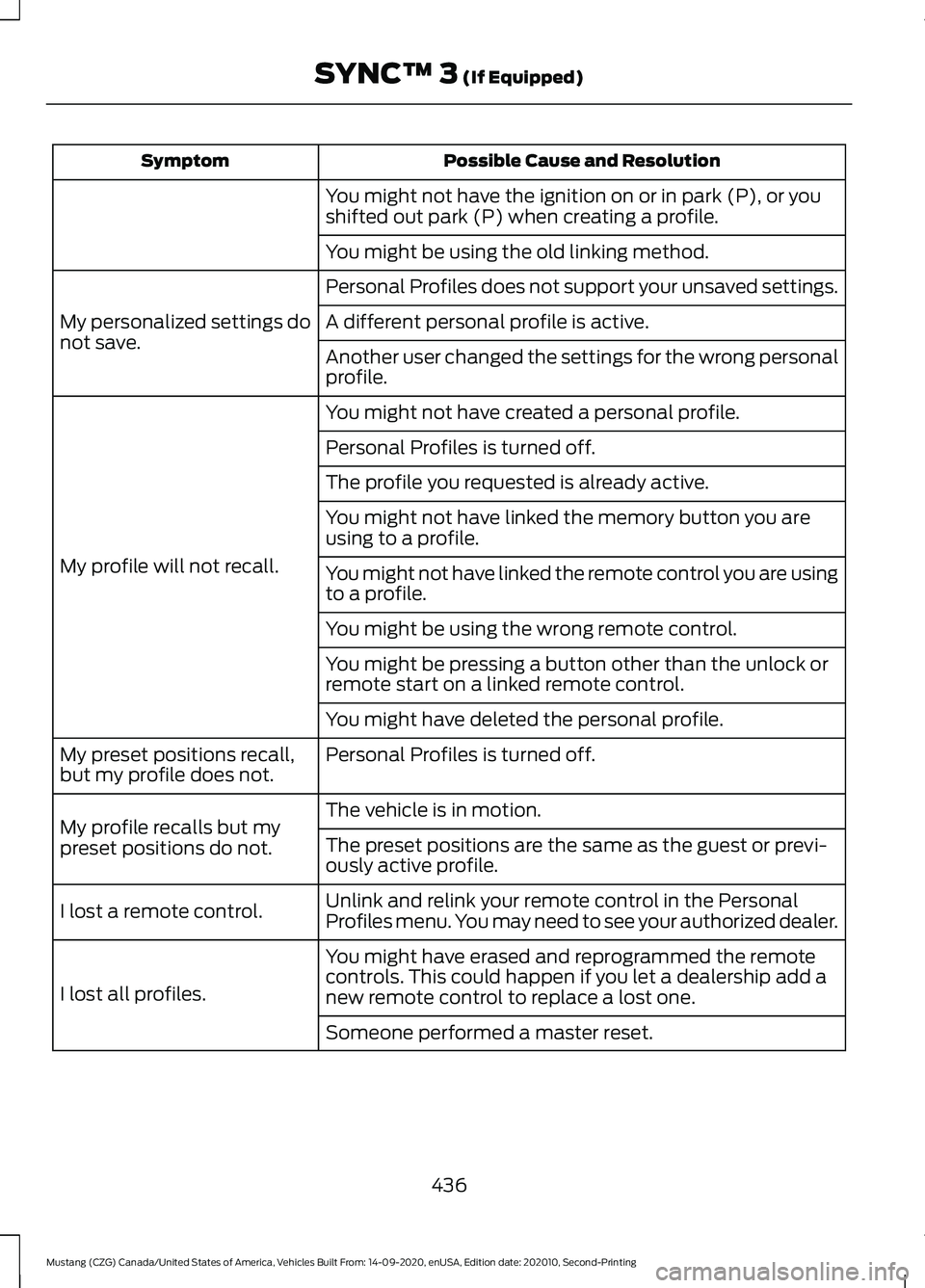
Possible Cause and Resolution
Symptom
You might not have the ignition on or in park (P), or you
shifted out park (P) when creating a profile.
You might be using the old linking method.
Personal Profiles does not support your unsaved settings.
My personalized settings do
not save. A different personal profile is active.
Another user changed the settings for the wrong personal
profile.
You might not have created a personal profile.
My profile will not recall. Personal Profiles is turned off.
The profile you requested is already active.
You might not have linked the memory button you are
using to a profile.
You might not have linked the remote control you are using
to a profile.
You might be using the wrong remote control.
You might be pressing a button other than the unlock or
remote start on a linked remote control.
You might have deleted the personal profile.
Personal Profiles is turned off.
My preset positions recall,
but my profile does not.
The vehicle is in motion.
My profile recalls but my
preset positions do not. The preset positions are the same as the guest or previ-
ously active profile.
Unlink and relink your remote control in the Personal
Profiles menu. You may need to see your authorized dealer.
I lost a remote control.
You might have erased and reprogrammed the remote
controls. This could happen if you let a dealership add a
new remote control to replace a lost one.
I lost all profiles.
Someone performed a master reset.
436
Mustang (CZG) Canada/United States of America, Vehicles Built From: 14-09-2020, enUSA, Edition date: 202010, Second-Printing SYNC™ 3 (If Equipped)
Page 523 of 530
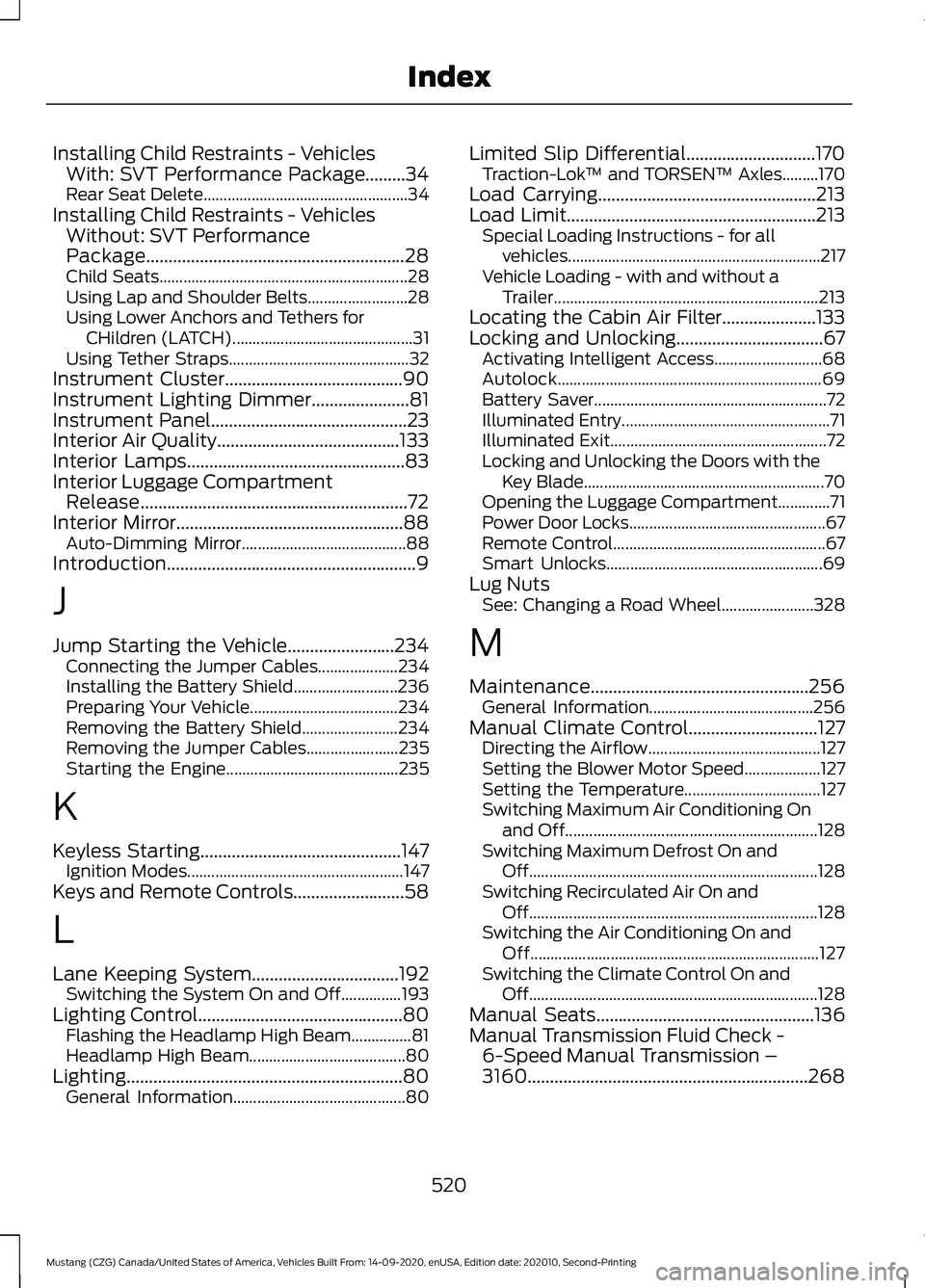
Installing Child Restraints - Vehicles
With: SVT Performance Package.........34
Rear Seat Delete................................................... 34
Installing Child Restraints - Vehicles Without: SVT Performance
Package..........................................................28
Child Seats.............................................................. 28
Using Lap and Shoulder Belts......................... 28
Using Lower Anchors and Tethers for CHildren (LATCH)............................................. 31
Using Tether Straps............................................. 32
Instrument Cluster
........................................90
Instrument Lighting Dimmer......................81
Instrument Panel
............................................23
Interior Air Quality.........................................133
Interior Lamps
.................................................83
Interior Luggage Compartment Release............................................................72
Interior Mirror...................................................88 Auto-Dimming Mirror......................................... 88
Introduction........................................................9
J
Jump Starting the Vehicle........................234 Connecting the Jumper Cables.................... 234
Installing the Battery Shield.......................... 236
Preparing Your Vehicle..................................... 234
Removing the Battery Shield........................ 234
Removing the Jumper Cables....................... 235
Starting the Engine........................................... 235
K
Keyless Starting
.............................................147
Ignition Modes...................................................... 147
Keys and Remote Controls.........................58
L
Lane Keeping System.................................192 Switching the System On and Off...............193
Lighting Control
..............................................80
Flashing the Headlamp High Beam...............81
Headlamp High Beam....................................... 80
Lighting
..............................................................80
General Information........................................... 80Limited Slip Differential.............................170
Traction-Lok ™ and TORSEN™ Axles.........170
Load Carrying.................................................213
Load Limit........................................................213 Special Loading Instructions - for all
vehicles............................................................... 217
Vehicle Loading - with and without a Trailer.................................................................. 213
Locating the Cabin Air Filter.....................133
Locking and Unlocking.................................67 Activating Intelligent Access........................... 68
Autolock.................................................................. 69
Battery Saver.......................................................... 72
Illuminated Entry.................................................... 71
Illuminated Exit...................................................... 72
Locking and Unlocking the Doors with the Key Blade............................................................ 70
Opening the Luggage Compartment.............71
Power Door Locks................................................. 67
Remote Control..................................................... 67
Smart Unlocks...................................................... 69
Lug Nuts See: Changing a Road Wheel....................... 328
M
Maintenance.................................................256 General Information......................................... 256
Manual Climate Control
.............................127
Directing the Airflow........................................... 127
Setting the Blower Motor Speed...................127
Setting the Temperature.................................. 127
Switching Maximum Air Conditioning On and Off............................................................... 128
Switching Maximum Defrost On and Off........................................................................\
128
Switching Recirculated Air On and Off........................................................................\
128
Switching the Air Conditioning On and Off........................................................................\
127
Switching the Climate Control On and Off........................................................................\
128
Manual Seats
.................................................136
Manual Transmission Fluid Check - 6-Speed Manual Transmission –
3160...............................................................268
520
Mustang (CZG) Canada/United States of America, Vehicles Built From: 14-09-2020, enUSA, Edition date: 202010, Second-Printing Index