USB FORD MUSTANG 2022 Owner's Manual
[x] Cancel search | Manufacturer: FORD, Model Year: 2022, Model line: MUSTANG, Model: FORD MUSTANG 2022Pages: 528, PDF Size: 10.04 MB
Page 432 of 528
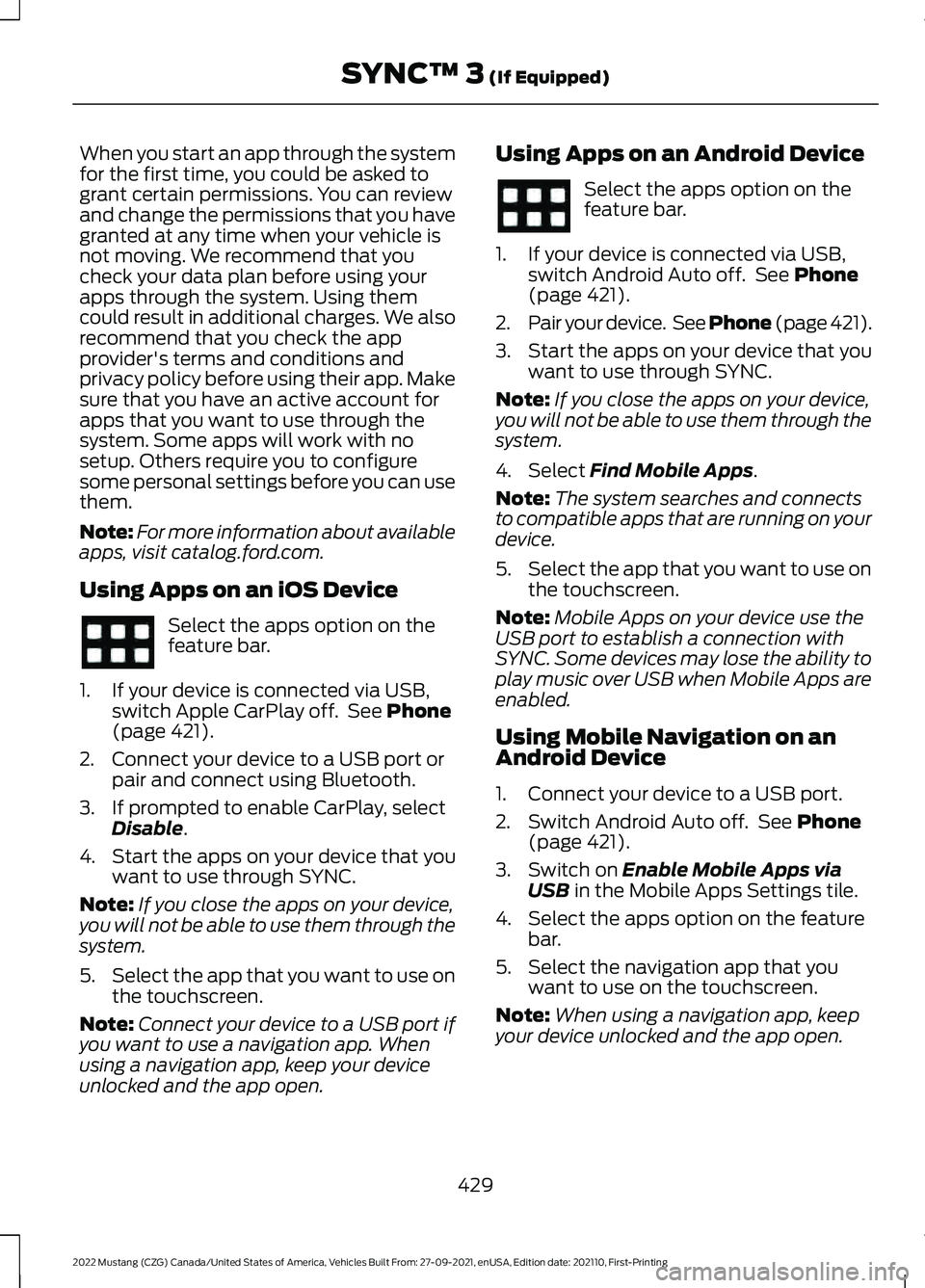
When you start an app through the system
for the first time, you could be asked to
grant certain permissions. You can review
and change the permissions that you have
granted at any time when your vehicle is
not moving. We recommend that you
check your data plan before using your
apps through the system. Using them
could result in additional charges. We also
recommend that you check the app
provider's terms and conditions and
privacy policy before using their app. Make
sure that you have an active account for
apps that you want to use through the
system. Some apps will work with no
setup. Others require you to configure
some personal settings before you can use
them.
Note:
For more information about available
apps, visit catalog.ford.com.
Using Apps on an iOS Device Select the apps option on the
feature bar.
1. If your device is connected via USB, switch Apple CarPlay off. See Phone
(page 421).
2. Connect your device to a USB port or pair and connect using Bluetooth.
3. If prompted to enable CarPlay, select Disable
.
4. Start the apps on your device that you want to use through SYNC.
Note: If you close the apps on your device,
you will not be able to use them through the
system.
5. Select the app that you want to use on
the touchscreen.
Note: Connect your device to a USB port if
you want to use a navigation app. When
using a navigation app, keep your device
unlocked and the app open. Using Apps on an Android Device Select the apps option on the
feature bar.
1. If your device is connected via USB, switch Android Auto off. See
Phone
(page 421).
2. Pair your device. See Phone (page
421).
3. Start the apps on your device that you want to use through SYNC.
Note: If you close the apps on your device,
you will not be able to use them through the
system.
4. Select
Find Mobile Apps.
Note: The system searches and connects
to compatible apps that are running on your
device.
5. Select the app that you want to use on
the touchscreen.
Note: Mobile Apps on your device use the
USB port to establish a connection with
SYNC. Some devices may lose the ability to
play music over USB when Mobile Apps are
enabled.
Using Mobile Navigation on an
Android Device
1. Connect your device to a USB port.
2. Switch Android Auto off. See
Phone
(page 421).
3. Switch on
Enable Mobile Apps via
USB in the Mobile Apps Settings tile.
4. Select the apps option on the feature bar.
5. Select the navigation app that you want to use on the touchscreen.
Note: When using a navigation app, keep
your device unlocked and the app open.
429
2022 Mustang (CZG) Canada/United States of America, Vehicles Built From: 27-09-2021, enUSA, Edition date: 202110, First-Printing SYNC™ 3
(If Equipped)
Page 436 of 528
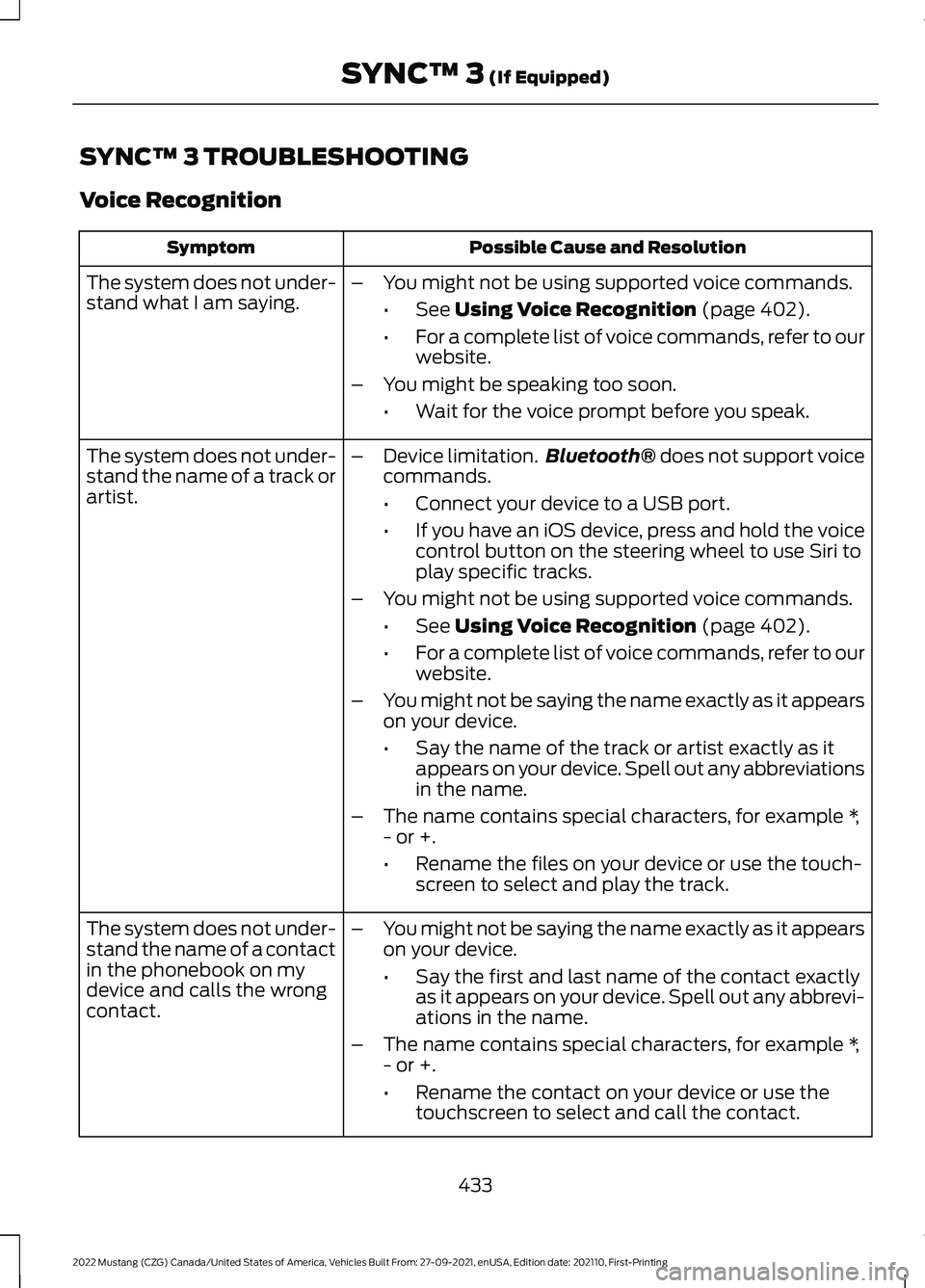
SYNC™ 3 TROUBLESHOOTING
Voice Recognition
Possible Cause and Resolution
Symptom
The system does not under-
stand what I am saying. –
You might not be using supported voice commands.
•See Using Voice Recognition (page 402).
• For a complete list of voice commands, refer to our
website.
– You might be speaking too soon.
•Wait for the voice prompt before you speak.
The system does not under-
stand the name of a track or
artist. –
Device limitation. Bluetooth®
does not support voice
commands.
• Connect your device to a USB port.
• If you have an iOS device, press and hold the voice
control button on the steering wheel to use Siri to
play specific tracks.
– You might not be using supported voice commands.
•See
Using Voice Recognition (page 402).
• For a complete list of voice commands, refer to our
website.
– You might not be saying the name exactly as it appears
on your device.
•Say the name of the track or artist exactly as it
appears on your device. Spell out any abbreviations
in the name.
– The name contains special characters, for example *,
- or +.
•Rename the files on your device or use the touch-
screen to select and play the track.
The system does not under-
stand the name of a contact
in the phonebook on my
device and calls the wrong
contact. –
You might not be saying the name exactly as it appears
on your device.
•Say the first and last name of the contact exactly
as it appears on your device. Spell out any abbrevi-
ations in the name.
– The name contains special characters, for example *,
- or +.
•Rename the contact on your device or use the
touchscreen to select and call the contact.
433
2022 Mustang (CZG) Canada/United States of America, Vehicles Built From: 27-09-2021, enUSA, Edition date: 202110, First-Printing SYNC™ 3
(If Equipped)
Page 437 of 528
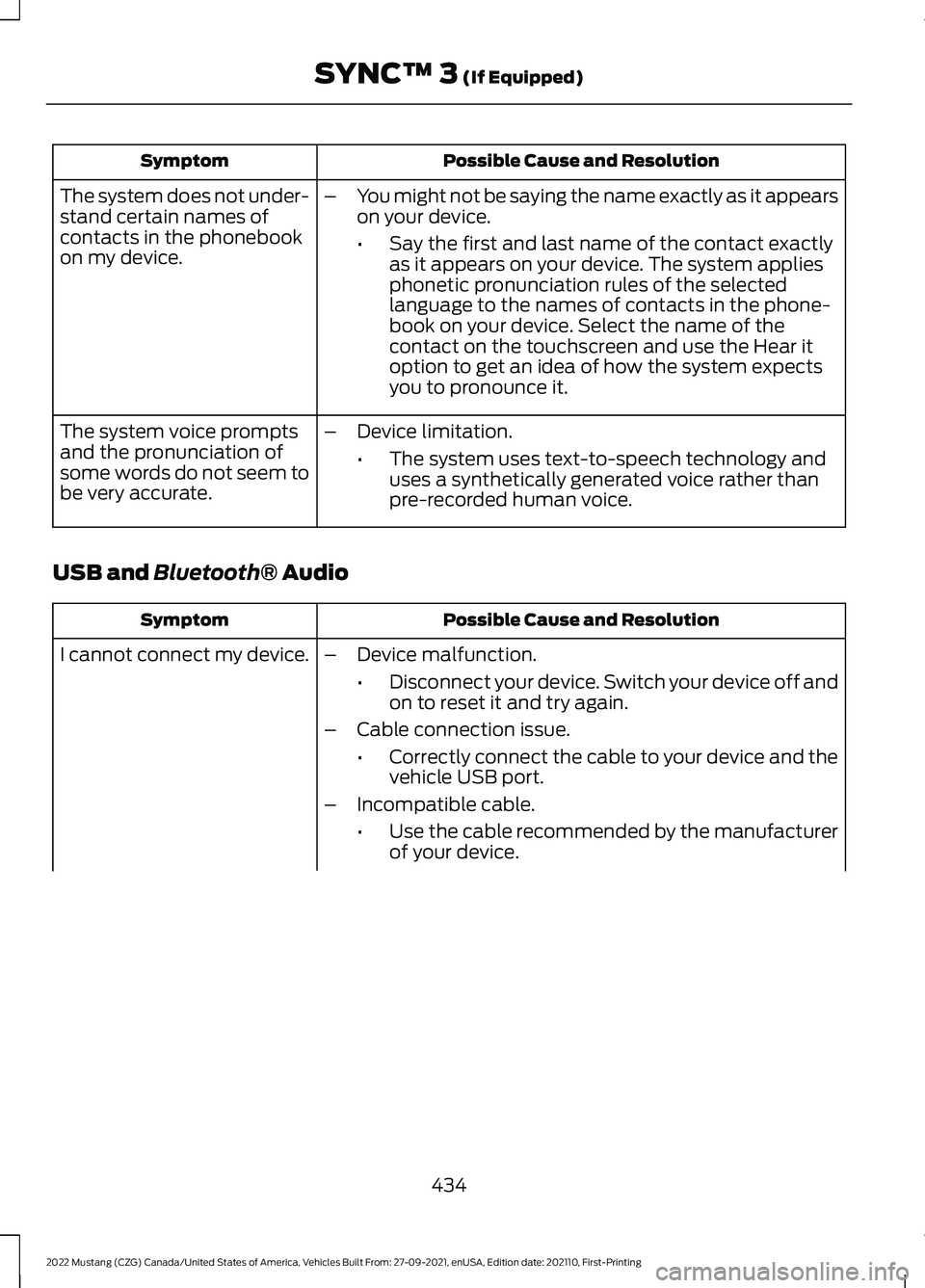
Possible Cause and Resolution
Symptom
–You might not be saying the name exactly as it appears
on your device.
•Say the first and last name of the contact exactly
as it appears on your device. The system applies
phonetic pronunciation rules of the selected
language to the names of contacts in the phone-
book on your device. Select the name of the
contact on the touchscreen and use the Hear it
option to get an idea of how the system expects
you to pronounce it.
The system does not under-
stand certain names of
contacts in the phonebook
on my device.
–Device limitation.
•The system uses text-to-speech technology and
uses a synthetically generated voice rather than
pre-recorded human voice.
The system voice prompts
and the pronunciation of
some words do not seem to
be very accurate.
USB and Bluetooth® Audio Possible Cause and Resolution
Symptom
I cannot connect my device. –Device malfunction.
•Disconnect your device. Switch your device off and
on to reset it and try again.
– Cable connection issue.
•Correctly connect the cable to your device and the
vehicle USB port.
– Incompatible cable.
•Use the cable recommended by the manufacturer
of your device.
434
2022 Mustang (CZG) Canada/United States of America, Vehicles Built From: 27-09-2021, enUSA, Edition date: 202110, First-Printing SYNC™ 3
(If Equipped)
Page 438 of 528
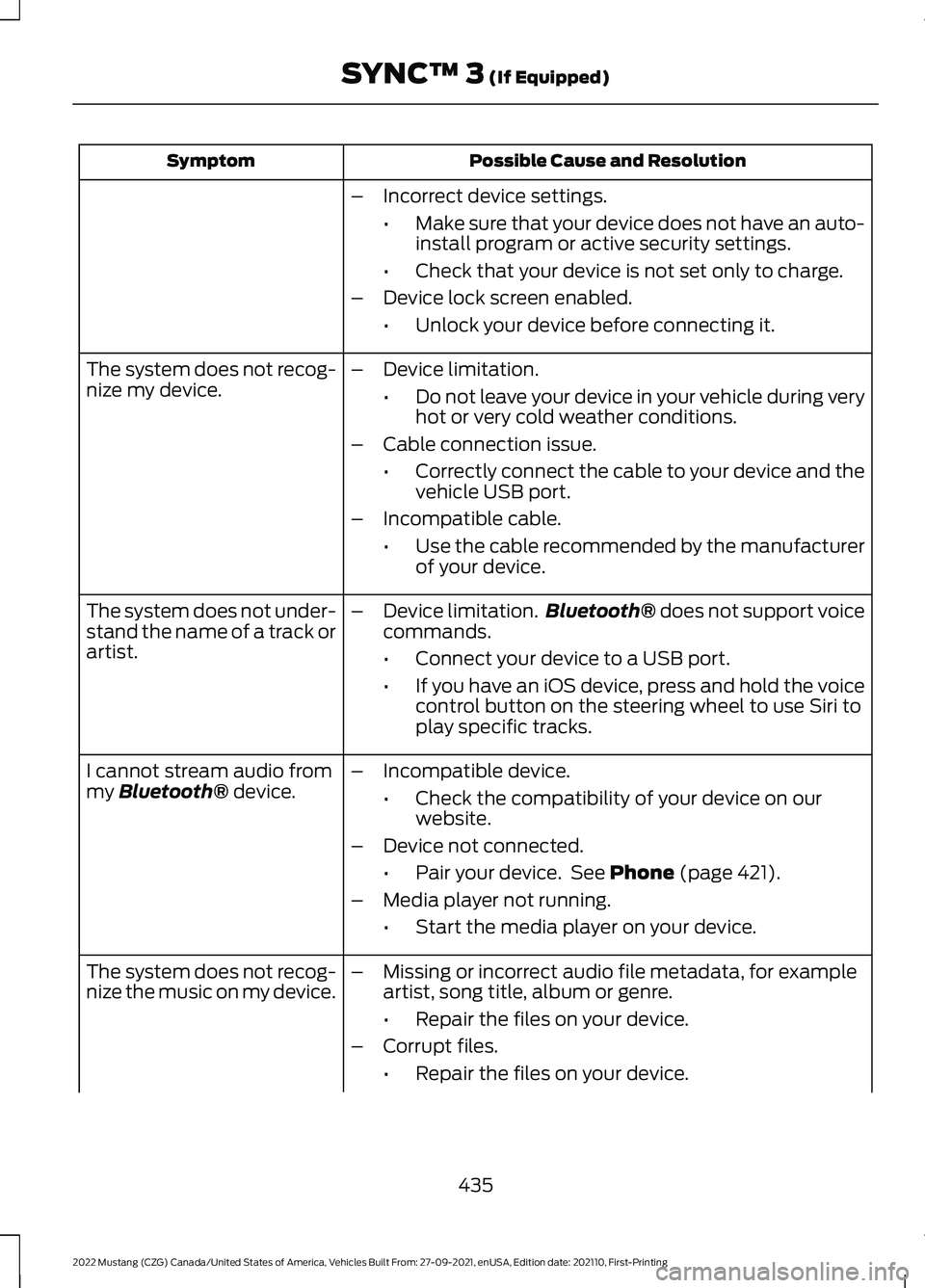
Possible Cause and Resolution
Symptom
–Incorrect device settings.
•Make sure that your device does not have an auto-
install program or active security settings.
• Check that your device is not set only to charge.
– Device lock screen enabled.
•Unlock your device before connecting it.
The system does not recog-
nize my device. –
Device limitation.
•Do not leave your device in your vehicle during very
hot or very cold weather conditions.
– Cable connection issue.
•Correctly connect the cable to your device and the
vehicle USB port.
– Incompatible cable.
•Use the cable recommended by the manufacturer
of your device.
The system does not under-
stand the name of a track or
artist. –
Device limitation. Bluetooth® does not support voice
commands.
• Connect your device to a USB port.
• If you have an iOS device, press and hold the voice
control button on the steering wheel to use Siri to
play specific tracks.
I cannot stream audio from
my
Bluetooth® device. –
Incompatible device.
•Check the compatibility of your device on our
website.
– Device not connected.
•Pair your device. See
Phone (page 421).
– Media player not running.
•Start the media player on your device.
The system does not recog-
nize the music on my device. –
Missing or incorrect audio file metadata, for example
artist, song title, album or genre.
•Repair the files on your device.
– Corrupt files.
•Repair the files on your device.
435
2022 Mustang (CZG) Canada/United States of America, Vehicles Built From: 27-09-2021, enUSA, Edition date: 202110, First-Printing SYNC™ 3
(If Equipped)
Page 439 of 528
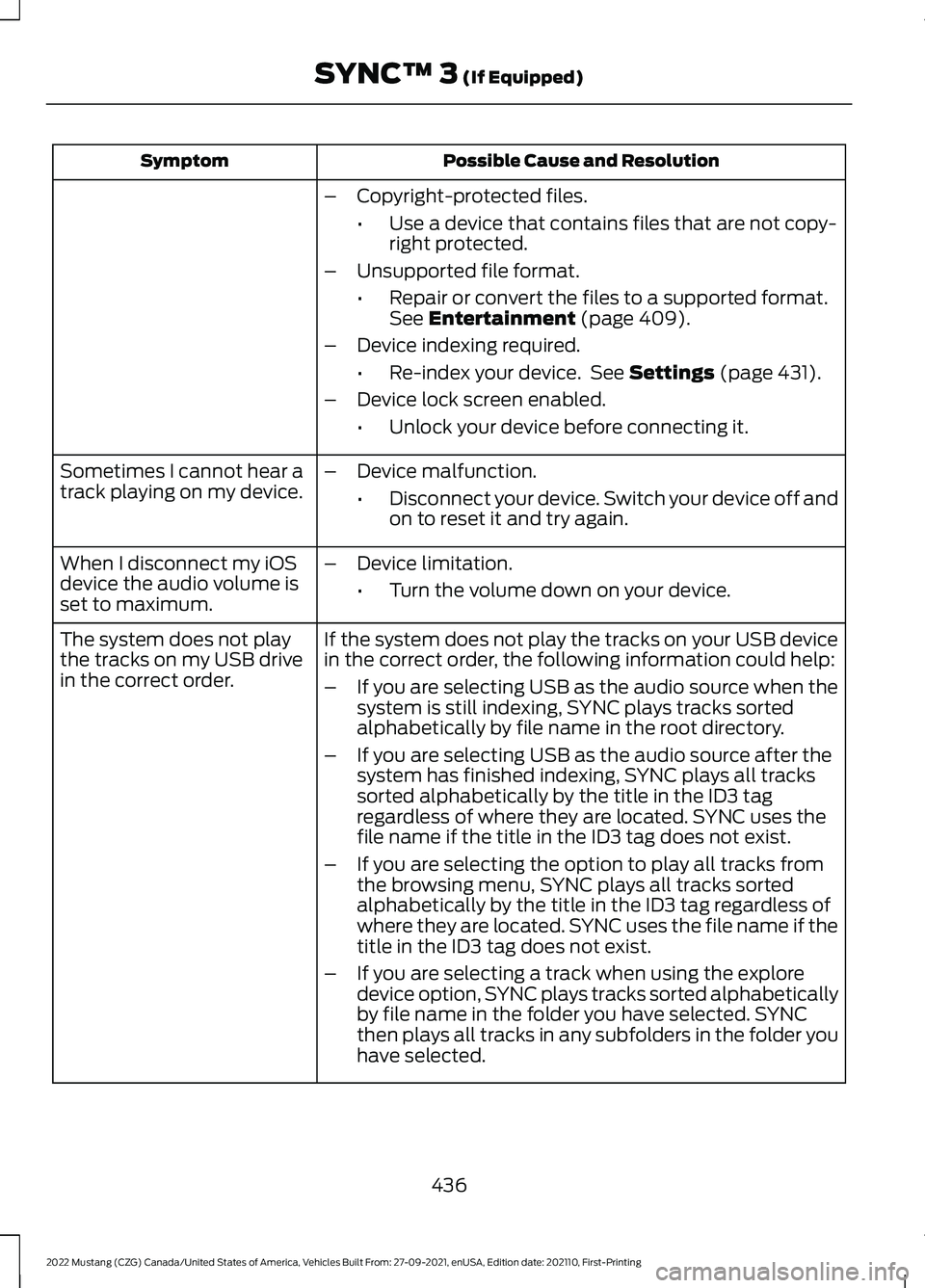
Possible Cause and Resolution
Symptom
–Copyright-protected files.
•Use a device that contains files that are not copy-
right protected.
– Unsupported file format.
•Repair or convert the files to a supported format.
See Entertainment (page 409).
– Device indexing required.
•Re-index your device. See
Settings (page 431).
– Device lock screen enabled.
•Unlock your device before connecting it.
Sometimes I cannot hear a
track playing on my device. –
Device malfunction.
•Disconnect your device. Switch your device off and
on to reset it and try again.
When I disconnect my iOS
device the audio volume is
set to maximum. –
Device limitation.
•Turn the volume down on your device.
If the system does not play the tracks on your USB device
in the correct order, the following information could help:
The system does not play
the tracks on my USB drive
in the correct order.
–If you are selecting USB as the audio source when the
system is still indexing, SYNC plays tracks sorted
alphabetically by file name in the root directory.
– If you are selecting USB as the audio source after the
system has finished indexing, SYNC plays all tracks
sorted alphabetically by the title in the ID3 tag
regardless of where they are located. SYNC uses the
file name if the title in the ID3 tag does not exist.
– If you are selecting the option to play all tracks from
the browsing menu, SYNC plays all tracks sorted
alphabetically by the title in the ID3 tag regardless of
where they are located. SYNC uses the file name if the
title in the ID3 tag does not exist.
– If you are selecting a track when using the explore
device option, SYNC plays tracks sorted alphabetically
by file name in the folder you have selected. SYNC
then plays all tracks in any subfolders in the folder you
have selected.
436
2022 Mustang (CZG) Canada/United States of America, Vehicles Built From: 27-09-2021, enUSA, Edition date: 202110, First-Printing SYNC™ 3
(If Equipped)
Page 440 of 528
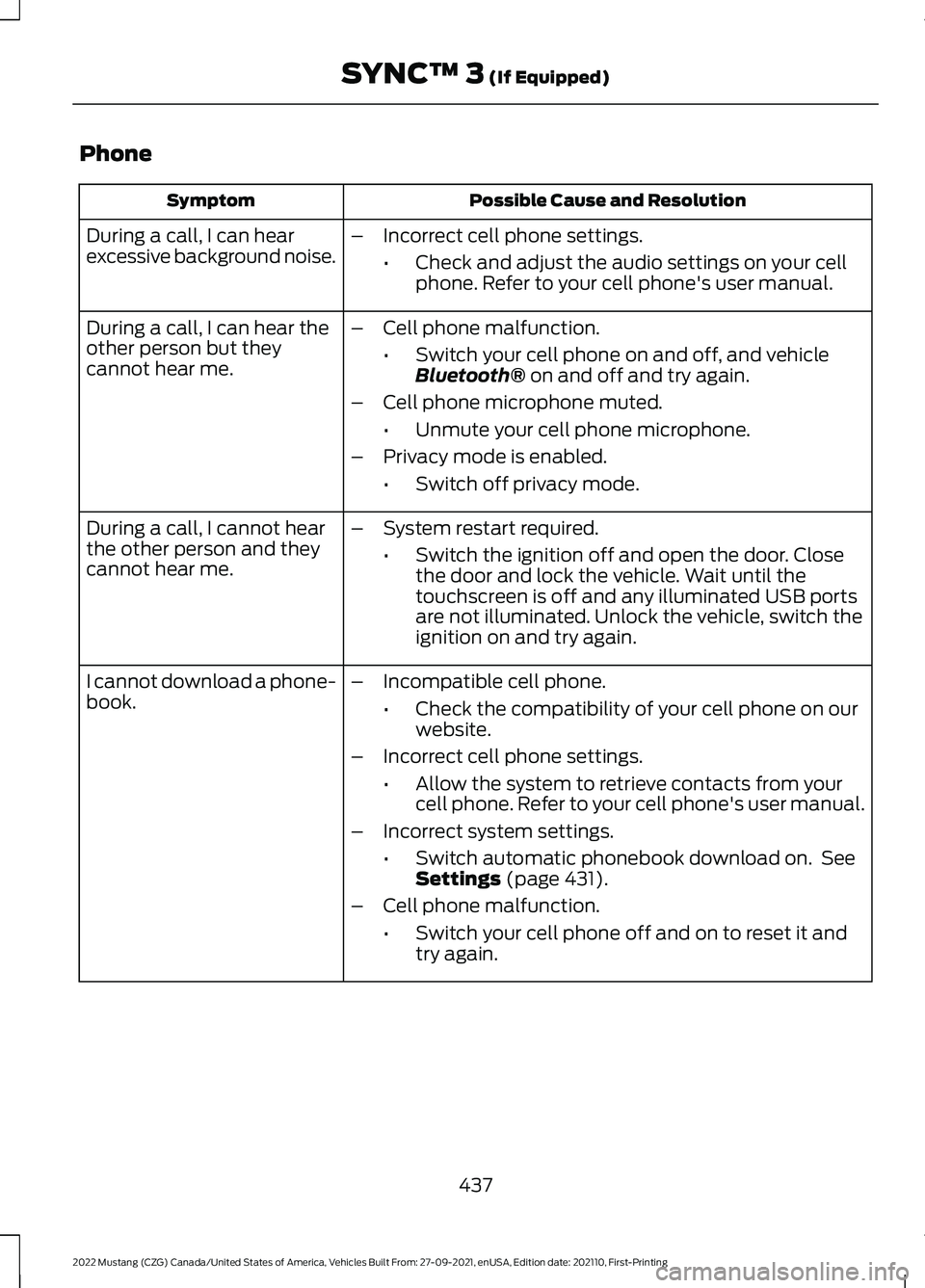
Phone
Possible Cause and Resolution
Symptom
During a call, I can hear
excessive background noise. –
Incorrect cell phone settings.
•Check and adjust the audio settings on your cell
phone. Refer to your cell phone's user manual.
During a call, I can hear the
other person but they
cannot hear me. –
Cell phone malfunction.
•Switch your cell phone on and off, and vehicle
Bluetooth® on and off and try again.
– Cell phone microphone muted.
•Unmute your cell phone microphone.
– Privacy mode is enabled.
•Switch off privacy mode.
During a call, I cannot hear
the other person and they
cannot hear me. –
System restart required.
•Switch the ignition off and open the door. Close
the door and lock the vehicle. Wait until the
touchscreen is off and any illuminated USB ports
are not illuminated. Unlock the vehicle, switch the
ignition on and try again.
I cannot download a phone-
book. –
Incompatible cell phone.
•Check the compatibility of your cell phone on our
website.
– Incorrect cell phone settings.
•Allow the system to retrieve contacts from your
cell phone. Refer to your cell phone's user manual.
– Incorrect system settings.
•Switch automatic phonebook download on. See
Settings
(page 431).
– Cell phone malfunction.
•Switch your cell phone off and on to reset it and
try again.
437
2022 Mustang (CZG) Canada/United States of America, Vehicles Built From: 27-09-2021, enUSA, Edition date: 202110, First-Printing SYNC™ 3
(If Equipped)
Page 443 of 528
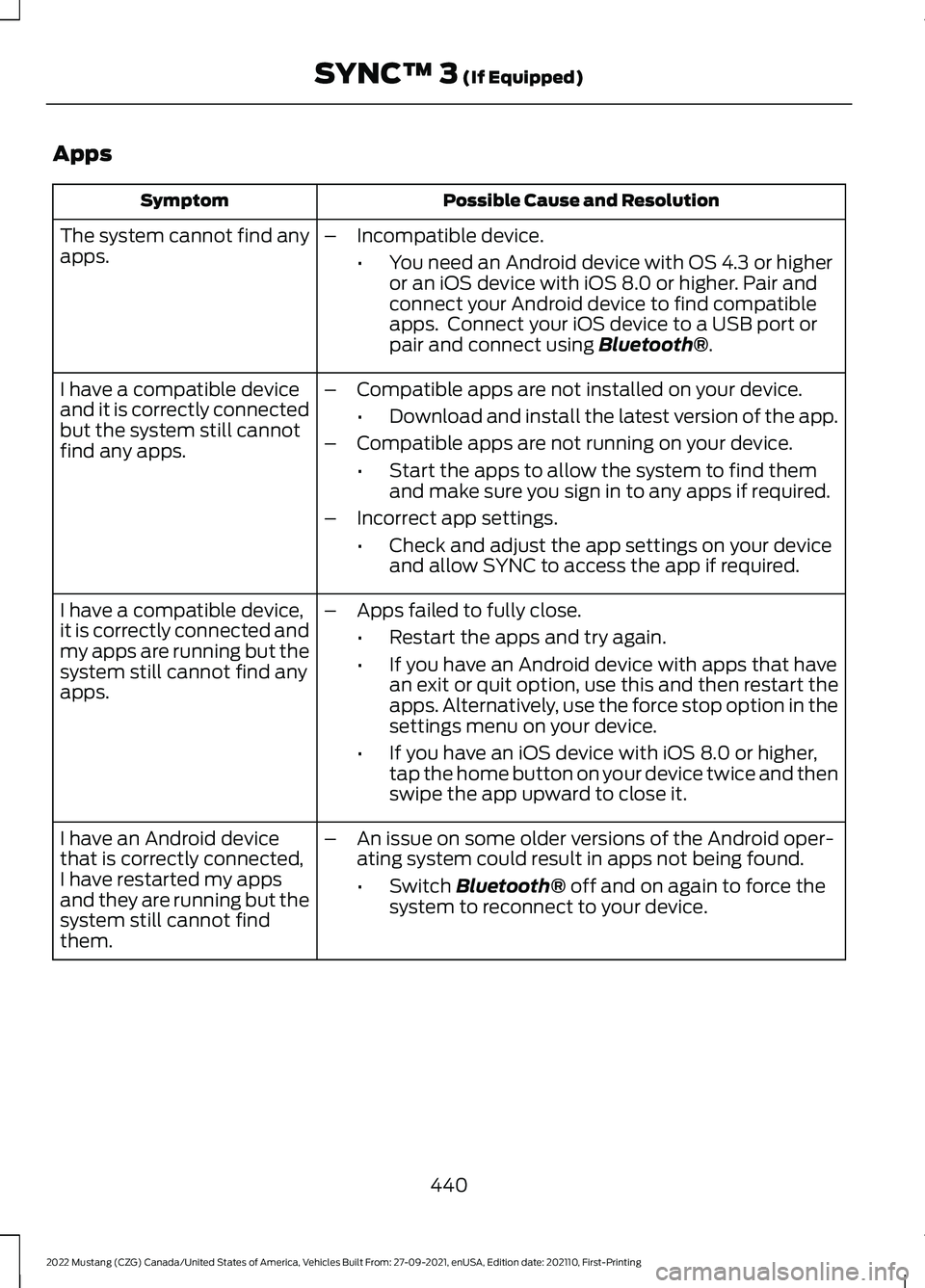
Apps
Possible Cause and Resolution
Symptom
The system cannot find any
apps. –
Incompatible device.
•You need an Android device with OS 4.3 or higher
or an iOS device with iOS 8.0 or higher. Pair and
connect your Android device to find compatible
apps. Connect your iOS device to a USB port or
pair and connect using Bluetooth®.
I have a compatible device
and it is correctly connected
but the system still cannot
find any apps. –
Compatible apps are not installed on your device.
•Download and install the latest version of the app.
– Compatible apps are not running on your device.
•Start the apps to allow the system to find them
and make sure you sign in to any apps if required.
– Incorrect app settings.
•Check and adjust the app settings on your device
and allow SYNC to access the app if required.
I have a compatible device,
it is correctly connected and
my apps are running but the
system still cannot find any
apps. –
Apps failed to fully close.
•Restart the apps and try again.
• If you have an Android device with apps that have
an exit or quit option, use this and then restart the
apps. Alternatively, use the force stop option in the
settings menu on your device.
• If you have an iOS device with iOS 8.0 or higher,
tap the home button on your device twice and then
swipe the app upward to close it.
I have an Android device
that is correctly connected,
I have restarted my apps
and they are running but the
system still cannot find
them. –
An issue on some older versions of the Android oper-
ating system could result in apps not being found.
•Switch
Bluetooth® off and on again to force the
system to reconnect to your device.
440
2022 Mustang (CZG) Canada/United States of America, Vehicles Built From: 27-09-2021, enUSA, Edition date: 202110, First-Printing SYNC™ 3
(If Equipped)
Page 528 of 528
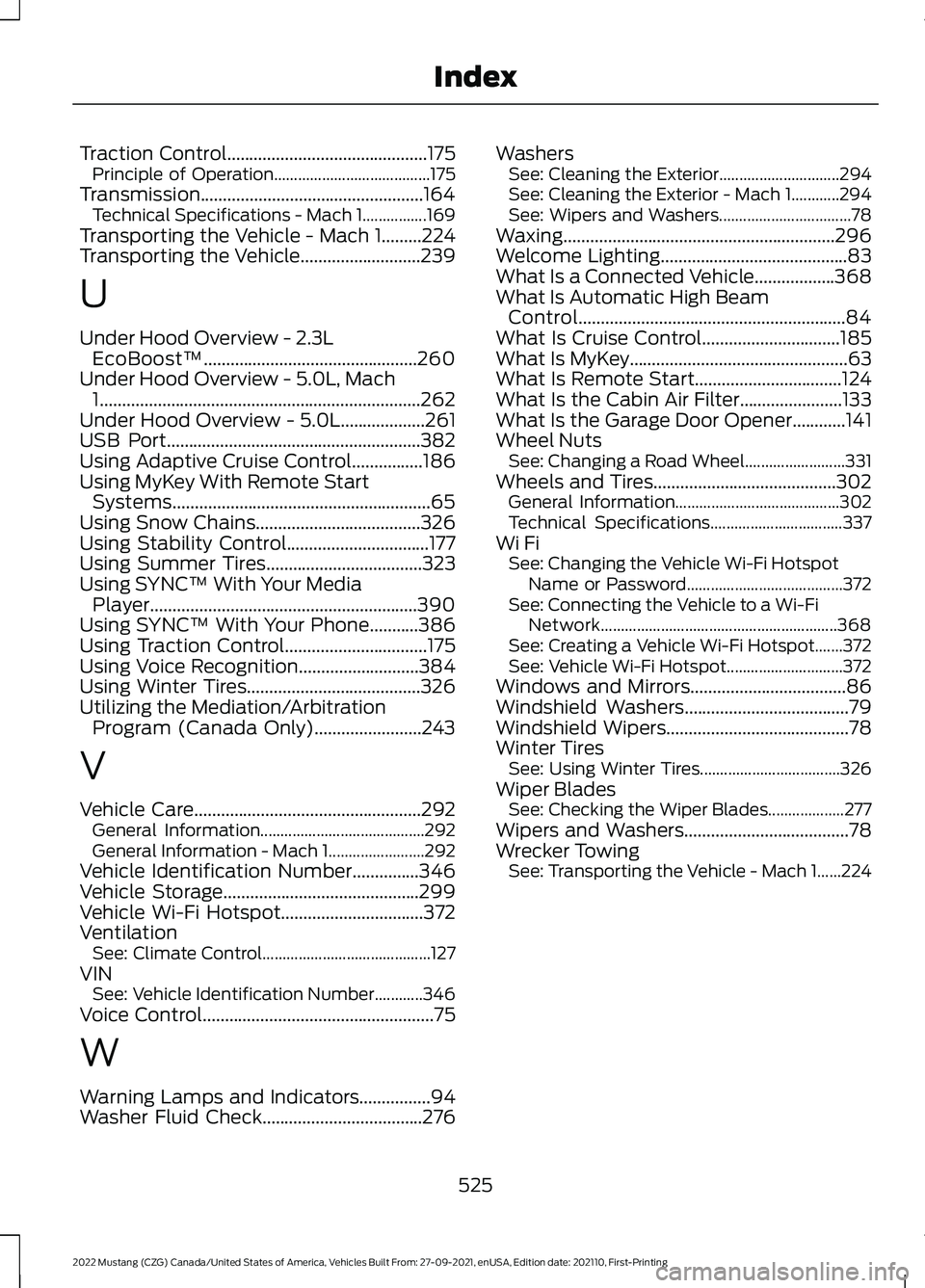
Traction Control.............................................175
Principle of Operation....................................... 175
Transmission..................................................164 Technical Specifications - Mach 1................169
Transporting the Vehicle - Mach 1.........224
Transporting the Vehicle...........................239
U
Under Hood Overview - 2.3L EcoBoost™................................................260
Under Hood Overview - 5.0L, Mach 1
........................................................................\
262
Under Hood Overview - 5.0L...................261
USB Port.........................................................382
Using Adaptive Cruise Control................186
Using MyKey With Remote Start Systems..........................................................65
Using Snow Chains
.....................................326
Using Stability Control................................177
Using Summer Tires
...................................323
Using SYNC™ With Your Media Player............................................................390
Using SYNC™ With Your Phone...........386
Using Traction Control................................175
Using Voice Recognition...........................384
Using Winter Tires
.......................................326
Utilizing the Mediation/Arbitration Program (Canada Only)........................243
V
Vehicle Care
...................................................292
General Information......................................... 292
General Information - Mach 1........................ 292
Vehicle Identification Number
...............346
Vehicle Storage............................................299
Vehicle Wi-Fi Hotspot................................372
Ventilation See: Climate Control.......................................... 127
VIN See: Vehicle Identification Number............346
Voice Control....................................................75
W
Warning Lamps and Indicators................94
Washer Fluid Check
....................................276 Washers
See: Cleaning the Exterior.............................. 294
See: Cleaning the Exterior - Mach 1............294
See: Wipers and Washers................................. 78
Waxing.............................................................296
Welcome Lighting..........................................83
What Is a Connected Vehicle..................368
What Is Automatic High Beam Control............................................................84
What Is Cruise Control
...............................185
What Is MyKey.................................................63
What Is Remote Start.................................124
What Is the Cabin Air Filter.......................133
What Is the Garage Door Opener............141
Wheel Nuts See: Changing a Road Wheel......................... 331
Wheels and Tires
.........................................302
General Information......................................... 302
Technical Specifications................................. 337
Wi Fi See: Changing the Vehicle Wi-Fi Hotspot
Name or Password....................................... 372
See: Connecting the Vehicle to a Wi-Fi Network........................................................... 368
See: Creating a Vehicle Wi-Fi Hotspot.......372
See: Vehicle Wi-Fi Hotspot............................. 372
Windows and Mirrors
...................................86
Windshield Washers.....................................79
Windshield Wipers.........................................78
Winter Tires See: Using Winter Tires................................... 326
Wiper Blades See: Checking the Wiper Blades................... 277
Wipers and Washers.....................................78
Wrecker Towing See: Transporting the Vehicle - Mach 1......224
525
2022 Mustang (CZG) Canada/United States of America, Vehicles Built From: 27-09-2021, enUSA, Edition date: 202110, First-Printing Index