steering wheel FORD MUSTANG 2022 Owner's Manual
[x] Cancel search | Manufacturer: FORD, Model Year: 2022, Model line: MUSTANG, Model: FORD MUSTANG 2022Pages: 528, PDF Size: 10.04 MB
Page 176 of 528
•
You take corners too fast.
• The road surface is poor.
Note: If the system activates, the brake
pedal could pulse and may travel further.
Maintain pressure on the brake pedal. You
may also hear a noise from the system. This
is normal.
PARKING BRAKE
Vehicles With Automatic
Transmission WARNING: Always set the parking
brake and leave your vehicle with the
transmission in park (P).
Note: If you park your vehicle on a hill and
facing uphill, shift into park (P) and turn the
steering wheel away from the curb.
Note: If you park your vehicle on a hill and
facing downhill, shift into park (P) and turn
the steering wheel toward the curb.
Vehicles with Manual
Transmission WARNING:
Always set the parking
brake fully and make sure you shift the
gearshift lever to first gear. Switch the
ignition off and remove the key whenever
you leave your vehicle.
Note: If you park your vehicle on a hill and
facing uphill, select first gear and turn the
steering wheel away from the curb.
Note: If you park your vehicle on a hill and
facing downhill, select reverse gear and turn
the steering wheel toward the curb.
To park your vehicle:
1. Apply the brake and shift into the neutral position. 2. Fully apply the parking brake, hold the
clutch pedal down, then shift into first
(1).
3. Turn the ignition off.
After you turn the engine off you can now
release the clutch pedal.
All Vehicles WARNING:
If the parking brake is
fully released, but the brake warning
lamp remains illuminated, the brakes
may not be working properly. Have your
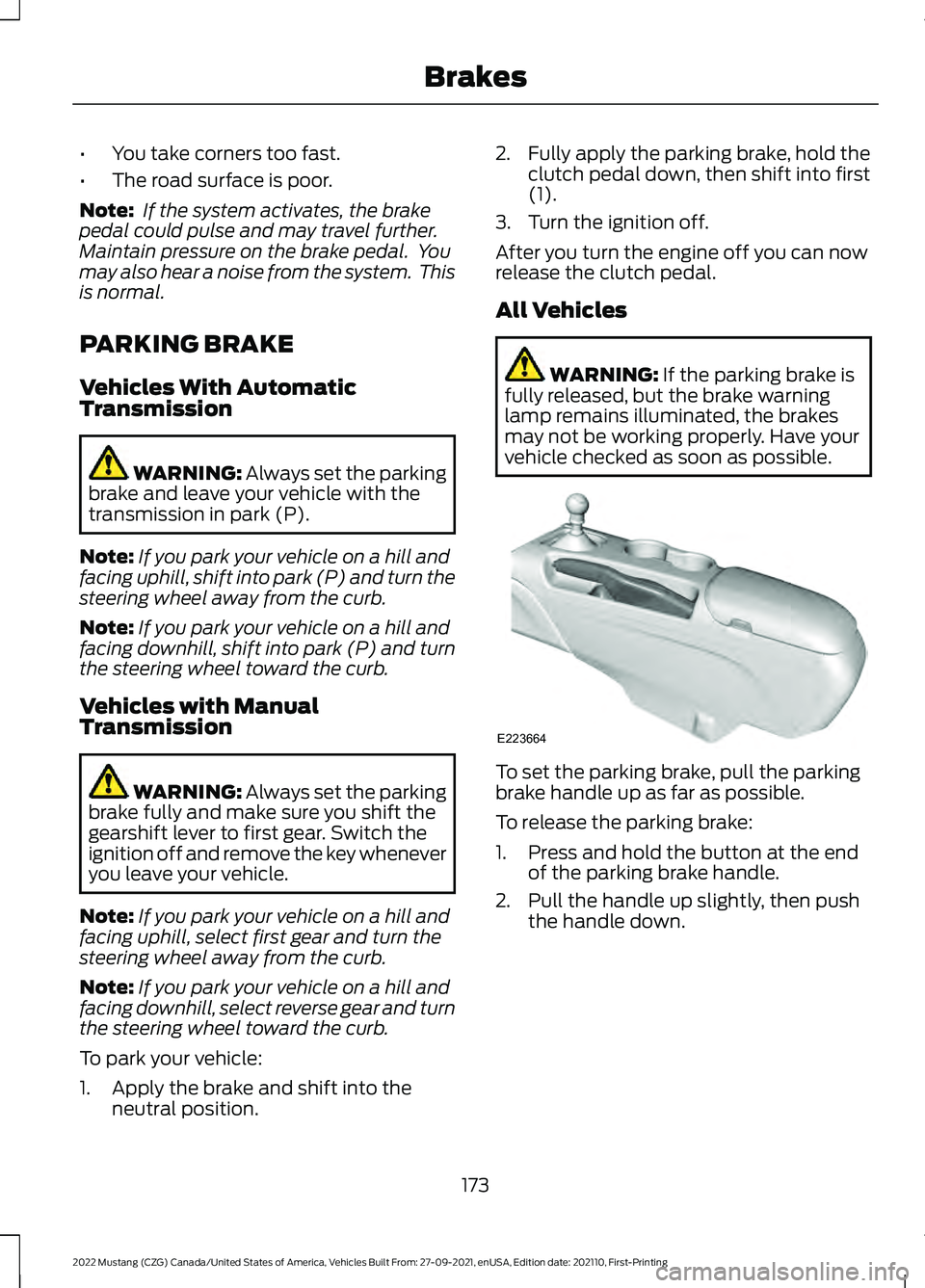
vehicle checked as soon as possible. To set the parking brake, pull the parking
brake handle up as far as possible.
To release the parking brake:
1. Press and hold the button at the end
of the parking brake handle.
2. Pull the handle up slightly, then push the handle down.
173
2022 Mustang (CZG) Canada/United States of America, Vehicles Built From: 27-09-2021, enUSA, Edition date: 202110, First-Printing BrakesE223664
Page 179 of 528
PRINCIPLE OF OPERATION
WARNING: Vehicle modifications
involving braking system, aftermarket
roof racks, suspension, steering system,
tire construction and wheel and tire size
may change the handling characteristics
of your vehicle and may adversely affect
the performance of the electronic
stability control system. In addition,
installing any stereo loudspeakers may
interfere with and adversely affect the
electronic stability control system. Install
any aftermarket stereo loudspeaker as
far as possible from the front center
console, the tunnel, and the front seats
in order to minimize the risk of interfering
with the electronic stability control
sensors. Reducing the effectiveness of
the electronic stability control system
could lead to an increased risk of loss of
vehicle control, vehicle rollover, personal
injury and death. WARNING:
Remember that even
advanced technology cannot defy the
laws of physics. It’ s always possible to
lose control of a vehicle due to
inappropriate driver input for the
conditions. Aggressive driving on any
road condition can cause you to lose
control of your vehicle increasing the risk
of personal injury or property damage.
Activation of the electronic stability
control system is an indication that at
least some of the tires have exceeded
their ability to grip the road; this could
reduce the operator ’s ability to control
the vehicle potentially resulting in a loss
of vehicle control, vehicle rollover,
personal injury and death. If your
electronic stability control system
activates, SLOW DOWN.
The system automatically turns on each
time you switch the ignition on. If a fault occurs in either the stability
control or the traction control system, you
may experience the following conditions:
•
The stability and traction control light
illuminates steadily.
• The stability control and traction
control systems do not enhance your
vehicle's ability to maintain traction of
the wheels.
If a driving condition activates either the
stability control or the traction control
system you may experience the following
conditions:
• The stability and traction control light
flashes.
• Your vehicle slows down.
• Reduced engine power.
• A vibration in the brake pedal.
• The brake pedal is stiffer than usual.
• If the driving condition is severe and
your foot is not on the brake, the brake
pedal may move as the system applies
higher brake force.
The stability control system has several
features built into it to help you maintain
control of your vehicle:
Electronic Stability Control
The system enhances your vehicle ’s ability
to prevent skids or lateral slides by
applying brakes to one or more of the
wheels individually and, if necessary,
reducing engine power.
Traction Control
The system enhances your vehicle ’s ability
to maintain traction of the wheels by
detecting and controlling wheel spin.
See
Using Traction Control (page 175).
176
2022 Mustang (CZG) Canada/United States of America, Vehicles Built From: 27-09-2021, enUSA, Edition date: 202110, First-Printing Stability Control
Page 186 of 528
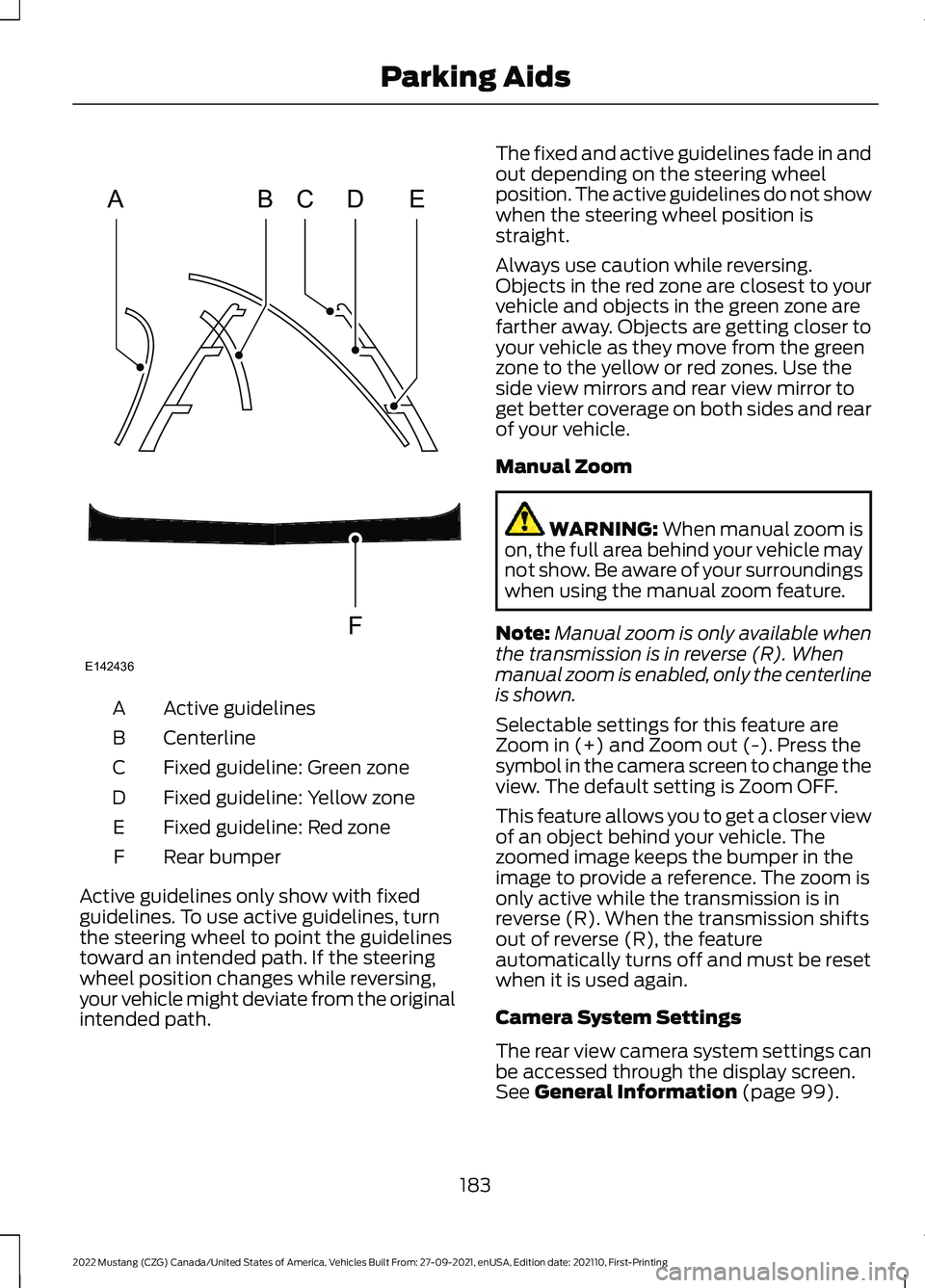
Active guidelines
A
Centerline
B
Fixed guideline: Green zone
C
Fixed guideline: Yellow zone
D
Fixed guideline: Red zone
E
Rear bumper
F
Active guidelines only show with fixed
guidelines. To use active guidelines, turn
the steering wheel to point the guidelines
toward an intended path. If the steering
wheel position changes while reversing,
your vehicle might deviate from the original
intended path. The fixed and active guidelines fade in and
out depending on the steering wheel
position. The active guidelines do not show
when the steering wheel position is
straight.
Always use caution while reversing.
Objects in the red zone are closest to your
vehicle and objects in the green zone are
farther away. Objects are getting closer to
your vehicle as they move from the green
zone to the yellow or red zones. Use the
side view mirrors and rear view mirror to
get better coverage on both sides and rear
of your vehicle.
Manual Zoom
WARNING: When manual zoom is
on, the full area behind your vehicle may
not show. Be aware of your surroundings
when using the manual zoom feature.
Note: Manual zoom is only available when
the transmission is in reverse (R). When
manual zoom is enabled, only the centerline
is shown.
Selectable settings for this feature are
Zoom in (+) and Zoom out (-). Press the
symbol in the camera screen to change the
view. The default setting is Zoom OFF.
This feature allows you to get a closer view
of an object behind your vehicle. The
zoomed image keeps the bumper in the
image to provide a reference. The zoom is
only active while the transmission is in
reverse (R). When the transmission shifts
out of reverse (R), the feature
automatically turns off and must be reset
when it is used again.
Camera System Settings
The rear view camera system settings can
be accessed through the display screen.
See
General Information (page 99).
183
2022 Mustang (CZG) Canada/United States of America, Vehicles Built From: 27-09-2021, enUSA, Edition date: 202110, First-Printing Parking AidsABCD
F
E
E142436
Page 188 of 528
WHAT IS CRUISE CONTROL
Cruise control lets you maintain a set
speed without keeping your foot on the
accelerator pedal.
Requirements
Use cruise control when the vehicle speed
is greater than 20 mph (30 km/h).
SWITCHING CRUISE CONTROL
ON AND OFF WARNING:
Do not use cruise
control on winding roads, in heavy traffic
or when the road surface is slippery. This
could result in loss of vehicle control,
serious injury or death.
The cruise controls are on the steering
wheel. See
Cruise Control (page 76).
Switching Cruise Control On Press the button.
Switching Cruise Control Off Press the button when the
system is in standby mode.
The system also turns off when you switch
the ignition off.
Note: The set speed erases when you
switch the system off. SETTING THE CRUISE
CONTROL SPEED WARNING:
When you are going
downhill, your vehicle speed could
increase above the set speed. The
system does not apply the brakes.
Drive to the speed you prefer. Press either button to set the
current speed.
Take your foot off the accelerator pedal.
Note: The indicator changes color in the
information display.
Changing the Set Speed Press and release the button to
increase the set speed in small
increments.
Press and hold the button to accelerate.
Release the button when you reach your
preferred speed. Press and release the button to
decrease the set speed in small
increments.
Press and hold the button to decelerate.
Release the button when you reach your
preferred speed.
Note: If you accelerate by pressing the
accelerator pedal, the set speed does not
change. When you release the accelerator
pedal, your vehicle returns to the speed that
you previously set.
185
2022 Mustang (CZG) Canada/United States of America, Vehicles Built From: 27-09-2021, enUSA, Edition date: 202110, First-Printing Cruise ControlE265296 E265297
Page 190 of 528
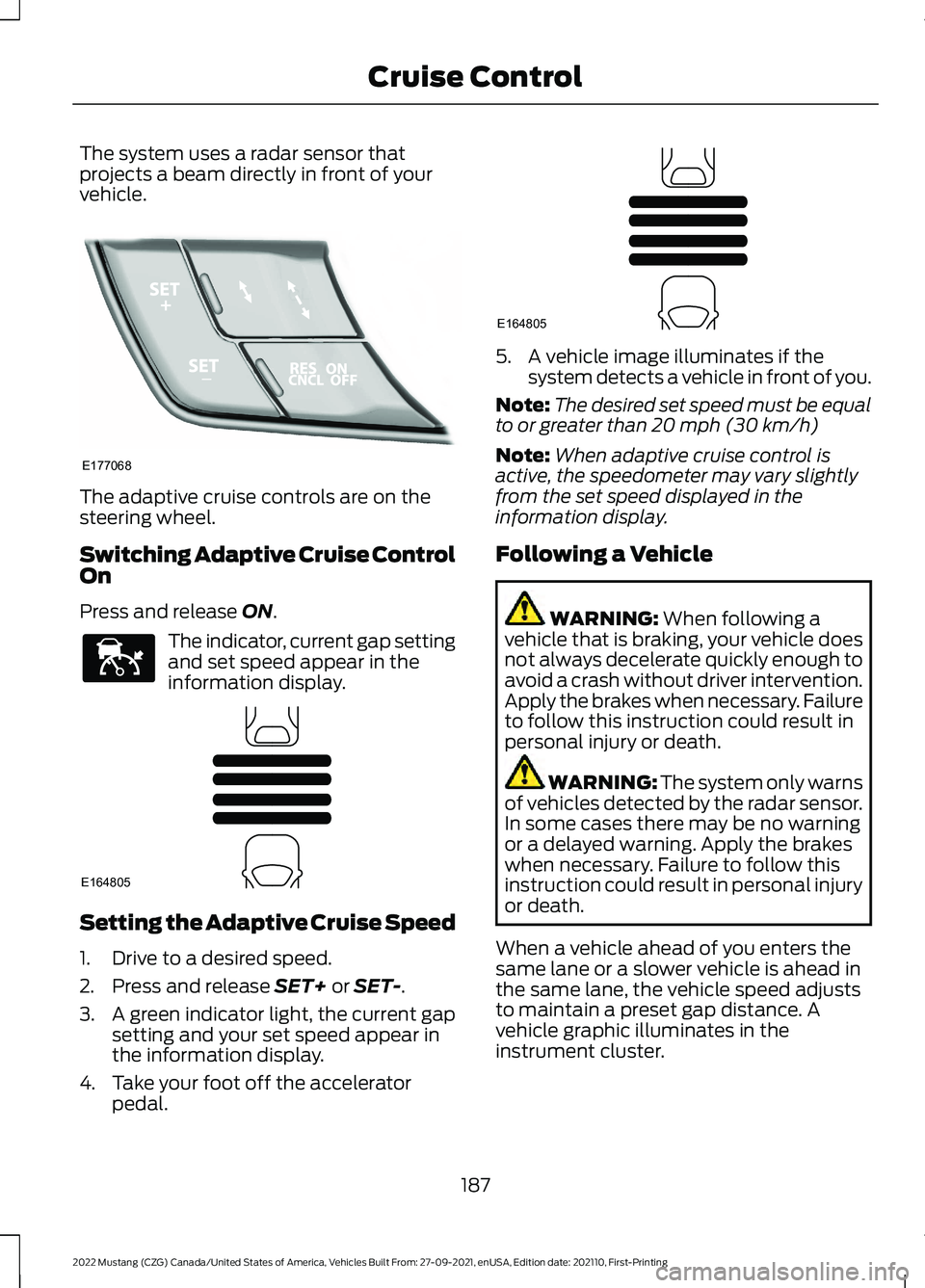
The system uses a radar sensor that
projects a beam directly in front of your
vehicle.
The adaptive cruise controls are on the
steering wheel.
Switching Adaptive Cruise Control
On
Press and release ON.
The indicator, current gap setting
and set speed appear in the
information display.
Setting the Adaptive Cruise Speed
1. Drive to a desired speed.
2. Press and release
SET+ or SET-.
3. A green indicator light, the current gap
setting and your set speed appear in
the information display.
4. Take your foot off the accelerator pedal. 5. A vehicle image illuminates if the
system detects a vehicle in front of you.
Note: The desired set speed must be equal
to or greater than
20 mph (30 km/h)
Note: When adaptive cruise control is
active, the speedometer may vary slightly
from the set speed displayed in the
information display.
Following a Vehicle WARNING:
When following a
vehicle that is braking, your vehicle does
not always decelerate quickly enough to
avoid a crash without driver intervention.
Apply the brakes when necessary. Failure
to follow this instruction could result in
personal injury or death. WARNING:
The system only warns
of vehicles detected by the radar sensor.
In some cases there may be no warning
or a delayed warning. Apply the brakes
when necessary. Failure to follow this
instruction could result in personal injury
or death.
When a vehicle ahead of you enters the
same lane or a slower vehicle is ahead in
the same lane, the vehicle speed adjusts
to maintain a preset gap distance. A
vehicle graphic illuminates in the
instrument cluster.
187
2022 Mustang (CZG) Canada/United States of America, Vehicles Built From: 27-09-2021, enUSA, Edition date: 202110, First-Printing Cruise ControlE177068 E144529 E164805 E164805
Page 197 of 528
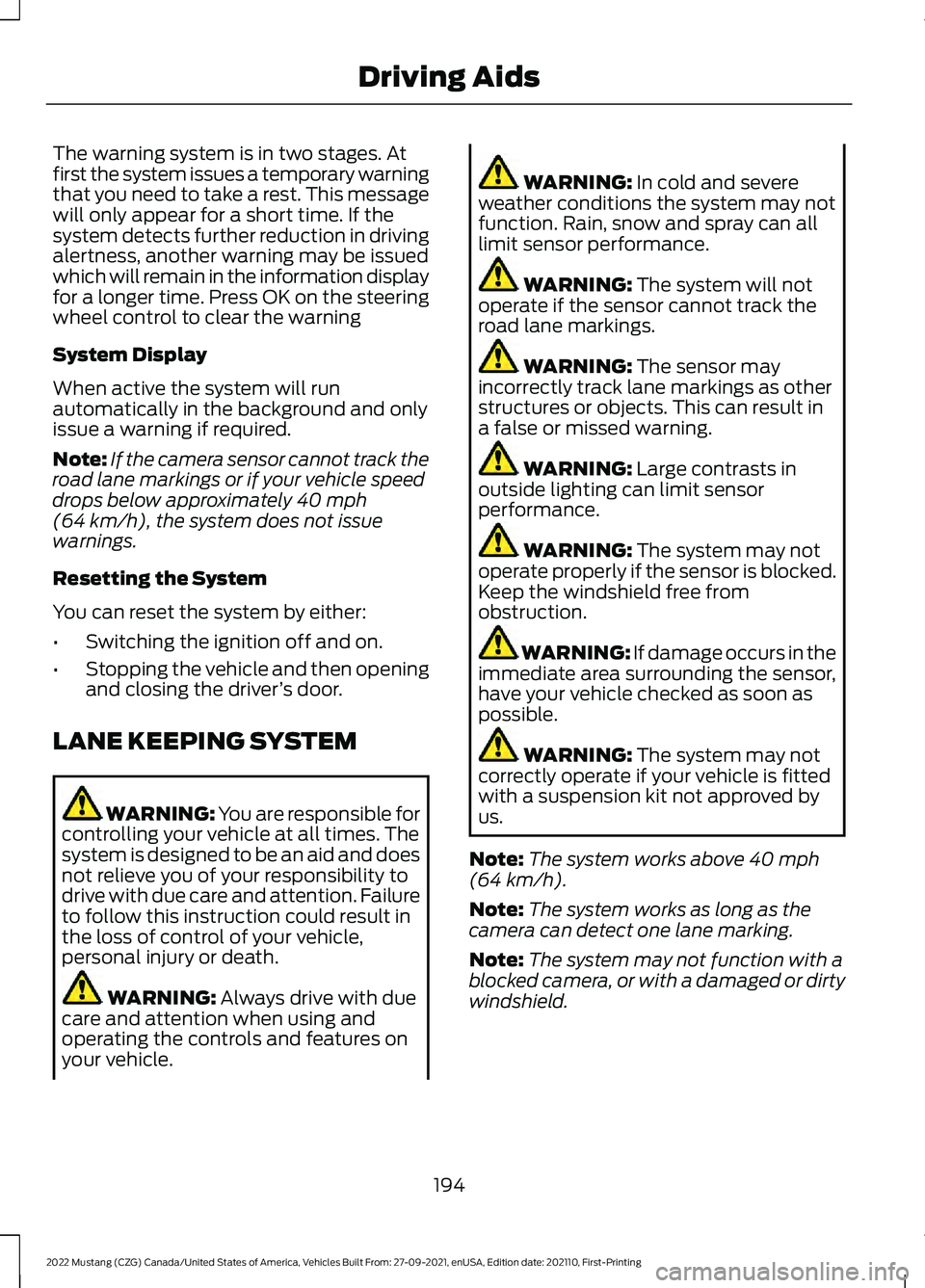
The warning system is in two stages. At
first the system issues a temporary warning
that you need to take a rest. This message
will only appear for a short time. If the
system detects further reduction in driving
alertness, another warning may be issued
which will remain in the information display
for a longer time. Press OK on the steering
wheel control to clear the warning
System Display
When active the system will run
automatically in the background and only
issue a warning if required.
Note:
If the camera sensor cannot track the
road lane markings or if your vehicle speed
drops below approximately 40 mph
(64 km/h), the system does not issue
warnings.
Resetting the System
You can reset the system by either:
• Switching the ignition off and on.
• Stopping the vehicle and then opening
and closing the driver ’s door.
LANE KEEPING SYSTEM WARNING: You are responsible for
controlling your vehicle at all times. The
system is designed to be an aid and does
not relieve you of your responsibility to
drive with due care and attention. Failure
to follow this instruction could result in
the loss of control of your vehicle,
personal injury or death. WARNING:
Always drive with due
care and attention when using and
operating the controls and features on
your vehicle. WARNING:
In cold and severe
weather conditions the system may not
function. Rain, snow and spray can all
limit sensor performance. WARNING:
The system will not
operate if the sensor cannot track the
road lane markings. WARNING:
The sensor may
incorrectly track lane markings as other
structures or objects. This can result in
a false or missed warning. WARNING:
Large contrasts in
outside lighting can limit sensor
performance. WARNING:
The system may not
operate properly if the sensor is blocked.
Keep the windshield free from
obstruction. WARNING:
If damage occurs in the
immediate area surrounding the sensor,
have your vehicle checked as soon as
possible. WARNING:
The system may not
correctly operate if your vehicle is fitted
with a suspension kit not approved by
us.
Note: The system works above
40 mph
(64 km/h).
Note: The system works as long as the
camera can detect one lane marking.
Note: The system may not function with a
blocked camera, or with a damaged or dirty
windshield.
194
2022 Mustang (CZG) Canada/United States of America, Vehicles Built From: 27-09-2021, enUSA, Edition date: 202110, First-Printing Driving Aids
Page 198 of 528
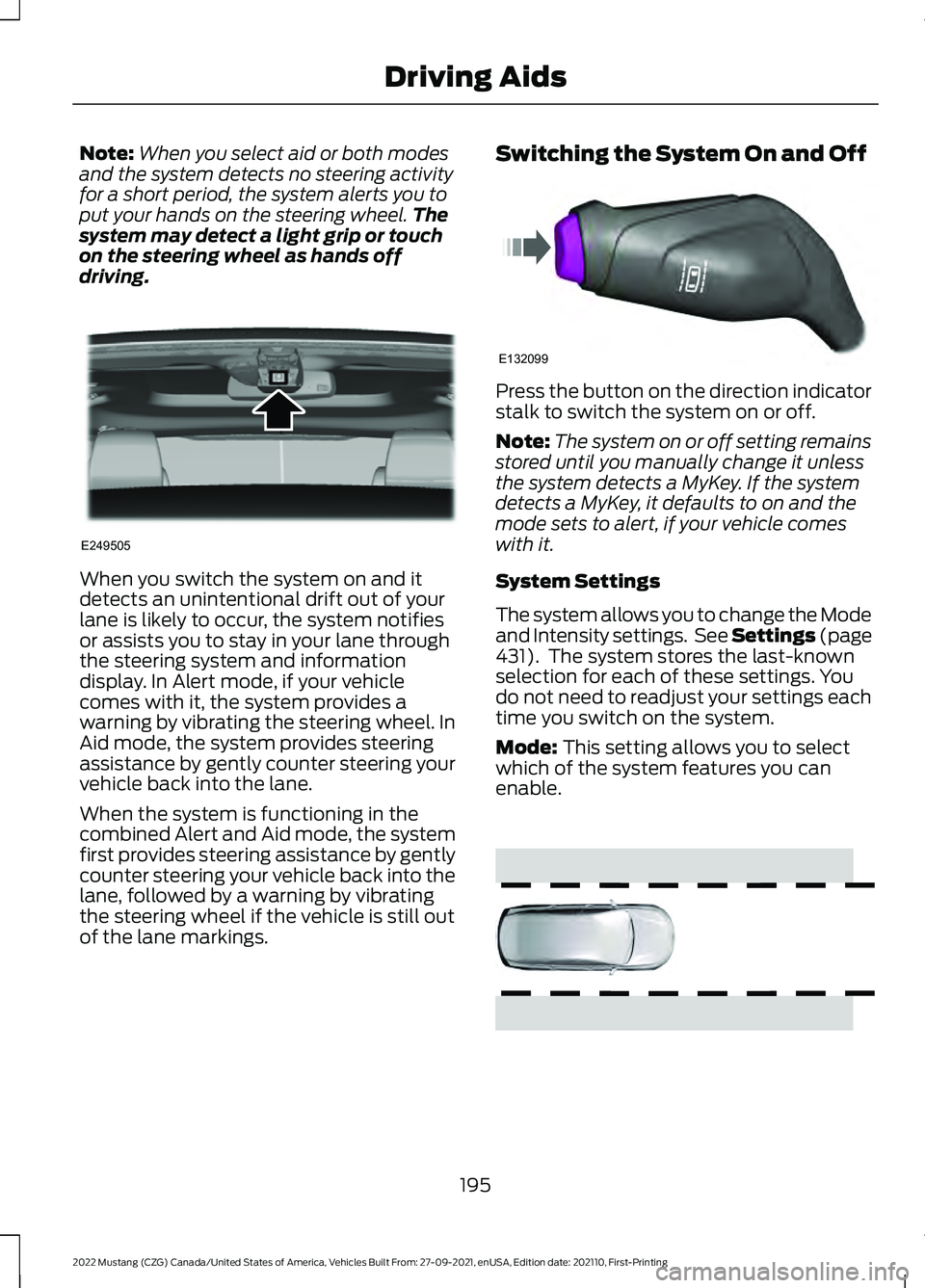
Note:
When you select aid or both modes
and the system detects no steering activity
for a short period, the system alerts you to
put your hands on the steering wheel. The
system may detect a light grip or touch
on the steering wheel as hands off
driving. When you switch the system on and it
detects an unintentional drift out of your
lane is likely to occur, the system notifies
or assists you to stay in your lane through
the steering system and information
display. In Alert mode, if your vehicle
comes with it, the system provides a
warning by vibrating the steering wheel. In
Aid mode, the system provides steering
assistance by gently counter steering your
vehicle back into the lane.
When the system is functioning in the
combined Alert and Aid mode, the system
first provides steering assistance by gently
counter steering your vehicle back into the
lane, followed by a warning by vibrating
the steering wheel if the vehicle is still out
of the lane markings. Switching the System On and Off Press the button on the direction indicator
stalk to switch the system on or off.
Note:
The system on or off setting remains
stored until you manually change it unless
the system detects a MyKey. If the system
detects a MyKey, it defaults to on and the
mode sets to alert, if your vehicle comes
with it.
System Settings
The system allows you to change the Mode
and Intensity settings. See Settings (page
431). The system stores the last-known
selection for each of these settings. You
do not need to readjust your settings each
time you switch on the system.
Mode:
This setting allows you to select
which of the system features you can
enable. 195
2022 Mustang (CZG) Canada/United States of America, Vehicles Built From: 27-09-2021, enUSA, Edition date: 202110, First-Printing Driving AidsE249505 E132099 E165515
Page 199 of 528
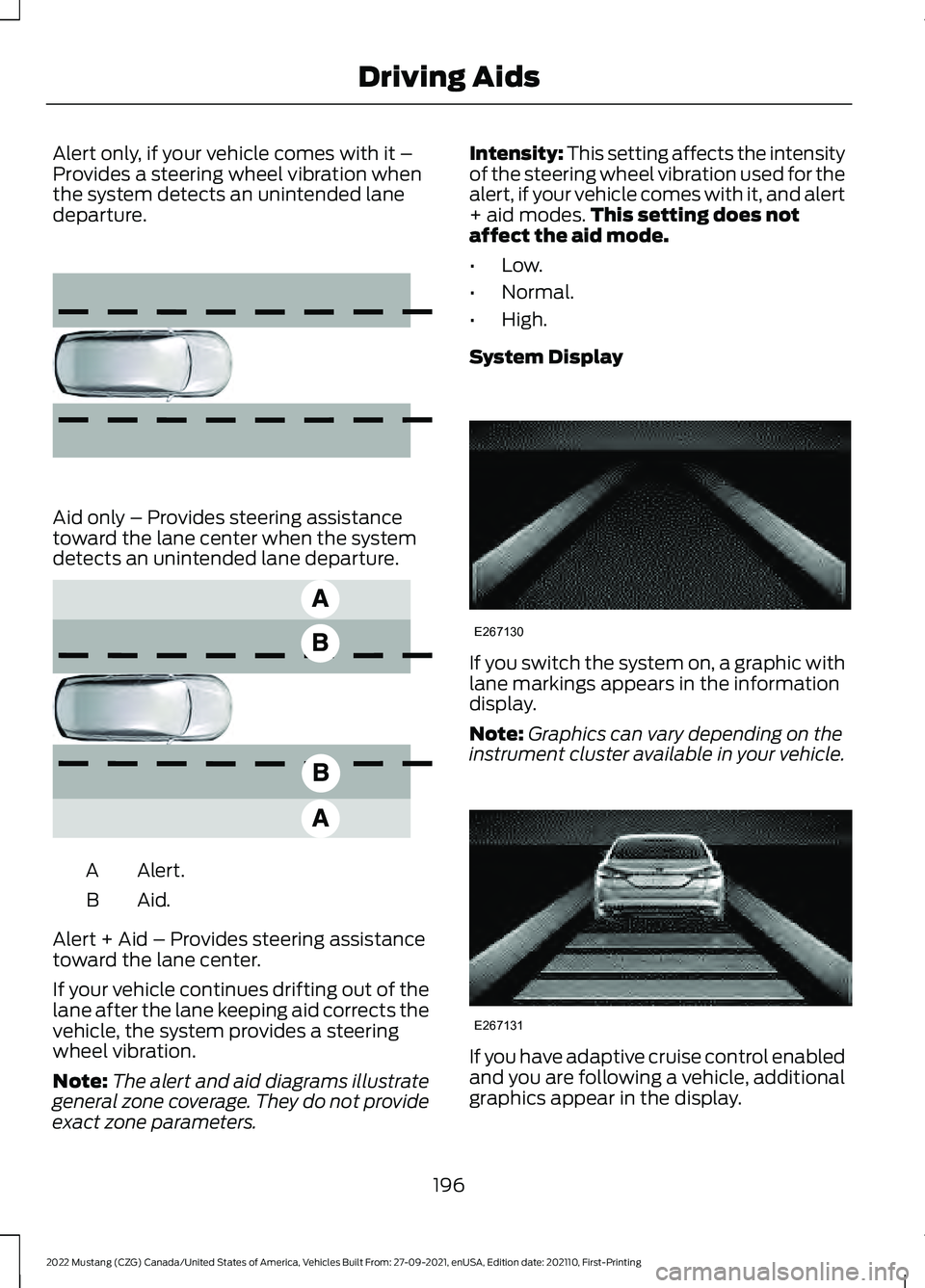
Alert only, if your vehicle comes with it –
Provides a steering wheel vibration when
the system detects an unintended lane
departure.
Aid only – Provides steering assistance
toward the lane center when the system
detects an unintended lane departure.
Alert.
A
Aid.B
Alert + Aid – Provides steering assistance
toward the lane center.
If your vehicle continues drifting out of the
lane after the lane keeping aid corrects the
vehicle, the system provides a steering
wheel vibration.
Note: The alert and aid diagrams illustrate
general zone coverage. They do not provide
exact zone parameters. Intensity: This setting affects the intensity
of the steering wheel vibration used for the
alert, if your vehicle comes with it, and alert
+ aid modes.
This setting does not
affect the aid mode.
• Low.
• Normal.
• High.
System Display If you switch the system on, a graphic with
lane markings appears in the information
display.
Note:
Graphics can vary depending on the
instrument cluster available in your vehicle. If you have adaptive cruise control enabled
and you are following a vehicle, additional
graphics appear in the display.
196
2022 Mustang (CZG) Canada/United States of America, Vehicles Built From: 27-09-2021, enUSA, Edition date: 202110, First-Printing Driving Aids E165516 E165517 E267130 E267131
Page 213 of 528
To create or save MyMode, press the
button on the steering wheel and access
the menu. See General Information
(page 99). The available systems display.
Choose your desired settings using the
appropriate buttons and menus. Press and
hold OK to save your settings. MyMode
adds to the drive mode list and you can
select the next time you drive your vehicle.
Note: The system has diagnostic checks
that continuously monitor the system to
make sure it properly operates. If a mode is
unavailable due to a system fault or change
in gear position, the selected mode defaults
to normal.
Note: Pre-Collision Assist automatically
disables when you select track mode. See
Pre-Collision Assist
(page 204).
Note: If your vehicle has adaptive dampers,
the steering setting optimizes to work with
each drive mode. Other steering settings
may not be available.
Selectable Steering Press the steering button on the
instrument panel to change the
steering feel. The first press
illuminates the selected mode. Each time
you press the button, it changes the mode.
Modes:
• Normal - Default factory setting.
• Sport - Slightly higher effort required
for steering with more road force felt
through the steering wheel.
• Comfort - Slightly less effort required
for steering with less road force felt
through the steering wheel.
Note: You may feel a soft feedback bump
in the steering wheel after you make a
selection.
Note: The steering setting defaults to
normal if you disconnect or remove the
battery. Active Exhaust
(If Equipped) Use the information display to
adjust the tone of the exhaust.
Active Exhaust modes:
• Quiet - Lowers the noise of the exhaust.
• Normal - Default factory setting.
• Sport - Raises the noise of the exhaust.
• Track - Tunes the exhaust for track
performance.
Note: The track exhaust mode setting is
only for use at tracks and not for use on
public roadways. Use of this setting results
in increased exterior noise, which may not
meet state and local laws and regulations.
It is the obligation of the driver to operate
the vehicle in a manner that complies with
state and local requirements. Only use the
track exhaust mode setting at a competition
track or an off-road course where elevated
exterior vehicle noise is acceptable.
Rev Match
(If Equipped)
This feature provides a smoother driving
experience, particularly during a downshift
event. You can accomplish this by a shift
position prediction that commands a quick
engine RPM match to the selected gear.
You can switch this feature on and off
through the information display. See
General Information
(page 99).
Note: The system remembers your last
selection through ignition cycles.
Note: Rev match is only available with a
manual transmission.
210
2022 Mustang (CZG) Canada/United States of America, Vehicles Built From: 27-09-2021, enUSA, Edition date: 202110, First-Printing Driving AidsE174705 E287122
Page 216 of 528
To create or save MyMode, press the
button on the steering wheel and access
the menu. See General Information
(page 99). The available systems display.
Select your desired settings using the
appropriate buttons and menus. Press and
hold OK to save your settings. MyMode is
added to the drive mode list and can be
selected the next time you drive your
vehicle.
Note: The system has diagnostic checks
that continuously monitor the system to
make sure it properly operates. If a mode is
unavailable due to a system fault or change
in gear position, the selected mode defaults
to normal.
Note: Pre-Collision Assist is automatically
disabled when track mode is selected.
See
Pre-Collision Assist (page 204).
Note: If your vehicle has adaptive dampers,
the steering setting is optimized to work with
each drive mode. Other steering settings
may not be available.
Selectable Steering
Note: The steering setting defaults to
normal if the battery is disconnected or
removed. Press the steering button on the
instrument panel to change the
steering feel. The first press
illuminates the selected mode. Each time
you press the button, it changes the mode.
Modes:
• Normal - Default factory setting.
• Sport - Slightly higher effort required
for steering with more road force felt
through the steering wheel.
• Comfort - Slightly less effort required
for steering with less road force felt
through the steering wheel. Note:
A soft feedback bump in the steering
wheel may be felt after you make a
selection.
Adaptive Dampers
(If Equipped) Press the button on the steering
wheel to adjust the suspension.
The first press illuminates the
current mode. Each time you press the
button, it changes the mode.
Adaptive damper modes:
• Normal — Available in normal and
sport drive modes.
• Sport — Available in normal, sport and
track drive modes.
• Track — Available only in track drive
mode.
• Drag Strip — Available only in drag strip
drive mode.
Active Exhaust
(If Equipped) Press the button on the
instrument panel under the
display to adjust the tone of the
exhaust.
Active Exhaust modes:
• Quiet - Lowers the noise of the exhaust.
• Normal - Default factory setting.
• Sport - Raises the noise of the exhaust.
• Track - Tunes the exhaust for track
performance.
Note: The track exhaust mode setting is
only for use at tracks and not for use on
public roadways. Use of this setting results
in increased exterior noise, which may not
meet state and local laws and regulations.
It is the obligation of the driver to operate
the vehicle in a manner that complies with
state and local requirements. Only use the
track exhaust mode setting at a competition
track or an off-road course where elevated
exterior vehicle noise is acceptable.
213
2022 Mustang (CZG) Canada/United States of America, Vehicles Built From: 27-09-2021, enUSA, Edition date: 202110, First-Printing Driving AidsE174705 E282723 E287122