brake FORD MUSTANG 2022 Warranty Guide
[x] Cancel search | Manufacturer: FORD, Model Year: 2022, Model line: MUSTANG, Model: FORD MUSTANG 2022Pages: 81, PDF Size: 1.96 MB
Page 41 of 81
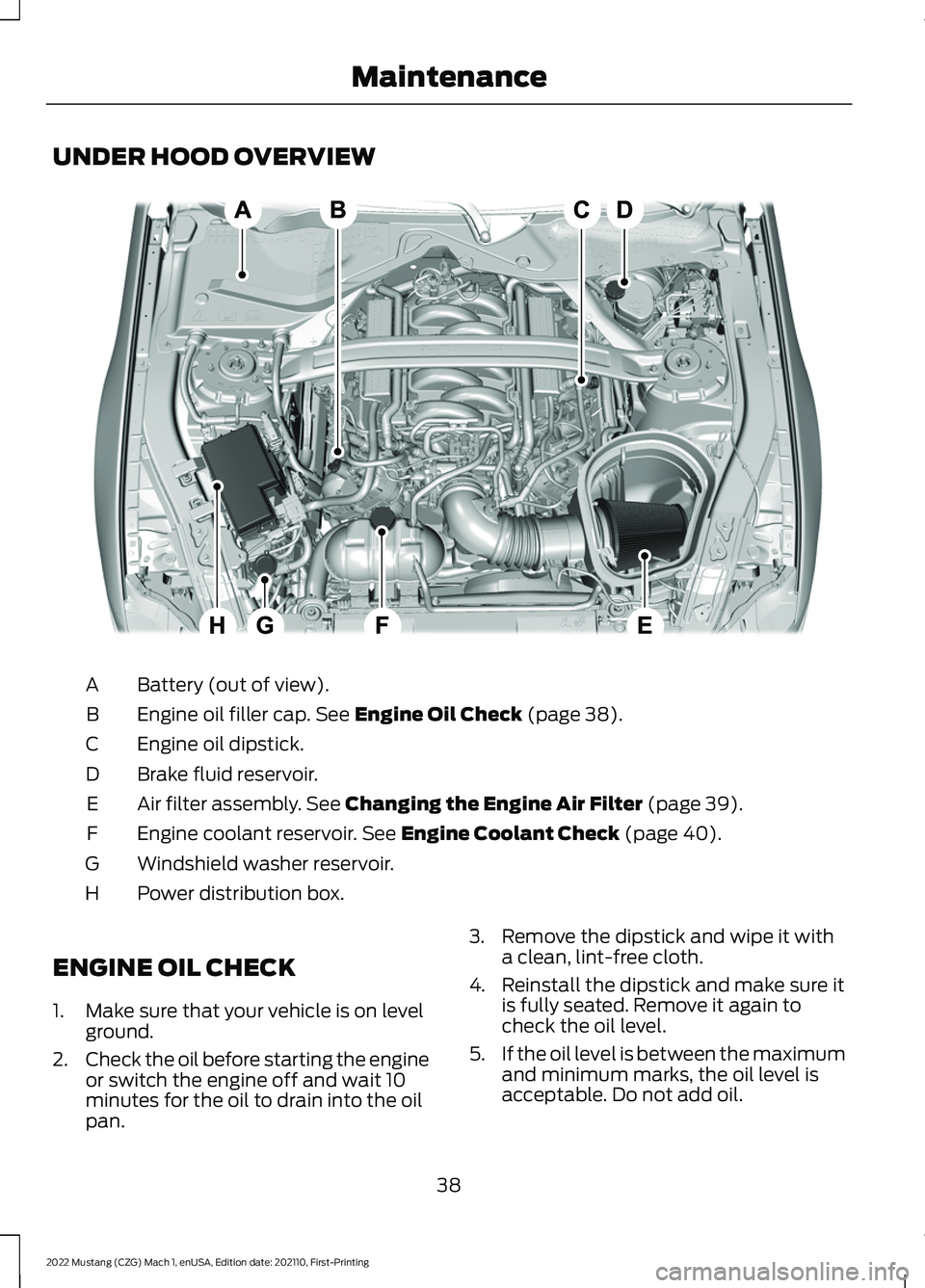
UNDER HOOD OVERVIEW
Battery (out of view).
A
Engine oil filler cap. See Engine Oil Check (page 38).
B
Engine oil dipstick.
C
Brake fluid reservoir.
D
Air filter assembly.
See Changing the Engine Air Filter (page 39).
E
Engine coolant reservoir.
See Engine Coolant Check (page 40).
F
Windshield washer reservoir.
G
Power distribution box.
H
ENGINE OIL CHECK
1. Make sure that your vehicle is on level ground.
2. Check the oil before starting the engine
or switch the engine off and wait 10
minutes for the oil to drain into the oil
pan. 3. Remove the dipstick and wipe it with
a clean, lint-free cloth.
4. Reinstall the dipstick and make sure it is fully seated. Remove it again to
check the oil level.
5. If the oil level is between the maximum
and minimum marks, the oil level is
acceptable. Do not add oil.
38
2022 Mustang (CZG) Mach 1, enUSA, Edition date: 202110, First-Printing MaintenanceE296063
Page 46 of 81
Operating at High Speeds and
Track Days
Your vehicle is capable of sustained high
speeds and track day driving.
Before operating your vehicle at high
speeds:
•
Verify your tires have the correct
pressures.
• Inspect wheels and tires for wear and
damage. Replace any damaged wheels
and tires.
• Check and set lug nut torque. See
Wheels (page 52).
• Verify fluid levels for oil, coolant, brake
and hydraulic fluid. See
Capacities
and Specifications (page 56).
• Change the engine oil and replace the
engine oil filter prior to use on the track.
Change the engine oil and filter again
after every four hours of track time.
Maintain the engine oil level at or near
the max mark on the engine oil dipstick.
See
Engine Oil Check (page 38).
• Replace the brake fluid with fresh
Motorcraft/Ford DOT 4 LV High
Performance Brake Fluid or other DOT
compliant fluid with a dry boiling point
greater than
500°F (260°C) from a
sealed container. Do not use silicone
or DOT 5 brake fluids.
• If you are operating your Mach 1 on a
drag strip, use drag strip selectable
drive mode in addition to using line lock
and launch control to provide a specific
set-up tuned for the quickest straight
line elapsed times.
• If you are operating your Mach 1 on a
road course, use sport or track
selectable drive modes to provide a
specific set-up tuned for optimal shift
and suspension set-up that is tuned
towards handling prowess on closed
course surfaces. After operating your vehicle at high speeds
or track day driving, do the following:
•
Set the tire pressure to the proper
specification.
• Check and set the lug nut torque. See
Wheels
(page 52).
• Check all fluid levels.
• Refer to the track maintenance interval
chart. See
Normal Scheduled
Maintenance (page 70).
• Check the front and rear wheel
bearings for abnormal wear.
• Inspect brake caliper dust boots for
abnormal wear.
Track Apps WARNING:
Track Apps™
is for
track use only. Remember that even
advanced technology cannot defy the
laws of physics. It is always possible to
lose control of a vehicle due to
inappropriate driver input for the
conditions. Aggressive driving on any
road condition can cause you to lose
control of your vehicle increasing the risk
of personal injury or property damage.
This information display driven feature
provides a suite of menu options to record
and optimize your track performances.
See
General Information (page 13).
Note: Track Apps are for track use only. Do
not use them under any other driving
conditions.
Note: You cannot view or clear your results
unless your vehicle is at a complete stop
with the right arrow on the display menu
inactive. If your vehicle does not reach
100 mph (160 km/h)
during the track run,
your display may not show your selected
interval's results.
43
2022 Mustang (CZG) Mach 1, enUSA, Edition date: 202110, First-Printing Track Use
Page 47 of 81
Note:
The pre-collision assist system turns
off when using Track Apps or when you
switch off your stability control system.
Acceleration Timer
Displays your vehicle's rate of acceleration
for a given speed or distance range.
Accelerometer
Displays your vehicle's rate of acceleration
or deceleration. A dot moves toward the
area of acceleration or deceleration.
LEFT Acceleration or Deceleration
When accelerating or decelerating left, the
dot moves to the right on the
accelerometer.
RIGHT Acceleration or Deceleration
When accelerating or decelerating right,
the dot moves to the left on the
accelerometer.
Brake Performance
Displays your vehicle's rate of deceleration
for a given speed range.
Exhaust Mode
Gives the driver the ability to choose the
vehicle's exhaust mode.
Note: The Track Exhaust Mode setting is
only for use at tracks and not for use on
public roadways. Use of this setting results
in increased exterior noise, which may not
meet state and local laws and regulations.
It is the obligation of the driver to operate
the vehicle in a manner that complies with
state and local requirements. Only use the
Track Exhaust Mode setting at a
competition track or an off-road course
where elevated exterior vehicle noise is
acceptable. Lap Timer
Gives you the ability to record lap times at
three separate tracks.
Launch Control (If Equipped)
Maximizes your vehicle's traction from a
standing start.
Follow these steps to use launch control:
1. Bring your vehicle to a complete stop.
2. Make sure launch control is enabled. The indicator illuminates in the
information display when launch
control is enabled.
3. Fully press the clutch pedal.
4. Shift the transmission into 1st gear.
5. Fully depress the accelerator pedal and
allow the engine RPM to stabilize.
6. Release the clutch pedal.
Line Lock
Line lock is a feature intended for use at
tracks only and should not be used on
public roadways. Use of this feature may
result in significantly increased rear tire
wear. It is intended to condition the rear
tires to maximize traction prior to track use.
Line lock maintains brake force at the front
wheels, allowing the rear wheels to spin
with minimal vehicle movement.
This feature is located in the Track Apps
menu. Make selections through the 5-way
information display control and OK button
located on the steering wheel.
Using Line Lock
There are three line lock stages:
• Initiated.
• Engaged.
• Off.
44
2022 Mustang (CZG) Mach 1, enUSA, Edition date: 202110, First-Printing Track Use
Page 48 of 81
Initiating Line Lock
The initiation stage verifies that the vehicle
is ready for line lock function, and confirms
driver intent. Follow the prompts in the
information display to initiate line lock.
The following conditions must be met to
initialize line lock:
•
The vehicle is on a level surface.
• The engine is running.
• The vehicle is traveling less than
25 mph (40 km/h).
• Selectable drive mode is not in wet
mode (if equipped).
• There are no electronic stability control
faults.
If you want to cancel line lock once it is
initialized, press the left information
display control. Once initiated, line lock is
prepared for activation and remains
initiated up to 25 mph (40 km/h). If vehicle
speed exceeds 25 mph (40 km/h), line lock
automatically cancels.
Engaging Line Lock
Follow the prompts in the information
display to engage line lock after it is
initialized. To engage, firmly apply the
brakes. Then press the OK button. Once
engaged, release the brake pedal. The
front brakes remain applied and the rear
brakes release. At this point, the
engagement timer is initiated and shown
on the driver information display.
The following conditions must be met to
engage line lock:
• The vehicle is on a level surface.
• The engine is running.
• The vehicle is stopped.
• The parking brake is not applied.
• The driver door is closed.
• The transmission is in a forward gear. •
Selectable drive mode is not in wet
mode (if equipped).
• There are no electronic stability control
faults.
• The steering wheel must be in the
straight ahead position.
Releasing Line Lock
While line lock is engaged, you can exit
(release) the feature using the OK button.
When you press the OK button, line lock
releases immediately and normal vehicle
function resumes. When line lock engages,
a countdown timer shows the remaining
time before line lock is released
automatically. If you exceed the time limit,
or another vehicle condition requires line
lock to release, the system safely
disengages and normal vehicle function
resumes.
Note: If you apply the brake pedal while
line lock is engaged, line lock automatically
cancels and normal brake function resumes.
Performance Shift Indicator
The performance shift indicator displays
a row of colored lights that represent
engine RPM.
The performance shift indicator menu
allows you to:
• Choose whether the indicator is shown
on the windshield or information
display.
• Set a shift point within the allowable
RPM range in increments of 100.
• Enable or disable the associated shift
tone, based on the set shift point.
• Set the between off, change with drive
mode, tach, track and drag.
• Set the light intensity. The intensity
adjusts between day time and night
time.
45
2022 Mustang (CZG) Mach 1, enUSA, Edition date: 202110, First-Printing Track Use
Page 49 of 81
Start Option
Allows you to select the type of countdown
the information display shows before
starting an event.
Status Screen
Provides the status of your chosen
performance-related settings.
View/Clear Results
Allows you to view and clear the last and
saved results of the Acceleration Timer,
Brake Performance, and All Time Best
results.
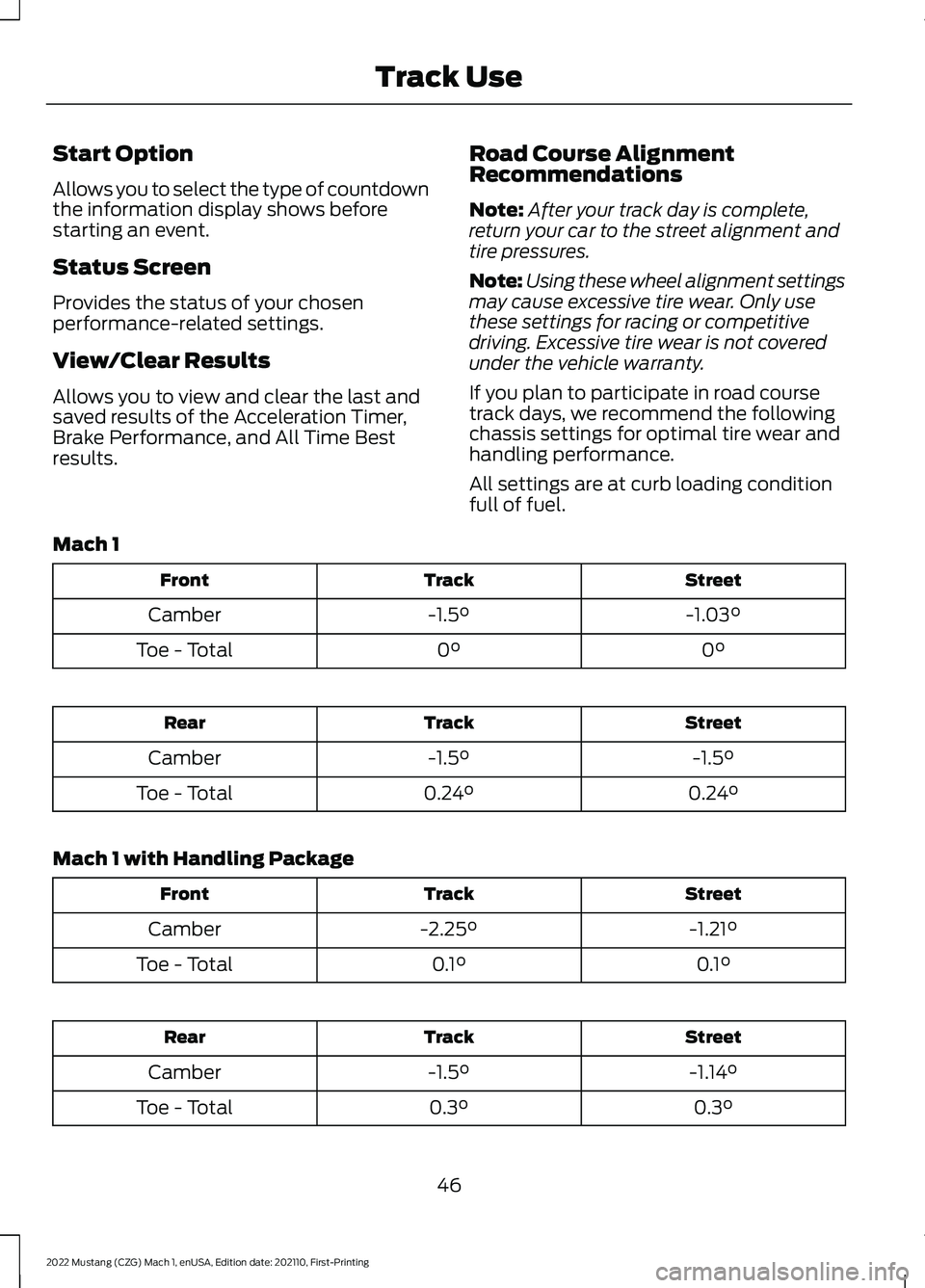
Road Course Alignment
Recommendations
Note:
After your track day is complete,
return your car to the street alignment and
tire pressures.
Note: Using these wheel alignment settings
may cause excessive tire wear. Only use
these settings for racing or competitive
driving. Excessive tire wear is not covered
under the vehicle warranty.
If you plan to participate in road course
track days, we recommend the following
chassis settings for optimal tire wear and
handling performance.
All settings are at curb loading condition
full of fuel.
Mach 1 Street
Track
Front
-1.03°
-1.5°
Camber
0°
0°
Toe - Total Street
Track
Rear
-1.5°
-1.5°
Camber
0.24°
0.24°
Toe - Total
Mach 1 with Handling Package Street
Track
Front
-1.21°
-2.25°
Camber
0.1°
0.1°
Toe - Total Street
Track
Rear
-1.14°
-1.5°
Camber
0.3°
0.3°
Toe - Total
46
2022 Mustang (CZG) Mach 1, enUSA, Edition date: 202110, First-Printing Track Use
Page 52 of 81
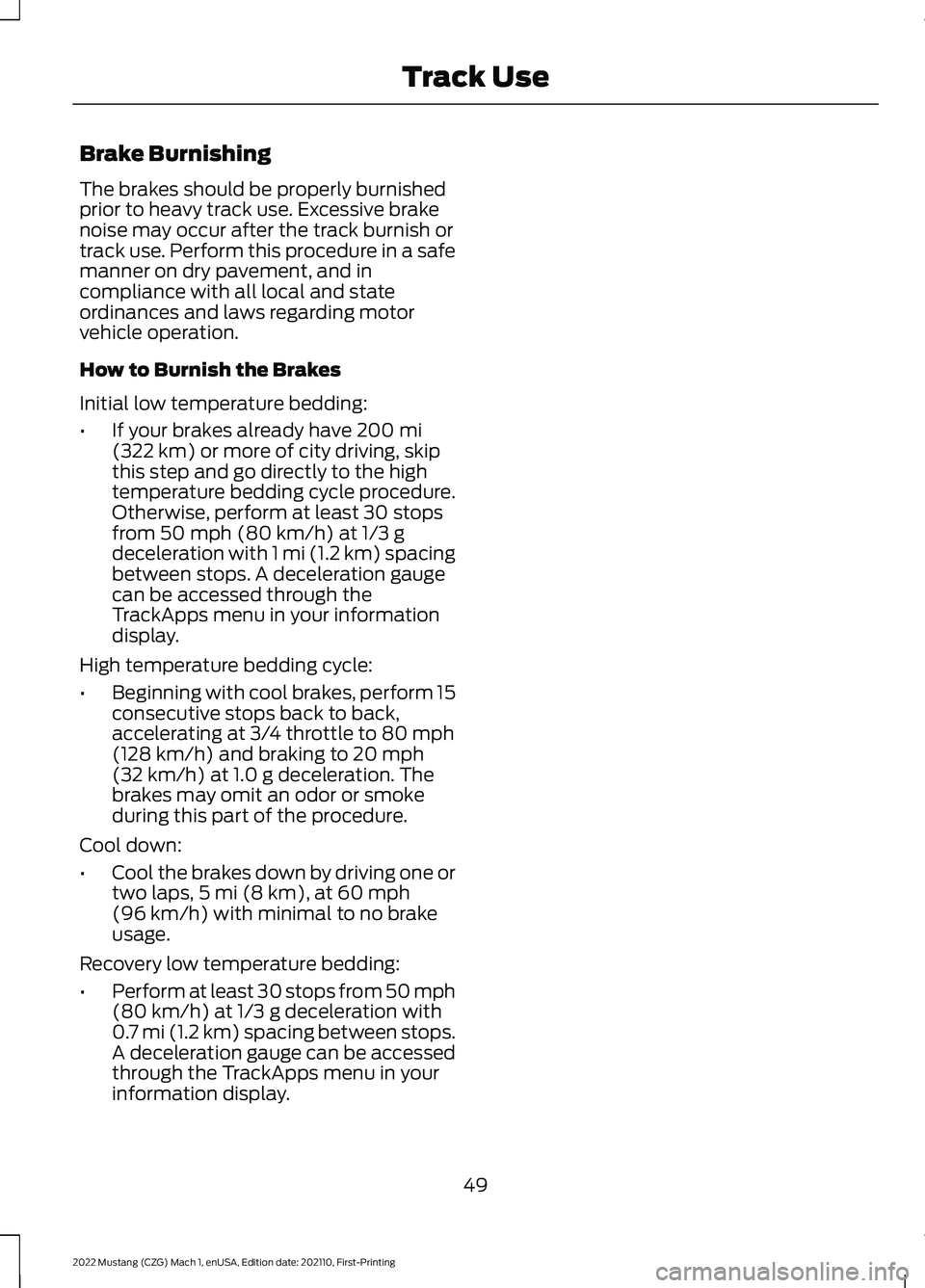
Brake Burnishing
The brakes should be properly burnished
prior to heavy track use. Excessive brake
noise may occur after the track burnish or
track use. Perform this procedure in a safe
manner on dry pavement, and in
compliance with all local and state
ordinances and laws regarding motor
vehicle operation.
How to Burnish the Brakes
Initial low temperature bedding:
•
If your brakes already have 200 mi
(322 km) or more of city driving, skip
this step and go directly to the high
temperature bedding cycle procedure.
Otherwise, perform at least 30 stops
from
50 mph (80 km/h) at 1/3 g
deceleration with 1 mi (1.2 km) spacing
between stops. A deceleration gauge
can be accessed through the
TrackApps menu in your information
display.
High temperature bedding cycle:
• Beginning with cool brakes, perform 15
consecutive stops back to back,
accelerating at 3/4 throttle to
80 mph
(128 km/h) and braking to 20 mph
(32 km/h) at 1.0 g deceleration. The
brakes may omit an odor or smoke
during this part of the procedure.
Cool down:
• Cool the brakes down by driving one or
two laps, 5 mi (8 km)
, at 60 mph
(96 km/h) with minimal to no brake
usage.
Recovery low temperature bedding:
• Perform at least 30 stops from 50 mph
(80 km/h)
at 1/3 g deceleration with
0.7 mi (1.2 km) spacing between stops.
A deceleration gauge can be accessed
through the TrackApps menu in your
information display.
49
2022 Mustang (CZG) Mach 1, enUSA, Edition date: 202110, First-Printing Track Use
Page 55 of 81
WHEELS
Your vehicle has unique wheels matched
to the tires. These wheels are more
susceptible to damage due to their
diameter, width and low profile tires.
To avoid damage to your wheels:
•
Maintain proper tire pressure (see Tires
in this supplement).
• When installing wheels, always torque
lug nuts to specification with a torque
wrench.
• Inspect your wheels for damage on a
regular basis. If a wheel is damaged,
replace it immediately.
• In the event that you encounter an
abnormally harsh impact, inspect the
outer diameter of your wheels, both
inside and out, for damage.
Use Motorcraft™ Wheel and Tire Cleaner
to maintain your wheels. See your Owner ’s
Manual for information on other cleaning
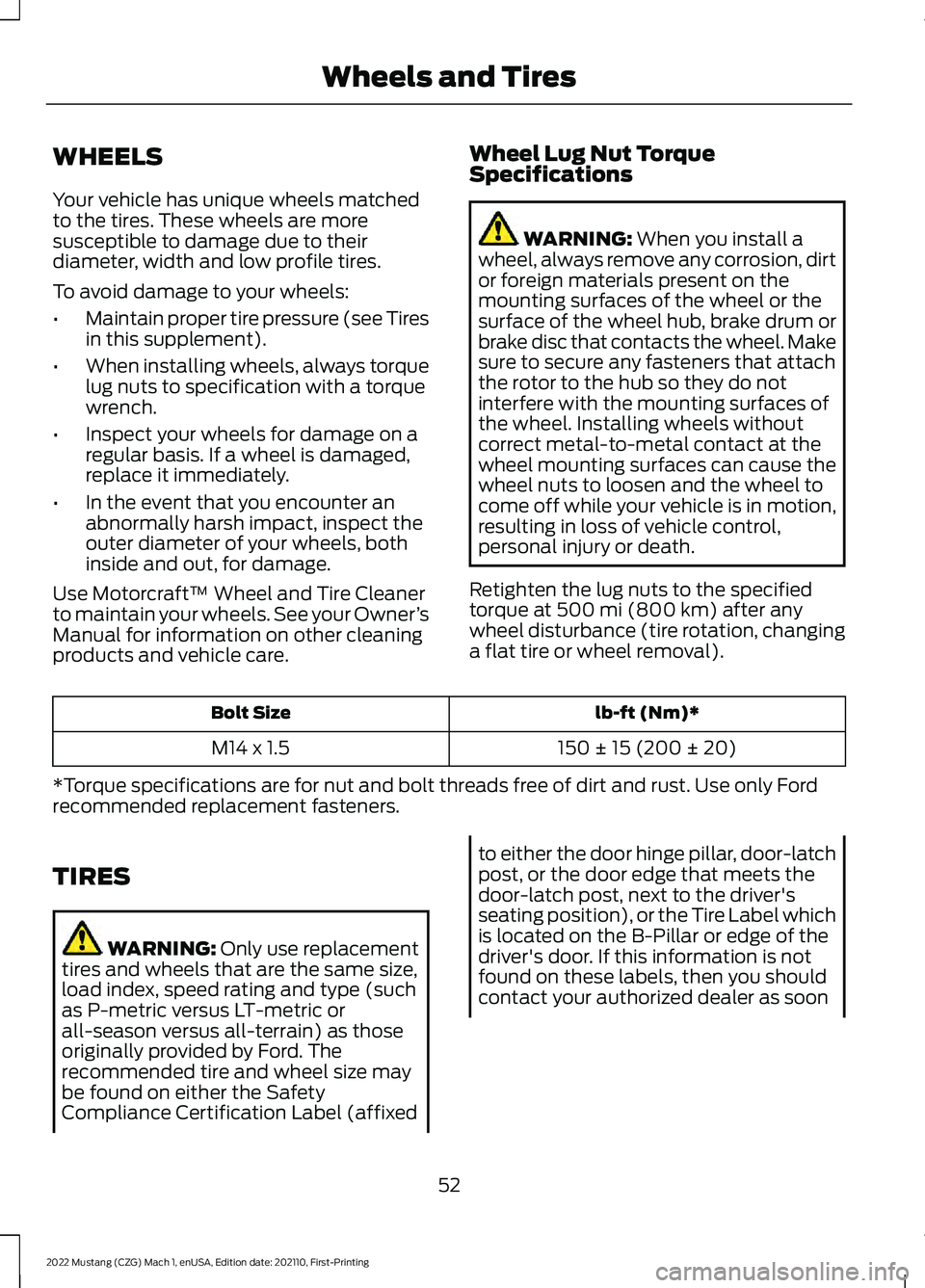
products and vehicle care. Wheel Lug Nut Torque
Specifications WARNING: When you install a
wheel, always remove any corrosion, dirt
or foreign materials present on the
mounting surfaces of the wheel or the
surface of the wheel hub, brake drum or
brake disc that contacts the wheel. Make
sure to secure any fasteners that attach
the rotor to the hub so they do not
interfere with the mounting surfaces of
the wheel. Installing wheels without
correct metal-to-metal contact at the
wheel mounting surfaces can cause the
wheel nuts to loosen and the wheel to
come off while your vehicle is in motion,
resulting in loss of vehicle control,
personal injury or death.
Retighten the lug nuts to the specified
torque at
500 mi (800 km) after any
wheel disturbance (tire rotation, changing
a flat tire or wheel removal). lb-ft (Nm)*
Bolt Size
150 ± 15 (200 ± 20)
M14 x 1.5
*Torque specifications are for nut and bolt threads free of dirt and rust. Use only Ford
recommended replacement fasteners.
TIRES WARNING:
Only use replacement
tires and wheels that are the same size,
load index, speed rating and type (such
as P-metric versus LT-metric or
all-season versus all-terrain) as those
originally provided by Ford. The
recommended tire and wheel size may
be found on either the Safety
Compliance Certification Label (affixed to either the door hinge pillar, door-latch
post, or the door edge that meets the
door-latch post, next to the driver's
seating position), or the Tire Label which
is located on the B-Pillar or edge of the
driver's door. If this information is not
found on these labels, then you should
contact your authorized dealer as soon
52
2022 Mustang (CZG) Mach 1, enUSA, Edition date: 202110, First-Printing Wheels and Tires
Page 60 of 81
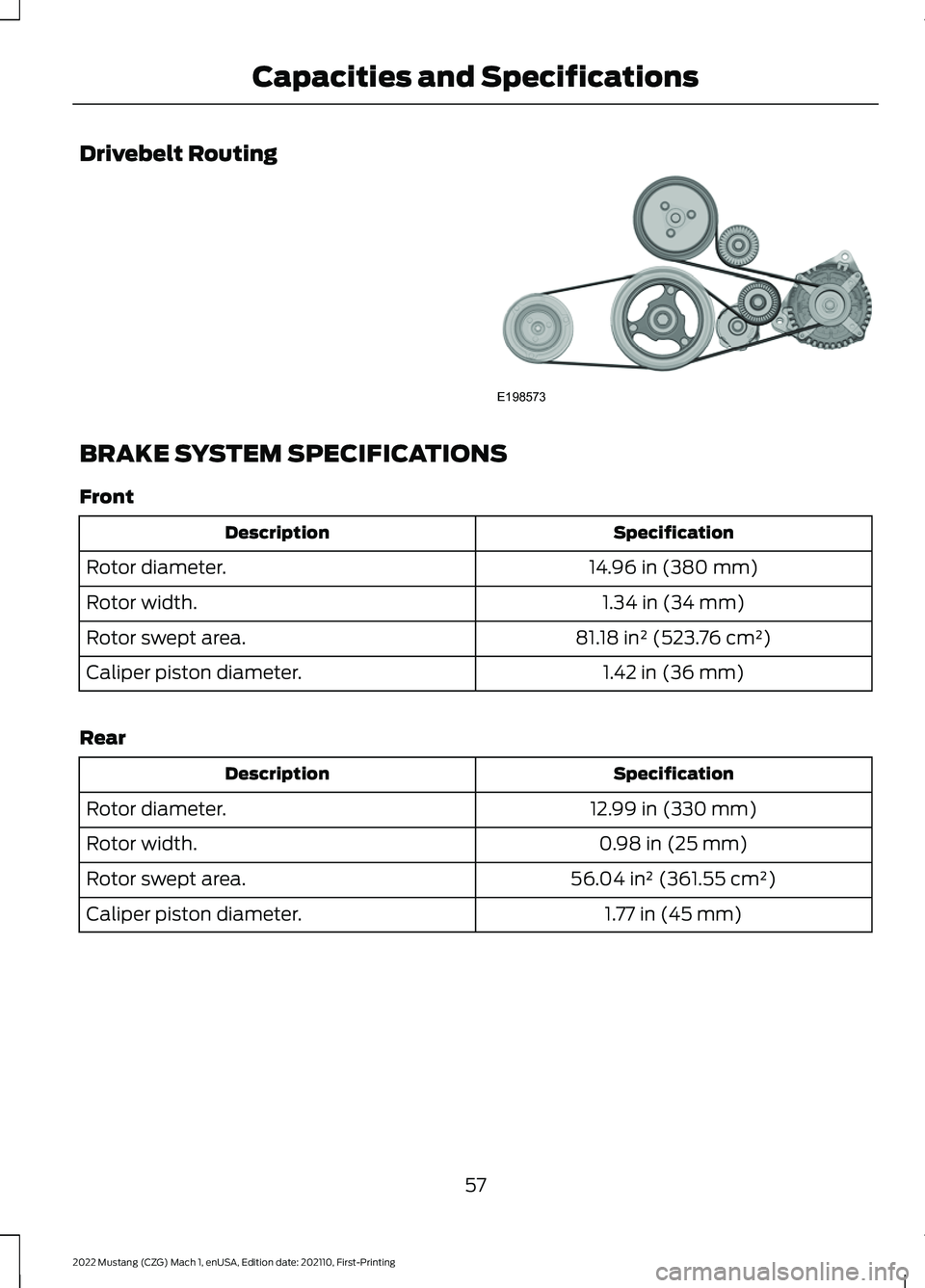
Drivebelt Routing
BRAKE SYSTEM SPECIFICATIONS
Front
Specification
Description
14.96 in (380 mm)
Rotor diameter.
1.34 in (34 mm)
Rotor width.
81.18 in² (523.76 cm²)
Rotor swept area.
1.42 in (36 mm)
Caliper piston diameter.
Rear Specification
Description
12.99 in (330 mm)
Rotor diameter.
0.98 in (25 mm)
Rotor width.
56.04 in² (361.55 cm²)
Rotor swept area.
1.77 in (45 mm)
Caliper piston diameter.
57
2022 Mustang (CZG) Mach 1, enUSA, Edition date: 202110, First-Printing Capacities and SpecificationsE198573
Page 63 of 81
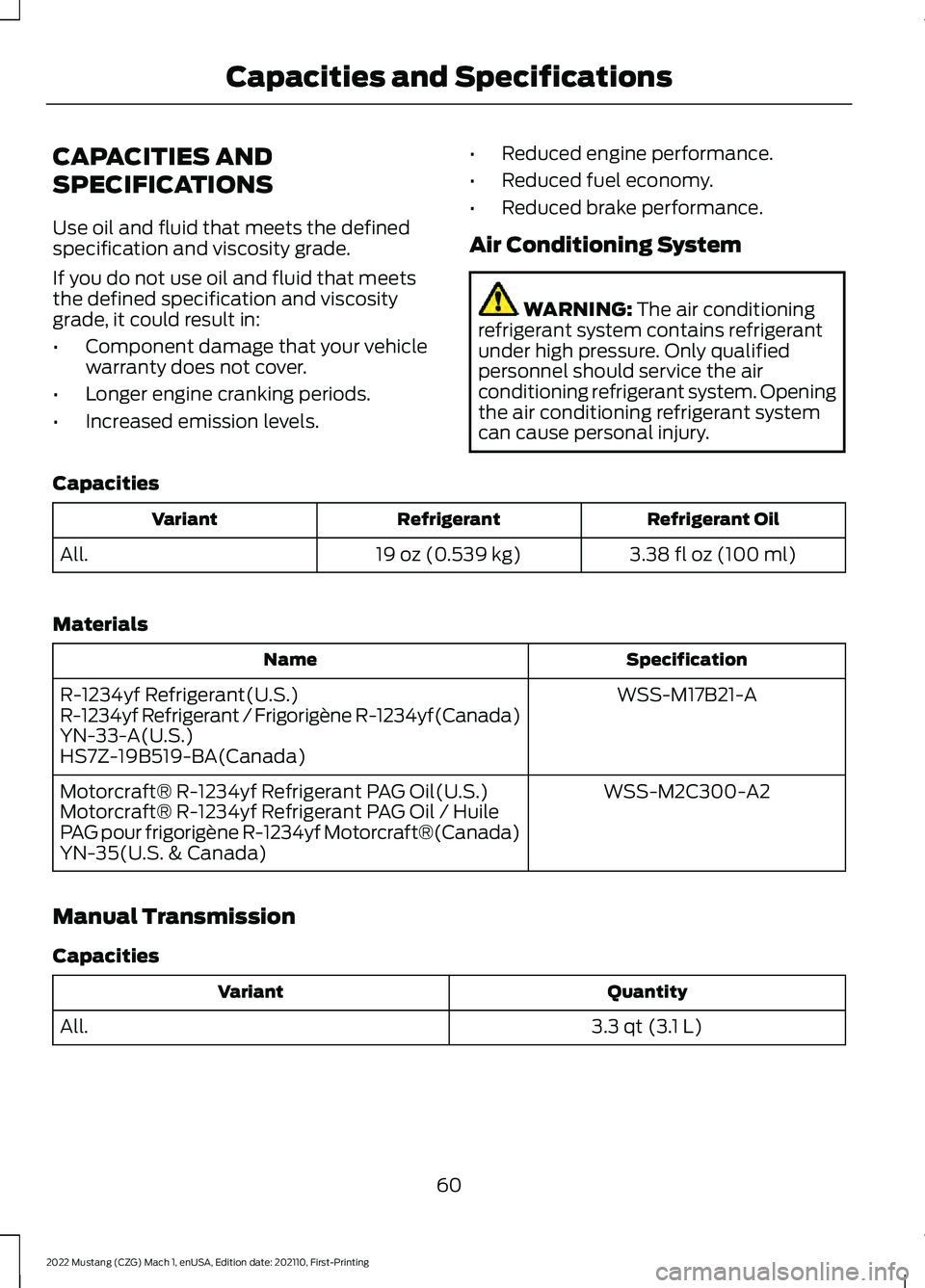
CAPACITIES AND
SPECIFICATIONS
Use oil and fluid that meets the defined
specification and viscosity grade.
If you do not use oil and fluid that meets
the defined specification and viscosity
grade, it could result in:
•
Component damage that your vehicle
warranty does not cover.
• Longer engine cranking periods.
• Increased emission levels. •
Reduced engine performance.
• Reduced fuel economy.
• Reduced brake performance.
Air Conditioning System WARNING: The air conditioning
refrigerant system contains refrigerant
under high pressure. Only qualified
personnel should service the air
conditioning refrigerant system. Opening
the air conditioning refrigerant system
can cause personal injury.
Capacities Refrigerant Oil
Refrigerant
Variant
3.38 fl oz (100 ml)
19 oz (0.539 kg)
All.
Materials Specification
Name
WSS-M17B21-A
R-1234yf Refrigerant(U.S.)
R-1234yf Refrigerant / Frigorigène R-1234yf(Canada)
YN-33-A(U.S.)
HS7Z-19B519-BA(Canada)
WSS-M2C300-A2
Motorcraft® R-1234yf Refrigerant PAG Oil(U.S.)
Motorcraft® R-1234yf Refrigerant PAG Oil / Huile
PAG pour frigorigène R-1234yf Motorcraft®(Canada)
YN-35(U.S. & Canada)
Manual Transmission
Capacities Quantity
Variant
3.3 qt (3.1 L)
All.
60
2022 Mustang (CZG) Mach 1, enUSA, Edition date: 202110, First-Printing Capacities and Specifications
Page 67 of 81
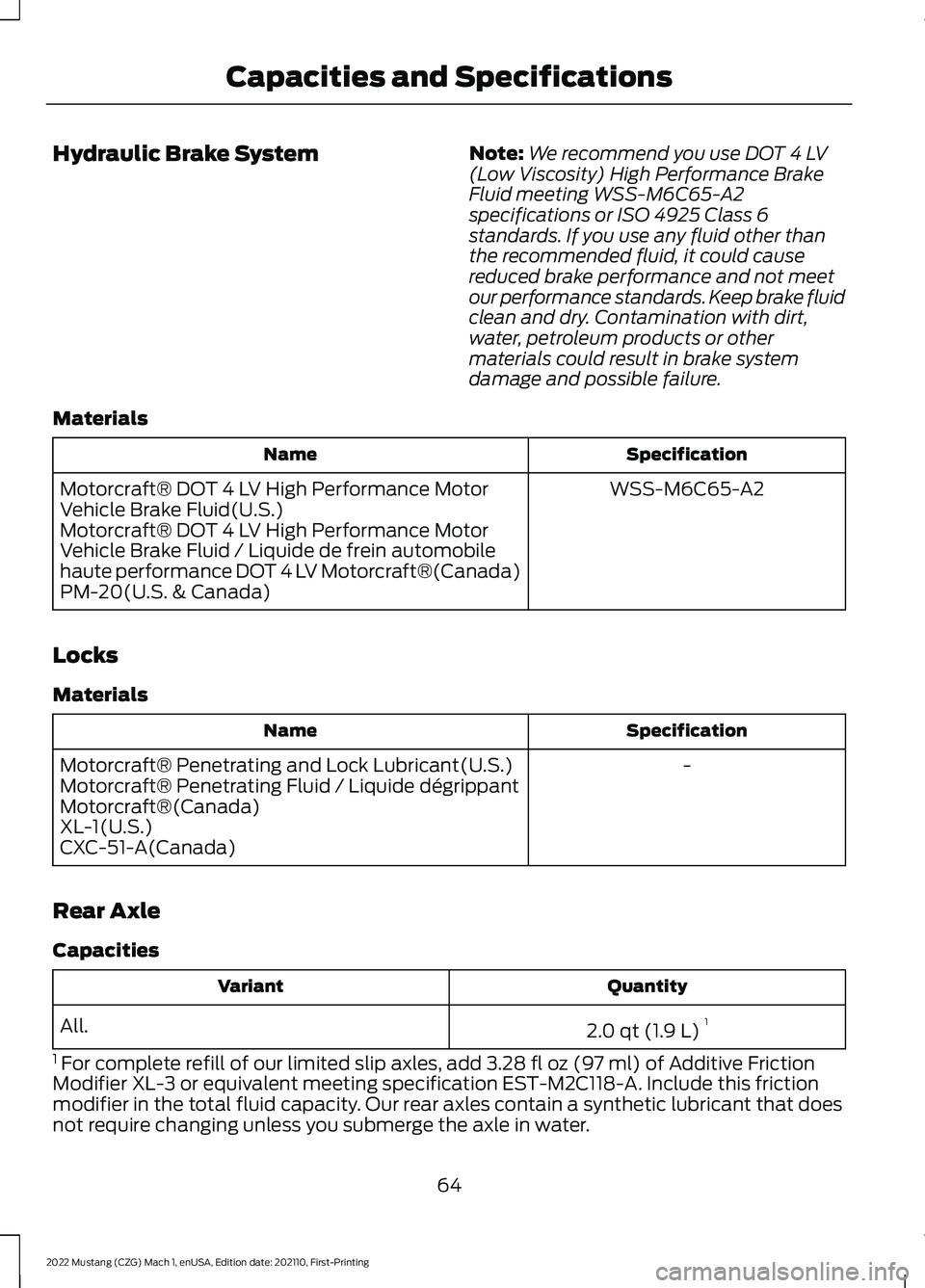
Hydraulic Brake System
Note:
We recommend you use DOT 4 LV
(Low Viscosity) High Performance Brake
Fluid meeting WSS-M6C65-A2
specifications or ISO 4925 Class 6
standards. If you use any fluid other than
the recommended fluid, it could cause
reduced brake performance and not meet
our performance standards. Keep brake fluid
clean and dry. Contamination with dirt,
water, petroleum products or other
materials could result in brake system
damage and possible failure.
Materials Specification
Name
WSS-M6C65-A2
Motorcraft® DOT 4 LV High Performance Motor
Vehicle Brake Fluid(U.S.)
Motorcraft® DOT 4 LV High Performance Motor
Vehicle Brake Fluid / Liquide de frein automobile
haute performance DOT 4 LV Motorcraft®(Canada)
PM-20(U.S. & Canada)
Locks
Materials Specification
Name
-
Motorcraft® Penetrating and Lock Lubricant(U.S.)
Motorcraft® Penetrating Fluid / Liquide dégrippant
Motorcraft®(Canada)
XL-1(U.S.)
CXC-51-A(Canada)
Rear Axle
Capacities Quantity
Variant
2.0 qt (1.9 L)1
All.
1 For complete refill of our limited slip axles, add 3.28 fl oz (97 ml) of Additive Friction
Modifier XL-3 or equivalent meeting specification EST-M2C118-A. Include this friction
modifier in the total fluid capacity. Our rear axles contain a synthetic lubricant that does
not require changing unless you submerge the axle in water.
64
2022 Mustang (CZG) Mach 1, enUSA, Edition date: 202110, First-Printing Capacities and Specifications