key battery FORD MUSTANG MACH-E 2021 User Guide
[x] Cancel search | Manufacturer: FORD, Model Year: 2021, Model line: MUSTANG MACH-E, Model: FORD MUSTANG MACH-E 2021Pages: 460, PDF Size: 7.29 MB
Page 99 of 460
PASSIVE ANTI-THEFT
SYSTEM
WHAT IS THE PASSIVE ANTI-
THEFT SYSTEM
The passive anti-theft system prevents
someone from starting the vehicle with an
incorrectly coded key.
Note:
Do not leave a duplicate coded key
in your vehicle. Always take the keys and
lock all the doors when leaving your vehicle.
HOW DOES THE PASSIVE ANTI-
THEFT SYSTEM WORK
The passive anti-theft system arms when
you switch the ignition off.
It disarms when the ignition is switched on
with a correctly coded key.
Note: The system is not compatible with
non-Ford aftermarket remote start systems.
Note: Do not leave a duplicate coded key
in your vehicle. Always take the keys and
lock all doors when leaving your vehicle.
ANTI-THEFT ALARM SYSTEM
WHAT IS THE ANTI-THEFT ALARM
SYSTEM
The Anti-Theft Alarm System warns you
of an unauthorized entry to your vehicle. HOW DOES THE ANTI-THEFT
ALARM SYSTEM WORK
When armed, the anti-theft alarm is
triggered in any of the following ways:
•
If someone opens a door, the liftgate
or the hood without a correctly coded
key or remote control.
• If you turn the power on without a
correctly coded key.
• If the interior sensors detect movement
inside your vehicle.
• If the inclination sensors detect an
attempt to raise your vehicle.
• If someone disconnects the vehicle
battery or the battery backup alarm.
If the anti-theft alarm is triggered, the
alarm horn sounds for 30 seconds and the
direction indicators flash for 5 minutes.
Any further attempts to carry out one of
the above sounds the alarm again.
WHAT IS THE PERIMETER ALARM
The perimeter alarm is designed to detect
unauthorized access to your vehicle.
WHAT ARE THE INTERIOR
SENSORS
The interior sensors are designed to detect
any movement inside your vehicle.
The interior sensors are in the overhead
console.
Note: Do not cover the interior sensors.
WHAT ARE THE INCLINATION
SENSORS
The inclination sensor is designed to detect
an attempt to raise your vehicle, for
example to remove a wheel or to tow it
away.
95
2021 Mustang Mach-E (CGW) Canada/United States of America, Vehicles Built From: 07-06-2021, enUSA, Edition date: 202104, First-Printing Security
Page 100 of 460
WHAT IS THE BATTERY BACKUP
ALARM
The battery backup alarm is an additional
alarm system that has its own battery and
horn. It is designed to detect if the vehicle
battery or the battery backup alarm is
disconnected.
ARMING THE ANTI-THEFT ALARM
SYSTEM
The alarm is ready to arm when there is
not a key in your vehicle.
Lock your vehicle with your remote control
to arm the alarm.
DISARMING THE ANTI-THEFT
ALARM SYSTEM
Disarm the alarm by performing any of the
following actions:
•
Unlock the doors or luggage
compartment with the remote control.
• Switch your vehicle on or start your
vehicle.
ANTI-THEFT ALARM SYSTEM
SETTINGS
WHAT ARE THE ALARM SECURITY
LEVELS
You can select two levels of alarm security,
all sensors and perimeter sensing.
All Sensors
All sensors is the standard setting.
In all sensors, all equipped sensors are on
when you arm the alarm. Note:
Do not arm the alarm with all sensors
if passengers, animals or other moving
objects are inside your vehicle.
Perimeter Sensing
In perimeter sensing, the interior sensors
are off when you arm the alarm.
All the other equipped sensors activate
when you arm the alarm in this mode.
SETTING THE ALARM SECURITY
LEVEL
Access the vehicle drawer on the
touchscreen.
1. Press SETTINGS.
2. Press
Vehicle.
3. Press
Alarm System.
4. Press
Motion sensors.
5. Press a setting.
WHAT IS ASK ON EXIT
You can choose which level of security you
require after you switch the ignition off.
Note: If you do not choose a setting, the
system defaults to all sensors.
SWITCHING ASK ON EXIT ON AND
OFF
Access the vehicle drawer on the
touchscreen.
1. Press
SETTINGS.
2. Press
Vehicle.
3. Press
Alarm System.
4. Press
Ask on Exit.
5. Press a setting.
96
2021 Mustang Mach-E (CGW) Canada/United States of America, Vehicles Built From: 07-06-2021, enUSA, Edition date: 202104, First-Printing Security
Page 129 of 460
WHAT IS REMOTE START
The system allows you to remotely start
your vehicle and to adjust the interior
temperature according to the settings that
you chose.
Note:
If your vehicle is plugged in during the
remote start operation, it will draw power
from the power source and not the vehicle's
battery.
REMOTE START LIMITATIONS
Remote start does not work under the
following conditions:
• The alarm horn is sounding.
• The hood is open.
• The vehicle is not in park (P).
• The vehicle is on.
• Remote start has been disabled in the
touchscreen.
• The high voltage or 12 volt battery is
below the minimum operating voltage.
Note: To use remote start with the Ford
Pass, enable the modem. See Enabling
and Disabling the Modem (page 350). To
use remote start with Phone as a Key,
enable the modem and set up Phone As A
Key. See
Programming Your Phone (page
70).
ENABLING REMOTE START
1. Access the vehicle drawer on the touchscreen.
2. Press
SETTINGS.
3. Press
Vehicle.
4. Press
Remote Start Setup.
5. Switch
Remote Start on or off. Note:
To remote start with FordPass or
Phone as a Key, make sure that the modem
is enabled and Phone as a Key is setup. See
Enabling and Disabling the Modem (page
350). See Programming Your Phone (page
70
).
REMOTELY STARTING AND
STOPPING THE VEHICLE
Remotely Starting the Vehicle
Using your Phone as a Key control screen,
press and hold the start button with your
authorized phone within
131 ft (40 m) of
the vehicle.
Note: You can also use the FordPass App
to start the vehicle.
Note: The direction indicators flash twice.
Note: The parking lamps turn on when the
vehicle is running.
Note: The horn sounds if the system fails
to start.
Note: All other vehicle systems remain off
when you have remotely started the vehicle.
Note: The vehicle remains secured when
you have remotely started the vehicle. A
valid key must be inside your vehicle to
switch the vehicle on and drive your vehicle.
Remotely Stopping the Vehicle
Using your Phone as a Key control screen,
press the remote stop button.
Note: You can also use the FordPass App
to stop the vehicle.
EXTENDING THE REMOTE
START DURATION
Using your Phone as a Key control screen
press the button showing addition time.
125
2021 Mustang Mach-E (CGW) Canada/United States of America, Vehicles Built From: 07-06-2021, enUSA, Edition date: 202104, First-Printing Remote Start
Page 160 of 460
Within 10 seconds of switching your vehicle
off, press the brake pedal and press the
push button start. After 10 seconds, you
can no longer start your vehicle if it does
not detect a valid remote control.
Once your vehicle starts, it remains on until
you press the push button start, even if it
does not detect a valid remote control.
If you open and close a door while your
vehicle is on, the system searches for a
valid remote control. You cannot start your
vehicle if the system does not detect a
valid remote control within 10 seconds.
ACCESSING THE PASSIVE KEY
BACKUP POSITION
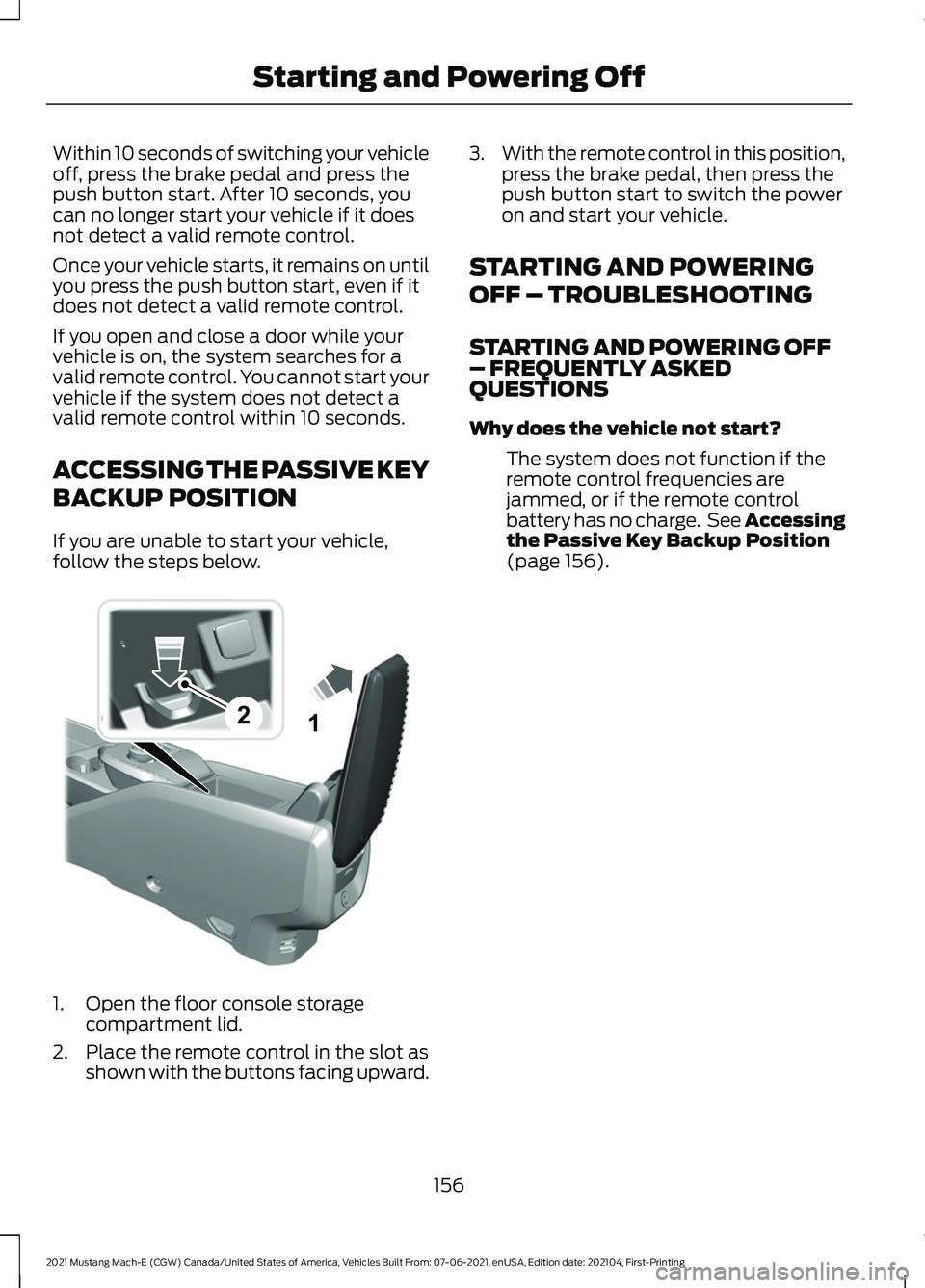
If you are unable to start your vehicle,
follow the steps below.
1. Open the floor console storage
compartment lid.
2. Place the remote control in the slot as shown with the buttons facing upward. 3.
With the remote control in this position,
press the brake pedal, then press the
push button start to switch the power
on and start your vehicle.
STARTING AND POWERING
OFF – TROUBLESHOOTING
STARTING AND POWERING OFF
– FREQUENTLY ASKED
QUESTIONS
Why does the vehicle not start? The system does not function if the
remote control frequencies are
jammed, or if the remote control
battery has no charge. See Accessing
the Passive Key Backup Position
(page 156).
156
2021 Mustang Mach-E (CGW) Canada/United States of America, Vehicles Built From: 07-06-2021, enUSA, Edition date: 202104, First-Printing Starting and Powering Off21E315884
Page 288 of 460
ROADSIDE ASSISTANCE
Vehicles Sold in the United States:
Getting Roadside Assistance
To fully assist you should you have a
vehicle concern, Ford Motor Company
offers a complimentary roadside
assistance program. This program is
separate from the New Vehicle Limited
Warranty.
The service is available:
•
24 hours a day, seven days a week.
• For the coverage period supplied with
your vehicle.
Roadside Assistance covers:
• 12 V battery jump start.
• Lock-out assistance (key replacement
cost is the customer's responsibility).
• In the event your vehicle's high-voltage
battery does not have enough power
to move, as a Mach-E roadside
customer, you can choose where you
would like your vehicle towed (within
a 35 mi (56 km) radius):
• Nearest public charger.
• EV Certified Ford or Lincoln Dealer.
• Your home residence.
Vehicles Sold in the United States:
Using Roadside Assistance
Complete the roadside assistance
identification card and place it in your
wallet for quick reference. This card is in
the Owner's Manual kit.
United States vehicle customers who
require Roadside Assistance, call
1-800-241-3673. If you need to arrange roadside assistance
for yourself, Ford Motor Company
reimburses a reasonable amount for
towing to the nearest dealership within
35 mi (56 km)
. To obtain reimbursement
information, United States vehicle
customers call 1-800-241-3673.
Customers need to submit their original
receipts.
Vehicles Sold in Canada: Getting
Roadside Assistance
To fully assist you should you have a
vehicle concern, Ford Motor Company of
Canada, Limited offers a complimentary
roadside assistance program. This
program is eligible within Canada or the
continental United States.
The service is available 24 hours a day,
seven days a week.
This program is separate from the New
Vehicle Limited Warranty, but the coverage
is concurrent with the powertrain coverage
period of your vehicle. Canadian roadside
coverage and benefits may differ from the
U.S. coverage.
If you require more information, please call
us in Canada at 1-800-665-2006, or visit
our website at
www .f or d . c a .
SWITCHING THE HAZARD
FLASHERS ON AND OFF
The hazard flashers operate with the
power on or off. The battery loses charge
and may have insufficient power to restart
your vehicle. The hazard flasher button is on
the center console. Press the
button to turn on the hazard
flashers if your vehicle is creating a safety
hazard for other road users.
When you switch the hazard flashers on,
all front and rear direction indicators flash.
284
2021 Mustang Mach-E (CGW) Canada/United States of America, Vehicles Built From: 07-06-2021, enUSA, Edition date: 202104, First-Printing Crash and Breakdown Information
Page 377 of 460
MAKING AND RECEIVING A
PHONE CALL
Making Calls
To call a number in your contacts,
select:
Action and Description
Menu Item
You can then select the
name of the contact you
want to call. Any numbers
stored for that contact
display along with any
stored contact photos. You
can then select the
number that you want to
call. The system begins the
call.
Contacts
To call a number from your recent calls,
select: Action and Description
Menu Item
You can then select an
entry that you want to call.
The system begins the call.
Recent Call
List
To call a number from your favorites,
select: Action and Description
Menu Item
You can then select an
entry that you want to call.
The system begins the call.
Favorites
To call a number that is not stored in
your phone, select: Action and Description
Menu Item
Select the digits of the
number you wish to call.
Phone
Keypad
The system begins the call.
Call Pressing the backspace button deletes the
last digit you typed.
Receiving Calls
During an incoming call, an audible tone
sounds. Caller information appears in the
display if it is available.
To accept the call, select:
Menu Item
Accept
Note: You can also accept the call by
pressing the phone button on the steering
wheel.
To reject the call, select: Menu Item
Reject
Ignore the call by doing nothing. The
system logs it as a missed call.
During a Phone Call
During a phone call, the contacts name
and number display on the screen along
with the call duration.
The phone status items are also visible:
• Signal Strength.
• Battery.
You can select any of the following during
an active phone call:
373
2021 Mustang Mach-E (CGW) Canada/United States of America, Vehicles Built From: 07-06-2021, enUSA, Edition date: 202104, First-Printing Phone
Page 441 of 460
1
12V Battery.....................................................306
Changing the 12V Battery............................... 306
Charging the 12V Battery................................ 306
12V Battery – Troubleshooting
..............306
12V Battery – Information Messages.........307
12V Battery – Warning Lamps...................... 306
3
360 Degree Camera
....................................215
360 Degree Camera Settings......................... 217
360 Degree Camera Guide Lines...........216
360 Degree Camera Limitations
............215
360 Degree Camera Precautions...........215
360 Degree Camera Settings...................217 Switching the 360 Degree Camera On and
Off........................................................................\
217
Switching the 360 Degree Camera View..................................................................... 217
9
911 Assist
...........................................................64
A
A/C See: Climate Control.......................................... 127
About This Publication..................................17
ABS See: Brakes............................................................ 187
Accessing Apps
.............................................377
Accessing Feature Drawers.....................368
Accessing Navigation
.................................383
Accessing the Passive Key Backup Position.........................................................156
Accessing the Trip Computer
...................124
Accessories....................................................387
AC Charging....................................................169 Connecting the Charger................................... 169
Stopping Charging............................................... 171
Active Drive Assist.......................................235 Active Drive Assist –
Troubleshooting............................................ 239
Active Drive Assist Alerts...........................237 Active Drive Assist Automatic
Cancellation................................................237
Active Drive Assist Indicators..................238
Active Drive Assist Limitations...............236
Active Drive Assist Precautions..............235
Active Drive Assist Requirements
.........236
Active Drive Assist Settings.....................236
Active Drive Assist – Troubleshooting........................................
239
Active Drive Assist – Information
Messages......................................................... 239
Active Park Assist.........................................218 Active Park Assist –
Troubleshooting............................................ 220
Active Park Assist Precautions................218
Active Park Assist – Troubleshooting........................................220
Active Park Assist – Frequently Asked Questions........................................................ 220
Active Park Assist – Information Messages......................................................... 220
Adaptive Cruise Control.............................222 Adaptive Cruise Control –
Troubleshooting............................................ 232
Intelligent Adaptive Cruise Control..............231
Lane Centering.................................................... 229
Adaptive Cruise Control Automatic Cancellation................................................225
Adaptive Cruise Control Indicators.......228
Adaptive Cruise Control Limitations...................................................222
Adaptive Cruise Control Precautions.................................................222
Adaptive Cruise Control – Troubleshooting........................................232
Adaptive Cruise Control – Information Messages......................................................... 232
Adjusting the Exterior Mirrors....................116
Adjusting the Headlamps.........................307
Adjusting the Instrument Panel Lighting Brightness......................................................112
Adjusting the Luggage Compartment Load Floor
....................................................278
Adjusting the Map.......................................383
Changing the Format of the Map................383
Zooming the Map In and Out........................ 383
Adjusting the Seatbelt Height...................49
437
2021 Mustang Mach-E (CGW) Canada/United States of America, Vehicles Built From: 07-06-2021, enUSA, Edition date: 202104, First-Printing Index
Page 444 of 460
Locating the Body Control Module Fuse
Box..................................................................... 299
Body Styling Kit Precautions....................314
Body Styling Kits...........................................314
Bonnet Lock See: Opening and Closing the Hood..........303
Booster Seats..................................................43
Brake Fluid Specification..........................188
Brake Over Accelerator...............................187
Brake Precautions........................................187
Brakes................................................................187 Anti-Lock Braking System............................... 187
Brakes – Troubleshooting............................... 188
Brakes – Troubleshooting.........................188 Brakes – Frequently Asked
Questions......................................................... 188
Brakes – Warning Lamps................................ 188
Breaking-In....................................................280
C
Calculating Payload
....................................272
Calculating the Load Limit.......................273
Canceling the Set Speed...........................227
Capacities and Specifications
................344
Center Console - GT......................................28
Center Display Limitations......................366
Center Display Overview
..........................366
Center Display Precautions.....................366
Changing a Road Wheel...........................343
Changing the Remote Control Battery.............................................................67
Changing the Vehicle Wi-Fi Hotspot Name or Password
..................................354
Charge Port Indicators...............................168
Charging a Device........................................150
Charging a Wireless Device.......................152
Charging Equipment
...................................159
Charging Your Vehicle.................................159 AC Charging.......................................................... 169
Charging Your Vehicle – Troubleshooting............................................ 180
DC Charging........................................................... 172
Charging Your Vehicle Hints.....................180
Charging Your Vehicle Precautions........159 Charging Your Vehicle –
Troubleshooting........................................180
Charging Your Vehicle – Frequently Asked Questions......................................................... 182
Charging Your Vehicle – Information Messages........................................................... 181
Charging Your Vehicle – Warning Lamps................................................................ 180
Checking MyKey System Status...............75
Checking the Brake Fluid...........................187
Checking the Coolant
................................304
Checking the Seatbelts.................................51
Checking the Tire Pressures....................329
Checking the Wiper Blades......................102
Children and Airbags
.....................................57
Child Restraint Anchor Points...................36
Locating the Child Restraint Lower Anchor
Points................................................................... 36
Locating the Child Restraint Top Tether Anchor Points.................................................... 37
What Are the Child Restraint Anchor Points................................................................... 36
Child Restraints...............................................37 Child Restraint Position Information.............37
Child Restraints Recommendation...............38
Child Safety
......................................................35
Child Restraint Anchor Points......................... 36
Child Restraints..................................................... 37
Installing Child Restraints................................. 38
Child Safety Locks.........................................45
Child Safety Precautions.............................35
Cleaning Products
......................................309
Cleaning the Exterior...................................310 Cleaning Camera Lenses and Sensors........311
Cleaning Chrome, Aluminium or Stainless
Steel................................................................... 310
Cleaning Headlamps and Rear Lamps................................................................ 310
Cleaning Stripes or Graphics........................... 311
Cleaning the Exterior Precautions...............310
Cleaning the Underbody................................... 311
Cleaning Wheels................................................. 310
Cleaning Windows and Wiper Blades........310
Cleaning the Interior
.....................................311
Cleaning Carpets and Floor Mats.................312
Cleaning Displays and Screens..................... 312
Cleaning Plastic................................................... 312
Cleaning Seatbelts............................................. 313
440
2021 Mustang Mach-E (CGW) Canada/United States of America, Vehicles Built From: 07-06-2021, enUSA, Edition date: 202104, First-Printing Index
Page 450 of 460
Liftgate – Warning Lamps................................
92
Linking or Unlinking a Personal Profile to a Device.........................................................381
Linking or Unlinking a Personal Profile to a Remote Control......................................381
Live Traffic
......................................................383
Switching Live Traffic On and Off...............383
What Is Live Traffic........................................... 383
Load Carrying
................................................270
Load Carrying Precautions.......................270
Locating the 360 Degree Cameras........216
Locating the Blind Spot Information System Sensors
.........................................252
Locating the Brake Fluid Reservoir.........187
Locating the Charge Port
..........................168
Locating the Cross Traffic Alert Sensors
.........................................................255
Locating the Keyless Entry Keypad.........83
Locating the Memory Function Buttons..........................................................144
Locating the Power Outlet.........................151
Locating the Pre-Collision Assist Sensors.........................................................259
Locating the Rear View Camera..............212
Locating the Safety Compliance Certification Labels
...................................271
Locating the Tire label.................................317
Locating the Tire Sealant and Inflator Kit....................................................................333
Locating the USB Ports..............................149
Locating the Wireless Accessory Charger..........................................................152
Locating Your Vehicle....................................67
Locking the Rear Window Controls........114
Luggage Compartment Anchor Points.............................................................278
Locating the Luggage Compartment Anchor Points................................................. 278
Luggage Compartment.............................275 Luggage Compartment Anchor
Points................................................................. 278
Luggage Compartment Precautions.................................................275
M
Maintenance
.................................................303
12V Battery........................................................... 30612V Battery – Troubleshooting.....................
306
Exterior Bulbs..................................................... 308
Interior Bulbs....................................................... 308
Maintenance Precautions
........................303
Making and Receiving a Phone Call..................................................................373
Manually Releasing the Electric Parking Brake..............................................................190
Manual Seats
.................................................134
Adjusting the Head Restraint......................... 134
Adjusting the Seat Backrest........................... 135
Adjusting the Seat Height............................... 136
Folding the Seat Backrest................................ 141
Head Restraint Components......................... 134
Installing the Head Restraint.......................... 135
Moving the Seat Backward and Forward............................................................. 135
Removing the Head Restraint........................ 135
Unfolding the Seat Backrest........................... 141
Memory Function
.........................................144
Memory Function Precautions................144
Mislock...............................................................78 Mislock Limitations.............................................. 78
Switching Mislock On and Off......................... 78
What Is Mislock..................................................... 78
Mobile Communications Equipment..................................................407
Mobile Device Data........................................24
Motorcraft Parts
..........................................344
Muting the Audio..........................................357
MyKey Settings
................................................73
Configurable MyKey Settings........................... 73
Non-Configurable MyKey Settings................73
MyKey – Troubleshooting
............................75
MyKey – Frequently Asked Questions..........76
MyKey – Information Messages...................... 75
MyKey ™.............................................................73
MyKey Settings...................................................... 73
MyKey – Troubleshooting.................................. 75
N
Navigation Map Updates..........................383
Navigation......................................................383 Adjusting the Map............................................. 383
Live Traffic............................................................ 383
Route Guidance................................................. 384
Setting a Destination....................................... 383
446
2021 Mustang Mach-E (CGW) Canada/United States of America, Vehicles Built From: 07-06-2021, enUSA, Edition date: 202104, First-Printing Index
Page 452 of 460
Adjusting the Seat Height...............................
138
Head Restraint Components......................... 136
Installing the Head Restraint......................... 138
Moving the Seat Backward and Forward............................................................. 138
Removing the Head Restraint........................ 137
Pre-Collision Assist Limitations.............258
Pre-Collision Assist Precautions............257
Pre-Collision Assist
.....................................257
Automatic Emergency Braking...................... 261
Distance Alert....................................................... 261
Distance Indication........................................... 259
Evasive Steering Assist.................................... 262
Pre-Collision Assist – Troubleshooting............................................ 263
Pre-Collision Assist – Troubleshooting........................................263
Pre-Collision Assist – Frequently Asked Questions........................................................ 264
Pre-Collision Assist – Information Messages......................................................... 263
Pre-Collision Assist – Warning Lamps............................................................... 263
Preparing Your Vehicle for Storage........315
Preserving Your High Voltage Battery............................................................157
Programming a MyKey.................................74
Programming the Garage Door Opener to Your Garage Door Opener
Motor..............................................................146
Programming the Garage Door Opener to Your Gate Opener Motor
....................147
Programming the Garage Door Opener to Your Hand-Held Transmitter...........146
Programming the Remote Control.........69
Programming Your Phone..........................70
Properly Adjusting the Driver and Front Passenger Seats..........................................57
R
Rear Exterior - Excluding: GT.....................33
Rear Exterior - GT
...........................................34
Rear Occupant Alert System Audible Warnings.......................................................143
Rear Occupant Alert System Indicators......................................................143 Rear Occupant Alert System
Limitations...................................................142
Rear Occupant Alert System Precautions..................................................142
Rear Occupant Alert System....................142
Rear Parking Aid..........................................208 Locating the Rear Parking Aid
Sensors............................................................ 208
Rear Parking Aid Audible Warnings............208
Rear Parking Aid Limitations......................... 208
What is the Rear Parking Aid........................ 208
Rear Seats
.......................................................140
Manual Seats....................................................... 140
Rear View Camera Guide Lines...............212
Rear View Camera Object Distance Indicators......................................................213
Rear View Camera Precautions
...............212
Rear View Camera........................................212 Rear View Camera Settings............................ 213
Rear View Camera Settings......................213 Switching Rear View Camera Delay On and
Off........................................................................\
213
Zooming the Rear View Camera In and Out....................................................................... 213
Rebooting the Center Display................368
Recalling a Preset Position
.......................144
Recreationally Towing Your Vehicle..........................................................290
Recycling and Disposing of the High Voltage Battery..........................................158
Releasing the Electric Parking Brake if the Vehicle Battery Has Run Out of
Charge.............................................................191
Remote Control Limitations
......................66
Remotely Starting and Stopping the Vehicle............................................................125
Remote Start Limitations..........................125
Remote Start
..................................................125
Remote Start Settings...................................... 126
Remote Start Settings................................126 Setting the Remote Start Duration..............126
Switching Climate Control Auto Mode On
and Off............................................................... 126
Switching Climate Control Last Settings On and Off........................................................ 126
Switching the Heated Seat Settings On and Off........................................................................\
126
448
2021 Mustang Mach-E (CGW) Canada/United States of America, Vehicles Built From: 07-06-2021, enUSA, Edition date: 202104, First-Printing Index