ad blue FORD MUSTANG MACH-E 2021 Owners Manual
[x] Cancel search | Manufacturer: FORD, Model Year: 2021, Model line: MUSTANG MACH-E, Model: FORD MUSTANG MACH-E 2021Pages: 460, PDF Size: 7.29 MB
Page 16 of 460
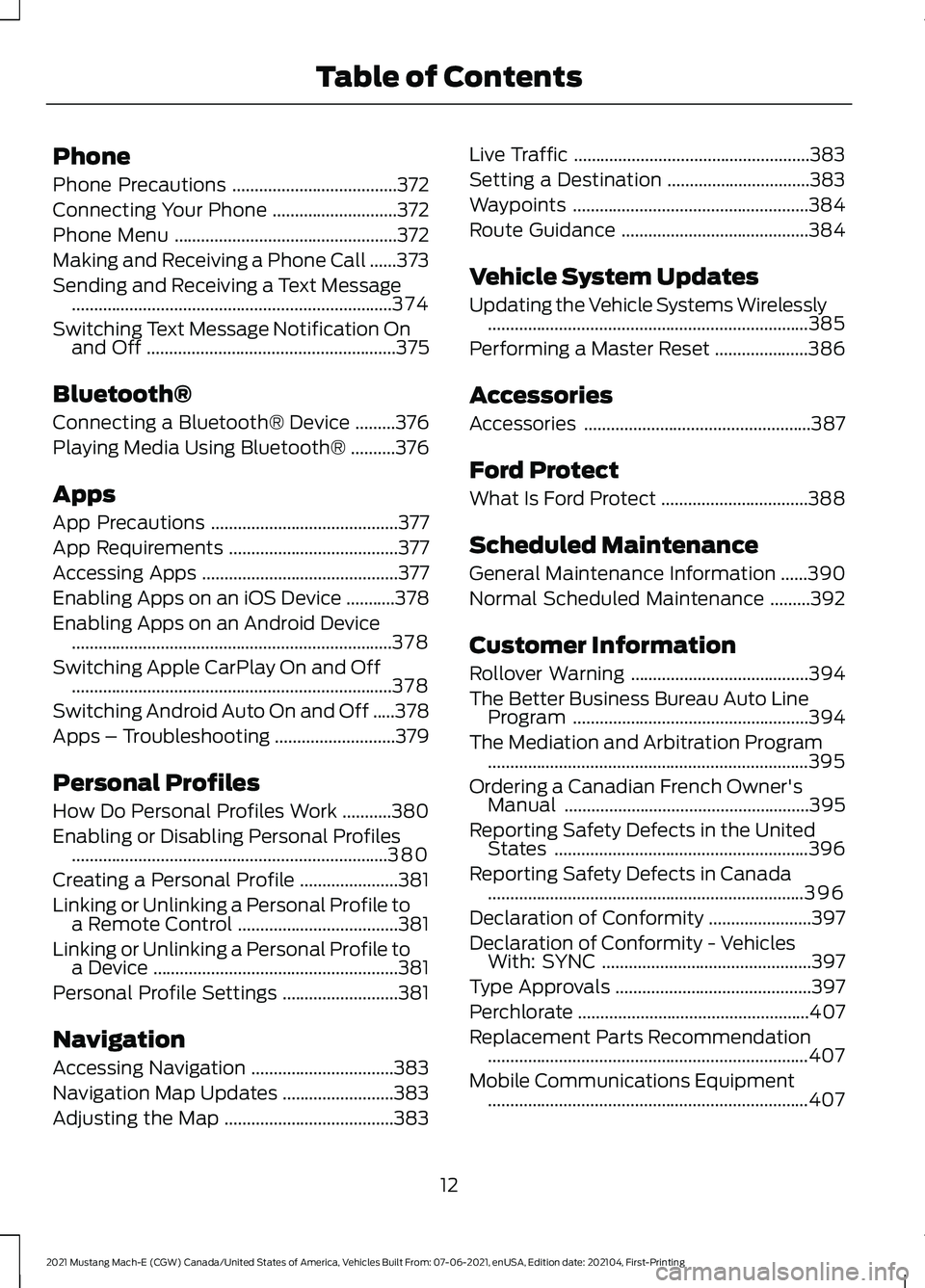
Phone
Phone Precautions
.....................................372
Connecting Your Phone ............................
372
Phone Menu ..................................................
372
Making and Receiving a Phone Call ......
373
Sending and Receiving a Text Message ........................................................................\
374
Switching Text Message Notification On and Off ........................................................
375
Bluetooth®
Connecting a Bluetooth® Device .........
376
Playing Media Using Bluetooth® ..........
376
Apps
App Precautions ..........................................
377
App Requirements ......................................
377
Accessing Apps ............................................
377
Enabling Apps on an iOS Device ...........
378
Enabling Apps on an Android Device ........................................................................\
378
Switching Apple CarPlay On and Off ........................................................................\
378
Switching Android Auto On and Off .....
378
Apps – Troubleshooting ...........................
379
Personal Profiles
How Do Personal Profiles Work ...........
380
Enabling or Disabling Personal Profiles .......................................................................
380
Creating a Personal Profile ......................
381
Linking or Unlinking a Personal Profile to a Remote Control ....................................
381
Linking or Unlinking a Personal Profile to a Device .......................................................
381
Personal Profile Settings ..........................
381
Navigation
Accessing Navigation ................................
383
Navigation Map Updates .........................
383
Adjusting the Map ......................................
383Live Traffic
.....................................................
383
Setting a Destination ................................
383
Waypoints .....................................................
384
Route Guidance ..........................................
384
Vehicle System Updates
Updating the Vehicle Systems Wirelessly ........................................................................\
385
Performing a Master Reset .....................
386
Accessories
Accessories ...................................................
387
Ford Protect
What Is Ford Protect .................................
388
Scheduled Maintenance
General Maintenance Information ......
390
Normal Scheduled Maintenance .........
392
Customer Information
Rollover Warning ........................................
394
The Better Business Bureau Auto Line Program .....................................................
394
The Mediation and Arbitration Program ........................................................................\
395
Ordering a Canadian French Owner's Manual .......................................................
395
Reporting Safety Defects in the United States .........................................................
396
Reporting Safety Defects in Canada .......................................................................
396
Declaration of Conformity .......................
397
Declaration of Conformity - Vehicles With: SYNC ...............................................
397
Type Approvals ............................................
397
Perchlorate ....................................................
407
Replacement Parts Recommendation ........................................................................\
407
Mobile Communications Equipment ........................................................................\
407
12
2021 Mustang Mach-E (CGW) Canada/United States of America, Vehicles Built From: 07-06-2021, enUSA, Edition date: 202104, First-Printing Table of Contents
Page 68 of 460
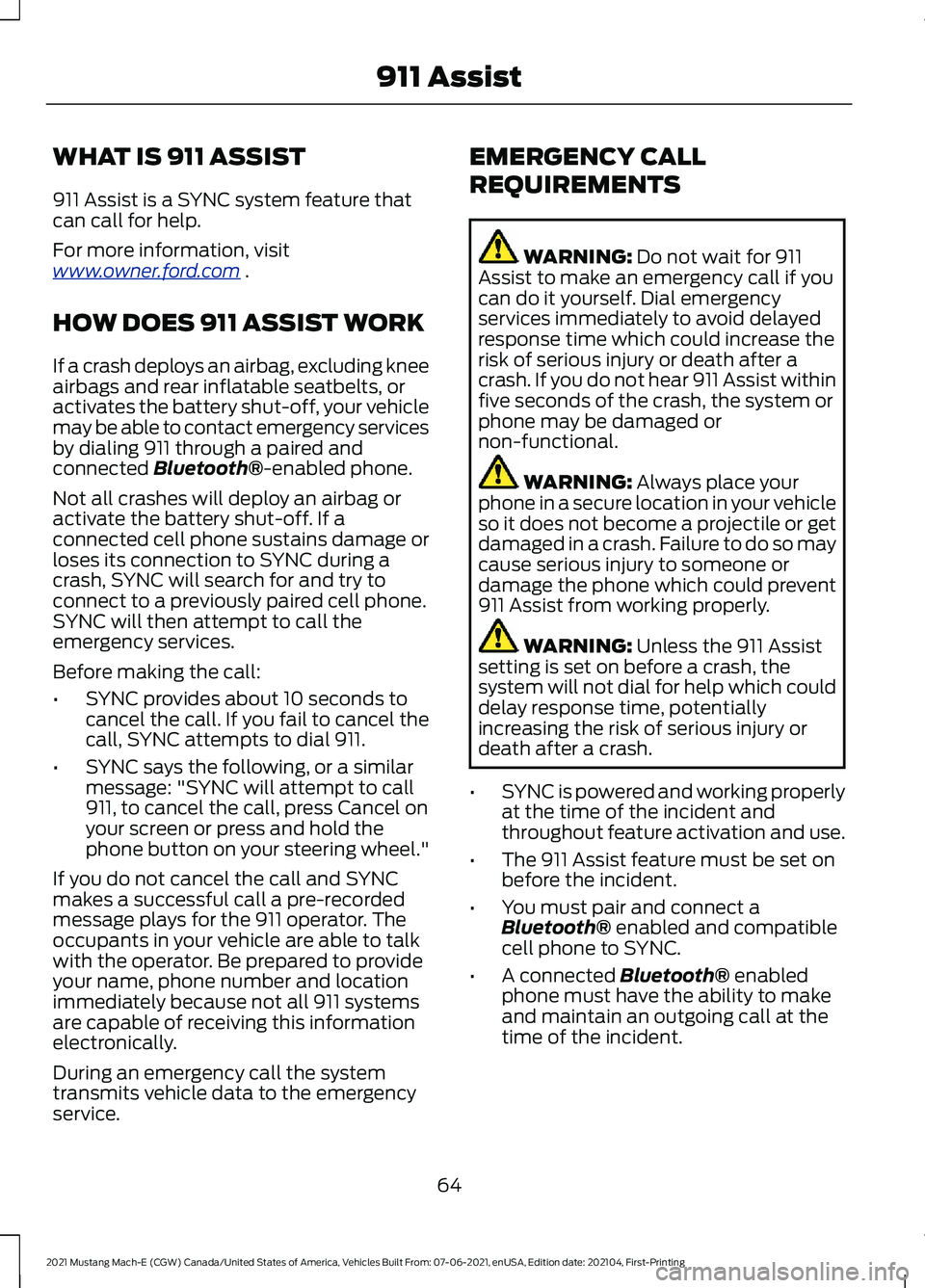
WHAT IS 911 ASSIST
911 Assist is a SYNC system feature that
can call for help.
For more information, visit
www
. o wner .f or d . c om .
HOW DOES 911 ASSIST WORK
If a crash deploys an airbag, excluding knee
airbags and rear inflatable seatbelts, or
activates the battery shut-off, your vehicle
may be able to contact emergency services
by dialing 911 through a paired and
connected Bluetooth®-enabled phone.
Not all crashes will deploy an airbag or
activate the battery shut-off. If a
connected cell phone sustains damage or
loses its connection to SYNC during a
crash, SYNC will search for and try to
connect to a previously paired cell phone.
SYNC will then attempt to call the
emergency services.
Before making the call:
• SYNC provides about 10 seconds to
cancel the call. If you fail to cancel the
call, SYNC attempts to dial 911.
• SYNC says the following, or a similar
message: "SYNC will attempt to call
911, to cancel the call, press Cancel on
your screen or press and hold the
phone button on your steering wheel."
If you do not cancel the call and SYNC
makes a successful call a pre-recorded
message plays for the 911 operator. The
occupants in your vehicle are able to talk
with the operator. Be prepared to provide
your name, phone number and location
immediately because not all 911 systems
are capable of receiving this information
electronically.
During an emergency call the system
transmits vehicle data to the emergency
service. EMERGENCY CALL
REQUIREMENTS WARNING:
Do not wait for 911
Assist to make an emergency call if you
can do it yourself. Dial emergency
services immediately to avoid delayed
response time which could increase the
risk of serious injury or death after a
crash. If you do not hear 911 Assist within
five seconds of the crash, the system or
phone may be damaged or
non-functional. WARNING:
Always place your
phone in a secure location in your vehicle
so it does not become a projectile or get
damaged in a crash. Failure to do so may
cause serious injury to someone or
damage the phone which could prevent
911 Assist from working properly. WARNING:
Unless the 911 Assist
setting is set on before a crash, the
system will not dial for help which could
delay response time, potentially
increasing the risk of serious injury or
death after a crash.
• SYNC is powered and working properly
at the time of the incident and
throughout feature activation and use.
• The 911 Assist feature must be set on
before the incident.
• You must pair and connect a
Bluetooth®
enabled and compatible
cell phone to SYNC.
• A connected
Bluetooth® enabled
phone must have the ability to make
and maintain an outgoing call at the
time of the incident.
64
2021 Mustang Mach-E (CGW) Canada/United States of America, Vehicles Built From: 07-06-2021, enUSA, Edition date: 202104, First-Printing 911 Assist
Page 69 of 460
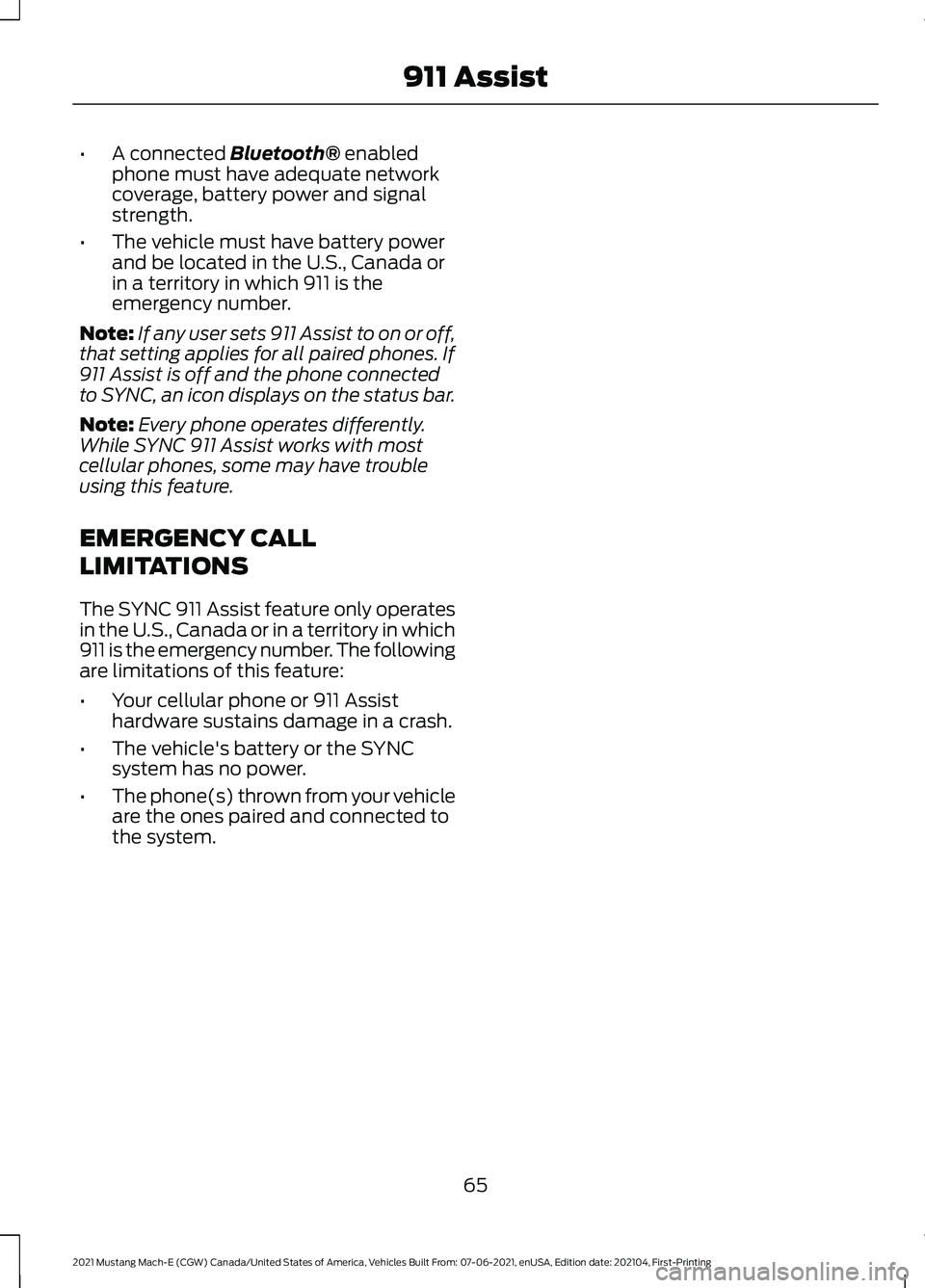
•
A connected Bluetooth® enabled
phone must have adequate network
coverage, battery power and signal
strength.
• The vehicle must have battery power
and be located in the U.S., Canada or
in a territory in which 911 is the
emergency number.
Note: If any user sets 911 Assist to on or off,
that setting applies for all paired phones. If
911 Assist is off and the phone connected
to SYNC, an icon displays on the status bar.
Note: Every phone operates differently.
While SYNC 911 Assist works with most
cellular phones, some may have trouble
using this feature.
EMERGENCY CALL
LIMITATIONS
The SYNC 911 Assist feature only operates
in the U.S., Canada or in a territory in which
911 is the emergency number. The following
are limitations of this feature:
• Your cellular phone or 911 Assist
hardware sustains damage in a crash.
• The vehicle's battery or the SYNC
system has no power.
• The phone(s) thrown from your vehicle
are the ones paired and connected to
the system.
65
2021 Mustang Mach-E (CGW) Canada/United States of America, Vehicles Built From: 07-06-2021, enUSA, Edition date: 202104, First-Printing 911 Assist
Page 74 of 460
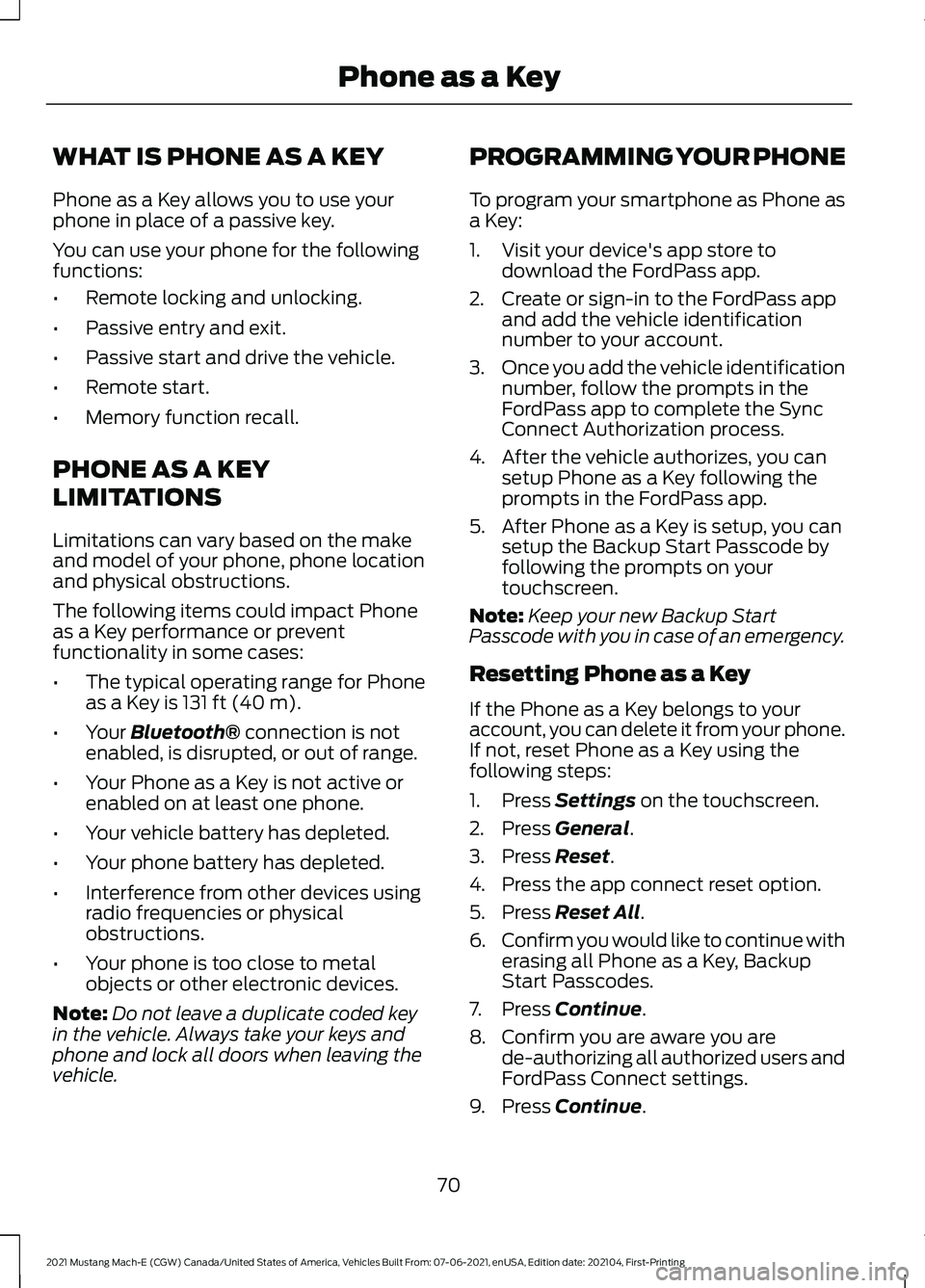
WHAT IS PHONE AS A KEY
Phone as a Key allows you to use your
phone in place of a passive key.
You can use your phone for the following
functions:
•
Remote locking and unlocking.
• Passive entry and exit.
• Passive start and drive the vehicle.
• Remote start.
• Memory function recall.
PHONE AS A KEY
LIMITATIONS
Limitations can vary based on the make
and model of your phone, phone location
and physical obstructions.
The following items could impact Phone
as a Key performance or prevent
functionality in some cases:
• The typical operating range for Phone
as a Key is 131 ft (40 m).
• Your
Bluetooth® connection is not
enabled, is disrupted, or out of range.
• Your Phone as a Key is not active or
enabled on at least one phone.
• Your vehicle battery has depleted.
• Your phone battery has depleted.
• Interference from other devices using
radio frequencies or physical
obstructions.
• Your phone is too close to metal
objects or other electronic devices.
Note: Do not leave a duplicate coded key
in the vehicle. Always take your keys and
phone and lock all doors when leaving the
vehicle. PROGRAMMING YOUR PHONE
To program your smartphone as Phone as
a Key:
1. Visit your device's app store to
download the FordPass app.
2. Create or sign-in to the FordPass app and add the vehicle identification
number to your account.
3. Once you add the vehicle identification
number, follow the prompts in the
FordPass app to complete the Sync
Connect Authorization process.
4. After the vehicle authorizes, you can setup Phone as a Key following the
prompts in the FordPass app.
5. After Phone as a Key is setup, you can setup the Backup Start Passcode by
following the prompts on your
touchscreen.
Note: Keep your new Backup Start
Passcode with you in case of an emergency.
Resetting Phone as a Key
If the Phone as a Key belongs to your
account, you can delete it from your phone.
If not, reset Phone as a Key using the
following steps:
1. Press
Settings on the touchscreen.
2. Press
General.
3. Press
Reset.
4. Press the app connect reset option.
5. Press
Reset All.
6. Confirm you would like to continue with
erasing all Phone as a Key, Backup
Start Passcodes.
7. Press
Continue.
8. Confirm you are aware you are de-authorizing all authorized users and
FordPass Connect settings.
9. Press
Continue.
70
2021 Mustang Mach-E (CGW) Canada/United States of America, Vehicles Built From: 07-06-2021, enUSA, Edition date: 202104, First-Printing Phone as a Key
Page 76 of 460
What happens if I cannot unlock the
vehicle with Phone as a Key?
Attempt to move your phone closer to
the vehicle. Check that the FordPass
app is still running and that the Phone
as a Key control screen shows
connected. If the phone is connected,
attempt to press the remote unlock
button in the FordPass app. If the
phone is not connected or the remote
unlock button does not work in the
FordPass app, attempt to force close
and restart the app.
Why do I get a No Key Detected
message in the instrument cluster
display when I am using Phone as a Key
and my phone is in the car? Your phone ’s Bluetooth connection
has been disrupted or is not
connected. Try reconnecting your
phone's Bluetooth connection. Move
the phone closer to the center of the
vehicle near the cup holder or center
console. Verify your Phone as a Key is
still active, enabled and has not been
revoked.
What do I do if my phone is lost,
damaged, or the battery has depleted? Use the Backup Start Passcode that
you created to protect you in the event
that you lose your phone, damage it,
or the battery depletes. See Using
the Backup Start Passcode (page
71).
How many phones can I use for Phone
as a Key? You can program and activate up to
four phones with Phone as a Key to
your vehicle. How does a valet drive my car if I only
use my Phone as a Key?
Have the valet use the temporary valet
passcode that you created when using
valet mode. See
Using the Valet
Mode (page 71).
I uninstalled my FordPass app and
reinstalled it. Why am I not able to get
a new Phone as a Key? Remove the Phone as a Key that was
previously associated with your phone
or reset Phone as a Key from your
vehicle, and then request a new Phone
as a Key. See
Programming Your
Phone (page 70).
Why can I not remotely start the vehicle
with my Phone as a Key? Using the FordPass app, verify your
Phone as a Key setup is complete and
enabled via Bluetooth connection on
at least one phone. If Bluetooth has
connected but Phone as a Key setup
is not complete, complete the setup
of your Phone as a Key, as prompted
from the FordPass app. See
Programming Your Phone
(page
70).
72
2021 Mustang Mach-E (CGW) Canada/United States of America, Vehicles Built From: 07-06-2021, enUSA, Edition date: 202104, First-Printing Phone as a Key
Page 123 of 460
The amount of energy being used when
driving is affected by:
•
Mild or aggressive acceleration or
braking.
• Your vehicle's speed.
• Use of accessories, such as climate
control.
• Ambient temperature and weather
conditions.
• Driving in a city or on a highway.
• Driving on flat or hilly roads.
The available energy capacity in the high
voltage battery is affected by cold
temperatures and battery degradation.
See Preserving Your High Voltage
Battery (page 157).
When your navigation system has an active
route the distance to your destination or
next charging station is also displayed.
Note: It is normal for vehicle range
estimates to vary due to changes in average
energy usage and battery temperature. This
could cause different range estimates each
time you fully charge your battery. See
Maximizing Your Driving Range (page 282
).
Note: When you leave your vehicle
unplugged, it periodically uses energy from
the high voltage battery to recharge the
12-volt accessory battery, resulting in
reduction in vehicle driving range.
WHAT IS THE HIGH VOLTAGE
BATTERY GAUGE
Displays the high voltage battery state of
charge in the form of a gauge or a
percentage. A full fill or 100% charge
represents the total amount of energy you
can get from plugging your vehicle in.
The gauge is normally blue. When a low
battery condition is reached the gauge is
amber. When the battery is depleted the
gauge is red. When the full battery gauge is displayed
and your navigation system has an active
route, a symbol is added that represents
the battery charge level needed to reach
your destination or next charging station.
Charging Status
Additional charge information displays
when you power on your vehicle without
pressing the brake pedal and your vehicle
is plugged in. Charging status includes the
charge start or charge end time as
appropriate. When DC charging, the time
at 80% displays followed by the time at
100%. You can modify your vehicle charge
settings on the information and
entertainment display. See
Setting the
Charging Schedule and Preferences
(page
174).
Charge Required to Reach Destination
When the navigation system has an active
route, the instrument cluster displays the
charge level required in order to reach your
destination and the time when that charge
level is available.
WHAT ARE THE INSTRUMENT
CLUSTER WARNING LAMPS
Warning lamps alert you to a vehicle
condition that could become serious.
Some lamps illuminate when you start
your vehicle to make sure they work. If any
lamps remain on after starting your vehicle,
refer to the respective system warning
lamp for further information.
119
2021 Mustang Mach-E (CGW) Canada/United States of America, Vehicles Built From: 07-06-2021, enUSA, Edition date: 202104, First-Printing Instrument Cluster
Page 124 of 460
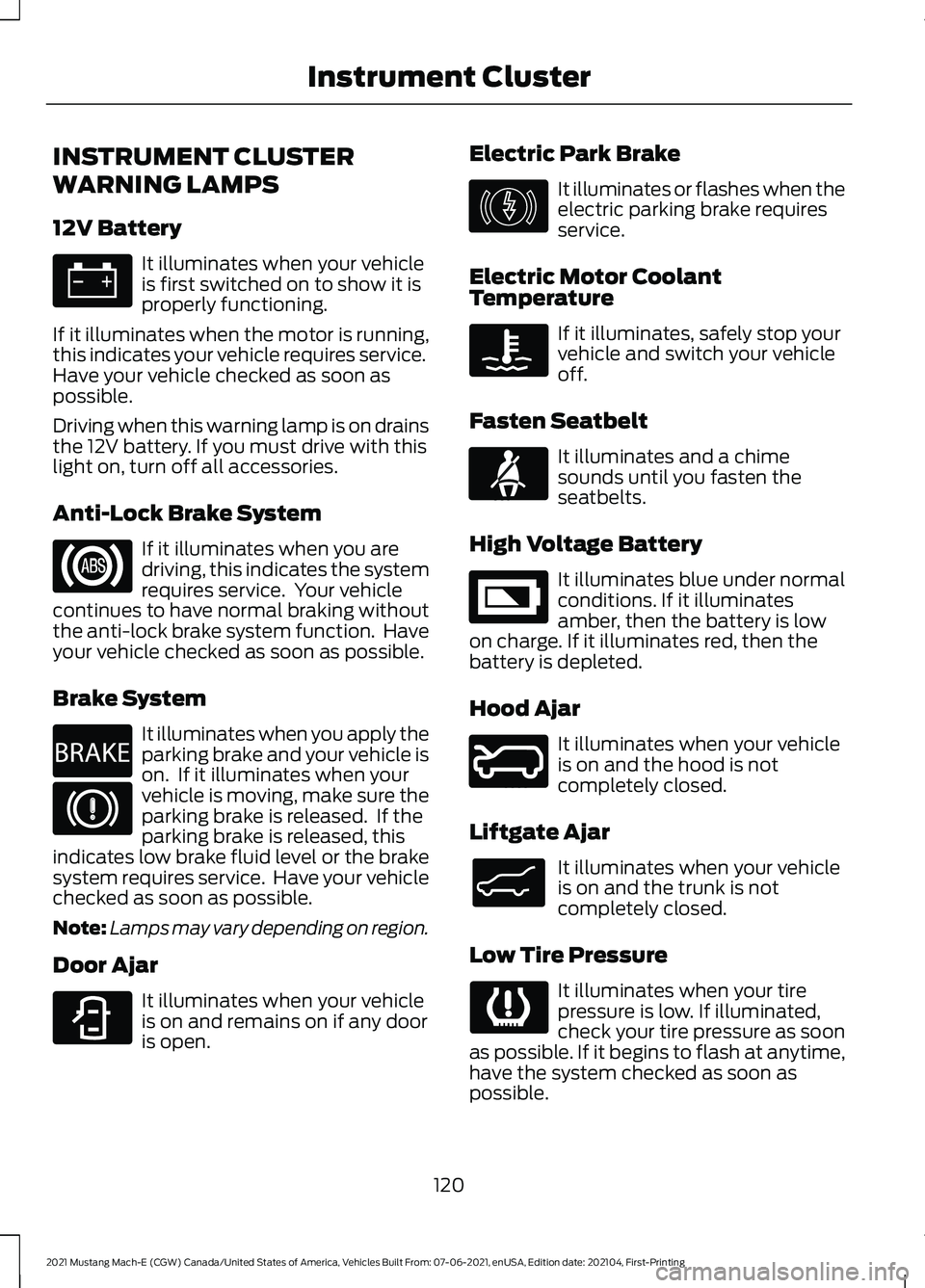
INSTRUMENT CLUSTER
WARNING LAMPS
12V Battery
It illuminates when your vehicle
is first switched on to show it is
properly functioning.
If it illuminates when the motor is running,
this indicates your vehicle requires service.
Have your vehicle checked as soon as
possible.
Driving when this warning lamp is on drains
the 12V battery. If you must drive with this
light on, turn off all accessories.
Anti-Lock Brake System If it illuminates when you are
driving, this indicates the system
requires service. Your vehicle
continues to have normal braking without
the anti-lock brake system function. Have
your vehicle checked as soon as possible.
Brake System It illuminates when you apply the
parking brake and your vehicle is
on. If it illuminates when your
vehicle is moving, make sure the
parking brake is released. If the
parking brake is released, this
indicates low brake fluid level or the brake
system requires service. Have your vehicle
checked as soon as possible.
Note: Lamps may vary depending on region.
Door Ajar It illuminates when your vehicle
is on and remains on if any door
is open. Electric Park Brake It illuminates or flashes when the
electric parking brake requires
service.
Electric Motor Coolant
Temperature If it illuminates, safely stop your
vehicle and switch your vehicle
off.
Fasten Seatbelt It illuminates and a chime
sounds until you fasten the
seatbelts.
High Voltage Battery It illuminates blue under normal
conditions. If it illuminates
amber, then the battery is low
on charge. If it illuminates red, then the
battery is depleted.
Hood Ajar It illuminates when your vehicle
is on and the hood is not
completely closed.
Liftgate Ajar It illuminates when your vehicle
is on and the trunk is not
completely closed.
Low Tire Pressure It illuminates when your tire
pressure is low. If illuminated,
check your tire pressure as soon
as possible. If it begins to flash at anytime,
have the system checked as soon as
possible.
120
2021 Mustang Mach-E (CGW) Canada/United States of America, Vehicles Built From: 07-06-2021, enUSA, Edition date: 202104, First-Printing Instrument Cluster E270480 E323451 E146190 E71880 E335242 E246598 E138633
Page 166 of 460
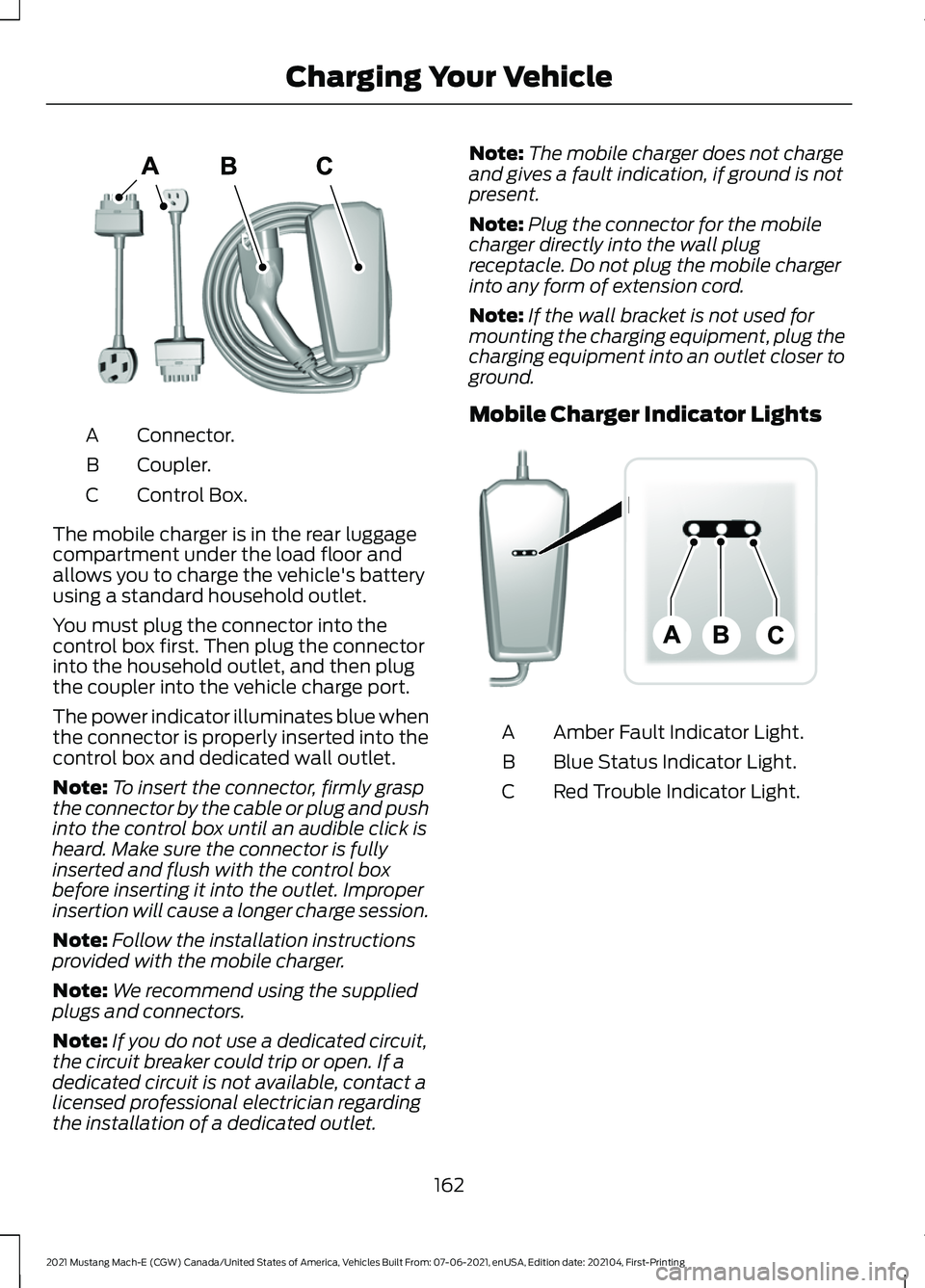
Connector.
A
Coupler.
B
Control Box.
C
The mobile charger is in the rear luggage
compartment under the load floor and
allows you to charge the vehicle's battery
using a standard household outlet.
You must plug the connector into the
control box first. Then plug the connector
into the household outlet, and then plug
the coupler into the vehicle charge port.
The power indicator illuminates blue when
the connector is properly inserted into the
control box and dedicated wall outlet.
Note: To insert the connector, firmly grasp
the connector by the cable or plug and push
into the control box until an audible click is
heard. Make sure the connector is fully
inserted and flush with the control box
before inserting it into the outlet. Improper
insertion will cause a longer charge session.
Note: Follow the installation instructions
provided with the mobile charger.
Note: We recommend using the supplied
plugs and connectors.
Note: If you do not use a dedicated circuit,
the circuit breaker could trip or open. If a
dedicated circuit is not available, contact a
licensed professional electrician regarding
the installation of a dedicated outlet. Note:
The mobile charger does not charge
and gives a fault indication, if ground is not
present.
Note: Plug the connector for the mobile
charger directly into the wall plug
receptacle. Do not plug the mobile charger
into any form of extension cord.
Note: If the wall bracket is not used for
mounting the charging equipment, plug the
charging equipment into an outlet closer to
ground.
Mobile Charger Indicator Lights Amber Fault Indicator Light.
A
Blue Status Indicator Light.
B
Red Trouble Indicator Light.
C
162
2021 Mustang Mach-E (CGW) Canada/United States of America, Vehicles Built From: 07-06-2021, enUSA, Edition date: 202104, First-Printing Charging Your VehicleE336365 E336515
Page 167 of 460
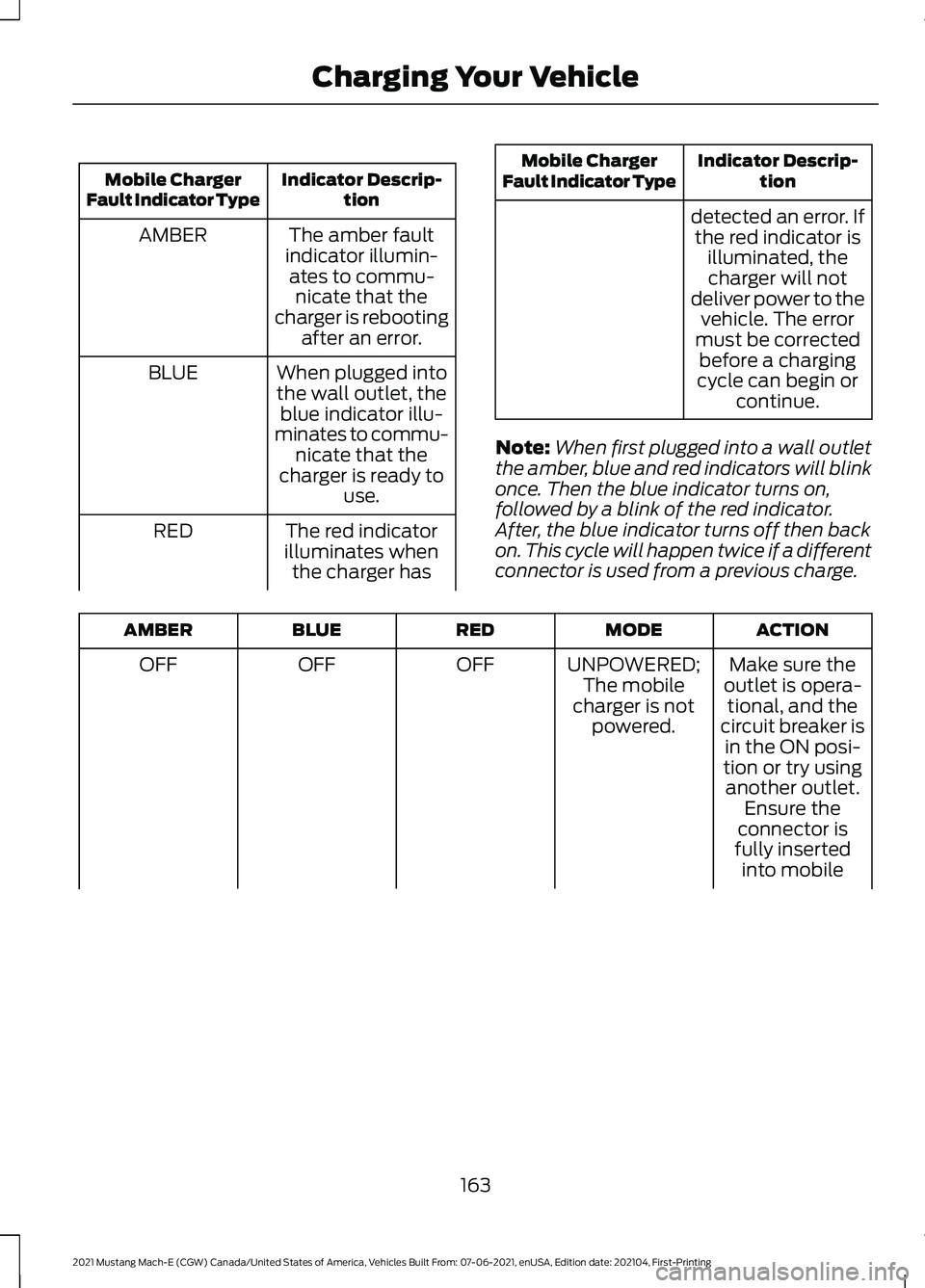
Indicator Descrip-
tion
Mobile Charger
Fault Indicator Type
The amber fault
indicator illumin- ates to commu- nicate that the
charger is rebooting after an error.
AMBER
When plugged intothe wall outlet, the blue indicator illu-
minates to commu- nicate that the
charger is ready to use.
BLUE
The red indicator
illuminates when the charger has
RED Indicator Descrip-
tion
Mobile Charger
Fault Indicator Type
detected an error. Ifthe red indicator is illuminated, thecharger will not
deliver power to the vehicle. The error
must be corrected before a charging
cycle can begin or continue.
Note: When first plugged into a wall outlet
the amber, blue and red indicators will blink
once. Then the blue indicator turns on,
followed by a blink of the red indicator.
After, the blue indicator turns off then back
on. This cycle will happen twice if a different
connector is used from a previous charge. ACTION
MODE
RED
BLUE
AMBER
Make sure the
outlet is opera- tional, and the
circuit breaker is in the ON posi-
tion or try using
UNPOWERED;
The mobile
charger is not powered.
OFF
OFF
OFF
another outlet.Ensure the
connector is
fully inserted into mobile
163
2021 Mustang Mach-E (CGW) Canada/United States of America, Vehicles Built From: 07-06-2021, enUSA, Edition date: 202104, First-Printing Charging Your Vehicle
Page 168 of 460
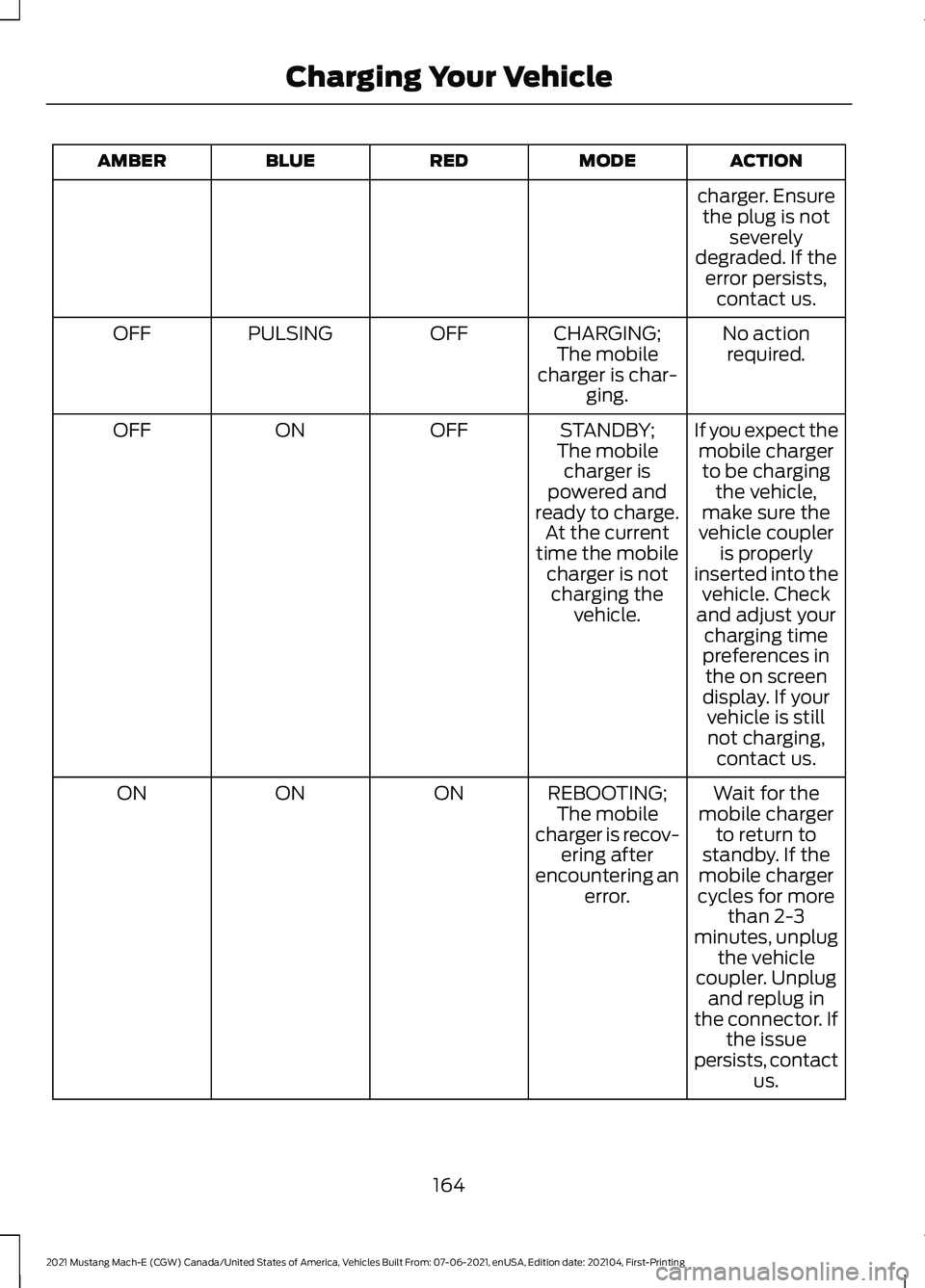
ACTION
MODE
RED
BLUE
AMBER
charger. Ensurethe plug is not severely
degraded. If the error persists, contact us.
No actionrequired.
CHARGING;
The mobile
charger is char- ging.
OFF
PULSING
OFF
If you expect themobile chargerto be charging the vehicle,
make sure the
vehicle coupler
STANDBY;
The mobile charger is
powered and
ready to charge. At the current
time the mobile charger is notcharging the vehicle.
OFF
ON
OFF
is properly
inserted into the vehicle. Check
and adjust your charging time
preferences in the on screen
display. If your vehicle is stillnot charging, contact us.
Wait for the
mobile charger to return to
standby. If the
mobile charger
cycles for more
REBOOTING;
The mobile
charger is recov- ering after
encountering an error.
ON
ON
ON
than 2-3
minutes, unplug the vehicle
coupler. Unplug and replug in
the connector. If the issue
persists, contact us.
164
2021 Mustang Mach-E (CGW) Canada/United States of America, Vehicles Built From: 07-06-2021, enUSA, Edition date: 202104, First-Printing Charging Your Vehicle