transmission FORD MUSTANG MACH E 2023 User Guide
[x] Cancel search | Manufacturer: FORD, Model Year: 2023, Model line: MUSTANG MACH E, Model: FORD MUSTANG MACH E 2023Pages: 496, PDF Size: 13.09 MB
Page 230 of 496
WHAT IS THE REAR VIEW
CAMERA
The rear view camera provides a videoimage of the area behind your vehicle whenthe transmission is in reverse (R).
REAR VIEW CAMERA
PRECAUTIONS
WARNING: The rear view camerasystem is a reverse aid supplementdevice that still requires the driver to useit in conjunction with the interior andexterior mirrors for maximum coverage.
WARNING: Objects that are closeto either corner of the bumper or underthe bumper, might not be seen on thescreen due to the limited coverage of thecamera system.
WARNING: Reverse your vehicleslowly. Failure to follow this instructioncould result in the loss of control of yourvehicle, personal injury or death.
WARNING: Use caution when thetailgate is ajar. If the tailgate is ajar, thecamera is out of position and the videoimage could be incorrect. All guide linesdisappear when the tailgate is ajar.Failure to follow this instruction couldresult in personal injury.
WARNING: Use caution whenturning camera features on or off whenthe transmission is not in park (P). Makesure your vehicle is not moving.
Note:If the image comes on while thetransmission is not in reverse (R), have thesystem inspected by your authorized dealer.
LOCATING THE REAR VIEW
CAMERA
The rear view camera is on the liftgate. Itprovides a video image of the area behindyour vehicle.
REAR VIEW CAMERA GUIDE
LINES
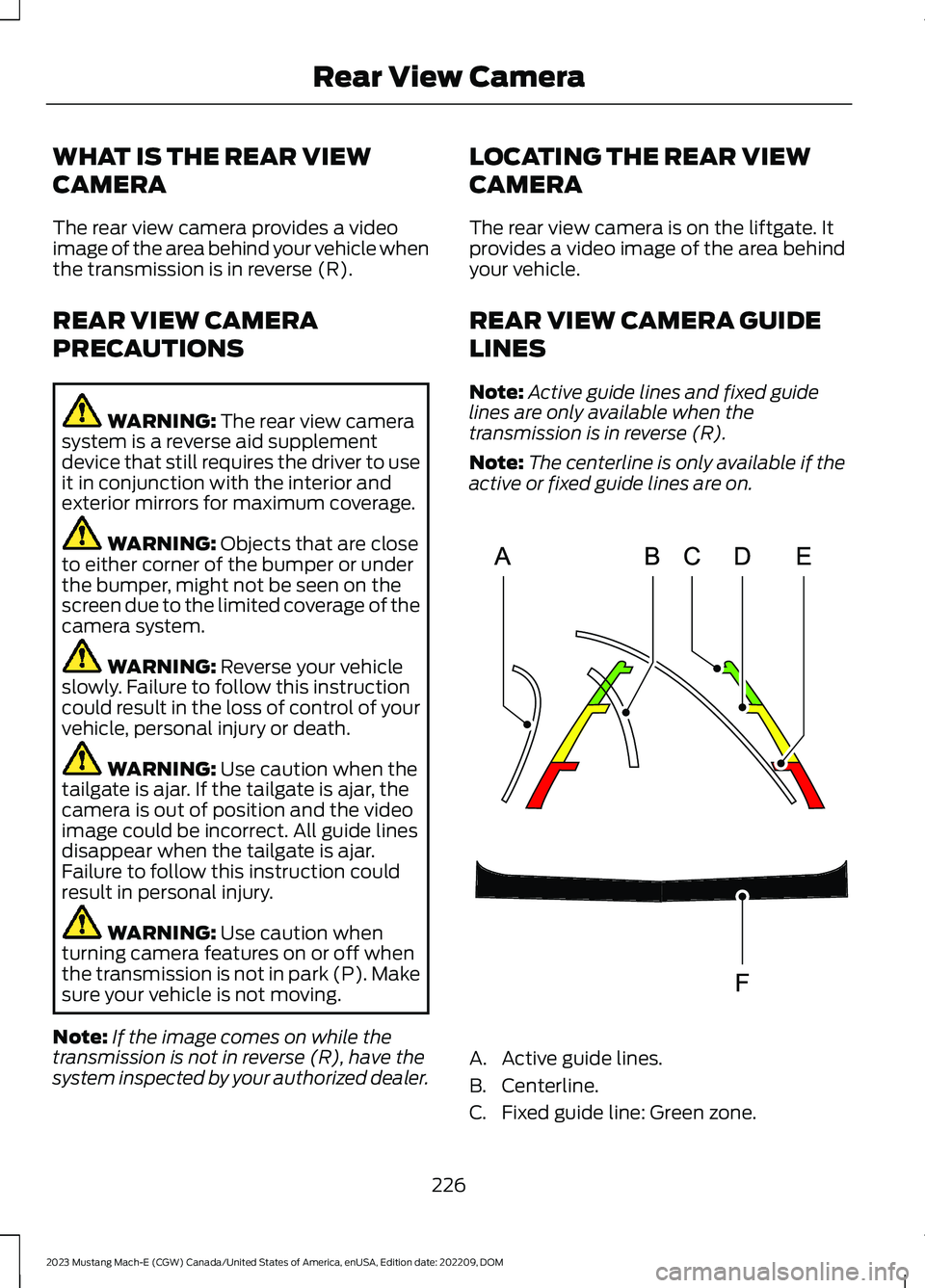
Note:Active guide lines and fixed guidelines are only available when thetransmission is in reverse (R).
Note:The centerline is only available if theactive or fixed guide lines are on.
A.Active guide lines.
B.Centerline.
C.Fixed guide line: Green zone.
226
2023 Mustang Mach-E (CGW) Canada/United States of America, enUSA, Edition date: 202209, DOMRear View CameraE306774
Page 231 of 496
D.Fixed guide line: Yellow zone.
E.Fixed guide line: Red zone.
F.Rear bumper.
Active guide lines only show with fixedguide lines. To use active guide lines, turnthe steering wheel to point the guide linestoward an intended path. If the steeringwheel position changes while reversing,your vehicle might deviate from theintended path.
The fixed and active guide lines fade in andout depending on the steering wheelposition. The active guide lines do notdisplay when the steering wheel positionis straight.
Use caution while reversing. Objects in thered zone are closest to your vehicle andobjects in the green zone are farther away.Objects get closer to your vehicle as theymove from the green zone to the yellow orred zones. Use the side view mirrors andrear view mirror to get better coverage onboth sides and rear of your vehicle.
REAR VIEW CAMERA OBJECT
DISTANCE INDICATORS
The system provides an image of yourvehicle and the sensor zones. The zoneshighlight green, yellow, and red when theparking aid sensors detect an object in thecoverage area.
REAR VIEW CAMERA
SETTINGS
ZOOMING THE REAR VIEWCAMERA IN AND OUT
WARNING: When manual zoom ison, the full area behind your vehicle maynot show. Be aware of your surroundingswhen using the manual zoom feature.
Selectable settings for this feature arezoom in (+) and zoom out (-). Press thesymbol on the camera screen to changethe view. The default setting is zoom off.
This allows you to get a closer view of anobject behind your vehicle. The zoomedimage keeps the bumper in the image toprovide a reference. The zoom is onlyactive while the transmission is in reverse(R).
Note:Manual zoom is only available whenthe transmission is in reverse (R).
Note:Only the centerline shows when youenable manual zoom.
SWITCHING REAR VIEW CAMERADELAY ON AND OFF
1.
Press the button on thetouchscreen.
2.Press Driver Assistance.
3.Switch Rear View Camera Delay on oroff.
227
2023 Mustang Mach-E (CGW) Canada/United States of America, enUSA, Edition date: 202209, DOMRear View CameraE386797
Page 232 of 496
When shifting the transmission out ofreverse (R) and into any gear other thanpark (P), the camera image remains in thedisplay until:
•Your vehicle speed reachesapproximately 5 mph (8 km/h).
•You shift your vehicle into park (P).
228
2023 Mustang Mach-E (CGW) Canada/United States of America, enUSA, Edition date: 202209, DOMRear View Camera
Page 234 of 496
Side View Camera
The side view camera is on the outsidemirror. It provides a video image of the areaon the sides of your vehicle to aid you whenparking.
360 DEGREE CAMERA GUIDE
LINES
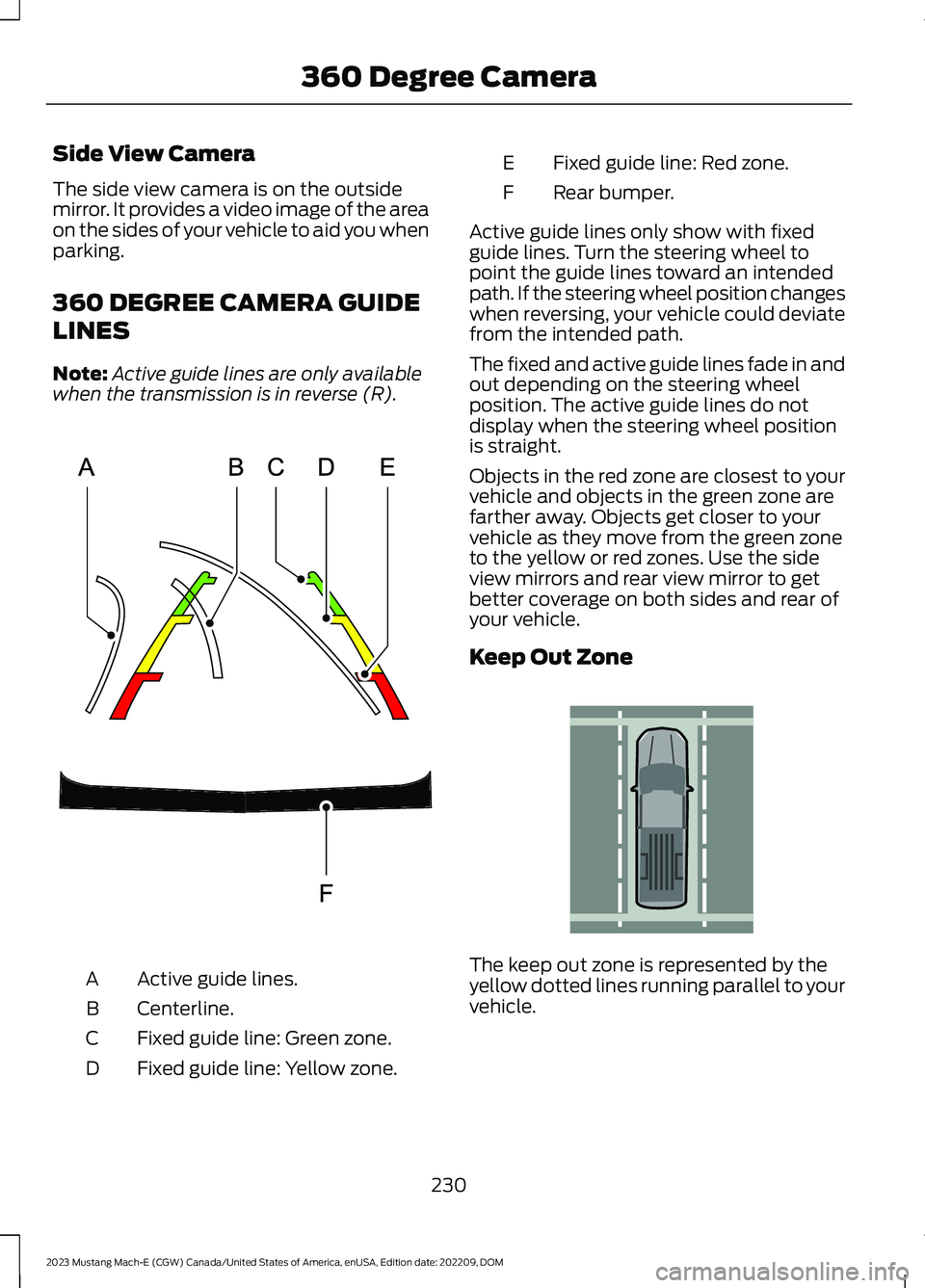
Note:Active guide lines are only availablewhen the transmission is in reverse (R).
Active guide lines.A
Centerline.B
Fixed guide line: Green zone.C
Fixed guide line: Yellow zone.D
Fixed guide line: Red zone.E
Rear bumper.F
Active guide lines only show with fixedguide lines. Turn the steering wheel topoint the guide lines toward an intendedpath. If the steering wheel position changeswhen reversing, your vehicle could deviatefrom the intended path.
The fixed and active guide lines fade in andout depending on the steering wheelposition. The active guide lines do notdisplay when the steering wheel positionis straight.
Objects in the red zone are closest to yourvehicle and objects in the green zone arefarther away. Objects get closer to yourvehicle as they move from the green zoneto the yellow or red zones. Use the sideview mirrors and rear view mirror to getbetter coverage on both sides and rear ofyour vehicle.
Keep Out Zone
The keep out zone is represented by theyellow dotted lines running parallel to yourvehicle.
230
2023 Mustang Mach-E (CGW) Canada/United States of America, enUSA, Edition date: 202209, DOM360 Degree CameraE306774 E310341
Page 238 of 496
4.Use the turn signal to choose thedirection to exit the parking space.
5.Press and hold the brake pedal.
6.Release the steering wheel and shiftinto neutral (N).
7.Release the parking brake.
8.Press and hold the parking aid button.
9.Release the brake pedal to allow yourvehicle to move.
Note:After active park assist drives yourvehicle to a position where you can exit theparking space in a forward movement, amessage appears instructing you to take fullcontrol of your vehicle.
10.Take control of your vehicle.
Note:You can slow down your vehicle atany time by pressing the brake pedal.
ACTIVE PARK ASSIST –
TROUBLESHOOTING
ACTIVE PARK ASSIST –INFORMATION MESSAGES
ActionMessage
The systemrequires service.Have your vehiclechecked as soon aspossible.
Active Park Fault
ACTIVE PARK ASSIST –FREQUENTLY ASKED QUESTIONS
Why does active park assist notoperate correctly?
The system is unable to detect avehicle, curb or object to park next toor in between. The system needsboundary objects to operate correctly.
Why does active park assist not searchfor a parking space?
You have switched traction control off.
Why does active park assist not searchfor a parking space?
The transmission is in reverse (R). Yourvehicle must be moving forward to beable to detect a parking space.
Why does active park assist not offera parking space?
The sensors could be blocked. Forexample, snow, ice or largeaccumulations of dirt. Blocked sensorscan affect how the system functions.
Why does active park assist not offera parking space?
The sensors in the front or rear bumpercould be damaged.
Why does active park assist not offera parking space?
There is not enough room in theparking space for your vehicle to safelypark.
Why does active park assist not offera parking space?
There is not enough space for theparking maneuver on the opposite sideof the parking space.
Why does active park assist not offera parking space?
The parking space is more than 5 ft(1.5 m) or less than 2 ft (0.5 m) awayfrom your vehicle.
Why does active park assist not offera parking space?
Your vehicle's speed is greater than22 mph (35 km/h) for parallel parkingor greater than 19 mph (30 km/h) forperpendicular parking.
234
2023 Mustang Mach-E (CGW) Canada/United States of America, enUSA, Edition date: 202209, DOMActive Park Assist (If Equipped)
Page 266 of 496
WHAT IS ONE PEDAL DRIVE
One pedal drive allows you to accelerate,slow down and stop using only theaccelerator pedal. Pressing the acceleratordown accelerates your vehicle, releasingpressure on the accelerator with your footstill on the pedal slows down your vehicleand releasing the pedal completely allowsyour vehicle to come to a complete stop ifthe road grade is not excessively steep.See One Pedal Drive Precautions (page262).
ONE PEDAL DRIVE
PRECAUTIONS
WARNING: This system is an extradriving aid. It does not replace yourattention and judgment, or the need toapply the brakes. This system does NOTautomatically brake your vehicle. If youfail to press the brake pedal whennecessary, you may collide with anothervehicle.
Shifting into neutral (N) does not hold yourvehicle at a standstill.
Shifting into drive (D) or reverse (R) doesnot cause the vehicle to move if theaccelerator pedal is not pressed.
Note:Always check the transmissionselection before accelerating.
Note:Switch off one pedal drive beforeentering a car wash.
ONE PEDAL DRIVE
LIMITATIONS
One pedal drive is unavailable when anyof the following occur:
•Shifting into an incorrect transmissionposition, such as park (P) when driving.
•Using active park assist.
•Using cruise control.
•Selecting a drive mode other thanengage, whisper, or unbridle. Forexample unbridle extend (GT only)disables one pedal drive.
•Turning off stability control.
Releasing the accelerator pedal may notbring your vehicle to a complete stop onsteep grades.
Increased vehicle load may reduceaccelerator pedal ability to slow thevehicle.
SWITCHING ONE PEDAL DRIVE
ON AND OFF
1.
Press the button on thetouchscreen.
2.Press CONTROLS.
3.Switch 1-Pedal Drive on or off.
ONE PEDAL DRIVE
INDICATORS
When one pedal drive is active,the indicator displays in theinstrument cluster.
262
2023 Mustang Mach-E (CGW) Canada/United States of America, enUSA, Edition date: 202209, DOMOne Pedal DriveE386797 1E328584
Page 311 of 496
The service is available 24 hours a day,seven days a week.
This program is separate from the NewVehicle Limited Warranty, but the coverageis concurrent with the powertrain coverageperiod of your vehicle. Canadian roadsidecoverage and benefits may differ from theU.S. coverage.
If you require more information, please callus in Canada at 1-800-665-2006, or visitour website at www.ford.ca.
SWITCHING THE HAZARD
FLASHERS ON AND OFF
The hazard flashers operate with thepower on or off. The battery loses chargeand may have insufficient power to restartyour vehicle.
The hazard flasher button is onthe center console. Press thebutton to turn on the hazardflashers if your vehicle is creating a safetyhazard for other road users.
When you switch the hazard flashers on,all front and rear direction indicators flash.
Press the button again to switch them off.
JUMP STARTING THE VEHICLE
JUMP STARTING PRECAUTIONS
WARNING: Connect batteries withonly the same nominal voltage.
WARNING: Use only adequatelysized cables with insulated clamps.
Note:This procedure is only for the 12 voltunder hood battery.
Note:Your vehicle has a 12 volt battery thatis easily accessible under the hood. The 12volt battery controls the switches andcontacts that engage the high voltagebattery. Do not jump start the high voltagebattery using a standard 12 volt battery. Towyour vehicle to an authorized dealer if thehigh voltage battery does not accept aregular charge.
Note:Do not attempt to push start yourvehicle. You could cause transmissiondamage.
Note:Do not disconnect the 12 volt batteryfrom your vehicle electrical system.
PREPARING THE VEHICLE
Opening the Front LuggageCompartment With No VehiclePower
If the vehicle has no power, you will beunable to open the front luggagecompartment. To open the front luggagecompartment follow the steps below:
1.Use an external power supply such asa 12 volt jump box.
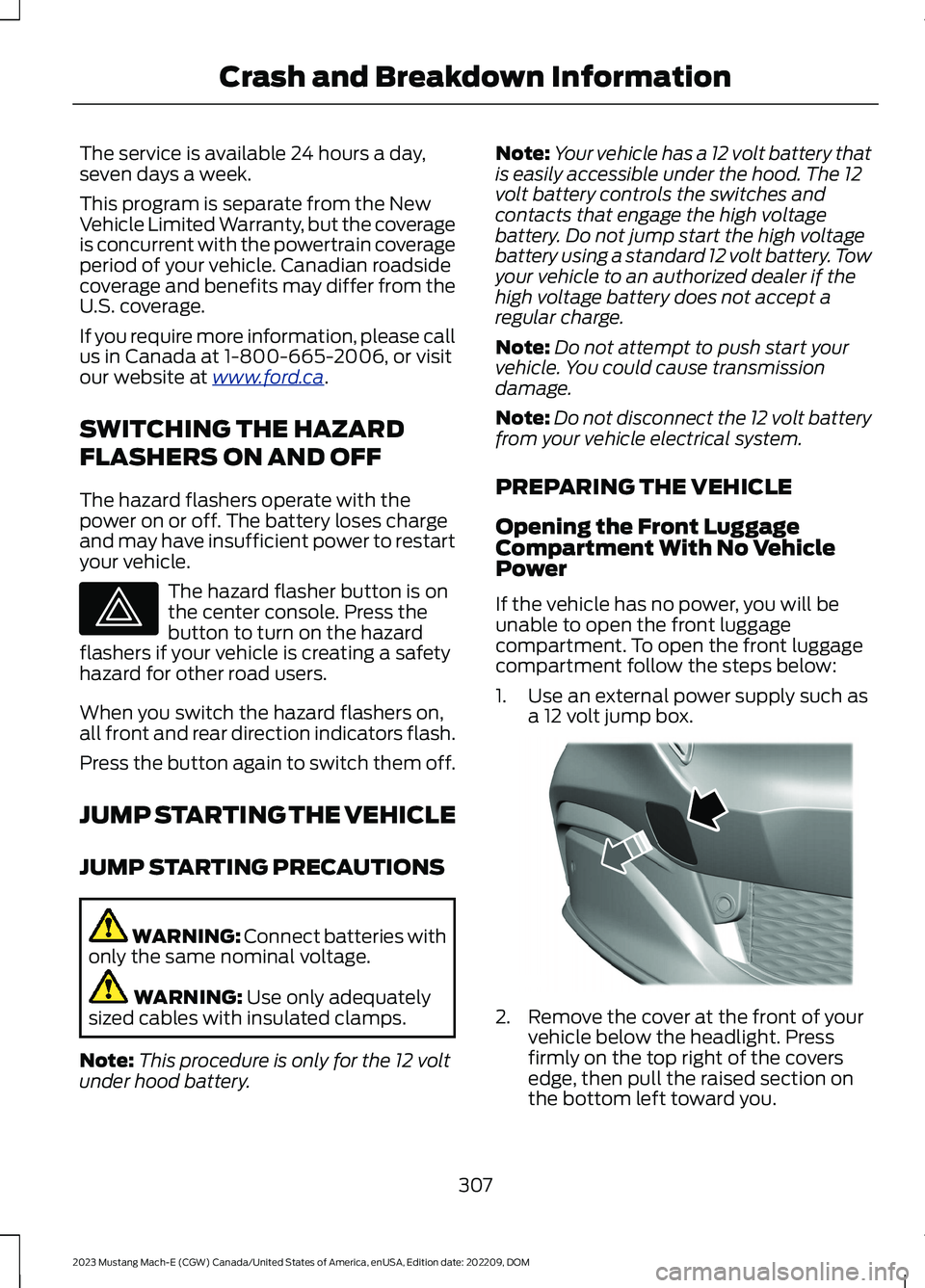
2.Remove the cover at the front of yourvehicle below the headlight. Pressfirmly on the top right of the coversedge, then pull the raised section onthe bottom left toward you.
307
2023 Mustang Mach-E (CGW) Canada/United States of America, enUSA, Edition date: 202209, DOMCrash and Breakdown InformationE75790 E323341
Page 313 of 496
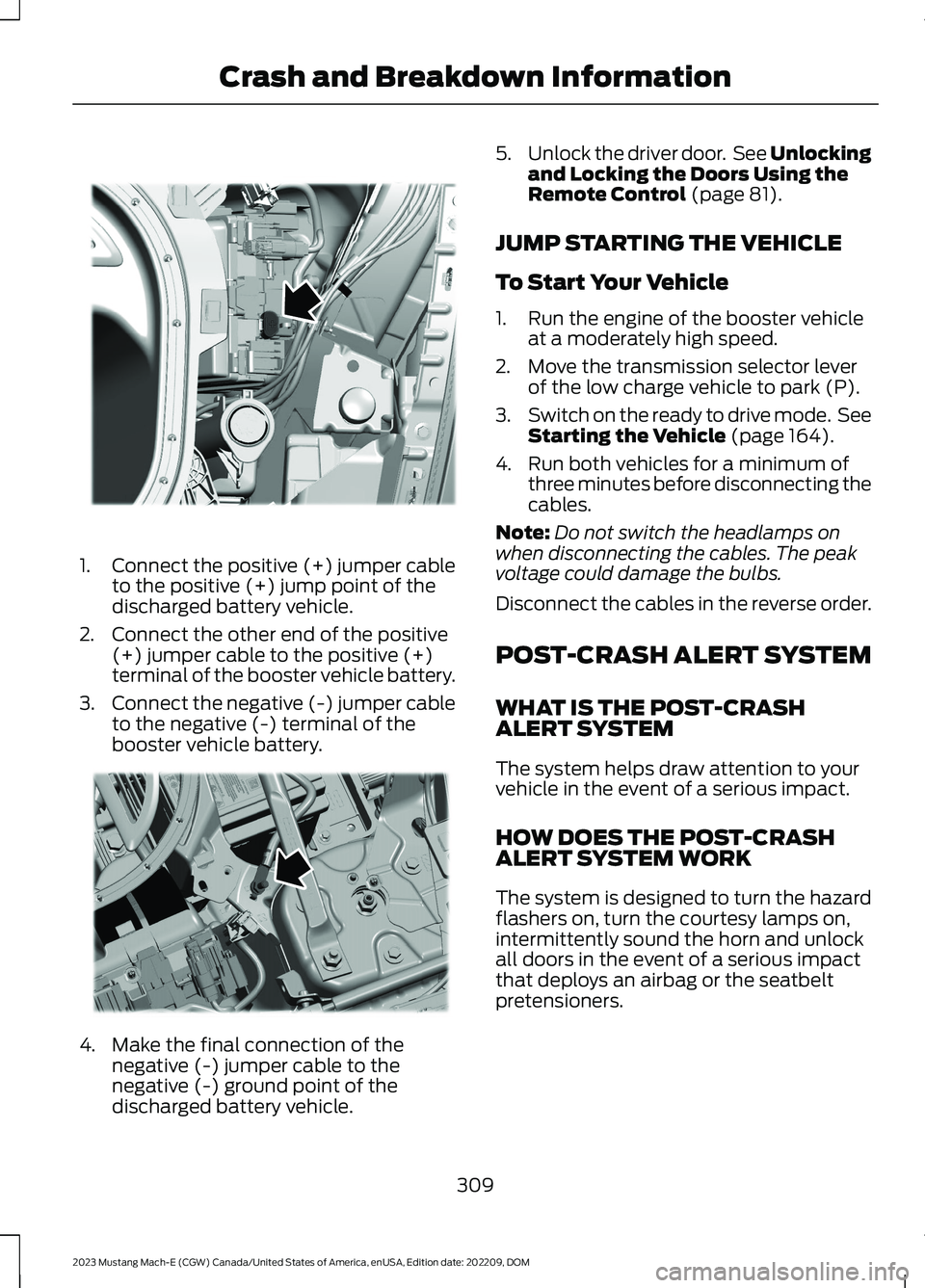
1.Connect the positive (+) jumper cableto the positive (+) jump point of thedischarged battery vehicle.
2.Connect the other end of the positive(+) jumper cable to the positive (+)terminal of the booster vehicle battery.
3.Connect the negative (-) jumper cableto the negative (-) terminal of thebooster vehicle battery.
4.Make the final connection of thenegative (-) jumper cable to thenegative (-) ground point of thedischarged battery vehicle.
5.Unlock the driver door. See Unlockingand Locking the Doors Using theRemote Control (page 81).
JUMP STARTING THE VEHICLE
To Start Your Vehicle
1.Run the engine of the booster vehicleat a moderately high speed.
2.Move the transmission selector leverof the low charge vehicle to park (P).
3.Switch on the ready to drive mode. SeeStarting the Vehicle (page 164).
4.Run both vehicles for a minimum ofthree minutes before disconnecting thecables.
Note:Do not switch the headlamps onwhen disconnecting the cables. The peakvoltage could damage the bulbs.
Disconnect the cables in the reverse order.
POST-CRASH ALERT SYSTEM
WHAT IS THE POST-CRASHALERT SYSTEM
The system helps draw attention to yourvehicle in the event of a serious impact.
HOW DOES THE POST-CRASHALERT SYSTEM WORK
The system is designed to turn the hazardflashers on, turn the courtesy lamps on,intermittently sound the horn and unlockall doors in the event of a serious impactthat deploys an airbag or the seatbeltpretensioners.
309
2023 Mustang Mach-E (CGW) Canada/United States of America, enUSA, Edition date: 202209, DOMCrash and Breakdown InformationE338767 E338540
Page 417 of 496
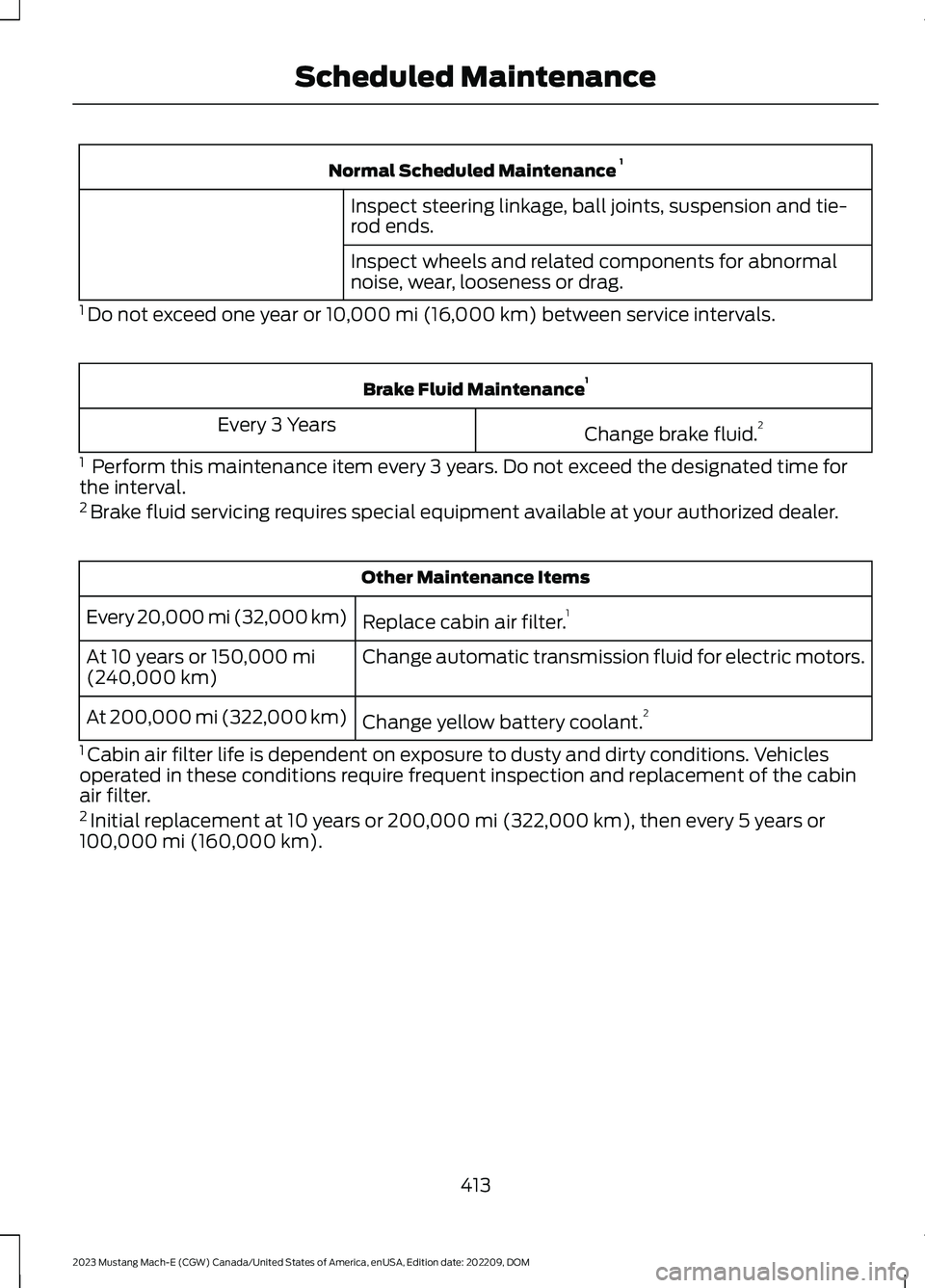
Normal Scheduled Maintenance 1
Inspect steering linkage, ball joints, suspension and tie-rod ends.
Inspect wheels and related components for abnormalnoise, wear, looseness or drag.
1 Do not exceed one year or 10,000 mi (16,000 km) between service intervals.
Brake Fluid Maintenance1
Change brake fluid.2Every 3 Years
1 Perform this maintenance item every 3 years. Do not exceed the designated time forthe interval.2 Brake fluid servicing requires special equipment available at your authorized dealer.
Other Maintenance Items
Replace cabin air filter.1Every 20,000 mi (32,000 km)
Change automatic transmission fluid for electric motors.At 10 years or 150,000 mi(240,000 km)
Change yellow battery coolant.2At 200,000 mi (322,000 km)
1 Cabin air filter life is dependent on exposure to dusty and dirty conditions. Vehiclesoperated in these conditions require frequent inspection and replacement of the cabinair filter.2 Initial replacement at 10 years or 200,000 mi (322,000 km), then every 5 years or100,000 mi (160,000 km).
413
2023 Mustang Mach-E (CGW) Canada/United States of America, enUSA, Edition date: 202209, DOMScheduled Maintenance
Page 449 of 496
•Links to Third Party Sites: TheSOFTWARE may provide you with theability to link to third party sites. Thethird party sites are not under thecontrol of FORD MOTOR COMPANY,its affiliates and/or its designatedagent. Neither FORD MOTORCOMPANY nor its affiliates nor itsdesignated agent are responsible for(I) the contents of any third party sites,any links contained in third party sites,or any changes or updates to thirdparty sites, or (ii) webcasting or anyother form of transmission receivedfrom any third party sites. If theSOFTWARE provides links to thirdparty sites, those links are provided toyou only as a convenience, and theinclusion of any link does not imply anendorsement of the third party site byFORD MOTOR COMPANY, its affiliatesand/or its designated agent.
•Obligation to Drive Responsibly:You recognize your obligation to driveresponsibly and keep attention on theroad. You will read and abide with theDEVICES operating instructionsparticularly as they pertain to safetyand you agree to assume any riskassociated with the use of theDEVICES.
UPGRADES AND RECOVERY MEDIA:If the SOFTWARE is provided by FORDMOTOR COMPANY separate from theDEVICES on media such as a ROM chip,CD ROM disk(s) or via web download orother means, and is labeled "For UpgradePurposes Only" or "For Recovery PurposesOnly" you may install one (1) copy of suchSOFTWARE onto the DEVICES as areplacement copy for the existingSOFTWARE, and use it in accordance withthis EULA, including any additional EULAterms accompanying the upgradeSOFTWARE.
INTELLECTUAL PROPERTY RIGHTS:All title and intellectual property rights inand to the SOFTWARE (including but notlimited to any images, photographs,animations, video, audio, music, text and"applets" incorporated into theSOFTWARE), the accompanying printedmaterials, and any copies of theSOFTWARE, are owned by FORD MOTORCOMPANY, or its affiliates or suppliers. TheSOFTWARE is licensed, not sold. You maynot copy the printed materialsaccompanying the SOFTWARE. All titleand intellectual property rights in and tothe content which may be accessedthrough use of the SOFTWARE is theproperty of the respective content ownerand may be protected by applicablecopyright or other intellectual propertylaws and treaties. This EULA grants you norights to use such content outside itsintended use. All rights not specificallygranted under this EULA are reserved byFORD MOTOR COMPANY, its affiliates,and third party software and serviceproviders and suppliers. Use of any on-lineservices which may be accessed throughthe SOFTWARE may be governed by therespective terms of use relating to suchservices. If this SOFTWARE containsdocumentation that is provided only inelectronic form, you may print one copy ofsuch electronic documentation.
EXPORT RESTRICTIONS: Youacknowledge that the SOFTWARE issubject to U.S. and European Union exportjurisdiction. You agree to comply with allapplicable international and national lawsthat apply to the SOFTWARE, includingthe U.S. Export Administration Regulations,as well as end-user, end-use anddestination restrictions issued by U.S. andother governments.
445
2023 Mustang Mach-E (CGW) Canada/United States of America, enUSA, Edition date: 202209, DOMCustomer Information