center console FORD MUSTANG MACH E 2023 Owners Manual
[x] Cancel search | Manufacturer: FORD, Model Year: 2023, Model line: MUSTANG MACH E, Model: FORD MUSTANG MACH E 2023Pages: 496, PDF Size: 13.09 MB
Page 5 of 496
Contacting Us
Contacting Us..................................................15
Introduction
About This Publication.................................17
Using This Publication.................................18
Symbols Glossary
Symbols Used on Your Vehicle.................19
Data Privacy
Data Privacy.....................................................22
Service Data....................................................23
Event Data........................................................23
Settings Data..................................................24
Connected Vehicle Data.............................24
Mobile Device Data.......................................25
Emergency Call System Data...................25
Environment
Protecting the Environment......................26
Visual Search
Steering Wheel...............................................27
Instrument Panel - Excluding: GT...........28
Instrument Panel - GT.................................29
Center Console - GT....................................30
Vehicle Interior - Excluding: GT.................31
Vehicle Interior - GT......................................32
Front Exterior - Excluding: GT...................33
Front Exterior - GT........................................34
Rear Exterior - Excluding: GT....................35
Rear Exterior - GT..........................................36
Child Safety
Child Safety Precautions............................37
Child Restraint Anchor Points..................38
Child Restraints..............................................39
Installing Child Restraints..........................40
Booster Seats.................................................45
Child Safety Locks.........................................47
Seatbelts
Seatbelt Precautions...................................48
Fastening and Unfastening the Seatbelts..........................................................................49
Sensitive Locking Mode..............................50
Automatic Locking Mode...........................50
Adjusting the Seatbelts DuringPregnancy.....................................................51
Adjusting the Seatbelt Height...................51
Seatbelt Reminder.........................................51
Checking the Seatbelts...............................53
Seatbelt Extensions.....................................54
Personal Safety System™
What Is the Personal Safety System..........................................................................55
How Does the Personal Safety SystemWork...............................................................55
Personal Safety System Components..........................................................................55
Airbags
How Do the Front Airbags Work..............56
How Do the Side Airbags Work...............56
How Do the Knee Airbags Work...............57
How Does the Safety Canopy™ Work...........................................................................57
Airbag Precautions.......................................58
Properly Adjusting the Driver and FrontPassenger Seats........................................59
Children and Airbags...................................59
Front Passenger Sensing System...........60
Crash Sensors and Airbag Indicator.......63
Disposing of Airbags....................................64
Pedestrian Alert System
What Is the Pedestrian Alert System..........................................................................65
1
2023 Mustang Mach-E (CGW) Canada/United States of America, enUSA, Edition date: 202209, DOMTable of Contents
Page 34 of 496
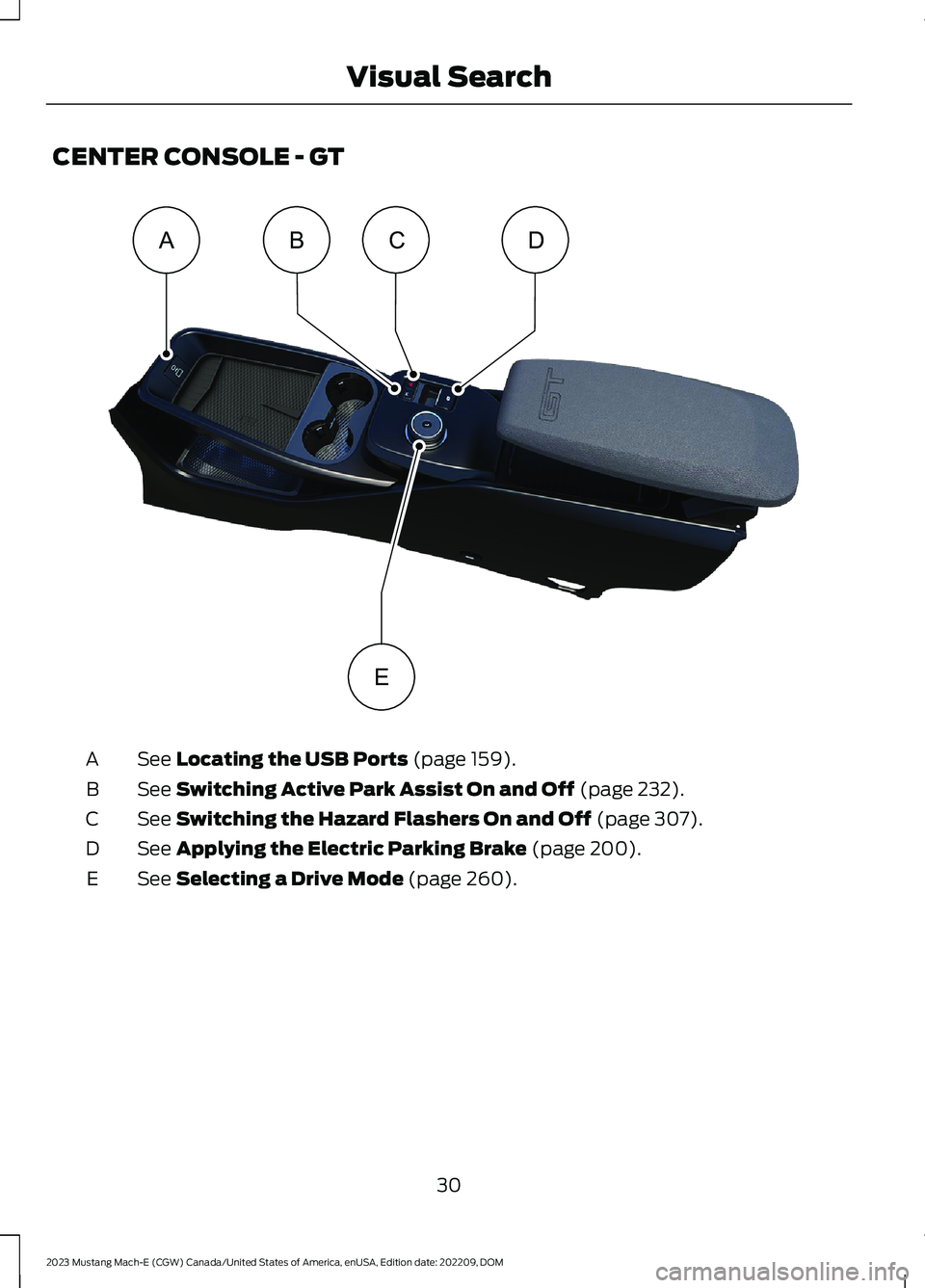
CENTER CONSOLE - GT
See Locating the USB Ports (page 159).A
See Switching Active Park Assist On and Off (page 232).B
See Switching the Hazard Flashers On and Off (page 307).C
See Applying the Electric Parking Brake (page 200).D
See Selecting a Drive Mode (page 260).E
30
2023 Mustang Mach-E (CGW) Canada/United States of America, enUSA, Edition date: 202209, DOMVisual SearchABCDE E379462
Page 65 of 496
•When the front passenger sensingsystem enables the front passengerfrontal airbag, the passenger airbagstatus indicator illuminates the onlamp.
If a person of adult size is sitting in the frontpassenger seat, but the passenger airbagstatus indicator off lamp is illuminated, itis possible that the person is not sittingproperly in the seat. If this happens:
•Switch your vehicle off and ask theperson to place the seat backrest in anupright position.
•Have the person sit upright in the seat,centered on the seat cushion, with theperson's legs comfortably extended.
•Restart your vehicle and have theperson remain in this position for abouttwo minutes. This allows the systemto detect that person and enable thepassenger frontal airbag.
•If the indicator off lamp remainsilluminated even after this, you shouldadvise the person to ride in the rearseat.
After all occupants have adjusted theirseats and put on seatbelts, it is veryimportant that they continue to sit upright,leaning against the seat backrest, andcentered on the seat cushion, with theirfeet comfortably extended on the floor.
Sitting improperly can increase the chanceof injury in a crash event. For example, ifan occupant slouches, lies down, turnssideways, sits forward, leans forward orsideways, or puts one or both feet up, thechance of injury during a crash greatlyincreases.
If you think that the state of the passengerairbag status indicator lamp is incorrect,check for the following:
•Objects lodged underneath the seat.
•Objects between the seat cushion andthe center console.
•Objects hanging off the seat backrest.
•Objects stowed in the seat backrestmap pocket.
•Objects placed on the occupant's lap.
•Cargo interference with the seat
•Other passengers pushing or pulling onthe seat.
•Rear passenger feet and knees restingor pushing on the seat.
The listed conditions could cause theweight of a properly seated occupant tobe incorrectly interpreted by the frontpassenger sensing system. The person inthe front passenger seat could appearheavier or lighter due to the conditionslisted.
Make sure the front passengersensing system is operatingproperly. See Crash Sensorsand Airbag Indicator (page 63).
If the airbag readiness light is on, do thefollowing:
•Pull your vehicle over.
•Switch your vehicle off.
•Check for any objects lodgedunderneath the front passenger seator cargo interfering with the seat.
•Remove the obstruction if found.
•Restart your vehicle.
•Wait at least two minutes and verifythat the airbag readiness light in theinstrument cluster is no longerilluminated.
•If the airbag readiness light in theinstrument cluster remains illuminated,there may be a problem due to thefront passenger sensing system.
Do not attempt to repair or service thesystem. Take your vehicle in for serviceimmediately.
61
2023 Mustang Mach-E (CGW) Canada/United States of America, enUSA, Edition date: 202209, DOMAirbagsE67017
Page 66 of 496
If it is necessary to modify an advancedfront airbag system to accommodate aperson with disabilities, contact yourCustomer Relationship Center. SeeContacting Us (page 15).
FRONT PASSENGER SENSINGSYSTEM PRECAUTIONS
WARNING: Sitting improperly, outof position or with the seatback reclinedtoo far can take weight off the seatcushion and affect the decision of thepassenger sensing system, resulting inserious injury or death in the event of acrash. Always sit upright against yourseat back, with your feet on the floor.
WARNING: Any alteration ormodification to the front passenger seatmay affect the performance of the frontpassenger sensing system. This couldseriously increase the risk of injury ordeath.
WARNING: Do not stow objects inthe seatback map pocket or hangobjects off a seatback if a child is in thefront passenger seat. Do not placeobjects under the front passenger seator between the seat and the centerconsole. Check the passenger airbagindicator lamp for proper airbag status.Failure to follow these instructions mayinterfere with the front passenger seatsensing system and increase the risk ofserious injury.
FRONT PASSENGER SENSING SYSTEM INDICATORS
Passenger AirbagPassenger Airbag StatusIndicatorOccupant
DisabledOFF: IlluminatedEmpty
ON: Not Illuminated
DisabledOFF: IlluminatedChild
ON: Not Illuminated
EnabledOFF: Not IlluminatedAdult
ON: Illuminated
62
2023 Mustang Mach-E (CGW) Canada/United States of America, enUSA, Edition date: 202209, DOMAirbags
Page 78 of 496
2.Use the touchscreen to enter yourbackup start passcode.
3.After entering your passcode, pressreturn within 30 seconds.
4.Once the system validates the backupstart passcode, a message alerts youto start your vehicle.
5.Press the brake pedal and the pushbutton start within 20 seconds to startthe vehicle.
6.If your vehicle does not start, repeatsteps 1-5.
System Lockout
The system locks after five combinedincorrect attempts of the following:
•Entering a backup start passcode.
•Resetting a current passcode.
•Entering a valet mode passcode.
Note:The system remains locked for fiveminutes. After five minutes the systemallows codes to be entered again.
PHONE AS A KEY –
TROUBLESHOOTING
PHONE AS A KEY – FREQUENTLYASKED QUESTIONS
How can I tell if my vehicle hasphone as a key?
•The touchscreen shows the phone asa key reset option.
•A control button appears on the homescreen of the FordPass app if you haveregistered your vehicle through theFordPass app.
What happens if I cannot unlockthe vehicle with phone as a key?
•Attempt to move your phone closer tothe vehicle.
•Check that the FordPass app is stillrunning and that the phone as a keycontrol screen shows connected. If thephone is connected, attempt to pressthe remote unlock button in theFordPass app. If the phone is notconnected or the remote unlock buttondoes not work in the FordPass app,attempt to force close and restart theapp.
Why do I get a No Key Detectedmessage in the instrument clusterdisplay when I am using phone asa key and my phone is in the car?
•Your phone’s Bluetooth connection hasbeen disrupted or is not connected. Tryreconnecting your phone's Bluetoothconnection.
•Move the phone closer to the center ofthe vehicle near the cup holder orcenter console.
•Verify your phone as a key is still active,enabled and has not been revoked.
What do I do if my phone is lost,damaged or the battery hasdepleted?
•Use the backup start passcode thatyou created. See Using the BackupStart Passcode (page 73).
How many phones can I use forphone as a key?
•You can program and activate up tofour phones with phone as a key to yourvehicle.
74
2023 Mustang Mach-E (CGW) Canada/United States of America, enUSA, Edition date: 202209, DOMPhone as a Key
Page 81 of 496
Audio System Volume Limit
The audio system maximum volumereduces. A message appears on thetouchscreen if you attempt to exceed thevolume limit. Automatic volume controlturns off.
911 Assist
If you set 911 assist to always on, youcannot switch it off with a MyKey.
Do Not Disturb
If you set do not disturb to always on, youcannot switch it off with a MyKey.
Note:If a phone is connected using AppleCarPlay or Android Auto while driving witha MyKey, the driver can receive phone callsand text messages even if the do not disturbrestriction is on. And if the vehicle comeswith satellite radio, there is no restriction onthe adult content.
Traction and Stability Control
If you set traction control or stabilitycontrol to always on, you cannot switch itoff with a MyKey.
CREATING A MYKEY
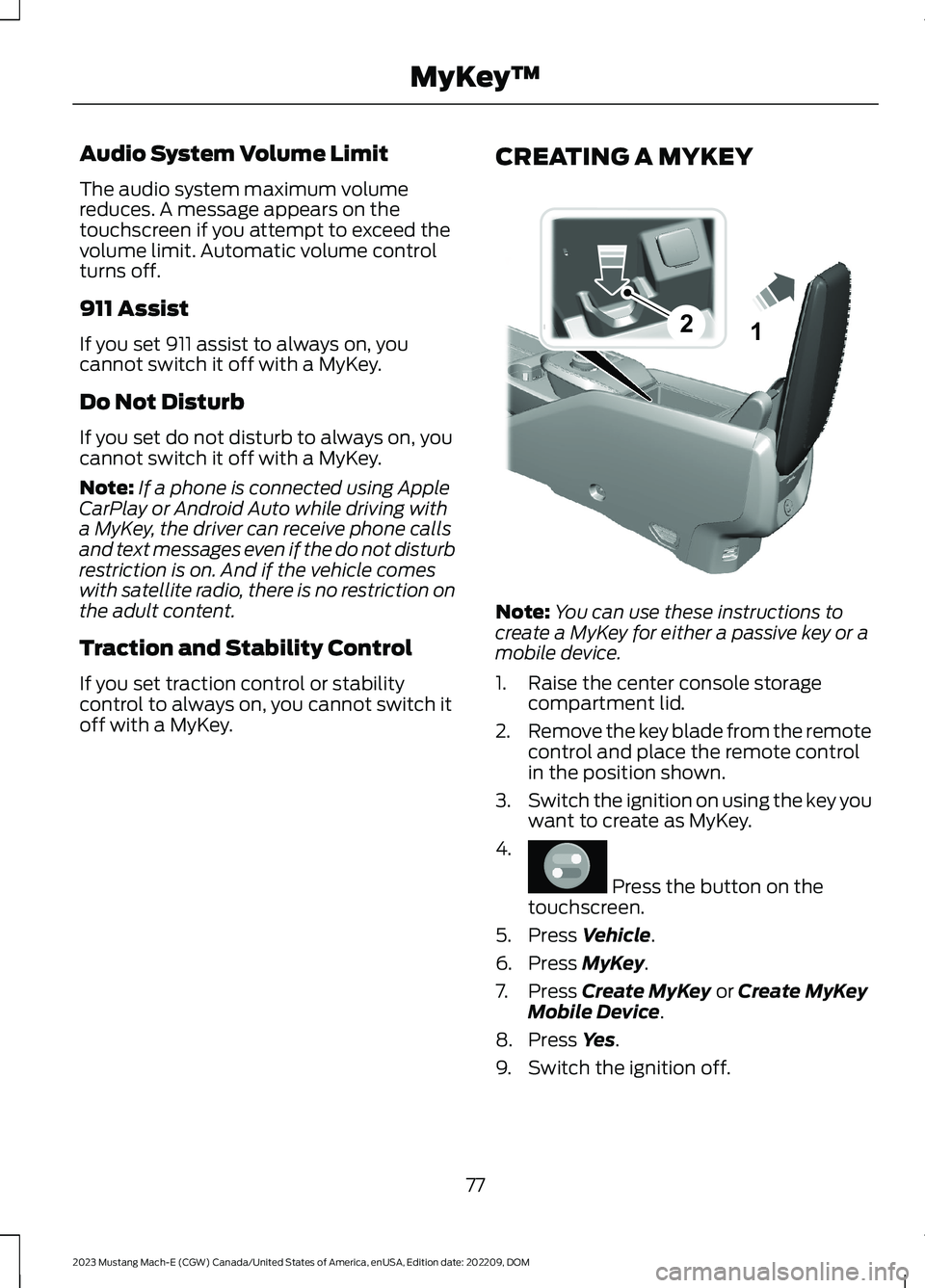
Note:You can use these instructions tocreate a MyKey for either a passive key or amobile device.
1.Raise the center console storagecompartment lid.
2.Remove the key blade from the remotecontrol and place the remote controlin the position shown.
3.Switch the ignition on using the key youwant to create as MyKey.
4.
Press the button on thetouchscreen.
5.Press Vehicle.
6.Press MyKey.
7.Press Create MyKey or Create MyKeyMobile Device.
8.Press Yes.
9.Switch the ignition off.
77
2023 Mustang Mach-E (CGW) Canada/United States of America, enUSA, Edition date: 202209, DOMMyKey™21E315884 E386797
Page 163 of 496
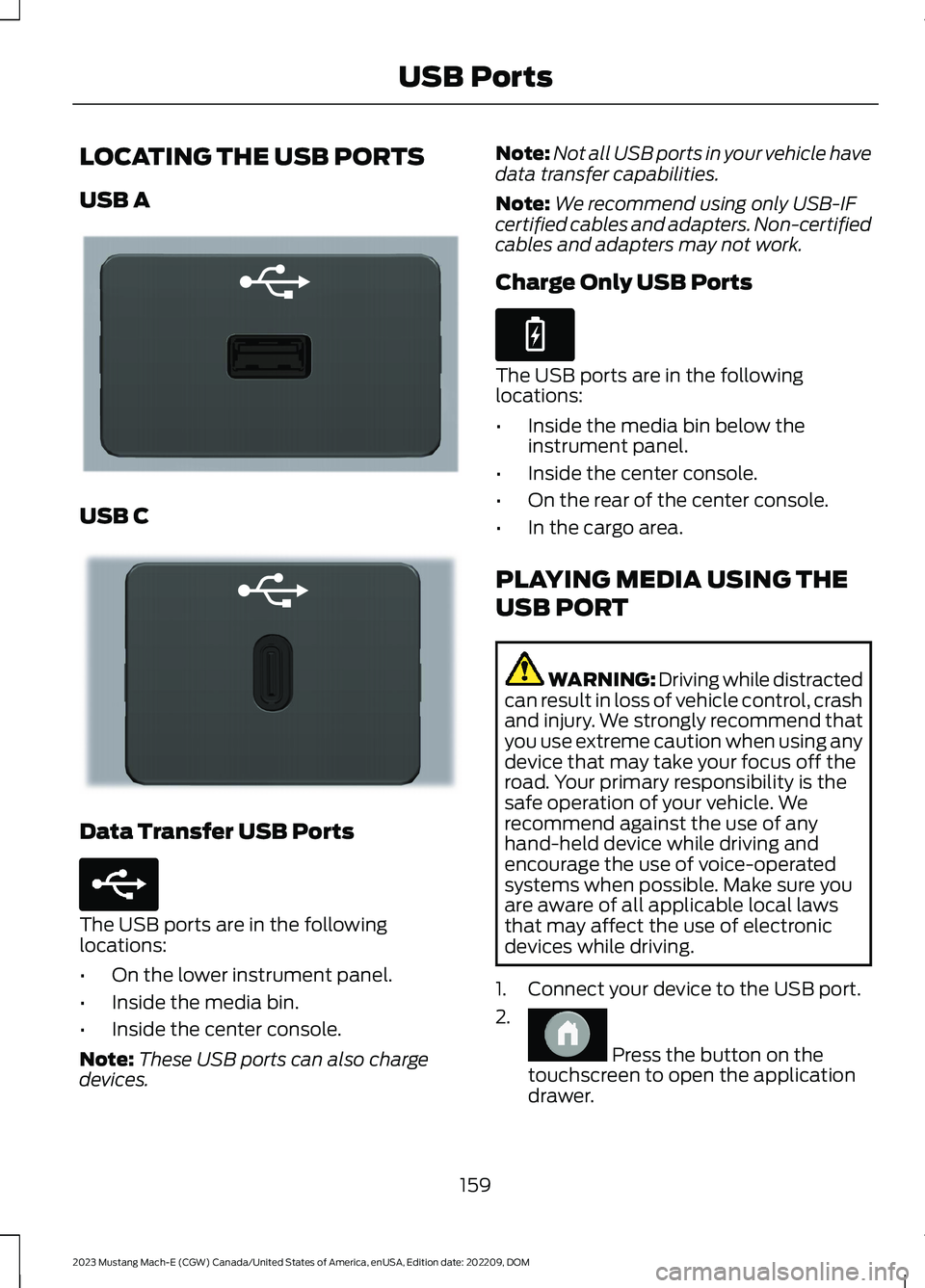
LOCATING THE USB PORTS
USB A
USB C
Data Transfer USB Ports
The USB ports are in the followinglocations:
•On the lower instrument panel.
•Inside the media bin.
•Inside the center console.
Note:These USB ports can also chargedevices.
Note:Not all USB ports in your vehicle havedata transfer capabilities.
Note:We recommend using only USB-IFcertified cables and adapters. Non-certifiedcables and adapters may not work.
Charge Only USB Ports
The USB ports are in the followinglocations:
•Inside the media bin below theinstrument panel.
•Inside the center console.
•On the rear of the center console.
•In the cargo area.
PLAYING MEDIA USING THE
USB PORT
WARNING: Driving while distractedcan result in loss of vehicle control, crashand injury. We strongly recommend thatyou use extreme caution when using anydevice that may take your focus off theroad. Your primary responsibility is thesafe operation of your vehicle. Werecommend against the use of anyhand-held device while driving andencourage the use of voice-operatedsystems when possible. Make sure youare aware of all applicable local lawsthat may affect the use of electronicdevices while driving.
1.Connect your device to the USB port.
2.
Press the button on thetouchscreen to open the applicationdrawer.
159
2023 Mustang Mach-E (CGW) Canada/United States of America, enUSA, Edition date: 202209, DOMUSB PortsE201595 E301114 E250655 E263583 E386798
Page 165 of 496
WHAT IS THE POWER OUTLET
The power outlet can power devices usinga 12 V outlet adapter.
POWER OUTLET
PRECAUTIONS
When you switch the vehicle on, you canuse the socket to power 12 V applianceswith a maximum current rating of 20 A. Donot use the power point over the vehiclecapacity of 12 V DC 240 W or a fuse couldblow. Do not plug in any device thatsupplies power to the vehicle through thepower points. This could result in damageto vehicle systems. Do not hang anyaccessory from the accessory plug. Alwayskeep the power point caps closed whennot in use. Do not insert objects other thanan accessory plug into the power point.
To prevent the battery from running out ofcharge:
•Do not use the power point longer thannecessary when the vehicle is off.
•Do not leave devices plugged inovernight or when you park your vehiclefor extended periods.
LOCATING THE POWER
OUTLETS
Power outlets are in the followinglocations:
•In the media bin below the instrumentpanel.
•Inside the main center console bin.
•On the rear of the main center consolebin.
•In the cargo area.
161
2023 Mustang Mach-E (CGW) Canada/United States of America, enUSA, Edition date: 202209, DOMPower Outlet
Page 166 of 496
WHAT IS THE WIRELESS
ACCESSORY CHARGER
The wireless accessory charger allows youto charge one compatible Qi wirelesscharging device on the charging area.
WIRELESS ACCESSORY
CHARGER PRECAUTIONS
WARNING: Wireless chargingdevices can affect the operation ofimplanted medical devices, includingcardiac pacemakers. If you have anyimplanted medical devices, werecommend that you consult with yourphysician.
Keep the charging area clean and removeforeign objects prior to charging a device.
Do not place items with a magnetic stripor radio-frequency identification chip, forexample passports, parking tickets,transportation passes or credit cards, nearthe charging area when charging a device.Damage could occur to the magnetic stripor radio-frequency identification chip.
Do not place metal objects, for exampleremote controls, coins and candywrappers, on or near the charging areawhen charging a device. Metal objects mayheat up and degrade the chargingperformance, in addition to causinginterruptions in charging.
Charging could be interrupted, degraded,or could stop if any of the following occur:
•The system detects a foreign object.
•The device is misaligned on thecharging area.
•The device moves on the activecharging area when the vehicle is inmotion.
•The vehicle ambient temperature is toohigh.
•You attempt to charge a non-Qicompatible device on the wirelesscharger.
Note:During charging, the device and thecharger could heat up, this is normal. If thebattery gets hotter than usual, the devicemay stop charging.
LOCATING THE WIRELESS
ACCESSORY CHARGER
The charging area is in the frontconsole below the instrumentpanel.
CHARGING A WIRELESS
DEVICE
Place the device on the center of thecharging surface with the charging sidedown. The charging stops after your devicereaches a full charge.
You can use the charger when the vehicleis in accessory mode, when the vehicle isrunning, or when SYNC is on.
Displays on the status bar whenwireless charging is in progress.
Note:The charging performance may beaffected if your device is in a case. It may benecessary to remove the case to wirelesslycharge your device.
Note:Software and firmware updates mayaffect device compatibility, including theuse of unofficial software or firmware. Youshould verify charging functionality with yourspecific devices in-vehicle.
162
2023 Mustang Mach-E (CGW) Canada/United States of America, enUSA, Edition date: 202209, DOMWireless Accessory ChargerE297549 E263583
Page 197 of 496
LOW (L)
In low (L) your vehicle decelerates morenoticeably than in drive (D) when yourelease the accelerator pedal.
Note:We recommend using this mode fordriving on hilly or mountainous roads orwhen towing a trailer. See Towing a Trailer(page 300).
SHIFTING YOUR VEHICLE INTO
GEAR
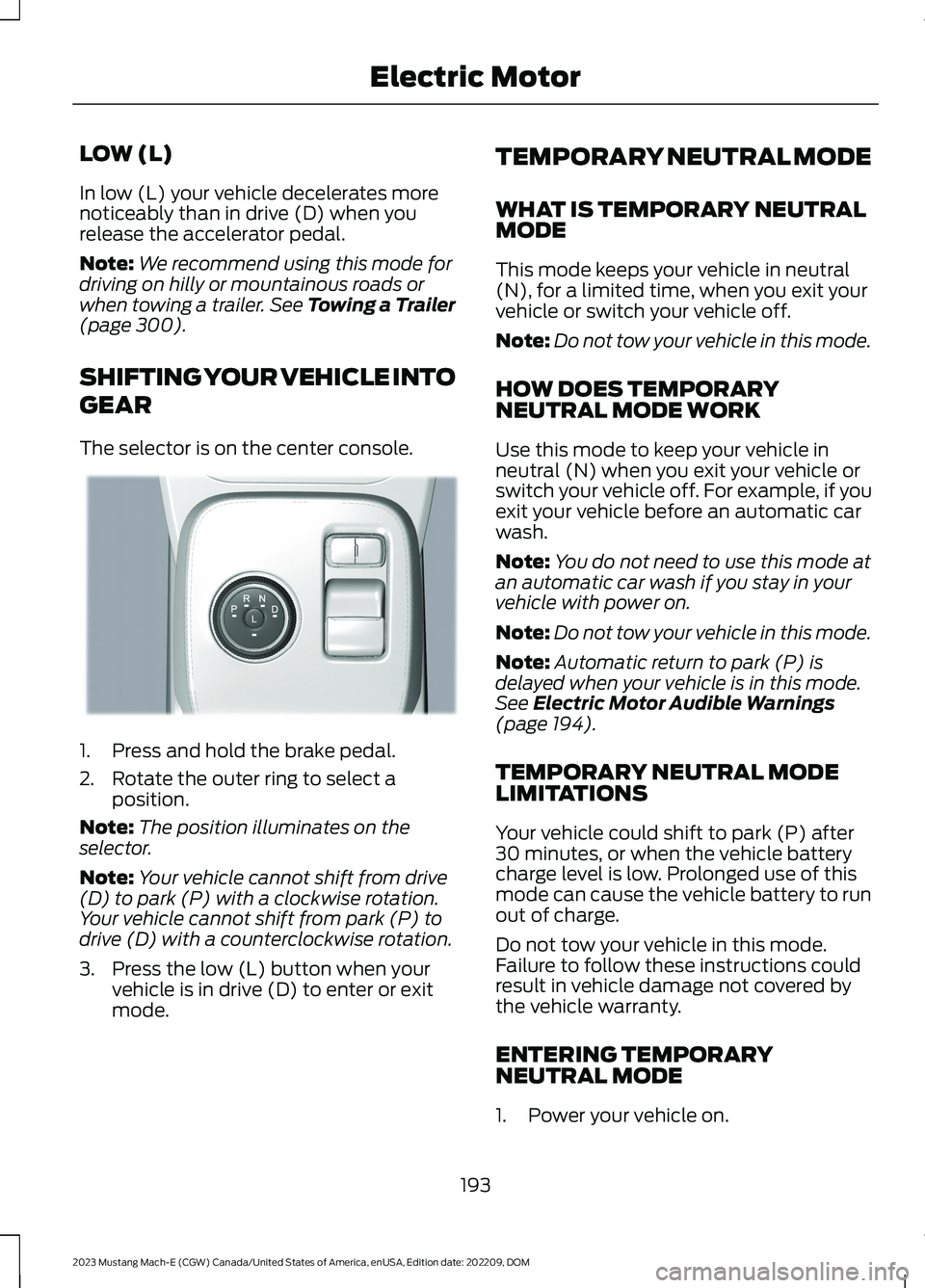
The selector is on the center console.
1.Press and hold the brake pedal.
2.Rotate the outer ring to select aposition.
Note:The position illuminates on theselector.
Note:Your vehicle cannot shift from drive(D) to park (P) with a clockwise rotation.Your vehicle cannot shift from park (P) todrive (D) with a counterclockwise rotation.
3.Press the low (L) button when yourvehicle is in drive (D) to enter or exitmode.
TEMPORARY NEUTRAL MODE
WHAT IS TEMPORARY NEUTRALMODE
This mode keeps your vehicle in neutral(N), for a limited time, when you exit yourvehicle or switch your vehicle off.
Note:Do not tow your vehicle in this mode.
HOW DOES TEMPORARYNEUTRAL MODE WORK
Use this mode to keep your vehicle inneutral (N) when you exit your vehicle orswitch your vehicle off. For example, if youexit your vehicle before an automatic carwash.
Note:You do not need to use this mode atan automatic car wash if you stay in yourvehicle with power on.
Note:Do not tow your vehicle in this mode.
Note:Automatic return to park (P) isdelayed when your vehicle is in this mode.See Electric Motor Audible Warnings(page 194).
TEMPORARY NEUTRAL MODELIMITATIONS
Your vehicle could shift to park (P) after30 minutes, or when the vehicle batterycharge level is low. Prolonged use of thismode can cause the vehicle battery to runout of charge.
Do not tow your vehicle in this mode.Failure to follow these instructions couldresult in vehicle damage not covered bythe vehicle warranty.
ENTERING TEMPORARYNEUTRAL MODE
1.Power your vehicle on.
193
2023 Mustang Mach-E (CGW) Canada/United States of America, enUSA, Edition date: 202209, DOMElectric MotorE334919