ECO mode FORD POLICE INTERCEPTOR 2021 User Guide
[x] Cancel search | Manufacturer: FORD, Model Year: 2021, Model line: POLICE INTERCEPTOR, Model: FORD POLICE INTERCEPTOR 2021Pages: 412, PDF Size: 7.51 MB
Page 42 of 412
SEATBELT EXTENSIONS
WARNING: Persons who fit into
the vehicle's seatbelt should not use an
extension. Unnecessary use could result
in serious personal injury in the event of
a crash. WARNING:
Only use extensions
provided free of charge by our dealers.
The dealer will provide an extension
designed specifically for this vehicle,
model year and seating position. The use
of an extension intended for another
vehicle, model year or seating position
may not offer you the full protection of
your vehicle's seatbelt restraint system. WARNING:
Never use seatbelt
extensions to install child restraints. WARNING:
Do not use a seatbelt
extension with an inflatable seatbelt. WARNING:
Do not use extensions
to change the way the seatbelt fits
across the torso, over the lap or to make
the seatbelt buckle easier to reach.
If, because of body size or driving position,
it is not possible to properly fasten the
seatbelt over your lap and shoulder, an
extension that is compatible with the
seatbelts is available free of charge from
our dealers. Only use our seatbelt
extensions made by the original equipment
seatbelt manufacturer with our seatbelts.
Ask your authorized dealer if your extension
is compatible with your vehicle restraint
system.
39
Explorer (CTW) Police, Canada/United States of America, Police, enUSA, Edition date: 202007, Second-Printing Seatbelts
Page 62 of 412
Remote Control (If Equipped)
You can use the remote control at any
time.
Unlocking the Doors Press the button to unlock the
driver door.
Press the button again within three
seconds to unlock all doors.
Press and hold both the lock and unlock
buttons on the remote control for three
seconds to change between driver door or
all doors unlock mode. Driver door mode
only unlocks the driver door when you
press the unlock button once. The
unlocking mode applies to the remote
control.
Locking the Doors Press the button to lock all
doors.
Independent Liftgate Unlocking
Feature
(If Equipped)
This feature allows you to unlock the
liftgate independent of the other doors.
Unlocking
The liftgate unlocks when you press the
liftgate release button on the overhead
console with the ignition on.
Liftgate Timed Release (If Equipped)
Switch the ignition to the run, start or
accessory position. Press the liftgate release button
on the overhead console.
Note: Only the liftgate unlocks. All other
passenger doors remain in the previous
locking state. A warning lamp illuminates in the
instrument cluster for 45 seconds.
See
Warning Lamps and Indicators (page
79). You can then open the liftgate using
the exterior liftgate release button.
Once the 45 second timer expires, the
lamp turns off and the liftgate no longer
opens. Press the liftgate release button on
the overhead console again to restart the
timer.
Note: The liftgate does not unlock when
you electronically unlock all the doors using
the remote control or power door lock
control, if your vehicle has this feature.
Note: You can also unlock the liftgate by
inserting the key blade into the liftgate lock
cylinder, or by pressing the liftgate release
button on the remote control, if your vehicle
has this feature.
Locking
The liftgate locks when any of the
following occur:
• You open and close the liftgate after
you press the liftgate release button
on the overhead console.
• The 45 second timer expires.
Global Lock and Unlock
Global lock and unlock coordinates the
liftgate lock state with the four doors.
When switching the doors to an unlock
state, open the liftgate using the exterior
liftgate release button. When you switch
the doors to the locked state, this locks the
liftgate.
Note: You can also unlock the liftgate by
inserting the key blade into the liftgate lock
cylinder.
Illuminated Entry
(If Equipped)
The interior lamps and some exterior
lamps illuminate when you unlock the
doors with the remote control.
59
Explorer (CTW) Police, Canada/United States of America, Police, enUSA, Edition date: 202007, Second-Printing Doors and LocksE138629 E138623
Page 67 of 412
While the vehicle is running and in Park (P),
press and release the button located on
the center of the instrument panel.
Activating the feature will turn on the
Police Perimeter Alert System display in
the instrument cluster.
Note:
When the feature is active an icon
will display on the instrument cluster.
Police Perimeter Alert Settings
Note: When the Police Idle feature is active,
windows will not automatically roll up.
Note: When window or door locking is
active, corresponding icons will display in
the instrument cluster.
Note: When Low mode is active, window
or door locking setting is not available.
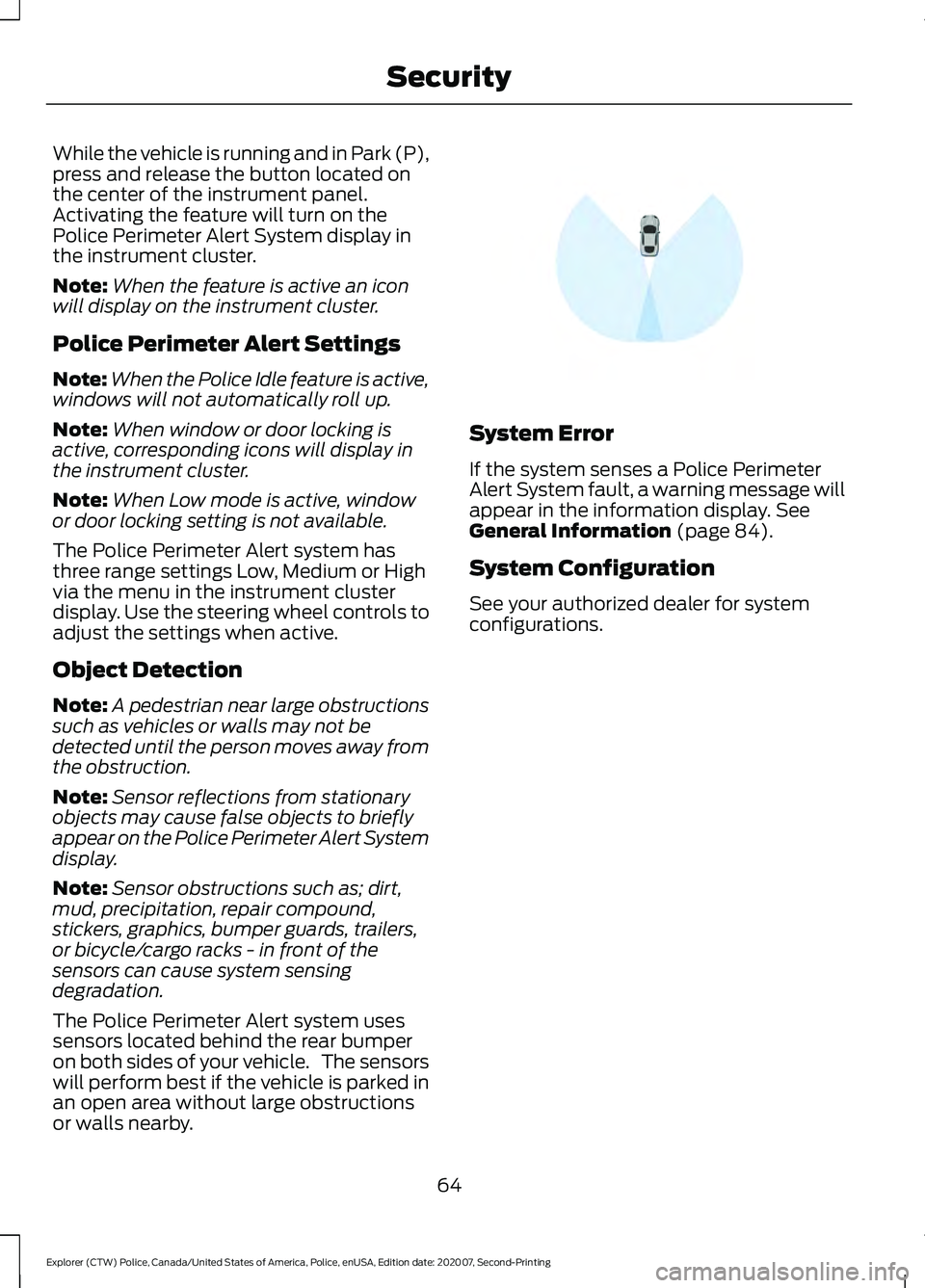
The Police Perimeter Alert system has
three range settings Low, Medium or High
via the menu in the instrument cluster
display. Use the steering wheel controls to
adjust the settings when active.
Object Detection
Note: A pedestrian near large obstructions
such as vehicles or walls may not be
detected until the person moves away from
the obstruction.
Note: Sensor reflections from stationary
objects may cause false objects to briefly
appear on the Police Perimeter Alert System
display.
Note: Sensor obstructions such as; dirt,
mud, precipitation, repair compound,
stickers, graphics, bumper guards, trailers,
or bicycle/cargo racks - in front of the
sensors can cause system sensing
degradation.
The Police Perimeter Alert system uses
sensors located behind the rear bumper
on both sides of your vehicle. The sensors
will perform best if the vehicle is parked in
an open area without large obstructions
or walls nearby. System Error
If the system senses a Police Perimeter
Alert System fault, a warning message will
appear in the information display. See
General Information (page 84).
System Configuration
See your authorized dealer for system
configurations.
64
Explorer (CTW) Police, Canada/United States of America, Police, enUSA, Edition date: 202007, Second-Printing SecurityE298030
Page 68 of 412
ADJUSTING THE STEERING
WHEEL
WARNING: Do not adjust the
steering wheel when your vehicle is
moving.
Note: Make sure that you are sitting in the
correct position. See Sitting in the Correct
Position
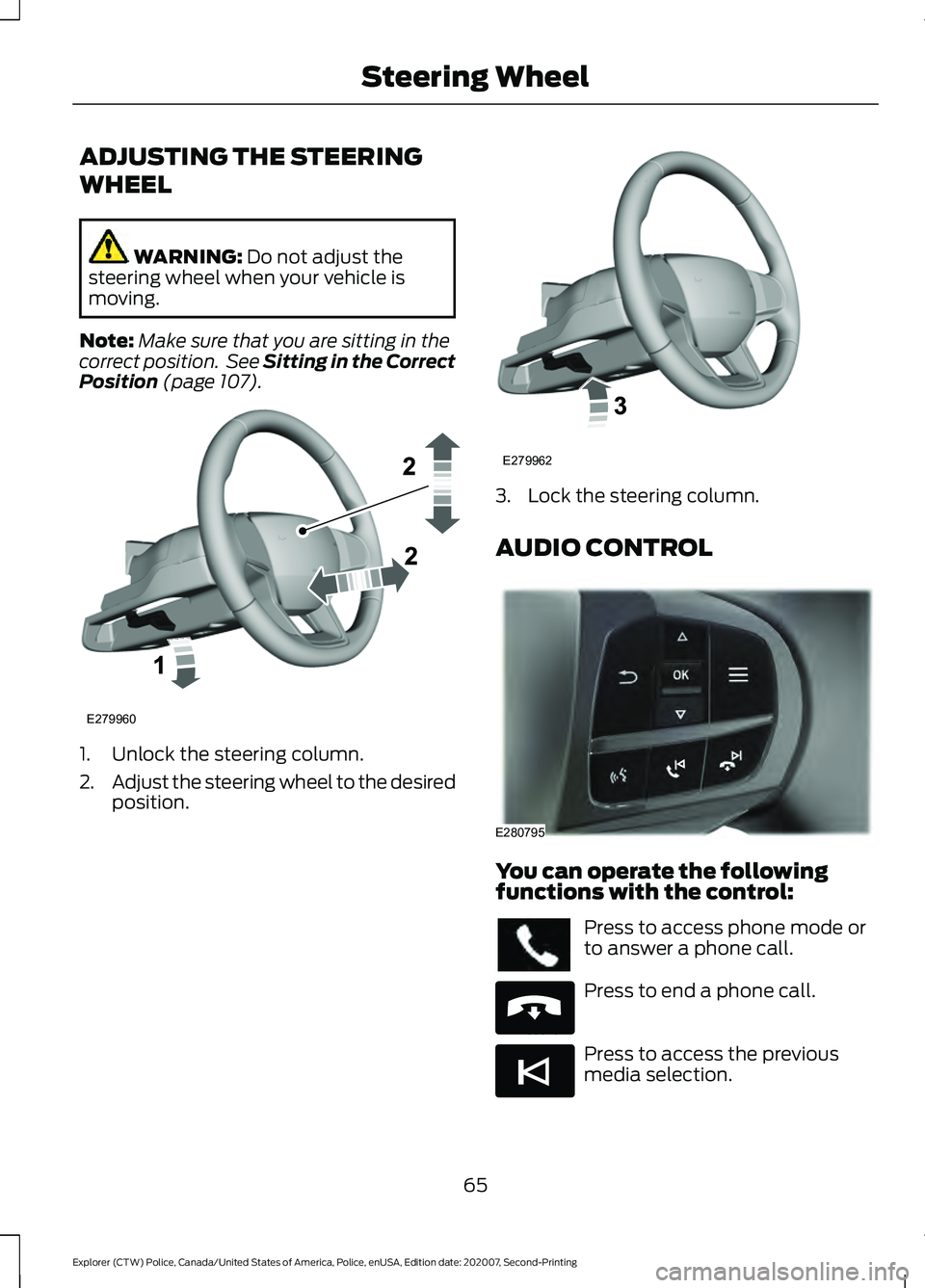
(page 107). 1. Unlock the steering column.
2.
Adjust the steering wheel to the desired
position. 3. Lock the steering column.
AUDIO CONTROL
You can operate the following
functions with the control:
Press to access phone mode or
to answer a phone call.
Press to end a phone call.
Press to access the previous
media selection.
65
Explorer (CTW) Police, Canada/United States of America, Police, enUSA, Edition date: 202007, Second-Printing Steering WheelE279960 E279962 E280795 E265040 E265045
Page 73 of 412
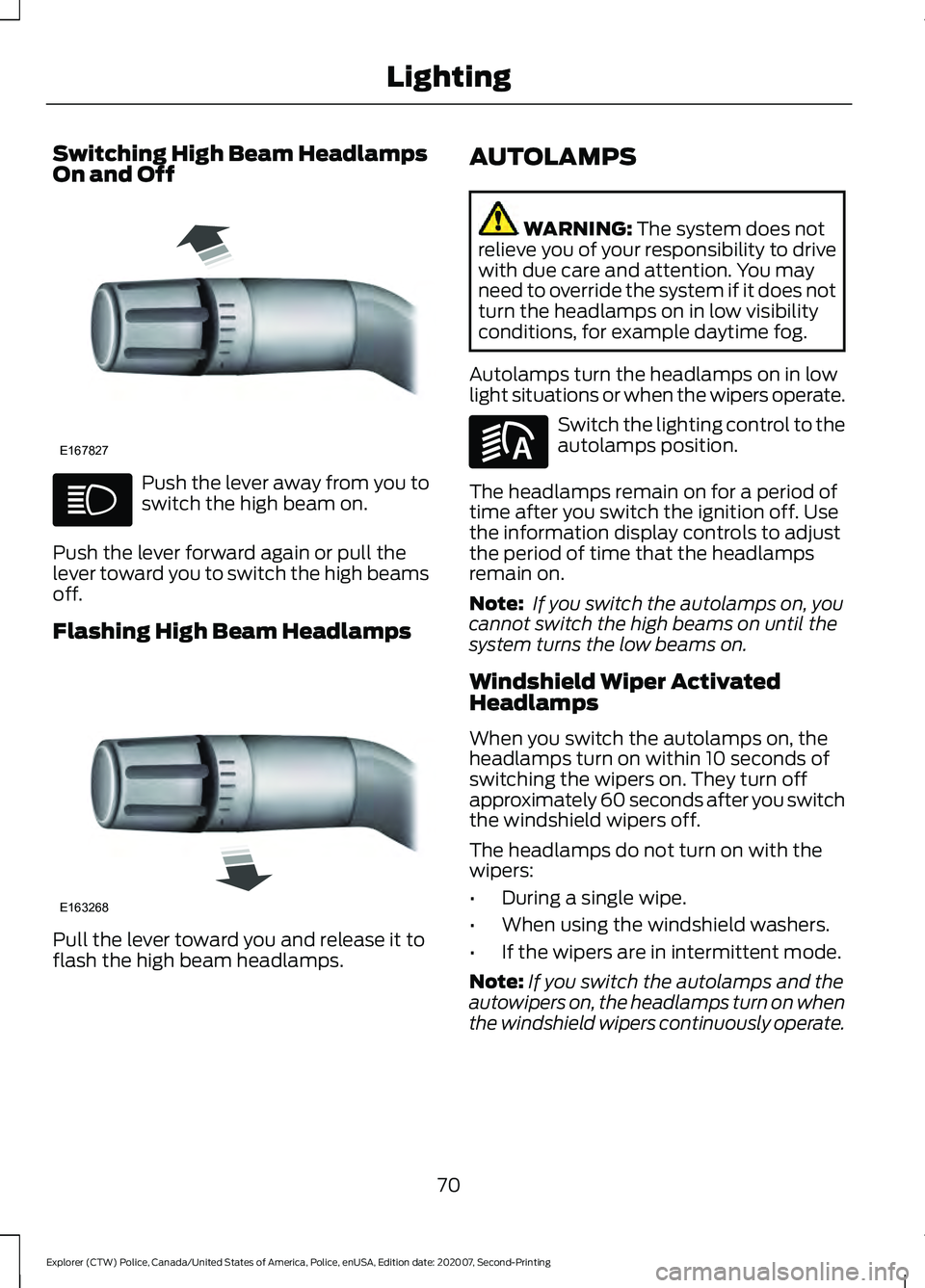
Switching High Beam Headlamps
On and Off
Push the lever away from you to
switch the high beam on.
Push the lever forward again or pull the
lever toward you to switch the high beams
off.
Flashing High Beam Headlamps Pull the lever toward you and release it to
flash the high beam headlamps. AUTOLAMPS WARNING: The system does not
relieve you of your responsibility to drive
with due care and attention. You may
need to override the system if it does not
turn the headlamps on in low visibility
conditions, for example daytime fog.
Autolamps turn the headlamps on in low
light situations or when the wipers operate. Switch the lighting control to the
autolamps position.
The headlamps remain on for a period of
time after you switch the ignition off. Use
the information display controls to adjust
the period of time that the headlamps
remain on.
Note: If you switch the autolamps on, you
cannot switch the high beams on until the
system turns the low beams on.
Windshield Wiper Activated
Headlamps
When you switch the autolamps on, the
headlamps turn on within 10 seconds of
switching the wipers on. They turn off
approximately 60 seconds after you switch
the windshield wipers off.
The headlamps do not turn on with the
wipers:
• During a single wipe.
• When using the windshield washers.
• If the wipers are in intermittent mode.
Note: If you switch the autolamps and the
autowipers on, the headlamps turn on when
the windshield wipers continuously operate.
70
Explorer (CTW) Police, Canada/United States of America, Police, enUSA, Edition date: 202007, Second-Printing LightingE167827 E163268 E281240
Page 78 of 412
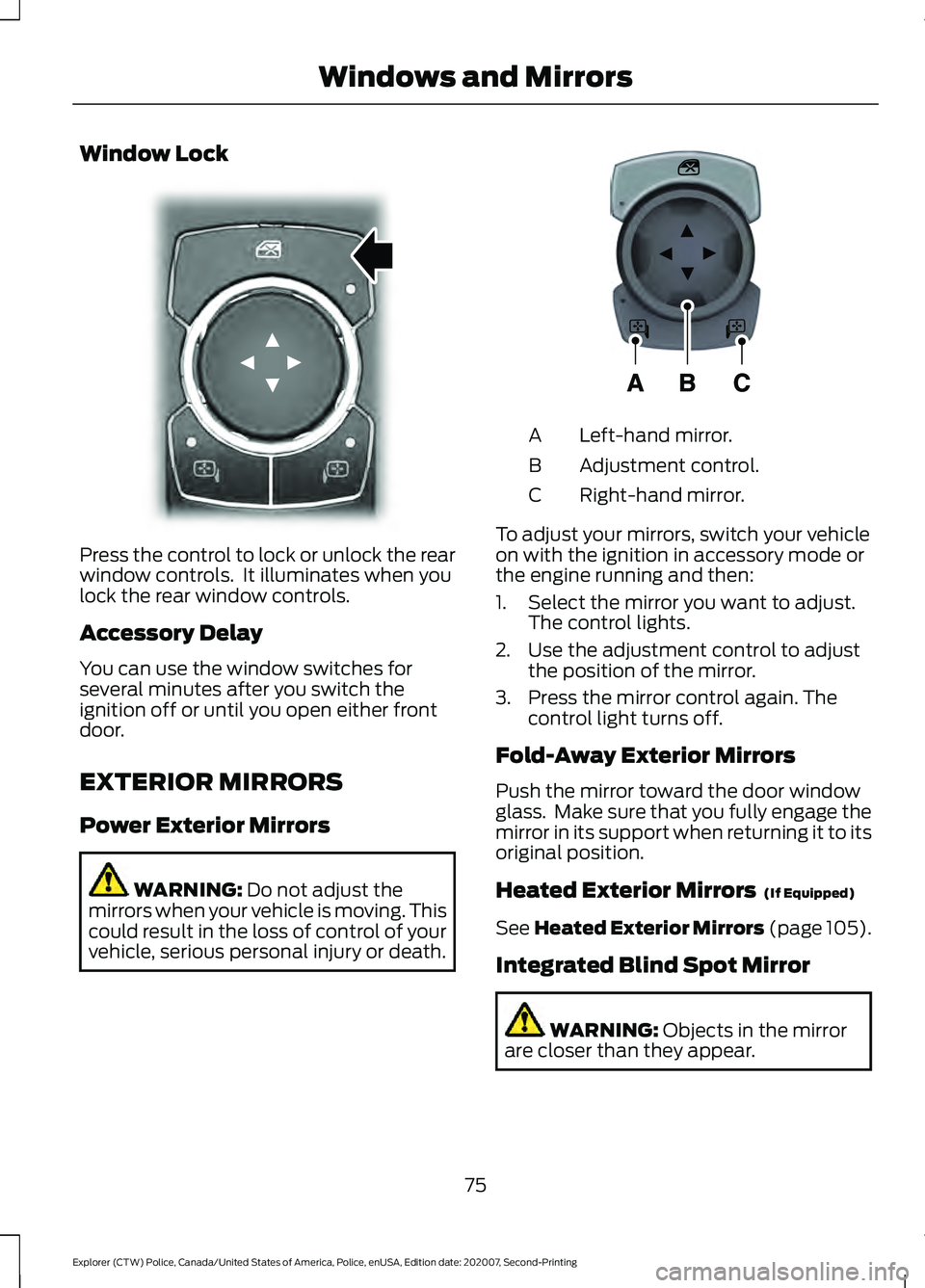
Window Lock
Press the control to lock or unlock the rear
window controls. It illuminates when you
lock the rear window controls.
Accessory Delay
You can use the window switches for
several minutes after you switch the
ignition off or until you open either front
door.
EXTERIOR MIRRORS
Power Exterior Mirrors
WARNING: Do not adjust the
mirrors when your vehicle is moving. This
could result in the loss of control of your
vehicle, serious personal injury or death. Left-hand mirror.
A
Adjustment control.
B
Right-hand mirror.
C
To adjust your mirrors, switch your vehicle
on with the ignition in accessory mode or
the engine running and then:
1. Select the mirror you want to adjust. The control lights.
2. Use the adjustment control to adjust the position of the mirror.
3. Press the mirror control again. The control light turns off.
Fold-Away Exterior Mirrors
Push the mirror toward the door window
glass. Make sure that you fully engage the
mirror in its support when returning it to its
original position.
Heated Exterior Mirrors (If Equipped)
See
Heated Exterior Mirrors (page 105).
Integrated Blind Spot Mirror WARNING:
Objects in the mirror
are closer than they appear.
75
Explorer (CTW) Police, Canada/United States of America, Police, enUSA, Edition date: 202007, Second-Printing Windows and MirrorsE304222 E297114
Page 84 of 412
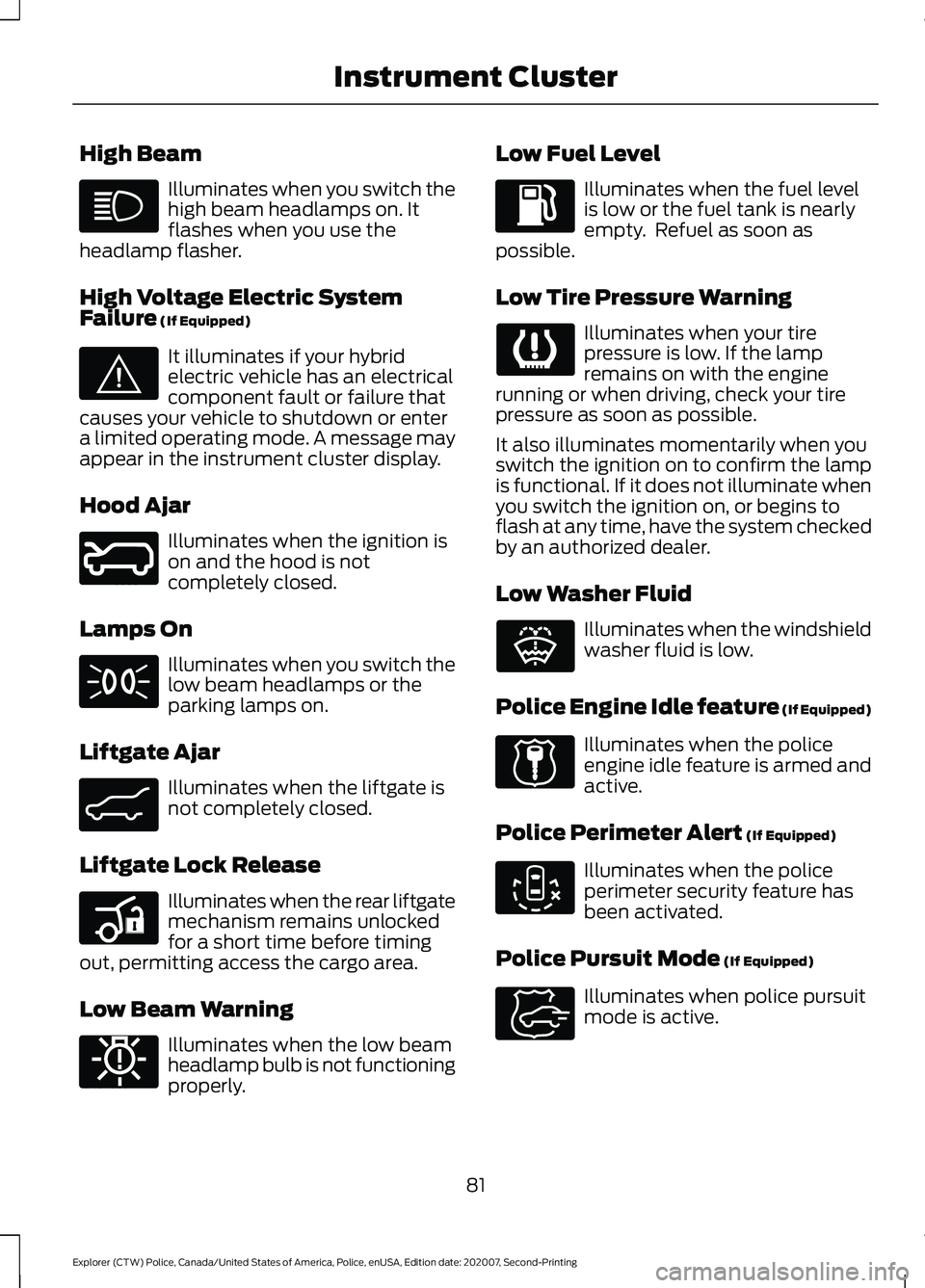
High Beam
Illuminates when you switch the
high beam headlamps on. It
flashes when you use the
headlamp flasher.
High Voltage Electric System
Failure (If Equipped) It illuminates if your hybrid
electric vehicle has an electrical
component fault or failure that
causes your vehicle to shutdown or enter
a limited operating mode. A message may
appear in the instrument cluster display.
Hood Ajar Illuminates when the ignition is
on and the hood is not
completely closed.
Lamps On Illuminates when you switch the
low beam headlamps or the
parking lamps on.
Liftgate Ajar Illuminates when the liftgate is
not completely closed.
Liftgate Lock Release Illuminates when the rear liftgate
mechanism remains unlocked
for a short time before timing
out, permitting access the cargo area.
Low Beam Warning Illuminates when the low beam
headlamp bulb is not functioning
properly. Low Fuel Level Illuminates when the fuel level
is low or the fuel tank is nearly
empty. Refuel as soon as
possible.
Low Tire Pressure Warning Illuminates when your tire
pressure is low. If the lamp
remains on with the engine
running or when driving, check your tire
pressure as soon as possible.
It also illuminates momentarily when you
switch the ignition on to confirm the lamp
is functional. If it does not illuminate when
you switch the ignition on, or begins to
flash at any time, have the system checked
by an authorized dealer.
Low Washer Fluid Illuminates when the windshield
washer fluid is low.
Police Engine Idle feature
(If Equipped) Illuminates when the police
engine idle feature is armed and
active.
Police Perimeter Alert
(If Equipped) Illuminates when the police
perimeter security feature has
been activated.
Police Pursuit Mode
(If Equipped) Illuminates when police pursuit
mode is active.
81
Explorer (CTW) Police, Canada/United States of America, Police, enUSA, Edition date: 202007, Second-Printing Instrument Cluster E144693 E246598 E162453 E206359 E181350 E132353 E224045 E288083 E271854
Page 87 of 412
GENERAL INFORMATION
WARNING: Driving while distracted
can result in loss of vehicle control, crash
and injury. We strongly recommend that
you use extreme caution when using any
device that may take your focus off the
road. Your primary responsibility is the
safe operation of your vehicle. We
recommend against the use of any
hand-held device while driving and
encourage the use of voice-operated
systems when possible. Make sure you
are aware of all applicable local laws
that may affect the use of electronic
devices while driving.
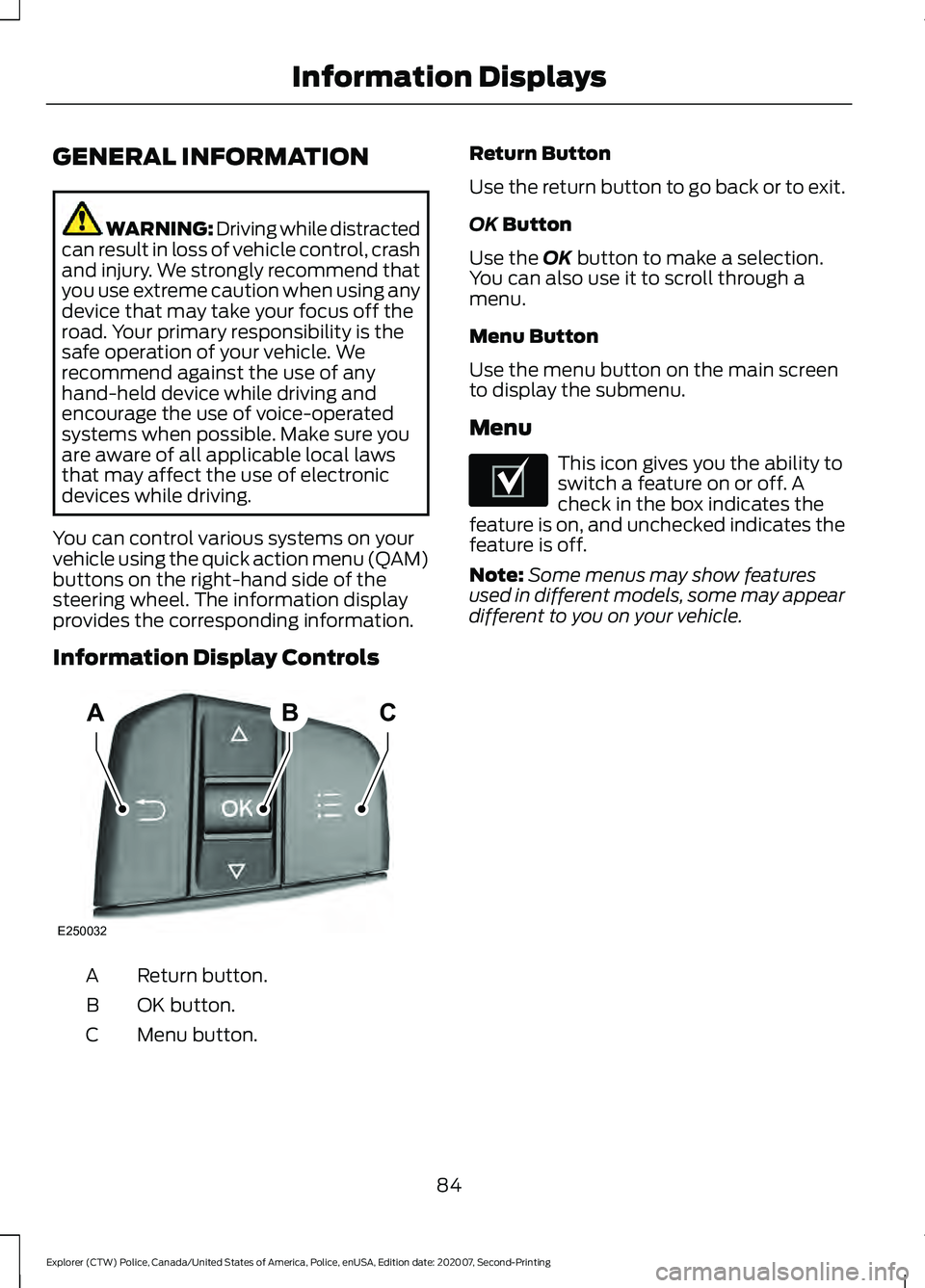
You can control various systems on your
vehicle using the quick action menu (QAM)
buttons on the right-hand side of the
steering wheel. The information display
provides the corresponding information.
Information Display Controls Return button.
A
OK button.
B
Menu button.
C Return Button
Use the return button to go back or to exit.
OK Button
Use the
OK button to make a selection.
You can also use it to scroll through a
menu.
Menu Button
Use the menu button on the main screen
to display the submenu.
Menu This icon gives you the ability to
switch a feature on or off. A
check in the box indicates the
feature is on, and unchecked indicates the
feature is off.
Note: Some menus may show features
used in different models, some may appear
different to you on your vehicle.
84
Explorer (CTW) Police, Canada/United States of America, Police, enUSA, Edition date: 202007, Second-Printing Information DisplaysABC
E250032 E204495
Page 91 of 412
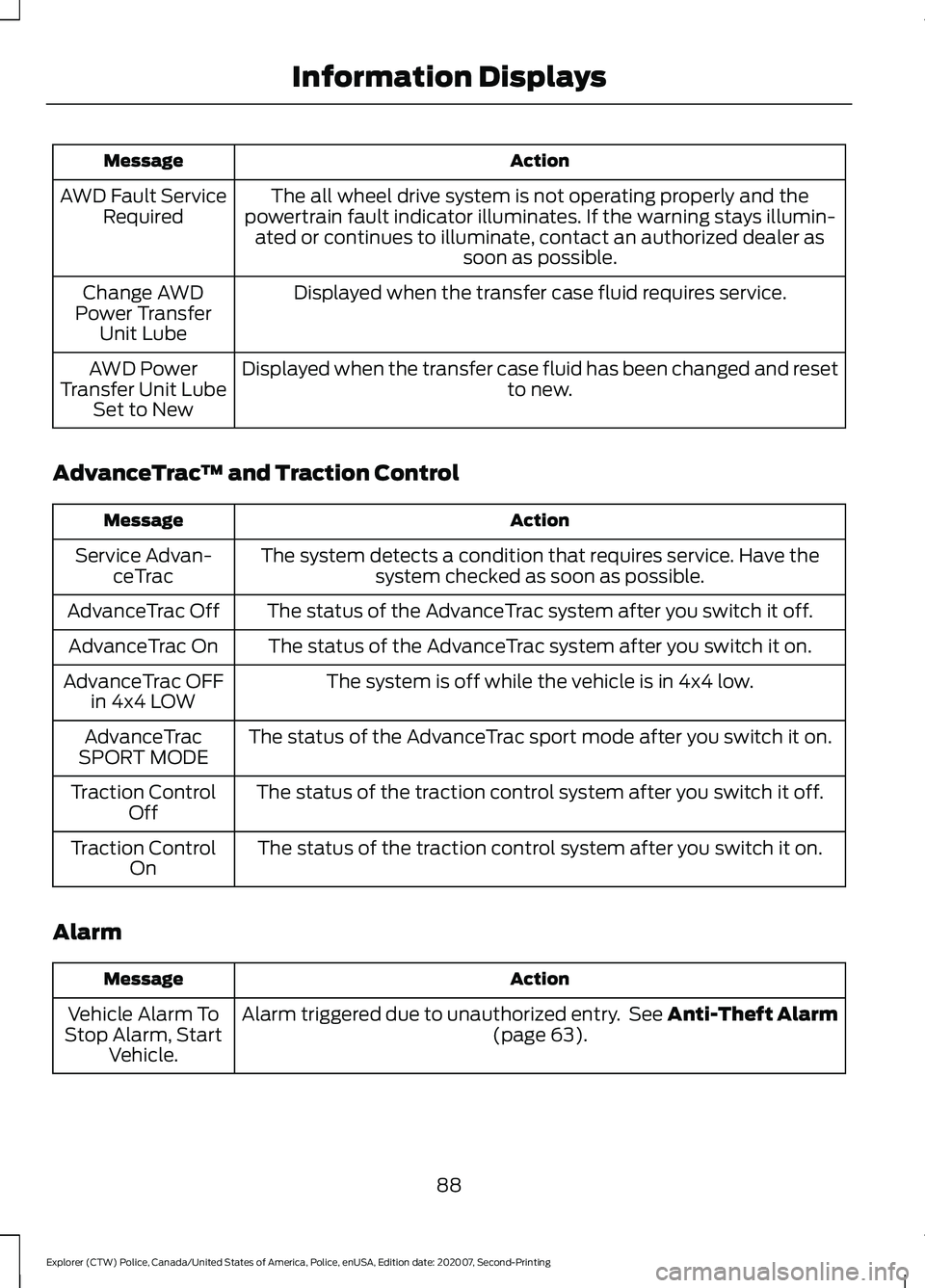
Action
Message
The all wheel drive system is not operating properly and the
powertrain fault indicator illuminates. If the warning stays illumin- ated or continues to illuminate, contact an authorized dealer as soon as possible.
AWD Fault Service
Required
Displayed when the transfer case fluid requires service.
Change AWD
Power Transfer Unit Lube
Displayed when the transfer case fluid has been changed and reset to new.
AWD Power
Transfer Unit Lube Set to New
AdvanceTrac ™ and Traction Control Action
Message
The system detects a condition that requires service. Have thesystem checked as soon as possible.
Service Advan-
ceTrac
The status of the AdvanceTrac system after you switch it off.
AdvanceTrac Off
The status of the AdvanceTrac system after you switch it on.
AdvanceTrac On
The system is off while the vehicle is in 4x4 low.
AdvanceTrac OFF
in 4x4 LOW
The status of the AdvanceTrac sport mode after you switch it on.
AdvanceTrac
SPORT MODE
The status of the traction control system after you switch it off.
Traction Control
Off
The status of the traction control system after you switch it on.
Traction Control
On
Alarm Action
Message
Alarm triggered due to unauthorized entry. See Anti-Theft Alarm (page 63).
Vehicle Alarm To
Stop Alarm, Start Vehicle.
88
Explorer (CTW) Police, Canada/United States of America, Police, enUSA, Edition date: 202007, Second-Printing Information Displays
Page 93 of 412
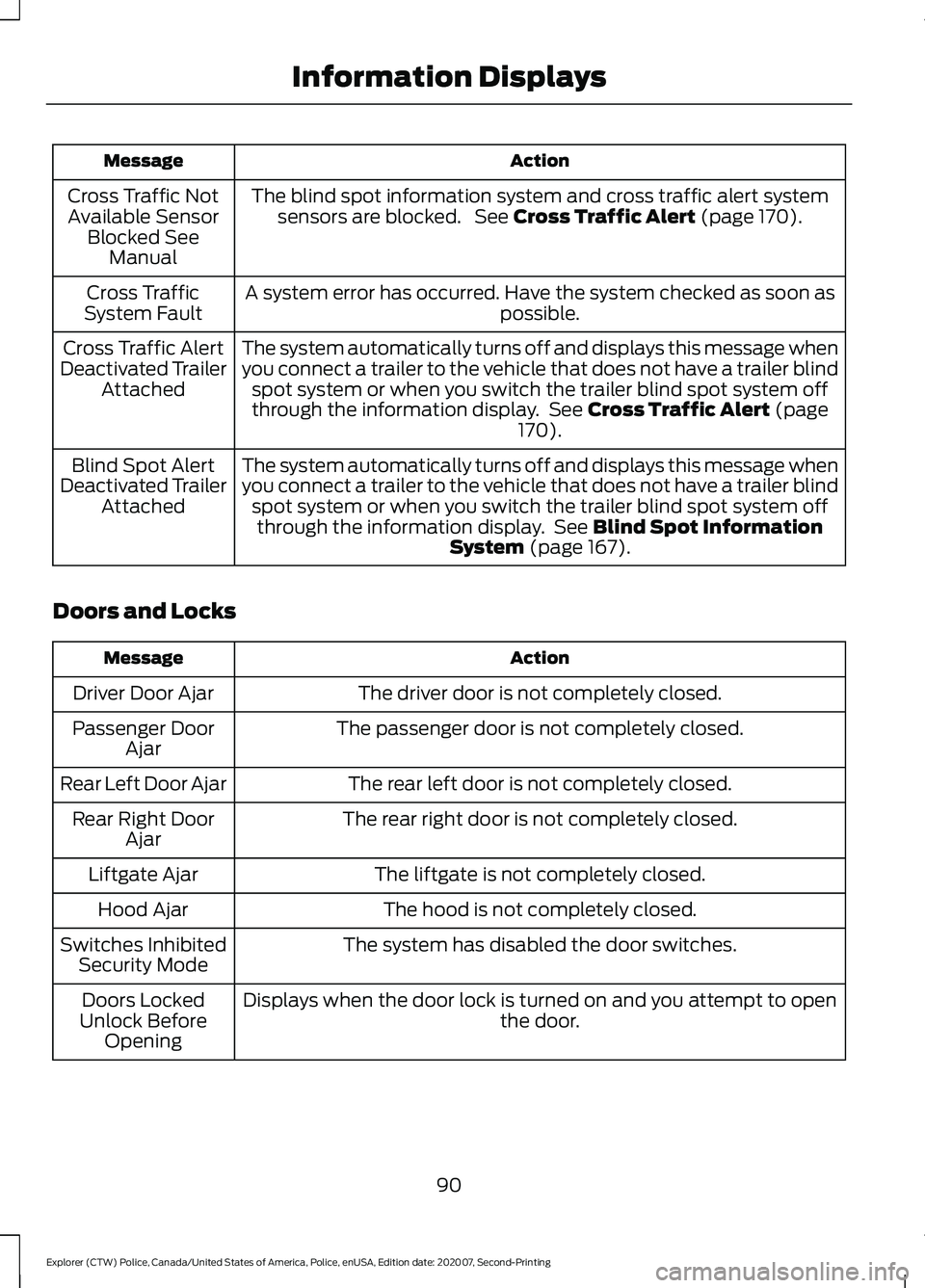
Action
Message
The blind spot information system and cross traffic alert systemsensors are blocked. See Cross Traffic Alert (page 170).
Cross Traffic Not
Available Sensor Blocked See Manual
A system error has occurred. Have the system checked as soon as possible.
Cross Traffic
System Fault
The system automatically turns off and displays this message when
you connect a trailer to the vehicle that does not have a trailer blindspot system or when you switch the trailer blind spot system off
through the information display. See
Cross Traffic Alert (page
170).
Cross Traffic Alert
Deactivated Trailer Attached
The system automatically turns off and displays this message when
you connect a trailer to the vehicle that does not have a trailer blindspot system or when you switch the trailer blind spot system offthrough the information display. See
Blind Spot Information
System (page 167).
Blind Spot Alert
Deactivated Trailer Attached
Doors and Locks Action
Message
The driver door is not completely closed.
Driver Door Ajar
The passenger door is not completely closed.
Passenger Door
Ajar
The rear left door is not completely closed.
Rear Left Door Ajar
The rear right door is not completely closed.
Rear Right Door
Ajar
The liftgate is not completely closed.
Liftgate Ajar
The hood is not completely closed.
Hood Ajar
The system has disabled the door switches.
Switches Inhibited
Security Mode
Displays when the door lock is turned on and you attempt to open the door.
Doors Locked
Unlock Before Opening
90
Explorer (CTW) Police, Canada/United States of America, Police, enUSA, Edition date: 202007, Second-Printing Information Displays