clock FORD POLICE INTERCEPTOR UTILITY 2015 1.G User Guide
[x] Cancel search | Manufacturer: FORD, Model Year: 2015, Model line: POLICE INTERCEPTOR UTILITY, Model: FORD POLICE INTERCEPTOR UTILITY 2015 1.GPages: 398, PDF Size: 6.24 MB
Page 244 of 398
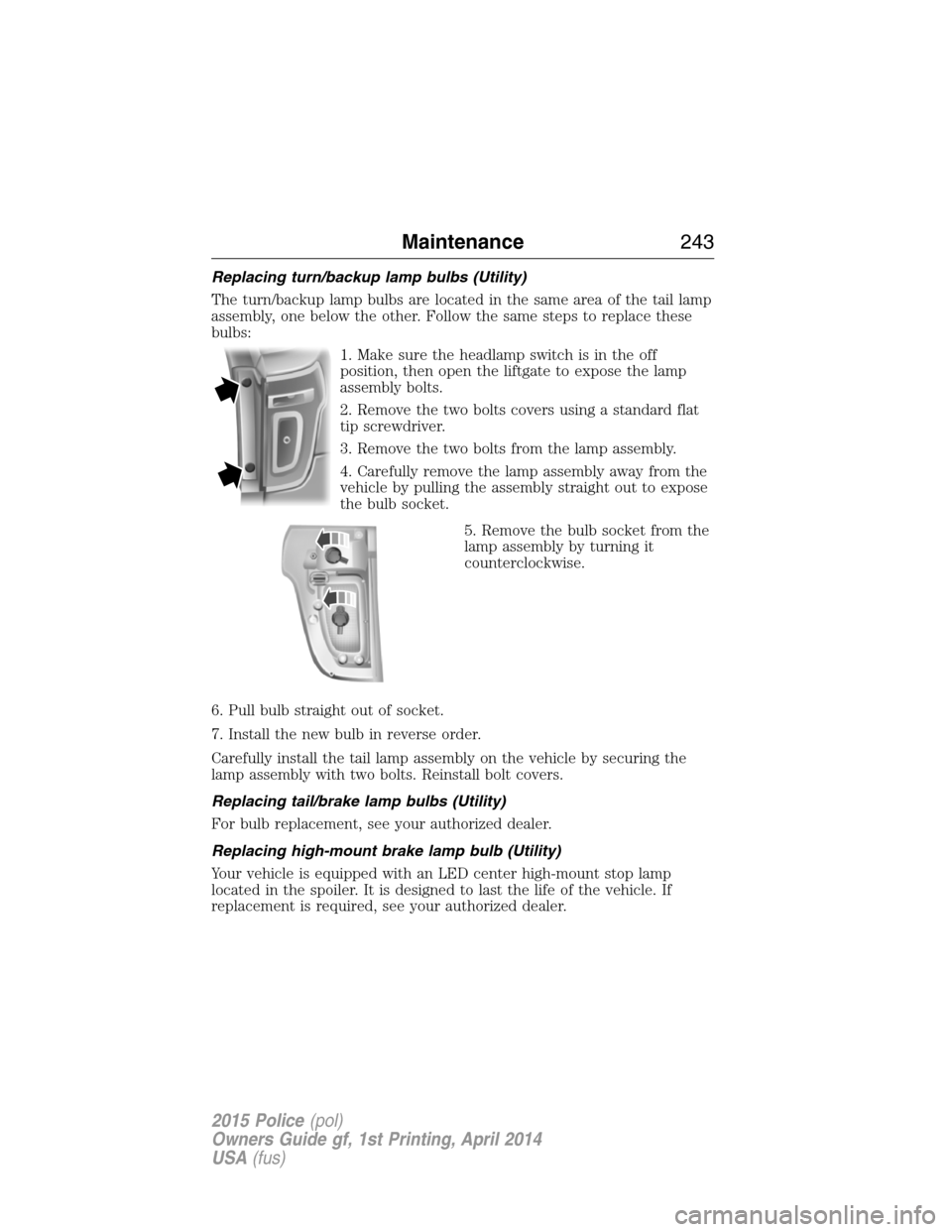
Replacing turn/backup lamp bulbs (Utility)
The turn/backup lamp bulbs are located in the same area of the tail lamp
assembly, one below the other. Follow the same steps to replace these
bulbs:
1. Make sure the headlamp switch is in the off
position, then open the liftgate to expose the lamp
assembly bolts.
2. Remove the two bolts covers using a standard flat
tip screwdriver.
3. Remove the two bolts from the lamp assembly.
4. Carefully remove the lamp assembly away from the
vehicle by pulling the assembly straight out to expose
the bulb socket.
5. Remove the bulb socket from the
lamp assembly by turning it
counterclockwise.
6. Pull bulb straight out of socket.
7. Install the new bulb in reverse order.
Carefully install the tail lamp assembly on the vehicle by securing the
lamp assembly with two bolts. Reinstall bolt covers.
Replacing tail/brake lamp bulbs (Utility)
For bulb replacement, see your authorized dealer.
Replacing high-mount brake lamp bulb (Utility)
Your vehicle is equipped with an LED center high-mount stop lamp
located in the spoiler. It is designed to last the life of the vehicle. If
replacement is required, see your authorized dealer.
Maintenance243
2015 Police(pol)
Owners Guide gf, 1st Printing, April 2014
USA(fus)
Page 285 of 398
WARNING:To reduce the risk of possible serious injury or
death, do not remove the full size spare tire from the factory
secured location. This location is necessary to achieve police-rated
75 mph (120 km/h) rear impact crash-test performance. Removal
increases the risk of fuel leak in high-speed rear impacts.
Note:Passengers should not remain in the vehicle when the vehicle is
being jacked.
Note:For sedan, only the original equipment tire or 245/55R18 tire with
outer diameter less than 725 millimeters will stow in the tire tub.
Utility
1. Park on a level surface, set the parking brake and activate the hazard
flashers.
2. Place the transmission in park(P)and turn the engine off.
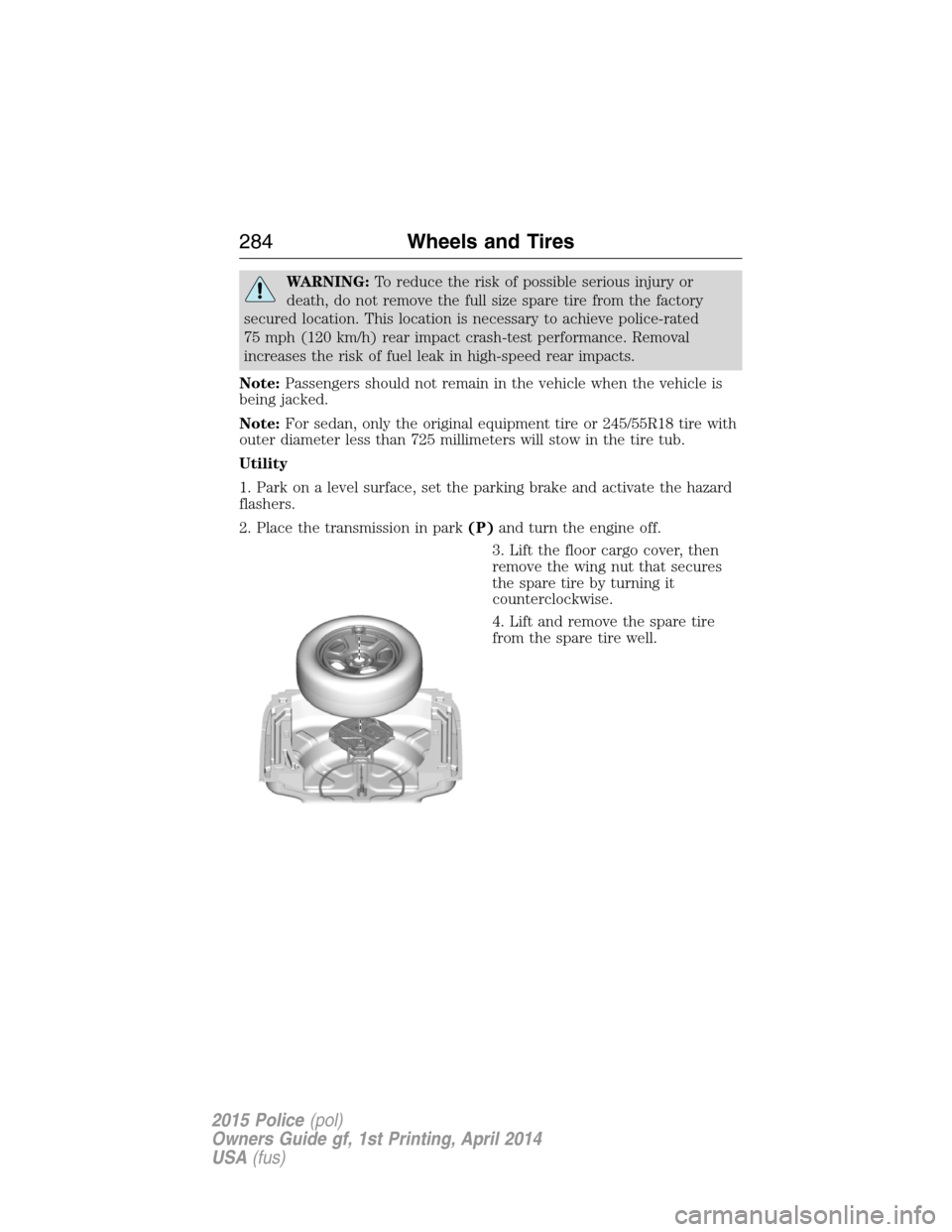
3. Lift the floor cargo cover, then
remove the wing nut that secures
the spare tire by turning it
counterclockwise.
4. Lift and remove the spare tire
from the spare tire well.
284Wheels and Tires
2015 Police(pol)
Owners Guide gf, 1st Printing, April 2014
USA(fus)
Page 286 of 398
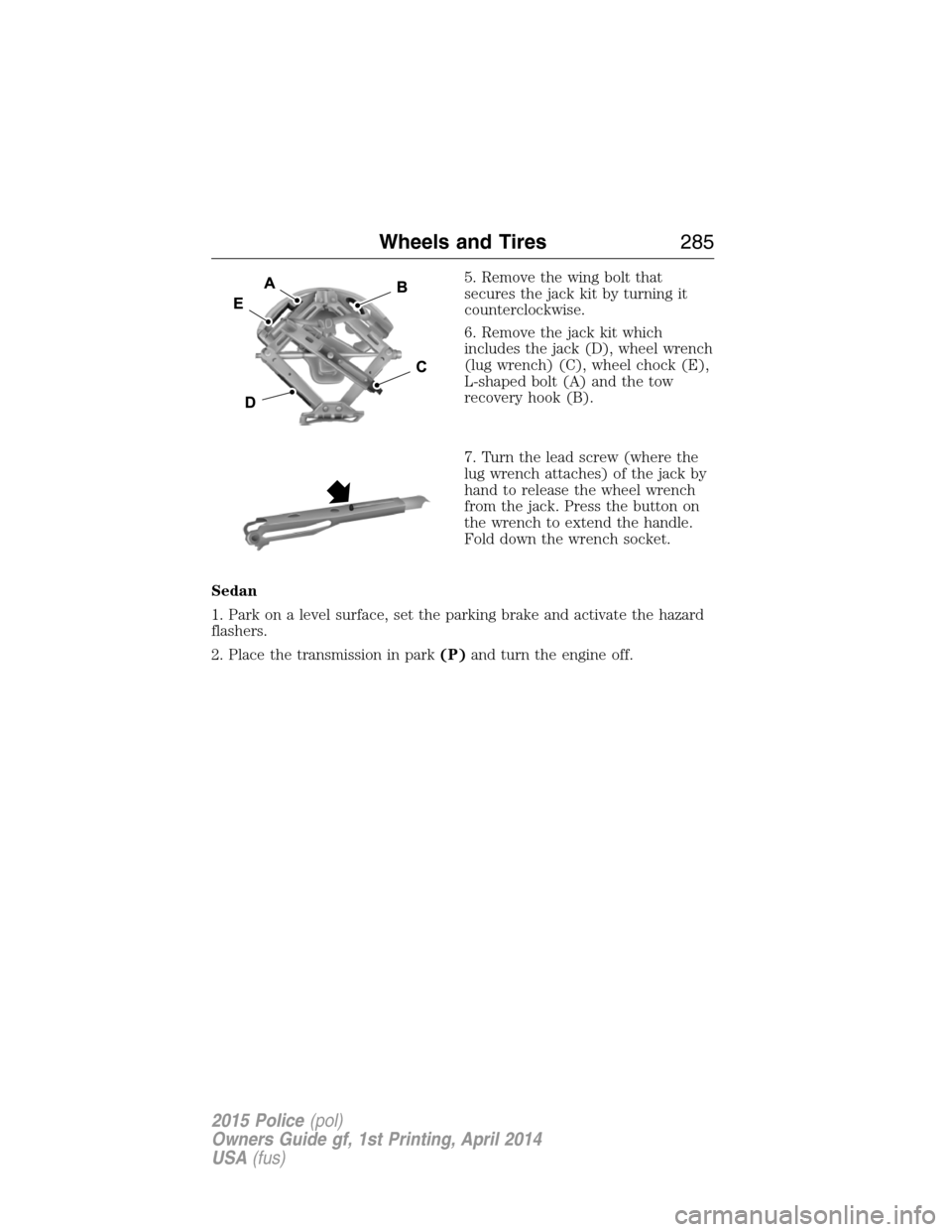
5. Remove the wing bolt that
secures the jack kit by turning it
counterclockwise.
6. Remove the jack kit which
includes the jack (D), wheel wrench
(lug wrench) (C), wheel chock (E),
L-shaped bolt (A) and the tow
recovery hook (B).
7. Turn the lead screw (where the
lug wrench attaches) of the jack by
hand to release the wheel wrench
from the jack. Press the button on
the wrench to extend the handle.
Fold down the wrench socket.
Sedan
1. Park on a level surface, set the parking brake and activate the hazard
flashers.
2. Place the transmission in park(P)and turn the engine off.
Wheels and Tires285
2015 Police(pol)
Owners Guide gf, 1st Printing, April 2014
USA(fus)
Page 287 of 398
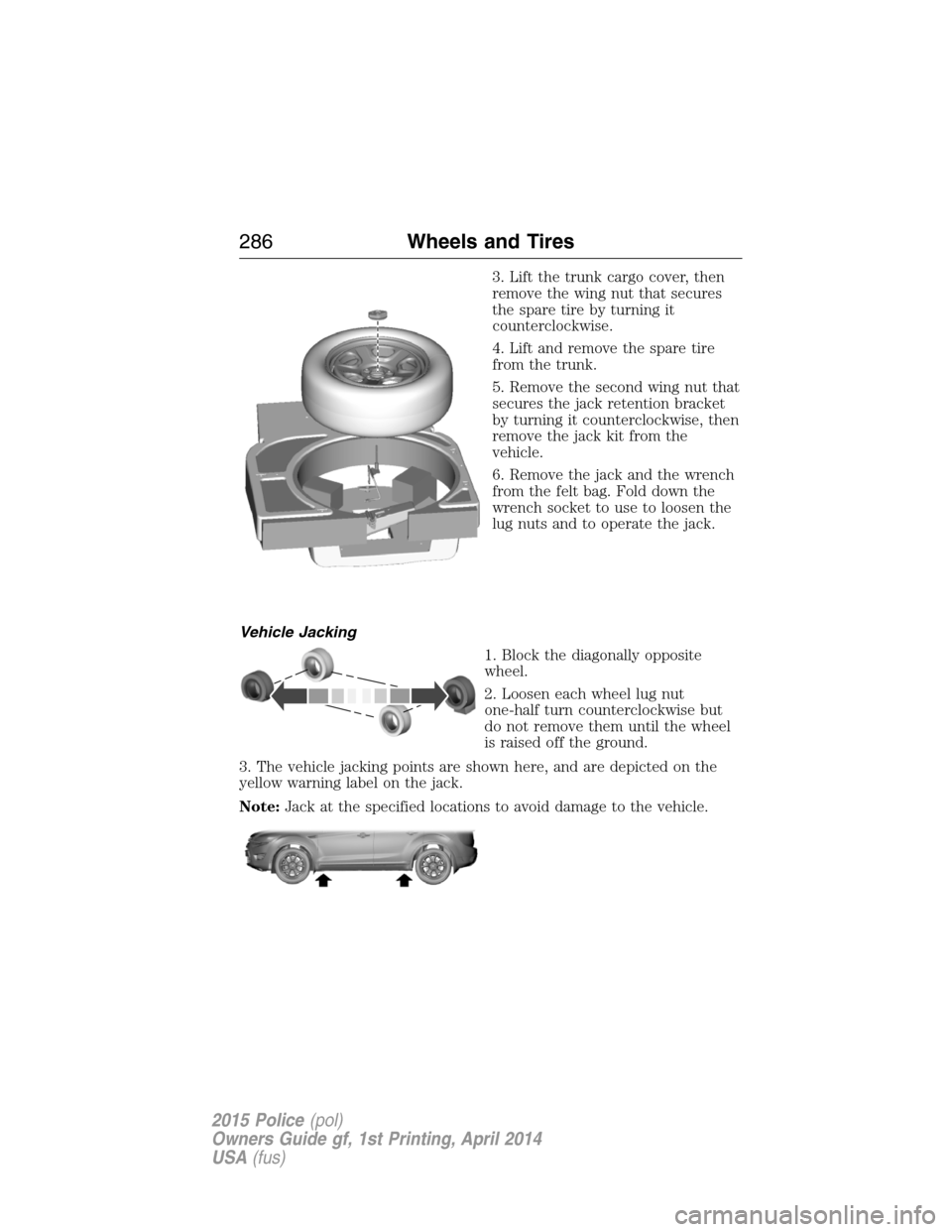
3. Lift the trunk cargo cover, then
remove the wing nut that secures
the spare tire by turning it
counterclockwise.
4. Lift and remove the spare tire
from the trunk.
5. Remove the second wing nut that
secures the jack retention bracket
by turning it counterclockwise, then
remove the jack kit from the
vehicle.
6. Remove the jack and the wrench
from the felt bag. Fold down the
wrench socket to use to loosen the
lug nuts and to operate the jack.
Vehicle Jacking
1. Block the diagonally opposite
wheel.
2. Loosen each wheel lug nut
one-half turn counterclockwise but
do not remove them until the wheel
is raised off the ground.
3. The vehicle jacking points are shown here, and are depicted on the
yellow warning label on the jack.
Note:Jack at the specified locations to avoid damage to the vehicle.
286Wheels and Tires
2015 Police(pol)
Owners Guide gf, 1st Printing, April 2014
USA(fus)
Page 288 of 398
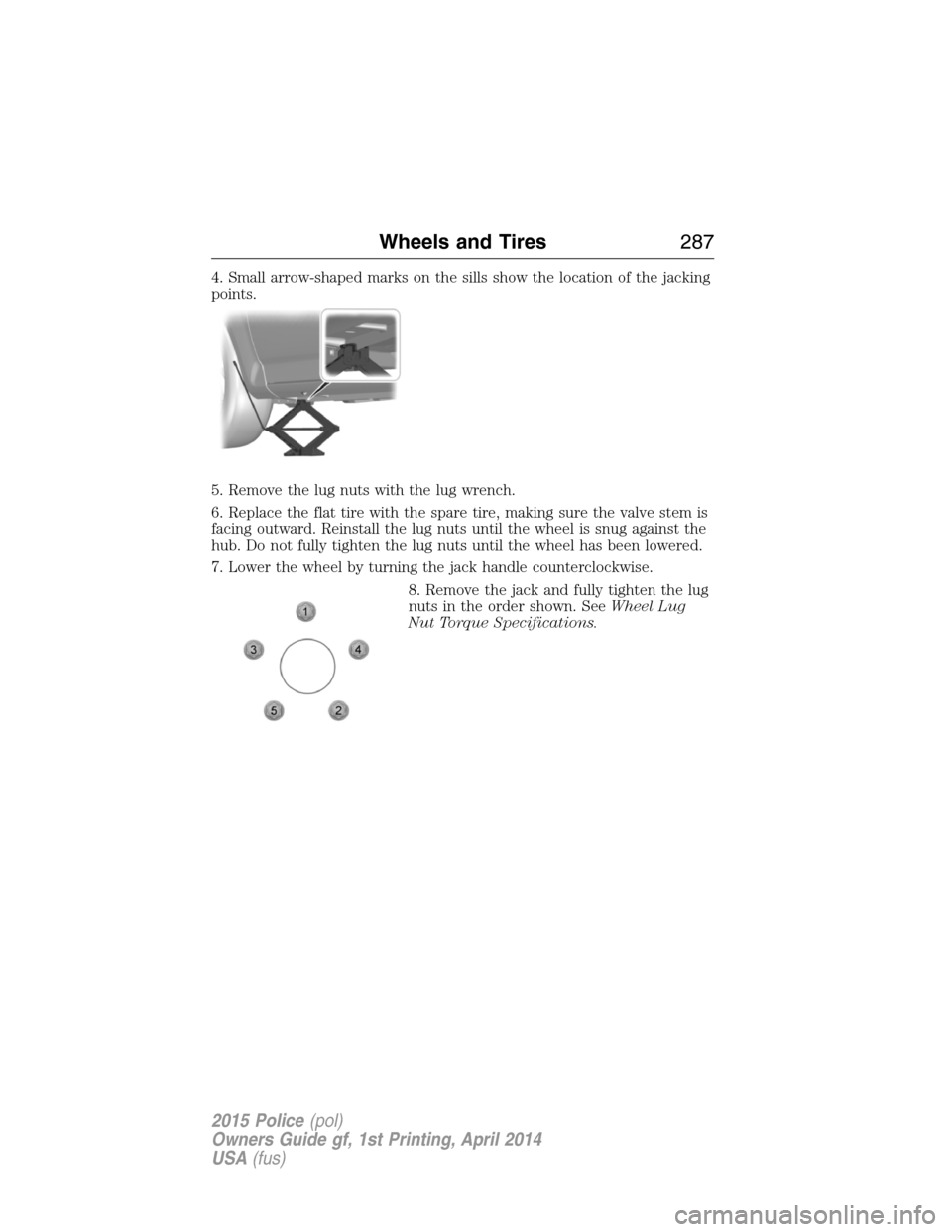
4. Small arrow-shaped marks on the sills show the location of the jacking
points.
5. Remove the lug nuts with the lug wrench.
6. Replace the flat tire with the spare tire, making sure the valve stem is
facing outward. Reinstall the lug nuts until the wheel is snug against the
hub. Do not fully tighten the lug nuts until the wheel has been lowered.
7. Lower the wheel by turning the jack handle counterclockwise.
8. Remove the jack and fully tighten the lug
nuts in the order shown. SeeWheel Lug
Nut Torque Specifications.
Wheels and Tires287
2015 Police(pol)
Owners Guide gf, 1st Printing, April 2014
USA(fus)
Page 289 of 398
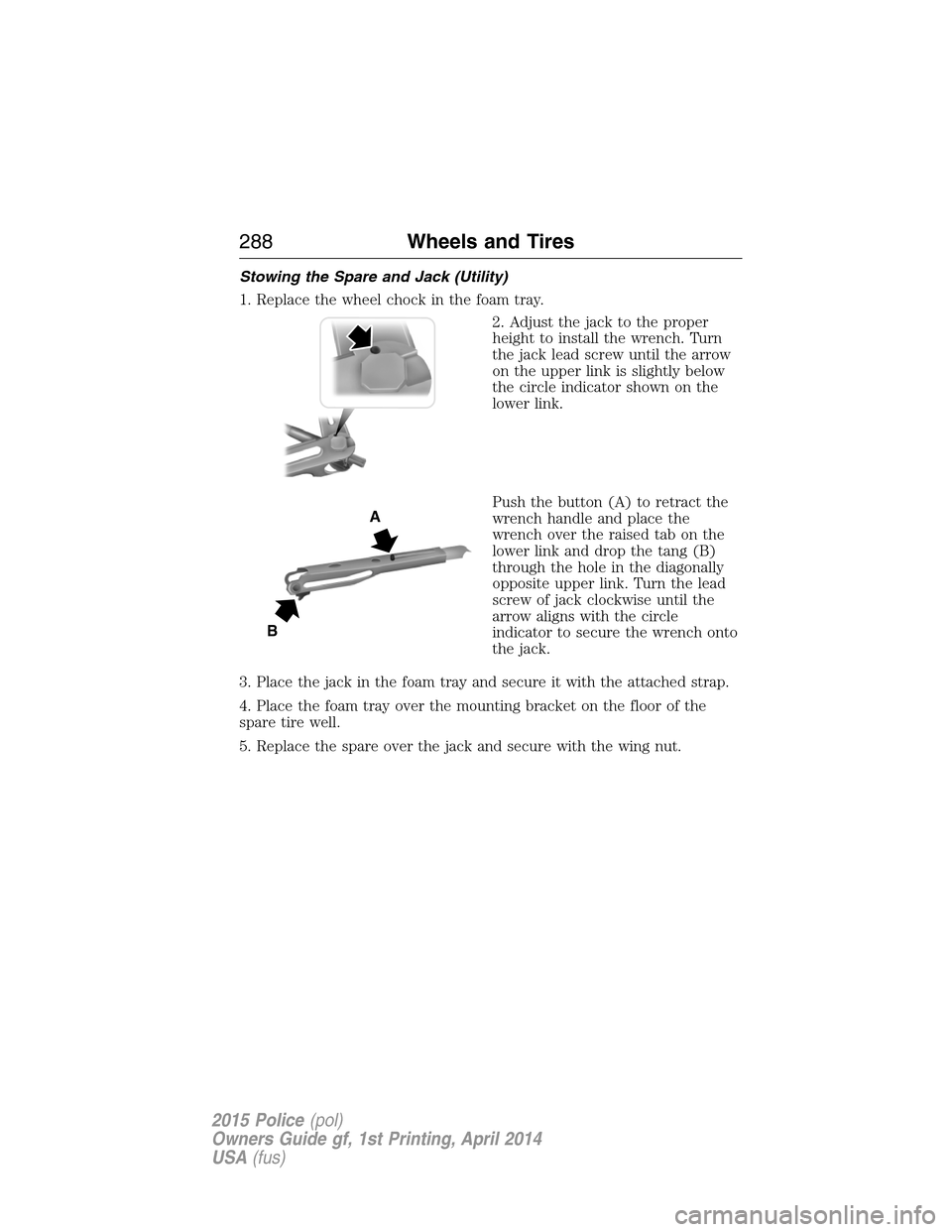
Stowing the Spare and Jack (Utility)
1. Replace the wheel chock in the foam tray.
2. Adjust the jack to the proper
height to install the wrench. Turn
the jack lead screw until the arrow
on the upper link is slightly below
the circle indicator shown on the
lower link.
Push the button (A) to retract the
wrench handle and place the
wrench over the raised tab on the
lower link and drop the tang (B)
through the hole in the diagonally
opposite upper link. Turn the lead
screw of jack clockwise until the
arrow aligns with the circle
indicator to secure the wrench onto
the jack.
3. Place the jack in the foam tray and secure it with the attached strap.
4. Place the foam tray over the mounting bracket on the floor of the
spare tire well.
5. Replace the spare over the jack and secure with the wing nut.
A
B
288Wheels and Tires
2015 Police(pol)
Owners Guide gf, 1st Printing, April 2014
USA(fus)
Page 309 of 398
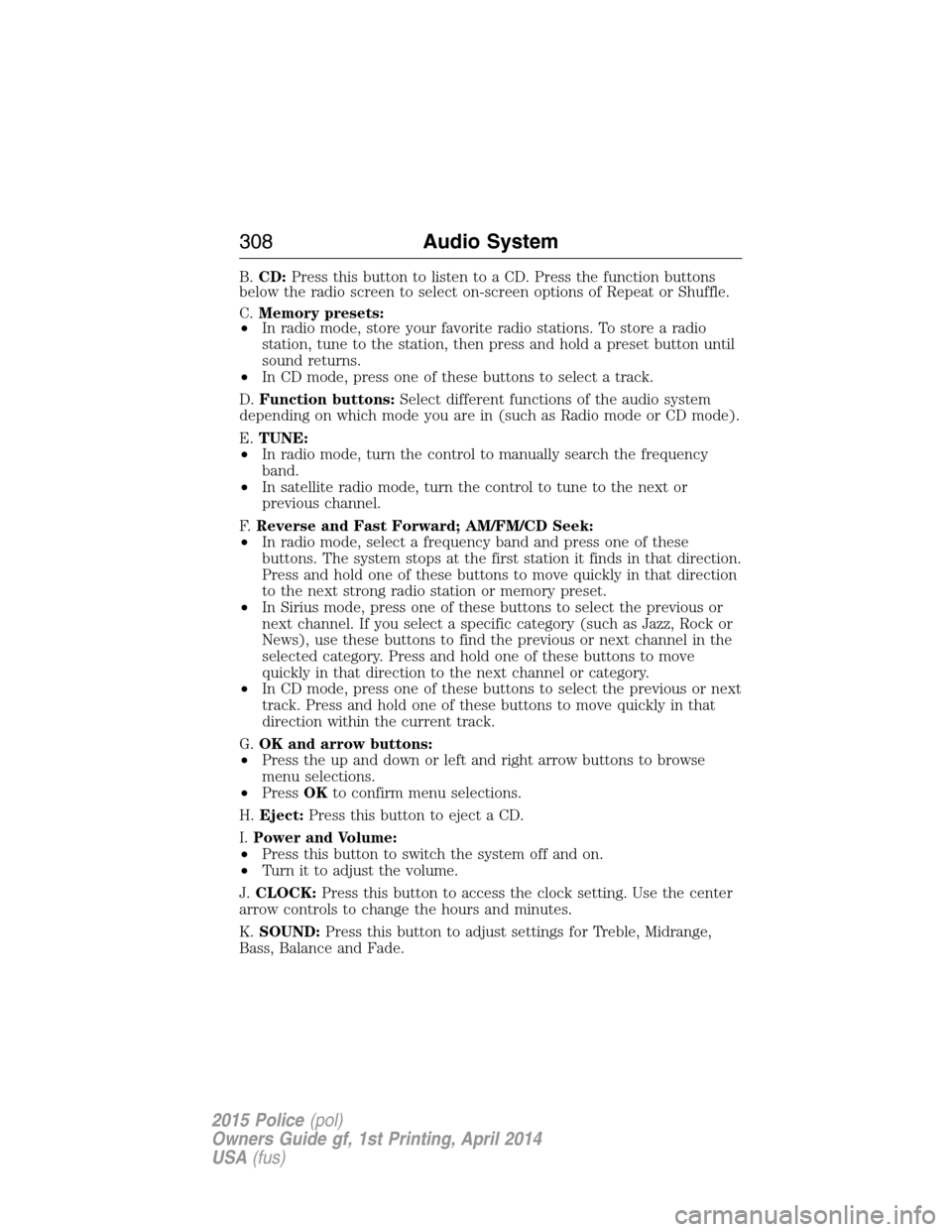
B.CD:Press this button to listen to a CD. Press the function buttons
below the radio screen to select on-screen options of Repeat or Shuffle.
C.Memory presets:
•In radio mode, store your favorite radio stations. To store a radio
station, tune to the station, then press and hold a preset button until
sound returns.
•In CD mode, press one of these buttons to select a track.
D.Function buttons:Select different functions of the audio system
depending on which mode you are in (such as Radio mode or CD mode).
E.TUNE:
•In radio mode, turn the control to manually search the frequency
band.
•In satellite radio mode, turn the control to tune to the next or
previous channel.
F.Reverse and Fast Forward; AM/FM/CD Seek:
•In radio mode, select a frequency band and press one of these
buttons. The system stops at the first station it finds in that direction.
Press and hold one of these buttons to move quickly in that direction
to the next strong radio station or memory preset.
•In Sirius mode, press one of these buttons to select the previous or
next channel. If you select a specific category (such as Jazz, Rock or
News), use these buttons to find the previous or next channel in the
selected category. Press and hold one of these buttons to move
quickly in that direction to the next channel or category.
•In CD mode, press one of these buttons to select the previous or next
track. Press and hold one of these buttons to move quickly in that
direction within the current track.
G.OK and arrow buttons:
•Press the up and down or left and right arrow buttons to browse
menu selections.
•PressOKto confirm menu selections.
H.Eject:Press this button to eject a CD.
I.Power and Volume:
•Press this button to switch the system off and on.
•Turn it to adjust the volume.
J.CLOCK:Press this button to access the clock setting. Use the center
arrow controls to change the hours and minutes.
K.SOUND:Press this button to adjust settings for Treble, Midrange,
Bass, Balance and Fade.
308Audio System
2015 Police(pol)
Owners Guide gf, 1st Printing, April 2014
USA(fus)
Page 311 of 398
CD Settings
Scan AllSelect to scan all disc selections.
Scan FolderSelect to scan all music in the current MP3
folder.
CD CompressionSelect to bring soft and loud passages together
for a more consistent listening level.
Clock Settings
Set TimeSelect to set the time.
Set DateSelect to set the calendar date.
24h ModeSelect to view clock time in a 12–hour mode or
24–hour mode.
Display Settings
DimmingSelect to change display brightness.
LanguageSelect to display the language in English,
French or Spanish.
Temp. SettingSelect to display the outside temperature in
Fahrenheit or Celsius.
HD RADIO™ INFORMATION (IF AVAILABLE)
Note:HD Radio broadcasts are not available in all markets.
HD Radio technology is the digital evolution of analog AM/FM radio. Your
system has a special receiver that allows it to receive digital broadcasts
(where available) in addition to the analog broadcasts, it already
receives. Digital broadcasts provide a better sound quality than analog
broadcasts with free, crystal-clear audio and no static or distortion. For
more information, and a guide to available stations and programming,
please visit www.hdradio.com.
When HD Radio is on and you tune to a station broadcasting HD Radio
technology, you may notice the HD Radio logo on your screen. When this
logo is available, you may also see Title and Artist fields on-screen.
The multicast indicator appears in FM mode (only) if the current station
is broadcasting multiple digital broadcasts. The highlighted numbers
signify available digital channels where new or different content is
available. HD1 signifies the main programming status and is available in
analog and digital broadcasts. Other multicast stations (HD2 through
HD7) are only available digitally.
310Audio System
2015 Police(pol)
Owners Guide gf, 1st Printing, April 2014
USA(fus)
Page 393 of 398
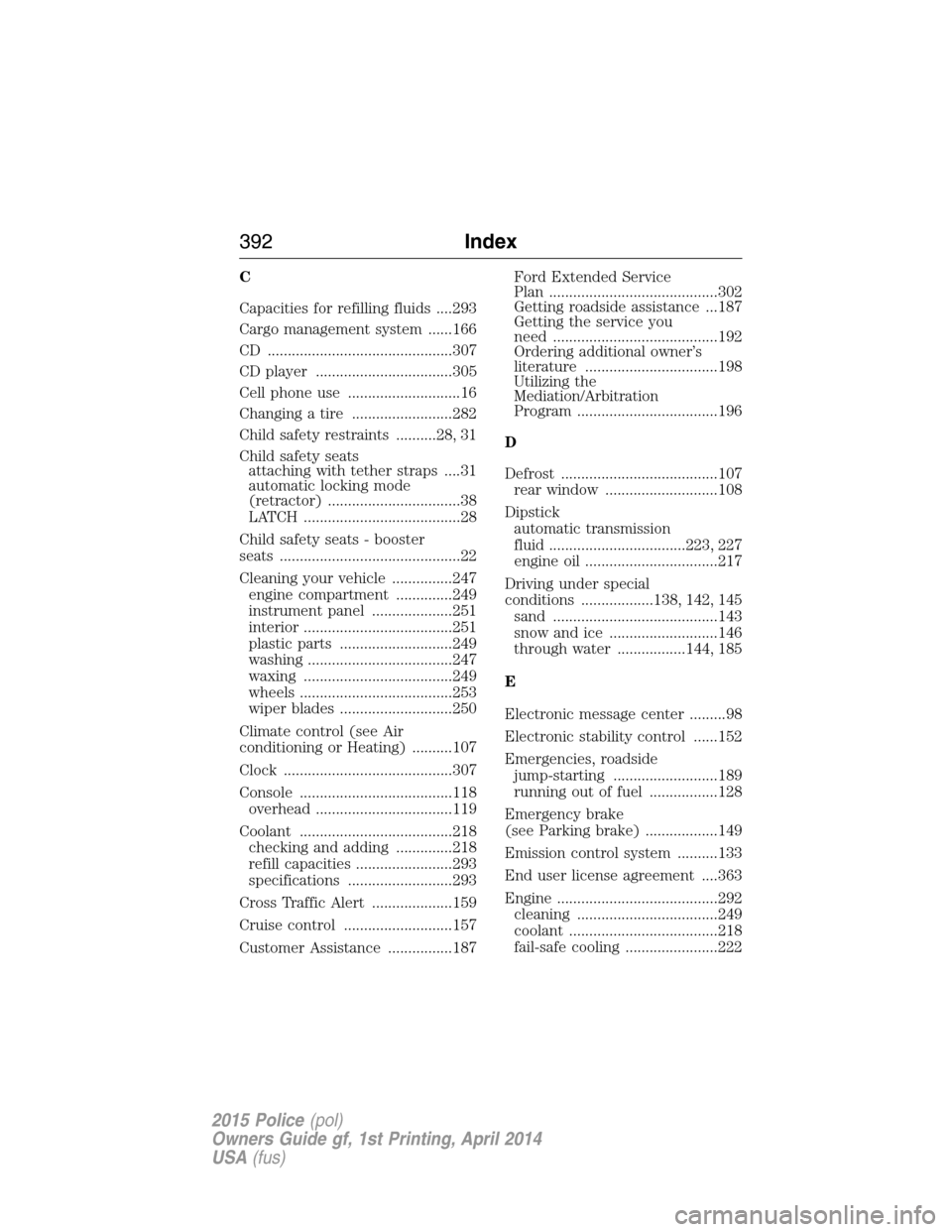
C
Capacities for refilling fluids ....293
Cargo management system ......166
CD ..............................................307
CD player ..................................305
Cell phone use ............................16
Changing a tire .........................282
Child safety restraints ..........28, 31
Child safety seats
attaching with tether straps ....31
automatic locking mode
(retractor) .................................38
LATCH .......................................28
Child safety seats - booster
seats .............................................22
Cleaning your vehicle ...............247
engine compartment ..............249
instrument panel ....................251
interior .....................................251
plastic parts ............................249
washing ....................................247
waxing .....................................249
wheels ......................................253
wiper blades ............................250
Climate control (see Air
conditioning or Heating) ..........107
Clock ..........................................307
Console ......................................118
overhead ..................................119
Coolant ......................................218
checking and adding ..............218
refill capacities ........................293
specifications ..........................293
Cross Traffic Alert ....................159
Cruise control ...........................157
Customer Assistance ................187Ford Extended Service
Plan ..........................................302
Getting roadside assistance ...187
Getting the service you
need .........................................192
Ordering additional owner’s
literature .................................198
Utilizing the
Mediation/Arbitration
Program ...................................196
D
Defrost .......................................107
rear window ............................108
Dipstick
automatic transmission
fluid ..................................223, 227
engine oil .................................217
Driving under special
conditions ..................138, 142, 145
sand .........................................143
snow and ice ...........................146
through water .................144, 185
E
Electronic message center .........98
Electronic stability control ......152
Emergencies, roadside
jump-starting ..........................189
running out of fuel .................128
Emergency brake
(see Parking brake) ..................149
Emission control system ..........133
End user license agreement ....363
Engine ........................................292
cleaning ...................................249
coolant .....................................218
fail-safe cooling .......................222
392Index
2015 Police(pol)
Owners Guide gf, 1st Printing, April 2014
USA(fus)
Page 396 of 398
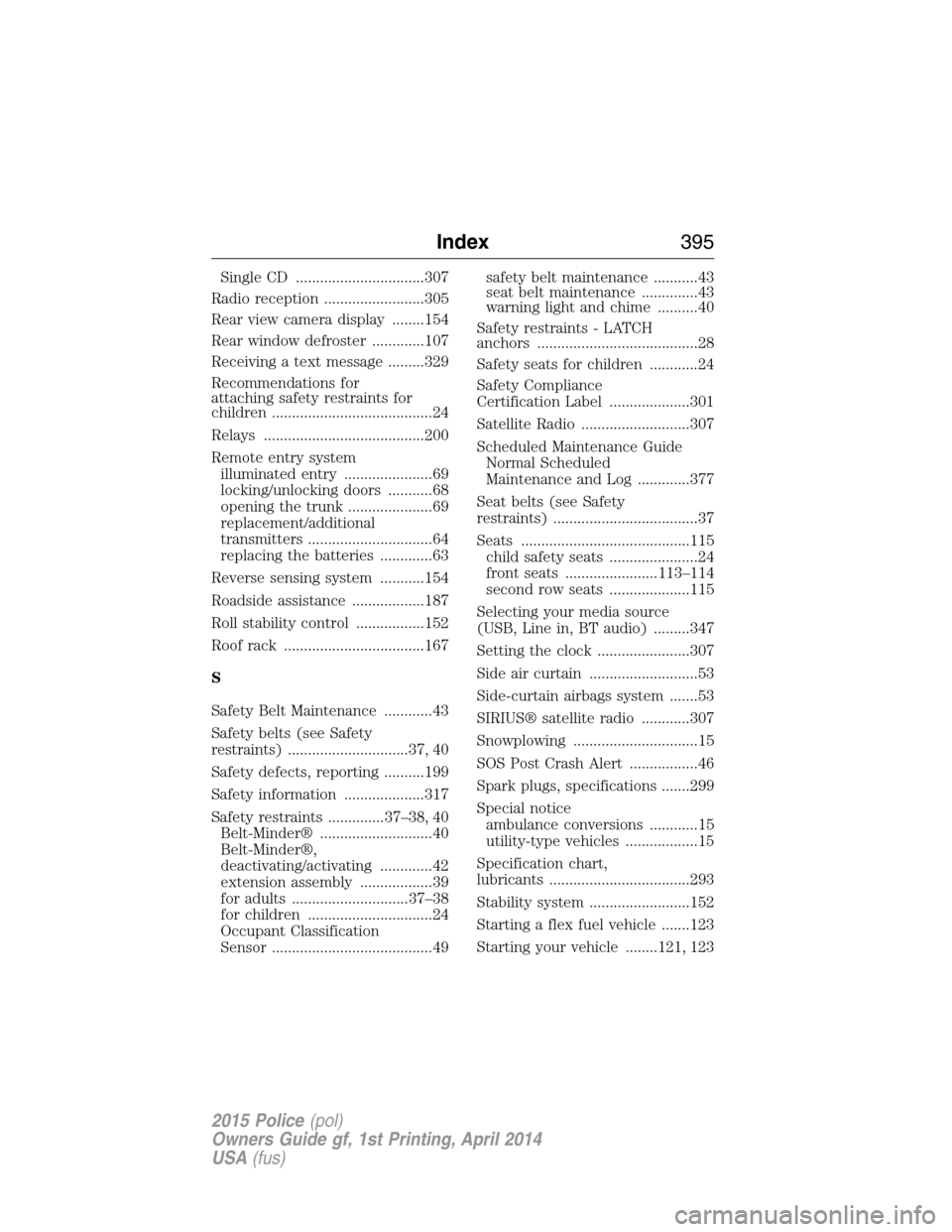
Single CD ................................307
Radio reception .........................305
Rear view camera display ........154
Rear window defroster .............107
Receiving a text message .........329
Recommendations for
attaching safety restraints for
children ........................................24
Relays ........................................200
Remote entry system
illuminated entry ......................69
locking/unlocking doors ...........68
opening the trunk .....................69
replacement/additional
transmitters ...............................64
replacing the batteries .............63
Reverse sensing system ...........154
Roadside assistance ..................187
Roll stability control .................152
Roof rack ...................................167
S
Safety Belt Maintenance ............43
Safety belts (see Safety
restraints) ..............................37, 40
Safety defects, reporting ..........199
Safety information ....................317
Safety restraints ..............37–38, 40
Belt-Minder® ............................40
Belt-Minder®,
deactivating/activating .............42
extension assembly ..................39
for adults .............................37–38
for children ...............................24
Occupant Classification
Sensor ........................................49safety belt maintenance ...........43
seat belt maintenance ..............43
warning light and chime ..........40
Safety restraints - LATCH
anchors ........................................28
Safety seats for children ............24
Safety Compliance
Certification Label ....................301
Satellite Radio ...........................307
Scheduled Maintenance Guide
Normal Scheduled
Maintenance and Log .............377
Seat belts (see Safety
restraints) ....................................37
Seats ..........................................115
child safety seats ......................24
front seats .......................113–114
second row seats ....................115
Selecting your media source
(USB, Line in, BT audio) .........347
Setting the clock .......................307
Side air curtain ...........................53
Side-curtain airbags system .......53
SIRIUS® satellite radio ............307
Snowplowing ...............................15
SOS Post Crash Alert .................46
Spark plugs, specifications .......299
Special notice
ambulance conversions ............15
utility-type vehicles ..................15
Specification chart,
lubricants ...................................293
Stability system .........................152
Starting a flex fuel vehicle .......123
Starting your vehicle ........121, 123
Index395
2015 Police(pol)
Owners Guide gf, 1st Printing, April 2014
USA(fus)