USB port FORD POLICE INTERCEPTOR UTILITY 2016 1.G User Guide
[x] Cancel search | Manufacturer: FORD, Model Year: 2016, Model line: POLICE INTERCEPTOR UTILITY, Model: FORD POLICE INTERCEPTOR UTILITY 2016 1.GPages: 350, PDF Size: 3.58 MB
Page 286 of 350
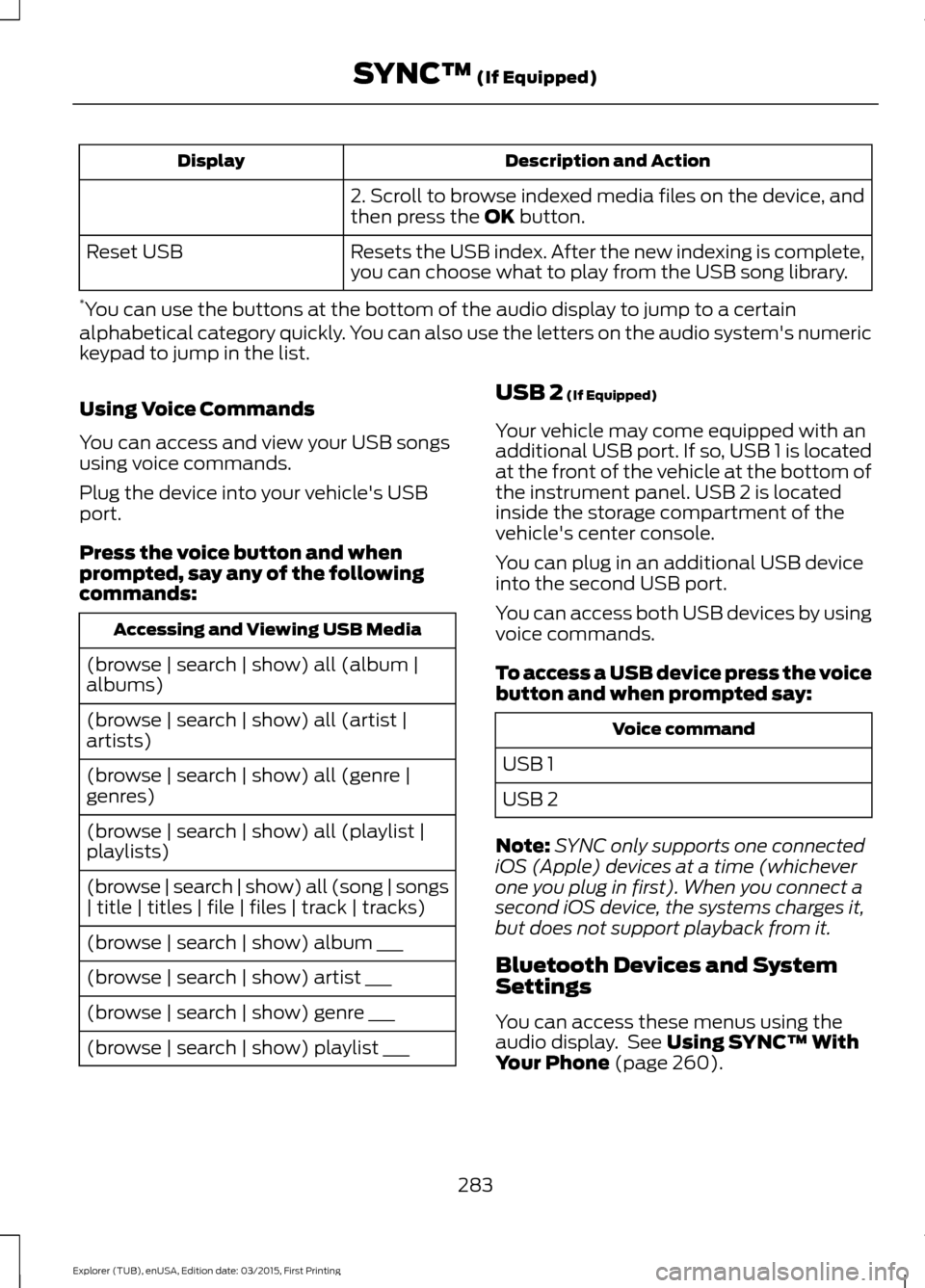
Description and Action
Display
2. Scroll to browse indexed media files on the device, and
then press the OK button.
Resets the USB index. After the new indexing is complete,
you can choose what to play from the USB song library.
Reset USB
* You can use the buttons at the bottom of the audio display to jump to a certain
alphabetical category quickly. You can also use the letters on the audio system's numeric
keypad to jump in the list.
Using Voice Commands
You can access and view your USB songs
using voice commands.
Plug the device into your vehicle's USB
port.
Press the voice button and when
prompted, say any of the following
commands: Accessing and Viewing USB Media
(browse | search | show) all (album |
albums)
(browse | search | show) all (artist |
artists)
(browse | search | show) all (genre |
genres)
(browse | search | show) all (playlist |
playlists)
(browse | search | show) all (song | songs
| title | titles | file | files | track | tracks)
(browse | search | show) album ___
(browse | search | show) artist ___
(browse | search | show) genre ___
(browse | search | show) playlist ___ USB 2
(If Equipped)
Your vehicle may come equipped with an
additional USB port. If so, USB 1 is located
at the front of the vehicle at the bottom of
the instrument panel. USB 2 is located
inside the storage compartment of the
vehicle's center console.
You can plug in an additional USB device
into the second USB port.
You can access both USB devices by using
voice commands.
To access a USB device press the voice
button and when prompted say: Voice command
USB 1
USB 2
Note: SYNC only supports one connected
iOS (Apple) devices at a time (whichever
one you plug in first). When you connect a
second iOS device, the systems charges it,
but does not support playback from it.
Bluetooth Devices and System
Settings
You can access these menus using the
audio display. See
Using SYNC™ With
Your Phone (page 260).
283
Explorer (TUB), enUSA, Edition date: 03/2015, First Printing SYNC™
(If Equipped)
Page 291 of 350
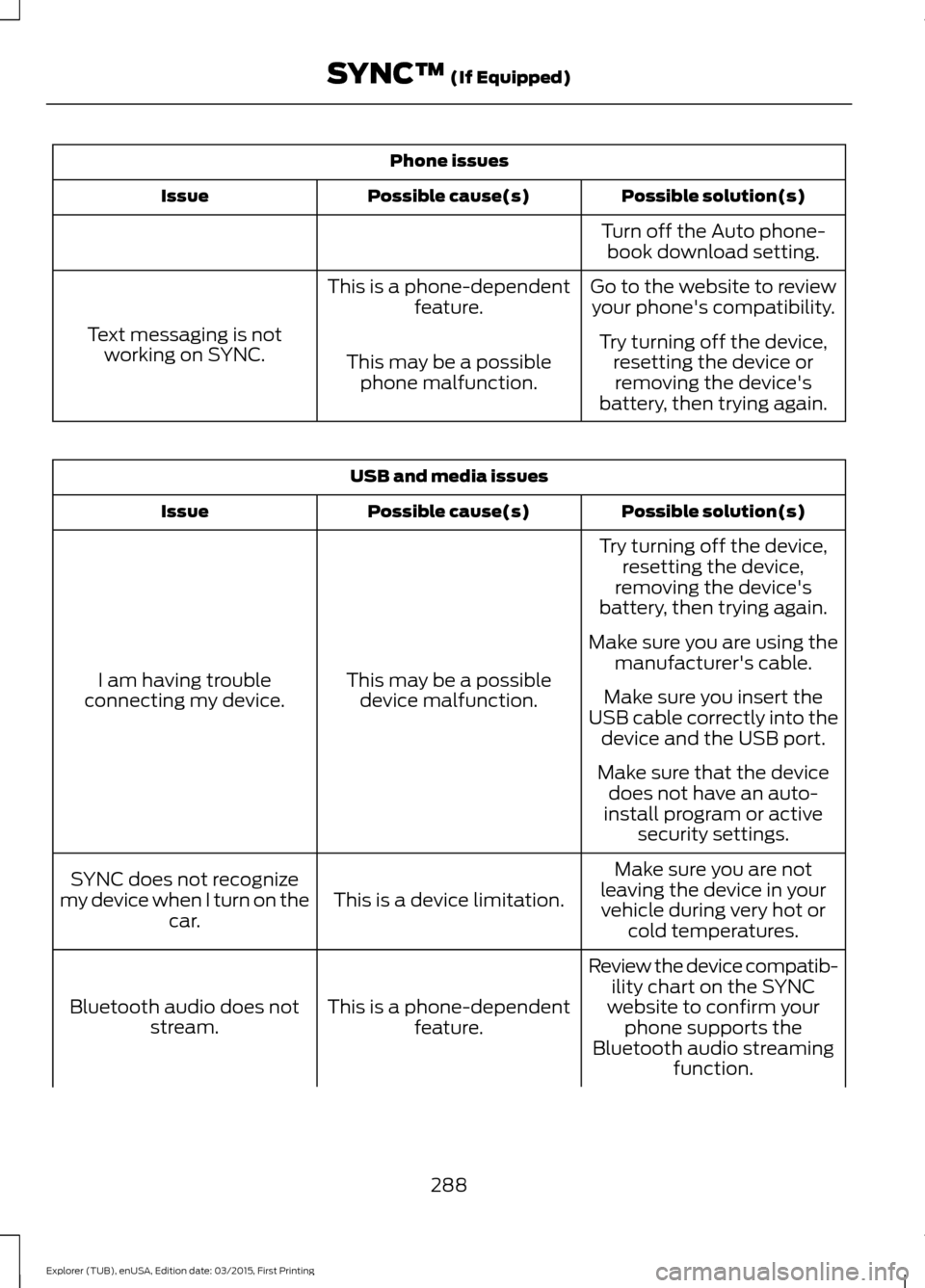
Phone issues
Possible solution(s)
Possible cause(s)
Issue
Turn off the Auto phone-book download setting.
Go to the website to review your phone's compatibility.
This is a phone-dependent
feature.
Text messaging is not working on SYNC. Try turning off the device,
resetting the device orremoving the device's
battery, then trying again.
This may be a possible
phone malfunction. USB and media issues
Possible solution(s)
Possible cause(s)
Issue
Try turning off the device,resetting the device,
removing the device's
battery, then trying again.
This may be a possible device malfunction.
I am having trouble
connecting my device. Make sure you are using the
manufacturer's cable.
Make sure you insert the
USB cable correctly into the device and the USB port.
Make sure that the device does not have an auto-
install program or active security settings.
Make sure you are not
leaving the device in your vehicle during very hot or cold temperatures.
This is a device limitation.
SYNC does not recognize
my device when I turn on the car.
Review the device compatib-ility chart on the SYNC
website to confirm your phone supports the
Bluetooth audio streaming function.
This is a phone-dependent
feature.
Bluetooth audio does not
stream.
288
Explorer (TUB), enUSA, Edition date: 03/2015, First Printing SYNC™ (If Equipped)
Page 294 of 350
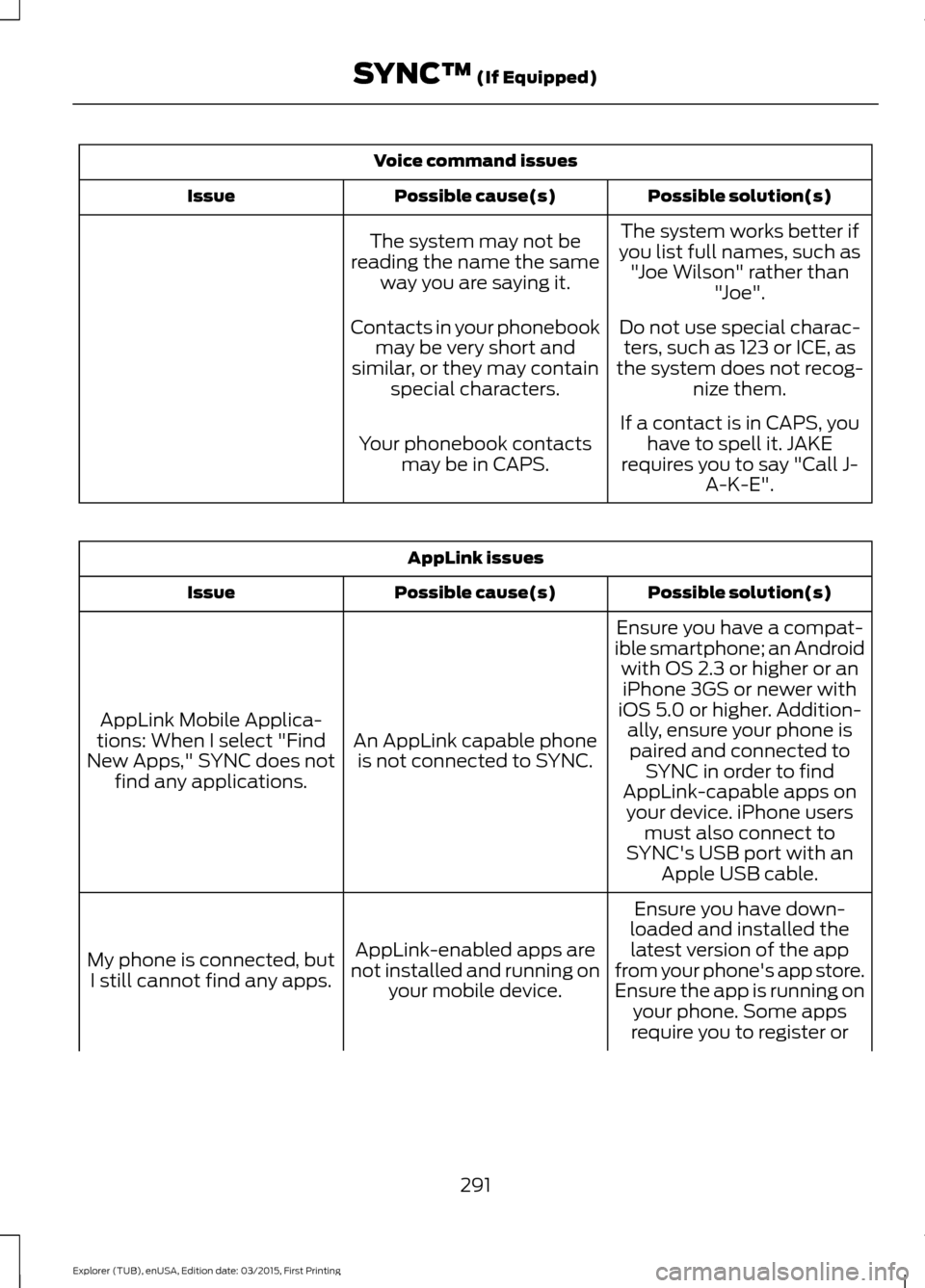
Voice command issues
Possible solution(s)
Possible cause(s)
Issue
The system works better if
you list full names, such as "Joe Wilson" rather than "Joe".
The system may not be
reading the name the same way you are saying it.
Do not use special charac-ters, such as 123 or ICE, as
the system does not recog- nize them.
Contacts in your phonebook
may be very short and
similar, or they may contain special characters.
If a contact is in CAPS, youhave to spell it. JAKE
requires you to say "Call J- A-K-E".
Your phonebook contacts
may be in CAPS. AppLink issues
Possible solution(s)
Possible cause(s)
Issue
Ensure you have a compat-
ible smartphone; an Android with OS 2.3 or higher or aniPhone 3GS or newer with
iOS 5.0 or higher. Addition- ally, ensure your phone is
An AppLink capable phone
is not connected to SYNC.
AppLink Mobile Applica-
tions: When I select "Find
New Apps," SYNC does not find any applications. paired and connected to
SYNC in order to find
AppLink-capable apps on your device. iPhone users must also connect to
SYNC's USB port with an Apple USB cable.
Ensure you have down-
loaded and installed the latest version of the app
from your phone's app store.
Ensure the app is running on your phone. Some apps
AppLink-enabled apps are
not installed and running on your mobile device.
My phone is connected, but
I still cannot find any apps.
require you to register or
291
Explorer (TUB), enUSA, Edition date: 03/2015, First Printing SYNC™ (If Equipped)
Page 296 of 350
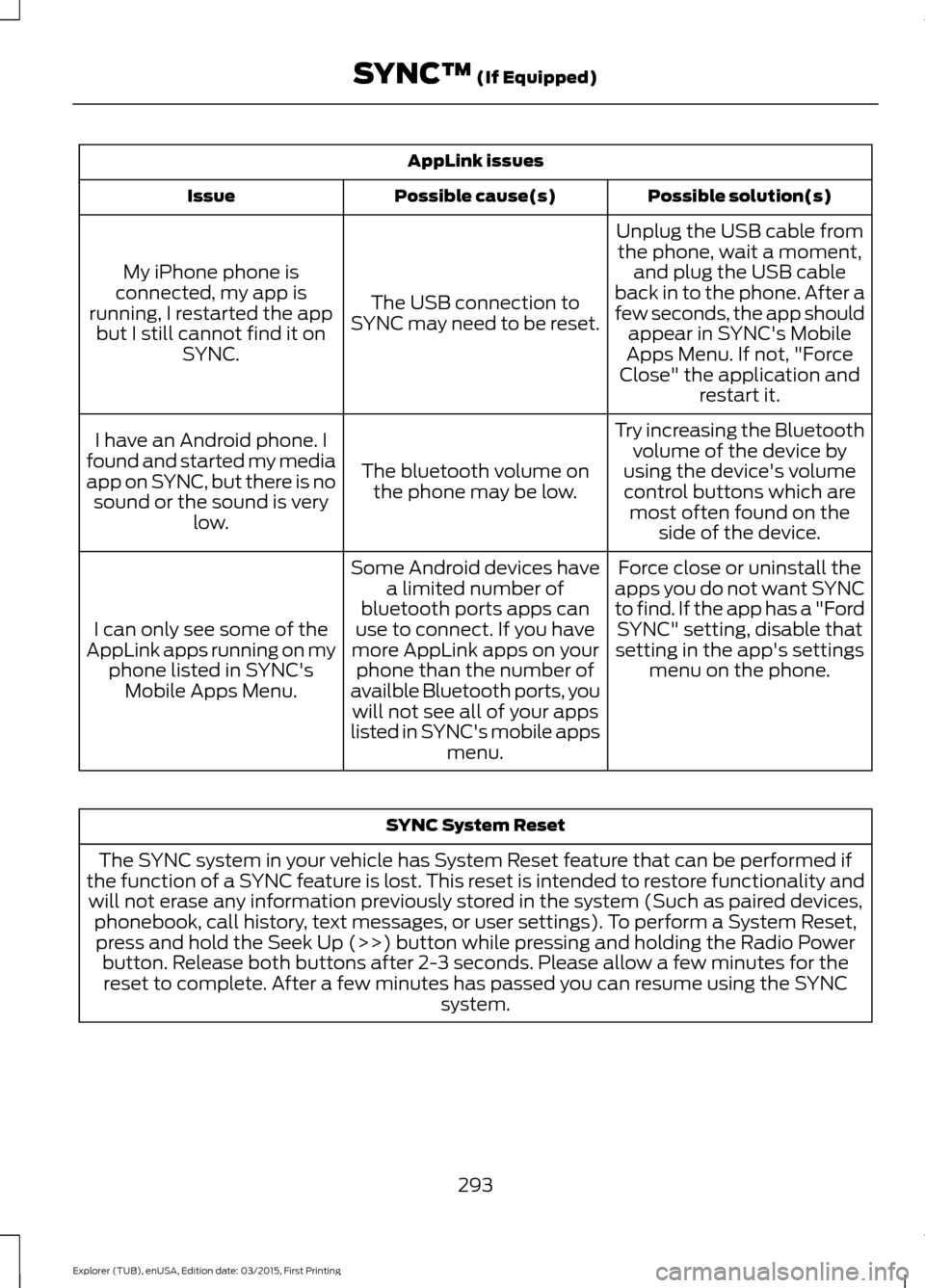
AppLink issues
Possible solution(s)
Possible cause(s)
Issue
Unplug the USB cable fromthe phone, wait a moment, and plug the USB cable
back in to the phone. After a
few seconds, the app should appear in SYNC's Mobile
Apps Menu. If not, "Force
Close" the application and restart it.
The USB connection to
SYNC may need to be reset.
My iPhone phone is
connected, my app is
running, I restarted the app but I still cannot find it on SYNC.
Try increasing the Bluetoothvolume of the device by
using the device's volume control buttons which are most often found on the side of the device.
The bluetooth volume on
the phone may be low.
I have an Android phone. I
found and started my media
app on SYNC, but there is no sound or the sound is very low.
Force close or uninstall the
apps you do not want SYNC
to find. If the app has a "Ford SYNC" setting, disable that
setting in the app's settings menu on the phone.
Some Android devices have
a limited number of
bluetooth ports apps can
use to connect. If you have
more AppLink apps on your phone than the number of
availble Bluetooth ports, you will not see all of your apps
listed in SYNC's mobile apps menu.
I can only see some of the
AppLink apps running on my phone listed in SYNC'sMobile Apps Menu. SYNC System Reset
The SYNC system in your vehicle has System Reset feature that can be performed if
the function of a SYNC feature is lost. This reset is intended to restore functionality and will not erase any information previously stored in the system (Such as paired devices, phonebook, call history, text messages, or user settings). To perform a System Reset,press and hold the Seek Up (>>) button while pressing and holding the Radio Power button. Release both buttons after 2-3 seconds. Please allow a few minutes for thereset to complete. After a few minutes has passed you can resume using the SYNC system.
293
Explorer (TUB), enUSA, Edition date: 03/2015, First Printing SYNC™ (If Equipped)
Page 348 of 350
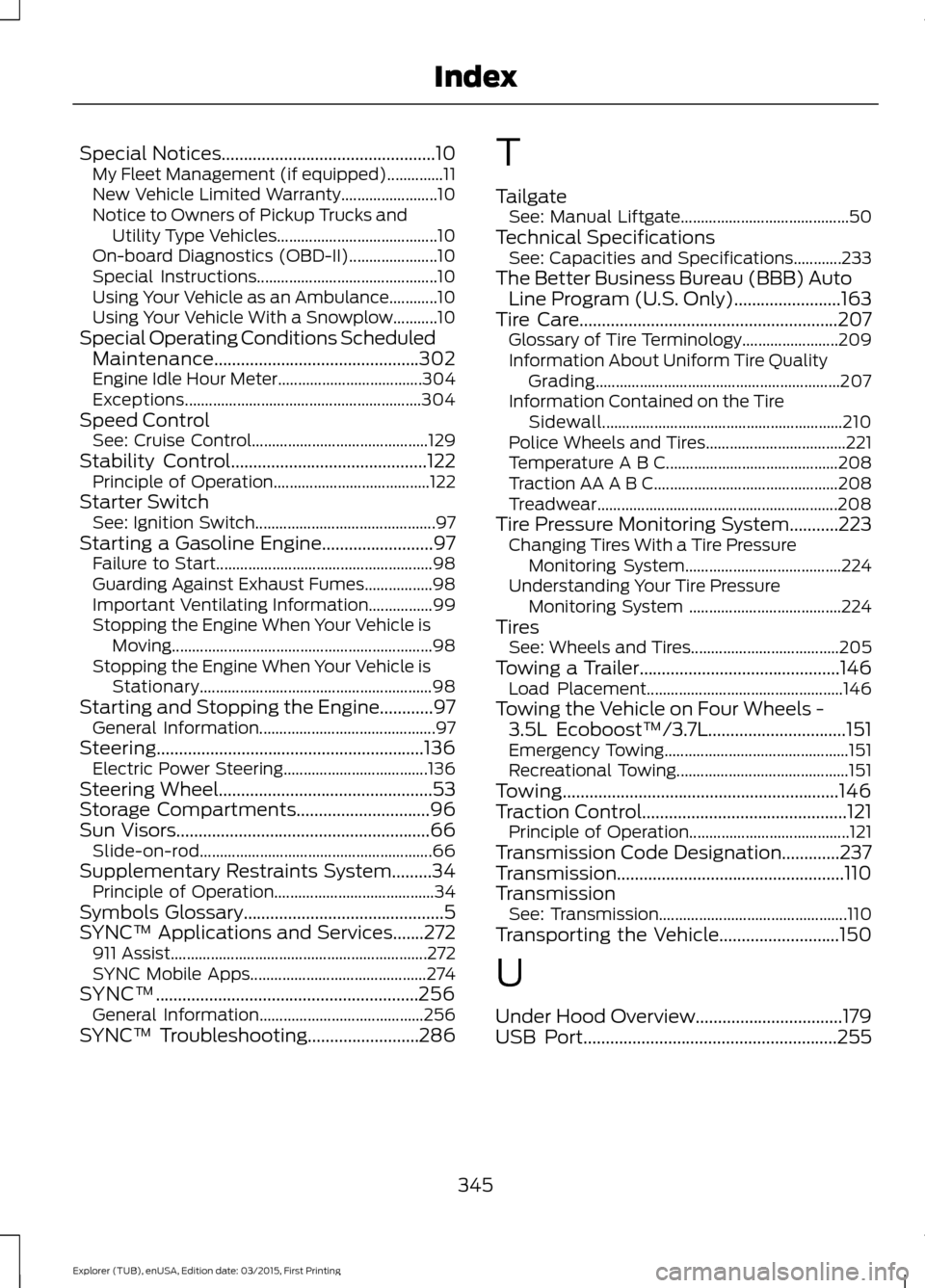
Special Notices................................................10
My Fleet Management (if equipped)..............11
New Vehicle Limited Warranty........................ 10
Notice to Owners of Pickup Trucks and Utility Type Vehicles........................................ 10
On-board Diagnostics (OBD-II)...................... 10
Special Instructions............................................. 10
Using Your Vehicle as an Ambulance............10
Using Your Vehicle With a Snowplow...........10
Special Operating Conditions Scheduled Maintenance..............................................302
Engine Idle Hour Meter.................................... 304
Exceptions........................................................... 304
Speed Control See: Cruise Control............................................ 129
Stability Control
............................................122
Principle of Operation....................................... 122
Starter Switch See: Ignition Switch............................................. 97
Starting a Gasoline Engine.........................97 Failure to Start...................................................... 98
Guarding Against Exhaust Fumes.................98
Important Ventilating Information................99
Stopping the Engine When Your Vehicle is Moving................................................................. 98
Stopping the Engine When Your Vehicle is Stationary.......................................................... 98
Starting and Stopping the Engine............97 General Information............................................ 97
Steering............................................................136 Electric Power Steering.................................... 136
Steering Wheel................................................53
Storage Compartments
..............................96
Sun Visors.........................................................66
Slide-on-rod.......................................................... 66
Supplementary Restraints System.........34 Principle of Operation........................................ 34
Symbols Glossary.............................................5
SYNC™ Applications and Services.......272 911 Assist................................................................ 272
SYNC Mobile Apps............................................ 274
SYNC™...........................................................256 General Information......................................... 256
SYNC™ Troubleshooting.........................286 T
Tailgate
See: Manual Liftgate.......................................... 50
Technical Specifications See: Capacities and Specifications............233
The Better Business Bureau (BBB) Auto Line Program (U.S. Only)
........................163
Tire Care..........................................................207
Glossary of Tire Terminology........................ 209
Information About Uniform Tire Quality Grading............................................................. 207
Information Contained on the Tire Sidewall............................................................ 210
Police Wheels and Tires................................... 221
Temperature A B C........................................... 208
Traction AA A B C.............................................. 208
Treadwear............................................................ 208
Tire Pressure Monitoring System...........223 Changing Tires With a Tire Pressure
Monitoring System....................................... 224
Understanding Your Tire Pressure Monitoring System ...................................... 224
Tires See: Wheels and Tires..................................... 205
Towing a Trailer.............................................146 Load Placement................................................. 146
Towing the Vehicle on Four Wheels - 3.5L Ecoboost™/3.7L
...............................151
Emergency Towing.............................................. 151
Recreational Towing........................................... 151
Towing..............................................................146
Traction Control
..............................................121
Principle of Operation........................................ 121
Transmission Code Designation.............237
Transmission
...................................................110
Transmission See: Transmission............................................... 110
Transporting the Vehicle...........................150
U
Under Hood Overview.................................179
USB Port
.........................................................255
345
Explorer (TUB), enUSA, Edition date: 03/2015, First Printing Index
Page 349 of 350
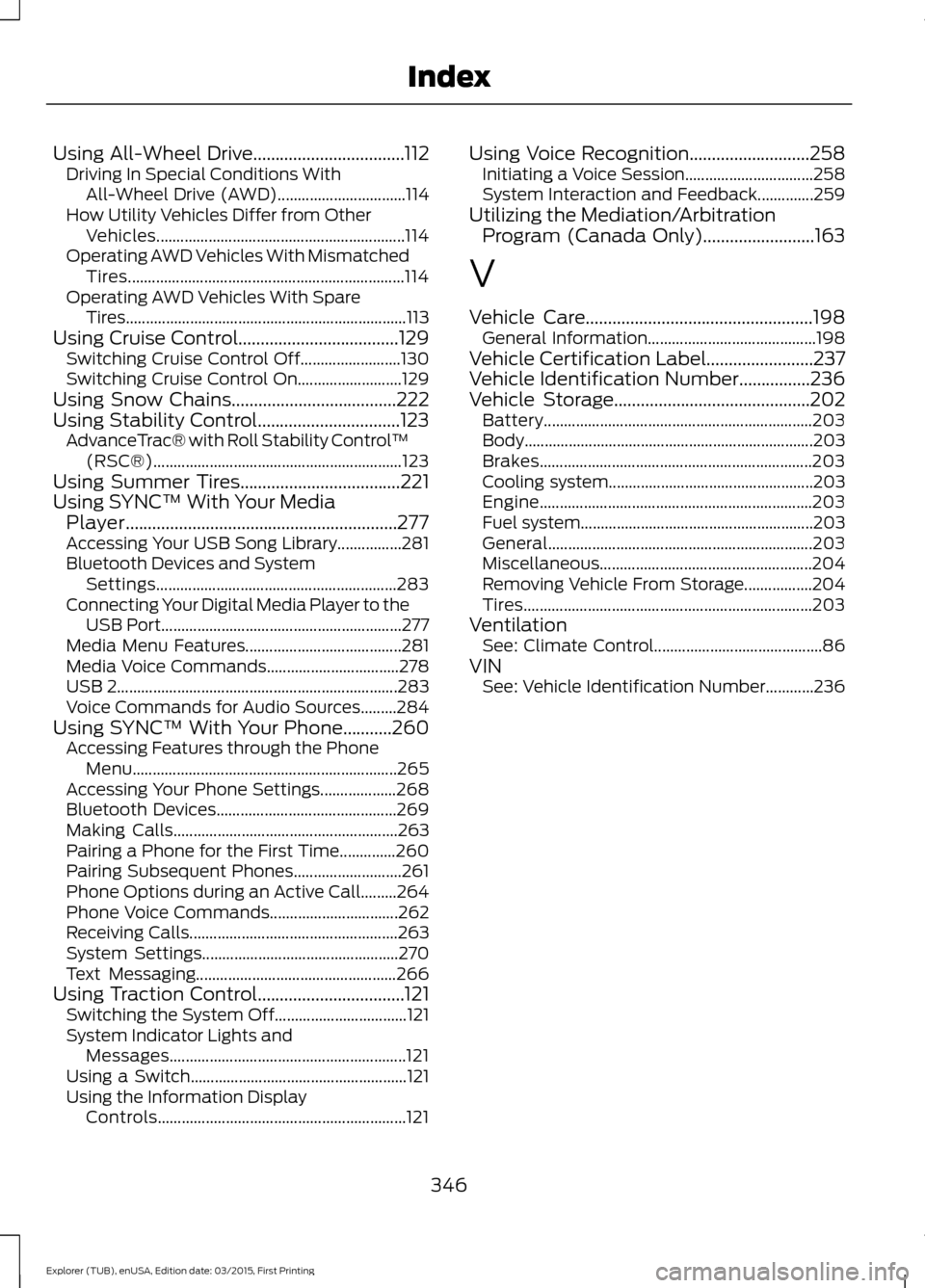
Using All-Wheel Drive..................................112
Driving In Special Conditions With
All-Wheel Drive (AWD)................................ 114
How Utility Vehicles Differ from Other Vehicles.............................................................. 114
Operating AWD Vehicles With Mismatched Tires..................................................................... 114
Operating AWD Vehicles With Spare Tires...................................................................... 113
Using Cruise Control....................................129 Switching Cruise Control Off......................... 130
Switching Cruise Control On.......................... 129
Using Snow Chains.....................................222
Using Stability Control................................123 AdvanceTrac® with Roll Stability Control ™
(RSC®).............................................................. 123
Using Summer Tires....................................221
Using SYNC™ With Your Media Player.............................................................277
Accessing Your USB Song Library................281
Bluetooth Devices and System Settings............................................................ 283
Connecting Your Digital Media Player to the USB Port............................................................ 277
Media Menu Features....................................... 281
Media Voice Commands................................. 278
USB 2...................................................................... 283
Voice Commands for Audio Sources.........284
Using SYNC™ With Your Phone...........260 Accessing Features through the Phone
Menu.................................................................. 265
Accessing Your Phone Settings................... 268
Bluetooth Devices............................................. 269
Making Calls........................................................ 263
Pairing a Phone for the First Time..............260
Pairing Subsequent Phones........................... 261
Phone Options during an Active Call.........264
Phone Voice Commands................................ 262
Receiving Calls.................................................... 263
System Settings................................................. 270
Text Messaging.................................................. 266
Using Traction Control.................................121 Switching the System Off................................. 121
System Indicator Lights and Messages........................................................... 121
Using a Switch...................................................... 121
Using the Information Display Controls.............................................................. 121Using Voice Recognition...........................258
Initiating a Voice Session................................ 258
System Interaction and Feedback..............259
Utilizing the Mediation/Arbitration Program (Canada Only).........................163
V
Vehicle Care
...................................................198
General Information.......................................... 198
Vehicle Certification Label........................237
Vehicle Identification Number................236
Vehicle Storage............................................202 Battery................................................................... 203
Body........................................................................\
203
Brakes.................................................................... 203
Cooling system................................................... 203
Engine.................................................................... 203
Fuel system.......................................................... 203
General.................................................................. 203
Miscellaneous..................................................... 204
Removing Vehicle From Storage.................204
Tires........................................................................\
203
Ventilation See: Climate Control.......................................... 86
VIN See: Vehicle Identification Number............236
346
Explorer (TUB), enUSA, Edition date: 03/2015, First Printing Index