radio FORD POLICE INTERCEPTOR UTILITY 2016 1.G Owners Manual
[x] Cancel search | Manufacturer: FORD, Model Year: 2016, Model line: POLICE INTERCEPTOR UTILITY, Model: FORD POLICE INTERCEPTOR UTILITY 2016 1.GPages: 350, PDF Size: 3.58 MB
Page 4 of 350
Introduction
About This Manual...........................................5
Symbols Glossary.............................................5
Data Recording..................................................7
California Proposition 65...............................9
Perchlorate..........................................................9
Ford Credit
...........................................................9
Replacement Parts Recommendation........................................9
Special Notices
................................................10
Mobile Communications Equipment......................................................11
Export Unique Options...................................11
Environment
Protecting the Environment
........................12
Child Safety
General Information
.......................................13
Installing Child Seats
.....................................14
Booster Seats
..................................................20
Child Seat Positioning...................................22
Child Safety Locks
.........................................24
Safety Belts
Principle of Operation..................................26
Fastening the Safety Belts..........................27
Safety Belt Height Adjustment
.................29
Safety Belt Warning Lamp and Indicator Chime.............................................................30
Safety Belt Minder.........................................30
Child Restraint and Safety Belt Maintenance................................................32
Personal Safety System ™
Personal Safety System ™
..........................33
Supplementary Restraints System
Principle of Operation..................................34 Driver and Passenger Airbags....................35
Front Passenger Sensing System............36
Side Airbags
.....................................................38
Passenger Knee Airbag................................39
Safety Canopy ™
............................................39
Crash Sensors and Airbag Indicator.......40
Airbag Disposal...............................................45
Keys and Remote Controls
Principle of Operation..................................46
General Information on Radio Frequencies.................................................46
Remote Control
..............................................46
Replacing a Lost Key or Remote Control............................................................47
Locks
Locking and Unlocking
................................48
Manual Liftgate
..............................................50
Security
Anti-Theft Alarm
............................................52
Steering Wheel
Adjusting the Steering Wheel....................53
Audio Control
...................................................53
Cruise Control
..................................................54
Information Display Control.......................54
Pedals
Adjusting the Pedals
.....................................55
Wipers and Washers
Windshield Wipers
........................................56
Windshield Washers.....................................56
Rear Window Wiper and Washers...........56
Lighting
General Information
.....................................58
Lighting Control
..............................................58
1
Explorer (TUB), enUSA, Edition date: 03/2015, First Printing Table of Contents
Page 7 of 350
Adjusting the Headlamps.........................190
Removing a Headlamp...............................192
Changing a Bulb............................................192
Bulb Specification Chart...........................195
Changing the Engine Air Filter..................197
Vehicle Care
General Information....................................198
Cleaning Products
.......................................198
Cleaning the Exterior
...................................198
Waxing..............................................................199
Cleaning the Engine....................................199
Cleaning the Windows and Wiper Blades
.........................................................200
Cleaning the Interior
..................................200
Cleaning the Instrument Panel and Instrument Cluster Lens........................201
Cleaning Leather Seats..............................201
Repairing Minor Paint Damage..............202
Cleaning the Alloy Wheels.......................202
Vehicle Storage............................................202
Wheels and Tires
General Information
...................................205
Tire Care
..........................................................207
Using Summer Tires
....................................221
Using Snow Chains.....................................222
Tire Pressure Monitoring System...........223
Changing a Road Wheel............................227
Technical Specifications............................231
Capacities and Specific- ations
Engine Specifications -
3.5L
Ecoboost™................................................233
Engine Specifications -
3.7L.....................233
Motorcraft Parts -
3.5L Ecoboost™......234
Motorcraft Parts - 3.7L...............................235
Vehicle Identification Number................236
Vehicle Certification Label........................237 Transmission Code Designation.............237
Capacities and Specifications -
3.5L
Ecoboost™................................................238
Capacities and Specifications - 3.7L.....242
Audio System
General Information....................................247
Audio Unit - Vehicles With: AM/FM/CD/ SYNC............................................................248
Digital Radio
..................................................250
Satellite Radio
..............................................253
USB Port
.........................................................255
SYNC™
General Information...................................256
Using Voice Recognition...........................258
Using SYNC™ With Your Phone...........260
SYNC™ Applications and Services.......272
Using SYNC™ With Your Media Player............................................................277
SYNC™ Troubleshooting.........................286
Extended Service Plan (ESP)
Extended Service Plan (ESP).................294
Scheduled Maintenance
General Maintenance Information
.......296
Normal Scheduled Maintenance..........299
Special Operating Conditions Scheduled Maintenance
.............................................302
Scheduled Maintenance Record...........305
Appendices
End User License Agreement..................316
4
Explorer (TUB), enUSA, Edition date: 03/2015, First Printing Table of Contents
Page 14 of 350
My Fleet Management (if
equipped)
This feature allows a fleet administrator
to control specific vehicle settings using a
Ford authorized service tool. This helps the
fleet administrator set certain vehicle
settings to match administrative policy.
The configurable settings are:
•
Vehicle Speed: Select an alternative
speed limit that is below your vehicle's
maximum capability. A message
displays and a tone sounds when
starting your vehicle to indicate the
customized speed limit.
• Audio Volume: Select a limit for the
maximum volume of the audio system
in the range of 0% (full mute) to 100%
(no limit) in 10% increments.
For more information regarding the My
Fleet Management feature
configuration process, reference the
procedure in the "Police Upfit &
Modifier ’s Guide" found at: Web Address
www.fordpoliceinterceptorupfit.com
MOBILE COMMUNICATIONS
EQUIPMENT
Using mobile communications equipment
is becoming increasingly important in the
conduct of business and personal affairs.
However, you must not compromise your
own or others’ safety when using such
equipment. Mobile communications can
enhance personal safety and security when
appropriately used, particularly in
emergency situations. Safety must be
paramount when using mobile communications equipment to avoid
negating these benefits. Mobile
communication equipment includes, but
is not limited to, cellular phones, pagers,
portable email devices, text messaging
devices and portable two-way radios. WARNING
Driving while distracted can result in
loss of vehicle control, crash and
injury. We strongly recommend that
you use extreme caution when using any
device that may take your focus off the
road. Your primary responsibility is the safe
operation of your vehicle. We recommend
against the use of any hand-held device
while driving and encourage the use of
voice-operated systems when possible.
Make sure you are aware of all applicable
local laws that may affect the use of
electronic devices while driving. EXPORT UNIQUE OPTIONS
For your particular global region, your
vehicle may be equipped with features and
options that are different from the features
and options that are described in this
Owner
’s Manual. A market unique
supplement may be supplied that
complements this book. By referring to the
market unique supplement, if provided,
you can properly identify those features,
recommendations and specifications that
are unique to your vehicle. This Owner ’s
Manual is written primarily for the U.S. and
Canadian Markets. Features or equipment
listed as standard may be different on units
built for Export. Refer to this Owner ’s
Manual for all other required
information and warnings.
11
Explorer (TUB), enUSA, Edition date: 03/2015, First Printing Introduction
Page 49 of 350
PRINCIPLE OF OPERATION
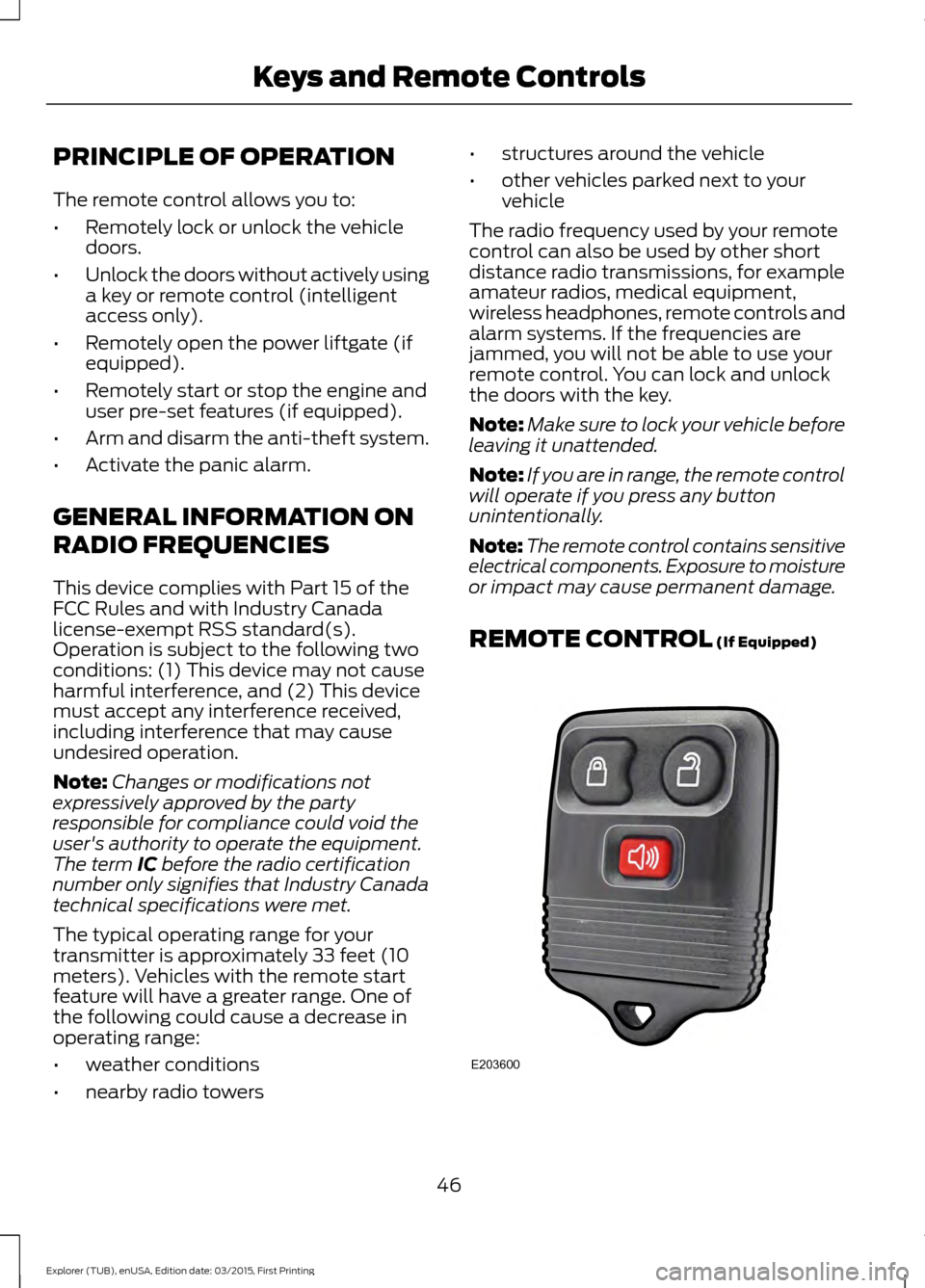
The remote control allows you to:
•
Remotely lock or unlock the vehicle
doors.
• Unlock the doors without actively using
a key or remote control (intelligent
access only).
• Remotely open the power liftgate (if
equipped).
• Remotely start or stop the engine and
user pre-set features (if equipped).
• Arm and disarm the anti-theft system.
• Activate the panic alarm.
GENERAL INFORMATION ON
RADIO FREQUENCIES
This device complies with Part 15 of the
FCC Rules and with Industry Canada
license-exempt RSS standard(s).
Operation is subject to the following two
conditions: (1) This device may not cause
harmful interference, and (2) This device
must accept any interference received,
including interference that may cause
undesired operation.
Note: Changes or modifications not
expressively approved by the party
responsible for compliance could void the
user's authority to operate the equipment.
The term IC before the radio certification
number only signifies that Industry Canada
technical specifications were met.
The typical operating range for your
transmitter is approximately 33 feet (10
meters). Vehicles with the remote start
feature will have a greater range. One of
the following could cause a decrease in
operating range:
• weather conditions
• nearby radio towers •
structures around the vehicle
• other vehicles parked next to your
vehicle
The radio frequency used by your remote
control can also be used by other short
distance radio transmissions, for example
amateur radios, medical equipment,
wireless headphones, remote controls and
alarm systems. If the frequencies are
jammed, you will not be able to use your
remote control. You can lock and unlock
the doors with the key.
Note: Make sure to lock your vehicle before
leaving it unattended.
Note: If you are in range, the remote control
will operate if you press any button
unintentionally.
Note: The remote control contains sensitive
electrical components. Exposure to moisture
or impact may cause permanent damage.
REMOTE CONTROL
(If Equipped) 46
Explorer (TUB), enUSA, Edition date: 03/2015, First Printing Keys and Remote ControlsE203600
Page 56 of 350
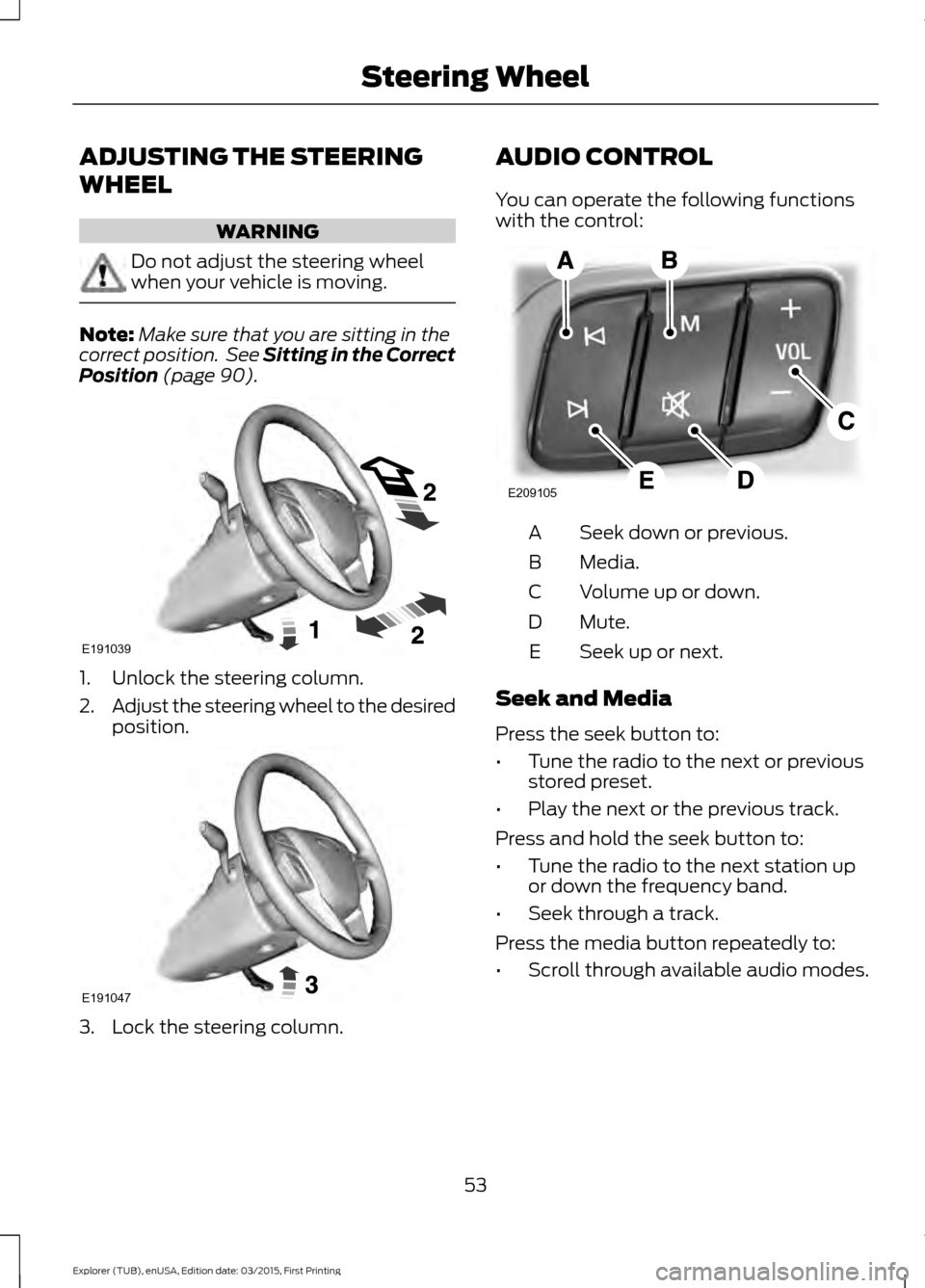
ADJUSTING THE STEERING
WHEEL
WARNING
Do not adjust the steering wheel
when your vehicle is moving.
Note:
Make sure that you are sitting in the
correct position. See Sitting in the Correct
Position (page 90). 1. Unlock the steering column.
2.
Adjust the steering wheel to the desired
position. 3. Lock the steering column. AUDIO CONTROL
You can operate the following functions
with the control:
Seek down or previous.
A
Media.
B
Volume up or down.
C
Mute.
D
Seek up or next.
E
Seek and Media
Press the seek button to:
• Tune the radio to the next or previous
stored preset.
• Play the next or the previous track.
Press and hold the seek button to:
• Tune the radio to the next station up
or down the frequency band.
• Seek through a track.
Press the media button repeatedly to:
• Scroll through available audio modes.
53
Explorer (TUB), enUSA, Edition date: 03/2015, First Printing Steering WheelE191039 E191047 E209105
Page 100 of 350
GENERAL INFORMATION
WARNINGS
Extended idling at high engine
speeds can produce very high
temperatures in the engine and
exhaust system, creating the risk of fire or
other damage. Do not park, idle or drive your vehicle
on dry grass or other dry ground
cover. The emission system heats up
the engine compartment and exhaust
system, creating the risk of fire. Do not start the engine in a closed
garage or in other enclosed areas.
Exhaust fumes can be toxic. Always
open the garage door before you start the
engine. If you smell exhaust fumes inside
your vehicle, have your vehicle
checked by an authorized dealer
immediately. Do not drive your vehicle if
you smell exhaust fumes. If you disconnect the battery, your vehicle
may exhibit some unusual driving
characteristics for approximately 5 miles
(8 kilometers) after you reconnect it. This
is because the engine management system
must realign itself with the engine. You can
disregard any unusual driving
characteristics during this period.
The powertrain control system meets all
Canadian interference-causing equipment
standard requirements regulating the
impulse electrical field or radio noise.
When you start the engine, avoid pressing
the accelerator pedal before and during
operation. Only use the accelerator pedal
when you have difficulty starting the
engine. IGNITION SWITCH
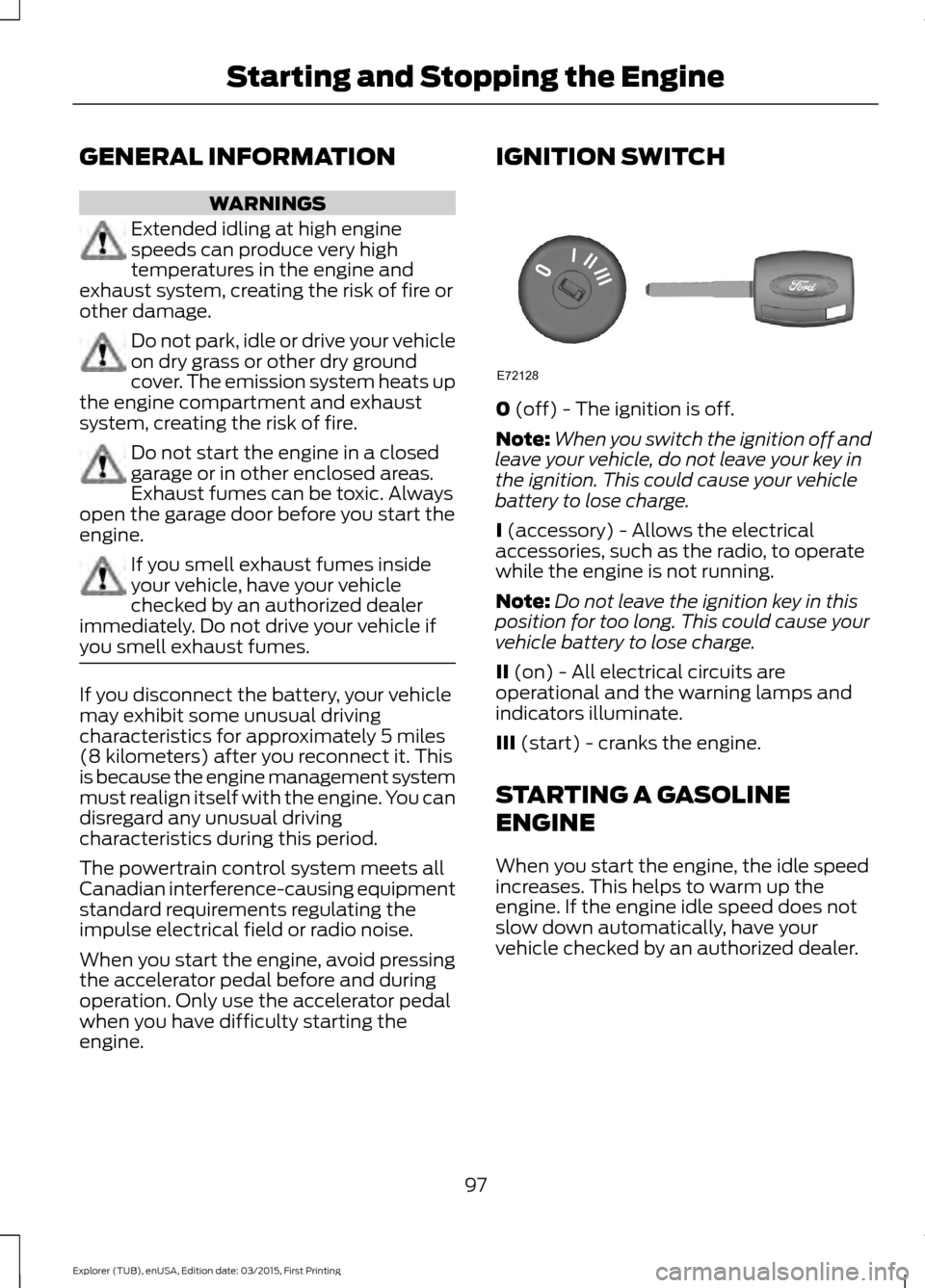
0 (off) - The ignition is off.
Note: When you switch the ignition off and
leave your vehicle, do not leave your key in
the ignition. This could cause your vehicle
battery to lose charge.
I
(accessory) - Allows the electrical
accessories, such as the radio, to operate
while the engine is not running.
Note: Do not leave the ignition key in this
position for too long. This could cause your
vehicle battery to lose charge.
II
(on) - All electrical circuits are
operational and the warning lamps and
indicators illuminate.
III
(start) - cranks the engine.
STARTING A GASOLINE
ENGINE
When you start the engine, the idle speed
increases. This helps to warm up the
engine. If the engine idle speed does not
slow down automatically, have your
vehicle checked by an authorized dealer.
97
Explorer (TUB), enUSA, Edition date: 03/2015, First Printing Starting and Stopping the EngineE72128
Page 177 of 350
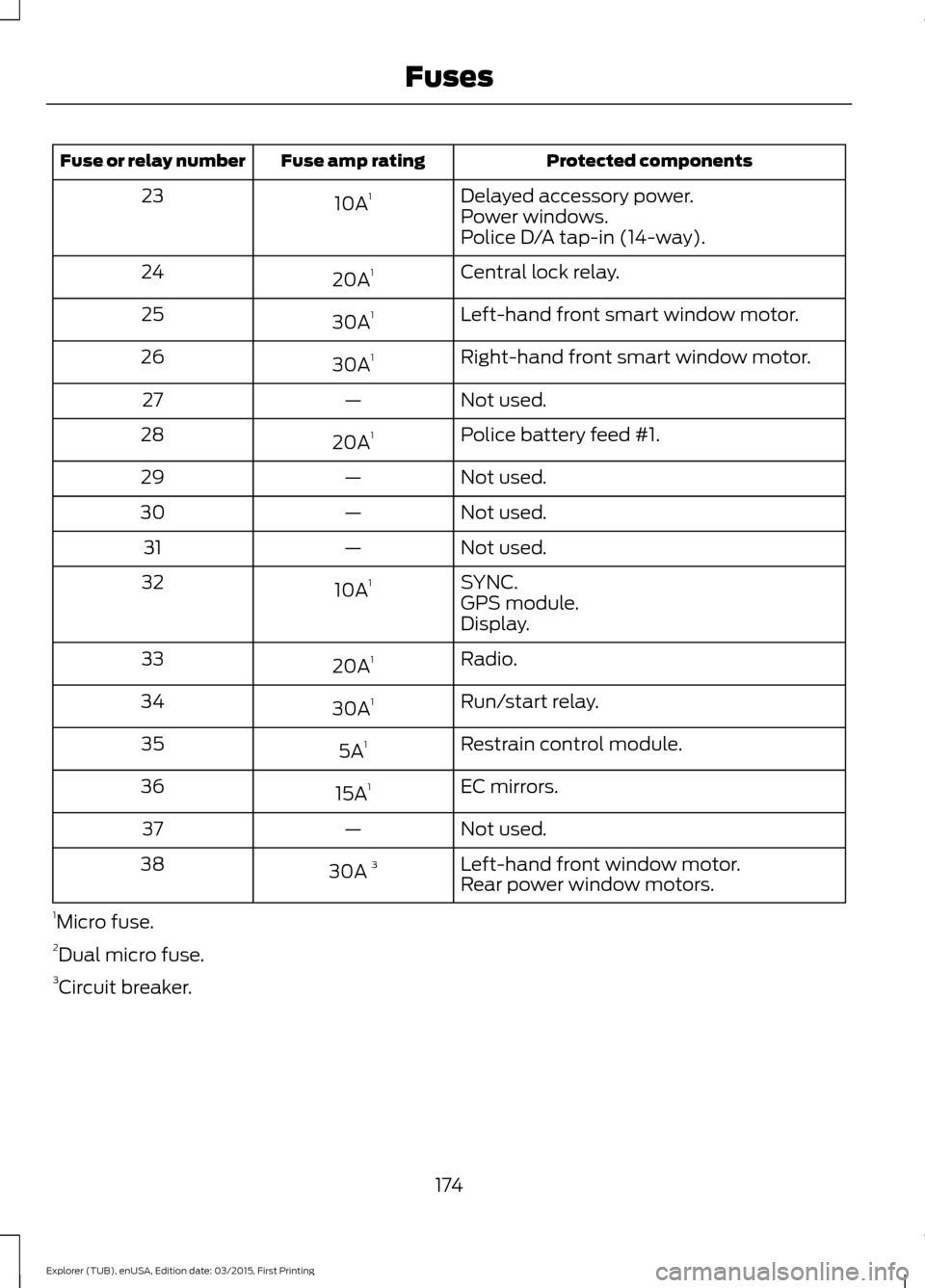
Protected components
Fuse amp rating
Fuse or relay number
Delayed accessory power.
10A 1
23
Power windows.
Police D/A tap-in (14-way).
Central lock relay.
20A 1
24
Left-hand front smart window motor.
30A 1
25
Right-hand front smart window motor.
30A 1
26
Not used.
—
27
Police battery feed #1.
20A 1
28
Not used.
—
29
Not used.
—
30
Not used.
—
31
SYNC.
10A 1
32
GPS module.
Display.
Radio.
20A 1
33
Run/start relay.
30A 1
34
Restrain control module.
5A 1
35
EC mirrors.
15A 1
36
Not used.
—
37
Left-hand front window motor.
30A 3
38
Rear power window motors.
1 Micro fuse.
2 Dual micro fuse.
3 Circuit breaker.
174
Explorer (TUB), enUSA, Edition date: 03/2015, First Printing Fuses
Page 191 of 350
WARNINGS
Keep batteries out of reach of
children. Batteries contain sulfuric
acid. Avoid contact with skin, eyes or
clothing. Shield your eyes when working
near the battery to protect against possible
splashing of acid solution. In case of acid
contact with skin or eyes, flush
immediately with water for a minimum of
15 minutes and get prompt medical
attention. If acid is swallowed, call a
physician immediately. Battery posts, terminals and related
accessories contain lead and lead
compounds. Wash hands after
handling. Your vehicle has a Motorcraft®
maintenance-free battery which normally
does not require additional water during
its life of service.
Note:
If your vehicle's battery has a cover
or shield, make sure it is reinstalled after the
battery has been cleaned or replaced.
Note: See an authorized dealer for low
voltage battery access, testing, or
replacement.
When a low voltage battery replacement
is necessary, see an authorized dealer to
replace the low voltage battery with a Ford
recommended replacement low voltage
battery that matches the electrical
requirements of the vehicle.
To ensure proper operation of the battery
management system (BMS), do not allow
a technician to connect any electrical
device ground connection directly to the
low voltage battery negative post. A
connection at the low voltage battery
negative post can cause inaccurate
measurements of the battery condition
and potential incorrect system operation. Note:
If a person adds electrical or
electronic accessories or components to the
vehicle, the accessories or components may
adversely affect the low voltage battery
performance and durability and may also
affect the performance of other electrical
systems in the vehicle.
For longer, trouble-free operation, keep the
top of the battery clean and dry. Also,
make certain the battery cables are always
tightly fastened to the battery terminals.
If you see any corrosion on the battery or
terminals, remove the cables from the
terminals and clean with a wire brush. You
can neutralize the acid with a solution of
baking soda and water.
When a battery replacement is required,
the battery should only be replaced with
a Ford recommended replacement battery
that matches the electrical requirements
of the vehicle.
Because your vehicle ’s engine is
electronically-controlled by a computer,
some engine control settings are
maintained by power from the low voltage
battery. Some engine computer settings,
like the idle trim and fuel trim strategy,
optimize the driveability and performance
of the engine. Some other computer
settings, like the clock and radio station
presets, are also maintained in memory by
power from the low voltage battery. When
a technician disconnects and connects the
low voltage battery, these settings are
erased. Complete the following procedure
in order to restore the settings:
1. With the vehicle at a complete stop, set the parking brake.
2. Shift into park (P).
3. Switch off all accessories.
4. Fully press the brake pedal and start the vehicle.
188
Explorer (TUB), enUSA, Edition date: 03/2015, First Printing Maintenance
Page 192 of 350
5. Run the engine until it reaches normal
operating temperature. While the
engine is warming up, complete the
following: Reset the clock. See Audio
System (page 247). Reset the power
windows bounce-back feature. See
Windows and Mirrors
(page 63).
Reset the radio station presets. See
Audio System
(page 247).
6. Allow the engine to idle for at least one
minute. If the engine turns off, press
the accelerator pedal to start the
engine.
7. While the engine is running, press the brake pedal and shift into neutral (N).
8. Allow the engine to run for at least one
minute by pressing on the accelerator
pedal.
9. Drive the vehicle at least 12 mi (20 km)
to completely relearn the idle and fuel
trim strategy.
Note: If you do not allow the engine to
relearn the idle and fuel trim strategy, the
idle quality of your vehicle may be adversely
affected until the engine computer
eventually relearns the idle trim and fuel
trim strategy.
Make sure that you dispose of old batteries
in an environmentally friendly way. Seek
advice from your local authority about
recycling old batteries.
CHECKING THE WIPER
BLADES Run the tip of your fingers over the edge of
the blade to check for roughness.
Clean the wiper blades with washer fluid
or water applied with a soft sponge or
cloth.
CHANGING THE WIPER
BLADES
Poor wiper quality can be improved by
cleaning the wiper blades and the
windshield.
Replace wiper blades annually for
optimum performance.
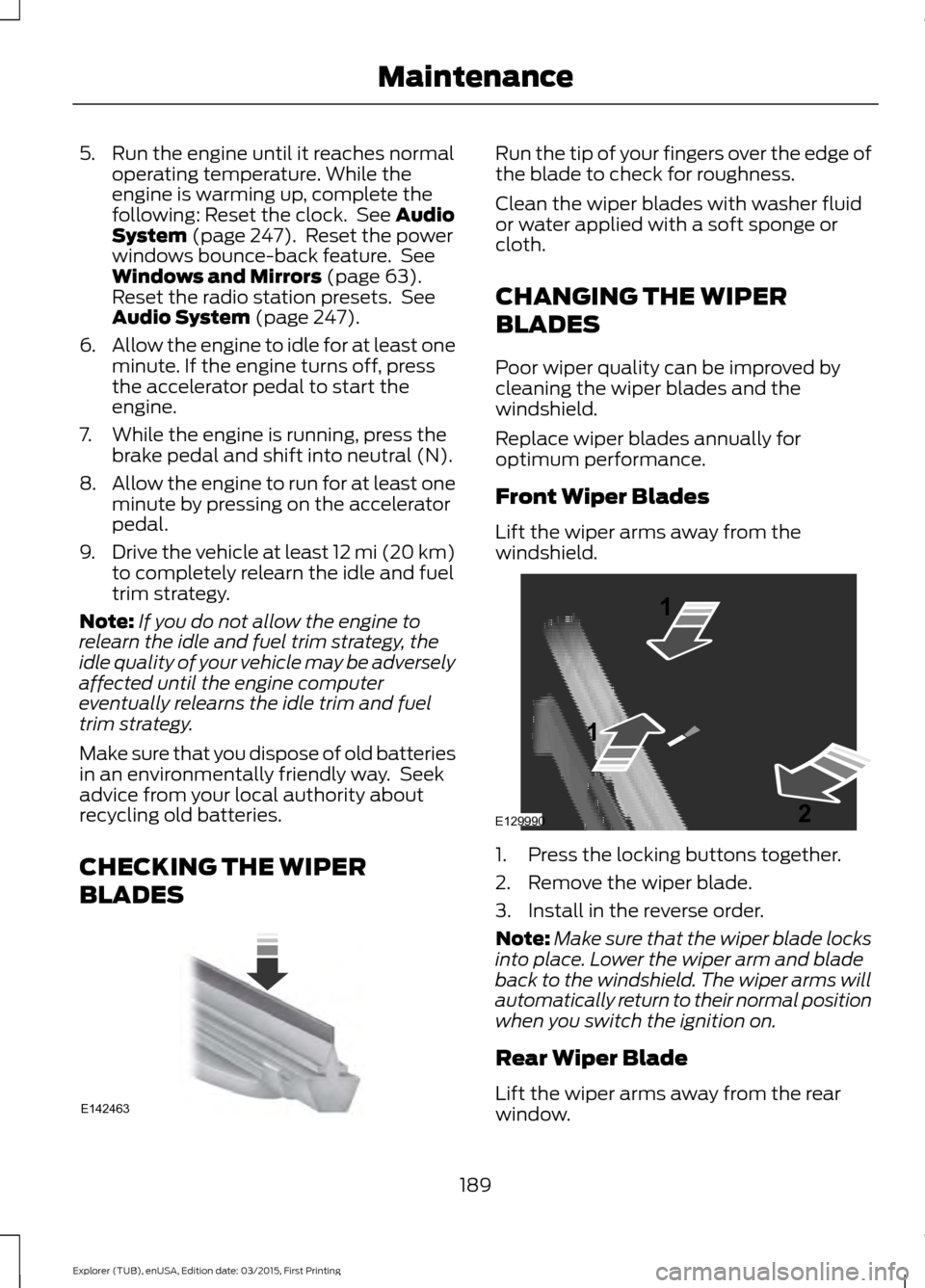
Front Wiper Blades
Lift the wiper arms away from the
windshield.
1. Press the locking buttons together.
2. Remove the wiper blade.
3. Install in the reverse order.
Note:
Make sure that the wiper blade locks
into place. Lower the wiper arm and blade
back to the windshield. The wiper arms will
automatically return to their normal position
when you switch the ignition on.
Rear Wiper Blade
Lift the wiper arms away from the rear
window.
189
Explorer (TUB), enUSA, Edition date: 03/2015, First Printing MaintenanceE142463 E129990
1
1 2
Page 250 of 350

GENERAL INFORMATION
Radio Frequencies and Reception
Factors
AM and FM frequencies are established by
the Federal Communications Commission
(FCC) and the Canadian Radio and
Telecommunications Commission (CRTC).
Those frequencies are:
•
AM: 530, 540-1700, 1710 kHz
• FM: 87.9-107.7, 107.9 MHz Radio Reception Factors
The further you travel from an AM or FM station, the
weaker the signal and the weaker the reception.
Distance and strength
Hills, mountains, tall buildings, bridges, tunnels, freeway
overpasses, parking garages, dense tree foliage and
thunderstorms can interfere with the reception.
Terrain
When you pass a ground-based broadcast repeating
tower, a stronger signal may overtake a weaker one and
result in the audio system muting.
Station overload
CD and CD Player Information
Note: CD units play commercially pressed
4.75-inch (12 centimeter) audio compact
discs only. Due to technical incompatibility,
certain recordable and re-recordable
compact discs may not function correctly
when used in Ford CD players.
Note: Do not insert CDs with homemade
paper (adhesive) labels into the CD player
as the label may peel and cause the CD to
become jammed. You should use a
permanent felt tip marker rather than
adhesive labels on your homemade CDs.
Ballpoint pens may damage CDs. Please
contact an authorized dealer for further
information.
Note: Do not use any irregularly shaped
discs or discs with a scratch protection film
attached.
Always handle discs by their edges only.
Clean the disc with an approved CD
cleaner only. Wipe it from the center of the
disc toward the edge. Do not clean in a
circular motion. Do not expose discs to direct sunlight or
heat sources for extended periods.
MP3 Track and Folder Structure
Audio systems capable of recognizing and
playing MP3 individual tracks and folder
structures work as follows:
•
There are two different modes for MP3
disc playback: MP3 track mode
(system default) and MP3 folder
mode.
• MP3 track mode ignores any folder
structure on the MP3 disc. The player
numbers each MP3 track on the disc
(noted by the .mp3 file extension) from
T001 to a maximum of T255. The
maximum number of playable MP3
files may be less depending on the
structure of the CD and exact model
of radio present.
247
Explorer (TUB), enUSA, Edition date: 03/2015, First Printing Audio System