center console FORD POLICE INTERCEPTOR UTILITY 2017 1.G Owners Manual
[x] Cancel search | Manufacturer: FORD, Model Year: 2017, Model line: POLICE INTERCEPTOR UTILITY, Model: FORD POLICE INTERCEPTOR UTILITY 2017 1.GPages: 360, PDF Size: 4.06 MB
Page 5 of 360
Lighting
General Information......................................62
Lighting Control..............................................62
Autolamps........................................................63
Instrument Lighting Dimmer.....................64
Daytime Running Lamps
............................64
Direction Indicators
.......................................65
Interior Lamps.................................................65
Windows and Mirrors
Power Windows
..............................................67
Exterior Mirrors................................................68
Interior Mirror
...................................................69
Sun Visors
.........................................................70
Instrument Cluster
Gauges.................................................................71
Warning Lamps and Indicators.................72
Audible Warnings and Indicators.............75
Information Displays
General Information
.......................................77
Information Messages.................................80
Climate Control
Manual Climate Control..............................90
Hints on Controlling the Interior Climate...........................................................91
Heated Windows and Mirrors....................92
Cabin Air Filter
.................................................92
Seats
Sitting in the Correct Position...................93
Head Restraints
..............................................93
Manual Seats
..................................................95
Power Seats
.....................................................96
Rear Seats
........................................................96 Auxiliary Power Points
Auxiliary Power Points.................................98
Storage Compartments
Center Console
...............................................99
Overhead Console
.........................................99
Starting and Stopping the Engine
General Information...................................100
Ignition Switch
..............................................100
Starting a Gasoline Engine.......................100
Engine Block Heater
....................................102
Police Engine Idle Feature.........................103
Fuel and Refueling
Safety Precautions
......................................104
Fuel Quality - Gasoline...............................105
Fuel Quality - E85........................................105
Fuel Filler Funnel Location
.......................106
Running Out of Fuel....................................106
Refueling..........................................................107
Fuel Consumption
........................................110
Emission Control System............................111
Transmission
Automatic Transmission.............................114
All-Wheel Drive
Using All-Wheel Drive..................................116
Brakes
General Information
....................................123
Hints on Driving With Anti-Lock Brakes...........................................................123
Parking Brake
.................................................124
Traction Control
Principle of Operation.................................125
2
Police Interceptor (TUB) Canada/United States of America, Police, enUSA, First Printing Table of Contents
Page 48 of 360
WARNINGS
Dash, tunnel or console-mounted
equipment should not be placed
outside of the specified zone. Failure
to follow this instruction could result in
personal injury. Do not mount equipment between
the side of front seat to the door trim
to block deployment of the side
airbag. Failure to follow this instruction
could result in personal injury. Dual driver and passenger airbags, side
airbags and knee airbags affect the way
police equipment can be mounted in police
vehicles.
Any surfaces that could come into contact
with an airbag, once it has deployed, must
not damage the airbag or alter its
deployment path.
Once the airbag has fully deployed, any
peripheral equipment surfaces that could
come into contact with the airbag (such
as when the airbag deflates with the
loading of an occupant) must not damage
the airbag or alter its deployment path.
Sharp edges, corners or protrusions could
damage the nylon airbag material and
reduce the effectiveness of the airbag.
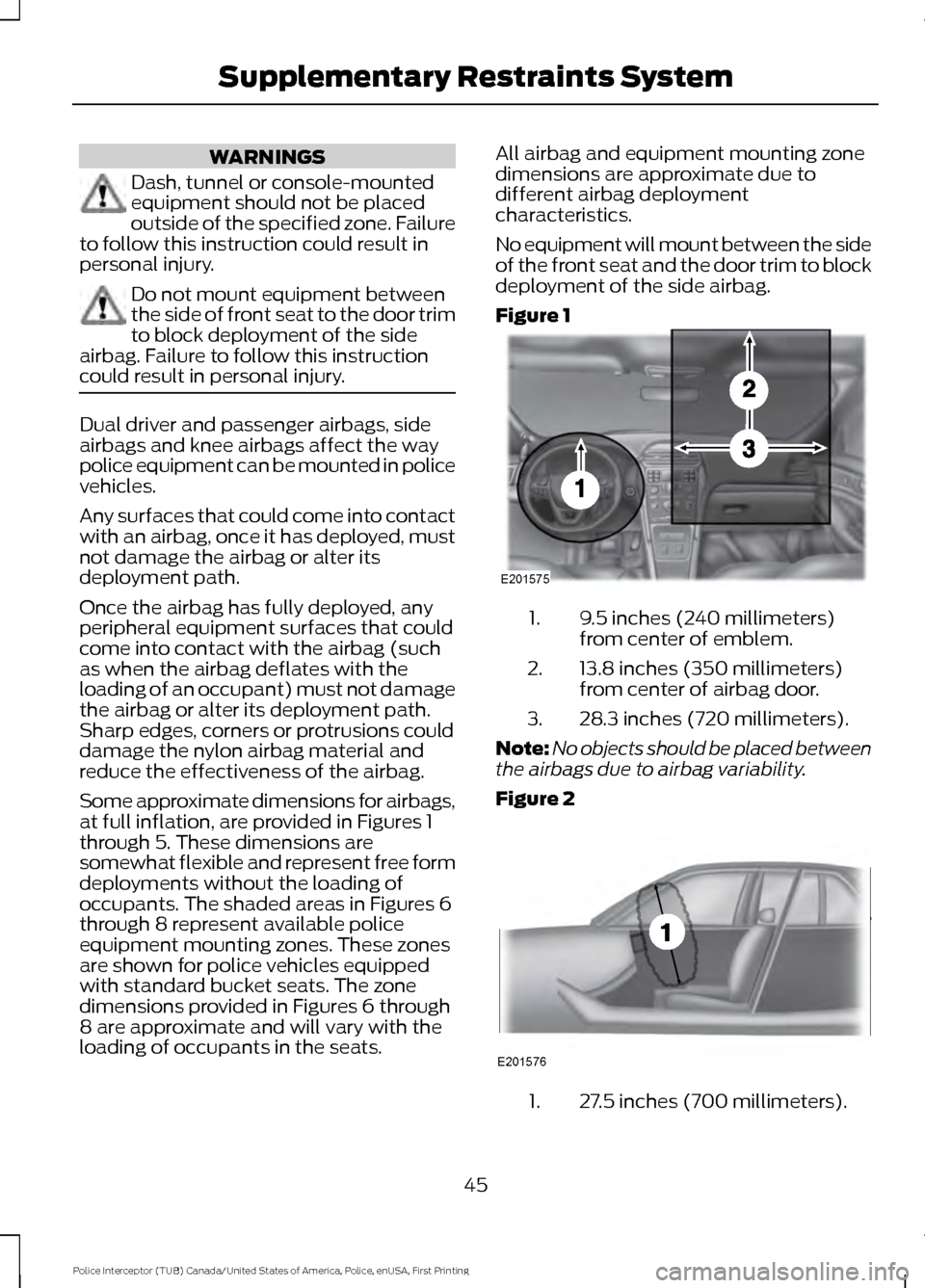
Some approximate dimensions for airbags,
at full inflation, are provided in Figures 1
through 5. These dimensions are
somewhat flexible and represent free form
deployments without the loading of
occupants. The shaded areas in Figures 6
through 8 represent available police
equipment mounting zones. These zones
are shown for police vehicles equipped
with standard bucket seats. The zone
dimensions provided in Figures 6 through
8 are approximate and will vary with the
loading of occupants in the seats. All airbag and equipment mounting zone
dimensions are approximate due to
different airbag deployment
characteristics.
No equipment will mount between the side
of the front seat and the door trim to block
deployment of the side airbag.
Figure 1
9.5 inches (240 millimeters)
from center of emblem.
1.
13.8 inches (350 millimeters)
from center of airbag door.
2.
28.3 inches (720 millimeters).
3.
Note: No objects should be placed between
the airbags due to airbag variability.
Figure 2 27.5 inches (700 millimeters).
1.
45
Police Interceptor (TUB) Canada/United States of America, Police, enUSA, First Printing Supplementary Restraints SystemE201575 E201576
Page 50 of 360
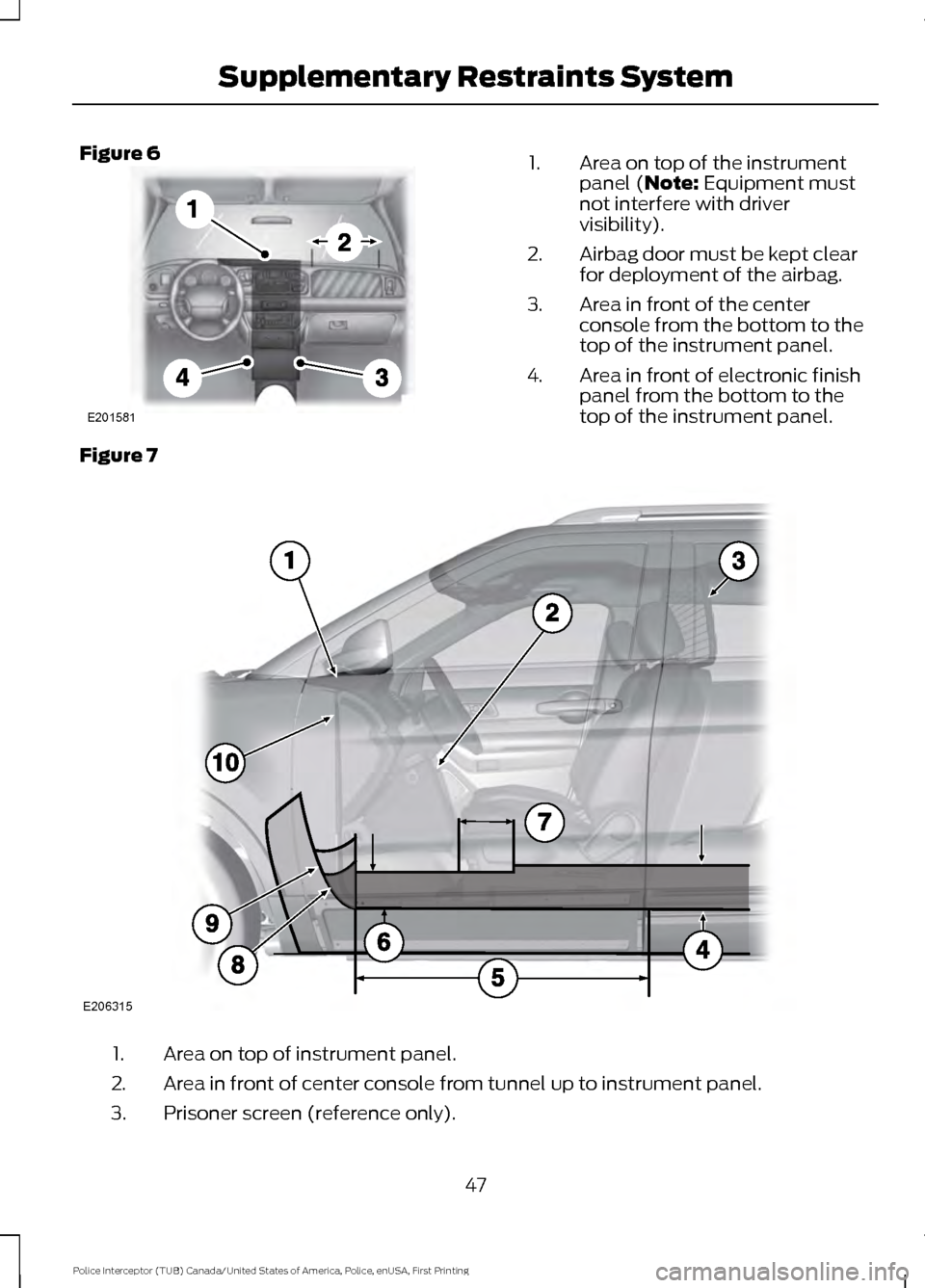
Figure 6
Area on top of the instrument
panel (Note: Equipment must
not interfere with driver
visibility).
1.
Airbag door must be kept clear
for deployment of the airbag.
2.
Area in front of the center
console from the bottom to the
top of the instrument panel.
3.
Area in front of electronic finish
panel from the bottom to the
top of the instrument panel.
4.
Figure 7 Area on top of instrument panel.
1.
Area in front of center console from tunnel up to instrument panel.
2.
Prisoner screen (reference only).
3.
47
Police Interceptor (TUB) Canada/United States of America, Police, enUSA, First Printing Supplementary Restraints SystemE201581 E206315
Page 51 of 360
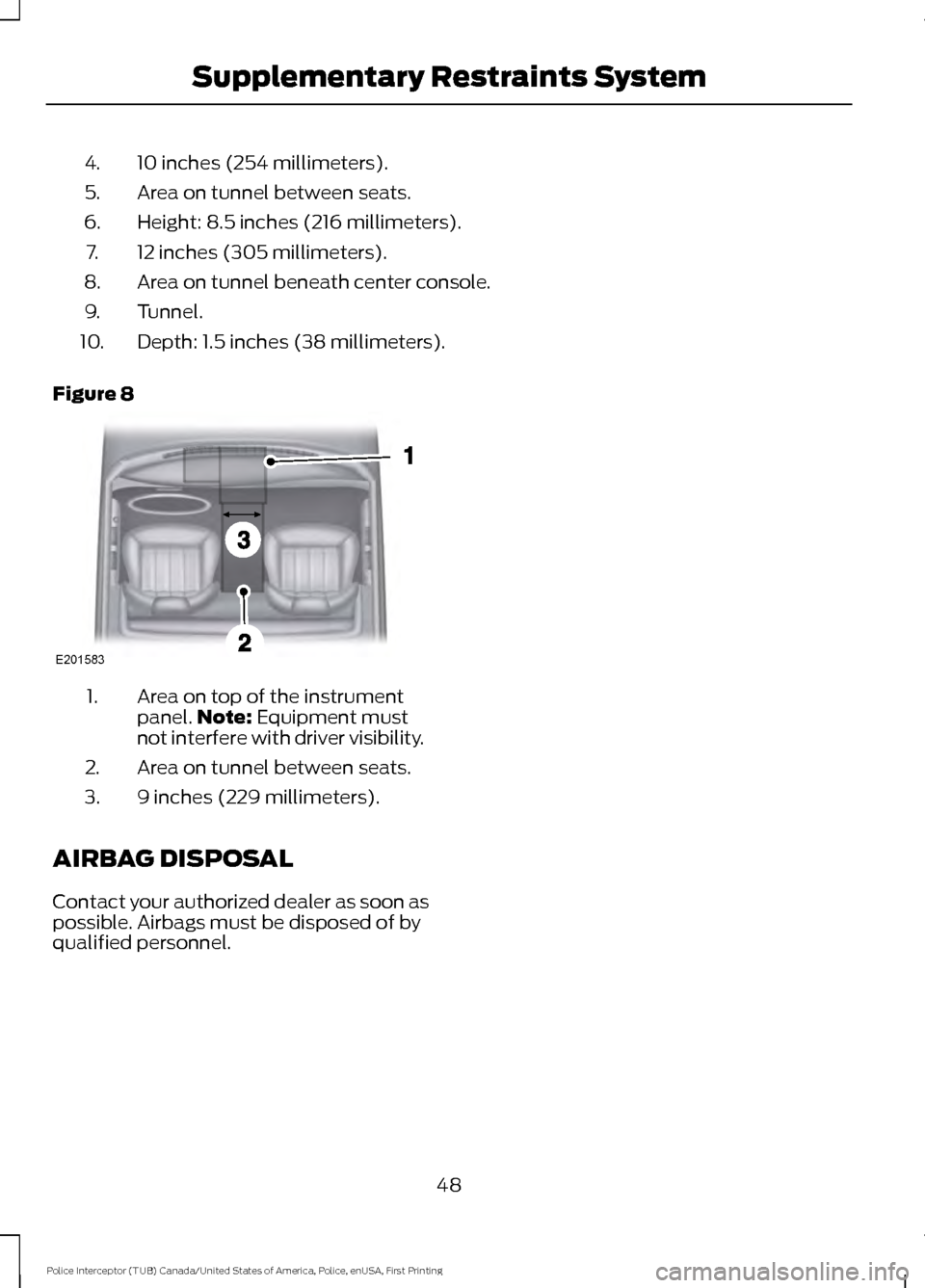
10 inches (254 millimeters).
4.
Area on tunnel between seats.
5.
Height: 8.5 inches (216 millimeters).
6.
12 inches (305 millimeters).
7.
Area on tunnel beneath center console.
8.
Tunnel.
9.
Depth: 1.5 inches (38 millimeters).
10.
Figure 8 Area on top of the instrument
panel.
Note: Equipment must
not interfere with driver visibility.
1.
Area on tunnel between seats.
2.
9 inches (229 millimeters).
3.
AIRBAG DISPOSAL
Contact your authorized dealer as soon as
possible. Airbags must be disposed of by
qualified personnel.
48
Police Interceptor (TUB) Canada/United States of America, Police, enUSA, First Printing Supplementary Restraints SystemE201583
Page 101 of 360
12 Volt DC Power Point
WARNINGS
Do not plug optional electrical
accessories into the cigar lighter
socket. Incorrect use of the cigar
lighter can cause damage not covered by
the vehicle warranty, and can result in fire
or serious injury. Do not use a power point for
operating a cigar lighter. Incorrect
use of the power points can cause
damage not covered by the vehicle
warranty, and can result in fire or serious
injury. Note:
When you switch the ignition on, you
can use the socket to power 12 volt
appliances with a maximum current rating
of 15 amps.
If the power supply does not work after you
switch the ignition off, switch the ignition
on.
Note: Do not hang any accessory from the
accessory plug.
Note: Do not use the power point over the
vehicle capacity of 12 volt DC 180 watts or
a fuse may blow.
Note: Always keep the power point caps
closed when not in use.
Do not insert objects other than an
accessory plug into the power point. This
will damage the power point and blow the
fuse.
Run the vehicle for full capacity use of the
power point.
To prevent the battery from running out of
charge:
• Do not use the power point longer than
necessary when the vehicle is not
running.
• Do not leave devices plugged in
overnight or when you park your vehicle
for extended periods. Locations
Power points may be in the following
locations:
•
On the instrument panel.
• On the center console.
• Inside the center console.
• On the rear of the center console.
• In the rear cargo area.
98
Police Interceptor (TUB) Canada/United States of America, Police, enUSA, First Printing Auxiliary Power Points
Page 102 of 360
CENTER CONSOLE (If Equipped)
Center Console
Stow items in the cup holder carefully as
items may become loose during hard
braking, acceleration or crashes, including
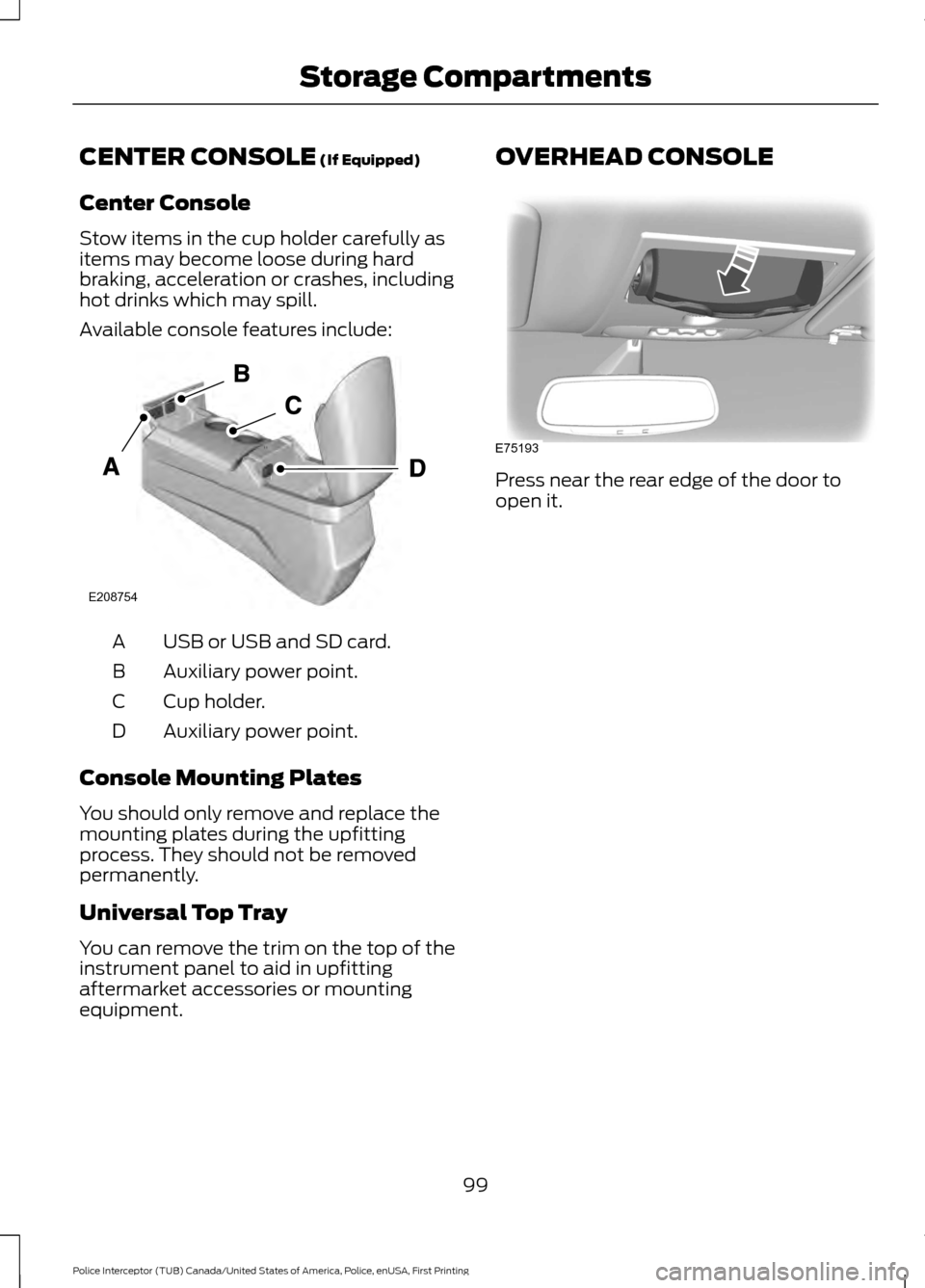
hot drinks which may spill.
Available console features include: USB or USB and SD card.
A
Auxiliary power point.
B
Cup holder.
C
Auxiliary power point.
D
Console Mounting Plates
You should only remove and replace the
mounting plates during the upfitting
process. They should not be removed
permanently.
Universal Top Tray
You can remove the trim on the top of the
instrument panel to aid in upfitting
aftermarket accessories or mounting
equipment. OVERHEAD CONSOLE
Press near the rear edge of the door to
open it.
99
Police Interceptor (TUB) Canada/United States of America, Police, enUSA, First Printing Storage CompartmentsE208754 E75193
Page 129 of 360
PRINCIPLE OF OPERATION
WARNINGS
Vehicle modifications involving
braking system, aftermarket roof
racks, suspension, steering system,
tire construction and wheel and tire size
may change the handling characteristics
of your vehicle and may adversely affect
the performance of the electronic stability
control system. In addition, installing any
stereo loudspeakers may interfere with
and adversely affect the electronic stability
control system. Install any aftermarket
stereo loudspeaker as far as possible from
the front center console, the tunnel, and
the front seats in order to minimize the risk
of interfering with the electronic stability
control sensors. Reducing the
effectiveness of the electronic stability
control system could lead to an increased
risk of loss of vehicle control, vehicle
rollover, personal injury and death. Remember that even advanced
technology cannot defy the laws of
physics. It’
s always possible to lose
control of a vehicle due to inappropriate
driver input for the conditions. Aggressive
driving on any road condition can cause
you to lose control of your vehicle
increasing the risk of personal injury or
property damage. Activation of the
electronic stability control system is an
indication that at least some of the tires
have exceeded their ability to grip the road;
this could reduce the operator ’s ability to
control the vehicle potentially resulting in
a loss of vehicle control, vehicle rollover,
personal injury and death. If your electronic
stability control system activates, SLOW
DOWN. The system automatically turns on each
time you switch the ignition on. If a fault occurs in either the stability
control or the traction control system, you
may experience the following conditions:
•
The stability and traction control light
illuminates steadily.
• The stability control and traction
control systems do not enhance your
vehicle's ability to maintain traction of
the wheels.
If a driving condition activates either the
stability control or the traction control
system you may experience the following
conditions:
• The stability and traction control light
flashes.
• Your vehicle slows down.
• Reduced engine power.
• A vibration in the brake pedal.
• The brake pedal is stiffer than usual.
• If the driving condition is severe and
your foot is not on the brake, the brake
pedal may move as the system applies
higher brake force.
The stability control system has several
features built into it to help you maintain
control of your vehicle:
Electronic Stability Control
The system enhances your vehicle ’s ability
to prevent skids or lateral slides by
applying brakes to one or more of the
wheels individually and, if necessary,
reducing engine power.
Roll Stability Control
The system enhances your vehicle ’s ability
to prevent rollovers by detecting your
vehicle ’s roll motion and the rate at which
it changes by applying the brakes to one
or more wheels individually.
126
Police Interceptor (TUB) Canada/United States of America, Police, enUSA, First Printing Stability Control
Page 264 of 360
Action
Condition
Message
Contact SIRIUS at 1-888-
539-7474 to resolve
subscription issues.
Your satellite service is no
longer available.
Questions? Call
1-888-539-7474
Use the channel guide to
turn off the Lock or Skip
function on that station.
All the channels in the
selected category are either
skipped or locked.
None found
Check Channel Guide
No action required.
SIRIUS has updated the
channels available for your
vehicle.
Subscription Updated
USB PORT (If Equipped) WARNING
Driving while distracted can result in
loss of vehicle control, crash and
injury. We strongly recommend that
you use extreme caution when using any
device that may take your focus off the
road. Your primary responsibility is the safe
operation of your vehicle. We recommend
against the use of any hand-held device
while driving and encourage the use of
voice-operated systems when possible.
Make sure you are aware of all applicable
local laws that may affect the use of
electronic devices while driving. The USB port allows you to plug in media
playing devices, memory sticks and charge
devices (if supported). See Using
SYNC™ With Your Media Player (page
283).
MEDIA HUB
(If Equipped)
The media hub is located in the front
storage bin and center console and has
the following features: See your SYNC information.
261
Police Interceptor (TUB) Canada/United States of America, Police, enUSA, First Printing Audio SystemE201595 E201595
Page 292 of 360
Description and Action
Display
2. Scroll to browse indexed media files on the device, and
then press the OK button.
Resets the USB index. After the new indexing is complete,
you can choose what to play from the USB song library.
Reset USB
* You can use the buttons at the bottom of the audio display to jump to a certain
alphabetical category quickly. You can also use the letters on the audio system's numeric
keypad to jump in the list.
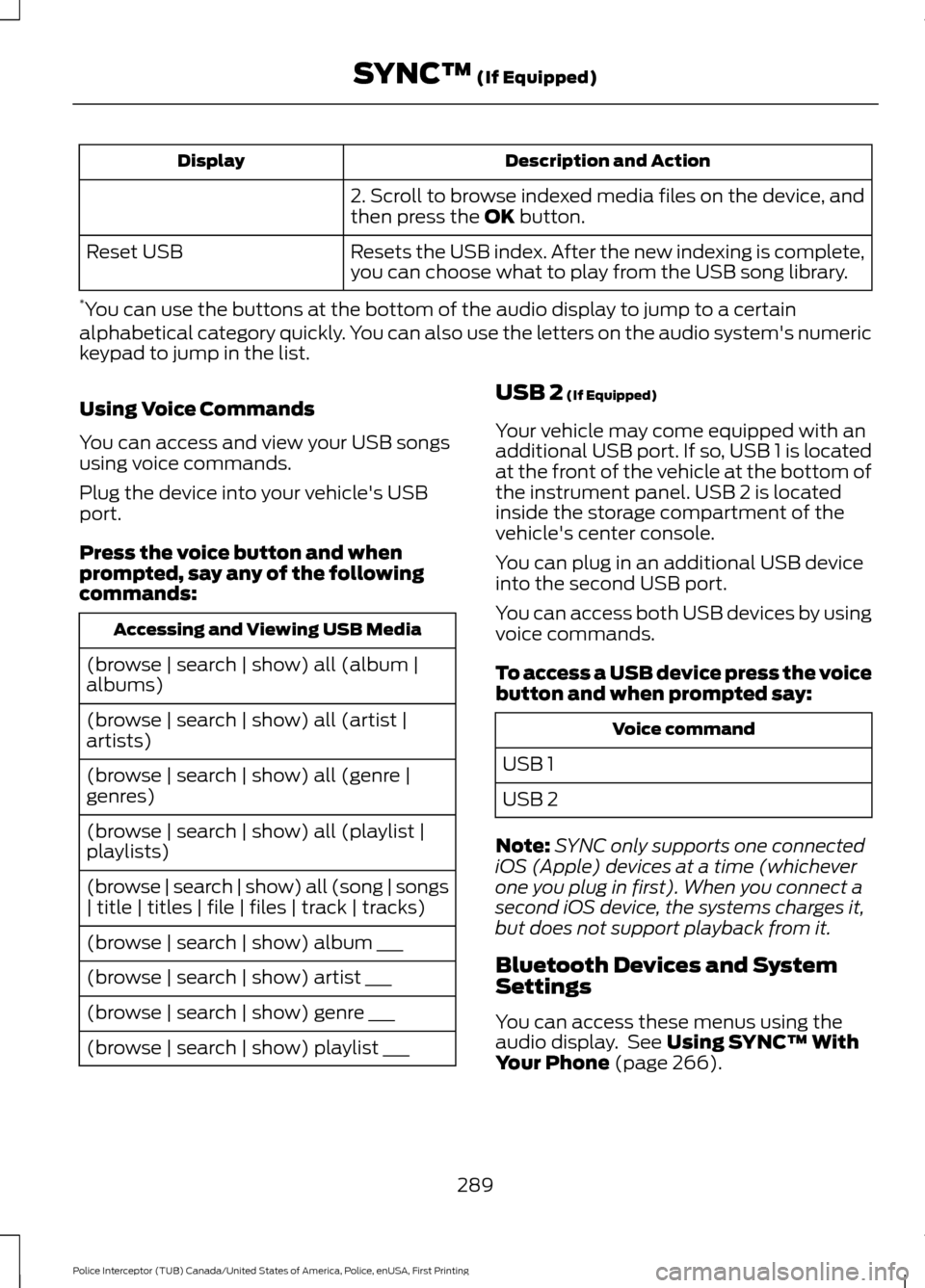
Using Voice Commands
You can access and view your USB songs
using voice commands.
Plug the device into your vehicle's USB
port.
Press the voice button and when
prompted, say any of the following
commands: Accessing and Viewing USB Media
(browse | search | show) all (album |
albums)
(browse | search | show) all (artist |
artists)
(browse | search | show) all (genre |
genres)
(browse | search | show) all (playlist |
playlists)
(browse | search | show) all (song | songs
| title | titles | file | files | track | tracks)
(browse | search | show) album ___
(browse | search | show) artist ___
(browse | search | show) genre ___
(browse | search | show) playlist ___ USB 2
(If Equipped)
Your vehicle may come equipped with an
additional USB port. If so, USB 1 is located
at the front of the vehicle at the bottom of
the instrument panel. USB 2 is located
inside the storage compartment of the
vehicle's center console.
You can plug in an additional USB device
into the second USB port.
You can access both USB devices by using
voice commands.
To access a USB device press the voice
button and when prompted say: Voice command
USB 1
USB 2
Note: SYNC only supports one connected
iOS (Apple) devices at a time (whichever
one you plug in first). When you connect a
second iOS device, the systems charges it,
but does not support playback from it.
Bluetooth Devices and System
Settings
You can access these menus using the
audio display. See
Using SYNC™ With
Your Phone (page 266).
289
Police Interceptor (TUB) Canada/United States of America, Police, enUSA, First Printing SYNC™
(If Equipped)
Page 353 of 360
Car Wash
See: Cleaning the Exterior.............................. 205
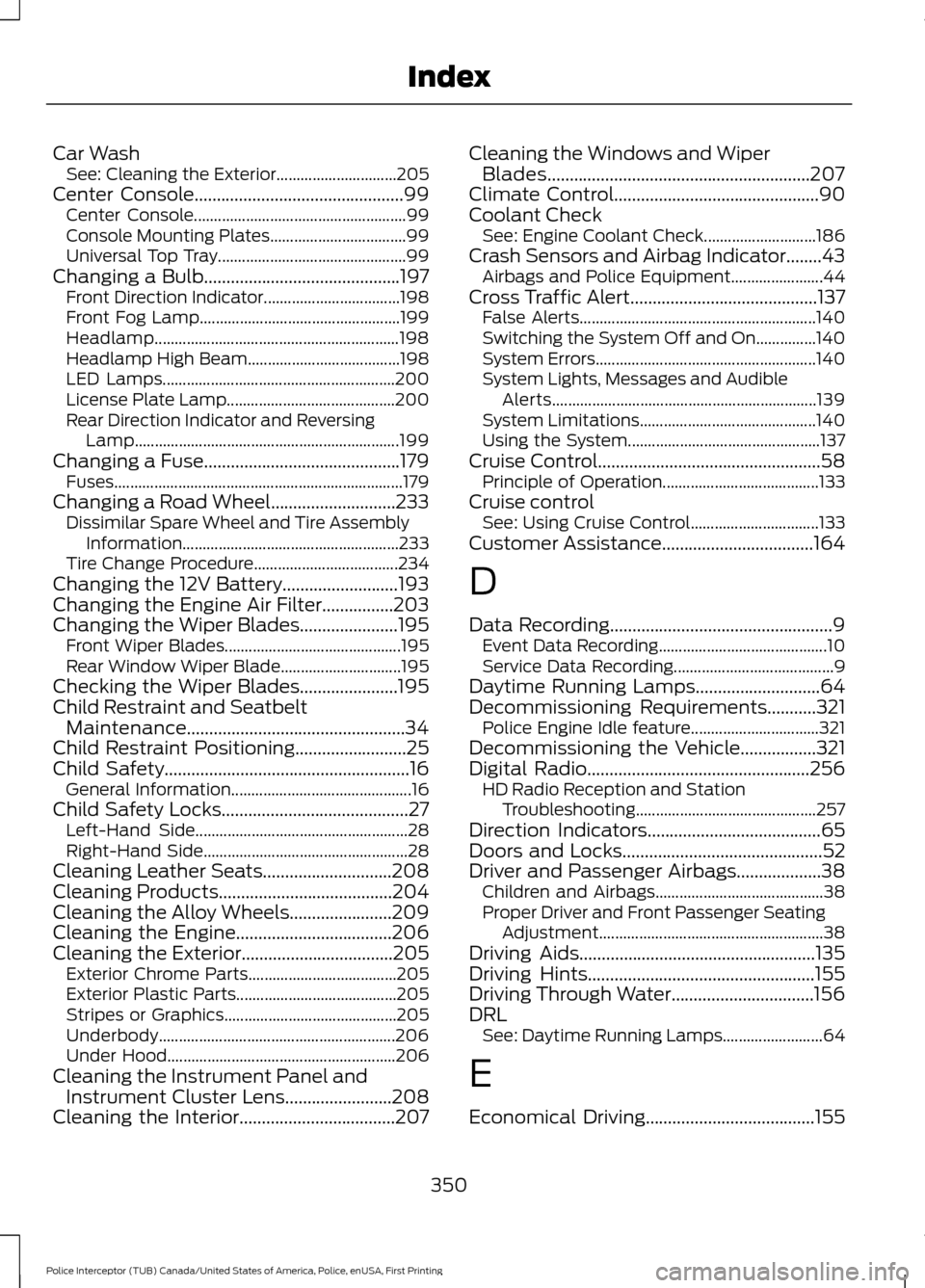
Center Console...............................................99
Center Console..................................................... 99
Console Mounting Plates.................................. 99
Universal Top Tray............................................... 99
Changing a Bulb............................................197 Front Direction Indicator.................................. 198
Front Fog Lamp.................................................. 199
Headlamp............................................................. 198
Headlamp High Beam...................................... 198
LED Lamps.......................................................... 200
License Plate Lamp.......................................... 200
Rear Direction Indicator and Reversing Lamp.................................................................. 199
Changing a Fuse............................................179 Fuses........................................................................\
179
Changing a Road Wheel............................233 Dissimilar Spare Wheel and Tire Assembly
Information...................................................... 233
Tire Change Procedure.................................... 234
Changing the 12V Battery..........................193
Changing the Engine Air Filter................203
Changing the Wiper Blades
......................195
Front Wiper Blades............................................ 195
Rear Window Wiper Blade.............................. 195
Checking the Wiper Blades......................195
Child Restraint and Seatbelt Maintenance.................................................34
Child Restraint Positioning.........................25
Child Safety.......................................................16 General Information............................................. 16
Child Safety Locks..........................................27 Left-Hand Side..................................................... 28
Right-Hand Side................................................... 28
Cleaning Leather Seats.............................208
Cleaning Products
.......................................204
Cleaning the Alloy Wheels.......................209
Cleaning the Engine
...................................206
Cleaning the Exterior..................................205
Exterior Chrome Parts..................................... 205
Exterior Plastic Parts........................................ 205
Stripes or Graphics........................................... 205
Underbody........................................................... 206
Under Hood......................................................... 206
Cleaning the Instrument Panel and Instrument Cluster Lens........................208
Cleaning the Interior...................................207 Cleaning the Windows and Wiper
Blades...........................................................207
Climate Control
..............................................90
Coolant Check See: Engine Coolant Check............................ 186
Crash Sensors and Airbag Indicator........43 Airbags and Police Equipment....................... 44
Cross Traffic Alert
..........................................137
False Alerts........................................................... 140
Switching the System Off and On...............140
System Errors....................................................... 140
System Lights, Messages and Audible Alerts.................................................................. 139
System Limitations............................................ 140
Using the System................................................ 137
Cruise Control
..................................................58
Principle of Operation....................................... 133
Cruise control See: Using Cruise Control................................ 133
Customer Assistance
..................................164
D
Data Recording
..................................................9
Event Data Recording.......................................... 10
Service Data Recording........................................ 9
Daytime Running Lamps
............................64
Decommissioning Requirements...........321
Police Engine Idle feature................................ 321
Decommissioning the Vehicle
.................321
Digital Radio..................................................256
HD Radio Reception and Station
Troubleshooting............................................. 257
Direction Indicators
.......................................65
Doors and Locks.............................................52
Driver and Passenger Airbags...................38 Children and Airbags.......................................... 38
Proper Driver and Front Passenger Seating Adjustment........................................................ 38
Driving Aids
.....................................................135
Driving Hints...................................................155
Driving Through Water................................156
DRL See: Daytime Running Lamps......................... 64
E
Economical Driving......................................155
350
Police Interceptor (TUB) Canada/United States of America, Police, enUSA, First Printing Index