radio FORD PROBE 1996 2.G Owner's Manual
[x] Cancel search | Manufacturer: FORD, Model Year: 1996, Model line: PROBE, Model: FORD PROBE 1996 2.GPages: 298, PDF Size: 2.53 MB
Page 139 of 298
![FORD PROBE 1996 2.G Owners Manual 139
*
[AS23900(ALL)04/95]
NOTE: If the vehicles battery is disconnected,
the clock and station memory preset
buttons (if programmed in auto mode)
will need to be reset.
*
[AS24000(ALL)02/95]
Adjustin](/img/11/5320/w960_5320-138.png "FORD PROBE 1996 2.G Owners Manual 139
*
[AS23900(ALL)04/95]
NOTE: If the vehicles battery is disconnected,
the clock and station memory preset
buttons (if programmed in auto mode)
will need to be reset.
*
[AS24000(ALL)02/95]
Adjustin")
139
*
[AS23900(ALL)04/95]
NOTE: If the vehicle's battery is disconnected,
the clock and station memory preset
buttons (if programmed in auto mode)
will need to be reset.
*
[AS24000(ALL)02/95]
Adjusting the tone balance and speaker
output of your radio
*
[AS24100(ALL)04/95]
q
Increasing or decreasing bass response
*
[AS24225(ALL)05/95]
Push the ªAUDIOº button repeatedly until
the display reads ªBASS.º Push the right (+)
side of the ªVOLUMEº button to increase
bass (more ªlowsº), and push the left (-) side
to decrease bass (less ªlowsº).
*
[AS24300(ALL)04/95]
q
Increasing or decreasing treble response
*
[AS24425(ALL)05/95]
Push the ªAUDIOº button repeatedly until
the display reads ªTREB.º Push the right (+)
side of the ªVOLUMEº button to increase the
treble (more ªhighsº), and push the left (-)
side to decrease treble (less ªhighsº).
*
[AS24500(ALL)08/89]
Speaker features and operation
*
[AS24600(ALL)04/95]
q
Adjusting speaker balance
*
[AS24725(ALL)05/95]
Balance control allows you to adjust the
sound distribution between the right and left
speakers. Push the ªAUDIOº button
repeatedly until the display reads ªBAL.º
Push the right (+) side of the ªVOLUMEº
button to shift the sound to the right
speakers, and push the left (-) side to shift
the sound to the left speakers.
File:prasp.ex
Update:Fri Jun 23 19:35:26 1995
Page 140 of 298
![FORD PROBE 1996 2.G Owners Manual 140
*
[AS24800(ALL)04/95]
q
Adjusting speaker fader
*
[AS24925(ALL)05/95]
Fade control allows you to adjust the sound
distribution between the front and rear
speakers. Push the ªAUDIOº button
repeat](/img/11/5320/w960_5320-139.png "FORD PROBE 1996 2.G Owners Manual 140
*
[AS24800(ALL)04/95]
q
Adjusting speaker fader
*
[AS24925(ALL)05/95]
Fade control allows you to adjust the sound
distribution between the front and rear
speakers. Push the ªAUDIOº button
repeat")
140
*
[AS24800(ALL)04/95]
q
Adjusting speaker fader
*
[AS24925(ALL)05/95]
Fade control allows you to adjust the sound
distribution between the front and rear
speakers. Push the ªAUDIOº button
repeatedly until the display reads ªFADE.º
Push the right (+) side of the ªVOLUMEº
button to shift the sound to the front
speakers, and push the left (-) side to shift
the sound to the rear speakers.
*
[AS24950(ALL)04/95]
NOTE: Illuminated bars in the display show
relative levels of bass and treble and
positions of speaker balance and fader
functions after adjustments are made,
then revert to volume level set.
%*
[AS25000(ALL)02/95]
Using the Controls of Your Cassette Tape
Player
*
[AS25500(ALL)02/95]
How to insert a tape
*
[AS25600(ALL)05/95]
Insert a cassette (with the open edge to the
right) firmly into the tape door opening, making
sure the cassette is completely in and ªseated.º
[AS25650(ALL)07/93]
NOTE: A cassette tape can be loaded with the
ignition on whether or not the radio
power is on. Inserting a cassette tape
with the radio power off will turn the
audio system on. After the cassette is
ejected, radio play will return.
*
[AS25700(ALL)02/95]
How to locate a desired track on the tape
*
[AS25800(ALL)02/95]
NOTE: The tape track number indicated in the
display does not necessarily correspond
to the tape track or side number on the
cassette label. It is used only to
indicate when the tape mechanism
reverses tracks.
File:prasp.ex
Update:Fri Jun 23 19:35:26 1995
Page 141 of 298
![FORD PROBE 1996 2.G Owners Manual 141
*
[AS25896(ALL)05/94]
q
Using the Automatic Music Search (ªAMSº)
function with cassette tape player
*
[AS25897(ALL)03/95]
Press and hold the ªAMSº button (ªAMSº
will appear in the display).](/img/11/5320/w960_5320-140.png "FORD PROBE 1996 2.G Owners Manual 141
*
[AS25896(ALL)05/94]
q
Using the Automatic Music Search (ªAMSº)
function with cassette tape player
*
[AS25897(ALL)03/95]
Press and hold the ªAMSº button (ªAMSº
will appear in the display).")
141
*
[AS25896(ALL)05/94]
q
Using the Automatic Music Search (ªAMSº)
function with cassette tape player
*
[AS25897(ALL)03/95]
Press and hold the ªAMSº button (ªAMSº
will appear in the display). Then, push the
left (
h) button to rewind to the beginning
of the current selection or press the right
(
g) button to fast forward to the beginning
of the next selection.
*
[AS25900(ALL)02/95]
q
Fast forwarding the tape
*
[AS26000(ALL)03/95]
Push the right (
g) button to fast forward
the tape.
*
[AS26100(ALL)02/95]
q
Rewinding the tape
*
[AS26200(ALL)03/95]
Push the left (
h) button to rewind the
tape.
*
[AS26900(ALL)02/95]
q
How to change the side of the tape being
played
*
[AS27000(ALL)03/95]
The alternate track (other side) of the tape
can be selected at any time by pushing both
fast-wind buttons (
hand
g) at the
same time.
*
[AS27100(ALL)02/95]
How to eject the tape
*
[AS27250(ALL)02/95]
To stop the tape and eject the cassette, press the
ªEJECTº button. The radio will resume playing.
*
[AS27300(ALL)02/95]
Using the DolbyHB noise reduction feature
*
[AS27400(ALL)02/95]
NOTE: Noise reduction system manufactured
under license from Dolby Labs
Licensing Corporation. ªDolbyº and
double-D symbol are trademarks of
Dolby Laboratories Licensing
Corporation.
*
[AS27550(ALL)05/95]
Push station memory button 3 to activate DolbyH
B Noise Reduction.
File:prasp.ex
Update:Fri Jun 23 19:35:26 1995
Page 143 of 298
![FORD PROBE 1996 2.G Owners Manual 143 %
*
[AS28400(ALL)03/95]
Clock Operation
*
[AS28500(ALL)07/90]
How to view the clock mode
*
[AS28650(ALL)07/93]
Press the ªCLOCKº button to alternate the
frequency and time in the display. In the](/img/11/5320/w960_5320-142.png "FORD PROBE 1996 2.G Owners Manual 143 %
*
[AS28400(ALL)03/95]
Clock Operation
*
[AS28500(ALL)07/90]
How to view the clock mode
*
[AS28650(ALL)07/93]
Press the ªCLOCKº button to alternate the
frequency and time in the display. In the")
143 %
*
[AS28400(ALL)03/95]
Clock Operation
*
[AS28500(ALL)07/90]
How to view the clock mode
*
[AS28650(ALL)07/93]
Press the ªCLOCKº button to alternate the
frequency and time in the display. In the clock
mode, pressing any radio function will
automatically display the radio frequency for
approximatedly ten seconds before changing
back to the clock mode.
*
[AS28800(ALL)07/90]
How to set the clock
*
[AS28900(ALL)04/92]
1. Turn the radio on.
*
[AS29025(ALL)03/95]
2. Press and hold in the ªCLOCKº button,
press the ªSEEKº button left (
b) to advance
the hours and right (
a) to advance the
minutes.
*
[AS29200(ALL)07/90]
NOTE: The clock displays 12-hour time with
no AM/PM indications.
*
[AS35200(ALL)06/95]
Common Radio Reception Conditions
*
[AS35300(ALL)02/95]
Several conditions prevent FM reception from
being completely clear and noise-free, such as
the following:
*
[AS35400(ALL)04/95]
1. Distance/Strength
*
[AS35500(ALL)02/95]
The strength of the FM signal is directly related
to the distance the signal must travel. The
listenable range of an average FM signal is
approximately 25 miles (40 kilometers). Beyond
this distance, the radio is operating in a fringe
area and the signal becomes weaker.
File:prasp.ex
Update:Fri Jun 23 19:35:26 1995
Page 144 of 298
![FORD PROBE 1996 2.G Owners Manual 144
*
[AS35550(ALL)06/90]
NOTE: Always make sure your antenna
(whether you have a power antenna or
a manually adjustable antenna) is fully
extended to the maximum length for
proper reception. If your](/img/11/5320/w960_5320-143.png "FORD PROBE 1996 2.G Owners Manual 144
*
[AS35550(ALL)06/90]
NOTE: Always make sure your antenna
(whether you have a power antenna or
a manually adjustable antenna) is fully
extended to the maximum length for
proper reception. If your")
144
*
[AS35550(ALL)06/90]
NOTE: Always make sure your antenna
(whether you have a power antenna or
a manually adjustable antenna) is fully
extended to the maximum length for
proper reception. If your antenna is not
fully extended, you may experience
signal loss while traveling in fringe
reception areas.
*
[AS35600(ALL)04/95]
2. Terrain
*
[AS35700(ALL)02/95]
The terrain (hilly, mountainous, tall buildings) of
the area over which the signal travels may
prevent the FM signal from being noise-free.
*
[AS35800(ALL)11/92]
Repeated pops and hisses which are heard
during an otherwise clear broadcast can occur
near the station because of the ªline of sightº
characteristic of FM radio waves.
*
[AS35900(ALL)01/95]
If there is a building or large structure between
the antenna and station, some of the signal
ªbendsº around the building, but certain spots
receive almost no signal. Moving out of the
ªshadowº of the structure will allow the station
to return to normal.
*
[AS36000(ALL)01/95]
When the radio waves are reflected off objects or
structures, the reflected signal cancels the normal
signal, causing the antenna to pick up noise and
distortion. Cancellation effects are most
prominent in metropolitan areas, but also can
become quite severe in hilly terrain and
depressed roadways.
*
[AS36100(ALL)01/95]
To minimize these conditions, a stereo/mono
blend circuit has been incorporated into this
system. This feature automatically switches a
weak stereo signal to a clearer monaural signal,
which improves the quality of reception.
File:prasp.ex
Update:Fri Jun 23 19:35:26 1995
Page 145 of 298
![FORD PROBE 1996 2.G Owners Manual 145
*
[AS36200(ALL)01/95]
Several sources of static are normal conditions
on AM frequencies. These can be caused by
power lines, electric fences, traffic lights and
thunderstorms.
*
[AS36300(ALL)01/95](/img/11/5320/w960_5320-144.png "FORD PROBE 1996 2.G Owners Manual 145
*
[AS36200(ALL)01/95]
Several sources of static are normal conditions
on AM frequencies. These can be caused by
power lines, electric fences, traffic lights and
thunderstorms.
*
[AS36300(ALL)01/95")
145
*
[AS36200(ALL)01/95]
Several sources of static are normal conditions
on AM frequencies. These can be caused by
power lines, electric fences, traffic lights and
thunderstorms.
*
[AS36300(ALL)01/95]
Another reception phenomenon isStrong Signal
Capture and Overload. This can occur when
listening to a weak station and when passing
another broadcast tower. The close station may
capture the more distant station, although the
displayed frequency does not change. While
passing the tower, the station may switch back
and forth a few times before returning to the
original station.
*
[AS36400(ALL)01/95]
When several broadcast towers are present
(common in metropolitan areas) several stations
may overload the receiver, resulting in
considerable station changing, mixing and
distortion.
*
[AS36500(ALL)01/95]
Automatic gain control circuitry for both AM
and FM bands has been incorporated into this
system to reduce strong signal capture and
overload.
%
*
[AS36600(ALL)08/89]
All About Radio Frequencies
*
[AS36700(ALL)06/95]
The Federal Communications Commission (FCC)
and the Canadian Radio Telecommunications
Commission (CRTC) establish the frequencies
AM and FM radio stations may use for their
broadcasts. The allowable frequencies are, AM:
530, 540...1600, 1610 kHz in 10 kHz steps; FM:
87.9, 88.1...107.7, 107.9 MHz in 0.2 MHz steps.
*
[AS36800(ALL)06/95]
Not all frequencies will be assigned to a given
area. This radio will tune to each of these
frequencies using manual tune and no fine
tuning is necessary as radio stations may not use
other frequencies.
File:prasp.ex
Update:Fri Jun 23 19:35:26 1995
Page 146 of 298
![FORD PROBE 1996 2.G Owners Manual 146
*
[AS36900(ALL)02/95]
Some FM radio stations advertise a
ªrounded-offº frequency which is not the
frequency they actually broadcast on. For
example, a radio station that is assigned a
frequency](/img/11/5320/w960_5320-145.png "FORD PROBE 1996 2.G Owners Manual 146
*
[AS36900(ALL)02/95]
Some FM radio stations advertise a
ªrounded-offº frequency which is not the
frequency they actually broadcast on. For
example, a radio station that is assigned a
frequency")
146
*
[AS36900(ALL)02/95]
Some FM radio stations advertise a
ªrounded-offº frequency which is not the
frequency they actually broadcast on. For
example, a radio station that is assigned a
frequency of 98.7 MHz may call itself ªRadio 99º
even though 99.0 MHz is not an allowable FM
broadcast frequency.
*
[AS37000(ALL)01/95]
Important Warranty and Service
Information
*
[AS37050(ALL)07/90]
q
Warranty
*
[AS37100(ALL)03/95]
Your sound system is warranted for three years
or 36,000 miles (60,000 kilometers), whichever
comes first. Consult your vehicle warranty
booklet for further information. Ask your dealer
for a copy of this limited warranty.
*
[AS37150(ALL)07/90]
q
Service
*
[AS37200(ALL)01/95]
At Ford Electronics, we stand behind our audio
systems with a comprehensive service and repair
program. If anything should go wrong with
your Ford audio system, return to your dealer
for service. There is a nationwide network of
qualified Ford authorized repair centers to assist
you.
File:prasp.ex
Update:Fri Jun 23 19:35:26 1995
Page 159 of 298
![FORD PROBE 1996 2.G Owners Manual 159
*
[DR10530(ALL)05/95]
If the brake pedal is applied while the vehicle is
driven over uneven road surfaces, the ABS may
cycle and the driver may sense a pulsation in
the brake pedal, accompanied by](/img/11/5320/w960_5320-158.png "FORD PROBE 1996 2.G Owners Manual 159
*
[DR10530(ALL)05/95]
If the brake pedal is applied while the vehicle is
driven over uneven road surfaces, the ABS may
cycle and the driver may sense a pulsation in
the brake pedal, accompanied by")
159
*
[DR10530(ALL)05/95]
If the brake pedal is applied while the vehicle is
driven over uneven road surfaces, the ABS may
cycle and the driver may sense a pulsation in
the brake pedal, accompanied by a slight up and
down movement of the pedal height and a
clicking sound. This may also happen when
driving on an inclined surface such as a
driveway while making a sharp turn. This is a
normal condition.
*
[DR10540(ALL)05/95]
Each time you turn the ignition key to the ON
position, the ABS will function through one test
cycle. When this happens, the ABS light will
come on for up to five seconds. If the light stays
on longer than five seconds, shut off the engine
and restart. If it remains on, it means the ABS is
disabled and should be serviced immediately to
restore the benefits of the anti-lock feature.
Normal braking is not affected unless the red
BRAKE system warning light is also lit.
*
[DR10550(ALL)05/95]
ABS has self-check capabilities. As described
above, the system turns on the ABS light each
time you start your engine. After the engine is
started and the ABS light turns off, the system
performs another test the first time the vehicle
reaches 4-9 mph (6-15 km/h). The system turns
on the ABS pump motor for approximately 1/2
second. At this time, a mechanical noise may be
heard. This is a normal part of the self-check
feature. If a malfunction is found during this
check the ABS light will come on.
[DR10560(ALL)05/95]
Ford Motor Company has not found any
detrimental effects of popular mobile road
transmitting equipment installed on vehicles
equipped with the Anti-lock Brake System if
normal radio installation practices are rigidly
followed. However, if after installing mobile
radio transmitting equipment, the Anti-lock
Brake System light comes on at any time other
than immediately after turning the key to the
File:prdrp.ex
Update:Fri Jun 23 19:35:02 1995
Page 160 of 298
160ON position, or during a sudden stop, have
your mobile radio dealer inspect the radio
installation. Proper radio installation procedures
to be followed are published by the radio
manufacturer.
*
[DR10600(ALL)03/95]
Parking Brake
*
[DR10700(ALL)01/95]
The parking brake should be used whenever
you park your vehicle.
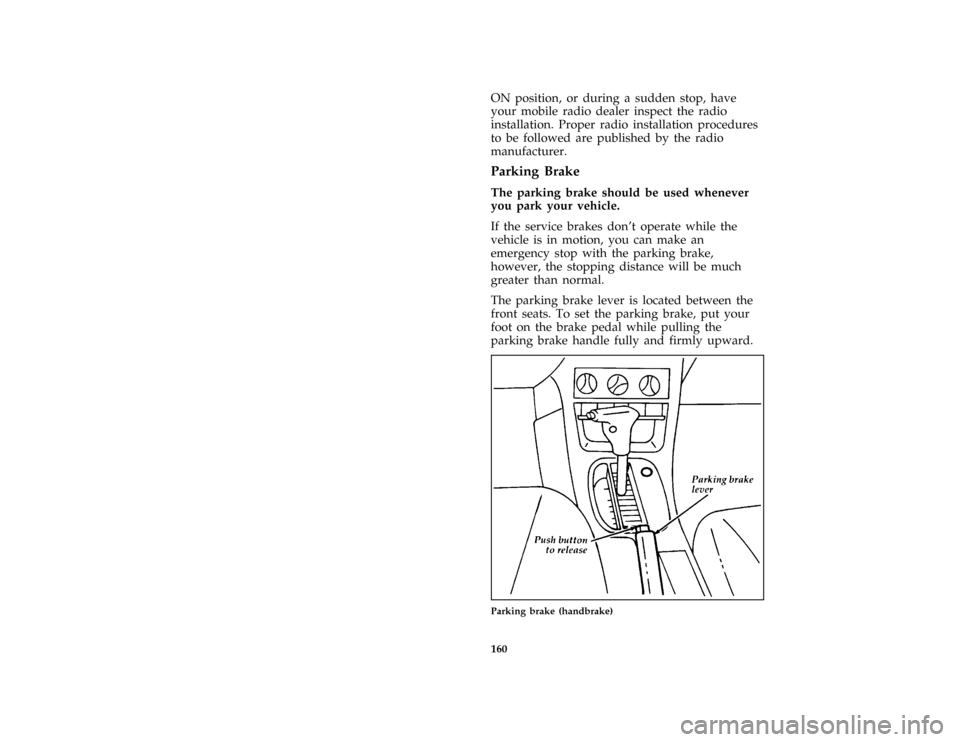
*
[DR10800(ALL)11/91]
If the service brakes don't operate while the
vehicle is in motion, you can make an
emergency stop with the parking brake,
however, the stopping distance will be much
greater than normal.
*
[DR10900(ALL)11/93]
The parking brake lever is located between the
front seats. To set the parking brake, put your
foot on the brake pedal while pulling the
parking brake handle fully and firmly upward.
[DR11000(ALL)03/94]
half page art:0032065-C
Parking brake (handbrake)
File:prdrp.ex
Update:Fri Jun 23 19:35:02 1995
Page 196 of 298
![FORD PROBE 1996 2.G Owners Manual 199
*
[AC01400(ALL)05/95]
NOTE: The Federal Communications
Commission (FCC) or the Canadian
Radio Telecommunications Commission
(CRTC) regulates the use of mobile
communications systems Ð such as
two](/img/11/5320/w960_5320-195.png "FORD PROBE 1996 2.G Owners Manual 199
*
[AC01400(ALL)05/95]
NOTE: The Federal Communications
Commission (FCC) or the Canadian
Radio Telecommunications Commission
(CRTC) regulates the use of mobile
communications systems Ð such as
two")
199
*
[AC01400(ALL)05/95]
NOTE: The Federal Communications
Commission (FCC) or the Canadian
Radio Telecommunications Commission
(CRTC) regulates the use of mobile
communications systems Ð such as
two-way radios, telephones, and theft
alarms Ð that are equipped with radio
transmitters. Any such equipment
installed in your vehicle should comply
with FCC or CRTC regulations and
should be installed only by a qualified
technician.
*
[AC01500(ALL)01/95]
NOTE: Mobile communications systems may
harm the operation of your vehicle,
particularly if they are not properly
designed for automotive use or are not
properly installed. For example, when
operated, such systems may cause the
engine to stumble or stall. In addition,
such systems may themselves be
damaged or their operation affected by
operating your vehicle. (Citizens band
[CB] transceivers, garage door openers,
and other transmitters whose power
output is 5 watts or less will not
ordinarily affect your vehicle's
operation.)
*
[AC01600(ALL)05/95]
NOTE: Because we have no control over the
installation, design, or manufacture of
such systems, Ford cannot assume
responsibility for any adverse effects or
damage that may result if you use this
equipment.
File:pracp.ex
Update:Fri Jun 23 19:33:54 1995