lock FORD RANGER 2008 2.G User Guide
[x] Cancel search | Manufacturer: FORD, Model Year: 2008, Model line: RANGER, Model: FORD RANGER 2008 2.GPages: 272, PDF Size: 2.73 MB
Page 39 of 272
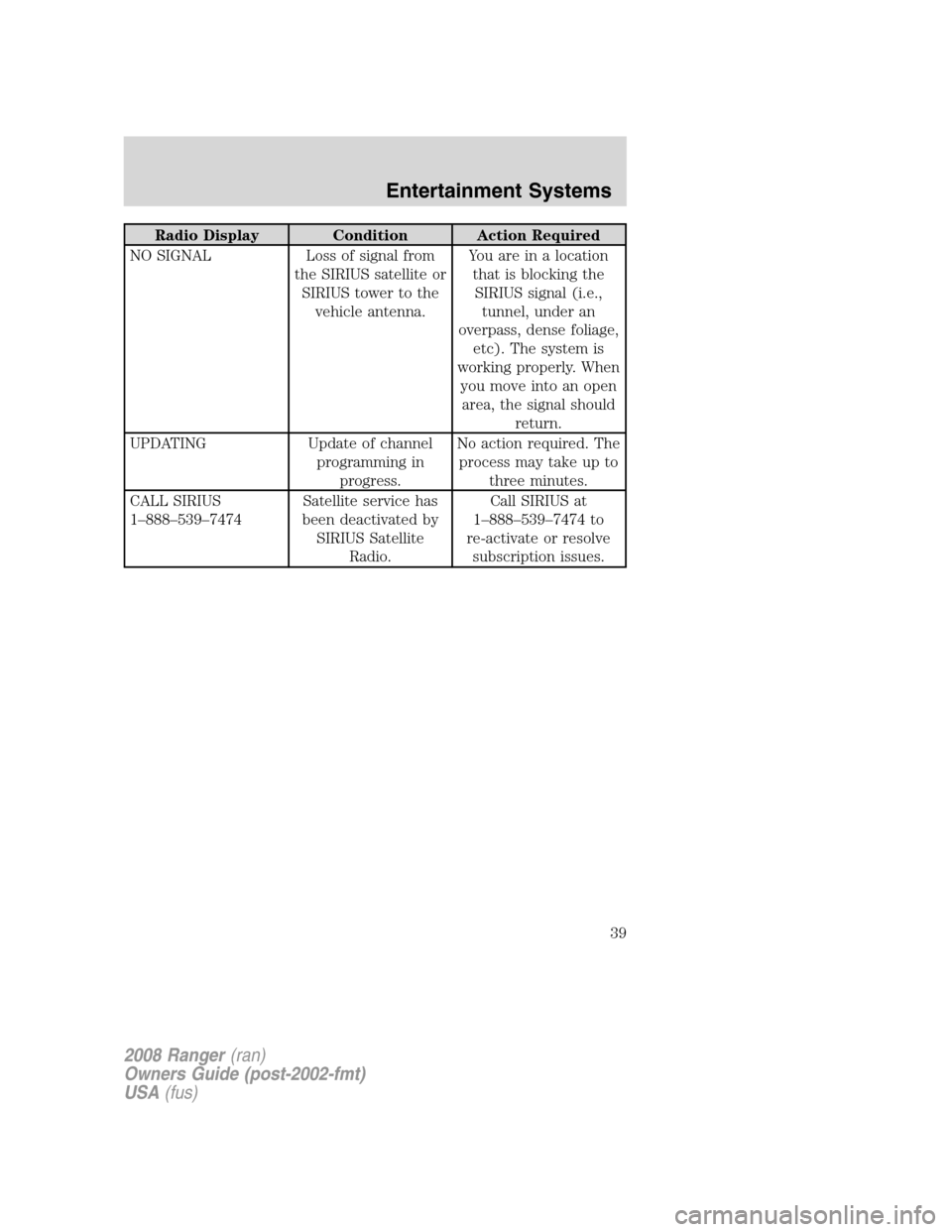
Radio Display Condition Action Required
NO SIGNAL Loss of signal from
the SIRIUS satellite or
SIRIUS tower to the
vehicle antenna.You are in a location
that is blocking the
SIRIUS signal (i.e.,
tunnel, under an
overpass, dense foliage,
etc). The system is
working properly. When
you move into an open
area, the signal should
return.
UPDATING Update of channel
programming in
progress.No action required. The
process may take up to
three minutes.
CALL SIRIUS
1–888–539–7474Satellite service has
been deactivated by
SIRIUS Satellite
Radio.Call SIRIUS at
1–888–539–7474 to
re-activate or resolve
subscription issues.
2008 Ranger(ran)
Owners Guide (post-2002-fmt)
USA(fus)
Entertainment Systems
39
Page 46 of 272
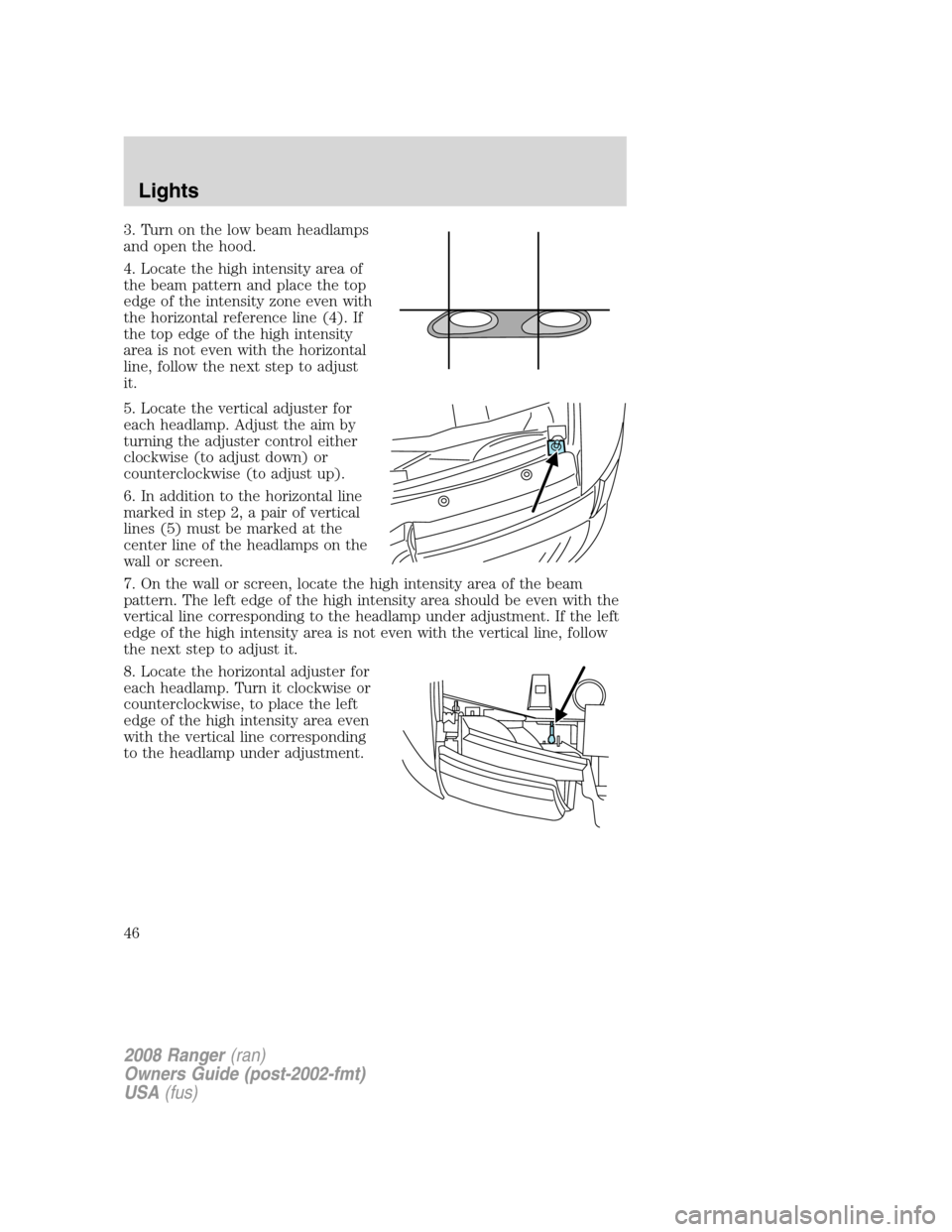
3. Turn on the low beam headlamps
and open the hood.
4. Locate the high intensity area of
the beam pattern and place the top
edge of the intensity zone even with
the horizontal reference line (4). If
the top edge of the high intensity
area is not even with the horizontal
line, follow the next step to adjust
it.
5. Locate the vertical adjuster for
each headlamp. Adjust the aim by
turning the adjuster control either
clockwise (to adjust down) or
counterclockwise (to adjust up).
6. In addition to the horizontal line
marked in step 2, a pair of vertical
lines (5) must be marked at the
center line of the headlamps on the
wall or screen.
7. On the wall or screen, locate the high intensity area of the beam
pattern. The left edge of the high intensity area should be even with the
vertical line corresponding to the headlamp under adjustment. If the left
edge of the high intensity area is not even with the vertical line, follow
the next step to adjust it.
8. Locate the horizontal adjuster for
each headlamp. Turn it clockwise or
counterclockwise, to place the left
edge of the high intensity area even
with the vertical line corresponding
to the headlamp under adjustment.
2008 Ranger(ran)
Owners Guide (post-2002-fmt)
USA(fus)
Lights
46
Page 49 of 272
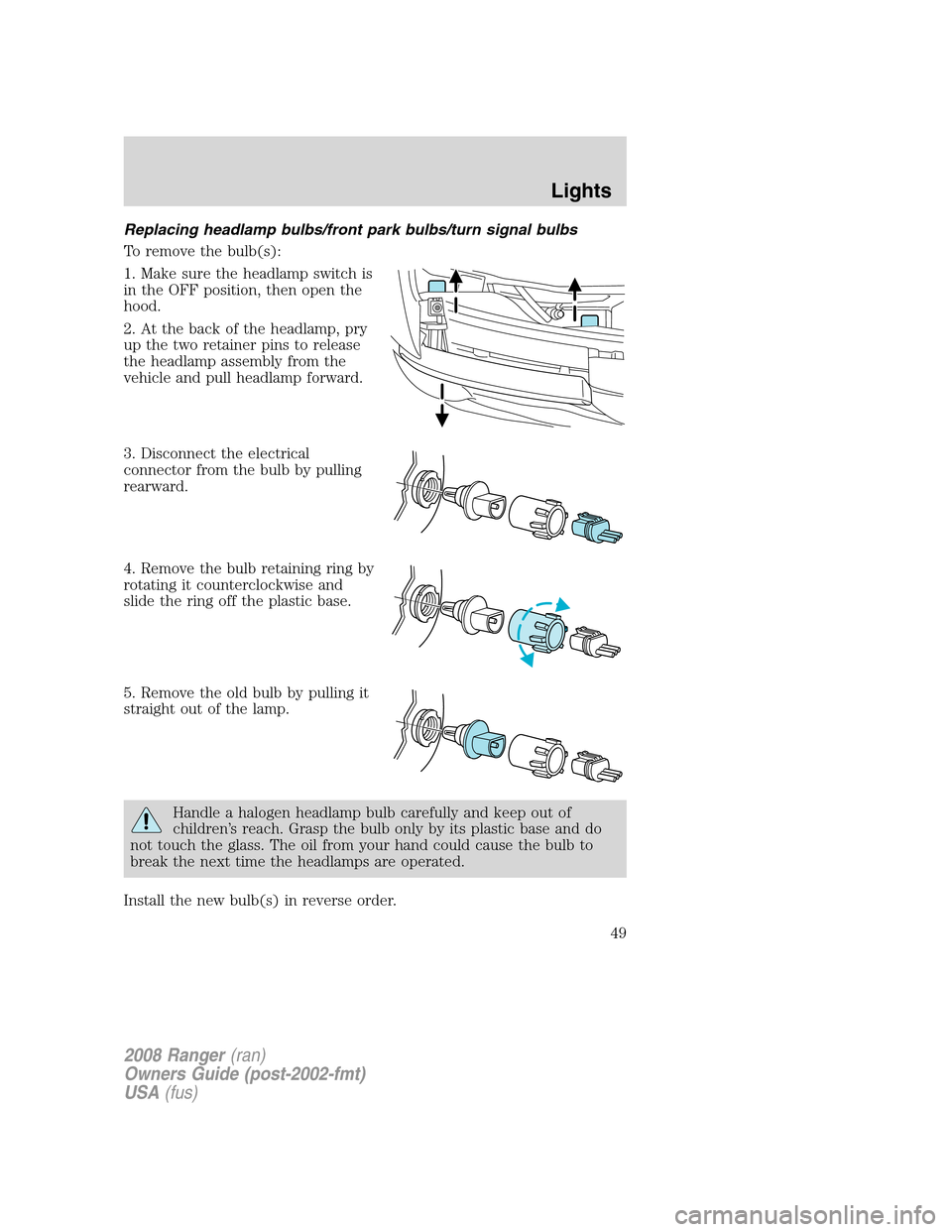
Replacing headlamp bulbs/front park bulbs/turn signal bulbs
To remove the bulb(s):
1. Make sure the headlamp switch is
in the OFF position, then open the
hood.
2. At the back of the headlamp, pry
up the two retainer pins to release
the headlamp assembly from the
vehicle and pull headlamp forward.
3. Disconnect the electrical
connector from the bulb by pulling
rearward.
4. Remove the bulb retaining ring by
rotating it counterclockwise and
slide the ring off the plastic base.
5. Remove the old bulb by pulling it
straight out of the lamp.
Handle a halogen headlamp bulb carefully and keep out of
children’s reach. Grasp the bulb only by its plastic base and do
not touch the glass. The oil from your hand could cause the bulb to
break the next time the headlamps are operated.
Install the new bulb(s) in reverse order.
2008 Ranger(ran)
Owners Guide (post-2002-fmt)
USA(fus)
Lights
49
Page 50 of 272
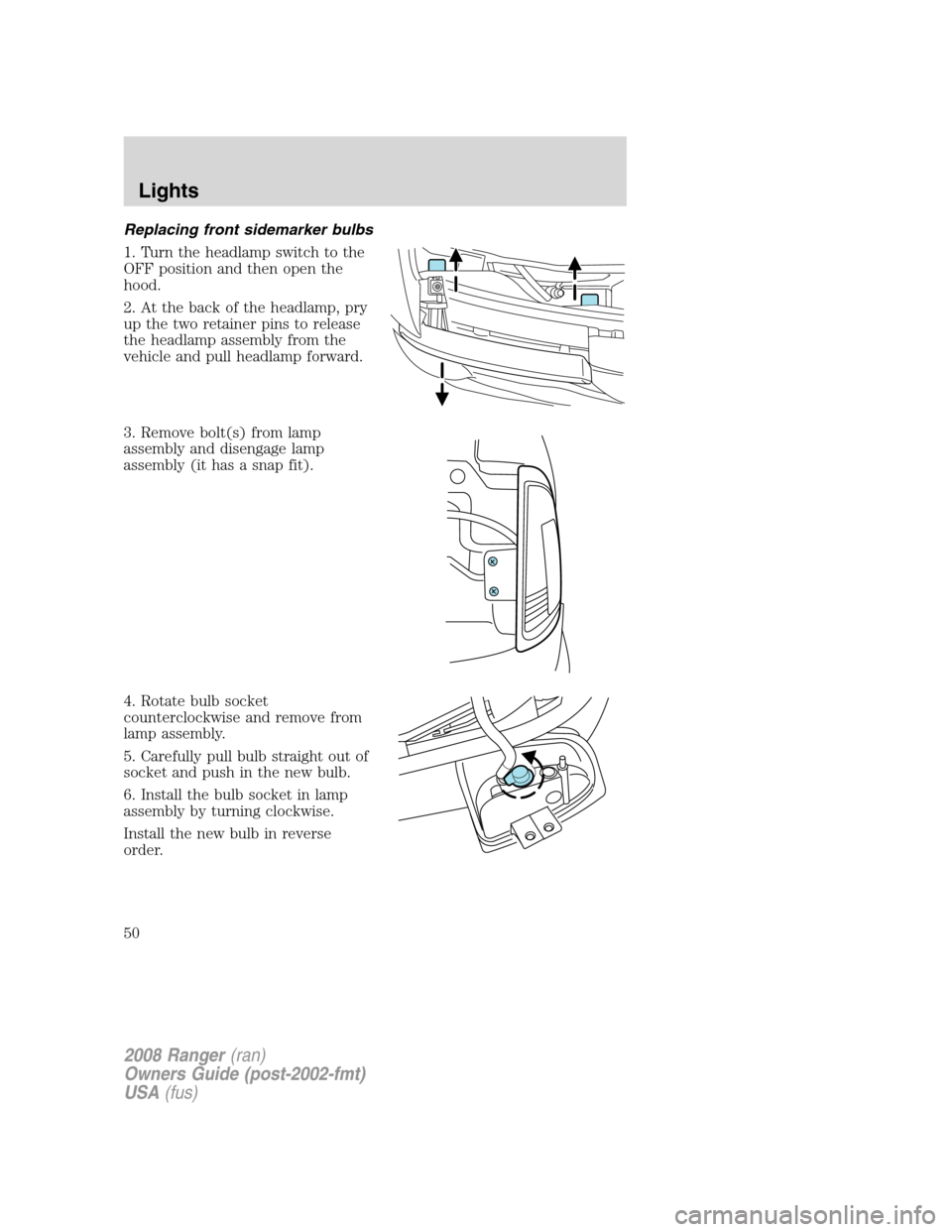
Replacing front sidemarker bulbs
1. Turn the headlamp switch to the
OFF position and then open the
hood.
2. At the back of the headlamp, pry
up the two retainer pins to release
the headlamp assembly from the
vehicle and pull headlamp forward.
3. Remove bolt(s) from lamp
assembly and disengage lamp
assembly (it has a snap fit).
4. Rotate bulb socket
counterclockwise and remove from
lamp assembly.
5. Carefully pull bulb straight out of
socket and push in the new bulb.
6. Install the bulb socket in lamp
assembly by turning clockwise.
Install the new bulb in reverse
order.
2008 Ranger(ran)
Owners Guide (post-2002-fmt)
USA(fus)
Lights
50
Page 51 of 272
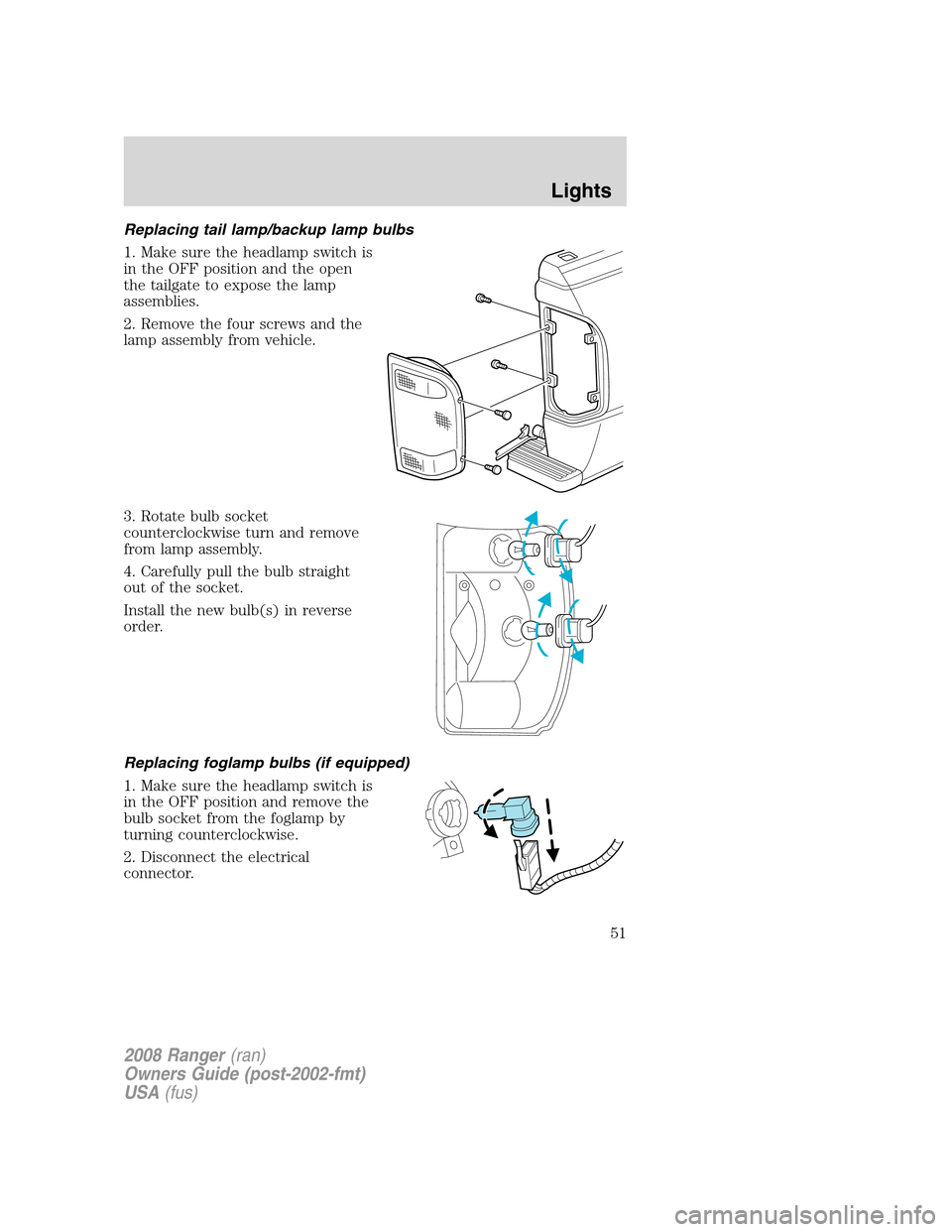
Replacing tail lamp/backup lamp bulbs
1. Make sure the headlamp switch is
in the OFF position and the open
the tailgate to expose the lamp
assemblies.
2. Remove the four screws and the
lamp assembly from vehicle.
3. Rotate bulb socket
counterclockwise turn and remove
from lamp assembly.
4. Carefully pull the bulb straight
out of the socket.
Install the new bulb(s) in reverse
order.
Replacing foglamp bulbs (if equipped)
1. Make sure the headlamp switch is
in the OFF position and remove the
bulb socket from the foglamp by
turning counterclockwise.
2. Disconnect the electrical
connector.
2008 Ranger(ran)
Owners Guide (post-2002-fmt)
USA(fus)
Lights
51
Page 52 of 272
Install the new bulb in reverse order.
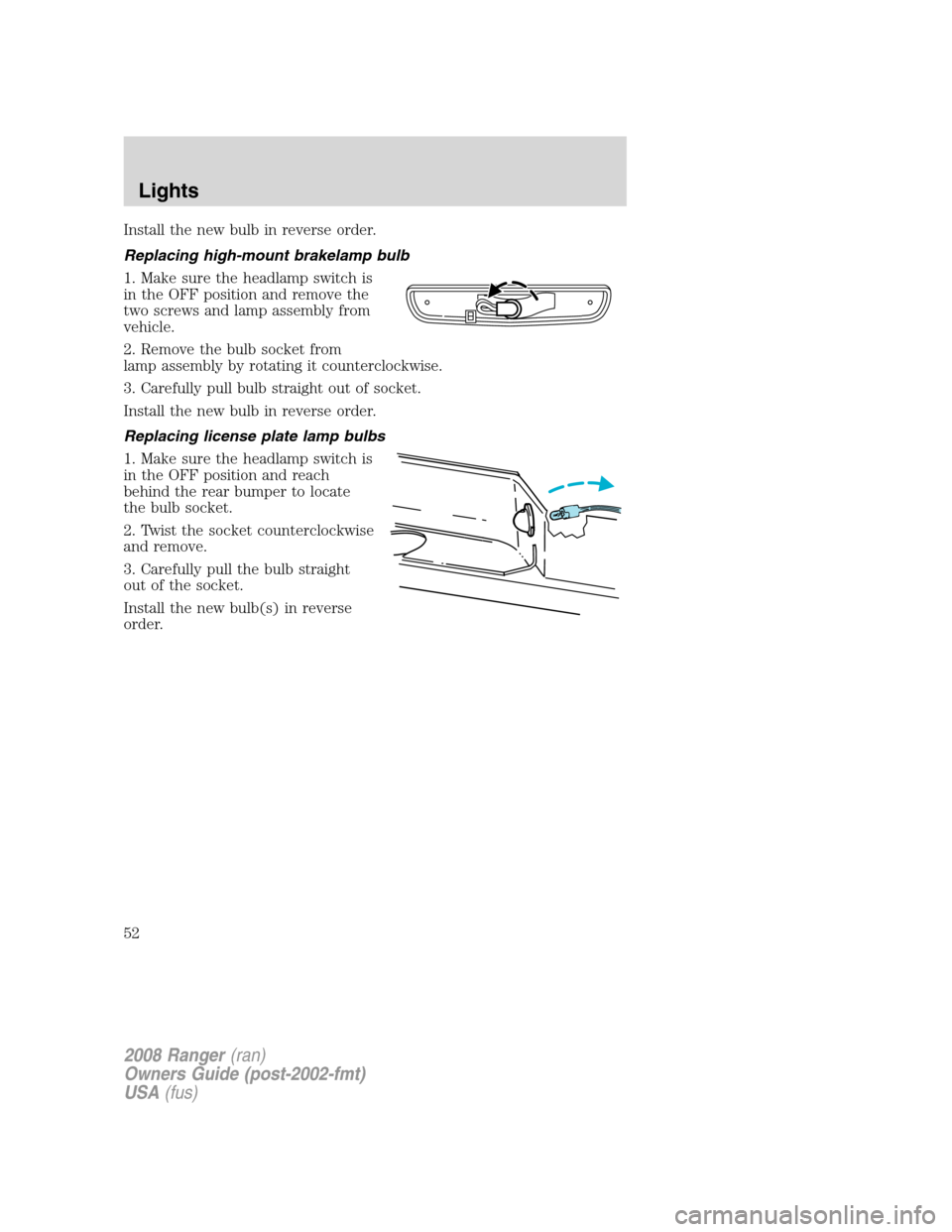
Replacing high-mount brakelamp bulb
1. Make sure the headlamp switch is
in the OFF position and remove the
two screws and lamp assembly from
vehicle.
2. Remove the bulb socket from
lamp assembly by rotating it counterclockwise.
3. Carefully pull bulb straight out of socket.
Install the new bulb in reverse order.
Replacing license plate lamp bulbs
1. Make sure the headlamp switch is
in the OFF position and reach
behind the rear bumper to locate
the bulb socket.
2. Twist the socket counterclockwise
and remove.
3. Carefully pull the bulb straight
out of the socket.
Install the new bulb(s) in reverse
order.
2008 Ranger(ran)
Owners Guide (post-2002-fmt)
USA(fus)
Lights
52
Page 54 of 272
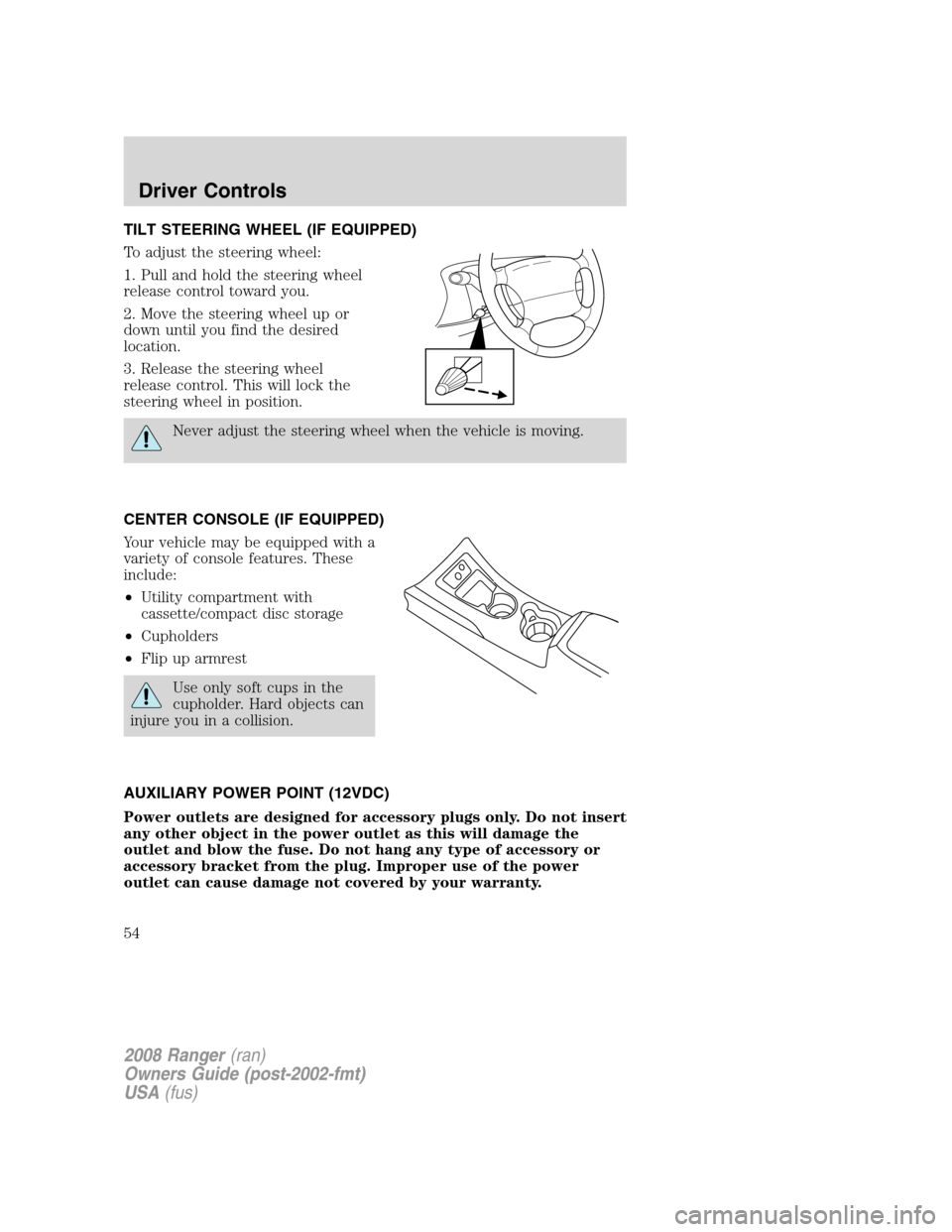
TILT STEERING WHEEL (IF EQUIPPED)
To adjust the steering wheel:
1. Pull and hold the steering wheel
release control toward you.
2. Move the steering wheel up or
down until you find the desired
location.
3. Release the steering wheel
release control. This will lock the
steering wheel in position.
Never adjust the steering wheel when the vehicle is moving.
CENTER CONSOLE (IF EQUIPPED)
Your vehicle may be equipped with a
variety of console features. These
include:
•Utility compartment with
cassette/compact disc storage
•Cupholders
•Flip up armrest
Use only soft cups in the
cupholder. Hard objects can
injure you in a collision.
AUXILIARY POWER POINT (12VDC)
Power outlets are designed for accessory plugs only. Do not insert
any other object in the power outlet as this will damage the
outlet and blow the fuse. Do not hang any type of accessory or
accessory bracket from the plug. Improper use of the power
outlet can cause damage not covered by your warranty.
2008 Ranger(ran)
Owners Guide (post-2002-fmt)
USA(fus)
Driver Controls
54
Page 56 of 272
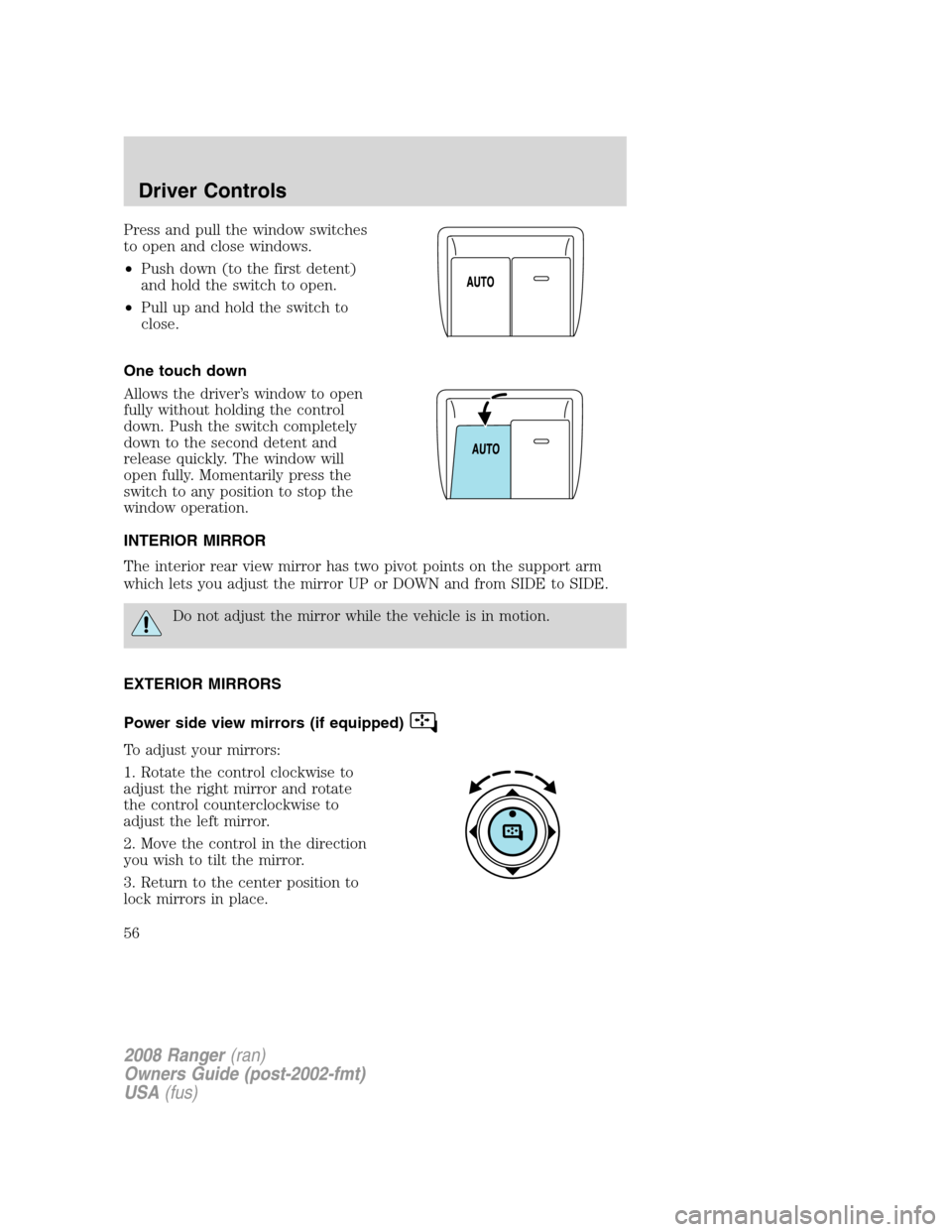
Press and pull the window switches
to open and close windows.
•Push down (to the first detent)
and hold the switch to open.
•Pull up and hold the switch to
close.
One touch down
Allows the driver’s window to open
fully without holding the control
down. Push the switch completely
down to the second detent and
release quickly. The window will
open fully. Momentarily press the
switch to any position to stop the
window operation.
INTERIOR MIRROR
The interior rear view mirror has two pivot points on the support arm
which lets you adjust the mirror UP or DOWN and from SIDE to SIDE.
Do not adjust the mirror while the vehicle is in motion.
EXTERIOR MIRRORS
Power side view mirrors (if equipped)
To adjust your mirrors:
1. Rotate the control clockwise to
adjust the right mirror and rotate
the control counterclockwise to
adjust the left mirror.
2. Move the control in the direction
you wish to tilt the mirror.
3. Return to the center position to
lock mirrors in place.
2008 Ranger(ran)
Owners Guide (post-2002-fmt)
USA(fus)
Driver Controls
56
Page 60 of 272
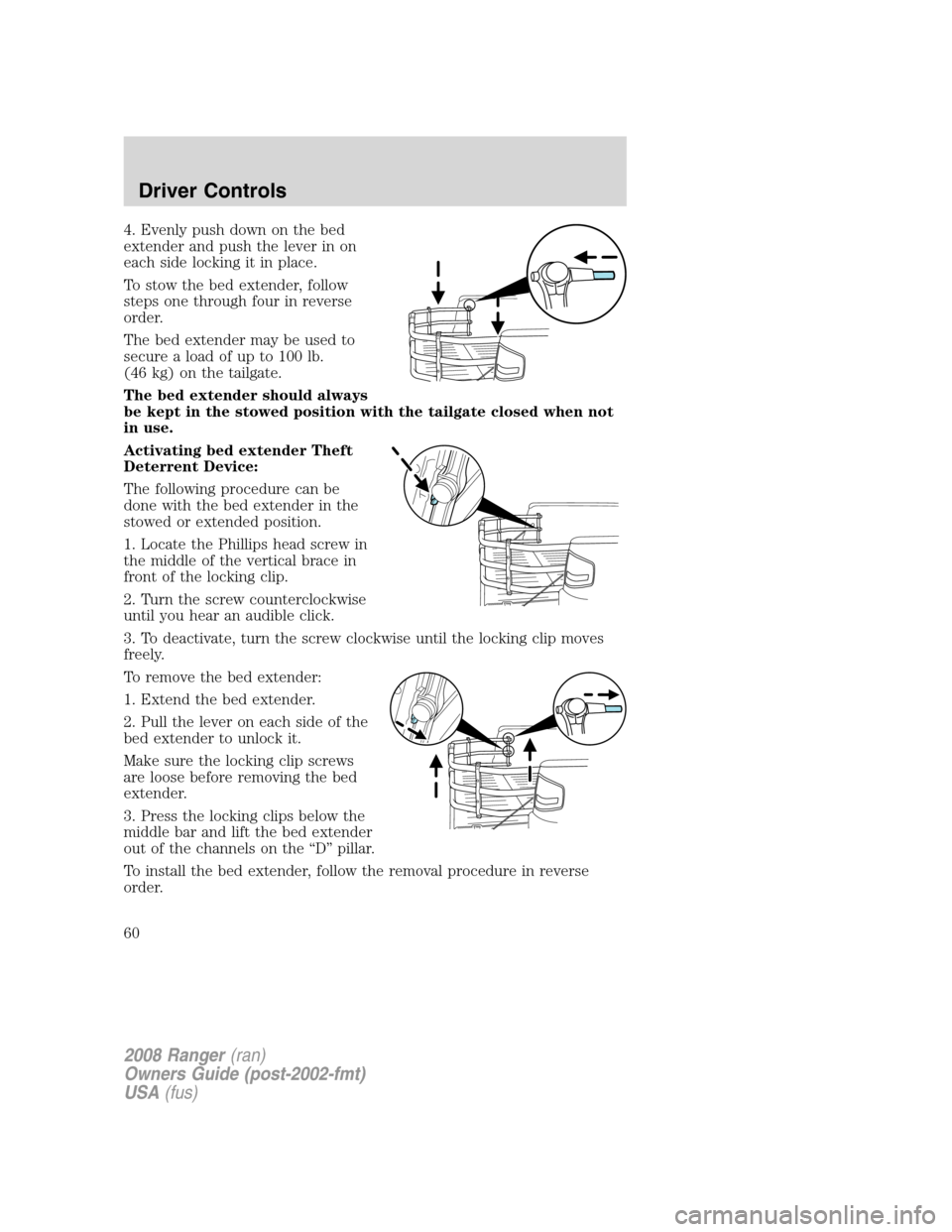
4. Evenly push down on the bed
extender and push the lever in on
each side locking it in place.
To stow the bed extender, follow
steps one through four in reverse
order.
The bed extender may be used to
secure a load of up to 100 lb.
(46 kg) on the tailgate.
The bed extender should always
be kept in the stowed position with the tailgate closed when not
in use.
Activating bed extender Theft
Deterrent Device:
The following procedure can be
done with the bed extender in the
stowed or extended position.
1. Locate the Phillips head screw in
the middle of the vertical brace in
front of the locking clip.
2. Turn the screw counterclockwise
until you hear an audible click.
3. To deactivate, turn the screw clockwise until the locking clip moves
freely.
To remove the bed extender:
1. Extend the bed extender.
2. Pull the lever on each side of the
bed extender to unlock it.
Make sure the locking clip screws
are loose before removing the bed
extender.
3. Press the locking clips below the
middle bar and lift the bed extender
out of the channels on the “D” pillar.
To install the bed extender, follow the removal procedure in reverse
order.
2008 Ranger(ran)
Owners Guide (post-2002-fmt)
USA(fus)
Driver Controls
60
Page 61 of 272
KEYS
The key operates all locks on your vehicle. You should always carry a
second key with you in a safe place in case you require it in an
emergency.
If your vehicle is equipped with the SecuriLock™ Passive Anti-theft
system, your keys are coded to your vehicle; using a non-coded key will
not permit your vehicle to start. If you lose your dealer supplied keys,
replacement keys are available through your authorized dealer.
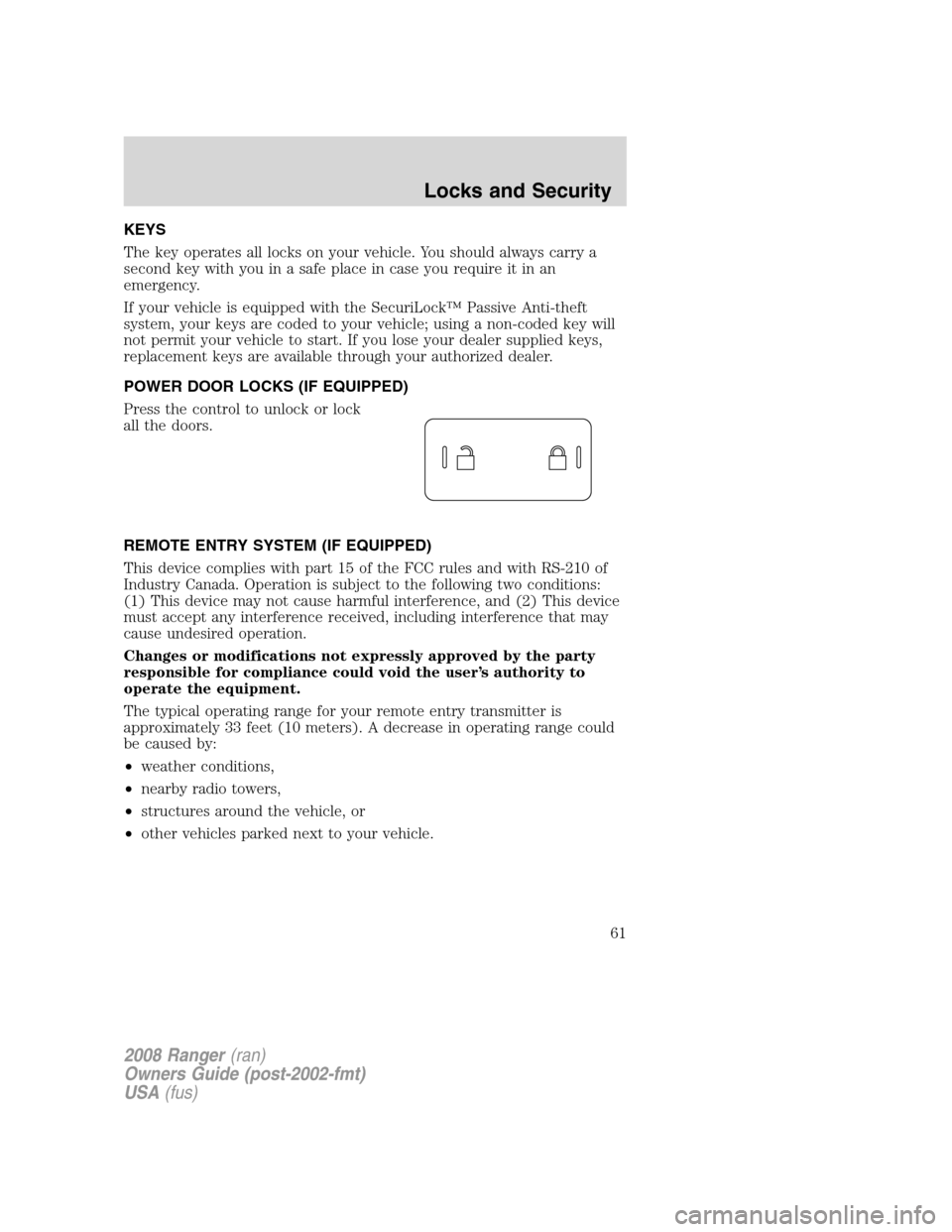
POWER DOOR LOCKS (IF EQUIPPED)
Press the control to unlock or lock
all the doors.
REMOTE ENTRY SYSTEM (IF EQUIPPED)
This device complies with part 15 of the FCC rules and with RS-210 of
Industry Canada. Operation is subject to the following two conditions:
(1) This device may not cause harmful interference, and (2) This device
must accept any interference received, including interference that may
cause undesired operation.
Changes or modifications not expressly approved by the party
responsible for compliance could void the user’s authority to
operate the equipment.
The typical operating range for your remote entry transmitter is
approximately 33 feet (10 meters). A decrease in operating range could
be caused by:
•weather conditions,
•nearby radio towers,
•structures around the vehicle, or
•other vehicles parked next to your vehicle.
2008 Ranger(ran)
Owners Guide (post-2002-fmt)
USA(fus)
Locks and Security
61