Information messages FORD RANGER 2019 User Guide
[x] Cancel search | Manufacturer: FORD, Model Year: 2019, Model line: RANGER, Model: FORD RANGER 2019Pages: 512, PDF Size: 7.63 MB
Page 178 of 512
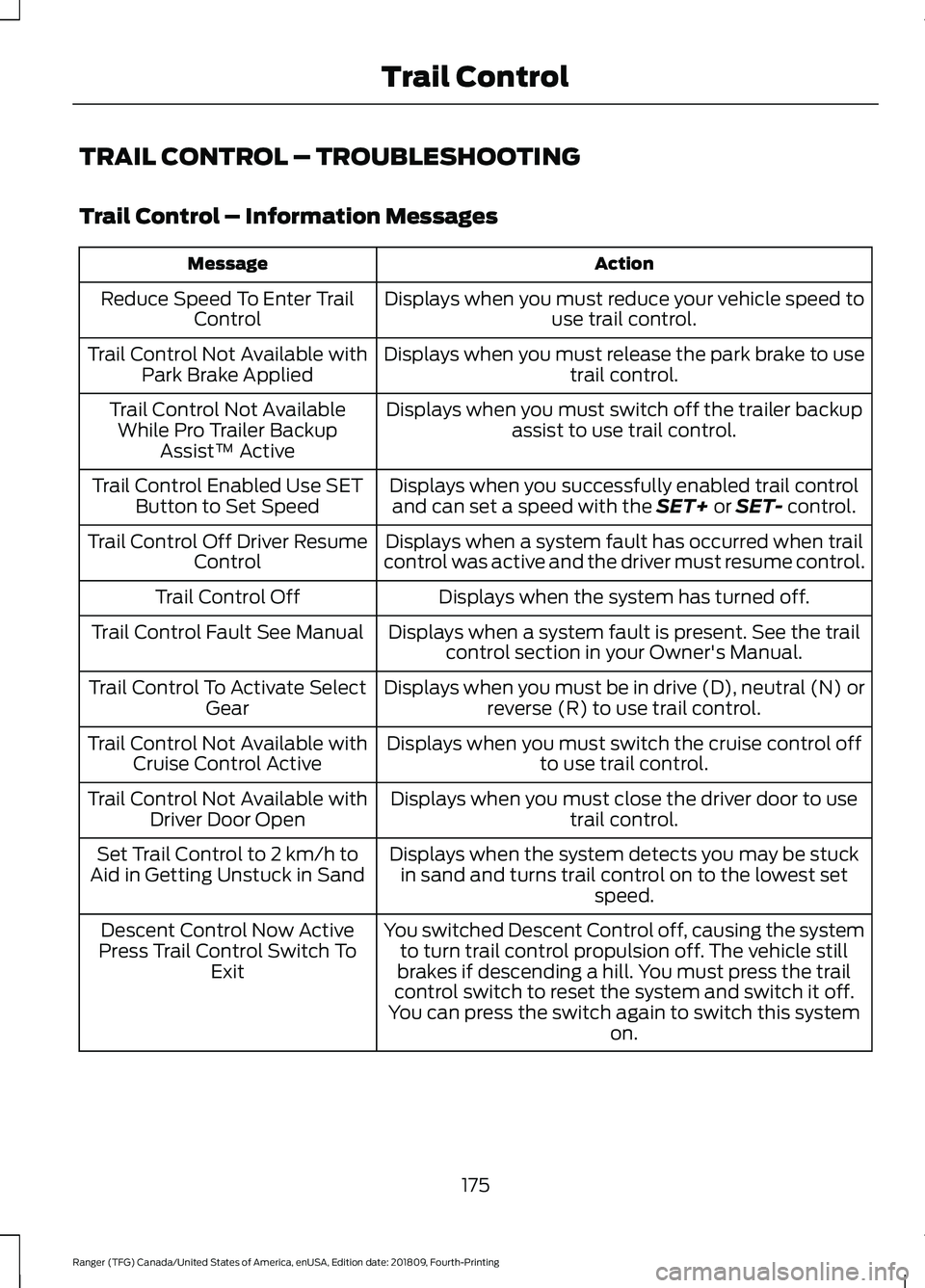
TRAIL CONTROL – TROUBLESHOOTING
Trail Control – Information Messages
Action
Message
Displays when you must reduce your vehicle speed touse trail control.
Reduce Speed To Enter Trail
Control
Displays when you must release the park brake to usetrail control.
Trail Control Not Available with
Park Brake Applied
Displays when you must switch off the trailer backupassist to use trail control.
Trail Control Not Available
While Pro Trailer Backup Assist™ Active
Displays when you successfully enabled trail controland can set a speed with the SET+ or SET- control.
Trail Control Enabled Use SET
Button to Set Speed
Displays when a system fault has occurred when trail
control was active and the driver must resume control.
Trail Control Off Driver Resume
Control
Displays when the system has turned off.
Trail Control Off
Displays when a system fault is present. See the trailcontrol section in your Owner's Manual.
Trail Control Fault See Manual
Displays when you must be in drive (D), neutral (N) orreverse (R) to use trail control.
Trail Control To Activate Select
Gear
Displays when you must switch the cruise control offto use trail control.
Trail Control Not Available with
Cruise Control Active
Displays when you must close the driver door to usetrail control.
Trail Control Not Available with
Driver Door Open
Displays when the system detects you may be stuckin sand and turns trail control on to the lowest set speed.
Set Trail Control to 2 km/h to
Aid in Getting Unstuck in Sand
You switched Descent Control off, causing the systemto turn trail control propulsion off. The vehicle still
brakes if descending a hill. You must press the trail
control switch to reset the system and switch it off.
You can press the switch again to switch this system on.
Descent Control Now Active
Press Trail Control Switch To Exit
175
Ranger (TFG) Canada/United States of America, enUSA, Edition date: 201809, Fourth-Printing Trail Control
Page 179 of 512
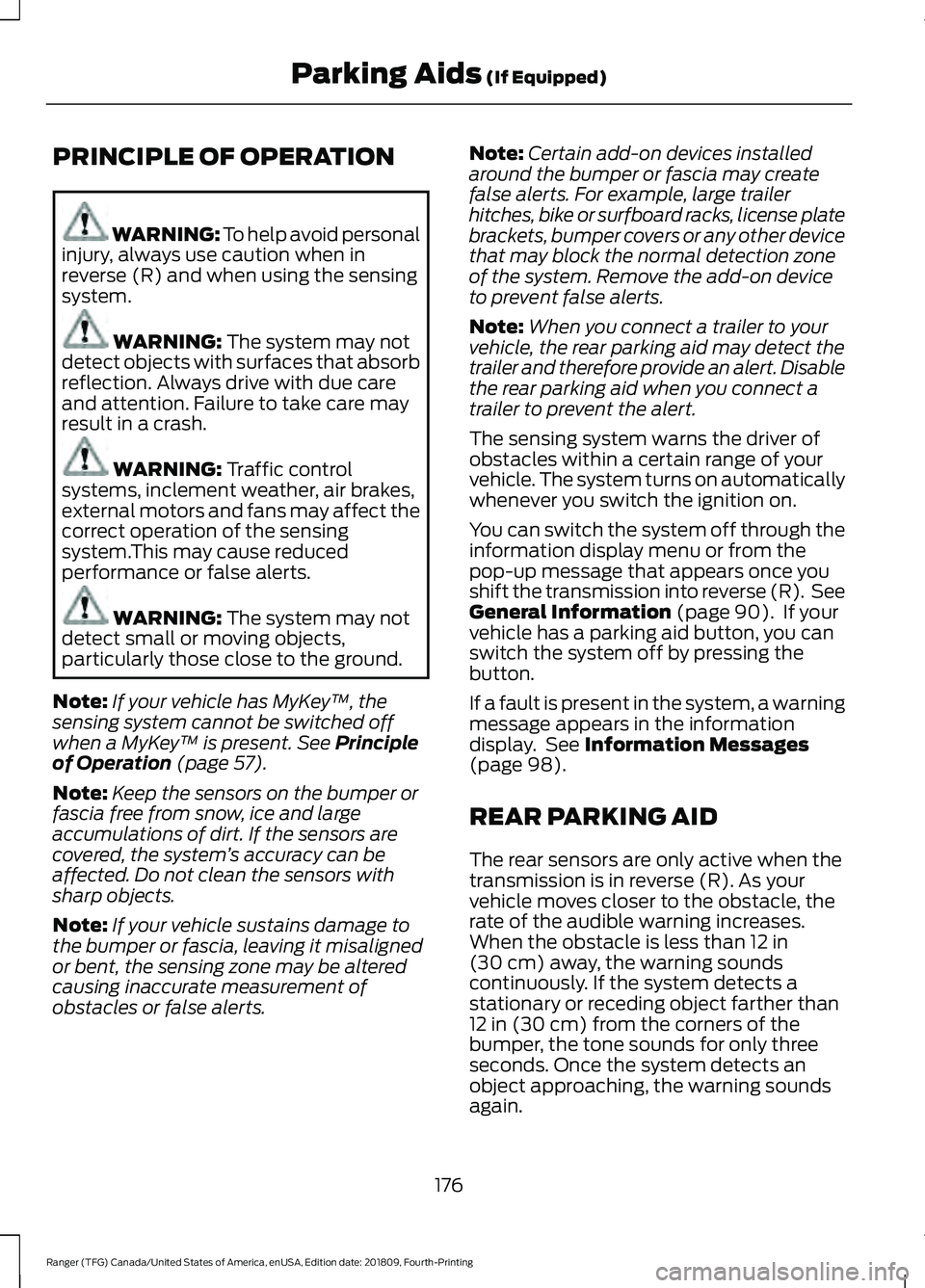
PRINCIPLE OF OPERATION
WARNING: To help avoid personal
injury, always use caution when in
reverse (R) and when using the sensing
system. WARNING: The system may not
detect objects with surfaces that absorb
reflection. Always drive with due care
and attention. Failure to take care may
result in a crash. WARNING:
Traffic control
systems, inclement weather, air brakes,
external motors and fans may affect the
correct operation of the sensing
system.This may cause reduced
performance or false alerts. WARNING:
The system may not
detect small or moving objects,
particularly those close to the ground.
Note: If your vehicle has MyKey ™, the
sensing system cannot be switched off
when a MyKey ™ is present.
See Principle
of Operation (page 57).
Note: Keep the sensors on the bumper or
fascia free from snow, ice and large
accumulations of dirt. If the sensors are
covered, the system ’s accuracy can be
affected. Do not clean the sensors with
sharp objects.
Note: If your vehicle sustains damage to
the bumper or fascia, leaving it misaligned
or bent, the sensing zone may be altered
causing inaccurate measurement of
obstacles or false alerts. Note:
Certain add-on devices installed
around the bumper or fascia may create
false alerts. For example, large trailer
hitches, bike or surfboard racks, license plate
brackets, bumper covers or any other device
that may block the normal detection zone
of the system. Remove the add-on device
to prevent false alerts.
Note: When you connect a trailer to your
vehicle, the rear parking aid may detect the
trailer and therefore provide an alert. Disable
the rear parking aid when you connect a
trailer to prevent the alert.
The sensing system warns the driver of
obstacles within a certain range of your
vehicle. The system turns on automatically
whenever you switch the ignition on.
You can switch the system off through the
information display menu or from the
pop-up message that appears once you
shift the transmission into reverse (R). See
General Information
(page 90). If your
vehicle has a parking aid button, you can
switch the system off by pressing the
button.
If a fault is present in the system, a warning
message appears in the information
display. See
Information Messages
(page 98).
REAR PARKING AID
The rear sensors are only active when the
transmission is in reverse (R). As your
vehicle moves closer to the obstacle, the
rate of the audible warning increases.
When the obstacle is less than
12 in
(30 cm) away, the warning sounds
continuously. If the system detects a
stationary or receding object farther than
12 in (30 cm)
from the corners of the
bumper, the tone sounds for only three
seconds. Once the system detects an
object approaching, the warning sounds
again.
176
Ranger (TFG) Canada/United States of America, enUSA, Edition date: 201809, Fourth-Printing Parking Aids
(If Equipped)
Page 199 of 512
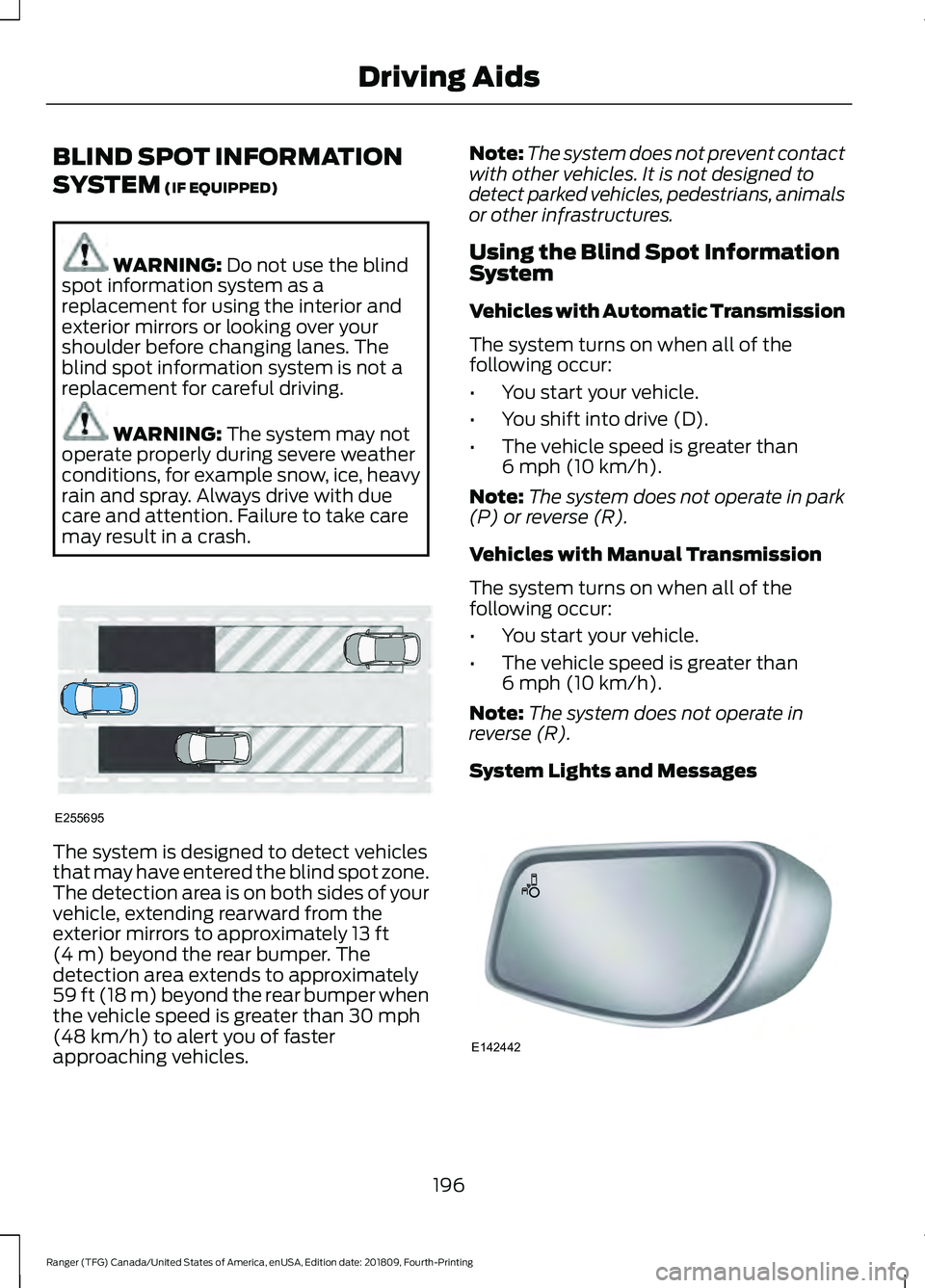
BLIND SPOT INFORMATION
SYSTEM (IF EQUIPPED)
WARNING:
Do not use the blind
spot information system as a
replacement for using the interior and
exterior mirrors or looking over your
shoulder before changing lanes. The
blind spot information system is not a
replacement for careful driving. WARNING:
The system may not
operate properly during severe weather
conditions, for example snow, ice, heavy
rain and spray. Always drive with due
care and attention. Failure to take care
may result in a crash. The system is designed to detect vehicles
that may have entered the blind spot zone.
The detection area is on both sides of your
vehicle, extending rearward from the
exterior mirrors to approximately
13 ft
(4 m) beyond the rear bumper. The
detection area extends to approximately
59 ft (18 m)
beyond the rear bumper when
the vehicle speed is greater than 30 mph
(48 km/h) to alert you of faster
approaching vehicles. Note:
The system does not prevent contact
with other vehicles. It is not designed to
detect parked vehicles, pedestrians, animals
or other infrastructures.
Using the Blind Spot Information
System
Vehicles with Automatic Transmission
The system turns on when all of the
following occur:
• You start your vehicle.
• You shift into drive (D).
• The vehicle speed is greater than
6 mph (10 km/h)
.
Note: The system does not operate in park
(P) or reverse (R).
Vehicles with Manual Transmission
The system turns on when all of the
following occur:
• You start your vehicle.
• The vehicle speed is greater than
6 mph (10 km/h)
.
Note: The system does not operate in
reverse (R).
System Lights and Messages 196
Ranger (TFG) Canada/United States of America, enUSA, Edition date: 201809, Fourth-Printing Driving AidsE255695 E142442
Page 200 of 512
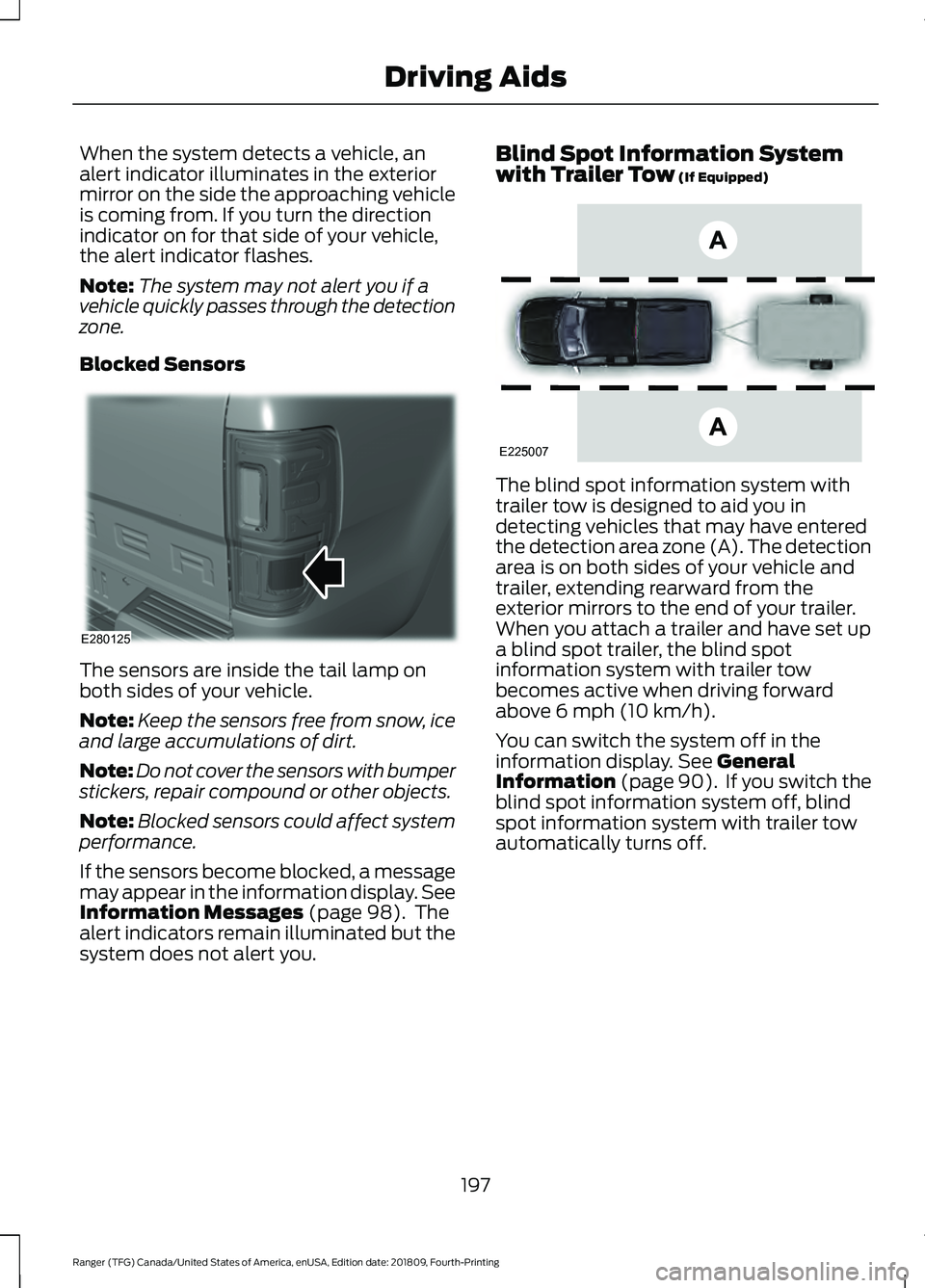
When the system detects a vehicle, an
alert indicator illuminates in the exterior
mirror on the side the approaching vehicle
is coming from. If you turn the direction
indicator on for that side of your vehicle,
the alert indicator flashes.
Note:
The system may not alert you if a
vehicle quickly passes through the detection
zone.
Blocked Sensors The sensors are inside the tail lamp on
both sides of your vehicle.
Note:
Keep the sensors free from snow, ice
and large accumulations of dirt.
Note: Do not cover the sensors with bumper
stickers, repair compound or other objects.
Note: Blocked sensors could affect system
performance.
If the sensors become blocked, a message
may appear in the information display. See
Information Messages (page 98). The
alert indicators remain illuminated but the
system does not alert you. Blind Spot Information System
with Trailer Tow
(If Equipped)
The blind spot information system with
trailer tow is designed to aid you in
detecting vehicles that may have entered
the detection area zone (A). The detection
area is on both sides of your vehicle and
trailer, extending rearward from the
exterior mirrors to the end of your trailer.
When you attach a trailer and have set up
a blind spot trailer, the blind spot
information system with trailer tow
becomes active when driving forward
above
6 mph (10 km/h).
You can switch the system off in the
information display.
See General
Information (page 90). If you switch the
blind spot information system off, blind
spot information system with trailer tow
automatically turns off.
197
Ranger (TFG) Canada/United States of America, enUSA, Edition date: 201809, Fourth-Printing Driving AidsE280125 E225007
Page 202 of 512
or add a new trailer. If you ignore the
request or if you exit the screen, a message
appears stating the system has turned off
due to a trailer connect. This message may
not appear until your vehicle speed reaches
22 mph (35 km/h).
The blind spot information system with
trailer tow activates when driving forward
for that particular trailer set up. If you cycle
the ignition, the blind spot information
system with trailer tow continues to
function using the last trailer you select.
Trailer Considerations
The system is designed to work with a
trailer with a front width of
8.2 ft (2.5 m)
or less, and a total length from the trailer
hitch ball to the rear of the trailer of
33 ft
(10 m) or less.
Some trailers may cause a slight change
in system performance:
• Large box trailers may cause false
alerts to occur when driving next to
infrastructures or near parked cars. A
false alert may also occur while making
a 90-degree turn.
• Trailers that have a width greater than
8.2 ft (2.5 m)
at the front and have a
total length greater than 20 ft (6 m)
may cause delayed alerts when a
vehicle is passing at high speed.
• Box trailers that have a width greater
than
8.2 ft (2.5 m) at the front may
cause early alerts when you pass a
vehicle.
• Clam shell or V-Nose box trailers with
a width greater than
8.2 ft (2.5 m) at
the front may cause delayed alerts
when a vehicle traveling the same
speed as your vehicle merges lanes.
System Errors
If the system detects a fault, a warning
lamp illuminates and a message displays.
See
Information Messages (page 98). Switching the System On and Off
You can switch the system off using the
information display.
See General
Information (page 90). When you switch
the system off, you do not receive alerts
and the information display shows a
system off message. The warning indicator
in the cluster also illuminates. When you
switch the system on or off, the alert
indicators flash twice.
Note: The system remembers the last
setting when you start your vehicle.
To permanently switch the system off,
contact an authorized dealer.
CROSS TRAFFIC ALERT
(IF
EQUIPPED) WARNING:
Do not use the cross
traffic alert system as a replacement for
using the interior and exterior mirrors or
looking over your shoulder before
reversing out of a parking space. The
cross traffic alert system is not a
replacement for careful driving. WARNING:
The system may not
operate properly during severe weather
conditions, for example snow, ice, heavy
rain and spray. Always drive with due
care and attention. Failure to take care
may result in a crash.
The system is designed to alert you of
vehicles approaching from the sides when
you shift into reverse (R).
199
Ranger (TFG) Canada/United States of America, enUSA, Edition date: 201809, Fourth-Printing Driving Aids
Page 204 of 512
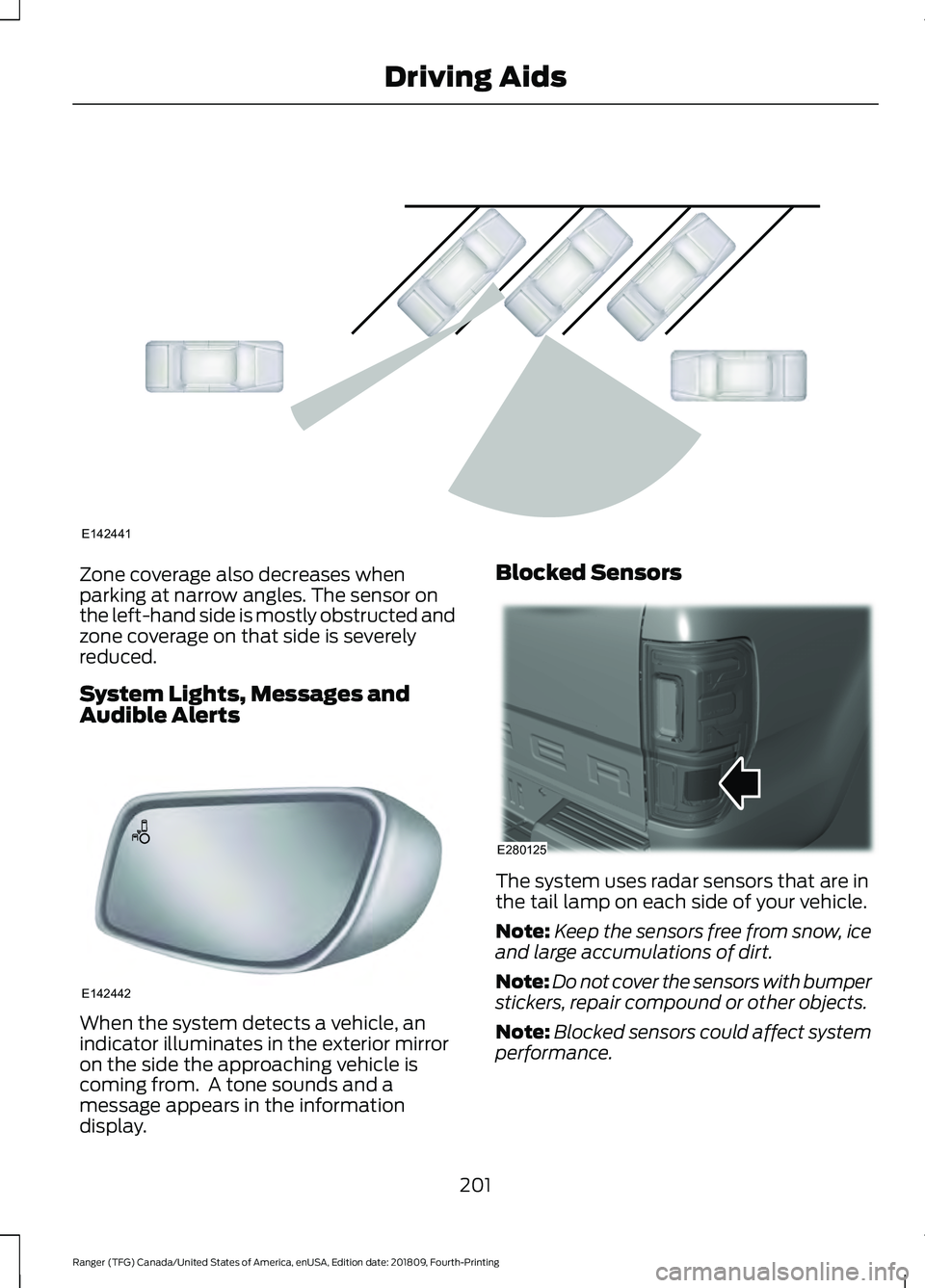
Zone coverage also decreases when
parking at narrow angles. The sensor on
the left-hand side is mostly obstructed and
zone coverage on that side is severely
reduced.
System Lights, Messages and
Audible Alerts
When the system detects a vehicle, an
indicator illuminates in the exterior mirror
on the side the approaching vehicle is
coming from. A tone sounds and a
message appears in the information
display. Blocked Sensors
The system uses radar sensors that are in
the tail lamp on each side of your vehicle.
Note:
Keep the sensors free from snow, ice
and large accumulations of dirt.
Note: Do not cover the sensors with bumper
stickers, repair compound or other objects.
Note: Blocked sensors could affect system
performance.
201
Ranger (TFG) Canada/United States of America, enUSA, Edition date: 201809, Fourth-Printing Driving AidsE142441 E142442 E280125
Page 205 of 512
If the sensors are blocked, a message may
appear in the information display when
you shift into reverse (R). See Information
Messages (page 98).
System Limitations
The system may not correctly operate
when any of the following occur:
• The sensors are blocked.
• Adjacently parked vehicles or objects
are obstructing the sensors.
• Vehicles approach at speeds greater
than
37 mph (60 km/h).
• The vehicle speed is greater than 7 mph
(12 km/h)
.
• You reverse out of an angled parking
space.
False Alerts
Note: If your vehicle has a tow bar with a
factory equipped trailer tow module and it
is towing a trailer, the system turns off. If
your vehicle has a tow bar but no factory
equipped trailer tow module, we
recommend that you switch the system off
manually. Operating the system with a
trailer attached causes poor performance.
In certain instances, false alerts may
illuminate the alert indicator even though
there is no vehicle in the coverage zone.
Some amount of false alerts are normal,
they are temporary and self-correct.
System Errors
If the system detects a fault a message
displays.
See Information Messages
(page 98).
Switching the System Off and On
You can temporarily switch the system off
using the information display. See
General
Information (page 90). When you switch
system off, a message displays.
See
Information Messages (page 98). Note:
The system turns on each time you
switch the ignition on and you shift into
reverse (R). If you temporarily switch the
system off, it turns on the next time you
switch the ignition on.
To permanently switch the system off,
contact an authorized dealer.
STEERING
Electric Power Steering WARNING:
The electric power
steering system has diagnostic checks
that continuously monitor the system. If
a fault is detected, a message displays
in the information display. Stop your
vehicle as soon as it is safe to do so.
Switch the ignition off. After at least 10
seconds, switch the ignition on and
watch the information display for a
steering system warning message. If a
steering system warning message
returns, have the system checked as
soon as possible. WARNING:
If the system detects
an error, you may not feel a difference in
the steering, however a serious condition
may exist. Have your vehicle checked as
soon as possible. Failure to do so may
result in loss of steering control.
Your vehicle is equipped with an electric
power-assisted steering system. There is
no fluid reservoir to check or fill.
If your vehicle loses electrical power while
you are driving (or if the ignition is turned
off), you can steer the vehicle manually,
but it takes more effort. Extreme
continuous steering may increase the effort
it takes for you to steer. This occurs to
prevent internal overheating and
permanent damage to your steering
system. If this should occur, you will neither
202
Ranger (TFG) Canada/United States of America, enUSA, Edition date: 201809, Fourth-Printing Driving Aids
Page 226 of 512
your vehicle has intelligent access,
press the engine START/STOP button
once without pressing the brake pedal.
You do not need to leave your keys in
the vehicle. You can lock and unlock
your vehicle as you normally do.
9. Release the brake pedal. WARNING: Do not disconnect the
battery during recreational towing. It
prevents the transfer case from shifting
properly and may cause the vehicle to
roll, even if the transmission is in park
(P). WARNING:
Shifting the transfer
case to its neutral position for
recreational towing may cause the
vehicle to roll, even if the transmission is
in park (P). It may injure the driver and
others. Make sure you press the foot
brake and the vehicle is in a secure, safe
position when you shift to neutral (N).
Note: Failing to put the transfer case in its
neutral position may damage vehicle
components.
Note: You can check the four-wheel-down
towing status at any time by opening the
driver door or by switching the ignition to the
accessory or on position and verifying the
confirmation message appears in the
cluster.
To exit four-wheel-down towing and return
the transfer case to the
2H position:
1. With your vehicle still properly secured
to the tow vehicle, switch the ignition
to the on position but do not start the
engine. If your vehicle has an ignition
key, turn the key to the on position. If
your vehicle has intelligent access,
press the engine START/STOP button
once without pressing the brake pedal.
2. Press and hold the brake pedal. 3. Shift the transmission out of neutral
(N) and into park (P).
4. Observe the messages on the information display screen.
Note: If completed successfully, the
instrument cluster displays
4X2, and
Neutral Tow Disabled.
Note: If the indicator light and message do
not display, you must perform the procedure
again from the beginning.
Note: You may hear an audible noise as the
transfer case shifts out of its neutral
position. This is normal.
223
Ranger (TFG) Canada/United States of America, enUSA, Edition date: 201809, Fourth-Printing Towing
Page 263 of 512
Only use oils certified for gasoline engines
by the American Petroleum Institute (API).
An oil with this trademark symbol
conforms to the current engine and
emission system protection standards and
fuel economy requirements of the
International Lubricants Specification
Advisory Committee (ILSAC).
To top up the engine oil level do the
following:
1. Clean the area surrounding the engine
oil filler cap before you remove it.
2. Remove the engine oil filler cap. See Under Hood Overview (page 258).
Turn it counterclockwise and remove
it.
3. Add engine oil that meets our specifications. See
Capacities and
Specifications (page 320). You may
have to use a funnel to pour the engine
oil into the opening.
4. Recheck the oil level.
5. If the oil level is correct, replace the dipstick and make sure it is fully seated.
6. Replace the engine oil filler cap. Turn it clockwise until you feel a strong
resistance.
Note: Do not add oil further than the
maximum mark. Oil levels above the
maximum mark may cause engine damage.
Note: Make sure you install the oil filler cap
correctly.
Note: Soak up any spillage with an
absorbent cloth immediately.
OIL CHANGE INDICATOR
RESET
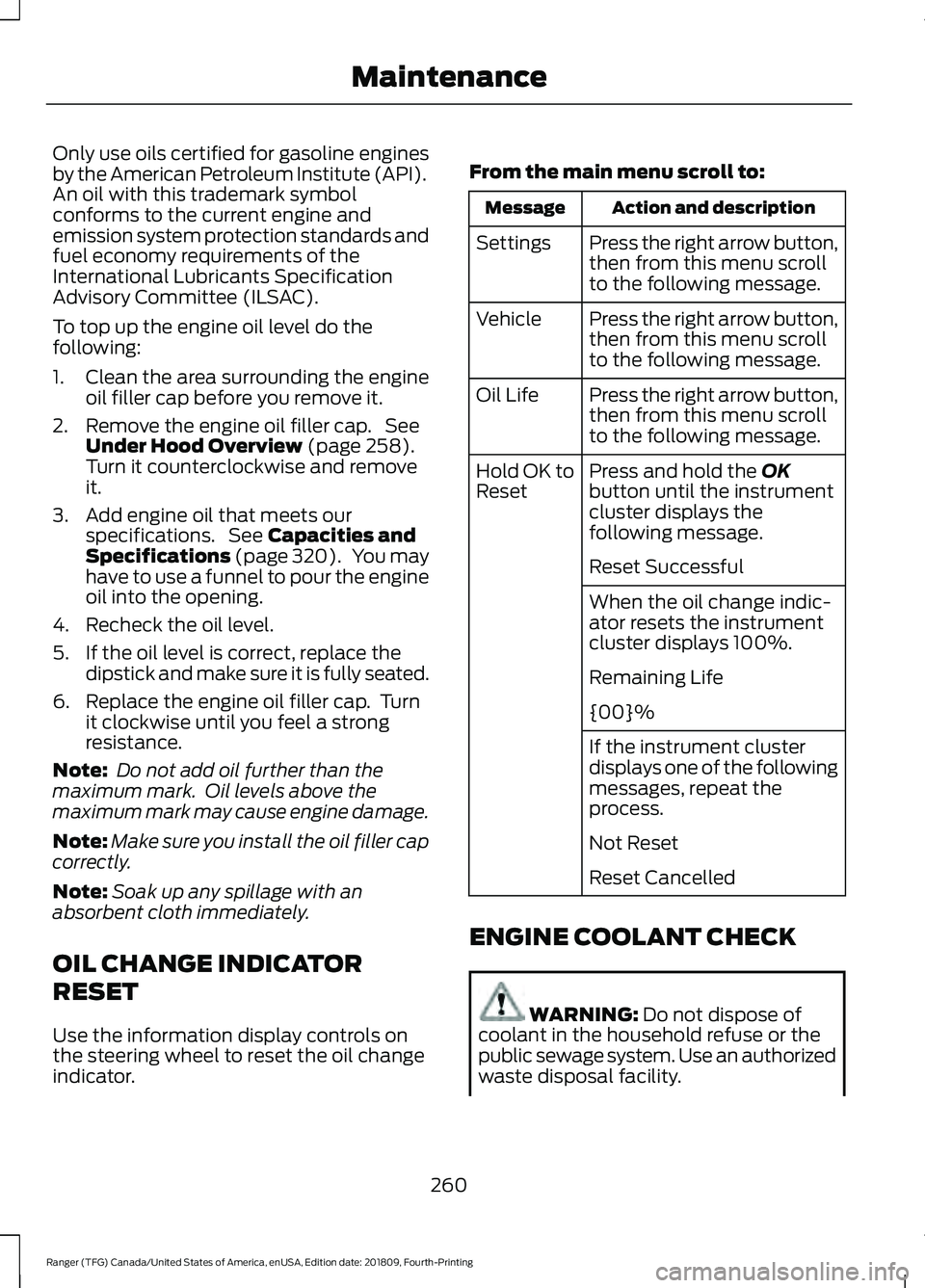
Use the information display controls on
the steering wheel to reset the oil change
indicator. From the main menu scroll to: Action and description
Message
Press the right arrow button,
then from this menu scroll
to the following message.
Settings
Press the right arrow button,
then from this menu scroll
to the following message.
Vehicle
Press the right arrow button,
then from this menu scroll
to the following message.
Oil Life
Press and hold the
OK
button until the instrument
cluster displays the
following message.
Hold OK to
Reset
Reset Successful
When the oil change indic-
ator resets the instrument
cluster displays 100%.
Remaining Life
{00}%
If the instrument cluster
displays one of the following
messages, repeat the
process.
Not Reset
Reset Cancelled
ENGINE COOLANT CHECK WARNING:
Do not dispose of
coolant in the household refuse or the
public sewage system. Use an authorized
waste disposal facility.
260
Ranger (TFG) Canada/United States of America, enUSA, Edition date: 201809, Fourth-Printing Maintenance
Page 266 of 512
To avoid fluid contamination, the reservoir
cap must remain in place and fully tight,
unless you are adding fluid.
Only use fluid that meets Ford
specifications. See Capacities and
Specifications (page 316).
POWER STEERING FLUID
CHECK
Your vehicle is equipped with an electric
power steering (EPS) system. There is no
fluid reservoir to check or fill.
WASHER FLUID CHECK WARNING:
If you operate your
vehicle in temperatures below 40°F
(5°C), use washer fluid with antifreeze
protection. Failure to use washer fluid
with antifreeze protection in cold
weather could result in impaired
windshield vision and increase the risk
of injury or accident.
Add fluid to fill the reservoir if the level is
low. Only use a washer fluid that meets
Ford specifications. See
Capacities and
Specifications (page 316).
State or local regulations on volatile
organic compounds may restrict the use
of methanol, a common windshield washer
antifreeze additive. Washer fluids
containing non-methanol antifreeze
agents should be used only if they provide
cold weather protection without damaging
the vehicle ’s paint finish, wiper blades or
washer system. CHARGING THE 12V BATTERY
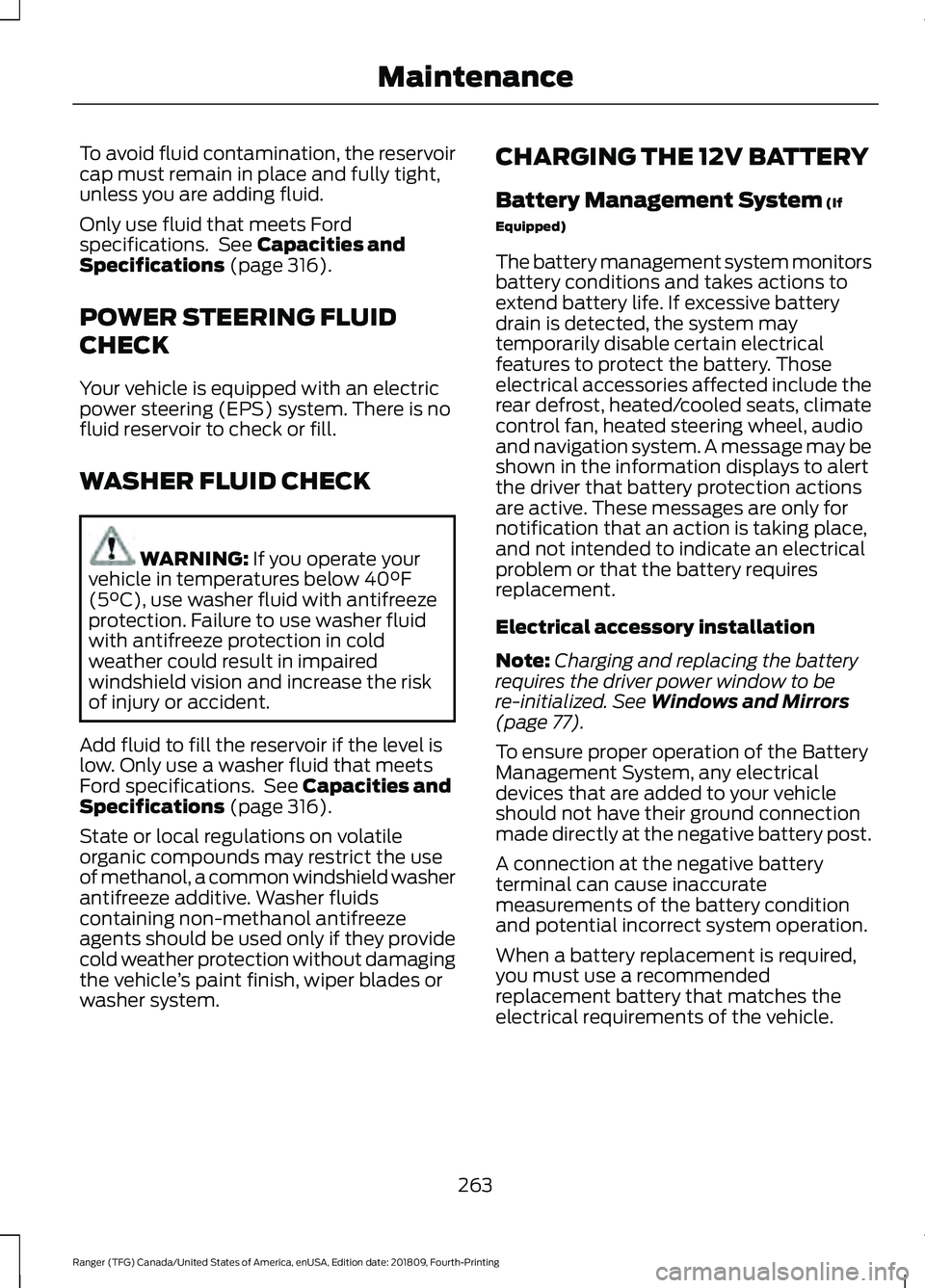
Battery Management System
(If
Equipped)
The battery management system monitors
battery conditions and takes actions to
extend battery life. If excessive battery
drain is detected, the system may
temporarily disable certain electrical
features to protect the battery. Those
electrical accessories affected include the
rear defrost, heated/cooled seats, climate
control fan, heated steering wheel, audio
and navigation system. A message may be
shown in the information displays to alert
the driver that battery protection actions
are active. These messages are only for
notification that an action is taking place,
and not intended to indicate an electrical
problem or that the battery requires
replacement.
Electrical accessory installation
Note: Charging and replacing the battery
requires the driver power window to be
re-initialized.
See Windows and Mirrors
(page 77).
To ensure proper operation of the Battery
Management System, any electrical
devices that are added to your vehicle
should not have their ground connection
made directly at the negative battery post.
A connection at the negative battery
terminal can cause inaccurate
measurements of the battery condition
and potential incorrect system operation.
When a battery replacement is required,
you must use a recommended
replacement battery that matches the
electrical requirements of the vehicle.
263
Ranger (TFG) Canada/United States of America, enUSA, Edition date: 201809, Fourth-Printing Maintenance