Information messages FORD RANGER 2019 Owner's Manual
[x] Cancel search | Manufacturer: FORD, Model Year: 2019, Model line: RANGER, Model: FORD RANGER 2019Pages: 512, PDF Size: 7.63 MB
Page 343 of 512
things, this profile may contain data about
your cellular phone book, text messages
(read and unread), and call history,
including history of calls when your cellular
phone was not connected to the system.
In addition, if you connect a media device,
the system creates and retains an index of
supported media content. The system also
records a short development log of
approximately 10 minutes of all recent
system activity. The log profile and other
system data may be used to improve the
system and help diagnose any problems
that may occur.
The cellular profile, media device index,
and development log will remain in the
vehicle unless you delete them and are
generally accessible only in the vehicle
when you connect the cellular phone or
media player. If you no longer plan to use
the system or the vehicle, we recommend
you perform a Master Reset to erase all
stored information.
No one can access system data without
special equipment and access to the
vehicle's SYNC module. Ford Motor
Company and Ford of Canada will not
access the system data for any purpose
other than as described absent consent, a
court order, or where required by law
enforcement, other government
authorities, or other third parties acting
with lawful authority. Other parties may
seek to access the information
independently of Ford Motor Company and
Ford of Canada. For further privacy
information, see the section on 911 Assist.
See SYNC™ Applications and Services
(page 343).
USING VOICE RECOGNITION
This system helps you control many
features using voice commands. This
allows you to keep your hands on the
wheel and focus on what is around you.
Initiating a Voice Session Press the voice button. A list of
available voice commands
appears in the display.
Global Voice Commands
These voice commands are always
available. You can say them at any time. Global voice commands
Gives you available commands you can use
on the current screen.
Help
Gives you a list of possible voice
commands.
List of Commands
This command ends the voice session. You
can also cancel a session by pressing seek
up, seek down, or holding the voice button
for two or more seconds.
Cancel
340
Ranger (TFG) Canada/United States of America, enUSA, Edition date: 201809, Fourth-Printing SYNC™
(If Equipped)E142599
Page 358 of 512
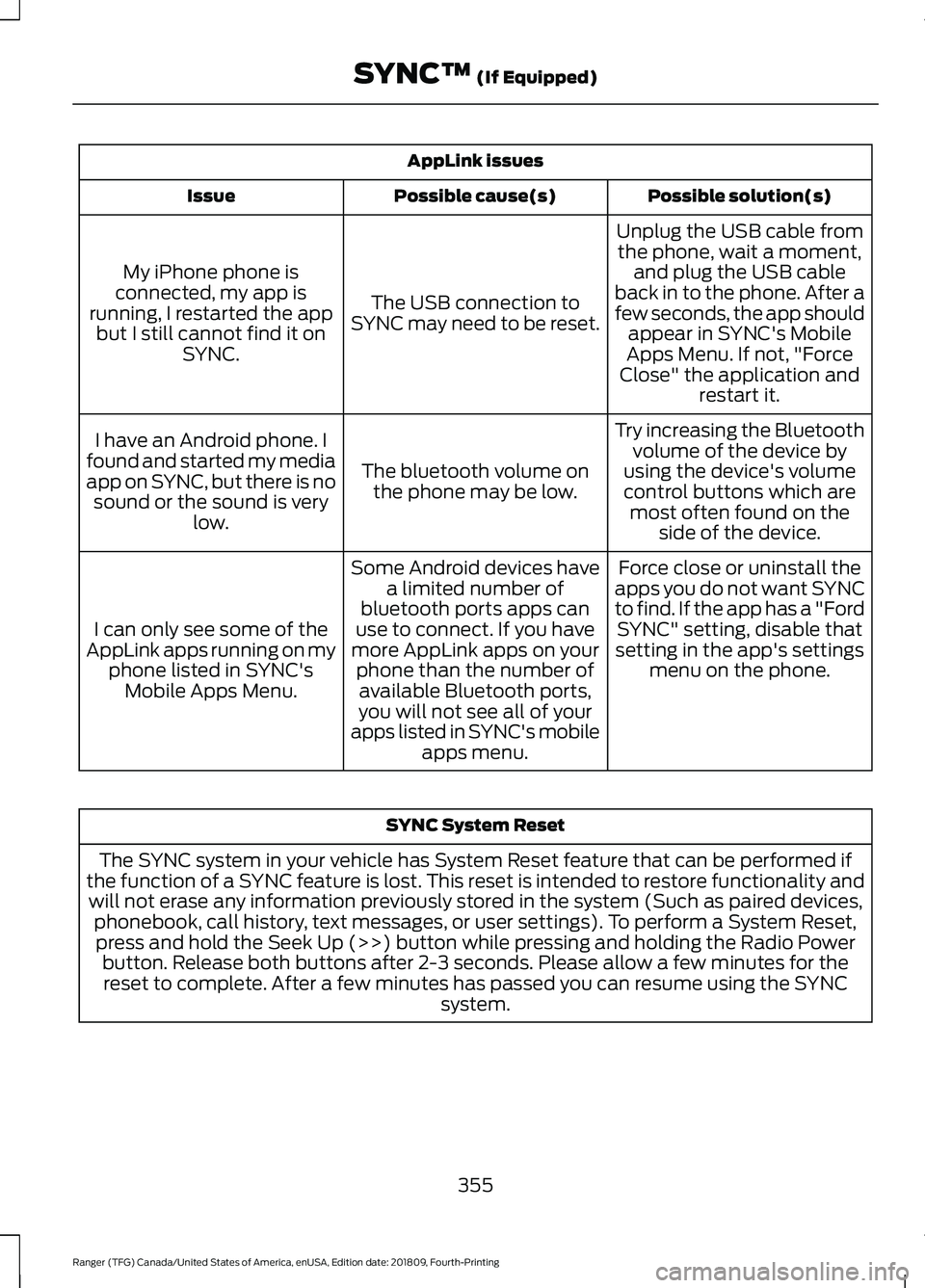
AppLink issues
Possible solution(s)
Possible cause(s)
Issue
Unplug the USB cable fromthe phone, wait a moment, and plug the USB cable
back in to the phone. After a
few seconds, the app should appear in SYNC's Mobile
Apps Menu. If not, "Force
Close" the application and restart it.
The USB connection to
SYNC may need to be reset.
My iPhone phone is
connected, my app is
running, I restarted the app but I still cannot find it on SYNC.
Try increasing the Bluetoothvolume of the device by
using the device's volume control buttons which are most often found on the side of the device.
The bluetooth volume on
the phone may be low.
I have an Android phone. I
found and started my media
app on SYNC, but there is no sound or the sound is very low.
Force close or uninstall the
apps you do not want SYNC
to find. If the app has a "Ford SYNC" setting, disable that
setting in the app's settings menu on the phone.
Some Android devices have
a limited number of
bluetooth ports apps can
use to connect. If you have
more AppLink apps on your phone than the number ofavailable Bluetooth ports,
you will not see all of your
apps listed in SYNC's mobile apps menu.
I can only see some of the
AppLink apps running on my phone listed in SYNC'sMobile Apps Menu. SYNC System Reset
The SYNC system in your vehicle has System Reset feature that can be performed if
the function of a SYNC feature is lost. This reset is intended to restore functionality and will not erase any information previously stored in the system (Such as paired devices, phonebook, call history, text messages, or user settings). To perform a System Reset,press and hold the Seek Up (>>) button while pressing and holding the Radio Power button. Release both buttons after 2-3 seconds. Please allow a few minutes for thereset to complete. After a few minutes has passed you can resume using the SYNC system.
355
Ranger (TFG) Canada/United States of America, enUSA, Edition date: 201809, Fourth-Printing SYNC™ (If Equipped)
Page 370 of 512
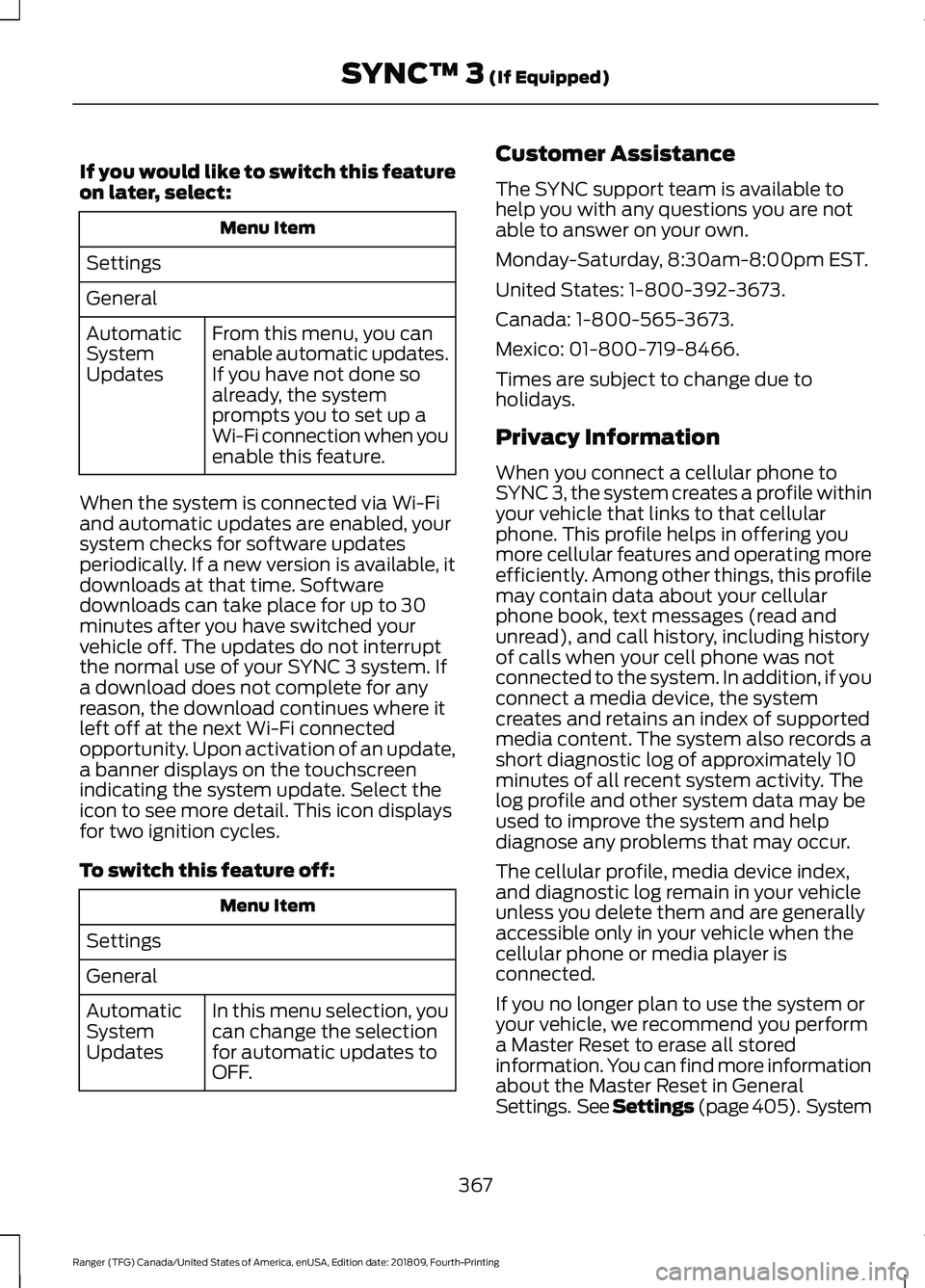
If you would like to switch this feature
on later, select:
Menu Item
Settings
General From this menu, you can
enable automatic updates.
If you have not done so
already, the system
prompts you to set up a
Wi-Fi connection when you
enable this feature.
Automatic
System
Updates
When the system is connected via Wi-Fi
and automatic updates are enabled, your
system checks for software updates
periodically. If a new version is available, it
downloads at that time. Software
downloads can take place for up to 30
minutes after you have switched your
vehicle off. The updates do not interrupt
the normal use of your SYNC 3 system. If
a download does not complete for any
reason, the download continues where it
left off at the next Wi-Fi connected
opportunity. Upon activation of an update,
a banner displays on the touchscreen
indicating the system update. Select the
icon to see more detail. This icon displays
for two ignition cycles.
To switch this feature off: Menu Item
Settings
General In this menu selection, you
can change the selection
for automatic updates to
OFF.
Automatic
System
Updates Customer Assistance
The SYNC support team is available to
help you with any questions you are not
able to answer on your own.
Monday-Saturday, 8:30am-8:00pm EST.
United States: 1-800-392-3673.
Canada: 1-800-565-3673.
Mexico: 01-800-719-8466.
Times are subject to change due to
holidays.
Privacy Information
When you connect a cellular phone to
SYNC 3, the system creates a profile within
your vehicle that links to that cellular
phone. This profile helps in offering you
more cellular features and operating more
efficiently. Among other things, this profile
may contain data about your cellular
phone book, text messages (read and
unread), and call history, including history
of calls when your cell phone was not
connected to the system. In addition, if you
connect a media device, the system
creates and retains an index of supported
media content. The system also records a
short diagnostic log of approximately 10
minutes of all recent system activity. The
log profile and other system data may be
used to improve the system and help
diagnose any problems that may occur.
The cellular profile, media device index,
and diagnostic log remain in your vehicle
unless you delete them and are generally
accessible only in your vehicle when the
cellular phone or media player is
connected.
If you no longer plan to use the system or
your vehicle, we recommend you perform
a Master Reset to erase all stored
information. You can find more information
about the Master Reset in General
Settings. See Settings (page 405). System
367
Ranger (TFG) Canada/United States of America, enUSA, Edition date: 201809, Fourth-Printing SYNC™ 3
(If Equipped)
Page 416 of 512
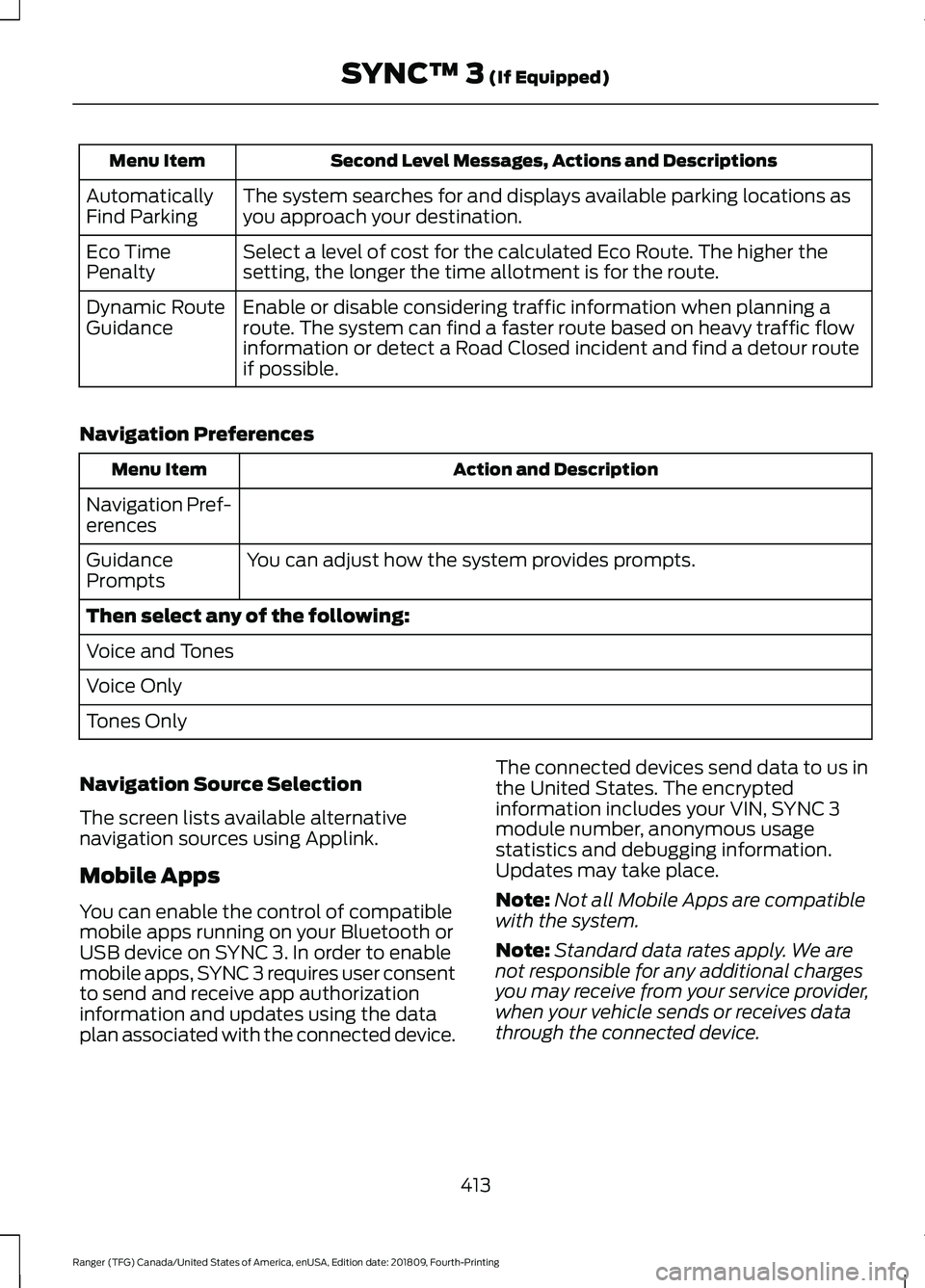
Second Level Messages, Actions and Descriptions
Menu Item
The system searches for and displays available parking locations as
you approach your destination.
Automatically
Find Parking
Select a level of cost for the calculated Eco Route. The higher the
setting, the longer the time allotment is for the route.
Eco Time
Penalty
Enable or disable considering traffic information when planning a
route. The system can find a faster route based on heavy traffic flow
information or detect a Road Closed incident and find a detour route
if possible.
Dynamic Route
Guidance
Navigation Preferences Action and Description
Menu Item
Navigation Pref-
erences You can adjust how the system provides prompts.
Guidance
Prompts
Then select any of the following:
Voice and Tones
Voice Only
Tones Only
Navigation Source Selection
The screen lists available alternative
navigation sources using Applink.
Mobile Apps
You can enable the control of compatible
mobile apps running on your Bluetooth or
USB device on SYNC 3. In order to enable
mobile apps, SYNC 3 requires user consent
to send and receive app authorization
information and updates using the data
plan associated with the connected device. The connected devices send data to us in
the United States. The encrypted
information includes your VIN, SYNC 3
module number, anonymous usage
statistics and debugging information.
Updates may take place.
Note:
Not all Mobile Apps are compatible
with the system.
Note: Standard data rates apply. We are
not responsible for any additional charges
you may receive from your service provider,
when your vehicle sends or receives data
through the connected device.
413
Ranger (TFG) Canada/United States of America, enUSA, Edition date: 201809, Fourth-Printing SYNC™ 3 (If Equipped)
Page 435 of 512
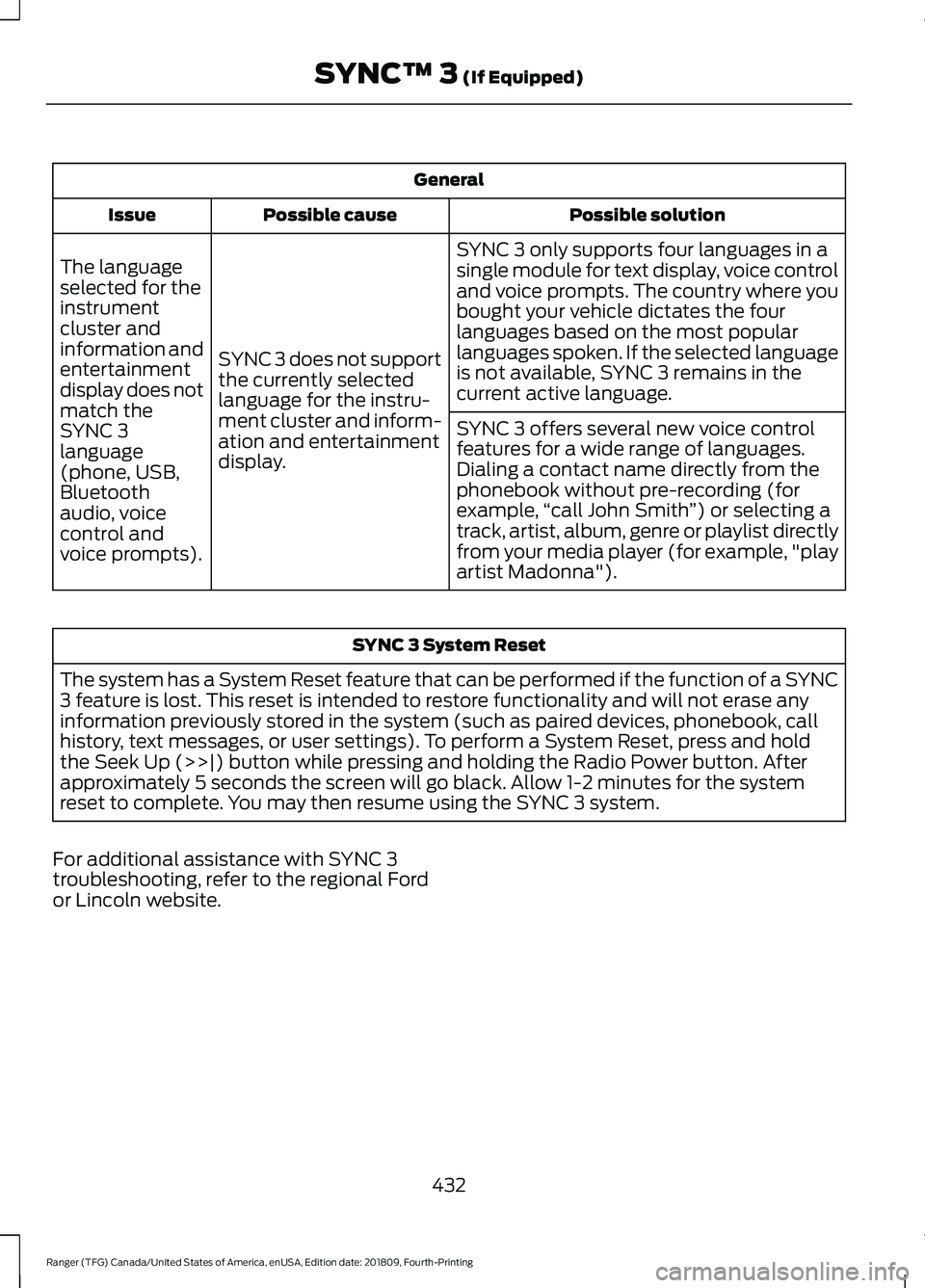
General
Possible solution
Possible cause
Issue
SYNC 3 only supports four languages in a
single module for text display, voice control
and voice prompts. The country where you
bought your vehicle dictates the four
languages based on the most popular
languages spoken. If the selected language
is not available, SYNC 3 remains in the
current active language.
SYNC 3 does not support
the currently selected
language for the instru-
ment cluster and inform-
ation and entertainment
display.
The language
selected for the
instrument
cluster and
information and
entertainment
display does not
match the
SYNC 3
SYNC 3 offers several new voice control
features for a wide range of languages.
Dialing a contact name directly from the
phonebook without pre-recording (for
example,
“call John Smith ”) or selecting a
track, artist, album, genre or playlist directly
from your media player (for example, "play
artist Madonna").
language
(phone, USB,
Bluetooth
audio, voice
control and
voice prompts). SYNC 3 System Reset
The system has a System Reset feature that can be performed if the function of a SYNC
3 feature is lost. This reset is intended to restore functionality and will not erase any
information previously stored in the system (such as paired devices, phonebook, call
history, text messages, or user settings). To perform a System Reset, press and hold
the Seek Up (>>|) button while pressing and holding the Radio Power button. After
approximately 5 seconds the screen will go black. Allow 1-2 minutes for the system
reset to complete. You may then resume using the SYNC 3 system.
For additional assistance with SYNC 3
troubleshooting, refer to the regional Ford
or Lincoln website.
432
Ranger (TFG) Canada/United States of America, enUSA, Edition date: 201809, Fourth-Printing SYNC™ 3 (If Equipped)
Page 502 of 512
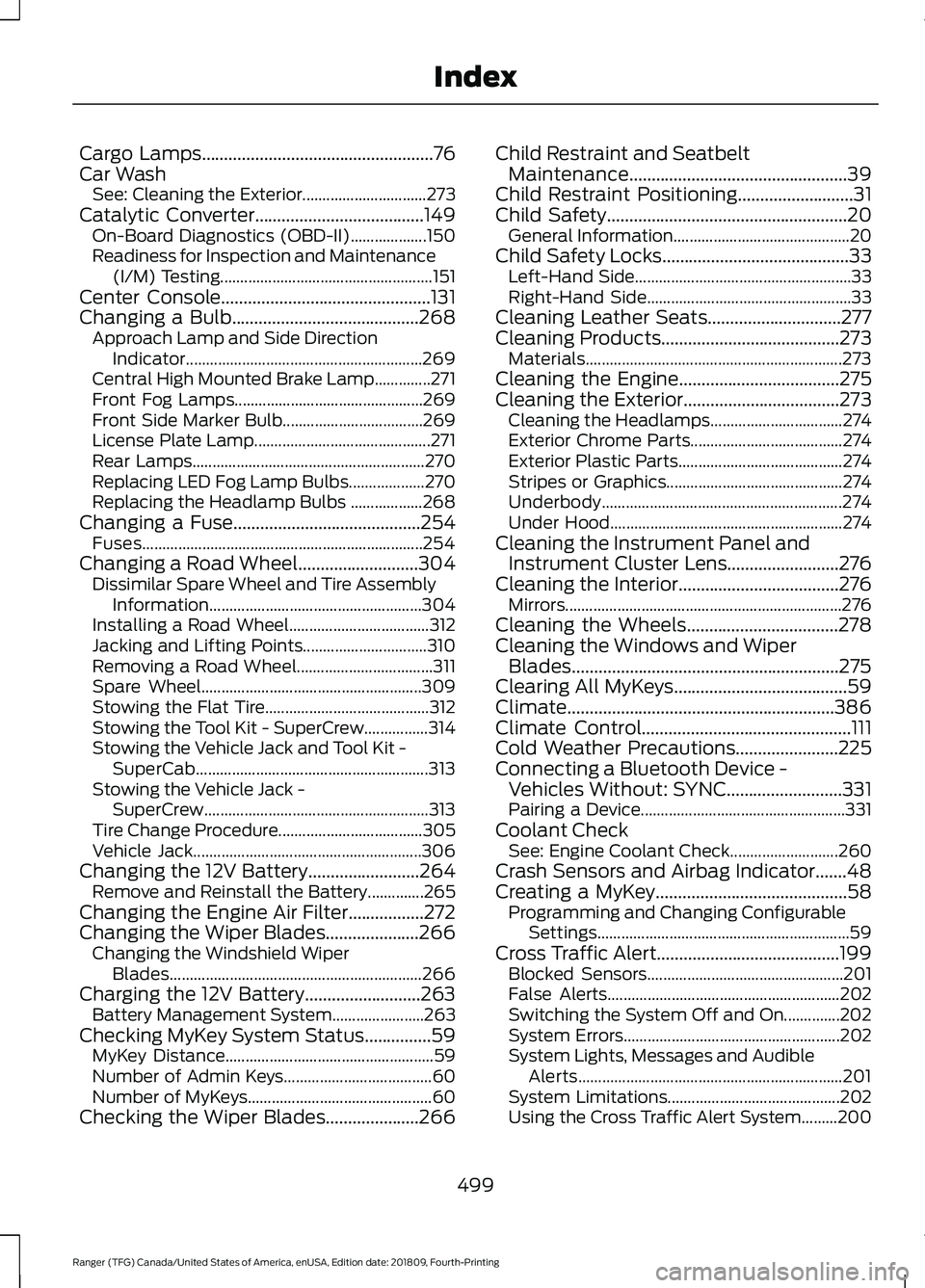
Cargo Lamps....................................................76
Car Wash See: Cleaning the Exterior............................... 273
Catalytic Converter
......................................149
On-Board Diagnostics (OBD-II)................... 150
Readiness for Inspection and Maintenance (I/M) Testing..................................................... 151
Center Console
...............................................131
Changing a Bulb..........................................268 Approach Lamp and Side Direction
Indicator........................................................... 269
Central High Mounted Brake Lamp..............271
Front Fog Lamps............................................... 269
Front Side Marker Bulb................................... 269
License Plate Lamp............................................ 271
Rear Lamps.......................................................... 270
Replacing LED Fog Lamp Bulbs................... 270
Replacing the Headlamp Bulbs .................. 268
Changing a Fuse
..........................................254
Fuses...................................................................... 254
Changing a Road Wheel...........................304 Dissimilar Spare Wheel and Tire Assembly
Information..................................................... 304
Installing a Road Wheel................................... 312
Jacking and Lifting Points............................... 310
Removing a Road Wheel.................................. 311
Spare Wheel....................................................... 309
Stowing the Flat Tire......................................... 312
Stowing the Tool Kit - SuperCrew................314
Stowing the Vehicle Jack and Tool Kit - SuperCab.......................................................... 313
Stowing the Vehicle Jack - SuperCrew........................................................ 313
Tire Change Procedure.................................... 305
Vehicle Jack......................................................... 306
Changing the 12V Battery.........................264 Remove and Reinstall the Battery..............265
Changing the Engine Air Filter.................272
Changing the Wiper Blades
.....................266
Changing the Windshield Wiper
Blades............................................................... 266
Charging the 12V Battery..........................263 Battery Management System....................... 263
Checking MyKey System Status...............59 MyKey Distance.................................................... 59
Number of Admin Keys..................................... 60
Number of MyKeys.............................................. 60
Checking the Wiper Blades.....................266 Child Restraint and Seatbelt
Maintenance.................................................39
Child Restraint Positioning
..........................31
Child Safety......................................................20 General Information............................................ 20
Child Safety Locks..........................................33 Left-Hand Side...................................................... 33
Right-Hand Side................................................... 33
Cleaning Leather Seats..............................277
Cleaning Products........................................273 Materials................................................................ 273
Cleaning the Engine....................................275
Cleaning the Exterior...................................273 Cleaning the Headlamps................................. 274
Exterior Chrome Parts...................................... 274
Exterior Plastic Parts......................................... 274
Stripes or Graphics............................................ 274
Underbody............................................................ 274
Under Hood.......................................................... 274
Cleaning the Instrument Panel and Instrument Cluster Lens
.........................276
Cleaning the Interior....................................276
Mirrors..................................................................... 276
Cleaning the Wheels..................................278
Cleaning the Windows and Wiper Blades............................................................275
Clearing All MyKeys
.......................................59
Climate............................................................386
Climate Control
...............................................111
Cold Weather Precautions.......................225
Connecting a Bluetooth Device - Vehicles Without: SYNC..........................331
Pairing a Device................................................... 331
Coolant Check See: Engine Coolant Check........................... 260
Crash Sensors and Airbag Indicator.......48
Creating a MyKey
...........................................58
Programming and Changing Configurable
Settings............................................................... 59
Cross Traffic Alert.........................................199 Blocked Sensors................................................. 201
False Alerts.......................................................... 202
Switching the System Off and On..............202
System Errors...................................................... 202
System Lights, Messages and Audible Alerts.................................................................. 201
System Limitations........................................... 202
Using the Cross Traffic Alert System.........200
499
Ranger (TFG) Canada/United States of America, enUSA, Edition date: 201809, Fourth-Printing Index
Page 505 of 512
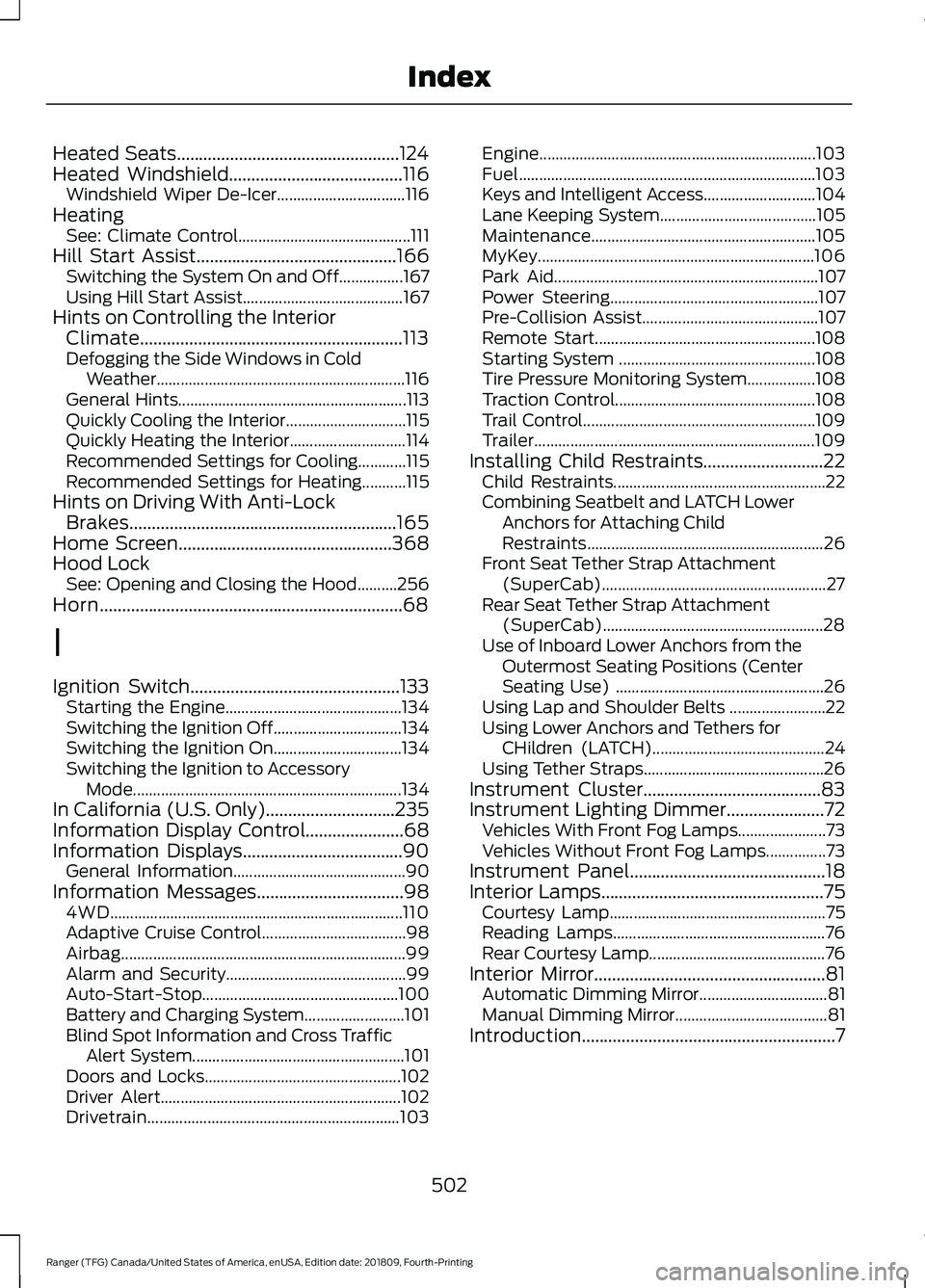
Heated Seats..................................................124
Heated Windshield.......................................116
Windshield Wiper De-Icer................................ 116
Heating See: Climate Control........................................... 111
Hill Start Assist.............................................166 Switching the System On and Off................167
Using Hill Start Assist........................................ 167
Hints on Controlling the Interior Climate...........................................................113
Defogging the Side Windows in Cold Weather.............................................................. 116
General Hints......................................................... 113
Quickly Cooling the Interior.............................. 115
Quickly Heating the Interior............................. 114
Recommended Settings for Cooling............115
Recommended Settings for Heating...........115
Hints on Driving With Anti-Lock Brakes............................................................165
Home Screen
................................................368
Hood Lock See: Opening and Closing the Hood..........256
Horn....................................................................68
I
Ignition Switch
...............................................133
Starting the Engine............................................ 134
Switching the Ignition Off................................ 134
Switching the Ignition On................................ 134
Switching the Ignition to Accessory Mode
................................................................... 134
In California (U.S. Only).............................235
Information Display Control
......................68
Information Displays....................................90
General Information........................................... 90
Information Messages
.................................98
4WD........................................................................\
. 110
Adaptive Cruise Control.................................... 98
Airbag....................................................................... 99
Alarm and Security............................................. 99
Auto-Start-Stop................................................. 100
Battery and Charging System......................... 101
Blind Spot Information and Cross Traffic Alert System..................................................... 101
Doors and Locks................................................. 102
Driver Alert............................................................ 102
Drivetrain............................................................... 103Engine.....................................................................
103
Fuel........................................................................\
.. 103
Keys and Intelligent Access............................ 104
Lane Keeping System....................................... 105
Maintenance........................................................ 105
MyKey..................................................................... 106
Park Aid.................................................................. 107
Power Steering.................................................... 107
Pre-Collision Assist............................................ 107
Remote Start....................................................... 108
Starting System ................................................. 108
Tire Pressure Monitoring System.................108
Traction Control.................................................. 108
Trail Control.......................................................... 109
Trailer...................................................................... 109
Installing Child Restraints...........................22 Child Restraints..................................................... 22
Combining Seatbelt and LATCH Lower Anchors for Attaching Child
Restraints........................................................... 26
Front Seat Tether Strap Attachment (SuperCab)........................................................ 27
Rear Seat Tether Strap Attachment (SuperCab)....................................................... 28
Use of Inboard Lower Anchors from the Outermost Seating Positions (Center
Seating Use) .................................................... 26
Using Lap and Shoulder Belts ........................ 22
Using Lower Anchors and Tethers for CHildren (LATCH)........................................... 24
Using Tether Straps............................................. 26
Instrument Cluster
........................................83
Instrument Lighting Dimmer......................72 Vehicles With Front Fog Lamps...................... 73
Vehicles Without Front Fog Lamps...............73
Instrument Panel
............................................18
Interior Lamps..................................................75
Courtesy Lamp...................................................... 75
Reading Lamps..................................................... 76
Rear Courtesy Lamp............................................ 76
Interior Mirror....................................................81 Automatic Dimming Mirror................................ 81
Manual Dimming Mirror...................................... 81
Introduction.........................................................7
502
Ranger (TFG) Canada/United States of America, enUSA, Edition date: 201809, Fourth-Printing Index
Page 507 of 512
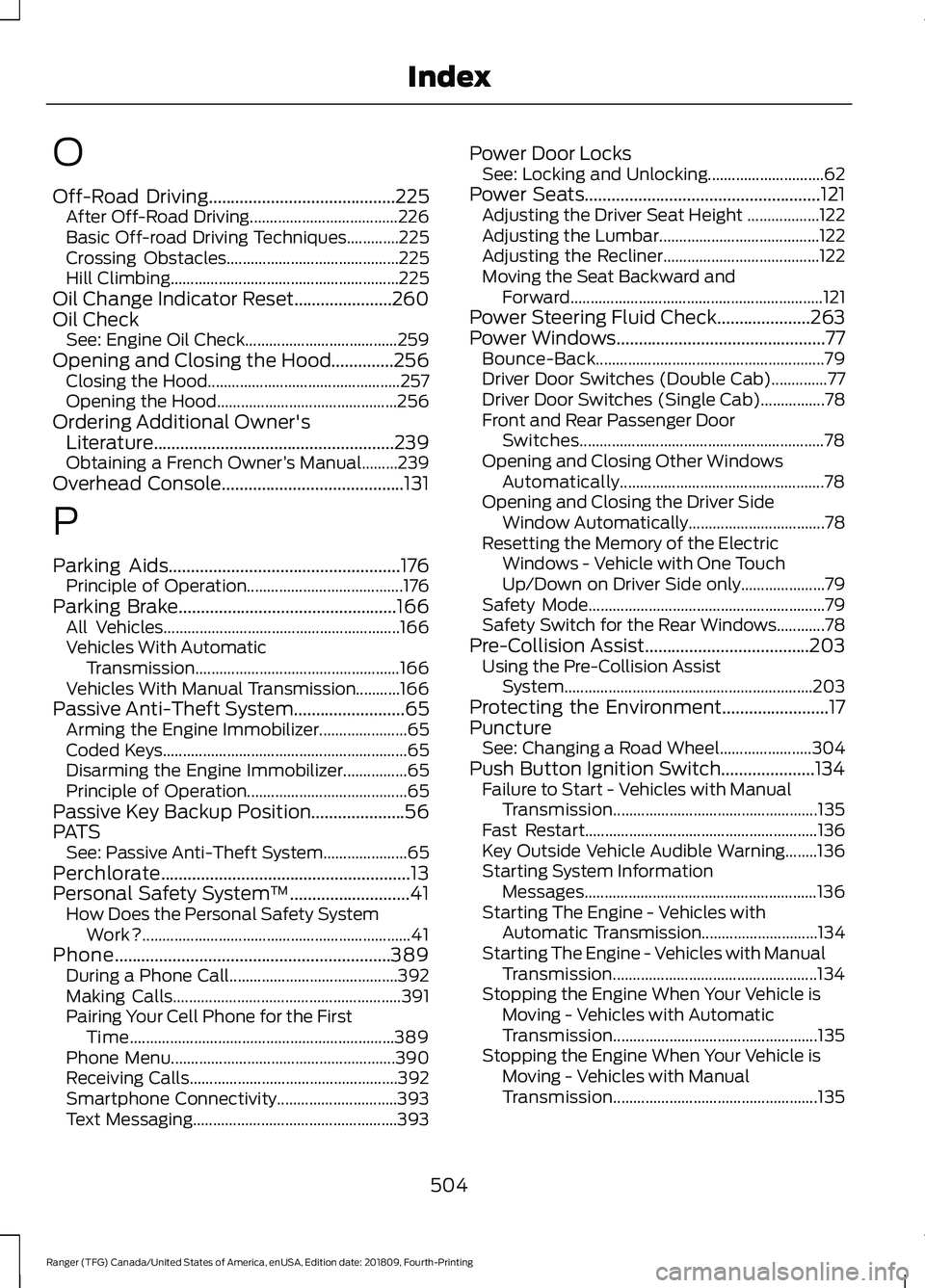
O
Off-Road Driving..........................................225
After Off-Road Driving..................................... 226
Basic Off-road Driving Techniques.............225
Crossing Obstacles........................................... 225
Hill Climbing......................................................... 225
Oil Change Indicator Reset......................260
Oil Check See: Engine Oil Check...................................... 259
Opening and Closing the Hood..............256 Closing the Hood................................................ 257
Opening the Hood............................................. 256
Ordering Additional Owner's Literature......................................................239
Obtaining a French Owner ’s Manual.........239
Overhead Console
.........................................131
P
Parking Aids
....................................................176
Principle of Operation....................................... 176
Parking Brake
.................................................166
All Vehicles........................................................... 166
Vehicles With Automatic Transmission................................................... 166
Vehicles With Manual Transmission...........166
Passive Anti-Theft System
.........................65
Arming the Engine Immobilizer...................... 65
Coded Keys............................................................. 65
Disarming the Engine Immobilizer................65
Principle of Operation........................................ 65
Passive Key Backup Position.....................56
PATS See: Passive Anti-Theft System..................... 65
Perchlorate........................................................13
Personal Safety System ™
...........................41
How Does the Personal Safety System
Work?................................................................... 41
Phone..............................................................389 During a Phone Call.......................................... 392
Making Calls......................................................... 391
Pairing Your Cell Phone for the First Time.................................................................. 389
Phone Menu........................................................ 390
Receiving Calls.................................................... 392
Smartphone Connectivity.............................. 393
Text Messaging................................................... 393Power Door Locks
See: Locking and Unlocking............................. 62
Power Seats
.....................................................121
Adjusting the Driver Seat Height .................. 122
Adjusting the Lumbar........................................ 122
Adjusting the Recliner....................................... 122
Moving the Seat Backward and Forward............................................................... 121
Power Steering Fluid Check.....................263
Power Windows...............................................77 Bounce-Back......................................................... 79
Driver Door Switches (Double Cab)..............77
Driver Door Switches (Single Cab)................78
Front and Rear Passenger Door Switches............................................................. 78
Opening and Closing Other Windows Automatically................................................... 78
Opening and Closing the Driver Side Window Automatically.................................. 78
Resetting the Memory of the Electric Windows - Vehicle with One Touch
Up/Down on Driver Side only..................... 79
Safety Mode........................................................... 79
Safety Switch for the Rear Windows............78
Pre-Collision Assist.....................................203 Using the Pre-Collision Assist
System.............................................................. 203
Protecting the Environment........................17
Puncture See: Changing a Road Wheel....................... 304
Push Button Ignition Switch.....................134 Failure to Start - Vehicles with Manual
Transmission................................................... 135
Fast Restart.......................................................... 136
Key Outside Vehicle Audible Warning........136
Starting System Information Messages.......................................................... 136
Starting The Engine - Vehicles with Automatic Transmission............................. 134
Starting The Engine - Vehicles with Manual Transmission................................................... 134
Stopping the Engine When Your Vehicle is Moving - Vehicles with Automatic
Transmission................................................... 135
Stopping the Engine When Your Vehicle is Moving - Vehicles with Manual
Transmission................................................... 135
504
Ranger (TFG) Canada/United States of America, enUSA, Edition date: 201809, Fourth-Printing Index
Page 510 of 512
Tire Pressure Monitoring System..........298
Changing Tires With a Tire Pressure
Monitoring System....................................... 299
Understanding Your Tire Pressure Monitoring System ..................................... 300
Tires See: Wheels and Tires...................................... 281
Towing a Trailer..............................................215
Towing Points................................................232
Towing the Vehicle on Four Wheels...........................................................221
Emergency Towing............................................ 222
Recreational Towing......................................... 222
Towing...............................................................215
Traction Control............................................168
Principle of Operation...................................... 168
Trail Control Indicators................................174
Trail Control
.....................................................174
Trail Control – Troubleshooting..................... 175
Trail Control – Troubleshooting...............175 Trail Control – Information Messages.........175
Trailer Sway Control....................................216
Transmission Code Designation.............319
Transmission..................................................152
Transporting the Vehicle
...........................232
Type Approvals............................................483 China...................................................................... 494
Radio Frequency Certification for Keys and Remote Controls.......................................... 494
Radio Frequency Certifications for Blind Spot Information System.......................... 492
Radio Frequency Certifications for Body Control Module............................................. 494
Radio Frequency Certifications for Cruise Control Module............................................. 494
Radio Frequency Certifications for Mid Range Radar.................................................. 486
Radio Frequency Certifications for Passive Anti-Theft System........................................ 487
Radio Frequency Certifications for Radio Transceiver Module..................................... 490
Radio Frequency Certifications for SYNC 3........................................................................\
.. 493
Radio Frequency Certifications for Tire Pressure Monitoring Sensor(s)...............483
Radio Frequency Certifications for Wireless Charging........................................................... 493Radio Frequency Statement for Audio
Unit.................................................................... 494
U
Under Hood Overview...............................258
Under Seat Storage.....................................132 SuperCab............................................................... 132
Unique Driving Characteristics................139
Universal Garage Door Opener................125 HomeLink Wireless Control System............125
USB Port..........................................................337
Using Adaptive Cruise Control................183 Automatic Cancellation................................... 186
Blocked Sensor................................................... 188
Canceling the Set Speed................................. 186
Changing the Set Speed................................. 186
Detection Issues.................................................. 187
Following a Vehicle............................................ 184
Hilly Condition Usage....................................... 186
Overriding the Set Speed................................ 185
Resuming the Set Speed................................ 186
Setting the Adaptive Cruise Speed.............184
Setting the Gap Distance................................ 185
Switching Adaptive Cruise Control Off........................................................................\
187
Switching Adaptive Cruise Control On........................................................................\
184
Switching to Normal Cruise Control...........189
System Not Available....................................... 188
Using Cruise Control....................................182 Canceling the Set Speed................................. 182
Changing the Set Speed.................................. 182
Resuming the Set Speed................................. 183
Setting the Cruise Speed................................. 182
Switching Cruise Control Off......................... 183
Switching Cruise Control On.......................... 182
Using Four-Wheel Drive.............................156 4WD Indicator Lights........................................ 156
Driving Off-Road With Truck and Utility Vehicles............................................................. 158
How Your Vehicle Differs From Other Vehicles.............................................................. 157
Using the Electronic Shift on the Fly 4WD system............................................................... 156
Using MyKey With Remote Start Systems..........................................................60
507
Ranger (TFG) Canada/United States of America, enUSA, Edition date: 201809, Fourth-Printing Index
Page 511 of 512
Using Snow Chains.....................................297
Vehicles with Stability Control..................... 298
Using Stability Control
................................170
AdvanceTrac ™ with Roll Stability Control ™
(RSC™)............................................................. 170
Using SYNC™ With Your Media Player.............................................................347
Audio Voice Commands.................................. 347
Media Sources..................................................... 347
Using SYNC™ With Your Phone............342 Accessing Features through the Phone
Menu.................................................................. 343
Pairing a Phone...................................................342
Phone Controls................................................... 343
Phone Voice Commands................................ 343
Using Traction Control...............................168 Switching the System Off .............................. 168
System Indicator Lights and Messages.......................................................... 168
Using Voice Recognition...........................340 Audio Voice Commands................................. 370
Climate Voice Commands............................... 371
Initiating a Voice Session............................... 340
Mobile App Voice Commands...................... 374
Navigation Voice Commands........................ 373
Phone Voice Commands................................. 371
SiriusXM Traffic and Travel Link Voice Commands...................................................... 374
System Interaction and Feedback...............341
Voice Settings Commands............................. 375
Using Voice Recognition - Vehicles Without: SYNC..........................................338
Voice Pass Through.......................................... 338
Utilizing the Mediation/Arbitration Program (Canada Only).........................237
V
Vehicle Care
...................................................273
General Information.......................................... 273
Vehicle Certification Label........................318
Vehicle Identification Number.................318
Vehicle Storage.............................................278 Battery.................................................................... 279
Body........................................................................\
278
Brakes..................................................................... 279
Cooling system................................................... 279
Engine..................................................................... 279Fuel system..........................................................
279
General.................................................................. 278
Miscellaneous..................................................... 279
Removing Vehicle From Storage.................. 279
Tires........................................................................\
. 279
Ventilation See: Climate Control........................................... 111
VIN See: Vehicle Identification Number.............318
Voice Control
....................................................67
W
Warning Lamps and Indicators................86 Adaptive Cruise Control Indicator.................86
Anti-Lock Braking System................................ 86
Automatic Headlamp High Beam Indicator............................................................. 86
Auto-Start-Stop Indicator................................ 86
Battery..................................................................... 86
Blind Spot Monitor.............................................. 86
Brake System Warning Lamp.......................... 86
Cruise Control Indicator..................................... 87
Direction Indicator................................................ 87
Door Ajar Warning Lamp................................... 87
Electronic Locking Differential........................ 87
Engine Coolant Temperature Warning Lamp.................................................................... 87
Fasten Seatbelt Warning Lamp...................... 87
Four-Wheel Drive Indicators............................ 87
Front Airbag............................................................ 87
Front Fog Lamp Indicator.................................. 87
Headlamp High Beam Indicator..................... 87
Hood Ajar Warning Lamp................................. 88
Low Beam Malfunction..................................... 88
Low Fuel Level Warning Lamp....................... 88
Low Tire Pressure Warning Lamp.................. 88
Low Washer Fluid Level Warning Lamp
................................................................... 88
Oil Pressure Warning Lamp............................. 88
Parking Lamps...................................................... 88
Powertrain Malfunction/Reduced Power/Electronic Throttle Control...........88
Service Engine Soon........................................... 88
Stability Control and Traction Control Indicator............................................................. 89
Stability Control and Traction Control Off Warning Lamp................................................. 89
508
Ranger (TFG) Canada/United States of America, enUSA, Edition date: 201809, Fourth-Printing Index