turn off FORD RANGER 2019 Owner's Manual
[x] Cancel search | Manufacturer: FORD, Model Year: 2019, Model line: RANGER, Model: FORD RANGER 2019Pages: 512, PDF Size: 7.63 MB
Page 93 of 512
GENERAL INFORMATION
WARNING: Driving while
distracted can result in loss of vehicle
control, crash and injury. We strongly
recommend that you use extreme
caution when using any device that may
take your focus off the road. Your
primary responsibility is the safe
operation of your vehicle. We
recommend against the use of any
hand-held device while driving and
encourage the use of voice-operated
systems when possible. Make sure you
are aware of all applicable local laws
that may affect the use of electronic
devices while driving.
Note: Your vehicle may or may not be
equipped with all the messages listed in this
chapter. Your vehicle will not display
messages of systems it is not equipped with.
Various systems on your vehicle can be
controlled using the information display
controls on the steering wheel.
Corresponding information is displayed in
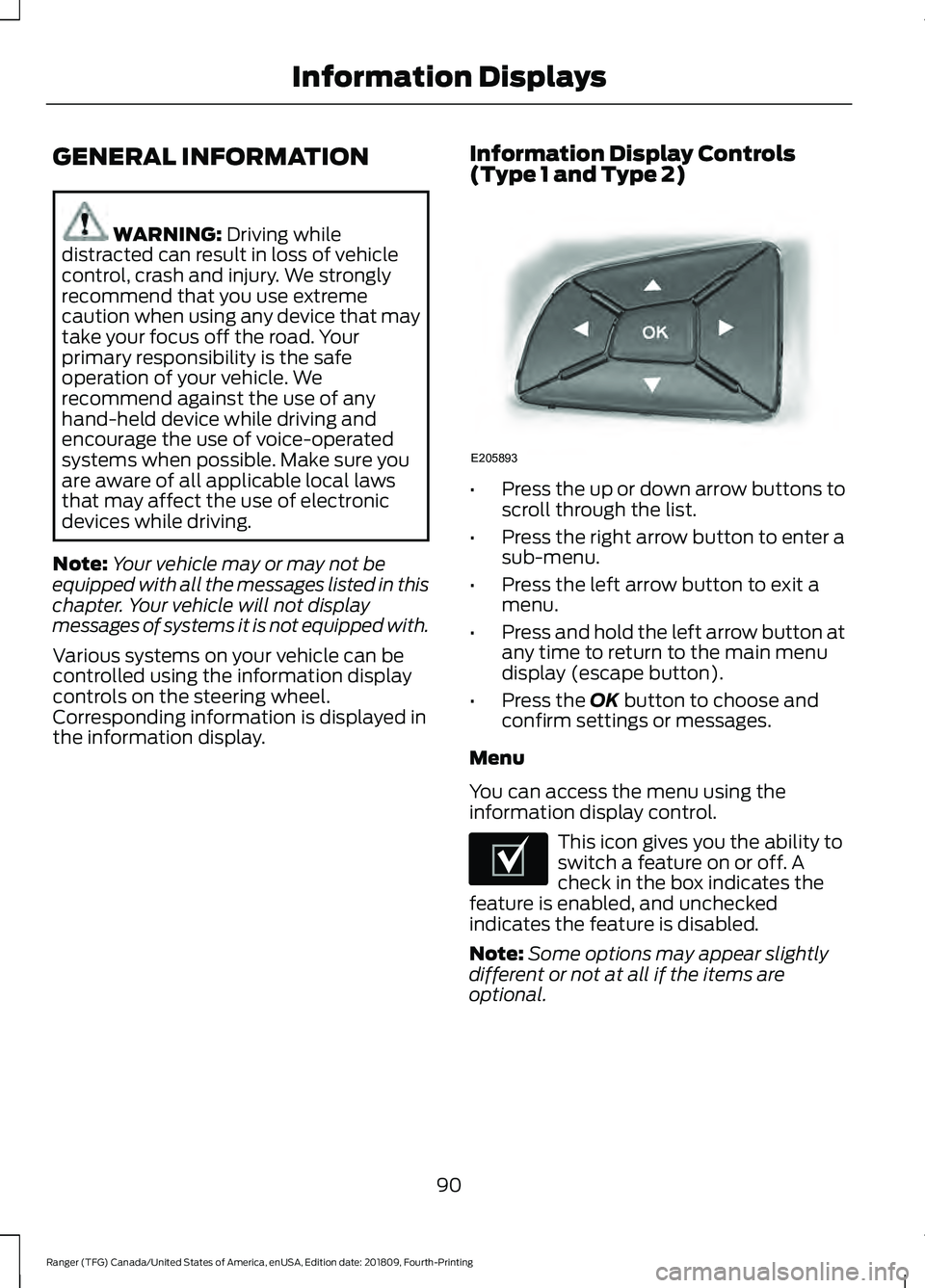
the information display. Information Display Controls
(Type 1 and Type 2) •
Press the up or down arrow buttons to
scroll through the list.
• Press the right arrow button to enter a
sub-menu.
• Press the left arrow button to exit a
menu.
• Press and hold the left arrow button at
any time to return to the main menu
display (escape button).
• Press the
OK button to choose and
confirm settings or messages.
Menu
You can access the menu using the
information display control. This icon gives you the ability to
switch a feature on or off. A
check in the box indicates the
feature is enabled, and unchecked
indicates the feature is disabled.
Note: Some options may appear slightly
different or not at all if the items are
optional.
90
Ranger (TFG) Canada/United States of America, enUSA, Edition date: 201809, Fourth-Printing Information DisplaysE205893 E204495
Page 94 of 512
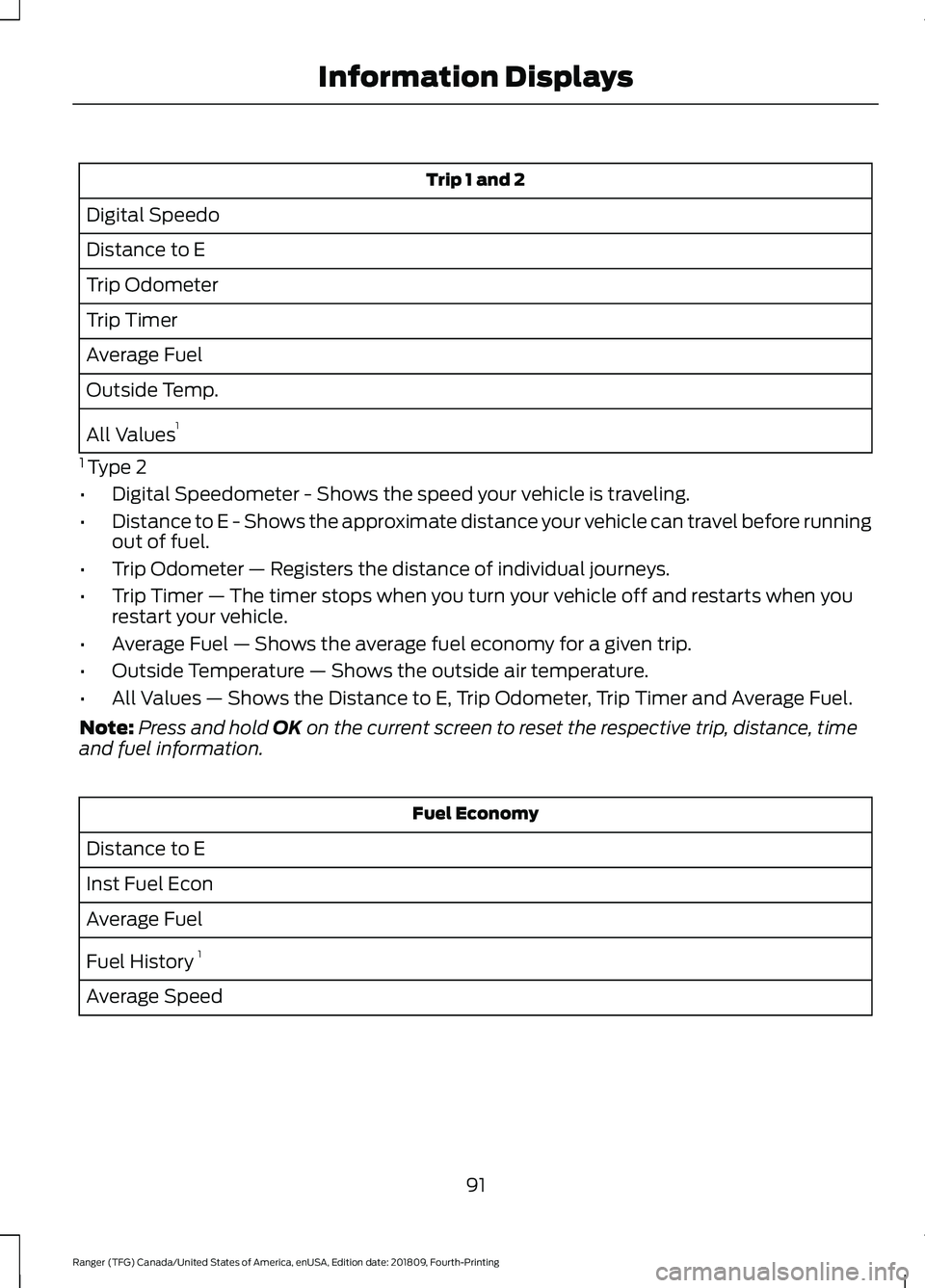
Trip 1 and 2
Digital Speedo
Distance to E
Trip Odometer
Trip Timer
Average Fuel
Outside Temp.
All Values 1
1 Type 2
• Digital Speedometer - Shows the speed your vehicle is traveling.
• Distance to E - Shows the approximate distance your vehicle can travel before running
out of fuel.
• Trip Odometer — Registers the distance of individual journeys.
• Trip Timer — The timer stops when you turn your vehicle off and restarts when you
restart your vehicle.
• Average Fuel — Shows the average fuel economy for a given trip.
• Outside Temperature — Shows the outside air temperature.
• All Values — Shows the Distance to E, Trip Odometer, Trip Timer and Average Fuel.
Note: Press and hold OK on the current screen to reset the respective trip, distance, time
and fuel information. Fuel Economy
Distance to E
Inst Fuel Econ
Average Fuel
Fuel History 1
Average Speed
91
Ranger (TFG) Canada/United States of America, enUSA, Edition date: 201809, Fourth-Printing Information Displays
Page 98 of 512
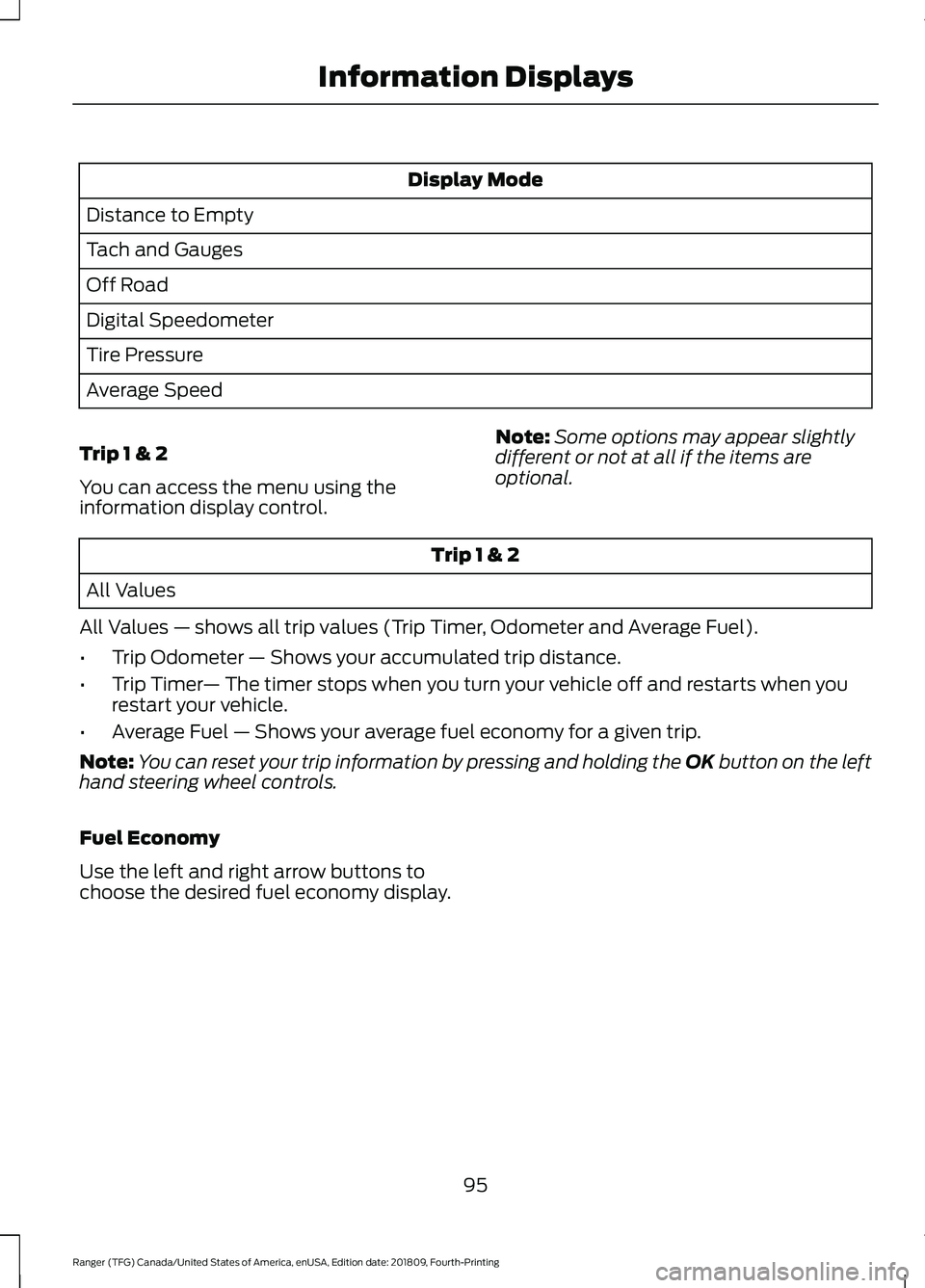
Display Mode
Distance to Empty
Tach and Gauges
Off Road
Digital Speedometer
Tire Pressure
Average Speed
Trip 1 & 2
You can access the menu using the
information display control. Note:
Some options may appear slightly
different or not at all if the items are
optional. Trip 1 & 2
All Values
All Values — shows all trip values (Trip Timer, Odometer and Average Fuel).
• Trip Odometer — Shows your accumulated trip distance.
• Trip Timer — The timer stops when you turn your vehicle off and restarts when you
restart your vehicle.
• Average Fuel — Shows your average fuel economy for a given trip.
Note: You can reset your trip information by pressing and holding the OK button on the left
hand steering wheel controls.
Fuel Economy
Use the left and right arrow buttons to
choose the desired fuel economy display.
95
Ranger (TFG) Canada/United States of America, enUSA, Edition date: 201809, Fourth-Printing Information Displays
Page 102 of 512
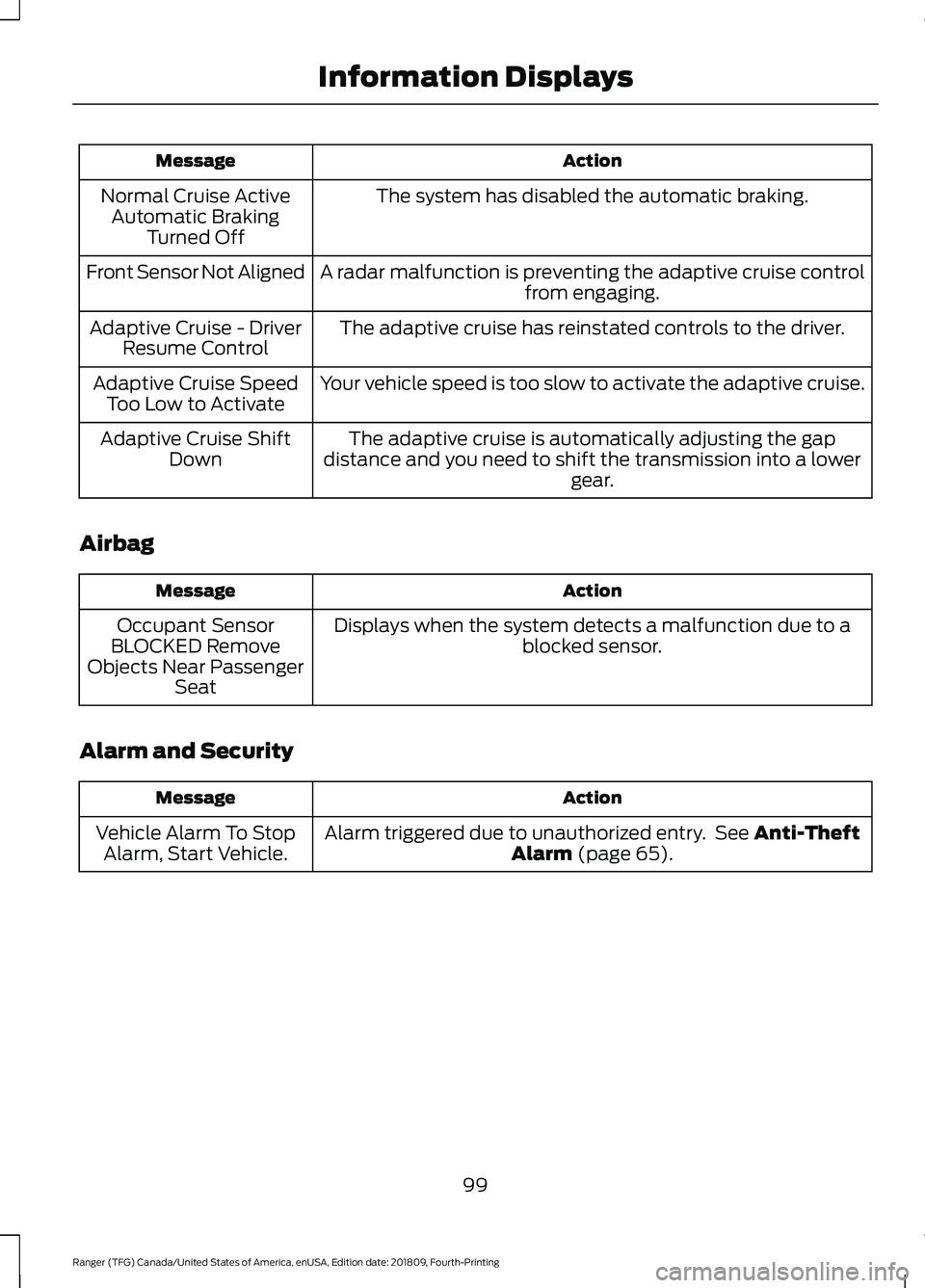
Action
Message
The system has disabled the automatic braking.
Normal Cruise Active
Automatic Braking Turned Off
A radar malfunction is preventing the adaptive cruise control from engaging.
Front Sensor Not Aligned
The adaptive cruise has reinstated controls to the driver.
Adaptive Cruise - Driver
Resume Control
Your vehicle speed is too slow to activate the adaptive cruise.
Adaptive Cruise Speed
Too Low to Activate
The adaptive cruise is automatically adjusting the gap
distance and you need to shift the transmission into a lower gear.
Adaptive Cruise Shift
Down
Airbag Action
Message
Displays when the system detects a malfunction due to a blocked sensor.
Occupant Sensor
BLOCKED Remove
Objects Near Passenger Seat
Alarm and Security Action
Message
Alarm triggered due to unauthorized entry. See Anti-Theft
Alarm (page 65).
Vehicle Alarm To Stop
Alarm, Start Vehicle.
99
Ranger (TFG) Canada/United States of America, enUSA, Edition date: 201809, Fourth-Printing Information Displays
Page 104 of 512
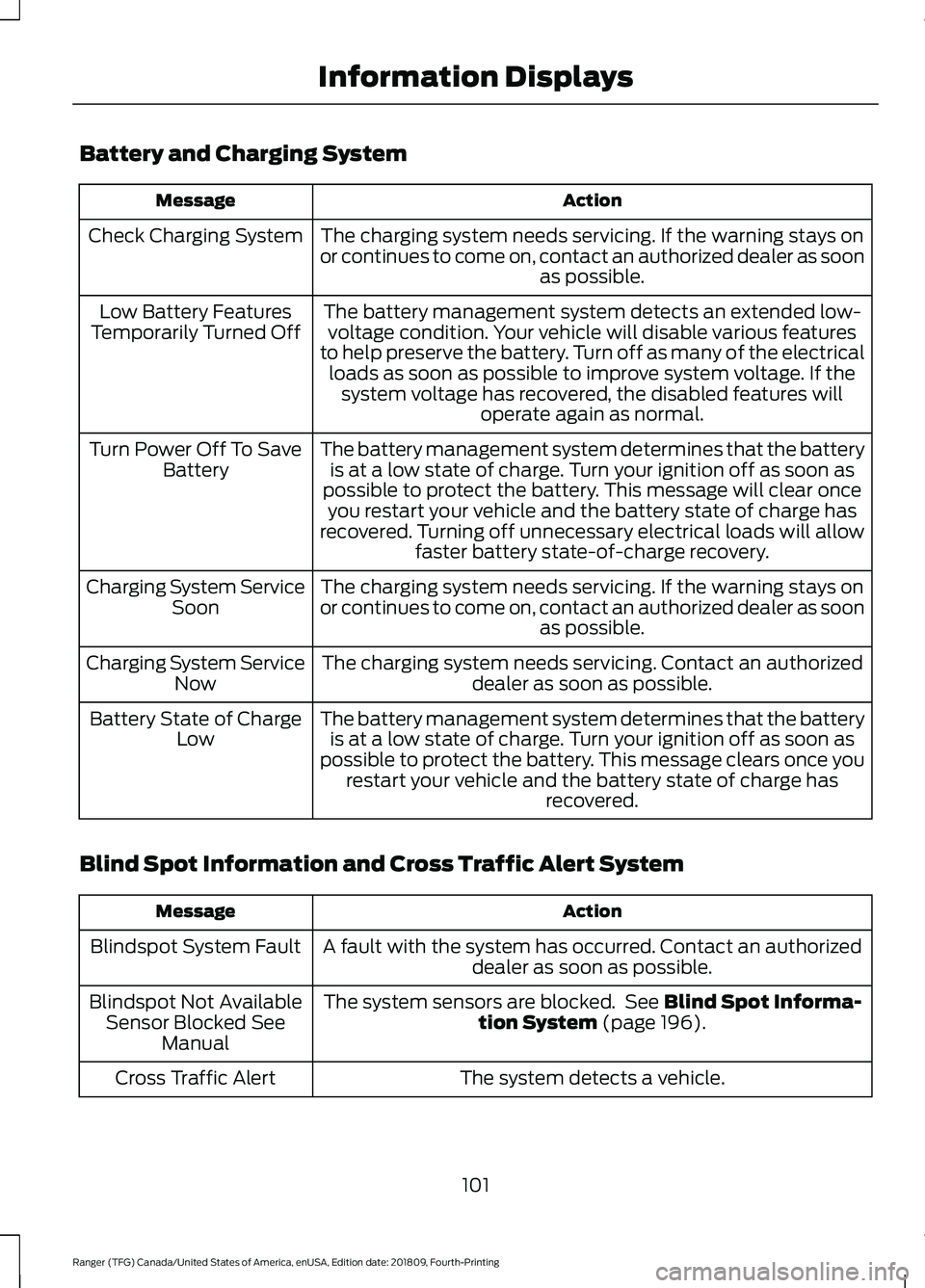
Battery and Charging System
Action
Message
The charging system needs servicing. If the warning stays on
or continues to come on, contact an authorized dealer as soon as possible.
Check Charging System
The battery management system detects an extended low-voltage condition. Your vehicle will disable various features
to help preserve the battery. Turn off as many of the electrical loads as soon as possible to improve system voltage. If the system voltage has recovered, the disabled features will operate again as normal.
Low Battery Features
Temporarily Turned Off
The battery management system determines that the batteryis at a low state of charge. Turn your ignition off as soon as
possible to protect the battery. This message will clear once you restart your vehicle and the battery state of charge has
recovered. Turning off unnecessary electrical loads will allow faster battery state-of-charge recovery.
Turn Power Off To Save
Battery
The charging system needs servicing. If the warning stays on
or continues to come on, contact an authorized dealer as soon as possible.
Charging System Service
Soon
The charging system needs servicing. Contact an authorized dealer as soon as possible.
Charging System Service
Now
The battery management system determines that the batteryis at a low state of charge. Turn your ignition off as soon as
possible to protect the battery. This message clears once you restart your vehicle and the battery state of charge has recovered.
Battery State of Charge
Low
Blind Spot Information and Cross Traffic Alert System Action
Message
A fault with the system has occurred. Contact an authorizeddealer as soon as possible.
Blindspot System Fault
The system sensors are blocked. See Blind Spot Informa-
tion System (page 196).
Blindspot Not Available
Sensor Blocked See Manual
The system detects a vehicle.
Cross Traffic Alert
101
Ranger (TFG) Canada/United States of America, enUSA, Edition date: 201809, Fourth-Printing Information Displays
Page 105 of 512
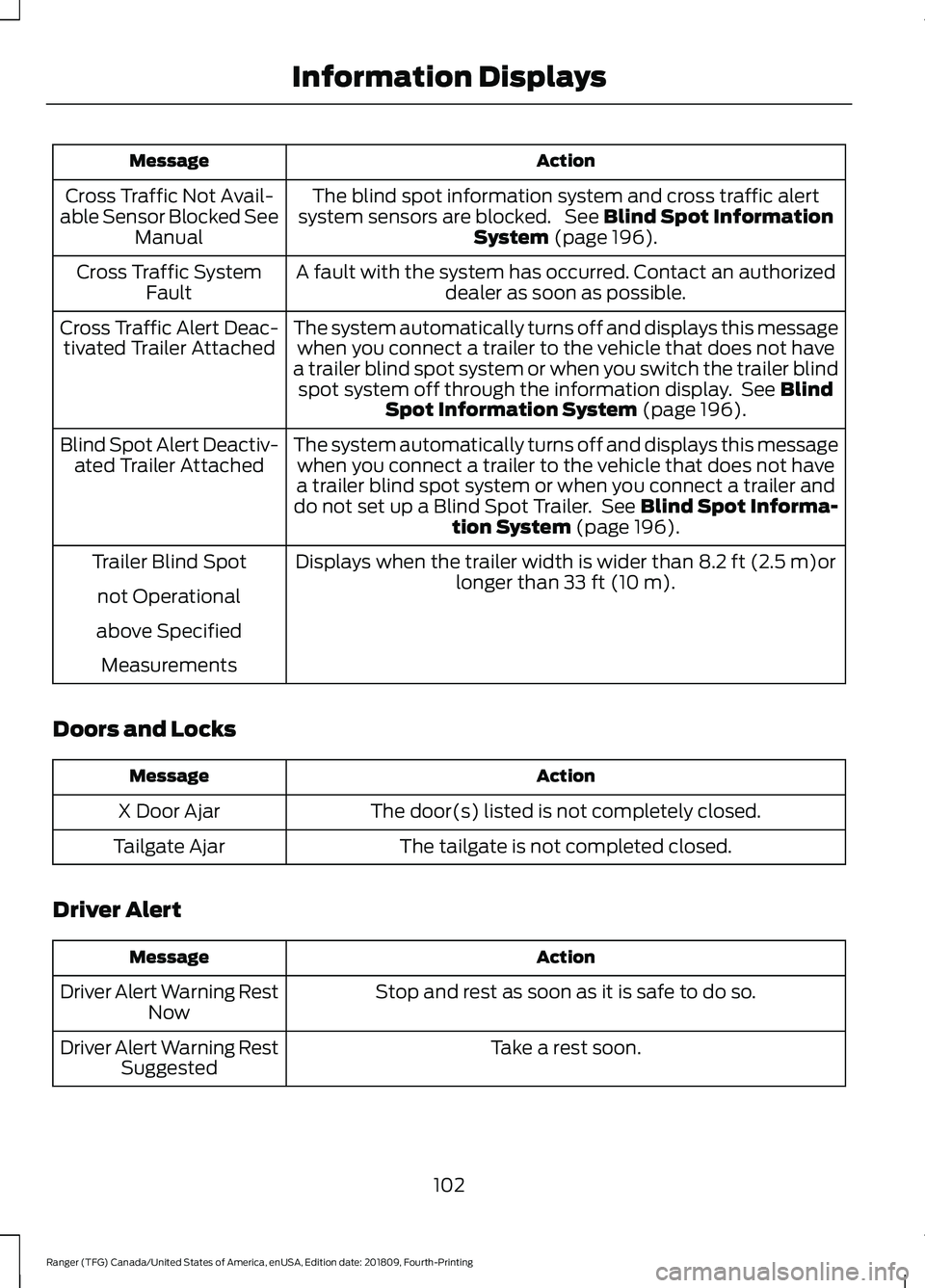
Action
Message
The blind spot information system and cross traffic alert
system sensors are blocked. See Blind Spot Information
System (page 196).
Cross Traffic Not Avail-
able Sensor Blocked See Manual
A fault with the system has occurred. Contact an authorizeddealer as soon as possible.
Cross Traffic System
Fault
The system automatically turns off and displays this messagewhen you connect a trailer to the vehicle that does not have
a trailer blind spot system or when you switch the trailer blind spot system off through the information display. See
Blind
Spot Information System (page 196).
Cross Traffic Alert Deac-
tivated Trailer Attached
The system automatically turns off and displays this messagewhen you connect a trailer to the vehicle that does not have
a trailer blind spot system or when you connect a trailer and
do not set up a Blind Spot Trailer. See
Blind Spot Informa-
tion System (page 196).
Blind Spot Alert Deactiv-
ated Trailer Attached
Displays when the trailer width is wider than
8.2 ft (2.5 m)or
longer than 33 ft (10 m).
Trailer Blind Spot
not Operational
above Specified Measurements
Doors and Locks Action
Message
The door(s) listed is not completely closed.
X Door Ajar
The tailgate is not completed closed.
Tailgate Ajar
Driver Alert Action
Message
Stop and rest as soon as it is safe to do so.
Driver Alert Warning Rest
Now
Take a rest soon.
Driver Alert Warning Rest
Suggested
102
Ranger (TFG) Canada/United States of America, enUSA, Edition date: 201809, Fourth-Printing Information Displays
Page 108 of 512
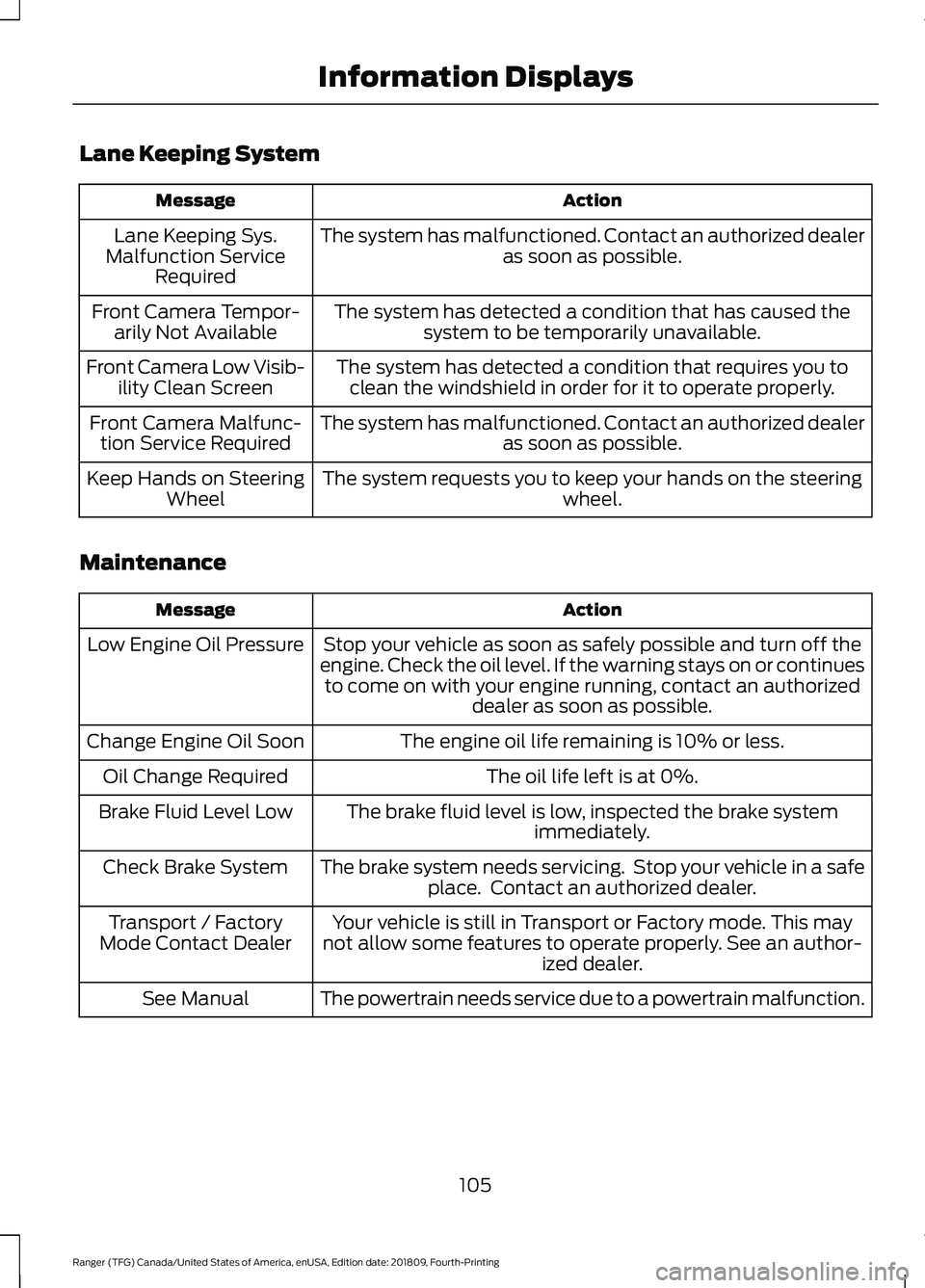
Lane Keeping System
Action
Message
The system has malfunctioned. Contact an authorized dealer as soon as possible.
Lane Keeping Sys.
Malfunction Service Required
The system has detected a condition that has caused thesystem to be temporarily unavailable.
Front Camera Tempor-
arily Not Available
The system has detected a condition that requires you toclean the windshield in order for it to operate properly.
Front Camera Low Visib-
ility Clean Screen
The system has malfunctioned. Contact an authorized dealeras soon as possible.
Front Camera Malfunc-
tion Service Required
The system requests you to keep your hands on the steering wheel.
Keep Hands on Steering
Wheel
Maintenance Action
Message
Stop your vehicle as soon as safely possible and turn off the
engine. Check the oil level. If the warning stays on or continues to come on with your engine running, contact an authorized dealer as soon as possible.
Low Engine Oil Pressure
The engine oil life remaining is 10% or less.
Change Engine Oil Soon
The oil life left is at 0%.
Oil Change Required
The brake fluid level is low, inspected the brake systemimmediately.
Brake Fluid Level Low
The brake system needs servicing. Stop your vehicle in a safeplace. Contact an authorized dealer.
Check Brake System
Your vehicle is still in Transport or Factory mode. This may
not allow some features to operate properly. See an author- ized dealer.
Transport / Factory
Mode Contact Dealer
The powertrain needs service due to a powertrain malfunction.
See Manual
105
Ranger (TFG) Canada/United States of America, enUSA, Edition date: 201809, Fourth-Printing Information Displays
Page 112 of 512
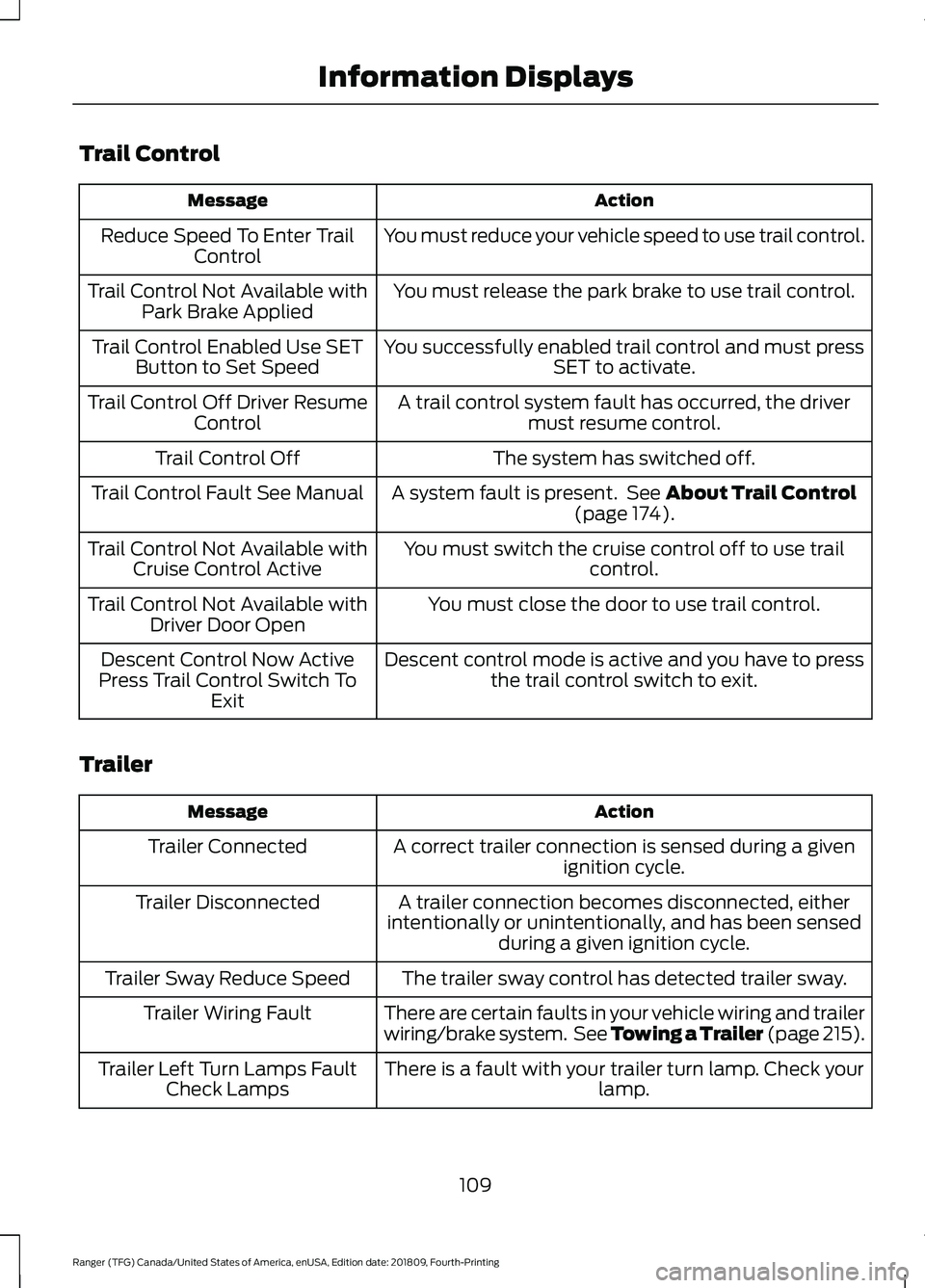
Trail Control
Action
Message
You must reduce your vehicle speed to use trail control.
Reduce Speed To Enter Trail
Control
You must release the park brake to use trail control.
Trail Control Not Available with
Park Brake Applied
You successfully enabled trail control and must pressSET to activate.
Trail Control Enabled Use SET
Button to Set Speed
A trail control system fault has occurred, the drivermust resume control.
Trail Control Off Driver Resume
Control
The system has switched off.
Trail Control Off
A system fault is present. See About Trail Control
(page 174).
Trail Control Fault See Manual
You must switch the cruise control off to use trailcontrol.
Trail Control Not Available with
Cruise Control Active
You must close the door to use trail control.
Trail Control Not Available with
Driver Door Open
Descent control mode is active and you have to pressthe trail control switch to exit.
Descent Control Now Active
Press Trail Control Switch To Exit
Trailer Action
Message
A correct trailer connection is sensed during a givenignition cycle.
Trailer Connected
A trailer connection becomes disconnected, either
intentionally or unintentionally, and has been sensed during a given ignition cycle.
Trailer Disconnected
The trailer sway control has detected trailer sway.
Trailer Sway Reduce Speed
There are certain faults in your vehicle wiring and trailer
wiring/brake system. See Towing a Trailer (page 215).
Trailer Wiring Fault
There is a fault with your trailer turn lamp. Check yourlamp.
Trailer Left Turn Lamps Fault
Check Lamps
109
Ranger (TFG) Canada/United States of America, enUSA, Edition date: 201809, Fourth-Printing Information Displays
Page 114 of 512
MANUAL CLIMATE CONTROL
Directing the Airflow
Press and release the button to
direct airflow to the windshield
air vents and de-mister.
Press and release the button to
direct airflow to the instrument
panel air vents.
Press and release the button to
direct airflow to the footwell air
vents.
You can direct air through the windshield
and footwell air vents or the instrument
panel and footwell air vents at the same
time.
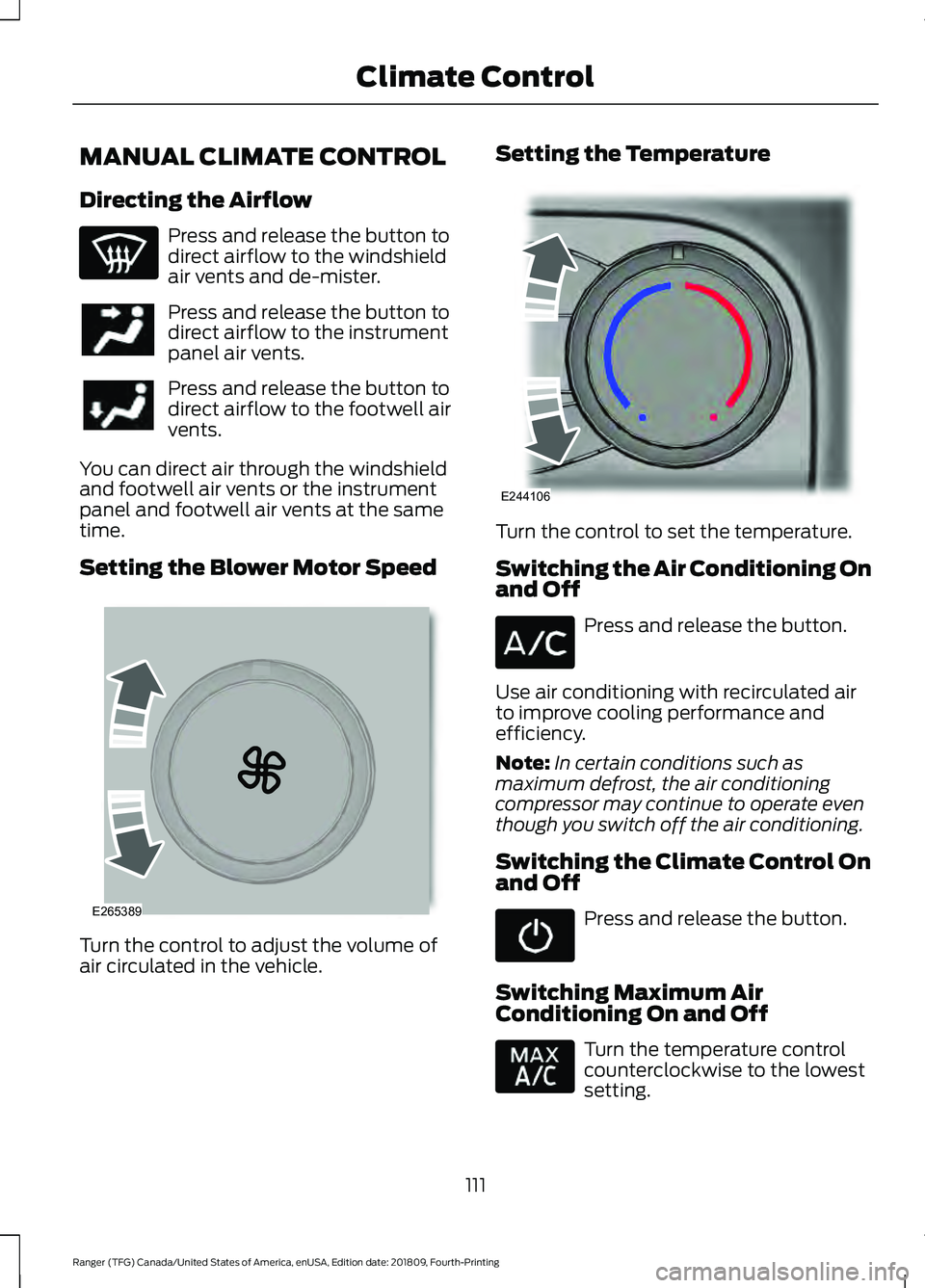
Setting the Blower Motor Speed Turn the control to adjust the volume of
air circulated in the vehicle. Setting the Temperature
Turn the control to set the temperature.
Switching the Air Conditioning On
and Off
Press and release the button.
Use air conditioning with recirculated air
to improve cooling performance and
efficiency.
Note: In certain conditions such as
maximum defrost, the air conditioning
compressor may continue to operate even
though you switch off the air conditioning.
Switching the Climate Control On
and Off Press and release the button.
Switching Maximum Air
Conditioning On and Off Turn the temperature control
counterclockwise to the lowest
setting.
111
Ranger (TFG) Canada/United States of America, enUSA, Edition date: 201809, Fourth-Printing Climate Control E265389 E244106
Page 115 of 512
Note:
Recirculated air flows through the
instrument panel air vents, air conditioning
turns on and the blower motor adjusts to
the highest speed.
Switching Maximum Defrost On
and Off Turn the temperature control
clockwise to the highest setting.
Note: Air flows through the windshield air
vents, and the blower motor adjusts to the
highest speed.
You can also use this setting to defog and
clear the windshield of a thin covering of
ice. The heated rear window also turns on
when you select maximum defrost.
Note: To prevent window fogging, you
cannot select recirculated air when
maximum defrost is on.
Switching Recirculated Air On and
Off Press and release the button to
switch between outside air and
recirculated air.
The air currently in the passenger
compartment recirculates. This may
reduce the time needed to cool the interior,
when used with A/C, and reduce unwanted
odors from entering your vehicle.
Note: Recirculated air may turn off, or
prevent you from switching on, in all air flow
modes except MAX A/C to reduce the risk
of fogging. Recirculation may also turn on
and off in various air distribution control
combinations during hot weather to improve
cooling efficiency.
AUTOMATIC CLIMATE
CONTROL
Note: You can switch temperature units
between Fahrenheit and Celsius. Note:
You can control some of the climate
features through the touchscreen.
Setting the Temperature
Press and release + or - on the left-hand
side of the climate control to set the
left-hand temperature.
Note: This control also adjusts the
right-hand side temperature when you
switch off dual zone mode.
Press and release
+ or - on the right-hand
side of the climate control to set the
right-hand temperature.
Setting the Blower Motor Speed Press and release + or - to adjust
the volume of air circulated in
the vehicle.
Switching Auto Mode On and Off Press and release the button to
switch on automatic operation,
then set the temperature.
The system adjusts the blower motor
speed, air distribution, air conditioning
operation, and outside or recirculated air
to reach and maintain the temperature you
have set.
Note: You can also switch off dual zone
mode by pressing and holding the button
for more than two seconds.
Switching the Air Conditioning On
and Off Press and release the button.
Use air conditioning with recirculated air
to improve cooling performance and
efficiency.
112
Ranger (TFG) Canada/United States of America, enUSA, Edition date: 201809, Fourth-Printing Climate Control