Information displays FORD RANGER 2019 Repair Manual
[x] Cancel search | Manufacturer: FORD, Model Year: 2019, Model line: RANGER, Model: FORD RANGER 2019Pages: 512, PDF Size: 7.63 MB
Page 416 of 512
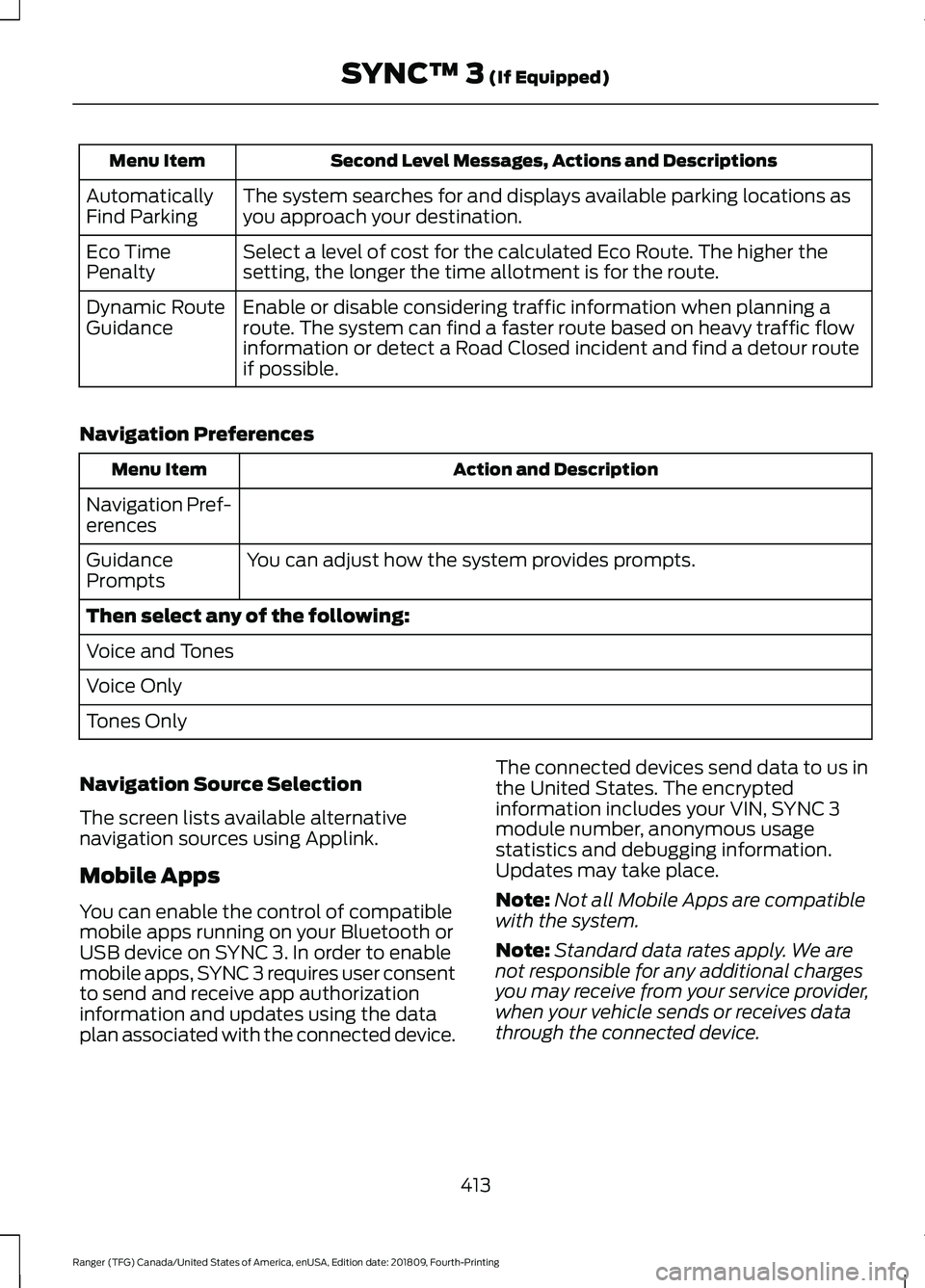
Second Level Messages, Actions and Descriptions
Menu Item
The system searches for and displays available parking locations as
you approach your destination.
Automatically
Find Parking
Select a level of cost for the calculated Eco Route. The higher the
setting, the longer the time allotment is for the route.
Eco Time
Penalty
Enable or disable considering traffic information when planning a
route. The system can find a faster route based on heavy traffic flow
information or detect a Road Closed incident and find a detour route
if possible.
Dynamic Route
Guidance
Navigation Preferences Action and Description
Menu Item
Navigation Pref-
erences You can adjust how the system provides prompts.
Guidance
Prompts
Then select any of the following:
Voice and Tones
Voice Only
Tones Only
Navigation Source Selection
The screen lists available alternative
navigation sources using Applink.
Mobile Apps
You can enable the control of compatible
mobile apps running on your Bluetooth or
USB device on SYNC 3. In order to enable
mobile apps, SYNC 3 requires user consent
to send and receive app authorization
information and updates using the data
plan associated with the connected device. The connected devices send data to us in
the United States. The encrypted
information includes your VIN, SYNC 3
module number, anonymous usage
statistics and debugging information.
Updates may take place.
Note:
Not all Mobile Apps are compatible
with the system.
Note: Standard data rates apply. We are
not responsible for any additional charges
you may receive from your service provider,
when your vehicle sends or receives data
through the connected device.
413
Ranger (TFG) Canada/United States of America, enUSA, Edition date: 201809, Fourth-Printing SYNC™ 3 (If Equipped)
Page 419 of 512
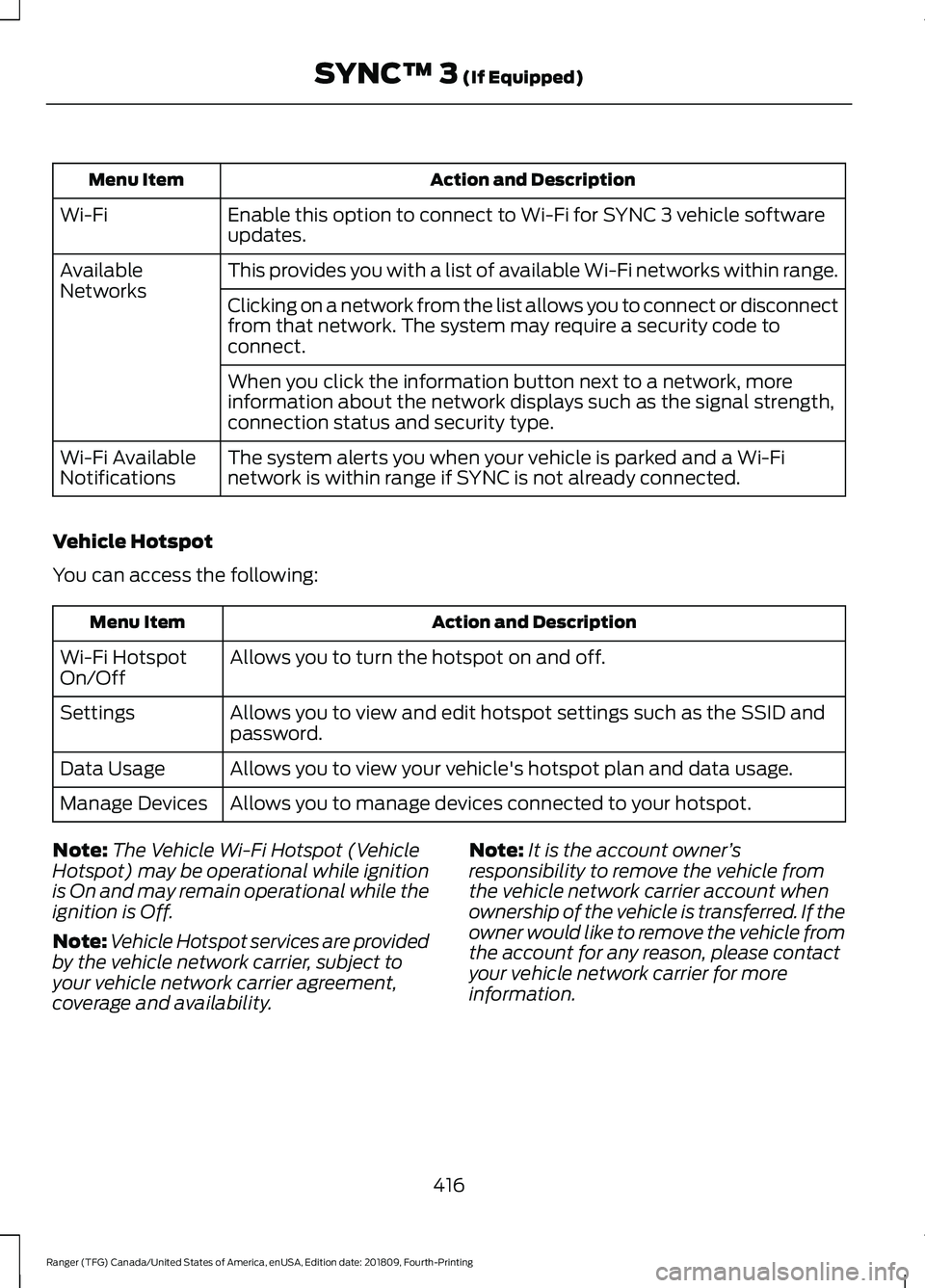
Action and Description
Menu Item
Enable this option to connect to Wi-Fi for SYNC 3 vehicle software
updates.
Wi-Fi
This provides you with a list of available Wi-Fi networks within range.
Available
Networks
Clicking on a network from the list allows you to connect or disconnect
from that network. The system may require a security code to
connect.
When you click the information button next to a network, more
information about the network displays such as the signal strength,
connection status and security type.
The system alerts you when your vehicle is parked and a Wi-Fi
network is within range if SYNC is not already connected.
Wi-Fi Available
Notifications
Vehicle Hotspot
You can access the following: Action and Description
Menu Item
Allows you to turn the hotspot on and off.
Wi-Fi Hotspot
On/Off
Allows you to view and edit hotspot settings such as the SSID and
password.
Settings
Allows you to view your vehicle's hotspot plan and data usage.
Data Usage
Allows you to manage devices connected to your hotspot.
Manage Devices
Note: The Vehicle Wi-Fi Hotspot (Vehicle
Hotspot) may be operational while ignition
is On and may remain operational while the
ignition is Off.
Note: Vehicle Hotspot services are provided
by the vehicle network carrier, subject to
your vehicle network carrier agreement,
coverage and availability. Note:
It is the account owner ’s
responsibility to remove the vehicle from
the vehicle network carrier account when
ownership of the vehicle is transferred. If the
owner would like to remove the vehicle from
the account for any reason, please contact
your vehicle network carrier for more
information.
416
Ranger (TFG) Canada/United States of America, enUSA, Edition date: 201809, Fourth-Printing SYNC™ 3 (If Equipped)
Page 421 of 512
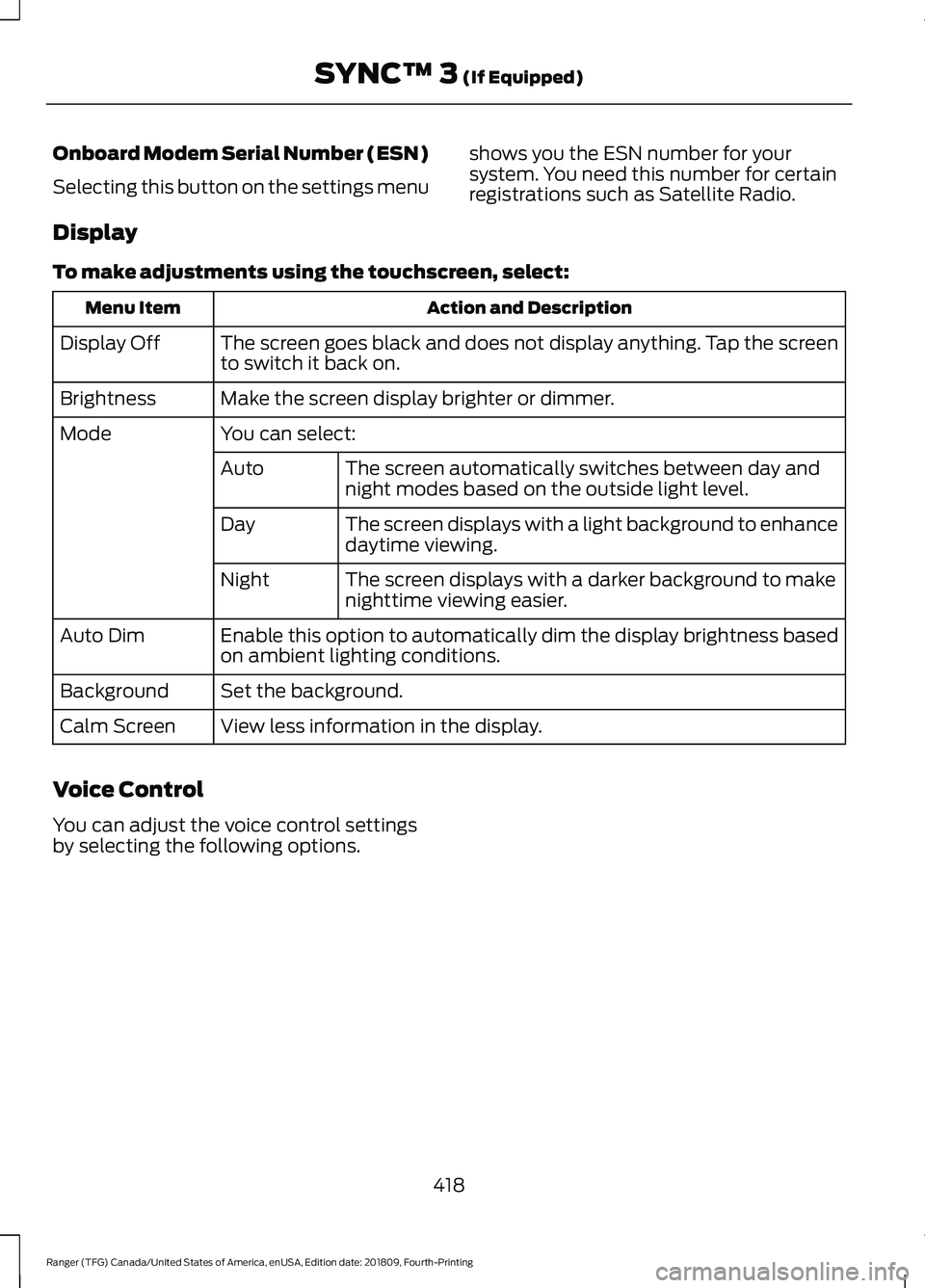
Onboard Modem Serial Number (ESN)
Selecting this button on the settings menu
shows you the ESN number for your
system. You need this number for certain
registrations such as Satellite Radio.
Display
To make adjustments using the touchscreen, select: Action and Description
Menu Item
The screen goes black and does not display anything. Tap the screen
to switch it back on.
Display Off
Make the screen display brighter or dimmer.
Brightness
You can select:
Mode
The screen automatically switches between day and
night modes based on the outside light level.
Auto
The screen displays with a light background to enhance
daytime viewing.
Day
The screen displays with a darker background to make
nighttime viewing easier.
Night
Enable this option to automatically dim the display brightness based
on ambient lighting conditions.
Auto Dim
Set the background.
Background
View less information in the display.
Calm Screen
Voice Control
You can adjust the voice control settings
by selecting the following options.
418
Ranger (TFG) Canada/United States of America, enUSA, Edition date: 201809, Fourth-Printing SYNC™ 3 (If Equipped)
Page 505 of 512
Heated Seats..................................................124
Heated Windshield.......................................116
Windshield Wiper De-Icer................................ 116
Heating See: Climate Control........................................... 111
Hill Start Assist.............................................166 Switching the System On and Off................167
Using Hill Start Assist........................................ 167
Hints on Controlling the Interior Climate...........................................................113
Defogging the Side Windows in Cold Weather.............................................................. 116
General Hints......................................................... 113
Quickly Cooling the Interior.............................. 115
Quickly Heating the Interior............................. 114
Recommended Settings for Cooling............115
Recommended Settings for Heating...........115
Hints on Driving With Anti-Lock Brakes............................................................165
Home Screen
................................................368
Hood Lock See: Opening and Closing the Hood..........256
Horn....................................................................68
I
Ignition Switch
...............................................133
Starting the Engine............................................ 134
Switching the Ignition Off................................ 134
Switching the Ignition On................................ 134
Switching the Ignition to Accessory Mode
................................................................... 134
In California (U.S. Only).............................235
Information Display Control
......................68
Information Displays....................................90
General Information........................................... 90
Information Messages
.................................98
4WD........................................................................\
. 110
Adaptive Cruise Control.................................... 98
Airbag....................................................................... 99
Alarm and Security............................................. 99
Auto-Start-Stop................................................. 100
Battery and Charging System......................... 101
Blind Spot Information and Cross Traffic Alert System..................................................... 101
Doors and Locks................................................. 102
Driver Alert............................................................ 102
Drivetrain............................................................... 103Engine.....................................................................
103
Fuel........................................................................\
.. 103
Keys and Intelligent Access............................ 104
Lane Keeping System....................................... 105
Maintenance........................................................ 105
MyKey..................................................................... 106
Park Aid.................................................................. 107
Power Steering.................................................... 107
Pre-Collision Assist............................................ 107
Remote Start....................................................... 108
Starting System ................................................. 108
Tire Pressure Monitoring System.................108
Traction Control.................................................. 108
Trail Control.......................................................... 109
Trailer...................................................................... 109
Installing Child Restraints...........................22 Child Restraints..................................................... 22
Combining Seatbelt and LATCH Lower Anchors for Attaching Child
Restraints........................................................... 26
Front Seat Tether Strap Attachment (SuperCab)........................................................ 27
Rear Seat Tether Strap Attachment (SuperCab)....................................................... 28
Use of Inboard Lower Anchors from the Outermost Seating Positions (Center
Seating Use) .................................................... 26
Using Lap and Shoulder Belts ........................ 22
Using Lower Anchors and Tethers for CHildren (LATCH)........................................... 24
Using Tether Straps............................................. 26
Instrument Cluster
........................................83
Instrument Lighting Dimmer......................72 Vehicles With Front Fog Lamps...................... 73
Vehicles Without Front Fog Lamps...............73
Instrument Panel
............................................18
Interior Lamps..................................................75
Courtesy Lamp...................................................... 75
Reading Lamps..................................................... 76
Rear Courtesy Lamp............................................ 76
Interior Mirror....................................................81 Automatic Dimming Mirror................................ 81
Manual Dimming Mirror...................................... 81
Introduction.........................................................7
502
Ranger (TFG) Canada/United States of America, enUSA, Edition date: 201809, Fourth-Printing Index
Page 506 of 512
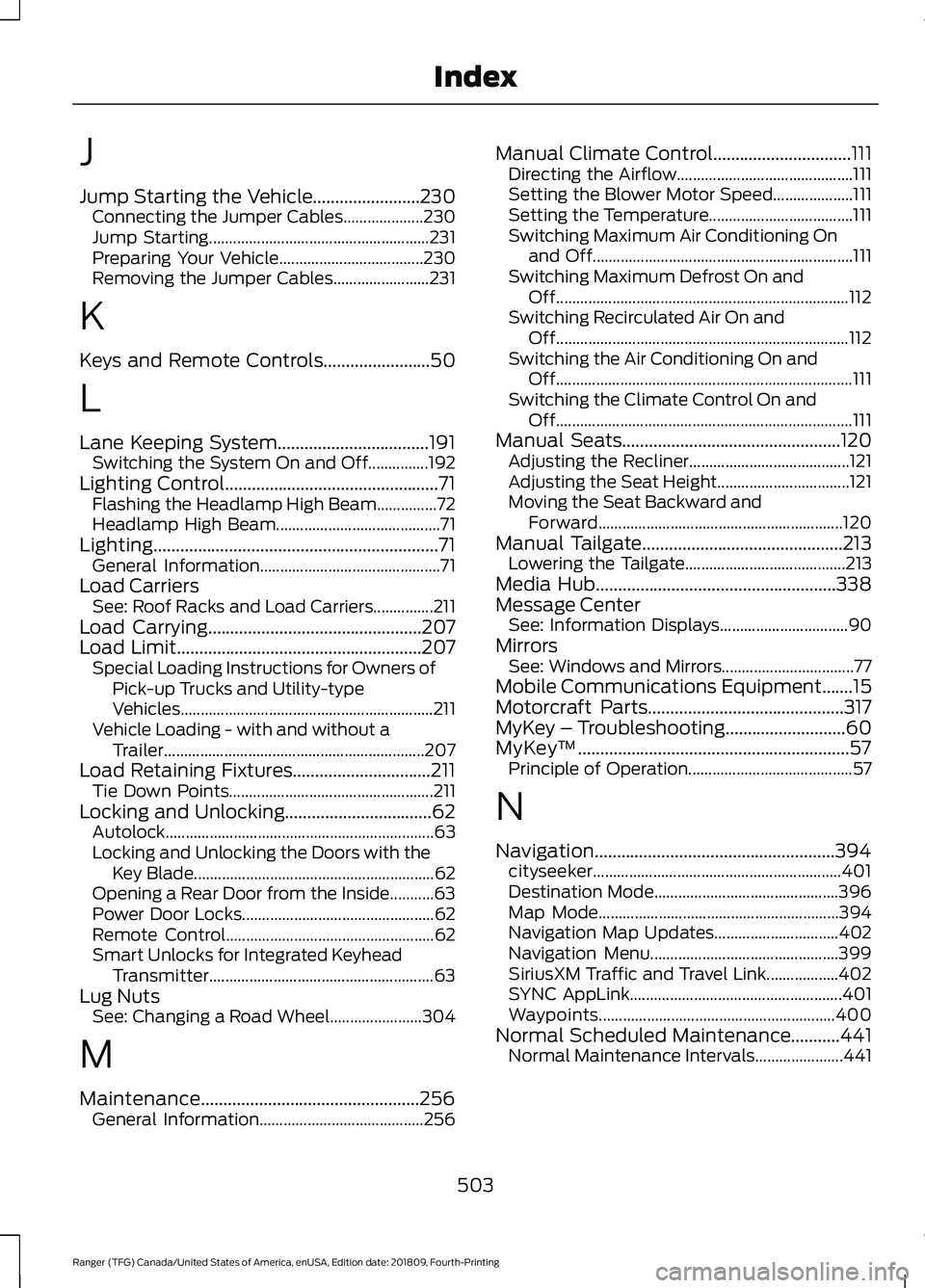
J
Jump Starting the Vehicle........................230
Connecting the Jumper Cables.................... 230
Jump Starting....................................................... 231
Preparing Your Vehicle.................................... 230
Removing the Jumper Cables........................ 231
K
Keys and Remote Controls........................50
L
Lane Keeping System..................................191 Switching the System On and Off...............192
Lighting Control................................................71 Flashing the Headlamp High Beam...............72
Headlamp High Beam......................................... 71
Lighting................................................................71 General Information............................................. 71
Load Carriers See: Roof Racks and Load Carriers...............211
Load Carrying................................................207
Load Limit.......................................................207
Special Loading Instructions for Owners of
Pick-up Trucks and Utility-type
Vehicles............................................................... 211
Vehicle Loading - with and without a Trailer................................................................. 207
Load Retaining Fixtures...............................211 Tie Down Points................................................... 211
Locking and Unlocking.................................62 Autolock................................................................... 63
Locking and Unlocking the Doors with the Key Blade............................................................ 62
Opening a Rear Door from the Inside...........63
Power Door Locks................................................ 62
Remote Control.................................................... 62
Smart Unlocks for Integrated Keyhead Transmitter........................................................ 63
Lug Nuts See: Changing a Road Wheel....................... 304
M
Maintenance.................................................256 General Information......................................... 256Manual Climate Control...............................111
Directing the Airflow............................................ 111
Setting the Blower Motor Speed.................... 111
Setting the Temperature.................................... 111
Switching Maximum Air Conditioning On and Off................................................................. 111
Switching Maximum Defrost On and Off........................................................................\
. 112
Switching Recirculated Air On and Off........................................................................\
. 112
Switching the Air Conditioning On and Off........................................................................\
.. 111
Switching the Climate Control On and Off........................................................................\
.. 111
Manual Seats.................................................120 Adjusting the Recliner........................................ 121
Adjusting the Seat Height................................. 121
Moving the Seat Backward and Forward............................................................. 120
Manual Tailgate
.............................................213
Lowering the Tailgate........................................ 213
Media Hub......................................................338
Message Center See: Information Displays................................ 90
Mirrors See: Windows and Mirrors................................. 77
Mobile Communications Equipment.......15
Motorcraft Parts
............................................317
MyKey – Troubleshooting...........................60
MyKey ™
.............................................................57
Principle of Operation......................................... 57
N
Navigation......................................................394 cityseeker.............................................................. 401
Destination Mode.............................................. 396
Map Mode............................................................ 394
Navigation Map Updates............................... 402
Navigation Menu............................................... 399
SiriusXM Traffic and Travel Link.................. 402
SYNC AppLink..................................................... 401
Waypoints........................................................... 400
Normal Scheduled Maintenance...........441 Normal Maintenance Intervals...................... 441
503
Ranger (TFG) Canada/United States of America, enUSA, Edition date: 201809, Fourth-Printing Index