ignition FORD RANGER 2019 Manual Online
[x] Cancel search | Manufacturer: FORD, Model Year: 2019, Model line: RANGER, Model: FORD RANGER 2019Pages: 512, PDF Size: 7.63 MB
Page 404 of 512
Menu Item
The waypoint list then appears and you are
able to re-order all of your waypoints by
selecting the menu icon on the right hand
side of the location. You can select up to
five waypoints.
Add Waypoint
Optimize Order
You can also have the system set the order
for you by pressing:
Go
To return to your route, press:
SYNC AppLink
The AppLink app allows you to use some
SYNC 3 navigation features on your phone.
First Mile Navigation
When you switch your ignition off, the
location of your vehicle is recorded and
sent to your SYNC AppLink app. The
location of your vehicle can be viewed
within the app. You can also view walking
directions to your vehicle.
Last Mile Navigation
When you park near your destination, the
system provides walking directions to your
destination.
POI Search
Your paired phone can be used to access
additional points of interest (POI). These
points of interest can only be access when
your phone is paired.
Send To Car
You can send destinations to your
navigation system using a computer or
phone using AppLink. cityseeker (If Equipped)
Note: cityseeker point of interest (POI)
information is limited to approximately 1,110
cities (1,049 in the United States, 36 in
Canada and 15 in Mexico). cityseeker, when available, is a service that
provides more information about certain
points of interest such as restaurants,
hotels and attractions.
When you have selected a point of interest,
the location and information appear, such
as address, phone number and a star
rating.
Press
More Information to see a photo,
a review, a list of services and facilities, the
average room or meal price and the web
address. This screen displays the point of
interest icons.
401
Ranger (TFG) Canada/United States of America, enUSA, Edition date: 201809, Fourth-Printing SYNC™ 3
(If Equipped)E225487
Page 419 of 512
Action and Description
Menu Item
Enable this option to connect to Wi-Fi for SYNC 3 vehicle software
updates.
Wi-Fi
This provides you with a list of available Wi-Fi networks within range.
Available
Networks
Clicking on a network from the list allows you to connect or disconnect
from that network. The system may require a security code to
connect.
When you click the information button next to a network, more
information about the network displays such as the signal strength,
connection status and security type.
The system alerts you when your vehicle is parked and a Wi-Fi
network is within range if SYNC is not already connected.
Wi-Fi Available
Notifications
Vehicle Hotspot
You can access the following: Action and Description
Menu Item
Allows you to turn the hotspot on and off.
Wi-Fi Hotspot
On/Off
Allows you to view and edit hotspot settings such as the SSID and
password.
Settings
Allows you to view your vehicle's hotspot plan and data usage.
Data Usage
Allows you to manage devices connected to your hotspot.
Manage Devices
Note: The Vehicle Wi-Fi Hotspot (Vehicle
Hotspot) may be operational while ignition
is On and may remain operational while the
ignition is Off.
Note: Vehicle Hotspot services are provided
by the vehicle network carrier, subject to
your vehicle network carrier agreement,
coverage and availability. Note:
It is the account owner ’s
responsibility to remove the vehicle from
the vehicle network carrier account when
ownership of the vehicle is transferred. If the
owner would like to remove the vehicle from
the account for any reason, please contact
your vehicle network carrier for more
information.
416
Ranger (TFG) Canada/United States of America, enUSA, Edition date: 201809, Fourth-Printing SYNC™ 3 (If Equipped)
Page 429 of 512
AppLink Issues
Possible solution(s)
Possible cause(s)
Issue
Make sure you have a compatible smart-
phone; an Android with OS 2.3 or higher or
an iPhone 3GS or newer with iOS 5.0 or
higher. Additionally, make sure you pair and
connect your phone to SYNC 3 in order to
find AppLink-capable apps on your device.
iPhone users must also connect to a USB
port with an Apple USB cable.
You did not connect an
Applink Compatible
phone to SYNC 3.
AppLink Mobile
Applications:
When I select
"Find Mobile
Apps," SYNC 3
does not find
any applica-
tions.
Make sure you have downloaded and
installed the latest version of the app from
your phone's app store. Make sure the app
is running on your phone. Some apps
require you to register or login to the app
on the phone before using them with
AppLink. Also, some may have a "Ford
SYNC" setting, so check the app's settings
menu on the phone.
AppLink-enabled apps
are not installed and
running on your mobile
device.
My phone is
connected, but I
still cannot find
any apps.
Closing and restarting apps may help SYNC
3 find the application if you cannot discover
it inside the vehicle. On an Android device,
if apps have an 'Exit' or 'Quit' option, then
select it and restart the app. If the app does
not have that option, select the phone's
settings menu and select 'Apps', then find
the particular app and choose 'Force stop.'
Do not forget to restart the app afterward,
then select "Find Mobile Apps" on SYNC 3.
Sometimes apps do not
properly close and re-
open their connection to
SYNC 3, over ignition
cycles, for example.
My phone is
connected, my
app(s) are
running, but I
still cannot find
any apps.
On an iPhone with iOS7+, to force close an
app, double tap the home button then
swipe up on the app to close it. Tap the
home button again, then select the app
again to restart it. After a few seconds, the
app should then appear in SYNC 3's Mobile
App's Menu.
426
Ranger (TFG) Canada/United States of America, enUSA, Edition date: 201809, Fourth-Printing SYNC™ 3 (If Equipped)
Page 433 of 512
Personal Profiles
Possible cause and solution
Issue
Personal Profiles have not been set up.
I cannot create a profile. An invalid profile name was entered.
A memory button was not selected when
prompted.
The vehicle
’s ignition was not On and in
Park or was shifted out of Run or Park while
creating a profile.
Personal Profiles is turned off.
The lock button was not selected on a
keyfob when prompted.
I cannot link a keyfob. The keyfob selected was already associ-
ated to another profile and an overwrite
was declined.
A profile recall was performed while linking
a keyfob.
The vehicle
’s ignition was not On and in
Park, or was shifted out of Run or Park while
linking a keyfob.
The old linking method is used.
The unsaved setting is not supported by
Personal Profiles.
My personalized settings do not save. A different Personal Profile is active than
expected.
Another user has changed settings for the
wrong Personal Profile.
A Personal Profile has not been created.
My profile will not recall. Personal Profiles is turned off.
The requested profile is already active.
The memory button being used is not linked
to a profile.
430
Ranger (TFG) Canada/United States of America, enUSA, Edition date: 201809, Fourth-Printing SYNC™ 3 (If Equipped)
Page 460 of 512
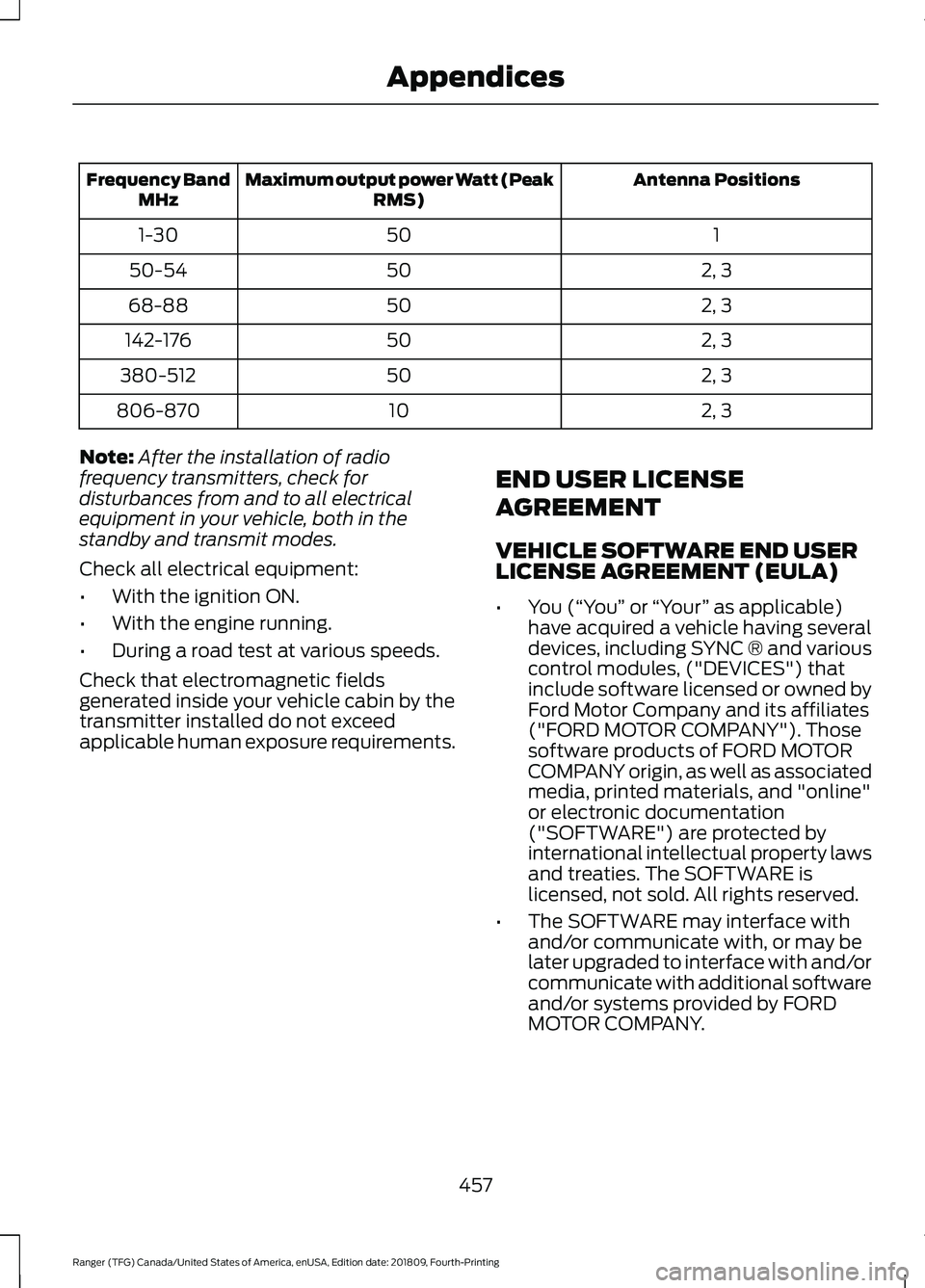
Antenna Positions
Maximum output power Watt (Peak
RMS)
Frequency Band
MHz
1
50
1-30
2, 3
50
50-54
2, 3
50
68-88
2, 3
50
142-176
2, 3
50
380-512
2, 3
10
806-870
Note: After the installation of radio
frequency transmitters, check for
disturbances from and to all electrical
equipment in your vehicle, both in the
standby and transmit modes.
Check all electrical equipment:
• With the ignition ON.
• With the engine running.
• During a road test at various speeds.
Check that electromagnetic fields
generated inside your vehicle cabin by the
transmitter installed do not exceed
applicable human exposure requirements. END USER LICENSE
AGREEMENT
VEHICLE SOFTWARE END USER
LICENSE AGREEMENT (EULA)
•
You (“You” or “Your ” as applicable)
have acquired a vehicle having several
devices, including SYNC ® and various
control modules, ("DEVICES") that
include software licensed or owned by
Ford Motor Company and its affiliates
("FORD MOTOR COMPANY"). Those
software products of FORD MOTOR
COMPANY origin, as well as associated
media, printed materials, and "online"
or electronic documentation
("SOFTWARE") are protected by
international intellectual property laws
and treaties. The SOFTWARE is
licensed, not sold. All rights reserved.
• The SOFTWARE may interface with
and/or communicate with, or may be
later upgraded to interface with and/or
communicate with additional software
and/or systems provided by FORD
MOTOR COMPANY.
457
Ranger (TFG) Canada/United States of America, enUSA, Edition date: 201809, Fourth-Printing Appendices
Page 500 of 512
4
4WD
See: Four-Wheel Drive..................................... 156
A
A/C See: Climate Control........................................... 111
About This Manual...........................................7
About Trail Control.......................................174
ABS See: Brakes........................................................... 165
ABS driving hints See: Hints on Driving With Anti-Lock
Brakes................................................................ 165
Accessories....................................................433 Exterior Style....................................................... 433
Interior Style........................................................ 433
Lifestyle................................................................. 433
Peace of Mind..................................................... 433
Accessories See: Replacement Parts
Recommendation............................................ 13
ACC See: Using Adaptive Cruise Control.............183
Adjusting the Headlamps........................266 Vertical Aim Adjustment................................ 266
Adjusting the Steering Wheel...................66
Airbag Disposal
...............................................49
Air Conditioning See: Climate Control........................................... 111
Air Filter See: Changing the Engine Air Filter.............272
Alarm See: Anti-Theft Alarm........................................ 65
Ambient Lighting............................................76 Adjusting the Brightness.................................... 76
Changing the Color.............................................. 76
Switching Ambient Lighting Off..................... 76
Switching Ambient Lighting On...................... 76
Anti-Theft Alarm
............................................65
Alarm System........................................................ 65
Arming the Alarm................................................. 65
Disarming the Alarm........................................... 65
Triggering the Alarm............................................65
Appendices....................................................455 Apps.................................................................402
........................................................................\
.......... 402
SiriusXM Traffic and Travel Link.................. 404
At a Glance........................................................18
Audible Warnings and Indicators.............89 Headlamps On Warning Chime..................... 89
Key in Ignition Warning Chime........................ 89
Keyless Warning Alert........................................ 89
Parking Brake On Warning Chime.................89
Audio Control
..................................................66
Type One................................................................. 66
Type Two................................................................. 67
You can operate the following functions with the control:............................................... 67
Audio Input Jack...........................................337
Audio System................................................326 General Information......................................... 326
Audio Unit - Vehicles With: SYNC 3
......................................................................330
Adjusting the Volume...................................... 330
Changing Radio Stations................................. 331
Playing or Pausing Media................................. 331
Switching the Audio Unit On and Off..........331
Using Seek, Fast Forward and Reverse.............................................................. 331
Audio Unit - Vehicles With: SYNC.........328 Accessing the Apps Menu.............................. 328
Accessing the Clock Settings........................ 328
Accessing the Information Menu.................328
Accessing the Media Source Menu.............328
Accessing the Phone Features..................... 328
Accessing the Settings Menu........................ 328
Accessing the Sound Settings...................... 329
Adjusting the Volume....................................... 329
Changing Radio Stations................................ 329
Listening to the Radio...................................... 329
Playing or Pausing Media............................... 329
Switching Repeat Mode On and Off..........329
Switching Shuffle Mode On and Off..........329
Switching the Audio Unit On and Off........329
Switching the Display On and Off...............329
Using a Cell Phone............................................ 329
Using Seek, Fast Forward and Reverse............................................................. 330
Using the Display Control............................... 330
Using the Number Block................................. 330
497
Ranger (TFG) Canada/United States of America, enUSA, Edition date: 201809, Fourth-Printing Index
Page 505 of 512
Heated Seats..................................................124
Heated Windshield.......................................116
Windshield Wiper De-Icer................................ 116
Heating See: Climate Control........................................... 111
Hill Start Assist.............................................166 Switching the System On and Off................167
Using Hill Start Assist........................................ 167
Hints on Controlling the Interior Climate...........................................................113
Defogging the Side Windows in Cold Weather.............................................................. 116
General Hints......................................................... 113
Quickly Cooling the Interior.............................. 115
Quickly Heating the Interior............................. 114
Recommended Settings for Cooling............115
Recommended Settings for Heating...........115
Hints on Driving With Anti-Lock Brakes............................................................165
Home Screen
................................................368
Hood Lock See: Opening and Closing the Hood..........256
Horn....................................................................68
I
Ignition Switch
...............................................133
Starting the Engine............................................ 134
Switching the Ignition Off................................ 134
Switching the Ignition On................................ 134
Switching the Ignition to Accessory Mode
................................................................... 134
In California (U.S. Only).............................235
Information Display Control
......................68
Information Displays....................................90
General Information........................................... 90
Information Messages
.................................98
4WD........................................................................\
. 110
Adaptive Cruise Control.................................... 98
Airbag....................................................................... 99
Alarm and Security............................................. 99
Auto-Start-Stop................................................. 100
Battery and Charging System......................... 101
Blind Spot Information and Cross Traffic Alert System..................................................... 101
Doors and Locks................................................. 102
Driver Alert............................................................ 102
Drivetrain............................................................... 103Engine.....................................................................
103
Fuel........................................................................\
.. 103
Keys and Intelligent Access............................ 104
Lane Keeping System....................................... 105
Maintenance........................................................ 105
MyKey..................................................................... 106
Park Aid.................................................................. 107
Power Steering.................................................... 107
Pre-Collision Assist............................................ 107
Remote Start....................................................... 108
Starting System ................................................. 108
Tire Pressure Monitoring System.................108
Traction Control.................................................. 108
Trail Control.......................................................... 109
Trailer...................................................................... 109
Installing Child Restraints...........................22 Child Restraints..................................................... 22
Combining Seatbelt and LATCH Lower Anchors for Attaching Child
Restraints........................................................... 26
Front Seat Tether Strap Attachment (SuperCab)........................................................ 27
Rear Seat Tether Strap Attachment (SuperCab)....................................................... 28
Use of Inboard Lower Anchors from the Outermost Seating Positions (Center
Seating Use) .................................................... 26
Using Lap and Shoulder Belts ........................ 22
Using Lower Anchors and Tethers for CHildren (LATCH)........................................... 24
Using Tether Straps............................................. 26
Instrument Cluster
........................................83
Instrument Lighting Dimmer......................72 Vehicles With Front Fog Lamps...................... 73
Vehicles Without Front Fog Lamps...............73
Instrument Panel
............................................18
Interior Lamps..................................................75
Courtesy Lamp...................................................... 75
Reading Lamps..................................................... 76
Rear Courtesy Lamp............................................ 76
Interior Mirror....................................................81 Automatic Dimming Mirror................................ 81
Manual Dimming Mirror...................................... 81
Introduction.........................................................7
502
Ranger (TFG) Canada/United States of America, enUSA, Edition date: 201809, Fourth-Printing Index
Page 507 of 512
O
Off-Road Driving..........................................225
After Off-Road Driving..................................... 226
Basic Off-road Driving Techniques.............225
Crossing Obstacles........................................... 225
Hill Climbing......................................................... 225
Oil Change Indicator Reset......................260
Oil Check See: Engine Oil Check...................................... 259
Opening and Closing the Hood..............256 Closing the Hood................................................ 257
Opening the Hood............................................. 256
Ordering Additional Owner's Literature......................................................239
Obtaining a French Owner ’s Manual.........239
Overhead Console
.........................................131
P
Parking Aids
....................................................176
Principle of Operation....................................... 176
Parking Brake
.................................................166
All Vehicles........................................................... 166
Vehicles With Automatic Transmission................................................... 166
Vehicles With Manual Transmission...........166
Passive Anti-Theft System
.........................65
Arming the Engine Immobilizer...................... 65
Coded Keys............................................................. 65
Disarming the Engine Immobilizer................65
Principle of Operation........................................ 65
Passive Key Backup Position.....................56
PATS See: Passive Anti-Theft System..................... 65
Perchlorate........................................................13
Personal Safety System ™
...........................41
How Does the Personal Safety System
Work?................................................................... 41
Phone..............................................................389 During a Phone Call.......................................... 392
Making Calls......................................................... 391
Pairing Your Cell Phone for the First Time.................................................................. 389
Phone Menu........................................................ 390
Receiving Calls.................................................... 392
Smartphone Connectivity.............................. 393
Text Messaging................................................... 393Power Door Locks
See: Locking and Unlocking............................. 62
Power Seats
.....................................................121
Adjusting the Driver Seat Height .................. 122
Adjusting the Lumbar........................................ 122
Adjusting the Recliner....................................... 122
Moving the Seat Backward and Forward............................................................... 121
Power Steering Fluid Check.....................263
Power Windows...............................................77 Bounce-Back......................................................... 79
Driver Door Switches (Double Cab)..............77
Driver Door Switches (Single Cab)................78
Front and Rear Passenger Door Switches............................................................. 78
Opening and Closing Other Windows Automatically................................................... 78
Opening and Closing the Driver Side Window Automatically.................................. 78
Resetting the Memory of the Electric Windows - Vehicle with One Touch
Up/Down on Driver Side only..................... 79
Safety Mode........................................................... 79
Safety Switch for the Rear Windows............78
Pre-Collision Assist.....................................203 Using the Pre-Collision Assist
System.............................................................. 203
Protecting the Environment........................17
Puncture See: Changing a Road Wheel....................... 304
Push Button Ignition Switch.....................134 Failure to Start - Vehicles with Manual
Transmission................................................... 135
Fast Restart.......................................................... 136
Key Outside Vehicle Audible Warning........136
Starting System Information Messages.......................................................... 136
Starting The Engine - Vehicles with Automatic Transmission............................. 134
Starting The Engine - Vehicles with Manual Transmission................................................... 134
Stopping the Engine When Your Vehicle is Moving - Vehicles with Automatic
Transmission................................................... 135
Stopping the Engine When Your Vehicle is Moving - Vehicles with Manual
Transmission................................................... 135
504
Ranger (TFG) Canada/United States of America, enUSA, Edition date: 201809, Fourth-Printing Index
Page 508 of 512
Stopping the Engine When Your Vehicle is
Stationary - Vehicles with Automatic
Transmission................................................... 135
Stopping the Engine When Your Vehicle is Stationary - Vehicles with Manual
Transmission................................................... 135
Switching the Ignition On to Accessory Mode................................................................... 134
Vehicles with a Diesel Engine........................ 134
R
Radio.................................................................332 Antenna................................................................. 332
Rear Axle
..........................................................163
Rear Parking Aid............................................176
Obstacle Distance Indicator............................ 177
Rear Seat Armrest........................................132
Rear Seats
........................................................122
Folding the Seat Backrest............................... 123
Folding the Seat Cushion................................. 123
Removing the Seat Cushion........................... 122
Unfolding the Seat Backrest.......................... 124
Unfolding the Seat Cushion............................ 123
Rear View Camera........................................178 Camera guidelines.............................................. 179
Manual Zoom........................................................ 181
Obstacle Distance Indicator.......................... 180
Rear Camera Delay............................................. 181
Using the Rear View Camera System.........179
Rear View Camera See: Rear View Camera.................................... 178
Recommended Towing Weights............216 Towing Capacities............................................... 217
Trailer Hitch Identification................................ 217
Trailer Nose Weight............................................ 218
Refueling..........................................................144 Refueling System Overview........................... 144
Refueling System Warning............................. 146
Refueling Your Vehicle...................................... 144
Remote Control..............................................50 Car Finder................................................................ 54
Integrated Keyhead Transmitter.................... 50
Intelligent Access Key.......................................... 51
Remote Start......................................................... 55
Replacing the Battery......................................... 52
Sounding a Panic Alarm.................................... 54Remote Start
...................................................117
Automatic Settings............................................. 117
Heated and Cooled Features........................... 117
Last Settings.......................................................... 117
Removing a Headlamp.............................268
Removing the Tailgate................................213
Repairing Minor Paint Damage
...............278
Replacement Parts Recommendation........................................13
Collision Repairs.................................................... 14
Scheduled Maintenance and Mechanical Repairs.................................................................. 13
Warranty on Replacement Parts..................... 14
Replacing a Lost Key or Remote Control............................................................56
Reporting Safety Defects (Canada Only)
..............................................................239
Reporting Safety Defects (U.S. Only)
..............................................................239
Roadside Assistance..................................228
Vehicles Sold in Canada: Getting Roadside
Assistance....................................................... 229
Vehicles Sold in the United States: Getting Roadside Assistance................................... 228
Vehicles Sold in the United States: Using Roadside Assistance................................... 228
Roadside Emergencies
..............................228
Roof Racks and Load Carriers...................211
Running-In See: Breaking-In................................................. 224
Running Out of Fuel
.....................................142
Adding Fuel From a Portable Fuel
Container.......................................................... 143
Filling a Portable Fuel Container................... 142
S
Safety Canopy ™
.............................................47
Safety Precautions........................................141
Satellite Radio
..............................................334
Satellite Radio Electronic Serial Number
(ESN)................................................................. 335
Satellite Radio Reception Factors...............335
SiriusXM Satellite Radio Service.................. 335
Troubleshooting................................................. 336
Scheduled Maintenance Record
...........444
Scheduled Maintenance...........................437
Seatbelt Extensions......................................39
505
Ranger (TFG) Canada/United States of America, enUSA, Edition date: 201809, Fourth-Printing Index
Page 509 of 512
Seatbelt Height Adjustment......................37
Seatbelt Reminder.........................................37 Seatbelt Status..................................................... 38
Seatbelts...........................................................34 Principle of Operation........................................ 34
Seats..................................................................118
Security..............................................................65
Settings...........................................................405 911 Assist............................................................... 410
Ambient Lighting................................................. 417
Bluetooth.............................................................. 407
Clock....................................................................... 407
Display.................................................................... 418
General................................................................... 415
Media Player....................................................... 406
Mobile Apps.......................................................... 413
Navigation............................................................. 412
Phone..................................................................... 407
Radio........................................................................\
411
SiriusXM.................................................................. 411
Sound.................................................................... 405
Valet Mode............................................................ 419
Vehicle..................................................................... 417
Voice Control........................................................ 418
Wi-Fi & Hotspot.................................................. 415
Setting the Trail Control Speed...............174
Side Airbags
.....................................................46
Sitting in the Correct Position...................118
Snow Chains See: Using Snow Chains.................................. 297
Spare Wheel See: Changing a Road Wheel....................... 304
Special Notices
................................................14
Fleet Telematics Modem.................................... 15
FordPass Connect................................................. 15
New Vehicle Limited Warranty......................... 14
Notice to Owners of Pickup Trucks and Utility Type Vehicles........................................ 15
On Board Diagnostics Data Link Connector ............................................................ 14
Special Instructions.............................................. 14
Using Your Vehicle as an Ambulance............15
Using Your Vehicle With a Snowplow...........15
Special Operating Conditions Scheduled Maintenance..............................................442
Exceptions........................................................... 444
Speed Control See: Cruise Control............................................ 182Stability Control
............................................169
Principle of Operation...................................... 169
Starter Switch See: Ignition Switch........................................... 133
Starting and Stopping the Engine..........133 General Information.......................................... 133
Steering...........................................................202 Electric Power Steering................................... 202
Steering Wheel...............................................66
Storage Compartments
..............................131
Sun Visors.........................................................82
Illuminated Vanity Mirror................................... 82
Supplementary Restraints System
.........42
Principle of Operation......................................... 42
Switching Trail Control On and Off........174
Symbols Glossary
.............................................7
SYNC™ 3........................................................356
General Information......................................... 356
SYNC™ 3 Troubleshooting
.......................419
SYNC™ Applications and Services
........................................................343
911 Assist............................................................... 343
SYNC Mobile Apps............................................ 345
SYNC™
............................................................339
General Information......................................... 339
SYNC™ Troubleshooting
..........................347
T
Tailgate Lock
...................................................213
Tailgate.............................................................213
Technical Specifications See: Capacities and Specifications.............316
Terrain Control................................................172 Principle of Operation........................................ 172
The Better Business Bureau (BBB) Auto Line Program (U.S. Only)
.......................236
Tire Care..........................................................282
Glossary of Tire Terminology........................ 284
Information About Uniform Tire Quality Grading............................................................. 282
Information Contained on the Tire Sidewall........................................................... 285
Temperature A B C............................................ 283
Traction AA A B C............................................... 283
Treadwear............................................................ 283
506
Ranger (TFG) Canada/United States of America, enUSA, Edition date: 201809, Fourth-Printing Index