length FORD RANGER 2019 Owners Manual
[x] Cancel search | Manufacturer: FORD, Model Year: 2019, Model line: RANGER, Model: FORD RANGER 2019Pages: 512, PDF Size: 7.63 MB
Page 39 of 512
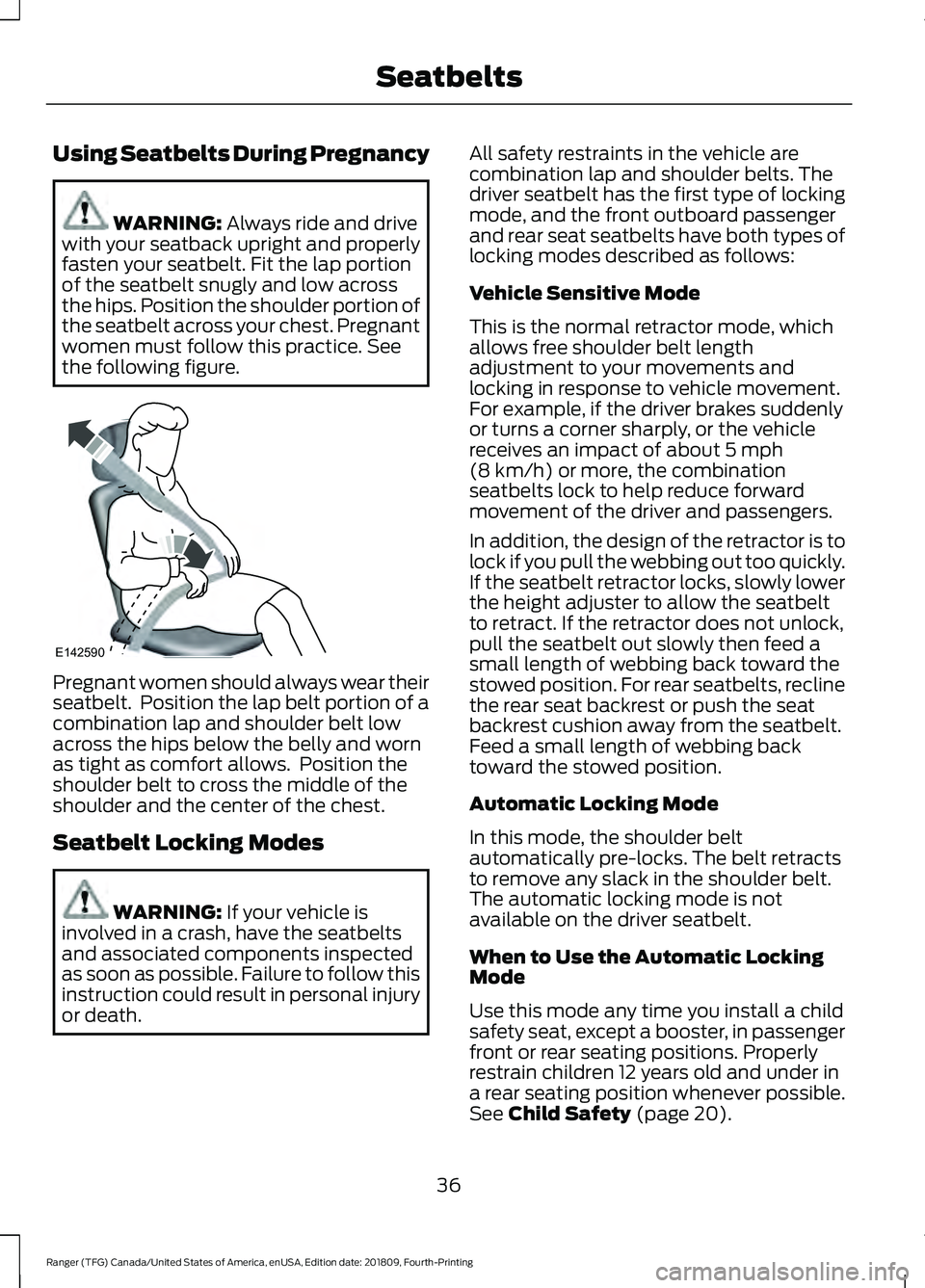
Using Seatbelts During Pregnancy
WARNING: Always ride and drive
with your seatback upright and properly
fasten your seatbelt. Fit the lap portion
of the seatbelt snugly and low across
the hips. Position the shoulder portion of
the seatbelt across your chest. Pregnant
women must follow this practice. See
the following figure. Pregnant women should always wear their
seatbelt. Position the lap belt portion of a
combination lap and shoulder belt low
across the hips below the belly and worn
as tight as comfort allows. Position the
shoulder belt to cross the middle of the
shoulder and the center of the chest.
Seatbelt Locking Modes
WARNING:
If your vehicle is
involved in a crash, have the seatbelts
and associated components inspected
as soon as possible. Failure to follow this
instruction could result in personal injury
or death. All safety restraints in the vehicle are
combination lap and shoulder belts. The
driver seatbelt has the first type of locking
mode, and the front outboard passenger
and rear seat seatbelts have both types of
locking modes described as follows:
Vehicle Sensitive Mode
This is the normal retractor mode, which
allows free shoulder belt length
adjustment to your movements and
locking in response to vehicle movement.
For example, if the driver brakes suddenly
or turns a corner sharply, or the vehicle
receives an impact of about
5 mph
(8 km/h) or more, the combination
seatbelts lock to help reduce forward
movement of the driver and passengers.
In addition, the design of the retractor is to
lock if you pull the webbing out too quickly.
If the seatbelt retractor locks, slowly lower
the height adjuster to allow the seatbelt
to retract. If the retractor does not unlock,
pull the seatbelt out slowly then feed a
small length of webbing back toward the
stowed position. For rear seatbelts, recline
the rear seat backrest or push the seat
backrest cushion away from the seatbelt.
Feed a small length of webbing back
toward the stowed position.
Automatic Locking Mode
In this mode, the shoulder belt
automatically pre-locks. The belt retracts
to remove any slack in the shoulder belt.
The automatic locking mode is not
available on the driver seatbelt.
When to Use the Automatic Locking
Mode
Use this mode any time you install a child
safety seat, except a booster, in passenger
front or rear seating positions. Properly
restrain children 12 years old and under in
a rear seating position whenever possible.
See
Child Safety (page 20).
36
Ranger (TFG) Canada/United States of America, enUSA, Edition date: 201809, Fourth-Printing SeatbeltsE142590
Page 99 of 512
Fuel Economy
Fuel Economy
Fuel History
Auto StartStop
• Fuel Economy - Shows a visual graph of your instantaneous fuel economy, average
fuel economy and distance to empty.
• Fuel History - Shows a bar chart of your fuel history from the past 30 min, average
fuel economy and distance to empty.
• Auto StartStop - Available Auto Start-Stop messaging will provide details about what
is happening with your system. See Information Messages (page 98).
Note: You can reset your average fuel economy by pressing and holding the
OK button on
the left hand steering wheel controls.
Driver Assist
In this mode, you can configure different
driver setting choices. Note:
Some items are optional and may
not appear. Driver Assist
Blind spot
Blind Spot
Enter the submenu and select your
setting
Trailer
Enter the submenu and select your
setting
Trailer Length
Cross Traffic
Alert
Hill Start Assist
Rear Park Aid
Trailer Sway Enter the submenu and select your setting
Chimes
Enter the submenu and select your setting
Cruise Control
Enter the submenu and select your setting
Driver Alert
96
Ranger (TFG) Canada/United States of America, enUSA, Edition date: 201809, Fourth-Printing Information Displays
Page 201 of 512
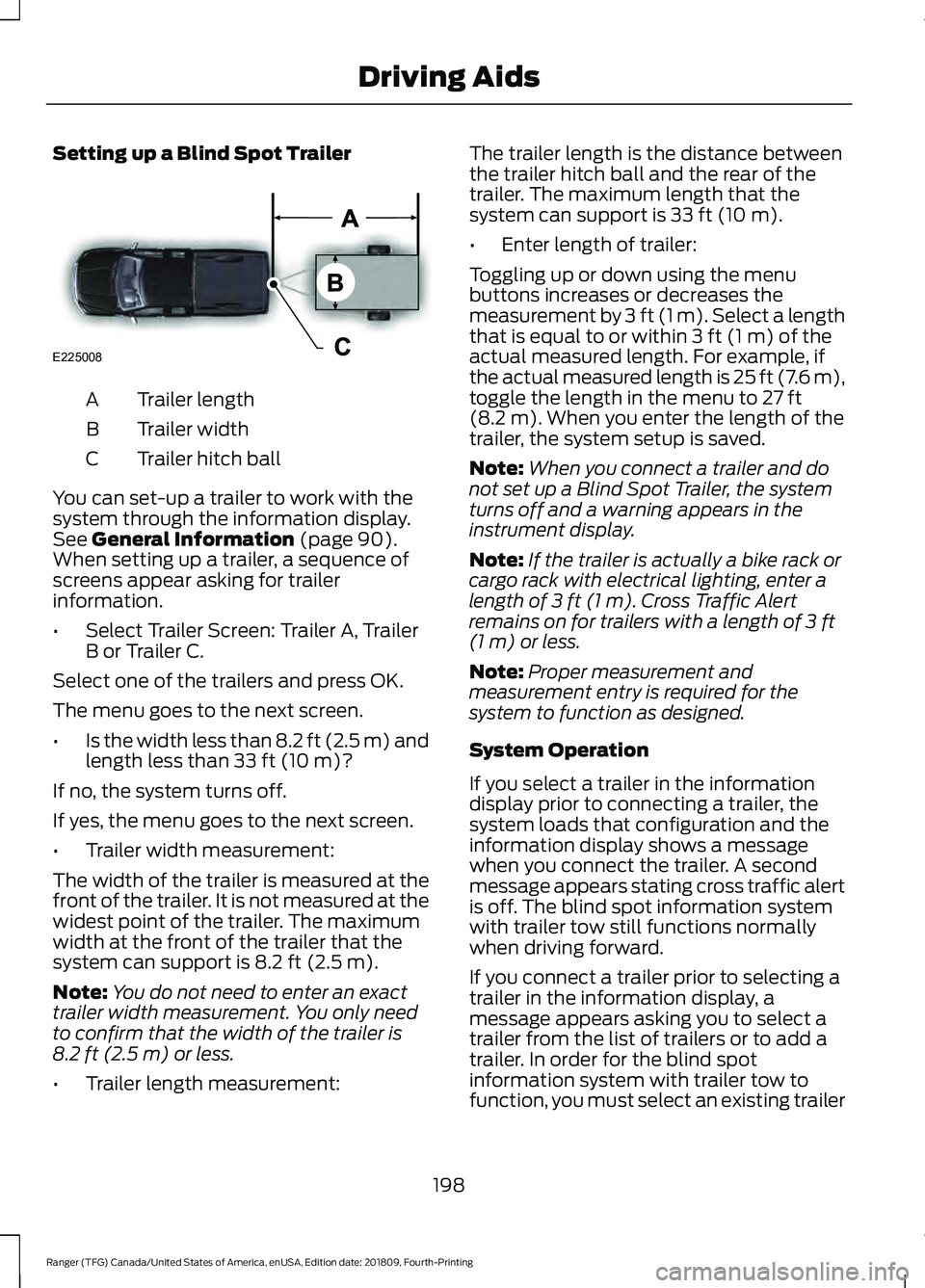
Setting up a Blind Spot Trailer
Trailer length
A
Trailer width
B
Trailer hitch ball
C
You can set-up a trailer to work with the
system through the information display.
See General Information (page 90).
When setting up a trailer, a sequence of
screens appear asking for trailer
information.
• Select Trailer Screen: Trailer A, Trailer
B or Trailer C.
Select one of the trailers and press OK.
The menu goes to the next screen.
• Is the width less than 8.2 ft (2.5 m) and
length less than
33 ft (10 m)?
If no, the system turns off.
If yes, the menu goes to the next screen.
• Trailer width measurement:
The width of the trailer is measured at the
front of the trailer. It is not measured at the
widest point of the trailer. The maximum
width at the front of the trailer that the
system can support is
8.2 ft (2.5 m).
Note: You do not need to enter an exact
trailer width measurement. You only need
to confirm that the width of the trailer is
8.2 ft (2.5 m)
or less.
• Trailer length measurement: The trailer length is the distance between
the trailer hitch ball and the rear of the
trailer. The maximum length that the
system can support is
33 ft (10 m).
• Enter length of trailer:
Toggling up or down using the menu
buttons increases or decreases the
measurement by
3 ft (1 m). Select a length
that is equal to or within 3 ft (1 m) of the
actual measured length. For example, if
the actual measured length is 25 ft (7.6 m),
toggle the length in the menu to
27 ft
(8.2 m). When you enter the length of the
trailer, the system setup is saved.
Note: When you connect a trailer and do
not set up a Blind Spot Trailer, the system
turns off and a warning appears in the
instrument display.
Note: If the trailer is actually a bike rack or
cargo rack with electrical lighting, enter a
length of
3 ft (1 m). Cross Traffic Alert
remains on for trailers with a length of 3 ft
(1 m) or less.
Note: Proper measurement and
measurement entry is required for the
system to function as designed.
System Operation
If you select a trailer in the information
display prior to connecting a trailer, the
system loads that configuration and the
information display shows a message
when you connect the trailer. A second
message appears stating cross traffic alert
is off. The blind spot information system
with trailer tow still functions normally
when driving forward.
If you connect a trailer prior to selecting a
trailer in the information display, a
message appears asking you to select a
trailer from the list of trailers or to add a
trailer. In order for the blind spot
information system with trailer tow to
function, you must select an existing trailer
198
Ranger (TFG) Canada/United States of America, enUSA, Edition date: 201809, Fourth-Printing Driving AidsE225008
Page 202 of 512
or add a new trailer. If you ignore the
request or if you exit the screen, a message
appears stating the system has turned off
due to a trailer connect. This message may
not appear until your vehicle speed reaches
22 mph (35 km/h).
The blind spot information system with
trailer tow activates when driving forward
for that particular trailer set up. If you cycle
the ignition, the blind spot information
system with trailer tow continues to
function using the last trailer you select.
Trailer Considerations
The system is designed to work with a
trailer with a front width of
8.2 ft (2.5 m)
or less, and a total length from the trailer
hitch ball to the rear of the trailer of
33 ft
(10 m) or less.
Some trailers may cause a slight change
in system performance:
• Large box trailers may cause false
alerts to occur when driving next to
infrastructures or near parked cars. A
false alert may also occur while making
a 90-degree turn.
• Trailers that have a width greater than
8.2 ft (2.5 m)
at the front and have a
total length greater than 20 ft (6 m)
may cause delayed alerts when a
vehicle is passing at high speed.
• Box trailers that have a width greater
than
8.2 ft (2.5 m) at the front may
cause early alerts when you pass a
vehicle.
• Clam shell or V-Nose box trailers with
a width greater than
8.2 ft (2.5 m) at
the front may cause delayed alerts
when a vehicle traveling the same
speed as your vehicle merges lanes.
System Errors
If the system detects a fault, a warning
lamp illuminates and a message displays.
See
Information Messages (page 98). Switching the System On and Off
You can switch the system off using the
information display.
See General
Information (page 90). When you switch
the system off, you do not receive alerts
and the information display shows a
system off message. The warning indicator
in the cluster also illuminates. When you
switch the system on or off, the alert
indicators flash twice.
Note: The system remembers the last
setting when you start your vehicle.
To permanently switch the system off,
contact an authorized dealer.
CROSS TRAFFIC ALERT
(IF
EQUIPPED) WARNING:
Do not use the cross
traffic alert system as a replacement for
using the interior and exterior mirrors or
looking over your shoulder before
reversing out of a parking space. The
cross traffic alert system is not a
replacement for careful driving. WARNING:
The system may not
operate properly during severe weather
conditions, for example snow, ice, heavy
rain and spray. Always drive with due
care and attention. Failure to take care
may result in a crash.
The system is designed to alert you of
vehicles approaching from the sides when
you shift into reverse (R).
199
Ranger (TFG) Canada/United States of America, enUSA, Edition date: 201809, Fourth-Printing Driving Aids
Page 236 of 512
Before using recovery hooks:
•
Make sure all attaching points are
secure and capable of withstanding
the applied load.
• Never use chains, cables or tow straps
with metal hook ends.
• Only use recovery straps that have a
minimum breaking strength two to
three times the gross vehicle weight of
the stuck vehicle.
• Make sure the recovery strap is in good
condition and free of visible cuts, tears
or damage.
• Use a damper device such as a tarp,
heavy blanket or piece of carpet
draped over the recovery strap to help
absorb the energy in the event the
strap breaks.
• Make sure the stuck vehicle is not
loaded heavier than its gross vehicle
weight rating specified on the
certification label.
• Always align the tow vehicle and stuck
vehicle in a straight line (within 10
degrees).
• Keep bystanders to the sides of the
vehicle, at a distance of at least twice
the length of the recovery strap. This
helps avoid injury from the hazard of a
recovery hook or strap breaking, or a
vehicle lurching into their path.
233
Ranger (TFG) Canada/United States of America, enUSA, Edition date: 201809, Fourth-Printing Roadside Emergencies
Page 240 of 512
UTILIZING THE
MEDIATION/ARBITRATION
PROGRAM (CANADA ONLY)
For vehicles delivered to authorized
Canadian dealers. In those cases where
you continue to feel that the efforts by Ford
of Canada and the authorized dealer to
resolve a factory-related vehicle service
concern have been unsatisfactory, Ford of
Canada participates in an impartial third
party mediation/arbitration program
administered by the Canadian Motor
Vehicle Arbitration Plan (CAMVAP).
The CAMVAP program is a straight forward
and relatively speedy alternative to resolve
a disagreement when all other efforts to
produce a settlement have failed. This
procedure is without cost to you and is
designed to eliminate the need for lengthy
and expensive legal proceedings.
In the CAMVAP program, impartial
third-party arbitrators conduct hearings at
mutually convenient times and places in
an informal environment. These impartial
arbitrators review the positions of the
parties, make decisions and, when
appropriate, render awards to resolve
disputes. CAMVAP decisions are fast, fair,
and final as the arbitrator
’s award is
binding on both you and Ford of Canada.
CAMVAP services are available in all
Canadian territories and provinces. For
more information, without charge or
obligation, call your CAMVAP Provincial
Administrator directly at 1-800-207-0685
or visit www.camvap.ca. GETTING ASSISTANCE
OUTSIDE THE U.S. AND
CANADA
Before exporting your vehicle to a foreign
country, contact the appropriate foreign
embassy or consulate. These officials can
inform you of local vehicle registration
regulations and where to find unleaded
fuel or petrol/gas engines or the proper
sulfur fuel for diesel engines.
If you cannot find the proper fuel
recommended for your vehicle, contact
our Customer Relationship Center.
The use of improper fuels in your vehicle
without proper conversion may damage
the effectiveness of your emission control
system and may cause engine knocking or
serious engine damage. Ford Motor
Company or Ford of Canada is not
responsible for any damage caused by use
of improper fuel. Using improper fuels may
also result in difficulty importing your
vehicle back into the United States.
If your vehicle must be serviced while you
are traveling or living in Asia-Pacific Region,
Sub-Saharan Africa, U.S. Virgin Islands
and/or Puerto Rico, Central America, the
Caribbean, and Israel and the Middle East,
contact the nearest authorized dealer. If
the authorized dealer cannot help you,
contact the corresponding Ford Customer
Assistance Center:
FORD MOTOR COMPANY
Customer Relationship Centers in:
237
Ranger (TFG) Canada/United States of America, enUSA, Edition date: 201809, Fourth-Printing Customer Assistance
Page 269 of 512
CHECKING THE WIPER
BLADES
Run the tip of your fingers over the edge of
the blade to check for roughness.
Clean the wiper blades with isopropyl
alcohol or windscreen washer concentrate.
CHANGING THE WIPER
BLADES
Changing the Windshield Wiper
Blades
Note:
The windshield wiper blades are
different in length.
Note: If you install wiper blades of the
wrong length, the wiper blades can clash
damaging the wiper system. 1. Pull the wiper blade and arm away
from the glass. 2. Squeeze the blade's lock pin and tab
on the bottom of the arm to release
the wiper blade.
3. Slide the blade out to remove it from the arm hook.
4. Install in the reverse order.
Note: Make sure that the wiper blade locks
into place.
ADJUSTING THE HEADLAMPS
Vertical Aim Adjustment
If your vehicle has been involved in a crash,
have the aim of the headlamp beam
checked by an authorized dealer.
266
Ranger (TFG) Canada/United States of America, enUSA, Edition date: 201809, Fourth-Printing MaintenanceE222238 E279824 E279825
Page 372 of 512
Home screen display
Tile
Item
If your vehicle does not have navigation, this space contains
the compass.
The name of the connected phone appears on the screen.
The status of the phone features also appear. This includes
signal strength, battery charge, text messaging and
roaming.
Phone
B
This map displays your current location or current route in
real time.
Navigation *
C
When you have navigation active, you also see the next
turn and the length of time and distance to your destina-
tion.
If your vehicle does not have navigation, this space contains
the audio information.
* If equipped.
You can touch any of the feature displays
to access that feature.
Anytime you select the home button, the
system returns you to this screen.
USING VOICE RECOGNITION
The SYNC 3 system allows you to use voice
commands, to control features like audio
and climate controls. By using voice
commands, you can keep your hands on
the wheel and your eyes on the road. You can access each feature controlled by
SYNC 3 through a variety of commands. To activate the SYNC 3 voice
commands push the voice
button on the steering wheel and
wait for the prompt.
___ is a dynamic listing, meaning that it can
be the name of anything, such as artist, the
name of contact or number. The context
and the description of the command tell
you what to say for this dynamic option.
There are some commands that work for
every feature, these commands are: Action and Description
Voice Command
Brings you to the main menu.
Main Menu
Returns you to the previous screen.
Go back
Ends the voice session.
Cancel
Gives you a list of possible voice commands.
List of Commands
You can name any feature and the system gives a list of
commands available for the feature. For example, you could
say:
___ List of Commands
369
Ranger (TFG) Canada/United States of America, enUSA, Edition date: 201809, Fourth-Printing SYNC™ 3 (If Equipped)E142599