manual transmission FORD RANGER 2019 Owners Manual
[x] Cancel search | Manufacturer: FORD, Model Year: 2019, Model line: RANGER, Model: FORD RANGER 2019Pages: 512, PDF Size: 7.63 MB
Page 6 of 512
Running Out of Fuel
....................................142
Refueling .........................................................
144
Fuel Consumption ......................................
146
Engine Emission Control
Emission Law ................................................
148
Catalytic Converter .....................................
149
Transmission
Automatic Transmission ...........................
152
Four-Wheel Drive
Principle of Operation ................................
156
Using Four-Wheel Drive ............................
156
Rear Axle
Electronic Locking Differential ...............
163
Brakes
General Information ...................................
165
Hints on Driving With Anti-Lock Brakes ........................................................................\
.
165
Parking Brake ................................................
166
Hill Start Assist .............................................
166
Traction Control
Principle of Operation ...............................
168
Using Traction Control ..............................
168
Stability Control
Principle of Operation ...............................
169
Using Stability Control ...............................
170
Terrain Control
Principle of Operation ................................
172
Trail Control
About Trail Control ......................................
174
Switching Trail Control On and Off .......
174
Setting the Trail Control Speed ..............
174Canceling the Set Speed
..........................
174
Trail Control Indicators ...............................
174
Trail Control – Troubleshooting ..............
175
Parking Aids
Principle of Operation ................................
176
Rear Parking Aid ...........................................
176
Front Parking Aid ..........................................
177
Rear View Camera .......................................
178
Cruise Control
Principle of Operation ................................
182
Using Cruise Control ...................................
182
Using Adaptive Cruise Control ...............
183
Driving Aids
Driver Alert .....................................................
190
Lane Keeping System .................................
191
Blind Spot Information System .............
196
Cross Traffic Alert ........................................
199
Steering ..........................................................
202
Pre-Collision Assist ....................................
203
Load Carrying
Load Limit ......................................................
207
Roof Racks and Load Carriers ..................
211
Load Retaining Fixtures ..............................
211
Tailgate
Tailgate Lock ..................................................
213
Manual Tailgate ............................................
213
Removing the Tailgate ...............................
213
Towing
Towing a Trailer .............................................
215
Trailer Sway Control ...................................
216
Recommended Towing Weights ...........
216
Essential Towing Checks ..........................
218
Towing the Vehicle on Four Wheels ......
221
3
Ranger (TFG) Canada/United States of America, enUSA, Edition date: 201809, Fourth-Printing Table of Contents
Page 17 of 512
Collision Repairs
We hope that you never experience a
collision, but accidents do happen.
Genuine Ford replacement collision parts
meet our stringent requirements for fit,
finish, structural integrity, corrosion
protection and dent resistance. During
vehicle development we validate that
these parts deliver the intended level of
protection as a whole system. A great way
to know for sure you are getting this level
of protection is to use genuine Ford
replacement collision parts.
Warranty on Replacement Parts
Genuine Ford and Motorcraft replacement
parts are the only replacement parts that
benefit from a Ford Warranty. The Ford
Warranty may not cover damage caused
to your vehicle as a result of failed
non-Ford parts. For additional information,
refer to the terms and conditions of the
Ford Warranty.
SPECIAL NOTICES
New Vehicle Limited Warranty
Vehicles sold in the United States and
Canada
For a detailed description of what is
covered by your New Vehicle Limited
Warranty, see your warranty guide that is
available online. For more information,
refer to our website and download your
copy of the warranty guide.
Vehicles sold outside the United States
and Canada
For a detailed description of what is
covered by your New Vehicle Limited
Warranty, see the warranty guide that is
provided to you along with your Owner
’s
Manual. Special Instructions
For your added safety, your vehicle is fitted
with sophisticated electronic controls. WARNING: You risk death or
serious injury to yourself and others if you
do not follow the instruction highlighted
by the warning symbol. Failure to follow
the specific warnings and instructions
could result in personal injury. WARNING:
NEVER use a rearward
facing child restraint on a seat protected
by an ACTIVE AIRBAG in front of it,
DEATH or SERIOUS INJURY to the CHILD
can occur.
On Board Diagnostics Data Link
Connector WARNING:
Do not connect
wireless plug-in devices to the data link
connector. Unauthorized third parties
could gain access to vehicle data and
impair the performance of safety related
systems. Only allow repair facilities that
follow our service and repair instructions
to connect their equipment to the data
link connector.
Your vehicle has an OBD Data Link
Connector (DLC) that is used in
conjunction with a diagnostic scan tool for
vehicle diagnostics, repairs and
reprogramming services. Installing an
aftermarket device that uses the DLC
during normal driving for purposes such as
remote insurance company monitoring,
transmission of vehicle data to other
devices or entities, or altering the
performance of the vehicle, may cause
14
Ranger (TFG) Canada/United States of America, enUSA, Edition date: 201809, Fourth-Printing Introduction
Page 58 of 512
Remote Start (If Equipped)
WARNING:
To avoid exhaust
fumes, do not use remote start if your
vehicle is parked indoors or in areas that
are not well ventilated.
Note: Do not use remote start if your fuel
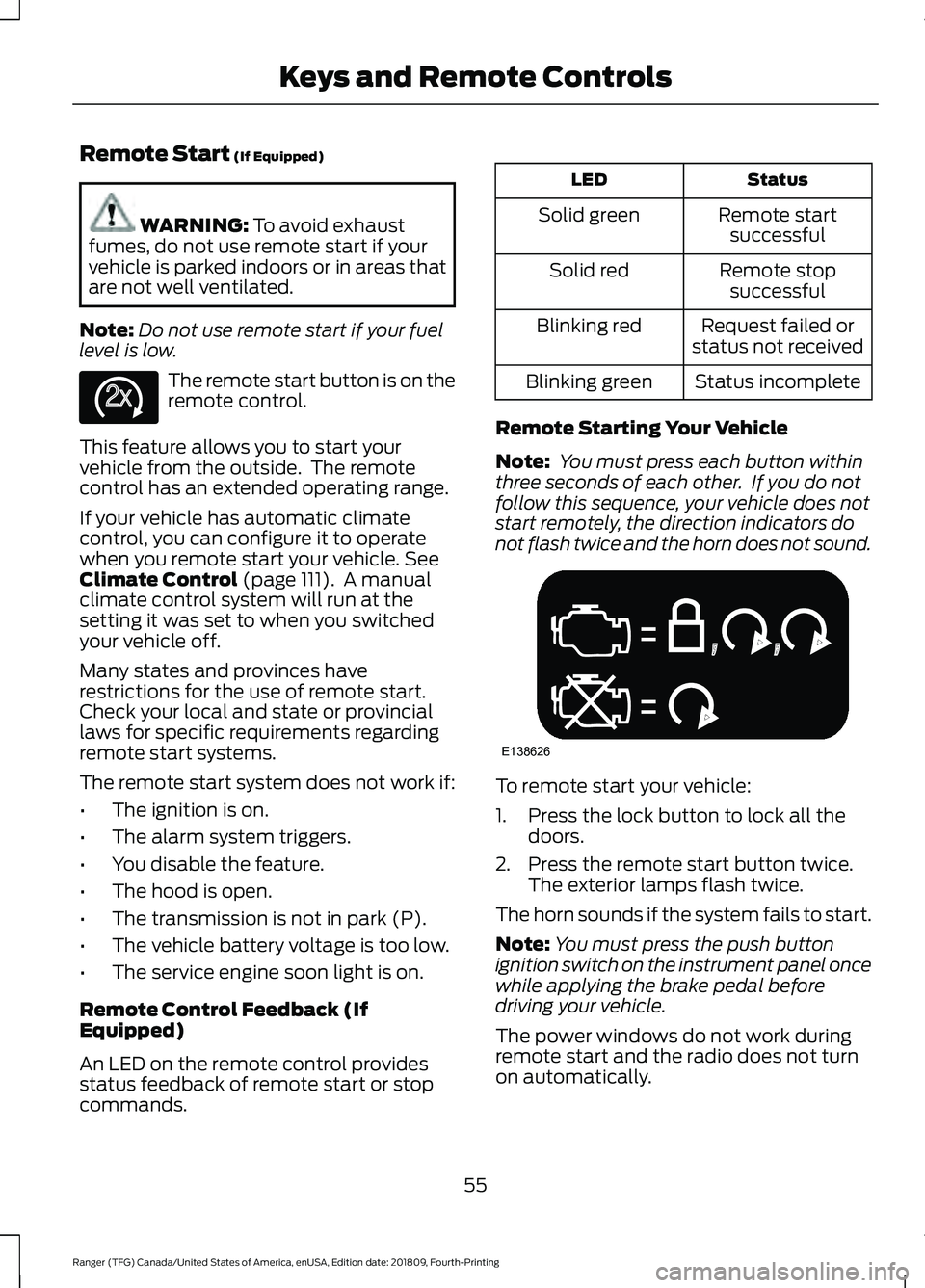
level is low. The remote start button is on the
remote control.
This feature allows you to start your
vehicle from the outside. The remote
control has an extended operating range.
If your vehicle has automatic climate
control, you can configure it to operate
when you remote start your vehicle.
See
Climate Control (page 111). A manual
climate control system will run at the
setting it was set to when you switched
your vehicle off.
Many states and provinces have
restrictions for the use of remote start.
Check your local and state or provincial
laws for specific requirements regarding
remote start systems.
The remote start system does not work if:
• The ignition is on.
• The alarm system triggers.
• You disable the feature.
• The hood is open.
• The transmission is not in park (P).
• The vehicle battery voltage is too low.
• The service engine soon light is on.
Remote Control Feedback (If
Equipped)
An LED on the remote control provides
status feedback of remote start or stop
commands. Status
LED
Remote startsuccessful
Solid green
Remote stopsuccessful
Solid red
Request failed or
status not received
Blinking red
Status incomplete
Blinking green
Remote Starting Your Vehicle
Note: You must press each button within
three seconds of each other. If you do not
follow this sequence, your vehicle does not
start remotely, the direction indicators do
not flash twice and the horn does not sound. To remote start your vehicle:
1. Press the lock button to lock all the
doors.
2. Press the remote start button twice. The exterior lamps flash twice.
The horn sounds if the system fails to start.
Note: You must press the push button
ignition switch on the instrument panel once
while applying the brake pedal before
driving your vehicle.
The power windows do not work during
remote start and the radio does not turn
on automatically.
55
Ranger (TFG) Canada/United States of America, enUSA, Edition date: 201809, Fourth-Printing Keys and Remote ControlsE138625 E138626
Page 76 of 512
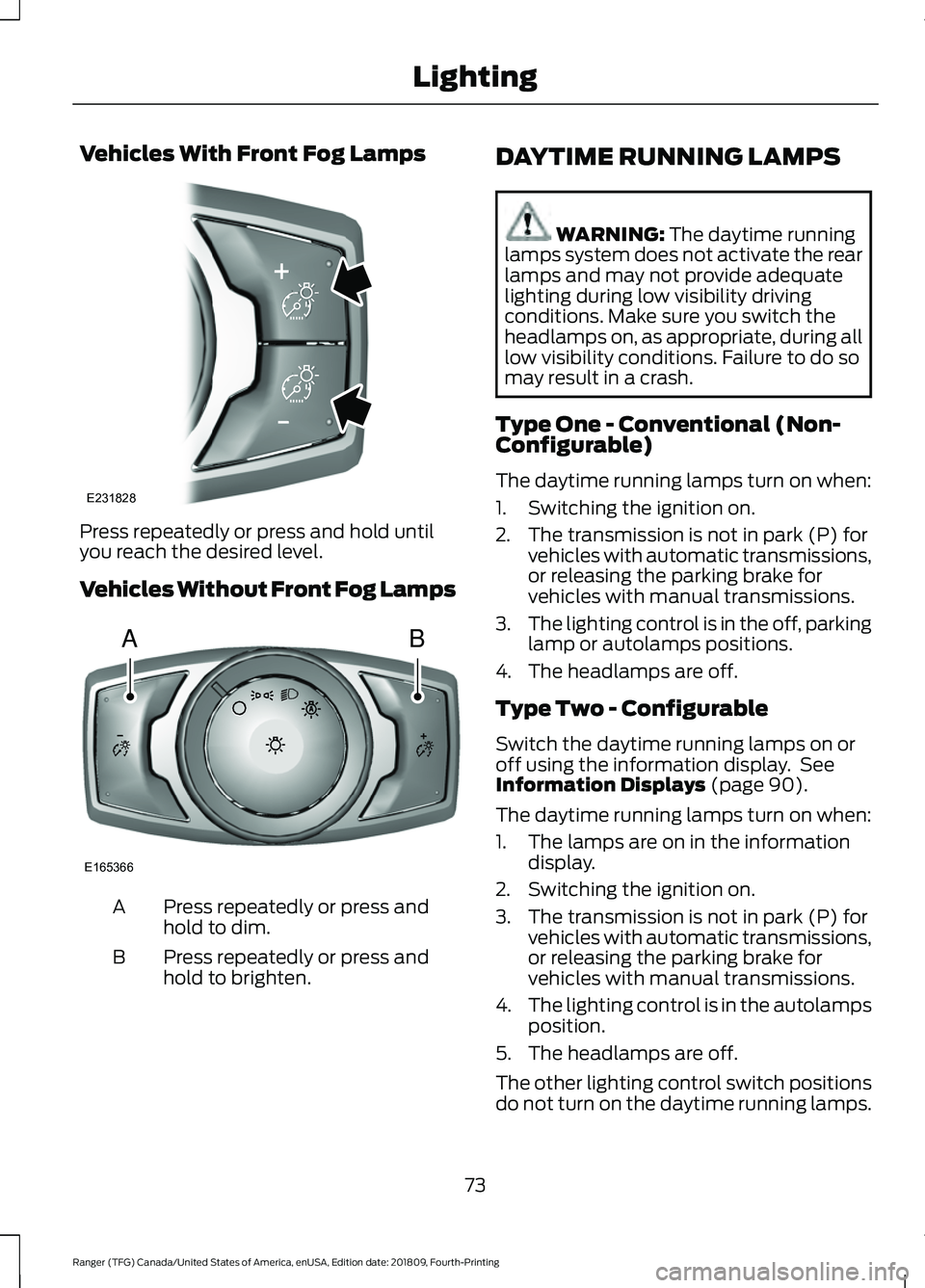
Vehicles With Front Fog Lamps
Press repeatedly or press and hold until
you reach the desired level.
Vehicles Without Front Fog Lamps
Press repeatedly or press and
hold to dim.
A
Press repeatedly or press and
hold to brighten.
B DAYTIME RUNNING LAMPS WARNING: The daytime running
lamps system does not activate the rear
lamps and may not provide adequate
lighting during low visibility driving
conditions. Make sure you switch the
headlamps on, as appropriate, during all
low visibility conditions. Failure to do so
may result in a crash.
Type One - Conventional (Non-
Configurable)
The daytime running lamps turn on when:
1. Switching the ignition on.
2. The transmission is not in park (P) for vehicles with automatic transmissions,
or releasing the parking brake for
vehicles with manual transmissions.
3. The lighting control is in the off, parking
lamp or autolamps positions.
4. The headlamps are off.
Type Two - Configurable
Switch the daytime running lamps on or
off using the information display. See
Information Displays
(page 90).
The daytime running lamps turn on when:
1. The lamps are on in the information display.
2. Switching the ignition on.
3. The transmission is not in park (P) for vehicles with automatic transmissions,
or releasing the parking brake for
vehicles with manual transmissions.
4. The lighting control is in the autolamps
position.
5. The headlamps are off.
The other lighting control switch positions
do not turn on the daytime running lamps.
73
Ranger (TFG) Canada/United States of America, enUSA, Edition date: 201809, Fourth-Printing LightingE231828 AB
E165366
Page 113 of 512
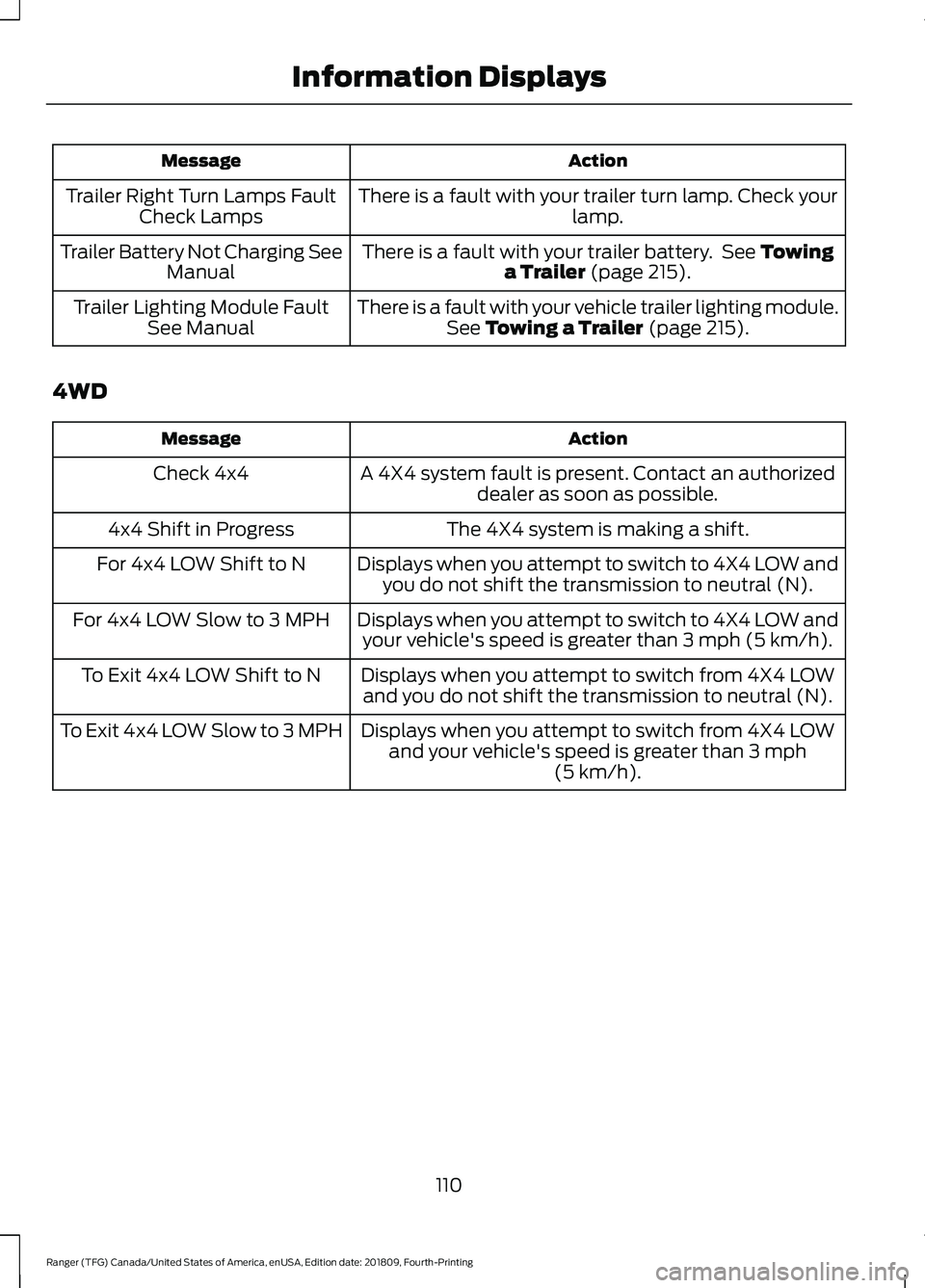
Action
Message
There is a fault with your trailer turn lamp. Check your lamp.
Trailer Right Turn Lamps Fault
Check Lamps
There is a fault with your trailer battery. See Towing
a Trailer (page 215).
Trailer Battery Not Charging See
Manual
There is a fault with your vehicle trailer lighting module.See
Towing a Trailer (page 215).
Trailer Lighting Module Fault
See Manual
4WD Action
Message
A 4X4 system fault is present. Contact an authorizeddealer as soon as possible.
Check 4x4
The 4X4 system is making a shift.
4x4 Shift in Progress
Displays when you attempt to switch to 4X4 LOW andyou do not shift the transmission to neutral (N).
For 4x4 LOW Shift to N
Displays when you attempt to switch to 4X4 LOW andyour vehicle's speed is greater than
3 mph (5 km/h).
For 4x4 LOW Slow to 3 MPH
Displays when you attempt to switch from 4X4 LOWand you do not shift the transmission to neutral (N).
To Exit 4x4 LOW Shift to N
Displays when you attempt to switch from 4X4 LOWand your vehicle's speed is greater than
3 mph
(5 km/h).
To Exit 4x4 LOW Slow to 3 MPH
110
Ranger (TFG) Canada/United States of America, enUSA, Edition date: 201809, Fourth-Printing Information Displays
Page 137 of 512
Switching the Ignition Off
Turn the key to position 0.
Switching the Ignition to
Accessory Mode
Turn the key to position
I. Electrical
accessories, for example the radio, operate
without the engine running.
Switching the Ignition On
Turn the key to position
II. All electrical
circuits and accessories are operational
and the warning lamps and indicators
illuminate.
Starting the Engine
Turn the key to position
III. Release the
key when the engine starts.
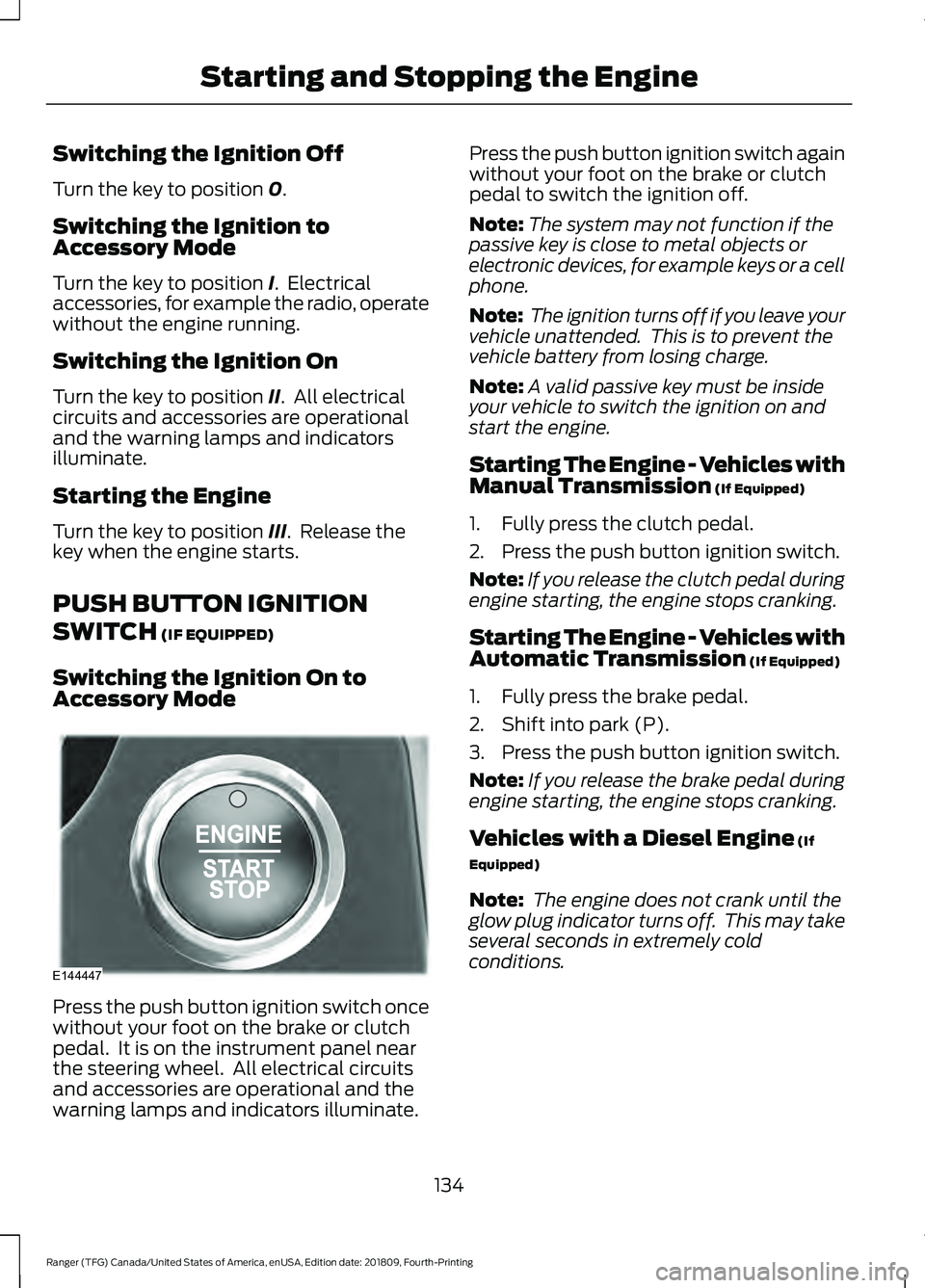
PUSH BUTTON IGNITION
SWITCH
(IF EQUIPPED)
Switching the Ignition On to
Accessory Mode Press the push button ignition switch once
without your foot on the brake or clutch
pedal. It is on the instrument panel near
the steering wheel. All electrical circuits
and accessories are operational and the
warning lamps and indicators illuminate. Press the push button ignition switch again
without your foot on the brake or clutch
pedal to switch the ignition off.
Note:
The system may not function if the
passive key is close to metal objects or
electronic devices, for example keys or a cell
phone.
Note: The ignition turns off if you leave your
vehicle unattended. This is to prevent the
vehicle battery from losing charge.
Note: A valid passive key must be inside
your vehicle to switch the ignition on and
start the engine.
Starting The Engine - Vehicles with
Manual Transmission
(If Equipped)
1. Fully press the clutch pedal.
2. Press the push button ignition switch.
Note: If you release the clutch pedal during
engine starting, the engine stops cranking.
Starting The Engine - Vehicles with
Automatic Transmission
(If Equipped)
1. Fully press the brake pedal.
2. Shift into park (P).
3. Press the push button ignition switch.
Note: If you release the brake pedal during
engine starting, the engine stops cranking.
Vehicles with a Diesel Engine
(If
Equipped)
Note: The engine does not crank until the
glow plug indicator turns off. This may take
several seconds in extremely cold
conditions.
134
Ranger (TFG) Canada/United States of America, enUSA, Edition date: 201809, Fourth-Printing Starting and Stopping the EngineE144447
Page 138 of 512
Failure to Start - Vehicles with
Manual Transmission (If Equipped)
The system does not function if:
• The passive key frequencies are
jammed.
• The key battery has no charge.
If you are unable to start the engine, do the
following:
1. Insert the passive key into the backup position. See
Passive Key Backup
Position (page 56).
2. With the passive key in this position, you can use the push button ignition
switch to switch the ignition on and
start the engine.
If the engine does not crank after you fully
press the clutch pedal and press the push
button ignition switch, do the following:
1. Fully press the clutch pedal and the brake pedal.
2. Press the push button ignition switch.
Stopping the Engine When Your
Vehicle is Stationary - Vehicles
with Manual Transmission (If Equipped)
Press the push button ignition switch.
Note: The ignition, all electrical circuits and
all warning lamps and indicators turn off.
Stopping the Engine When Your
Vehicle is Stationary - Vehicles
with Automatic Transmission
(If
Equipped)
1. Fully press the brake pedal.
2. Shift into park (P).
3. Press the push button ignition switch.
Note: The ignition, all electrical circuits and
all warning lamps and indicators turn off. Stopping the Engine When Your
Vehicle is Moving - Vehicles with
Manual Transmission
(If Equipped) WARNING:
Switching off the
engine when your vehicle is still moving
results in a significant decrease in
braking assistance. Higher effort is
required to apply the brakes and to stop
your vehicle. A significant decrease in
steering assistance could also occur. The
steering does not lock, but higher effort
could be required to steer your vehicle.
When you switch the ignition off, some
electrical circuits, for example airbags,
also turn off. If you unintentionally switch
the ignition off, shift into neutral (N) and
restart the engine.
1. Press and hold the push button ignition
switch until the engine stops, or press
it three times within two seconds.
2. Shift into neutral and use the brakes to
bring your vehicle to a safe stop.
3. Press the push button ignition switch.
Stopping the Engine When Your
Vehicle is Moving - Vehicles with
Automatic Transmission
(If Equipped) WARNING:
Switching off the
engine when your vehicle is still moving
results in a significant decrease in
braking assistance. Higher effort is
required to apply the brakes and to stop
your vehicle. A significant decrease in
steering assistance could also occur. The
steering does not lock, but higher effort
could be required to steer your vehicle.
When you switch the ignition off, some
electrical circuits, for example airbags,
also turn off. If you unintentionally switch
the ignition off, shift into neutral (N) and
restart the engine.
135
Ranger (TFG) Canada/United States of America, enUSA, Edition date: 201809, Fourth-Printing Starting and Stopping the Engine
Page 143 of 512
Automatic Engine Restart
Any of the following conditions will result
in an automatic restart of the engine:
•
Your foot is removed from the brake
pedal.
• You press the accelerator pedal.
• You press the accelerator and the
brake pedal at the same time.
• The driver safety belt becomes
unfastened or the driver door is ajar.
• The transmission is moved into reverse
(R).
• Your vehicle is moving.
• The battery is not within optimal
operating conditions.
• The maximum engine off time is
exceeded.
• When you press the Auto-Start-Stop
button while the engine is stopped
automatically.
• The heated windshield is turned on.
Any of the following conditions may result
in an automatic restart of the engine:
• The blower fan speed is increased or
the climate control temperature is
changed.
• An electrical accessory is turned on or
plugged in.
Disabling Auto-Start-Stop Press the Auto-Start-Stop
button located on the center
console to switch the system off.
The button will illuminate. The system will
only be deactivated for the current ignition
cycle. Press the button again to restore
Auto-Start-Stop function. If your vehicle is in an Auto-Start-Stop
state and you shift the transmission to
reverse without pressing the brake, a
message telling you to press the brake
appears. You must press the brake pedal
within 60 seconds, or you will need to shift
to park and manually restart your vehicle.
Note:
If the Shift to P, Restart Engine
message appears and the amber
Auto-Start-Stop indicator light is flashing,
automatic restart is not available. The
vehicle must be restarted manually. See
Information Displays (page 90).
140
Ranger (TFG) Canada/United States of America, enUSA, Edition date: 201809, Fourth-Printing Unique Driving Characteristics
Page 155 of 512
AUTOMATIC TRANSMISSION
WARNING: Always fully apply the
parking brake and make sure you shift
into park (P). Failure to follow this
instruction could result in personal injury
or death. WARNING:
Do not apply the brake
pedal and accelerator pedal
simultaneously. Applying both pedals
simultaneously for more than a few
seconds will limit engine performance,
which may result in difficulty maintaining
speed in traffic and could lead to serious
injury.
Note: A cold engine has a higher idle
speed. This increases the tendency for your
vehicle to creep when you have selected a
drive gear.
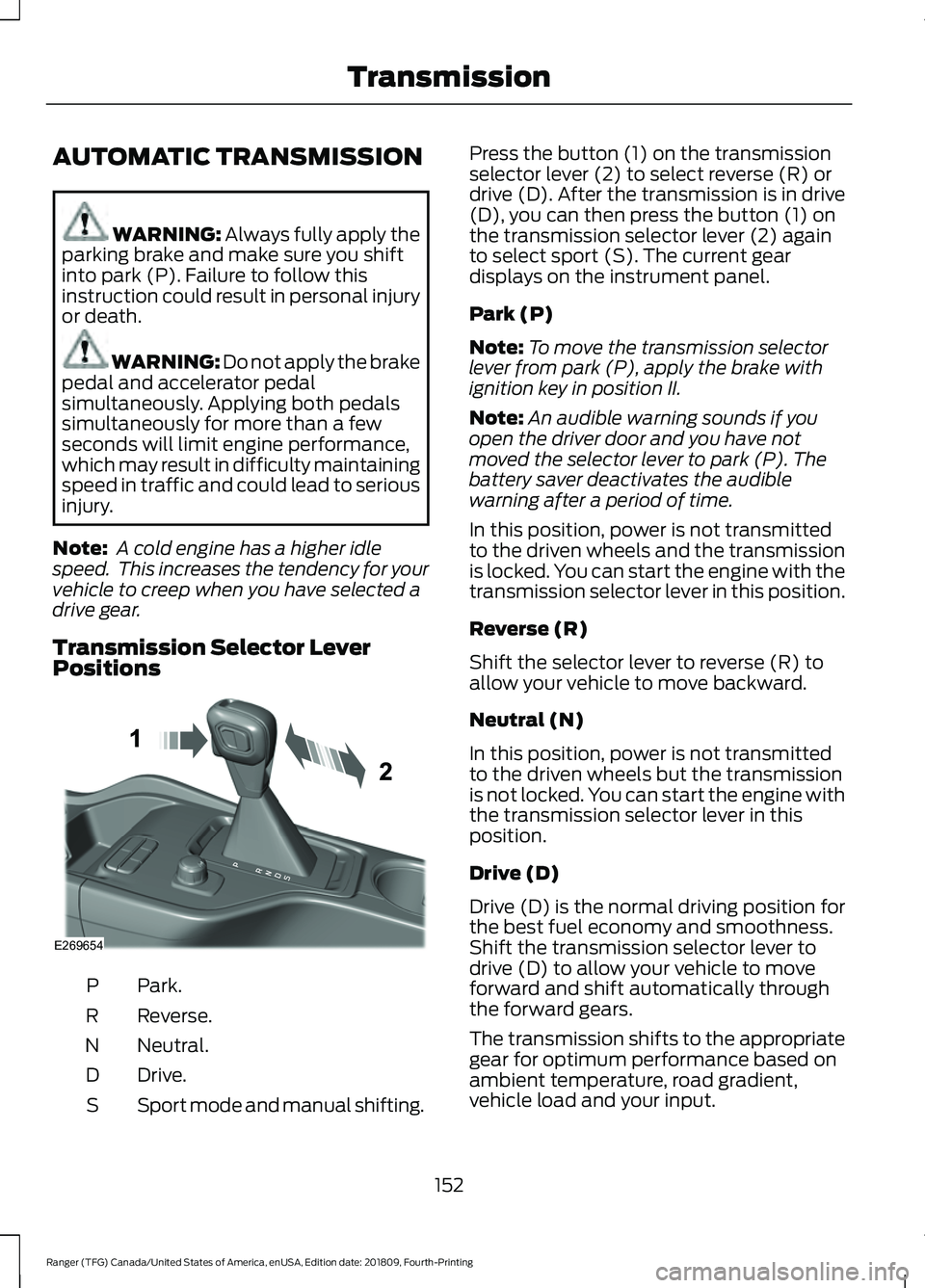
Transmission Selector Lever
Positions Park.
P
Reverse.
R
Neutral.
N
Drive.
D
Sport mode and manual shifting.
S Press the button (1) on the transmission
selector lever (2) to select reverse (R) or
drive (D). After the transmission is in drive
(D), you can then press the button (1) on
the transmission selector lever (2) again
to select sport (S). The current gear
displays on the instrument panel.
Park (P)
Note:
To move the transmission selector
lever from park (P), apply the brake with
ignition key in position II.
Note: An audible warning sounds if you
open the driver door and you have not
moved the selector lever to park (P). The
battery saver deactivates the audible
warning after a period of time.
In this position, power is not transmitted
to the driven wheels and the transmission
is locked. You can start the engine with the
transmission selector lever in this position.
Reverse (R)
Shift the selector lever to reverse (R) to
allow your vehicle to move backward.
Neutral (N)
In this position, power is not transmitted
to the driven wheels but the transmission
is not locked. You can start the engine with
the transmission selector lever in this
position.
Drive (D)
Drive (D) is the normal driving position for
the best fuel economy and smoothness.
Shift the transmission selector lever to
drive (D) to allow your vehicle to move
forward and shift automatically through
the forward gears.
The transmission shifts to the appropriate
gear for optimum performance based on
ambient temperature, road gradient,
vehicle load and your input.
152
Ranger (TFG) Canada/United States of America, enUSA, Edition date: 201809, Fourth-Printing TransmissionE269654
Page 156 of 512
Sport Mode (S)
Switch on sport mode by shifting the
transmission selector lever to sport (S). In
sport mode the transmission selects the
optimum gear for best performance. This
gear selection is typically lower than that
of drive (D) and the shifts are faster.
Tow Mode
To switch on tow mode, press
the button on the center console
until tow mode is active. The
indicator light illuminates in the instrument
cluster when the system becomes active.
The tow mode feature:
• Moves upshifts to higher engine speeds
to reduce the frequency of
transmission shifting.
• Provides engine braking in all forward
gears, which slows your vehicle and
assists you in controlling your vehicle
when descending a slope.
• Depending on driving conditions and
load conditions, may downshift the
transmission, slow your vehicle and
control your vehicle speed when
descending a hill, without pressing the
accelerator pedal. The amount of
downshift braking provided varies
based upon the amount you press the
brake pedal.
The tow mode feature improves
transmission operation when towing a
trailer or a heavy load. All transmission
gear ranges are available when using tow
mode.
To switch off the tow mode feature and
return to normal driving mode, press the
button on the center console twice. The
indicator light turns off when the system
turns off. Tow mode also turns off when
you power down your vehicle. SelectShift™ Automatic
Transmission
This feature gives you the ability to change
gears up or down as desired.
As long as the engine speed does not
exceed the maximum allowable limit,
downshifts are allowed. SelectShift
automatically downshifts at low engine
speeds in order to prevent engine stalls.
Note:
Engine damage may occur if you
maintain excessive engine revving without
shifting.
SelectShift does not automatically upshift,
even if the engine is approaching the RPM
limit.
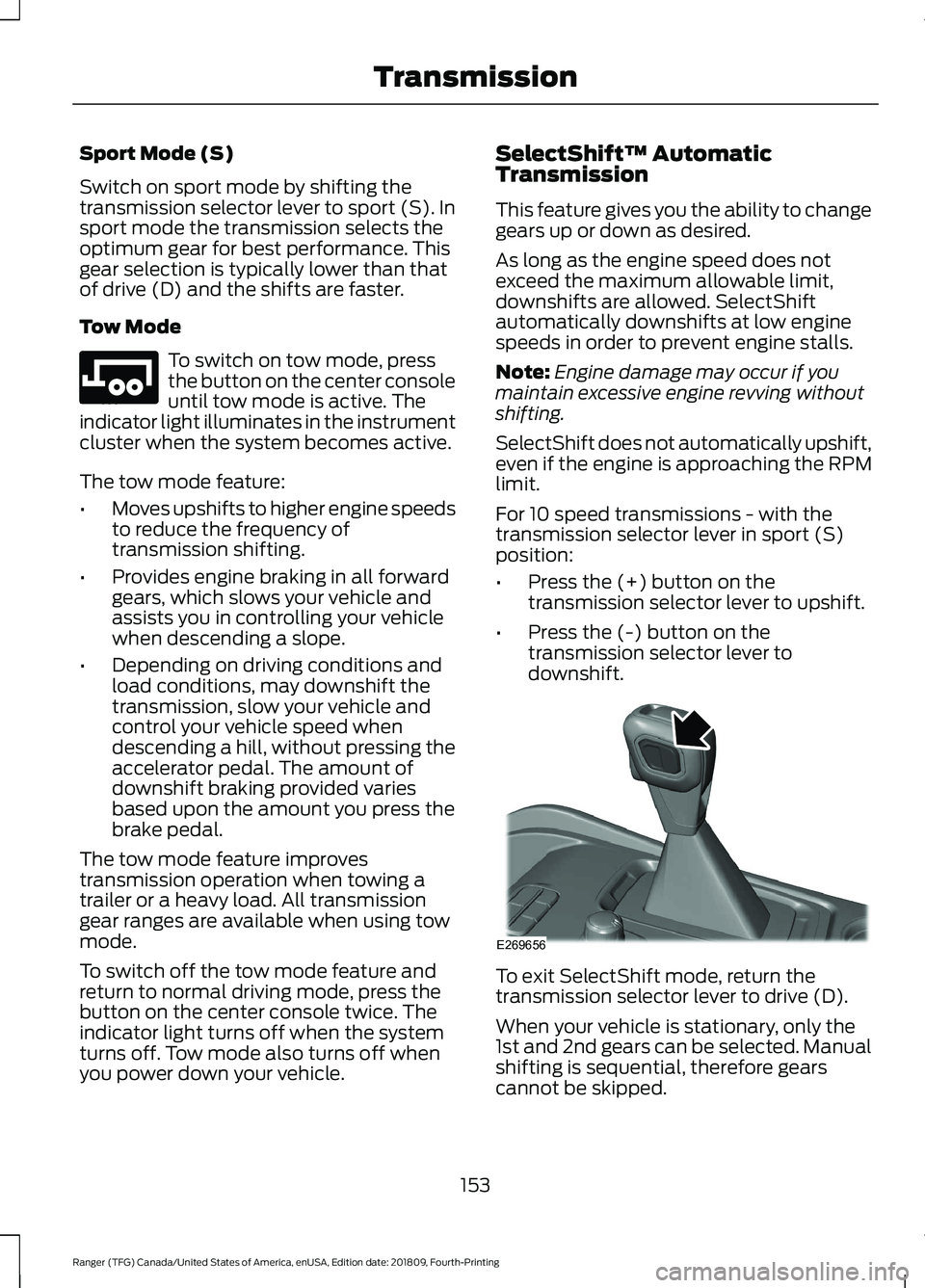
For 10 speed transmissions - with the
transmission selector lever in sport (S)
position:
• Press the (+) button on the
transmission selector lever to upshift.
• Press the (-) button on the
transmission selector lever to
downshift. To exit SelectShift mode, return the
transmission selector lever to drive (D).
When your vehicle is stationary, only the
1st and 2nd gears can be selected. Manual
shifting is sequential, therefore gears
cannot be skipped.
153
Ranger (TFG) Canada/United States of America, enUSA, Edition date: 201809, Fourth-Printing TransmissionE246592 E269656