USB port FORD RANGER 2021 Owner's Manual
[x] Cancel search | Manufacturer: FORD, Model Year: 2021, Model line: RANGER, Model: FORD RANGER 2021Pages: 475, PDF Size: 7.9 MB
Page 401 of 475
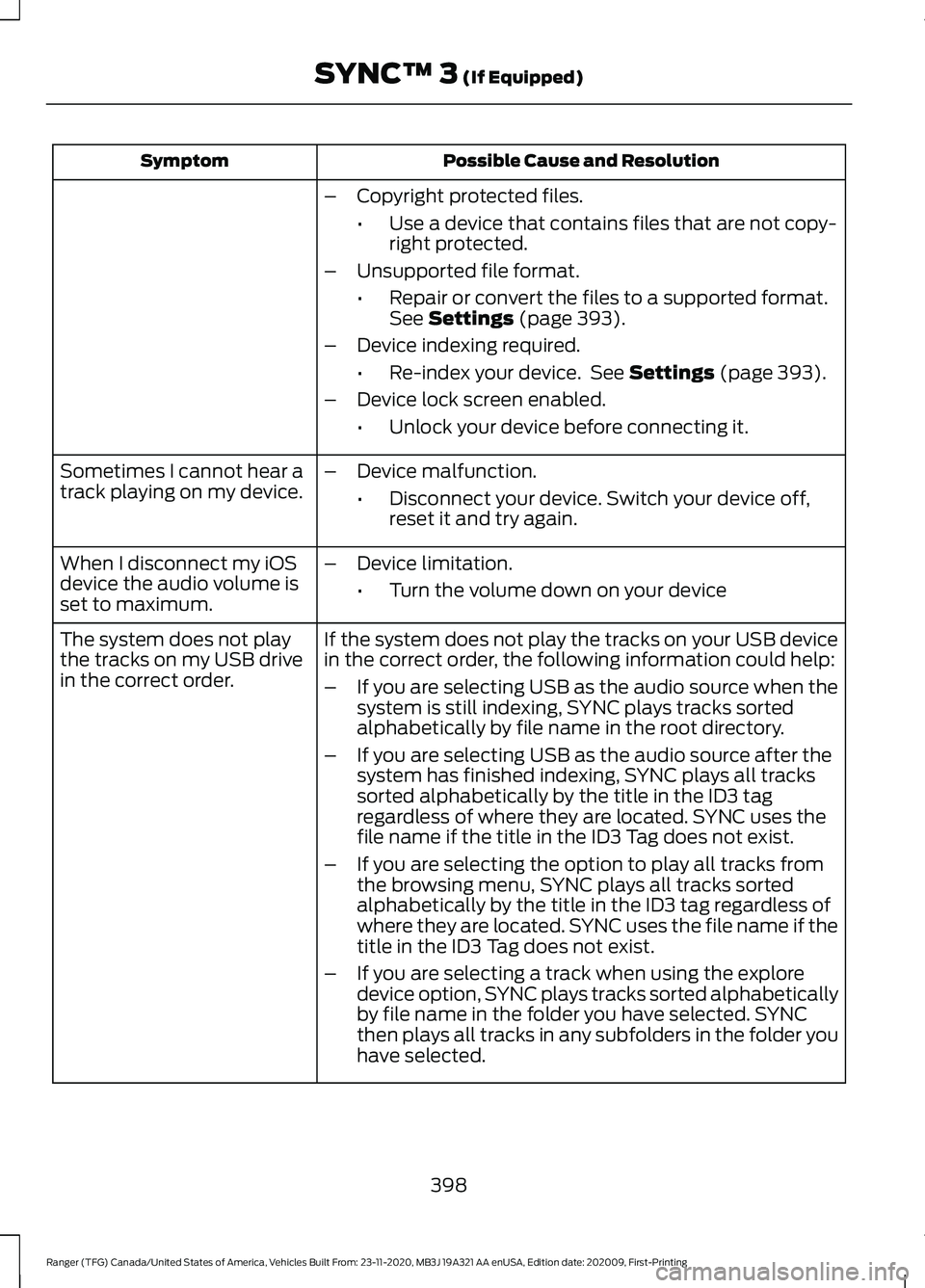
Possible Cause and Resolution
Symptom
–Copyright protected files.
•Use a device that contains files that are not copy-
right protected.
– Unsupported file format.
•Repair or convert the files to a supported format.
See Settings (page 393).
– Device indexing required.
•Re-index your device. See
Settings (page 393).
– Device lock screen enabled.
•Unlock your device before connecting it.
Sometimes I cannot hear a
track playing on my device. –
Device malfunction.
•Disconnect your device. Switch your device off,
reset it and try again.
When I disconnect my iOS
device the audio volume is
set to maximum. –
Device limitation.
•Turn the volume down on your device
If the system does not play the tracks on your USB device
in the correct order, the following information could help:
The system does not play
the tracks on my USB drive
in the correct order.
–If you are selecting USB as the audio source when the
system is still indexing, SYNC plays tracks sorted
alphabetically by file name in the root directory.
– If you are selecting USB as the audio source after the
system has finished indexing, SYNC plays all tracks
sorted alphabetically by the title in the ID3 tag
regardless of where they are located. SYNC uses the
file name if the title in the ID3 Tag does not exist.
– If you are selecting the option to play all tracks from
the browsing menu, SYNC plays all tracks sorted
alphabetically by the title in the ID3 tag regardless of
where they are located. SYNC uses the file name if the
title in the ID3 Tag does not exist.
– If you are selecting a track when using the explore
device option, SYNC plays tracks sorted alphabetically
by file name in the folder you have selected. SYNC
then plays all tracks in any subfolders in the folder you
have selected.
398
Ranger (TFG) Canada/United States of America, Vehicles Built From: 23-11-2020, MB3J 19A321 AA enUSA, Edition date: 202009, First-Printing SYNC™ 3
(If Equipped)
Page 402 of 475
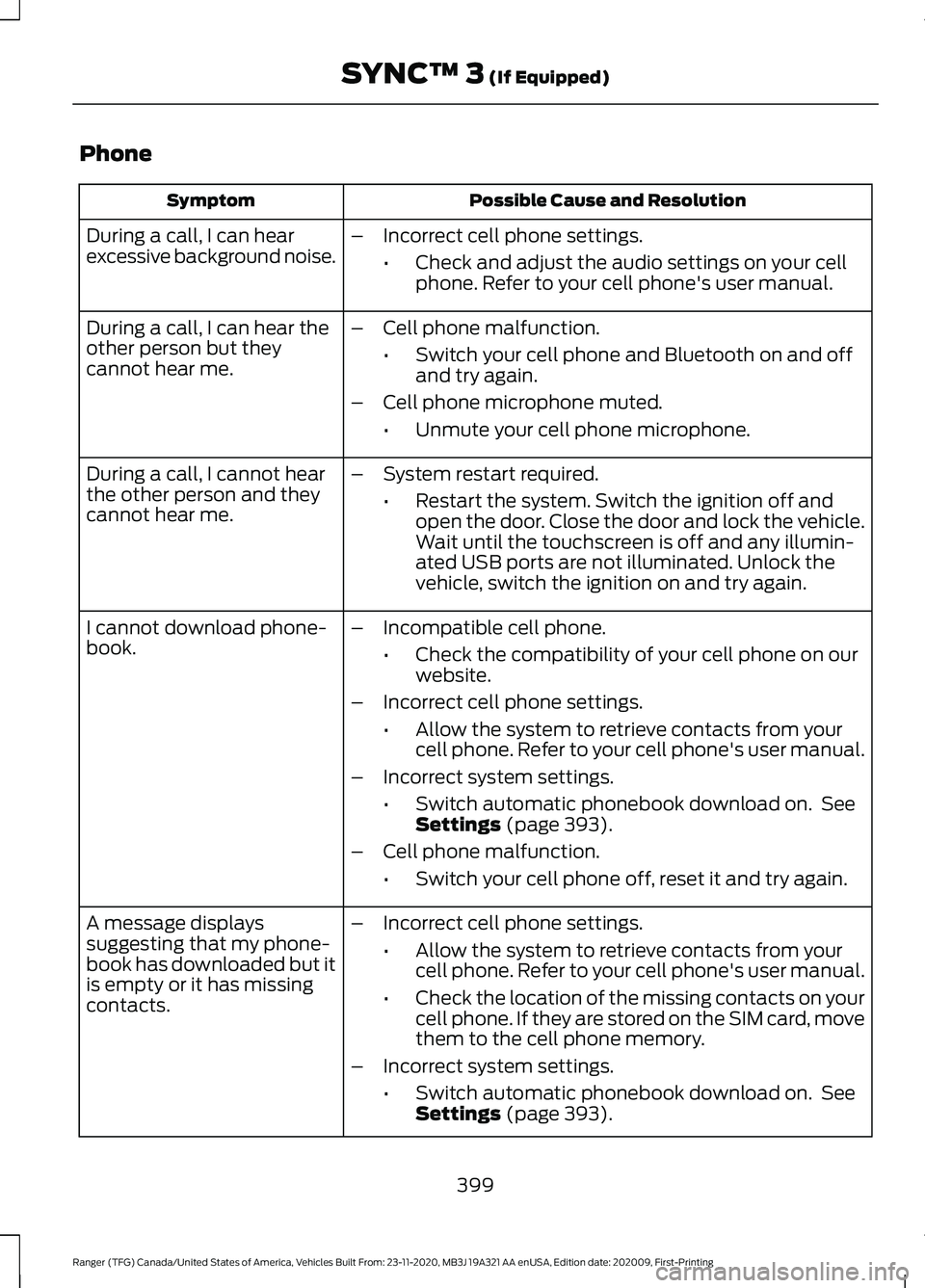
Phone
Possible Cause and Resolution
Symptom
During a call, I can hear
excessive background noise. –
Incorrect cell phone settings.
•Check and adjust the audio settings on your cell
phone. Refer to your cell phone's user manual.
– Cell phone malfunction.
•Switch your cell phone and Bluetooth on and off
and try again.
– Cell phone microphone muted.
•Unmute your cell phone microphone.
During a call, I can hear the
other person but they
cannot hear me.
During a call, I cannot hear
the other person and they
cannot hear me.
–
System restart required.
•Restart the system. Switch the ignition off and
open the door. Close the door and lock the vehicle.
Wait until the touchscreen is off and any illumin-
ated USB ports are not illuminated. Unlock the
vehicle, switch the ignition on and try again.
I cannot download phone-
book. –
Incompatible cell phone.
•Check the compatibility of your cell phone on our
website.
– Incorrect cell phone settings.
•Allow the system to retrieve contacts from your
cell phone. Refer to your cell phone's user manual.
– Incorrect system settings.
•Switch automatic phonebook download on. See
Settings (page 393).
– Cell phone malfunction.
•Switch your cell phone off, reset it and try again.
– Incorrect cell phone settings.
•Allow the system to retrieve contacts from your
cell phone. Refer to your cell phone's user manual.
• Check the location of the missing contacts on your
cell phone. If they are stored on the SIM card, move
them to the cell phone memory.
– Incorrect system settings.
•Switch automatic phonebook download on. See
Settings
(page 393).
A message displays
suggesting that my phone-
book has downloaded but it
is empty or it has missing
contacts.
399
Ranger (TFG) Canada/United States of America, Vehicles Built From: 23-11-2020, MB3J 19A321 AA enUSA, Edition date: 202009, First-Printing SYNC™ 3
(If Equipped)
Page 405 of 475
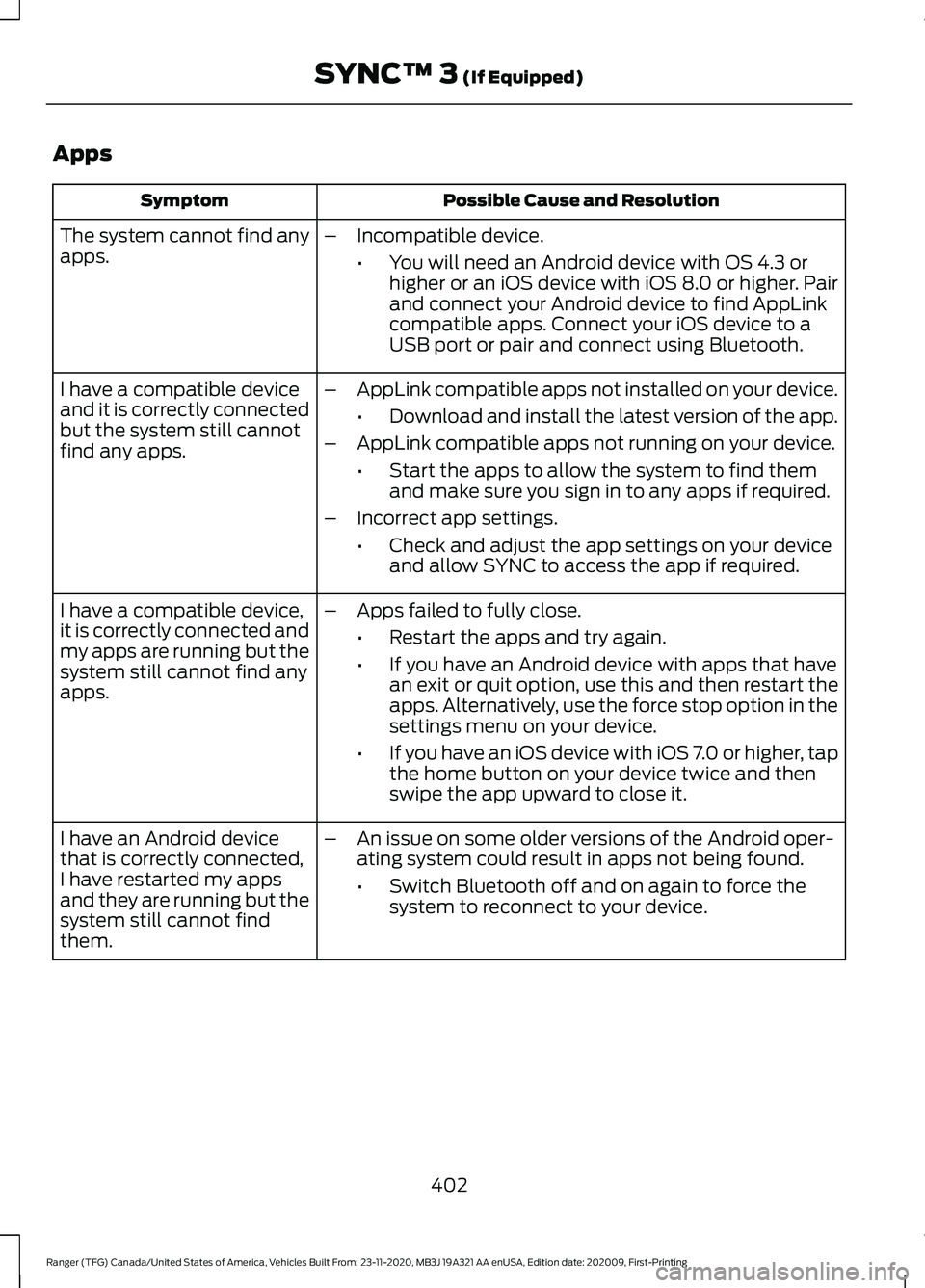
Apps
Possible Cause and Resolution
Symptom
The system cannot find any
apps. –
Incompatible device.
•You will need an Android device with OS 4.3 or
higher or an iOS device with iOS 8.0 or higher. Pair
and connect your Android device to find AppLink
compatible apps. Connect your iOS device to a
USB port or pair and connect using Bluetooth.
I have a compatible device
and it is correctly connected
but the system still cannot
find any apps. –
AppLink compatible apps not installed on your device.
•Download and install the latest version of the app.
– AppLink compatible apps not running on your device.
•Start the apps to allow the system to find them
and make sure you sign in to any apps if required.
– Incorrect app settings.
•Check and adjust the app settings on your device
and allow SYNC to access the app if required.
I have a compatible device,
it is correctly connected and
my apps are running but the
system still cannot find any
apps. –
Apps failed to fully close.
•Restart the apps and try again.
• If you have an Android device with apps that have
an exit or quit option, use this and then restart the
apps. Alternatively, use the force stop option in the
settings menu on your device.
• If you have an iOS device with iOS 7.0 or higher, tap
the home button on your device twice and then
swipe the app upward to close it.
I have an Android device
that is correctly connected,
I have restarted my apps
and they are running but the
system still cannot find
them. –
An issue on some older versions of the Android oper-
ating system could result in apps not being found.
•Switch Bluetooth off and on again to force the
system to reconnect to your device.
402
Ranger (TFG) Canada/United States of America, Vehicles Built From: 23-11-2020, MB3J 19A321 AA enUSA, Edition date: 202009, First-Printing SYNC™ 3 (If Equipped)
Page 472 of 475
Multi Contour Seats..........................................
394
Navigation............................................................ 394
Personal Profiles................................................ 394
Phone..................................................................... 393
Seats...................................................................... 394
Sound..................................................................... 393
Valet Mode........................................................... 394
Vehicle................................................................... 393
Voice Control....................................................... 394
Setting the Trail Control Speed...............182
Side Airbags.....................................................45
Sitting in the Correct Position..................124
Snow Chains See: Using Snow Chains................................. 307
Spare Wheel See: Changing a Road Wheel......................... 312
Special Notices
................................................14
New Vehicle Limited Warranty......................... 14
Notice to Owners of Pickup Trucks and Utility Type Vehicles........................................ 15
On Board Diagnostics Data Link Connector ............................................................ 14
Special Instructions.............................................. 14
Using Your Vehicle as an Ambulance............15
Using Your Vehicle With a Snowplow...........15
Special Operating Conditions Scheduled Maintenance...............................................422
Exceptions............................................................ 424
Speed Control See: Cruise Control............................................ 190
Stability Control
.............................................177
Principle of Operation........................................ 177
Starter Switch See: Ignition Switch............................................ 141
Starting a Gasoline Engine........................142 Automatic Engine Shutdown........................ 144
Failure to Start..................................................... 144
Guarding Against Exhaust Fumes................145
Important Ventilating Information...............145
Stopping the Engine When Your Vehicle is Moving............................................................... 145
Stopping the Engine When Your Vehicle is Stationary......................................................... 144
Vehicles with an Ignition Key.......................... 143
Vehicles with Keyless Start............................. 143
Starting and Stopping the Engine...........141 General Information........................................... 141Steering............................................................210
Electric Power Steering.................................... 210
Steering Wheel
................................................72
Storage Compartments.............................139
Sun Visors.........................................................88 Illuminated Vanity Mirror................................... 88
Supplementary Restraints System..........41 Principle of Operation......................................... 41
Switching Rear Occupant Alert System On and Off.....................................................131
Semiannual Reminder....................................... 131
Switching Trail Control On and Off........182
Symbols Glossary
.............................................7
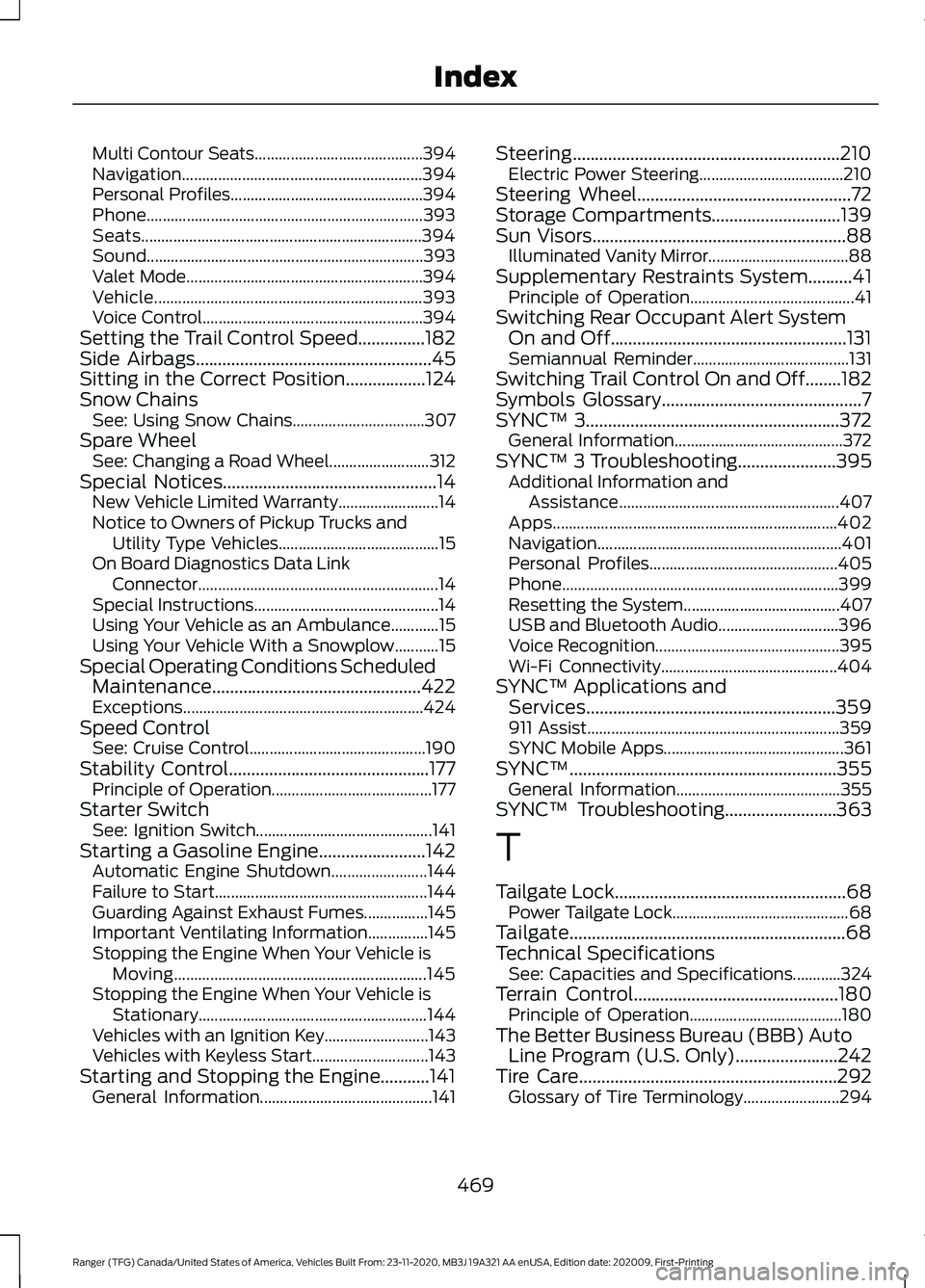
SYNC™ 3.........................................................372
General Information.......................................... 372
SYNC™ 3 Troubleshooting......................395 Additional Information and
Assistance....................................................... 407
Apps....................................................................... 402
Navigation............................................................. 401
Personal Profiles............................................... 405
Phone..................................................................... 399
Resetting the System....................................... 407
USB and Bluetooth Audio.............................. 396
Voice Recognition.............................................. 395
Wi-Fi Connectivity............................................ 404
SYNC™ Applications and Services........................................................359
911 Assist............................................................... 359
SYNC Mobile Apps............................................. 361
SYNC™............................................................355 General Information......................................... 355
SYNC™ Troubleshooting.........................363
T
Tailgate Lock....................................................68 Power Tailgate Lock............................................ 68
Tailgate..............................................................68
Technical Specifications See: Capacities and Specifications............324
Terrain Control..............................................180 Principle of Operation...................................... 180
The Better Business Bureau (BBB) Auto Line Program (U.S. Only)
.......................242
Tire Care..........................................................292
Glossary of Tire Terminology........................ 294
469
Ranger (TFG) Canada/United States of America, Vehicles Built From: 23-11-2020, MB3J 19A321 AA enUSA, Edition date: 202009, First-Printing Index
Page 473 of 475
Information About Uniform Tire Quality
Grading............................................................. 292
Information Contained on the Tire Sidewall........................................................... 295
Temperature A B C............................................ 293
Traction AA A B C............................................... 293
Treadwear.............................................................293
Tire Pressure Monitoring System..........308
Changing Tires With a Tire Pressure
Monitoring System...................................... 309
Understanding Your Tire Pressure Monitoring System ....................................... 310
Tires See: Wheels and Tires...................................... 291
Towing a Trailer..............................................221
Towing Points
................................................238
Towing the Vehicle on Four Wheels...........................................................227
Emergency Towing............................................ 228
Recreational Towing......................................... 228
Towing...............................................................221
Traction Control
.............................................176
Principle of Operation....................................... 176
Trail Control Indicators...............................183
Trail Control....................................................182 Trail Control – Troubleshooting.................... 183
Trail Control – Troubleshooting..............183 Trail Control – Information
Messages.......................................................... 183
Trailer Sway Control
....................................222
Transmission Code Designation.............327
Transmission..................................................160
Transporting the Vehicle...........................238
Type Approvals
............................................454
Radio Frequency Certification for Keys and
Remote Controls........................................... 457
Radio Frequency Certifications for Blind Spot Information System.......................... 456
Radio Frequency Certifications for Body Control Module.............................................. 457
Radio Frequency Certifications for Cruise Control Module.............................................. 457
Radio Frequency Certifications for Passive Anti-Theft System....................................... 455
Radio Frequency Certifications for Radio Transceiver Module...................................... 455
Radio Frequency Certifications for Sync 2.5....................................................................... 455Radio Frequency Certifications for SYNC
3........................................................................\
... 457
Radio Frequency Certifications for Telematic Control Unit............................... 456
Radio Frequency Certifications for Tire Pressure Monitoring Sensor(s)...............454
Radio Frequency Statement for Audio Unit.................................................................... 458
United States of America............................... 457
U
Under Hood Overview...............................264
Under Seat Storage
.....................................140
SuperCab.............................................................. 140
Unique Driving Characteristics.................147
Universal Garage Door Opener................133 HomeLink Wireless Control System............133
USB Port
.........................................................353
Using Adaptive Cruise Control.................191 Automatic Cancellation................................... 194
Blocked Sensor................................................... 196
Canceling the Set Speed................................. 194
Changing the Set Speed.................................. 194
Detection Issues................................................. 195
Following a Vehicle............................................ 192
Hilly Condition Usage........................................ 194
Overriding the Set Speed................................ 193
Resuming the Set Speed................................. 194
Setting the Adaptive Cruise Speed..............192
Setting the Gap Distance................................ 193
Switching Adaptive Cruise Control Off....................................................................... 195
Switching Adaptive Cruise Control On........................................................................\
192
Switching to Normal Cruise Control............197
System Not Available....................................... 196
Using Cruise Control...................................190 Canceling the Set Speed................................ 190
Changing the Set Speed................................. 190
Resuming the Set Speed.................................. 191
Setting the Cruise Speed................................ 190
Switching Cruise Control Off........................... 191
Switching Cruise Control On.......................... 190
Using Four-Wheel Drive.............................164 4WD Indicator Lights........................................ 164
Driving Off-Road With Truck and Utility Vehicles............................................................. 166
470
Ranger (TFG) Canada/United States of America, Vehicles Built From: 23-11-2020, MB3J 19A321 AA enUSA, Edition date: 202009, First-Printing Index