trouble FORD RANGER 2021 Owner's Manual
[x] Cancel search | Manufacturer: FORD, Model Year: 2021, Model line: RANGER, Model: FORD RANGER 2021Pages: 475, PDF Size: 7.9 MB
Page 368 of 475
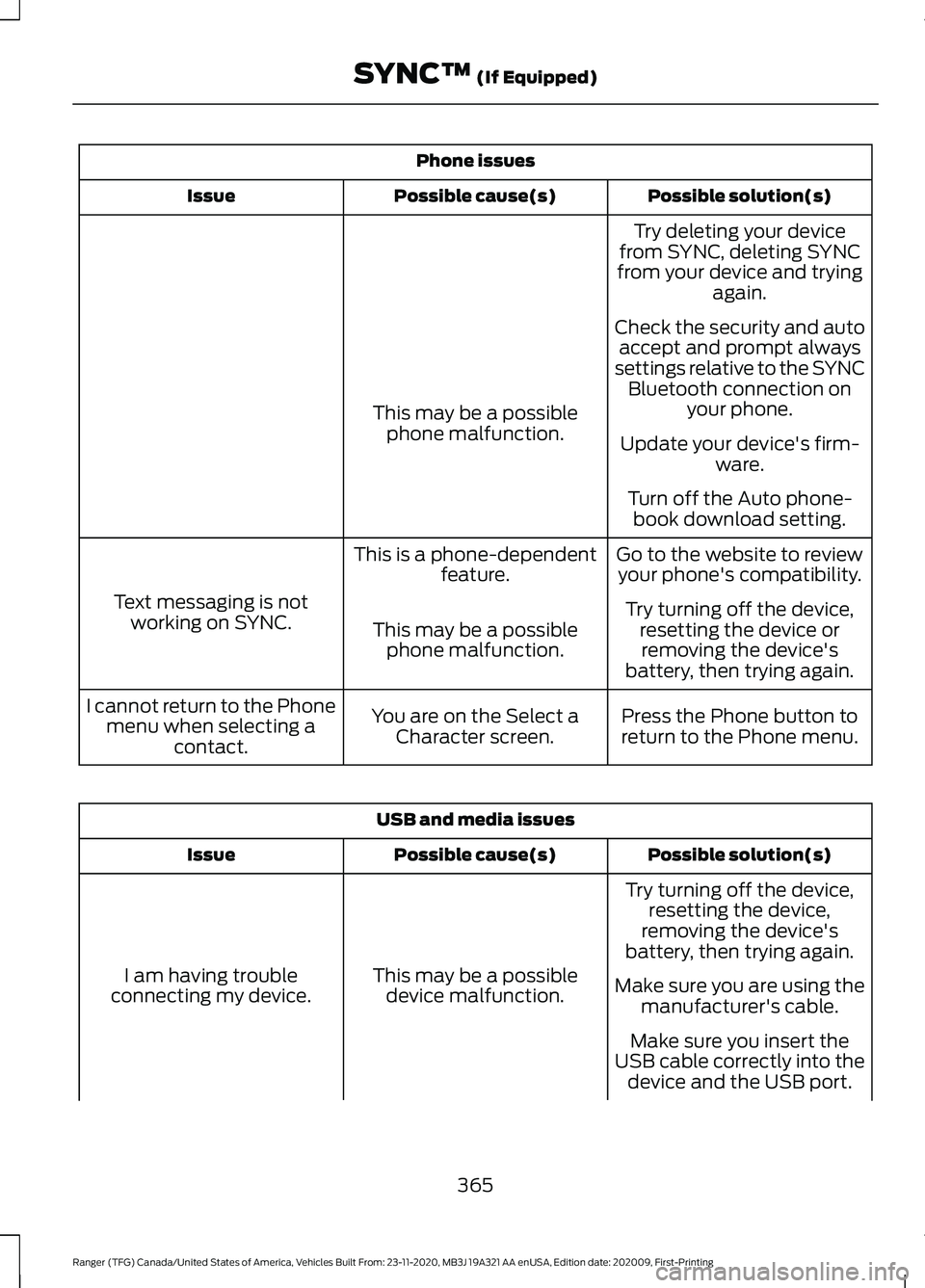
Phone issues
Possible solution(s)
Possible cause(s)
Issue
Try deleting your device
from SYNC, deleting SYNC
from your device and trying again.
Check the security and auto accept and prompt always
settings relative to the SYNC Bluetooth connection on your phone.
This may be a possible
phone malfunction. Update your device's firm-
ware.
Turn off the Auto phone- book download setting.
Go to the website to review your phone's compatibility.
This is a phone-dependent
feature.
Text messaging is not working on SYNC. Try turning off the device,
resetting the device orremoving the device's
battery, then trying again.
This may be a possible
phone malfunction.
Press the Phone button to
return to the Phone menu.
You are on the Select a
Character screen.
I cannot return to the Phone
menu when selecting a contact. USB and media issues
Possible solution(s)
Possible cause(s)
Issue
Try turning off the device,resetting the device,
removing the device's
battery, then trying again.
This may be a possible device malfunction.
I am having trouble
connecting my device. Make sure you are using the
manufacturer's cable.
Make sure you insert the
USB cable correctly into the device and the USB port.
365
Ranger (TFG) Canada/United States of America, Vehicles Built From: 23-11-2020, MB3J 19A321 AA enUSA, Edition date: 202009, First-Printing SYNC™ (If Equipped)
Page 371 of 475
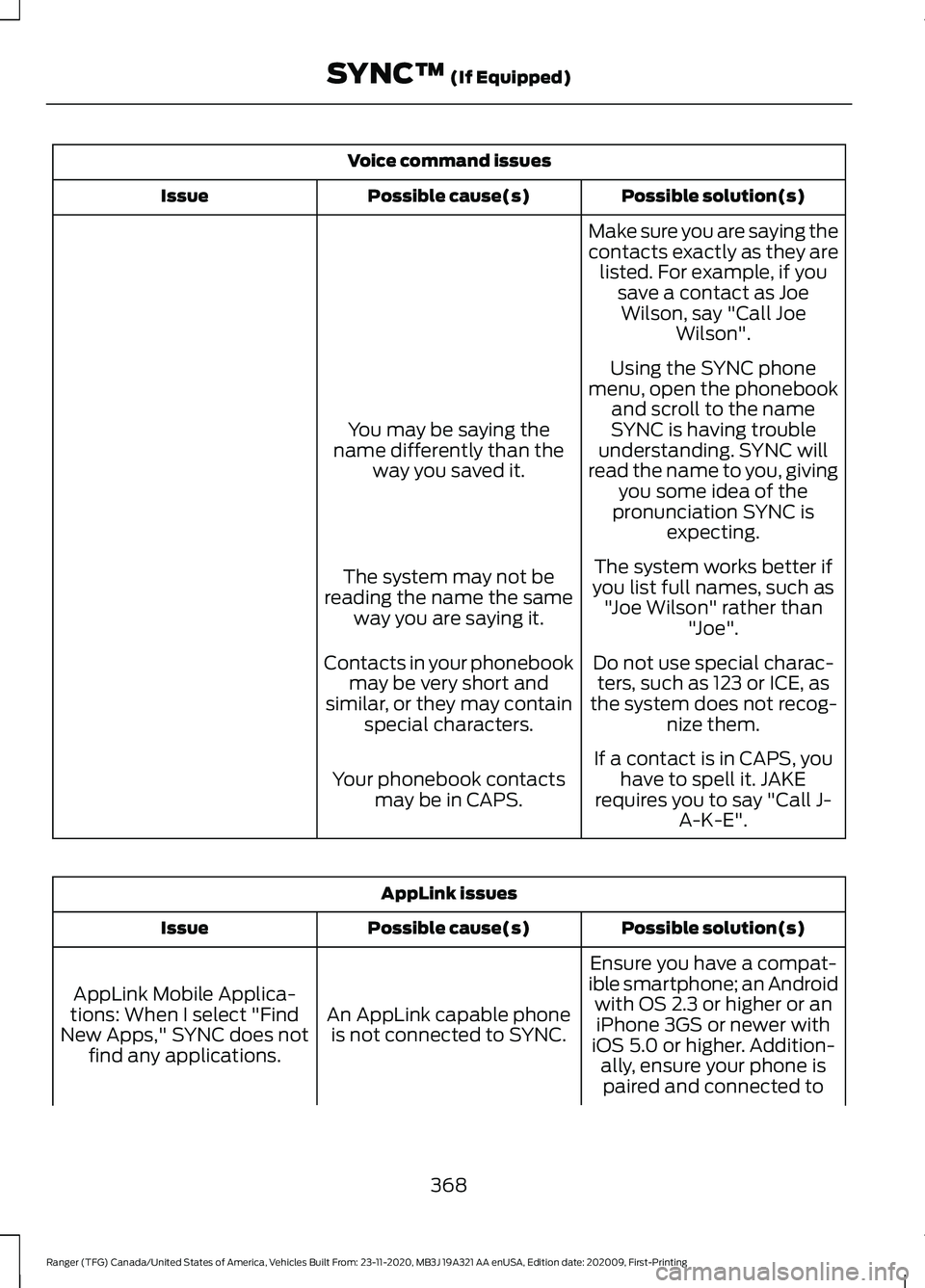
Voice command issues
Possible solution(s)
Possible cause(s)
Issue
Make sure you are saying the
contacts exactly as they arelisted. For example, if you save a contact as JoeWilson, say "Call Joe Wilson".
Using the SYNC phone
menu, open the phonebook and scroll to the name
SYNC is having trouble
understanding. SYNC will
read the name to you, giving you some idea of the
pronunciation SYNC is expecting.
You may be saying the
name differently than the way you saved it.
The system works better if
you list full names, such as "Joe Wilson" rather than "Joe".
The system may not be
reading the name the same way you are saying it.
Do not use special charac-ters, such as 123 or ICE, as
the system does not recog- nize them.
Contacts in your phonebook
may be very short and
similar, or they may contain special characters.
If a contact is in CAPS, youhave to spell it. JAKE
requires you to say "Call J- A-K-E".
Your phonebook contacts
may be in CAPS. AppLink issues
Possible solution(s)
Possible cause(s)
Issue
Ensure you have a compat-
ible smartphone; an Android with OS 2.3 or higher or aniPhone 3GS or newer with
iOS 5.0 or higher. Addition- ally, ensure your phone is
An AppLink capable phone
is not connected to SYNC.
AppLink Mobile Applica-
tions: When I select "Find
New Apps," SYNC does not find any applications.
paired and connected to
368
Ranger (TFG) Canada/United States of America, Vehicles Built From: 23-11-2020, MB3J 19A321 AA enUSA, Edition date: 202009, First-Printing SYNC™ (If Equipped)
Page 395 of 475
Navigation Map Accuracy and
Updates
HERE is the digital map provider for the
navigation application. If you find map data
errors, you may report them directly to
HERE by going to www.here.com. HERE
evaluates all reported map errors and
responds with the result of their
investigation by e-mail.
The navigation system map data may
contain inaccurate or incomplete
information due to the passage of time,
changing circumstances, sources used and
the nature of collecting comprehensive
geographic data, any of which may lead to
incorrect results. Inaccurate speed limit
information, turn restrictions and other
road attributes may affect the determined
route and associated guidance
Annual navigation map updates are
available for purchase through your
dealership. Depending on your purchase
agreement, you might be eligible for free
Map update. You can choose to download
the Map data update onto a USB, order a
USB, or use Wi-Fi to deliver automatic
updates. To update your Map data over
Wi-Fi, your vehicle must be connected to
a Wi-Fi access point. Map Data files are
large, so it is highly recommended to
perform the update when free Wi-Fi is
available otherwise high data rates may
apply. For USB updates, free map update
eligibility, and other details, contact
dealers at 1-866-462-8837 in the United
States and Canada or 01-800-557-5539
in Mexico or visit our local website for more
information.
APPS
Note:
For more information about available
apps, supported devices and
troubleshooting, refer to our local website. When you start an app through the system
for the first time, you could be asked to
grant certain permissions. You can review
and change the permissions that you have
granted at any time when your vehicle is
not moving. See Settings (page 393).
Note: We recommend that you check your
data plan before using your apps through
the system. Using them could result in
additional charges.
Note: We recommend that you check the
app provider's terms and conditions and
privacy policy before using their app.
Note: Make sure that you have an active
account for apps that you want to use
through the system.
Note: Some apps will work with no setup.
Others require you to configure some
personal settings before you can use them.
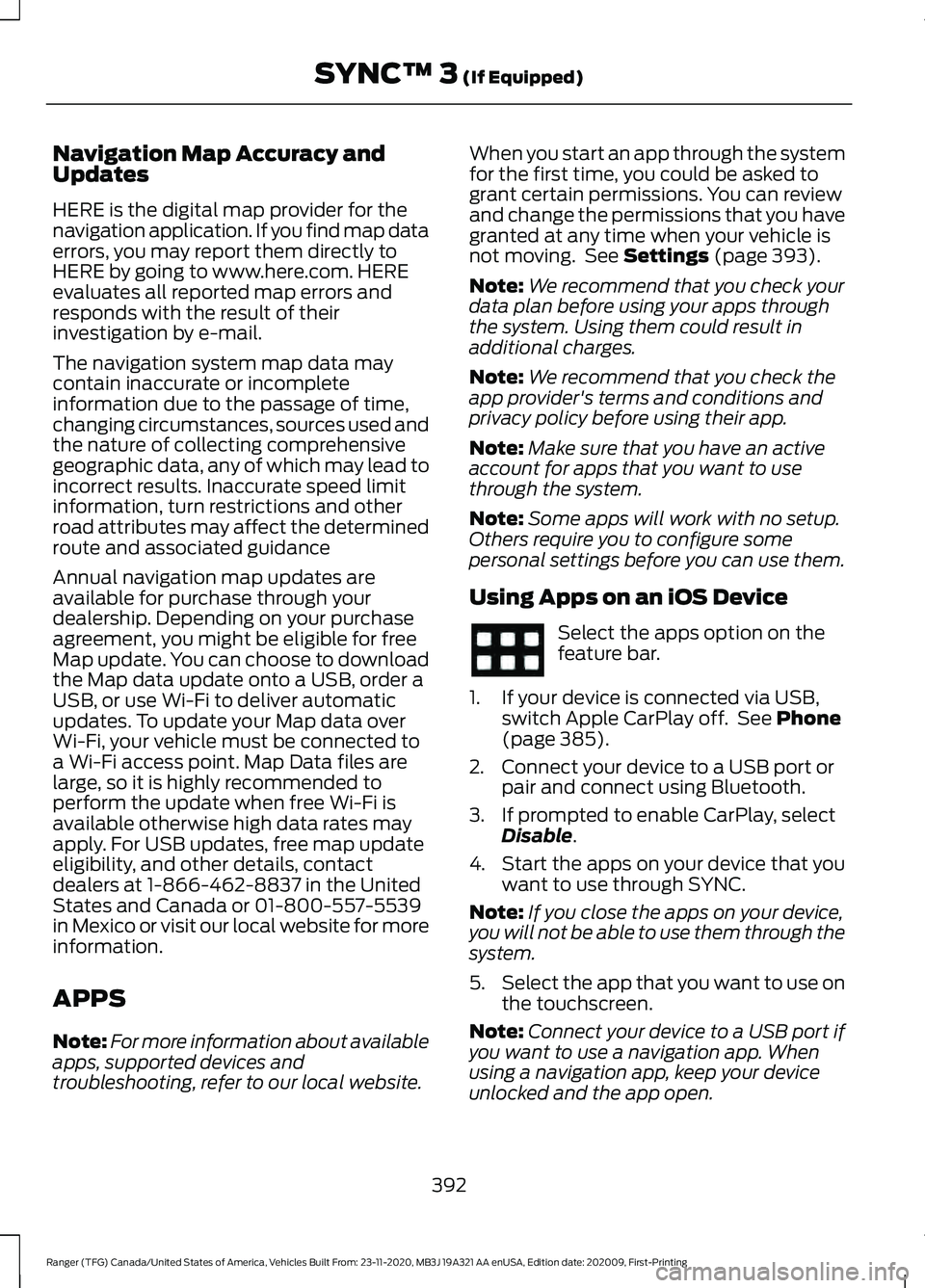
Using Apps on an iOS Device Select the apps option on the
feature bar.
1. If your device is connected via USB, switch Apple CarPlay off. See
Phone
(page 385).
2. Connect your device to a USB port or pair and connect using Bluetooth.
3. If prompted to enable CarPlay, select Disable
.
4. Start the apps on your device that you want to use through SYNC.
Note: If you close the apps on your device,
you will not be able to use them through the
system.
5. Select the app that you want to use on
the touchscreen.
Note: Connect your device to a USB port if
you want to use a navigation app. When
using a navigation app, keep your device
unlocked and the app open.
392
Ranger (TFG) Canada/United States of America, Vehicles Built From: 23-11-2020, MB3J 19A321 AA enUSA, Edition date: 202009, First-Printing SYNC™ 3
(If Equipped)
Page 398 of 475
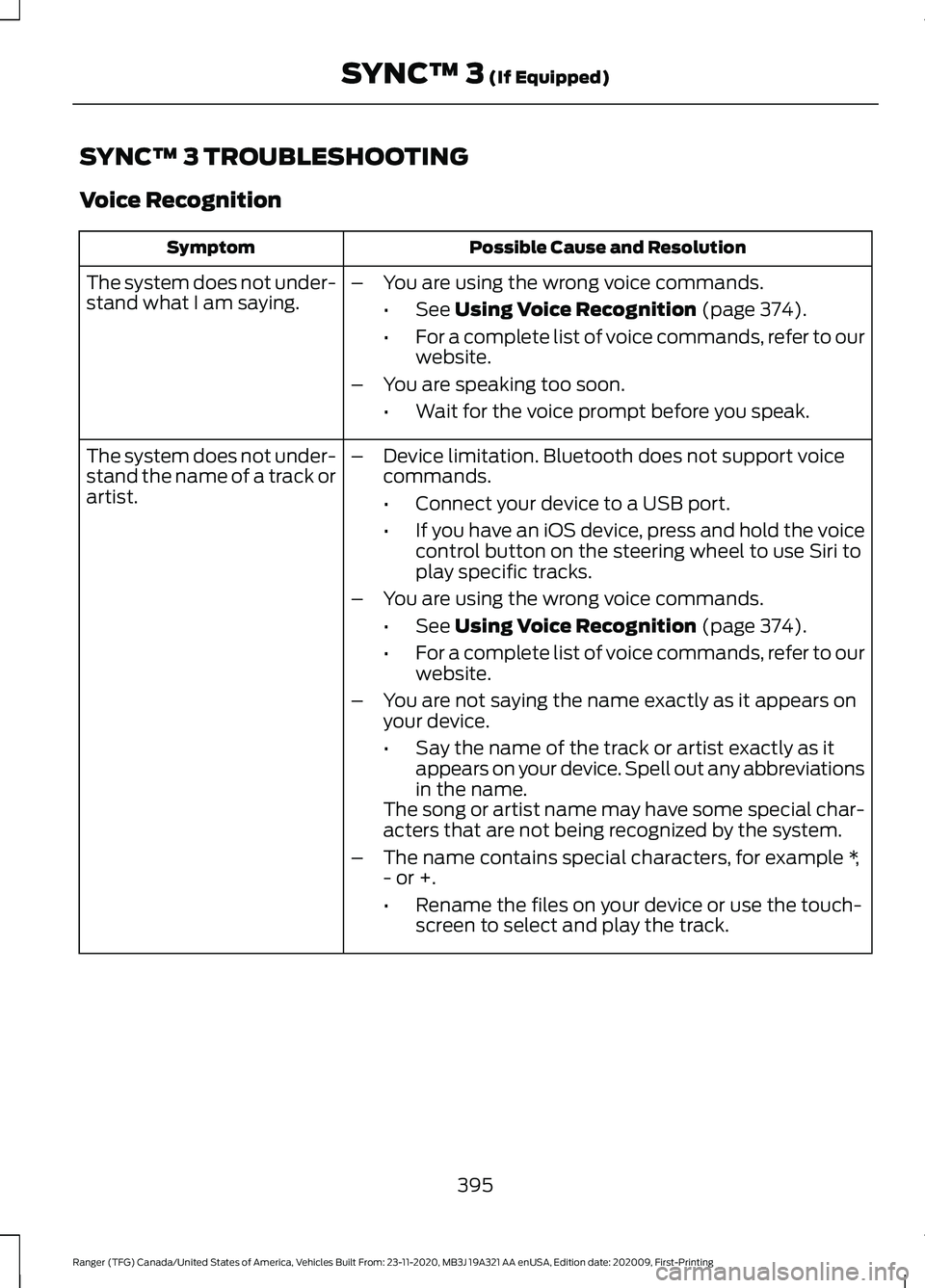
SYNC™ 3 TROUBLESHOOTING
Voice Recognition
Possible Cause and Resolution
Symptom
The system does not under-
stand what I am saying. –
You are using the wrong voice commands.
•See Using Voice Recognition (page 374).
• For a complete list of voice commands, refer to our
website.
– You are speaking too soon.
•Wait for the voice prompt before you speak.
The system does not under-
stand the name of a track or
artist. –
Device limitation. Bluetooth does not support voice
commands.
•Connect your device to a USB port.
• If you have an iOS device, press and hold the voice
control button on the steering wheel to use Siri to
play specific tracks.
– You are using the wrong voice commands.
•See
Using Voice Recognition (page 374).
• For a complete list of voice commands, refer to our
website.
– You are not saying the name exactly as it appears on
your device.
•Say the name of the track or artist exactly as it
appears on your device. Spell out any abbreviations
in the name.
The song or artist name may have some special char-
acters that are not being recognized by the system.
– The name contains special characters, for example *,
- or +.
•Rename the files on your device or use the touch-
screen to select and play the track.
395
Ranger (TFG) Canada/United States of America, Vehicles Built From: 23-11-2020, MB3J 19A321 AA enUSA, Edition date: 202009, First-Printing SYNC™ 3
(If Equipped)
Page 465 of 475
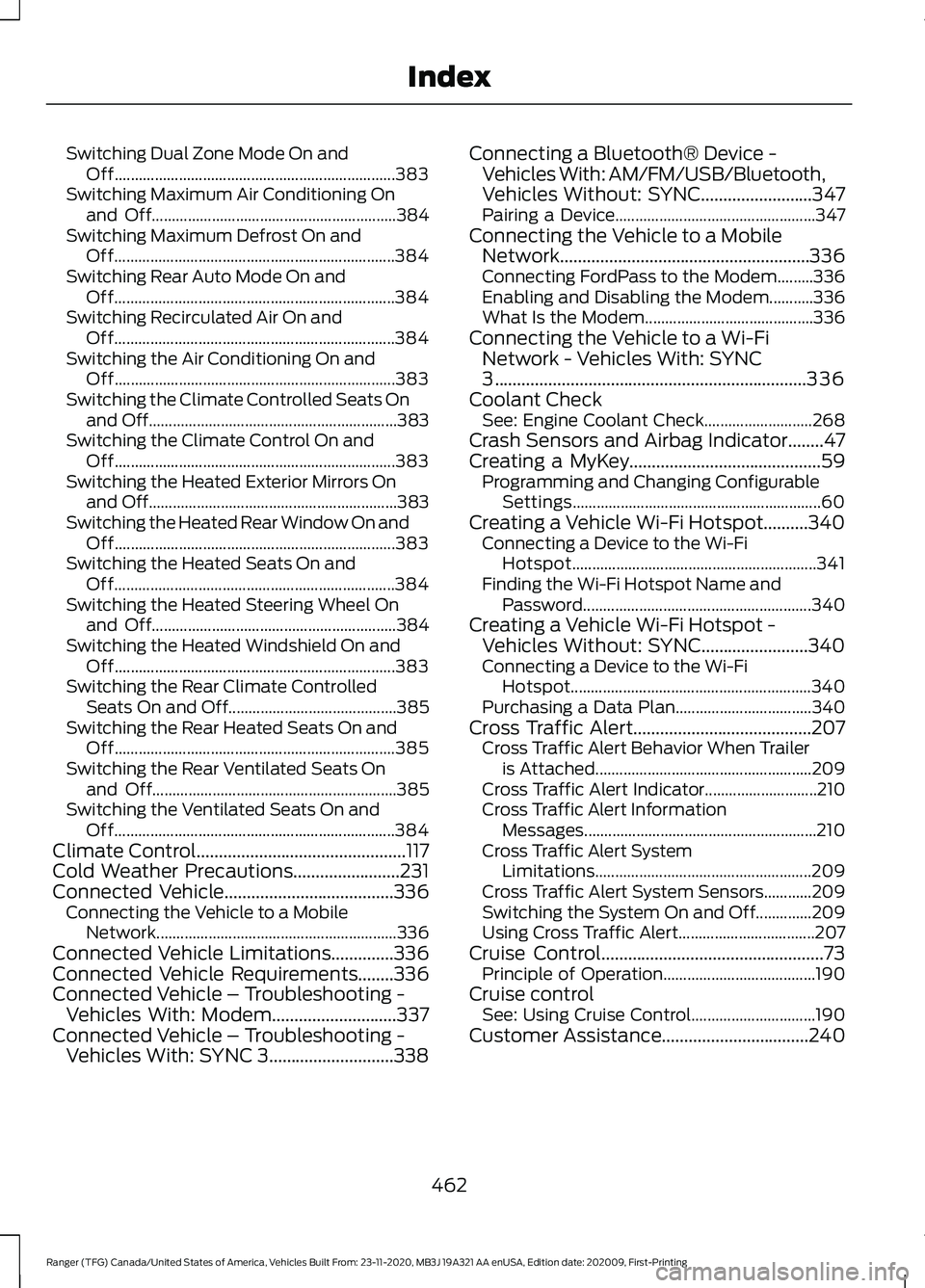
Switching Dual Zone Mode On and
Off...................................................................... 383
Switching Maximum Air Conditioning On and Off............................................................. 384
Switching Maximum Defrost On and Off...................................................................... 384
Switching Rear Auto Mode On and Off...................................................................... 384
Switching Recirculated Air On and Off...................................................................... 384
Switching the Air Conditioning On and Off...................................................................... 383
Switching the Climate Controlled Seats On and Off.............................................................. 383
Switching the Climate Control On and Off...................................................................... 383
Switching the Heated Exterior Mirrors On and Off.............................................................. 383
Switching the Heated Rear Window On and Off...................................................................... 383
Switching the Heated Seats On and Off...................................................................... 384
Switching the Heated Steering Wheel On and Off............................................................. 384
Switching the Heated Windshield On and Off...................................................................... 383
Switching the Rear Climate Controlled Seats On and Off.......................................... 385
Switching the Rear Heated Seats On and Off...................................................................... 385
Switching the Rear Ventilated Seats On and Off............................................................. 385
Switching the Ventilated Seats On and Off...................................................................... 384
Climate Control...............................................117
Cold Weather Precautions........................231
Connected Vehicle......................................336 Connecting the Vehicle to a Mobile
Network............................................................ 336
Connected Vehicle Limitations..............336
Connected Vehicle Requirements
........336
Connected Vehicle – Troubleshooting - Vehicles With: Modem............................337
Connected Vehicle – Troubleshooting - Vehicles With: SYNC 3............................338 Connecting a Bluetooth® Device -
Vehicles With: AM/FM/USB/Bluetooth,
Vehicles Without: SYNC
.........................347
Pairing a Device.................................................. 347
Connecting the Vehicle to a Mobile Network........................................................336
Connecting FordPass to the Modem.........336
Enabling and Disabling the Modem...........336
What Is the Modem.......................................... 336
Connecting the Vehicle to a Wi-Fi Network - Vehicles With: SYNC
3
......................................................................336
Coolant Check See: Engine Coolant Check........................... 268
Crash Sensors and Airbag Indicator........47
Creating a MyKey...........................................59 Programming and Changing Configurable
Settings.............................................................. 60
Creating a Vehicle Wi-Fi Hotspot
..........340
Connecting a Device to the Wi-Fi
Hotspot............................................................. 341
Finding the Wi-Fi Hotspot Name and Password......................................................... 340
Creating a Vehicle Wi-Fi Hotspot - Vehicles Without: SYNC
........................340
Connecting a Device to the Wi-Fi
Hotspot............................................................ 340
Purchasing a Data Plan.................................. 340
Cross Traffic Alert........................................207 Cross Traffic Alert Behavior When Trailer
is Attached...................................................... 209
Cross Traffic Alert Indicator............................ 210
Cross Traffic Alert Information Messages.......................................................... 210
Cross Traffic Alert System Limitations...................................................... 209
Cross Traffic Alert System Sensors............209
Switching the System On and Off..............209
Using Cross Traffic Alert.................................. 207
Cruise Control
..................................................73
Principle of Operation...................................... 190
Cruise control See: Using Cruise Control............................... 190
Customer Assistance
.................................240
462
Ranger (TFG) Canada/United States of America, Vehicles Built From: 23-11-2020, MB3J 19A321 AA enUSA, Edition date: 202009, First-Printing Index
Page 466 of 475

D
Data Recording..................................................9
Comfort, Convenience and Entertainment
Data........................................................................\
11
Event Data................................................................. 11
Service Data............................................................ 10
Services That Third Parties Provide...............12
Services That We Provide.................................. 12
Vehicles With a Modem...................................... 12
Vehicles With an Emergency Call System.................................................................. 13
Vehicles With SYNC............................................. 12
Daytime Running Lamps.............................79 Type One - Conventional
(Non-Configurable)........................................ 79
Type Two - Configurable................................... 79
Declaration of Conformity.......................454
Digital Radio
..................................................350
HD Radio Reception and Station
Troubleshooting............................................. 351
Direction Indicators
........................................81
Direction Indicator................................................ 81
Switching the Direction Indicators On and Off........................................................................\
.. 81
Doors and Locks.............................................63
Driver Alert
......................................................198
PRINCIPLE OF OPERATION........................... 198
USING DRIVER ALERT..................................... 198
Driver and Passenger Airbags....................42 Children and Airbags........................................... 43
Proper Driver and Front Passenger Seating Adjustment........................................................ 42
Driving Aids.....................................................198
Driving Hints
..................................................230
Driving Through Water...............................232
DRL See: Daytime Running Lamps......................... 79
E
Economical Driving.....................................230
Electromagnetic Compatibility
..............426
Electronic Locking Differential..................171
Operating Electronic Locking Differential
with Spare or Mismatched Tires...............171
Emergency Call Limitations.......................50
Emergency Call Requirements
.................49 Emission Law
.................................................156
Noise Emissions Warranty, Prohibited
Tampering Acts and Maintenance..........157
Tampering With a Noise Control System............................................................... 156
End User License Agreement.................429 VEHICLE SOFTWARE END USER LICENSE
AGREEMENT (EULA) ................................. 429
Engine Block Heater
....................................145
Using the Engine Block Heater...................... 146
Engine Coolant Check
...............................268
Adding Coolant.................................................. 268
Coolant Change................................................. 270
Engine Coolant Temperature Management....................................................271
Fail-Safe Cooling............................................... 270
Recycled Coolant.............................................. 269
Severe Climates................................................. 270
Engine Emission Control
............................156
Engine Immobilizer See: Passive Anti-Theft System..................... 70
Engine Oil Check..........................................265 Adding Engine Oil.............................................. 265
Engine Oil Dipstick......................................265
Engine Specifications.................................324 Drivebelt Routing............................................... 324
Entertainment..............................................380 Playing Music From a USB or Media
Player................................................................. 381
Streaming Music From a Bluetooth Device................................................................. 381
Using the Radio................................................... 381
Environment.....................................................16
Essential Towing Checks
..........................224
Before Towing a Trailer.................................... 226
Launching or Retrieving a Boat or Personal Watercraft (PWC)......................................... 227
Safety Chains...................................................... 225
Trailer Brakes....................................................... 226
Trailer Lamps....................................................... 226
Trailer Towing Connector................................ 225
When Towing a Trailer..................................... 226
Event Data Recording See: Data Recording.............................................. 9
Exterior Mirrors................................................86 Blind Spot Information System...................... 87
Fold Away Exterior Mirrors................................ 86
Heated Exterior Mirrors...................................... 87
463
Ranger (TFG) Canada/United States of America, Vehicles Built From: 23-11-2020, MB3J 19A321 AA enUSA, Edition date: 202009, First-Printing Index
Page 469 of 475
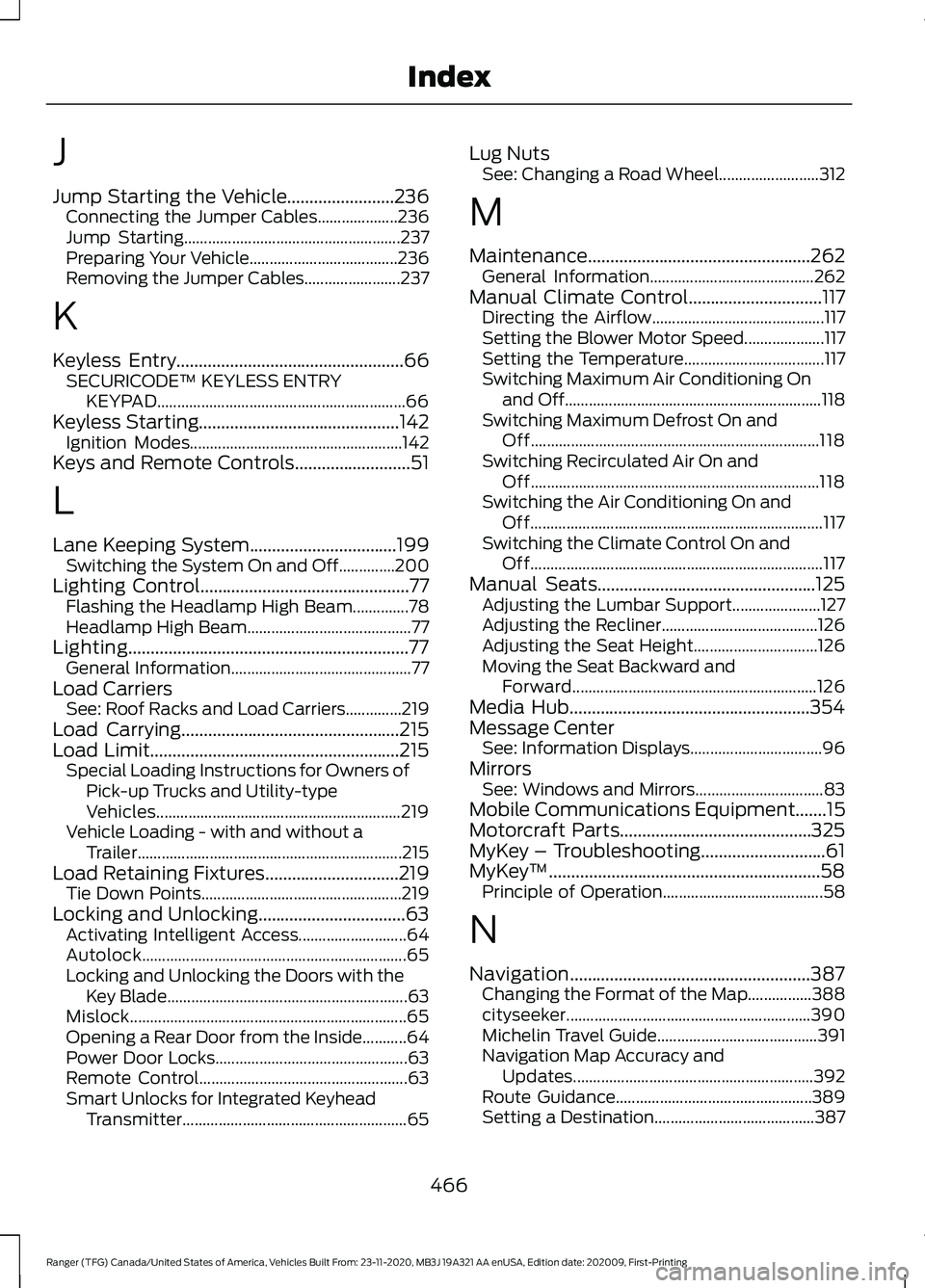
J
Jump Starting the Vehicle........................236
Connecting the Jumper Cables.................... 236
Jump Starting...................................................... 237
Preparing Your Vehicle..................................... 236
Removing the Jumper Cables........................ 237
K
Keyless Entry...................................................66 SECURICODE™ KEYLESS ENTRY
KEYPAD.............................................................. 66
Keyless Starting.............................................142 Ignition Modes..................................................... 142
Keys and Remote Controls..........................51
L
Lane Keeping System.................................199 Switching the System On and Off..............200
Lighting Control...............................................77
Flashing the Headlamp High Beam..............78
Headlamp High Beam......................................... 77
Lighting...............................................................77 General Information............................................. 77
Load Carriers See: Roof Racks and Load Carriers..............219
Load Carrying.................................................215
Load Limit........................................................215 Special Loading Instructions for Owners of
Pick-up Trucks and Utility-type
Vehicles............................................................. 219
Vehicle Loading - with and without a Trailer.................................................................. 215
Load Retaining Fixtures
..............................219
Tie Down Points.................................................. 219
Locking and Unlocking.................................63 Activating Intelligent Access........................... 64
Autolock.................................................................. 65
Locking and Unlocking the Doors with the Key Blade............................................................ 63
Mislock..................................................................... 65
Opening a Rear Door from the Inside...........64
Power Door Locks................................................ 63
Remote Control.................................................... 63
Smart Unlocks for Integrated Keyhead Transmitter........................................................ 65Lug Nuts
See: Changing a Road Wheel......................... 312
M
Maintenance..................................................262 General Information......................................... 262
Manual Climate Control
..............................117
Directing the Airflow........................................... 117
Setting the Blower Motor Speed.................... 117
Setting the Temperature................................... 117
Switching Maximum Air Conditioning On and Off................................................................ 118
Switching Maximum Defrost On and Off........................................................................\
118
Switching Recirculated Air On and Off........................................................................\
118
Switching the Air Conditioning On and Off........................................................................\
. 117
Switching the Climate Control On and Off........................................................................\
. 117
Manual Seats.................................................125 Adjusting the Lumbar Support...................... 127
Adjusting the Recliner....................................... 126
Adjusting the Seat Height............................... 126
Moving the Seat Backward and Forward............................................................. 126
Media Hub......................................................354
Message Center See: Information Displays................................. 96
Mirrors See: Windows and Mirrors................................ 83
Mobile Communications Equipment.......15
Motorcraft Parts...........................................325
MyKey – Troubleshooting............................61
MyKey ™
.............................................................58
Principle of Operation........................................ 58
N
Navigation......................................................387 Changing the Format of the Map................388
cityseeker............................................................. 390
Michelin Travel Guide........................................ 391
Navigation Map Accuracy and Updates............................................................ 392
Route Guidance................................................. 389
Setting a Destination........................................ 387
466
Ranger (TFG) Canada/United States of America, Vehicles Built From: 23-11-2020, MB3J 19A321 AA enUSA, Edition date: 202009, First-Printing Index
Page 471 of 475
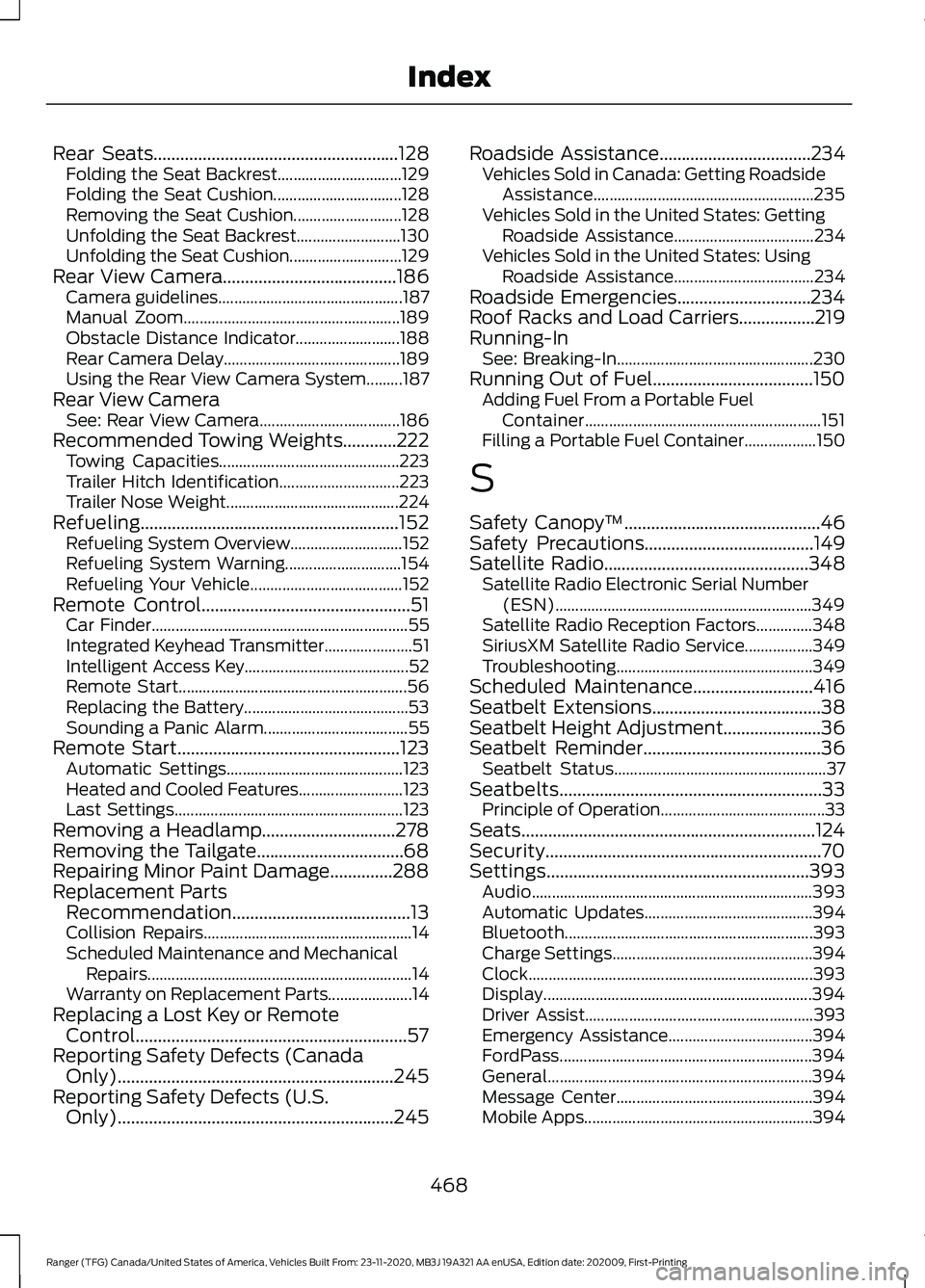
Rear Seats.......................................................128
Folding the Seat Backrest............................... 129
Folding the Seat Cushion................................ 128
Removing the Seat Cushion........................... 128
Unfolding the Seat Backrest.......................... 130
Unfolding the Seat Cushion............................ 129
Rear View Camera.......................................186 Camera guidelines.............................................. 187
Manual Zoom...................................................... 189
Obstacle Distance Indicator.......................... 188
Rear Camera Delay............................................ 189
Using the Rear View Camera System.........187
Rear View Camera See: Rear View Camera................................... 186
Recommended Towing Weights............222 Towing Capacities............................................. 223
Trailer Hitch Identification.............................. 223
Trailer Nose Weight........................................... 224
Refueling..........................................................152 Refueling System Overview............................ 152
Refueling System Warning............................. 154
Refueling Your Vehicle...................................... 152
Remote Control
...............................................51
Car Finder................................................................ 55
Integrated Keyhead Transmitter...................... 51
Intelligent Access Key......................................... 52
Remote Start......................................................... 56
Replacing the Battery......................................... 53
Sounding a Panic Alarm.................................... 55
Remote Start..................................................123 Automatic Settings............................................ 123
Heated and Cooled Features.......................... 123
Last Settings......................................................... 123
Removing a Headlamp..............................278
Removing the Tailgate.................................68
Repairing Minor Paint Damage..............288
Replacement Parts Recommendation........................................13
Collision Repairs.................................................... 14
Scheduled Maintenance and Mechanical Repairs.................................................................. 14
Warranty on Replacement Parts..................... 14
Replacing a Lost Key or Remote Control.............................................................57
Reporting Safety Defects (Canada Only)..............................................................245
Reporting Safety Defects (U.S. Only)..............................................................245 Roadside Assistance
..................................234
Vehicles Sold in Canada: Getting Roadside
Assistance....................................................... 235
Vehicles Sold in the United States: Getting Roadside Assistance................................... 234
Vehicles Sold in the United States: Using Roadside Assistance................................... 234
Roadside Emergencies..............................234
Roof Racks and Load Carriers.................219
Running-In See: Breaking-In................................................. 230
Running Out of Fuel....................................150 Adding Fuel From a Portable Fuel
Container........................................................... 151
Filling a Portable Fuel Container.................. 150
S
Safety Canopy ™
............................................46
Safety Precautions......................................149
Satellite Radio..............................................348
Satellite Radio Electronic Serial Number
(ESN)................................................................ 349
Satellite Radio Reception Factors..............348
SiriusXM Satellite Radio Service.................349
Troubleshooting................................................. 349
Scheduled Maintenance
...........................416
Seatbelt Extensions......................................38
Seatbelt Height Adjustment......................36
Seatbelt Reminder........................................36 Seatbelt Status..................................................... 37
Seatbelts...........................................................33 Principle of Operation......................................... 33
Seats..................................................................124
Security..............................................................70
Settings...........................................................393 Audio...................................................................... 393
Automatic Updates.......................................... 394
Bluetooth.............................................................. 393
Charge Settings.................................................. 394
Clock....................................................................... 393
Display................................................................... 394
Driver Assist......................................................... 393
Emergency Assistance.................................... 394
FordPass............................................................... 394
General.................................................................. 394
Message Center................................................. 394
Mobile Apps......................................................... 394
468
Ranger (TFG) Canada/United States of America, Vehicles Built From: 23-11-2020, MB3J 19A321 AA enUSA, Edition date: 202009, First-Printing Index
Page 472 of 475
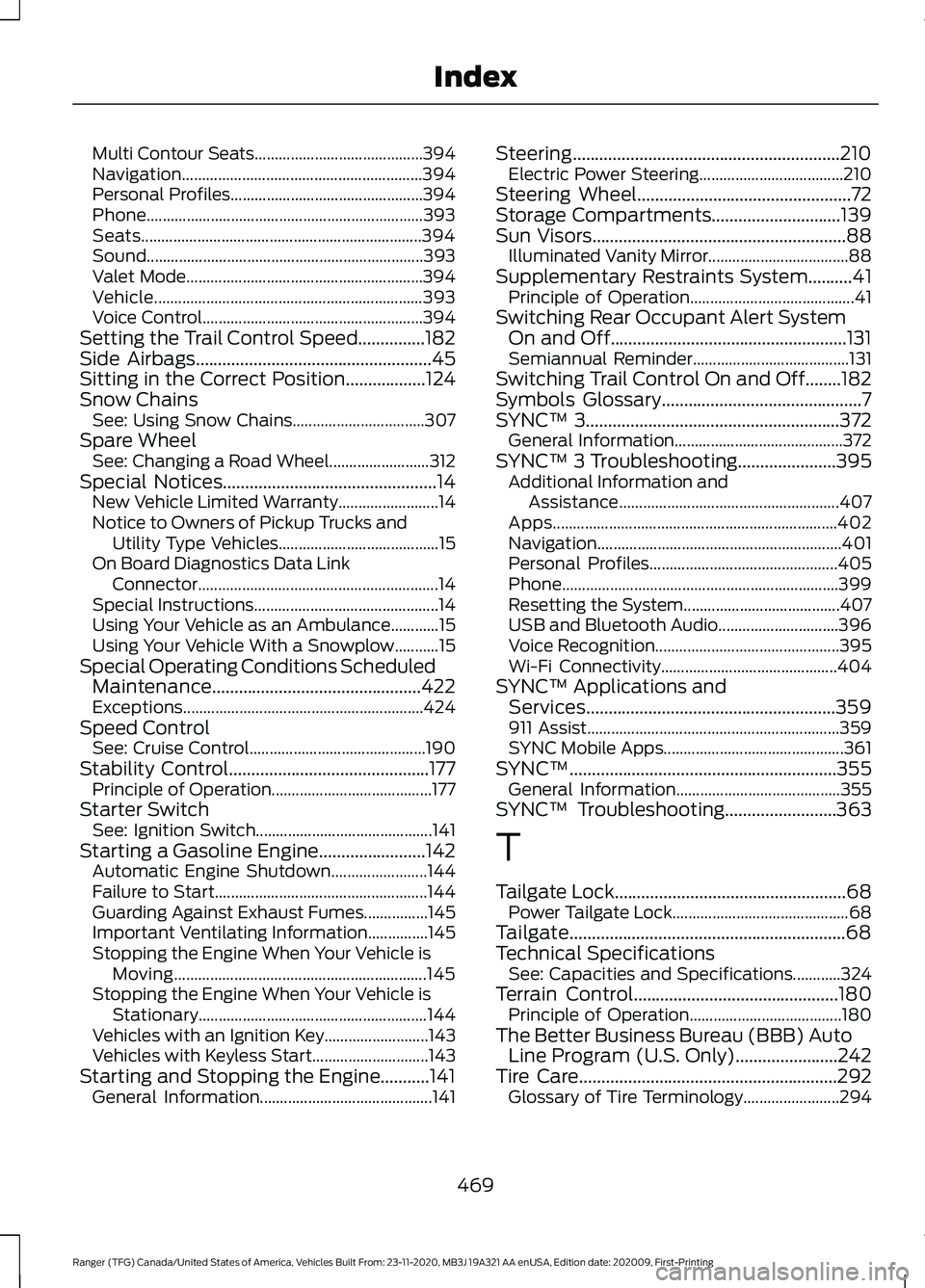
Multi Contour Seats..........................................
394
Navigation............................................................ 394
Personal Profiles................................................ 394
Phone..................................................................... 393
Seats...................................................................... 394
Sound..................................................................... 393
Valet Mode........................................................... 394
Vehicle................................................................... 393
Voice Control....................................................... 394
Setting the Trail Control Speed...............182
Side Airbags.....................................................45
Sitting in the Correct Position..................124
Snow Chains See: Using Snow Chains................................. 307
Spare Wheel See: Changing a Road Wheel......................... 312
Special Notices
................................................14
New Vehicle Limited Warranty......................... 14
Notice to Owners of Pickup Trucks and Utility Type Vehicles........................................ 15
On Board Diagnostics Data Link Connector ............................................................ 14
Special Instructions.............................................. 14
Using Your Vehicle as an Ambulance............15
Using Your Vehicle With a Snowplow...........15
Special Operating Conditions Scheduled Maintenance...............................................422
Exceptions............................................................ 424
Speed Control See: Cruise Control............................................ 190
Stability Control
.............................................177
Principle of Operation........................................ 177
Starter Switch See: Ignition Switch............................................ 141
Starting a Gasoline Engine........................142 Automatic Engine Shutdown........................ 144
Failure to Start..................................................... 144
Guarding Against Exhaust Fumes................145
Important Ventilating Information...............145
Stopping the Engine When Your Vehicle is Moving............................................................... 145
Stopping the Engine When Your Vehicle is Stationary......................................................... 144
Vehicles with an Ignition Key.......................... 143
Vehicles with Keyless Start............................. 143
Starting and Stopping the Engine...........141 General Information........................................... 141Steering............................................................210
Electric Power Steering.................................... 210
Steering Wheel
................................................72
Storage Compartments.............................139
Sun Visors.........................................................88 Illuminated Vanity Mirror................................... 88
Supplementary Restraints System..........41 Principle of Operation......................................... 41
Switching Rear Occupant Alert System On and Off.....................................................131
Semiannual Reminder....................................... 131
Switching Trail Control On and Off........182
Symbols Glossary
.............................................7
SYNC™ 3.........................................................372
General Information.......................................... 372
SYNC™ 3 Troubleshooting......................395 Additional Information and
Assistance....................................................... 407
Apps....................................................................... 402
Navigation............................................................. 401
Personal Profiles............................................... 405
Phone..................................................................... 399
Resetting the System....................................... 407
USB and Bluetooth Audio.............................. 396
Voice Recognition.............................................. 395
Wi-Fi Connectivity............................................ 404
SYNC™ Applications and Services........................................................359
911 Assist............................................................... 359
SYNC Mobile Apps............................................. 361
SYNC™............................................................355 General Information......................................... 355
SYNC™ Troubleshooting.........................363
T
Tailgate Lock....................................................68 Power Tailgate Lock............................................ 68
Tailgate..............................................................68
Technical Specifications See: Capacities and Specifications............324
Terrain Control..............................................180 Principle of Operation...................................... 180
The Better Business Bureau (BBB) Auto Line Program (U.S. Only)
.......................242
Tire Care..........................................................292
Glossary of Tire Terminology........................ 294
469
Ranger (TFG) Canada/United States of America, Vehicles Built From: 23-11-2020, MB3J 19A321 AA enUSA, Edition date: 202009, First-Printing Index
Page 473 of 475
Information About Uniform Tire Quality
Grading............................................................. 292
Information Contained on the Tire Sidewall........................................................... 295
Temperature A B C............................................ 293
Traction AA A B C............................................... 293
Treadwear.............................................................293
Tire Pressure Monitoring System..........308
Changing Tires With a Tire Pressure
Monitoring System...................................... 309
Understanding Your Tire Pressure Monitoring System ....................................... 310
Tires See: Wheels and Tires...................................... 291
Towing a Trailer..............................................221
Towing Points
................................................238
Towing the Vehicle on Four Wheels...........................................................227
Emergency Towing............................................ 228
Recreational Towing......................................... 228
Towing...............................................................221
Traction Control
.............................................176
Principle of Operation....................................... 176
Trail Control Indicators...............................183
Trail Control....................................................182 Trail Control – Troubleshooting.................... 183
Trail Control – Troubleshooting..............183 Trail Control – Information
Messages.......................................................... 183
Trailer Sway Control
....................................222
Transmission Code Designation.............327
Transmission..................................................160
Transporting the Vehicle...........................238
Type Approvals
............................................454
Radio Frequency Certification for Keys and
Remote Controls........................................... 457
Radio Frequency Certifications for Blind Spot Information System.......................... 456
Radio Frequency Certifications for Body Control Module.............................................. 457
Radio Frequency Certifications for Cruise Control Module.............................................. 457
Radio Frequency Certifications for Passive Anti-Theft System....................................... 455
Radio Frequency Certifications for Radio Transceiver Module...................................... 455
Radio Frequency Certifications for Sync 2.5....................................................................... 455Radio Frequency Certifications for SYNC
3........................................................................\
... 457
Radio Frequency Certifications for Telematic Control Unit............................... 456
Radio Frequency Certifications for Tire Pressure Monitoring Sensor(s)...............454
Radio Frequency Statement for Audio Unit.................................................................... 458
United States of America............................... 457
U
Under Hood Overview...............................264
Under Seat Storage
.....................................140
SuperCab.............................................................. 140
Unique Driving Characteristics.................147
Universal Garage Door Opener................133 HomeLink Wireless Control System............133
USB Port
.........................................................353
Using Adaptive Cruise Control.................191 Automatic Cancellation................................... 194
Blocked Sensor................................................... 196
Canceling the Set Speed................................. 194
Changing the Set Speed.................................. 194
Detection Issues................................................. 195
Following a Vehicle............................................ 192
Hilly Condition Usage........................................ 194
Overriding the Set Speed................................ 193
Resuming the Set Speed................................. 194
Setting the Adaptive Cruise Speed..............192
Setting the Gap Distance................................ 193
Switching Adaptive Cruise Control Off....................................................................... 195
Switching Adaptive Cruise Control On........................................................................\
192
Switching to Normal Cruise Control............197
System Not Available....................................... 196
Using Cruise Control...................................190 Canceling the Set Speed................................ 190
Changing the Set Speed................................. 190
Resuming the Set Speed.................................. 191
Setting the Cruise Speed................................ 190
Switching Cruise Control Off........................... 191
Switching Cruise Control On.......................... 190
Using Four-Wheel Drive.............................164 4WD Indicator Lights........................................ 164
Driving Off-Road With Truck and Utility Vehicles............................................................. 166
470
Ranger (TFG) Canada/United States of America, Vehicles Built From: 23-11-2020, MB3J 19A321 AA enUSA, Edition date: 202009, First-Printing Index