page 78 FORD RANGER 2023 Owners Manual
[x] Cancel search | Manufacturer: FORD, Model Year: 2023, Model line: RANGER, Model: FORD RANGER 2023Pages: 470, PDF Size: 13.06 MB
Page 292 of 470
CLEANING THE INSTRUMENT
PANEL AND INSTRUMENT
CLUSTER LENS
WARNING: Do not use chemicalsolvents or strong detergents whencleaning the steering wheel orinstrument panel to avoid contaminationof the airbag system.
Note:Follow the same procedure ascleaning leather seats for cleaning leatherinstrument panels and leather interior trimsurfaces. See Cleaning Leather Seats(page 288).
Clean the instrument panel and clusterlens with a clean, damp and soft cloth,then use a clean, dry and soft cloth to drythese areas.
•Avoid cleaners or polishes that increasethe gloss of the upper portion of theinstrument panel. The dull finish in thisarea helps protect you fromundesirable windshield reflection.
•Do not use any household cleaningproducts or glass cleaners as thesemay damage the finish of theinstrument panel, interior trim andcluster lens.
•Wash or wipe your hands clean if youhave been in contact with certainproducts such as insect repellent andsuntan lotion to avoid possible damageto the interior painted surfaces.
•Do not allow air fresheners and handsanitizers to spill onto interior surfaces.If a spill occurs, wipe off immediately.Your warranty may not cover thesedamages.
If a staining liquid like coffee or juice hasbeen spilled on the instrument panel or oninterior trim surfaces:
1.Wipe up spilled liquid using a clean,soft cloth as quickly as possible.
2.Use Motorcraft Premium Leather andVinyl Cleaner or a commerciallyavailable leather cleaning product forautomotive interiors. Test any cleaneror stain remover on an inconspicuousarea.
3.Alternatively, wipe the surface with aclean, soft cloth and a mild soap andwater solution. Dry the area with aclean, soft cloth.
4.If necessary, apply more soap andwater solution or cleaning product toa clean, soft cloth and press it onto thesoiled area. Allow this to set at roomtemperature for 30 minutes.
5.Remove the soaked cloth, then with aclean, damp cloth, use a rubbingmotion for 60 seconds on the soiledarea.
6.Dry the area with a clean, soft cloth.
CLEANING LEATHER SEATS
Note:Follow the same procedure ascleaning leather seats for cleaning leatherinstrument panels and leather interior trimsurfaces.
For routine cleaning, wipe the surface witha soft, damp cloth and a mild soap andwater solution. Dry the area with a clean,soft cloth.
For cleaning and removing stains such asdye transfer, use Motorcraft PremiumLeather and Vinyl Cleaner or acommercially available leather cleaningproduct for automotive interiors.
Note:Test any cleaner or stain remover onan inconspicuous area.
288
2023 Ranger (TFG) Canada/United States of America, Vehicles Built From: 10-10-2022, enUSA, Edition date: 202208, First-PrintingVehicle Care
Page 304 of 470
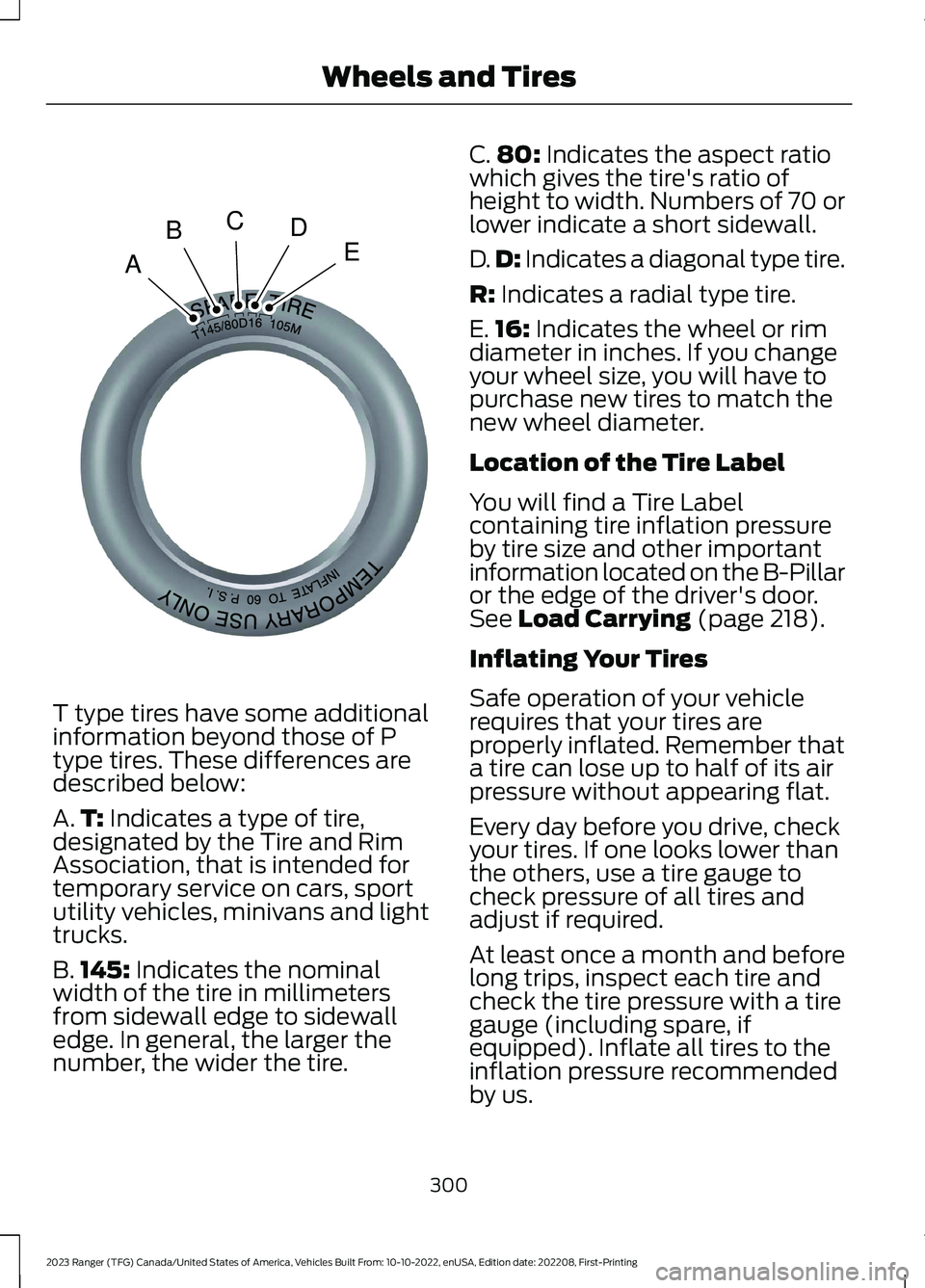
T type tires have some additionalinformation beyond those of Ptype tires. These differences aredescribed below:
A.T: Indicates a type of tire,designated by the Tire and RimAssociation, that is intended fortemporary service on cars, sportutility vehicles, minivans and lighttrucks.
B.145: Indicates the nominalwidth of the tire in millimetersfrom sidewall edge to sidewalledge. In general, the larger thenumber, the wider the tire.
C.80: Indicates the aspect ratiowhich gives the tire's ratio ofheight to width. Numbers of 70 orlower indicate a short sidewall.
D.D: Indicates a diagonal type tire.
R: Indicates a radial type tire.
E.16: Indicates the wheel or rimdiameter in inches. If you changeyour wheel size, you will have topurchase new tires to match thenew wheel diameter.
Location of the Tire Label
You will find a Tire Labelcontaining tire inflation pressureby tire size and other importantinformation located on the B-Pillaror the edge of the driver's door.See Load Carrying (page 218).
Inflating Your Tires
Safe operation of your vehiclerequires that your tires areproperly inflated. Remember thata tire can lose up to half of its airpressure without appearing flat.
Every day before you drive, checkyour tires. If one looks lower thanthe others, use a tire gauge tocheck pressure of all tires andadjust if required.
At least once a month and beforelong trips, inspect each tire andcheck the tire pressure with a tiregauge (including spare, ifequipped). Inflate all tires to theinflation pressure recommendedby us.
300
2023 Ranger (TFG) Canada/United States of America, Vehicles Built From: 10-10-2022, enUSA, Edition date: 202208, First-PrintingWheels and TiresABCDEE142545
Page 313 of 470
The tires on your vehicle have all-weathertreads to provide traction in rain and snow.However, in some climates, you may needto use snow tires and snow chains. If youneed to use snow chains, we recommendyou use steel wheels of the same size andspecifications, as snow chains may chipaluminum wheels.
Note:Only use snow chains on applicabletire sizes.
Only fit snow chains to the followingspecified tires:
•255/70 R16 111T.
•255/65 R17 110T.
•265/65 R17 112T.
•265/60 R18 110T.
•LT265/65 R17 109T.
•LT265/70 R17 112T.
Only use S-Class snow chains,0.6 in(15 mm) chain links.
Only use manual tensioning chains. Do notuse self-tensioning chains.
Only use snow chains in pairs on the rearaxle.
Note:The anti-lock brake system continuesto operate normally.
Follow these guidelines when using snowtires and chains:
•If possible, avoid fully loading yourvehicle.
•Install chains securely, verifying thatthe chains do not touch any wiring,brake lines, or fuel lines.
•Drive cautiously. If you hear the chainsrub or bang against your vehicle, stopand retighten the chains. If this doesnot work, remove the chains to preventdamage to your vehicle.
•Remove the tire chains when you nolonger need them. Do not use tirechains on dry roads.
If you have any questions regarding snowchains, please contact your authorizeddealer.
Vehicles with Stability Control
When stability control is on, your vehiclemay exhibit some unusual drivingcharacteristics. To reduce this, switchtraction control off. See Using TractionControl (page 178).
TIRE PRESSURE MONITORING
SYSTEM
WARNING: The tire pressuremonitoring system is not a substitute formanually checking tire pressures. Youshould periodically check tire pressuresusing a pressure gauge. Failure tocorrectly maintain tire pressures couldincrease the risk of tire failure, loss ofcontrol, vehicle rollover and personalinjury.
Note: You should only use tire sealants inroadside emergencies as they may causedamage to the tire pressure monitoringsystem sensor.
Note: If the tire pressure monitoring systemsensor becomes damaged, it may notfunction.
Each tire, including the spare (ifprovided), should be checkedmonthly when cold and inflatedto the inflation pressure recommended bythe vehicle manufacturer on the vehicleplacard or tire inflation pressure label. (Ifyour vehicle has tires of a different sizethan the size indicated on the vehicleplacard or tire inflation pressure label, youshould determine the proper tire inflationpressure for those tires).
309
2023 Ranger (TFG) Canada/United States of America, Vehicles Built From: 10-10-2022, enUSA, Edition date: 202208, First-PrintingWheels and TiresE139232
Page 315 of 470
Check the tire pressure periodically (atleast monthly) using an accurate tiregauge. See When Inflating Your Tires inthis chapter.
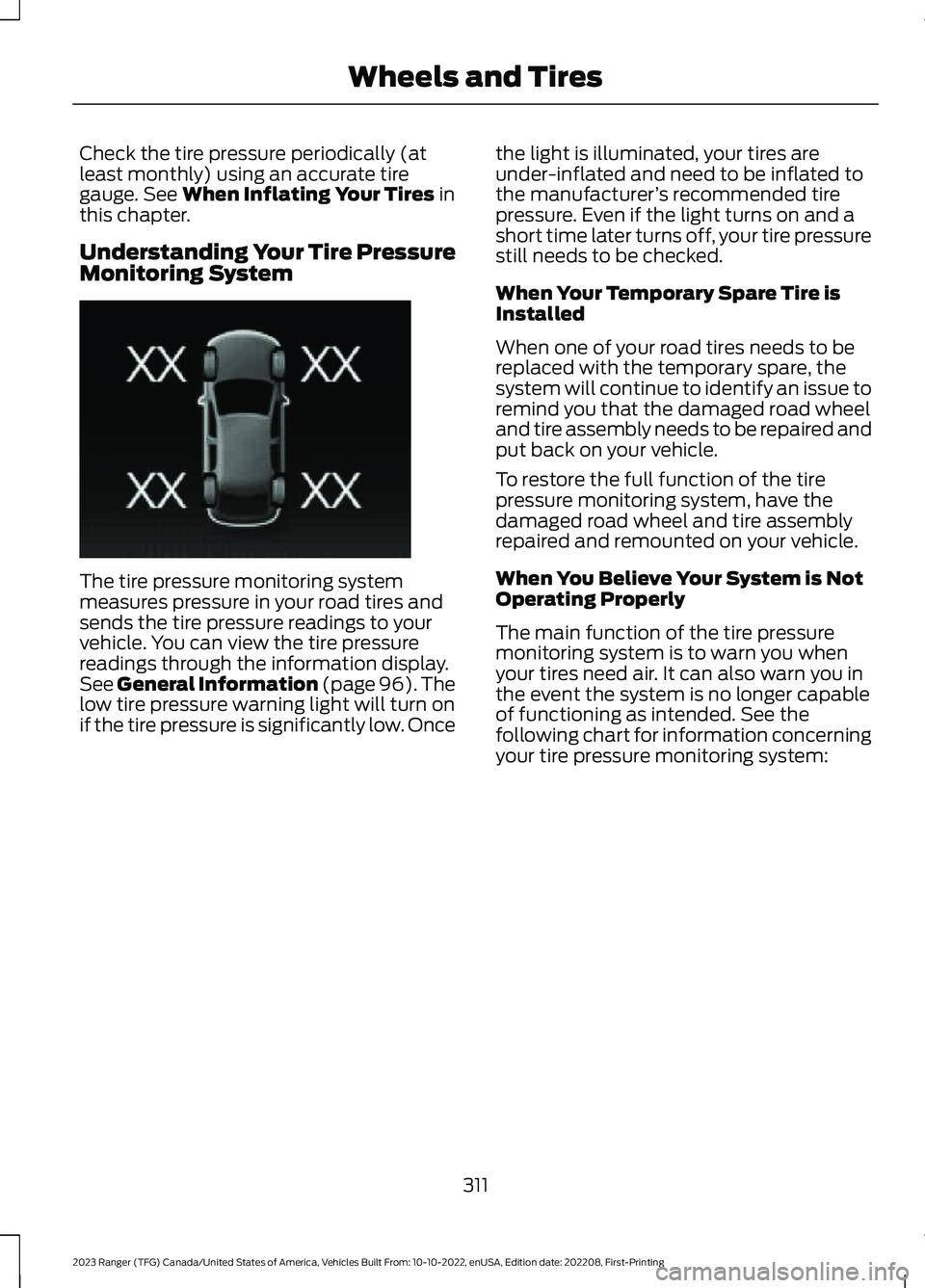
Understanding Your Tire PressureMonitoring System
The tire pressure monitoring systemmeasures pressure in your road tires andsends the tire pressure readings to yourvehicle. You can view the tire pressurereadings through the information display.See General Information (page 96).Thelow tire pressure warning light will turn onif the tire pressure is significantly low. Once
the light is illuminated, your tires areunder-inflated and need to be inflated tothe manufacturer’s recommended tirepressure. Even if the light turns on and ashort time later turns off, your tire pressurestill needs to be checked.
When Your Temporary Spare Tire isInstalled
When one of your road tires needs to bereplaced with the temporary spare, thesystem will continue to identify an issue toremind you that the damaged road wheeland tire assembly needs to be repaired andput back on your vehicle.
To restore the full function of the tirepressure monitoring system, have thedamaged road wheel and tire assemblyrepaired and remounted on your vehicle.
When You Believe Your System is NotOperating Properly
The main function of the tire pressuremonitoring system is to warn you whenyour tires need air. It can also warn you inthe event the system is no longer capableof functioning as intended. See thefollowing chart for information concerningyour tire pressure monitoring system:
311
2023 Ranger (TFG) Canada/United States of America, Vehicles Built From: 10-10-2022, enUSA, Edition date: 202208, First-PrintingWheels and TiresE250820
Page 317 of 470
How Temperature Affects Your TirePressure
The tire pressure monitoring systemmonitors tire pressure in each pneumatictire. While driving in a normal manner, atypical passenger tire inflation pressuremay increase about 2–4 psi (14–28 kPa)from a cold start situation. If the vehicle isstationary overnight with the outsidetemperature significantly lower than thedaytime temperature, the tire pressure maydecrease about 3 psi (21 kPa) for a drop of30°F (17°C) in ambient temperature. Thislower pressure value may be detected bythe tire pressure monitoring system asbeing significantly lower than therecommended inflation pressure andactivate the system warning light for lowtire pressure. If the low tire pressurewarning light is on, visually check each tireto verify that no tire is flat. If one or moretires are flat, repair as necessary. Checkthe air pressure in the road tires. If any tireis under-inflated, carefully drive the vehicleto the nearest location where air can beadded to the tires. Inflate all the tires tothe recommended inflation pressure.
CHANGING A ROAD WHEEL
WARNING: If the tire pressuremonitor sensor becomes damaged itmay not function.
If you get a flat tire when driving, do notheavily apply the brake. Instead, graduallydecrease your speed. Firmly hold thesteering wheel and slowly move to a safeplace on the side of the road.
Have a flat serviced by an authorizeddealer in order to prevent damage to thesystem sensors. See Tire PressureMonitoring System (page 309). Replacethe spare tire with a road tire as soon aspossible. During repairing or replacing ofthe flat tire, have the authorized dealerinspect the system sensor for damage.
Note:The use of tire sealant could damageyour tire pressure monitoring system andshould only be used in roadsideemergencies.
Note:The tire pressure monitoring systemindicator light illuminates when the sparetire is in use. To restore the full function ofthe monitoring system, all road wheels withtire pressure monitoring sensors must bemounted on this vehicle.
Dissimilar Spare Wheel and TireAssembly Information
WARNING: Failure to follow theseguidelines could result in an increasedrisk of loss of vehicle control, injury ordeath.
If you have a dissimilar spare wheel andtire, then it is intended for temporary useonly. This means that if you need to use it,you should replace it as soon as possiblewith a road wheel and tire assembly thatis the same size and type as the road tiresand wheels that were originally providedby Ford.
A dissimilar spare wheel and tire assemblyis defined as a spare wheel and tireassembly that is different in brand, size orappearance from the other road tires andwheels on your vehicle.
313
2023 Ranger (TFG) Canada/United States of America, Vehicles Built From: 10-10-2022, enUSA, Edition date: 202208, First-PrintingWheels and Tires
Page 326 of 470
2.Install the wheel nuts finger tight.
3.Install the locking wheel nut key.
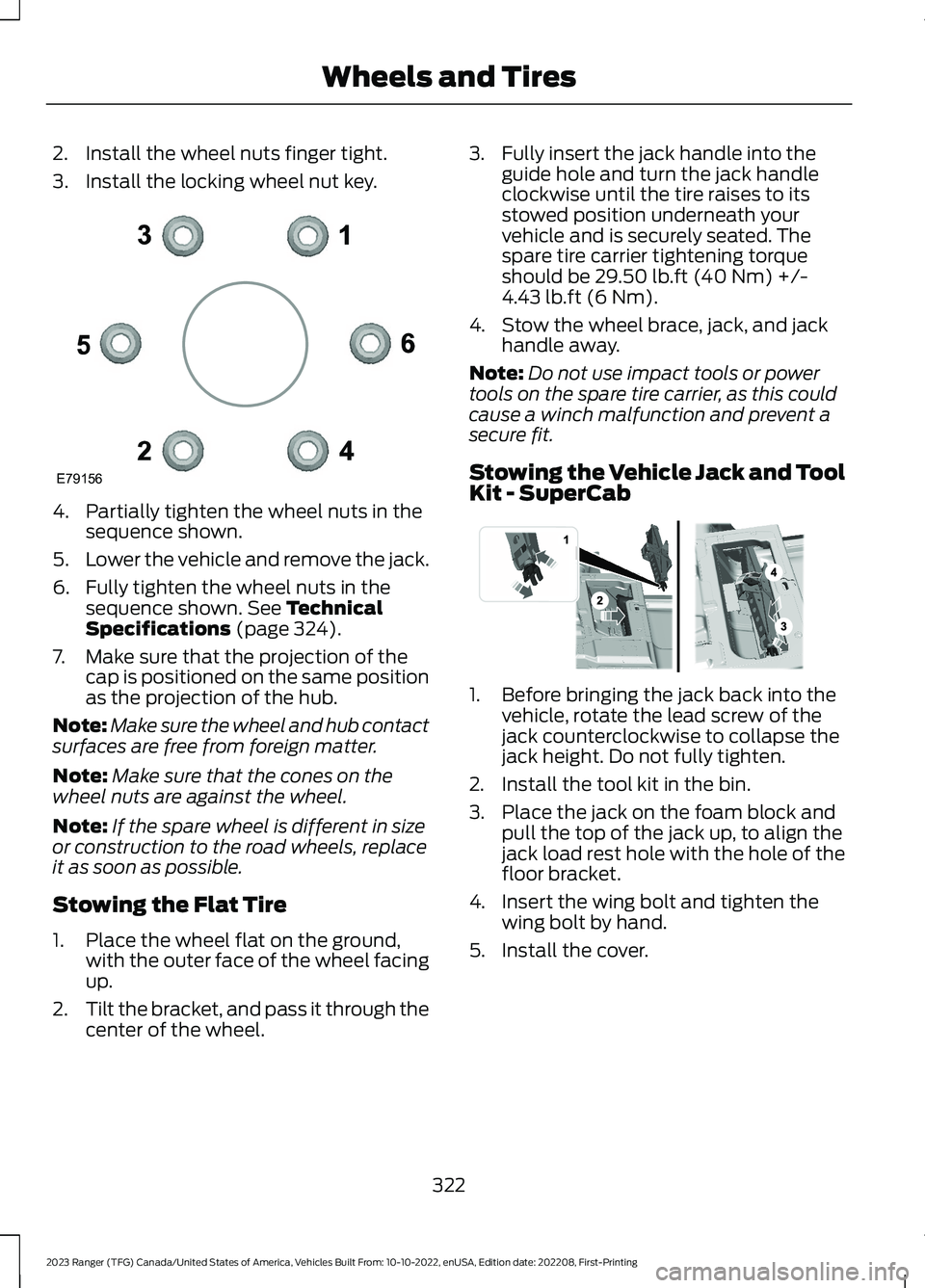
4.Partially tighten the wheel nuts in thesequence shown.
5.Lower the vehicle and remove the jack.
6.Fully tighten the wheel nuts in thesequence shown. See TechnicalSpecifications (page 324).
7.Make sure that the projection of thecap is positioned on the same positionas the projection of the hub.
Note:Make sure the wheel and hub contactsurfaces are free from foreign matter.
Note:Make sure that the cones on thewheel nuts are against the wheel.
Note:If the spare wheel is different in sizeor construction to the road wheels, replaceit as soon as possible.
Stowing the Flat Tire
1.Place the wheel flat on the ground,with the outer face of the wheel facingup.
2.Tilt the bracket, and pass it through thecenter of the wheel.
3.Fully insert the jack handle into theguide hole and turn the jack handleclockwise until the tire raises to itsstowed position underneath yourvehicle and is securely seated. Thespare tire carrier tightening torqueshould be 29.50 lb.ft (40 Nm) +/-4.43 lb.ft (6 Nm).
4.Stow the wheel brace, jack, and jackhandle away.
Note:Do not use impact tools or powertools on the spare tire carrier, as this couldcause a winch malfunction and prevent asecure fit.
Stowing the Vehicle Jack and ToolKit - SuperCab
1.Before bringing the jack back into thevehicle, rotate the lead screw of thejack counterclockwise to collapse thejack height. Do not fully tighten.
2.Install the tool kit in the bin.
3.Place the jack on the foam block andpull the top of the jack up, to align thejack load rest hole with the hole of thefloor bracket.
4.Insert the wing bolt and tighten thewing bolt by hand.
5.Install the cover.
322
2023 Ranger (TFG) Canada/United States of America, Vehicles Built From: 10-10-2022, enUSA, Edition date: 202208, First-PrintingWheels and TiresE79156 E296013
Page 330 of 470
MOTORCRAFT PARTS
Part NumberComponent
FA-1943Air filter element.
FL-910-SOil filter.1
BAGM-48H6-760Battery.BAGM-94RH7-800
SP-594Spark plugs.2
FT-215Transmission filter (10R80).
FP-88Cabin air filter.
WW-2615-A (driver side)Windshield wiper blade.WW-1615-A (passenger side)
1 If a Motorcraft oil filter is not available, use an oil filter that aligns to SAE/USCAR – 36Performance Specifications. Filter Type B.2 For spark plug replacement, contact a dealer. Replace the spark plugs at the appropriateintervals.
See Scheduled Maintenance (page 416).
We recommend Motorcraft replacement parts available at a dealer or at fordparts.comfor scheduled maintenance. We engineer the parts for your vehicle to meet or exceed ourspecifications. Use of other parts could impact vehicle performance, emissions anddurability. Your warranty could be void for any damage related to use of other parts.
326
2023 Ranger (TFG) Canada/United States of America, Vehicles Built From: 10-10-2022, enUSA, Edition date: 202208, First-PrintingCapacities and Specifications
Page 345 of 470
CREATING A VEHICLE WI-FI
HOTSPOT - VEHICLES
WITHOUT: SYNC
Use your FordPass app to create andchange the name and password of yourWi-Fi hotspot. Visit your regional websitefor more information on the FordPass app.
Make sure your FordPass account isconnected to the Connectivity Device. SeeConnecting FordPass to the Modem(page 337).
Note:The Wi-Fi Hotspot may be defaultedto off. If so you will need to switch it on usingthe FordPass app.
Connecting a Device to the Wi-FiHotspot
1.On your device, turn on Wi-Fi and selectthe hotspot from the list of availableWi-Fi networks.
2.When prompted, enter the password.
Purchasing a Data Plan
1.Connect a device to the hotspot.
Note:The vehicle network carrier’s portalopens on your device.
2.If the portal does not open on yourdevice, open a website and it redirectsto the vehicle network carrier’s portal.
Note:Secure websites do not redirect.
Note:If you have an active plan, the systemdoes not redirect to the vehicle networkcarrier’s portal when you connect a device.Visit the vehicle network carrier’s websiteto purchase more data.
Note:If data usage information is availablein the vehicle hotspot menu, it isapproximate.
Note:If you carry out a master reset, thesystem does not remove your vehicle fromyour vehicle network carrier’s account. Toremove your vehicle from the account,contact your vehicle network carrier.
Note:The vehicle network carrier providesVehicle Hotspot services, subject to yourvehicle network carrier agreement, coverageand availability.
CREATING A VEHICLE WI-FI
HOTSPOT - VEHICLES WITH:
SYNC 3
You can create a Wi-Fi hotspot in yourvehicle and allow devices to connect to itfor access to the Internet.
1.Select Settings.
2.Select FordPass Connect.
3.Select Vehicle Hotspot.
Note:The vehicle hotspot default settingis on.
4.Select Settings.
5.Select Edit.
6.Select Wi-Fi Visibility.
Note:The Wi-Fi Visibility default setting ison.
Finding the Wi-Fi Hotspot Nameand Password
1.Select Settings.
2.Select FordPass Connect.
3.Select Vehicle Hotspot.
4.Select Settings.
Note:The SSID is the hotspot name.
5.Select View Password.
341
2023 Ranger (TFG) Canada/United States of America, Vehicles Built From: 10-10-2022, enUSA, Edition date: 202208, First-PrintingVehicle Wi-Fi Hotspot (If Equipped)
Page 359 of 470
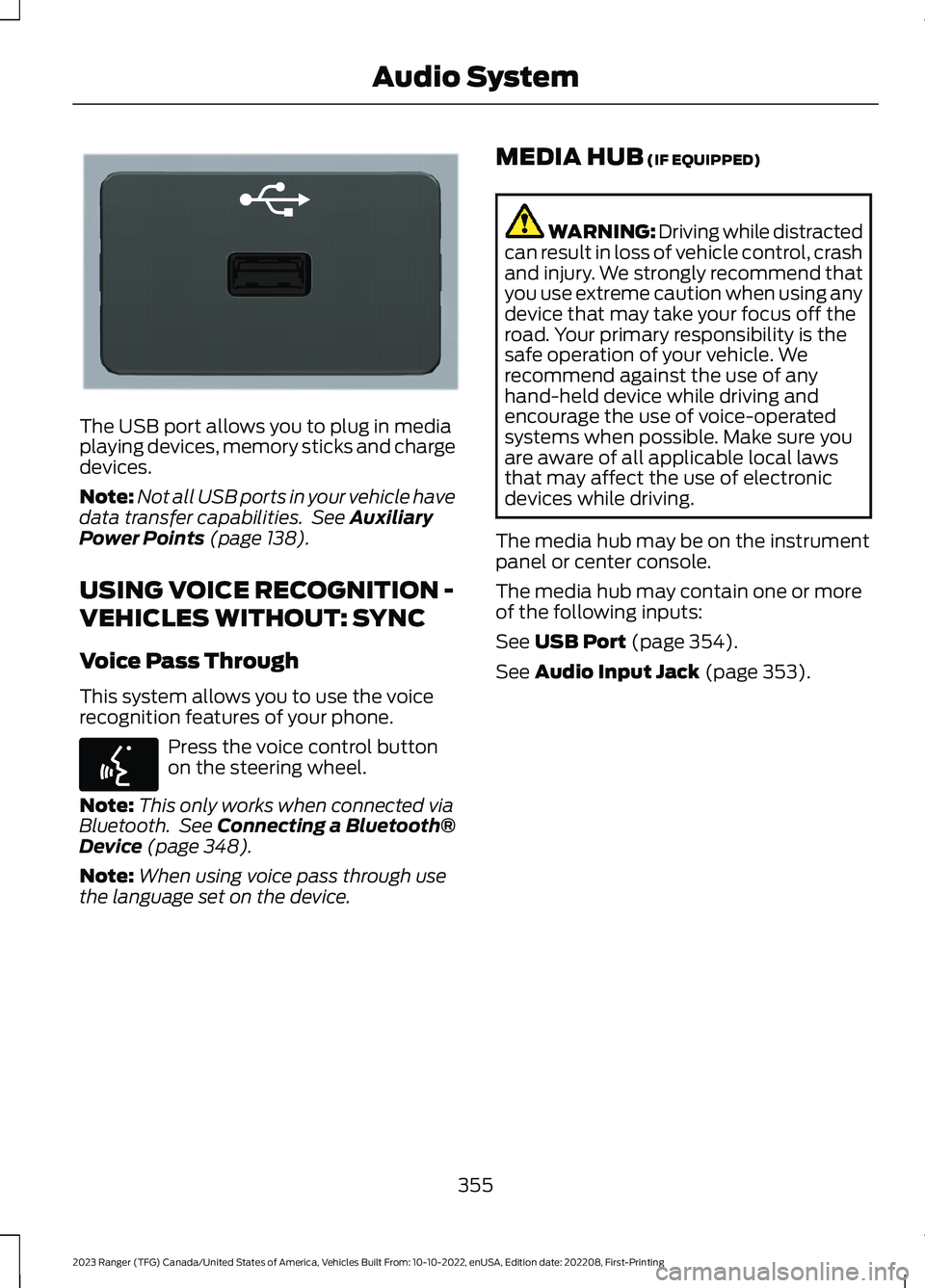
The USB port allows you to plug in mediaplaying devices, memory sticks and chargedevices.
Note:Not all USB ports in your vehicle havedata transfer capabilities. See AuxiliaryPower Points (page 138).
USING VOICE RECOGNITION -
VEHICLES WITHOUT: SYNC
Voice Pass Through
This system allows you to use the voicerecognition features of your phone.
Press the voice control buttonon the steering wheel.
Note:This only works when connected viaBluetooth. See Connecting a Bluetooth®Device (page 348).
Note:When using voice pass through usethe language set on the device.
MEDIA HUB (IF EQUIPPED)
WARNING: Driving while distractedcan result in loss of vehicle control, crashand injury. We strongly recommend thatyou use extreme caution when using anydevice that may take your focus off theroad. Your primary responsibility is thesafe operation of your vehicle. Werecommend against the use of anyhand-held device while driving andencourage the use of voice-operatedsystems when possible. Make sure youare aware of all applicable local lawsthat may affect the use of electronicdevices while driving.
The media hub may be on the instrumentpanel or center console.
The media hub may contain one or moreof the following inputs:
See USB Port (page 354).
See Audio Input Jack (page 353).
355
2023 Ranger (TFG) Canada/United States of America, Vehicles Built From: 10-10-2022, enUSA, Edition date: 202208, First-PrintingAudio SystemE201595 E142599
Page 360 of 470
GENERAL INFORMATION
SYNC is an in-vehicle communicationssystem that works with your Bluetoothenabled cellular phone and portable mediaplayer. This allows you to:
•Make and receive calls.
•Access and play music from yourportable music player.
•Use 911 Assist or Emergency Assistanceand applications via SYNC AppLink.*
•Access phonebook contacts and musicusing voice commands.
•Stream music from your connectedphone.
•Text message.
•Use the advanced voice recognitionsystem.
•Charge your USB device (if your devicesupports this).*These features are not available in allmarkets and may require activation.Available AppLink enabled apps vary bymarket.
Make sure that you review your device'smanual before using it with SYNC.
Support
SYNC support is available at your regionalFord website. See SYNC™Troubleshooting (page 362).
SYNC Owner Account
Why do I need a SYNC owner account?
•Essential for keeping up with the latestsoftware downloads available forSYNC.
•Access to customer support for anyquestions you may have.
Driving Restrictions
For your safety, certain features arespeed-dependent and restricted when yourvehicle is traveling over 3 mph (5 km/h).
Safety Information
WARNING: Driving while distractedcan result in loss of vehicle control, crashand injury. We strongly recommend thatyou use extreme caution when using anydevice that may take your focus off theroad. Your primary responsibility is thesafe operation of your vehicle. Werecommend against the use of anyhand-held device while driving andencourage the use of voice-operatedsystems when possible. Make sure youare aware of all applicable local lawsthat may affect the use of electronicdevices while driving.
When using SYNC:
•Do not operate playing devices if thepower cords or cables are broken, splitor damaged. Place cords and cablesout of the way, so they do not interferewith the operation of pedals, seats,compartments or safe driving abilities.
•Do not leave playing devices in yourvehicle during extreme conditions as itcould cause them damage. See yourdevice's manual for further information.
•Do not attempt to service or repair thesystem. See an authorized dealer.
Privacy Information
When a cellular phone is connected toSYNC, the system creates a profile withinyour vehicle that is linked to that cellularphone. This profile is created in order tooffer you more cellular features and tooperate more efficiently. Among otherthings, this profile may contain data aboutyour cellular phone book, text messages
356
2023 Ranger (TFG) Canada/United States of America, Vehicles Built From: 10-10-2022, enUSA, Edition date: 202208, First-PrintingSYNC™ (If Equipped)