lock FORD RANGER 2023 Owners Manual
[x] Cancel search | Manufacturer: FORD, Model Year: 2023, Model line: RANGER, Model: FORD RANGER 2023Pages: 470, PDF Size: 13.06 MB
Page 351 of 470
Playing or Pausing Media
Press and release the button toeither play or pause the audio.
Switching the Audio Unit On andOff
Press and release the button.
Switching the Display On and Off
Press and release the button.
Switching Repeat Mode On and Off
Press and release the button torepeat the current media source.
Switching Shuffle Mode On andOff
Press and release the button toshuffle the current media source.
Using a Cell Phone
Press and release to eitheranswer an incoming phone callor to make a phone call.
Press and hold to end a phonecall.
Using the Display Control
Use the up and down arrow buttons toselect the various settings. When you makeyour selection, press the left and rightarrow buttons to change the settings.
Press and release to confirm aselection.
Using the Number Block
In radio mode, store and recall your favoriteradio stations. To store a favorite stationpress and hold until the sound returns.
In phone mode, enter a phone number.
Using Seek, Fast Forward andReverse
In radio mode, select a frequency band andpress and release either button. Thesystem stops at the first station it finds inthat direction.
AUDIO UNIT - VEHICLES WITH:
SYNC 3
WARNING: Driving while distractedcan result in loss of vehicle control, crashand injury. We strongly recommend thatyou use extreme caution when using anydevice that may take your focus off theroad. Your primary responsibility is thesafe operation of your vehicle. Werecommend against the use of anyhand-held device while driving andencourage the use of voice-operatedsystems when possible. Make sure youare aware of all applicable local lawsthat may affect the use of electronicdevices while driving.
Note:The touchscreen system controlsmost of the audio features.
Note:Some features, such as satelliteradio, may not be available in your location.Check with an authorized dealer.
347
2023 Ranger (TFG) Canada/United States of America, Vehicles Built From: 10-10-2022, enUSA, Edition date: 202208, First-PrintingAudio System E272035 E268569 E265040 E265041
Page 355 of 470
ActionConditionMessage
The signal is blocked. Whenyou move into an open area,the signal should return.
The signal is lost from theSiriusXM satellite or Siri-usXM tower to your vehicleantenna.
No Signal
No action required. Theprocess may take up tothree minutes.
Update of channelprogramming in progress.Updating…
Contact SiriusXM at 1-888-539-7474 to resolvesubscription issues.
Your satellite service is nolonger available.Questions? Call
1-888-539-7474
Use the channel guide toturn off the Lock or Skipfunction on that station.
All the channels in theselected category are eitherskipped or locked.
None found
Check Channel Guide
No action required.SiriusXM has updated thechannels available for yourvehicle.
Subscription Updated
DIGITAL RADIO (IF EQUIPPED)
Note:HD Radio broadcasts are notavailable in all markets.
HD Radio technology is the digitalevolution of analog AM/FM radio. Yoursystem has a special receiver that allowsit to receive digital broadcasts, whereavailable, in addition to the analogbroadcasts, it already receives. Digitalbroadcasts provide a better sound qualitythan analog broadcasts with free,crystal-clear audio and no static ordistortion. For more information, and aguide to available stations andprogramming, please visitwww.hdradio.com.
When HD Radio is on and you tune to astation broadcasting HD Radio technology,you may notice the HD Radio logo on yourscreen. When this logo is available, youmay also see Title and Artist fieldson-screen.
The multicast indicator appears in FMmode, only, if the current station isbroadcasting multiple digital broadcasts.The highlighted numbers signify availabledigital channels where new or differentcontent is available. HD1 signifies the mainprogramming status and is available inanalog and digital broadcasts. Othermulticast stations, HD2 through HD7, areonly available digitally.
When HD Radio broadcasts are active, youcan access the following functions:
•Memory presets allow you to save anactive channel as a memory preset.Touch and hold a memory preset slotuntil the sound returns. There is a briefmute while the radio saves the station.Sound returns when finished. Whenswitching to an HD2 or HD3 memorypreset, the sound mutes before thedigital audio plays, because the systemhas to reacquire the digital signal.
351
2023 Ranger (TFG) Canada/United States of America, Vehicles Built From: 10-10-2022, enUSA, Edition date: 202208, First-PrintingAudio System
Page 376 of 470
GENERAL INFORMATION
WARNING: Driving while distractedcan result in loss of vehicle control, crashand injury. We strongly recommend thatyou use extreme caution when using anydevice that may take your focus off theroad. Your primary responsibility is thesafe operation of your vehicle. Werecommend against the use of anyhand-held device while driving andencourage the use of voice-operatedsystems when possible. Make sure youare aware of all applicable local lawsthat may affect the use of electronicdevices while driving.
About SYNC
The system allows you to interact with theentertainment, information andcommunication systems on your vehicleusing voice commands and a touchscreen.The system provides easy interaction withaudio, phone, navigation, mobile apps andsettings.
Note:You can switch the system on anduse it for up to an hour without switchingthe ignition on.
Note:You can use the system after youswitch the ignition off for up to 10 minutesor until you open a door.
Note:For your safety, some features arespeed-dependent. Their use is limited towhen your vehicle speed is less than 3 mph(5 km/h).
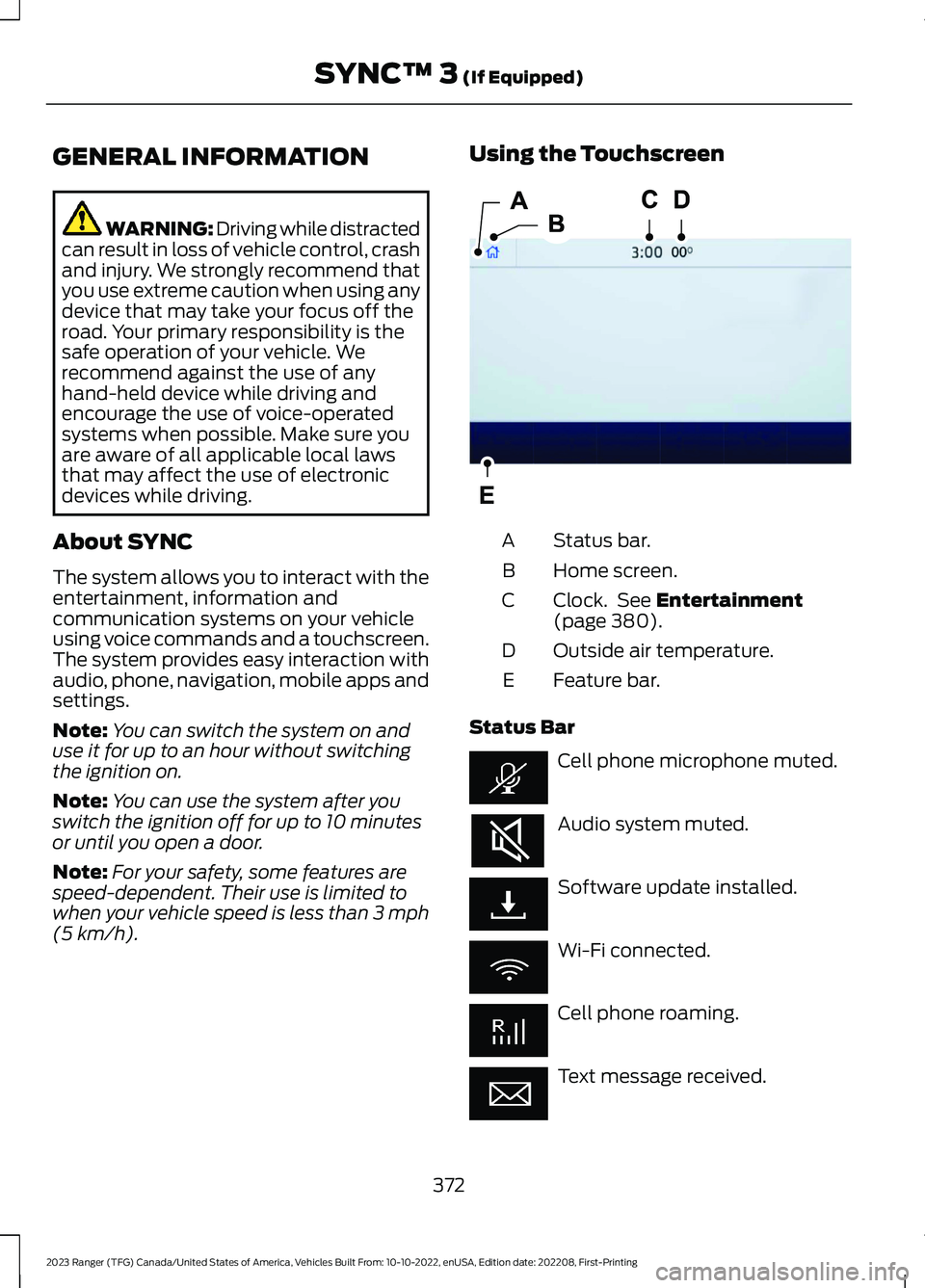
Using the Touchscreen
Status bar.A
Home screen.B
Clock. See Entertainment(page 380).C
Outside air temperature.D
Feature bar.E
Status Bar
Cell phone microphone muted.
Audio system muted.
Software update installed.
Wi-Fi connected.
Cell phone roaming.
Text message received.
372
2023 Ranger (TFG) Canada/United States of America, Vehicles Built From: 10-10-2022, enUSA, Edition date: 202208, First-PrintingSYNC™ 3 (If Equipped)E293823
Page 388 of 470
Switching the Heated Seats Onand Off
Touch the button to cyclethrough the various heatsettings.
Switching the Heated SteeringWheel On and Off
Touch the button.
Switching Maximum AirConditioning On and Off
Touch the button for maximumcooling.
Recirculated air flows through theinstrument panel air vents, air conditioningturns on and the blower motor adjusts tothe highest speed.
Switching Maximum Defrost Onand Off
Touch the button for maximumdefrosting.
Air flows through the windshield air vents,and the blower motor adjusts to thehighest speed.
You can also use this setting to defog andclear the windshield of a thin covering ofice.
Note:To prevent window fogging, youcannot select recirculated air whenmaximum defrost is on.
Note:The heated rear window also turnson when you select maximum defrost.
Note:Depending on your region, airconditioning turns on.
Switching Recirculated Air On andOff
Touch the button to switchbetween outside air andrecirculated air.
The air currently in the passengercompartment recirculates. This mayreduce the time needed to cool the interior,when used with A/C, and reduce unwantedodors from entering your vehicle.
Note: Recirculated air may turn off, orprevent you from switching on, in all air flowmodes except MAX A/C to reduce the riskof fogging. Recirculation may also turn onand off in various air distribution controlcombinations during hot weather to improvecooling efficiency.
Switching the Ventilated Seats Onand Off
Touch the button to cyclethrough the various ventilatedseat settings.
Accessing Rear Climate Controls
Touch the button to accessadditional controls for the rearclimate system.
Rear Climate Control LockIndicator
Touch the button.
When on, you can only operatethe rear passenger settingsthrough the front controls.
Switching Rear Auto Mode On andOff
Touch the button to switch onrear automatic operation, thenset the temperature.
384
2023 Ranger (TFG) Canada/United States of America, Vehicles Built From: 10-10-2022, enUSA, Edition date: 202208, First-PrintingSYNC™ 3 (If Equipped) E256621 E268558 E270447 E265289
Page 397 of 470
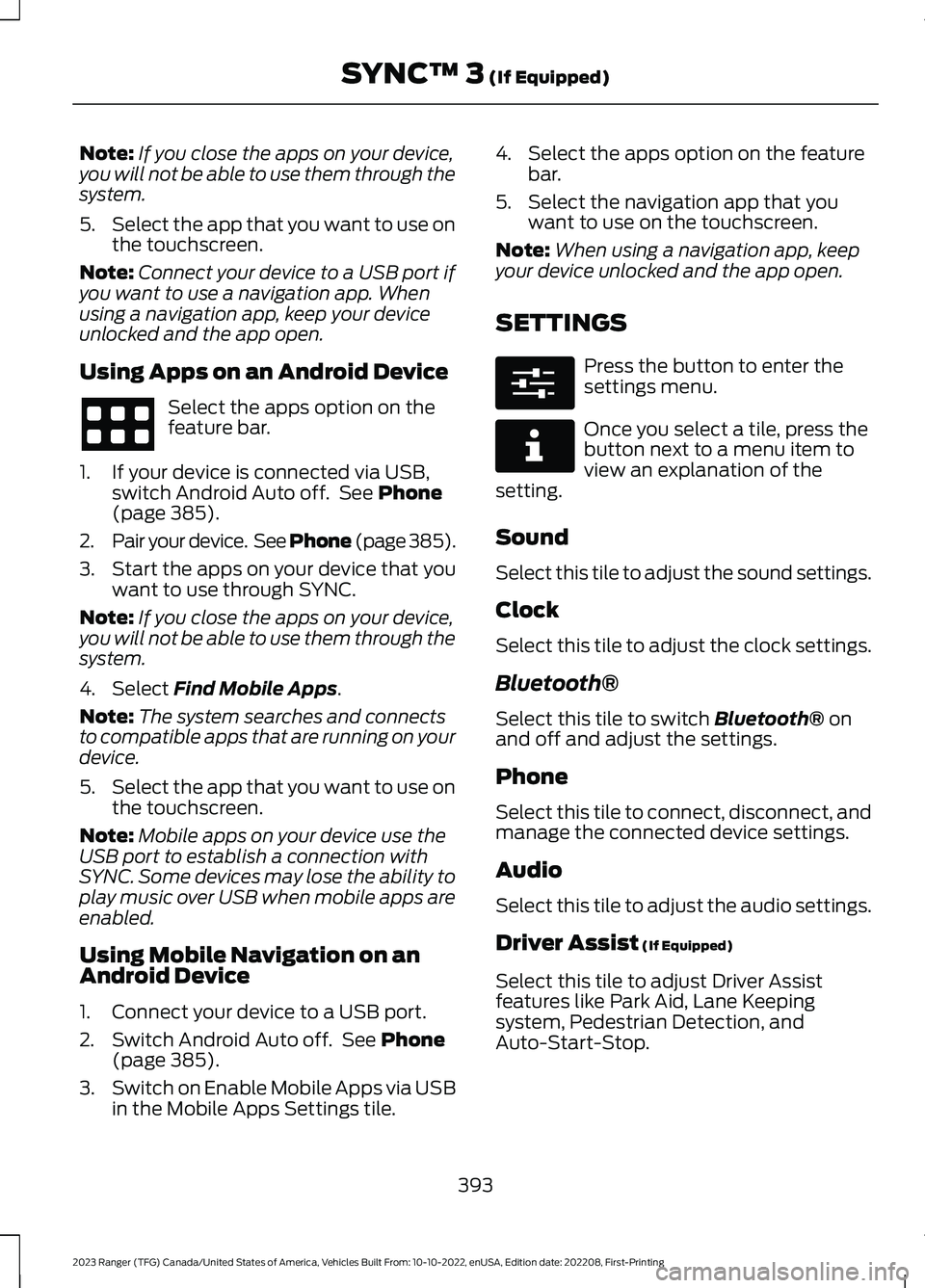
Note:If you close the apps on your device,you will not be able to use them through thesystem.
5.Select the app that you want to use onthe touchscreen.
Note:Connect your device to a USB port ifyou want to use a navigation app. Whenusing a navigation app, keep your deviceunlocked and the app open.
Using Apps on an Android Device
Select the apps option on thefeature bar.
1.If your device is connected via USB,switch Android Auto off. See Phone(page 385).
2.Pair your device. See Phone (page 385).
3.Start the apps on your device that youwant to use through SYNC.
Note:If you close the apps on your device,you will not be able to use them through thesystem.
4.Select Find Mobile Apps.
Note:The system searches and connectsto compatible apps that are running on yourdevice.
5.Select the app that you want to use onthe touchscreen.
Note:Mobile apps on your device use theUSB port to establish a connection withSYNC. Some devices may lose the ability toplay music over USB when mobile apps areenabled.
Using Mobile Navigation on anAndroid Device
1.Connect your device to a USB port.
2.Switch Android Auto off. See Phone(page 385).
3.Switch on Enable Mobile Apps via USBin the Mobile Apps Settings tile.
4.Select the apps option on the featurebar.
5.Select the navigation app that youwant to use on the touchscreen.
Note:When using a navigation app, keepyour device unlocked and the app open.
SETTINGS
Press the button to enter thesettings menu.
Once you select a tile, press thebutton next to a menu item toview an explanation of thesetting.
Sound
Select this tile to adjust the sound settings.
Clock
Select this tile to adjust the clock settings.
Bluetooth®
Select this tile to switch Bluetooth® onand off and adjust the settings.
Phone
Select this tile to connect, disconnect, andmanage the connected device settings.
Audio
Select this tile to adjust the audio settings.
Driver Assist (If Equipped)
Select this tile to adjust Driver Assistfeatures like Park Aid, Lane Keepingsystem, Pedestrian Detection, andAuto-Start-Stop.
393
2023 Ranger (TFG) Canada/United States of America, Vehicles Built From: 10-10-2022, enUSA, Edition date: 202208, First-PrintingSYNC™ 3 (If Equipped) E280315 E268570
Page 401 of 470
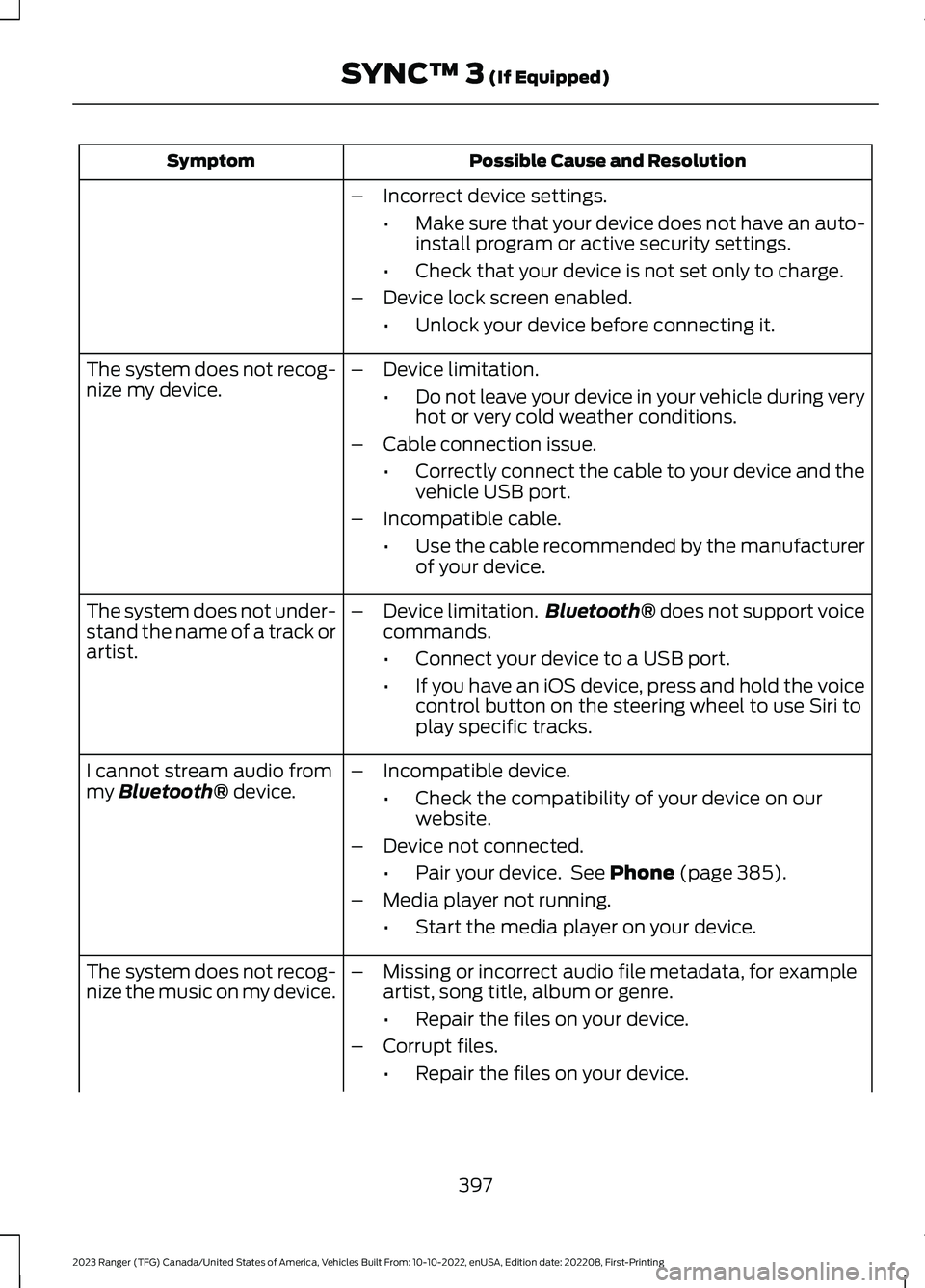
Possible Cause and ResolutionSymptom
–Incorrect device settings.
•Make sure that your device does not have an auto-install program or active security settings.
•Check that your device is not set only to charge.
–Device lock screen enabled.
•Unlock your device before connecting it.
The system does not recog-nize my device.–Device limitation.
•Do not leave your device in your vehicle during veryhot or very cold weather conditions.
–Cable connection issue.
•Correctly connect the cable to your device and thevehicle USB port.
–Incompatible cable.
•Use the cable recommended by the manufacturerof your device.
The system does not under-stand the name of a track orartist.
–Device limitation.Bluetooth® does not support voicecommands.
•Connect your device to a USB port.
•If you have an iOS device, press and hold the voicecontrol button on the steering wheel to use Siri toplay specific tracks.
I cannot stream audio frommy Bluetooth® device.–Incompatible device.
•Check the compatibility of your device on ourwebsite.
–Device not connected.
•Pair your device. See Phone (page 385).
–Media player not running.
•Start the media player on your device.
The system does not recog-nize the music on my device.–Missing or incorrect audio file metadata, for exampleartist, song title, album or genre.
•Repair the files on your device.
–Corrupt files.
•Repair the files on your device.
397
2023 Ranger (TFG) Canada/United States of America, Vehicles Built From: 10-10-2022, enUSA, Edition date: 202208, First-PrintingSYNC™ 3 (If Equipped)
Page 402 of 470
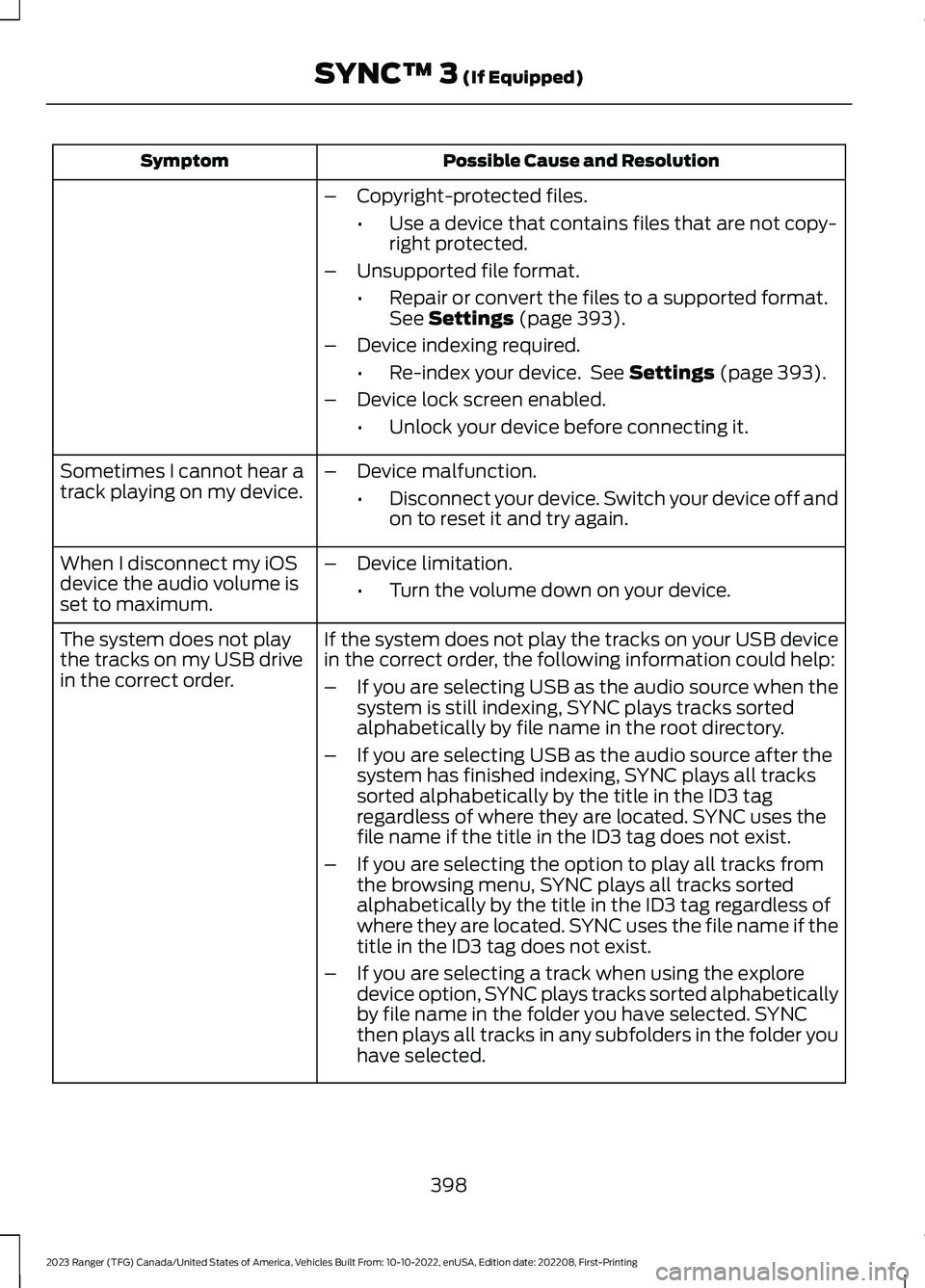
Possible Cause and ResolutionSymptom
–Copyright-protected files.
•Use a device that contains files that are not copy-right protected.
–Unsupported file format.
•Repair or convert the files to a supported format.See Settings (page 393).
–Device indexing required.
•Re-index your device. See Settings (page 393).
–Device lock screen enabled.
•Unlock your device before connecting it.
Sometimes I cannot hear atrack playing on my device.–Device malfunction.
•Disconnect your device. Switch your device off andon to reset it and try again.
When I disconnect my iOSdevice the audio volume isset to maximum.
–Device limitation.
•Turn the volume down on your device.
If the system does not play the tracks on your USB devicein the correct order, the following information could help:The system does not playthe tracks on my USB drivein the correct order.–If you are selecting USB as the audio source when thesystem is still indexing, SYNC plays tracks sortedalphabetically by file name in the root directory.
–If you are selecting USB as the audio source after thesystem has finished indexing, SYNC plays all trackssorted alphabetically by the title in the ID3 tagregardless of where they are located. SYNC uses thefile name if the title in the ID3 tag does not exist.
–If you are selecting the option to play all tracks fromthe browsing menu, SYNC plays all tracks sortedalphabetically by the title in the ID3 tag regardless ofwhere they are located. SYNC uses the file name if thetitle in the ID3 tag does not exist.
–If you are selecting a track when using the exploredevice option, SYNC plays tracks sorted alphabeticallyby file name in the folder you have selected. SYNCthen plays all tracks in any subfolders in the folder youhave selected.
398
2023 Ranger (TFG) Canada/United States of America, Vehicles Built From: 10-10-2022, enUSA, Edition date: 202208, First-PrintingSYNC™ 3 (If Equipped)
Page 403 of 470
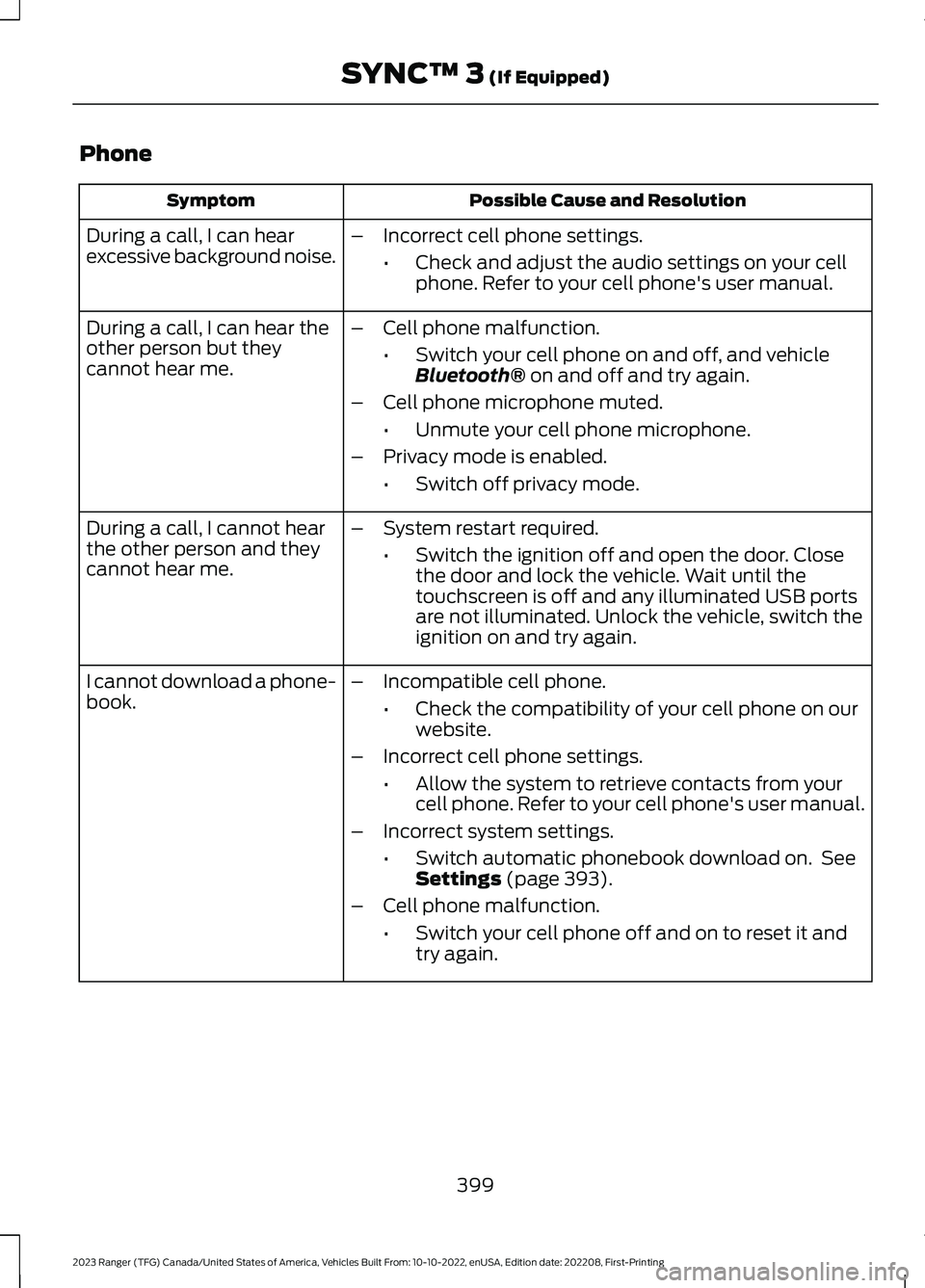
Phone
Possible Cause and ResolutionSymptom
During a call, I can hearexcessive background noise.–Incorrect cell phone settings.
•Check and adjust the audio settings on your cellphone. Refer to your cell phone's user manual.
During a call, I can hear theother person but theycannot hear me.
–Cell phone malfunction.
•Switch your cell phone on and off, and vehicleBluetooth® on and off and try again.
–Cell phone microphone muted.
•Unmute your cell phone microphone.
–Privacy mode is enabled.
•Switch off privacy mode.
During a call, I cannot hearthe other person and theycannot hear me.
–System restart required.
•Switch the ignition off and open the door. Closethe door and lock the vehicle. Wait until thetouchscreen is off and any illuminated USB portsare not illuminated. Unlock the vehicle, switch theignition on and try again.
I cannot download a phone-book.–Incompatible cell phone.
•Check the compatibility of your cell phone on ourwebsite.
–Incorrect cell phone settings.
•Allow the system to retrieve contacts from yourcell phone. Refer to your cell phone's user manual.
–Incorrect system settings.
•Switch automatic phonebook download on. SeeSettings (page 393).
–Cell phone malfunction.
•Switch your cell phone off and on to reset it andtry again.
399
2023 Ranger (TFG) Canada/United States of America, Vehicles Built From: 10-10-2022, enUSA, Edition date: 202208, First-PrintingSYNC™ 3 (If Equipped)
Page 409 of 470
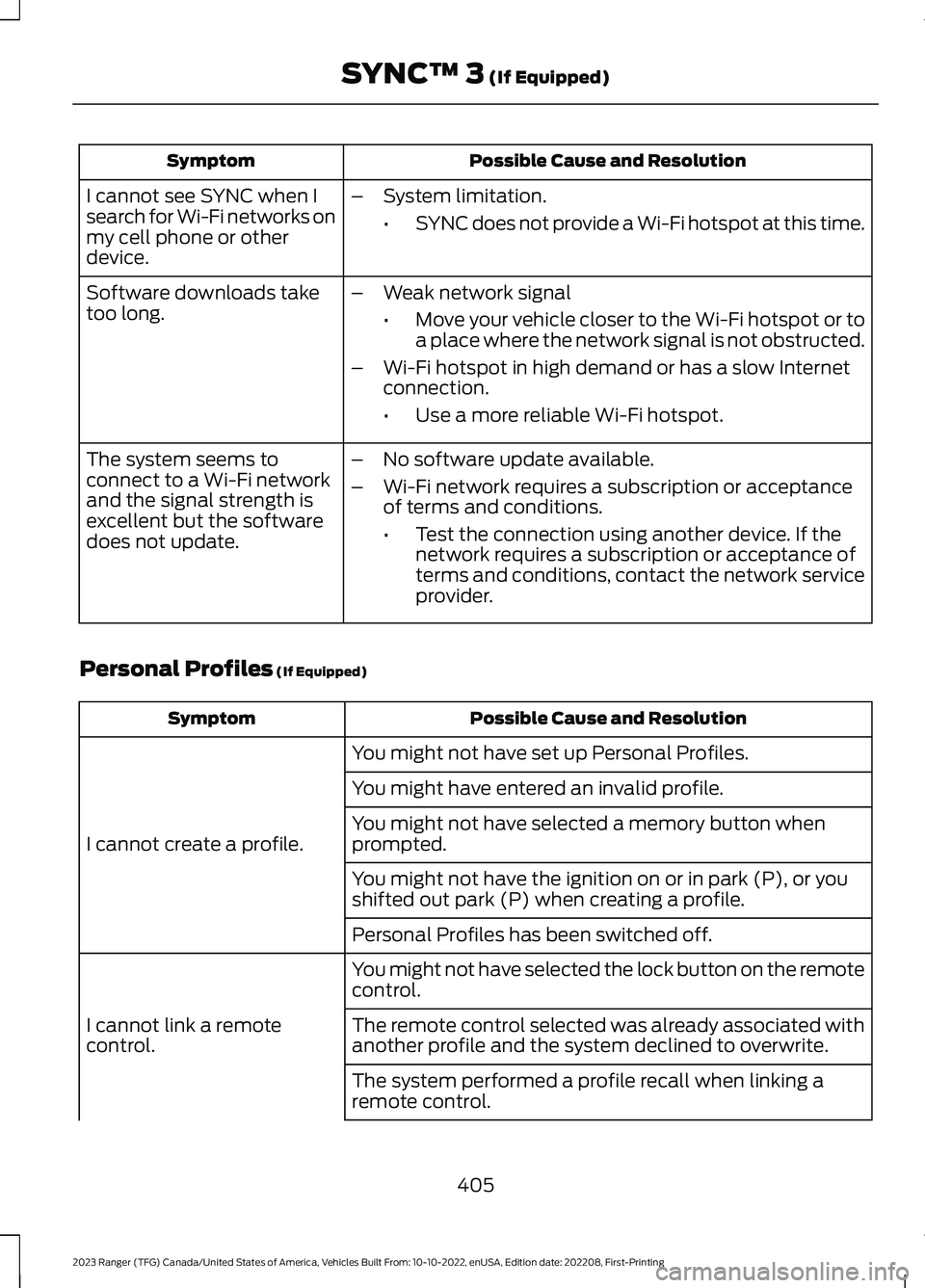
Possible Cause and ResolutionSymptom
I cannot see SYNC when Isearch for Wi-Fi networks onmy cell phone or otherdevice.
–System limitation.
•SYNC does not provide a Wi-Fi hotspot at this time.
–Weak network signal
•Move your vehicle closer to the Wi-Fi hotspot or toa place where the network signal is not obstructed.
–Wi-Fi hotspot in high demand or has a slow Internetconnection.
•Use a more reliable Wi-Fi hotspot.
Software downloads taketoo long.
–No software update available.
–Wi-Fi network requires a subscription or acceptanceof terms and conditions.
•Test the connection using another device. If thenetwork requires a subscription or acceptance ofterms and conditions, contact the network serviceprovider.
The system seems toconnect to a Wi-Fi networkand the signal strength isexcellent but the softwaredoes not update.
Personal Profiles (If Equipped)
Possible Cause and ResolutionSymptom
You might not have set up Personal Profiles.
I cannot create a profile.
You might have entered an invalid profile.
You might not have selected a memory button whenprompted.
You might not have the ignition on or in park (P), or youshifted out park (P) when creating a profile.
Personal Profiles has been switched off.
You might not have selected the lock button on the remotecontrol.
I cannot link a remotecontrol.The remote control selected was already associated withanother profile and the system declined to overwrite.
The system performed a profile recall when linking aremote control.
405
2023 Ranger (TFG) Canada/United States of America, Vehicles Built From: 10-10-2022, enUSA, Edition date: 202208, First-PrintingSYNC™ 3 (If Equipped)
Page 410 of 470
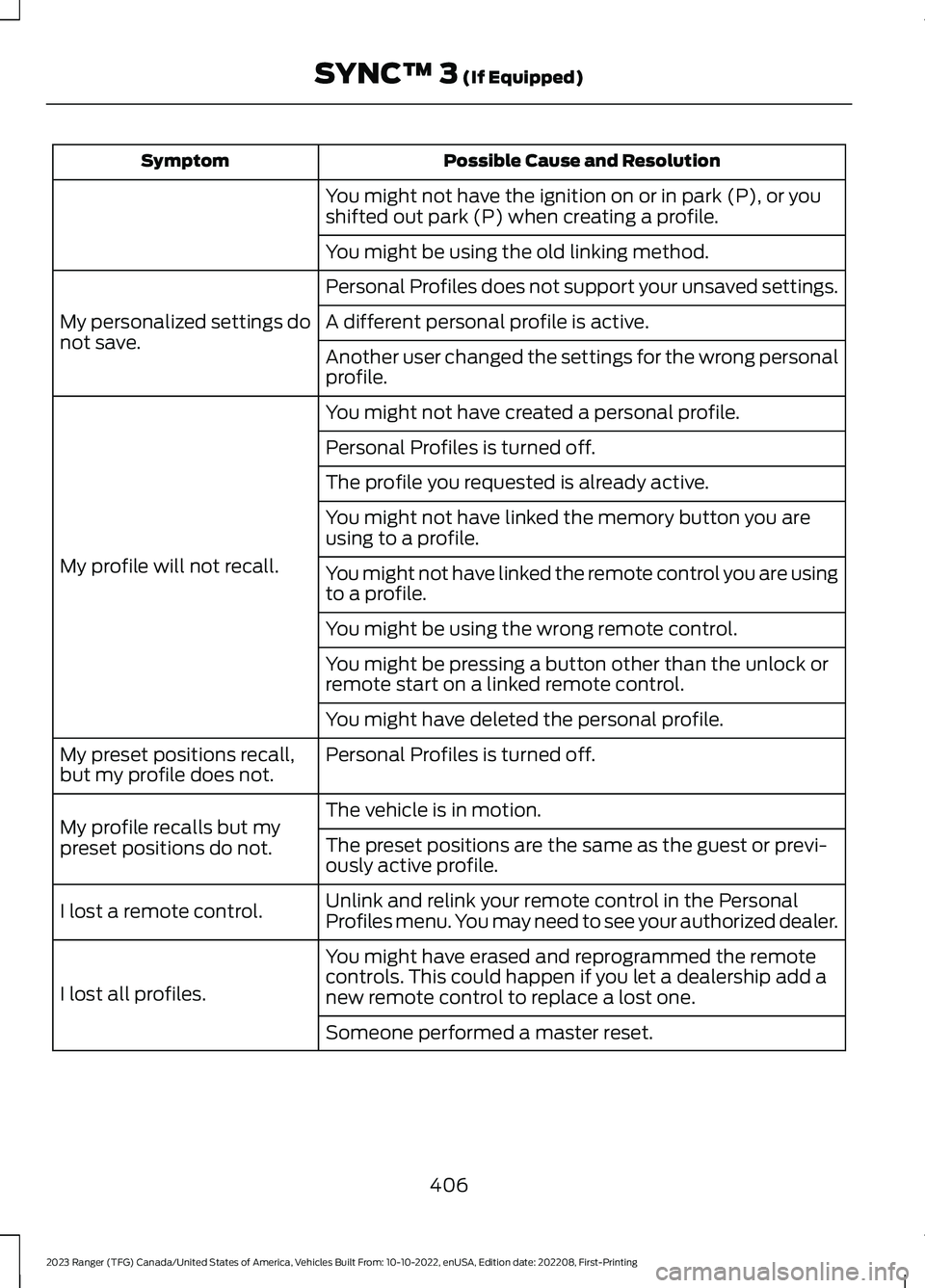
Possible Cause and ResolutionSymptom
You might not have the ignition on or in park (P), or youshifted out park (P) when creating a profile.
You might be using the old linking method.
Personal Profiles does not support your unsaved settings.
My personalized settings donot save.A different personal profile is active.
Another user changed the settings for the wrong personalprofile.
You might not have created a personal profile.
My profile will not recall.
Personal Profiles is turned off.
The profile you requested is already active.
You might not have linked the memory button you areusing to a profile.
You might not have linked the remote control you are usingto a profile.
You might be using the wrong remote control.
You might be pressing a button other than the unlock orremote start on a linked remote control.
You might have deleted the personal profile.
Personal Profiles is turned off.My preset positions recall,but my profile does not.
The vehicle is in motion.My profile recalls but mypreset positions do not.The preset positions are the same as the guest or previ-ously active profile.
Unlink and relink your remote control in the PersonalProfiles menu. You may need to see your authorized dealer.I lost a remote control.
You might have erased and reprogrammed the remotecontrols. This could happen if you let a dealership add anew remote control to replace a lost one.I lost all profiles.
Someone performed a master reset.
406
2023 Ranger (TFG) Canada/United States of America, Vehicles Built From: 10-10-2022, enUSA, Edition date: 202208, First-PrintingSYNC™ 3 (If Equipped)