cruise control FORD RANGER 2023 User Guide
[x] Cancel search | Manufacturer: FORD, Model Year: 2023, Model line: RANGER, Model: FORD RANGER 2023Pages: 470, PDF Size: 13.06 MB
Page 109 of 470
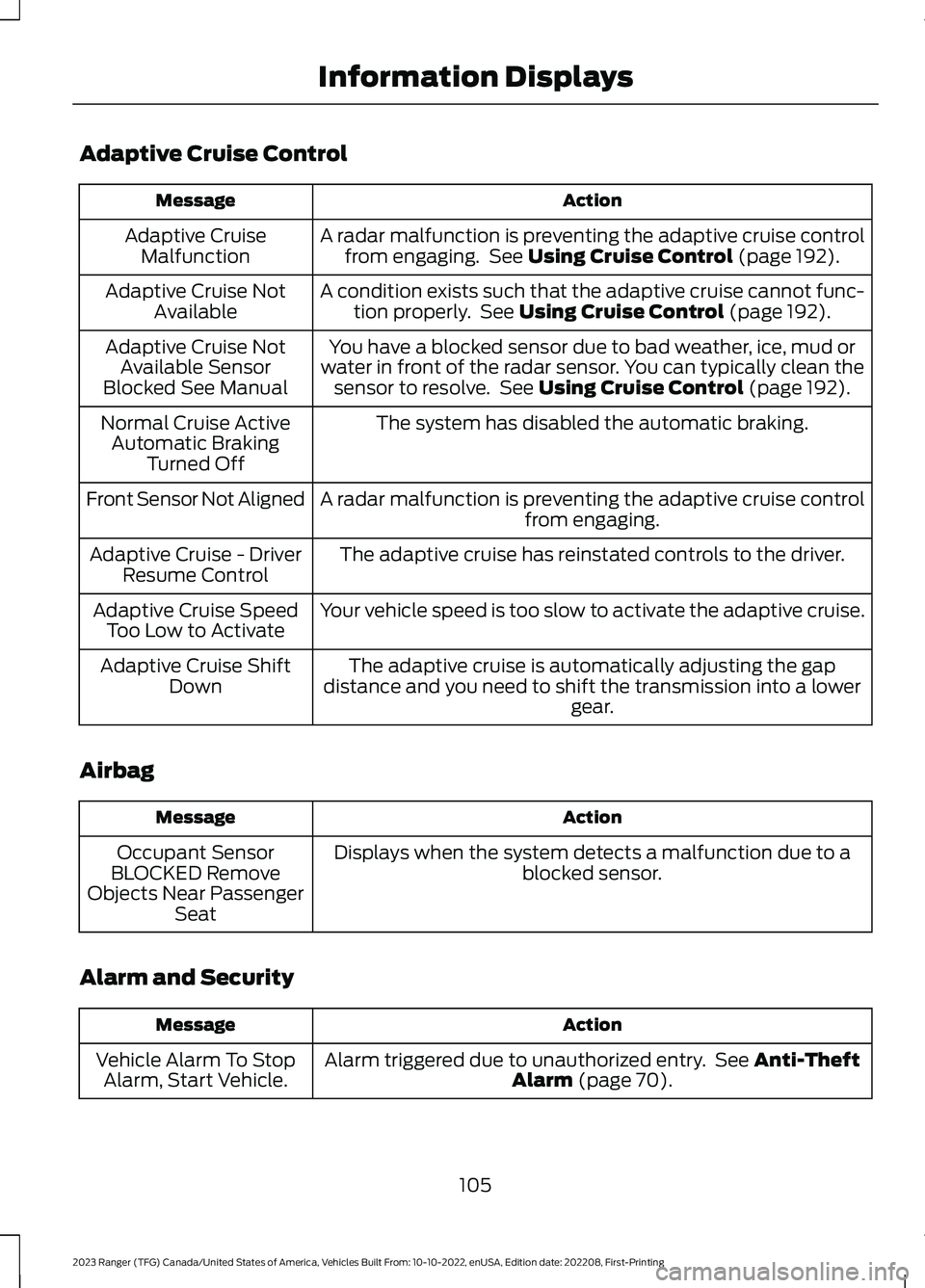
Adaptive Cruise Control
ActionMessage
A radar malfunction is preventing the adaptive cruise controlfrom engaging. See Using Cruise Control (page 192).Adaptive CruiseMalfunction
A condition exists such that the adaptive cruise cannot func-tion properly. See Using Cruise Control (page 192).Adaptive Cruise NotAvailable
You have a blocked sensor due to bad weather, ice, mud orwater in front of the radar sensor. You can typically clean thesensor to resolve. See Using Cruise Control (page 192).
Adaptive Cruise NotAvailable SensorBlocked See Manual
The system has disabled the automatic braking.Normal Cruise ActiveAutomatic BrakingTurned Off
A radar malfunction is preventing the adaptive cruise controlfrom engaging.Front Sensor Not Aligned
The adaptive cruise has reinstated controls to the driver.Adaptive Cruise - DriverResume Control
Your vehicle speed is too slow to activate the adaptive cruise.Adaptive Cruise SpeedToo Low to Activate
The adaptive cruise is automatically adjusting the gapdistance and you need to shift the transmission into a lowergear.
Adaptive Cruise ShiftDown
Airbag
ActionMessage
Displays when the system detects a malfunction due to ablocked sensor.Occupant SensorBLOCKED RemoveObjects Near PassengerSeat
Alarm and Security
ActionMessage
Alarm triggered due to unauthorized entry. See Anti-TheftAlarm (page 70).Vehicle Alarm To StopAlarm, Start Vehicle.
105
2023 Ranger (TFG) Canada/United States of America, Vehicles Built From: 10-10-2022, enUSA, Edition date: 202208, First-PrintingInformation Displays
Page 119 of 470
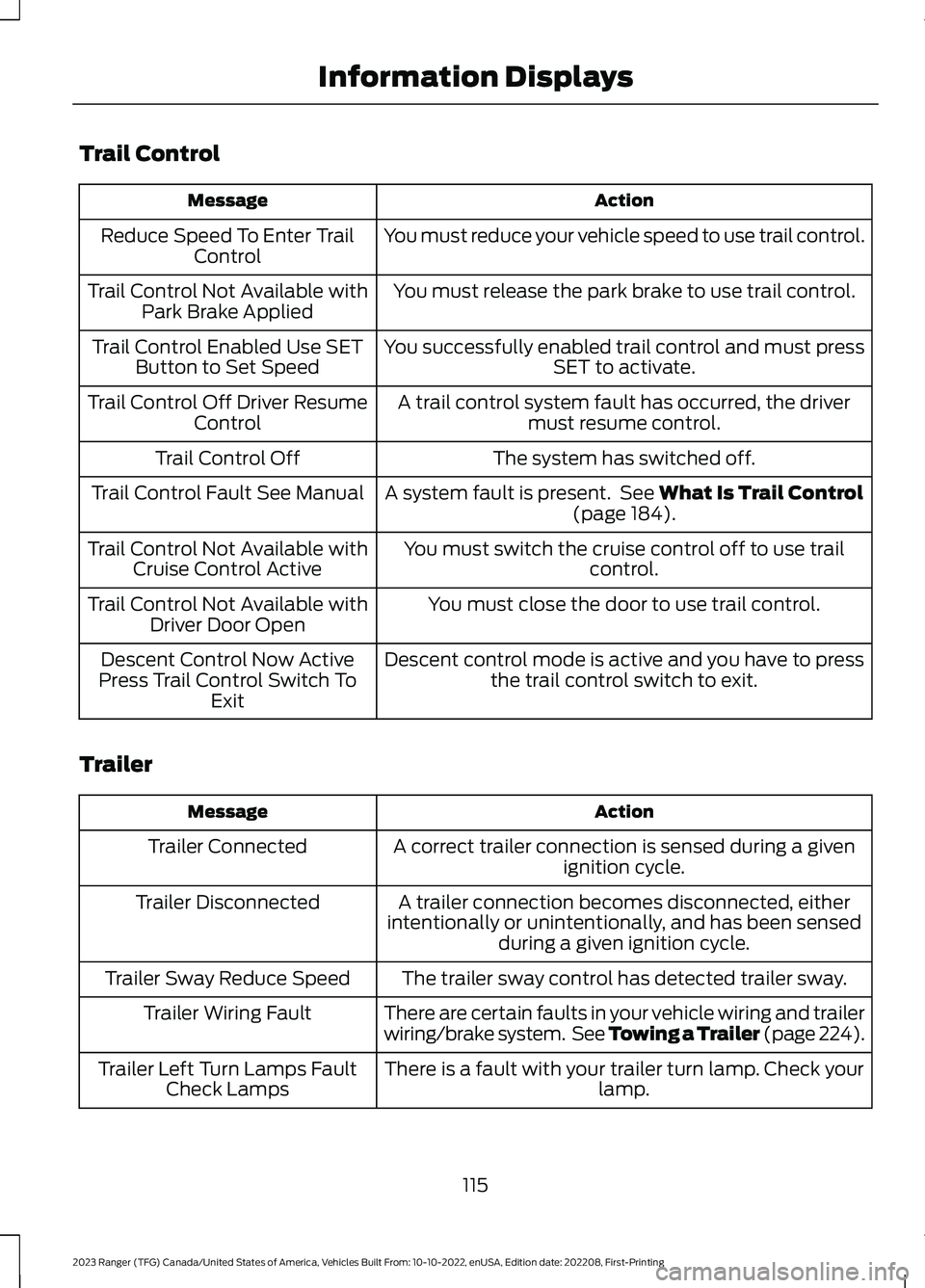
Trail Control
ActionMessage
You must reduce your vehicle speed to use trail control.Reduce Speed To Enter TrailControl
You must release the park brake to use trail control.Trail Control Not Available withPark Brake Applied
You successfully enabled trail control and must pressSET to activate.Trail Control Enabled Use SETButton to Set Speed
A trail control system fault has occurred, the drivermust resume control.Trail Control Off Driver ResumeControl
The system has switched off.Trail Control Off
A system fault is present. See What Is Trail Control(page 184).Trail Control Fault See Manual
You must switch the cruise control off to use trailcontrol.Trail Control Not Available withCruise Control Active
You must close the door to use trail control.Trail Control Not Available withDriver Door Open
Descent control mode is active and you have to pressthe trail control switch to exit.Descent Control Now ActivePress Trail Control Switch ToExit
Trailer
ActionMessage
A correct trailer connection is sensed during a givenignition cycle.Trailer Connected
A trailer connection becomes disconnected, eitherintentionally or unintentionally, and has been sensedduring a given ignition cycle.
Trailer Disconnected
The trailer sway control has detected trailer sway.Trailer Sway Reduce Speed
There are certain faults in your vehicle wiring and trailerwiring/brake system. See Towing a Trailer (page 224).Trailer Wiring Fault
There is a fault with your trailer turn lamp. Check yourlamp.Trailer Left Turn Lamps FaultCheck Lamps
115
2023 Ranger (TFG) Canada/United States of America, Vehicles Built From: 10-10-2022, enUSA, Edition date: 202208, First-PrintingInformation Displays
Page 177 of 470
ELECTRONIC LOCKING
DIFFERENTIAL (IF EQUIPPED)
Note:Do not operate the system on dryhard surface roads. Doing so could lead toexcessive tire noise and wear. Use thesystem only on consistently slippery or loosesurfaces.
The system locks the left and right portionsof the rear axle together to form a soliddriving axle, resulting in increased rearwheel traction in certain conditions.
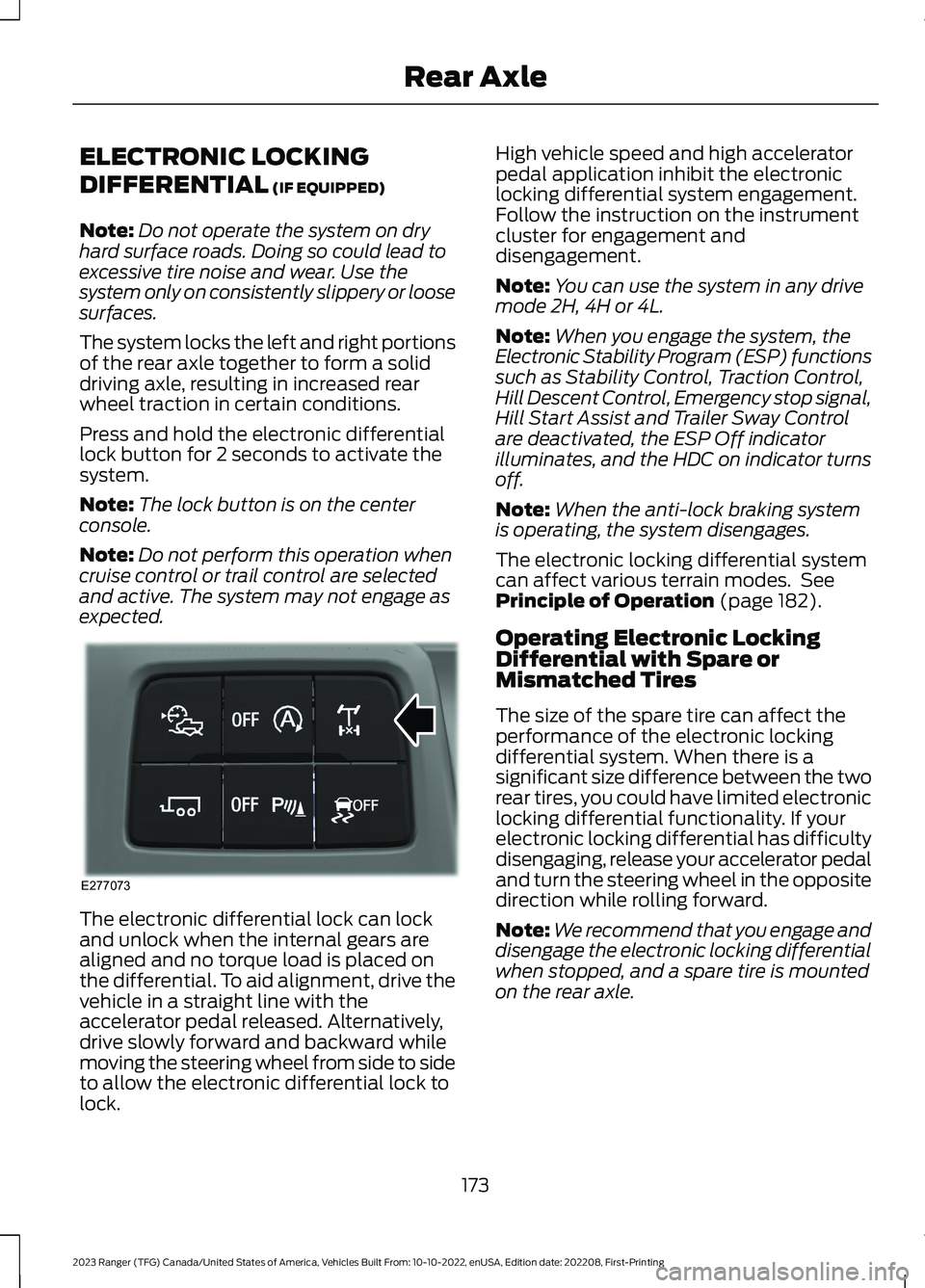
Press and hold the electronic differentiallock button for 2 seconds to activate thesystem.
Note:The lock button is on the centerconsole.
Note:Do not perform this operation whencruise control or trail control are selectedand active. The system may not engage asexpected.
The electronic differential lock can lockand unlock when the internal gears arealigned and no torque load is placed onthe differential. To aid alignment, drive thevehicle in a straight line with theaccelerator pedal released. Alternatively,drive slowly forward and backward whilemoving the steering wheel from side to sideto allow the electronic differential lock tolock.
High vehicle speed and high acceleratorpedal application inhibit the electroniclocking differential system engagement.Follow the instruction on the instrumentcluster for engagement anddisengagement.
Note:You can use the system in any drivemode 2H, 4H or 4L.
Note:When you engage the system, theElectronic Stability Program (ESP) functionssuch as Stability Control, Traction Control,Hill Descent Control, Emergency stop signal,Hill Start Assist and Trailer Sway Controlare deactivated, the ESP Off indicatorilluminates, and the HDC on indicator turnsoff.
Note:When the anti-lock braking systemis operating, the system disengages.
The electronic locking differential systemcan affect various terrain modes. SeePrinciple of Operation (page 182).
Operating Electronic LockingDifferential with Spare orMismatched Tires
The size of the spare tire can affect theperformance of the electronic lockingdifferential system. When there is asignificant size difference between the tworear tires, you could have limited electroniclocking differential functionality. If yourelectronic locking differential has difficultydisengaging, release your accelerator pedaland turn the steering wheel in the oppositedirection while rolling forward.
Note:We recommend that you engage anddisengage the electronic locking differentialwhen stopped, and a spare tire is mountedon the rear axle.
173
2023 Ranger (TFG) Canada/United States of America, Vehicles Built From: 10-10-2022, enUSA, Edition date: 202208, First-PrintingRear AxleE277073
Page 189 of 470
TRAIL CONTROL INDICATORS
TRAIL CONTROL – TROUBLESHOOTING
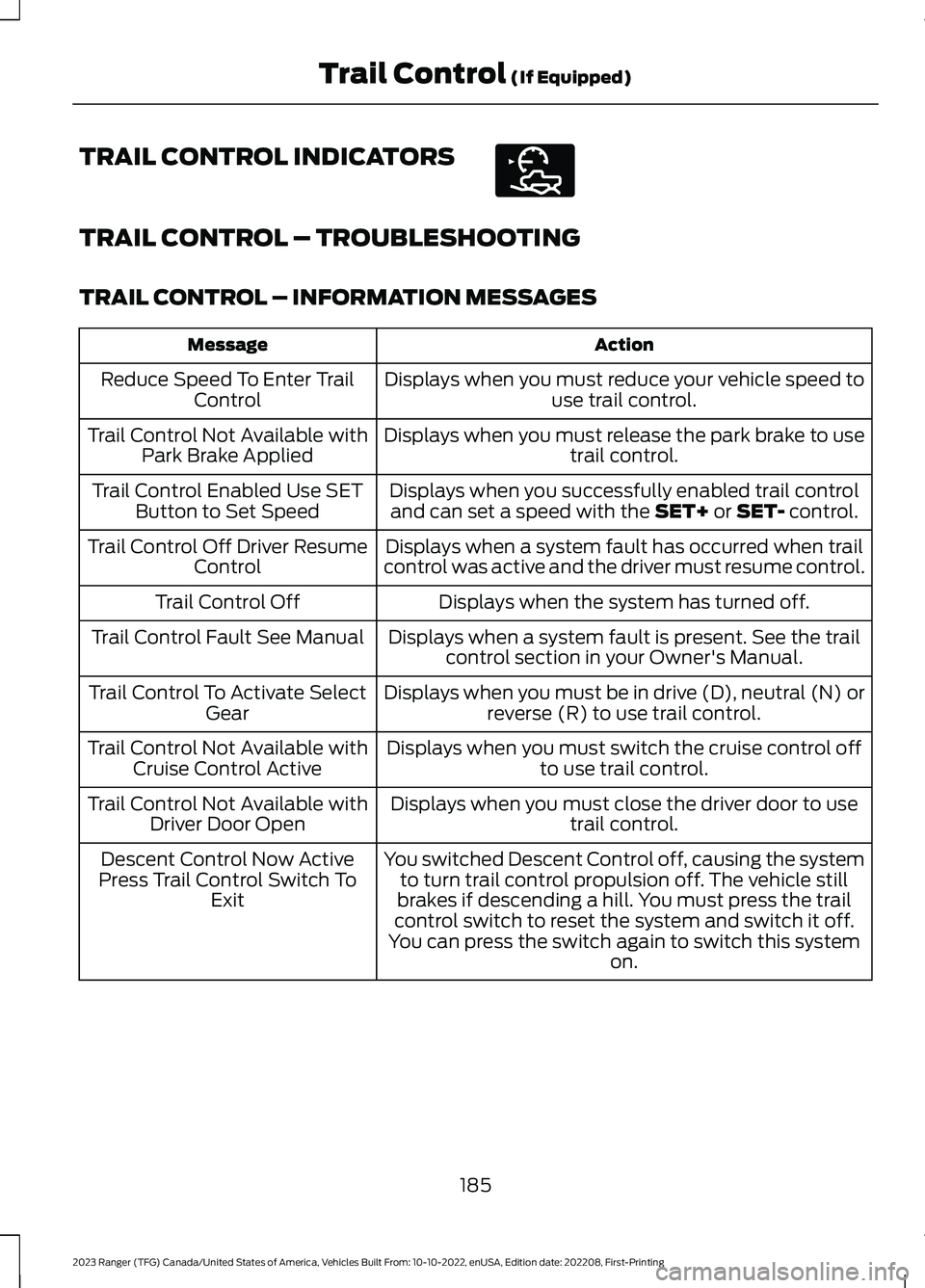
TRAIL CONTROL – INFORMATION MESSAGES
ActionMessage
Displays when you must reduce your vehicle speed touse trail control.Reduce Speed To Enter TrailControl
Displays when you must release the park brake to usetrail control.Trail Control Not Available withPark Brake Applied
Displays when you successfully enabled trail controland can set a speed with the SET+ or SET- control.Trail Control Enabled Use SETButton to Set Speed
Displays when a system fault has occurred when trailcontrol was active and the driver must resume control.Trail Control Off Driver ResumeControl
Displays when the system has turned off.Trail Control Off
Displays when a system fault is present. See the trailcontrol section in your Owner's Manual.Trail Control Fault See Manual
Displays when you must be in drive (D), neutral (N) orreverse (R) to use trail control.Trail Control To Activate SelectGear
Displays when you must switch the cruise control offto use trail control.Trail Control Not Available withCruise Control Active
Displays when you must close the driver door to usetrail control.Trail Control Not Available withDriver Door Open
You switched Descent Control off, causing the systemto turn trail control propulsion off. The vehicle stillbrakes if descending a hill. You must press the trailcontrol switch to reset the system and switch it off.You can press the switch again to switch this systemon.
Descent Control Now ActivePress Trail Control Switch ToExit
185
2023 Ranger (TFG) Canada/United States of America, Vehicles Built From: 10-10-2022, enUSA, Edition date: 202208, First-PrintingTrail Control (If Equipped)E272858
Page 196 of 470
PRINCIPLE OF OPERATION
Cruise control lets you maintain a setspeed without keeping your foot on theaccelerator pedal. You can use cruisecontrol when your vehicle speed is greaterthan 20 mph (30 km/h).
USING CRUISE CONTROL (IF
EQUIPPED)
WARNING: Do not use cruisecontrol on winding roads, in heavy trafficor when the road surface is slippery. Thiscould result in loss of vehicle control,serious injury or death.
WARNING: When you are goingdownhill, your vehicle speed couldincrease above the set speed. Thesystem does not apply the brakes.
Note:The system cancels if your vehiclespeed drops below 10 mph (16 km/h) underthe set speed when driving uphill.
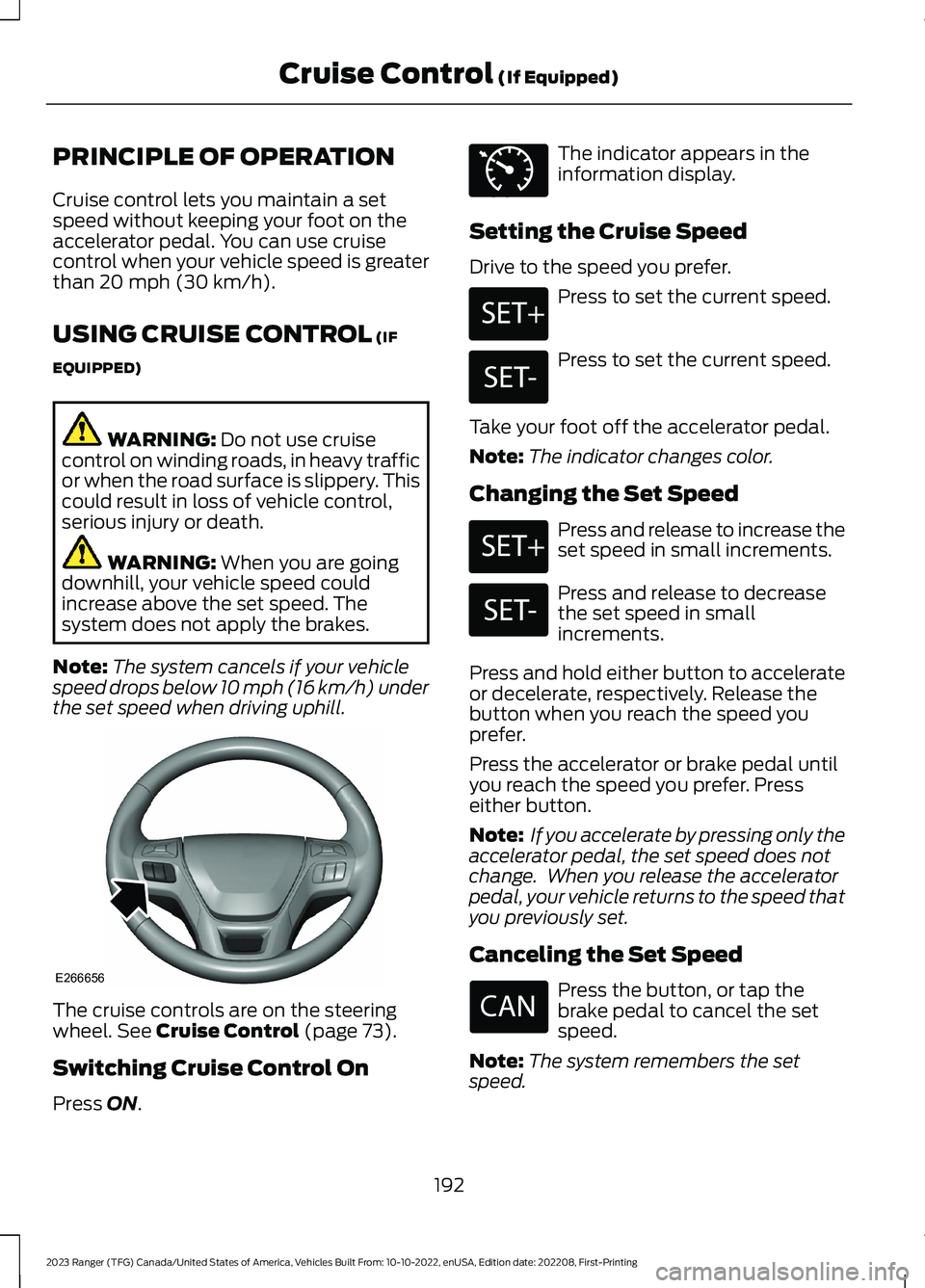
The cruise controls are on the steeringwheel. See Cruise Control (page 73).
Switching Cruise Control On
Press ON.
The indicator appears in theinformation display.
Setting the Cruise Speed
Drive to the speed you prefer.
Press to set the current speed.
Press to set the current speed.
Take your foot off the accelerator pedal.
Note:The indicator changes color.
Changing the Set Speed
Press and release to increase theset speed in small increments.
Press and release to decreasethe set speed in smallincrements.
Press and hold either button to accelerateor decelerate, respectively. Release thebutton when you reach the speed youprefer.
Press the accelerator or brake pedal untilyou reach the speed you prefer. Presseither button.
Note: If you accelerate by pressing only theaccelerator pedal, the set speed does notchange. When you release the acceleratorpedal, your vehicle returns to the speed thatyou previously set.
Canceling the Set Speed
Press the button, or tap thebrake pedal to cancel the setspeed.
Note:The system remembers the setspeed.
192
2023 Ranger (TFG) Canada/United States of America, Vehicles Built From: 10-10-2022, enUSA, Edition date: 202208, First-PrintingCruise Control (If Equipped)E266656 E71340 E246884 E246885 E246884 E246885
Page 197 of 470
Resuming the Set Speed
Press to resume the set speed.
Switching Cruise Control Off
Press and release the buttonwhen the system is in standbymode or switch the ignition off.
Note:You erase the set speed when youswitch the system off.
USING ADAPTIVE CRUISE
CONTROL (IF EQUIPPED)
WARNING: You are responsible forcontrolling your vehicle at all times. Thesystem is designed to be an aid and doesnot relieve you of your responsibility todrive with due care and attention. Failureto follow this instruction could result inthe loss of control of your vehicle,personal injury or death.
WARNING: Pay close attention tochanging road conditions such asentering or leaving a highway, on roadswith intersections or roundabouts, roadswithout visible lanes of travel, roads thatare unpaved, or steep slopes. Failure tofollow this instruction could result in theloss of control of your vehicle, personalinjury or death.
WARNING: Do not use the systemin poor visibility, for example fog, heavyrain, spray or snow.
WARNING: Do not use the systemwhen towing a trailer that hasaftermarket electronic trailer brakecontrols. Failure to follow this instructioncould result in the loss of control of yourvehicle, personal injury or death.
WARNING: Do not use tire sizesother than those recommended becausethis can affect the normal operation ofthe system. Failure to do so may resultin a loss of vehicle control, which couldresult in serious injury.
WARNING: The system may notdetect stationary or slow movingvehicles below 6 mph (10 km/h).
WARNING: The system does notdetect pedestrians or objects in the road.
WARNING: The system does notdetect oncoming vehicles in the samelane.
WARNING: The system is not acrash warning or avoidance system.
WARNING: Do not use the systemwith a snow plow blade installed.
The system adjusts your vehicle speed tomaintain the set gap between you and thevehicle in front of you in the same lane.You can select four gap settings.
The system uses a radar sensor thatdirectly projects a beam in front of yourvehicle.
193
2023 Ranger (TFG) Canada/United States of America, Vehicles Built From: 10-10-2022, enUSA, Edition date: 202208, First-PrintingCruise Control (If Equipped) E265297
Page 198 of 470
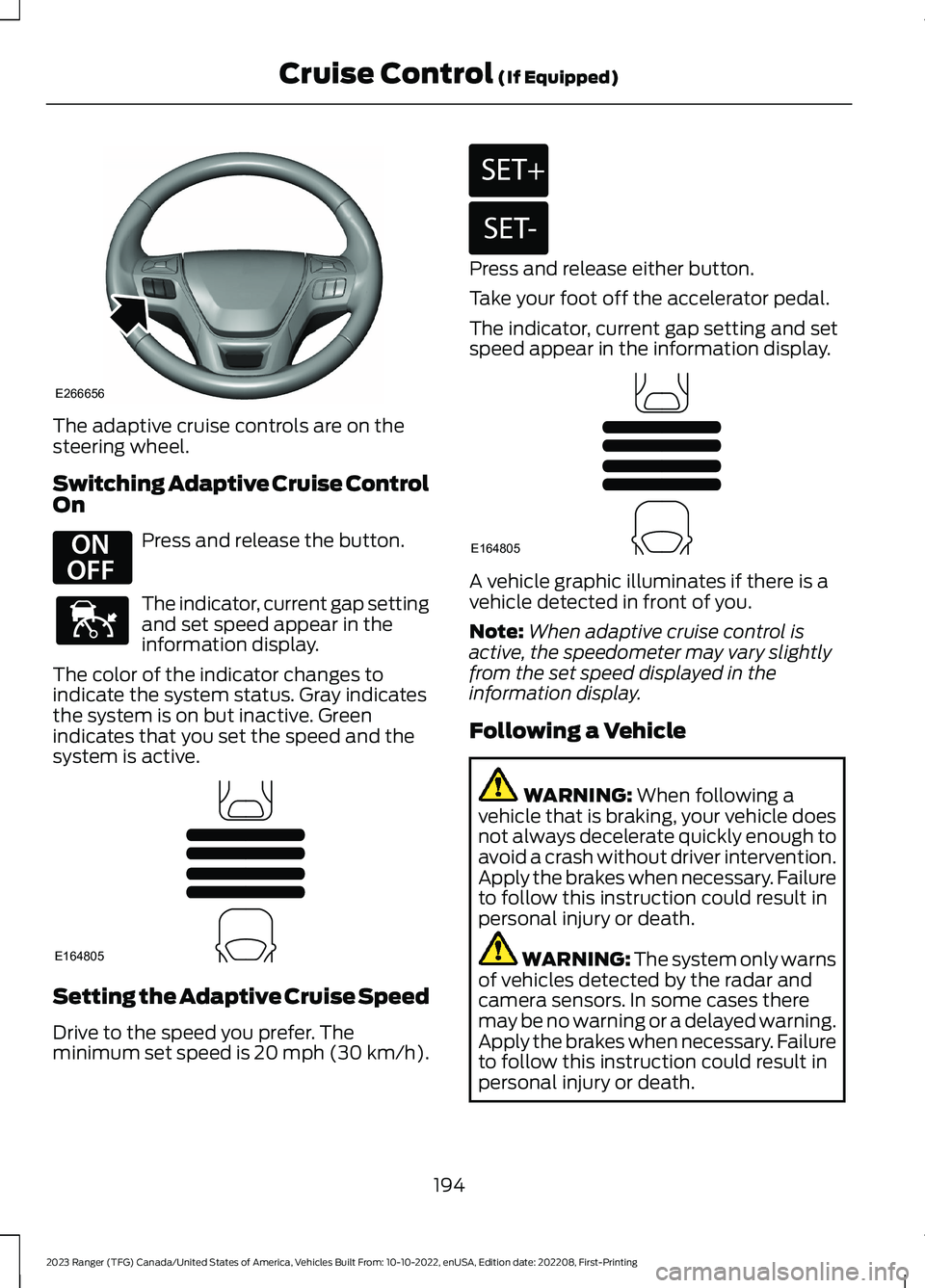
The adaptive cruise controls are on thesteering wheel.
Switching Adaptive Cruise ControlOn
Press and release the button.
The indicator, current gap settingand set speed appear in theinformation display.
The color of the indicator changes toindicate the system status. Gray indicatesthe system is on but inactive. Greenindicates that you set the speed and thesystem is active.
Setting the Adaptive Cruise Speed
Drive to the speed you prefer. Theminimum set speed is 20 mph (30 km/h).
Press and release either button.
Take your foot off the accelerator pedal.
The indicator, current gap setting and setspeed appear in the information display.
A vehicle graphic illuminates if there is avehicle detected in front of you.
Note:When adaptive cruise control isactive, the speedometer may vary slightlyfrom the set speed displayed in theinformation display.
Following a Vehicle
WARNING: When following avehicle that is braking, your vehicle doesnot always decelerate quickly enough toavoid a crash without driver intervention.Apply the brakes when necessary. Failureto follow this instruction could result inpersonal injury or death.
WARNING: The system only warnsof vehicles detected by the radar andcamera sensors. In some cases theremay be no warning or a delayed warning.Apply the brakes when necessary. Failureto follow this instruction could result inpersonal injury or death.
194
2023 Ranger (TFG) Canada/United States of America, Vehicles Built From: 10-10-2022, enUSA, Edition date: 202208, First-PrintingCruise Control (If Equipped)E266656 E294678 E144529 E164805 E246884 E246885 E164805
Page 199 of 470
Note:When you are following a vehicle andyou switch on a direction indicator, adaptivecruise control may provide a smalltemporary acceleration to help you pass.
Note:The brakes may emit noise whenapplied by the system.
When a vehicle ahead of you enters thesame lane or a slower vehicle is ahead inthe same lane, the vehicle speed adjuststo maintain a preset gap distance. Avehicle graphic illuminates in theinstrument cluster.
Your vehicle maintains a consistent gapfrom the vehicle ahead until:
•The vehicle in front of you acceleratesto a speed above the set speed.
•The vehicle in front of you moves outof the lane you are in.
•Your vehicle speed falls below 12 mph(20 km/h).
•You set a new gap distance.
The system applies the brakes to slow yourvehicle to maintain a safe gap distancefrom the vehicle in front. The system onlyapplies limited braking. You can overridethe system by applying the brakes.
If the system determines that its maximumbraking level is not sufficient, an audiblewarning sounds, a message appears in theinformation display and an indicatorflashes when the system continues tobrake. Take immediate action.
Setting the Gap Distance
You can decrease or increase the distancebetween your vehicle and the vehicle infront by pressing the gap control.
Press and release to decreasethe gap distance.
Press and release to increase thegap distance.
The selected gap appears in theinformation display as shown by the barsin the image.
Note:The gap setting is time dependentand therefore the distance adjusts with yourvehicle speed.
Note:It is your responsibility to select a gapappropriate to the driving conditions.
Adaptive Cruise Control Gap Settings
DynamicbehaviorDistance GapGraphicdisplay,bars indic-atedbetweenvehicles
Sport.Closest.1
Normal.Close.2
Normal.Medium.3
Comfort.Far.4
Each time you switch the system on, itselects the last chosen gap setting.
Overriding the Set Speed
WARNING: If you override thesystem by pressing the acceleratorpedal, it does not automatically applythe brakes to maintain a gap from anyvehicle ahead.
195
2023 Ranger (TFG) Canada/United States of America, Vehicles Built From: 10-10-2022, enUSA, Edition date: 202208, First-PrintingCruise Control (If Equipped)E263697 E263696 E164805
Page 200 of 470
When you press the accelerator pedal, youoverride the set speed and gap distance.
Use the accelerator pedalnormally to intentionally exceedthe set speed limit.
When you override the system, the greenindicator light illuminates and the vehicleimage does not appear in the informationdisplay.
The system resumes operation when yourelease the accelerator pedal. The vehiclespeed decreases to the set speed, or alower speed if following a slower vehicle.
Changing the Set Speed
Press and release to increase theset speed in small increments.
Press and release to decreasethe set speed in smallincrements.
Press and hold either button to change theset speed in large increments. Release thebutton when the set speed equals thespeed you prefer.
Press the accelerator or brake pedal untilyou reach the speed you prefer. Presseither button.
The system may apply the brakes to slowthe vehicle to the new set speed. The setspeed displays continuously in theinformation display when the system isactive.
Canceling the Set Speed
Press and release the button ortap the brake pedal.
The set speed does not erase.
Resuming the Set Speed
Press and release the button.
Your vehicle speed returns to thepreviously set speed and gap setting. Theset speed displays continuously in theinformation display when the system isactive.
Note:Only use resume if you are aware ofthe set speed and intend to return to it.
Automatic Cancellation
The system is not functional at vehiclespeeds below 12 mph (20 km/h). Theinformation display indicates low enginespeed, an audible alarm sounds and theautomatic braking releases if the vehicledrops below this speed.
Automatic cancellation can also occurwhen:
•The tires lose traction.
•You apply the parking brake.
Note:If the engine speed drops too low, anaudible warning sounds and a messageappears in the information display.Automatic braking releases.
Hilly Condition Usage
Note:An audible alarm sounds and thesystem shuts down if it applies brakes foran extended period of time. This allows thebrakes to cool. The system normallyfunctions again when the brakes havecooled.
Select a lower gear during prolongeddownhill driving on steep slopes, such asmountainous areas, when the system isactive. In such situations, the system needsadditional engine braking to reduce theload on the vehicle’s regular brake systemto prevent the brakes from overheating.
196
2023 Ranger (TFG) Canada/United States of America, Vehicles Built From: 10-10-2022, enUSA, Edition date: 202208, First-PrintingCruise Control (If Equipped)E144529 E246884 E246885
Page 201 of 470
Switching Adaptive Cruise ControlOff
Press and release the buttonwhen the system is in standbymode, or switch the ignition off.
Note:You erase the set speed and gapsetting when you switch the system off.
Detection Issues
WARNING: On rare occasions,detection issues can occur due to theroad infrastructures, for example bridges,tunnels and safety barriers. In thesecases, the system may brake late orunexpectedly. At all times, you areresponsible for controlling your vehicle,supervising the system and intervening,if required.
WARNING: If the systemmalfunctions, have your vehicle checkedas soon as possible.
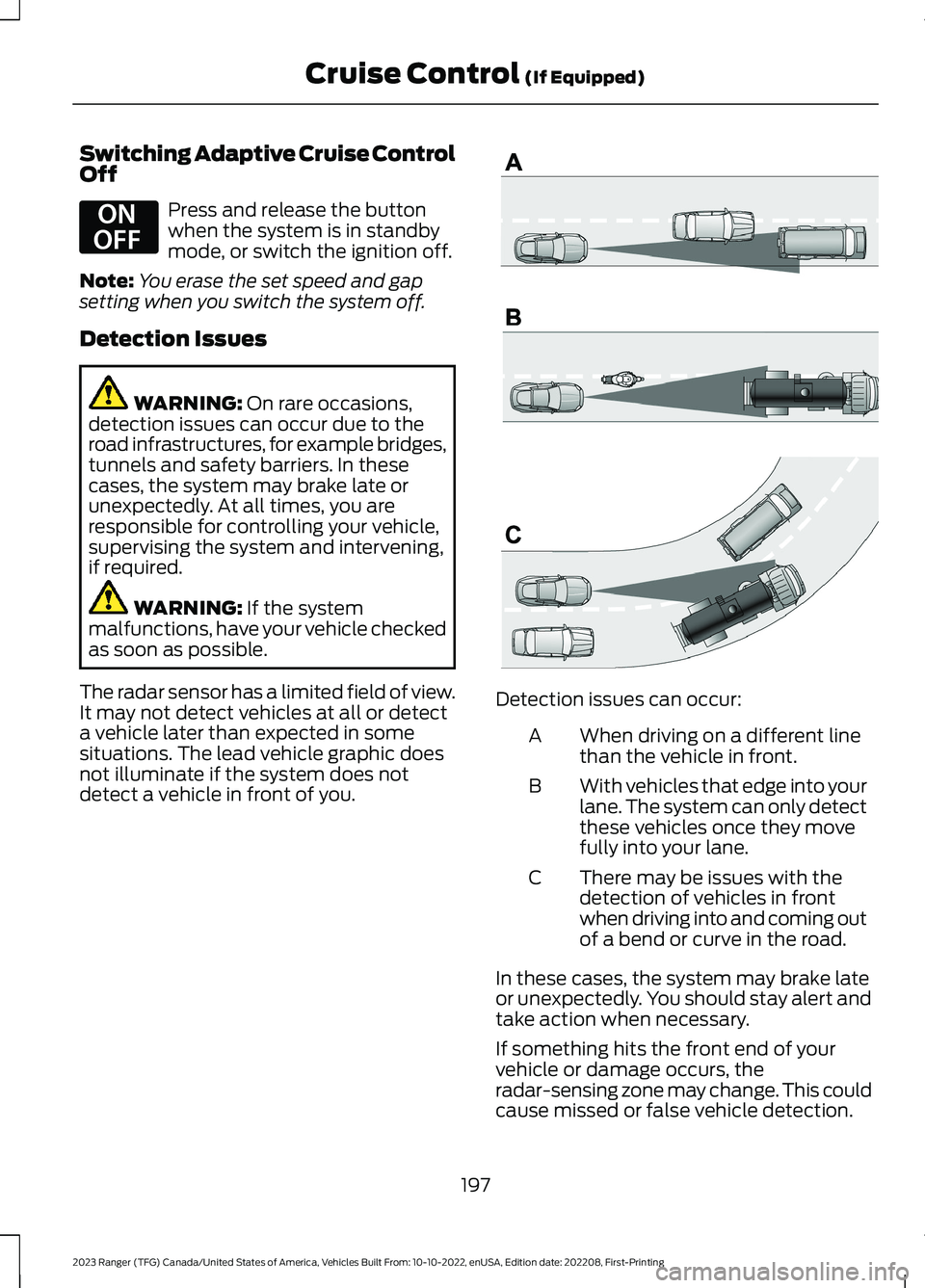
The radar sensor has a limited field of view.It may not detect vehicles at all or detecta vehicle later than expected in somesituations. The lead vehicle graphic doesnot illuminate if the system does notdetect a vehicle in front of you.
Detection issues can occur:
When driving on a different linethan the vehicle in front.A
With vehicles that edge into yourlane. The system can only detectthese vehicles once they movefully into your lane.
B
There may be issues with thedetection of vehicles in frontwhen driving into and coming outof a bend or curve in the road.
C
In these cases, the system may brake lateor unexpectedly. You should stay alert andtake action when necessary.
If something hits the front end of yourvehicle or damage occurs, theradar-sensing zone may change. This couldcause missed or false vehicle detection.
197
2023 Ranger (TFG) Canada/United States of America, Vehicles Built From: 10-10-2022, enUSA, Edition date: 202208, First-PrintingCruise Control (If Equipped)E294678 E71621