page 78 FORD RANGER 2023 User Guide
[x] Cancel search | Manufacturer: FORD, Model Year: 2023, Model line: RANGER, Model: FORD RANGER 2023Pages: 470, PDF Size: 13.06 MB
Page 49 of 470
After all occupants have adjusted theirseats and put on seatbelts, it is veryimportant that they continue to sitproperly. A properly seated occupant sitsupright, leaning against the seat backrest,and centered on the seat cushion, withtheir feet comfortably extended on thefloor. Sitting improperly can increase thechance of injury in a crash event. Forexample, if an occupant slouches, liesdown, turns sideways, sits forward, leansforward or sideways, or puts one or bothfeet up, the chance of injury during a crashgreatly increases.
If you think that the state of the passengerairbag status indicator lamp is incorrect,check for the following:
•Objects lodged underneath the seat.
•Objects between the seat cushion andthe center console.
•Objects hanging off the seat backrest.
•Objects stowed in the seat backrestmap pocket.
•Objects placed on the occupant's lap.
•Cargo interference with the seat
•Other passengers pushing or pulling onthe seat.
•Rear passenger feet and knees restingor pushing on the seat.
The conditions listed above may cause theweight of a properly seated occupant tobe incorrectly interpreted by the frontpassenger sensing system. The person inthe front passenger seat may appearheavier or lighter due to the conditionsdescribed in the previous list.
Make sure the front passengersensing system is operatingproperly. See Crash Sensorsand Airbag Indicator (page 48).
If the airbag readiness light is lit, do thefollowing:
The driver and adult passengers shouldcheck for objects lodged underneath thefront passenger seat or cargo interferingwith the seat.
If objects are lodged or cargo is interferingwith the seat, take the following steps toremove the obstruction:
•Pull your vehicle over.
•Switch your vehicle off.
•Driver or adult passengers shouldcheck for any objects lodgedunderneath the front passenger seator cargo interfering with the seat.
•Remove the obstruction(s) (if found).
•Restart your vehicle.
•Wait at least two minutes and verifythat the airbag readiness light in theinstrument cluster is no longerilluminated.
•If the airbag readiness light in theinstrument cluster remains illuminated,this may or may not be a problem dueto the front passenger sensing system.
Do not attempt to repair or service thesystem. Immediately take your vehicle toan authorized dealer.
If it is necessary to modify an advancedfront airbag system to accommodate aperson with disabilities, contact yourCustomer Relationship Center.
SIDE AIRBAGS
WARNING: Do not place objectsor mount equipment on or near theairbag cover, on the side of the front orrear seatbacks, or in areas that maycome into contact with a deployingairbag. Failure to follow theseinstructions may increase the risk ofpersonal injury in the event of a crash.
45
2023 Ranger (TFG) Canada/United States of America, Vehicles Built From: 10-10-2022, enUSA, Edition date: 202208, First-PrintingSupplementary Restraints SystemE67017
Page 50 of 470
WARNING: Accessory seat coversnot released by Ford Motor Companycould prevent the deployment of theairbags and increase the risk of injuriesin a crash.
WARNING: Do not lean your headon the door. The side airbag could injureyou as it deploys from the side of theseatback.
WARNING: Do not attempt toservice, repair, or modify thesupplementary restraint system orassociated components. Failure tofollow this instruction could result inpersonal injury or death.
WARNING: If a supplementaryrestraint system component hasdeployed, it will not function again. Havethe system and associated componentsinspected as soon as possible. Failure tofollow this instruction could result inpersonal injury or death.
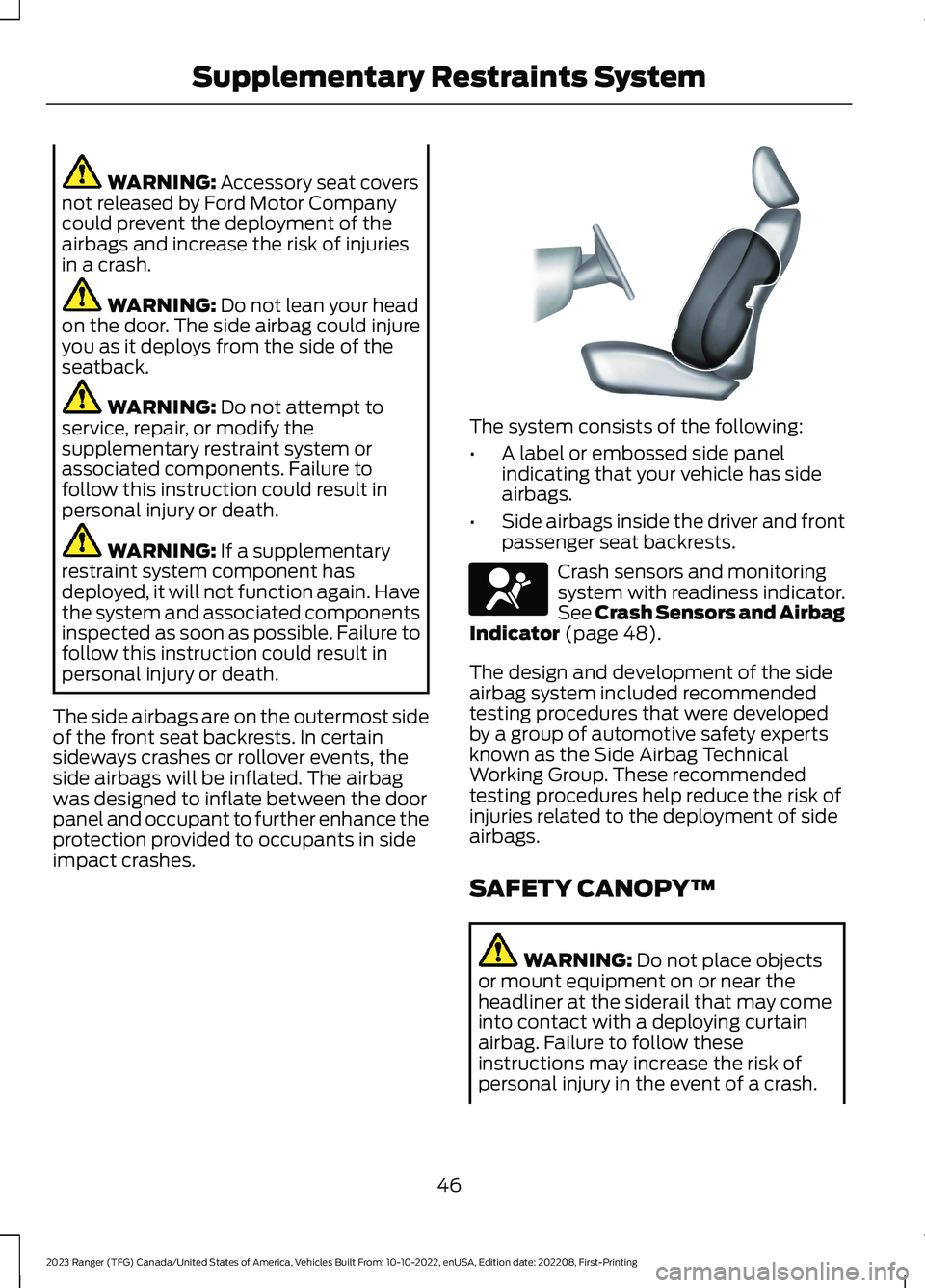
The side airbags are on the outermost sideof the front seat backrests. In certainsideways crashes or rollover events, theside airbags will be inflated. The airbagwas designed to inflate between the doorpanel and occupant to further enhance theprotection provided to occupants in sideimpact crashes.
The system consists of the following:
•A label or embossed side panelindicating that your vehicle has sideairbags.
•Side airbags inside the driver and frontpassenger seat backrests.
Crash sensors and monitoringsystem with readiness indicator.See Crash Sensors and AirbagIndicator (page 48).
The design and development of the sideairbag system included recommendedtesting procedures that were developedby a group of automotive safety expertsknown as the Side Airbag TechnicalWorking Group. These recommendedtesting procedures help reduce the risk ofinjuries related to the deployment of sideairbags.
SAFETY CANOPY™
WARNING: Do not place objectsor mount equipment on or near theheadliner at the siderail that may comeinto contact with a deploying curtainairbag. Failure to follow theseinstructions may increase the risk ofpersonal injury in the event of a crash.
46
2023 Ranger (TFG) Canada/United States of America, Vehicles Built From: 10-10-2022, enUSA, Edition date: 202208, First-PrintingSupplementary Restraints SystemE152533 E67017
Page 51 of 470
WARNING: Do not lean your headon the door. The curtain airbag couldinjure you as it deploys from theheadliner.
WARNING: Do not attempt toservice, repair, or modify thesupplementary restraint system orassociated components. Failure tofollow this instruction could result inpersonal injury or death.
WARNING: All occupants of yourvehicle, including the driver, shouldalways properly wear their seatbelts,even when an airbag supplementalrestraint system is provided. Failure toproperly wear your seatbelt couldseriously increase the risk of injury ordeath.
WARNING: To reduce risk of injury,do not obstruct or place objects in thedeployment path of the airbag.
WARNING: If a supplementaryrestraint system component hasdeployed, it will not function again. Havethe system and associated componentsinspected as soon as possible. Failure tofollow this instruction could result inpersonal injury or death.
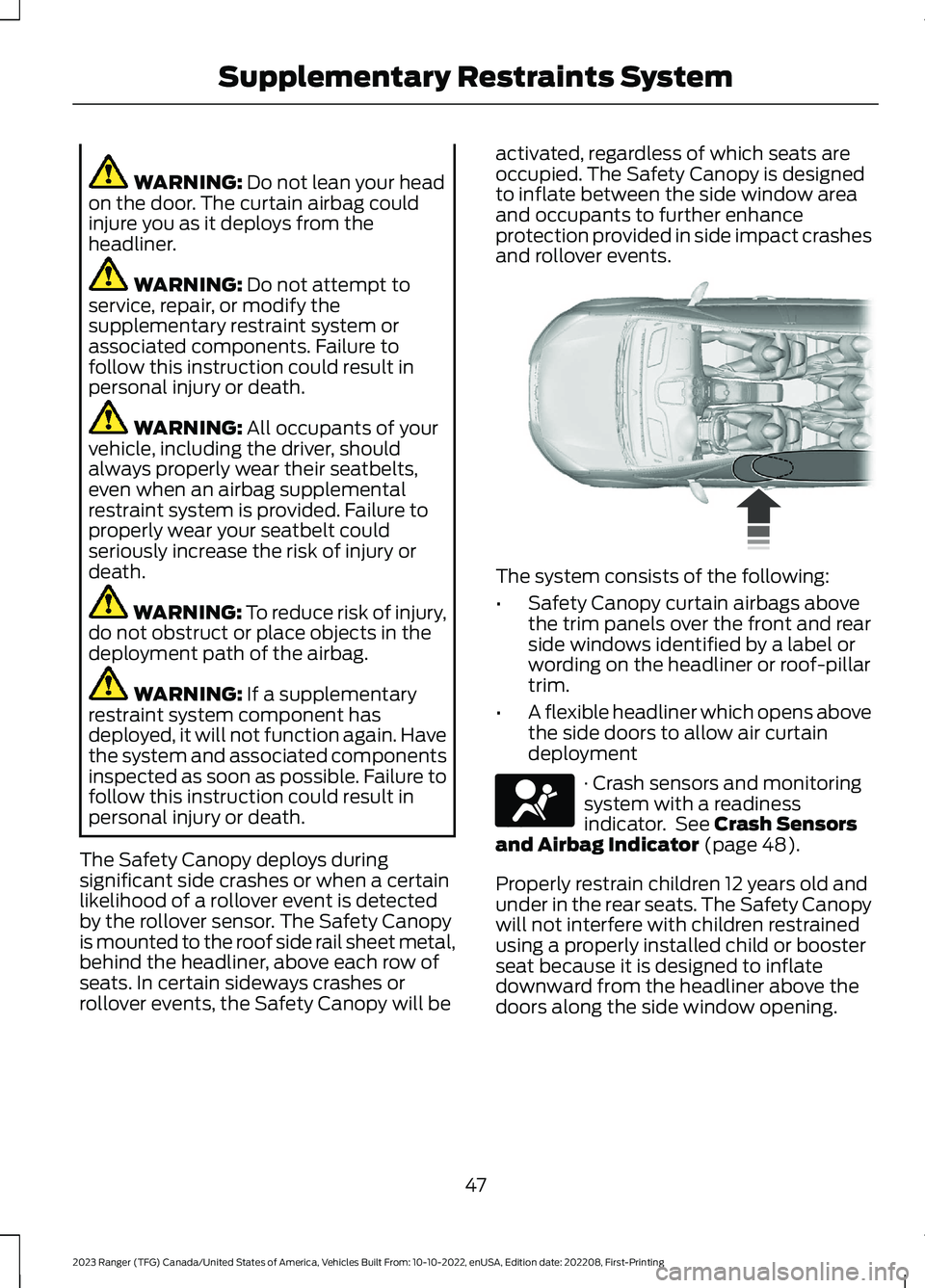
The Safety Canopy deploys duringsignificant side crashes or when a certainlikelihood of a rollover event is detectedby the rollover sensor. The Safety Canopyis mounted to the roof side rail sheet metal,behind the headliner, above each row ofseats. In certain sideways crashes orrollover events, the Safety Canopy will be
activated, regardless of which seats areoccupied. The Safety Canopy is designedto inflate between the side window areaand occupants to further enhanceprotection provided in side impact crashesand rollover events.
The system consists of the following:
•Safety Canopy curtain airbags abovethe trim panels over the front and rearside windows identified by a label orwording on the headliner or roof-pillartrim.
•A flexible headliner which opens abovethe side doors to allow air curtaindeployment
· Crash sensors and monitoringsystem with a readinessindicator. See Crash Sensorsand Airbag Indicator (page 48).
Properly restrain children 12 years old andunder in the rear seats. The Safety Canopywill not interfere with children restrainedusing a properly installed child or boosterseat because it is designed to inflatedownward from the headliner above thedoors along the side window opening.
47
2023 Ranger (TFG) Canada/United States of America, Vehicles Built From: 10-10-2022, enUSA, Edition date: 202208, First-PrintingSupplementary Restraints System E75004 E67017
Page 56 of 470
GENERAL INFORMATION ON
RADIO FREQUENCIES
This device complies with Part 15 of theFCC Rules and with Industry Canadalicense-exempt RSS standard(s).Operation is subject to the following twoconditions: (1) This device may not causeharmful interference, and (2) This devicemust accept any interference received,including interference that may causeundesired operation.
WARNING: Changes ormodifications not expressively approvedby the party responsible for compliancecould void the user's authority to operatethe equipment. The term "IC:" before theradio certification number only signifiesthat Industry Canada technicalspecifications were met.
The typical operating range for yourtransmitter is approximately 33 ft (10 m).Vehicles with the remote start feature willhave a greater range.
One of the following could cause adecrease in operating range:
•Weather conditions.
•Nearby radio towers.
•Structures around the vehicle.
•Other vehicles parked next to yourvehicle.
The radio frequency used by your remotecontrol can also be used by other radiotransmitters, for example amateur radios,medical equipment, wireless headphones,wireless remote controls, cell phones,battery chargers and alarm systems. If thefrequencies are jammed, you will not beable to use your remote control. You canlock and unlock the doors with the key.
Note:Make sure to lock your vehicle beforeleaving it unattended.
Note:If you are in range, the remote controlwill operate if you press any buttonunintentionally.
Note:The remote control contains sensitiveelectrical components. Exposure to moistureor impact may cause permanent damage.
Intelligent Access (If Equipped)
The system uses a radio frequency signalto communicate with your vehicle andauthorize your vehicle to unlock when oneof the following conditions are met:
•You activate the front exterior doorhandle switch.
•You press the luggage compartmentbutton.
•You press a button on the transmitter.
If excessive radio frequency interferenceis present in the area or if the transmitterbattery is low, you may need tomechanically unlock your door. You canuse the mechanical key blade in yourintelligent access key to open the driverdoor in this situation. See RemoteControl (page 52).
REMOTE CONTROL
Integrated Keyhead Transmitter (If
Equipped)
Use the key blade to start your vehicle andunlock or lock the driver door from outsideyour vehicle. The integrated keyheadtransmitter functions as a programmedignition key that operates all the locks andstarts your vehicle, as well as a remotecontrol.
52
2023 Ranger (TFG) Canada/United States of America, Vehicles Built From: 10-10-2022, enUSA, Edition date: 202208, First-PrintingKeys and Remote Controls
Page 58 of 470
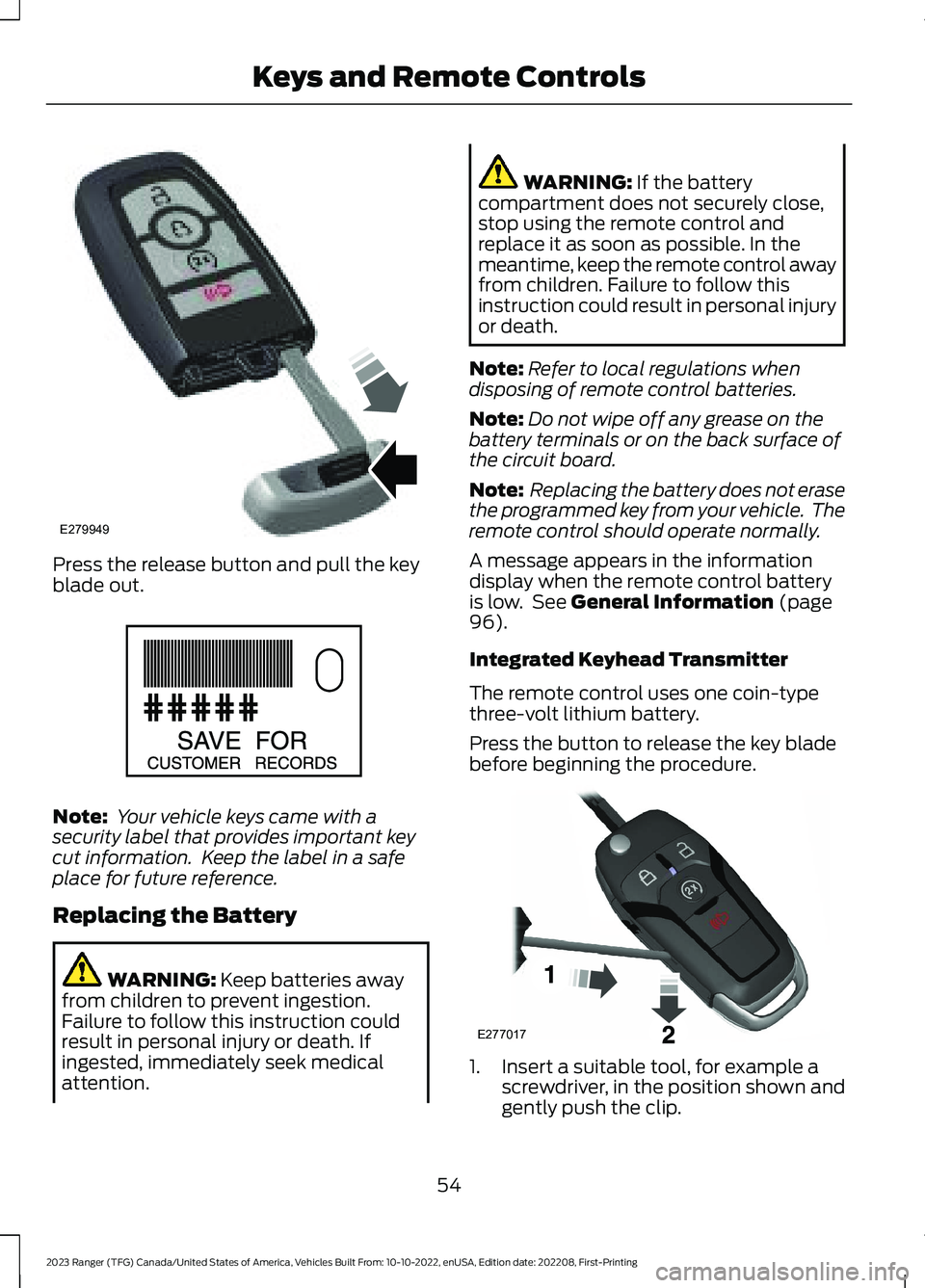
Press the release button and pull the keyblade out.
Note: Your vehicle keys came with asecurity label that provides important keycut information. Keep the label in a safeplace for future reference.
Replacing the Battery
WARNING: Keep batteries awayfrom children to prevent ingestion.Failure to follow this instruction couldresult in personal injury or death. Ifingested, immediately seek medicalattention.
WARNING: If the batterycompartment does not securely close,stop using the remote control andreplace it as soon as possible. In themeantime, keep the remote control awayfrom children. Failure to follow thisinstruction could result in personal injuryor death.
Note:Refer to local regulations whendisposing of remote control batteries.
Note:Do not wipe off any grease on thebattery terminals or on the back surface ofthe circuit board.
Note: Replacing the battery does not erasethe programmed key from your vehicle. Theremote control should operate normally.
A message appears in the informationdisplay when the remote control batteryis low. See General Information (page96).
Integrated Keyhead Transmitter
The remote control uses one coin-typethree-volt lithium battery.
Press the button to release the key bladebefore beginning the procedure.
1.Insert a suitable tool, for example ascrewdriver, in the position shown andgently push the clip.
54
2023 Ranger (TFG) Canada/United States of America, Vehicles Built From: 10-10-2022, enUSA, Edition date: 202208, First-PrintingKeys and Remote ControlsE279949 E151795 E277017
Page 61 of 470
Remote Start (If Equipped)
WARNING: Do not start the enginein a closed garage or in other enclosedareas. Exhaust fumes are toxic. Alwaysopen the garage door before you startthe engine. Failure to follow thisinstruction could result in personal injuryor death.
Note: Do not use remote start if your fuellevel is low.
The remote start button is on theremote control.
This feature allows you to start yourvehicle from the outside. The remotecontrol has an extended operating range.
If your vehicle has automatic climatecontrol, you can configure it to operatewhen you remote start your vehicle. SeeClimate Control (page 117). A manualclimate control system will run at thesetting it was set to when you switchedyour vehicle off.
Many states and provinces haverestrictions for the use of remote start.Check your local and state or provinciallaws for specific requirements regardingremote start systems.
The remote start system does not work if:
•The ignition is on.
•The alarm system triggers.
•You disable the feature.
•The hood is open.
•The transmission is not in park (P).
•The vehicle battery voltage is too low.
•The service engine soon light is on.
Remote Control Feedback (IfEquipped)
An LED on the remote control providesstatus feedback of remote start or stopcommands.
StatusLED
Remote startsuccessfulSolid green
Remote stopsuccessfulSolid red
Request failed orstatus not receivedBlinking red
Status incompleteBlinking green
Remote Starting Your Vehicle
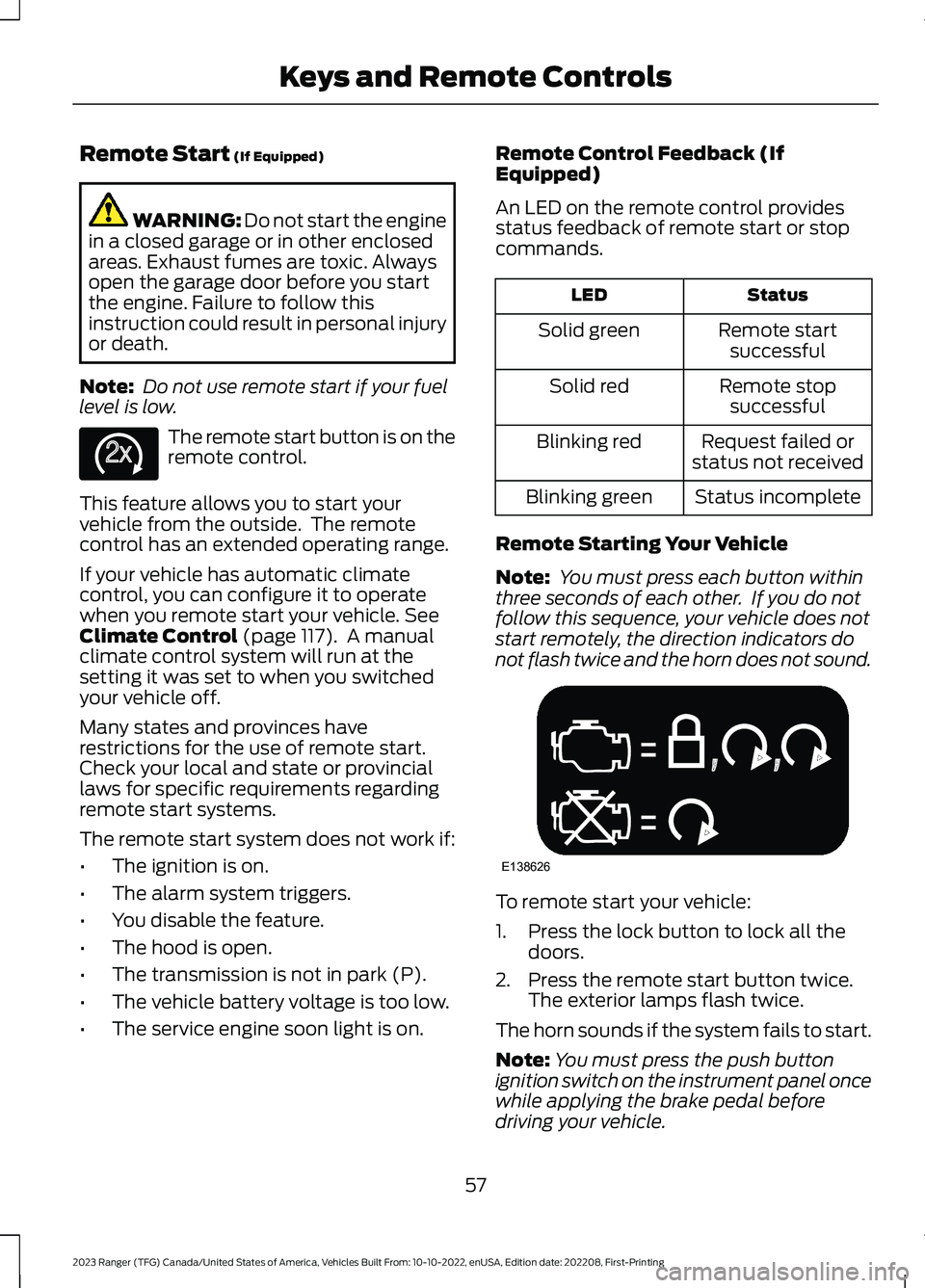
Note: You must press each button withinthree seconds of each other. If you do notfollow this sequence, your vehicle does notstart remotely, the direction indicators donot flash twice and the horn does not sound.
To remote start your vehicle:
1.Press the lock button to lock all thedoors.
2.Press the remote start button twice.The exterior lamps flash twice.
The horn sounds if the system fails to start.
Note:You must press the push buttonignition switch on the instrument panel oncewhile applying the brake pedal beforedriving your vehicle.
57
2023 Ranger (TFG) Canada/United States of America, Vehicles Built From: 10-10-2022, enUSA, Edition date: 202208, First-PrintingKeys and Remote ControlsE138625 E138626
Page 64 of 470
Note:Not every feature applies to everyvehicle in every market. When they areavailable for your vehicle, then they appearin the information display, providing choicesto switch them on or off, or to select a morespecific setting.
•Various vehicle speed limits so theMyKey driver cannot exceed certainspeeds. The information display showswarnings followed by an audible tonewhen the MyKey driver reaches the setspeed. You cannot override the setspeed by fully depressing theaccelerator pedal.
WARNING: Do not set MyKeymaximum speed limit to a limit that willprevent the driver from maintaining asafe speed considering posted speedlimits and prevailing road conditions. Thedriver is always responsible to drive inaccordance with local laws andprevailing conditions. Failure to do socould result in accident or injury.
•Various vehicle speed reminders soMyKey drivers know when their vehiclespeed approaches the limits. Warningsappear in the information display anda tone sounds when the MyKey driversexceed the set vehicle speed.
•The audio system's maximum volumelimits to 45% so MyKey drivers canconcentrate on the road. A messageappears in the information displaywhen MyKey drivers attempt to exceedthe limited volume. MyKey alsodisables the automatic volume control.Note: If your vehicle includes anAM/FM radio or a very basic audiosystem, then the radio may not limit.
•Always on setting. This setting forcescertain features to remain on andactive for MyKey drivers. For example,E911 or emergency assistance and thedo not disturb features stay on even ifa MyKey driver uses the feature'scontrol to switch it off. When selected,you will not be able to turn off AdvanceTrac or traction control (if your vehiclehas this feature).
CREATING A MYKEY
Use the information display to create aMyKey:
1.Insert the key you want to program intothe ignition. If your vehicle has apush-button start, place the remotecontrol into the backup slot. SeeStarting a Gasoline Engine (page143).
2.Switch the ignition on.
3.Access the main menu in theinformation display and then scrollthrough the menus to change thesettings of your MyKey. From theMyKey menu select the option CreateMyKey. See Information Displays(page 96).
60
2023 Ranger (TFG) Canada/United States of America, Vehicles Built From: 10-10-2022, enUSA, Edition date: 202208, First-PrintingMyKey™
Page 65 of 470
4.Select Yes if you want to create thekey as MyKey. A confirmation messageappears on the screen.
5.Switch the ignition off.
You successfully created a MyKey. Makesure you label it so you can distinguish itfrom the admin keys.
You can also program configurablesettings for the key(s). See Programmingand Changing Configurable Settings.
Programming and ChangingConfigurable Settings
Use the information display to access yourconfigurable MyKey settings.
1.Switch the ignition on using an adminkey or transmitter you want to program.
2.Access the main menu in theinformation display and then scrollthrough the menus to change thesettings of your MyKey. SeeInformation Displays (page 96).
3.Follow the instructions in the display.The programmed restrictions applywhen you switch the vehicle off, openand close the driver door and restartyour vehicle with the programmed keyor transmitter.
Note: You can clear or change your MyKeysettings at any time during the same keycycle as you created the MyKey. Once youhave switched the vehicle off, however, youneed an admin key to change or clear yourMyKey settings. When you make anychanges to your MyKey settings, you changethe settings for every MyKey. You cannotmake individual changes to apply to certainMyKeys.
CLEARING ALL MYKEYS
When you clear your MyKeys, you removeall restrictions and return all MyKeys totheir original admin key status at once. Toclear all MyKeys of all MyKey settings, usethe information display.
1.Switch the ignition on using an adminkey.
2.Access the main menu in theinformation display and then scrollthrough the menus to begin clearingyour MyKey programming. SeeInformation Displays (page 96).
3.Follow the instructions in the display.
4.A confirmation message appears in thedisplay after you finish clearing yourMyKeys.
Note:When you clear your MyKeys, youremove all restrictions and return all MyKeysto their original admin key status. Youcannot remove the MyKey restrictionsindividually.
CHECKING MYKEY SYSTEM
STATUS
You can find information about yourprogrammed MyKeys by using theinformation display. See InformationDisplays (page 96).
MyKey Distance
Tracks the distance when drivers use aMyKey. The only way to delete theaccumulated distance is by using an adminkey to clear all MyKeys. If the distance doesnot accumulate as expected, then theintended user is not using the MyKey, or anadmin key user recently cleared and thenrecreated a MyKey.
61
2023 Ranger (TFG) Canada/United States of America, Vehicles Built From: 10-10-2022, enUSA, Edition date: 202208, First-PrintingMyKey™
Page 66 of 470
Number of MyKeys
Indicates the number of MyKeysprogrammed to your vehicle. Use thisfeature to detect how many MyKeys youhave for your vehicle and determine whenall MyKeys have been deleted.
Number of Admin Keys
Indicates how many admin keys areprogrammed to your vehicle. Use thisfeature to determine how many adminkeys you have for your vehicle, and detectif an additional MyKey has beenprogrammed.
USING MYKEY WITH REMOTE
START SYSTEMS
MyKey is not compatible with nonFord-approved, aftermarket remote startsystems. If you choose to install a remotestart system, see an authorized dealer fora Ford-approved remote start system.
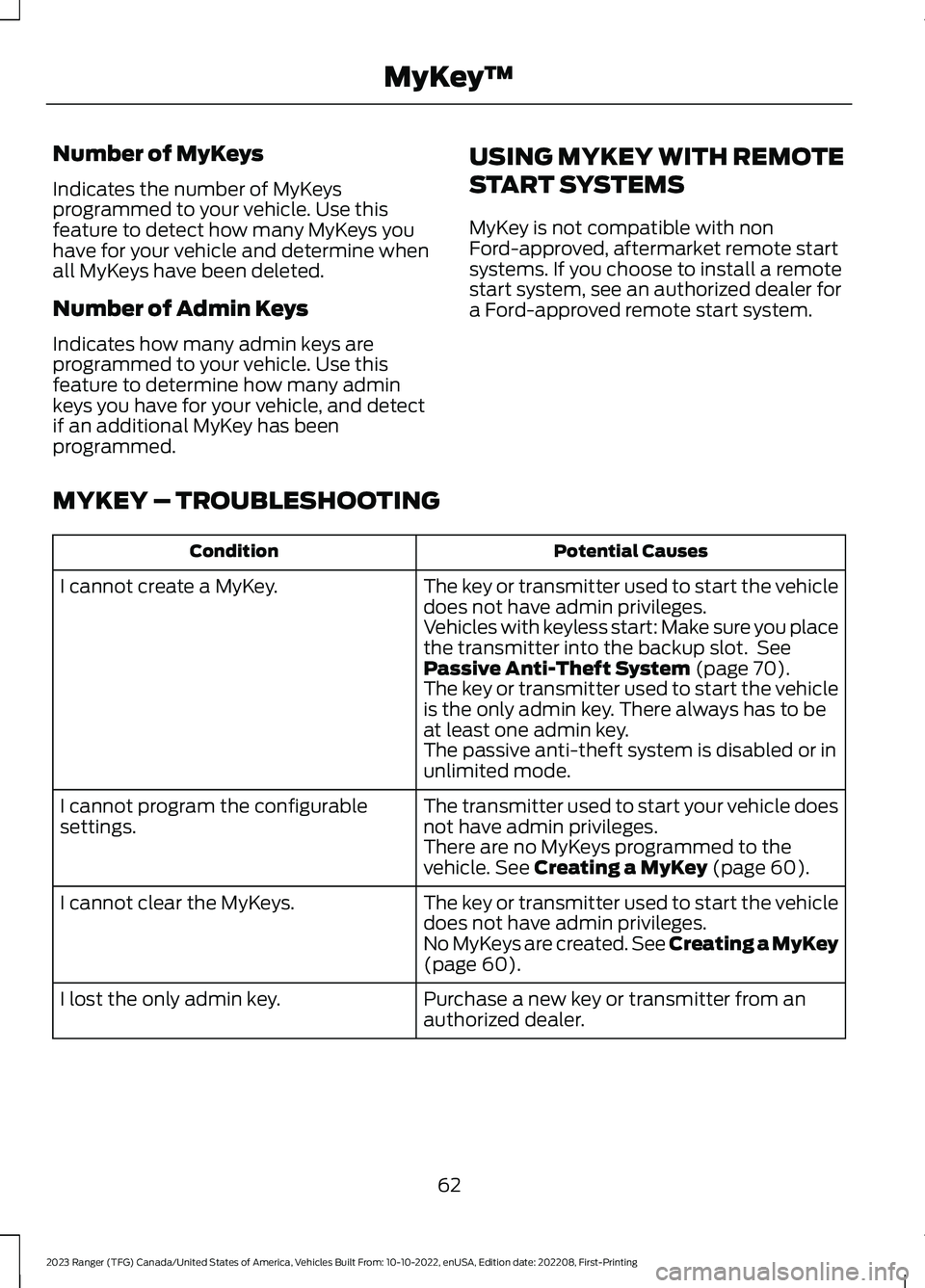
MYKEY – TROUBLESHOOTING
Potential CausesCondition
The key or transmitter used to start the vehicledoes not have admin privileges.I cannot create a MyKey.
Vehicles with keyless start: Make sure you placethe transmitter into the backup slot. SeePassive Anti-Theft System (page 70).The key or transmitter used to start the vehicleis the only admin key. There always has to beat least one admin key.The passive anti-theft system is disabled or inunlimited mode.
The transmitter used to start your vehicle doesnot have admin privileges.I cannot program the configurablesettings.There are no MyKeys programmed to thevehicle. See Creating a MyKey (page 60).
The key or transmitter used to start the vehicledoes not have admin privileges.I cannot clear the MyKeys.
No MyKeys are created. See Creating a MyKey(page 60).
Purchase a new key or transmitter from anauthorized dealer.I lost the only admin key.
62
2023 Ranger (TFG) Canada/United States of America, Vehicles Built From: 10-10-2022, enUSA, Edition date: 202208, First-PrintingMyKey™
Page 67 of 470
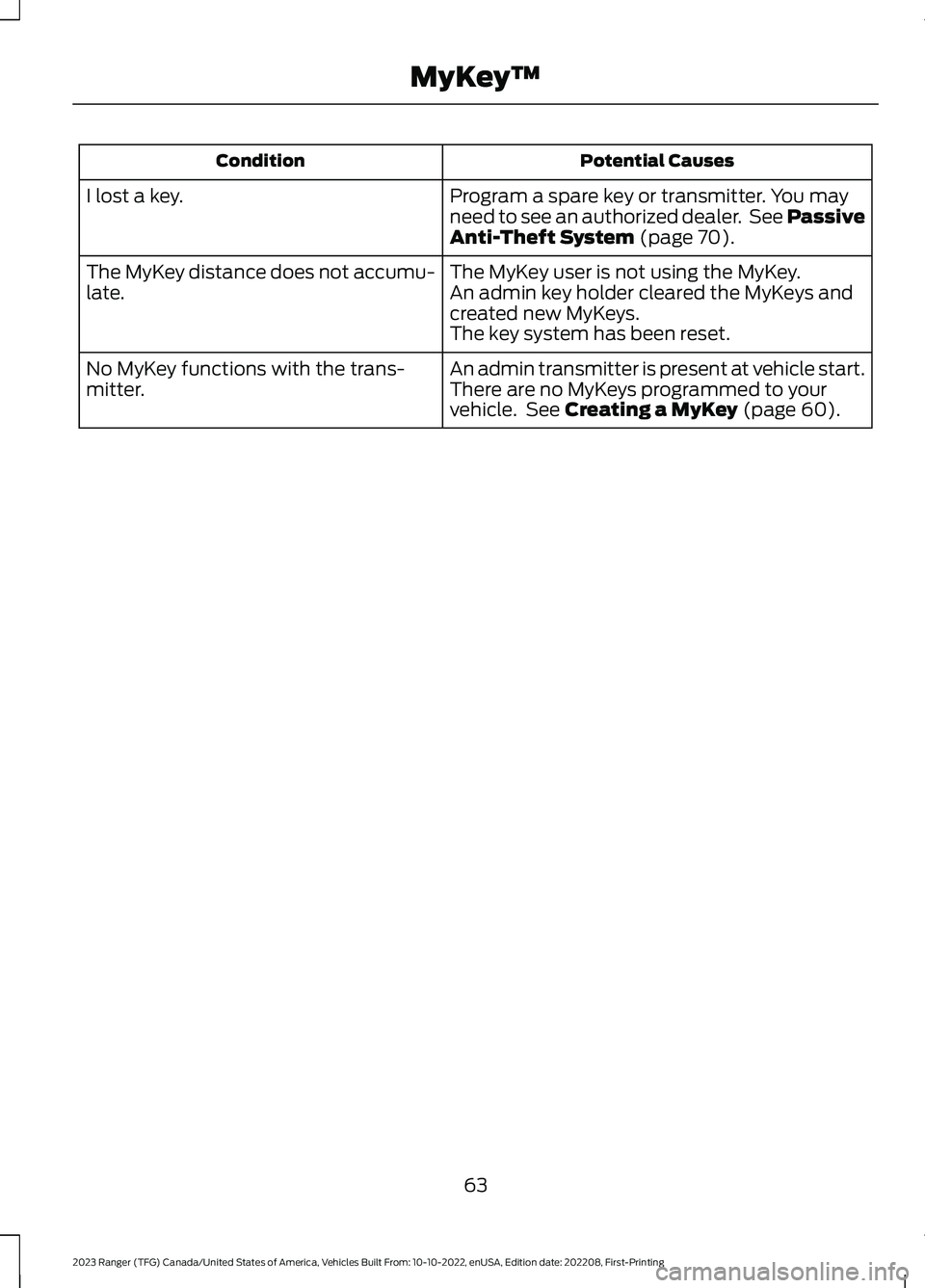
Potential CausesCondition
Program a spare key or transmitter. You mayneed to see an authorized dealer. See PassiveAnti-Theft System (page 70).
I lost a key.
The MyKey user is not using the MyKey.The MyKey distance does not accumu-late.An admin key holder cleared the MyKeys andcreated new MyKeys.The key system has been reset.
An admin transmitter is present at vehicle start.No MyKey functions with the trans-mitter.There are no MyKeys programmed to yourvehicle. See Creating a MyKey (page 60).
63
2023 Ranger (TFG) Canada/United States of America, Vehicles Built From: 10-10-2022, enUSA, Edition date: 202208, First-PrintingMyKey™