warning FORD RANGER 2023 Owner's Guide
[x] Cancel search | Manufacturer: FORD, Model Year: 2023, Model line: RANGER, Model: FORD RANGER 2023Pages: 470, PDF Size: 13.06 MB
Page 54 of 470
WHAT IS 911 ASSIST
If a crash deploys an airbag, excluding kneeairbags and rear inflatable seatbelts, oractivates the fuel pump shut-off, yourvehicle may be able to contact emergencyservices by dialing 911 through a paired andconnected Bluetooth®-enabled phone.
Website
www.owner.ford.comwww.syncmyride.cawww.syncmaroute.ca
Not all crashes will deploy an airbag oractivate the fuel pump shut-off (thetriggers for 911 Assist). If a connected cellphone sustains damage or loses itsconnection to SYNC during a crash, SYNCwill search for and try to connect to apreviously paired cell phone; SYNC willthen attempt to call emergency services.
Before making the call:
•SYNC provides a short window of time(about 10 seconds) to cancel the call.If you fail to cancel the call, SYNCattempts to dial 911.
•SYNC says the following, or a similarmessage: "SYNC will attempt to call911, to cancel the call, press Cancel onyour screen or press and hold thephone button on your steering wheel."
If you do not cancel the call, and SYNCmakes a successful call, a pre-recordedmessage plays for the 911 operator, andthen the occupant(s) in your vehicle is ableto talk with the operator. Be prepared toprovide your name, phone number andlocation immediately, because not all 911systems are capable of receiving thisinformation electronically.
During an emergency call, the systemtransmits vehicle data to emergencyservices.
EMERGENCY CALL
REQUIREMENTS
WARNING: Do not wait for 911Assist to make an emergency call if youcan do it yourself. Dial emergencyservices immediately to avoid delayedresponse time which could increase therisk of serious injury or death after acrash. If you do not hear 911 Assist withinfive seconds of the crash, the system orphone may be damaged ornon-functional.
WARNING: Always place yourphone in a secure location in your vehicleso it does not become a projectile or getdamaged in a crash. Failure to do so maycause serious injury to someone ordamage the phone which could prevent911 Assist from working properly.
WARNING: Unless the 911 Assistsetting is set on before a crash, thesystem will not dial for help which coulddelay response time, potentiallyincreasing the risk of serious injury ordeath after a crash.
•SYNC must be powered and workingproperly at the time of the incident andthroughout feature activation and use.
•The 911 Assist feature must be set onbefore the incident.
•You must pair and connect aBluetooth® enabled and compatiblecell phone to SYNC.
•A connected Bluetooth® enabledphone must have the ability to makeand maintain an outgoing call at thetime of the incident.
50
2023 Ranger (TFG) Canada/United States of America, Vehicles Built From: 10-10-2022, enUSA, Edition date: 202208, First-Printing911 Assist
Page 56 of 470
GENERAL INFORMATION ON
RADIO FREQUENCIES
This device complies with Part 15 of theFCC Rules and with Industry Canadalicense-exempt RSS standard(s).Operation is subject to the following twoconditions: (1) This device may not causeharmful interference, and (2) This devicemust accept any interference received,including interference that may causeundesired operation.
WARNING: Changes ormodifications not expressively approvedby the party responsible for compliancecould void the user's authority to operatethe equipment. The term "IC:" before theradio certification number only signifiesthat Industry Canada technicalspecifications were met.
The typical operating range for yourtransmitter is approximately 33 ft (10 m).Vehicles with the remote start feature willhave a greater range.
One of the following could cause adecrease in operating range:
•Weather conditions.
•Nearby radio towers.
•Structures around the vehicle.
•Other vehicles parked next to yourvehicle.
The radio frequency used by your remotecontrol can also be used by other radiotransmitters, for example amateur radios,medical equipment, wireless headphones,wireless remote controls, cell phones,battery chargers and alarm systems. If thefrequencies are jammed, you will not beable to use your remote control. You canlock and unlock the doors with the key.
Note:Make sure to lock your vehicle beforeleaving it unattended.
Note:If you are in range, the remote controlwill operate if you press any buttonunintentionally.
Note:The remote control contains sensitiveelectrical components. Exposure to moistureor impact may cause permanent damage.
Intelligent Access (If Equipped)
The system uses a radio frequency signalto communicate with your vehicle andauthorize your vehicle to unlock when oneof the following conditions are met:
•You activate the front exterior doorhandle switch.
•You press the luggage compartmentbutton.
•You press a button on the transmitter.
If excessive radio frequency interferenceis present in the area or if the transmitterbattery is low, you may need tomechanically unlock your door. You canuse the mechanical key blade in yourintelligent access key to open the driverdoor in this situation. See RemoteControl (page 52).
REMOTE CONTROL
Integrated Keyhead Transmitter (If
Equipped)
Use the key blade to start your vehicle andunlock or lock the driver door from outsideyour vehicle. The integrated keyheadtransmitter functions as a programmedignition key that operates all the locks andstarts your vehicle, as well as a remotecontrol.
52
2023 Ranger (TFG) Canada/United States of America, Vehicles Built From: 10-10-2022, enUSA, Edition date: 202208, First-PrintingKeys and Remote Controls
Page 58 of 470
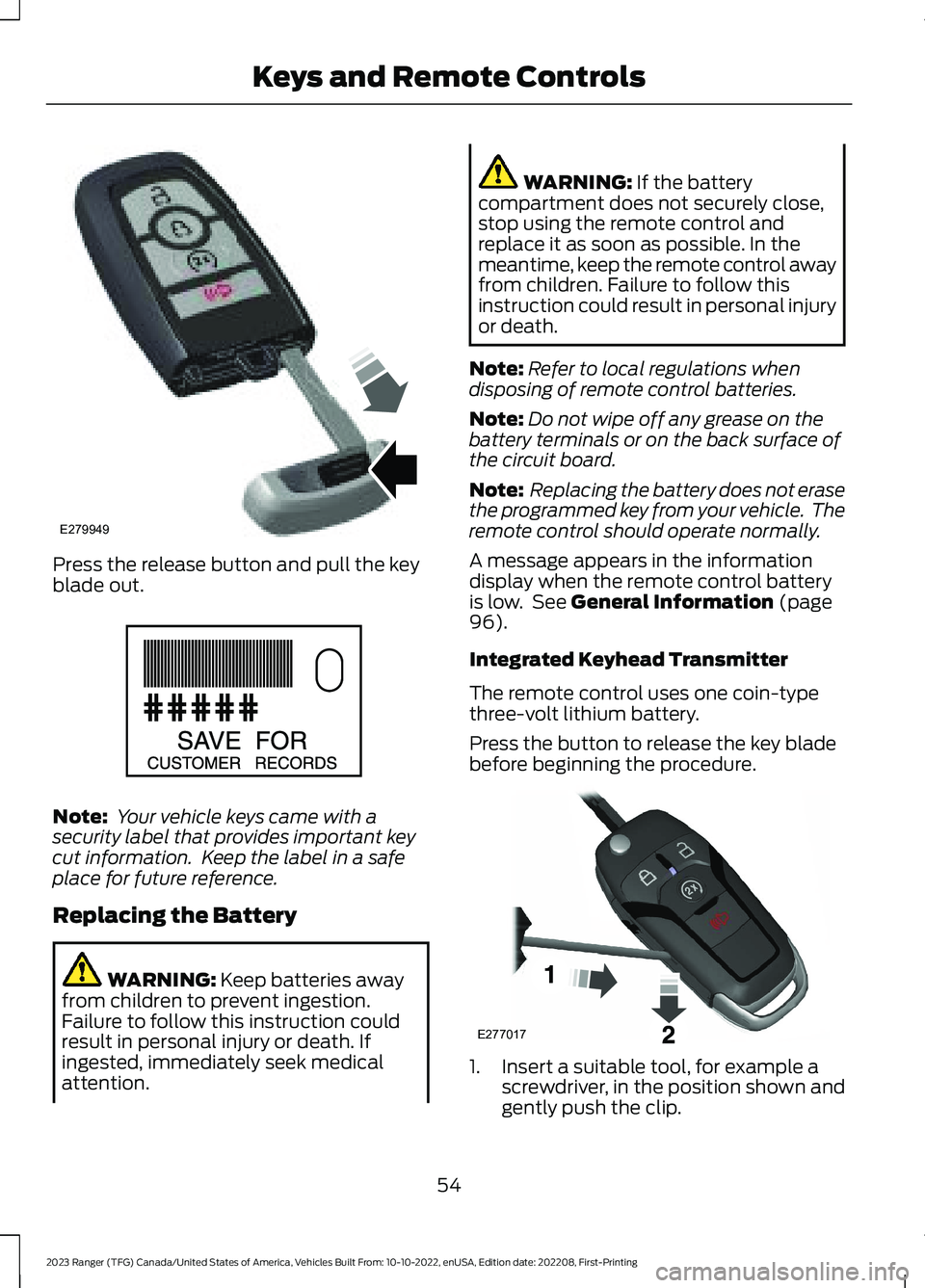
Press the release button and pull the keyblade out.
Note: Your vehicle keys came with asecurity label that provides important keycut information. Keep the label in a safeplace for future reference.
Replacing the Battery
WARNING: Keep batteries awayfrom children to prevent ingestion.Failure to follow this instruction couldresult in personal injury or death. Ifingested, immediately seek medicalattention.
WARNING: If the batterycompartment does not securely close,stop using the remote control andreplace it as soon as possible. In themeantime, keep the remote control awayfrom children. Failure to follow thisinstruction could result in personal injuryor death.
Note:Refer to local regulations whendisposing of remote control batteries.
Note:Do not wipe off any grease on thebattery terminals or on the back surface ofthe circuit board.
Note: Replacing the battery does not erasethe programmed key from your vehicle. Theremote control should operate normally.
A message appears in the informationdisplay when the remote control batteryis low. See General Information (page96).
Integrated Keyhead Transmitter
The remote control uses one coin-typethree-volt lithium battery.
Press the button to release the key bladebefore beginning the procedure.
1.Insert a suitable tool, for example ascrewdriver, in the position shown andgently push the clip.
54
2023 Ranger (TFG) Canada/United States of America, Vehicles Built From: 10-10-2022, enUSA, Edition date: 202208, First-PrintingKeys and Remote ControlsE279949 E151795 E277017
Page 61 of 470
Remote Start (If Equipped)
WARNING: Do not start the enginein a closed garage or in other enclosedareas. Exhaust fumes are toxic. Alwaysopen the garage door before you startthe engine. Failure to follow thisinstruction could result in personal injuryor death.
Note: Do not use remote start if your fuellevel is low.
The remote start button is on theremote control.
This feature allows you to start yourvehicle from the outside. The remotecontrol has an extended operating range.
If your vehicle has automatic climatecontrol, you can configure it to operatewhen you remote start your vehicle. SeeClimate Control (page 117). A manualclimate control system will run at thesetting it was set to when you switchedyour vehicle off.
Many states and provinces haverestrictions for the use of remote start.Check your local and state or provinciallaws for specific requirements regardingremote start systems.
The remote start system does not work if:
•The ignition is on.
•The alarm system triggers.
•You disable the feature.
•The hood is open.
•The transmission is not in park (P).
•The vehicle battery voltage is too low.
•The service engine soon light is on.
Remote Control Feedback (IfEquipped)
An LED on the remote control providesstatus feedback of remote start or stopcommands.
StatusLED
Remote startsuccessfulSolid green
Remote stopsuccessfulSolid red
Request failed orstatus not receivedBlinking red
Status incompleteBlinking green
Remote Starting Your Vehicle
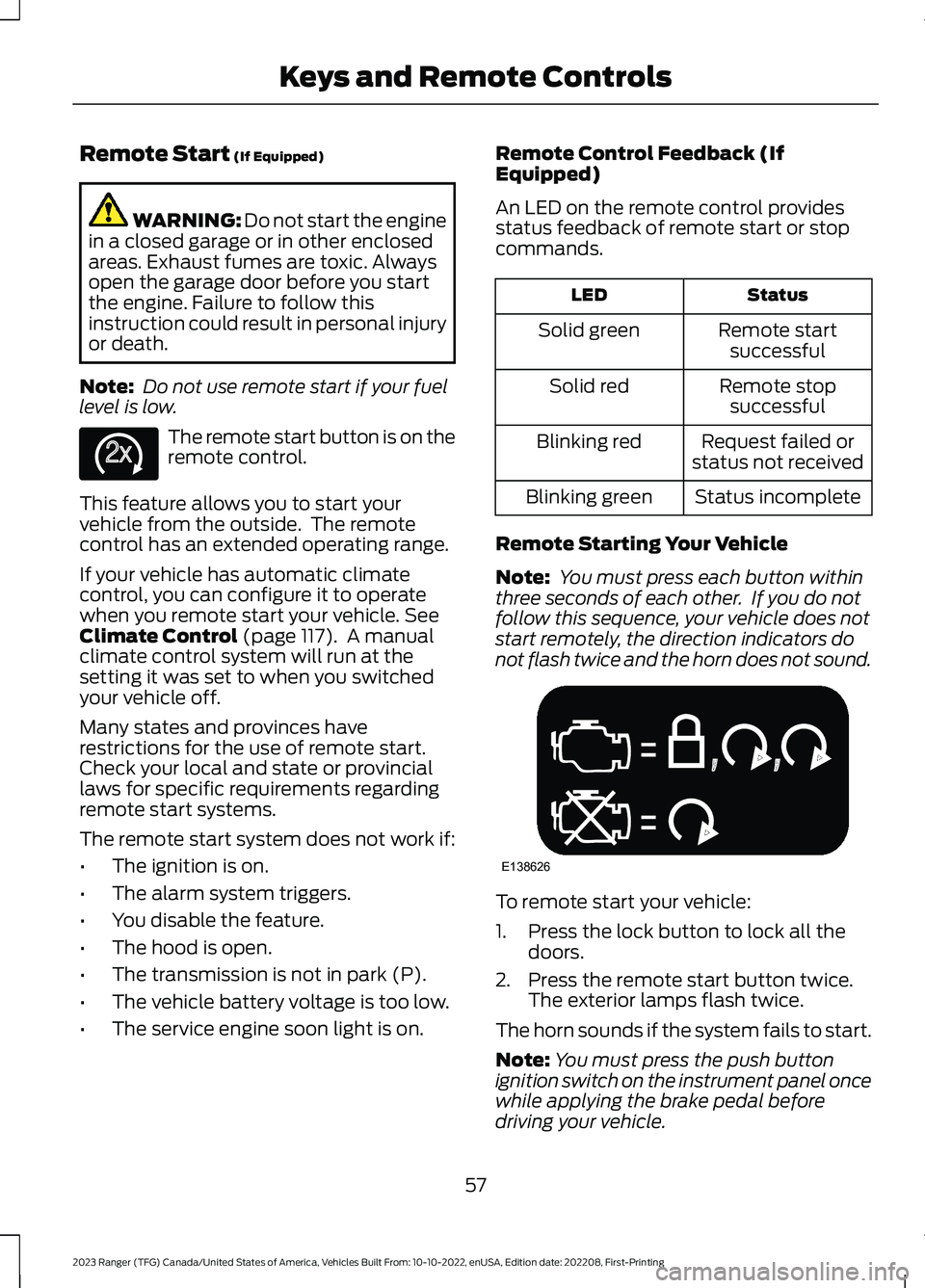
Note: You must press each button withinthree seconds of each other. If you do notfollow this sequence, your vehicle does notstart remotely, the direction indicators donot flash twice and the horn does not sound.
To remote start your vehicle:
1.Press the lock button to lock all thedoors.
2.Press the remote start button twice.The exterior lamps flash twice.
The horn sounds if the system fails to start.
Note:You must press the push buttonignition switch on the instrument panel oncewhile applying the brake pedal beforedriving your vehicle.
57
2023 Ranger (TFG) Canada/United States of America, Vehicles Built From: 10-10-2022, enUSA, Edition date: 202208, First-PrintingKeys and Remote ControlsE138625 E138626
Page 63 of 470
PRINCIPLE OF OPERATION
MyKey allows you to program keys withrestricted driving modes to promote gooddriving habits. You can program therestrictions to all keys except one. Any keysthat you did not program are administratorkeys or admin keys.
You can use admin keys to:
•Create a MyKey with certain vehiclerestrictions.
•Program certain MyKey settings.
•Clear all MyKey restrictions.
After you program a MyKey, you can viewthe following information through theinformation display:
•The total number of admin keys andMyKeys for your vehicle.
•The total distance a MyKey drivertraveled with your vehicle.
Note:Every MyKey receives the samerestrictions and settings. You cannotprogram them individually.
Note:For vehicles equipped with apush-button start switch: When both aMyKey and an admin key are present whenyou start your vehicle, the system recognizesthe admin key only.
Standard Settings
Not every vehicle includes the featureslisted below. If your vehicle has thisequipment, then you cannot change thefollowing settings when using a MyKey:
•Seatbelt reminder or Belt-Minder™.MyKey mutes the audio system untildrivers, and in some instances,passengers, fasten their seatbelts.Note: If your vehicle includes anAM/FM radio or a very basic audiosystem, then the radio may not mute.
•Earlier low-fuel warning. The low-fuelwarning activates earlier for MyKeydrivers, giving them more time to refuel.
•Certain driver alerts, stability systemsor parking aids turn on automaticallywhen you use the MyKey system. Forexample, Blind Spot InformationSystem (BLIS), cross traffic alert, lanedeparture warning or forward collisionwarning.Note: MyKey drivers may beable to turn the lane departure warningfeature off, but this feature turns backon automatically with every new keycycle.
•Restricted touchscreen operation insome markets. For example, MyKeymay prevent manual navigationdestination input while the vehicle is inany gear other than park (P) or whenthe vehicle reaches a certain rate ofspeed.
•Satellite radio adult contentrestrictions, if this feature is availablein your market.
Optional Settings
You can configure certain vehicle featuresettings when you first create a MyKey. Youcan also change the settings afterwardwith an admin key.
59
2023 Ranger (TFG) Canada/United States of America, Vehicles Built From: 10-10-2022, enUSA, Edition date: 202208, First-PrintingMyKey™
Page 64 of 470
Note:Not every feature applies to everyvehicle in every market. When they areavailable for your vehicle, then they appearin the information display, providing choicesto switch them on or off, or to select a morespecific setting.
•Various vehicle speed limits so theMyKey driver cannot exceed certainspeeds. The information display showswarnings followed by an audible tonewhen the MyKey driver reaches the setspeed. You cannot override the setspeed by fully depressing theaccelerator pedal.
WARNING: Do not set MyKeymaximum speed limit to a limit that willprevent the driver from maintaining asafe speed considering posted speedlimits and prevailing road conditions. Thedriver is always responsible to drive inaccordance with local laws andprevailing conditions. Failure to do socould result in accident or injury.
•Various vehicle speed reminders soMyKey drivers know when their vehiclespeed approaches the limits. Warningsappear in the information display anda tone sounds when the MyKey driversexceed the set vehicle speed.
•The audio system's maximum volumelimits to 45% so MyKey drivers canconcentrate on the road. A messageappears in the information displaywhen MyKey drivers attempt to exceedthe limited volume. MyKey alsodisables the automatic volume control.Note: If your vehicle includes anAM/FM radio or a very basic audiosystem, then the radio may not limit.
•Always on setting. This setting forcescertain features to remain on andactive for MyKey drivers. For example,E911 or emergency assistance and thedo not disturb features stay on even ifa MyKey driver uses the feature'scontrol to switch it off. When selected,you will not be able to turn off AdvanceTrac or traction control (if your vehiclehas this feature).
CREATING A MYKEY
Use the information display to create aMyKey:
1.Insert the key you want to program intothe ignition. If your vehicle has apush-button start, place the remotecontrol into the backup slot. SeeStarting a Gasoline Engine (page143).
2.Switch the ignition on.
3.Access the main menu in theinformation display and then scrollthrough the menus to change thesettings of your MyKey. From theMyKey menu select the option CreateMyKey. See Information Displays(page 96).
60
2023 Ranger (TFG) Canada/United States of America, Vehicles Built From: 10-10-2022, enUSA, Edition date: 202208, First-PrintingMyKey™
Page 72 of 470
TAILGATE LOCK
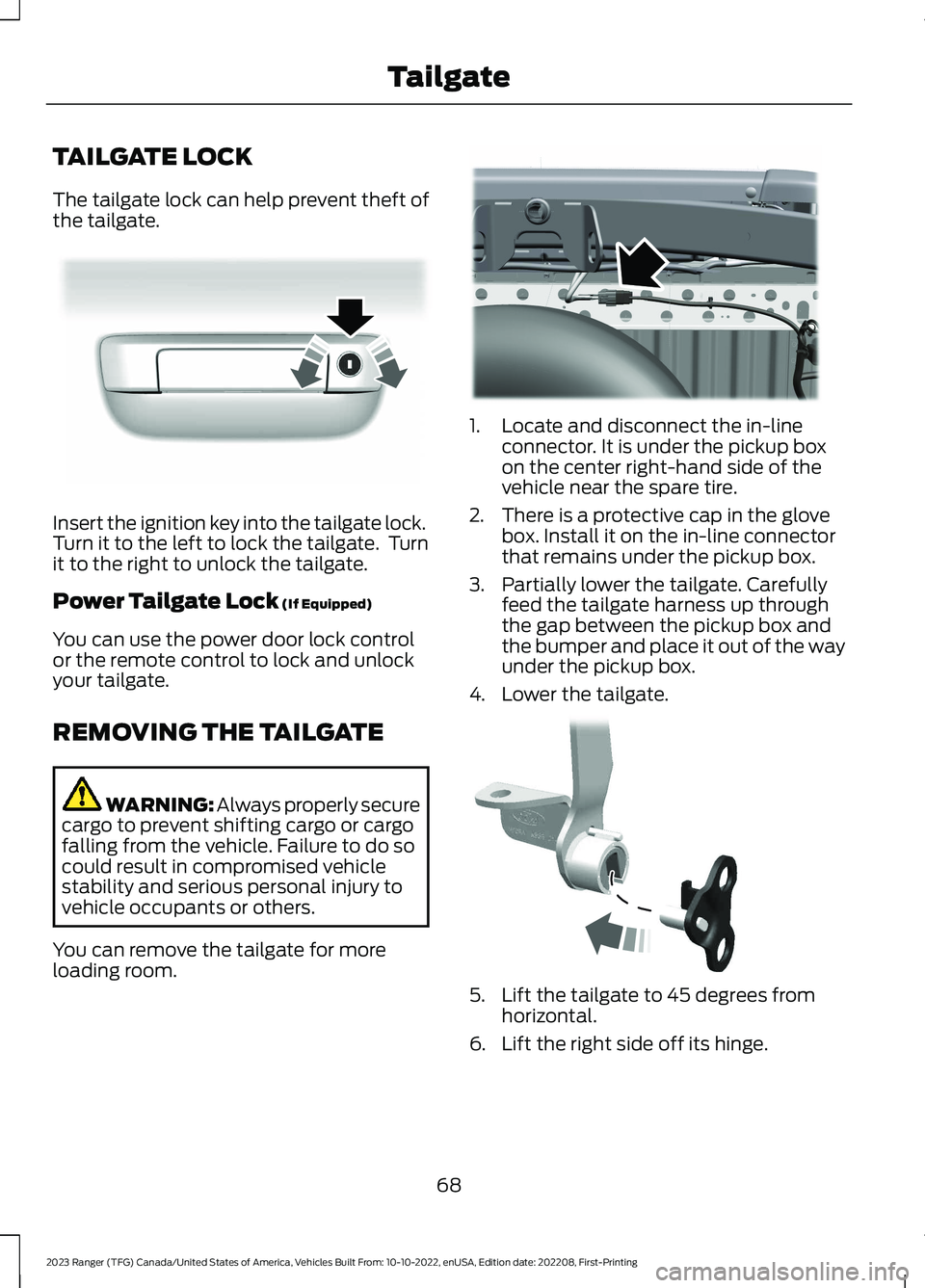
The tailgate lock can help prevent theft ofthe tailgate.
Insert the ignition key into the tailgate lock.Turn it to the left to lock the tailgate. Turnit to the right to unlock the tailgate.
Power Tailgate Lock (If Equipped)
You can use the power door lock controlor the remote control to lock and unlockyour tailgate.
REMOVING THE TAILGATE
WARNING: Always properly securecargo to prevent shifting cargo or cargofalling from the vehicle. Failure to do socould result in compromised vehiclestability and serious personal injury tovehicle occupants or others.
You can remove the tailgate for moreloading room.
1.Locate and disconnect the in-lineconnector. It is under the pickup boxon the center right-hand side of thevehicle near the spare tire.
2.There is a protective cap in the glovebox. Install it on the in-line connectorthat remains under the pickup box.
3.Partially lower the tailgate. Carefullyfeed the tailgate harness up throughthe gap between the pickup box andthe bumper and place it out of the wayunder the pickup box.
4.Lower the tailgate.
5.Lift the tailgate to 45 degrees fromhorizontal.
6.Lift the right side off its hinge.
68
2023 Ranger (TFG) Canada/United States of America, Vehicles Built From: 10-10-2022, enUSA, Edition date: 202208, First-PrintingTailgateE295939 E295026 E295025
Page 75 of 470
Panic Alarm (If Equipped)
The alarm can be activated using theremote control.
Triggering the Alarm
•If someone opens a door or the hoodwithout a valid key or remote control.
•If you switch the ignition on without avalid key.
If the alarm sounds, the alarm horn soundsfor 30 seconds and the hazard warninglamps flash for five minutes.
Any further attempts to carry out one ofthe above will sound the alarm again.
Arming the Alarm
Press the lock button once to lock yourvehicle and arm the alarm.
Disarming the Alarm
Disarm the alarm by any of the followingactions:
•Unlock the doors with the key andswitch the ignition on with a correctlycoded key within 12 seconds.
•Unlock the doors or luggagecompartment using the remote control.
71
2023 Ranger (TFG) Canada/United States of America, Vehicles Built From: 10-10-2022, enUSA, Edition date: 202208, First-PrintingSecurity
Page 76 of 470
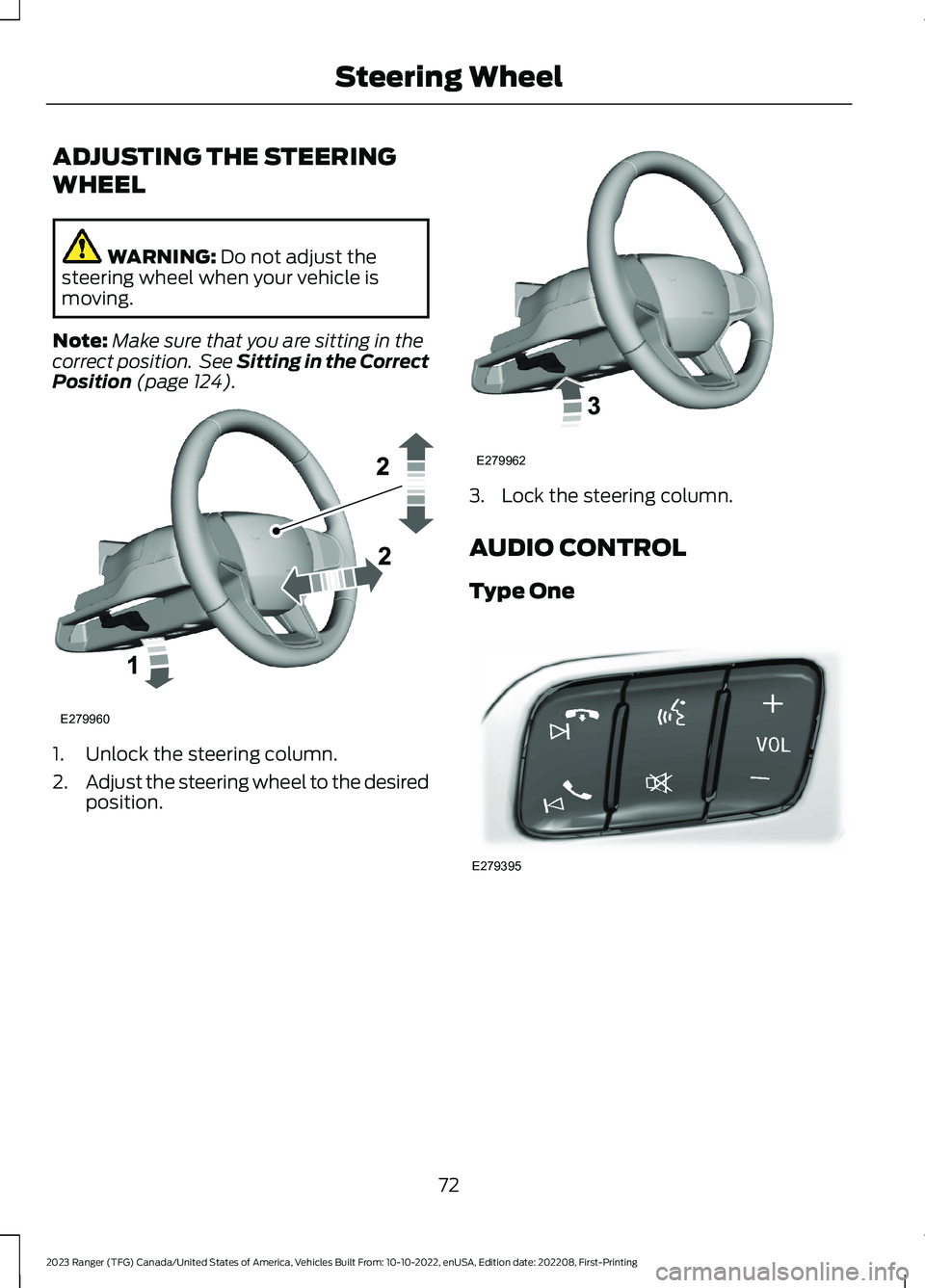
ADJUSTING THE STEERING
WHEEL
WARNING: Do not adjust thesteering wheel when your vehicle ismoving.
Note:Make sure that you are sitting in thecorrect position. See Sitting in the CorrectPosition (page 124).
1.Unlock the steering column.
2.Adjust the steering wheel to the desiredposition.
3.Lock the steering column.
AUDIO CONTROL
Type One
72
2023 Ranger (TFG) Canada/United States of America, Vehicles Built From: 10-10-2022, enUSA, Edition date: 202208, First-PrintingSteering WheelE279960 E279962 E279395
Page 82 of 470
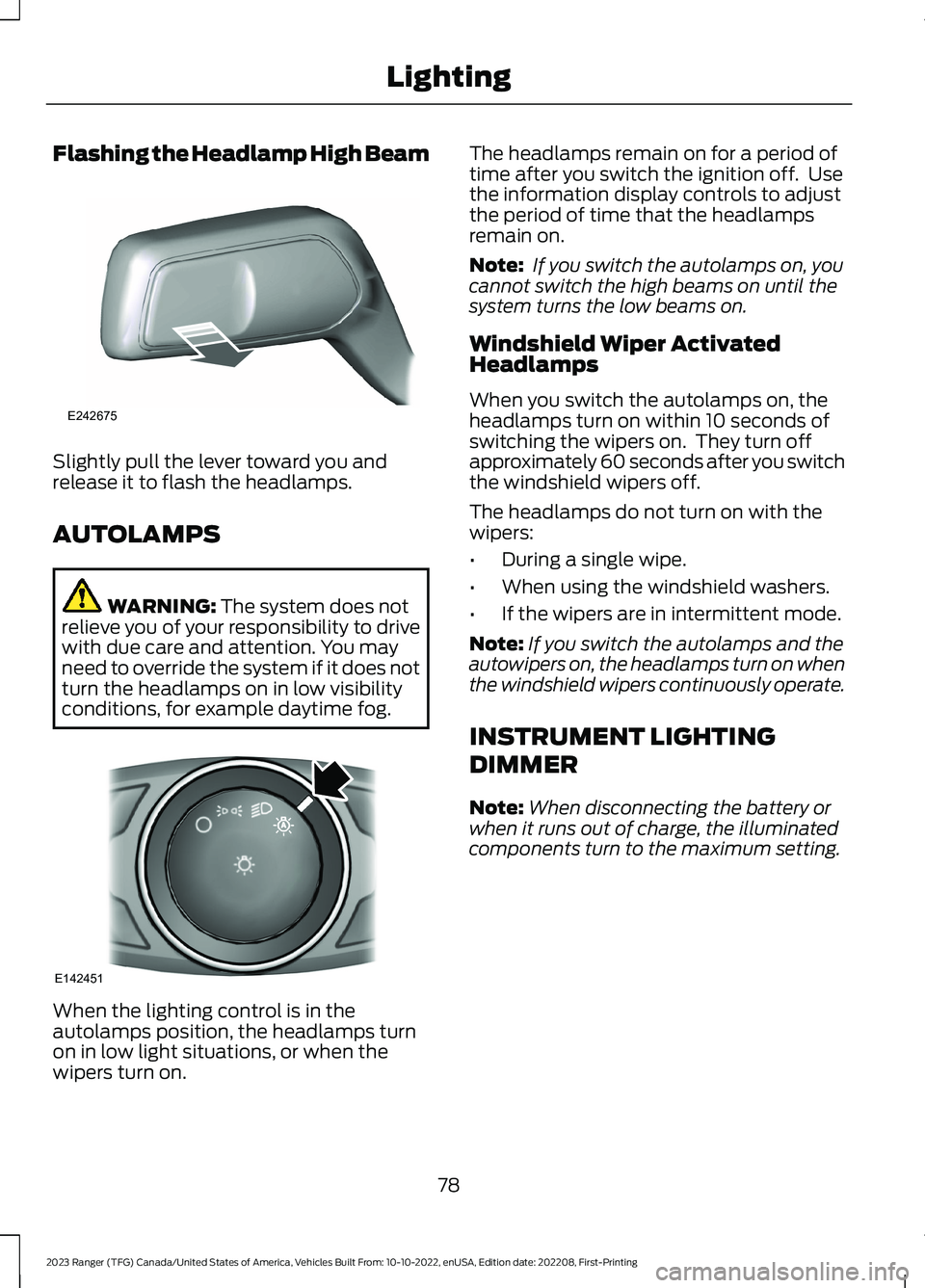
Flashing the Headlamp High Beam
Slightly pull the lever toward you andrelease it to flash the headlamps.
AUTOLAMPS
WARNING: The system does notrelieve you of your responsibility to drivewith due care and attention. You mayneed to override the system if it does notturn the headlamps on in low visibilityconditions, for example daytime fog.
When the lighting control is in theautolamps position, the headlamps turnon in low light situations, or when thewipers turn on.
The headlamps remain on for a period oftime after you switch the ignition off. Usethe information display controls to adjustthe period of time that the headlampsremain on.
Note: If you switch the autolamps on, youcannot switch the high beams on until thesystem turns the low beams on.
Windshield Wiper ActivatedHeadlamps
When you switch the autolamps on, theheadlamps turn on within 10 seconds ofswitching the wipers on. They turn offapproximately 60 seconds after you switchthe windshield wipers off.
The headlamps do not turn on with thewipers:
•During a single wipe.
•When using the windshield washers.
•If the wipers are in intermittent mode.
Note:If you switch the autolamps and theautowipers on, the headlamps turn on whenthe windshield wipers continuously operate.
INSTRUMENT LIGHTING
DIMMER
Note:When disconnecting the battery orwhen it runs out of charge, the illuminatedcomponents turn to the maximum setting.
78
2023 Ranger (TFG) Canada/United States of America, Vehicles Built From: 10-10-2022, enUSA, Edition date: 202208, First-PrintingLightingE242675 E142451