traction control FORD RANGER 2023 Owners Manual
[x] Cancel search | Manufacturer: FORD, Model Year: 2023, Model line: RANGER, Model: FORD RANGER 2023Pages: 470, PDF Size: 13.06 MB
Page 7 of 470
Rear Occupant Alert System AudibleWarnings.....................................................133
Garage Door Opener
Universal Garage Door Opener..............134
Auxiliary Power Points
Auxiliary Power Points...............................138
Storage Compartments
Glove Compartment..................................140
Center Console............................................140
Overhead Console......................................140
Rear Seat Armrest........................................141
Under Seat Storage.....................................141
Starting and Stopping theEngine
General Information...................................142
Ignition Switch..............................................142
Keyless Starting...........................................143
Starting a Gasoline Engine.......................143
Engine Block Heater...................................146
Unique Driving Characteristics
Auto-Start-Stop..........................................148
Fuel and Refueling
Safety Precautions.....................................150
Fuel Quality...................................................150
Fuel Filler Funnel Location........................151
Running Out of Fuel.....................................151
Refueling.........................................................153
Fuel Consumption.......................................155
Engine Emission Control
Emission Law.................................................157
Catalytic Converter.....................................158
Transmission
Automatic Transmission............................161
Four-Wheel Drive
Principle of Operation................................165
Using Four-Wheel Drive............................165
Rear Axle
Electronic Locking Differential................173
Brakes
General Information....................................175
Hints on Driving With Anti-Lock Brakes.........................................................................175
Parking Brake.................................................176
Hill Start Assist.............................................176
Traction Control
Principle of Operation................................178
Using Traction Control...............................178
Stability Control
Principle of Operation................................179
Using Stability Control..............................180
Terrain Control
Principle of Operation................................182
Trail Control
What Is Trail Control..................................184
Switching Trail Control On and Off......184
Setting the Trail Control Speed.............184
Canceling the Set Speed..........................184
Trail Control Indicators..............................185
Trail Control – Troubleshooting.............185
Parking Aids
Principle of Operation...............................186
Rear Parking Aid...........................................187
3
2023 Ranger (TFG) Canada/United States of America, Vehicles Built From: 10-10-2022, enUSA, Edition date: 202208, First-PrintingTable of Contents
Page 64 of 470
Note:Not every feature applies to everyvehicle in every market. When they areavailable for your vehicle, then they appearin the information display, providing choicesto switch them on or off, or to select a morespecific setting.
•Various vehicle speed limits so theMyKey driver cannot exceed certainspeeds. The information display showswarnings followed by an audible tonewhen the MyKey driver reaches the setspeed. You cannot override the setspeed by fully depressing theaccelerator pedal.
WARNING: Do not set MyKeymaximum speed limit to a limit that willprevent the driver from maintaining asafe speed considering posted speedlimits and prevailing road conditions. Thedriver is always responsible to drive inaccordance with local laws andprevailing conditions. Failure to do socould result in accident or injury.
•Various vehicle speed reminders soMyKey drivers know when their vehiclespeed approaches the limits. Warningsappear in the information display anda tone sounds when the MyKey driversexceed the set vehicle speed.
•The audio system's maximum volumelimits to 45% so MyKey drivers canconcentrate on the road. A messageappears in the information displaywhen MyKey drivers attempt to exceedthe limited volume. MyKey alsodisables the automatic volume control.Note: If your vehicle includes anAM/FM radio or a very basic audiosystem, then the radio may not limit.
•Always on setting. This setting forcescertain features to remain on andactive for MyKey drivers. For example,E911 or emergency assistance and thedo not disturb features stay on even ifa MyKey driver uses the feature'scontrol to switch it off. When selected,you will not be able to turn off AdvanceTrac or traction control (if your vehiclehas this feature).
CREATING A MYKEY
Use the information display to create aMyKey:
1.Insert the key you want to program intothe ignition. If your vehicle has apush-button start, place the remotecontrol into the backup slot. SeeStarting a Gasoline Engine (page143).
2.Switch the ignition on.
3.Access the main menu in theinformation display and then scrollthrough the menus to change thesettings of your MyKey. From theMyKey menu select the option CreateMyKey. See Information Displays(page 96).
60
2023 Ranger (TFG) Canada/United States of America, Vehicles Built From: 10-10-2022, enUSA, Edition date: 202208, First-PrintingMyKey™
Page 99 of 470
Normally, it illuminates until the engine iscranked and automatically turns off if nomalfunctions are present. However, if after15 seconds it flashes eight times, thisindicates that your vehicle is not ready forInspection and Maintenance (I/M) testing.See Emission Law (page 157).
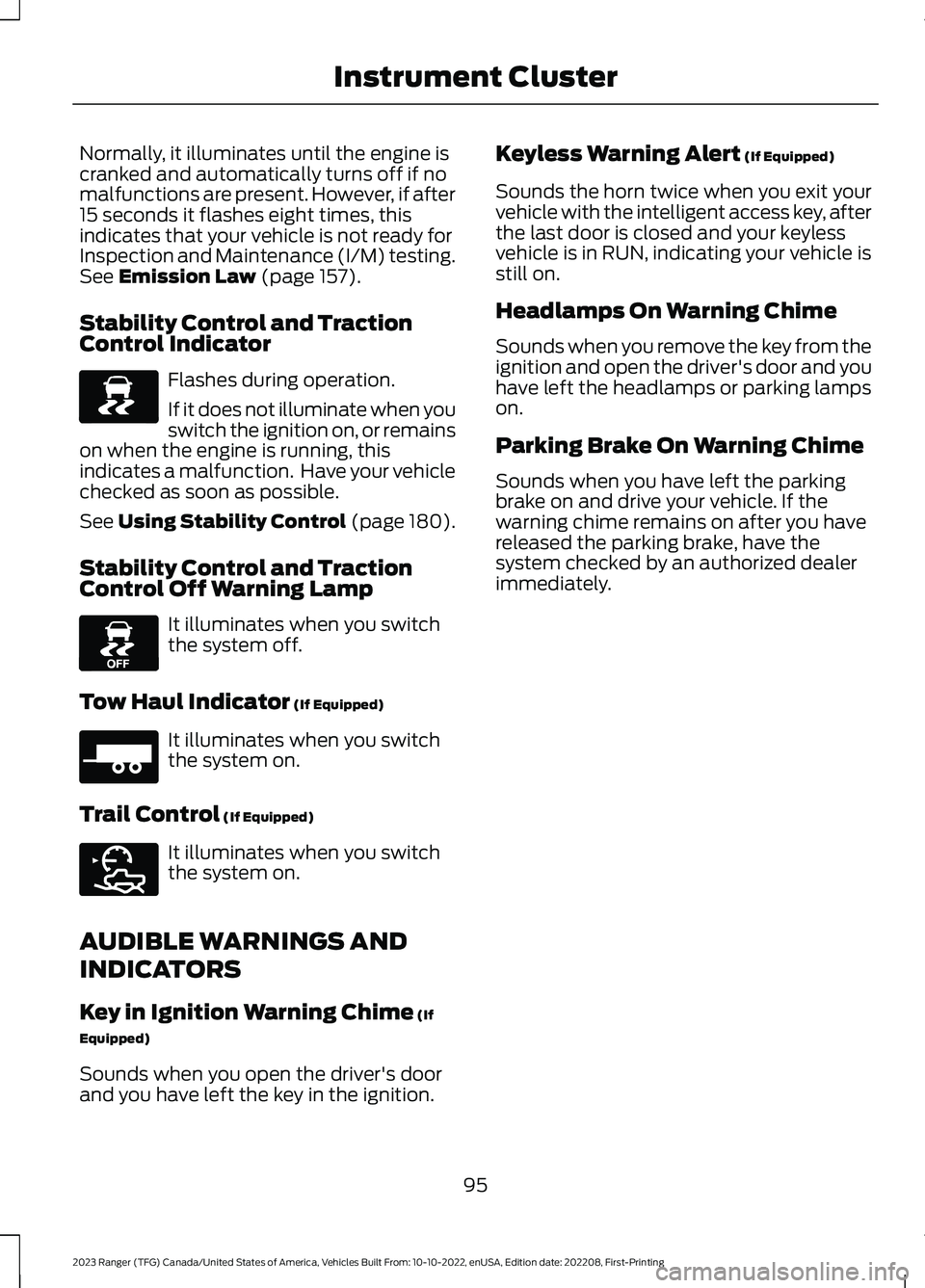
Stability Control and TractionControl Indicator
Flashes during operation.
If it does not illuminate when youswitch the ignition on, or remainson when the engine is running, thisindicates a malfunction. Have your vehiclechecked as soon as possible.
See Using Stability Control (page 180).
Stability Control and TractionControl Off Warning Lamp
It illuminates when you switchthe system off.
Tow Haul Indicator (If Equipped)
It illuminates when you switchthe system on.
Trail Control (If Equipped)
It illuminates when you switchthe system on.
AUDIBLE WARNINGS AND
INDICATORS
Key in Ignition Warning Chime (If
Equipped)
Sounds when you open the driver's doorand you have left the key in the ignition.
Keyless Warning Alert (If Equipped)
Sounds the horn twice when you exit yourvehicle with the intelligent access key, afterthe last door is closed and your keylessvehicle is in RUN, indicating your vehicle isstill on.
Headlamps On Warning Chime
Sounds when you remove the key from theignition and open the driver's door and youhave left the headlamps or parking lampson.
Parking Brake On Warning Chime
Sounds when you have left the parkingbrake on and drive your vehicle. If thewarning chime remains on after you havereleased the parking brake, have thesystem checked by an authorized dealerimmediately.
95
2023 Ranger (TFG) Canada/United States of America, Vehicles Built From: 10-10-2022, enUSA, Edition date: 202208, First-PrintingInstrument ClusterE138639 E130458 E271981 E272858
Page 102 of 470
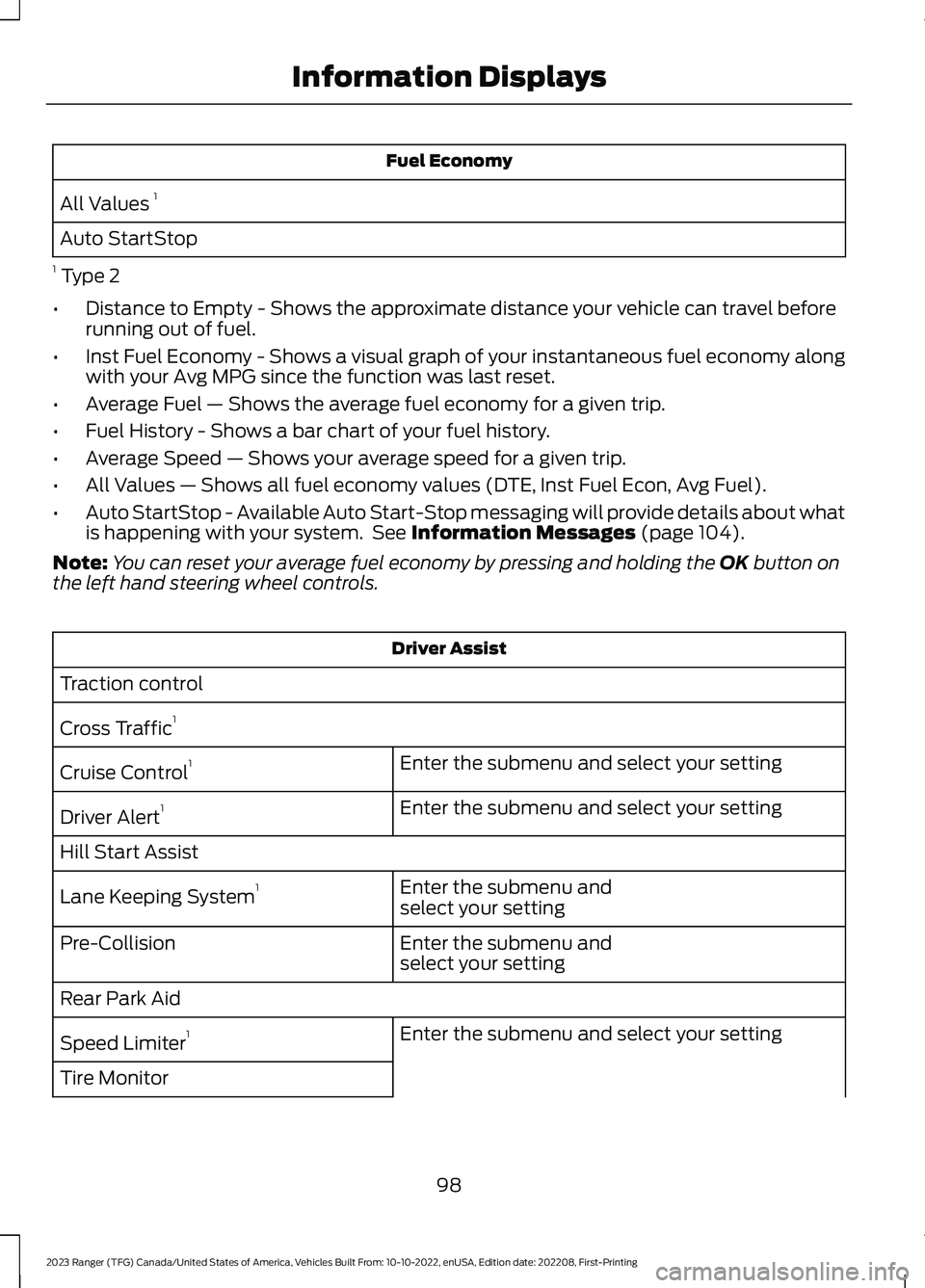
Fuel Economy
All Values 1
Auto StartStop
1 Type 2
•Distance to Empty - Shows the approximate distance your vehicle can travel beforerunning out of fuel.
•Inst Fuel Economy - Shows a visual graph of your instantaneous fuel economy alongwith your Avg MPG since the function was last reset.
•Average Fuel — Shows the average fuel economy for a given trip.
•Fuel History - Shows a bar chart of your fuel history.
•Average Speed — Shows your average speed for a given trip.
•All Values — Shows all fuel economy values (DTE, Inst Fuel Econ, Avg Fuel).
•Auto StartStop - Available Auto Start-Stop messaging will provide details about whatis happening with your system. See Information Messages (page 104).
Note:You can reset your average fuel economy by pressing and holding the OK button onthe left hand steering wheel controls.
Driver Assist
Traction control
Cross Traffic1
Enter the submenu and select your settingCruise Control1
Enter the submenu and select your settingDriver Alert1
Hill Start Assist
Enter the submenu andselect your settingLane Keeping System1
Enter the submenu andselect your settingPre-Collision
Rear Park Aid
Enter the submenu and select your settingSpeed Limiter1
Tire Monitor
98
2023 Ranger (TFG) Canada/United States of America, Vehicles Built From: 10-10-2022, enUSA, Edition date: 202208, First-PrintingInformation Displays
Page 103 of 470
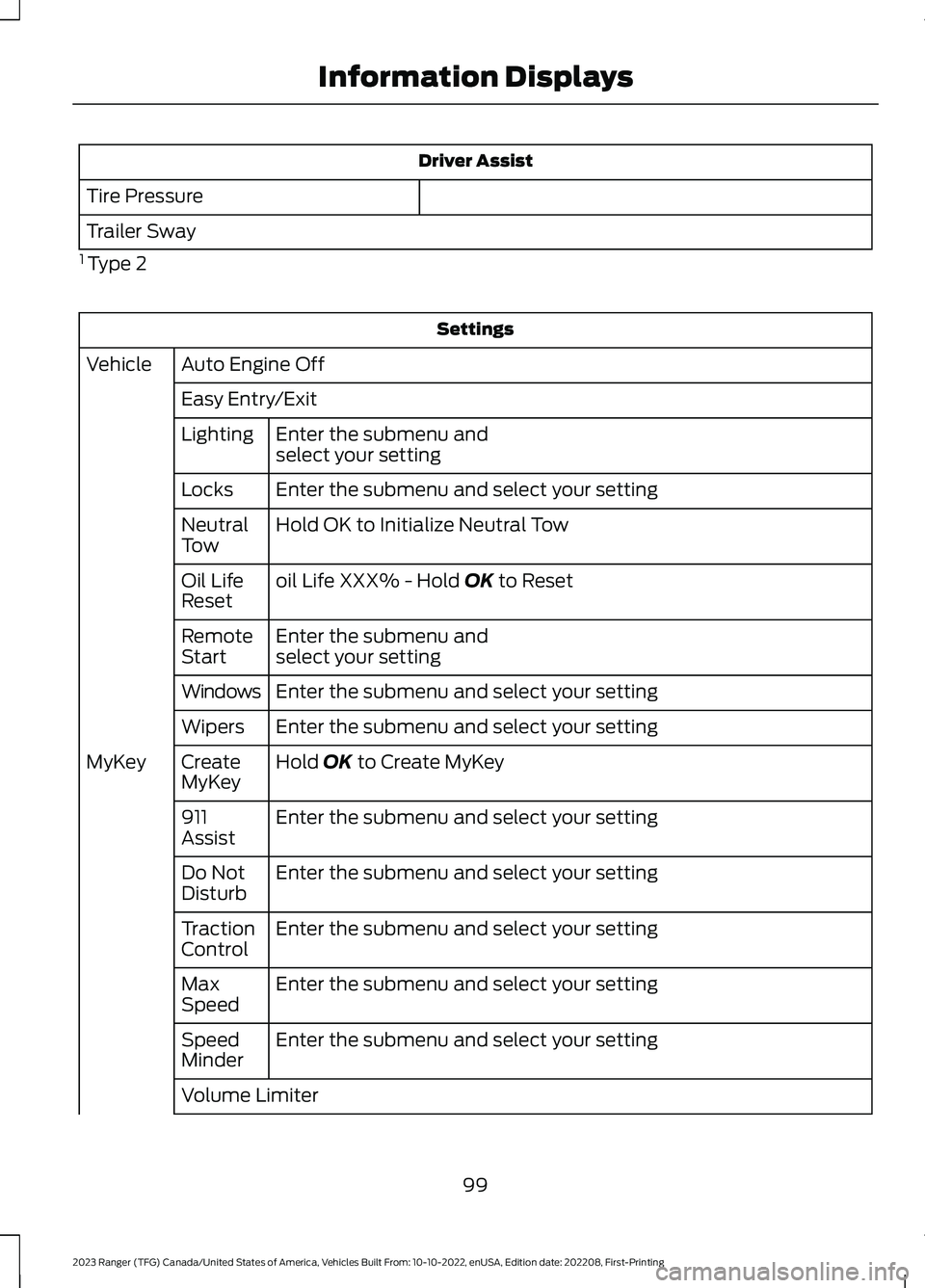
Driver Assist
Tire Pressure
Trailer Sway
1 Type 2
Settings
Auto Engine OffVehicle
Easy Entry/Exit
Enter the submenu andselect your settingLighting
Enter the submenu and select your settingLocks
Hold OK to Initialize Neutral TowNeutralTow
oil Life XXX% - Hold OK to ResetOil LifeReset
Enter the submenu andselect your settingRemoteStart
Enter the submenu and select your settingWindows
Enter the submenu and select your settingWipers
Hold OK to Create MyKeyCreateMyKeyMyKey
Enter the submenu and select your setting911Assist
Enter the submenu and select your settingDo NotDisturb
Enter the submenu and select your settingTractionControl
Enter the submenu and select your settingMaxSpeed
Enter the submenu and select your settingSpeedMinder
Volume Limiter
99
2023 Ranger (TFG) Canada/United States of America, Vehicles Built From: 10-10-2022, enUSA, Edition date: 202208, First-PrintingInformation Displays
Page 107 of 470
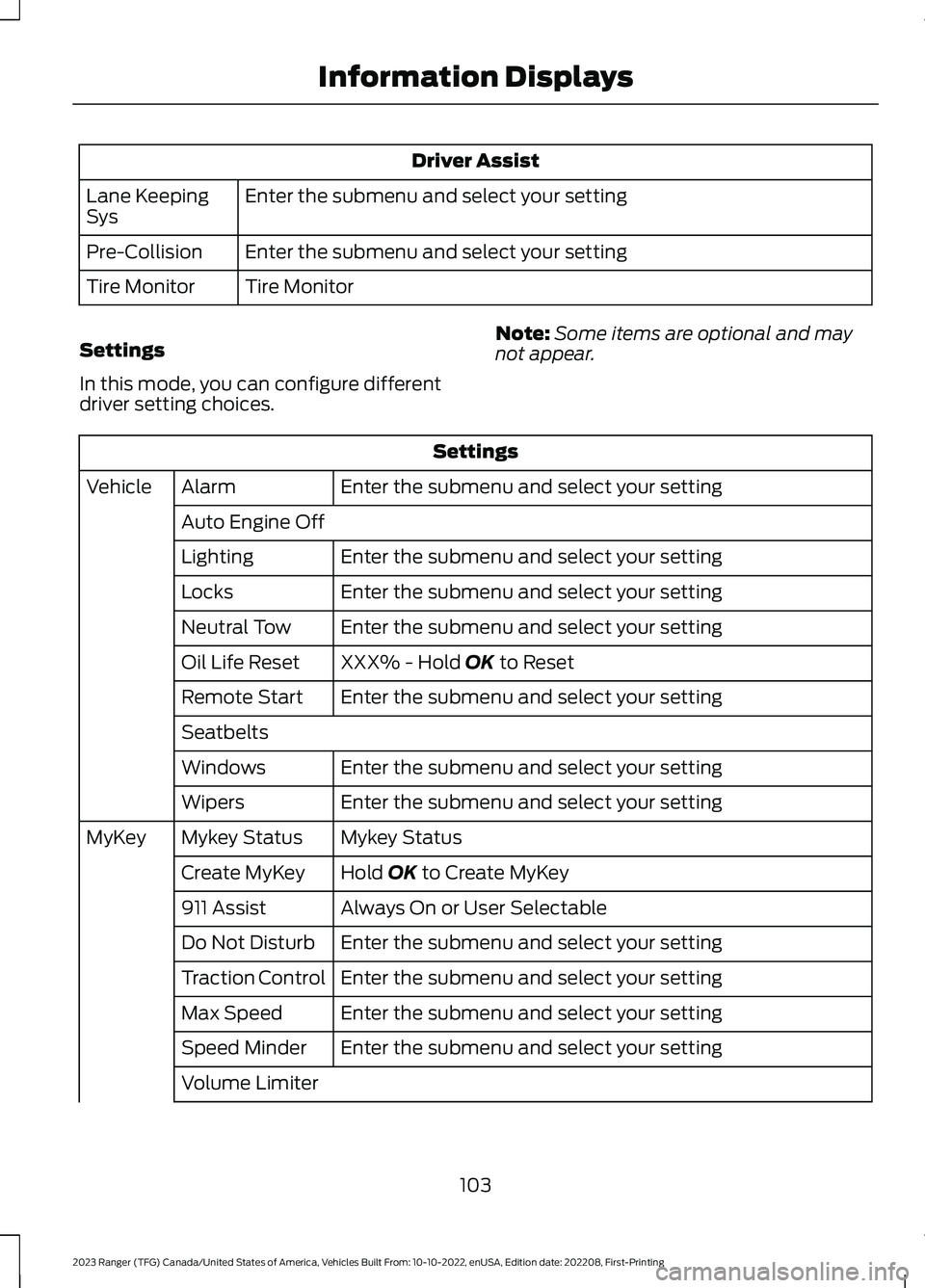
Driver Assist
Enter the submenu and select your settingLane KeepingSys
Enter the submenu and select your settingPre-Collision
Tire MonitorTire Monitor
Settings
In this mode, you can configure differentdriver setting choices.
Note:Some items are optional and maynot appear.
Settings
Enter the submenu and select your settingAlarmVehicle
Auto Engine Off
Enter the submenu and select your settingLighting
Enter the submenu and select your settingLocks
Enter the submenu and select your settingNeutral Tow
XXX% - Hold OK to ResetOil Life Reset
Enter the submenu and select your settingRemote Start
Seatbelts
Enter the submenu and select your settingWindows
Enter the submenu and select your settingWipers
Mykey StatusMykey StatusMyKey
Hold OK to Create MyKeyCreate MyKey
Always On or User Selectable911 Assist
Enter the submenu and select your settingDo Not Disturb
Enter the submenu and select your settingTraction Control
Enter the submenu and select your settingMax Speed
Enter the submenu and select your settingSpeed Minder
Volume Limiter
103
2023 Ranger (TFG) Canada/United States of America, Vehicles Built From: 10-10-2022, enUSA, Edition date: 202208, First-PrintingInformation Displays
Page 116 of 470
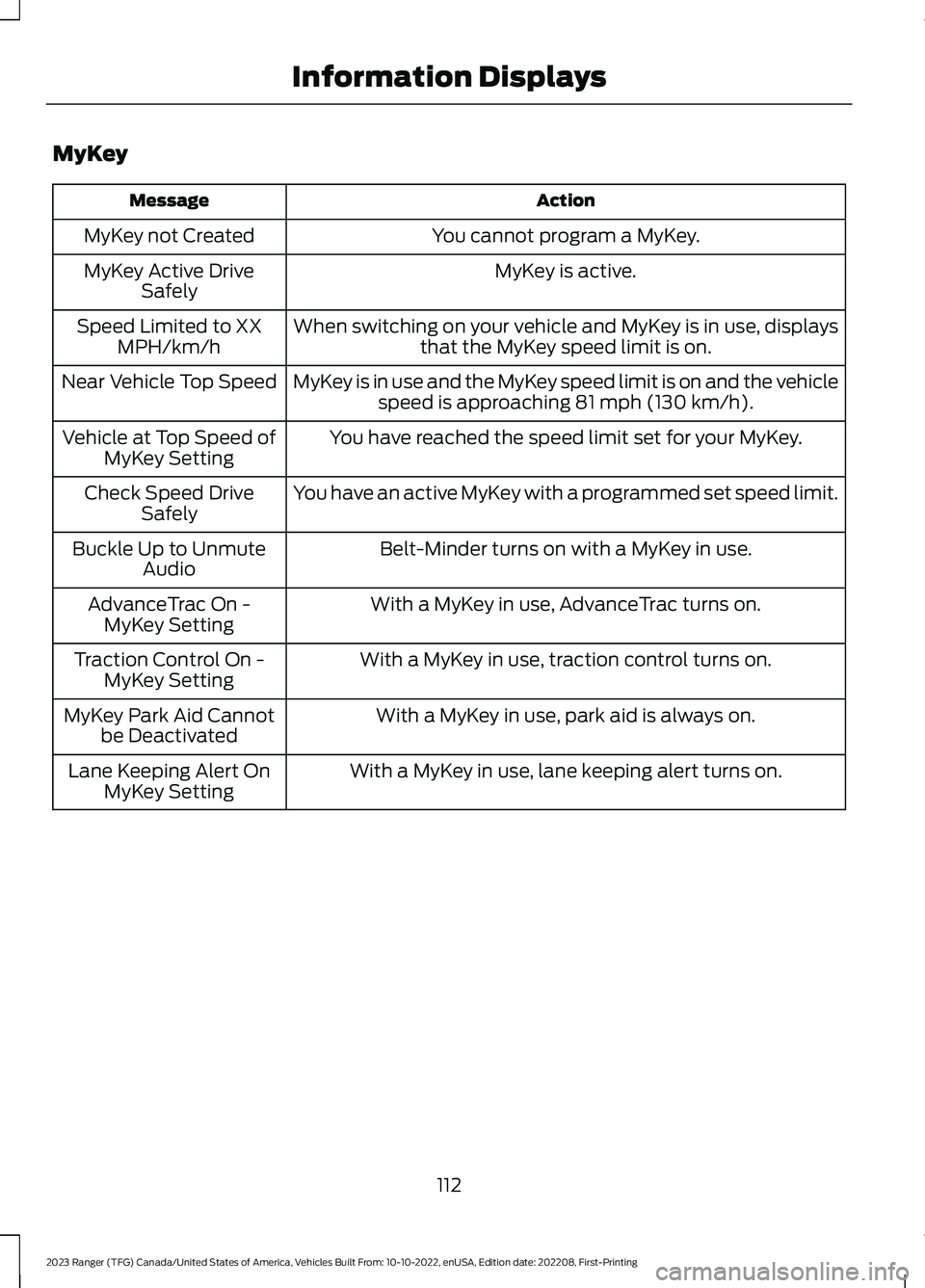
MyKey
ActionMessage
You cannot program a MyKey.MyKey not Created
MyKey is active.MyKey Active DriveSafely
When switching on your vehicle and MyKey is in use, displaysthat the MyKey speed limit is on.Speed Limited to XXMPH/km/h
MyKey is in use and the MyKey speed limit is on and the vehiclespeed is approaching 81 mph (130 km/h).Near Vehicle Top Speed
You have reached the speed limit set for your MyKey.Vehicle at Top Speed ofMyKey Setting
You have an active MyKey with a programmed set speed limit.Check Speed DriveSafely
Belt-Minder turns on with a MyKey in use.Buckle Up to UnmuteAudio
With a MyKey in use, AdvanceTrac turns on.AdvanceTrac On -MyKey Setting
With a MyKey in use, traction control turns on.Traction Control On -MyKey Setting
With a MyKey in use, park aid is always on.MyKey Park Aid Cannotbe Deactivated
With a MyKey in use, lane keeping alert turns on.Lane Keeping Alert OnMyKey Setting
112
2023 Ranger (TFG) Canada/United States of America, Vehicles Built From: 10-10-2022, enUSA, Edition date: 202208, First-PrintingInformation Displays
Page 118 of 470
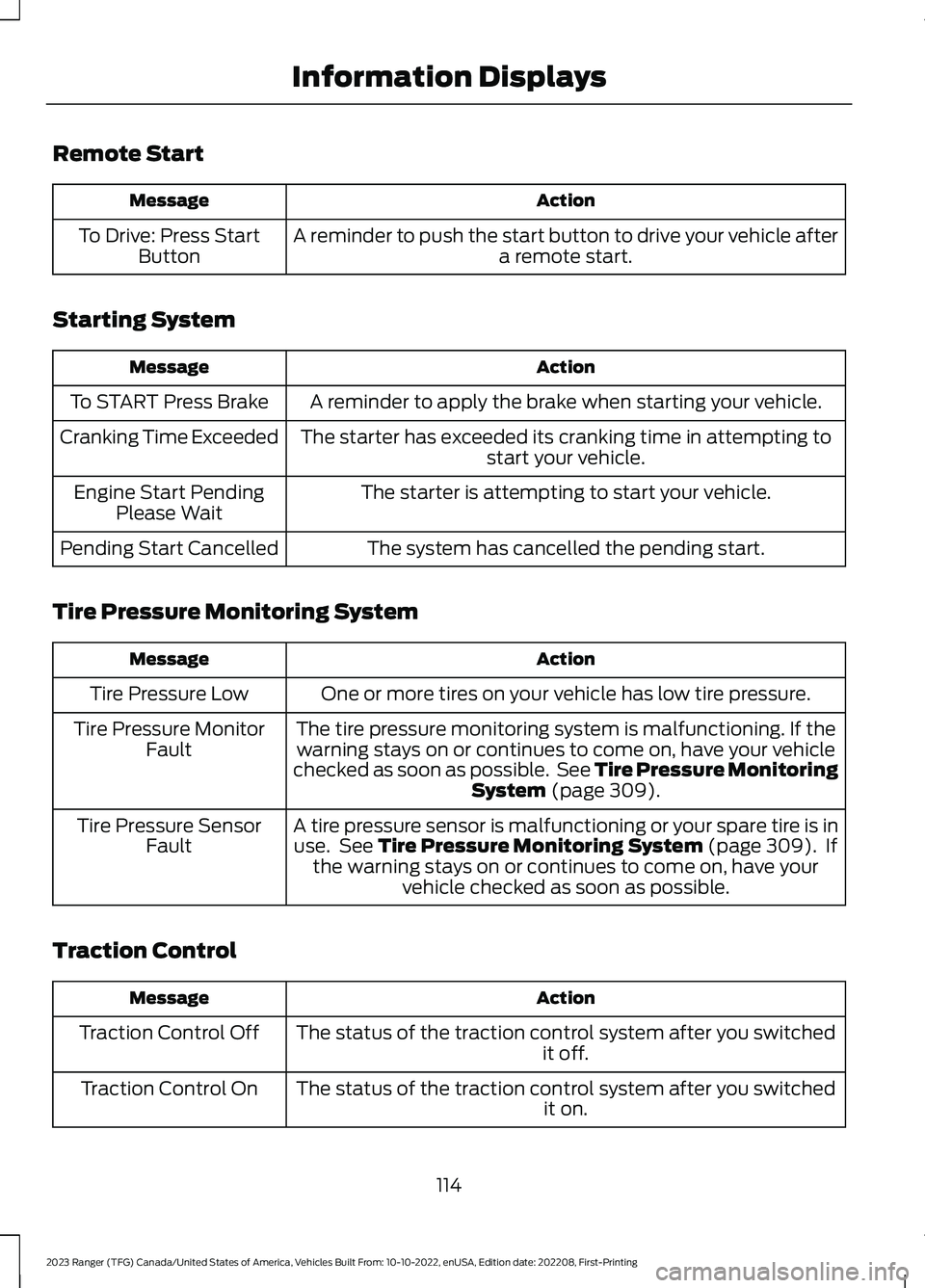
Remote Start
ActionMessage
A reminder to push the start button to drive your vehicle aftera remote start.To Drive: Press StartButton
Starting System
ActionMessage
A reminder to apply the brake when starting your vehicle.To START Press Brake
The starter has exceeded its cranking time in attempting tostart your vehicle.Cranking Time Exceeded
The starter is attempting to start your vehicle.Engine Start PendingPlease Wait
The system has cancelled the pending start.Pending Start Cancelled
Tire Pressure Monitoring System
ActionMessage
One or more tires on your vehicle has low tire pressure.Tire Pressure Low
The tire pressure monitoring system is malfunctioning. If thewarning stays on or continues to come on, have your vehiclechecked as soon as possible. See Tire Pressure MonitoringSystem (page 309).
Tire Pressure MonitorFault
A tire pressure sensor is malfunctioning or your spare tire is inuse. See Tire Pressure Monitoring System (page 309). Ifthe warning stays on or continues to come on, have yourvehicle checked as soon as possible.
Tire Pressure SensorFault
Traction Control
ActionMessage
The status of the traction control system after you switchedit off.Traction Control Off
The status of the traction control system after you switchedit on.Traction Control On
114
2023 Ranger (TFG) Canada/United States of America, Vehicles Built From: 10-10-2022, enUSA, Edition date: 202208, First-PrintingInformation Displays
Page 171 of 470
Maintain steering wheel control at alltimes, especially in rough terrain. Sincesudden changes in terrain can result inabrupt steering wheel motion, make sureyou grip the steering wheel from theoutside. Do not grip the spokes of thesteering wheel.
Drive cautiously to avoid vehicle damagefrom concealed objects such as rocks andstumps.
Either know the terrain or examine mapsof the area before driving. Map out yourroute before driving in the area. Tomaintain steering and braking control ofyour vehicle, have all four wheels on theground and they need to be rolling, notsliding or spinning.
Driving Off-Road With Truck andUtility Vehicles
Note:Your vehicle may have a front airdam. Due to low ground clearance, you candamage it when taking your vehicle off-road.You can take the air dam off by removingthe bolts that secure it.
We design four-wheel drive vehicles fordriving on sand, snow, mud and roughterrain and they have operatingcharacteristics that are somewhatdifferent from conventional vehicles, bothon and off the road.
The transfer case supplies power to all fourwheels. On four-wheel drive vehicles, thetransfer case allows you to select different4WD modes when necessary. Becomethoroughly familiar with this informationbefore you operate your vehicle.
Four-wheel drive uses all four wheels topower your vehicle. This increases traction,enabling you to drive over terrain and roadconditions that a conventional two-wheeldrive vehicle cannot.
Basic Operating Principles
•Drive slower in strong crosswinds whichcan affect the normal steeringcharacteristics of your vehicle.
•When driving your vehicle on surfacesmade slippery by loose sand, water,gravel, snow or ice, proceed with care.
•Do not use 4H or 4L on dry, hardsurfaced roads. Doing so can produceexcessive noise, increase tire wear andcould damage drive components. Use4H or 4L modes for consistentlyslippery or loose surfaces.
If Your Vehicle Leaves the Road
If your vehicle leaves the road, reduce yourvehicle speed and avoid severe braking.When your vehicle speed decreases, easeyour vehicle back onto the road. Do notsharply turn the steering wheel whenreturning your vehicle to the road.
It may be safer to stay on the shoulder ofthe road and gradually slow down beforereturning to the road. You may lose controlif you do not slow down or if you toosharply or abruptly turn the steering wheel.
It may be less risky to strike small objects,such as freeway reflectors, with minordamage to your vehicle rather thanattempt a sudden return to the road whichcould cause your vehicle to slide sidewaysout of control or roll over. Remember, yoursafety and the safety of others should beyour primary concern.
Emergency Maneuvers
In an unavoidable emergency situationwhere you must make a sudden sharp turn,remember to avoid over-driving yourvehicle and turn the steering wheel only asrapidly and as far as required to avoid theemergency. Excessive steering can resultin loss of vehicle control. Apply smoothpressure to the accelerator pedal or brakepedal when you require changes in vehicle
167
2023 Ranger (TFG) Canada/United States of America, Vehicles Built From: 10-10-2022, enUSA, Edition date: 202208, First-PrintingFour-Wheel Drive (If Equipped)
Page 173 of 470
•Shifting the transmission to neutral andback to drive.
•Shifting the transmission to reverseand back to drive.
•Driving the vehicle around a tight turnat a slow speed.
Driving in Special Conditions withFour-Wheel Drive
Four-wheel drive vehicles are suitable fordriving on sand, snow, mud and roughroads and have operating characteristicsthat are somewhat different fromconventional vehicles, both on and off thefreeway.
When driving at slow speeds off road underhigh load conditions, use a low gear whenpossible. Low gear operation maximizesthe engine and transmission coolingcapability.
Basic Operating Principles
When driving your vehicle on surfacesmade slippery by loose sand, water, gravel,snow or ice, proceed with care.
Sand
When driving over sand, try to keep all fourwheels on the most solid area of the trail.Shift to a lower gear and drive steadilythrough the terrain. Apply the acceleratorslowly and avoid excessive wheel slip.
Do not drive your vehicle in deep sand foran extended period of time. This can causethe system to overheat.
To resume operation, switch the ignitionoff and allow the system to cool down fora minimum of 15 minutes.
When driving at slow speeds in deep sandunder high outside temperatures, use a lowgear when possible. Low gear operationmaximizes the engine and transmissioncooling capability.
Avoid driving at excessive speeds, thiscauses vehicle momentum to work againstyou and your vehicle could become stuckto the point that you could requireassistance from another vehicle.Remember, you may be able to back outthe way you came if you proceed withcaution.
Mud and Water
Mud
Be cautious of sudden changes in vehiclespeed or direction when you are driving inmud. Even four-wheel drive vehicles canlose traction in slick mud. If your vehicledoes slide, steer in the direction of the slideuntil you regain control of your vehicle.
After driving through mud, clean off residuestuck to rotating driveshafts and tires.Excess mud stuck on tires and rotatingdriveshafts can cause an imbalance thatcould damage drive components.
Water
If you must drive through high water, driveslowly. Water may limit traction or brakecapability.
When driving through water, determine thedepth and avoid water higher than thebottom of the hubs. If the ignition systemgets wet, your vehicle could stall.
Once through water, try the brakes. Wetbrakes do not stop your vehicle aseffectively as dry brakes. Drying improvesby applying light pressure to the brakepedal when slowly moving.
Note:Driving through deep water maydamage the transmission. If you submergethe front or rear axle in water, have the axlelubricant and power transfer unit lubricantchecked, and change if necessary.
169
2023 Ranger (TFG) Canada/United States of America, Vehicles Built From: 10-10-2022, enUSA, Edition date: 202208, First-PrintingFour-Wheel Drive (If Equipped)