manual radio set FORD SUPER DUTY 2007 1.G Owners Manual
[x] Cancel search | Manufacturer: FORD, Model Year: 2007, Model line: SUPER DUTY, Model: FORD SUPER DUTY 2007 1.GPages: 312, PDF Size: 3.1 MB
Page 20 of 312
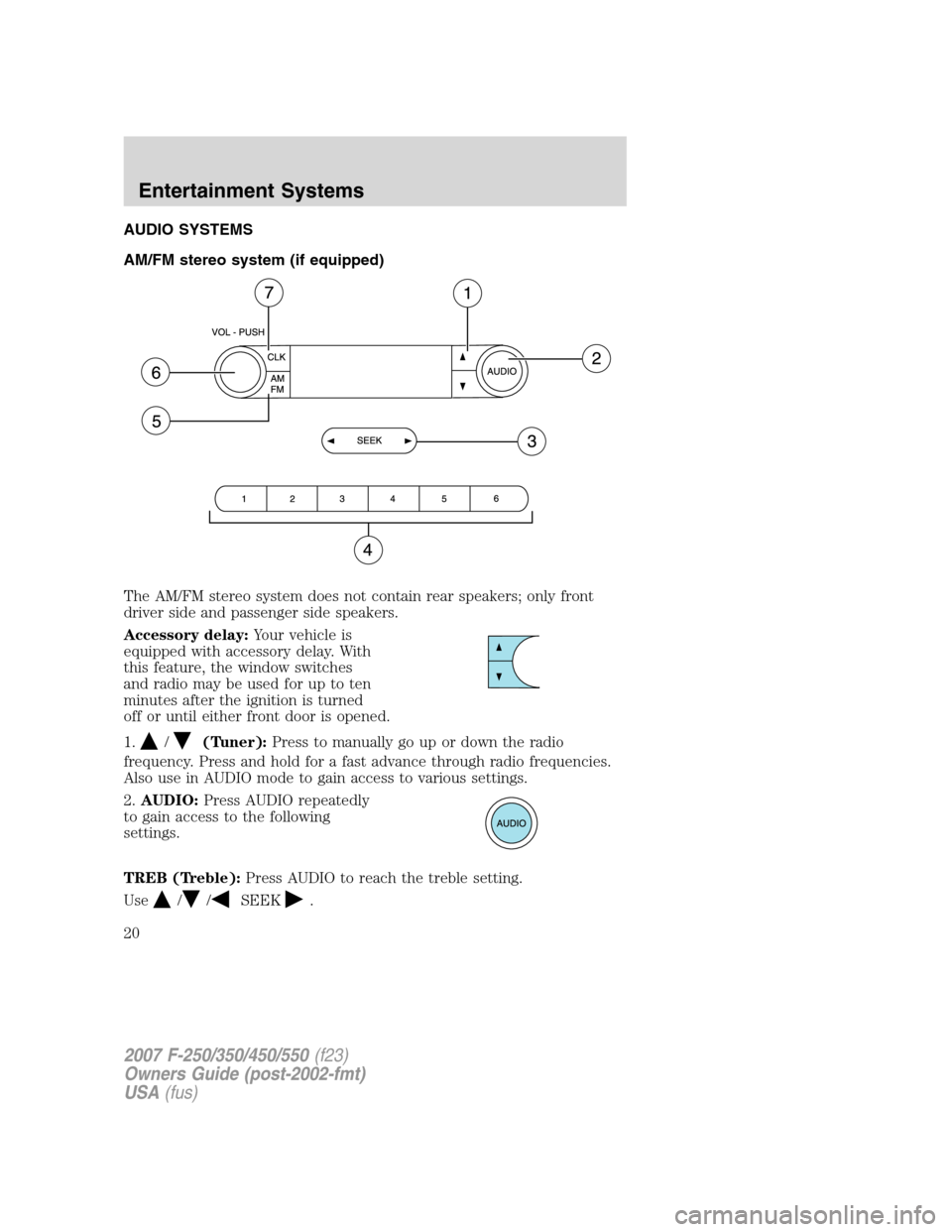
AUDIO SYSTEMS
AM/FM stereo system (if equipped)
The AM/FM stereo system does not contain rear speakers; only front
driver side and passenger side speakers.
Accessory delay:Your vehicle is
equipped with accessory delay. With
this feature, the window switches
and radio may be used for up to ten
minutes after the ignition is turned
off or until either front door is opened.
1.
/(Tuner):Press to manually go up or down the radio
frequency. Press and hold for a fast advance through radio frequencies.
Also use in AUDIO mode to gain access to various settings.
2.AUDIO:Press AUDIO repeatedly
to gain access to the following
settings.
TREB (Treble):Press AUDIO to reach the treble setting.
Use
//SEEK.
2007 F-250/350/450/550(f23)
Owners Guide (post-2002-fmt)
USA(fus)
Entertainment Systems
20
Page 21 of 312
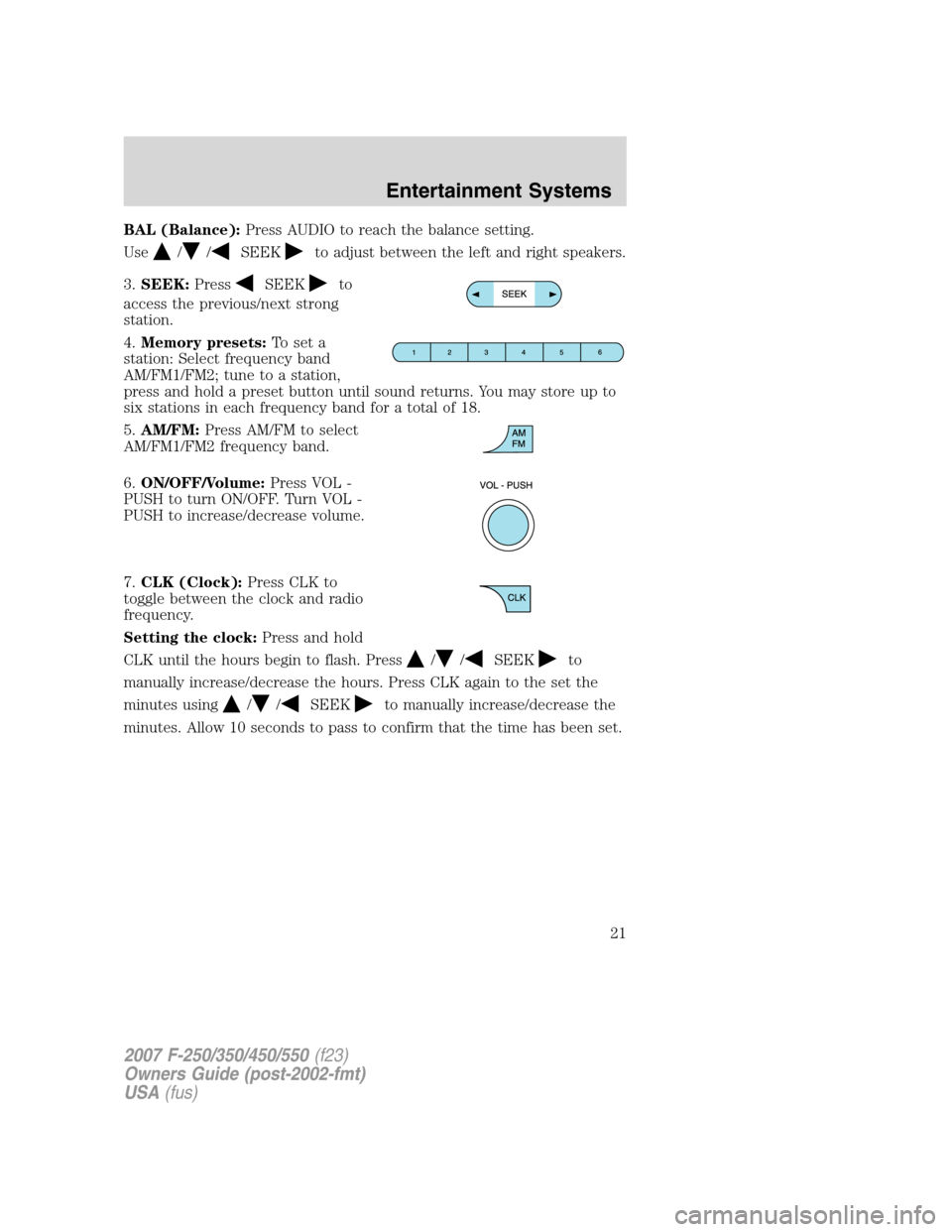
BAL (Balance):Press AUDIO to reach the balance setting.
Use
//SEEKto adjust between the left and right speakers.
3.SEEK:Press
SEEKto
access the previous/next strong
station.
4.Memory presets:To set a
station: Select frequency band
AM/FM1/FM2; tune to a station,
press and hold a preset button until sound returns. You may store up to
six stations in each frequency band for a total of 18.
5.AM/FM:Press AM/FM to select
AM/FM1/FM2 frequency band.
6.ON/OFF/Volume:Press VOL -
PUSH to turn ON/OFF. Turn VOL -
PUSH to increase/decrease volume.
7.CLK (Clock):Press CLK to
toggle between the clock and radio
frequency.
Setting the clock:Press and hold
CLK until the hours begin to flash. Press
//SEEKto
manually increase/decrease the hours. Press CLK again to the set the
minutes using
//SEEKto manually increase/decrease the
minutes. Allow 10 seconds to pass to confirm that the time has been set.
2007 F-250/350/450/550(f23)
Owners Guide (post-2002-fmt)
USA(fus)
Entertainment Systems
21
Page 22 of 312
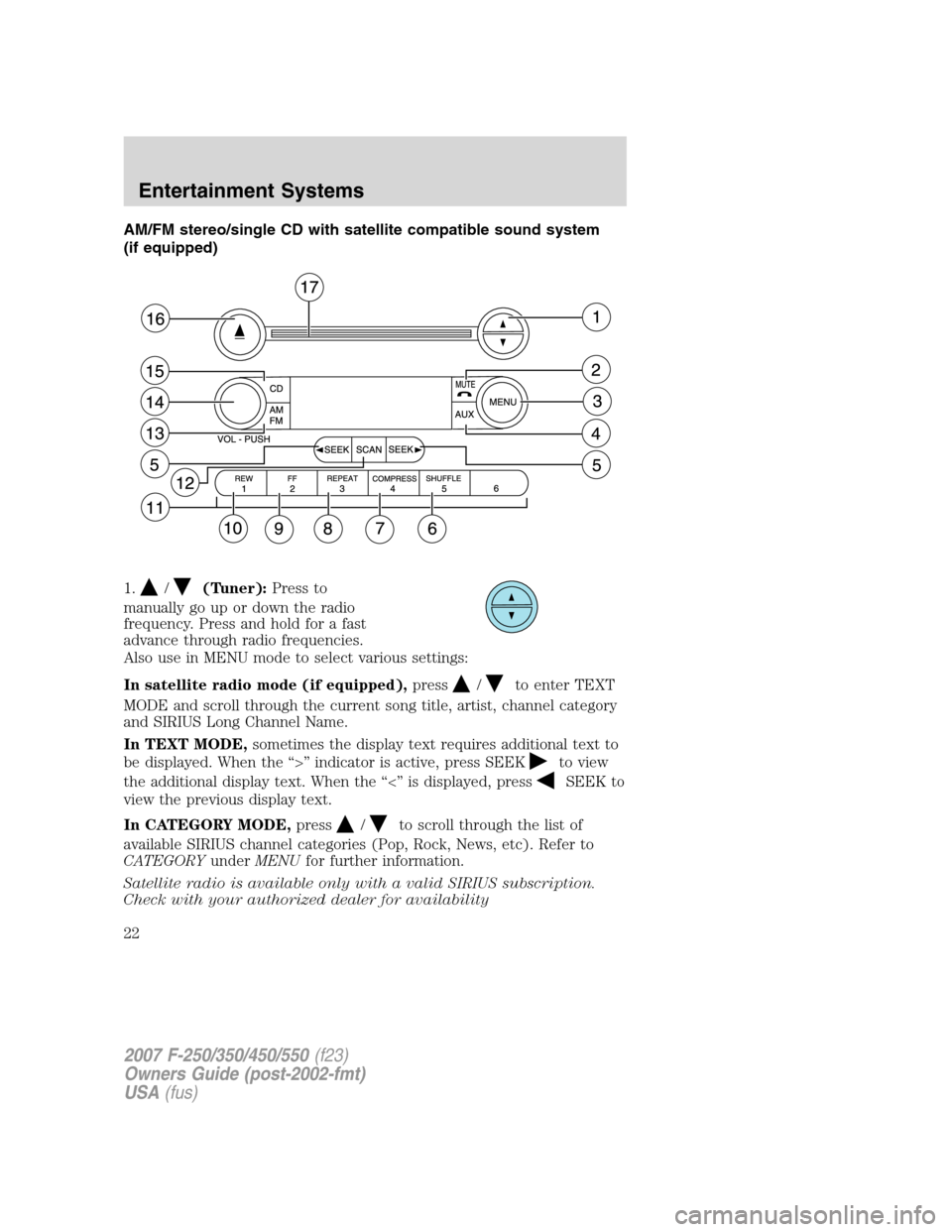
AM/FM stereo/single CD with satellite compatible sound system
(if equipped)
1.
/(Tuner):Press to
manually go up or down the radio
frequency. Press and hold for a fast
advance through radio frequencies.
Also use in MENU mode to select various settings:
In satellite radio mode (if equipped),press
/to enter TEXT
MODE and scroll through the current song title, artist, channel category
and SIRIUS Long Channel Name.
In TEXT MODE,sometimes the display text requires additional text to
be displayed. When the “>” indicator is active, press SEEK
to view
the additional display text. When the “<” is displayed, press
SEEK to
view the previous display text.
In CATEGORY MODE,press
/to scroll through the list of
available SIRIUS channel categories (Pop, Rock, News, etc). Refer to
CATEGORYunderMENUfor further information.
Satellite radio is available only with a valid SIRIUS subscription.
Check with your authorized dealer for availability
2007 F-250/350/450/550(f23)
Owners Guide (post-2002-fmt)
USA(fus)
Entertainment Systems
22
Page 23 of 312
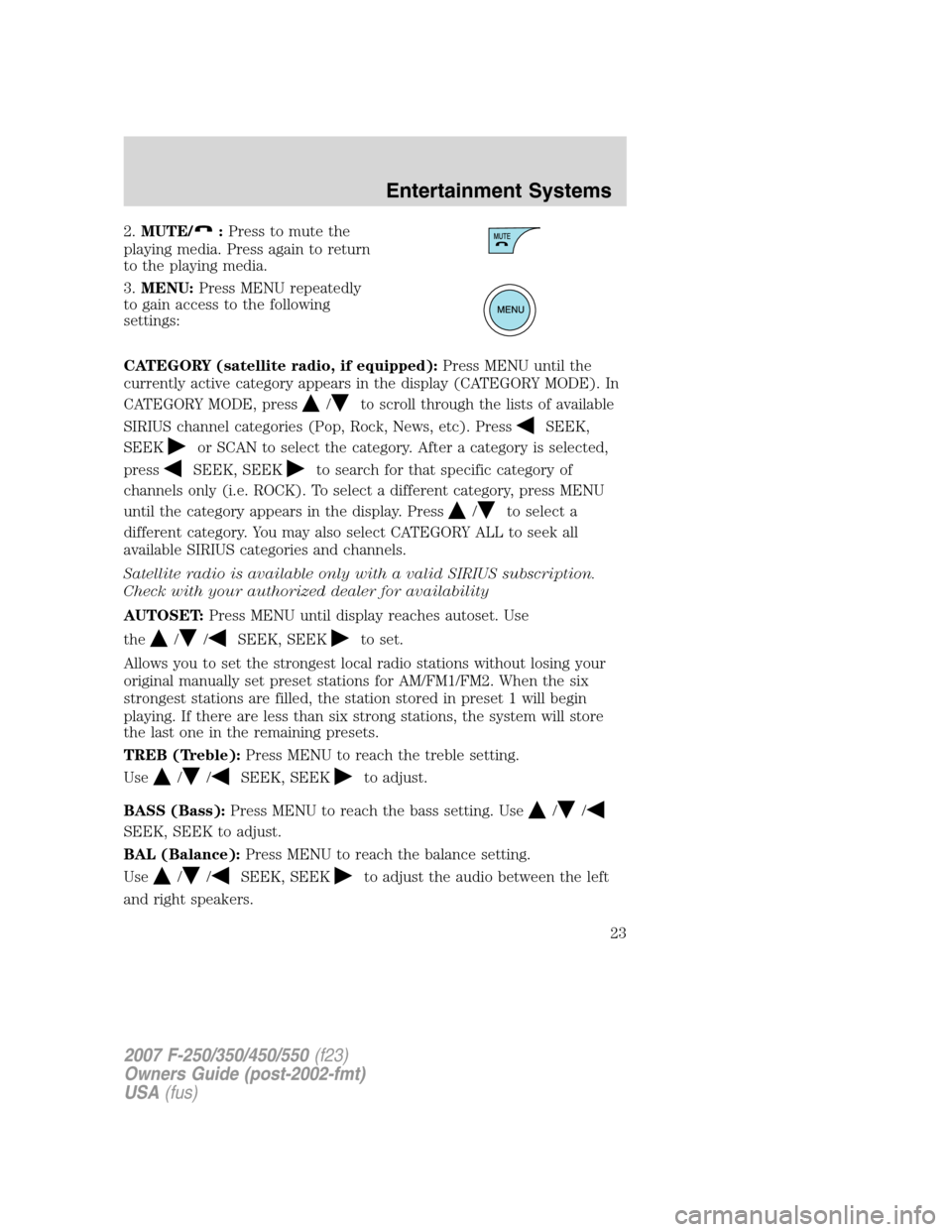
2.MUTE/:Press to mute the
playing media. Press again to return
to the playing media.
3.MENU:Press MENU repeatedly
to gain access to the following
settings:
CATEGORY (satellite radio, if equipped):Press MENU until the
currently active category appears in the display (CATEGORY MODE). In
CATEGORY MODE, press
/to scroll through the lists of available
SIRIUS channel categories (Pop, Rock, News, etc). Press
SEEK,
SEEK
or SCAN to select the category. After a category is selected,
press
SEEK, SEEKto search for that specific category of
channels only (i.e. ROCK). To select a different category, press MENU
until the category appears in the display. Press
/to select a
different category. You may also select CATEGORY ALL to seek all
available SIRIUS categories and channels.
Satellite radio is available only with a valid SIRIUS subscription.
Check with your authorized dealer for availability
AUTOSET:Press MENU until display reaches autoset. Use
the
//SEEK, SEEKto set.
Allows you to set the strongest local radio stations without losing your
original manually set preset stations for AM/FM1/FM2. When the six
strongest stations are filled, the station stored in preset 1 will begin
playing. If there are less than six strong stations, the system will store
the last one in the remaining presets.
TREB (Treble):Press MENU to reach the treble setting.
Use
//SEEK, SEEKto adjust.
BASS (Bass):Press MENU to reach the bass setting. Use
//
SEEK, SEEK to adjust.
BAL (Balance):Press MENU to reach the balance setting.
Use
//SEEK, SEEKto adjust the audio between the left
and right speakers.
2007 F-250/350/450/550(f23)
Owners Guide (post-2002-fmt)
USA(fus)
Entertainment Systems
23
Page 25 of 312
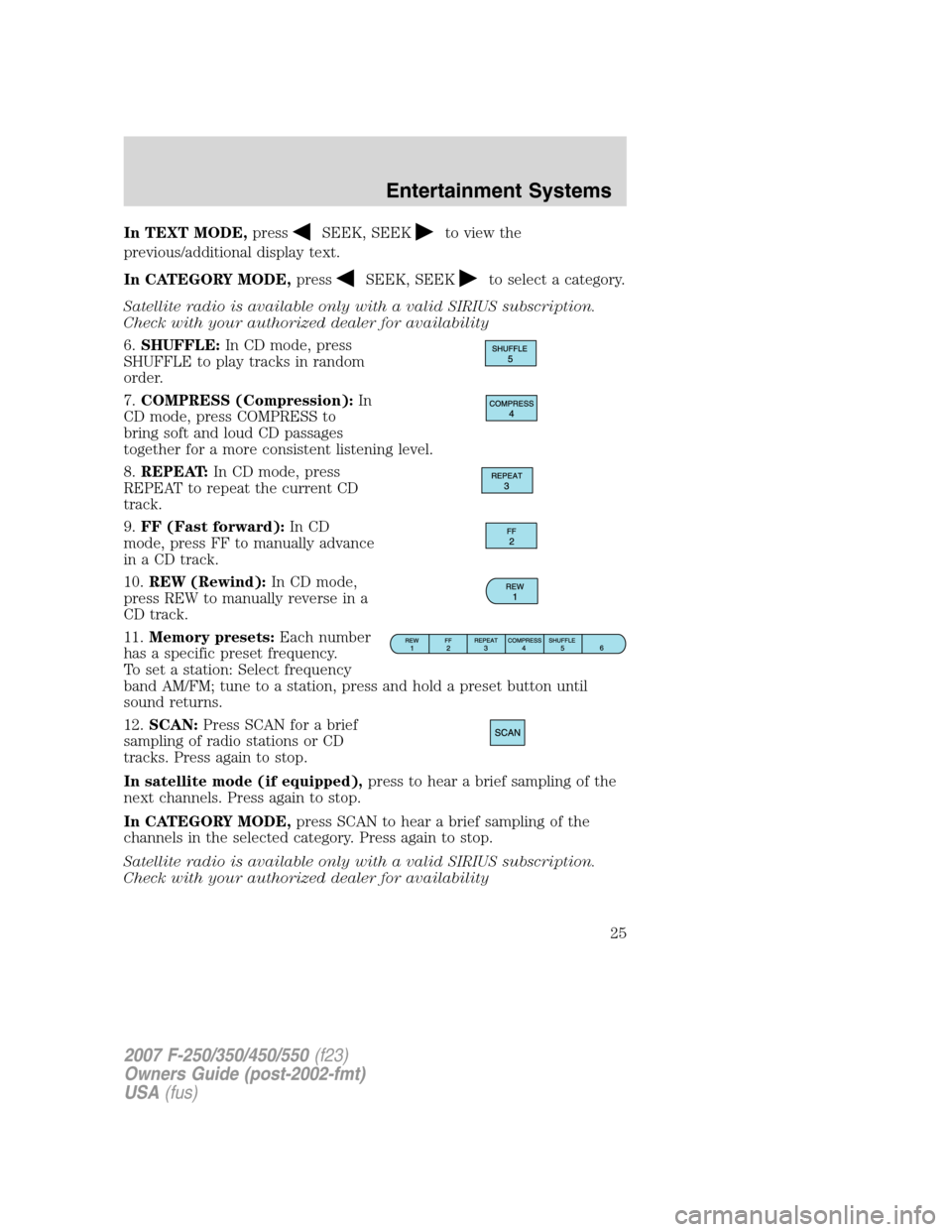
In TEXT MODE,pressSEEK, SEEKto view the
previous/additional display text.
In CATEGORY MODE,press
SEEK, SEEKto select a category.
Satellite radio is available only with a valid SIRIUS subscription.
Check with your authorized dealer for availability
6.SHUFFLE:In CD mode, press
SHUFFLE to play tracks in random
order.
7.COMPRESS (Compression):In
CD mode, press COMPRESS to
bring soft and loud CD passages
together for a more consistent listening level.
8.REPEAT:In CD mode, press
REPEAT to repeat the current CD
track.
9.FF (Fast forward):In CD
mode, press FF to manually advance
in a CD track.
10.REW (Rewind):In CD mode,
press REW to manually reverse in a
CD track.
11.Memory presets:Each number
has a specific preset frequency.
To set a station: Select frequency
band AM/FM; tune to a station, press and hold a preset button until
sound returns.
12.SCAN:Press SCAN for a brief
sampling of radio stations or CD
tracks. Press again to stop.
In satellite mode (if equipped),press to hear a brief sampling of the
next channels. Press again to stop.
In CATEGORY MODE,press SCAN to hear a brief sampling of the
channels in the selected category. Press again to stop.
Satellite radio is available only with a valid SIRIUS subscription.
Check with your authorized dealer for availability
2007 F-250/350/450/550(f23)
Owners Guide (post-2002-fmt)
USA(fus)
Entertainment Systems
25
Page 27 of 312
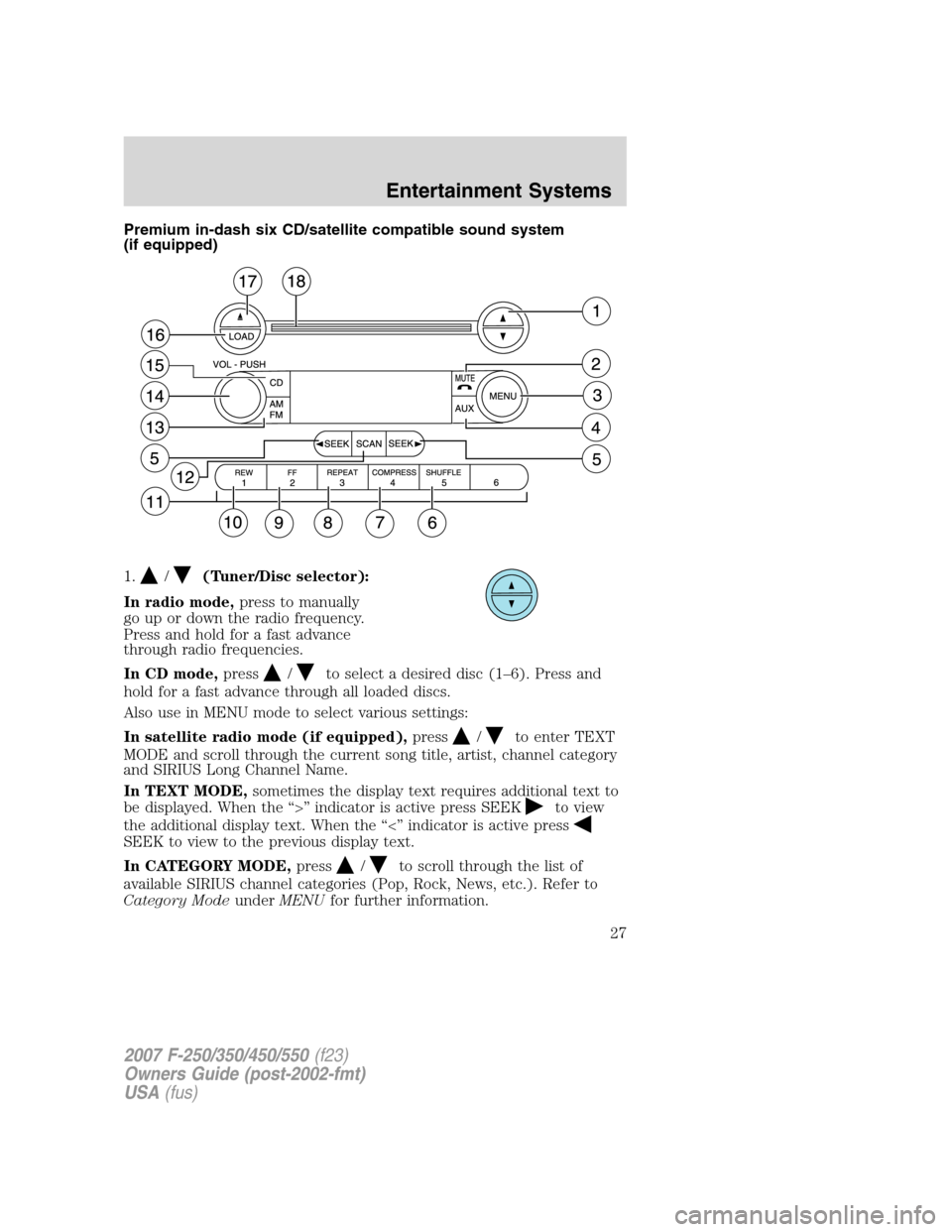
Premium in-dash six CD/satellite compatible sound system
(if equipped)
1.
/(Tuner/Disc selector):
In radio mode,press to manually
go up or down the radio frequency.
Press and hold for a fast advance
through radio frequencies.
In CD mode,press
/to select a desired disc (1–6). Press and
hold for a fast advance through all loaded discs.
Also use in MENU mode to select various settings:
In satellite radio mode (if equipped),press
/to enter TEXT
MODE and scroll through the current song title, artist, channel category
and SIRIUS Long Channel Name.
In TEXT MODE,sometimes the display text requires additional text to
be displayed. When the “>” indicator is active press SEEK
to view
the additional display text. When the “<” indicator is active press
SEEK to view to the previous display text.
In CATEGORY MODE,press
/to scroll through the list of
available SIRIUS channel categories (Pop, Rock, News, etc.). Refer to
Category ModeunderMENUfor further information.
2007 F-250/350/450/550(f23)
Owners Guide (post-2002-fmt)
USA(fus)
Entertainment Systems
27
Page 28 of 312
Satellite radio is available only in the continental United States with
a valid SIRIUS radio subscription.
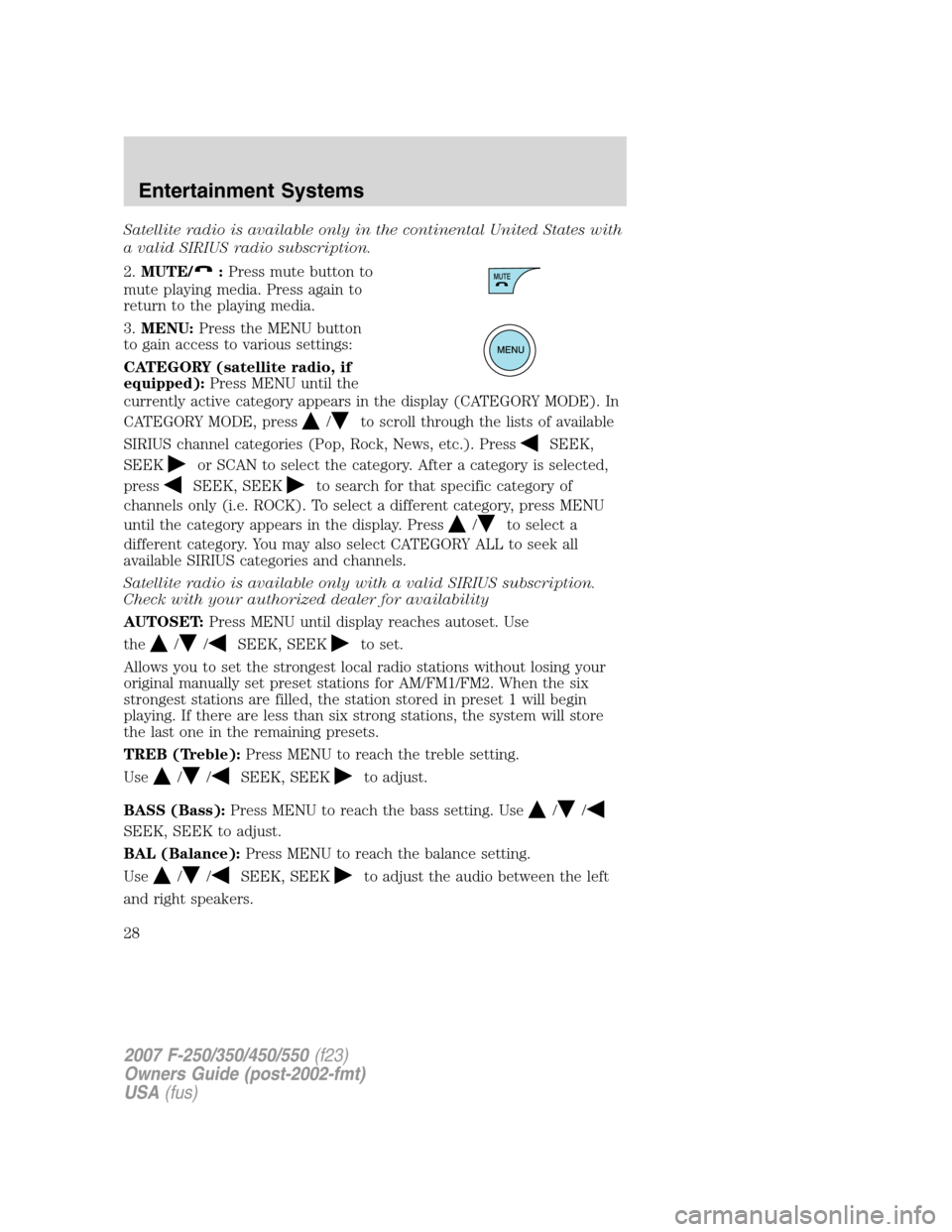
2.MUTE/
:Press mute button to
mute playing media. Press again to
return to the playing media.
3.MENU:Press the MENU button
to gain access to various settings:
CATEGORY (satellite radio, if
equipped):Press MENU until the
currently active category appears in the display (CATEGORY MODE). In
CATEGORY MODE, press
/to scroll through the lists of available
SIRIUS channel categories (Pop, Rock, News, etc.). Press
SEEK,
SEEK
or SCAN to select the category. After a category is selected,
press
SEEK, SEEKto search for that specific category of
channels only (i.e. ROCK). To select a different category, press MENU
until the category appears in the display. Press
/to select a
different category. You may also select CATEGORY ALL to seek all
available SIRIUS categories and channels.
Satellite radio is available only with a valid SIRIUS subscription.
Check with your authorized dealer for availability
AUTOSET:Press MENU until display reaches autoset. Use
the
//SEEK, SEEKto set.
Allows you to set the strongest local radio stations without losing your
original manually set preset stations for AM/FM1/FM2. When the six
strongest stations are filled, the station stored in preset 1 will begin
playing. If there are less than six strong stations, the system will store
the last one in the remaining presets.
TREB (Treble):Press MENU to reach the treble setting.
Use
//SEEK, SEEKto adjust.
BASS (Bass):Press MENU to reach the bass setting. Use
//
SEEK, SEEK to adjust.
BAL (Balance):Press MENU to reach the balance setting.
Use
//SEEK, SEEKto adjust the audio between the left
and right speakers.
2007 F-250/350/450/550(f23)
Owners Guide (post-2002-fmt)
USA(fus)
Entertainment Systems
28
Page 30 of 312
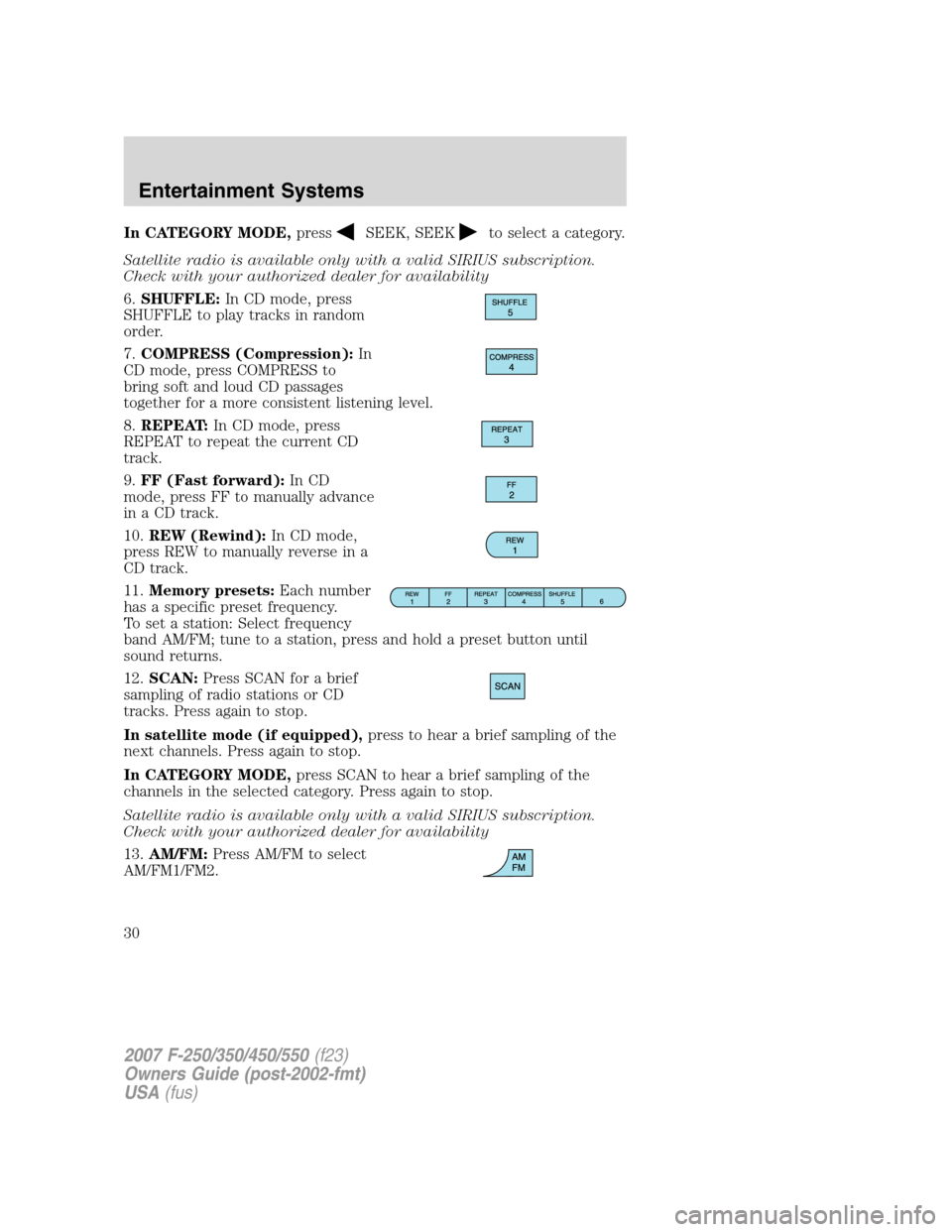
In CATEGORY MODE,pressSEEK, SEEKto select a category.
Satellite radio is available only with a valid SIRIUS subscription.
Check with your authorized dealer for availability
6.SHUFFLE:In CD mode, press
SHUFFLE to play tracks in random
order.
7.COMPRESS (Compression):In
CD mode, press COMPRESS to
bring soft and loud CD passages
together for a more consistent listening level.
8.REPEAT:In CD mode, press
REPEAT to repeat the current CD
track.
9.FF (Fast forward):In CD
mode, press FF to manually advance
in a CD track.
10.REW (Rewind):In CD mode,
press REW to manually reverse in a
CD track.
11.Memory presets:Each number
has a specific preset frequency.
To set a station: Select frequency
band AM/FM; tune to a station, press and hold a preset button until
sound returns.
12.SCAN:Press SCAN for a brief
sampling of radio stations or CD
tracks. Press again to stop.
In satellite mode (if equipped),press to hear a brief sampling of the
next channels. Press again to stop.
In CATEGORY MODE,press SCAN to hear a brief sampling of the
channels in the selected category. Press again to stop.
Satellite radio is available only with a valid SIRIUS subscription.
Check with your authorized dealer for availability
13.AM/FM:Press AM/FM to select
AM/FM1/FM2.
2007 F-250/350/450/550(f23)
Owners Guide (post-2002-fmt)
USA(fus)
Entertainment Systems
30
Page 169 of 312
STARTING
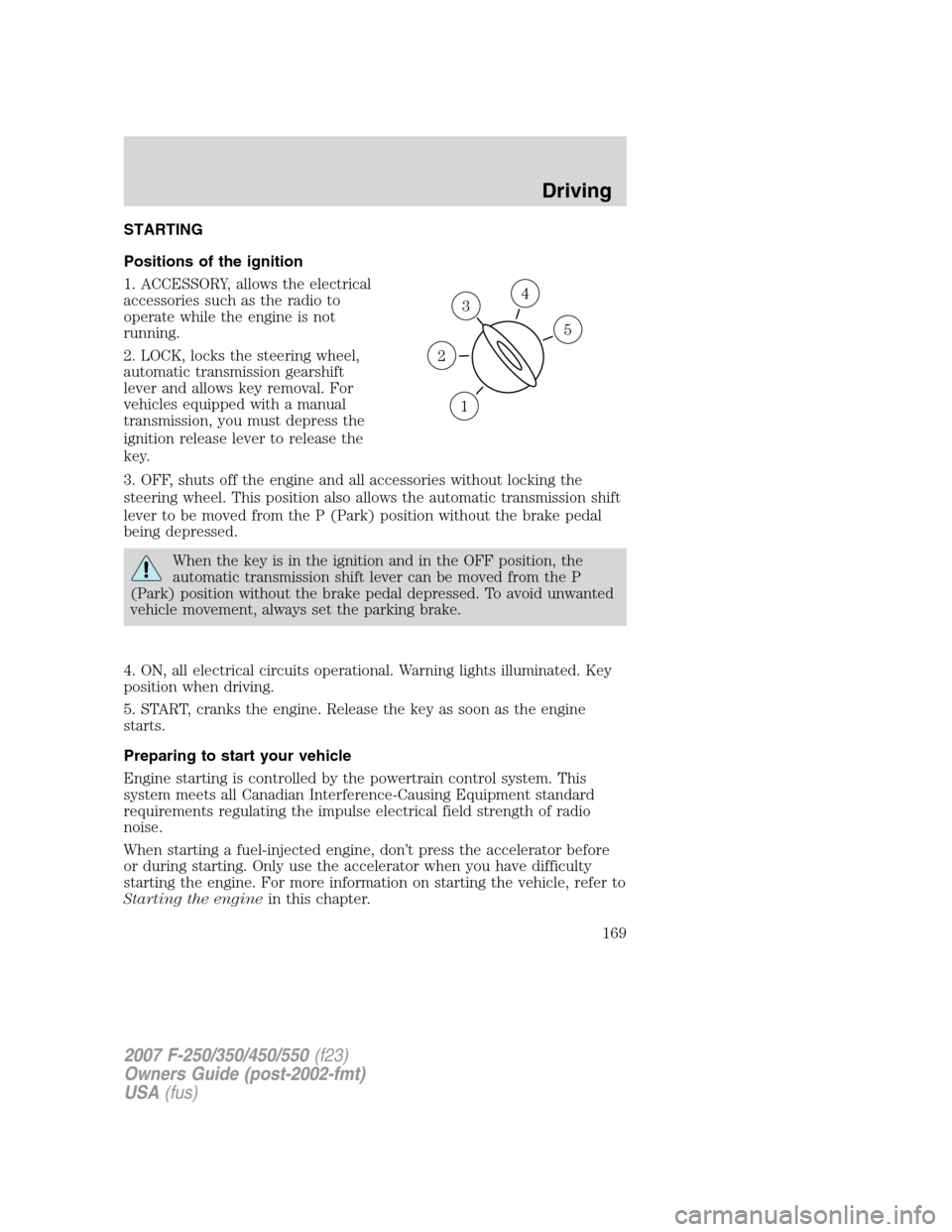
Positions of the ignition
1. ACCESSORY, allows the electrical
accessories such as the radio to
operate while the engine is not
running.
2. LOCK, locks the steering wheel,
automatic transmission gearshift
lever and allows key removal. For
vehicles equipped with a manual
transmission, you must depress the
ignition release lever to release the
key.
3. OFF, shuts off the engine and all accessories without locking the
steering wheel. This position also allows the automatic transmission shift
lever to be moved from the P (Park) position without the brake pedal
being depressed.
When the key is in the ignition and in the OFF position, the
automatic transmission shift lever can be moved from the P
(Park) position without the brake pedal depressed. To avoid unwanted
vehicle movement, always set the parking brake.
4. ON, all electrical circuits operational. Warning lights illuminated. Key
position when driving.
5. START, cranks the engine. Release the key as soon as the engine
starts.
Preparing to start your vehicle
Engine starting is controlled by the powertrain control system. This
system meets all Canadian Interference-Causing Equipment standard
requirements regulating the impulse electrical field strength of radio
noise.
When starting a fuel-injected engine, don’t press the accelerator before
or during starting. Only use the accelerator when you have difficulty
starting the engine. For more information on starting the vehicle, refer to
Starting the enginein this chapter.
3
1
2
5
4
2007 F-250/350/450/550(f23)
Owners Guide (post-2002-fmt)
USA(fus)
Driving
169
Page 263 of 312
When lifting a plastic-cased battery, excessive pressure on the
end walls could cause acid to flow through the vent caps,
resulting in personal injury and/or damage to the vehicle or battery.
Lift the battery with a battery carrier or with your hands on opposite
corners.
Keep batteries out of reach of children. Batteries contain sulfuric
acid. Avoid contact with skin, eyes or clothing. Shield your eyes
when working near the battery to protect against possible splashing of
acid solution. In case of acid contact with skin or eyes, flush
immediately with water for a minimum of 15 minutes and get prompt
medical attention. If acid is swallowed, call a physician immediately.
Battery posts, terminals and related accessories contain lead and
lead compounds.Wash hands after handling.
For information on transmission operation after the battery has been
disconnected, refer toShift strategyin theDrivingchapter.
Because your vehicle’s engine is also electronically controlled by a
computer, some control conditions are maintained by power from the
battery. When the battery is disconnected or a new battery is installed,
the engine must relearn its idle and fuel trim strategy for optimum
driveability and performance. To begin this process:
1. With the vehicle at a complete stop, set the parking brake.
2. Put the gearshift in P (Park) (automatic transmission) or the neutral
position (manual transmission), turn off all accessories and start the
engine.
3. Run the engine until it reaches normal operating temperature.
4. Allow the engine to idle for at least one minute.
5. Turn the A/C on and allow the engine to idle for at least one minute.
6. Drive the vehicle to complete the relearning process.
•The vehicle may need to be driven 10 miles (16 km) or more to
relearn the idle and fuel trim strategy.
•If you do not allow the engine to relearn its idle trim, the idle
quality of your vehicle may be adversely affected until the idle
trim is eventually relearned.
If the battery has been disconnected or a new battery has been installed,
the clock and the preset radio stations must be reset once the battery is
reconnected.
2007 F-250/350/450/550(f23)
Owners Guide (post-2002-fmt)
USA(fus)
Maintenance and Specifications
263