key FORD SUPER DUTY 2013 3.G User Guide
[x] Cancel search | Manufacturer: FORD, Model Year: 2013, Model line: SUPER DUTY, Model: FORD SUPER DUTY 2013 3.GPages: 563, PDF Size: 7.27 MB
Page 66 of 563
Extending the Vehicle Run Time
Repeat Steps 1 and 2 with your vehicle still running to extend the run
time for another remote start duration. If the duration is set to last
10 minutes, the duration will extend by another 10 minutes beginning
after what is left of the first activation time. For example, if your vehicle
had been running from the first remote start for five minutes, your
vehicle will continue to run now for a total of 15 minutes. You can only
extend the remote start up to a total of 35 minutes.
Wait at least five seconds before remote starting after a vehicle
shutdown. Only two remote starts are allowed.
The ignition must be turned on and then back off or allow one hour to
pass before using remote start again if additional remote starts are
desired.
Turning the Vehicle Off After Remote Starting
Press the button once. The parking lamps will turn off.
You may have to be closer to your vehicle than when starting due to
ground reflection and the added noise of the running vehicle.
You can disable or enable the remote start system through the
information display. See theInformation Displaychapter.
REPLACING A LOST KEY OR REMOTE CONTROL
Replacement or additional keys or remote controls can be purchased
from your authorized dealer. Your dealer can program the transmitters to
your vehicle or you may be able to program them yourself. See the
Securitychapter for information on programming your transmitters.
Keys and Remote Control65
2013 F-250/350/450/550(f23)
Owners Guide gf, 1st Printing
USA(fus)
Page 67 of 563
PRINCIPLES OF OPERATION
MyKey® allows you to program keys with restricted driving modes to
promote good driving habits. All but one of the keys programmed to the
vehicle can be activated with these restricted modes. Any keys that have
not been programmed are referred to as an administrator key or admin
key which can be used to:
•create a restricted key
•program optional MyKey settings
•clear all MyKey features altogether.
Once a key has been programmed, you can access the following
information using the information display control:
•How many admin keys and MyKeys are programmed to the vehicle.
•The total distance the vehicle has been driven with a MyKey.
For vehicles equipped with intelligent access (push button start), when
both a MyKey and an admin intelligent access key (fob) are present, the
admin fob will be recognized by the vehicle to start the engine.
Standard Settings
These settings cannot be changed.
•
Belt-Minder. This cannot be disabled and the five–minute timer does not
expire. The audio system is muted when MyKey Belt-Minder is activated.
(Not available in vehicles equipped with AM/FM only audio systems.)
•Early low fuel. Warnings are displayed in the information display control
followed by an audible tone when the fuel tank is at 1/8 tank or less.
•Driver assist features, if equipped on your vehicle, are forced on:
Parking aid, blind spot information system (BLIS) with cross traffic
alert and the collision warning system.
Optional Settings
These settings can be configured right after a MyKey is first created or
changed afterword with an Admin key.
•Vehicle speed limit of 80 mph (130 km/h). Visual warnings are
displayed followed by an audible tone when vehicle speed has reached
80 mph (130 km/h).
•Vehicle speed warning of 45, 55 or 65 mph (75, 90, or 105 km/h).
Visual warnings are displayed followed by an audible tone when the
preselected vehicle speed is exceeded.
66MyKey
2013 F-250/350/450/550(f23)
Owners Guide gf, 1st Printing
USA(fus)
Page 68 of 563
•Audio system maximum volume of 45%. A message in the audio
system is displayed when attempting to exceed the limited volume.
(Not available in vehicles equipped with AM/FM only audio systems.)
•AdvanceTrac. The system cannot be turned off when Always-on has
been set.
CREATING A MYKEY
Use the information display controls to create a MyKey.
For Type 1 information display controls:
1. Insert the key you want to program into the ignition or, if the vehicle
is equipped with push button start, put the Intelligent Access key in
the backup slot; see theStarting and Stopping the Enginechapter
for the backup slot location.
2. Turn the ignition on.
3. Press SETUP using the information display buttons until PRESS
RESET TO CREATE MYKEY is displayed.
4. Press and release the RESET button. HOLD RESET TO CONFIRM
MYKEY will be displayed.
5. Press and hold the RESET button for two seconds until MARK THIS
AS RESTRICTED is displayed Wait until KEY RESTRICTED AT
NEXT START is displayed.
The key is successfully programmed. Make sure you label it so you can
distinguish it from the admin keys.
For Type 2 information display controls:
1. Insert the key you want to program into the ignition or, if the vehicle
is equipped with push button start, put the Intelligent Access key in
the backup slot; see theStarting and Stopping the Enginechapter
for the backup slot location.
2. Turn the ignition on.
3. At the main menu screen select SETTING then MYKEY by pressing
OK or the right arrow key.
4. Press OK to select CREATE MYKEY.
5.
Hold OK as prompted until you see MARK THIS KEY AS RESTRICTED.
The key is successfully programmed. Make sure you label it so you can
distinguish it from the admin keys.
To program optional settings for the key(s), see the
Programming/Changing Optional Settingschapter.
MyKey67
2013 F-250/350/450/550(f23)
Owners Guide gf, 1st Printing
USA(fus)
Page 69 of 563
Programming/Changing Optional Settings
Note:All programmed keys can be cleared within the same key cycle in
which a key was programmed, otherwise an admin key is required to
clear the keys. To clear all keys, seeClearing all MyKeys.
You can access the optional settings through the information display control.
1. Turn the ignition on using an admin key.
2. Access the main menu and select Settings, then MyKey.
3. Use the arrow buttons to get to an optional feature.
4. Press OK or > to scroll through settings.
5. Press OK or > to make a selection.
CLEARING ALL MYKEYS
Note:All programmed MyKeys can be cleared within the same key cycle
in which a MyKey was created, otherwise an admin key is required to
clear the keys.
To clear all MyKeys (which removes all restrictions and returns them to
admin key status), use the information display controls to do the following:
For Type 1 information display settings
1. Press SETUP until PRESS RESET TO CLEAR MYKEY is displayed.
2. Press and release the RESET button. HOLD RESET TO CONFIRM
CLEAR is displayed.
3. Press and hold the RESET button for two seconds until ALL
MYKEYS CLEARED is displayed.
For Type 2 information display settings
1. Access the main menu and select Settings, then MyKey.
2. Scroll to Clear All and press the OK button.
3. Hold the OK button until ALL MYKEYS CLEARED is displayed.
CHECKING MYKEY SYSTEM STATUS
The information display controls provide information about keys
programmed to the vehicle:
•MYKEY MILES:Tracks mileage when a MyKey is used. If mileage
does not accumulate as expected, then the MyKey is not being used
by the intended user. The only way to reset this to zero is by clearing
MyKeys. If the mileage is lower than the last time you checked, then
the key system has been recently reset.
•# MYKEY(S):Indicates how many MyKeys are programmed to the
vehicle. Can also be used to detect deletion of a MyKey.
•# ADMIN KEY(S):Indicates how many admin keys are programmed
to the vehicle. Can also be used to detect if an additional key has
been programmed to the vehicle.
68MyKey
2013 F-250/350/450/550(f23)
Owners Guide gf, 1st Printing
USA(fus)
Page 70 of 563
USING MYKEY WITH REMOTE START SYSTEMS
MyKey is NOT compatible with non-Ford-approved aftermarket remote
start systems. If you choose to install a remote start system please see
your Ford authorized dealer for a Ford-approved remote start system.
MYKEY TROUBLESHOOTING
Condition Potential Causes
I cannot program a
key.•The key in the ignition does not have admin
privileges.
•The key in the ignition is the only admin key
(there always has to be at least one admin
key).
•The intelligent access key is not in the
backup slot (vehicles with push button start).
•SecuriLock passive anti-theft system is
disabled or in unlimited mode.
I cannot program the
optional settings.•The key in the ignition does not have admin
privileges.
•No keys are programmed to the vehicle.
Refer toCreating a MyKey.
I cannot clear the
MyKey programmed
keys.•Key in the ignition does not have admin
privileges.
•No restricted keys are programmed to the
vehicle. Refer toCreating a MyKey.
I lost the only admin
key.•Purchase a new key from your authorized
dealer.
I lost a key.•Program spare keys as outlined under
SecuriLock®in theSecuritychapter.
No restricted key
functions with
intelligent access key
(push button start).•An admin fob is present at engine start-up.
•No MyKey programmed keys are
programmed to the vehicle. Refer toCreating
a MyKey
MyKey miles do not
accumulate.•The MyKey programmed key is not being
used by the intended user.
•The key system has been reset.
MyKey69
2013 F-250/350/450/550(f23)
Owners Guide gf, 1st Printing
USA(fus)
Page 71 of 563
LOCKING AND UNLOCKING
You can use the power door lock control or the remote control to lock
and unlock the vehicle.
Power Door Locks (If Equipped)
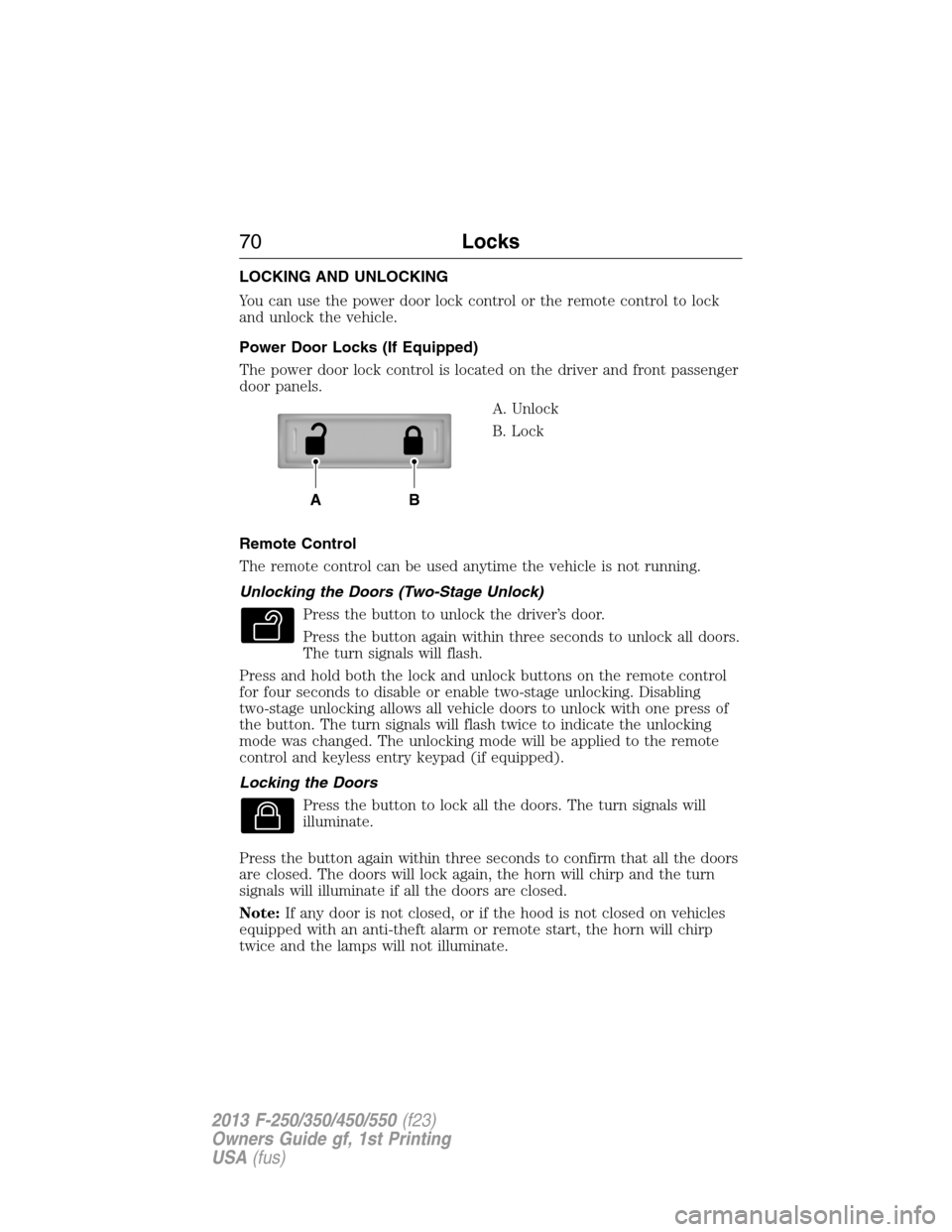
The power door lock control is located on the driver and front passenger
door panels.
A. Unlock
B. Lock
Remote Control
The remote control can be used anytime the vehicle is not running.
Unlocking the Doors (Two-Stage Unlock)
Press the button to unlock the driver’s door.
Press the button again within three seconds to unlock all doors.
The turn signals will flash.
Press and hold both the lock and unlock buttons on the remote control
for four seconds to disable or enable two-stage unlocking. Disabling
two-stage unlocking allows all vehicle doors to unlock with one press of
the button. The turn signals will flash twice to indicate the unlocking
mode was changed. The unlocking mode will be applied to the remote
control and keyless entry keypad (if equipped).
Locking the Doors
Press the button to lock all the doors. The turn signals will
illuminate.
Press the button again within three seconds to confirm that all the doors
are closed. The doors will lock again, the horn will chirp and the turn
signals will illuminate if all the doors are closed.
Note:If any door is not closed, or if the hood is not closed on vehicles
equipped with an anti-theft alarm or remote start, the horn will chirp
twice and the lamps will not illuminate.
AB
70Locks
2013 F-250/350/450/550(f23)
Owners Guide gf, 1st Printing
USA(fus)
Page 72 of 563
Smart Unlocks (If Equipped)
This feature helps to prevent you from locking yourself out of the vehicle
if your key is still in the ignition.
When you open the driver’s door and lock the vehicle with the power
door lock control, all the doors will lock, then the driver’s door will
unlock if your key is still in the ignition.
The vehicle can still be locked with the key in the ignition by:
•using the manual lock button on the door
•locking the driver’s door with a key
•using the keyless entry keypad (if equipped)
•using the lock button on the remote control (if equipped).
Autolock and Unlock (If Equipped)
The autolock feature will lock all the doors when:
•all doors are closed,
•the ignition is on,
•you shift into any gear putting the vehicle in motion, and
•the vehicle attains a speed greater than 12 mph (20 km/h).
If the vehicle was autolocked, the autounlock feature will unlock all
doors when the driver’s door is opened within 10 minutes of switching
the ignition off.
Enabling or Disabling Autolock and Autounlock
These features can be enabled or disabled:
•by your authorized dealer
•through the information display
•using the power door lock procedure.
To enable or disable using the power door locks, do the following:
Note:You will have 30 seconds to complete the procedure.
1. Switch the ignition on.
2. Press the power door unlock button three times.
3. Switch the ignition off.
4. Press the power door unlock button three times.
5. Switch the ignition on. The horn will chirp indicating the programming
mode has been entered.
Locks71
2013 F-250/350/450/550(f23)
Owners Guide gf, 1st Printing
USA(fus)
Page 73 of 563
Autolock:Once in programming mode, press the power door unlock
button then the lock button. The horn will chirp once if autolock was
deactivated or twice (one short and one long chirp) if autolock was
activated.
Autounlock:Once in programming mode, press the power door lock
button then the unlock button. The horn will chirp once if autounlock
was deactivated or twice (one short and one long chirp) if autounlock
was activated.
6. Turn the ignition off. The horn will chirp once to confirm the
procedure is complete.
Note:The autounlock feature can be enabled or disabled independently
of the autolock feature.
Illuminated Entry
The interior lamps and parking lamps illuminate when the remote entry
system is used to unlock the door(s).
The system will turn off the lights if:
•the ignition is turned on
•the lock button on the remote control is pressed
•the vehicle is locked using the keyless entry keypad
•after 25 seconds of illumination.
The dome lamp control (if equipped) must not be set to the off position
for the illuminated entry system to operate.
The lights will not turn off if:
•they have been turned on with the dimmer control
•any door is open.
Battery Saver
The battery saver will shut off the interior lamps 30 minutes after the
ignition has been turned off if a door is left open and the dome lamp
switch is left on. It will turn off the interior lamps after 10 minutes if the
dome lamp switch is left off.
72Locks
2013 F-250/350/450/550(f23)
Owners Guide gf, 1st Printing
USA(fus)
Page 74 of 563
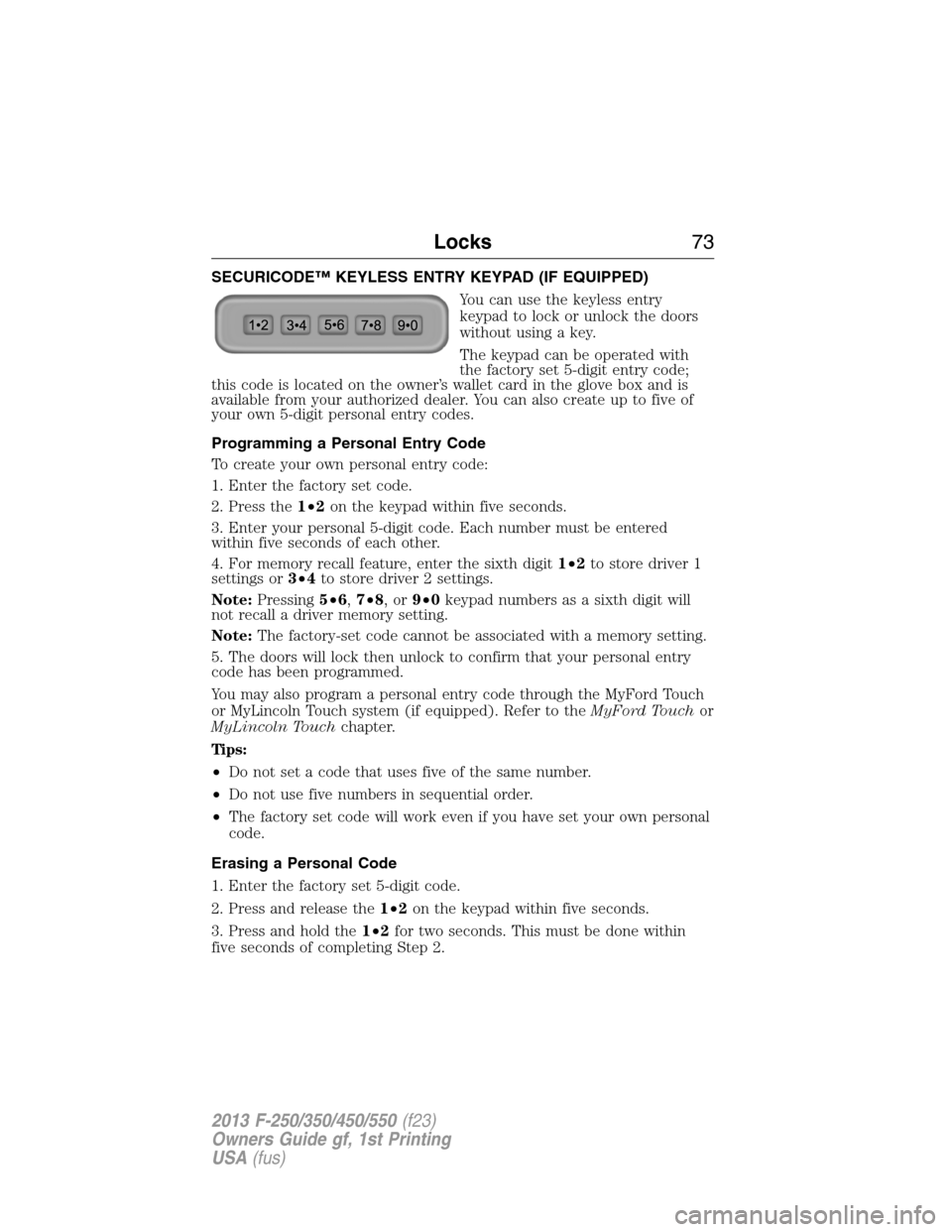
SECURICODE™ KEYLESS ENTRY KEYPAD (IF EQUIPPED)
You can use the keyless entry
keypad to lock or unlock the doors
without using a key.
The keypad can be operated with
the factory set 5-digit entry code;
this code is located on the owner’s wallet card in the glove box and is
available from your authorized dealer. You can also create up to five of
your own 5-digit personal entry codes.
Programming a Personal Entry Code
To create your own personal entry code:
1. Enter the factory set code.
2. Press the1•2on the keypad within five seconds.
3. Enter your personal 5-digit code. Each number must be entered
within five seconds of each other.
4. For memory recall feature, enter the sixth digit1•2to store driver 1
settings or3•4to store driver 2 settings.
Note:Pressing5•6,7•8,or9•0keypad numbers as a sixth digit will
not recall a driver memory setting.
Note:The factory-set code cannot be associated with a memory setting.
5. The doors will lock then unlock to confirm that your personal entry
code has been programmed.
You may also program a personal entry code through the MyFord Touch
or MyLincoln Touch system (if equipped). Refer to theMyFord Touchor
MyLincoln Touchchapter.
Tips:
•Do not set a code that uses five of the same number.
•Do not use five numbers in sequential order.
•The factory set code will work even if you have set your own personal
code.
Erasing a Personal Code
1. Enter the factory set 5-digit code.
2. Press and release the1•2on the keypad within five seconds.
3. Press and hold the1•2for two seconds. This must be done within
five seconds of completing Step 2.
Locks73
2013 F-250/350/450/550(f23)
Owners Guide gf, 1st Printing
USA(fus)
Page 75 of 563
All personal codes are now erased and only the factory set 5- digit code
will work.
Anti-Scan Feature
The keypad will go into an anti-scan mode if the wrong code has been
entered seven times (35 consecutive button presses). This mode disables
the keypad for one minute and the keypad lamp will flash.
The anti-scan feature will turn off after:
•one minute of keypad inactivity
•pressing the unlock button on the remote control
•the ignition is turned on.
Unlocking and Locking the Doors
To unlock the driver’s door:enter the factory set 5-digit code or your
personal code. Each number must be pressed within five seconds of each
other. The interior lamps will illuminate.Note:All doors will unlock if
the two-stage unlocking feature is disabled. Refer toLocking and
Unlockingearlier in this chapter.
To unlock all doors:enter the factory set code or your personal code,
then press the3•4control within five seconds.
To lock all doors:press and hold7•8and9•0at the same time (with
the driver’s door closed). You do not need to enter the keypad code first.
Displaying the Factory Set Code
Note:You will need to have two programmed passive anti-theft keys for
this procedure.
To display the factory set code in the information display:
1. Insert a key into the ignition and turn the ignition on for a few seconds.
2. Turn the ignition off and remove the key.
3. Insert the second key into the ignition and turn the ignition on.
The factory set code will display for a few seconds.
Note:The code may not display until after any other warning messages
first display.
74Locks
2013 F-250/350/450/550(f23)
Owners Guide gf, 1st Printing
USA(fus)